
Medium Access Control Sublayer Chapter 4 Channel Allocation
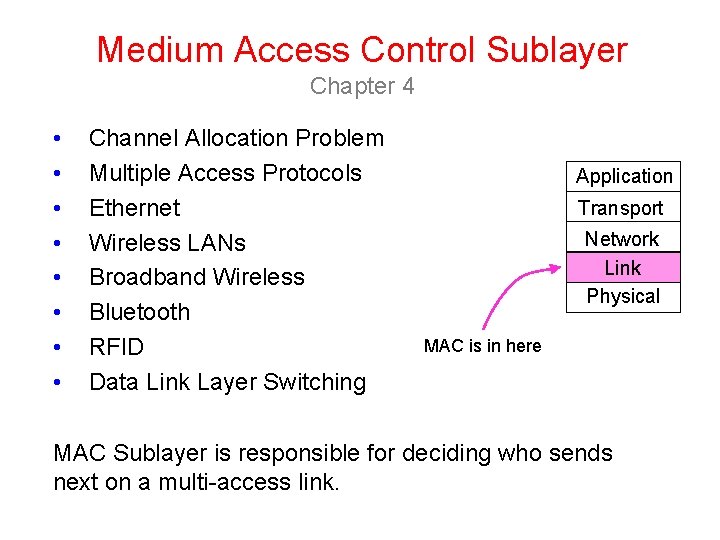
Medium Access Control Sublayer Chapter 4 • • Channel Allocation Problem Multiple Access Protocols Ethernet Wireless LANs Broadband Wireless Bluetooth RFID Data Link Layer Switching Application Transport Network Link Physical MAC is in here MAC Sublayer is responsible for deciding who sends next on a multi-access link.
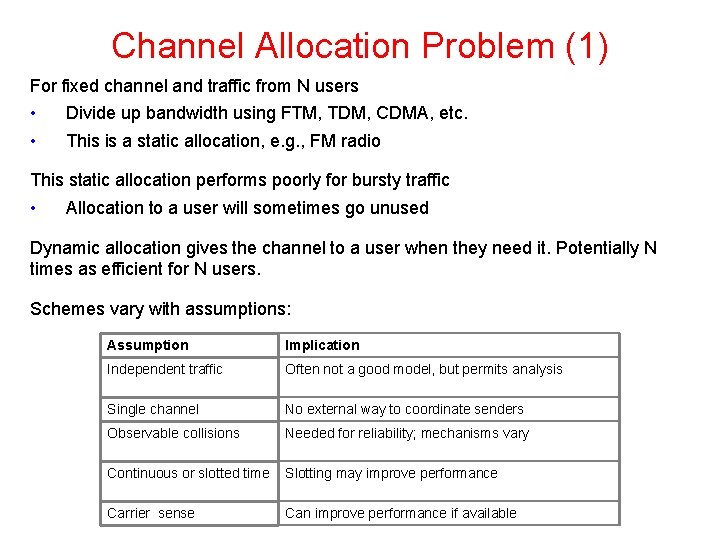
Channel Allocation Problem (1) For fixed channel and traffic from N users • • Divide up bandwidth using FTM, TDM, CDMA, etc. This is a static allocation, e. g. , FM radio This static allocation performs poorly for bursty traffic • Allocation to a user will sometimes go unused Dynamic allocation gives the channel to a user when they need it. Potentially N times as efficient for N users. Schemes vary with assumptions: Assumption Implication Independent traffic Often not a good model, but permits analysis Single channel No external way to coordinate senders Observable collisions Needed for reliability; mechanisms vary Continuous or slotted time Slotting may improve performance Carrier sense Can improve performance if available
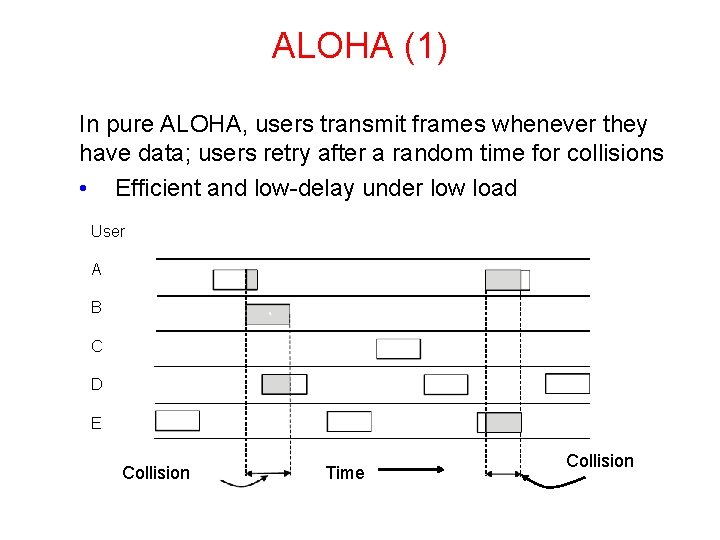
ALOHA (1) In pure ALOHA, users transmit frames whenever they have data; users retry after a random time for collisions • Efficient and low-delay under low load ` User A B C D E Collision Time Collision
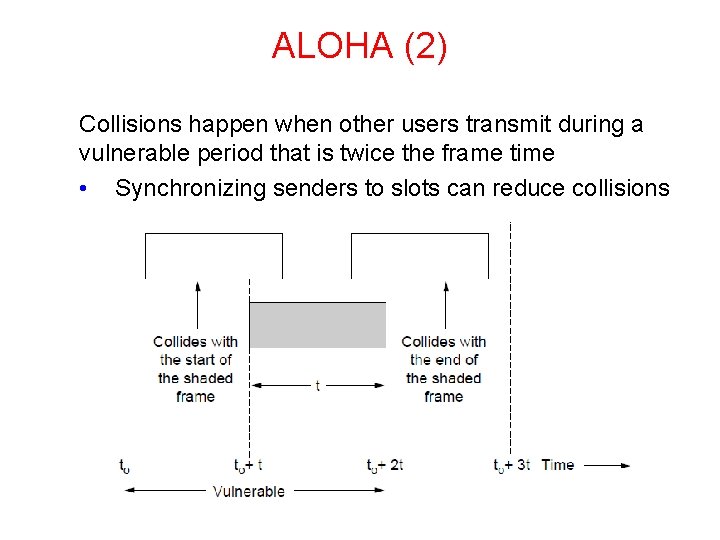
ALOHA (2) Collisions happen when other users transmit during a vulnerable period that is twice the frame time • Synchronizing senders to slots can reduce collisions
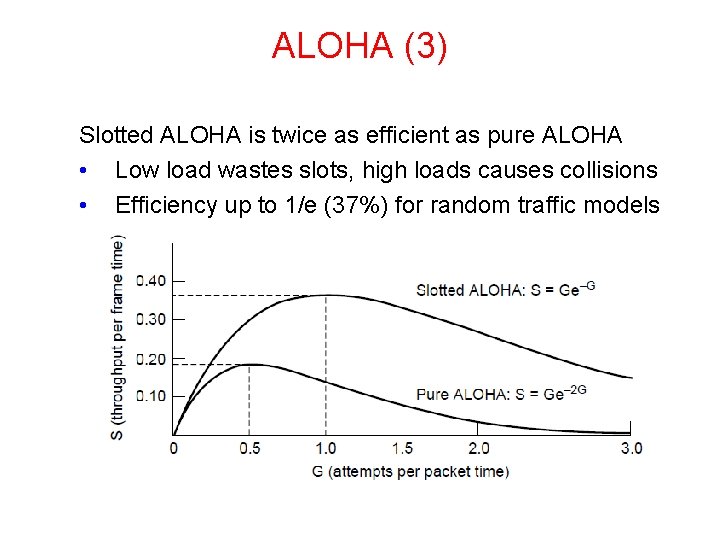
ALOHA (3) Slotted ALOHA is twice as efficient as pure ALOHA • Low load wastes slots, high loads causes collisions • Efficiency up to 1/e (37%) for random traffic models
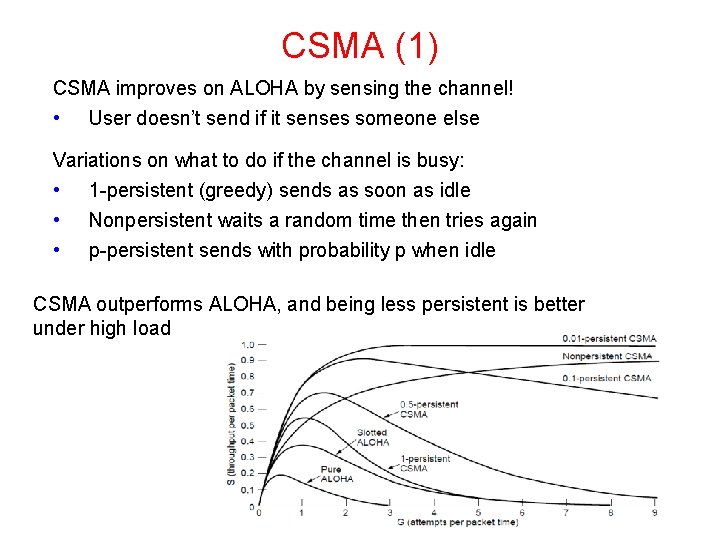
CSMA (1) CSMA improves on ALOHA by sensing the channel! • User doesn’t send if it senses someone else Variations on what to do if the channel is busy: • 1 -persistent (greedy) sends as soon as idle • Nonpersistent waits a random time then tries again • p-persistent sends with probability p when idle CSMA outperforms ALOHA, and being less persistent is better under high load
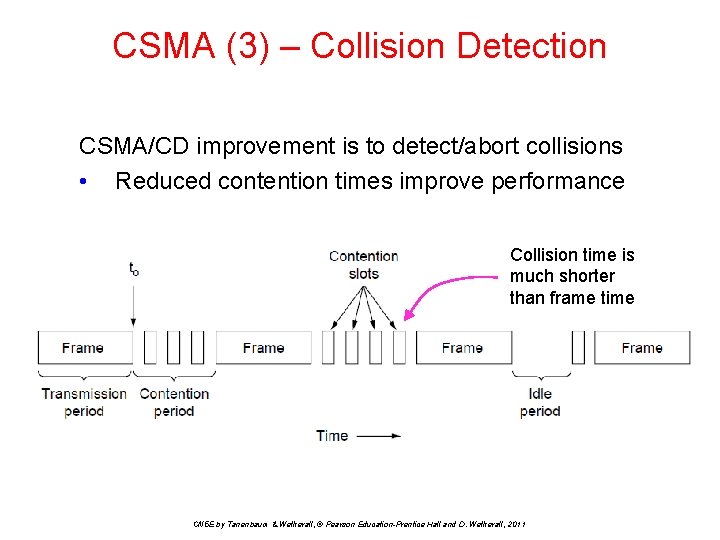
CSMA (3) – Collision Detection CSMA/CD improvement is to detect/abort collisions • Reduced contention times improve performance Collision time is much shorter than frame time CN 5 E by Tanenbaum & Wetherall, © Pearson Education-Prentice Hall and D. Wetherall, 2011
CSMA (4) • If two stations sense the channel to be idle and begin transmitting simultaneously, their signals will still collide. • An improvement is for the stations to quickly detect the collision and abruptly stop transmitting since they are irretrievably garbled anyway. • This strategy saves time and bandwidth. This protocol, is known as CSMA/CD(CSMA with Collision Detection). • In a hub, all stations are in the same Collision domain. They must use the CSMA/CD algorithm to schedule their transmissions.
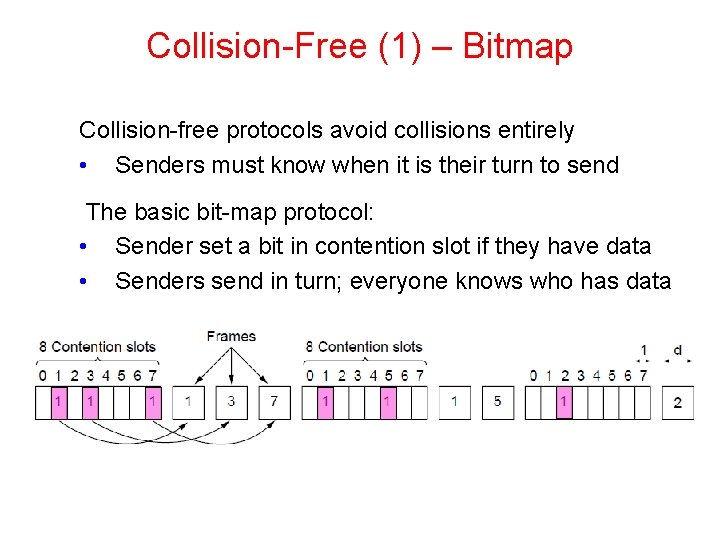
Collision-Free (1) – Bitmap Collision-free protocols avoid collisions entirely • Senders must know when it is their turn to send The basic bit-map protocol: • Sender set a bit in contention slot if they have data • Senders send in turn; everyone knows who has data
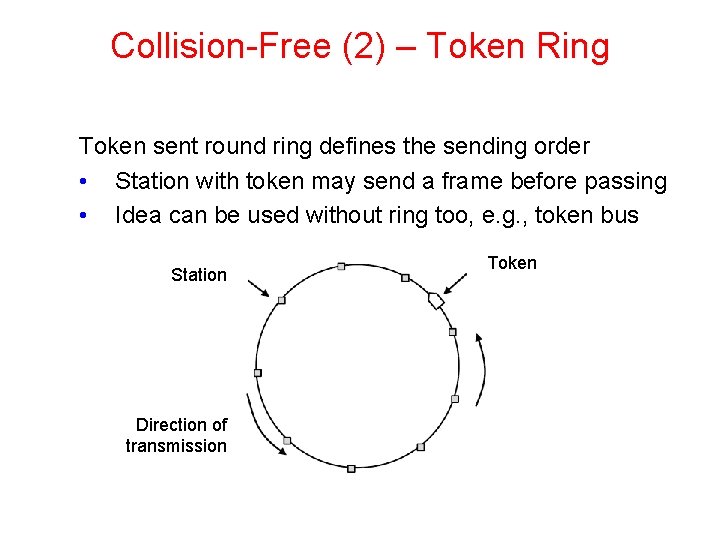
Collision-Free (2) – Token Ring Token sent round ring defines the sending order • Station with token may send a frame before passing • Idea can be used without ring too, e. g. , token bus Station Direction of transmission Token
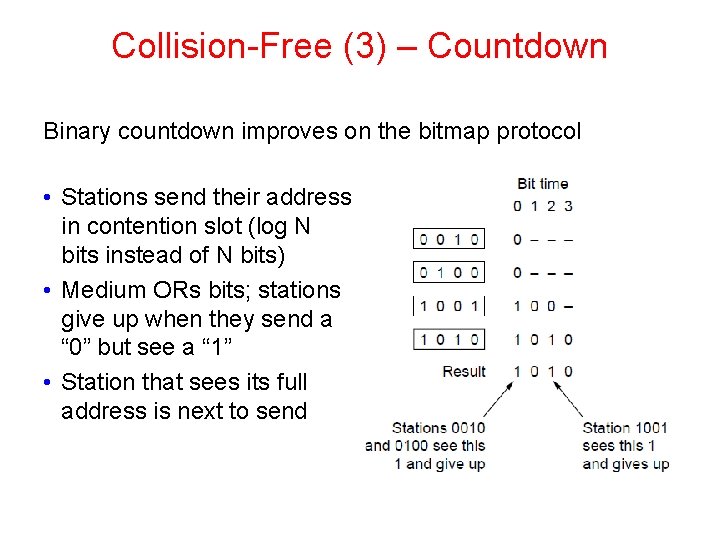
Collision-Free (3) – Countdown Binary countdown improves on the bitmap protocol • Stations send their address in contention slot (log N bits instead of N bits) • Medium ORs bits; stations give up when they send a “ 0” but see a “ 1” • Station that sees its full address is next to send
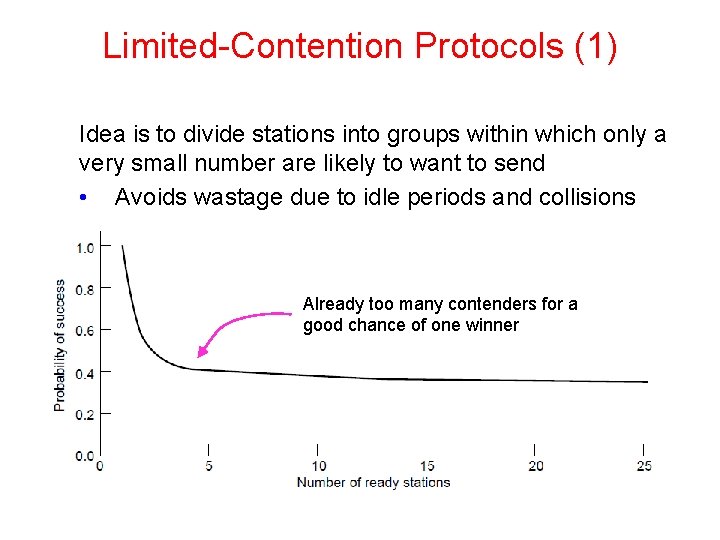
Limited-Contention Protocols (1) Idea is to divide stations into groups within which only a very small number are likely to want to send • Avoids wastage due to idle periods and collisions Already too many contenders for a good chance of one winner
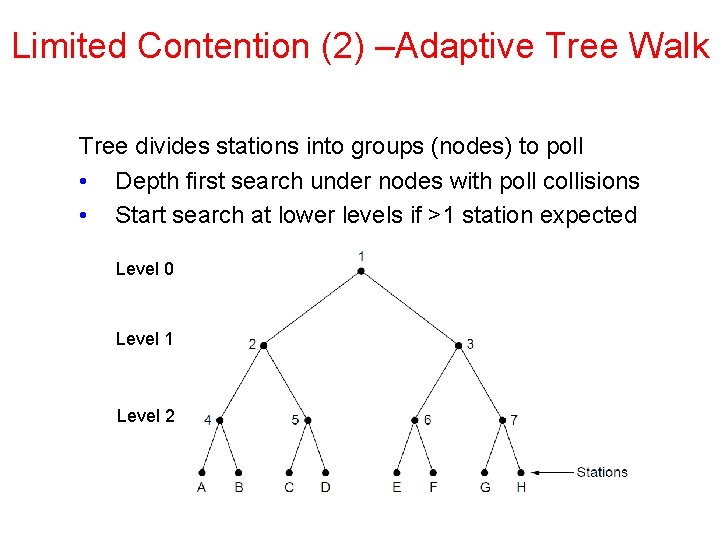
Limited Contention (2) –Adaptive Tree Walk Tree divides stations into groups (nodes) to poll • Depth first search under nodes with poll collisions • Start search at lower levels if >1 station expected Level 0 Level 1 Level 2
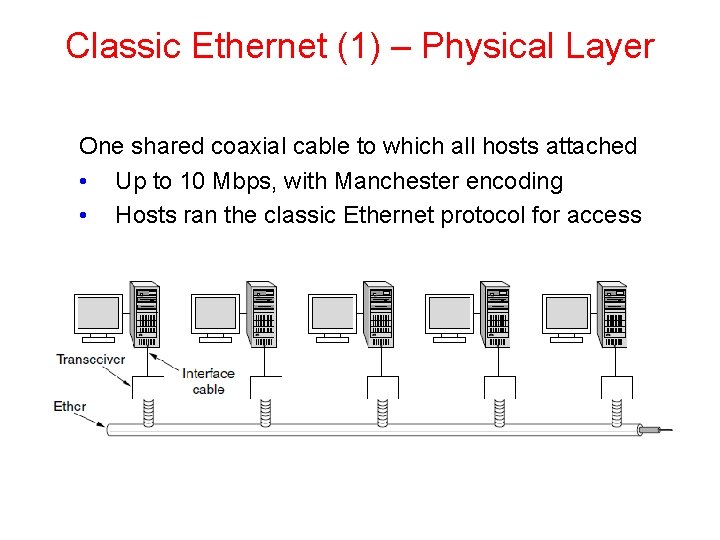
Classic Ethernet (1) – Physical Layer One shared coaxial cable to which all hosts attached • Up to 10 Mbps, with Manchester encoding • Hosts ran the classic Ethernet protocol for access
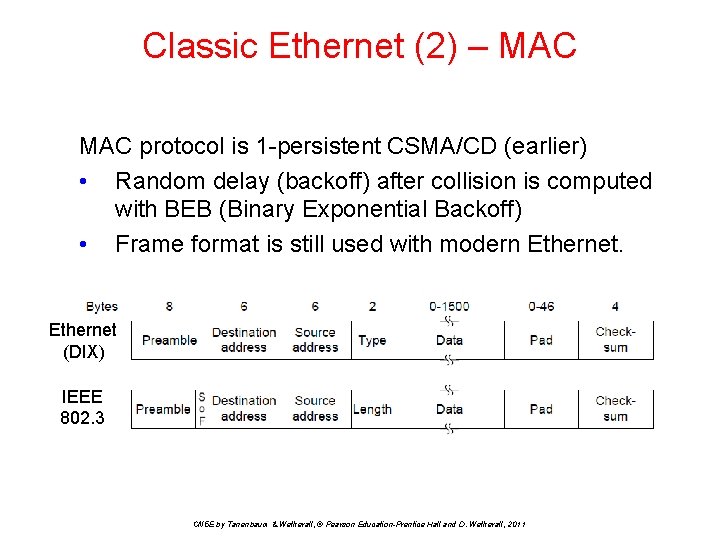
Classic Ethernet (2) – MAC protocol is 1 -persistent CSMA/CD (earlier) • Random delay (backoff) after collision is computed with BEB (Binary Exponential Backoff) • Frame format is still used with modern Ethernet (DIX) IEEE 802. 3 CN 5 E by Tanenbaum & Wetherall, © Pearson Education-Prentice Hall and D. Wetherall, 2011
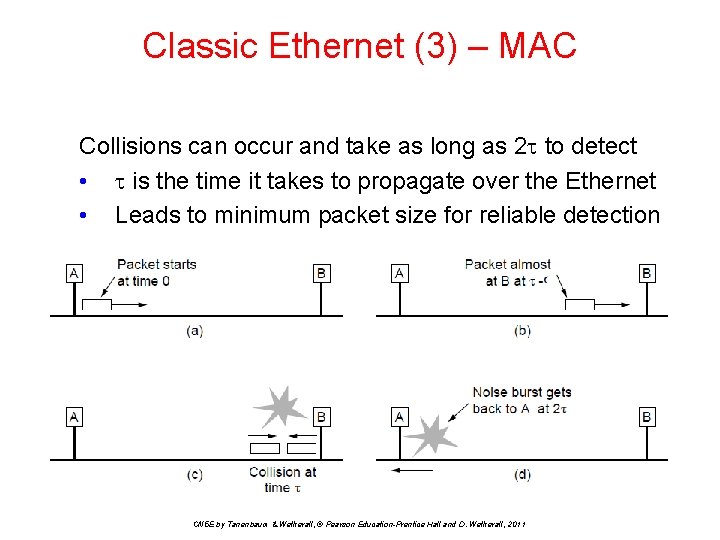
Classic Ethernet (3) – MAC Collisions can occur and take as long as 2 to detect • is the time it takes to propagate over the Ethernet • Leads to minimum packet size for reliable detection CN 5 E by Tanenbaum & Wetherall, © Pearson Education-Prentice Hall and D. Wetherall, 2011
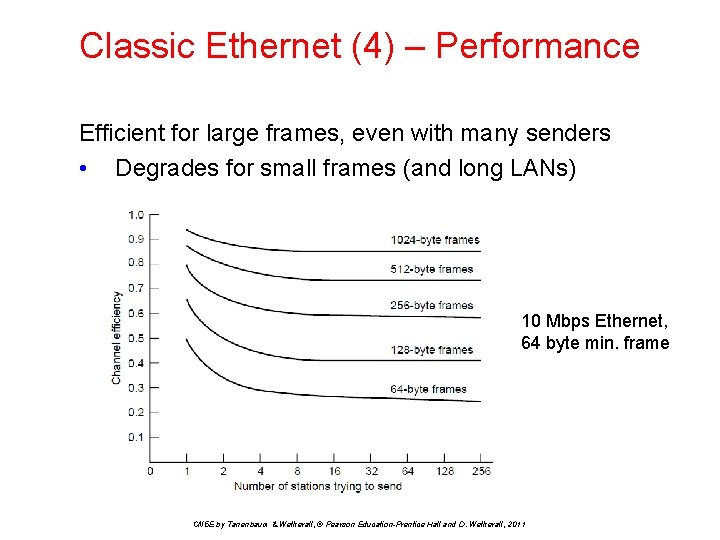
Classic Ethernet (4) – Performance Efficient for large frames, even with many senders • Degrades for small frames (and long LANs) 10 Mbps Ethernet, 64 byte min. frame CN 5 E by Tanenbaum & Wetherall, © Pearson Education-Prentice Hall and D. Wetherall, 2011
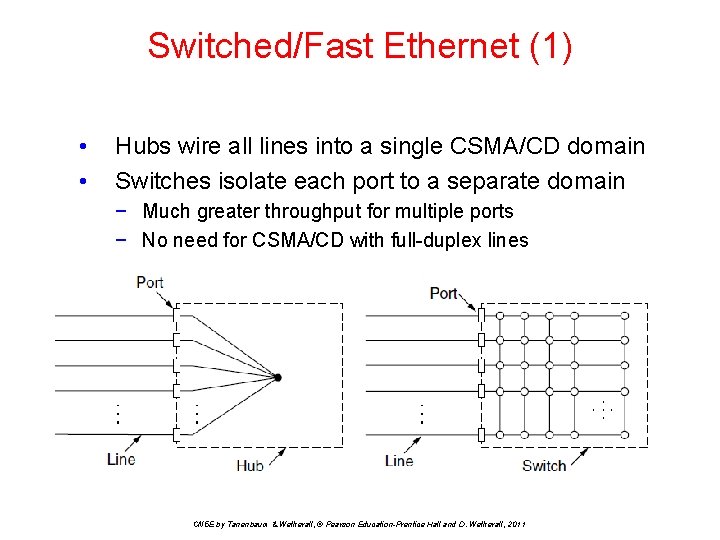
Switched/Fast Ethernet (1) • • Hubs wire all lines into a single CSMA/CD domain Switches isolate each port to a separate domain − Much greater throughput for multiple ports − No need for CSMA/CD with full-duplex lines CN 5 E by Tanenbaum & Wetherall, © Pearson Education-Prentice Hall and D. Wetherall, 2011
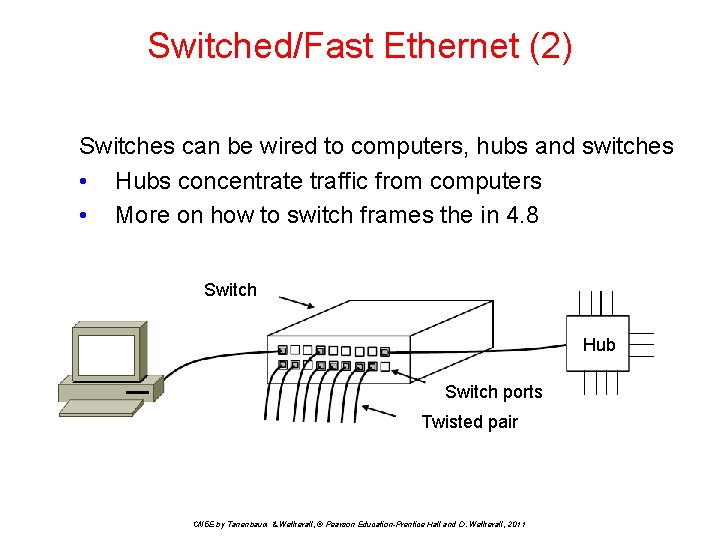
Switched/Fast Ethernet (2) Switches can be wired to computers, hubs and switches • Hubs concentrate traffic from computers • More on how to switch frames the in 4. 8 Switch Hub Switch ports Twisted pair CN 5 E by Tanenbaum & Wetherall, © Pearson Education-Prentice Hall and D. Wetherall, 2011
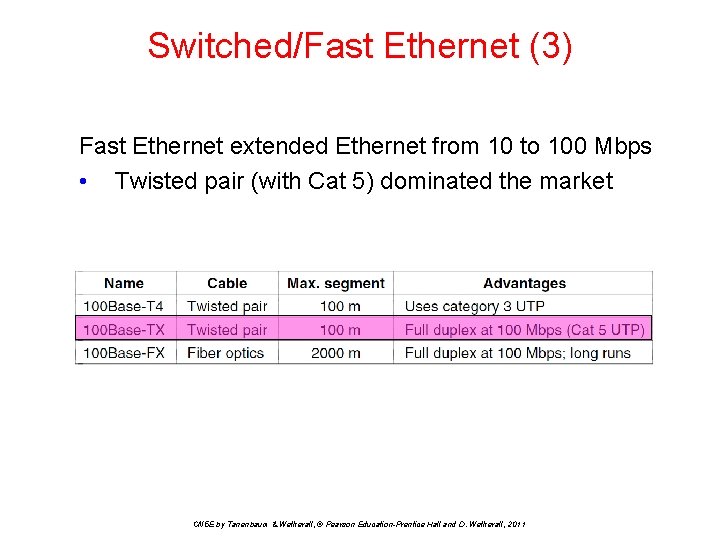
Switched/Fast Ethernet (3) Fast Ethernet extended Ethernet from 10 to 100 Mbps • Twisted pair (with Cat 5) dominated the market CN 5 E by Tanenbaum & Wetherall, © Pearson Education-Prentice Hall and D. Wetherall, 2011
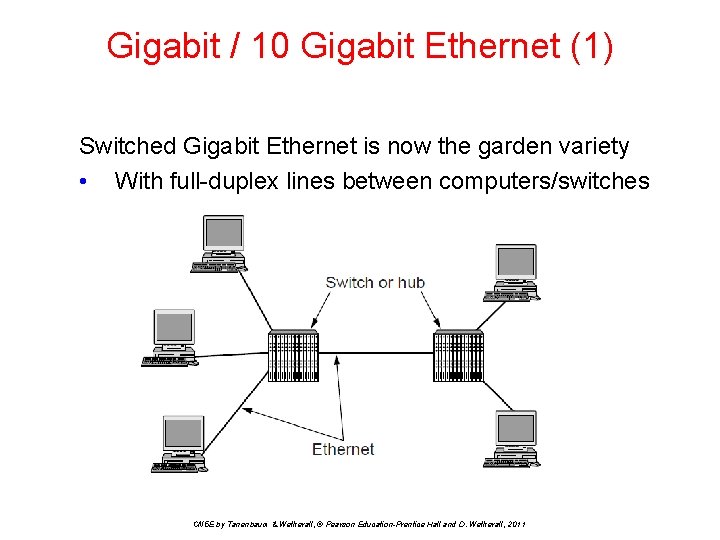
Gigabit / 10 Gigabit Ethernet (1) Switched Gigabit Ethernet is now the garden variety • With full-duplex lines between computers/switches CN 5 E by Tanenbaum & Wetherall, © Pearson Education-Prentice Hall and D. Wetherall, 2011
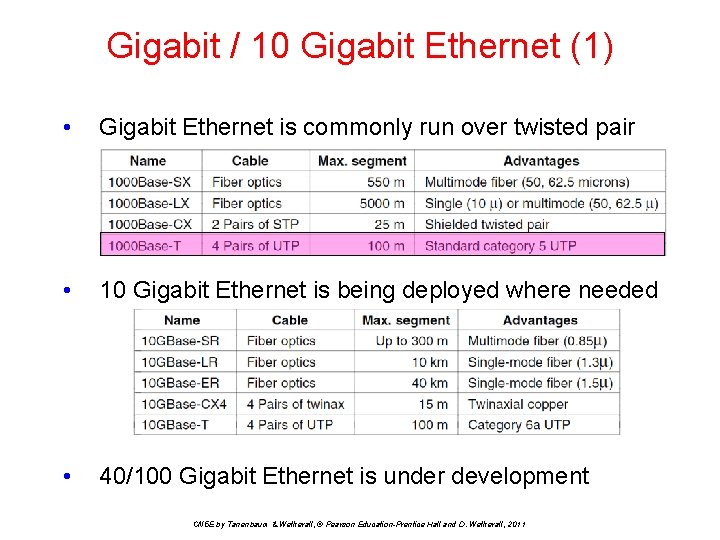
Gigabit / 10 Gigabit Ethernet (1) • Gigabit Ethernet is commonly run over twisted pair • 10 Gigabit Ethernet is being deployed where needed • 40/100 Gigabit Ethernet is under development CN 5 E by Tanenbaum & Wetherall, © Pearson Education-Prentice Hall and D. Wetherall, 2011
Fastest Data Transfer Records Single laser, single core record: May 2011 By 2011, speeds of 100 terabits-per-second had already been reached, but only using multi-laser setups that are both expensive and impractical. Researchers at the Karlsruhe Institute of Technology in Germany reached broadband speeds of around 26 terabits per second using a single fiber laser. At that speed, you could transfer every file from a 3 TB hard drive in less than a second. The record stood for years before new advancements in fiber completely changed the game. Commercial hardware record: January 2014 Back in 2014, scientists in the U. K. created the world’s fastest ever real-world internet connection using commercial-grade fiber optics cables with speeds of 1. 4 terabits per second, or. 175 terabytes a second. Those speeds would allow you to download 44 uncompressed HD films (at 4 GB each) in one second, or the entire English version text of Wikipedia in. 06 seconds. The test was done on a 255 -mile underground link between the BT Tower in central London and Ipswich on the east coast of England. It stands as the fastest trial using commercial equipment. Single laser, multi-core record: August 2014 A few months later, researchers at the Technical University of Denmark (DTU) reached transfer speeds of 43 terabits of data per second (5. 375 terabytes per second) using a multi-core optical fiber and laser transmitter. The university was one of the first to test out seven core glass thread fiber made by Japanese telecom company Nippon Telegraph and Telephone Corporation. At those speeds, you could download 1 gigabyte of data in about 0. 2 milliseconds. The average blink of an eye takes somewhere between 100 and 400 milliseconds, according to data from Harvard.
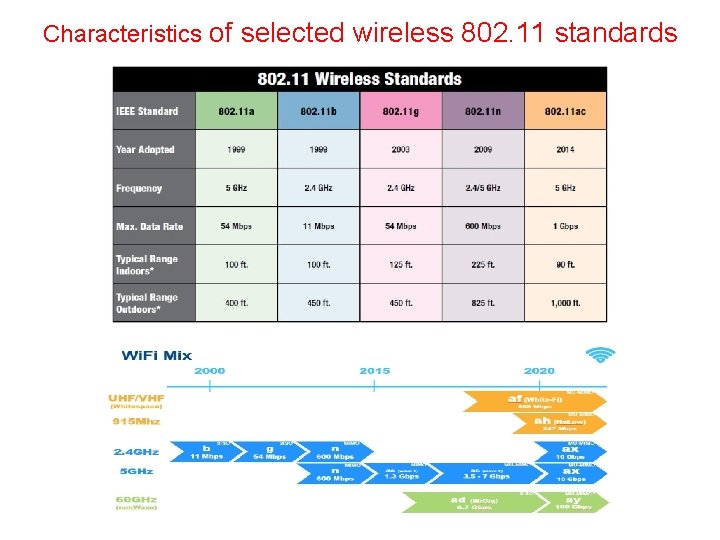
Characteristics of selected wireless 802. 11 standards
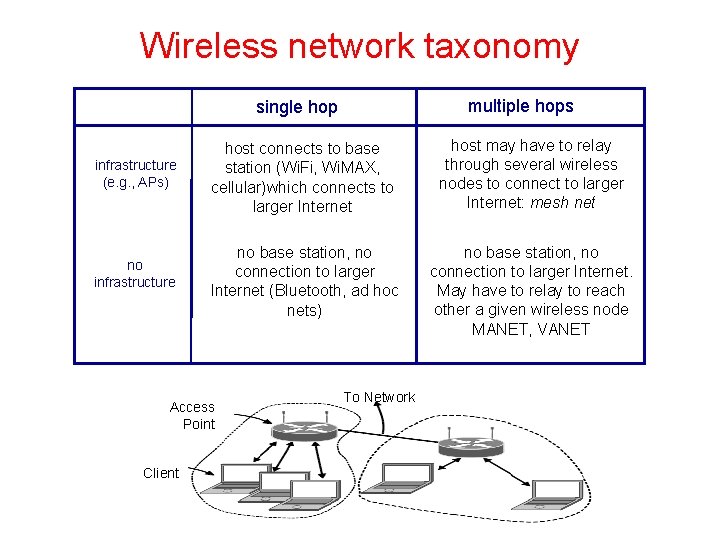
Wireless network taxonomy multiple hops single hop infrastructure (e. g. , APs) no infrastructure host connects to base station (Wi. Fi, Wi. MAX, cellular)which connects to larger Internet host may have to relay through several wireless nodes to connect to larger Internet: mesh net no base station, no connection to larger Internet (Bluetooth, ad hoc nets) no base station, no connection to larger Internet. May have to relay to reach other a given wireless node MANET, VANET Access Point Client To Network
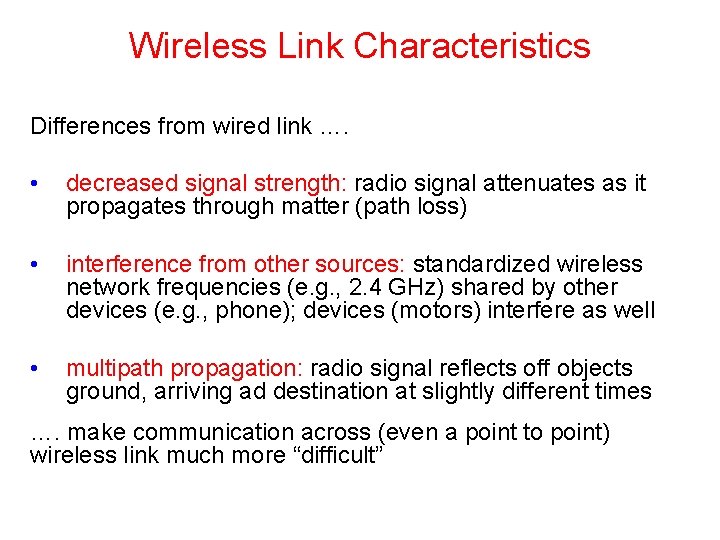
Wireless Link Characteristics Differences from wired link …. • decreased signal strength: radio signal attenuates as it propagates through matter (path loss) • interference from other sources: standardized wireless network frequencies (e. g. , 2. 4 GHz) shared by other devices (e. g. , phone); devices (motors) interfere as well • multipath propagation: radio signal reflects off objects ground, arriving ad destination at slightly different times …. make communication across (even a point to point) wireless link much more “difficult”
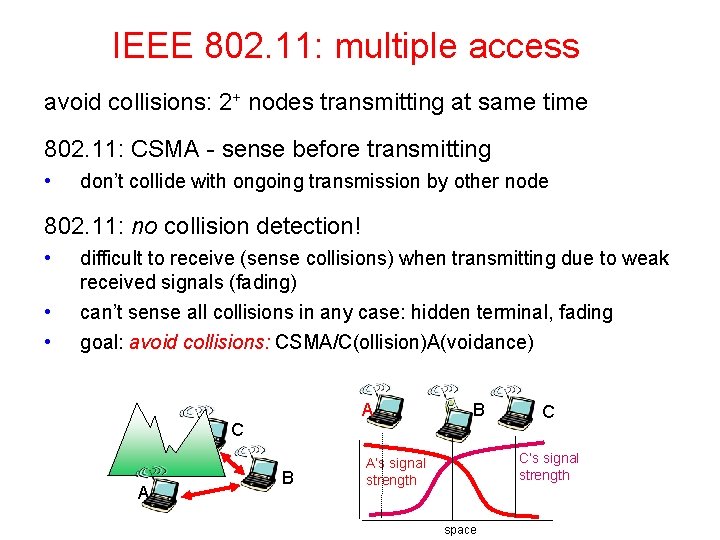
Wireless & MAC A station on a wireless LAN may not be able to transmit frames to or receive frames from all other stations because of the limited radio range of the stations. In wired LANs, when one station sends a frame, all other stations receive it. The absence of this property in wireless LANs causes a variety of complications. On a wireless network, the problem of a station not being able to detect a potential competitor for the medium because the competitor is too far away is called the hidden terminal problem. There is also the exposed terminal problem. Nodes cannot detect collisions, i. e. , sense while sending • Makes collisions expensive and to be avoided
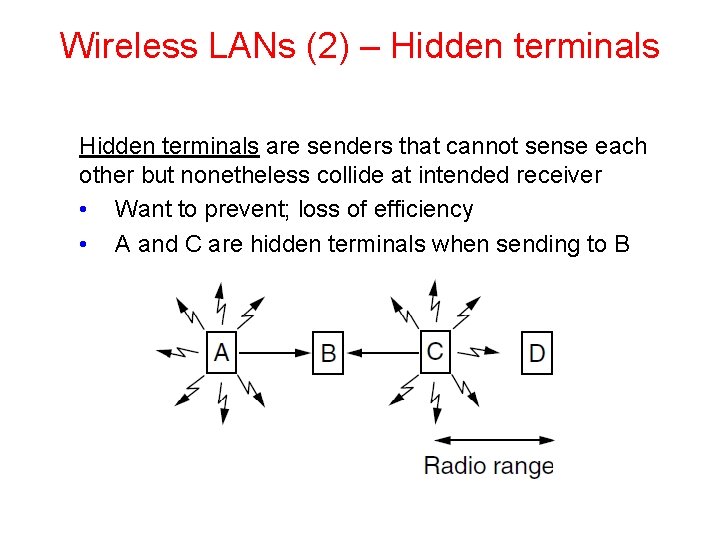
Wireless LANs (2) – Hidden terminals are senders that cannot sense each other but nonetheless collide at intended receiver • Want to prevent; loss of efficiency • A and C are hidden terminals when sending to B
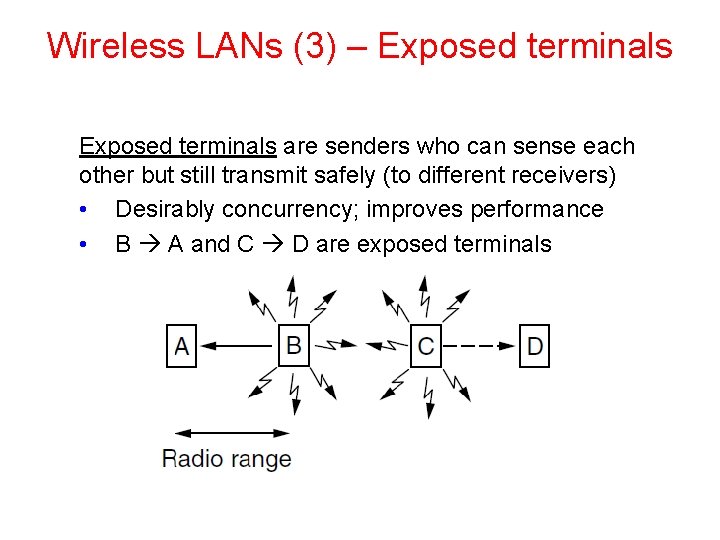
Wireless LANs (3) – Exposed terminals are senders who can sense each other but still transmit safely (to different receivers) • Desirably concurrency; improves performance • B A and C D are exposed terminals
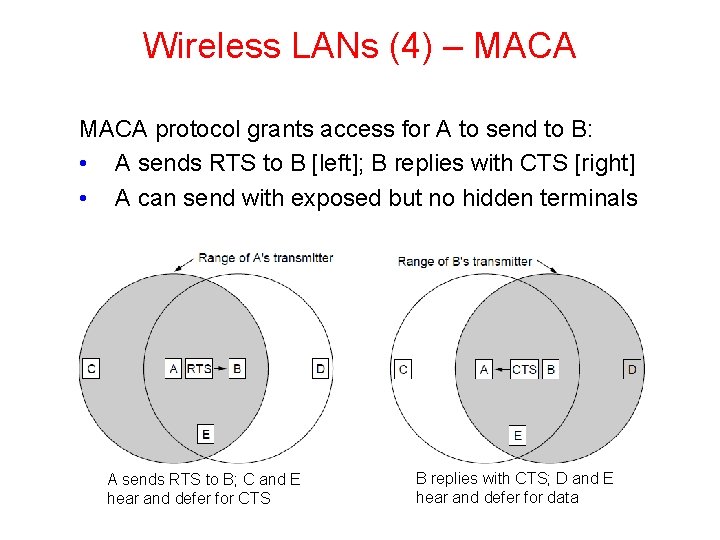
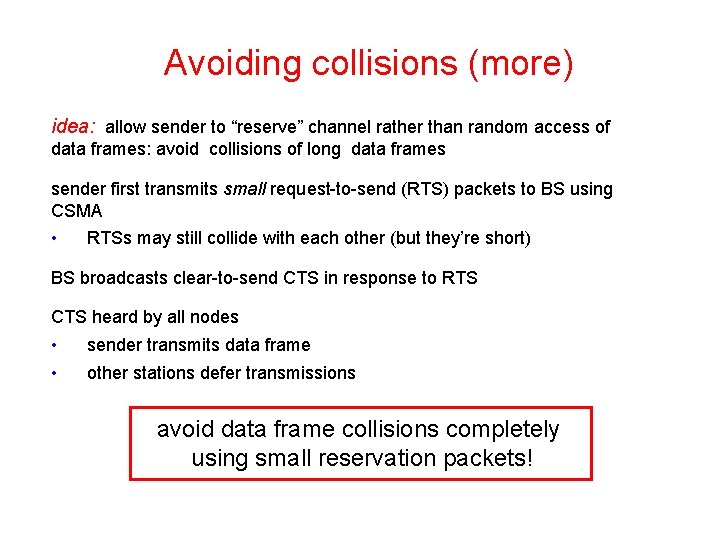
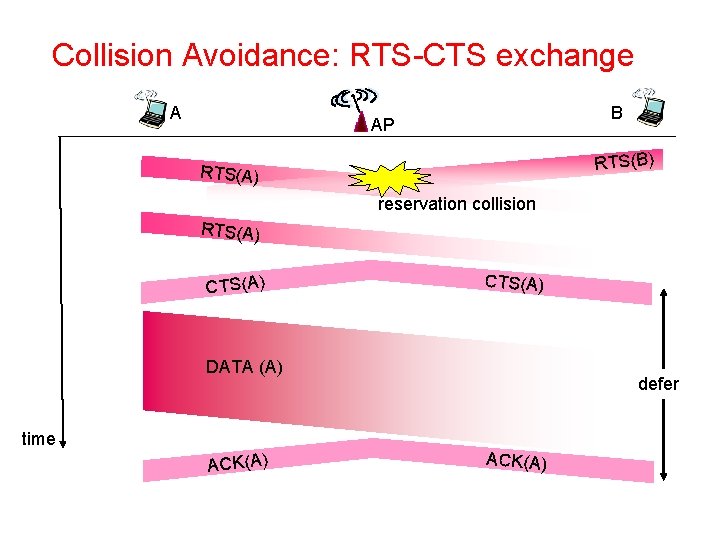
Wireless LANs (4) – MACA protocol grants access for A to send to B: • A sends RTS to B [left]; B replies with CTS [right] • A can send with exposed but no hidden terminals A sends RTS to B; C and E hear and defer for CTS B replies with CTS; D and E hear and defer for data
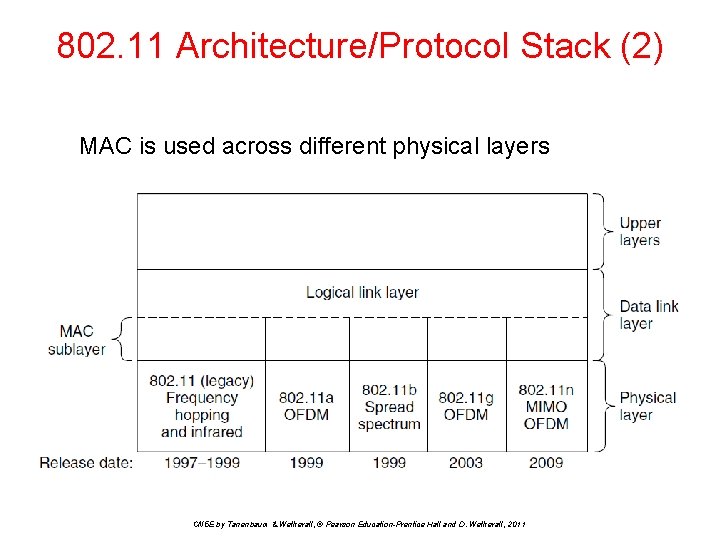
802. 11 Architecture/Protocol Stack (2) MAC is used across different physical layers CN 5 E by Tanenbaum & Wetherall, © Pearson Education-Prentice Hall and D. Wetherall, 2011
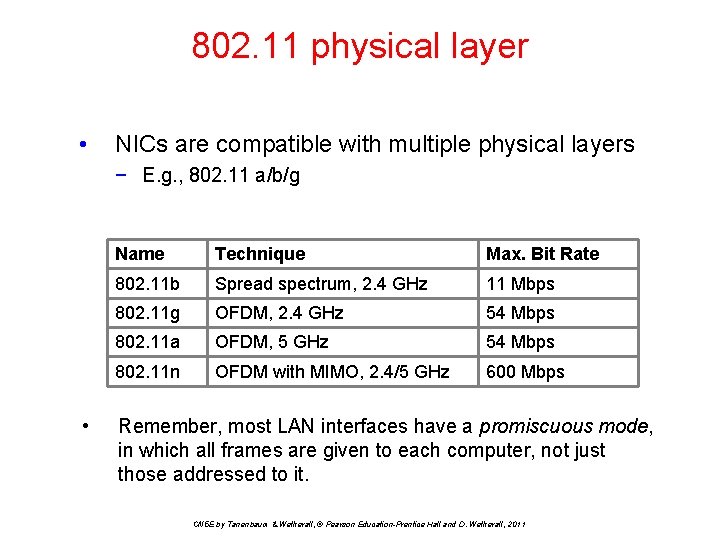
802. 11 physical layer • NICs are compatible with multiple physical layers − E. g. , 802. 11 a/b/g • Name Technique Max. Bit Rate 802. 11 b Spread spectrum, 2. 4 GHz 11 Mbps 802. 11 g OFDM, 2. 4 GHz 54 Mbps 802. 11 a OFDM, 5 GHz 54 Mbps 802. 11 n OFDM with MIMO, 2. 4/5 GHz 600 Mbps Remember, most LAN interfaces have a promiscuous mode, in which all frames are given to each computer, not just those addressed to it. CN 5 E by Tanenbaum & Wetherall, © Pearson Education-Prentice Hall and D. Wetherall, 2011
802. 11 physical layer • All of the 802. 11 transmission methods define multiple rates. • The idea is that different rates can be used depending on the current conditions. • If the wireless signal is weak, a low rate can be used. If the signal is clear, the highest rate can be used. • This adjustment is rate adaptation. CN 5 E by Tanenbaum & Wetherall, © Pearson Education-Prentice Hall and D. Wetherall, 2011
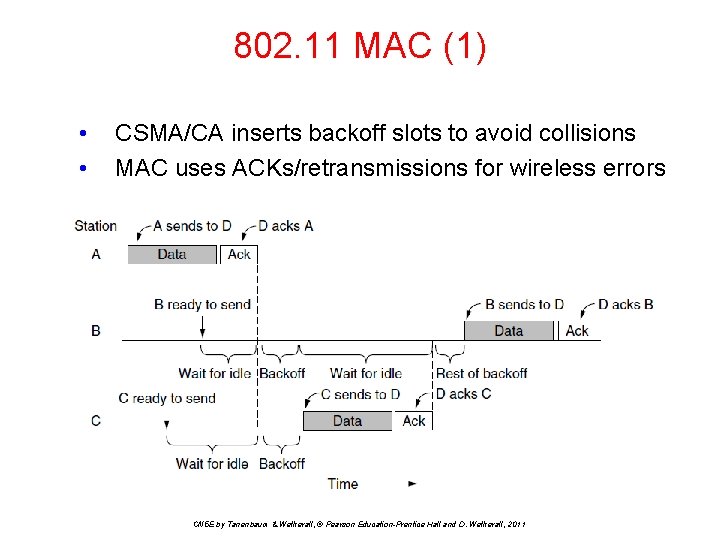
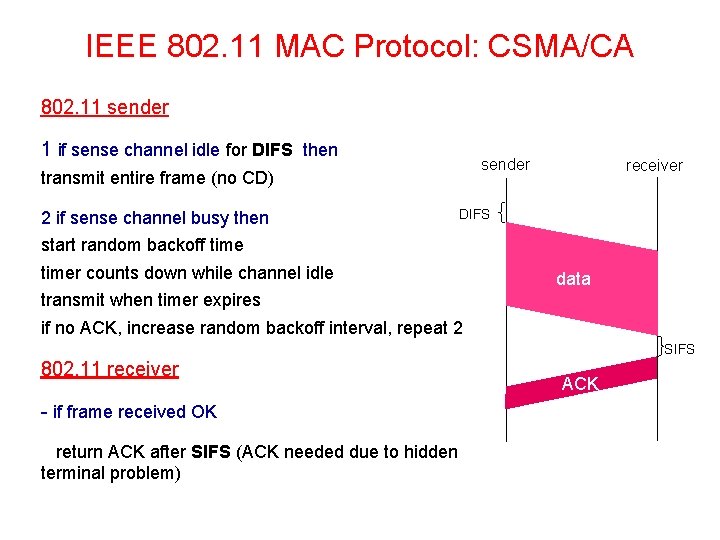
802. 11 MAC (1) • • CSMA/CA inserts backoff slots to avoid collisions MAC uses ACKs/retransmissions for wireless errors CN 5 E by Tanenbaum & Wetherall, © Pearson Education-Prentice Hall and D. Wetherall, 2011
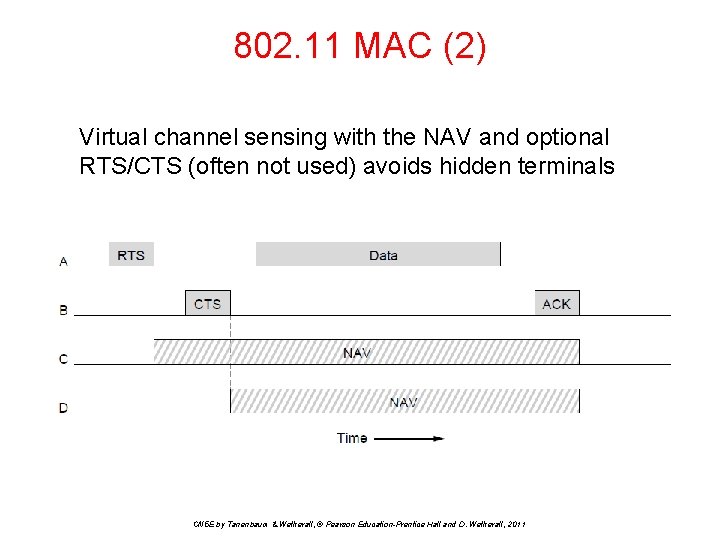
802. 11 MAC (2) Virtual channel sensing with the NAV and optional RTS/CTS (often not used) avoids hidden terminals CN 5 E by Tanenbaum & Wetherall, © Pearson Education-Prentice Hall and D. Wetherall, 2011
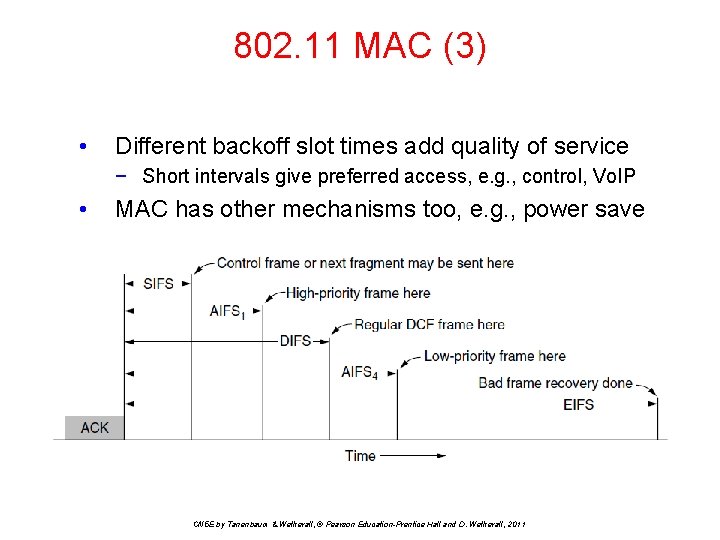
802. 11 MAC (3) • Different backoff slot times add quality of service − Short intervals give preferred access, e. g. , control, Vo. IP • MAC has other mechanisms too, e. g. , power save CN 5 E by Tanenbaum & Wetherall, © Pearson Education-Prentice Hall and D. Wetherall, 2011
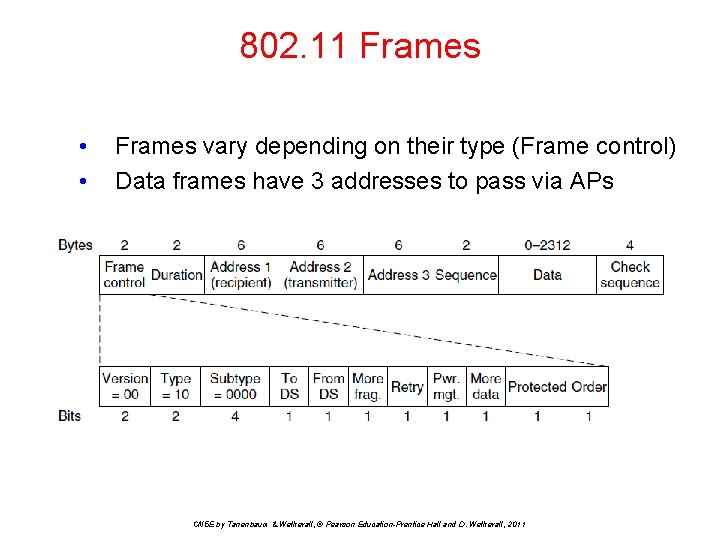
802. 11 Frames • • Frames vary depending on their type (Frame control) Data frames have 3 addresses to pass via APs CN 5 E by Tanenbaum & Wetherall, © Pearson Education-Prentice Hall and D. Wetherall, 2011
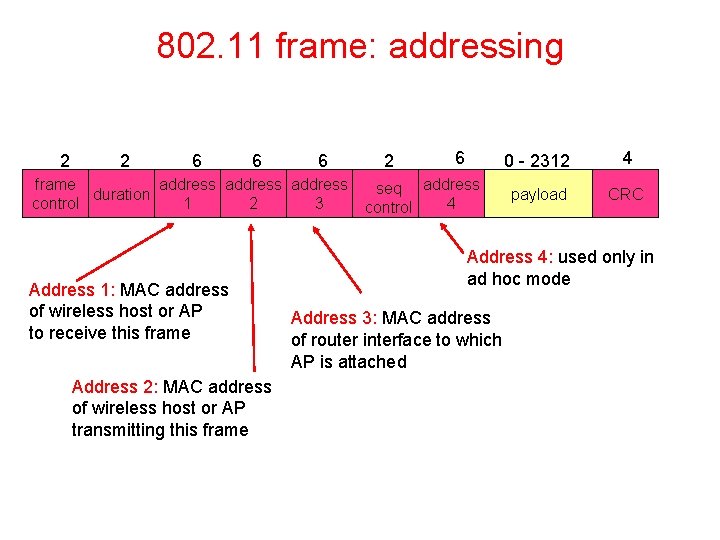
802. 11 frame: addressing 2 2 6 6 6 frame address duration control 1 2 3 Address 1: MAC address of wireless host or AP to receive this frame Address 2: MAC address of wireless host or AP transmitting this frame 2 6 seq address 4 control 0 - 2312 4 payload CRC Address 4: used only in ad hoc mode Address 3: MAC address of router interface to which AP is attached
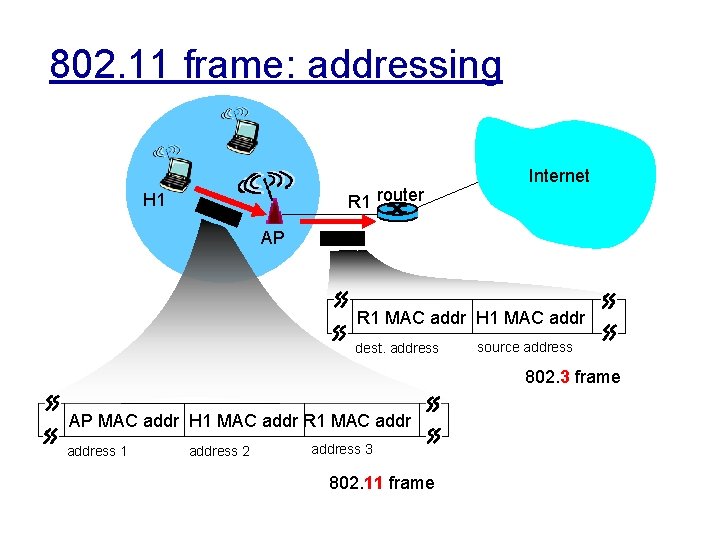
802. 11 frame: addressing R 1 router H 1 Internet AP R 1 MAC addr H 1 MAC addr dest. address source address 802. 3 frame AP MAC addr H 1 MAC addr R 1 MAC address 1 address 2 address 3 802. 11 frame
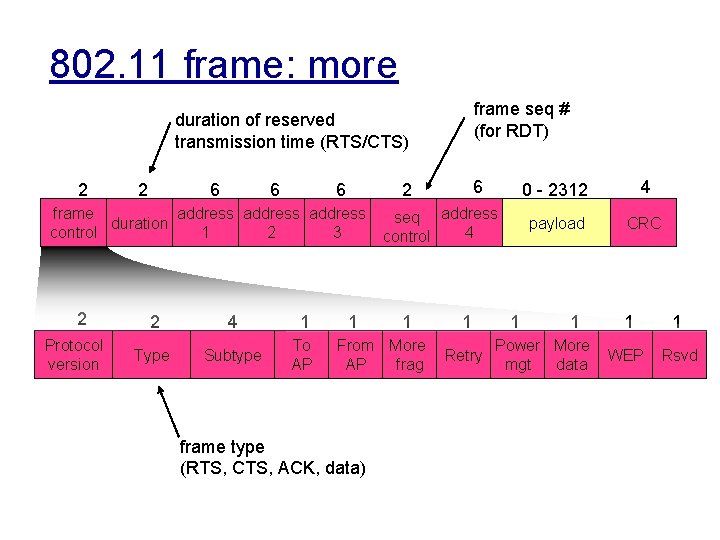
802. 11 frame: more frame seq # (for RDT) duration of reserved transmission time (RTS/CTS) 2 2 6 6 6 frame address duration control 1 2 3 2 Protocol version 2 4 1 Type Subtype To AP 6 2 1 seq address 4 control 1 From More AP frag frame type (RTS, CTS, ACK, data) 1 Retry 1 0 - 2312 4 payload CRC 1 Power More mgt data 1 1 WEP Rsvd
IEEE 802. 11: multiple access avoid collisions: 2+ nodes transmitting at same time 802. 11: CSMA - sense before transmitting • don’t collide with ongoing transmission by other node 802. 11: no collision detection! • • • difficult to receive (sense collisions) when transmitting due to weak received signals (fading) can’t sense all collisions in any case: hidden terminal, fading goal: avoid collisions: CSMA/C(ollision)A(voidance) A C A B B C C’s signal strength A’s signal strength space
IEEE 802. 11 MAC Protocol: CSMA/CA 802. 11 sender 1 if sense channel idle for DIFS then sender transmit entire frame (no CD) 2 if sense channel busy then receiver DIFS start random backoff timer counts down while channel idle data transmit when timer expires if no ACK, increase random backoff interval, repeat 2 SIFS 802. 11 receiver - if frame received OK return ACK after SIFS (ACK needed due to hidden terminal problem) ACK
Avoiding collisions (more) idea: allow sender to “reserve” channel rather than random access of data frames: avoid collisions of long data frames sender first transmits small request-to-send (RTS) packets to BS using CSMA • RTSs may still collide with each other (but they’re short) BS broadcasts clear-to-send CTS in response to RTS CTS heard by all nodes • • sender transmits data frame other stations defer transmissions avoid data frame collisions completely using small reservation packets!
Collision Avoidance: RTS-CTS exchange A B AP RTS(B) RTS(A) reservation collision RTS(A) CTS(A) DATA (A) defer time ACK(A)
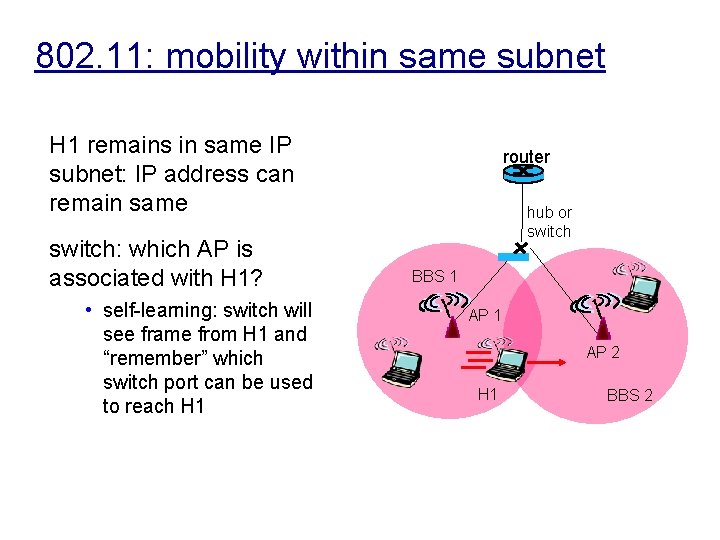
802. 11: mobility within same subnet H 1 remains in same IP subnet: IP address can remain same switch: which AP is associated with H 1? • self-learning: switch will see frame from H 1 and “remember” which switch port can be used to reach H 1 router hub or switch BBS 1 AP 2 H 1 BBS 2
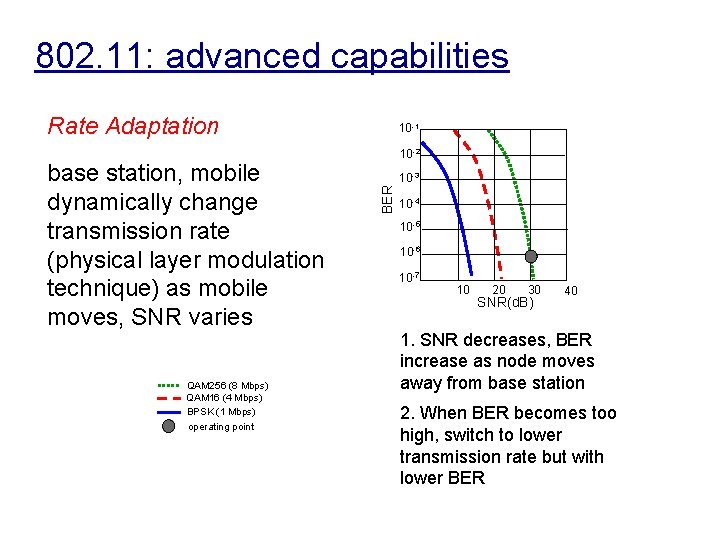
802. 11: advanced capabilities Rate Adaptation QAM 256 (8 Mbps) QAM 16 (4 Mbps) BPSK (1 Mbps) operating point 10 -2 10 -3 BER base station, mobile dynamically change transmission rate (physical layer modulation technique) as mobile moves, SNR varies 10 -1 10 -4 10 -5 10 -6 10 -7 10 20 30 SNR(d. B) 40 1. SNR decreases, BER increase as node moves away from base station 2. When BER becomes too high, switch to lower transmission rate but with lower BER
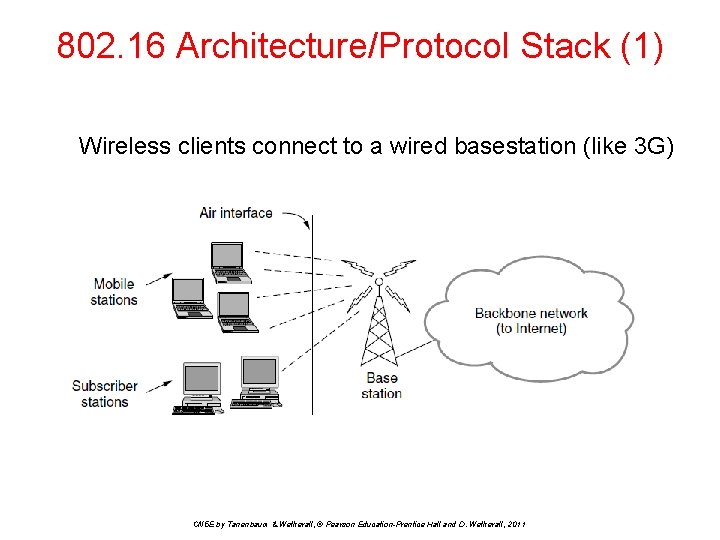
802. 16 Architecture/Protocol Stack (1) Wireless clients connect to a wired basestation (like 3 G) CN 5 E by Tanenbaum & Wetherall, © Pearson Education-Prentice Hall and D. Wetherall, 2011
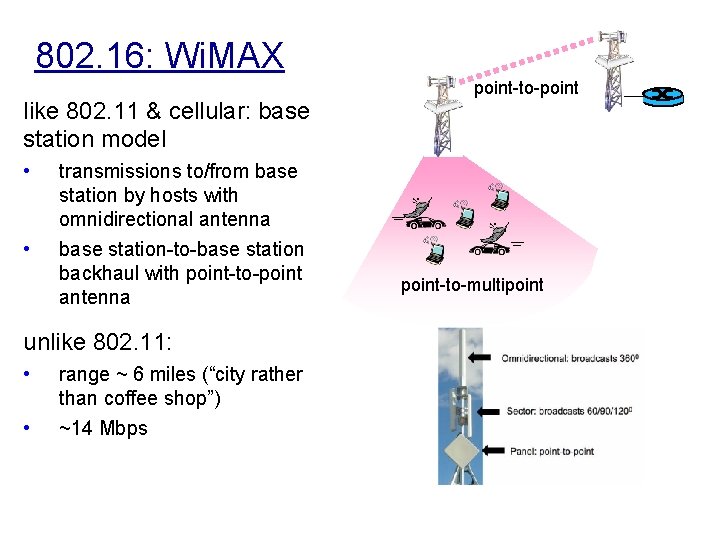
802. 16: Wi. MAX like 802. 11 & cellular: base station model • • transmissions to/from base station by hosts with omnidirectional antenna base station-to-base station backhaul with point-to-point antenna unlike 802. 11: • • range ~ 6 miles (“city rather than coffee shop”) ~14 Mbps point-to-point-to-multipoint
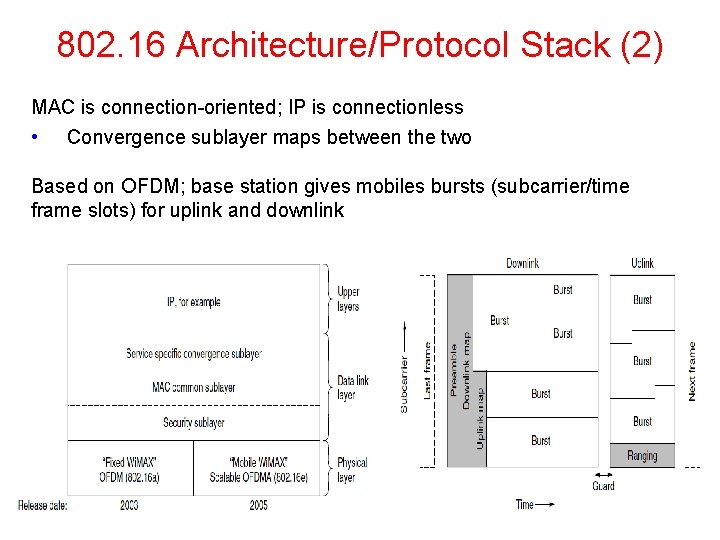
802. 16 Architecture/Protocol Stack (2) MAC is connection-oriented; IP is connectionless • Convergence sublayer maps between the two Based on OFDM; base station gives mobiles bursts (subcarrier/time frame slots) for uplink and downlink
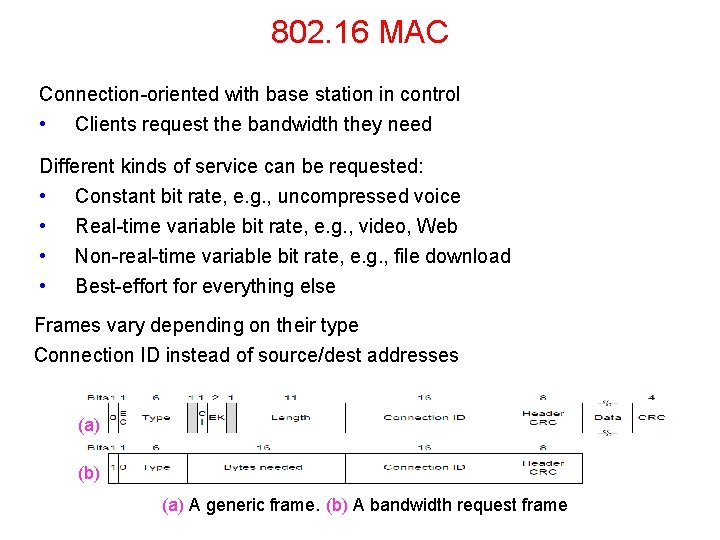
802. 16 MAC Connection-oriented with base station in control • Clients request the bandwidth they need Different kinds of service can be requested: • Constant bit rate, e. g. , uncompressed voice • Real-time variable bit rate, e. g. , video, Web • Non-real-time variable bit rate, e. g. , file download • Best-effort for everything else Frames vary depending on their type Connection ID instead of source/dest addresses (a) (b) (a) A generic frame. (b) A bandwidth request frame
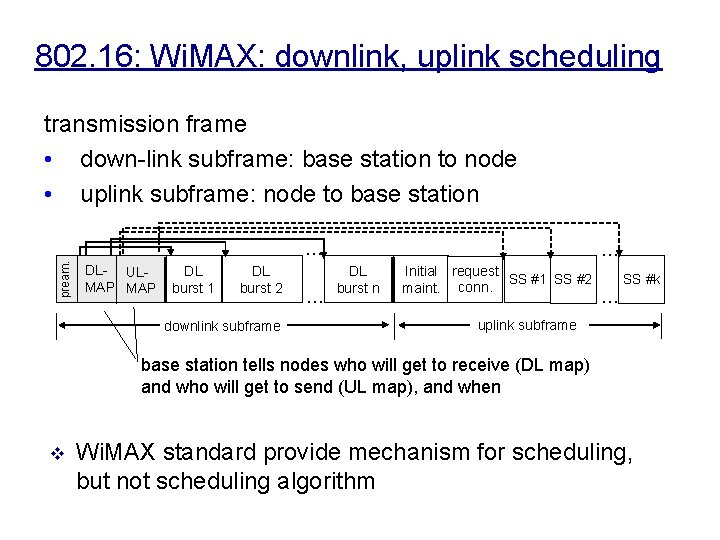
802. 16: Wi. MAX: downlink, uplink scheduling transmission frame • down-link subframe: base station to node • uplink subframe: node to base station pream. … DL- ULMAP DL burst 1 DL burst 2 downlink subframe … … DL burst n Initial request SS #1 SS #2 maint. conn. … SS #k uplink subframe base station tells nodes who will get to receive (DL map) and who will get to send (UL map), and when v Wi. MAX standard provide mechanism for scheduling, but not scheduling algorithm
Bluetooth • • Bluetooth Architecture » Bluetooth Applications / Protocol » Bluetooth Radio / Link Layers » Bluetooth Frames » CN 5 E by Tanenbaum & Wetherall, © Pearson Education-Prentice Hall and D. Wetherall, 2011
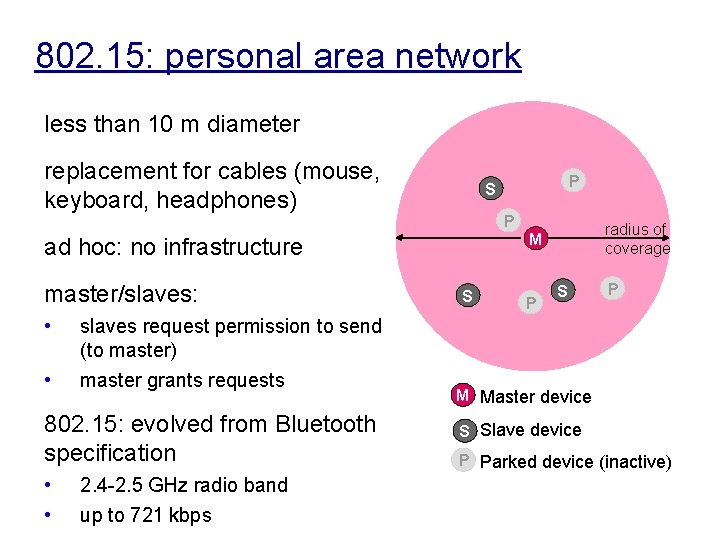
802. 15: personal area network less than 10 m diameter replacement for cables (mouse, keyboard, headphones) P • • slaves request permission to send (to master) master grants requests 802. 15: evolved from Bluetooth specification • • 2. 4 -2. 5 GHz radio band up to 721 kbps radius of coverage M ad hoc: no infrastructure master/slaves: P S S P M Master device S Slave device P Parked device (inactive)
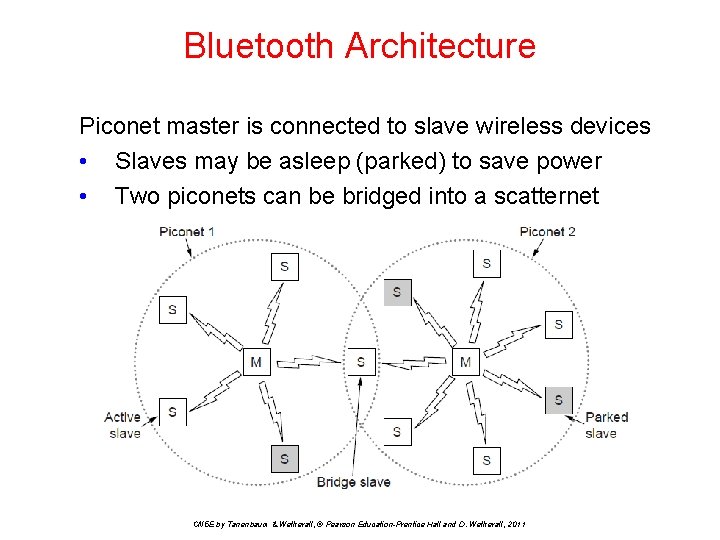
Bluetooth Architecture Piconet master is connected to slave wireless devices • Slaves may be asleep (parked) to save power • Two piconets can be bridged into a scatternet CN 5 E by Tanenbaum & Wetherall, © Pearson Education-Prentice Hall and D. Wetherall, 2011
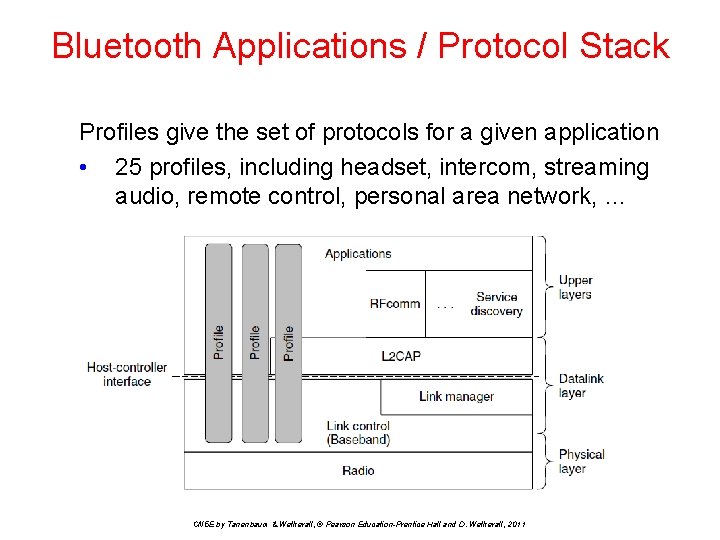
Bluetooth Applications / Protocol Stack Profiles give the set of protocols for a given application • 25 profiles, including headset, intercom, streaming audio, remote control, personal area network, … CN 5 E by Tanenbaum & Wetherall, © Pearson Education-Prentice Hall and D. Wetherall, 2011
Bluetooth Radio / Link Layers Radio layer • Uses adaptive frequency hopping in 2. 4 GHz band Link layer • TDM with timeslots for master and slaves • Synchronous CO for periodic slots in each direction • Asynchronous CL for packet-switched data • Links undergo pairing (user confirms passkey/PIN) to authorize them before use (much better than 0000 etc) CN 5 E by Tanenbaum & Wetherall, © Pearson Education-Prentice Hall and D. Wetherall, 2011
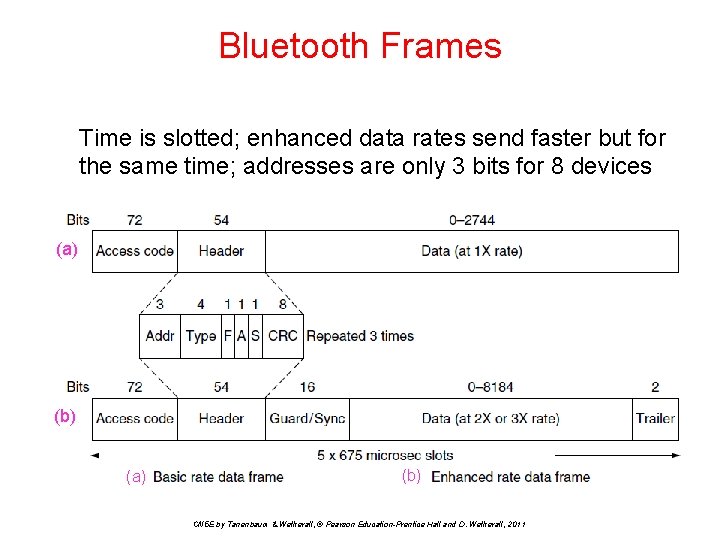
Bluetooth Frames Time is slotted; enhanced data rates send faster but for the same time; addresses are only 3 bits for 8 devices (a) (b) CN 5 E by Tanenbaum & Wetherall, © Pearson Education-Prentice Hall and D. Wetherall, 2011
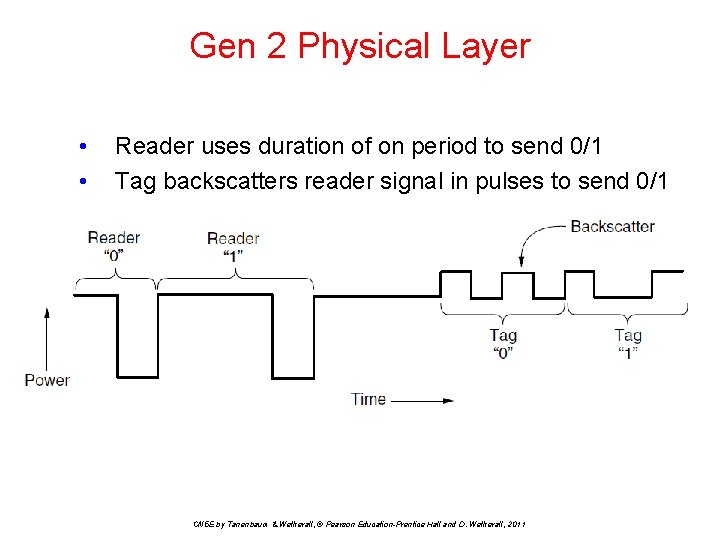
Gen 2 Physical Layer • • Reader uses duration of on period to send 0/1 Tag backscatters reader signal in pulses to send 0/1 CN 5 E by Tanenbaum & Wetherall, © Pearson Education-Prentice Hall and D. Wetherall, 2011
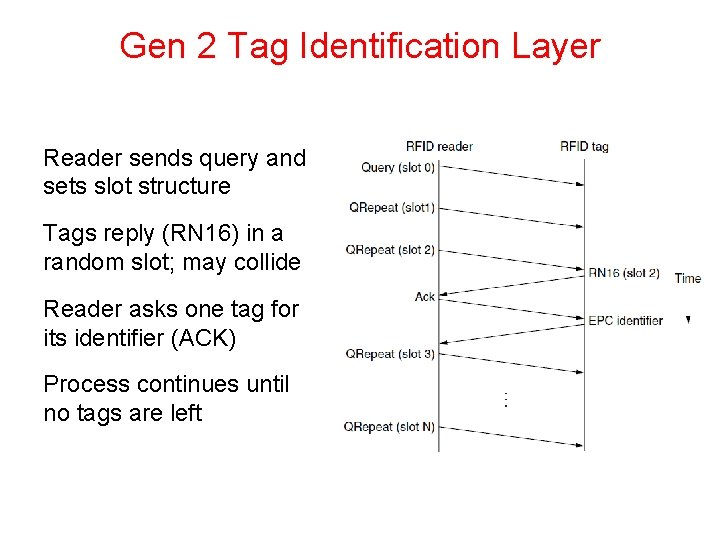
Gen 2 Tag Identification Layer Reader sends query and sets slot structure Tags reply (RN 16) in a random slot; may collide Reader asks one tag for its identifier (ACK) Process continues until no tags are left
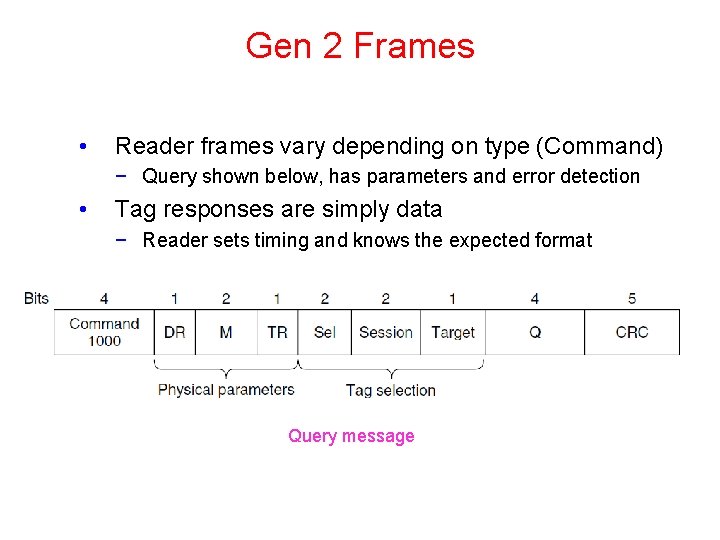
Gen 2 Frames • Reader frames vary depending on type (Command) − Query shown below, has parameters and error detection • Tag responses are simply data − Reader sets timing and knows the expected format Query message
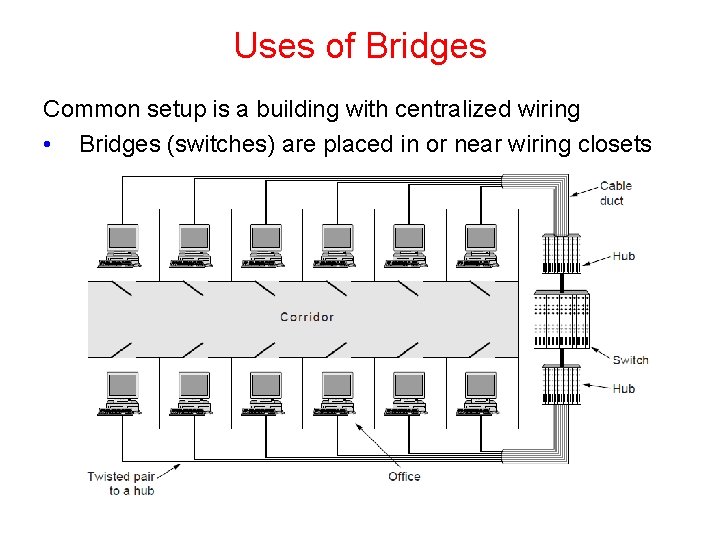
Uses of Bridges Common setup is a building with centralized wiring • Bridges (switches) are placed in or near wiring closets
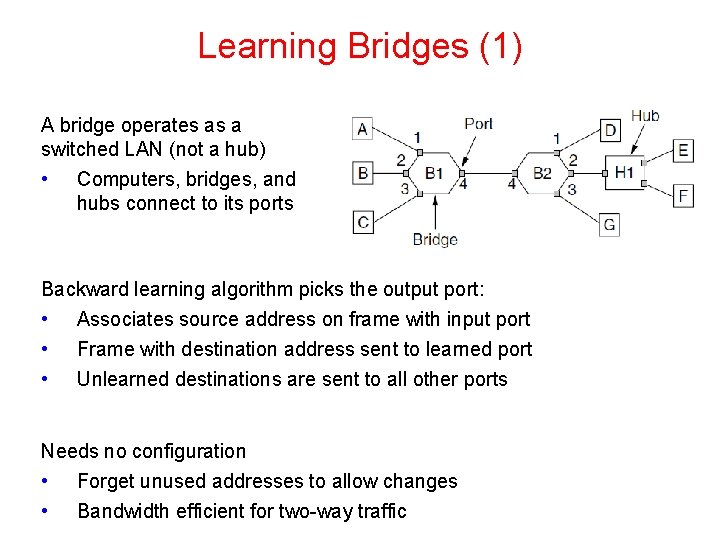
Learning Bridges (1) A bridge operates as a switched LAN (not a hub) • Computers, bridges, and hubs connect to its ports Backward learning algorithm picks the output port: • Associates source address on frame with input port • • Frame with destination address sent to learned port Unlearned destinations are sent to all other ports Needs no configuration • Forget unused addresses to allow changes • Bandwidth efficient for two-way traffic
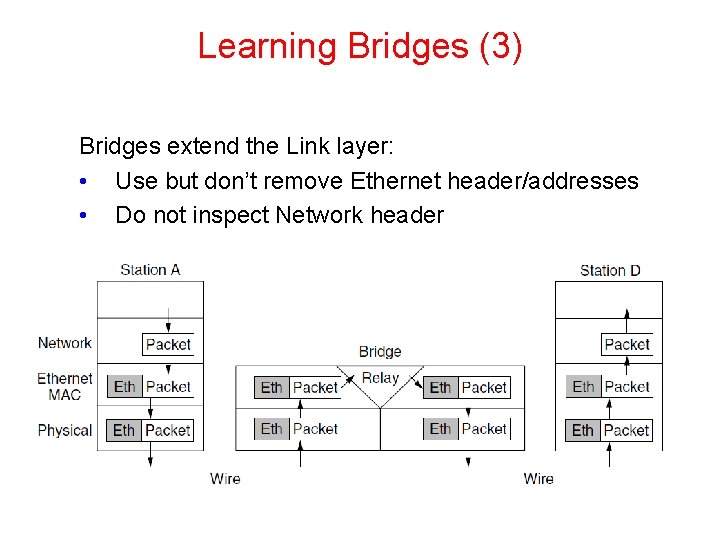
Learning Bridges (3) Bridges extend the Link layer: • Use but don’t remove Ethernet header/addresses • Do not inspect Network header
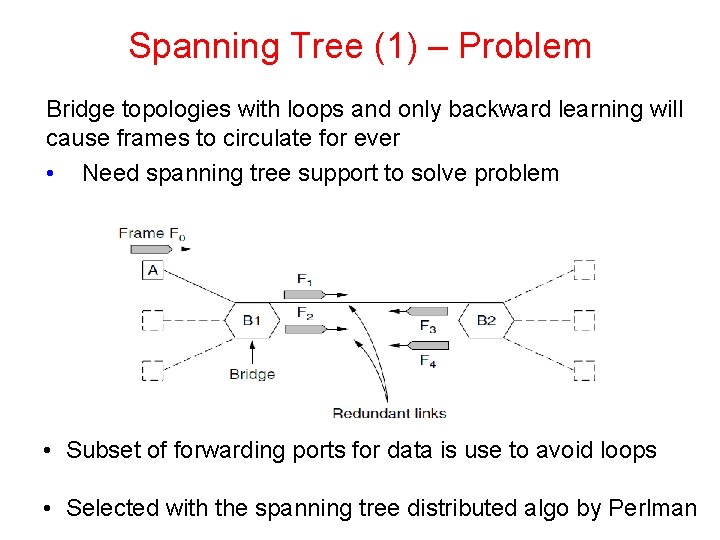
Spanning Tree (1) – Problem Bridge topologies with loops and only backward learning will cause frames to circulate for ever • Need spanning tree support to solve problem • Subset of forwarding ports for data is use to avoid loops • Selected with the spanning tree distributed algo by Perlman
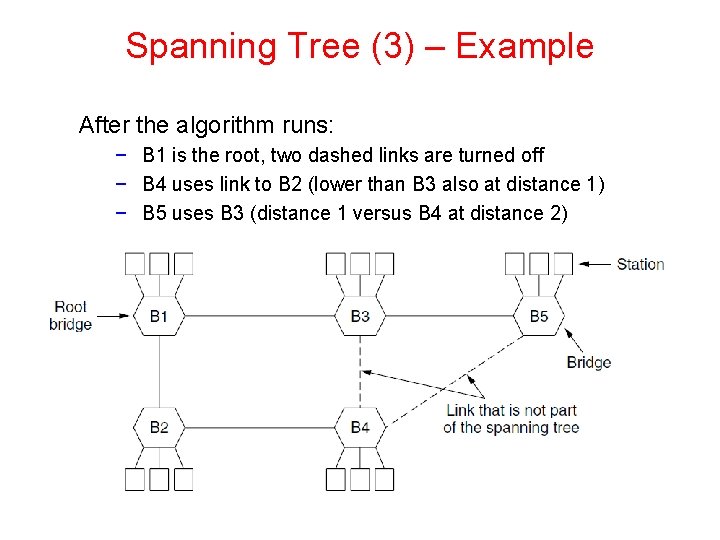
Spanning Tree (3) – Example After the algorithm runs: − B 1 is the root, two dashed links are turned off − B 4 uses link to B 2 (lower than B 3 also at distance 1) − B 5 uses B 3 (distance 1 versus B 4 at distance 2)
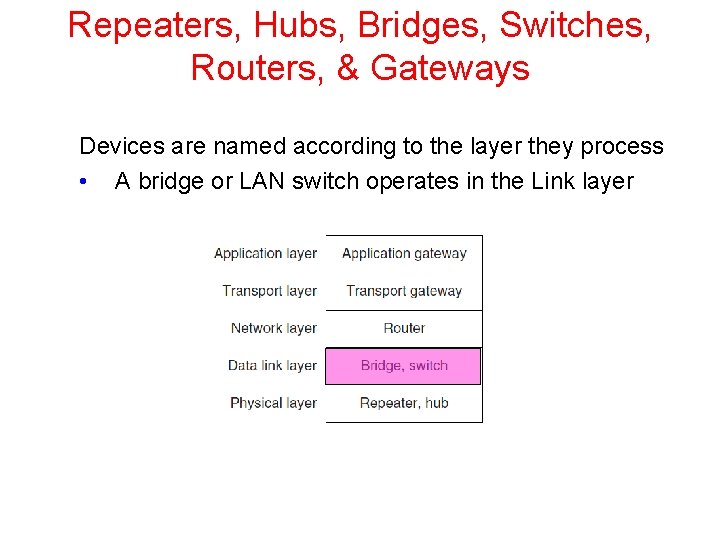
Repeaters, Hubs, Bridges, Switches, Routers, & Gateways Devices are named according to the layer they process • A bridge or LAN switch operates in the Link layer
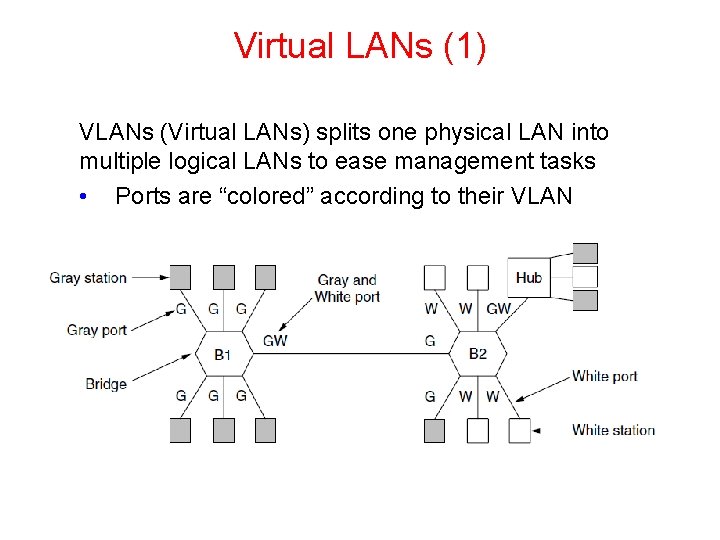
Virtual LANs (1) VLANs (Virtual LANs) splits one physical LAN into multiple logical LANs to ease management tasks • Ports are “colored” according to their VLAN
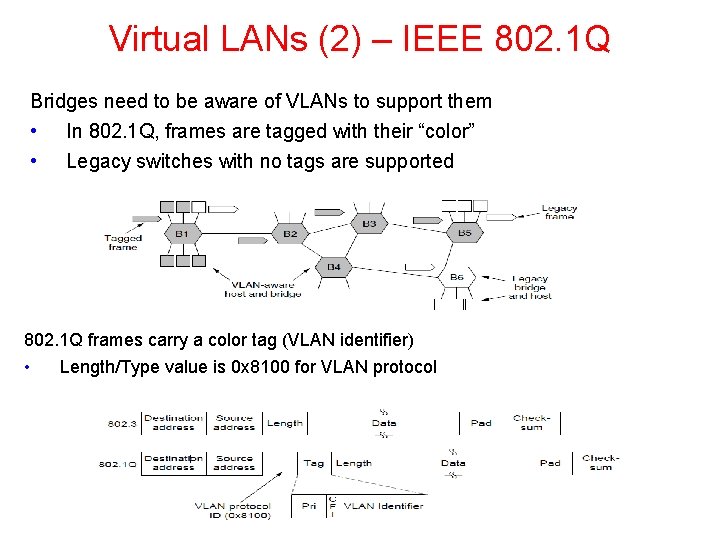
Virtual LANs (2) – IEEE 802. 1 Q Bridges need to be aware of VLANs to support them • In 802. 1 Q, frames are tagged with their “color” • Legacy switches with no tags are supported 802. 1 Q frames carry a color tag (VLAN identifier) • Length/Type value is 0 x 8100 for VLAN protocol
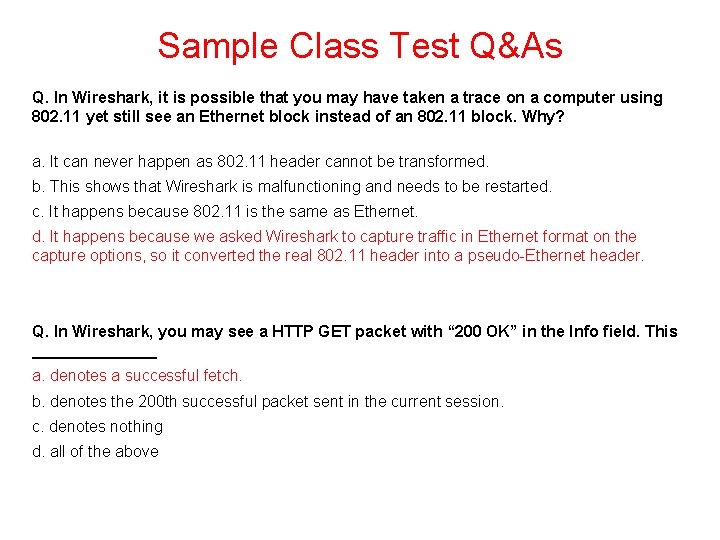
Sample Class Test Q&As Q. In Wireshark, it is possible that you may have taken a trace on a computer using 802. 11 yet still see an Ethernet block instead of an 802. 11 block. Why? a. It can never happen as 802. 11 header cannot be transformed. b. This shows that Wireshark is malfunctioning and needs to be restarted. c. It happens because 802. 11 is the same as Ethernet. d. It happens because we asked Wireshark to capture traffic in Ethernet format on the capture options, so it converted the real 802. 11 header into a pseudo-Ethernet header. Q. In Wireshark, you may see a HTTP GET packet with “ 200 OK” in the Info field. This _______ a. denotes a successful fetch. b. denotes the 200 th successful packet sent in the current session. c. denotes nothing d. all of the above
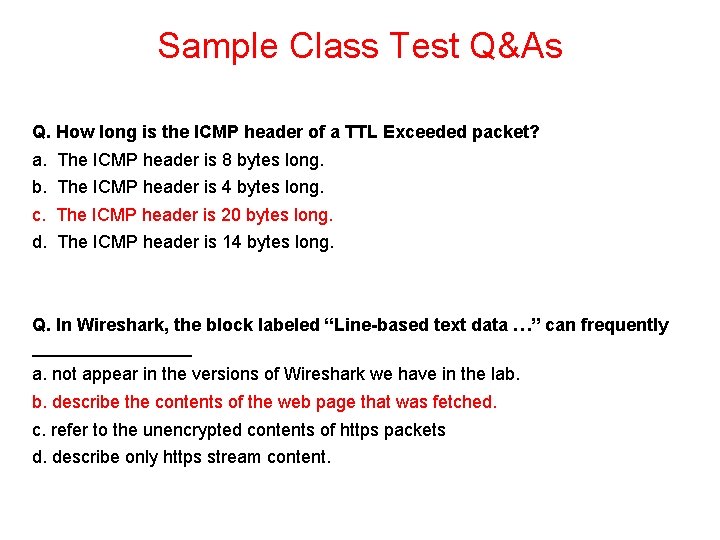
Sample Class Test Q&As Q. How long is the ICMP header of a TTL Exceeded packet? a. The ICMP header is 8 bytes long. b. The ICMP header is 4 bytes long. c. The ICMP header is 20 bytes long. d. The ICMP header is 14 bytes long. Q. In Wireshark, the block labeled “Line-based text data …” can frequently ________ a. not appear in the versions of Wireshark we have in the lab. b. describe the contents of the web page that was fetched. c. refer to the unencrypted contents of https packets d. describe only https stream content.
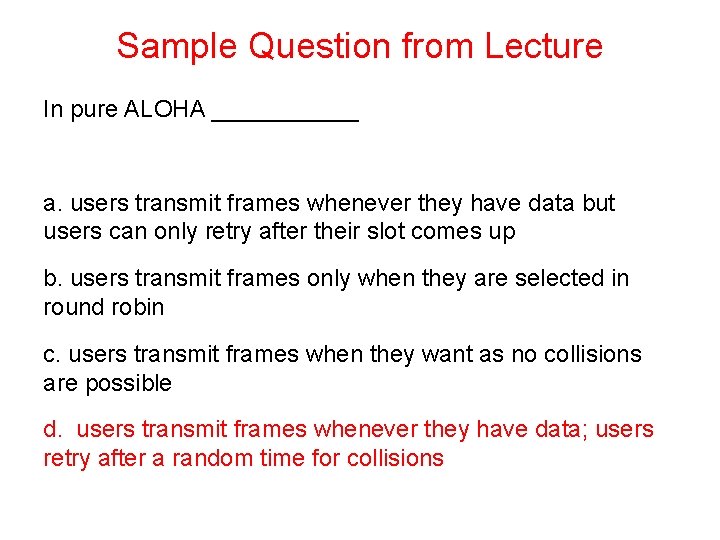
Sample Question from Lecture In pure ALOHA ______ a. users transmit frames whenever they have data but users can only retry after their slot comes up b. users transmit frames only when they are selected in round robin c. users transmit frames when they want as no collisions are possible d. users transmit frames whenever they have data; users retry after a random time for collisions
End Chapter 4
- Slides: 72