
Measure Control Automate MCS Product Training Simply convincing


- Slides: 49
Measure Control Automate MCS Product Training Simply convincing.
Content MCS product training Basics Functionality Commissioning Excercises www. fellereng. de 2
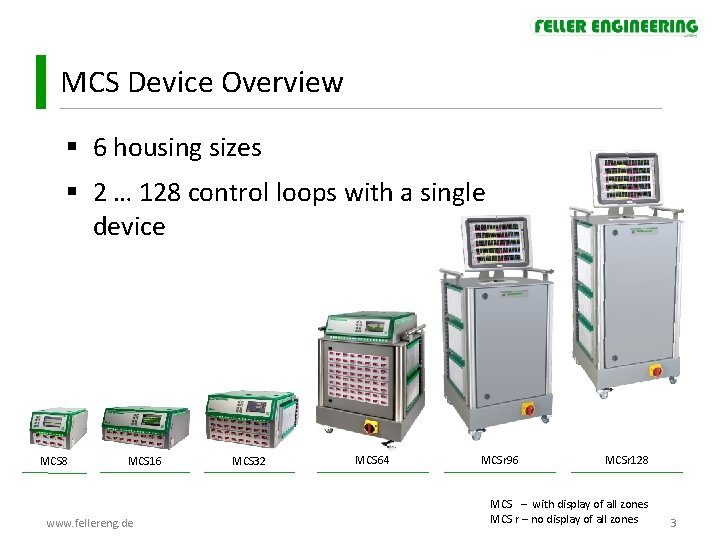
MCS Device Overview § 6 housing sizes § 2 … 128 control loops with a single device MCS 8 MCS 16 www. fellereng. de MCS 32 MCS 64 MCSr 96 MCSr 128 MCS – with display of all zones MCS r – no display of all zones 3
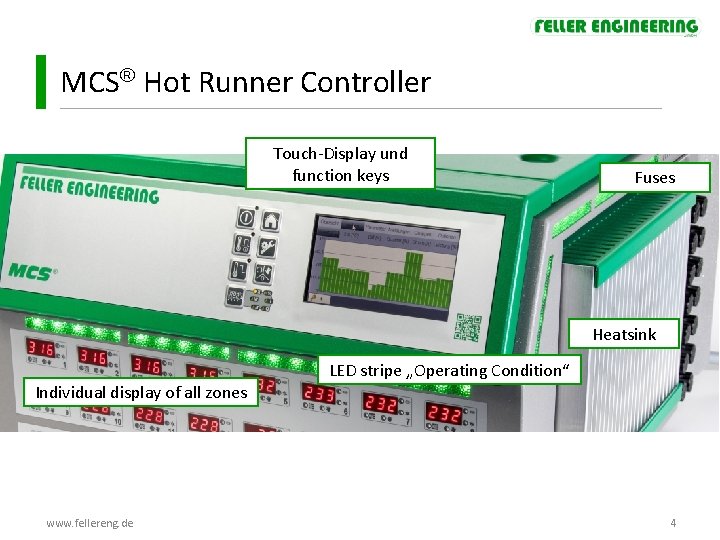
MCS Hot Runner Controller Touch-Display und function keys Fuses Heatsink LED stripe „Operating Condition“ Individual display of all zones www. fellereng. de 4
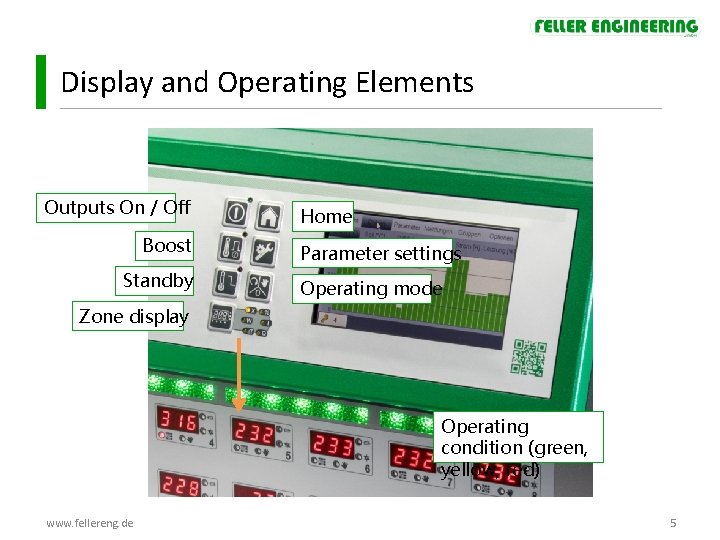
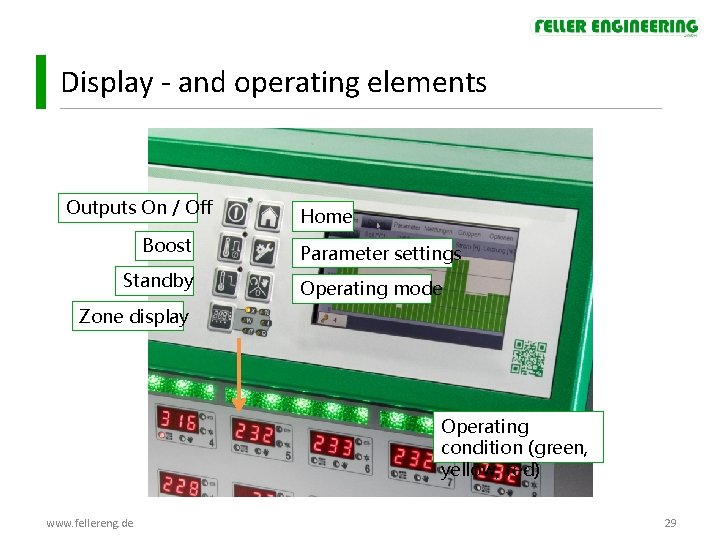
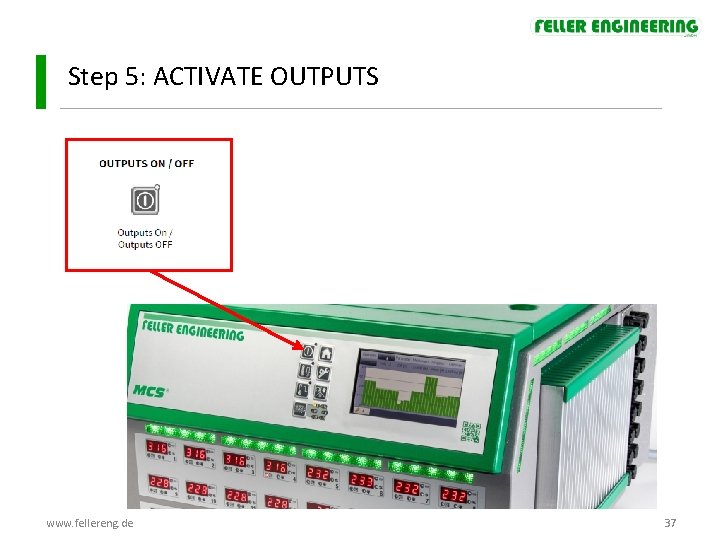
Display and Operating Elements Outputs On / Off Boost Standby Home Parameter settings Operating mode Zone display Operating condition (green, yellow, red) www. fellereng. de 5
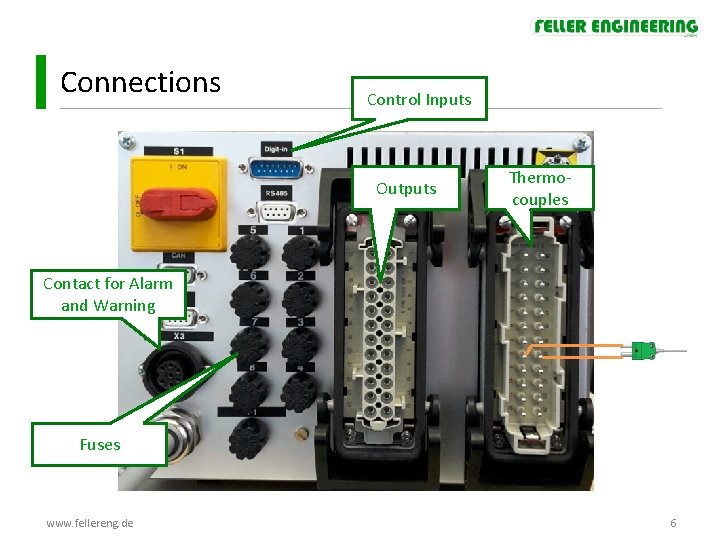
Connections Control Inputs Outputs Thermocouples Contact for Alarm and Warning Fuses www. fellereng. de 6
Content MCS product training Basics Functionality Commissioning Excercises www. fellereng. de 7
MCS Functionality Control behaviour § Automatic determination of the control parameters P I D During the heating nozzles and manifolds are classified (automatic detection between sluggish and fast control loops) and the PID control parameters determined. • Suppression of overshoots At aggressive control circuits, overshooting can be reduced when heating up. • Pulse mode / phase-fired control Pulse mode and phase-fired control are two different ways of controlling heating. Thus the controller reaches a high control precision, even in sensitive processes. (devices starting at 20 zones) www. fellereng. de 8
MCS Functionality Heating § Gentle heating by reducing the output rate in dependance of the temperature. § Group heating Zones are heated up so that they must only have a specific temperature difference from each other. § Sequential heating / cooling Zones can be heated and cooled sequentially. § Ramp The ramp function enables a slow and uniform heating / cooling of zones by specifying a rise / cooling curve. www. fellereng. de 9
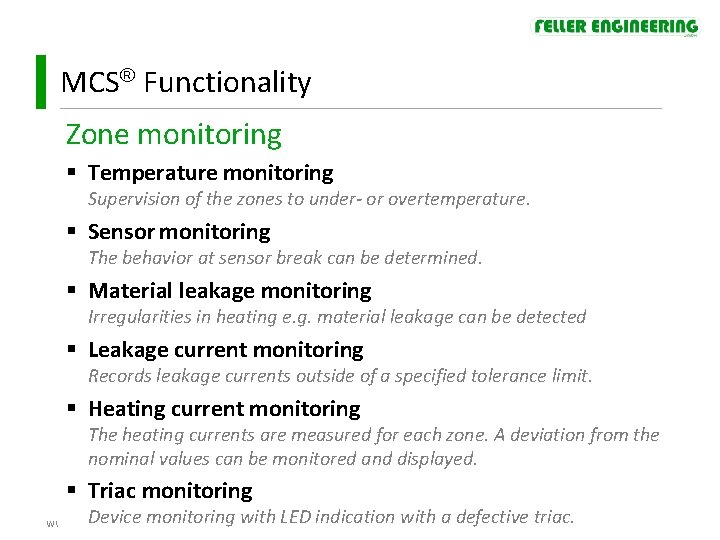
MCS Functionality Zone monitoring § Temperature monitoring Supervision of the zones to under- or overtemperature. § Sensor monitoring The behavior at sensor break can be determined. § Material leakage monitoring Irregularities in heating e. g. material leakage can be detected § Leakage current monitoring Records leakage currents outside of a specified tolerance limit. § Heating current monitoring The heating currents are measured for each zone. A deviation from the nominal values can be monitored and displayed. § Triac monitoring Device monitoring with LED indication with a defective triac. www. fellereng. de 10
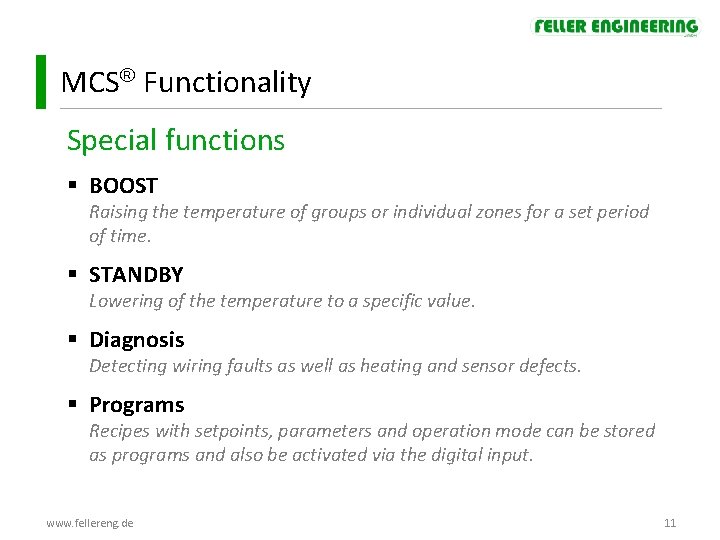
MCS Functionality Special functions § BOOST Raising the temperature of groups or individual zones for a set period of time. § STANDBY Lowering of the temperature to a specific value. § Diagnosis Detecting wiring faults as well as heating and sensor defects. § Programs Recipes with setpoints, parameters and operation mode can be stored as programs and also be activated via the digital input. www. fellereng. de 11
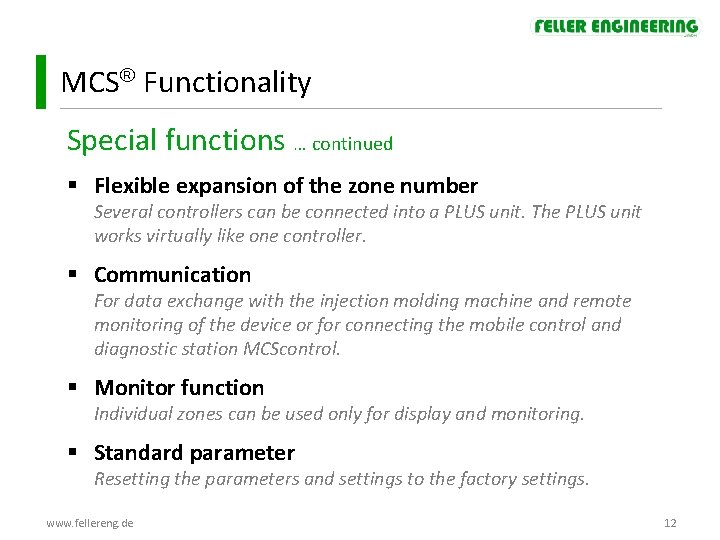
MCS Functionality Special functions … continued § Flexible expansion of the zone number Several controllers can be connected into a PLUS unit. The PLUS unit works virtually like one controller. § Communication For data exchange with the injection molding machine and remote monitoring of the device or for connecting the mobile control and diagnostic station MCScontrol. § Monitor function Individual zones can be used only for display and monitoring. § Standard parameter Resetting the parameters and settings to the factory settings. www. fellereng. de 12
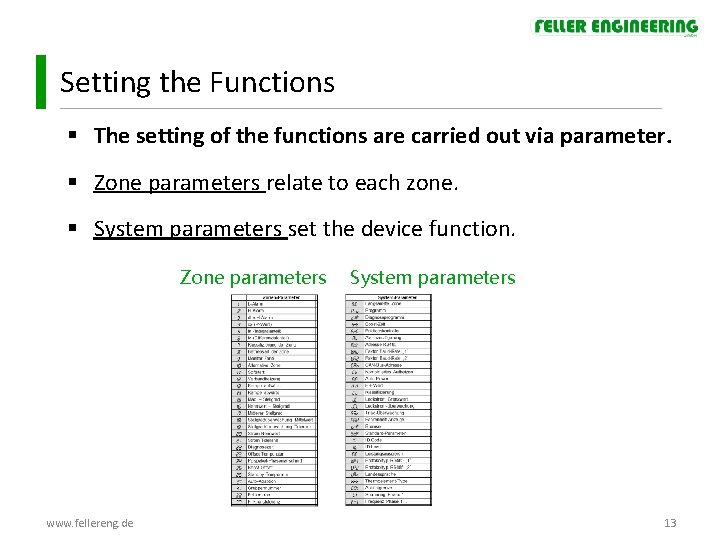
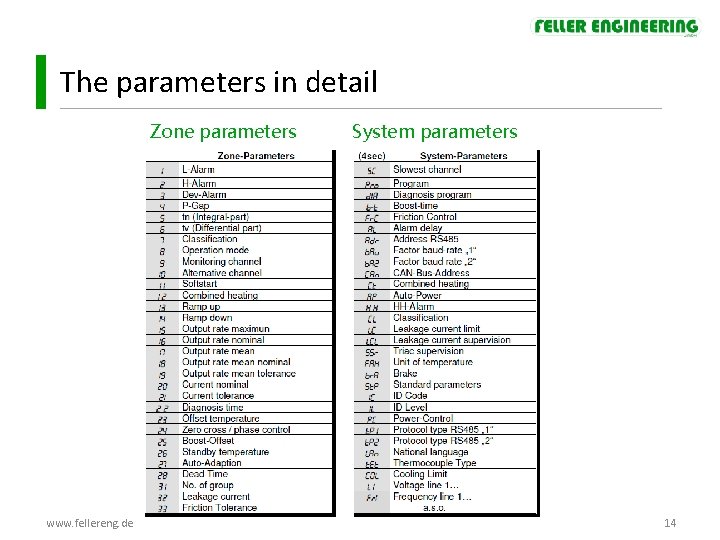
Setting the Functions § The setting of the functions are carried out via parameter. § Zone parameters relate to each zone. § System parameters set the device function. Zone parameters www. fellereng. de System parameters 13
The parameters in detail Zone parameters www. fellereng. de System parameters 14
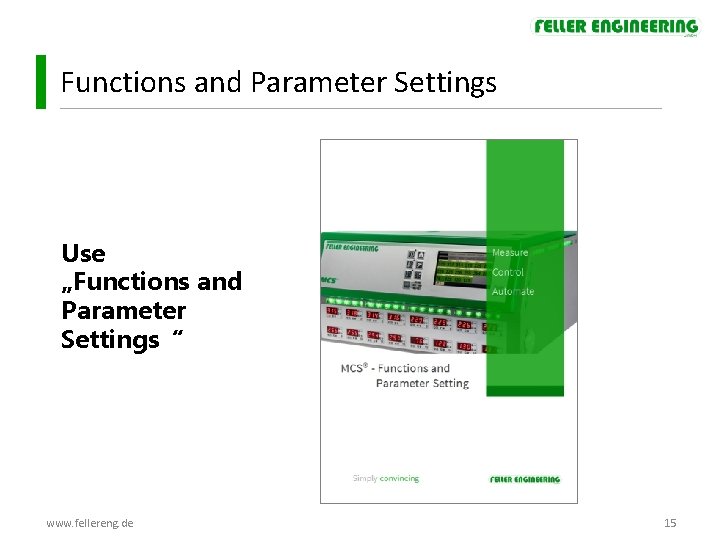
Functions and Parameter Settings Use „Functions and Parameter Settings“ www. fellereng. de 15
Functions and Parameter Settings t s o m e h t s e Funktionen … und n o t Parameter rtan o p im Beschreibung im Dokument: www. fellereng. de 16
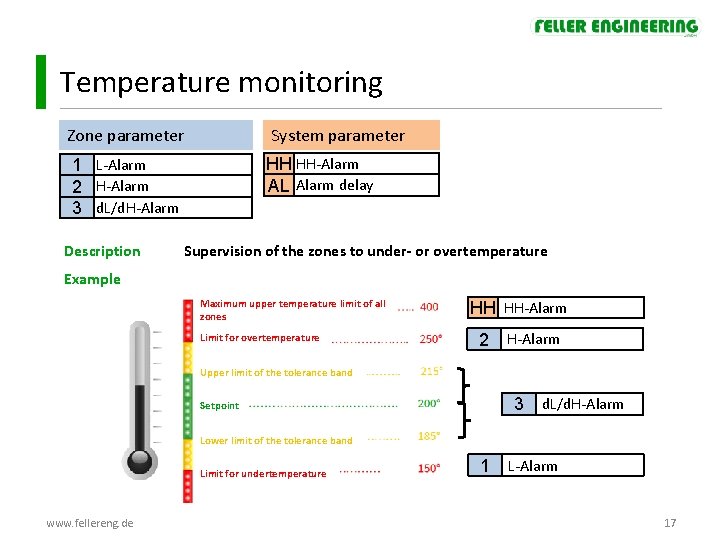
Temperature monitoring Zone parameter System parameter HH HH-Alarm AL Alarm delay 1 L-Alarm 2 H-Alarm 3 d. L/d. H-Alarm Description Supervision of the zones to under- or overtemperature Example Maximum upper temperature limit of all zones Limit for overtemperature HH HH-Alarm 2 H-Alarm Upper limit of the tolerance band 3 Setpoint d. L/d. H-Alarm Lower limit of the tolerance band Limit for undertemperature www. fellereng. de 1 L-Alarm 17
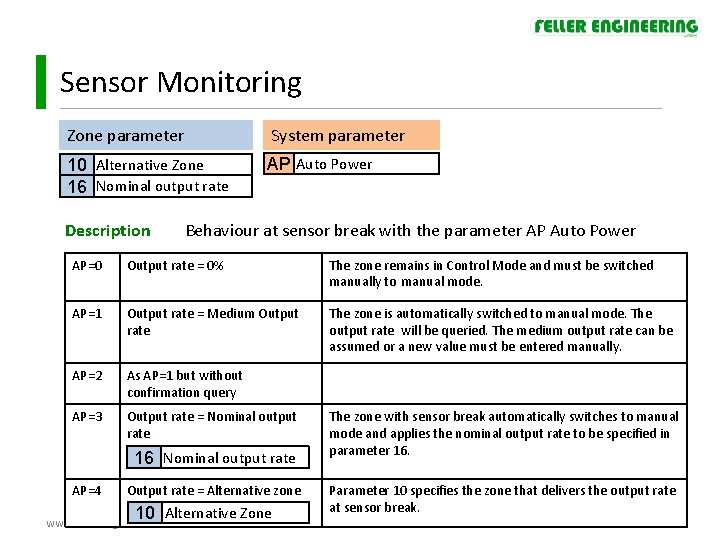
Sensor Monitoring Zone parameter System parameter 10 Alternative Zone 16 Nominal output rate AP Auto Power Description Behaviour at sensor break with the parameter AP Auto Power AP=0 Output rate = 0% The zone remains in Control Mode and must be switched manually to manual mode. AP=1 Output rate = Medium Output rate The zone is automatically switched to manual mode. The output rate will be queried. The medium output rate can be assumed or a new value must be entered manually. AP=2 As AP=1 but without confirmation query AP=3 Output rate = Nominal output rate 16 Nominal output rate AP=4 Output rate = Alternative zone www. fellereng. de 10 Alternative Zone The zone with sensor break automatically switches to manual mode and applies the nominal output rate to be specified in parameter 16. Parameter 10 specifies the zone that delivers the output rate at sensor break. 18
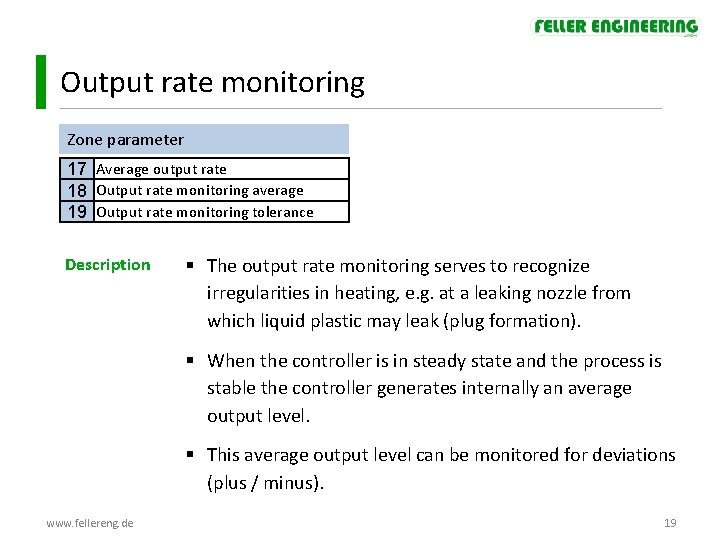
Output rate monitoring Zone parameter 17 Average output rate 18 Output rate monitoring average 19 Output rate monitoring tolerance Description § The output rate monitoring serves to recognize irregularities in heating, e. g. at a leaking nozzle from which liquid plastic may leak (plug formation). § When the controller is in steady state and the process is stable the controller generates internally an average output level. § This average output level can be monitored for deviations (plus / minus). www. fellereng. de 19
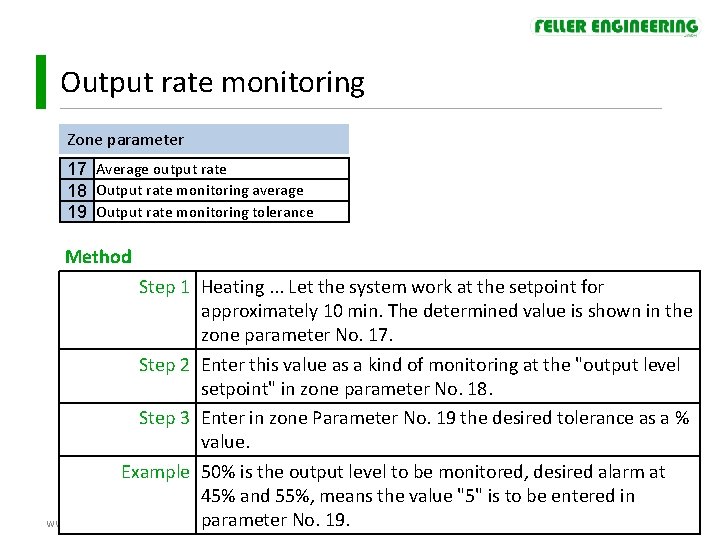
Output rate monitoring Zone parameter 17 Average output rate 18 Output rate monitoring average 19 Output rate monitoring tolerance Method Step 1 Heating. . . Let the system work at the setpoint for approximately 10 min. The determined value is shown in the zone parameter No. 17. Step 2 Enter this value as a kind of monitoring at the "output level setpoint" in zone parameter No. 18. Step 3 Enter in zone Parameter No. 19 the desired tolerance as a % value. Example 50% is the output level to be monitored, desired alarm at 45% and 55%, means the value "5" is to be entered in parameter No. 19. www. fellereng. de 20
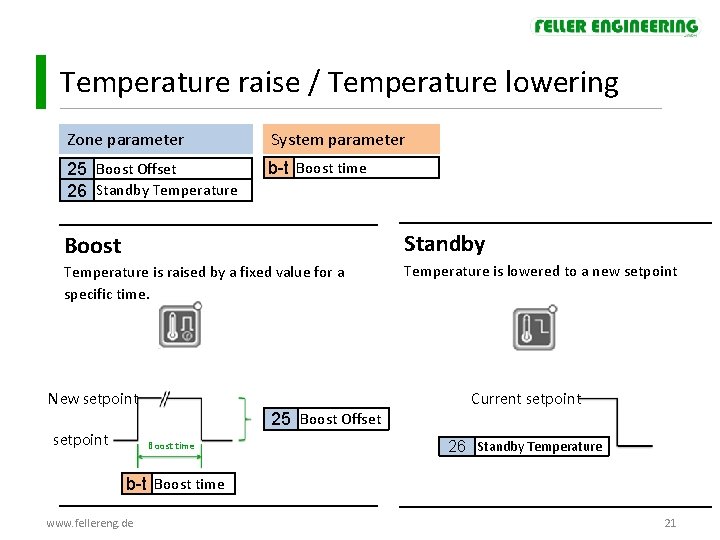
Temperature raise / Temperature lowering Zone parameter System parameter 25 Boost Offset 26 Standby Temperature b-t Boost time Boost Standby Temperature is raised by a fixed value for a specific time. . Temperature is lowered to a new setpoint New setpoint Current setpoint 25 Boost Offset setpoint Boost time 26 Standby Temperature b-t Boost time www. fellereng. de 21
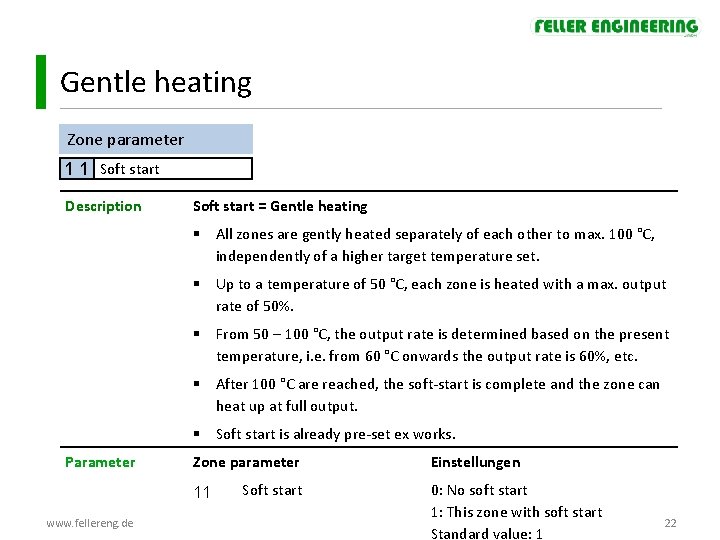
Gentle heating Zone parameter 1 1 Soft start Description Soft start = Gentle heating § All zones are gently heated separately of each other to max. 100 °C, independently of a higher target temperature set. § Up to a temperature of 50 °C, each zone is heated with a max. output rate of 50%. § From 50 – 100 °C, the output rate is determined based on the present temperature, i. e. from 60 °C onwards the output rate is 60%, etc. § After 100 °C are reached, the soft-start is complete and the zone can heat up at full output. § Soft start is already pre-set ex works. Parameter Zone parameter 11 www. fellereng. de Soft start Einstellungen 0: No soft start 1: This zone with soft start Standard value: 1 22
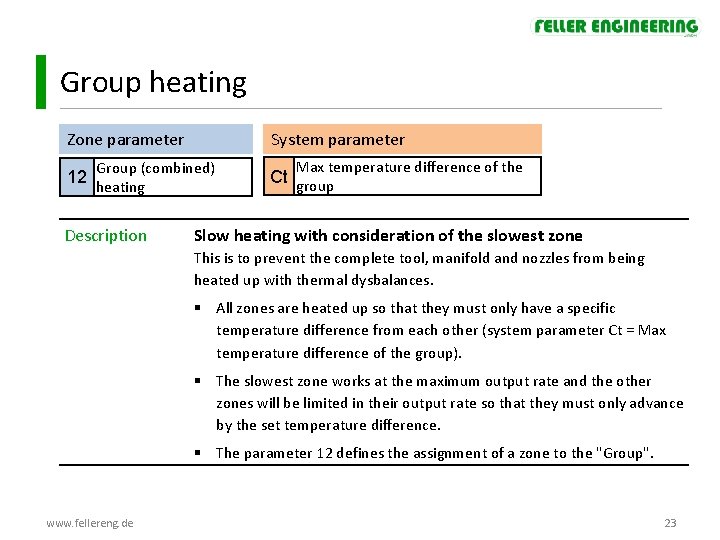
Group heating Zone parameter System parameter Group (combined) 12 heating Description Max temperature difference of the Ct group Slow heating with consideration of the slowest zone This is to prevent the complete tool, manifold and nozzles from being heated up with thermal dysbalances. § All zones are heated up so that they must only have a specific temperature difference from each other (system parameter Ct = Max temperature difference of the group). § The slowest zone works at the maximum output rate and the other zones will be limited in their output rate so that they must only advance by the set temperature difference. § The parameter 12 defines the assignment of a zone to the "Group". www. fellereng. de 23
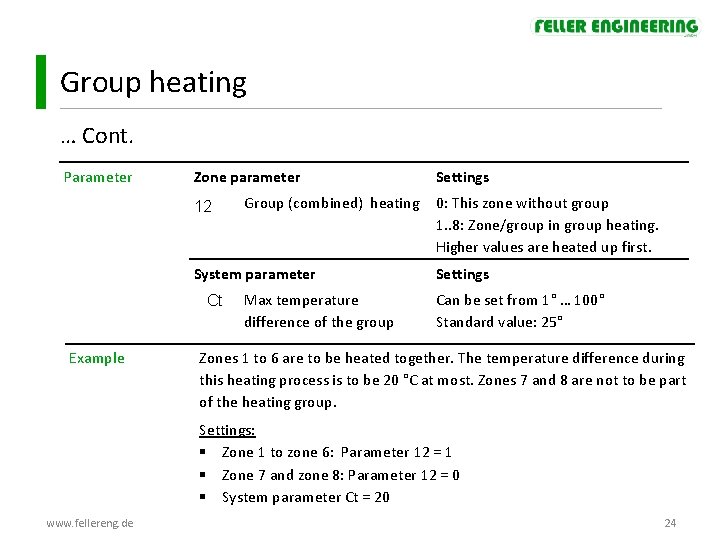
Group heating … Cont. Parameter Zone parameter 12 Group (combined) heating System parameter Ct Example Max temperature difference of the group Settings 0: This zone without group 1. . 8: Zone/group in group heating. Higher values are heated up first. Settings Can be set from 1° … 100° Standard value: 25° Zones 1 to 6 are to be heated together. The temperature difference during this heating process is to be 20 °C at most. Zones 7 and 8 are not to be part of the heating group. Settings: § Zone 1 to zone 6: Parameter 12 = 1 § Zone 7 and zone 8: Parameter 12 = 0 § System parameter Ct = 20 www. fellereng. de 24
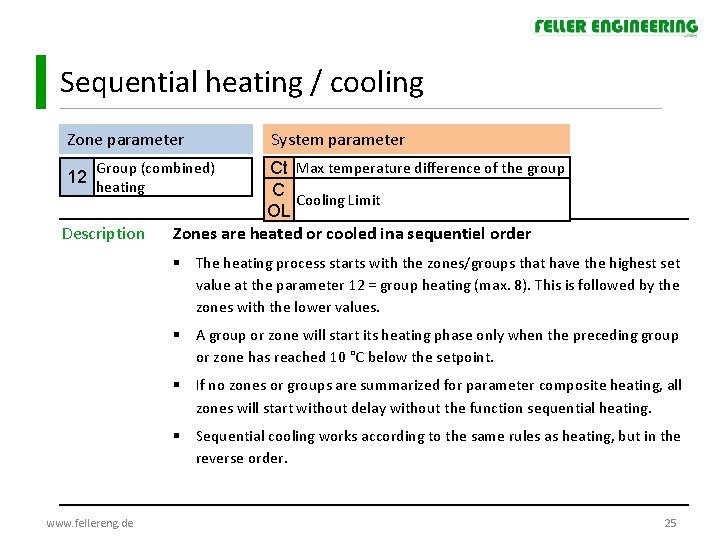
Sequential heating / cooling Zone parameter System parameter Group (combined) 12 heating Description Ct Max temperature difference of the group C Cooling Limit OL Zones are heated or cooled ina sequentiel order § The heating process starts with the zones/groups that have the highest set value at the parameter 12 = group heating (max. 8). This is followed by the zones with the lower values. § A group or zone will start its heating phase only when the preceding group or zone has reached 10 °C below the setpoint. § If no zones or groups are summarized for parameter composite heating, all zones will start without delay without the function sequential heating. § Sequential cooling works according to the same rules as heating, but in the reverse order. www. fellereng. de 25
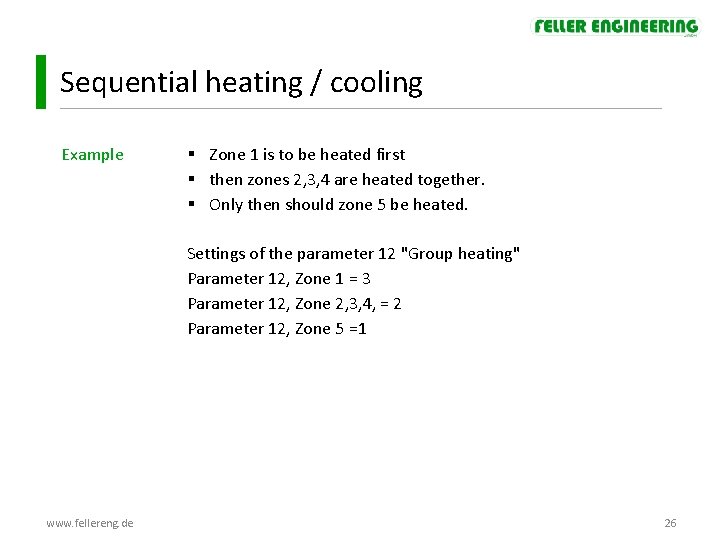
Sequential heating / cooling Example § Zone 1 is to be heated first § then zones 2, 3, 4 are heated together. § Only then should zone 5 be heated. Settings of the parameter 12 "Group heating" Parameter 12, Zone 1 = 3 Parameter 12, Zone 2, 3, 4, = 2 Parameter 12, Zone 5 =1 www. fellereng. de 26
Content MCS product training Basics Functionality Commissioning Excercises www. fellereng. de 27
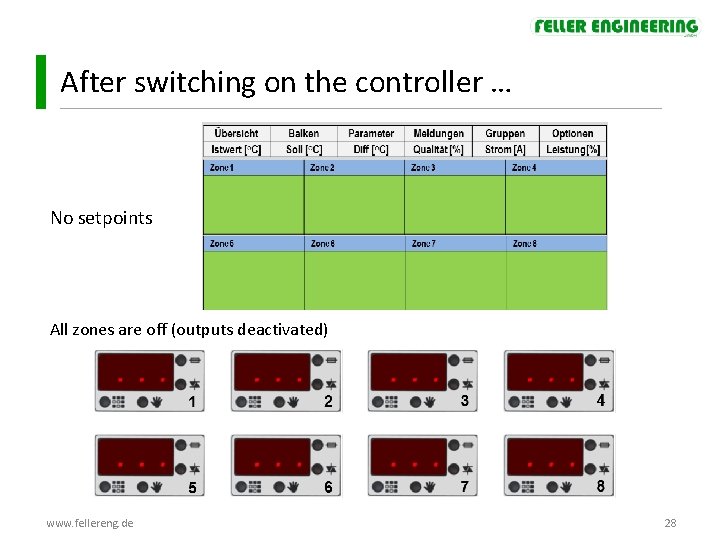
After switching on the controller … No setpoints All zones are off (outputs deactivated) www. fellereng. de 28
Display - and operating elements Outputs On / Off Boost Standby Home Parameter settings Operating mode Zone display Operating condition (green, yellow, red) www. fellereng. de 29
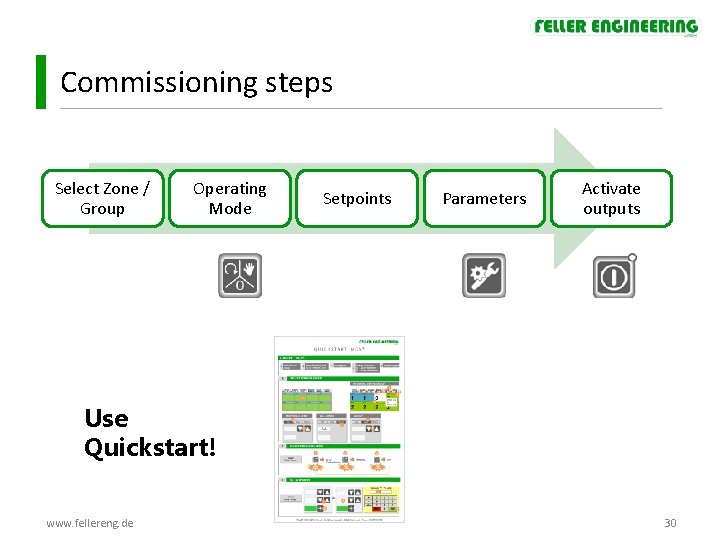
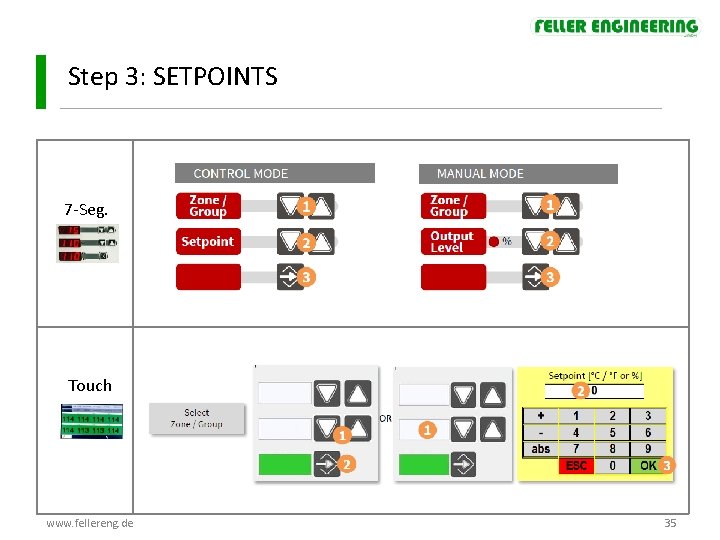
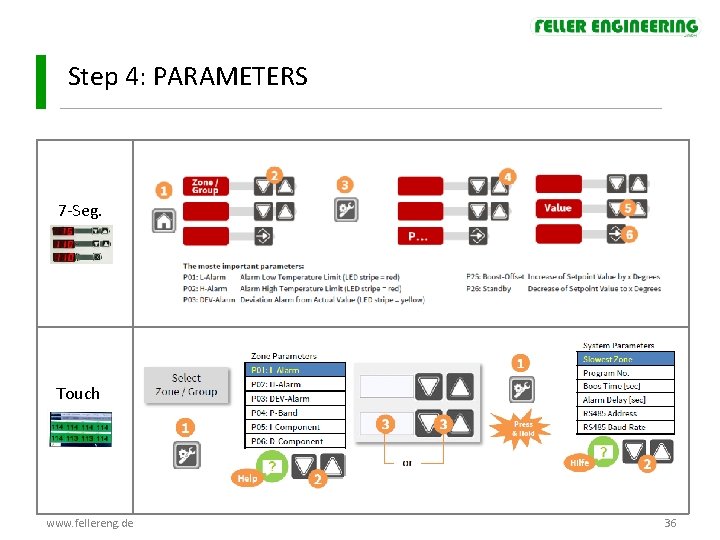
Commissioning steps Select Zone / Group Operating Mode Setpoints Parameters Activate outputs Use Quickstart! www. fellereng. de 30
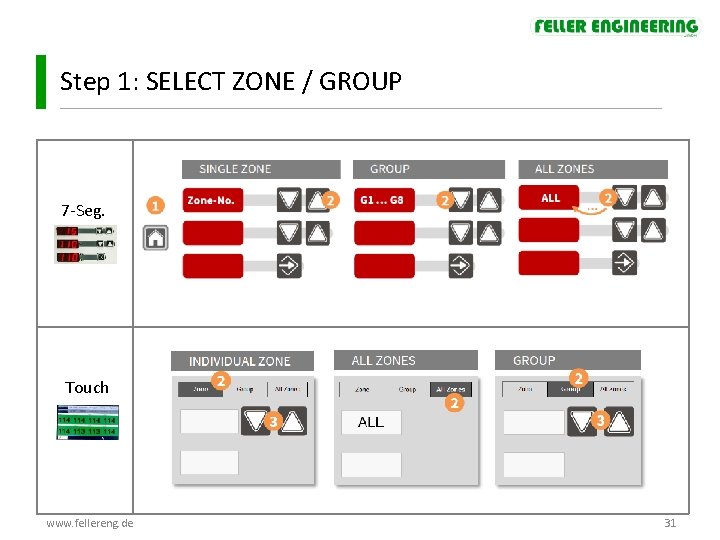
Step 1: SELECT ZONE / GROUP 7 -Seg. Touch www. fellereng. de 31
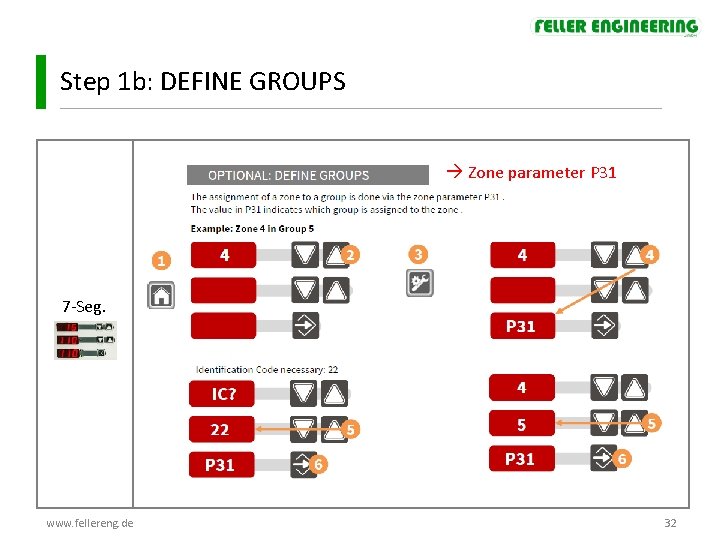
Step 1 b: DEFINE GROUPS Zone parameter P 31 7 -Seg. www. fellereng. de 32
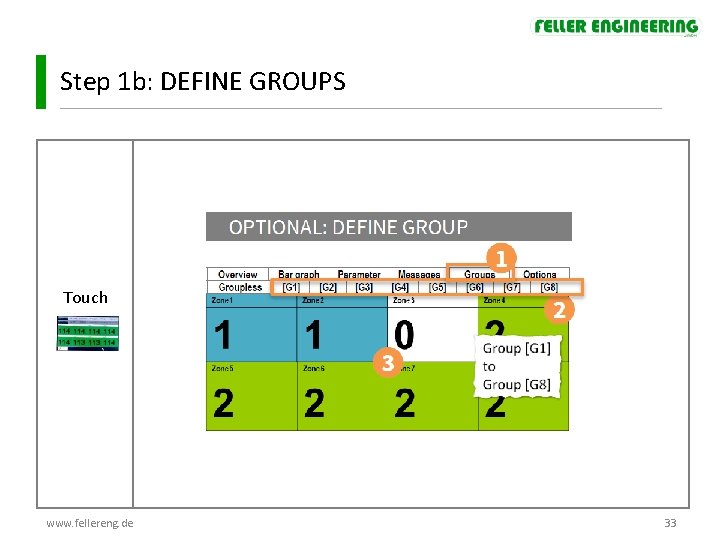
Step 1 b: DEFINE GROUPS Touch www. fellereng. de 33
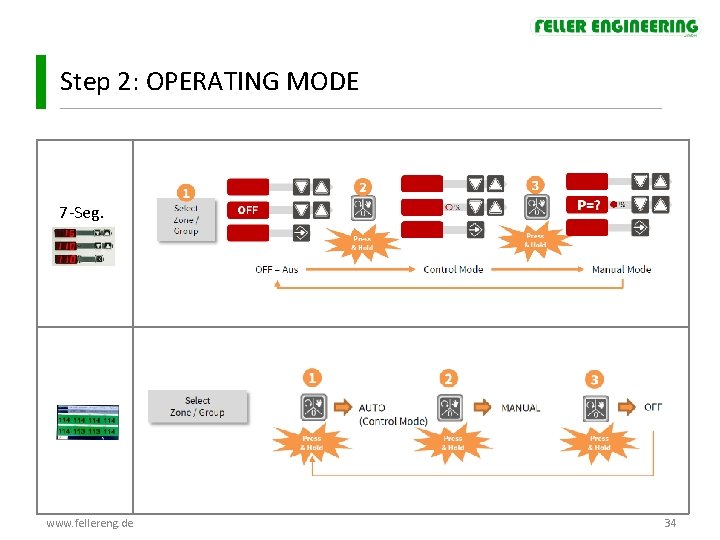
Step 2: OPERATING MODE 7 -Seg. www. fellereng. de 34
Step 3: SETPOINTS 7 -Seg. Touch www. fellereng. de 35
Step 4: PARAMETERS 7 -Seg. Systemparameter: Touch www. fellereng. de 36
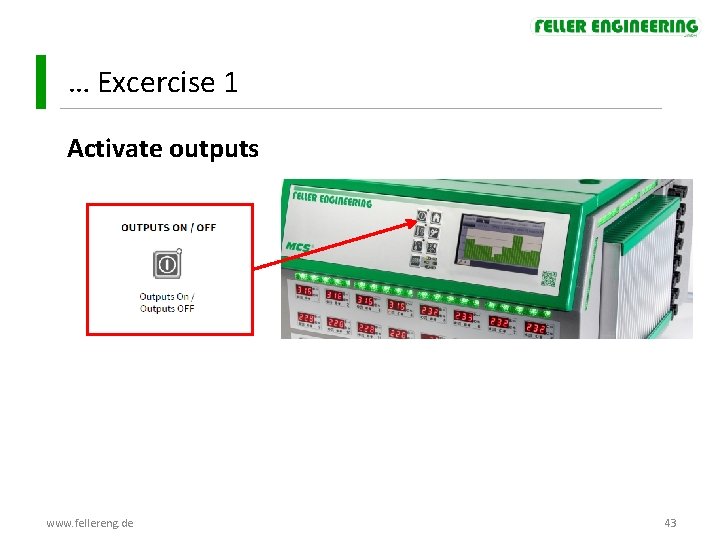
Step 5: ACTIVATE OUTPUTS www. fellereng. de 37
After activating the outputs … with factory settings: § Classification The controller calculates the control parameters P I D (while the flashing LED strip) § Soft-start The tool is in soft start heated (increasing output ratio with increasing temperature) § Upon reaching 100 ° C the soft start is complete § Group heating Group Heating with maximum temperature deviation of the zones of 25 ° C (standard value of system parameter “Ct”) www. fellereng. de 38
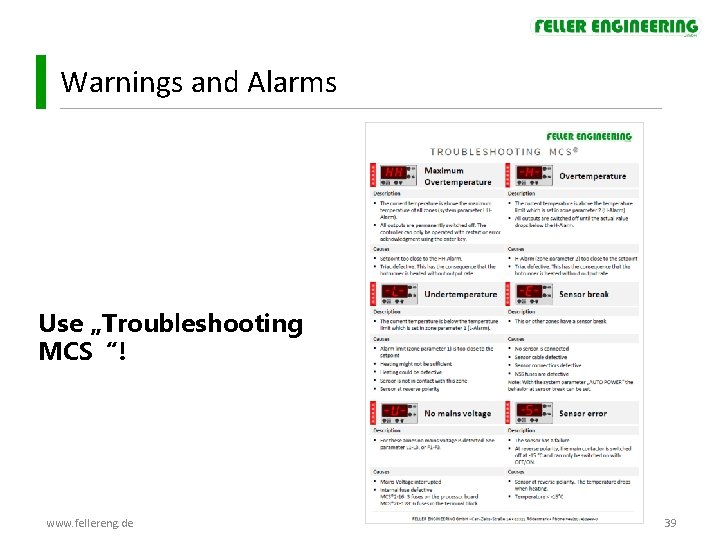
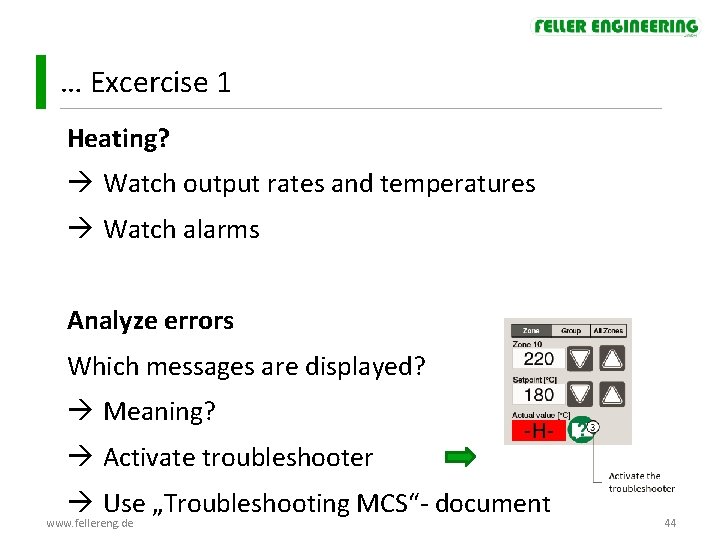
Warnings and Alarms Use „Troubleshooting MCS“! www. fellereng. de 39
Content MCS product training Basics Functionality Commissioning Excercises www. fellereng. de 40
Exercises § Groups § Operating mode § Setpoints § Temperature monitoring - Low Alarm - High Alarm - Tolerance band § Behavour at sensor break § Heating: in groups, sequential, soft-start § BOOST / STANDBY § Programs www. fellereng. de 41
Excercise 1 Groups: Zone 1 to 3 = Group 1 Operating mode Setpoints: All zones: setpoint 80° C Temperature monitoring § Low Alarm: 50° § High Alarm: 110° § Maximum deviation to the setpoint: 20° § Maximum temperature of all zones: 150° www. fellereng. de 42
… Excercise 1 Activate outputs www. fellereng. de 43
… Excercise 1 Heating? Watch output rates and temperatures Watch alarms Analyze errors Which messages are displayed? Meaning? Activate troubleshooter Use „Troubleshooting MCS“- document www. fellereng. de 44
Excercise 2 Behavour at sensor break § A zone should automatically switch to manual mode and continue to work with the output level of an alternative zone Simulate sensor break www. fellereng. de 45
Excercise 3 Sequentiel Heating § First Zone 1 § Then Zone 2 § Finally Zone 3 § Max. temperature difference +20° www. fellereng. de 46
Excercise 4 no Soft start and no group heating Watch output rates and temperatures www. fellereng. de 47
Excercise 5 Boost § Boost-Offset: 10° § Boost-time: 30 sec Standby § Standby-Temperature: 60° www. fellereng. de 48
Excercise 6 Programs § Current settings are saved in Program 1 § Select new Programm 2 and change: § § New alarm limits New setpoints § Select Programm 1 again § www. fellereng. de Verify settings of program 1 49