
MCS EXV PID CONTROL Operator Training Instructions Version





- Slides: 24
MCS EXV PID CONTROL Operator Training Instructions Version 1. 8 F - 06 March 2021
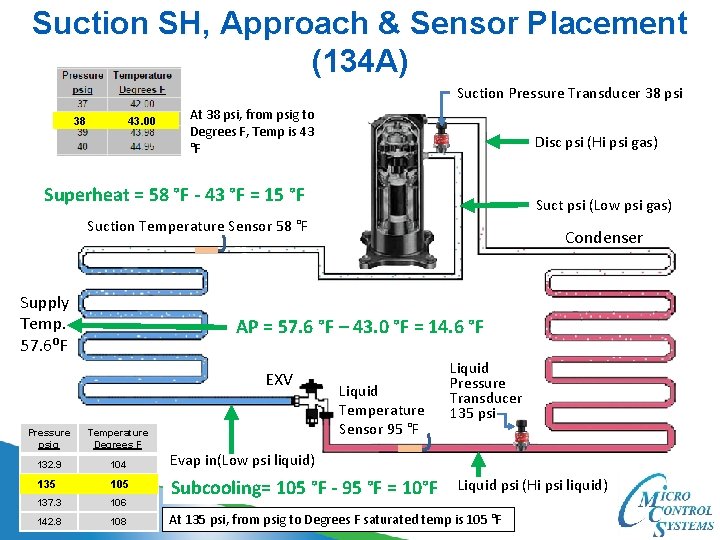
Suction SH, Approach & Sensor Placement (134 A) Suction Pressure Transducer 38 psi 38 43. 00 At 38 psi, from psig to Degrees F, Temp is 43 °F Disc psi (Hi psi gas) Superheat = 58 °F - 43 °F = 15 °F Suct psi (Low psi gas) Suction Temperature Sensor 58 °F Supply Temp. 57. 6⁰F Condenser AP = 57. 6 °F – 43. 0 °F = 14. 6 °F EXV Temperature Evaporator Liquid Temperature Sensor 95 °F Pressure psig Degrees F 132. 9 104 Evap in(Low psi liquid) 135 105 137. 3 106 Subcooling= 105 °F - 95 °F = 10°F 142. 8 108 Liquid Pressure Transducer 135 psi Liquid psi (Hi psi liquid) At 135 psi, from psig to Degrees F saturated temp is 105 °F
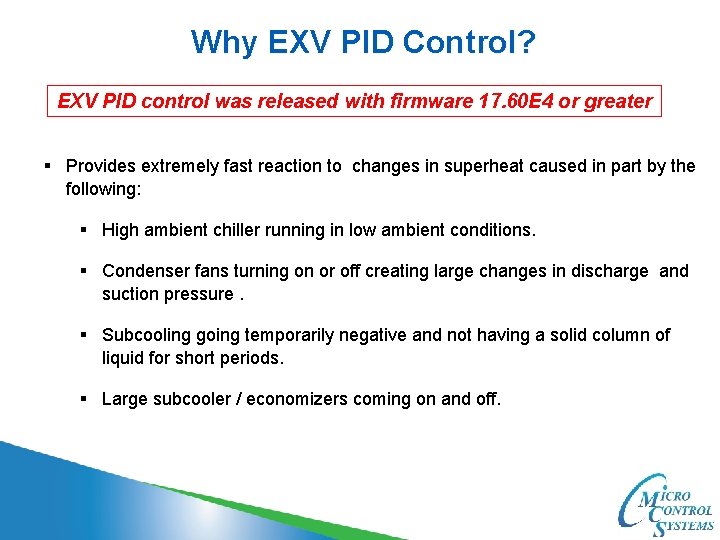
Why EXV PID Control? EXV PID control was released with firmware 17. 60 E 4 or greater § Provides extremely fast reaction to changes in superheat caused in part by the following: § High ambient chiller running in low ambient conditions. § Condenser fans turning on or off creating large changes in discharge and suction pressure. § Subcooling going temporarily negative and not having a solid column of liquid for short periods. § Large subcooler / economizers coming on and off.
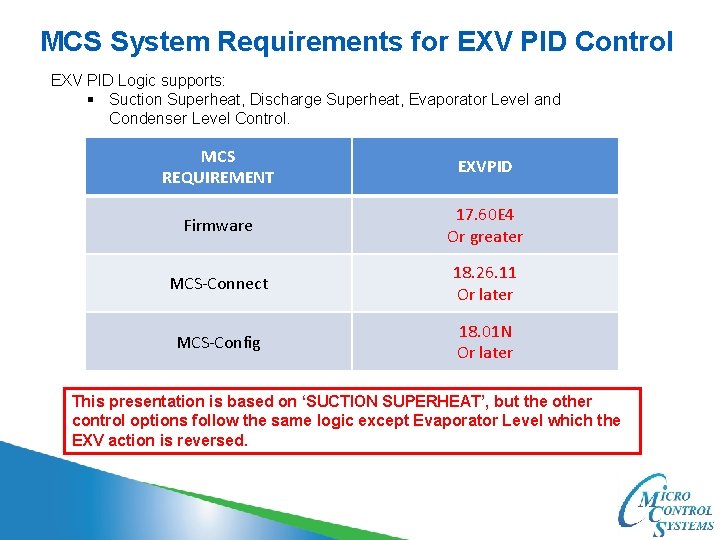
MCS System Requirements for EXV PID Control EXV PID Logic supports: § Suction Superheat, Discharge Superheat, Evaporator Level and Condenser Level Control. MCS REQUIREMENT EXVPID Firmware 17. 60 E 4 Or greater MCS-Connect 18. 26. 11 Or later MCS-Config 18. 01 N Or later This presentation is based on ‘SUCTION SUPERHEAT’, but the other control options follow the same logic except Evaporator Level which the EXV action is reversed.
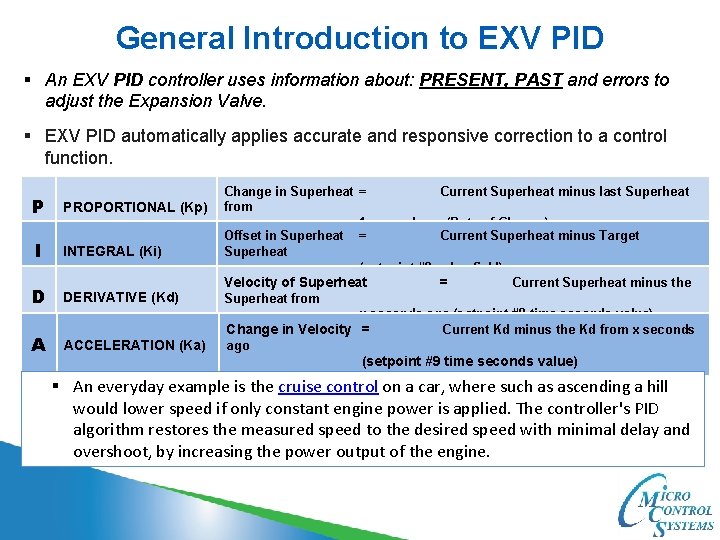
General Introduction to EXV PID § An EXV PID controller uses information about: PRESENT, PAST and errors to adjust the Expansion Valve. § EXV PID automatically applies accurate and responsive correction to a control function. P PROPORTIONAL (Kp) I INTEGRAL (Ki) D DERIVATIVE (Kd) A ACCELERATION (Ka) Change in Superheat = Current Superheat minus last Superheat from 1 second ago (Rate of Change) Offset in Superheat = Current Superheat minus Target Superheat (setpoint #9 value field) Velocity of Superheat = Current Superheat minus the Superheat from x seconds ago (setpoint #9 time seconds value) Change in Velocity = Current Kd minus the Kd from x seconds ago (setpoint #9 time seconds value) § An everyday example is the cruise control on a car, where such as ascending a hill would lower speed if only constant engine power is applied. The controller's PID algorithm restores the measured speed to the desired speed with minimal delay and overshoot, by increasing the power output of the engine.
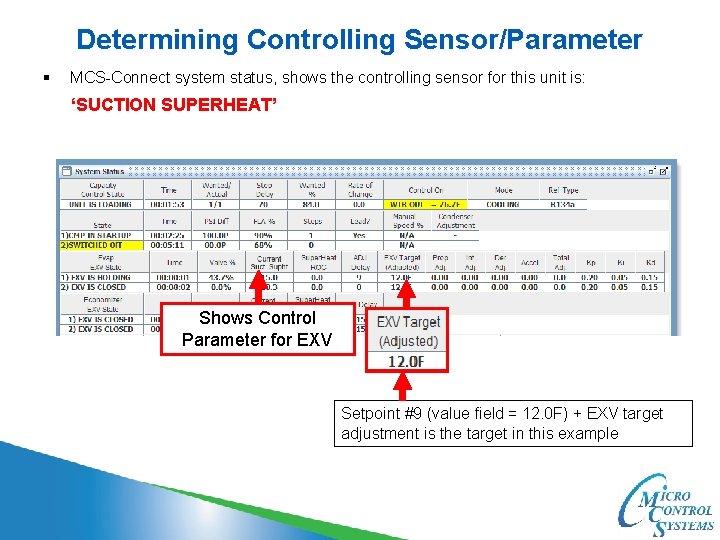
Determining Controlling Sensor/Parameter § MCS-Connect system status, shows the controlling sensor for this unit is: ‘SUCTION SUPERHEAT’ Shows Control Parameter for EXV Setpoint #9 (value field = 12. 0 F) + EXV target adjustment is the target in this example
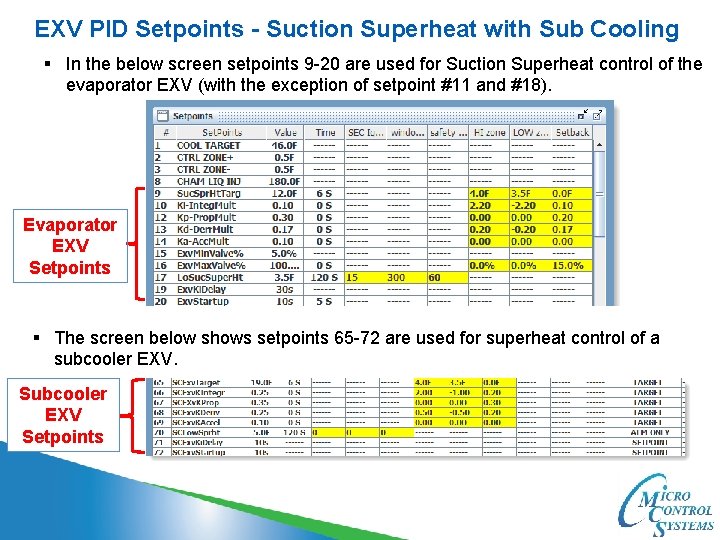
EXV PID Setpoints - Suction Superheat with Sub Cooling § In the below screen setpoints 9 -20 are used for Suction Superheat control of the evaporator EXV (with the exception of setpoint #11 and #18). Evaporator EXV Setpoints § The screen below shows setpoints 65 -72 are used for superheat control of a subcooler EXV. Subcooler EXV Setpoints
Calculations for the adjustment to EXV valve Calculations are done every second § MCS EXV PID algorithm uses two different sets of K multipliers to calculate adjustments to EXV on how far the superheat is from the superheat target, (setpoint #9 value field). FAST multipliers PID multipliers setpoints SLOW multipliers
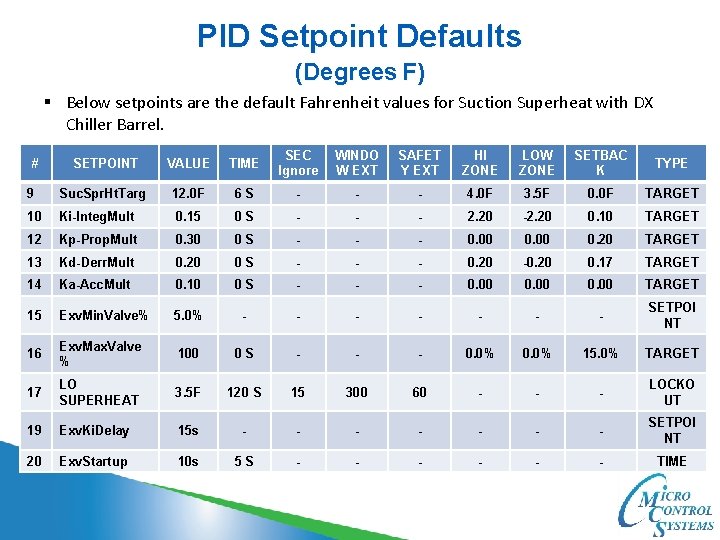
PID Setpoint Defaults (Degrees F) § Below setpoints are the default Fahrenheit values for Suction Superheat with DX Chiller Barrel. SETPOINT VALUE TIME SEC Ignore WINDO W EXT SAFET Y EXT HI ZONE LOW ZONE SETBAC K TYPE 9 Suc. Spr. Ht. Targ 12. 0 F 6 S - - - 4. 0 F 3. 5 F 0. 0 F TARGET 10 Ki-Integ. Mult 0. 15 0 S - - - 2. 20 -2. 20 0. 10 TARGET 12 Kp-Prop. Mult 0. 30 0 S - - - 0. 00 0. 20 TARGET 13 Kd-Derr. Mult 0. 20 0 S - - - 0. 20 -0. 20 0. 17 TARGET 14 Ka-Acc. Mult 0. 10 0 S - - - 0. 00 TARGET 15 Exv. Min. Valve% 5. 0% - - - - SETPOI NT 16 Exv. Max. Valve % 100 0 S - - - 0. 0% 15. 0% TARGET 17 LO SUPERHEAT 3. 5 F 120 S 15 300 60 - - - LOCKO UT 19 Exv. Ki. Delay 15 s - - - - SETPOI NT 20 Exv. Startup 10 s 5 S - - - TIME #
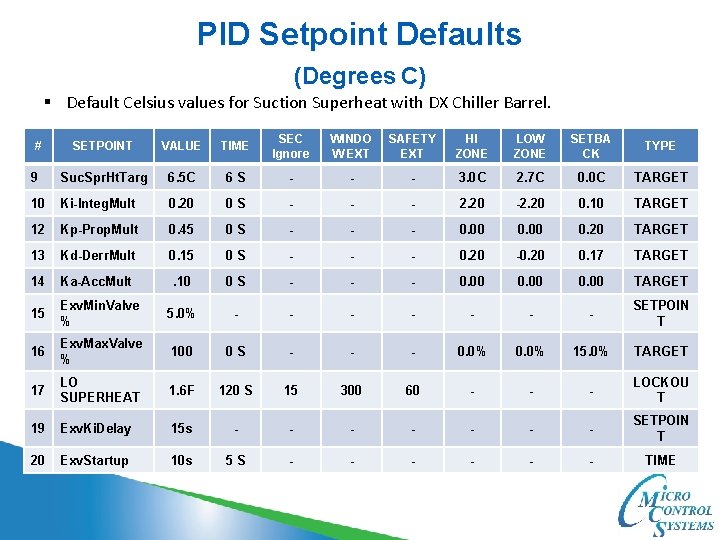
PID Setpoint Defaults (Degrees C) § Default Celsius values for Suction Superheat with DX Chiller Barrel. SETPOINT VALUE TIME SEC Ignore WINDO W EXT SAFETY EXT HI ZONE LOW ZONE SETBA CK TYPE 9 Suc. Spr. Ht. Targ 6. 5 C 6 S - - - 3. 0 C 2. 7 C 0. 0 C TARGET 10 Ki-Integ. Mult 0. 20 0 S - - - 2. 20 -2. 20 0. 10 TARGET 12 Kp-Prop. Mult 0. 45 0 S - - - 0. 00 0. 20 TARGET 13 Kd-Derr. Mult 0. 15 0 S - - - 0. 20 -0. 20 0. 17 TARGET 14 Ka-Acc. Mult . 10 0 S - - - 0. 00 TARGET 15 Exv. Min. Valve % 5. 0% - - - - SETPOIN T 16 Exv. Max. Valve % 100 0 S - - - 0. 0% 15. 0% TARGET 17 LO SUPERHEAT 1. 6 F 120 S 15 300 60 - - - LOCKOU T 19 Exv. Ki. Delay 15 s - - - - SETPOIN T 20 Exv. Startup 10 s 5 S - - - TIME #
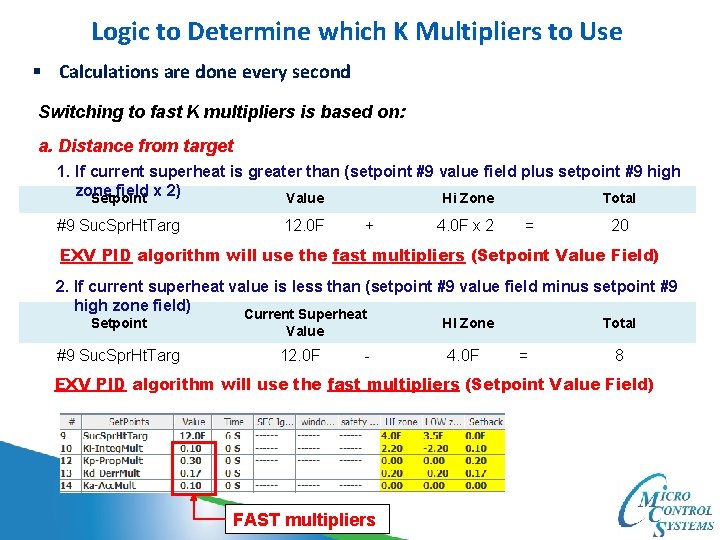
Logic to Determine which K Multipliers to Use § Calculations are done every second Switching to fast K multipliers is based on: a. Distance from target 1. If current superheat is greater than (setpoint #9 value field plus setpoint #9 high zone field x 2) Setpoint Value Hi Zone Total #9 Suc. Spr. Ht. Targ 12. 0 F + 4. 0 F x 2 = 20 EXV PID algorithm will use the fast multipliers (Setpoint Value Field) 2. If current superheat value is less than (setpoint #9 value field minus setpoint #9 high zone field) Current Superheat Setpoint #9 Suc. Spr. Ht. Targ HI Zone Value 12. 0 F - 4. 0 F Total = 8 EXV PID algorithm will use the fast multipliers (Setpoint Value Field) FAST multipliers
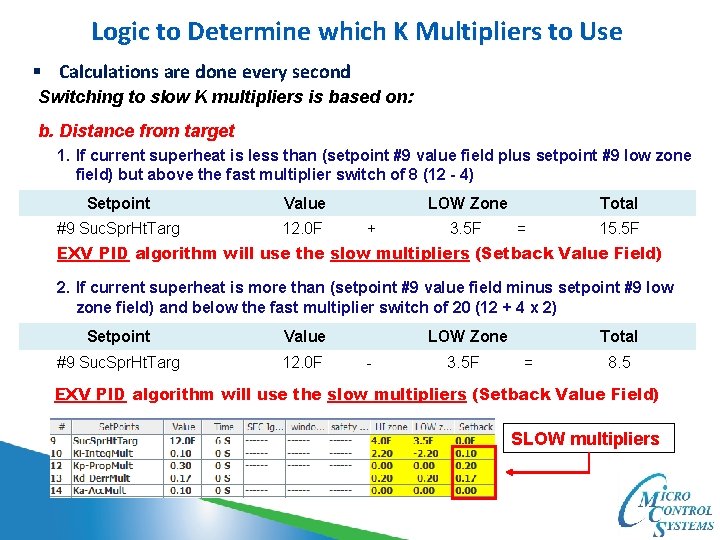
Logic to Determine which K Multipliers to Use § Calculations are done every second Switching to slow K multipliers is based on: b. Distance from target 1. If current superheat is less than (setpoint #9 value field plus setpoint #9 low zone field) but above the fast multiplier switch of 8 (12 - 4) Setpoint Value #9 Suc. Spr. Ht. Targ 12. 0 F LOW Zone + 3. 5 F Total = 15. 5 F EXV PID algorithm will use the slow multipliers (Setback Value Field) 2. If current superheat is more than (setpoint #9 value field minus setpoint #9 low zone field) and below the fast multiplier switch of 20 (12 + 4 x 2) Setpoint Value #9 Suc. Spr. Ht. Targ 12. 0 F LOW Zone - 3. 5 F Total = 8. 5 EXV PID algorithm will use the slow multipliers (Setback Value Field) SLOW multipliers
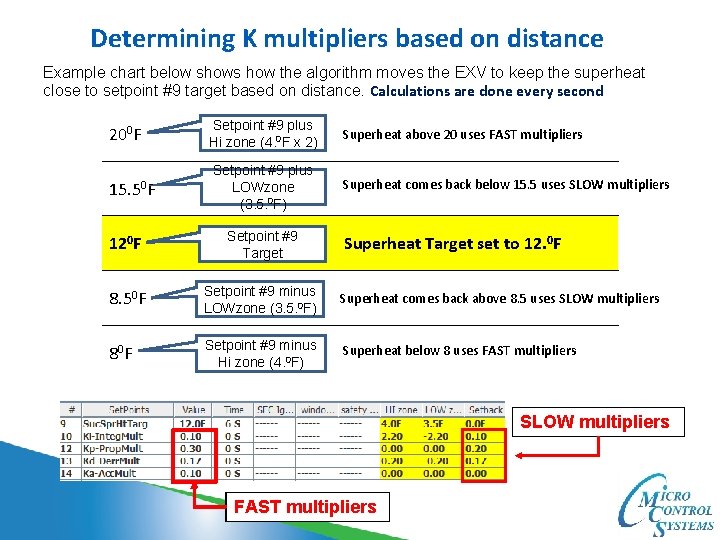
Determining K multipliers based on distance Example chart below shows how the algorithm moves the EXV to keep the superheat close to setpoint #9 target based on distance. Calculations are done every second 200 F 15. 50 F Setpoint #9 plus Hi zone (4. 0 F x 2) Setpoint #9 plus LOWzone (3. 5. 0 F) Superheat above 20 uses FAST multipliers Superheat comes back below 15. 5 uses SLOW multipliers 120 F Setpoint #9 Target 8. 50 F Setpoint #9 minus LOWzone (3. 5. 0 F) Superheat comes back above 8. 5 uses SLOW multipliers 80 F Setpoint #9 minus Hi zone (4. 0 F) Superheat below 8 uses FAST multipliers Superheat Target set to 12. 0 F SLOW multipliers FAST multipliers
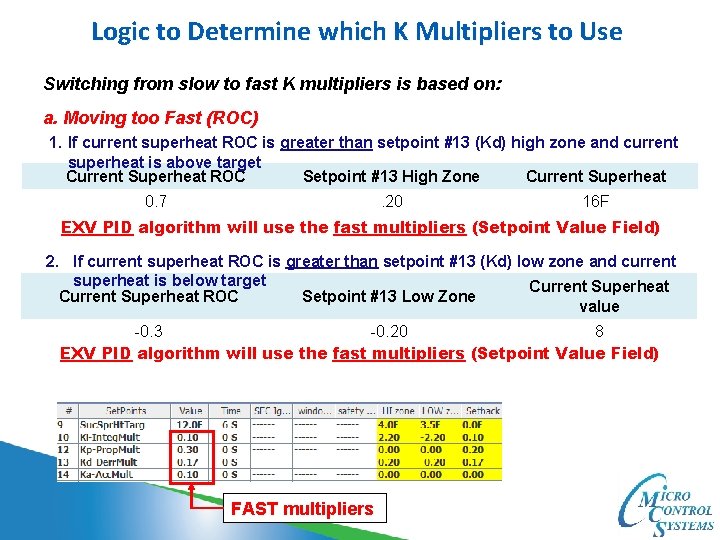
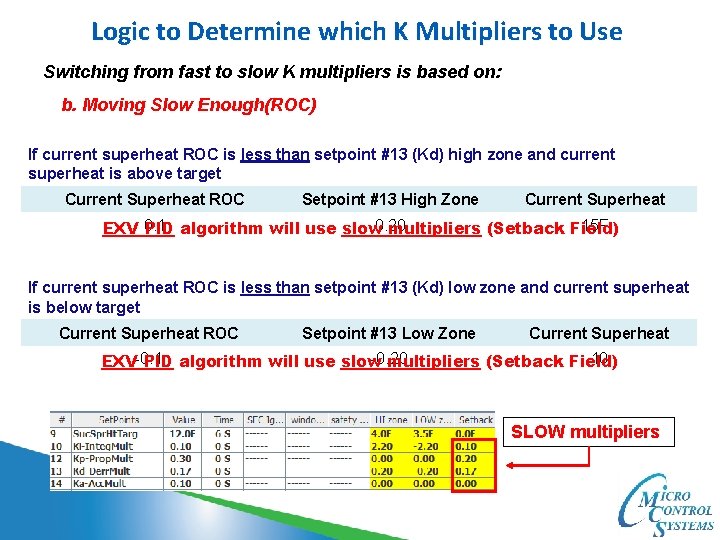
Logic to Determine which K Multipliers to Use Switching from slow to fast K multipliers is based on: a. Moving too Fast (ROC) 1. If current superheat ROC is greater than setpoint #13 (Kd) high zone and current superheat is above target Current Superheat ROC Setpoint #13 High Zone Current Superheat 0. 7 . 20 16 F EXV PID algorithm will use the fast multipliers (Setpoint Value Field) 2. If current superheat ROC is greater than setpoint #13 (Kd) low zone and current superheat is below target Current Superheat ROC Setpoint #13 Low Zone value -0. 3 -0. 20 8 EXV PID algorithm will use the fast multipliers (Setpoint Value Field) FAST multipliers
Logic to Determine which K Multipliers to Use Switching from fast to slow K multipliers is based on: b. Moving Slow Enough(ROC) If current superheat ROC is less than setpoint #13 (Kd) high zone and current superheat is above target Current Superheat ROC Setpoint #13 High Zone Current Superheat 15 F EXV 0. 1 PID algorithm will use slow 0. 20 multipliers (Setback Field) If current superheat ROC is less than setpoint #13 (Kd) low zone and current superheat is below target Current Superheat ROC Setpoint #13 Low Zone Current Superheat -0. 20 10 EXV-0. 1 PID algorithm will use slow multipliers (Setback Field) SLOW multipliers
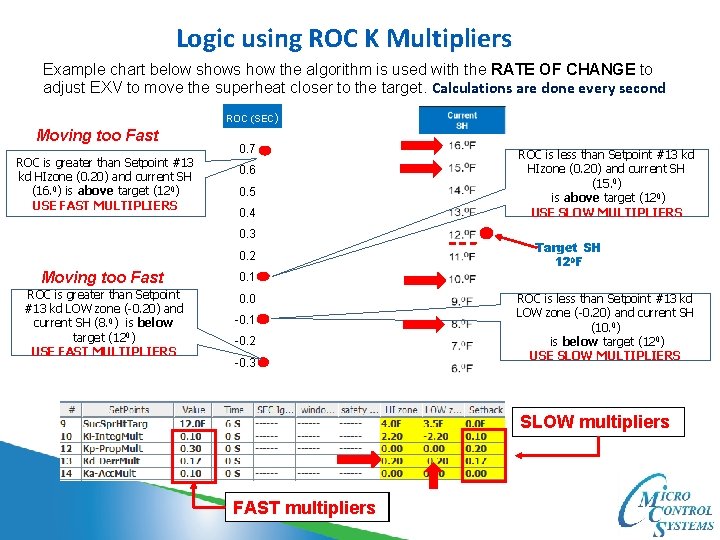
Logic using ROC K Multipliers Example chart below shows how the algorithm is used with the RATE OF CHANGE to adjust EXV to move the superheat closer to the target. Calculations are done every second ROC (SEC) Moving too Fast ROC is greater than Setpoint #13 kd HIzone (0. 20) and current SH (16. 0) is above target (120) USE FAST MULTIPLIERS 0. 7 0. 6 0. 5 0. 4 0. 3 0. 2 Moving too Fast ROC is greater than Setpoint #13 kd LOW zone (-0. 20) and current SH (8. 0) is below target (120) USE FAST MULTIPLIERS ROC is less than Setpoint #13 kd HIzone (0. 20) and current SH (15. 0) is above target (120) USE SLOW MULTIPLIERS Target SH 120 F 0. 1 0. 0 -0. 1 -0. 2 -0. 3 ROC is less than Setpoint #13 kd LOW zone (-0. 20) and current SH (10. 0) is below target (120) USE SLOW MULTIPLIERS SLOW multipliers FAST multipliers
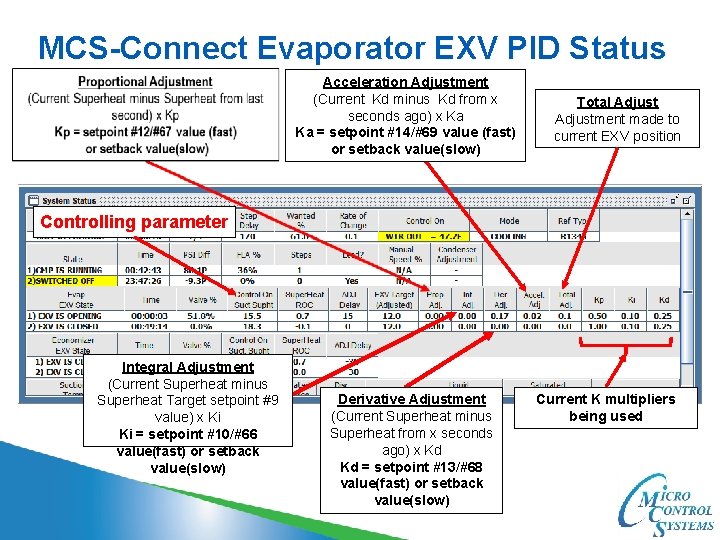
MCS-Connect Evaporator EXV PID Status Acceleration Adjustment (Current Kd minus Kd from x seconds ago) x Ka Ka = setpoint #14/#69 value (fast) or setback value(slow) Total Adjustment made to current EXV position Controlling parameter Integral Adjustment (Current Superheat minus Superheat Target setpoint #9 value) x Ki Ki = setpoint #10/#66 value(fast) or setback value(slow) Derivative Adjustment (Current Superheat minus Superheat from x seconds ago) x Kd Kd = setpoint #13/#68 value(fast) or setback value(slow) Current K multipliers being used
Allowing an Adjustments to the EXV Valve (When Ki & Kd are in opposite, we are going in the right direction) 1. When the Proportional adjust, Integral adjust, Derivative adjust and Acceleration all add up to be to. 1 or -. 1, the adjustment is made based on that number. 2. The Proportional adjust, Derivative adjust and Acceleration all run every second. 3. The Integral adjust uses setpoint #19 (Exv. Ki. Delay) as a delay before posting a value as long as; a. If the current Integral adjust (Ki) is > 0 and the current superheat > the current target plus setpoint #10 high zone field. b. If the current Integral adjust (Ki) is < 0 and the current superheat < the current target plus setpoint #10 low zone. Ki adjust Hi. Zone 12 plus 2. 20 = 14. 20 F 120 F Ki adjust LOW zone 12 plus -2. 20 = 9. 80 F Superheat Target No Ki Adjust in this area
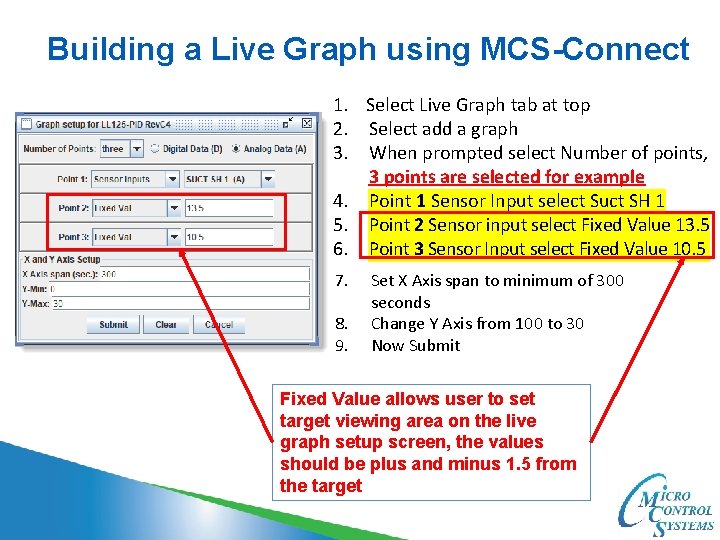
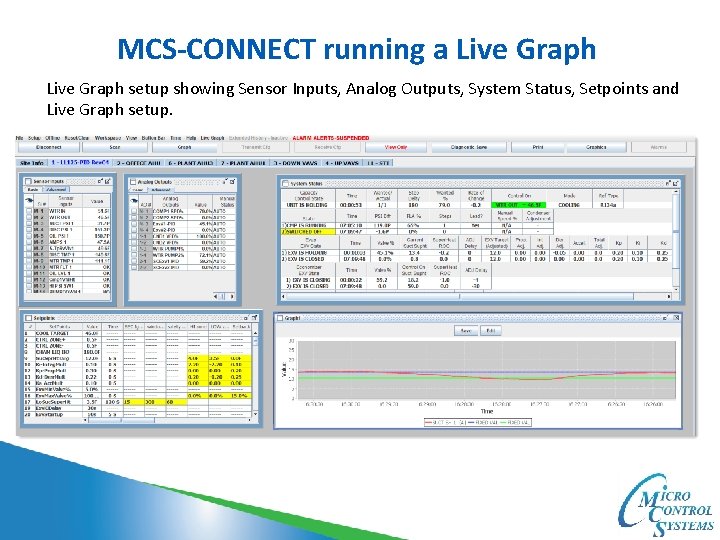
Building a Live Graph using MCS-Connect 1. Select Live Graph tab at top 2. Select add a graph 3. When prompted select Number of points, 3 points are selected for example 4. Point 1 Sensor Input select Suct SH 1 5. Point 2 Sensor input select Fixed Value 13. 5 6. Point 3 Sensor Input select Fixed Value 10. 5 7. 8. 9. Set X Axis span to minimum of 300 seconds Change Y Axis from 100 to 30 Now Submit Fixed Value allows user to set target viewing area on the live graph setup screen, the values should be plus and minus 1. 5 from the target
MCS-CONNECT running a Live Graph setup showing Sensor Inputs, Analog Outputs, System Status, Setpoints and Live Graph setup.
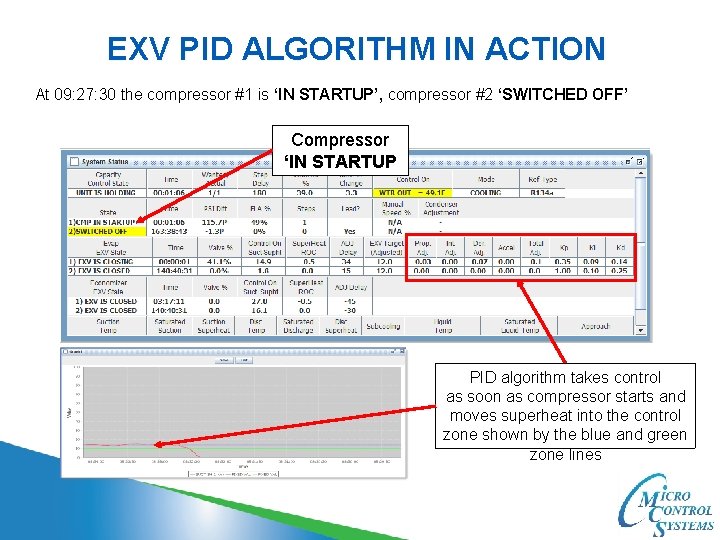
EXV PID ALGORITHM IN ACTION At 09: 27: 30 the compressor #1 is ‘IN STARTUP’, compressor #2 ‘SWITCHED OFF’ Compressor ‘IN STARTUP PID algorithm takes control as soon as compressor starts and moves superheat into the control zone shown by the blue and green zone lines
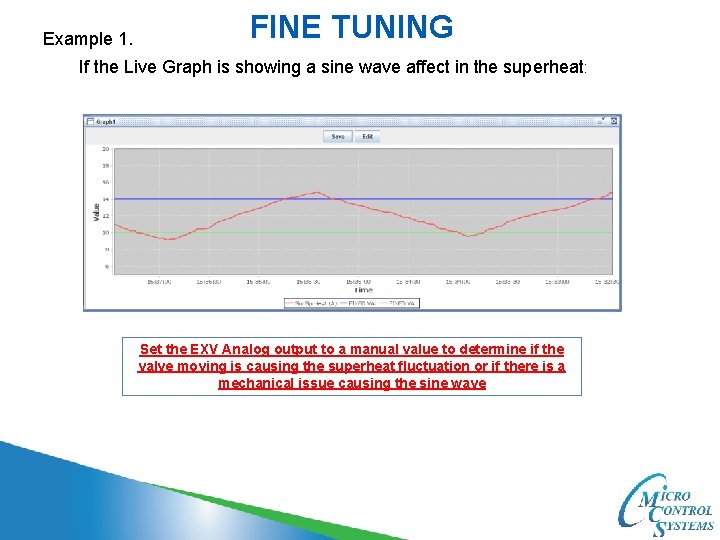
Example 1. FINE TUNING If the Live Graph is showing a sine wave affect in the superheat: Set the EXV Analog output to a manual value to determine if the valve moving is causing the superheat fluctuation or if there is a mechanical issue causing the sine wave
FINE TUNING Example 1. If putting the EXV in manual corrects the sine wave, then put the EXV valve back to auto and do the following: Adjust setpoint 12 Kp Proportional and setpoint 13 Kd Derivative. Decrease the value field and setback fields until the superheat levels out. SLOW multipliers FAST multipliers Make one adjustment at a time and wait at least 3 to 5 minutes, watching results on MCS-Connect with Live Graph.
For additional information please visit our website www. mcscontrols. com Or call MCS at 239 -694 -0089 5580 Enterprise Pkwy. Fort Myers, FL 33905 Office: 239 -694 -0089 Fax: 239 -694 -0031 www. mcscontrols. com