
MBSE Requirement Traceability Demo with Sys ML Jared

MBSE Requirement Traceability Demo with Sys. ML Jared Biggs, Trideum Corporation
Purpose & Scope Purpose • Contribute to WG goal to codify requirement model element relationships • Provide a Demo of tracing various elements to a notional requirement using Sys. ML • Discuss connector types in Sys. ML • Discuss arrow direction and why it matters • Brief will include some discussion of Sparx Enterprise Architect (EA), but is not the main purpose • Not to be confused with Cameo Enterprise Architecture (EA) Scope • Brief will center on Requirements traceability: not defining architectures, interfaces, parametrics, etc. This topic gets confusing very quickly due to overlapping terminology, varying toolsets, experience levels, industry terminology, practices, domains, etc. Page 2
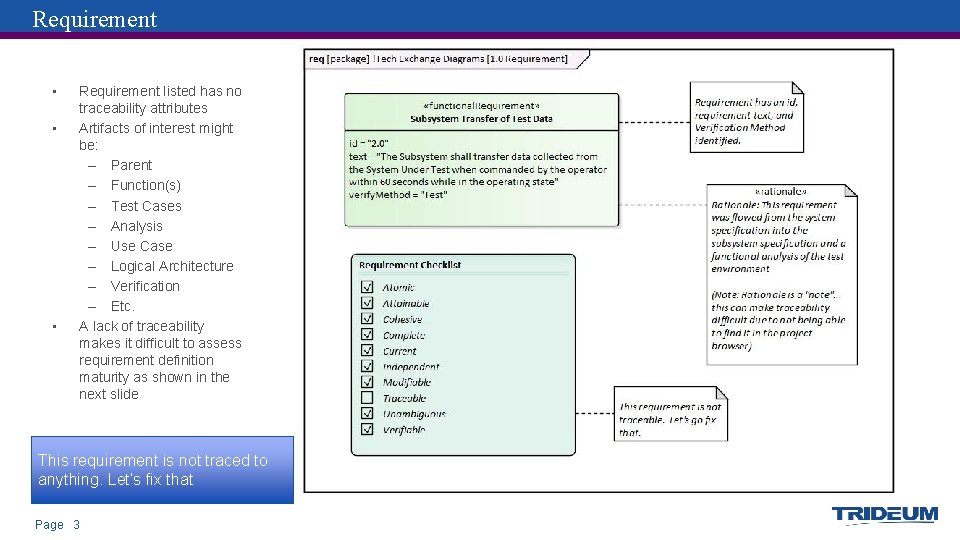
Requirement • • • Requirement listed has no traceability attributes Artifacts of interest might be: – Parent – Function(s) – Test Cases – Analysis – Use Case – Logical Architecture – Verification – Etc. A lack of traceability makes it difficult to assess requirement definition maturity as shown in the next slide This requirement is not traced to anything. Let’s fix that Page 3
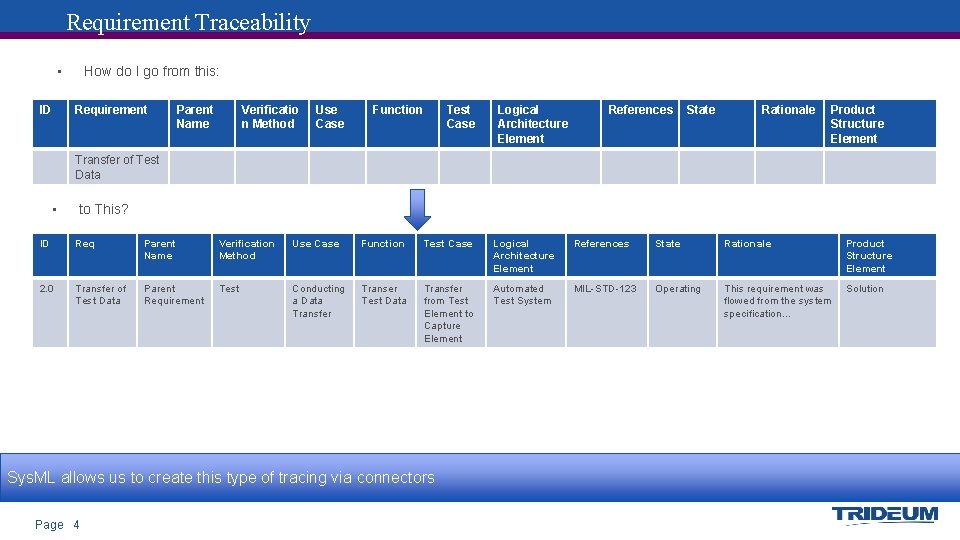
Requirement Traceability • ID How do I go from this: Requirement Parent Name Verificatio n Method Use Case Function Test Case Logical Architecture Element References State Rationale Product Structure Element Transfer of Test Data • to This? ID Req Parent Name Verification Method Use Case Function Test Case Logical Architecture Element References State Rationale Product Structure Element 2. 0 Transfer of Test Data Parent Requirement Test Conducting a Data Transfer Transer Test Data Transfer from Test Element to Capture Element Automated Test System MIL-STD-123 Operating This requirement was flowed from the system specification… Solution Sys. ML allows us to create this type of tracing via connectors Page 4
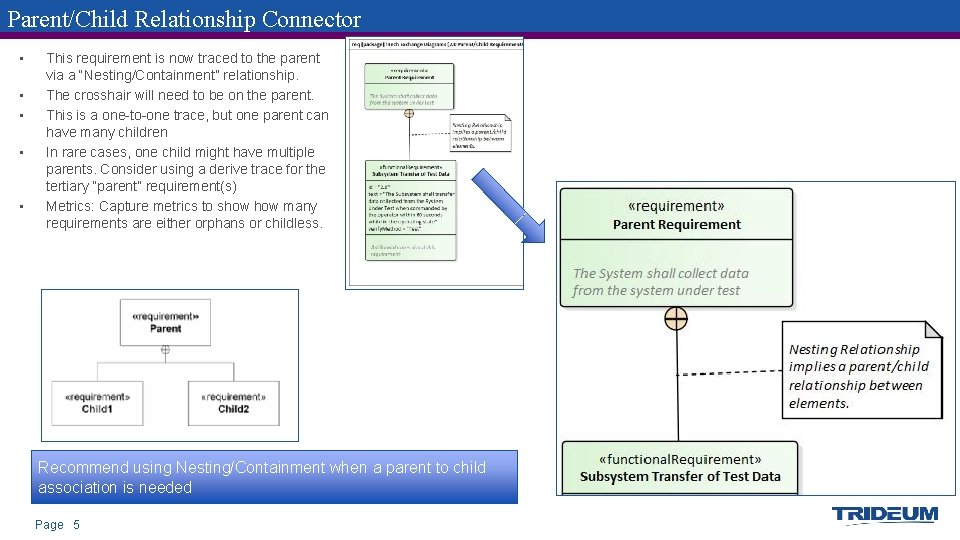
Parent/Child Relationship Connector • • • This requirement is now traced to the parent via a “Nesting/Containment” relationship. The crosshair will need to be on the parent. This is a one-to-one trace, but one parent can have many children In rare cases, one child might have multiple parents. Consider using a derive trace for the tertiary “parent” requirement(s) Metrics: Capture metrics to show many requirements are either orphans or childless. Recommend using Nesting/Containment when a parent to child association is needed Page 5
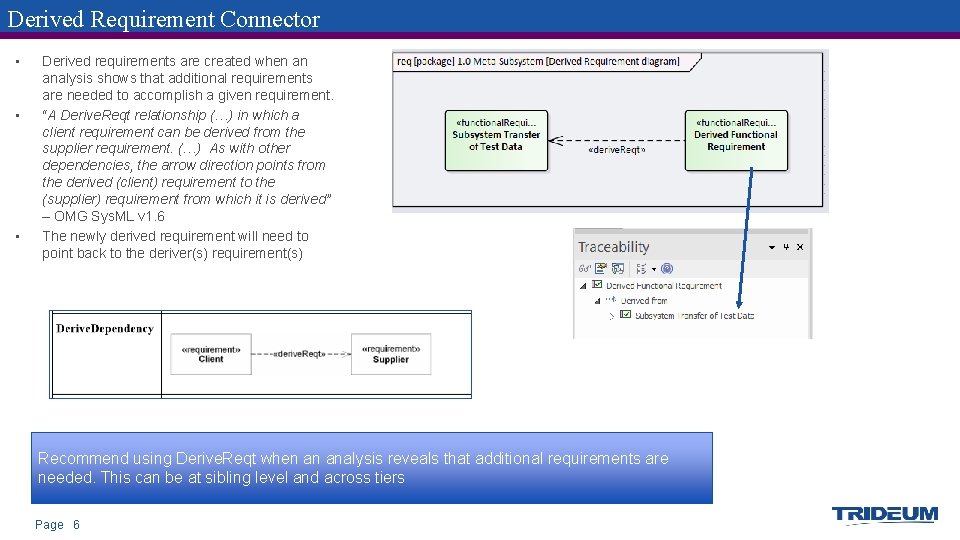
Derived Requirement Connector • • • Derived requirements are created when an analysis shows that additional requirements are needed to accomplish a given requirement. “A Derive. Reqt relationship (…) in which a client requirement can be derived from the supplier requirement. (…) As with other dependencies, the arrow direction points from the derived (client) requirement to the (supplier) requirement from which it is derived” – OMG Sys. ML v 1. 6 The newly derived requirement will need to point back to the deriver(s) requirement(s) Recommend using Derive. Reqt when an analysis reveals that additional requirements are needed. This can be at sibling level and across tiers Page 6
Wait, which way does the arrow go? • • Sys. ML arrow direction can be a potential source of confusion for MBSE practitioners and audience members Arrow direction defines which elements have which attributes – – – – • Ownership Verification details Allocations Refinement Usage Traceability Etc. “Most requirement relationships in Sys. ML are based on the UML dependency. The arrow points from the dependent model element (client) to the independent model element (supplier). Hence in Sys. ML, the arrow’s direction is opposite to that typically used for requirements flows, where the higher-level requirement points to the lower-level requirement. Take care with this when you draw your relationships!” – Requirements Engineering Magazine Pay close attention to arrow direction over the following slides. Watch for any inconsistencies Page 7
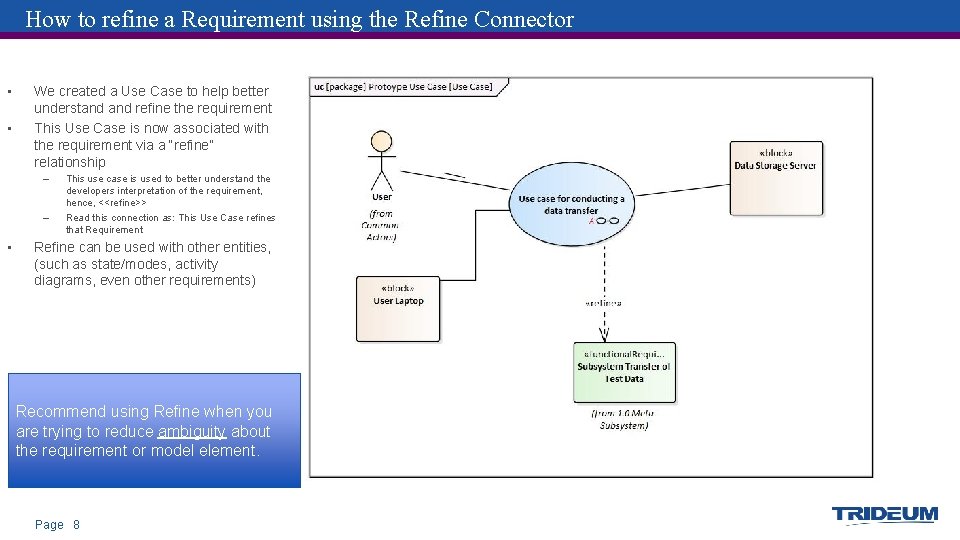
How to refine a Requirement using the Refine Connector • • We created a Use Case to help better understand refine the requirement This Use Case is now associated with the requirement via a “refine” relationship – – • This use case is used to better understand the developers interpretation of the requirement, hence, <<refine>> Read this connection as: This Use Case refines that Requirement Refine can be used with other entities, (such as state/modes, activity diagrams, even other requirements) Recommend using Refine when you are trying to reduce ambiguity about the requirement or model element. Page 8
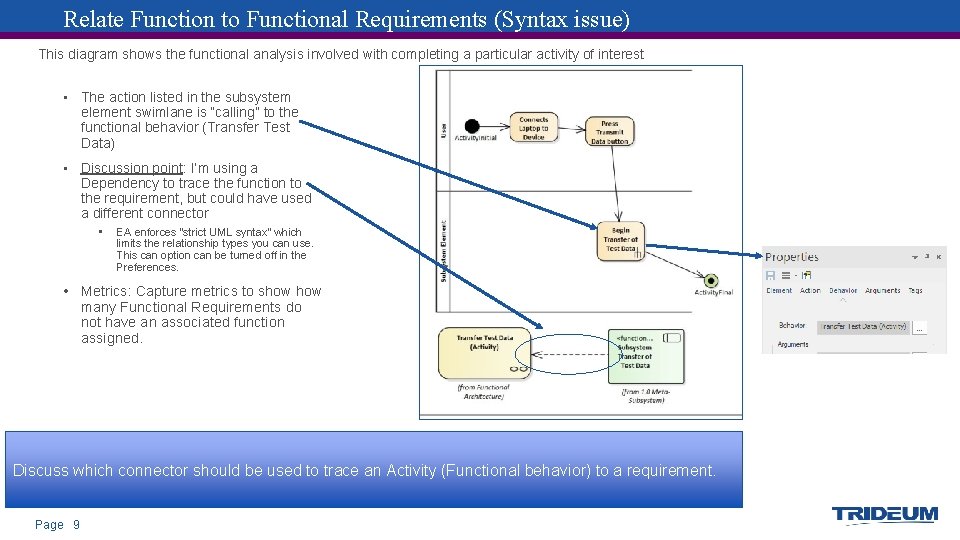
Relate Function to Functional Requirements (Syntax issue) This diagram shows the functional analysis involved with completing a particular activity of interest • The action listed in the subsystem element swimlane is “calling” to the functional behavior (Transfer Test Data) • Discussion point: I’m using a Dependency to trace the function to the requirement, but could have used a different connector • EA enforces “strict UML syntax” which limits the relationship types you can use. This can option can be turned off in the Preferences. • Metrics: Capture metrics to show many Functional Requirements do not have an associated function assigned. Discuss which connector should be used to trace an Activity (Functional behavior) to a requirement. Page 9
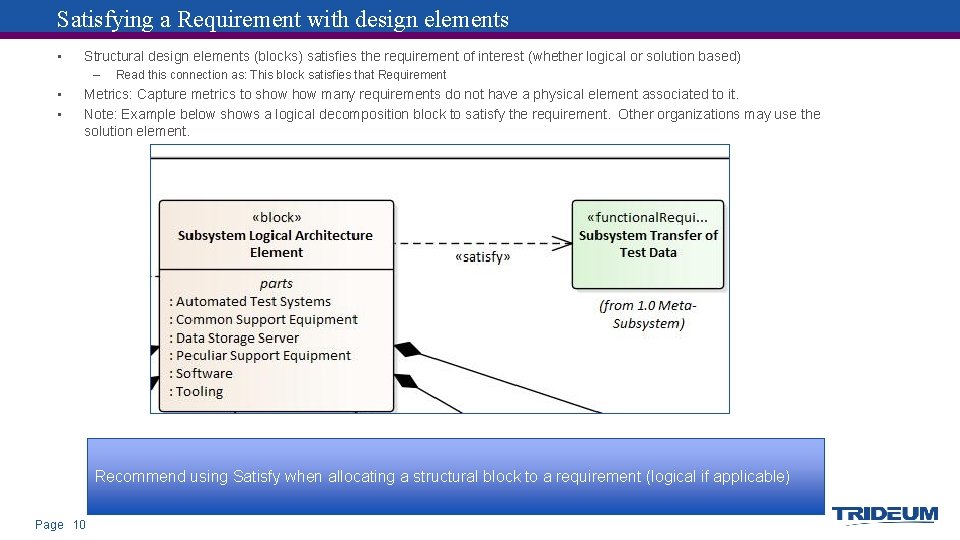
Satisfying a Requirement with design elements • Structural design elements (blocks) satisfies the requirement of interest (whether logical or solution based) – • • Read this connection as: This block satisfies that Requirement Metrics: Capture metrics to show many requirements do not have a physical element associated to it. Note: Example below shows a logical decomposition block to satisfy the requirement. Other organizations may use the solution element. Recommend using Satisfy when allocating a structural block to a requirement (logical if applicable) Page 10
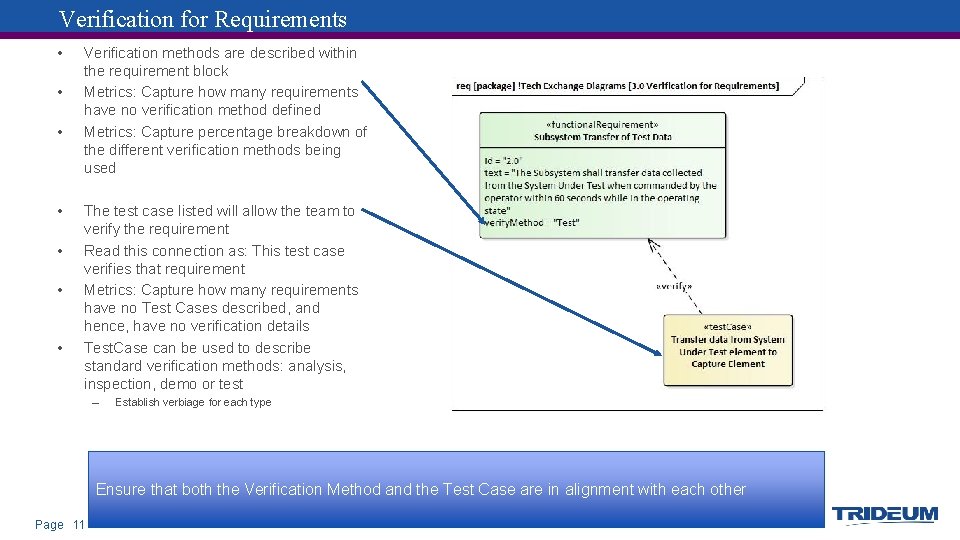
Verification for Requirements • • Verification methods are described within the requirement block Metrics: Capture how many requirements have no verification method defined Metrics: Capture percentage breakdown of the different verification methods being used The test case listed will allow the team to verify the requirement Read this connection as: This test case verifies that requirement Metrics: Capture how many requirements have no Test Cases described, and hence, have no verification details Test. Case can be used to describe standard verification methods: analysis, inspection, demo or test – Establish verbiage for each type Ensure that both the Verification Method and the Test Case are in alignment with each other Page 11
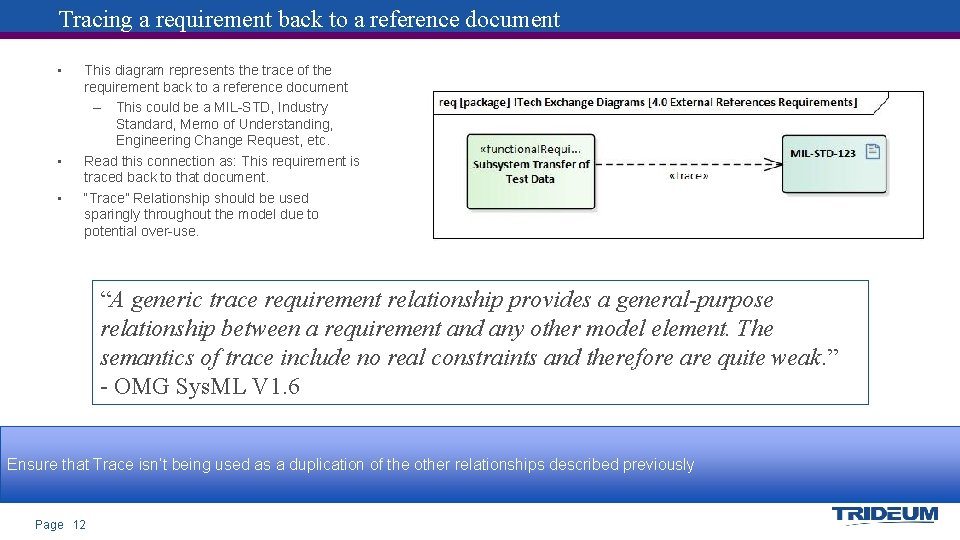
Tracing a requirement back to a reference document • • • This diagram represents the trace of the requirement back to a reference document – This could be a MIL-STD, Industry Standard, Memo of Understanding, Engineering Change Request, etc. Read this connection as: This requirement is traced back to that document. “Trace” Relationship should be used sparingly throughout the model due to potential over-use. “A generic trace requirement relationship provides a general-purpose relationship between a requirement and any other model element. The semantics of trace include no real constraints and therefore are quite weak. ” - OMG Sys. ML V 1. 6 Ensure that Trace isn’t being used as a duplication of the other relationships described previously Page 12
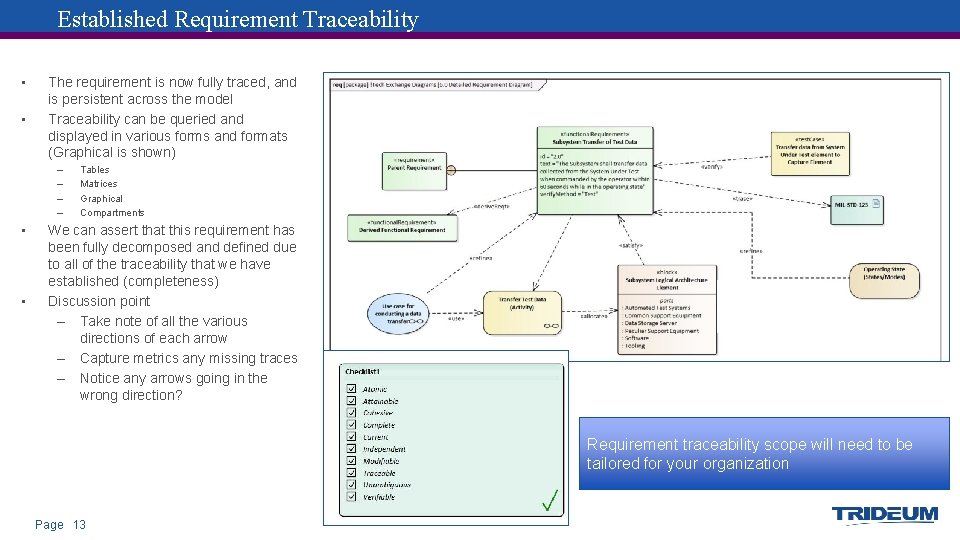
Established Requirement Traceability • • The requirement is now fully traced, and is persistent across the model Traceability can be queried and displayed in various forms and formats (Graphical is shown) – – • • Tables Matrices Graphical Compartments We can assert that this requirement has been fully decomposed and defined due to all of the traceability that we have established (completeness) Discussion point – Take note of all the various directions of each arrow – Capture metrics any missing traces – Notice any arrows going in the wrong direction? Requirement traceability scope will need to be tailored for your organization Page 13
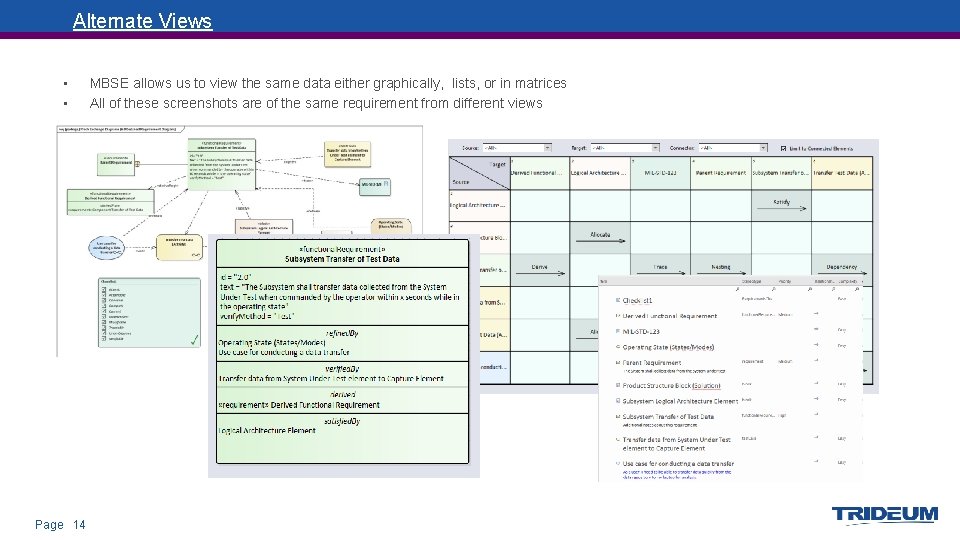
Alternate Views • • Page 14 MBSE allows us to view the same data either graphically, lists, or in matrices All of these screenshots are of the same requirement from different views
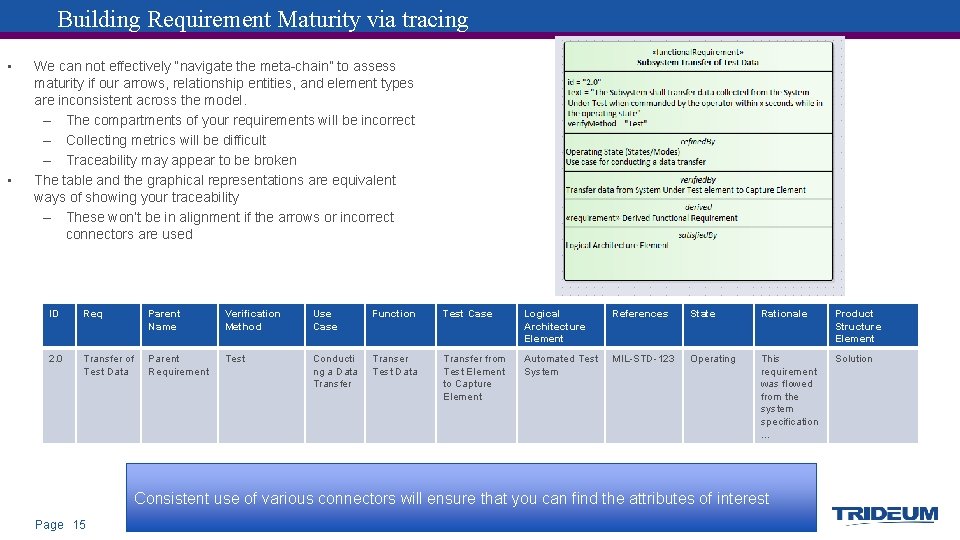
Building Requirement Maturity via tracing • • We can not effectively “navigate the meta-chain” to assess maturity if our arrows, relationship entities, and element types are inconsistent across the model. – The compartments of your requirements will be incorrect – Collecting metrics will be difficult – Traceability may appear to be broken The table and the graphical representations are equivalent ways of showing your traceability – These won’t be in alignment if the arrows or incorrect connectors are used ID Req Parent Name Verification Method Use Case Function Test Case Logical Architecture Element References State Rationale Product Structure Element 2. 0 Transfer of Test Data Parent Requirement Test Conducti ng a Data Transfer Transer Test Data Transfer from Test Element to Capture Element Automated Test System MIL-STD-123 Operating This requirement was flowed from the system specification … Solution Consistent use of various connectors will ensure that you can find the attributes of interest Page 15
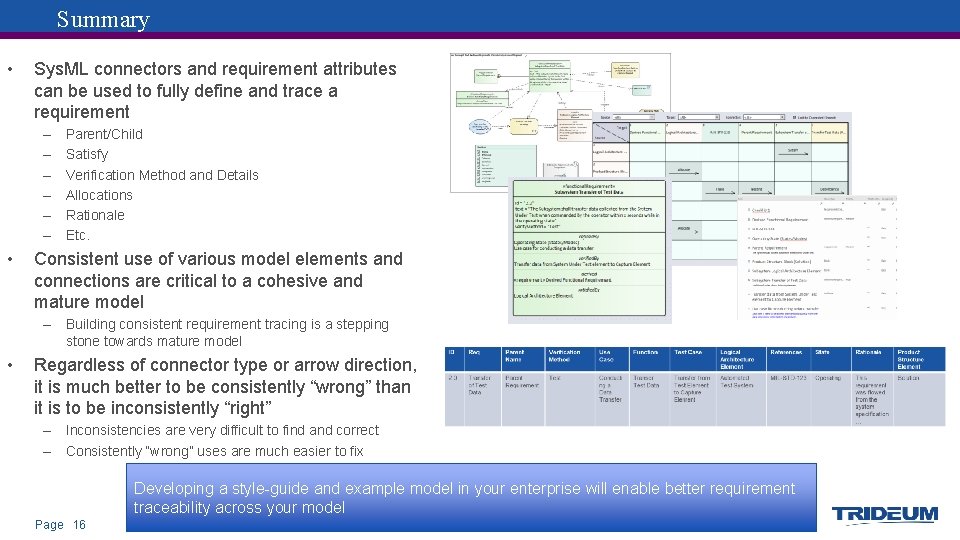
Summary • Sys. ML connectors and requirement attributes can be used to fully define and trace a requirement – – – • Parent/Child Satisfy Verification Method and Details Allocations Rationale Etc. Consistent use of various model elements and connections are critical to a cohesive and mature model – Building consistent requirement tracing is a stepping stone towards mature model • Regardless of connector type or arrow direction, it is much better to be consistently “wrong” than it is to be inconsistently “right” – Inconsistencies are very difficult to find and correct – Consistently “wrong” uses are much easier to fix Developing a style-guide and example model in your enterprise will enable better requirement traceability across your model Page 16
BACKUP Page 17
Resources Object Modeling Group • OMG Systems Modeling Language (OMG Sys. ML™) V 1. 6 Friedenthal, Sanford, Steiner § A Practical Guide to Sys. ML: The Systems Modeling Language. Third Edition § INCOSE Presentation: OMG Systems Modeling Language Tutorial (2009) Delligatti, Lenny. § Sys. ML Distilled: A brief Guide to the Systems Modeling Language Weilkiens § SYSMOD - The Systems Modeling Toolbox - Pragmatic MBSE with Sys. ML Friedenthal, Oster § http: //sysml-models. com/spacecraft/ Requirements Engineering Magazine § https: //re-magazine. ireb. org/ Page 18
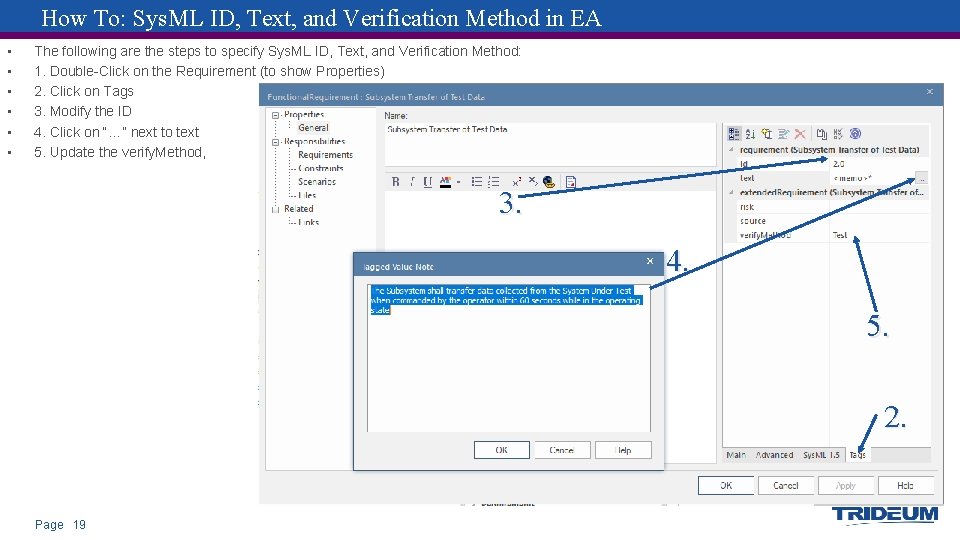
How To: Sys. ML ID, Text, and Verification Method in EA • • • The following are the steps to specify Sys. ML ID, Text, and Verification Method: 1. Double-Click on the Requirement (to show Properties) 2. Click on Tags 3. Modify the ID 4. Click on “…” next to text 5. Update the verify. Method, 3. 4. 5. 2. Page 19
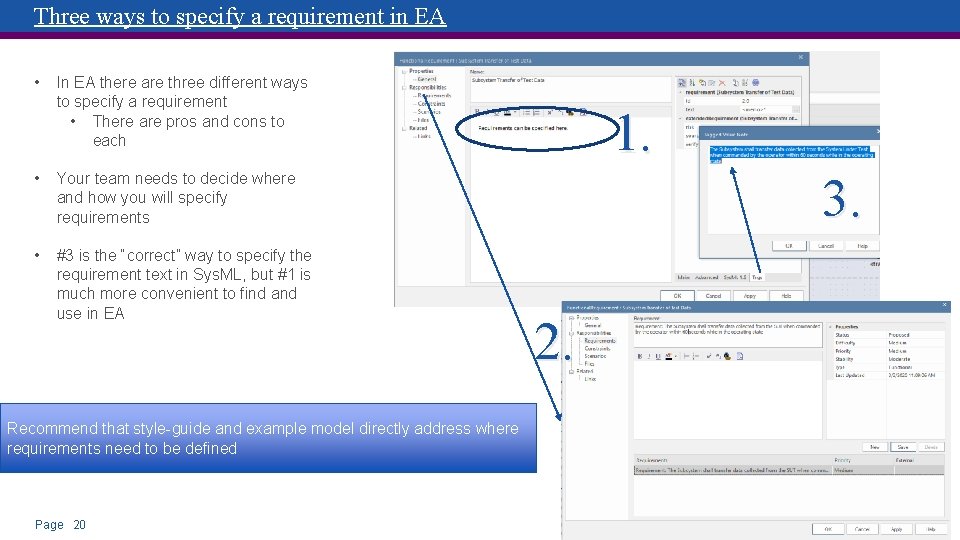
Three ways to specify a requirement in EA • In EA there are three different ways to specify a requirement • There are pros and cons to each • Your team needs to decide where and how you will specify requirements • #3 is the “correct” way to specify the requirement text in Sys. ML, but #1 is much more convenient to find and use in EA Recommend that style-guide and example model directly address where requirements need to be defined Page 20 1. 3. 2.
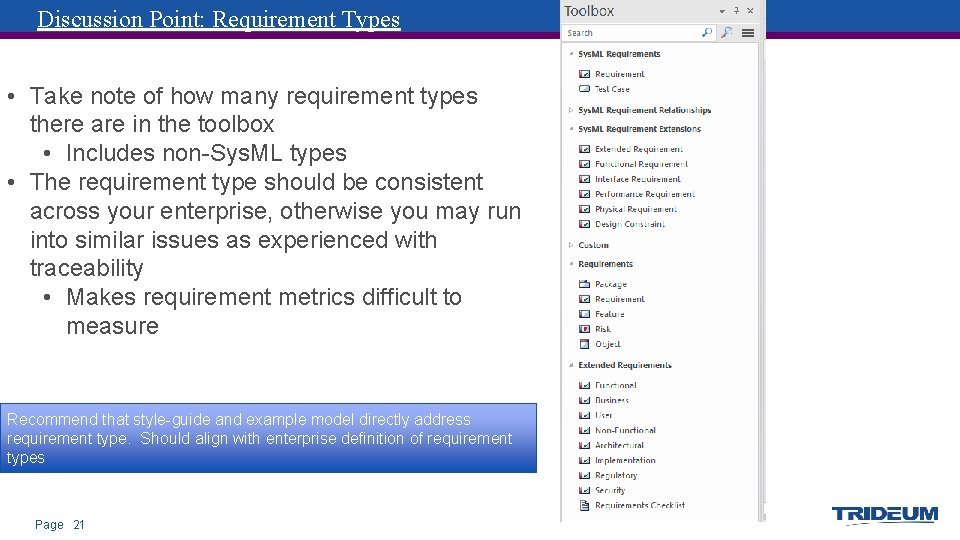
Discussion Point: Requirement Types • Take note of how many requirement types there are in the toolbox • Includes non-Sys. ML types • The requirement type should be consistent across your enterprise, otherwise you may run into similar issues as experienced with traceability • Makes requirement metrics difficult to measure Recommend that style-guide and example model directly address requirement type. Should align with enterprise definition of requirement types Page 21
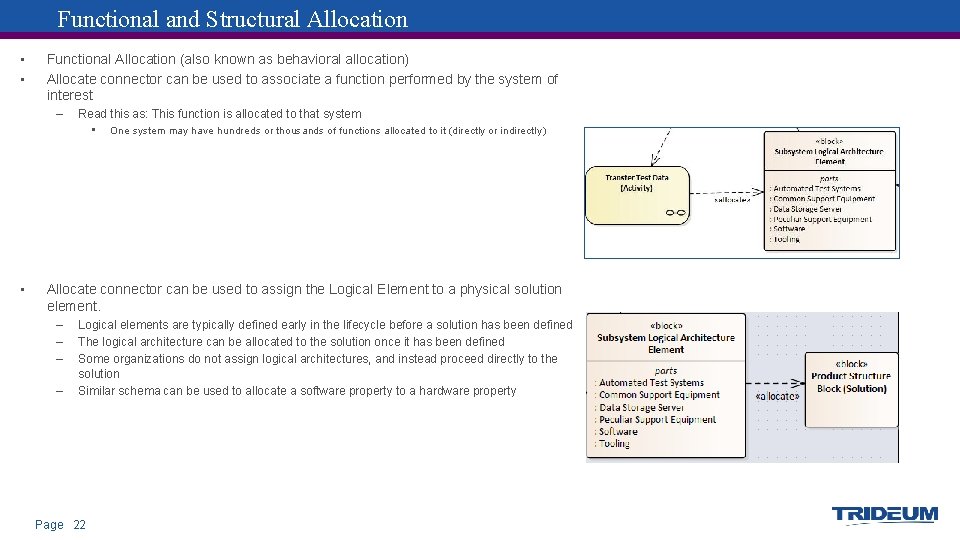
Functional and Structural Allocation • • Functional Allocation (also known as behavioral allocation) Allocate connector can be used to associate a function performed by the system of interest – Read this as: This function is allocated to that system • • One system may have hundreds or thousands of functions allocated to it (directly or indirectly) Allocate connector can be used to assign the Logical Element to a physical solution element. – – Logical elements are typically defined early in the lifecycle before a solution has been defined The logical architecture can be allocated to the solution once it has been defined Some organizations do not assign logical architectures, and instead proceed directly to the solution Similar schema can be used to allocate a software property to a hardware property Page 22
- Slides: 22