
Material Usage Report Use this procedure to display
- Slides: 1
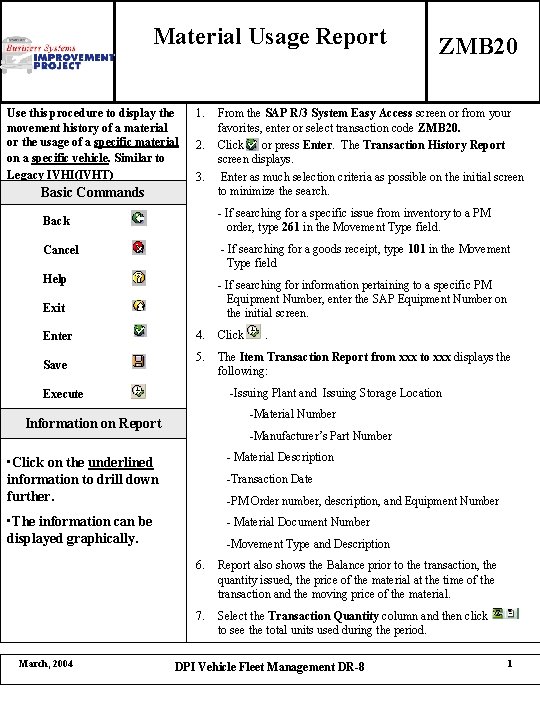
Material Usage Report Use this procedure to display the movement history of a material or the usage of a specific material on a specific vehicle. Similar to Legacy IVHI(IVHT) 1. ZMB 20 Basic Commands From the SAP R/3 System Easy Access screen or from your favorites, enter or select transaction code ZMB 20. Click or press Enter. The Transaction History Report screen displays. Enter as much selection criteria as possible on the initial screen to minimize the search. Back - If searching for a specific issue from inventory to a PM order, type 261 in the Movement Type field. Cancel - If searching for a goods receipt, type 101 in the Movement Type field Help - If searching for information pertaining to a specific PM Equipment Number, enter the SAP Equipment Number on the initial screen. 2. 3. Exit Enter Save 4. Click 5. The Item Transaction Report from xxx to xxx displays the following: . -Issuing Plant and Issuing Storage Location Execute -Material Number Information on Report -Manufacturer’s Part Number • Click on the underlined information to drill down further. - Material Description • The information can be displayed graphically. - Material Document Number March, 2004 -Transaction Date -PM Order number, description, and Equipment Number -Movement Type and Description 6. Report also shows the Balance prior to the transaction, the quantity issued, the price of the material at the time of the transaction and the moving price of the material. 7. Select the Transaction Quantity column and then click to see the total units used during the period. DPI Vehicle Fleet Management DR-8 1