
Material Requirements Planning 2019 Presented by Jay Uhlenhoff
Material Requirements Planning 2019 Presented by: Jay Uhlenhoff
Agenda 1. 2. 3. 4. 5. 6. Introductions and Expectations The Why and the How Forecasts (Ch. 3) MRP Wizard (Ch. 4) MRP Results (Ch. 5) Questions & Troubleshooting
Agenda 1. 2. 3. 4. 5. 6. Introductions and Expectations The Why and the How Forecasts (Ch. 3) MRP Wizard (Ch. 4) MRP Results (Ch. 5) Questions & Troubleshooting
Introduction Game – I’ll Go First • Jay Uhlenhoff • Consultant/Trainer/Tester since 2015 • Help customers get started using MRP • Only one of me – Help each other! • Your future resources are in this room. • Two scenario takeaways – Production of one brand, Raw materials
Introduction Game – Your Turn • Name, company and role • Years using Orchestrated? • Experience with MRP? • How solid is your data?
Agenda 1. 2. 3. 4. 5. 6. Introductions and Expectations The What and the How Forecasts (Ch. 3) MRP Wizard (Ch. 4) MRP Results (Ch. 5) Questions & Troubleshooting
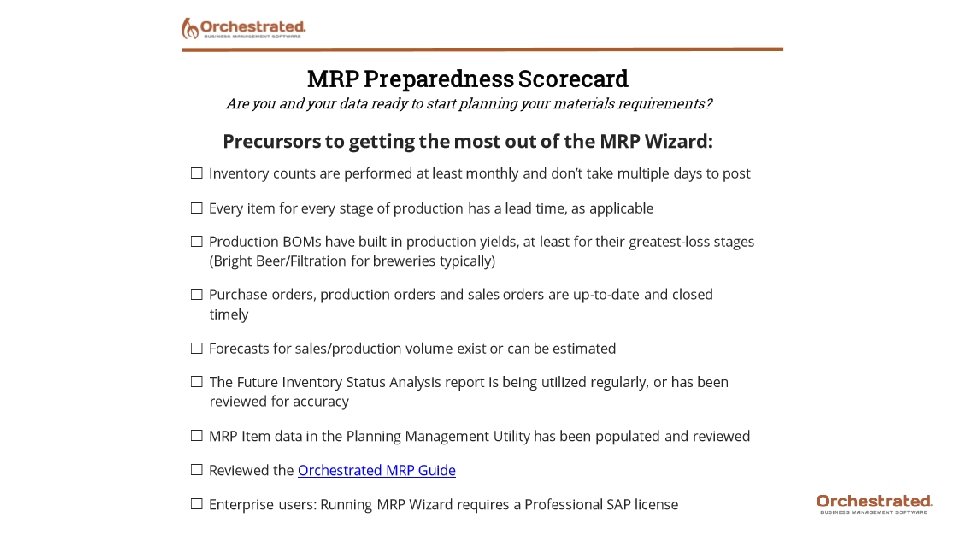
What Can MRP Do? • Calculate the amount of raw materials or liquid needed • Calculate when you need to order or produce those goods to meet demand • Recommend transfers between warehouses • Create POs and Inventory Transfer Req’s from recommendations
Key Concepts • A planning tool applying a simple equation to a very large data set. • Review regularly then take action • Get smarter about what to order and when • Example: Pd. Os • Item being produced is Supply • Item(s) being consumed is Demand
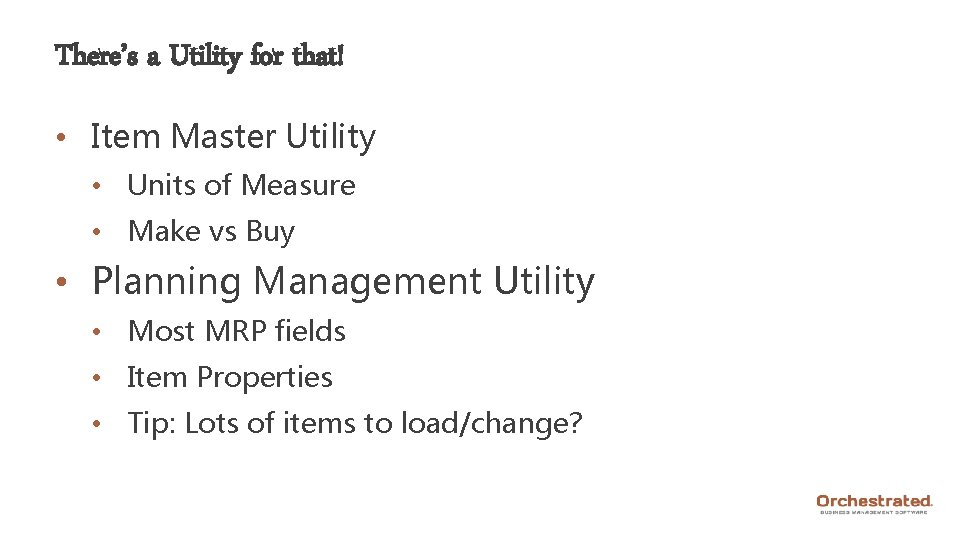
There’s a Utility for that! • Item Master Utility • Units of Measure • Make vs Buy • Planning Management Utility • Most MRP fields • Item Properties • Tip: Lots of items to load/change?
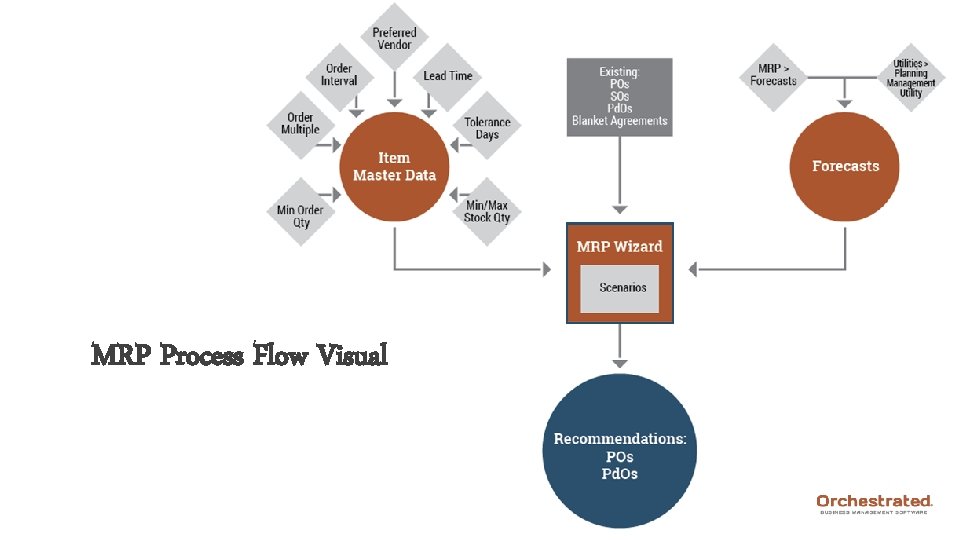
MRP Process Flow Visual

Pop Quiz!
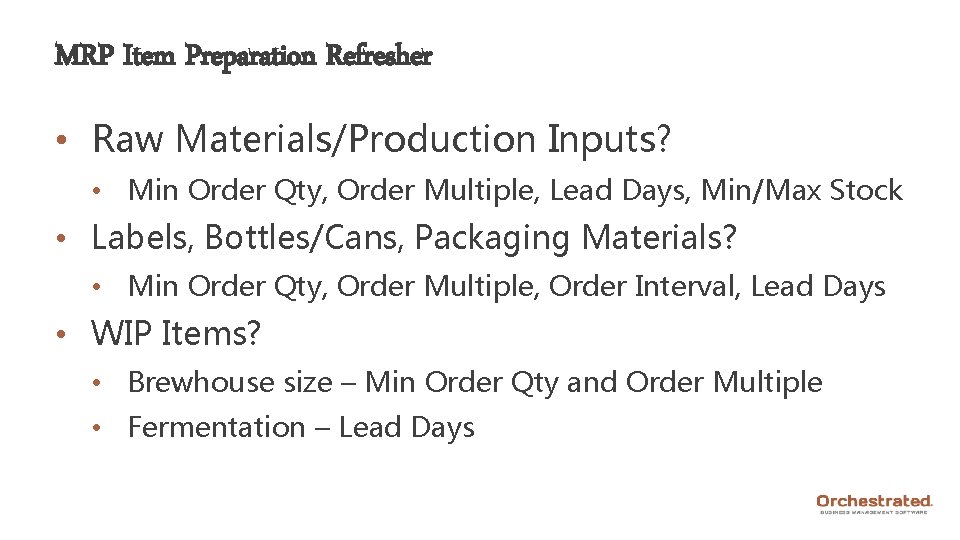
MRP Item Preparation Refresher • Raw Materials/Production Inputs? • Min Order Qty, Order Multiple, Lead Days, Min/Max Stock • Labels, Bottles/Cans, Packaging Materials? • Min Order Qty, Order Multiple, Order Interval, Lead Days • WIP Items? • Brewhouse size – Min Order Qty and Order Multiple • Fermentation – Lead Days
Use the Utilities! • Planning Management Utility • Most MRP fields • Item Properties • Tip: Lots of items to load/change? • Item Master Data Utility • Uo. Ms • Make vs Buy
Just Getting Started? • First, focus attention on: • Lead Days, Order Multiple, Min Order Qty, Min Stock • Then work on: • Production Yield by Brand/BOM, Purchase Uo. Ms, Max Stock, Order Interval • And later get to: • Tolerance Days, Preferred Vendor
Quick Q&A • Why is it important to devote resources to this feature? • Any specific goals taking this class? • High-level MRP questions? • Prior difficulty getting started with MRP?
Agenda 1. 2. 3. 4. 5. 6. Introductions and Expectations The Why and the How Forecasts (Ch. 3) MRP Wizard (Ch. 4) MRP Results (Ch. 5) Questions & Troubleshooting
Forecasting can be frustrating…
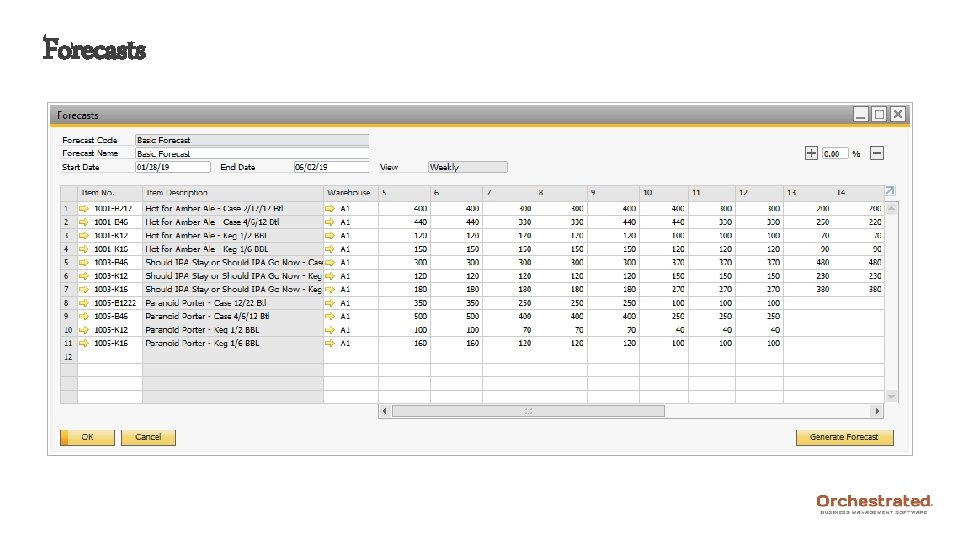
Forecasts • Extends planning beyond existing documents • Creates ability to plan further out • Works in tandem with current short-term sales • Can assist with both production and sales • Forecasts of barrelage or sales by SKU • Design a scenario with a specific forecast
Forecasts
Forecasts • Consider short and/or long-term forecast • Only one forecast per scenario • Data in Days, Weeks or Months • Quarters? Divide by three and use Months • Can be updated frequently or not at all
Creating a Forecast • Import an existing forecast • Planning Management Utility • Copy/paste into SAP Forecast feature • Manual creation in Orchestrated • Use SAP-generated historical sales forecast • Only use as a starting point
So Let’s Get To It • MRP > Forecasts • Utilities > Planning Management Utility > Demand Planning
Agenda 1. 2. 3. 4. 5. 6. Introductions and Expectations The Why and the How Forecasts (Ch. 3) MRP Wizard (Ch. 4) MRP Results (Ch. 5) Questions & Troubleshooting
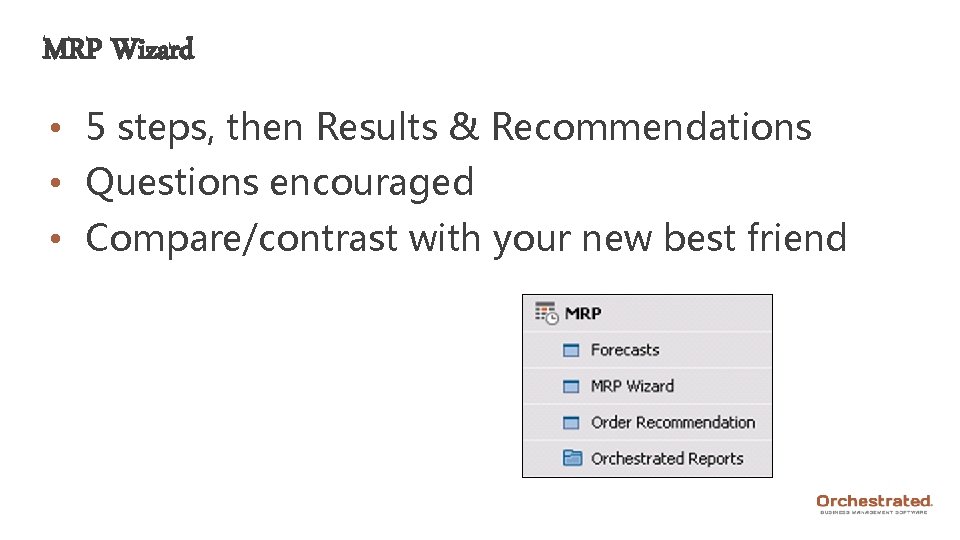
MRP Wizard • 5 steps, then Results & Recommendations • Questions encouraged • Compare/contrast with your new best friend
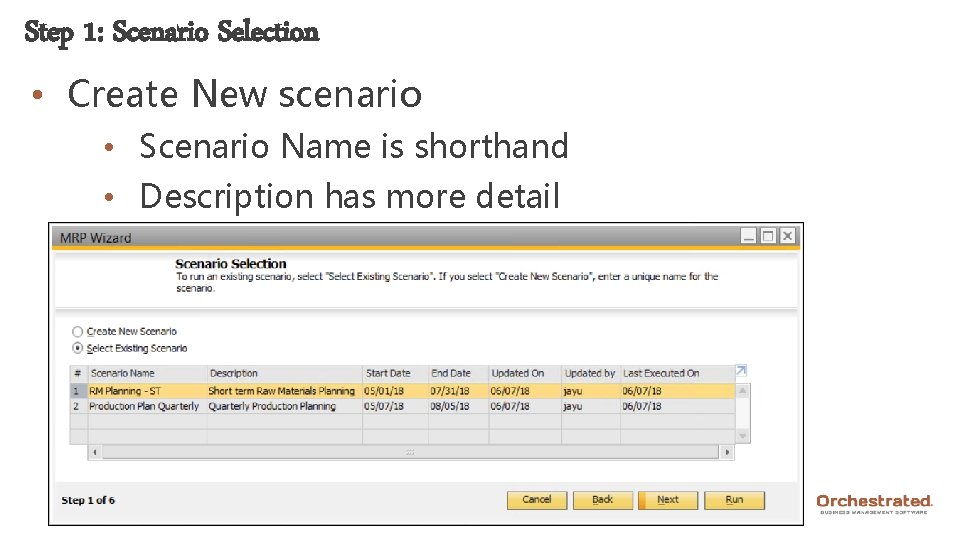
Step 1: Scenario Selection • Create New scenario • Scenario Name is shorthand • Description has more detail
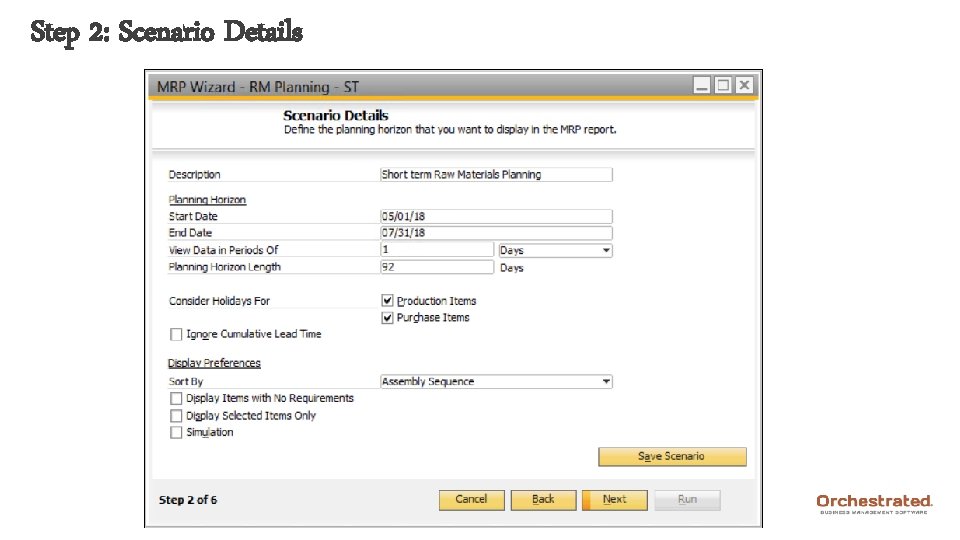
Step 2: Scenario Details
Step 2: Scenario Details • Match details to screenshot recommended • Days – 4 to 12 weeks; Weeks – 4 to 12 months • Items to note: • Date range applies to Due Date specifically • Range can be adjusted after-the-fact • Can later have separate Days and Weeks scenario • Simulation good option during early training (or Test DB)
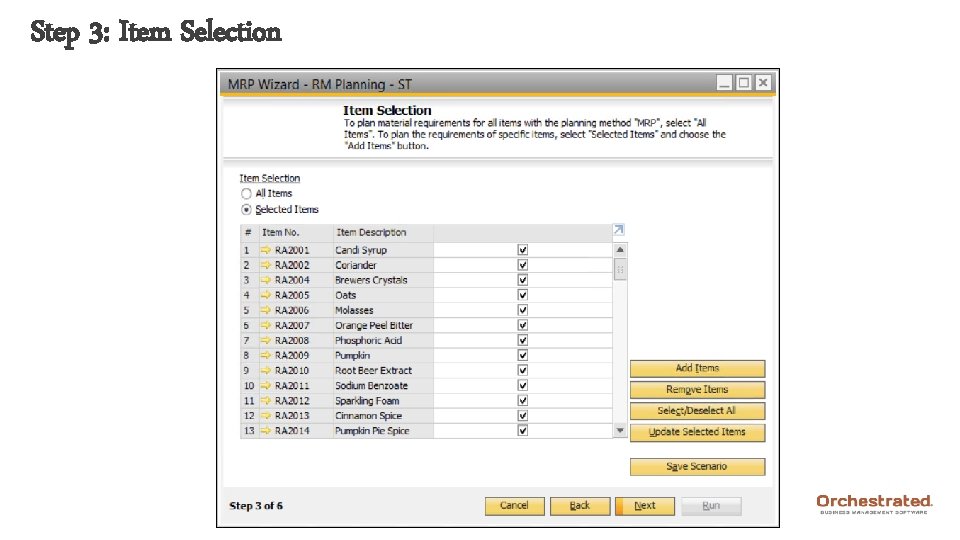
Step 3: Item Selection
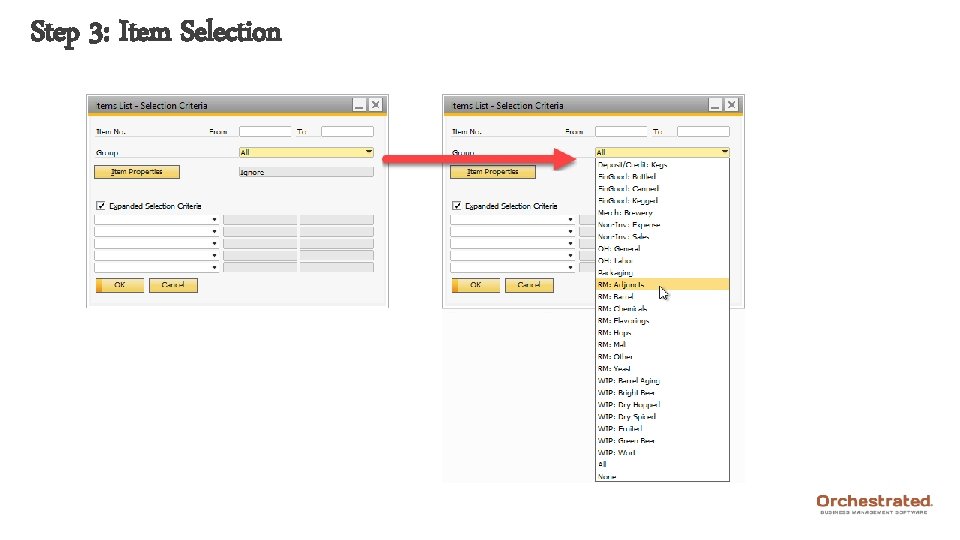
Step 3: Item Selection
Step 3: Item Selection • Missing items aren’t flagged for MRP • Can ‘stack’ filters • Items not obviously grouped > Item Properties • Number of items makes a difference
Item Properties • Great tool for creating subsets of items • Go beyond Item Groups, Process Types, etc. • Larger/more complex? More likely to utilize • Item Properties Setup, then Planning Mgmt Utility • Examples: • Subset beyond Item Group (labels, bottles) • Order Interval (same time of the month) • Vendor
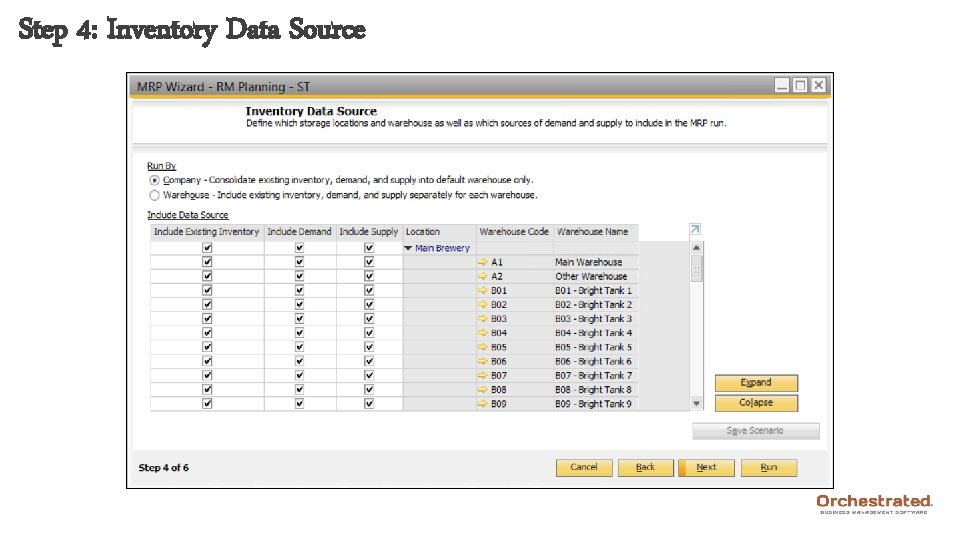
Step 4: Inventory Data Source
Step 4: Inventory Data Source • Company vs Warehouse • Company is most common, simpler to start • Recommendations for Default Warehouses • Heavy use of Inv. Transfers could make difference • Exclude OAK 01, QC, other non-available inv. • Consider removing entire locations if multiple • Expand/Collapse is helpful
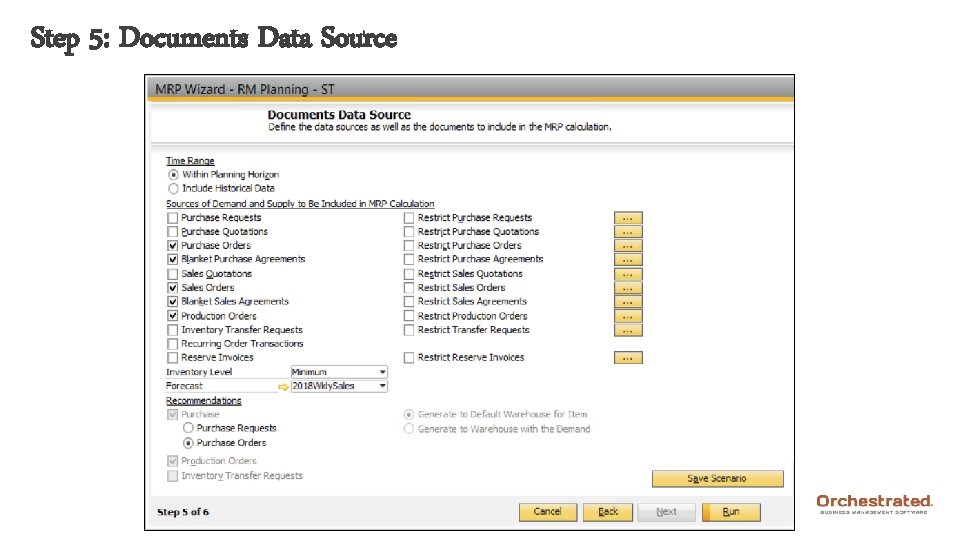
Step 5: Documents Data Source
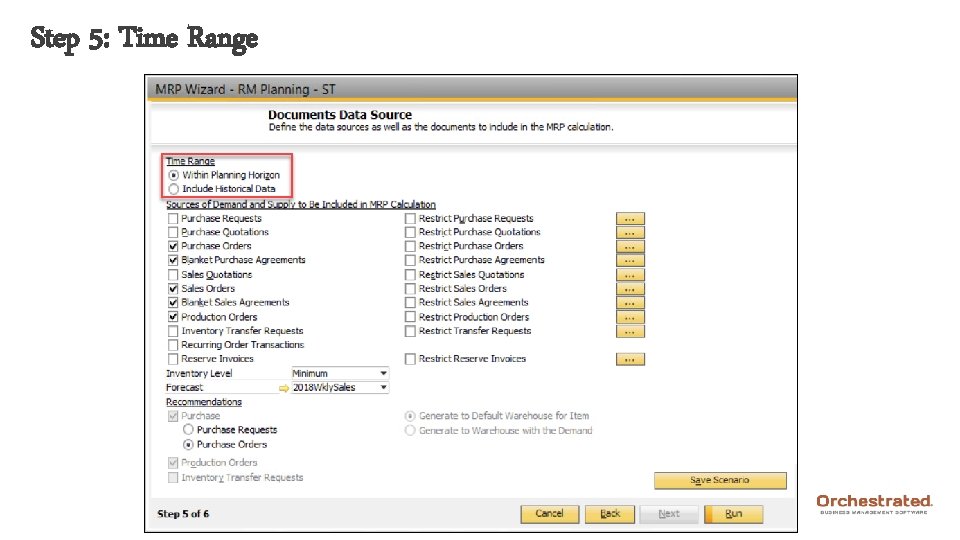
Step 5: Time Range
Step 5: Time Range • Within Planning Horizon • Issues with old, unclosed documents • Excludes documents with due date outside range • ‘Past Due Data’ column only back to Start Date • Switch to down the road • Include Historical Data • Includes data with due dates outside range • Helps identify invalid, old documents to close
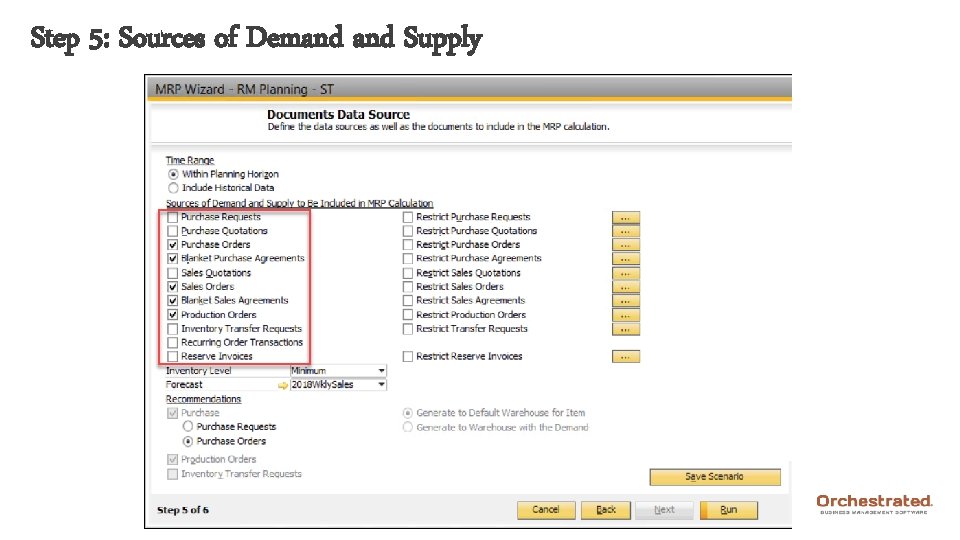
Step 5: Sources of Demand Supply
Step 5: Sources of Demand Supply • Pd. Os: Both Planned and Released included • Blanket agreements must be Specific type and Approved • Straightforward other than the Restrict column… • Check box for a document type • Then click ellipsis button to the right • Select all documents to include in the scenario • Likely want to ignore
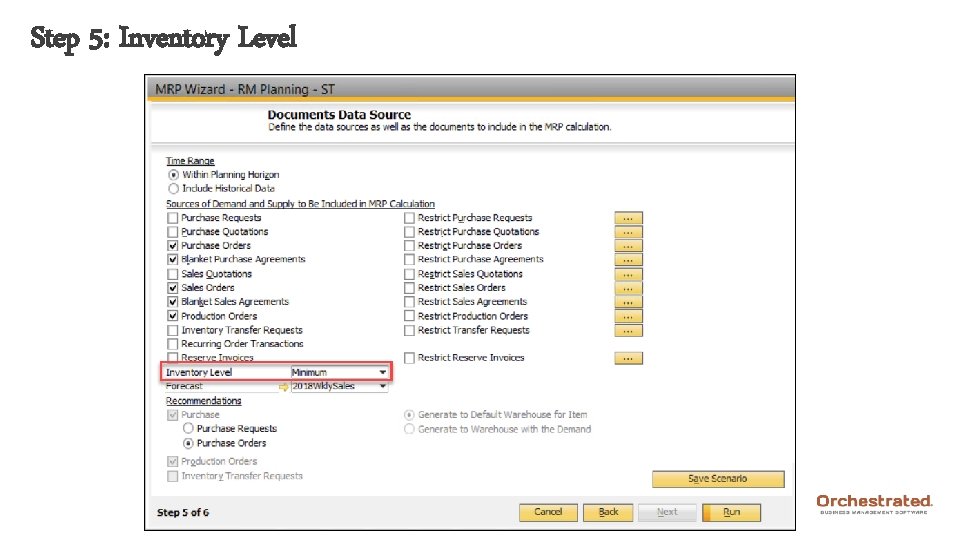
Step 5: Inventory Level
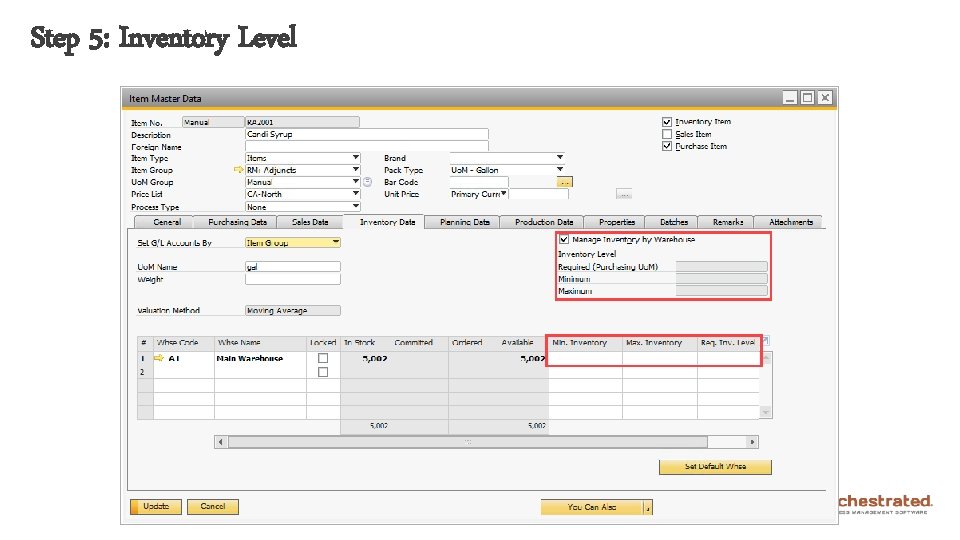
Step 5: Inventory Level
Step 5: Inventory Level • Set whether you want an inventory source of demand • Minimum or Maximum • Recommend ordering to meet this level of inventory • Required • Similar to Minimum but suggests in Purchase Uo. M • Min-Max • When falling below the minimum, order to the maximum • Blank • Only use other sources of demand
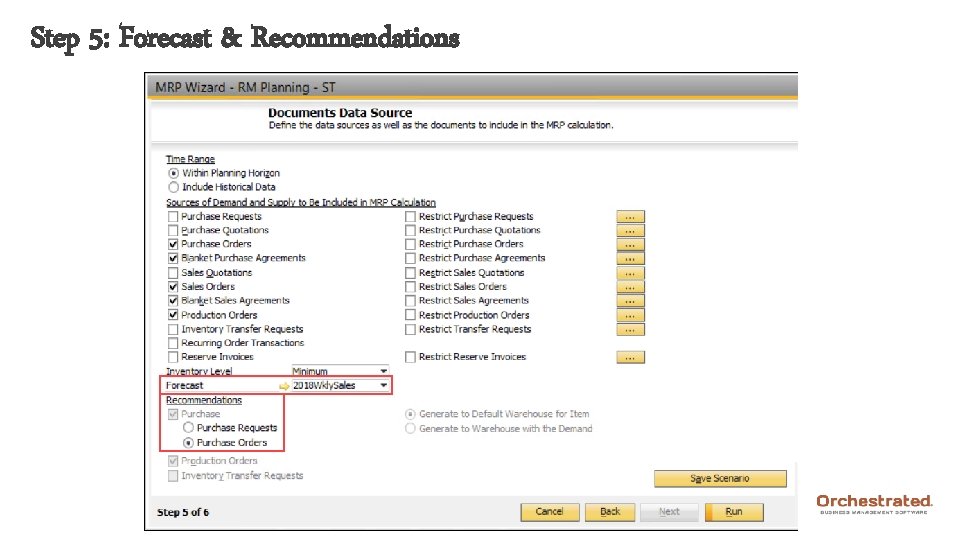
Step 5: Forecast & Recommendations
And Now… The Moment You (Probably Didn’t) Wait For • Click Save Scenario • Click Run!!
Agenda 1. 2. 3. 4. 5. 6. Introductions and Expectations The Why and the How Forecasts (Ch. 3) MRP Wizard (Ch. 4) MRP Results (Ch. 5) Questions & Troubleshooting
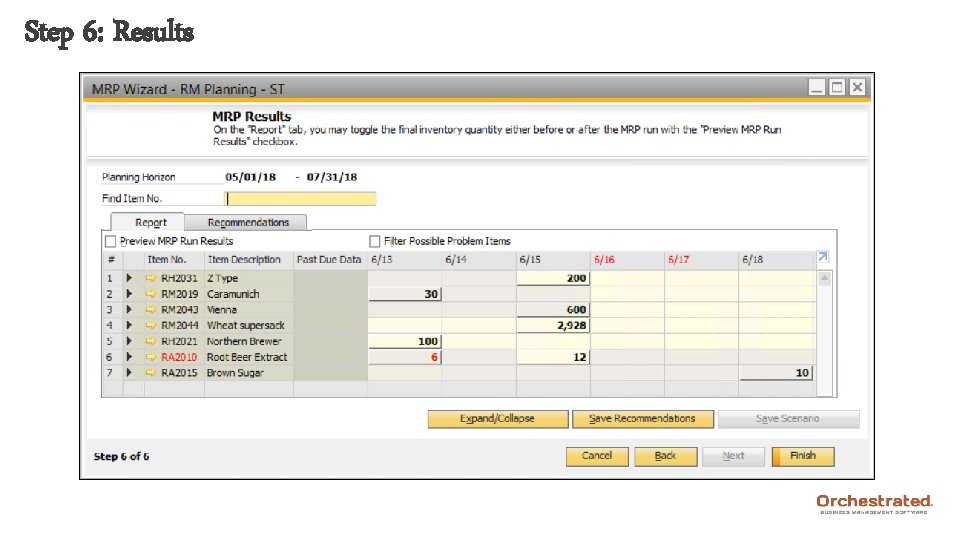
Step 6: Results
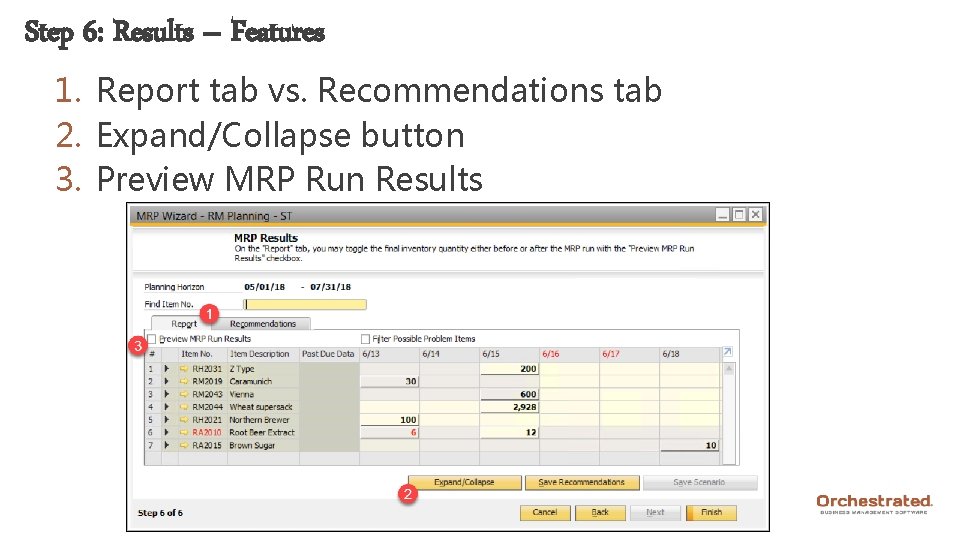
Step 6: Results – Features 1. Report tab vs. Recommendations tab 2. Expand/Collapse button 3. Preview MRP Run Results
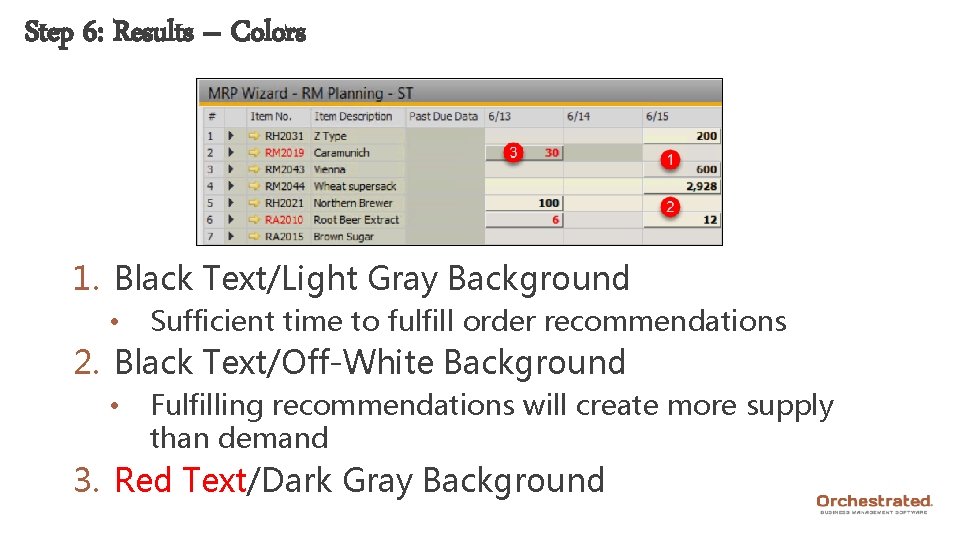
Step 6: Results – Colors 1. Black Text/Light Gray Background • Sufficient time to fulfill order recommendations 2. Black Text/Off-White Background • Fulfilling recommendations will create more supply than demand 3. Red Text/Dark Gray Background
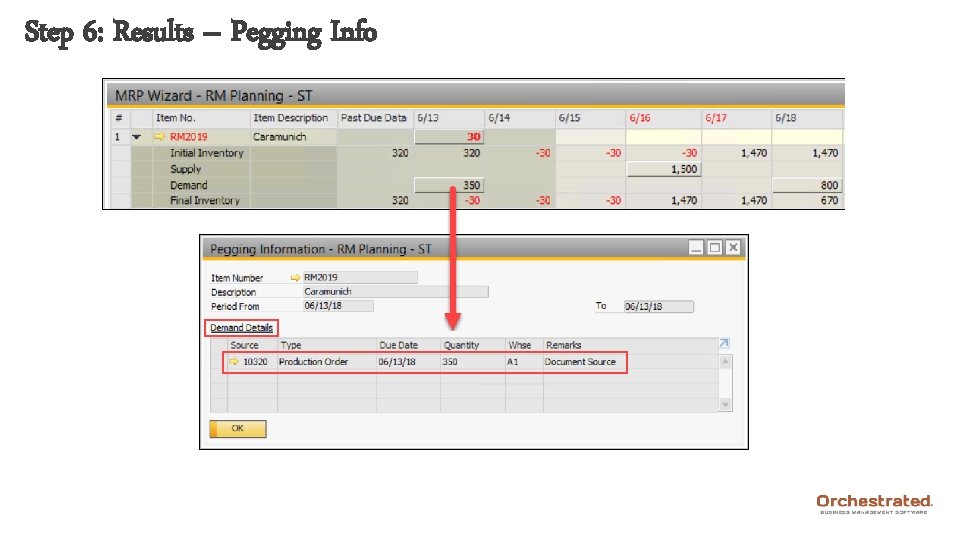
Step 6: Results – Pegging Info
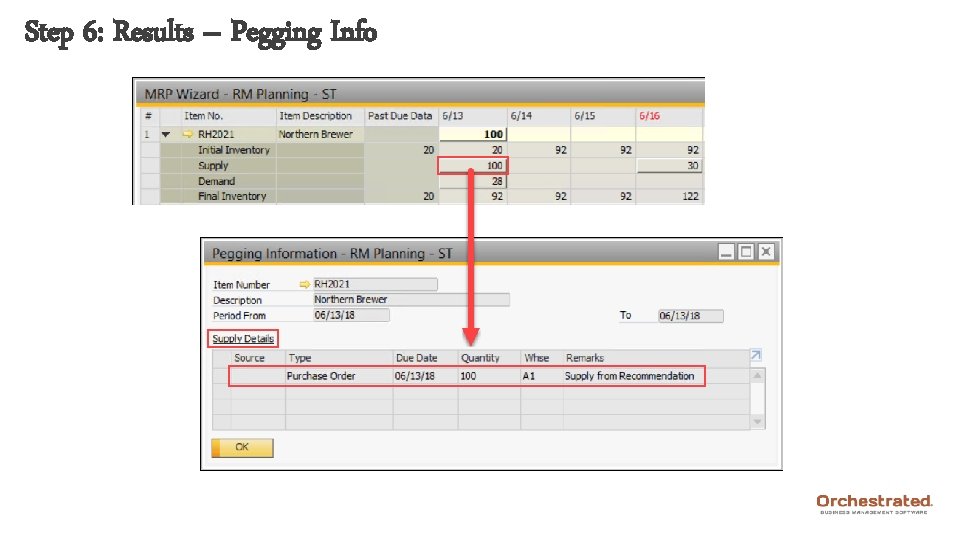
Step 6: Results – Pegging Info
Agenda 1. 2. 3. 4. 5. 6. Introductions and Expectations The Why and the How Forecasts (Ch. 3) MRP Wizard (Ch. 4) MRP Results (Ch. 5) Questions & Troubleshooting
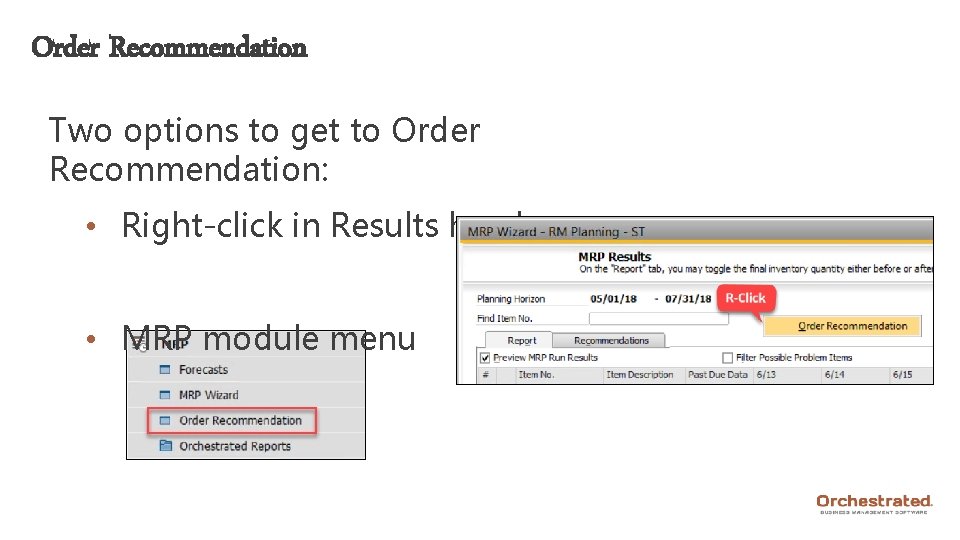
Order Recommendation Two options to get to Order Recommendation: • Right-click in Results header • MRP module menu
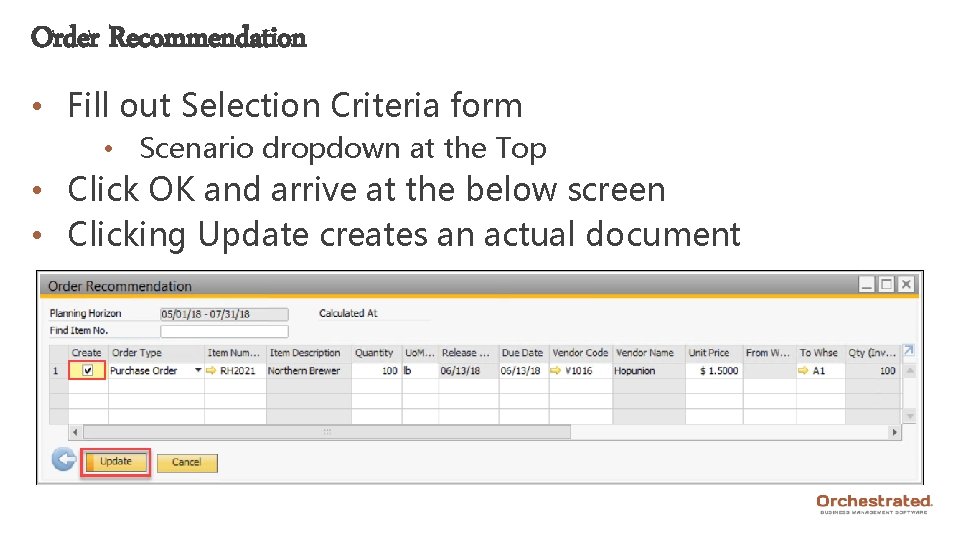
Order Recommendation • Fill out Selection Criteria form • Scenario dropdown at the Top • Click OK and arrive at the below screen • Clicking Update creates an actual document

Thank You! Orchestra Software 1400 NW Compton Dr. Suite 210 Beaverton, OR 97006 P: 877 -683 -2648 Web: support. orchestrated. com
- Slides: 54