
Material Handlers MMPM300 Material Handlers MMPMFacilities300 1 Introduction
- Slides: 122
Material Handlers MM_PM_300 Material Handlers MM_PM_Facilities_300 1
Introduction • Content • Objectives Material Handlers MM_PM_Facilities_300 2
Course Content • Unit 1 – Organizational Structure and Master Data • Unit 2 – MIGO Functions and Features • Unit 3 – Basic Inventory Concepts and Processes • Unit 4 – Goods Receipts • Unit 5 – Reservations & Goods Issues • Unit 6 – Transfer Postings • Course Summary Material Handlers MM_PM_Facilities_300 3
Learning Objectives • At the conclusion of this course you should be able to: Understand the relationship between the organizational structure and master data Use the MIGO transaction to execute various goods movements in SAP Create a personal favorites list of frequently used movement types Understand the relationship between goods movements and movement types Execute goods movements in SAP Material Handlers MM_PM_Facilities_300 4
Learning Objectives cont’d • At the conclusion of this course you should be able to: Cancel/ reverse goods movements Execute a return to vendor transaction, issue goods to cost centers, work orders, reservations and scrap Transfer materials from one location to another Pick and issue materials Differentiate between a stock and non-stock material Material Handlers MM_PM_Facilities_300 5
Unit 1 Organizational Structure and Material Master Material Handlers MM_PM_Facilities_300 6
Learning Objectives • At the conclusion of this unit you should be able to: Understand the organizational structure from an inventory management viewpoint Display material master by plant and storage location views Material Handlers MM_PM_Facilities_300 7
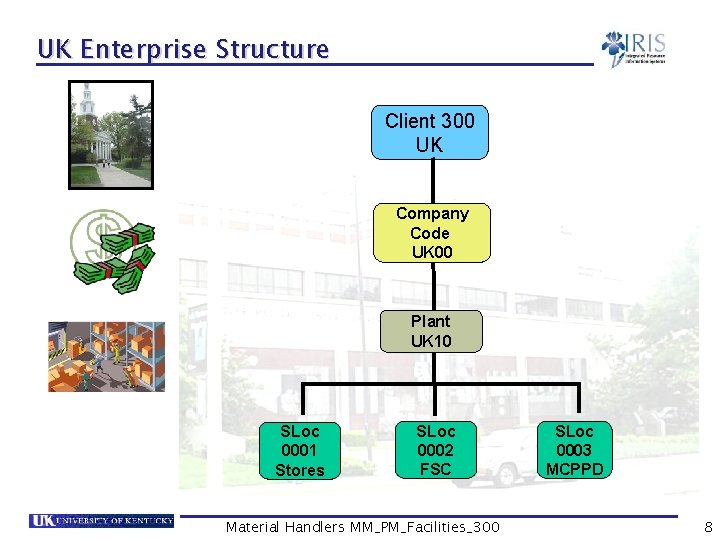
UK Enterprise Structure Client 300 UK Company Code UK 00 Plant UK 10 SLoc 0001 Stores SLoc 0002 FSC Material Handlers MM_PM_Facilities_300 SLoc 0003 MCPPD 8
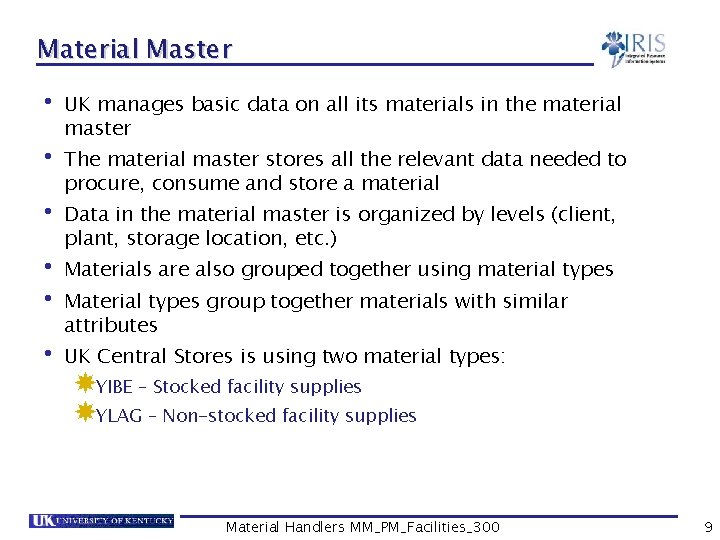
Material Master • UK manages basic data on all its materials in the material master • The material master stores all the relevant data needed to procure, consume and store a material • Data in the material master is organized by levels (client, plant, storage location, etc. ) • Materials are also grouped together using material types • Material types group together materials with similar attributes • UK Central Stores is using two material types: YIBE – Stocked facility supplies YLAG – Non-stocked facility supplies Material Handlers MM_PM_Facilities_300 9
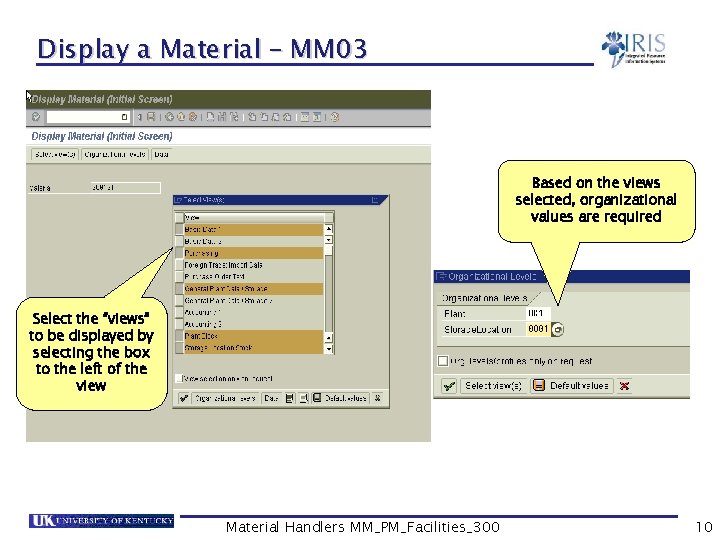
Display a Material – MM 03 Based on the views selected, organizational values are required Select the “views” to be displayed by selecting the box to the left of the view Material Handlers MM_PM_Facilities_300 10
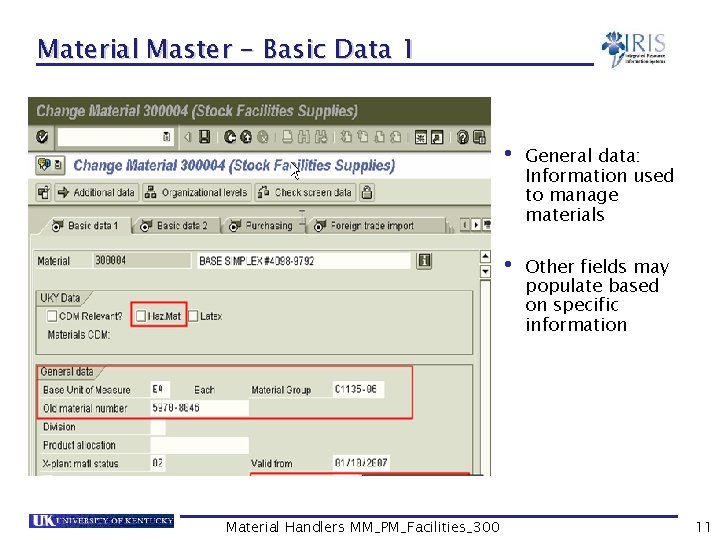
Material Master - Basic Data 1 • General data: Information used to manage materials • Other fields may populate based on specific information Material Handlers MM_PM_Facilities_300 11
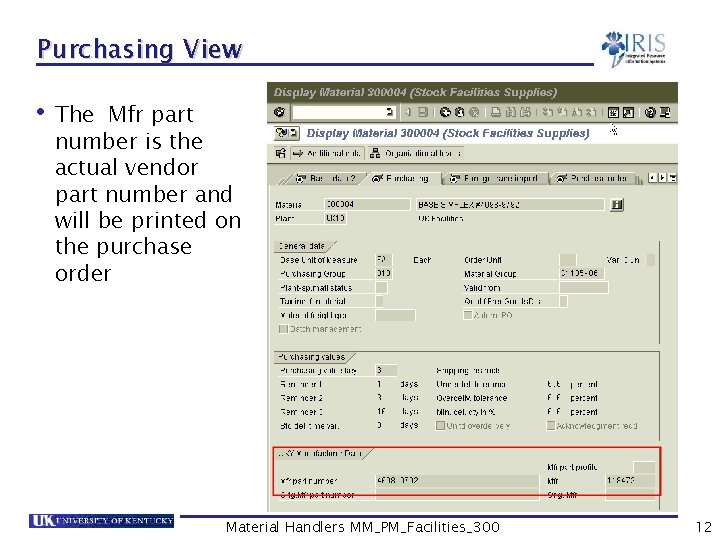
Purchasing View • The Mfr part number is the actual vendor part number and will be printed on the purchase order Material Handlers MM_PM_Facilities_300 12
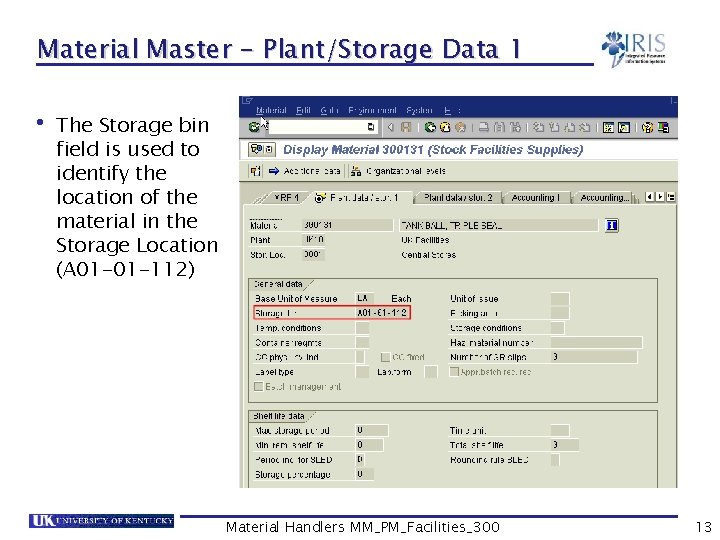
Material Master - Plant/Storage Data 1 • The Storage bin field is used to identify the location of the material in the Storage Location (A 01 -01 -112) Material Handlers MM_PM_Facilities_300 13
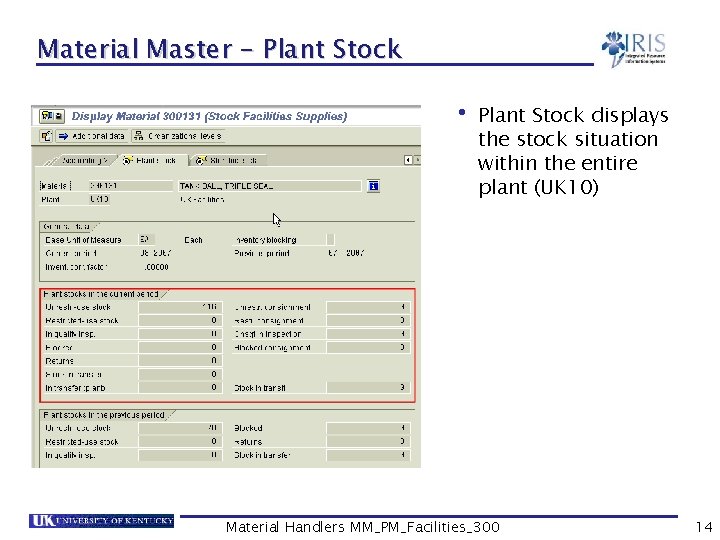
Material Master - Plant Stock • Plant Stock displays the stock situation within the entire plant (UK 10) Material Handlers MM_PM_Facilities_300 14
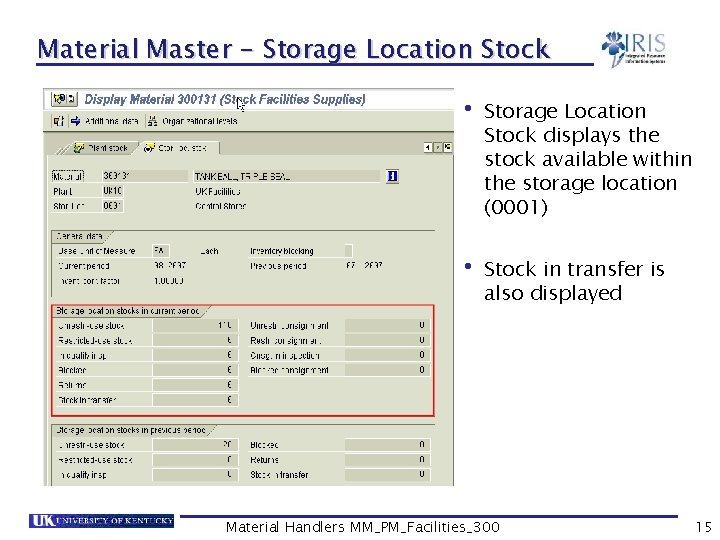
Material Master - Storage Location Stock • Storage Location Stock displays the stock available within the storage location (0001) • Stock in transfer is also displayed Material Handlers MM_PM_Facilities_300 15
Summary • You should now be able to: Understand the organizational structure from an inventory management viewpoint Display material master views Determine which materials are stock and non-stock Material Handlers MM_PM_Facilities_300 16
Unit 2 Inventory Management Overview Material Handlers MM_PM_Facilities_300 17
Learning Objectives • At the conclusion of this unit you should be able to: Understand the high level process overview Understand the goods movement concept in SAP Describe different kinds of goods movements in SAP and their relationship to movement types Material Handlers MM_PM_Facilities_300 18
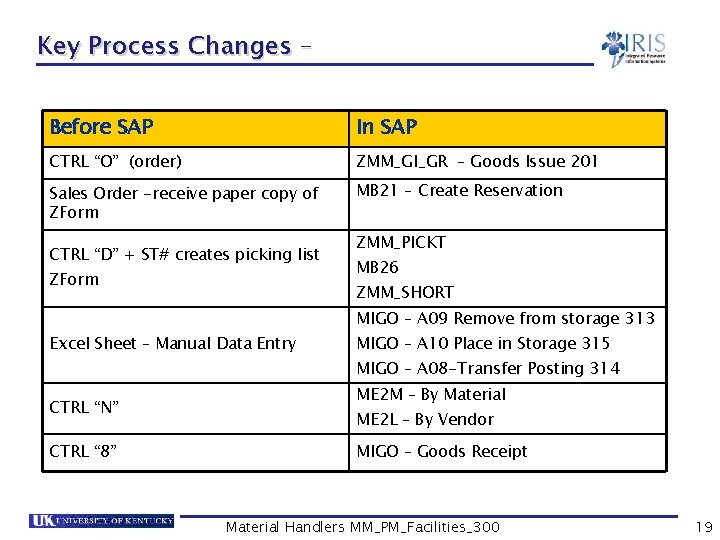
Key Process Changes – Before SAP In SAP CTRL “O” (order) ZMM_GI_GR – Goods Issue 201 Sales Order -receive paper copy of ZForm MB 21 – Create Reservation CTRL “D” + ST# creates picking list ZForm ZMM_PICKT MB 26 ZMM_SHORT MIGO – A 09 Remove from storage 313 Excel Sheet – Manual Data Entry MIGO – A 10 Place in Storage 315 MIGO – A 08 -Transfer Posting 314 CTRL “N” CTRL “ 8” ME 2 M – By Material ME 2 L – By Vendor MIGO – Goods Receipt Material Handlers MM_PM_Facilities_300 19
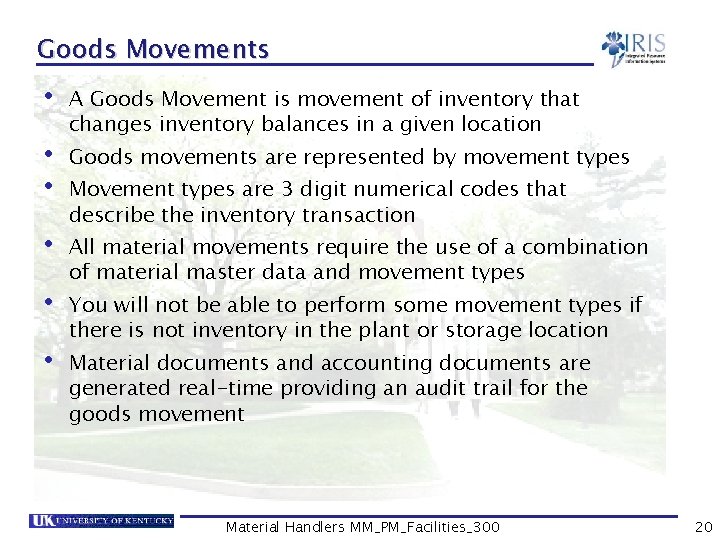
Goods Movements • A Goods Movement is movement of inventory that changes inventory balances in a given location • Goods movements are represented by movement types • Movement types are 3 digit numerical codes that describe the inventory transaction • All material movements require the use of a combination of material master data and movement types • You will not be able to perform some movement types if there is not inventory in the plant or storage location • Material documents and accounting documents are generated real-time providing an audit trail for the goods movement Material Handlers MM_PM_Facilities_300 20
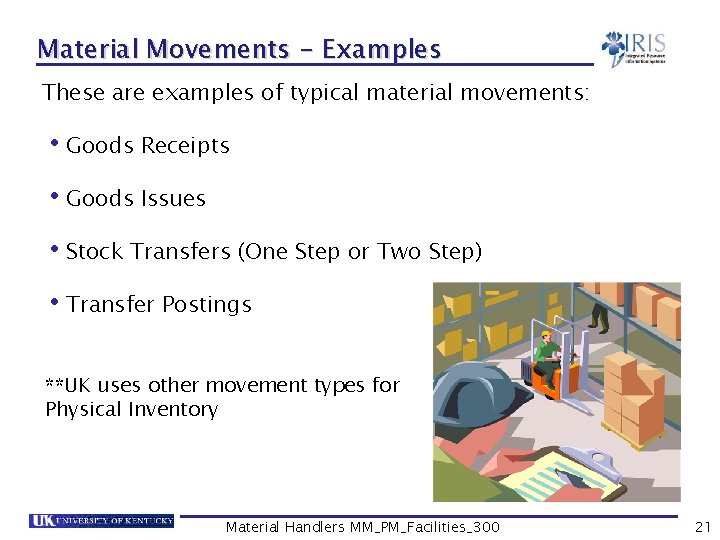
Material Movements - Examples These are examples of typical material movements: • Goods Receipts • Goods Issues • Stock Transfers (One Step or Two Step) • Transfer Postings **UK uses other movement types for Physical Inventory Material Handlers MM_PM_Facilities_300 21
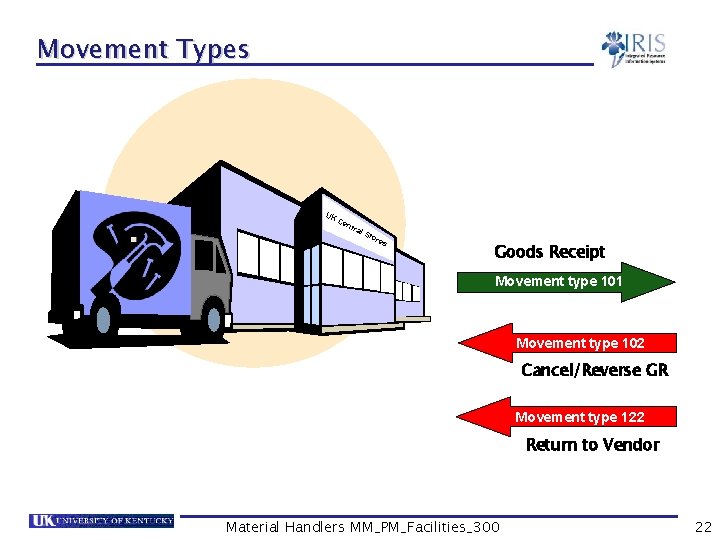
Movement Types Baxter Medical Supplies UK Ce ntr al S tor es Goods Receipt Movement type 101 Movement type 102 Cancel/Reverse GR Movement type 122 Return to Vendor Material Handlers MM_PM_Facilities_300 22
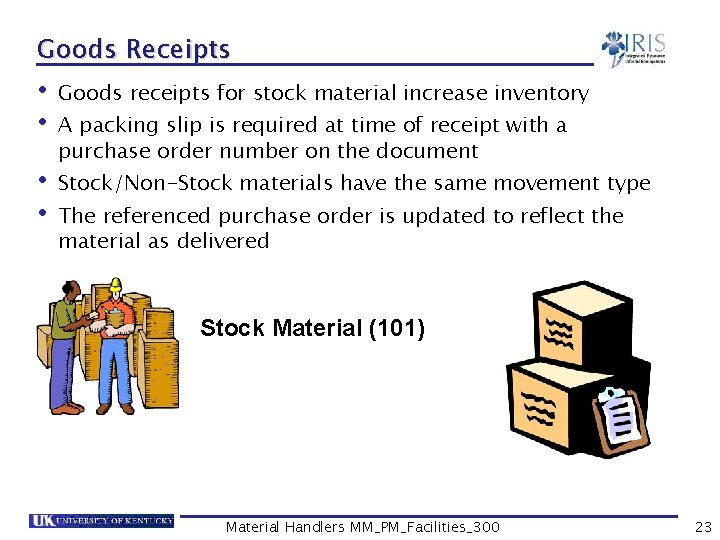
Goods Receipts • Goods receipts for stock material increase inventory • A packing slip is required at time of receipt with a purchase order number on the document • Stock/Non-Stock materials have the same movement type • The referenced purchase order is updated to reflect the material as delivered Stock Material (101) Material Handlers MM_PM_Facilities_300 23
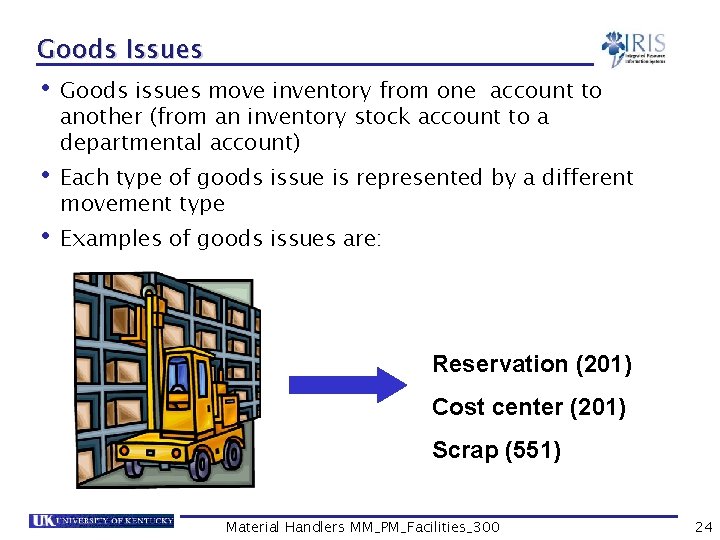
Goods Issues • Goods issues move inventory from one account to another (from an inventory stock account to a departmental account) • Each type of goods issue is represented by a different movement type • Examples of goods issues are: Reservation (201) Cost center (201) Scrap (551) Material Handlers MM_PM_Facilities_300 24
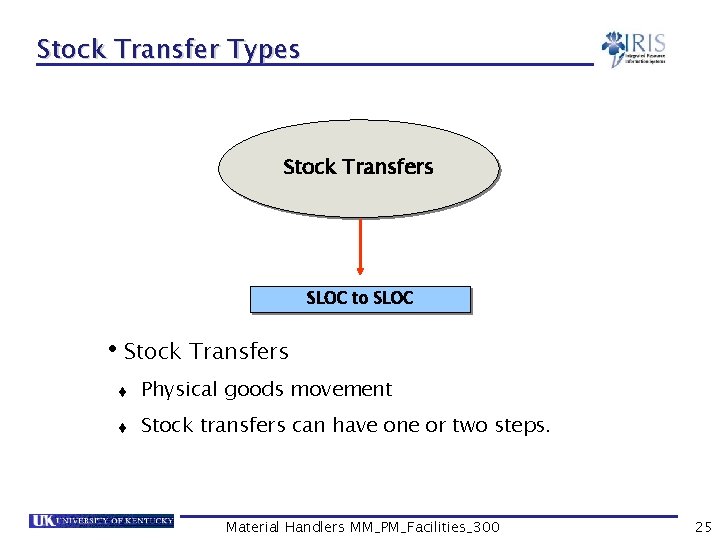
Stock Transfer Types Stock Transfers SLOC to SLOC • Stock Transfers t Physical goods movement t Stock transfers can have one or two steps. Material Handlers MM_PM_Facilities_300 25
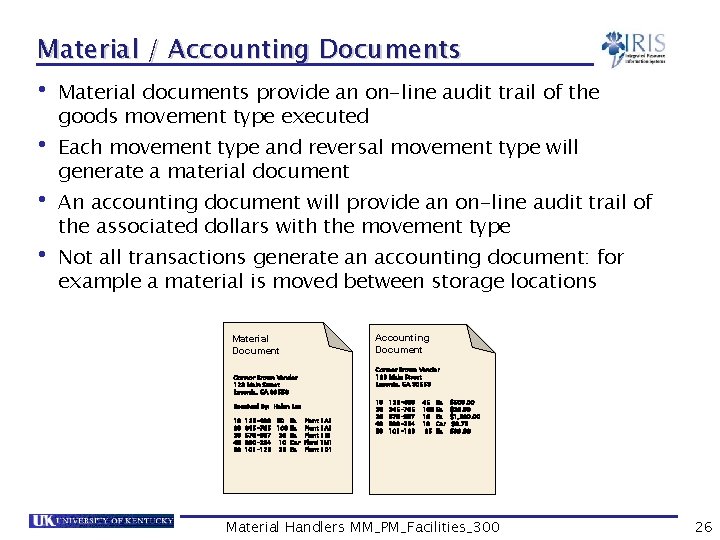
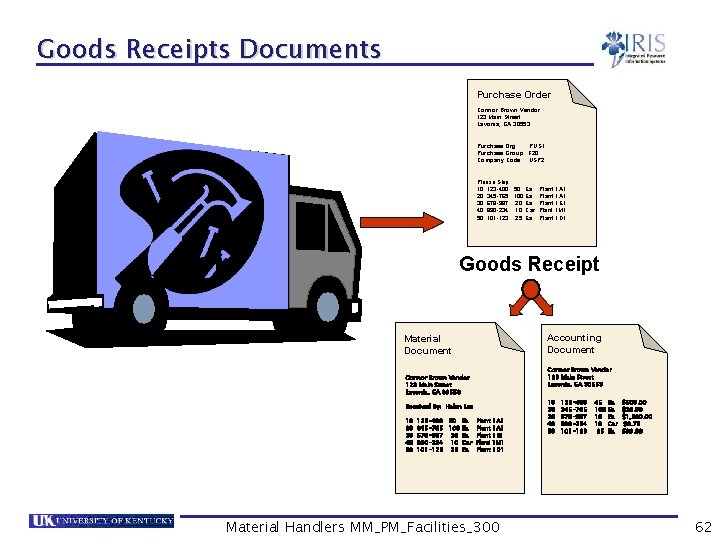
Material / Accounting Documents • Material documents provide an on-line audit trail of the goods movement type executed • Each movement type and reversal movement type will generate a material document • An accounting document will provide an on-line audit trail of the associated dollars with the movement type • Not all transactions generate an accounting document: for example a material is moved between storage locations Accounting Document Material Document Connor Brown Vendor 123 Main Street Lavonia, GA 30553 Received By: Helen Lee 10 20 30 40 50 123 -400 50 Ea 345 -765 100 Ea 678 -987 20 Ea 890 -234 10 Car 101 -123 25 Ea Plant 1 A 1 Plant 1 E 1 Plant 1 M 1 Plant 1 D 1 10 20 30 40 50 123 -400 345 -765 678 -987 890 -234 101 -123 45 100 10 10 25 Ea Ea Ea Car Ea $500. 00 $29. 99 $1, 500. 00 $0. 75 $99. 99 Material Handlers MM_PM_Facilities_300 26
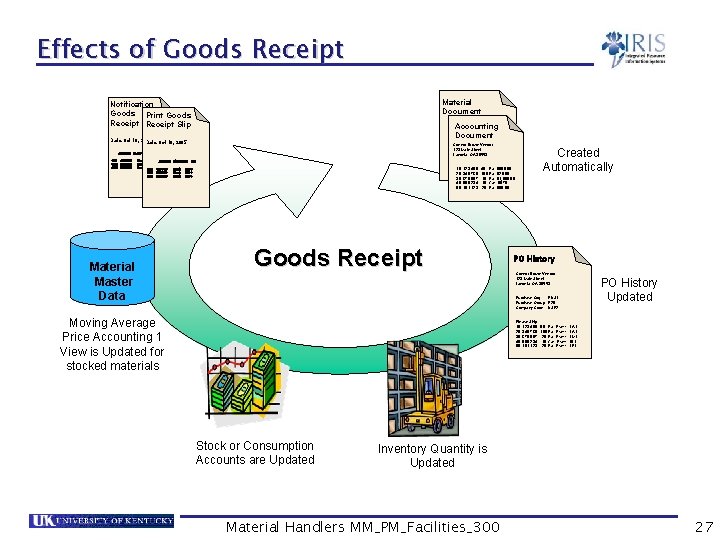
Effects of Goods Receipt Material Document Notification Goods Print Goods Receipt Slip Connor Brown Vendor 123 Main Street Lavonia, GA 30553 Accounting Document Date Oct 10, 2002 Date Oct 10, 2005 Received By: Helen Lee Connor Brown Vendor Main Street 10 123 -400 45 Ea Plant Lavonia, GA 30553 1000 20 345 -765 100 Ea Plant 2000 10 123 -400 45 Ea 30 678 -987 10 Ea Plant$500. 00 100020 345 -765 100 Ea $29. 99 30 678 -987 10 Ea $1, 500. 00 40 890 -234 10 Car Plant 300040 890 -234 10 Car $0. 75 50 101 -123 25 Ea Plant$99. 99 3000 Account Short text UNI 001 400040 002 500050 003 600600 Stock 500+ Account Stock 300+ Stock 001 100+400040 002 500050 003 600600 Material Master Data Short text UNI Stock 500+ 300+ 100+ Goods Receipt Created Automatically PO History Connor Brown Vendor 123 Main Street Lavonia, GA 30553 PO History Updated Purchase Org. : PUS 1 Purchase Group: F 20 Company Code: USP 2 Moving Average Price Accounting 1 View is Updated for stocked materials Please Ship: 10 123 -400 20 345 -765 30 678 -987 40 890 -234 50 101 -123 Stock or Consumption Accounts are Updated 50 Ea 100 Ea 20 Ea 10 Car 25 Ea Plant Plant 1 A 1 1 M 1 1 D 1 1 E 1 Inventory Quantity is Updated Material Handlers MM_PM_Facilities_300 27
Summary • You should now be able to: Explain the use of movement types Understand the relationship between transaction and reference documents Understand the relationship between movement types and transaction Material Handlers MM_PM_Facilities_300 28
Unit 3 MIGO Features & Functions Material Handlers MM_PM_Facilities_300 29
Learning Objectives • At the conclusion of this unit you should be able to: Explain a transaction variant Understand the relationship between transaction variants and reference documents Understand the relationship between movement types and transaction variants Create a Personal List for frequently used movement types Material Handlers MM_PM_Facilities_300 30
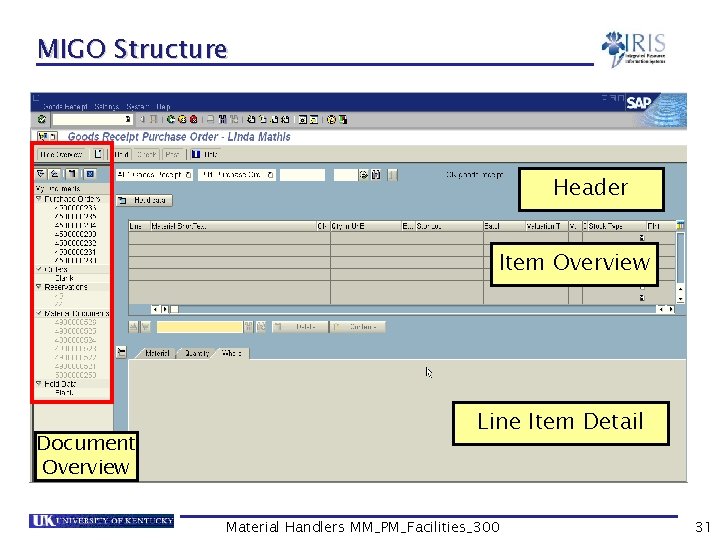
MIGO Structure Header Item Overview Document Overview Line Item Detail Material Handlers MM_PM_Facilities_300 31
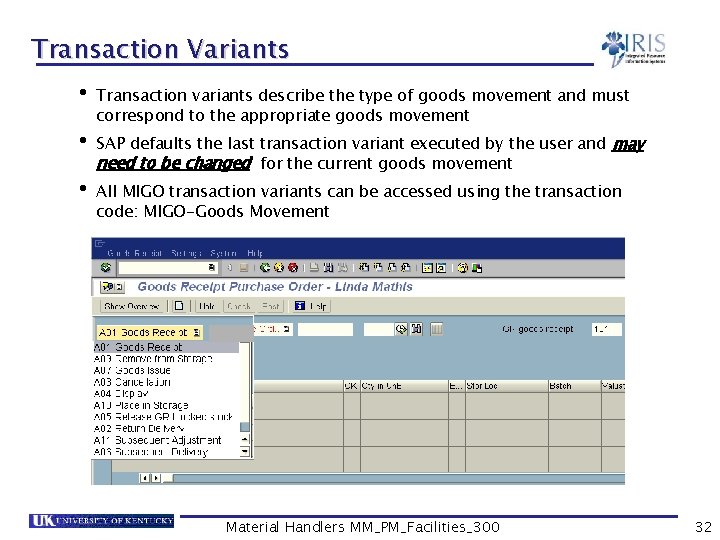
Transaction Variants • Transaction variants describe the type of goods movement and must correspond to the appropriate goods movement • SAP defaults the last transaction variant executed by the user and may need to be changed for the current goods movement • All MIGO transaction variants can be accessed using the transaction code: MIGO-Goods Movement Material Handlers MM_PM_Facilities_300 32
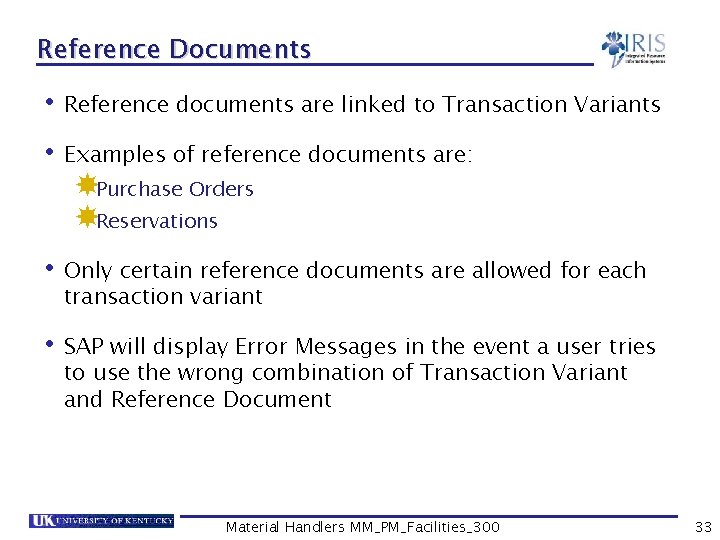
Reference Documents • Reference documents are linked to Transaction Variants • Examples of reference documents are: Purchase Orders Reservations • Only certain reference documents are allowed for each transaction variant • SAP will display Error Messages in the event a user tries to use the wrong combination of Transaction Variant and Reference Document Material Handlers MM_PM_Facilities_300 33
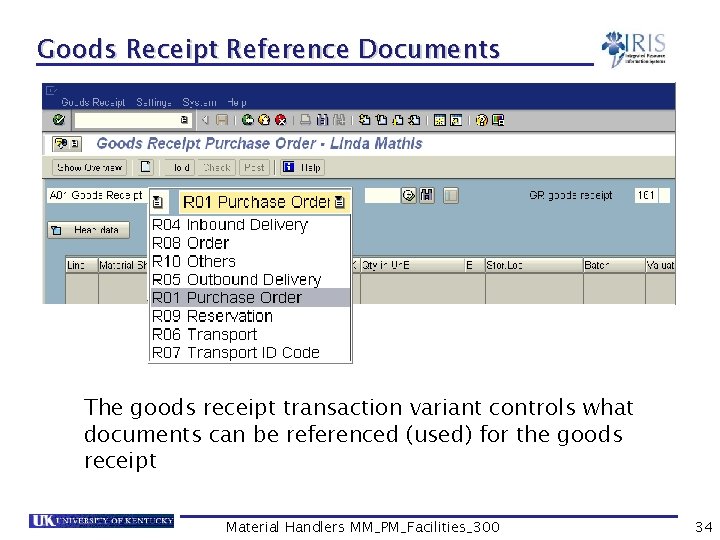
Goods Receipt Reference Documents The goods receipt transaction variant controls what documents can be referenced (used) for the goods receipt Material Handlers MM_PM_Facilities_300 34
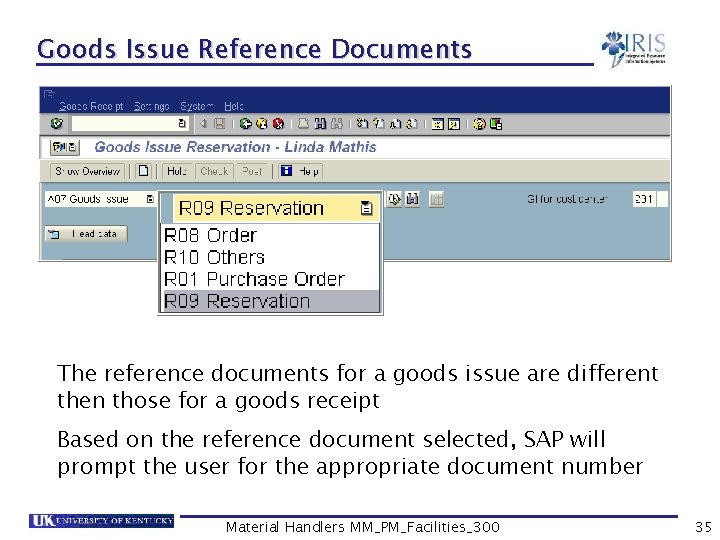
Goods Issue Reference Documents The reference documents for a goods issue are different then those for a goods receipt Based on the reference document selected, SAP will prompt the user for the appropriate document number Material Handlers MM_PM_Facilities_300 35
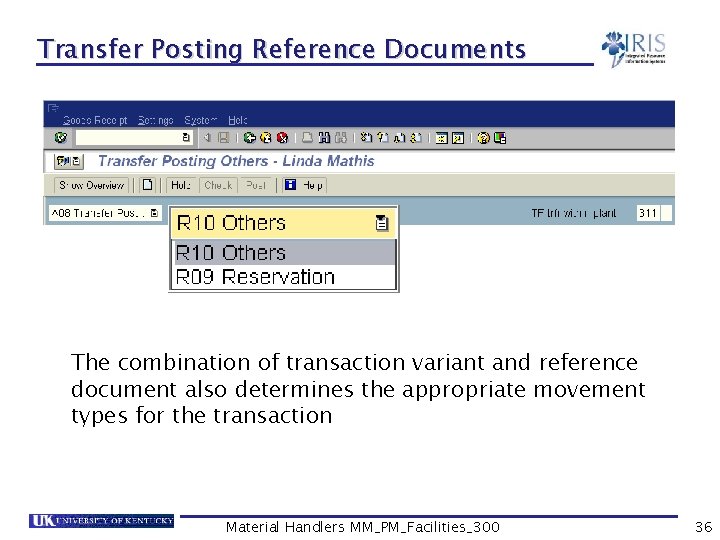
Transfer Posting Reference Documents The combination of transaction variant and reference document also determines the appropriate movement types for the transaction Material Handlers MM_PM_Facilities_300 36
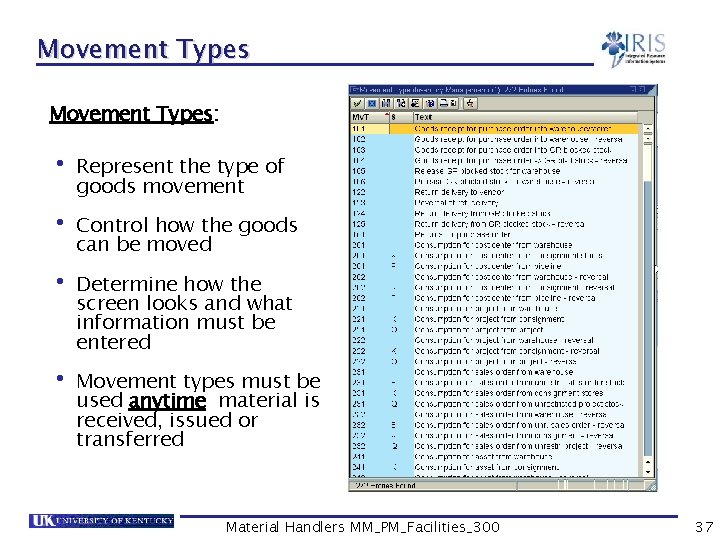
Movement Types: • Represent the type of goods movement • Control how the goods can be moved • Determine how the screen looks and what information must be entered • Movement types must be used anytime material is received, issued or transferred Material Handlers MM_PM_Facilities_300 37
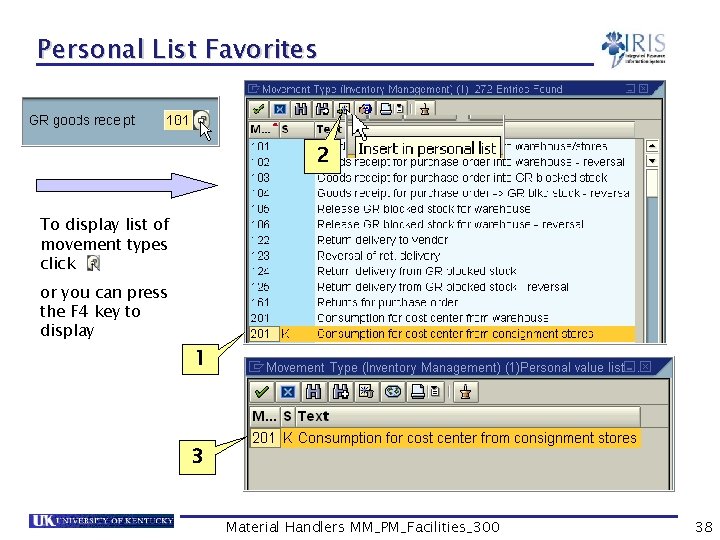
Personal List Favorites 2 To display list of movement types click or you can press the F 4 key to display 1 3 Material Handlers MM_PM_Facilities_300 38
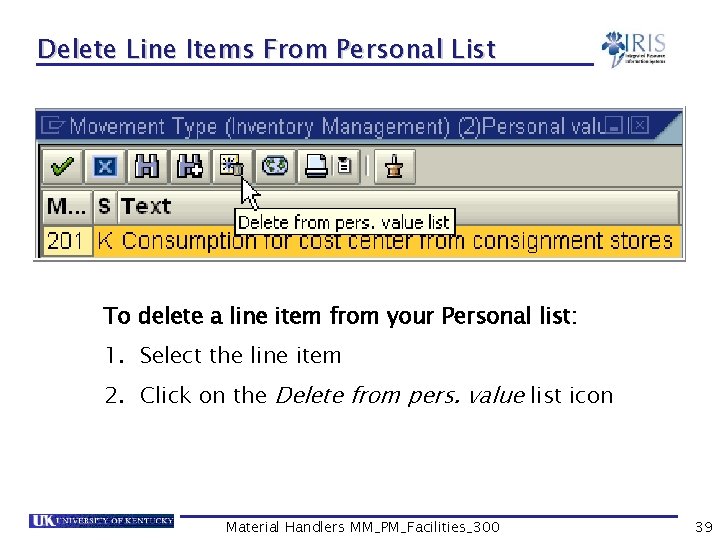
Delete Line Items From Personal List To delete a line item from your Personal list: 1. Select the line item 2. Click on the Delete from pers. value list icon Material Handlers MM_PM_Facilities_300 39
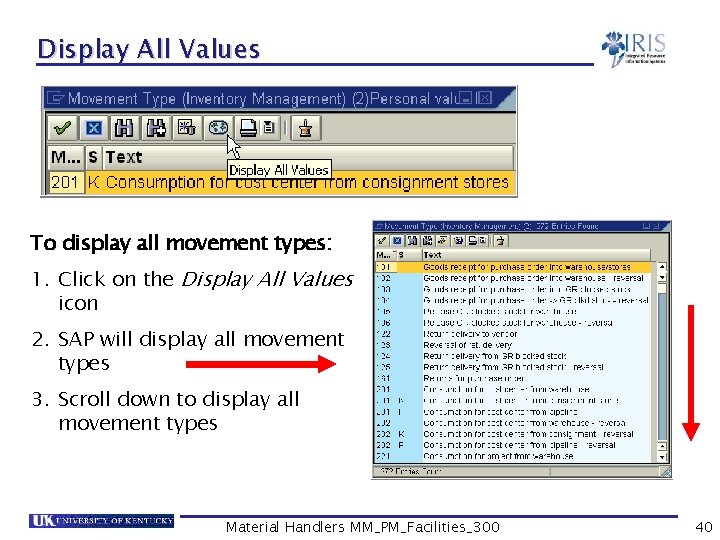
Display All Values To display all movement types: 1. Click on the Display All Values icon 2. SAP will display all movement types 3. Scroll down to display all movement types Material Handlers MM_PM_Facilities_300 40
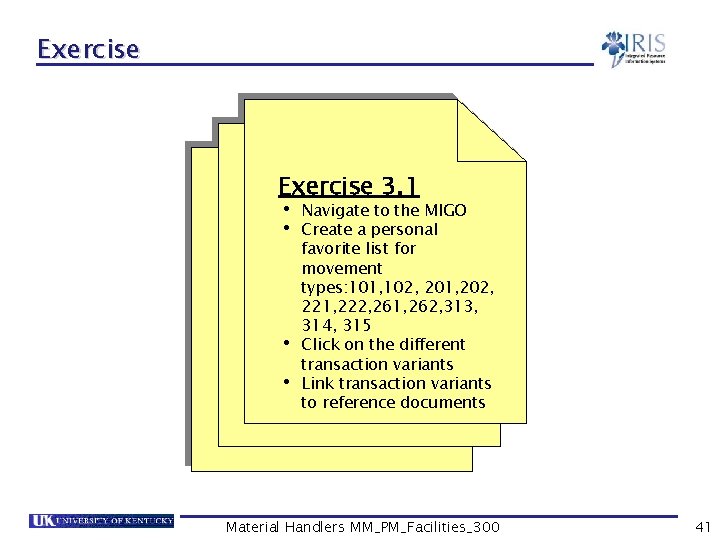
Exercise 3. 1 • Navigate to the MIGO • Create a personal • • favorite list for movement types: 101, 102, 201, 202, 221, 222, 261, 262, 313, 314, 315 Click on the different transaction variants Link transaction variants to reference documents Material Handlers MM_PM_Facilities_300 41
Summary • You should now be able to: Explain the use of transaction variants Understand the relationship between transaction variants and reference documents Understand the relationship between movement types and transaction variants Create a Personal List for frequently used movement types Post a goods movement Material Handlers MM_PM_Facilities_300 42
Unit 4 Goods Receipts Material Handlers MM_PM_Facilities_300 43
Learning Objectives • At the conclusion of this unit you should be able to: Post goods receipts for: § A single purchase order § Multiple line item purchase order § A partial delivery Cancel / Reverse a goods receipt Display the material documents Understand the impact of a goods receipt Return a material to a vendor Material Handlers MM_PM_Facilities_300 44
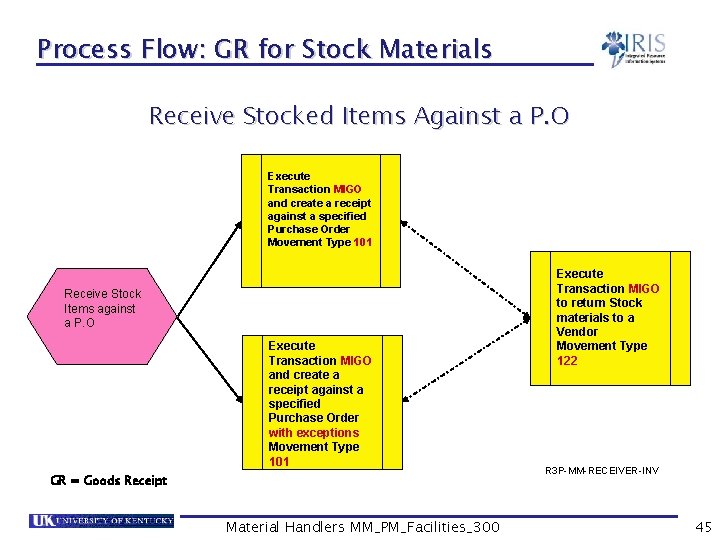
Process Flow: GR for Stock Materials Receive Stocked Items Against a P. O Execute Transaction MIGO and create a receipt against a specified Purchase Order Movement Type 101 Receive Stock Items against a P. O Execute Transaction MIGO and create a receipt against a specified Purchase Order with exceptions Movement Type 101 GR = Goods Receipt Material Handlers MM_PM_Facilities_300 Execute Transaction MIGO to return Stock materials to a Vendor Movement Type 122 R 3 P-MM-RECEIVER-INV 45
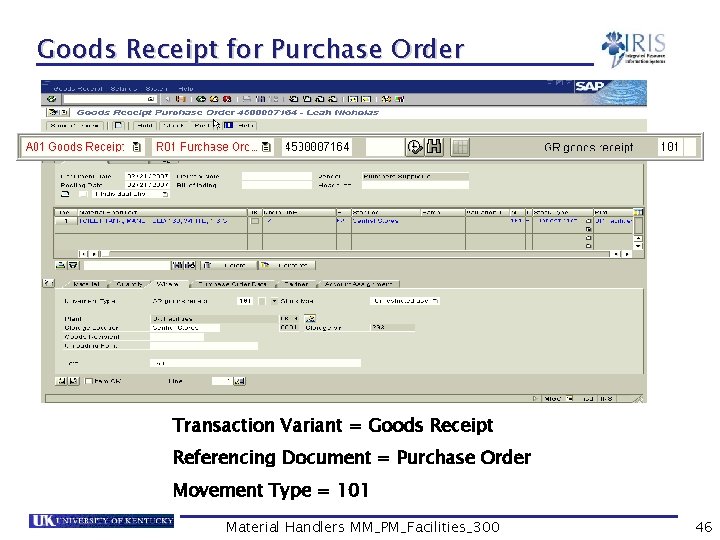
Goods Receipt for Purchase Order 4500004445 Transaction Variant = Goods Receipt Referencing Document = Purchase Order Movement Type = 101 Material Handlers MM_PM_Facilities_300 46
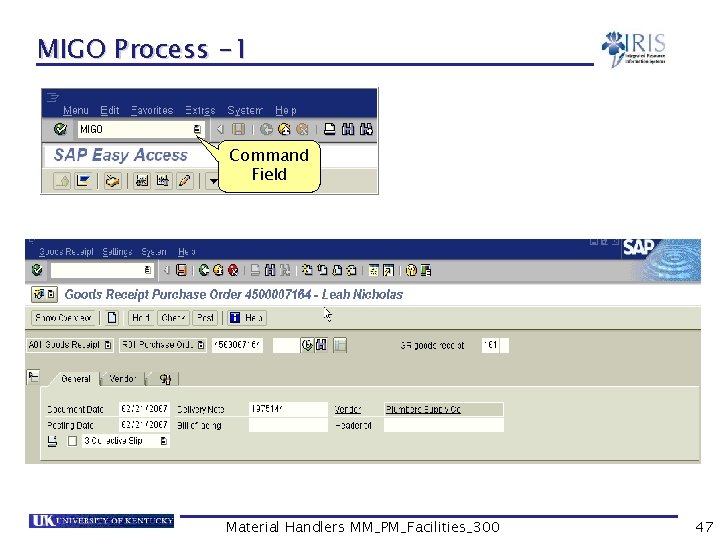
MIGO Process -1 Command Field Material Handlers MM_PM_Facilities_300 47
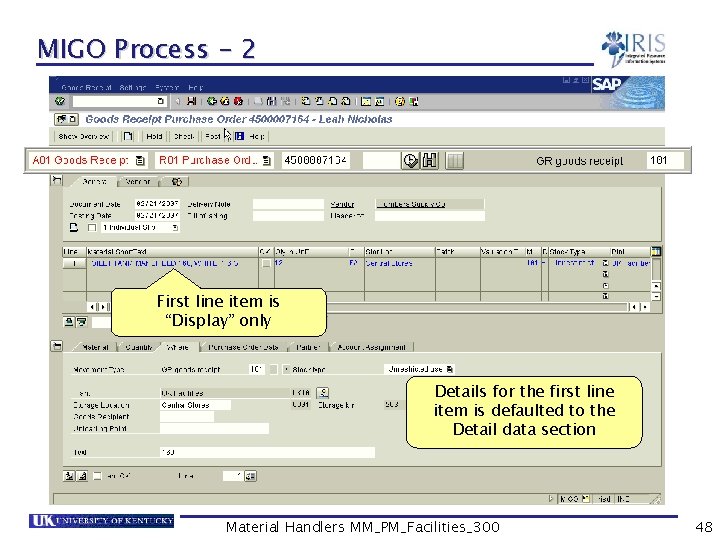
MIGO Process - 2 First line item is “Display” only Details for the first line item is defaulted to the Detail data section Material Handlers MM_PM_Facilities_300 48
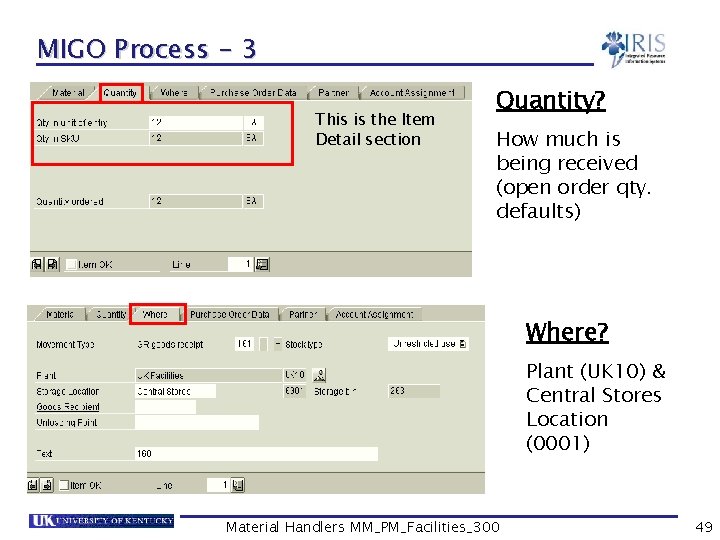
MIGO Process - 3 This is the Item Detail section Quantity? How much is being received (open order qty. defaults) Where? Plant (UK 10) & Central Stores Location (0001) Material Handlers MM_PM_Facilities_300 49
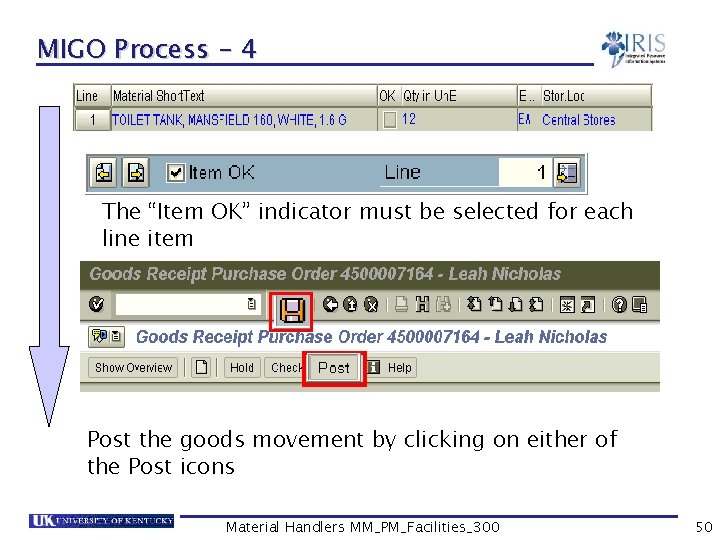
MIGO Process - 4 The “Item OK” indicator must be selected for each line item Post the goods movement by clicking on either of the Post icons Material Handlers MM_PM_Facilities_300 50
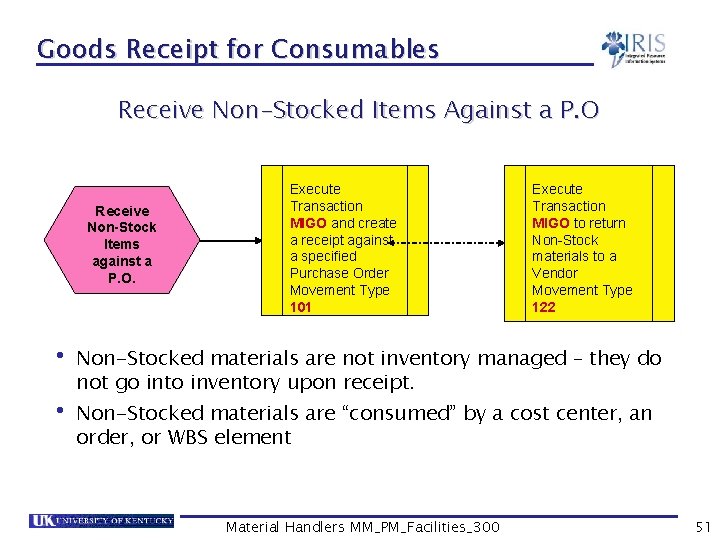
Goods Receipt for Consumables Receive Non-Stocked Items Against a P. O Receive Non-Stock Items against a P. O. Execute Transaction MIGO and create a receipt against a specified Purchase Order Movement Type 101 Execute Transaction MIGO to return Non-Stock materials to a Vendor Movement Type 122 • Non-Stocked materials are not inventory managed – they do not go into inventory upon receipt. • Non-Stocked materials are “consumed” by a cost center, an order, or WBS element Material Handlers MM_PM_Facilities_300 51
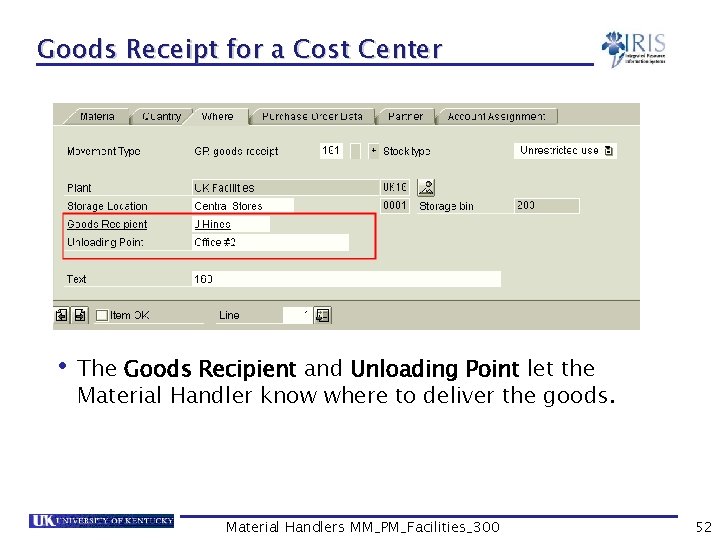
Goods Receipt for a Cost Center • The Goods Recipient and Unloading Point let the Material Handler know where to deliver the goods. Material Handlers MM_PM_Facilities_300 52
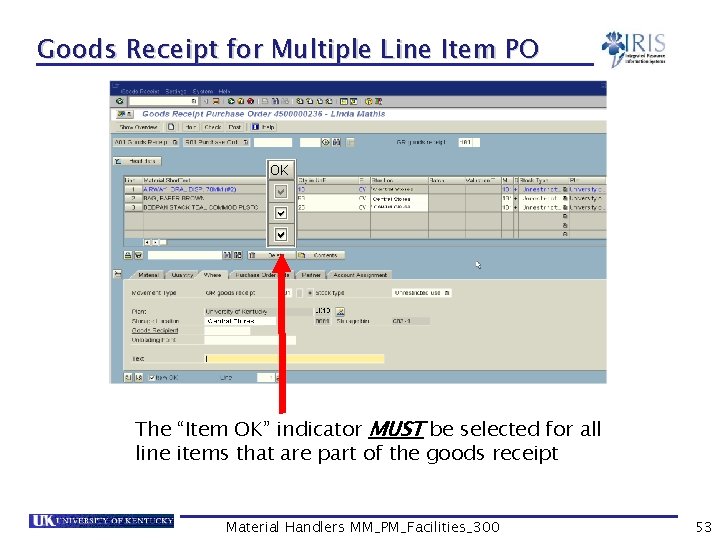
Goods Receipt for Multiple Line Item PO The “Item OK” indicator MUST be selected for all line items that are part of the goods receipt Material Handlers MM_PM_Facilities_300 53
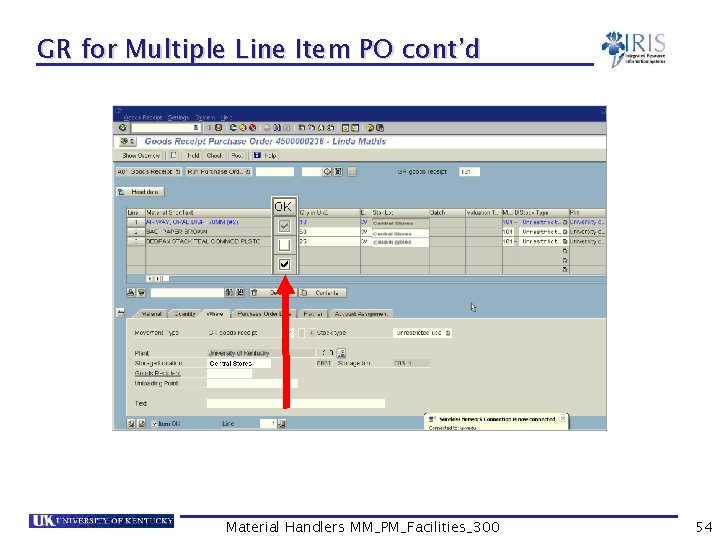
GR for Multiple Line Item PO cont’d Material Handlers MM_PM_Facilities_300 54
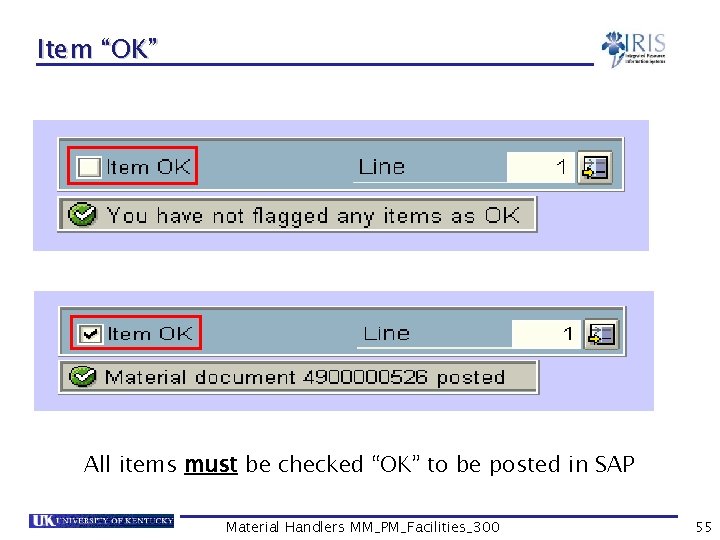
Item “OK” All items must be checked “OK” to be posted in SAP Material Handlers MM_PM_Facilities_300 55
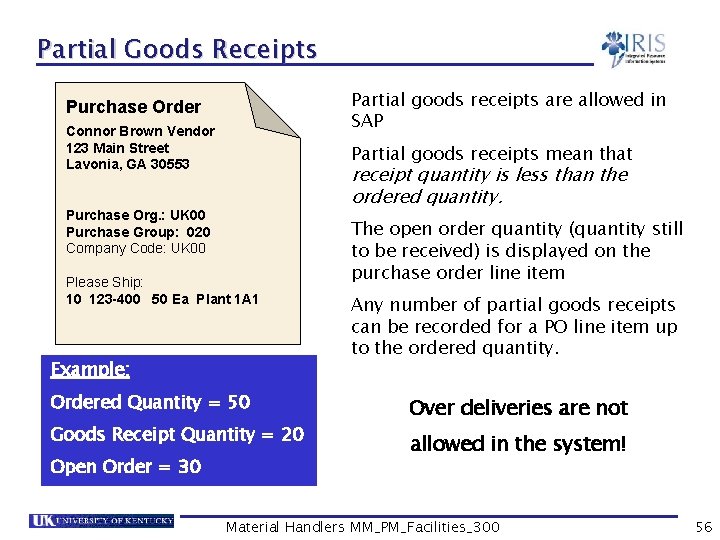
Partial Goods Receipts Partial goods receipts are allowed in SAP Purchase Order Connor Brown Vendor 123 Main Street Lavonia, GA 30553 Partial goods receipts mean that receipt quantity is less than the ordered quantity. Purchase Org. : UK 00 Purchase Group: 020 Company Code: UK 00 Please Ship: 10 123 -400 50 Ea Plant 1 A 1 Example: Ordered Quantity = 50 Goods Receipt Quantity = 20 Open Order = 30 The open order quantity (quantity still to be received) is displayed on the purchase order line item Any number of partial goods receipts can be recorded for a PO line item up to the ordered quantity. Over deliveries are not allowed in the system! Material Handlers MM_PM_Facilities_300 56
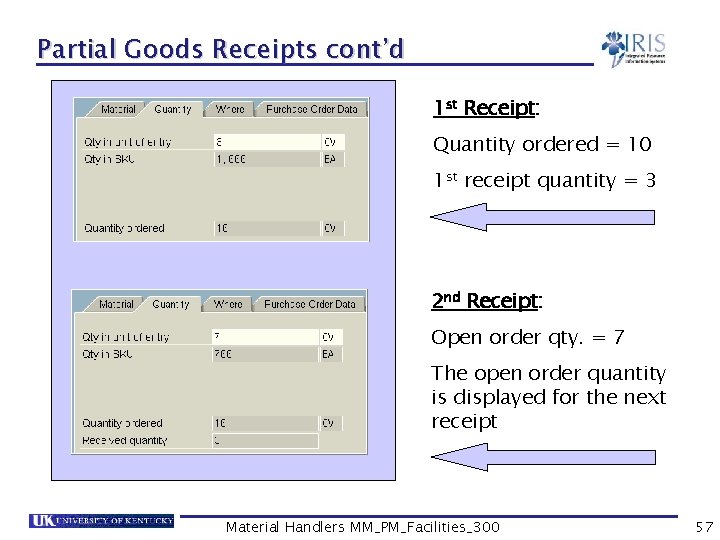
Partial Goods Receipts cont’d 1 st Receipt: Quantity ordered = 10 1 st receipt quantity = 3 2 nd Receipt: Open order qty. = 7 The open order quantity is displayed for the next receipt Material Handlers MM_PM_Facilities_300 57
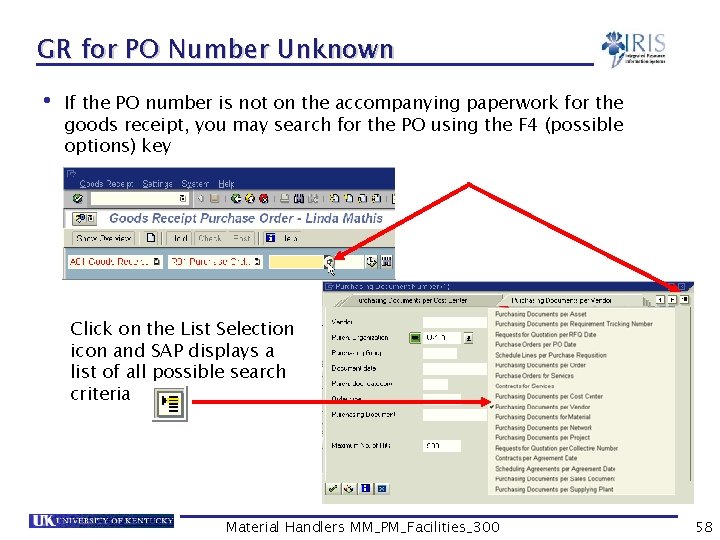
GR for PO Number Unknown • If the PO number is not on the accompanying paperwork for the goods receipt, you may search for the PO using the F 4 (possible options) key Click on the List Selection icon and SAP displays a list of all possible search criteria Material Handlers MM_PM_Facilities_300 58
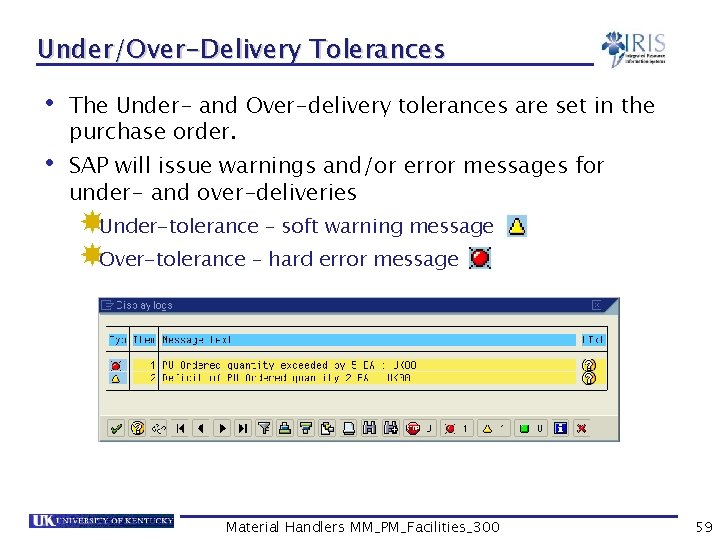
Under/Over-Delivery Tolerances • The Under- and Over-delivery tolerances are set in the purchase order. • SAP will issue warnings and/or error messages for under- and over-deliveries Under-tolerance – soft warning message Over-tolerance – hard error message Material Handlers MM_PM_Facilities_300 59
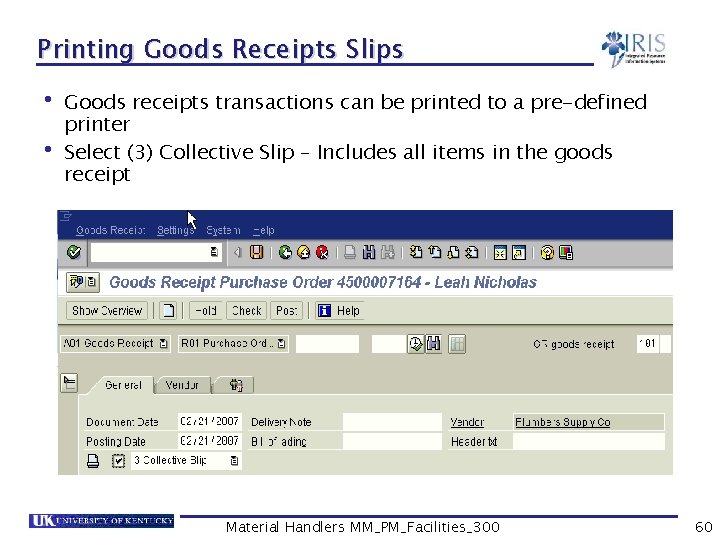
Printing Goods Receipts Slips • Goods receipts transactions can be printed to a pre-defined printer • Select (3) Collective Slip – Includes all items in the goods receipt Material Handlers MM_PM_Facilities_300 60
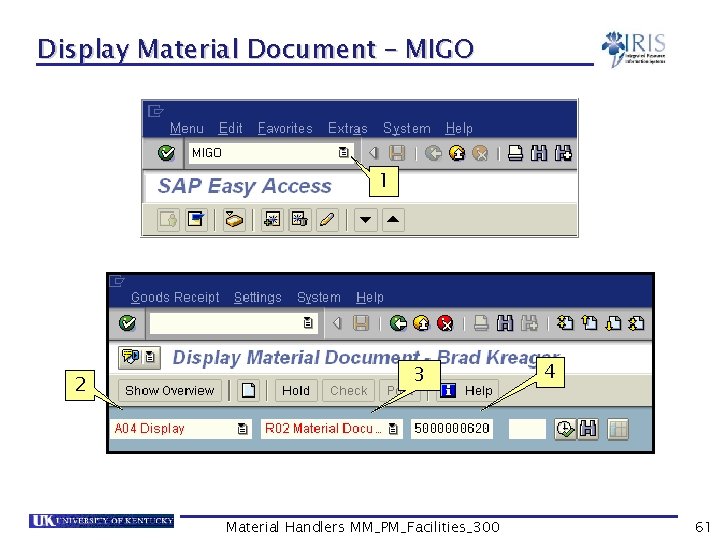
Display Material Document – MIGO 1 2 3 Material Handlers MM_PM_Facilities_300 4 61
Goods Receipts Documents Purchase Order Connor Brown Vendor 123 Main Street Lavonia, GA 30553 Purchase Org. : PUS 1 Purchase Group: F 20 Company Code: USP 2 Please Ship: 10 123 -400 20 345 -765 30 678 -987 40 890 -234 50 101 -123 50 Ea 100 Ea 20 Ea 10 Car 25 Ea Plant 1 A 1 Plant 1 E 1 Plant 1 M 1 Plant 1 D 1 Goods Receipt Accounting Document Material Document Connor Brown Vendor 123 Main Street Lavonia, GA 30553 Received By: Helen Lee 10 20 30 40 50 123 -400 50 Ea 345 -765 100 Ea 678 -987 20 Ea 890 -234 10 Car 101 -123 25 Ea Plant 1 A 1 Plant 1 E 1 Plant 1 M 1 Plant 1 D 1 Material Handlers MM_PM_Facilities_300 10 20 30 40 50 123 -400 345 -765 678 -987 890 -234 101 -123 45 100 10 10 25 Ea Ea Ea Car Ea $500. 00 $29. 99 $1, 500. 00 $0. 75 $99. 99 62
Exercise 4. 1 • GR for POs: • Single Item • Consumable • Multiple items • Partial receipts • Display a material document Material Handlers MM_PM_Facilities_300 63
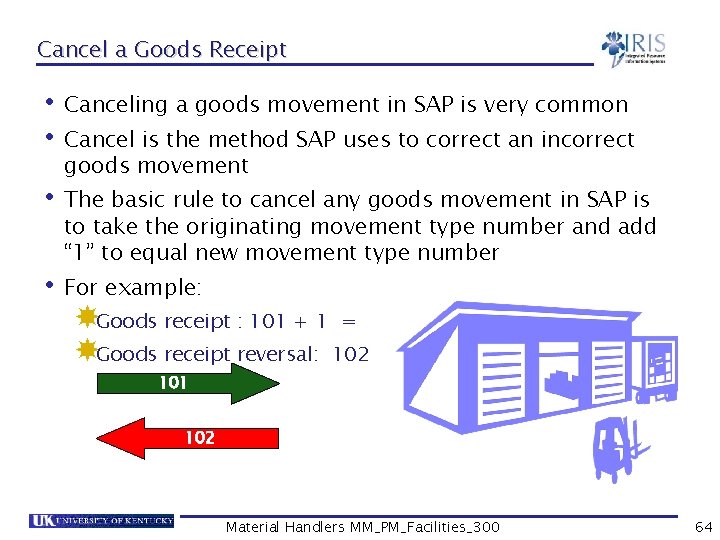
Cancel a Goods Receipt • Canceling a goods movement in SAP is very common • Cancel is the method SAP uses to correct an incorrect goods movement • The basic rule to cancel any goods movement in SAP is to take the originating movement type number and add “ 1” to equal new movement type number • For example: Goods receipt : 101 + 1 = Goods receipt reversal: 102 101 102 Material Handlers MM_PM_Facilities_300 64
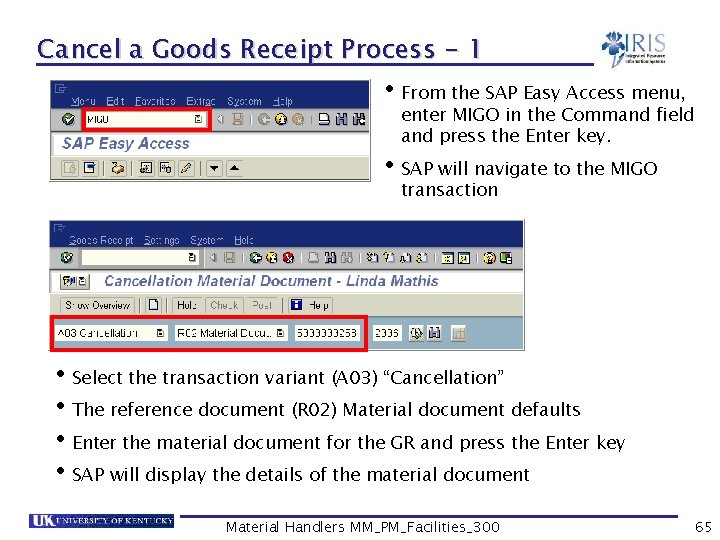
Cancel a Goods Receipt Process - 1 • From the SAP Easy Access menu, enter MIGO in the Command field and press the Enter key. • SAP will navigate to the MIGO transaction • Select the transaction variant (A 03) “Cancellation” • The reference document (R 02) Material document defaults • Enter the material document for the GR and press the Enter key • SAP will display the details of the material document Material Handlers MM_PM_Facilities_300 65
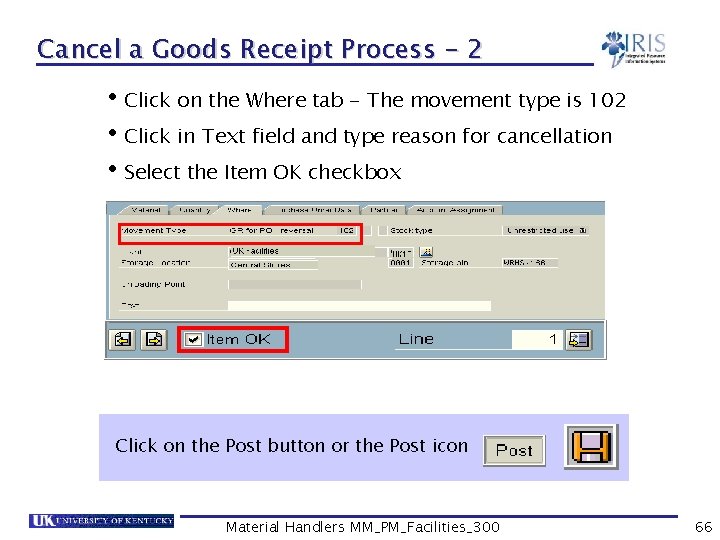
Cancel a Goods Receipt Process - 2 • Click on the Where tab - The movement type is 102 • Click in Text field and type reason for cancellation • Select the Item OK checkbox Click on the Post button or the Post icon Material Handlers MM_PM_Facilities_300 66
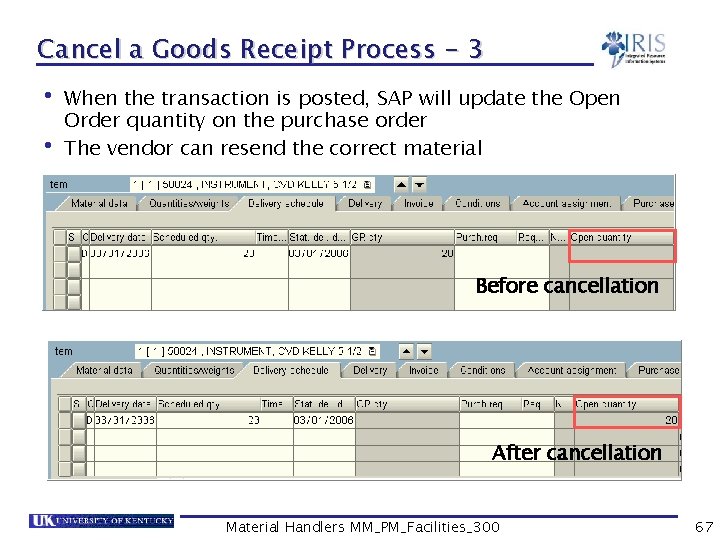
Cancel a Goods Receipt Process - 3 • When the transaction is posted, SAP will update the Open Order quantity on the purchase order • The vendor can resend the correct material Before cancellation After cancellation Material Handlers MM_PM_Facilities_300 67
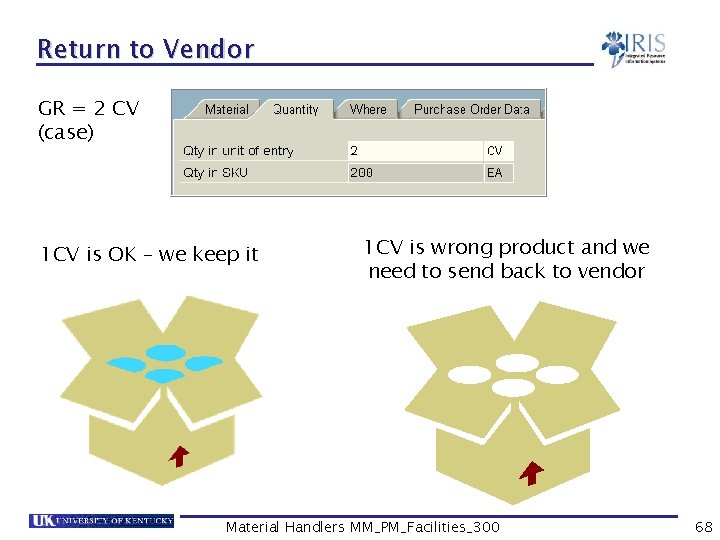
Return to Vendor GR = 2 CV (case) 1 CV is OK – we keep it 1 CV is wrong product and we need to send back to vendor Material Handlers MM_PM_Facilities_300 68
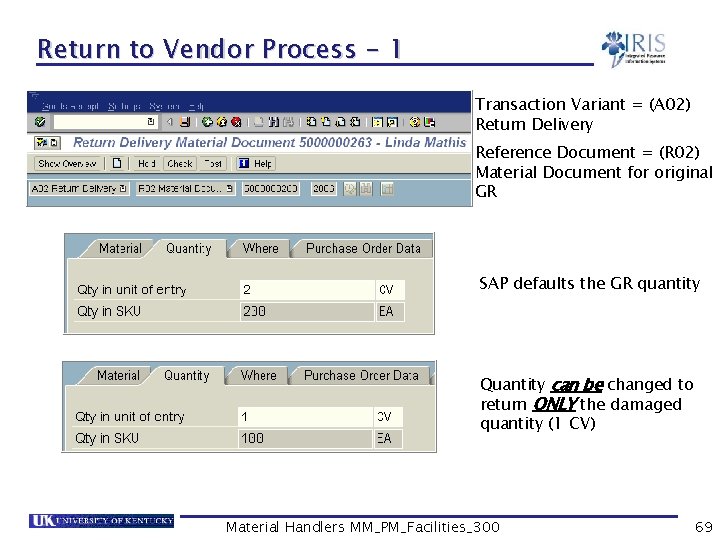
Return to Vendor Process - 1 Transaction Variant = (A 02) Return Delivery Reference Document = (R 02) Material Document for original GR SAP defaults the GR quantity Quantity can be changed to return ONLY the damaged quantity (1 CV) Material Handlers MM_PM_Facilities_300 69
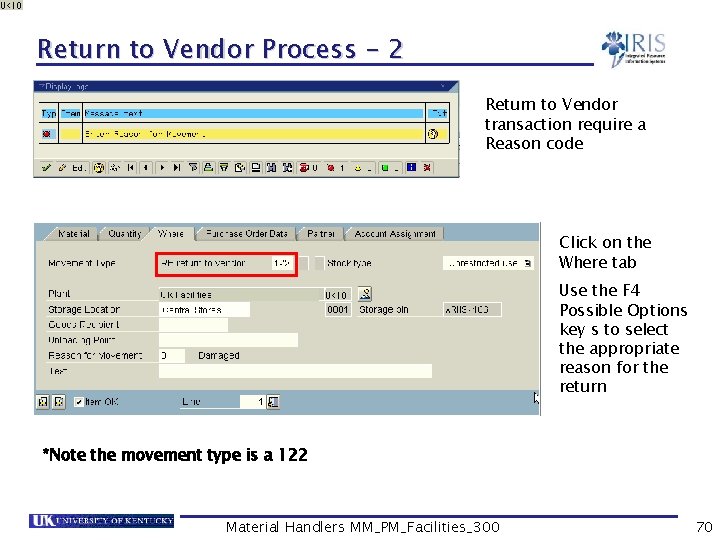
Return to Vendor Process - 2 Return to Vendor transaction require a Reason code Click on the Where tab Use the F 4 Possible Options key s to select the appropriate reason for the return *Note the movement type is a 122 Material Handlers MM_PM_Facilities_300 70
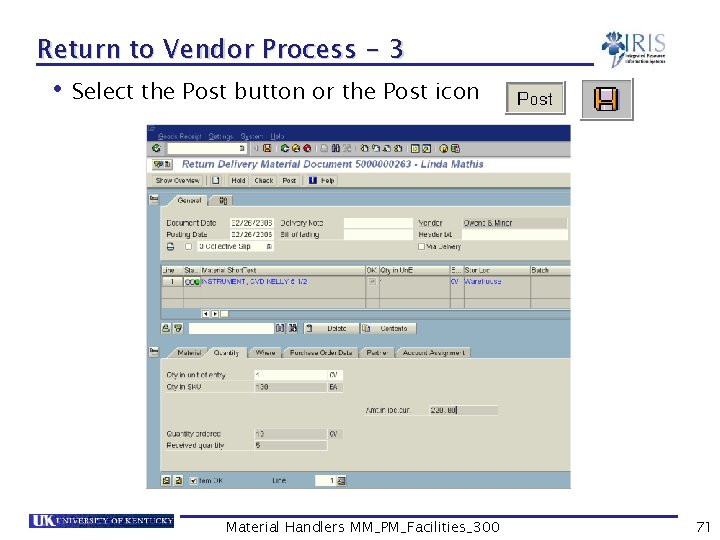
Return to Vendor Process - 3 • Select the Post button or the Post icon Material Handlers MM_PM_Facilities_300 71
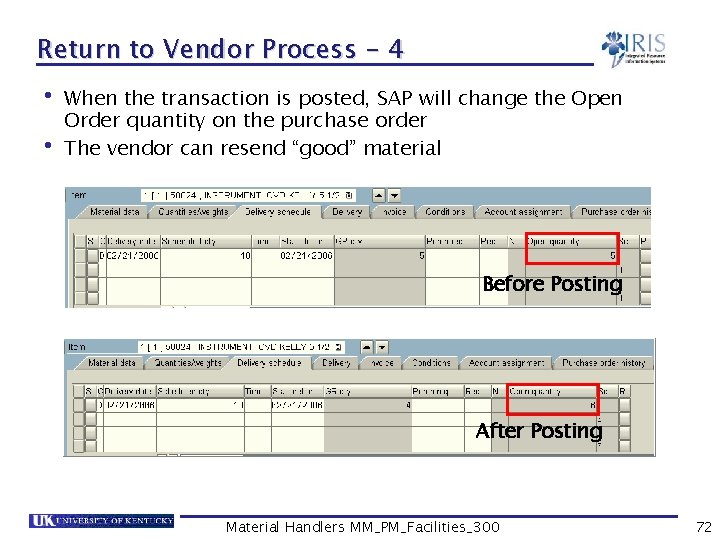
Return to Vendor Process - 4 • When the transaction is posted, SAP will change the Open Order quantity on the purchase order • The vendor can resend “good” material Before Posting After Posting Material Handlers MM_PM_Facilities_300 72
Exercise 4. 2 Cancel/Reverse a single line item GR Cancel/Reverse a multiple line item GR Return to Vendor • • • Material Handlers MM_PM_Facilities_300 73
Summary • You should be able to: Post goods receipts for: § A single purchase order § Multiple line item purchase order § A partial delivery Cancel / Reverse a goods receipt Display the material documents Understand the impact of a goods receipt Return a material to a vendor Material Handlers MM_PM_Facilities_300 74
Unit 5 Goods Issues & Reservations Material Handlers MM_PM_Facilities_300 75
Learning Objectives • At the conclusion of this unit you should be able to: Understand the concept of goods issues in SAP Understand what reservations are and why they are used Understand the difference between transaction codes ZMM_GI_GR and MB 1 A Post goods issues using MIGO and ZMM_GI_GR for: § § Cost centers Reservations WBS Elements To scrap Material Handlers MM_PM_Facilities_300 76
Learning Objectives cont’d • At the conclusion of this unit you should be able to: Use custom transactions to mass process reservations: § ZMM_PICKT § MB 26 § ZMM_SHORT Cancel / Reverse Goods Issues Print goods issues material documents Material Handlers MM_PM_Facilities_300 77
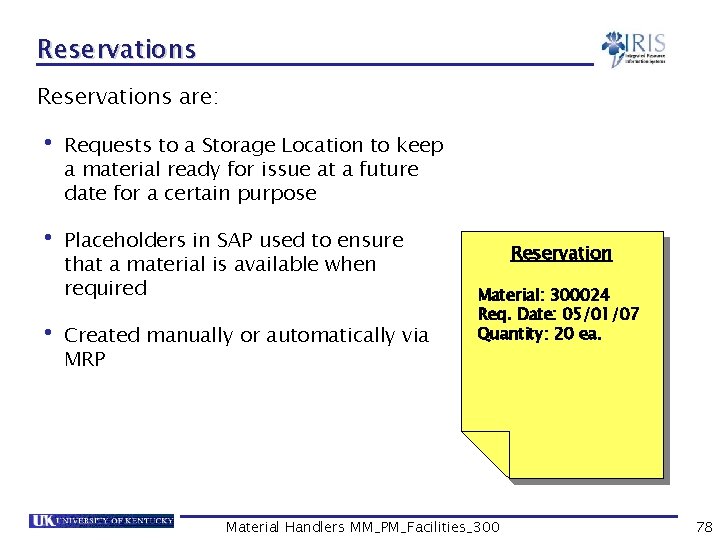
Reservations are: • Requests to a Storage Location to keep a material ready for issue at a future date for a certain purpose • Placeholders in SAP used to ensure that a material is available when required • Created manually or automatically via MRP Reservation Material: 300024 Req. Date: 05/01/07 Quantity: 20 ea. Material Handlers MM_PM_Facilities_300 78
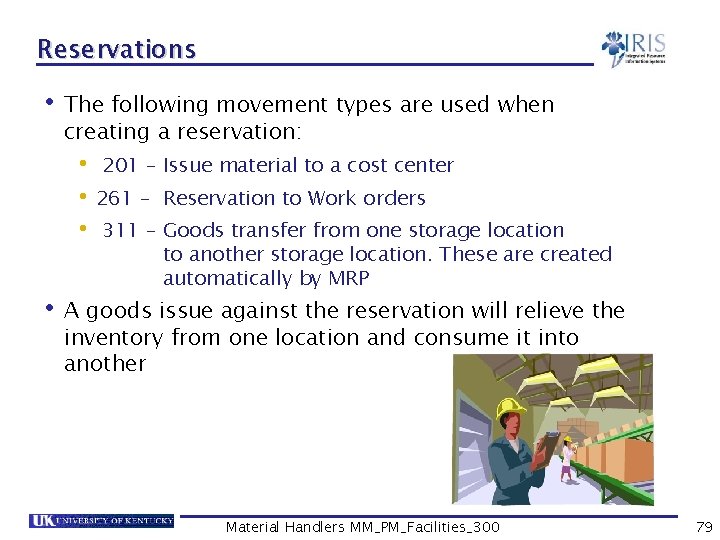
Reservations • The following movement types are used when creating a reservation: • 201 – Issue material to a cost center • 261 – Reservation to Work orders • 311 – Goods transfer from one storage location to another storage location. These are created automatically by MRP • A goods issue against the reservation will relieve the inventory from one location and consume it into another Material Handlers MM_PM_Facilities_300 79
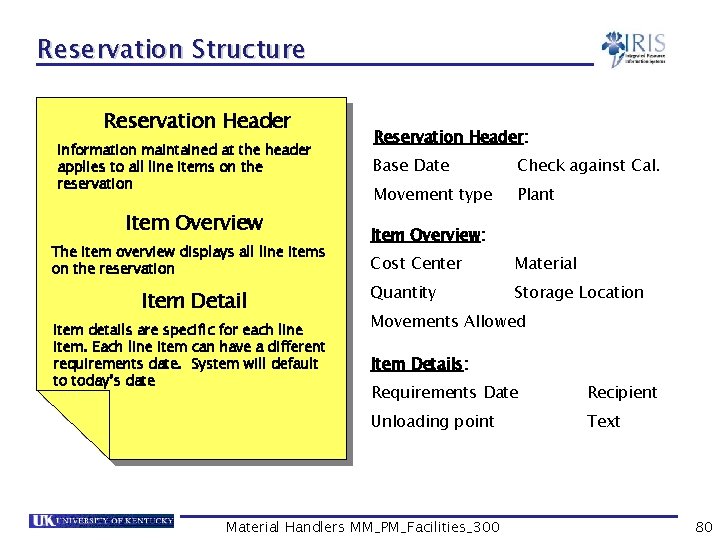
Reservation Structure Reservation Header Information maintained at the header applies to all line items on the reservation Item Overview The item overview displays all line items on the reservation Item Detail Item details are specific for each line item. Each line item can have a different requirements date. System will default to today’s date Reservation Header: Base Date Check against Cal. Movement type Plant Item Overview: Cost Center Material Quantity Storage Location Movements Allowed Item Details: Requirements Date Recipient Unloading point Text Material Handlers MM_PM_Facilities_300 80
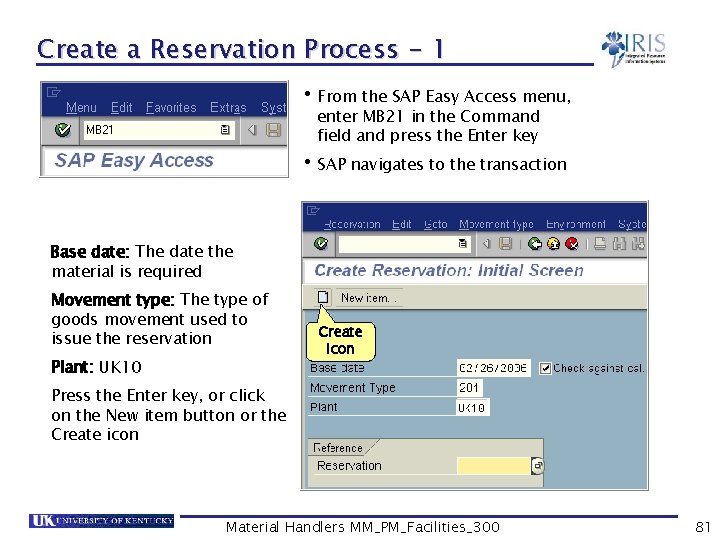
Create a Reservation Process - 1 • From the SAP Easy Access menu, enter MB 21 in the Command field and press the Enter key • SAP navigates to the transaction Base date: The date the material is required Movement type: The type of goods movement used to issue the reservation Plant: UK 10 Create icon Press the Enter key, or click on the New item button or the Create icon Material Handlers MM_PM_Facilities_300 81
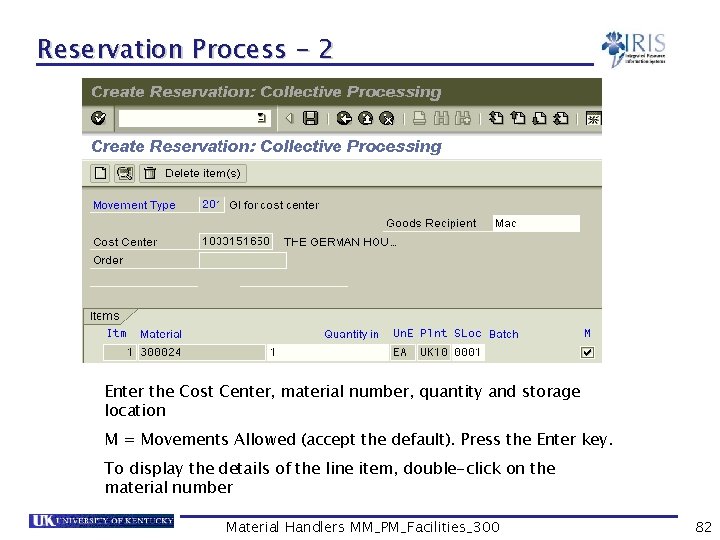
Reservation Process - 2 Enter the Cost Center, material number, quantity and storage location M = Movements Allowed (accept the default). Press the Enter key. To display the details of the line item, double-click on the material number Material Handlers MM_PM_Facilities_300 82
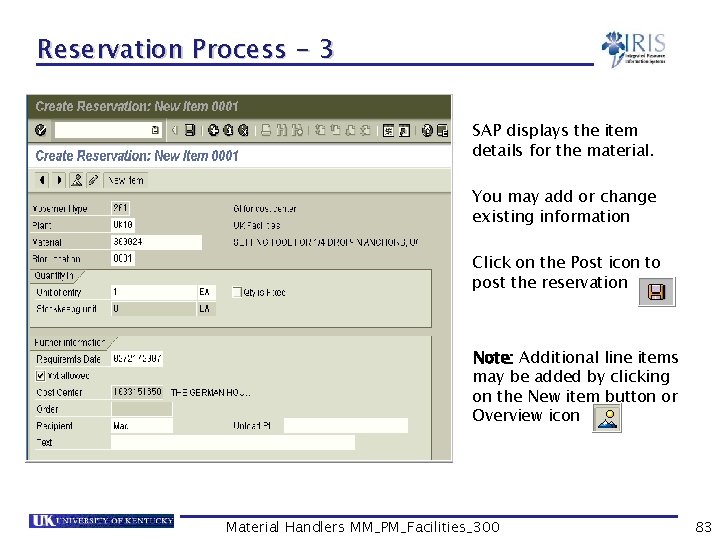
Reservation Process - 3 SAP displays the item details for the material. You may add or change existing information Click on the Post icon to post the reservation Note: Additional line items may be added by clicking on the New item button or Overview icon Material Handlers MM_PM_Facilities_300 83
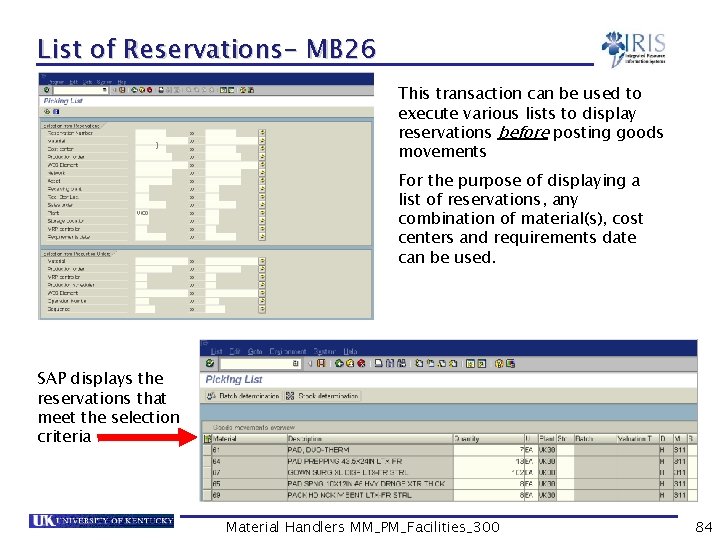
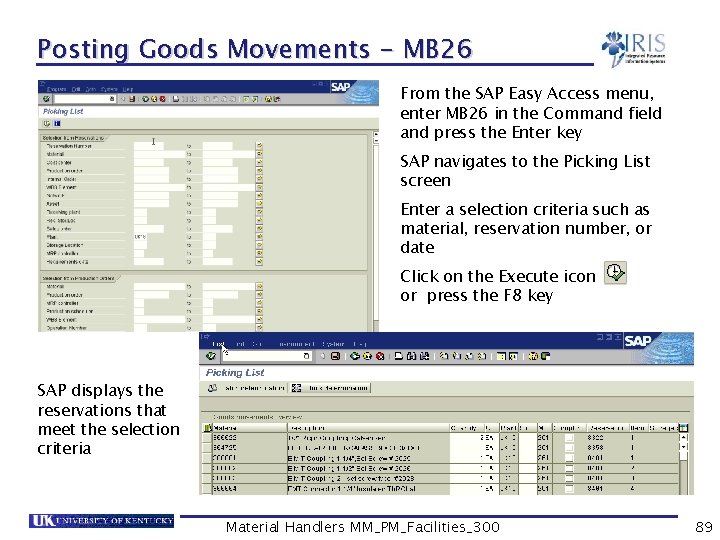
List of Reservations- MB 26 This transaction can be used to execute various lists to display reservations before posting goods movements For the purpose of displaying a list of reservations, any combination of material(s), cost centers and requirements date can be used. SAP displays the reservations that meet the selection criteria Material Handlers MM_PM_Facilities_300 84
Exercise 5. 1 Create a reservation for a cost center Use MB 26 to execute a list of reservations • • Material Handlers MM_PM_Facilities_300 85
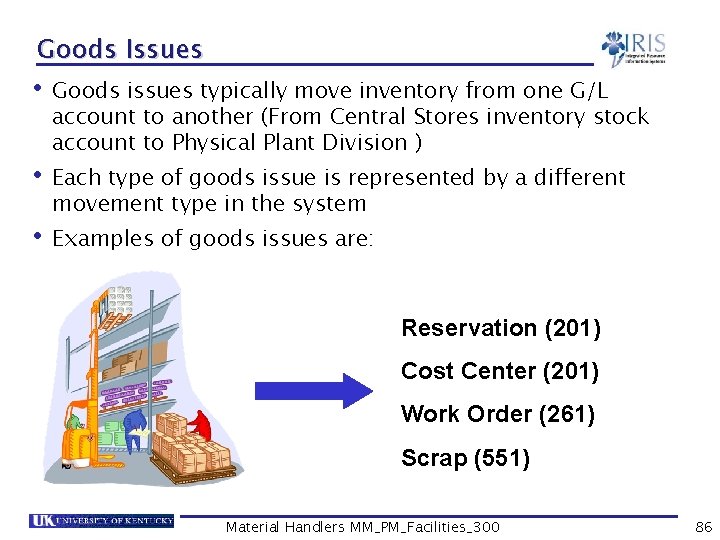
Goods Issues • Goods issues typically move inventory from one G/L account to another (From Central Stores inventory stock account to Physical Plant Division ) • Each type of goods issue is represented by a different movement type in the system • Examples of goods issues are: Reservation (201) Cost Center (201) Work Order (261) Scrap (551) Material Handlers MM_PM_Facilities_300 86
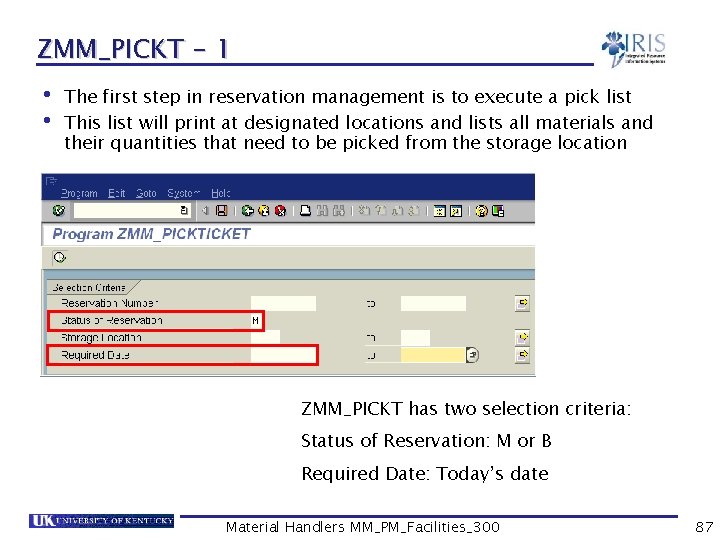
ZMM_PICKT - 1 • The first step in reservation management is to execute a pick list • This list will print at designated locations and lists all materials and their quantities that need to be picked from the storage location ZMM_PICKT has two selection criteria: Status of Reservation: M or B Required Date: Today’s date Material Handlers MM_PM_Facilities_300 87
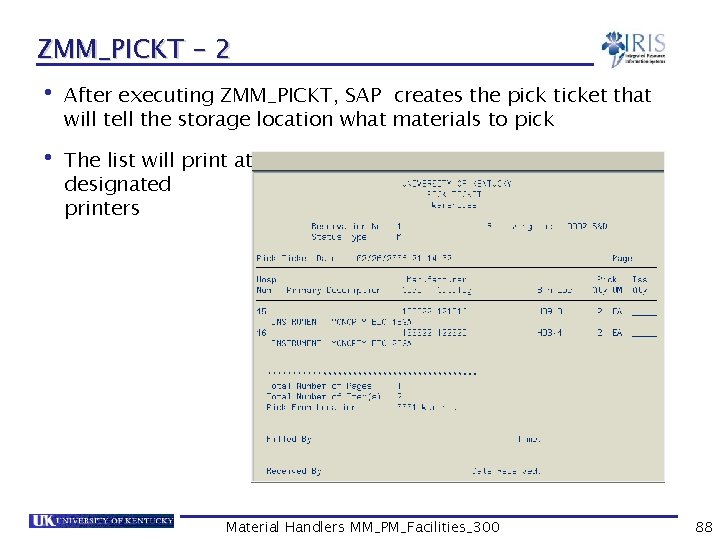
ZMM_PICKT - 2 • After executing ZMM_PICKT, SAP creates the pick ticket that will tell the storage location what materials to pick • The list will print at designated printers Material Handlers MM_PM_Facilities_300 88
Posting Goods Movements - MB 26 From the SAP Easy Access menu, enter MB 26 in the Command field and press the Enter key SAP navigates to the Picking List screen Enter a selection criteria such as material, reservation number, or date Click on the Execute icon or press the F 8 key SAP displays the reservations that meet the selection criteria Material Handlers MM_PM_Facilities_300 89
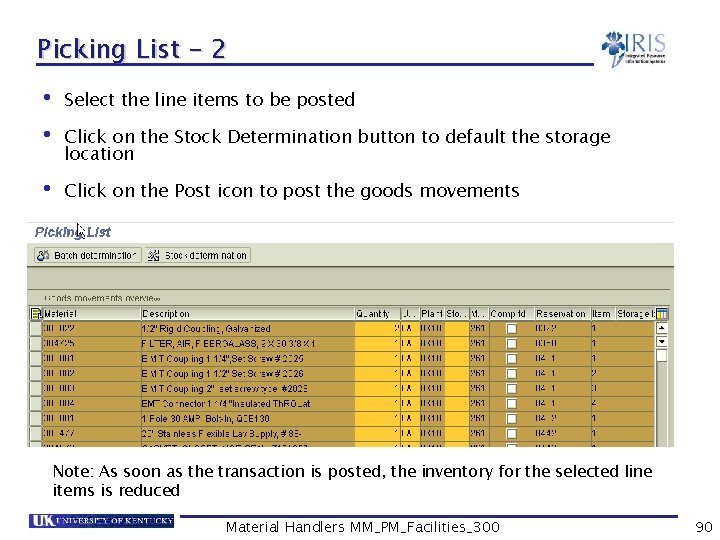
Picking List - 2 • Select the line items to be posted • Click on the Stock Determination button to default the storage location • Click on the Post icon to post the goods movements Note: As soon as the transaction is posted, the inventory for the selected line items is reduced Material Handlers MM_PM_Facilities_300 90
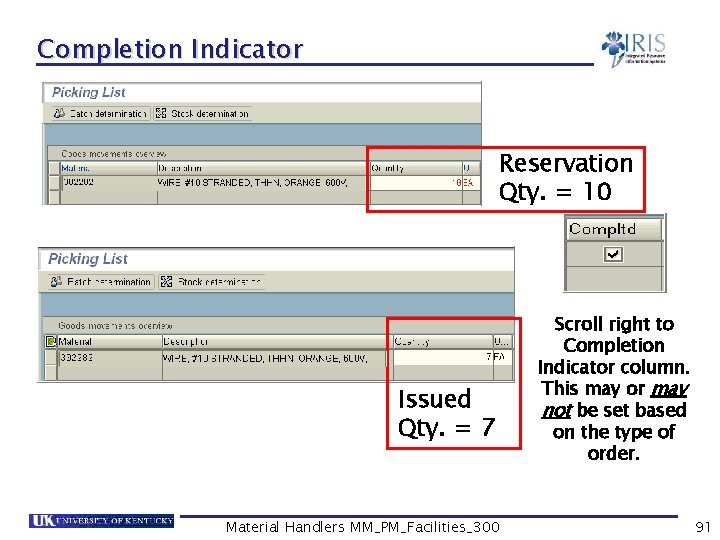
Completion Indicator Reservation Qty. = 10 Issued Qty. = 7 Material Handlers MM_PM_Facilities_300 Scroll right to Completion Indicator column. This may or may not be set based on the type of order. 91
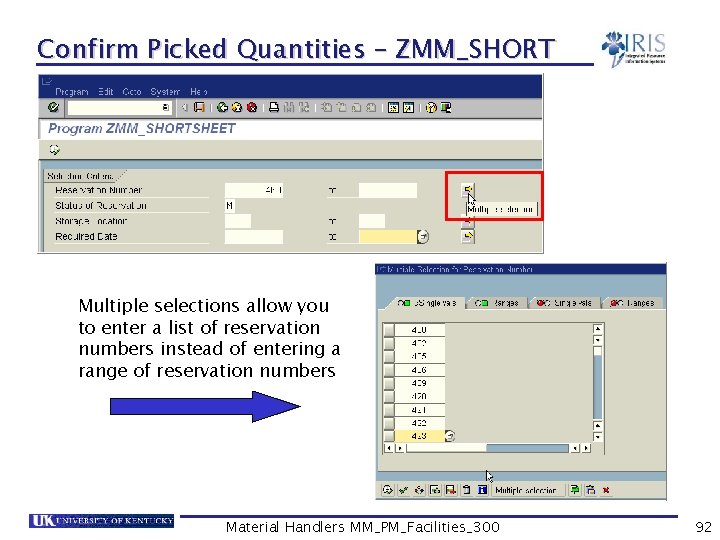
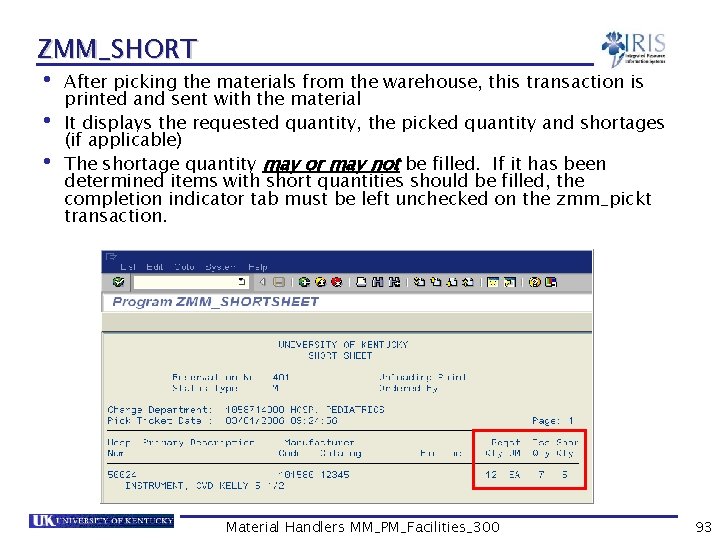
Confirm Picked Quantities – ZMM_SHORT Multiple selections allow you to enter a list of reservation numbers instead of entering a range of reservation numbers Material Handlers MM_PM_Facilities_300 92
ZMM_SHORT • After picking the materials from the warehouse, this transaction is printed and sent with the material • It displays the requested quantity, the picked quantity and shortages (if applicable) • The shortage quantity may or may not be filled. If it has been determined items with short quantities should be filled, the completion indicator tab must be left unchecked on the zmm_pickt transaction. Material Handlers MM_PM_Facilities_300 93
Exercise 5. 2 Execute ZMM_PICKT Post goods movements using MB 26 Execute ZMM_SHORT • • • Material Handlers MM_PM_Facilities_300 94
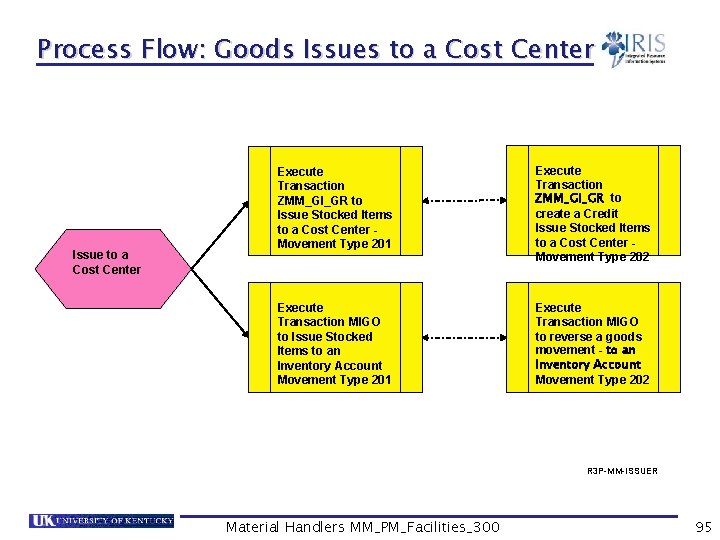
Process Flow: Goods Issues to a Cost Center Issue to a Cost Center Execute Transaction ZMM_GI_GR to Issue Stocked Items to a Cost Center Movement Type 201 Execute Transaction ZMM_GI_GR to create a Credit Issue Stocked Items to a Cost Center Movement Type 202 Execute Transaction MIGO to Issue Stocked Items to an Inventory Account Movement Type 201 Execute Transaction MIGO to reverse a goods movement - to an Inventory Account Movement Type 202 R 3 P-MM-ISSUER Material Handlers MM_PM_Facilities_300 95
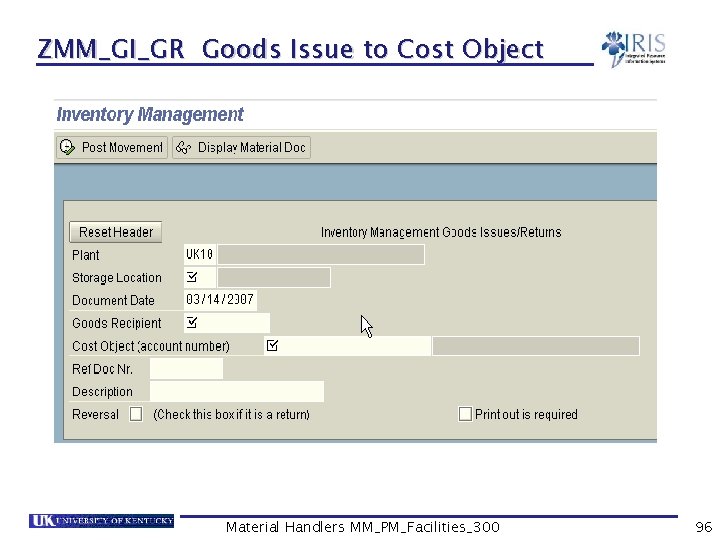
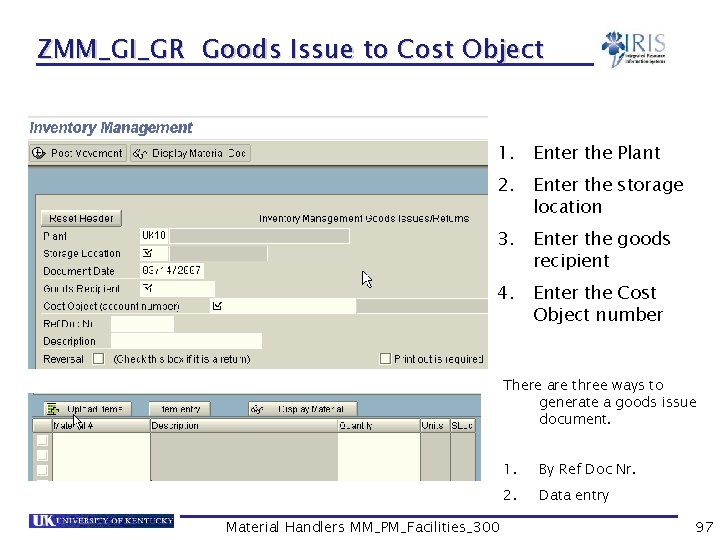
ZMM_GI_GR Goods Issue to Cost Object Material Handlers MM_PM_Facilities_300 96
ZMM_GI_GR Goods Issue to Cost Object 1. Enter the Plant 2. Enter the storage location 3. Enter the goods recipient 4. Enter the Cost Object number There are three ways to generate a goods issue document. Material Handlers MM_PM_Facilities_300 1. By Ref Doc Nr. 2. Data entry 97
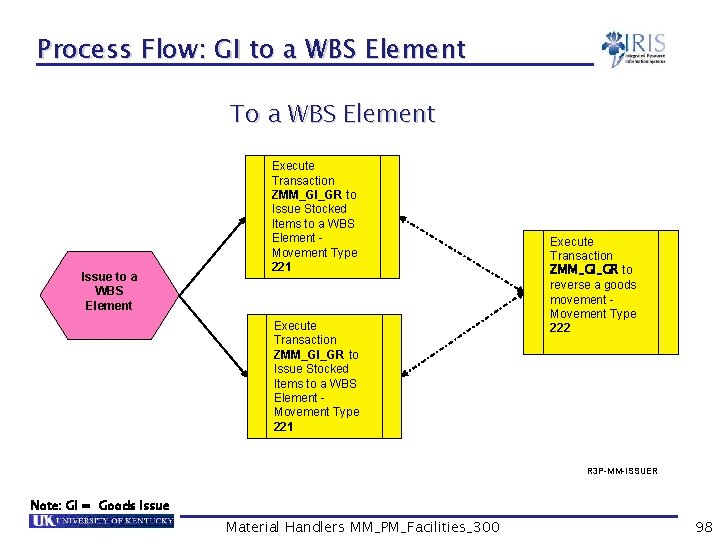
Process Flow: GI to a WBS Element To a WBS Element Issue to a WBS Element Execute Transaction ZMM_GI_GR to Issue Stocked Items to a WBS Element Movement Type 221 Execute Transaction ZMM_GI_GR to reverse a goods movement Movement Type 222 R 3 P-MM-ISSUER Note: GI = Goods Issue Material Handlers MM_PM_Facilities_300 98
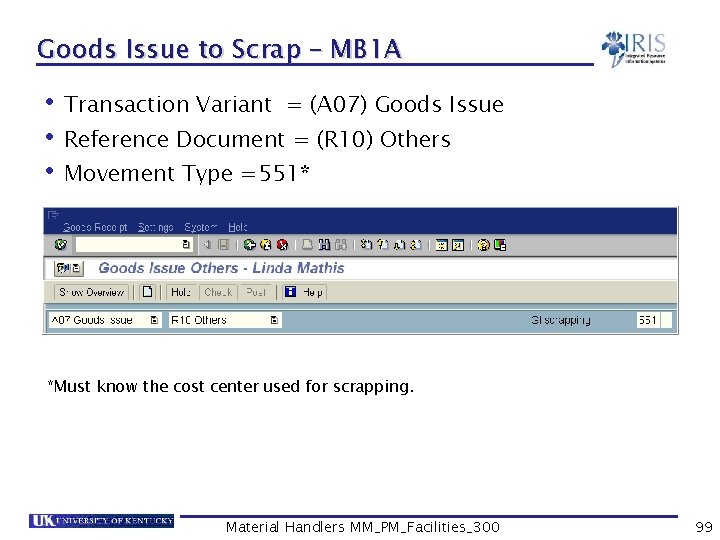
Goods Issue to Scrap – MB 1 A • Transaction Variant = (A 07) Goods Issue • Reference Document = (R 10) Others • Movement Type =551* *Must know the cost center used for scrapping. Material Handlers MM_PM_Facilities_300 99
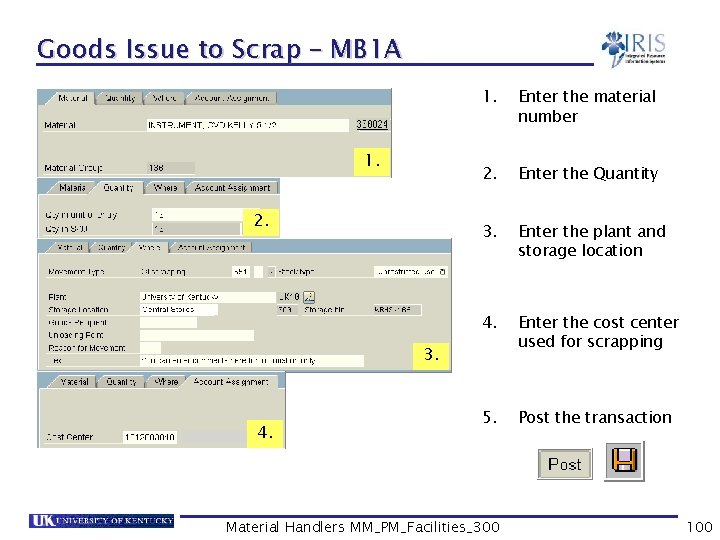
Goods Issue to Scrap – MB 1 A 1. 2. 1. Enter the material number 2. Enter the Quantity 3. Enter the plant and storage location 4. Enter the cost center used for scrapping 5. Post the transaction 3. 4. Material Handlers MM_PM_Facilities_300 100
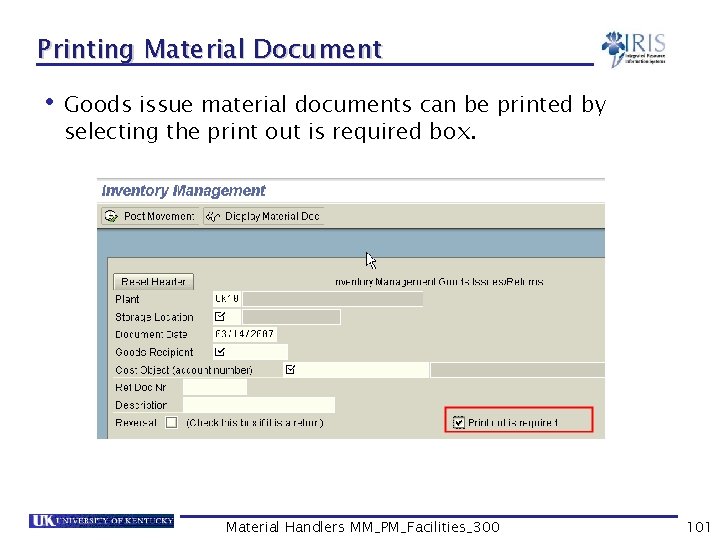
Printing Material Document • Goods issue material documents can be printed by selecting the print out is required box. Material Handlers MM_PM_Facilities_300 101
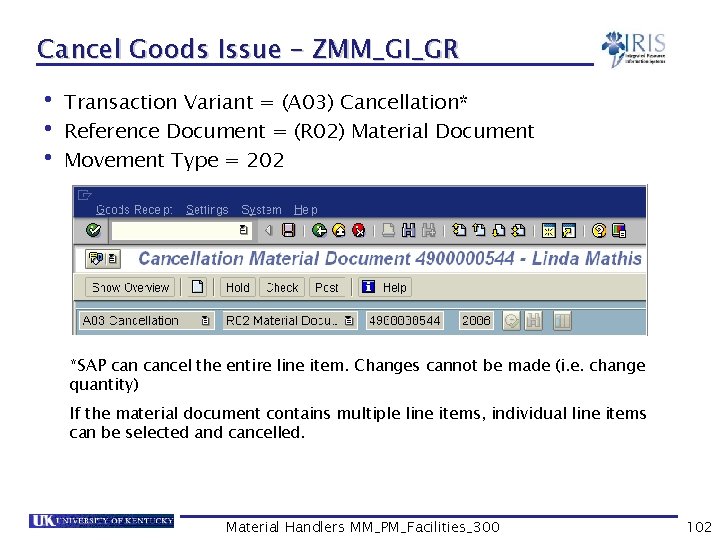
Cancel Goods Issue – ZMM_GI_GR • Transaction Variant = (A 03) Cancellation* • Reference Document = (R 02) Material Document • Movement Type = 202 *SAP cancel the entire line item. Changes cannot be made (i. e. change quantity) If the material document contains multiple line items, individual line items can be selected and cancelled. Material Handlers MM_PM_Facilities_300 102
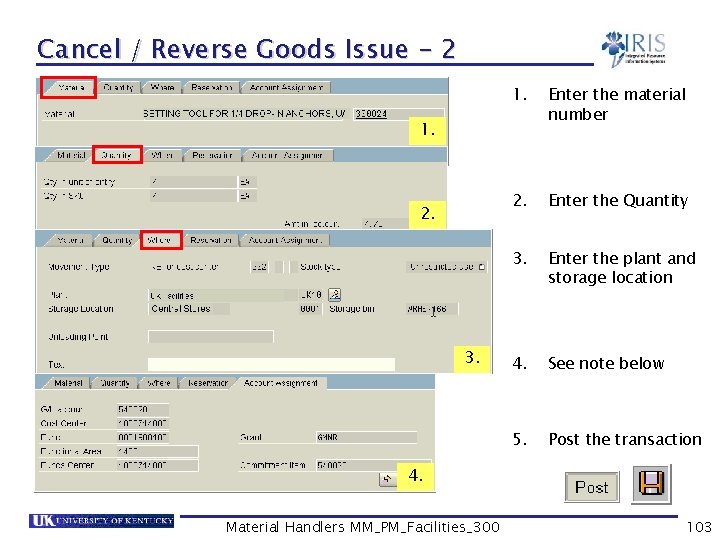
Cancel / Reverse Goods Issue - 2 1. Enter the material number 2. Enter the Quantity 3. Enter the plant and storage location 4. See note below 5. Post the transaction 1. 2. 3. 4. Material Handlers MM_PM_Facilities_300 103
Exercise 5. 3 Post a Goods Issue using ZMM_GI_GR Post Goods Issue using ZMM_GI_GR Cancel a Goods Issue from one cost center and issue to another Print material documents • • Material Handlers MM_PM_Facilities_300 104
Summary • You should now be able to: Understand the concept of goods issues in SAP transaction codes § ZMM_GI_GR § MIGO Understand what reservations are and why they are used Post goods issues using ZMM_GI_GR and MIGO for: § § Cost centers Reservations WBS Elements To scrap Material Handlers MM_PM_Facilities_300 105
Summary cont’d • You should now be able to: Use custom transactions to mass process reservations: § ZMM_PICKT § MB 26 § ZMM_SHORT Cancel / Reverse Goods Issues Print goods issues material documents Material Handlers MM_PM_Facilities_300 106
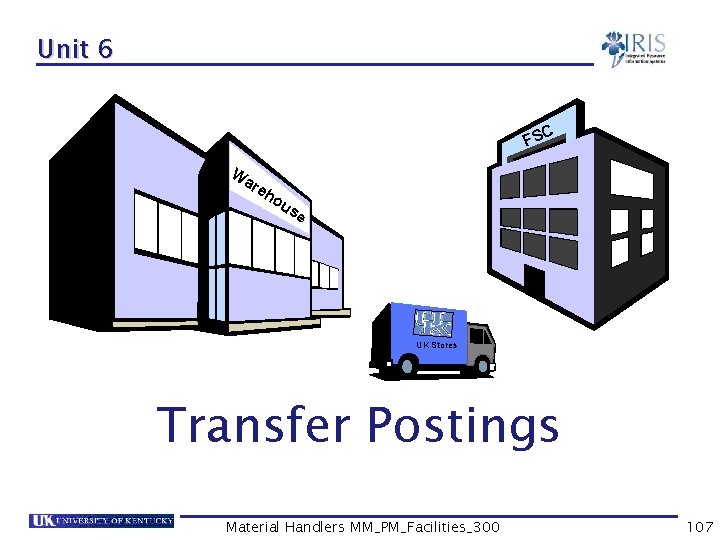
Unit 6 C FS W ar eh ou se UK Stores Transfer Postings Material Handlers MM_PM_Facilities_300 107
Learning Objectives • At the conclusion of this unit you should be able to: Execute a two step transfer posting Display stock in transfer Cancel a two step transfer posting Material Handlers MM_PM_Facilities_300 108
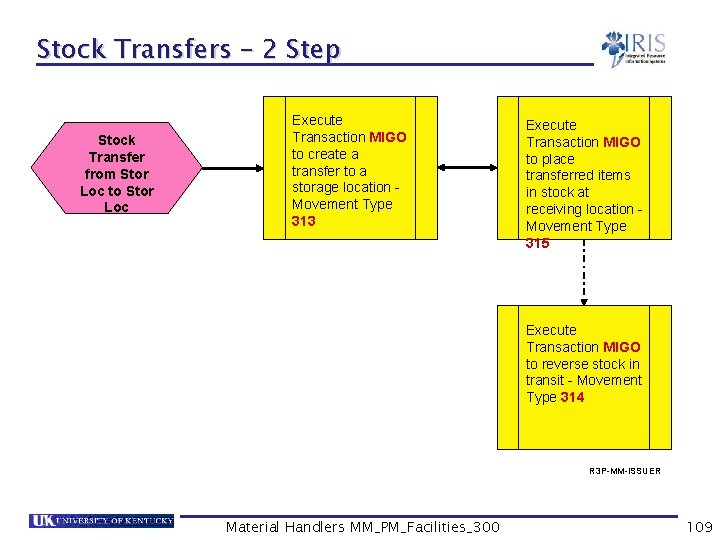
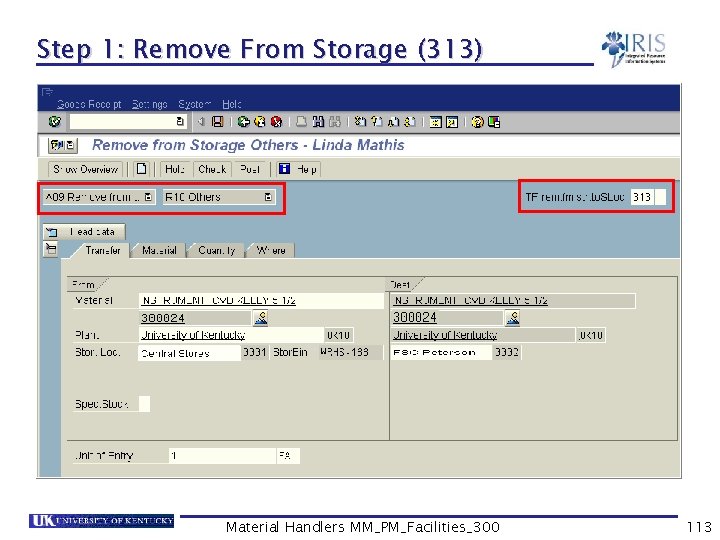
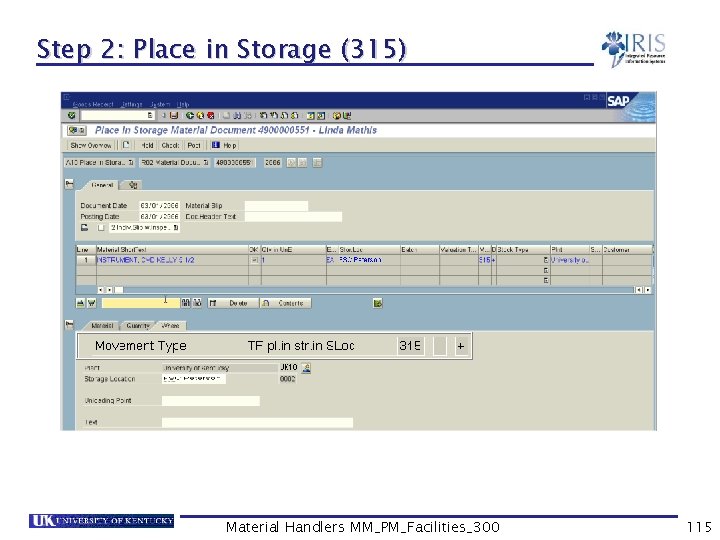
Stock Transfers – 2 Step Stock Transfer from Stor Loc to Stor Loc Execute Transaction MIGO to create a transfer to a storage location Movement Type 313 Execute Transaction MIGO to place transferred items in stock at receiving location Movement Type 315 Execute Transaction MIGO to reverse stock in transit - Movement Type 314 R 3 P-MM-ISSUER Material Handlers MM_PM_Facilities_300 109
Transfer Postings • Goods movements do not only occur in the form of goods receipts and goods issues. Internal stock transfers might also be necessary • A stock transfer from storage location to storage location in the same plant causes an update of the stock quantities in both storage locations • Stock transfers can be executed using a one-step or two-step procedure • UK will use both one-step and two-step stock transfer procedures Material Handlers MM_PM_Facilities_300 110
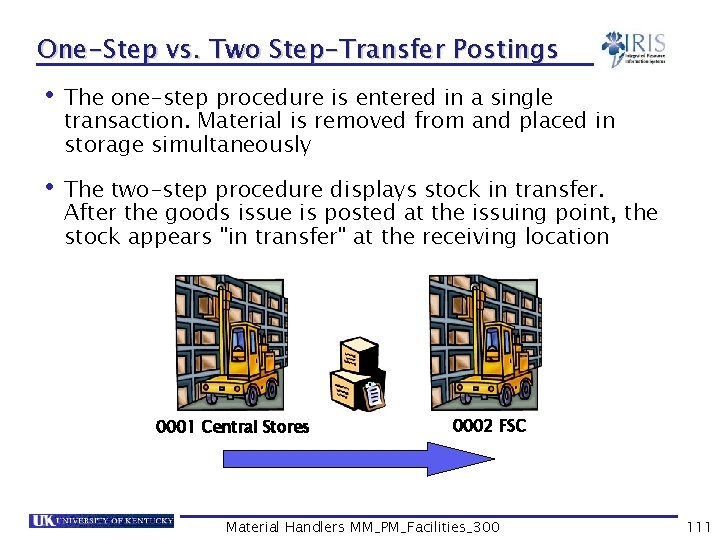
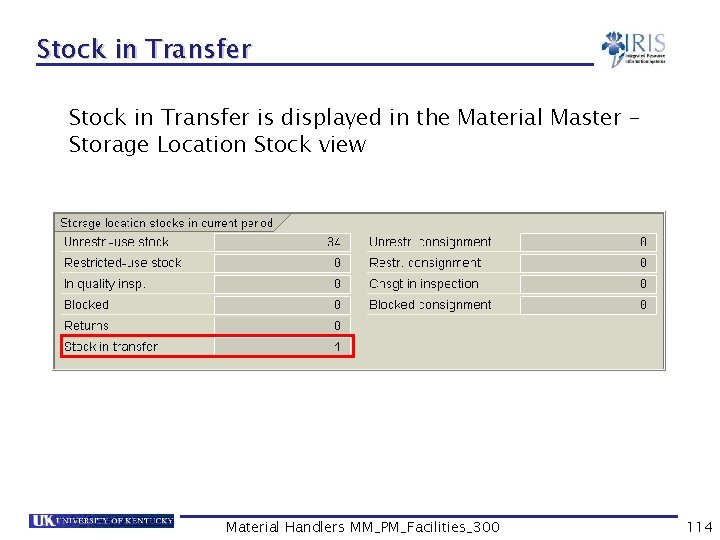
One-Step vs. Two Step-Transfer Postings • The one-step procedure is entered in a single transaction. Material is removed from and placed in storage simultaneously • The two-step procedure displays stock in transfer. After the goods issue is posted at the issuing point, the stock appears "in transfer" at the receiving location 0001 Central Stores 0002 FSC Material Handlers MM_PM_Facilities_300 111
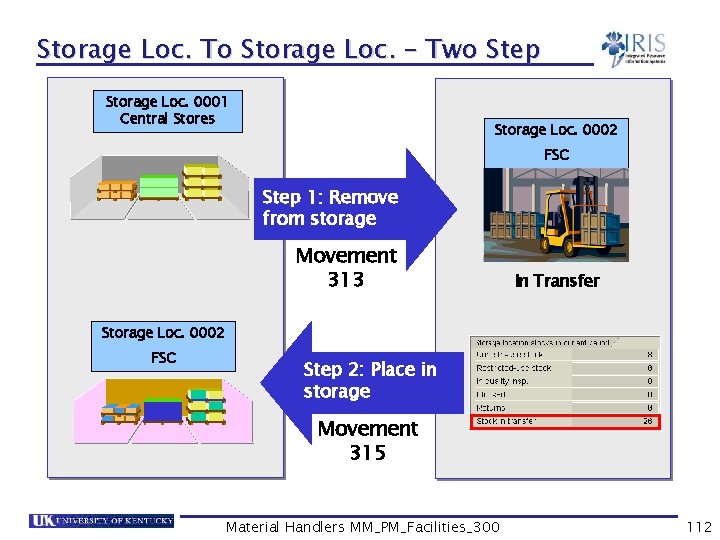
Storage Loc. To Storage Loc. – Two Step Storage Loc. 0001 Central Stores Storage Loc. 0002 FSC Step 1: Remove from storage Movement 313 In Transfer Storage Loc. 0002 FSC Step 2: Place in storage Movement 315 Material Handlers MM_PM_Facilities_300 112
Step 1: Remove From Storage (313) Material Handlers MM_PM_Facilities_300 113
Stock in Transfer is displayed in the Material Master – Storage Location Stock view Material Handlers MM_PM_Facilities_300 114
Step 2: Place in Storage (315) Material Handlers MM_PM_Facilities_300 115
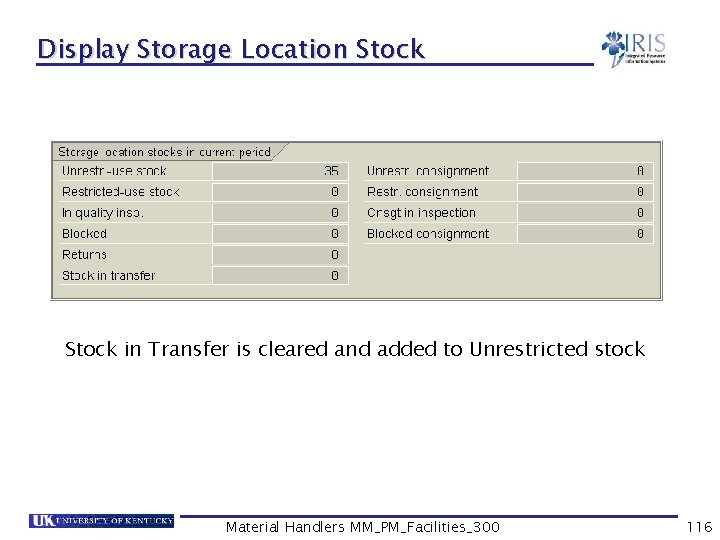
Display Storage Location Stock in Transfer is cleared and added to Unrestricted stock Material Handlers MM_PM_Facilities_300 116
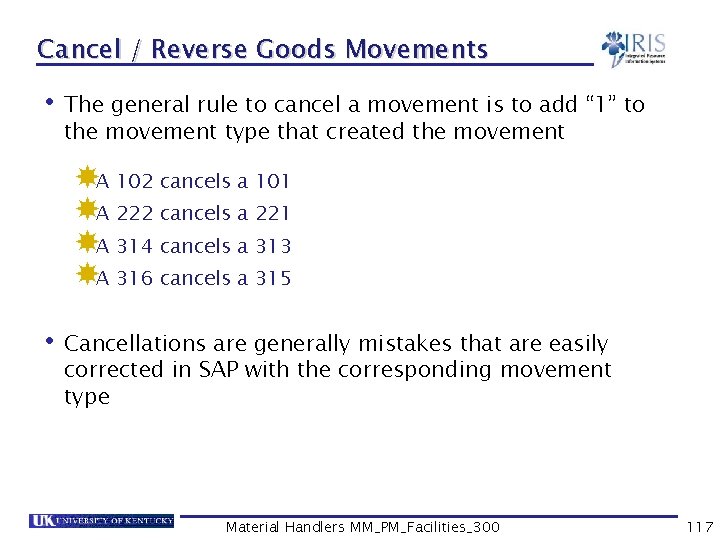
Cancel / Reverse Goods Movements • The general rule to cancel a movement is to add “ 1” to the movement type that created the movement A 102 cancels a 101 A 222 cancels a 221 A 314 cancels a 313 A 316 cancels a 315 • Cancellations are generally mistakes that are easily corrected in SAP with the corresponding movement type Material Handlers MM_PM_Facilities_300 117
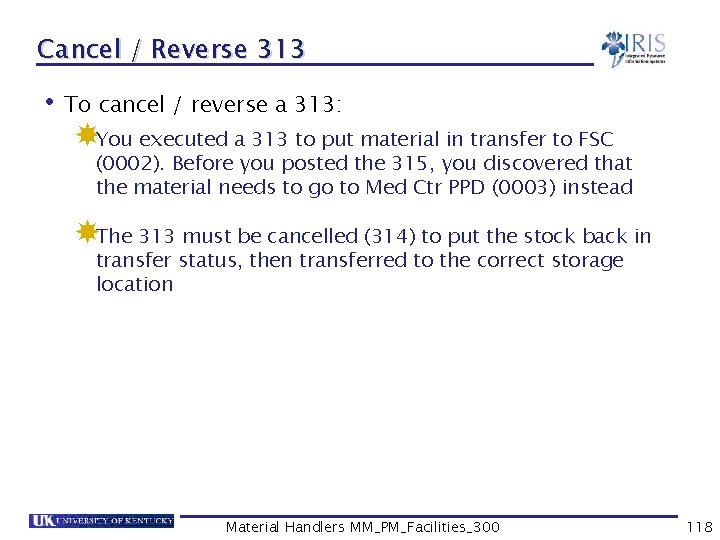
Cancel / Reverse 313 • To cancel / reverse a 313: You executed a 313 to put material in transfer to FSC (0002). Before you posted the 315, you discovered that the material needs to go to Med Ctr PPD (0003) instead The 313 must be cancelled (314) to put the stock back in transfer status, then transferred to the correct storage location Material Handlers MM_PM_Facilities_300 118
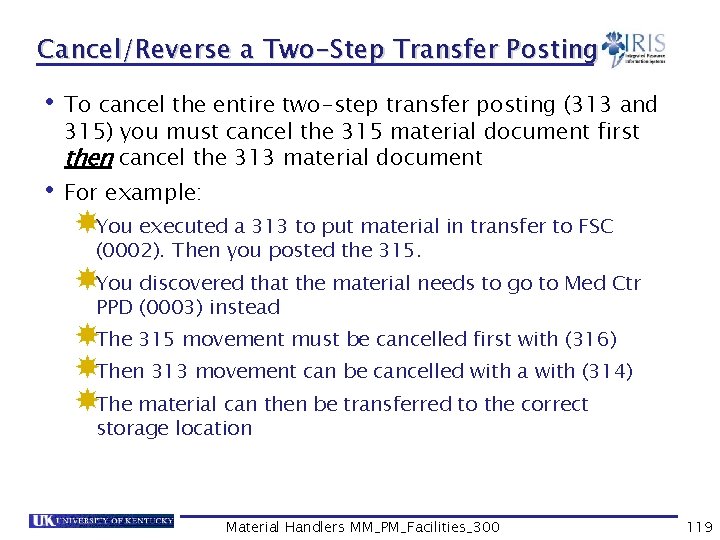
Cancel/Reverse a Two-Step Transfer Posting • To cancel the entire two-step transfer posting (313 and 315) you must cancel the 315 material document first then cancel the 313 material document • For example: You executed a 313 to put material in transfer to FSC (0002). Then you posted the 315. You discovered that the material needs to go to Med Ctr PPD (0003) instead The 315 movement must be cancelled first with (316) Then 313 movement can be cancelled with a with (314) The material can then be transferred to the correct storage location Material Handlers MM_PM_Facilities_300 119
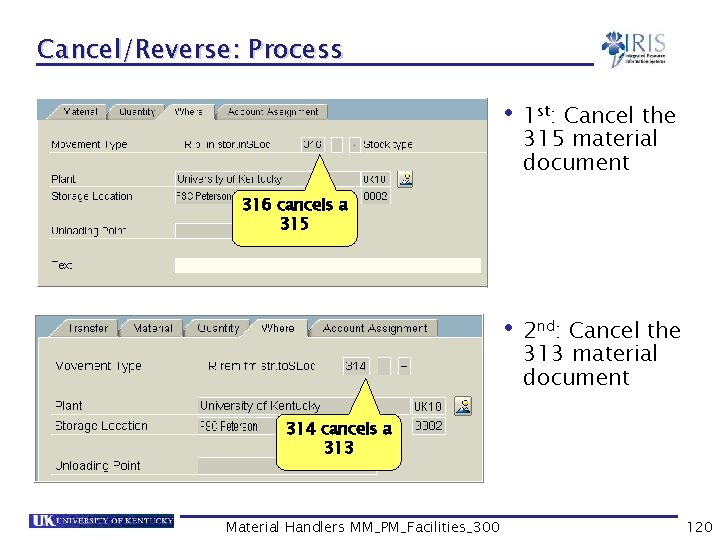
Cancel/Reverse: Process • 1 st: • 2 nd: Cancel the 315 material document 316 cancels a 315 Cancel the 313 material document 314 cancels a 313 Material Handlers MM_PM_Facilities_300 120
Course Summary • You should be able to: Understand the relationship between the organizational structure and master data Understand the ZMM_GI_GR transaction code Use the ZMM_GI_GR and MIGO transaction to execute various goods movements in SAP Create a personal favorites list of frequently used movement types Execute goods movements in SAP Cancel/ reverse goods movements Material Handlers MM_PM_Facilities_300 122
Course Summary cont’d • You should now be able to: Understand the relationship between goods movements and movement types Execute a return to vendor transaction, issue goods to cost centers, reservations and scrap Transfer materials from one location to another Pick and issue materials to reservations Differentiate between a stock material and nonstock material Material Handlers MM_PM_Facilities_300 123