
Markup Languages and Web Programming Objectives to learn
Markup Languages and Web Programming
Objectives • to learn basic HTML – and how to do web pages in our dept server (because it is useful) – to understand the layout algorithm behind browsers • to learn basic XML – as an example of markup languages for structured data representation • to use XSL to translate from XML to HTML – to learn the value of separating data from code or view • to talk about types of scripting
HTML • Hyper. Text Markup Language • this is what is behind what you see on a web page (type Crtl-U to ‘view source’) • early design principle for the web: describe the content, let the browser figure out how to display it – examples: line breaks/wrapping, fonts – “device-independent”, e. g. terminals that don’t support graphics. . .
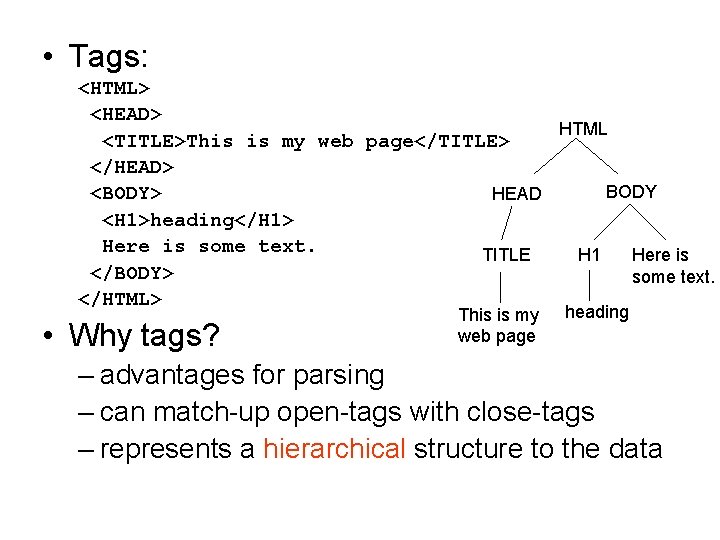
• Tags: <HTML> <HEAD> HTML <TITLE>This is my web page</TITLE> </HEAD> BODY <BODY> HEAD <H 1>heading</H 1> Here is some text. TITLE H 1 Here is </BODY> some text. </HTML> • Why tags? This is my web page heading – advantages for parsing – can match-up open-tags with close-tags – represents a hierarchical structure to the data
• More Tags: <B>boldface</B>, <I>italics</I> <BR/> line break, <P/> page break, <HR/> horizontal rule <!-- comments --> • Lists: – <UL> for unordered lists (bullets) – <OL> for ordered lists (numbered) <UL> <LI>list item </UL> • Note: – browsers are actually designed to be flexible and accept loose syntax without properly closed tags – a shorthand to close a tag is: <BR/> = <BR></BR>
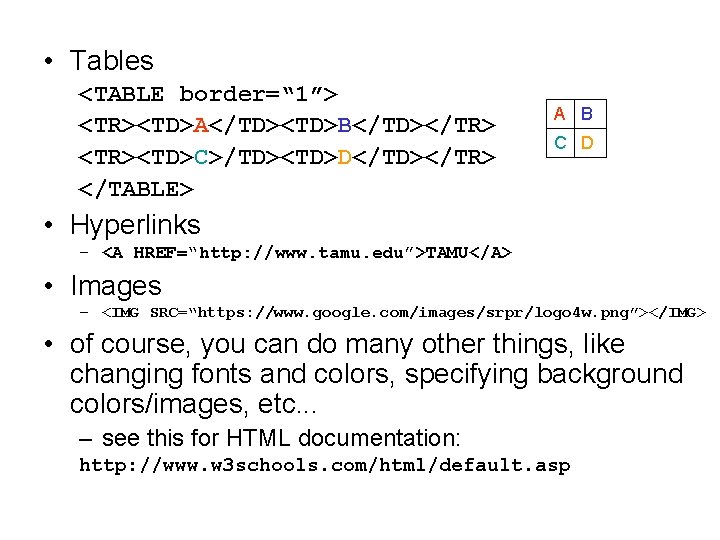
• Tables <TABLE border=“ 1”> <TR><TD>A</TD><TD>B</TD></TR> <TR><TD>C>/TD><TD>D</TD></TR> </TABLE> A B C D • Hyperlinks – <A HREF=“http: //www. tamu. edu”>TAMU</A> • Images – <IMG SRC=“https: //www. google. com/images/srpr/logo 4 w. png”></IMG> • of course, you can do many other things, like changing fonts and colors, specifying background colors/images, etc. . . – see this for HTML documentation: http: //www. w 3 schools. com/html/default. asp
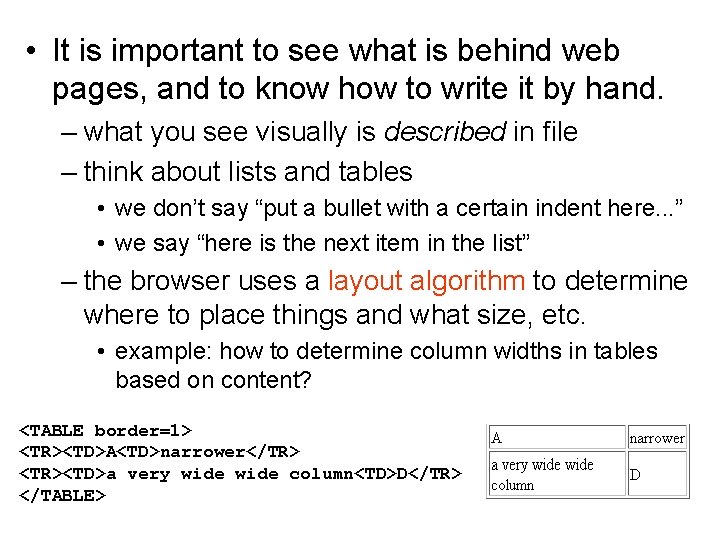
• It is important to see what is behind web pages, and to know how to write it by hand. – what you see visually is described in file – think about lists and tables • we don’t say “put a bullet with a certain indent here. . . ” • we say “here is the next item in the list” – the browser uses a layout algorithm to determine where to place things and what size, etc. • example: how to determine column widths in tables based on content? <TABLE border=1> <TR><TD>A<TD>narrower</TR> <TR><TD>a very wide column<TD>D</TR> </TABLE>

Markup Languages • different systems of tags • There are many markup languages – SGML: book contents, for publishers • <chapter>, <abstract>, <subsection>. . . – VRML: virtual reality, with tags for describing geometric objects and their positions in 3 D – Math. ML: tags for describing formulas • <sqrt>2</sqrt> • ax 2: <mrow>a <msup>x 2</msup></mrow> – XML: e. Xtensible Markup Language
• XML: make up your own tags for representing arbitrary data – example: <author>H. G. Wells</author> – partly, this was a response to the “semistructured” TABLEs in HTML – people didn’t know what the <TD> values meant semantically – tags “markup” or describe the data items • also known as metadata • data about the data, such as field name, source, units, etc. • can also use attributes • <price date=“ 9/29/2013” units=“euros”>2. 50</price>
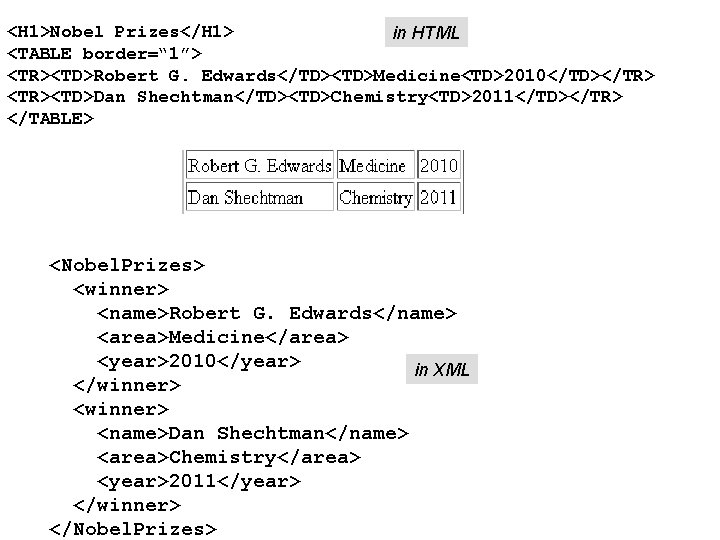
<H 1>Nobel Prizes</H 1> in HTML <TABLE border=“ 1”> <TR><TD>Robert G. Edwards</TD><TD>Medicine<TD>2010</TD></TR> <TR><TD>Dan Shechtman</TD><TD>Chemistry<TD>2011</TD></TR> </TABLE> <Nobel. Prizes> <winner> <name>Robert G. Edwards</name> <area>Medicine</area> <year>2010</year> in XML </winner> <name>Dan Shechtman</name> <area>Chemistry</area> <year>2011</year> </winner> </Nobel. Prizes>
• there are good parsers available for reading XML files in different languages – xerces for Java and C++ – minidom for Python – these APIs provide a parsing function: • input a filename • outputs the data in a tree-based data structure • note: XML requires strict syntax – every open tag must be properly closed (and not interleaved)
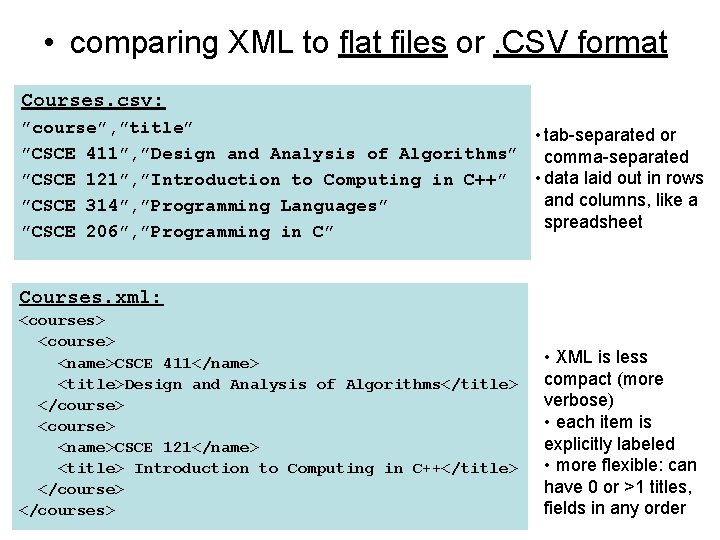
• comparing XML to flat files or. CSV format Courses. csv: ”course”, ”title” • tab-separated or ”CSCE 411”, ”Design and Analysis of Algorithms” comma-separated • data laid out in rows ”CSCE 121”, ”Introduction to Computing in C++” and columns, like a ”CSCE 314”, ”Programming Languages” spreadsheet ”CSCE 206”, ”Programming in C” Courses. xml: <courses> <course> <name>CSCE 411</name> <title>Design and Analysis of Algorithms</title> </course> <name>CSCE 121</name> <title> Introduction to Computing in C++</title> </courses> • XML is less compact (more verbose) • each item is explicitly labeled • more flexible: can have 0 or >1 titles, fields in any order
• Now we need a way to display data in XML – browsers show XML in raw form by default – use XSLT to “translate” XML data into HTML • e. Xtensible Stylesheet Language Transformation • http: //www. w 3 schools. com/xsl_languages. asp 1. make up a stylesheet (. xsl) file 2. add a reference to the stylesheet from your. xml file – this tells the browser how to display the data
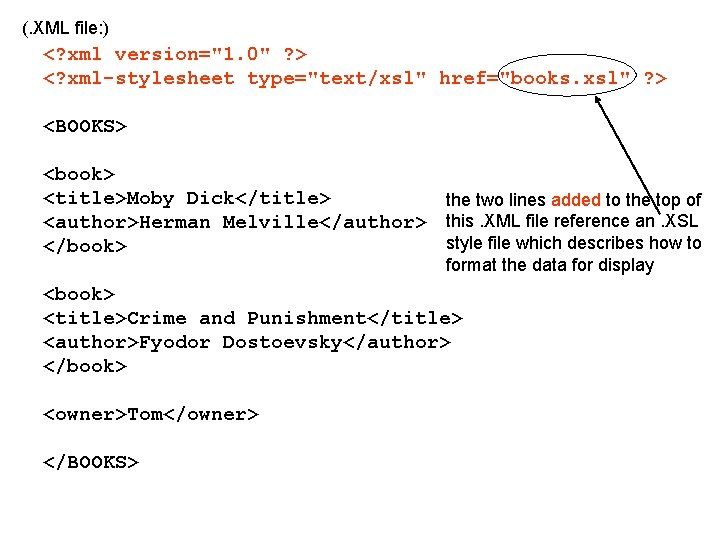
(. XML file: ) <? xml version="1. 0" ? > <? xml-stylesheet type="text/xsl" href="books. xsl" ? > <BOOKS> <book> <title>Moby Dick</title> the two lines added to the top of <author>Herman Melville</author> this. XML file reference an. XSL style file which describes how to </book> format the data for display <book> <title>Crime and Punishment</title> <author>Fyodor Dostoevsky</author> </book> <owner>Tom</owner> </BOOKS>
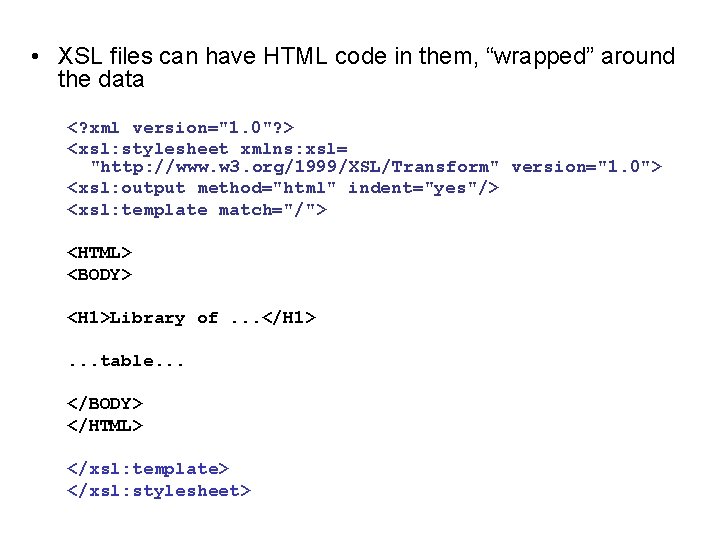
• XSL files can have HTML code in them, “wrapped” around the data <? xml version="1. 0"? > <xsl: stylesheet xmlns: xsl= "http: //www. w 3. org/1999/XSL/Transform" version="1. 0"> <xsl: output method="html" indent="yes"/> <xsl: template match="/"> <HTML> <BODY> <H 1>Library of. . . </H 1>. . . table. . . </BODY> </HTML> </xsl: template> </xsl: stylesheet>
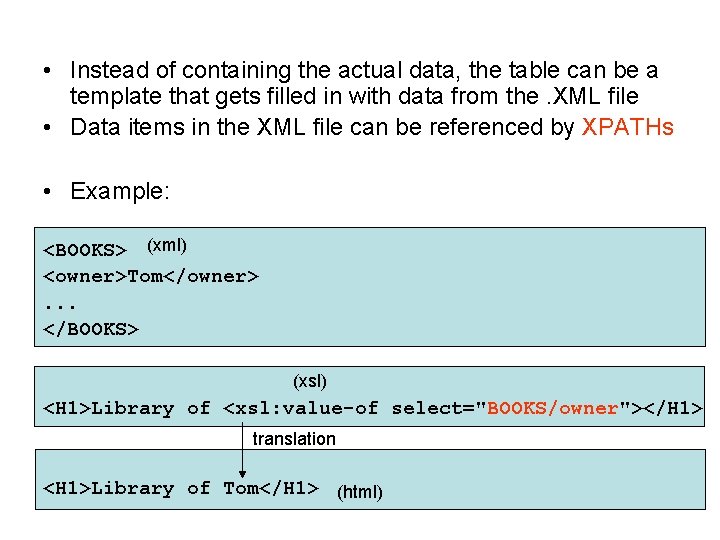
• Instead of containing the actual data, the table can be a template that gets filled in with data from the. XML file • Data items in the XML file can be referenced by XPATHs • Example: <BOOKS> (xml) <owner>Tom</owner>. . . </BOOKS> (xsl) <H 1>Library of <xsl: value-of select="BOOKS/owner"></H 1> translation <H 1>Library of Tom</H 1> (html)
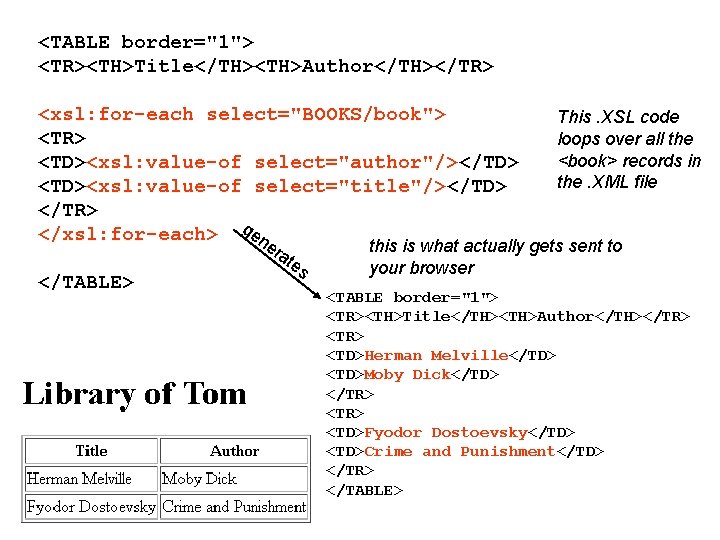
<TABLE border="1"> <TR><TH>Title</TH><TH>Author</TH></TR> <xsl: for-each select="BOOKS/book"> <TR> <TD><xsl: value-of select="author"/></TD> <TD><xsl: value-of select="title"/></TD> </TR> </xsl: for-each> gen er at </TABLE> es This. XSL code loops over all the <book> records in the. XML file this is what actually gets sent to your browser <TABLE border="1"> <TR><TH>Title</TH><TH>Author</TH></TR> <TD>Herman Melville</TD> <TD>Moby Dick</TD> </TR> <TD>Fyodor Dostoevsky</TD> <TD>Crime and Punishment</TD> </TR> </TABLE>
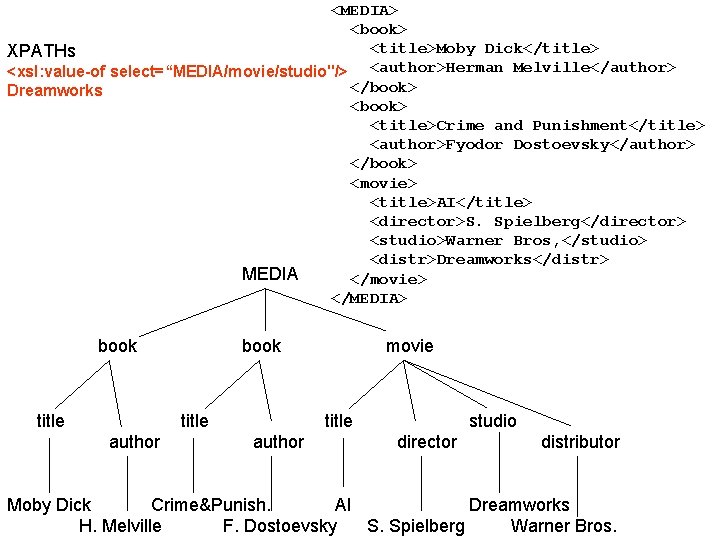
<MEDIA> <book> <title>Moby Dick</title> XPATHs <xsl: value-of select=“MEDIA/movie/studio"/> <author>Herman Melville</author> </book> Dreamworks <book> <title>Crime and Punishment</title> <author>Fyodor Dostoevsky</author> </book> <movie> <title>AI</title> <director>S. Spielberg</director> <studio>Warner Bros, </studio> <distr>Dreamworks</distr> MEDIA </movie> </MEDIA> book title author movie title author studio director distributor Moby Dick Crime&Punish. AI Dreamworks H. Melville F. Dostoevsky S. Spielberg Warner Bros.
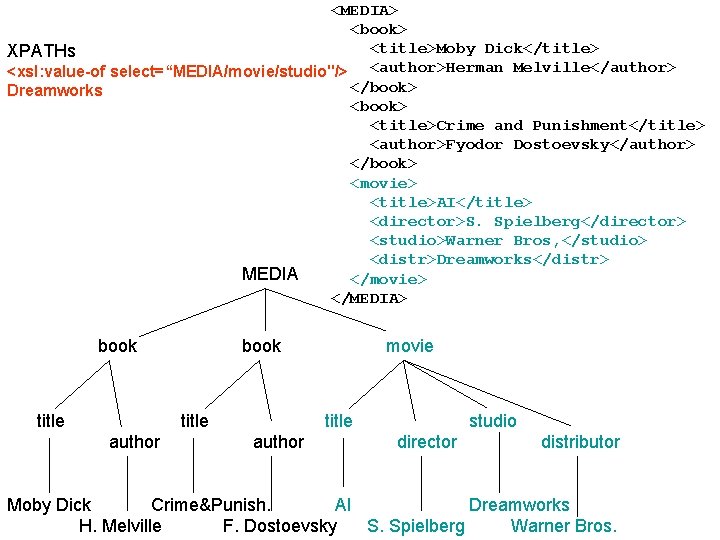
<MEDIA> <book> <title>Moby Dick</title> XPATHs <xsl: value-of select=“MEDIA/movie/studio"/> <author>Herman Melville</author> </book> Dreamworks <book> <title>Crime and Punishment</title> <author>Fyodor Dostoevsky</author> </book> <movie> <title>AI</title> <director>S. Spielberg</director> <studio>Warner Bros, </studio> <distr>Dreamworks</distr> MEDIA </movie> </MEDIA> book title author movie title author studio director distributor Moby Dick Crime&Punish. AI Dreamworks H. Melville F. Dostoevsky S. Spielberg Warner Bros.
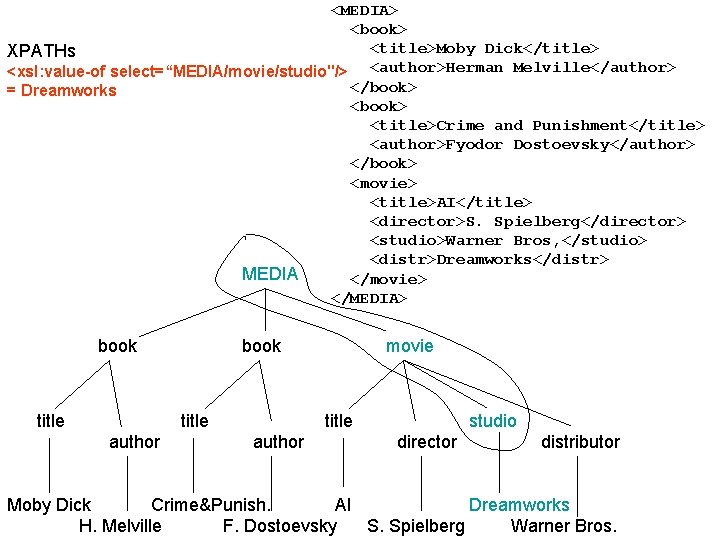
<MEDIA> <book> <title>Moby Dick</title> XPATHs <xsl: value-of select=“MEDIA/movie/studio"/> <author>Herman Melville</author> </book> = Dreamworks <book> <title>Crime and Punishment</title> <author>Fyodor Dostoevsky</author> </book> <movie> <title>AI</title> <director>S. Spielberg</director> <studio>Warner Bros, </studio> <distr>Dreamworks</distr> MEDIA </movie> </MEDIA> book title author movie title author studio director distributor Moby Dick Crime&Punish. AI Dreamworks H. Melville F. Dostoevsky S. Spielberg Warner Bros.
Separating Data from View/Code • general principle used in software engineering • can change the view without touching the data – e. g. swap the columns in the books table via XSL • can change the data without touching the code – e. g. internationalization: different sets of text strings in different languages • MVC (Model-View-Controller) paradigm advocated for programming in Smalltalk – M: methods defining how objects work – V: methods defining how they are displayed – C: methods defining how users interact with them • “resource forks” in Mac apps
• Making your own web pages in our CSCE department – follow these instructions. . . – https: //wiki. cse. tamu. edu/index. php/CSE_Web_Pages – make a web_home/ directory in your home directory – can access from PCs in labs via “H: ” drive – note: make sure you make. html pages readable by setting permissions
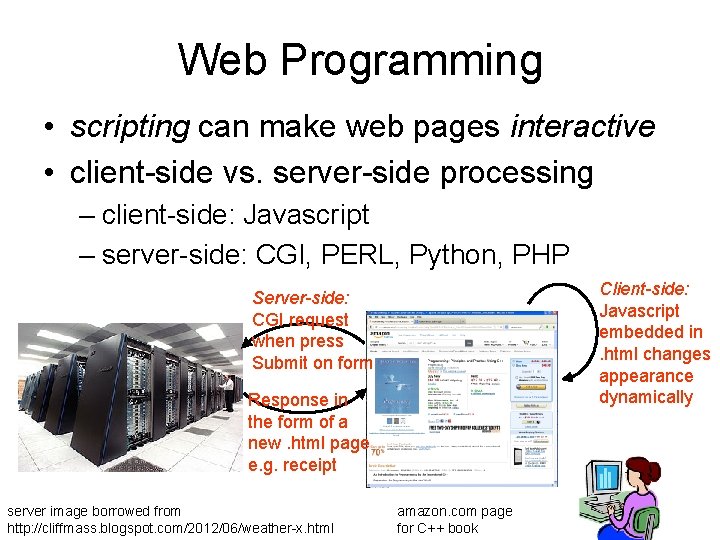
Web Programming • scripting can make web pages interactive • client-side vs. server-side processing – client-side: Javascript – server-side: CGI, PERL, Python, PHP Client-side: Javascript embedded in. html changes appearance dynamically Server-side: CGI request when press Submit on form Response in the form of a new. html page e. g. receipt server image borrowed from http: //cliffmass. blogspot. com/2012/06/weather-x. html amazon. com page for C++ book
Client-side: Javascript • examples: – popups when you mouse-over something – dynamically expand a table or section – validate data entered into a field • how it works – associate events like onmouseover() or onclick() to components of page (like buttons) – add a <script> section in the <head> of your. html – define functions to call on these events
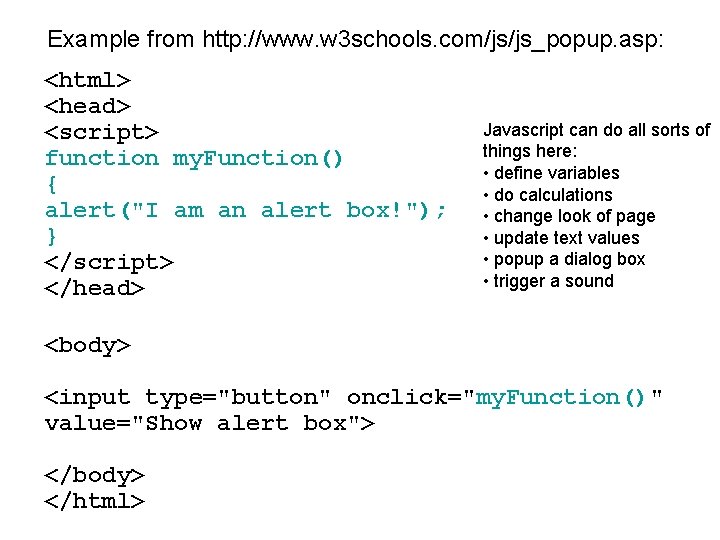
Example from http: //www. w 3 schools. com/js/js_popup. asp: <html> <head> <script> function my. Function() { alert("I am an alert box!"); } </script> </head> Javascript can do all sorts of things here: • define variables • do calculations • change look of page • update text values • popup a dialog box • trigger a sound <body> <input type="button" onclick="my. Function()" value="Show alert box"> </body> </html>
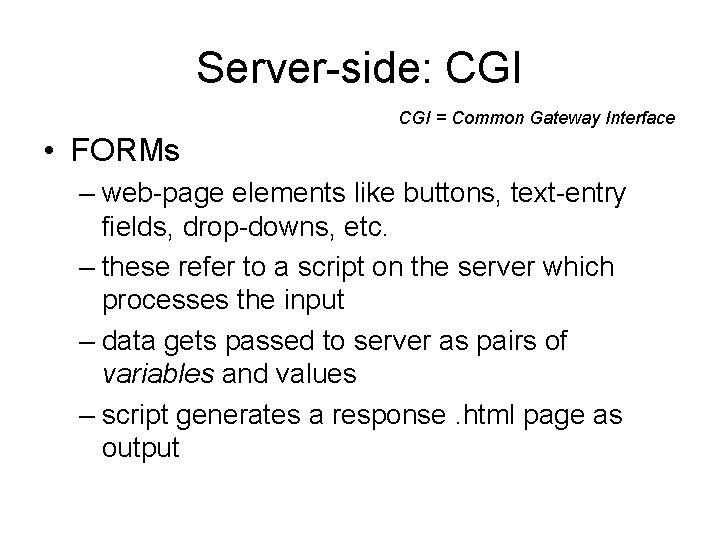
Server-side: CGI = Common Gateway Interface • FORMs – web-page elements like buttons, text-entry fields, drop-downs, etc. – these refer to a script on the server which processes the input – data gets passed to server as pairs of variables and values – script generates a response. html page as output
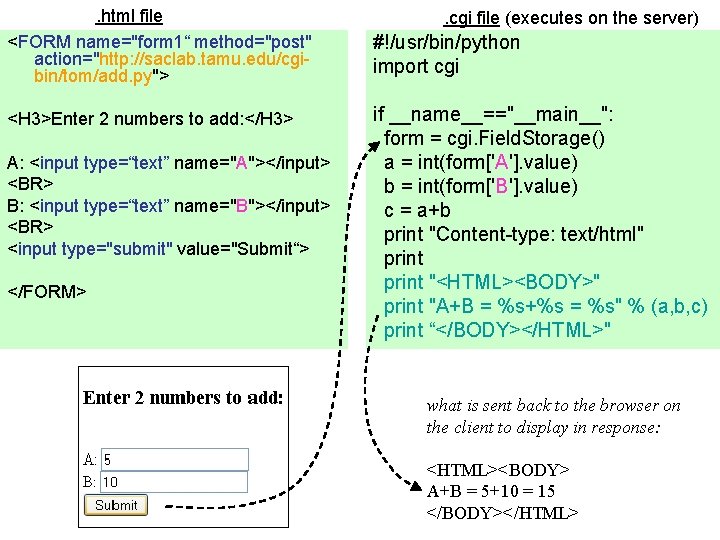
. html file <FORM name="form 1“ method="post" action="http: //saclab. tamu. edu/cgibin/tom/add. py"> <H 3>Enter 2 numbers to add: </H 3> A: <input type=“text” name="A"></input> <BR> B: <input type=“text” name="B"></input> <BR> <input type="submit" value="Submit“> </FORM> . cgi file (executes on the server) #!/usr/bin/python import cgi if __name__=="__main__": form = cgi. Field. Storage() a = int(form['A']. value) b = int(form['B']. value) c = a+b print "Content-type: text/html" print "<HTML><BODY>" print "A+B = %s+%s = %s" % (a, b, c) print “</BODY></HTML>" what is sent back to the browser on the client to display in response: <HTML><BODY> A+B = 5+10 = 15 </BODY></HTML>
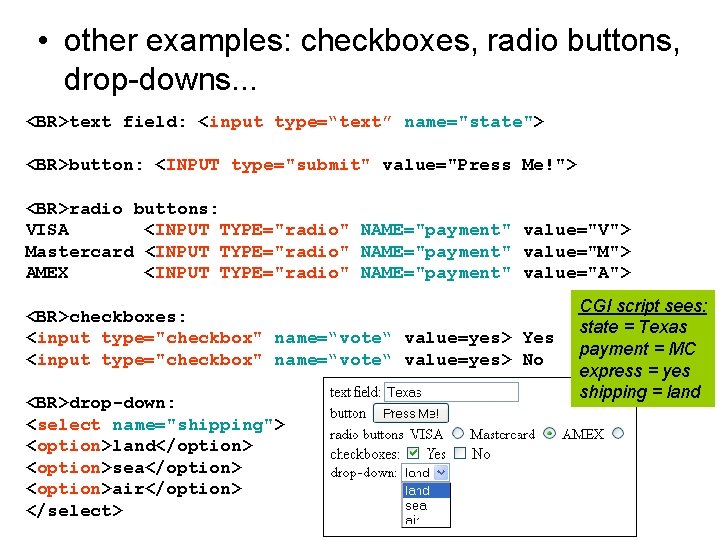
• other examples: checkboxes, radio buttons, drop-downs. . . <BR>text field: <input type=“text” name="state"> <BR>button: <INPUT type="submit" value="Press Me!"> <BR>radio buttons: VISA <INPUT TYPE="radio" NAME="payment" value="V"> Mastercard <INPUT TYPE="radio" NAME="payment" value="M"> AMEX <INPUT TYPE="radio" NAME="payment" value="A"> <BR>checkboxes: <input type="checkbox" name=“vote“ value=yes> Yes <input type="checkbox" name=“vote“ value=yes> No <BR>drop-down: <select name="shipping"> <option>land</option> <option>sea</option> <option>air</option> </select> CGI script sees: state = Texas payment = MC express = yes shipping = land
- Slides: 28