
Managing Projects Chapter 14 14 Chapter Objectives Be
Managing Projects Chapter 14
14 Chapter Objectives Be able to: § Explain the difference between routine business activities and projects. § Describe the five major phases of a project. § Construct a Gantt chart and interpret the results. § Construct a project network diagram and calculate the earliest and latest start and finish times for all activities. § Identify the critical activities and paths in a network. § Crash a project. Copyright © 2013 Pearson Education, Inc. publishing as Prentice Hall 14 - 2
14 Project § Project – A temporary endeavor undertaken to create a unique product, service, or result. © 2008 Project Management Institute § Projects have clear starting and ending points after which the people and resources dedicated to the project are reassigned. § Projects are non-routine, can be large or small, and may be difficult to manage. § Projects typically require significant levels of crossfunctional and interorganizational coordination. Copyright © 2013 Pearson Education, Inc. publishing as Prentice Hall 14 - 3
14 Project Management § Project Management – The application of knowledge, skills, tools, and techniques to project activities to meet project requirements. © 2008 Project Management Institute Copyright © 2013 Pearson Education, Inc. publishing as Prentice Hall 14 - 4
14 Project Management Trends § The faster pace of strategic change § New product lines are introduced more often to fight off competitors. § Information technology solutions become quickly out-ofdate. § Customer and supplier networks quickly change. § The changing role of middle management § The role has decreased due to more advanced information systems handling many of the tasks. § Responsibilities given to middle managers have been pushed down to supervisors and employees. Copyright © 2013 Pearson Education, Inc. publishing as Prentice Hall 14 - 5

14 § § § Project Phases Concept phase Project definition phase Planning phase Performance phase Postcompletion phase Figure 14. 1 Copyright © 2013 Pearson Education, Inc. publishing as Prentice Hall 14 - 6
14 Project Phases § Concept Phase § Broad definition and scope § Budget estimates within 30% § Project definition Phase § Tentative schedules and budgets, organization, key personnel and resource requirements § Budget estimates refined within 5% to 10% Copyright © 2013 Pearson Education, Inc. publishing as Prentice Hall 14 - 7
14 Project Phases § Planning phase § Detailed plans, timing, budgets and resources § Milestones § Project management tools and techniques § Performance phase § Execution and control § Postcompletion phase § “Wrap-up” § Reassignment of project resources Copyright © 2013 Pearson Education, Inc. publishing as Prentice Hall 14 - 8
14 Project Management Tools § Gantt charts – Graphical tools used to show expected start and end times for project activities and to track actual progress against these time targets. § Network diagrams – Graphical tools that show the logical linkages between activities in a project. Copyright © 2013 Pearson Education, Inc. publishing as Prentice Hall 14 - 9
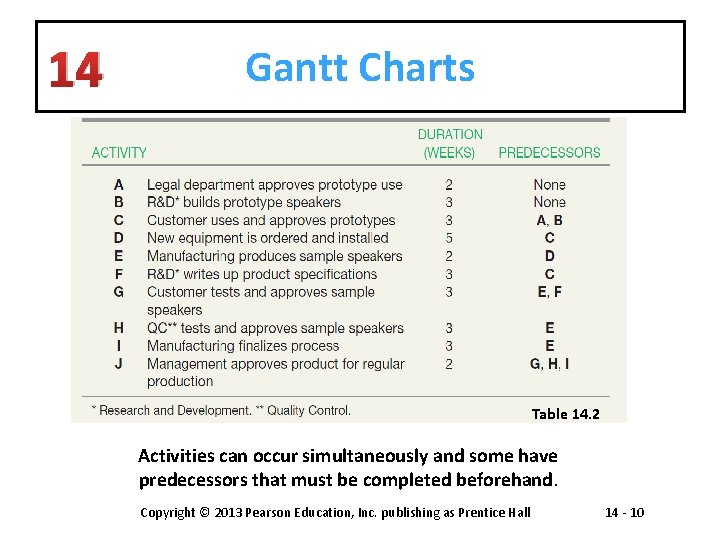
14 Gantt Charts Table 14. 2 Activities can occur simultaneously and some have predecessors that must be completed beforehand. Copyright © 2013 Pearson Education, Inc. publishing as Prentice Hall 14 - 10
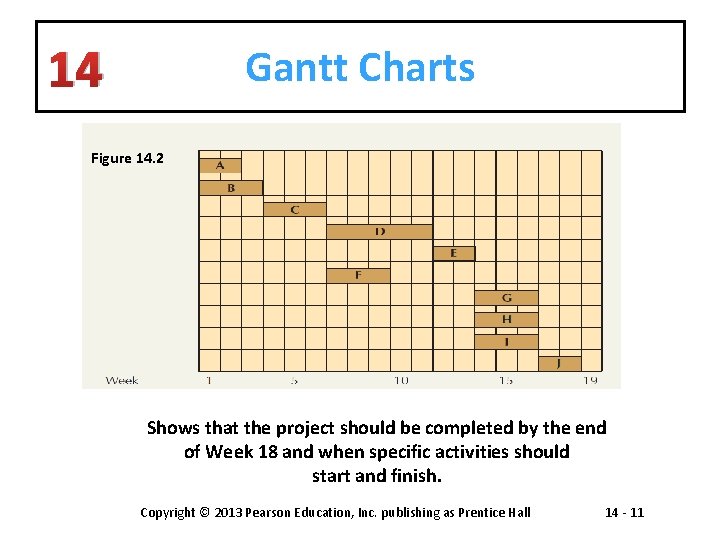
14 Gantt Charts Figure 14. 2 Shows that the project should be completed by the end of Week 18 and when specific activities should start and finish. Copyright © 2013 Pearson Education, Inc. publishing as Prentice Hall 14 - 11
14 Network Diagrams § Critical-path method – A network-based technique in which there is a single time estimate for each activity. § Program evaluation and review technique (PERT) – A network-based technique in which there are multiple time estimates for each activity. Copyright © 2013 Pearson Education, Inc. publishing as Prentice Hall 14 - 12
14 Constructing a Network Diagram § Identify each unique activity in a project by a capital letter that corresponds only to that activity. § Represent each activity in the project by a node that shows the estimate length. (Activity on node (AON) diagram. ) § If an activity has an immediate predecessor(s), show the relationship by connecting the two activities with an arrow. § Determine the earliest start time (ES) and earliest finish time (EF) for each activity by performing a forward pass. § Determine the latest finish time (LF) and latest starting time (LS) for each activity by doing a backward pass. § Determine the critical activities and path(s) in the project. Copyright © 2013 Pearson Education, Inc. publishing as Prentice Hall 14 - 13
14 Network Diagrams § Critical path – A network path that has the longest, or is tied for the longest, linked sequence of activities. § Project duration – The duration of a project is equal to the duration of the critical path. § Network path – A logically linked sequence of activities in a network diagram. § Critical activities – Project activities for which the earliest start time and latest start time are equal. Copyright © 2013 Pearson Education, Inc. publishing as Prentice Hall 14 - 14
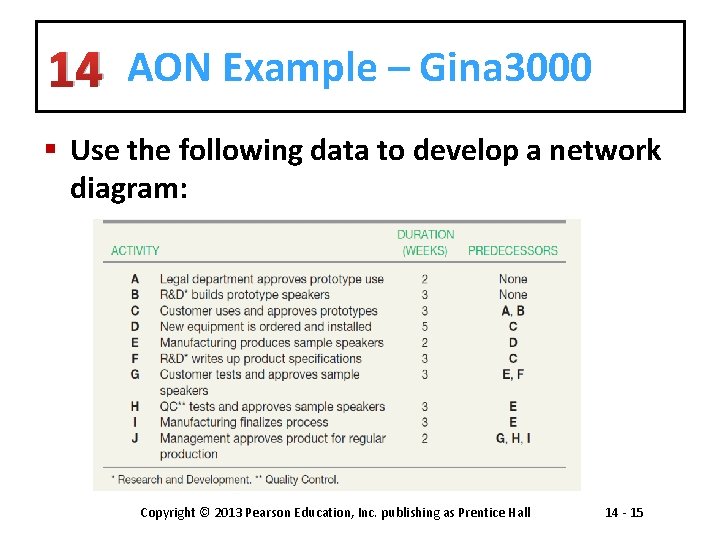
14 AON Example – Gina 3000 § Use the following data to develop a network diagram: Copyright © 2013 Pearson Education, Inc. publishing as Prentice Hall 14 - 15
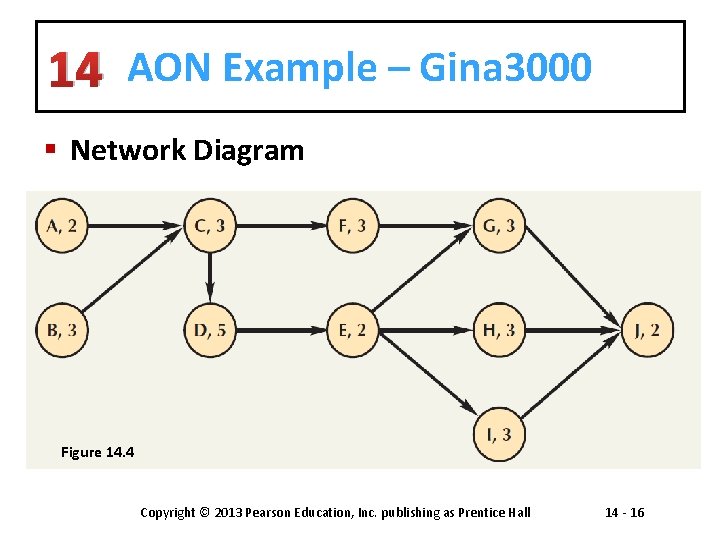
14 AON Example – Gina 3000 § Network Diagram Figure 14. 4 Copyright © 2013 Pearson Education, Inc. publishing as Prentice Hall 14 - 16
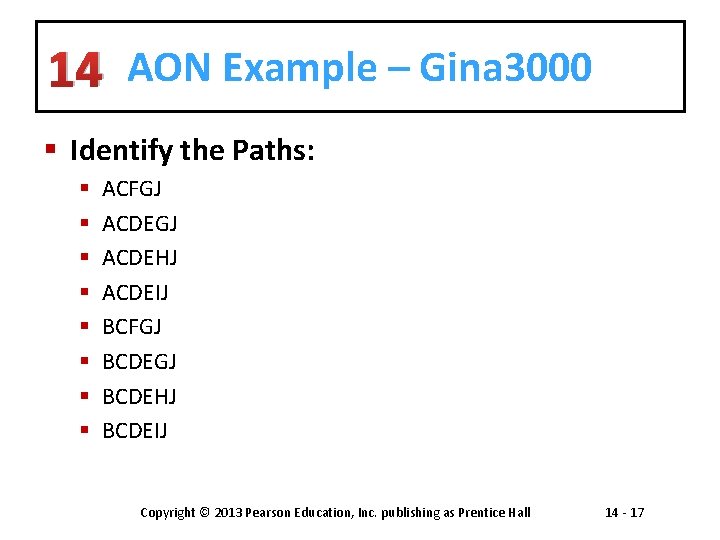
14 AON Example – Gina 3000 § Identify the Paths: § § § § ACFGJ ACDEHJ ACDEIJ BCFGJ BCDEHJ BCDEIJ Copyright © 2013 Pearson Education, Inc. publishing as Prentice Hall 14 - 17
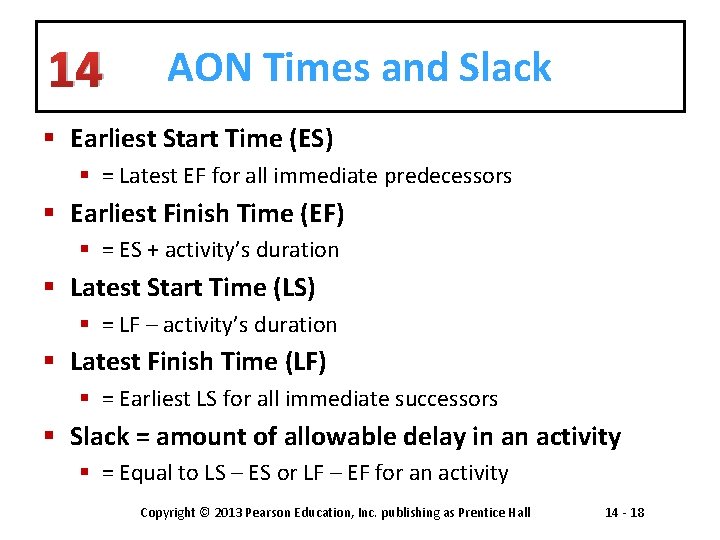
14 AON Times and Slack § Earliest Start Time (ES) § = Latest EF for all immediate predecessors § Earliest Finish Time (EF) § = ES + activity’s duration § Latest Start Time (LS) § = LF – activity’s duration § Latest Finish Time (LF) § = Earliest LS for all immediate successors § Slack = amount of allowable delay in an activity § = Equal to LS – ES or LF – EF for an activity Copyright © 2013 Pearson Education, Inc. publishing as Prentice Hall 14 - 18
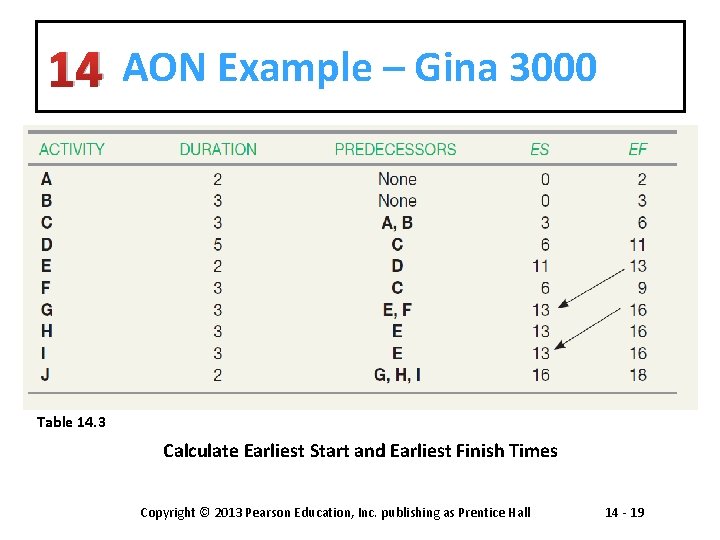
14 AON Example – Gina 3000 Table 14. 3 Calculate Earliest Start and Earliest Finish Times Copyright © 2013 Pearson Education, Inc. publishing as Prentice Hall 14 - 19
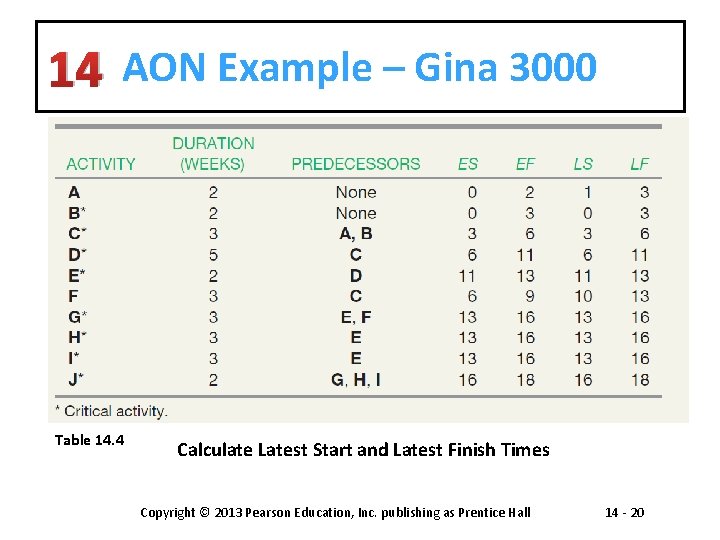
14 AON Example – Gina 3000 Table 14. 4 Calculate Latest Start and Latest Finish Times Copyright © 2013 Pearson Education, Inc. publishing as Prentice Hall 14 - 20
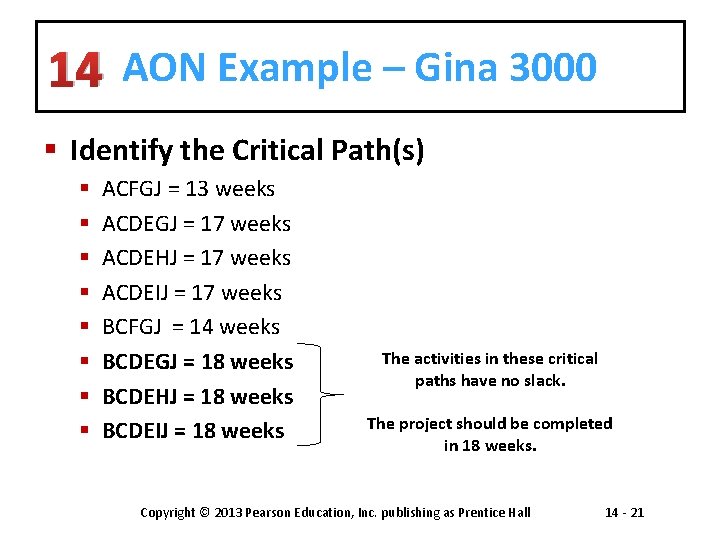
14 AON Example – Gina 3000 § Identify the Critical Path(s) § § § § ACFGJ = 13 weeks ACDEGJ = 17 weeks ACDEHJ = 17 weeks ACDEIJ = 17 weeks BCFGJ = 14 weeks BCDEGJ = 18 weeks BCDEHJ = 18 weeks BCDEIJ = 18 weeks The activities in these critical paths have no slack. The project should be completed in 18 weeks. Copyright © 2013 Pearson Education, Inc. publishing as Prentice Hall 14 - 21
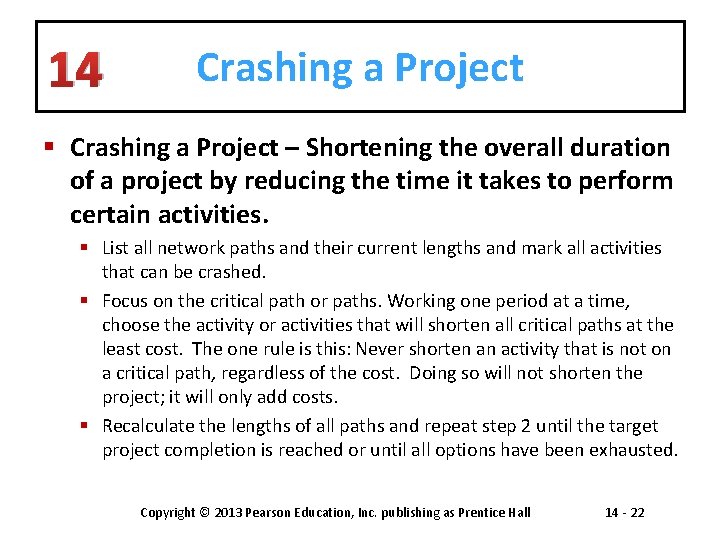
14 Crashing a Project § Crashing a Project – Shortening the overall duration of a project by reducing the time it takes to perform certain activities. § List all network paths and their current lengths and mark all activities that can be crashed. § Focus on the critical path or paths. Working one period at a time, choose the activity or activities that will shorten all critical paths at the least cost. The one rule is this: Never shorten an activity that is not on a critical path, regardless of the cost. Doing so will not shorten the project; it will only add costs. § Recalculate the lengths of all paths and repeat step 2 until the target project completion is reached or until all options have been exhausted. Copyright © 2013 Pearson Education, Inc. publishing as Prentice Hall 14 - 22
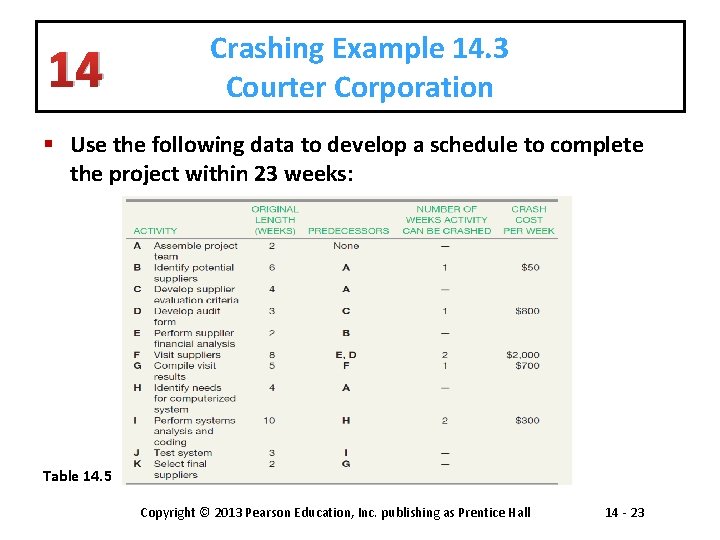
14 Crashing Example 14. 3 Courter Corporation § Use the following data to develop a schedule to complete the project within 23 weeks: Table 14. 5 Copyright © 2013 Pearson Education, Inc. publishing as Prentice Hall 14 - 23
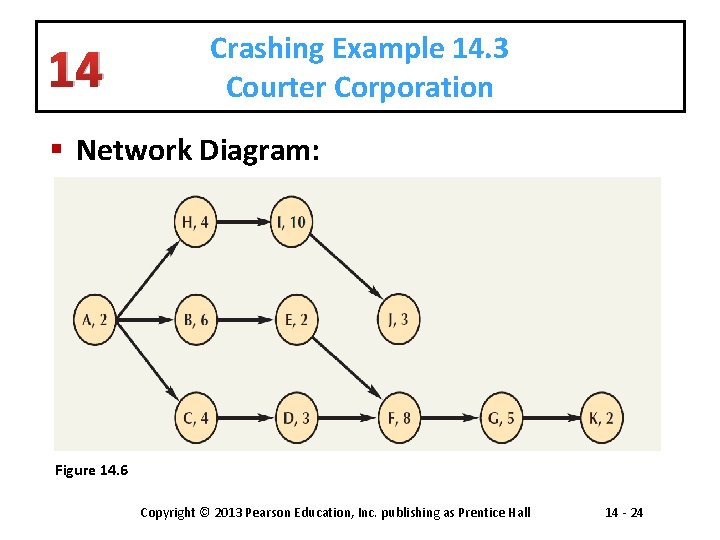
14 Crashing Example 14. 3 Courter Corporation § Network Diagram: Figure 14. 6 Copyright © 2013 Pearson Education, Inc. publishing as Prentice Hall 14 - 24
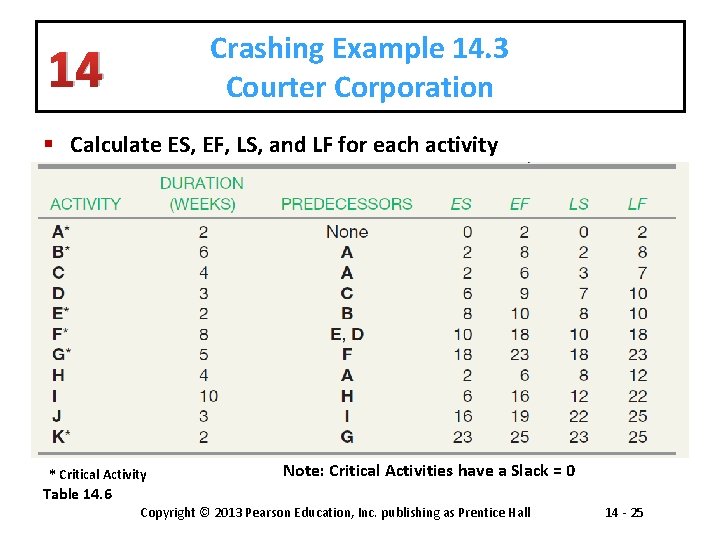
Crashing Example 14. 3 Courter Corporation 14 § Calculate ES, EF, LS, and LF for each activity * Critical Activity Note: Critical Activities have a Slack = 0 Table 14. 6 Copyright © 2013 Pearson Education, Inc. publishing as Prentice Hall 14 - 25
14 Crashing Example 14. 3 Courter Corporation § Network Paths for the Project § ABEFGK – 25 weeks § ACDFGK – 24 weeks § AHIJ – 19 weeks Copyright © 2013 Pearson Education, Inc. publishing as Prentice Hall 14 - 26
14 Crashing Example 14. 3 Courter Corporation § Choose the activity(s) that will shorten all critical path(s) at the least cost: § ABEFGK – 25 weeks • Activity B - shorten 1 week at a cost of $500 Copyright © 2013 Pearson Education, Inc. publishing as Prentice Hall 14 - 27
14 Crashing Example 14. 3 Courter Corporation § Updated Network Paths for the Project § ABEFGK – 24 weeks § ACDFGK – 24 weeks § AHIJ – 19 weeks § Crashing cost: $500 Copyright © 2013 Pearson Education, Inc. publishing as Prentice Hall 14 - 28
14 Crashing Example 14. 3 Courter Corporation § Choose the activity(s) that will shorten all critical path(s) at the least cost: § ABEFGK – 24 weeks § ACDFGK – 24 weeks • Activity G - shorten 1 week at a cost of $700 Copyright © 2013 Pearson Education, Inc. publishing as Prentice Hall 14 - 29
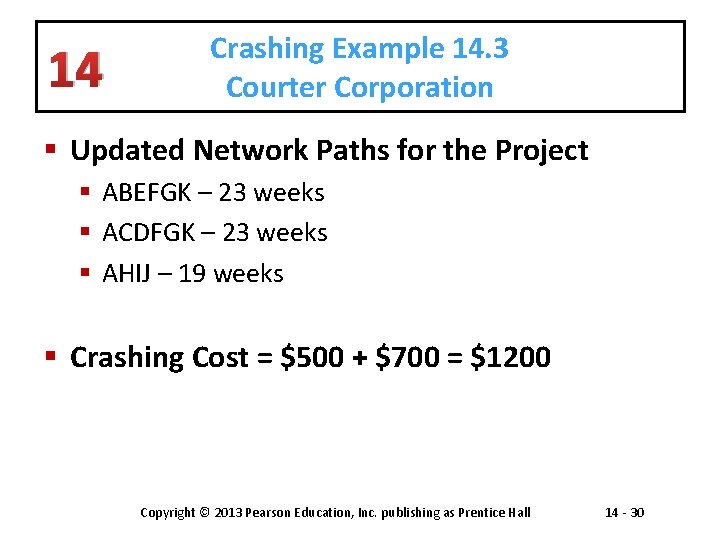
14 Crashing Example 14. 3 Courter Corporation § Updated Network Paths for the Project § ABEFGK – 23 weeks § ACDFGK – 23 weeks § AHIJ – 19 weeks § Crashing Cost = $500 + $700 = $1200 Copyright © 2013 Pearson Education, Inc. publishing as Prentice Hall 14 - 30
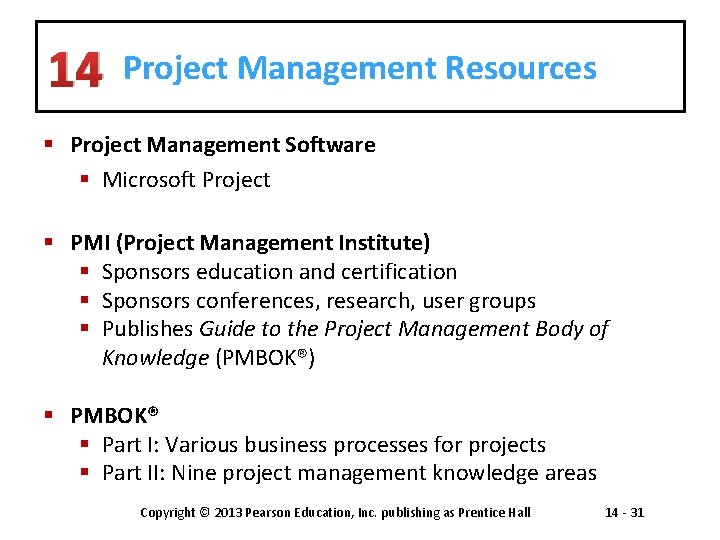
14 Project Management Resources § Project Management Software § Microsoft Project § PMI (Project Management Institute) § Sponsors education and certification § Sponsors conferences, research, user groups § Publishes Guide to the Project Management Body of Knowledge (PMBOK®) § PMBOK® § Part I: Various business processes for projects § Part II: Nine project management knowledge areas Copyright © 2013 Pearson Education, Inc. publishing as Prentice Hall 14 - 31
Managing Projects Case Study Viva Roma! Copyright © 2013 Pearson Education, Inc. publishing as Prentice Hall 14 -

All rights reserved. No part of this publication may be reproduced, stored in a retrieval system, or transmitted, in any form or by any means, electronic, mechanical, photocopying, recording, or otherwise, without the prior written permission of the publisher. Printed in the United States of America. Copyright © 2013 Pearson Education, Inc. publishing as Prentice Hall 14 - 33
- Slides: 33