
Managing MultiUser Databases Concurrency Security Integrity Components of
Managing Multi-User Databases. Concurrency, Security & Integrity
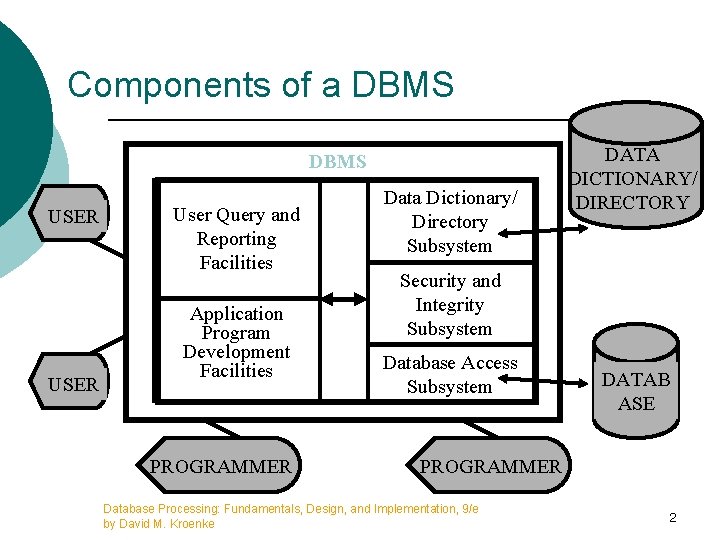
Components of a DBMS USER User Query and Reporting Facilities Application Program Development Facilities PROGRAMMER Data Dictionary/ Directory Subsystem DATA DICTIONARY/ DIRECTORY Security and Integrity Subsystem Database Access Subsystem DATAB ASE PROGRAMMER Database Processing: Fundamentals, Design, and Implementation, 9/e by David M. Kroenke 2
Database Administration ¡ ¡ ¡ All large and small databases need database administration Data administration refers to a function concerning all of an organization’s data assets Database administration (DBA) refers to a person or office specific to a single database and its applications 3
DBA Tasks ¡ ¡ ¡ ¡ Managing database structure Controlling concurrent processing Managing processing rights and responsibilities Developing database security Providing for database recovery Managing the DBMS Maintaining the data repository 4
Managing Database Structure ¡ DBA’s tasks: l l Participate in database and application development ¡ Assist in requirements stage and data model creation ¡ Play an active role in database design and creation Facilitate changes to database structure ¡ Seek community-wide solutions ¡ Assess impact on all users ¡ Provide configuration control forum ¡ Be prepared for problems after changes are made ¡ Maintain documentation 5
Concurrency Control ¡ Concurrency control ensures that one user’s work does not inappropriately influence another user’s work l l No single concurrency control technique is ideal for all circumstances Trade-offs need to be made between level of protection and throughput 6
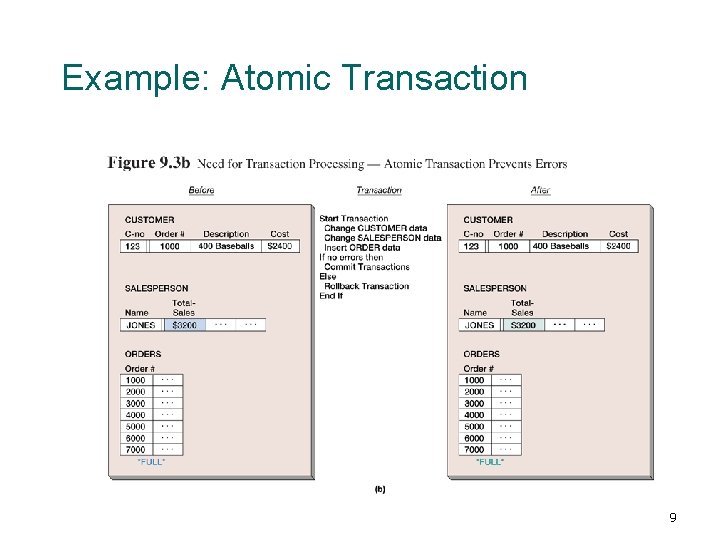
Atomic Transactions ¡ A transaction, or logical unit of work (LUW), is a series of actions taken against the database that occurs as an atomic unit l Either all actions in a transaction occur or none of them do 7
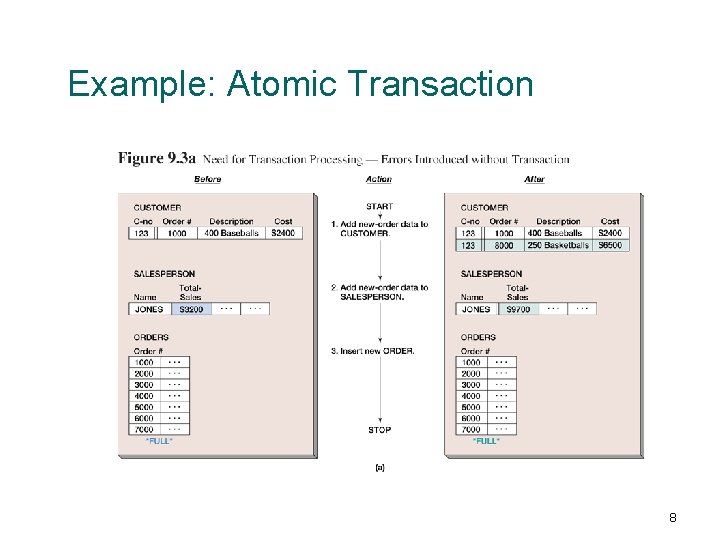
Example: Atomic Transaction 8
Example: Atomic Transaction 9
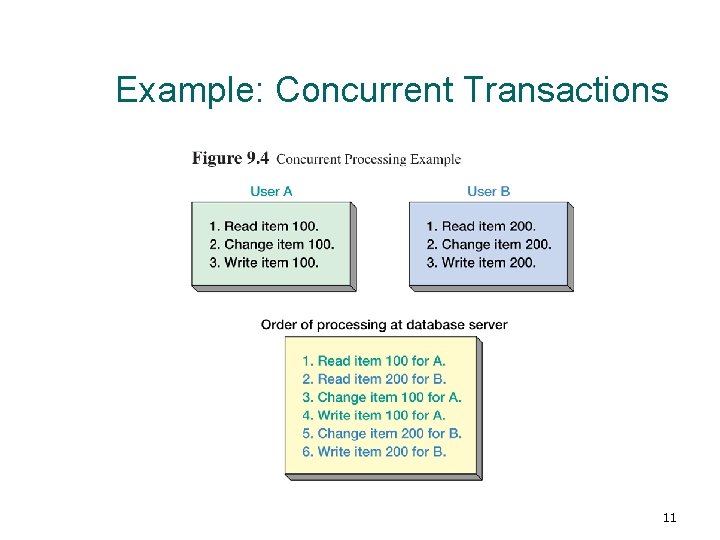
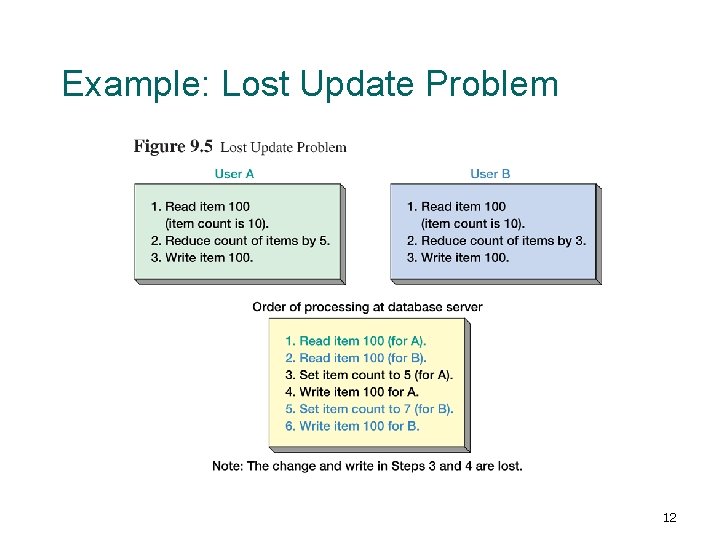
Concurrent Transaction ¡ ¡ Concurrent transactions refer to two or more transactions that appear to users as they are being processed against a database at the same time In reality, CPU can execute only one instruction at a time l ¡ Transactions are interleaved meaning that the operating system quickly switches CPU services among tasks so that some portion of each of them is carried out in a given interval Concurrency problems: lost update and inconsistent reads 10
Example: Concurrent Transactions 11
Example: Lost Update Problem 12
Resource Locking ¡ Resource locking prevents multiple applications from obtaining copies of the same record when the record is about to be changed 13
Lock Terminology ¡ ¡ ¡ Implicit locks are locks placed by the DBMS Explicit locks are issued by the application program Lock granularity refers to size of a locked resource l l ¡ Rows, page, table, and database level Large granularity is easy to manage but frequently causes conflicts Types of lock l l An exclusive lock prohibits other users from reading the locked resource A shared lock allows other users to read the locked resource, but they cannot update it 14
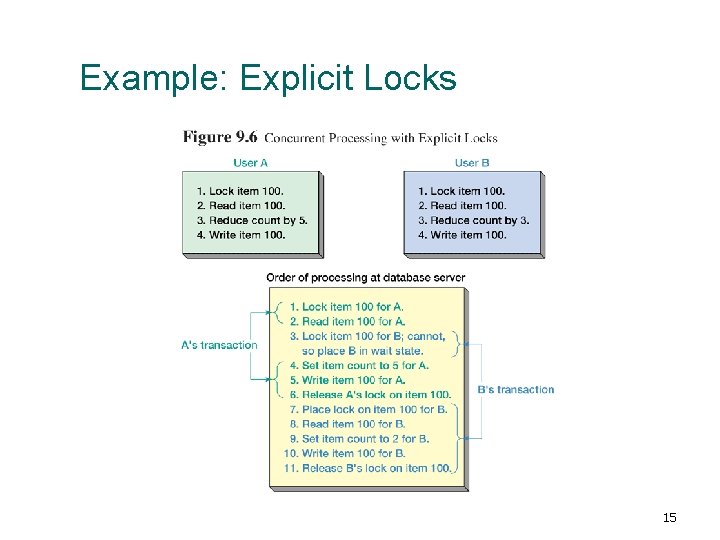
Example: Explicit Locks 15
Deadlock ¡ Deadlock, or the deadly embrace, occurs when two transactions are each waiting on a resource that the other transaction holds 16
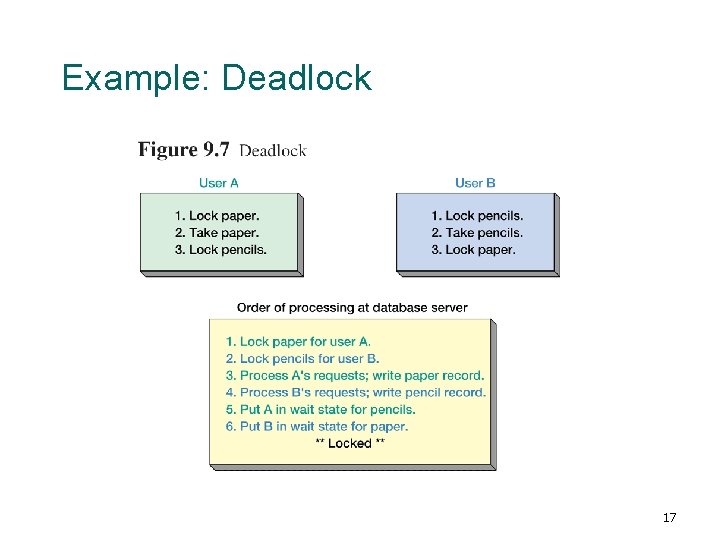
Example: Deadlock 17
Deadlock ¡ Preventing deadlock l l ¡ Allow users to issue all lock requests at one time Require all application programs to lock resources in the same order Breaking deadlock l l Almost every DBMS has algorithms for detecting deadlock When deadlock occurs, DBMS aborts one of the transactions and rollbacks partially completed work 18
Declaring Lock Characteristics ¡ ¡ Most application programs do not explicitly declare locks due to its complication Instead, they mark transaction boundaries and declare locking behavior they want the DBMS to use l ¡ Transaction boundary markers: BEGIN, COMMIT, and ROLLBACK TRANSACTION Advantage l If the locking behavior needs to be changed, only the lock declaration need be changed, not the application program 19
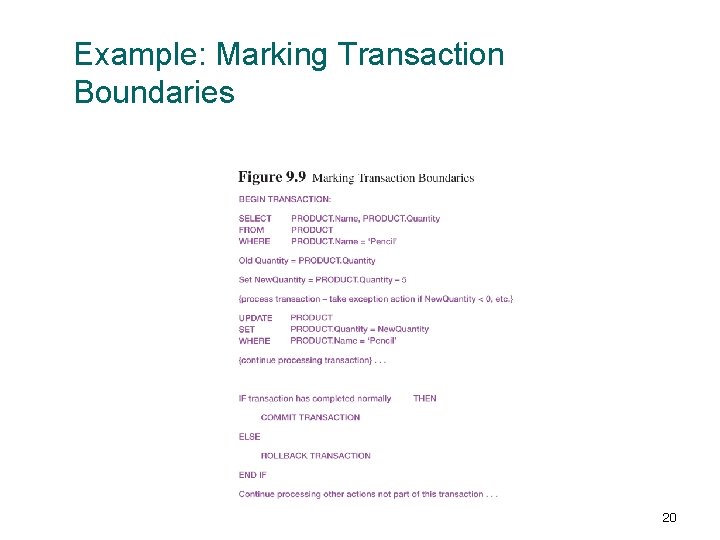
Example: Marking Transaction Boundaries 20
Database Security Database security ensures that only authorized users can perform authorized activities at authorized times ¡ Developing database security ¡ l l Determine users’ processing rights and responsibilities Enforce security requirements using security features from both DBMS and application programs 21
DBMS Security ¡ ¡ ¡ DBMS products provide security facilities They limit certain actions on certain objects to certain users or groups Almost all DBMS products use some form of user name and password security 22
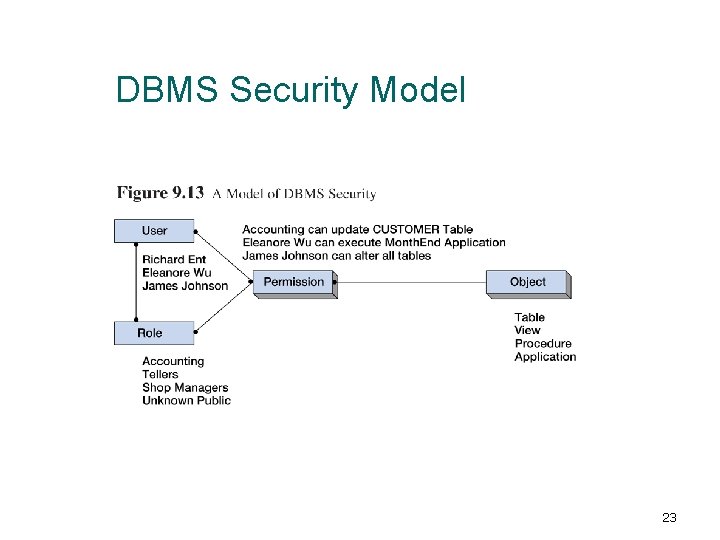
DBMS Security Model 23
DBMS Security Guidelines ¡ ¡ ¡ Run DBMS behind a firewall, but plan as though the firewall has been breached Apply the latest operating system and DBMS service packs and fixes Use the least functionality possible l l ¡ Support the fewest network protocols possible Delete unnecessary or unused system stored procedures Disable default logins and guest users, if possible Unless required, never allow all users to log on to the DBMS interactively Protect the computer that runs the DBMS l l l No user allowed to work at the computer that runs the DBMS computer physically secured behind locked doors Access to the room containing the DBMS computer should be recorded in a log 24
DBMS Security Guidelines (cont. ) ¡ Manage accounts and passwords l l l l ¡ Use a low privilege user account for the DBMS service Protect database accounts with strong passwords Monitor failed login attempts Frequently check group and role memberships Audit accounts with null passwords Assign accounts the lowest privileges possible Limit DBA account privileges Planning l l Develop a security plan for preventing and detecting security problems Create procedures for security emergencies and practice them 25
Application Security ¡ If DBMS security features are inadequate, additional security code could be written in application program l ¡ Application security in Internet applications is often provided on the Web server computer However, you should use the DBMS security features first l l The closer the security enforcement is to the data, the less chance there is for infiltration DBMS security features are faster, cheaper, and probably result in higher quality results than developing your own 26
Database Recovery In the event of system failure, that database must be restored to a usable state as soon as possible ¡ Two recovery techniques: ¡ l l Recovery via reprocessing Recovery via rollback/rollforward 27
Recovery via Reprocessing Recovery via reprocessing: the database goes back to a known point (database save) and reprocesses the workload from there (re-execute all database update programs) ¡ Unfeasible strategy because ¡ l l The recovered system may never catch up if the computer is heavily scheduled Asynchronous events, although concurrent transactions, may cause different results 28
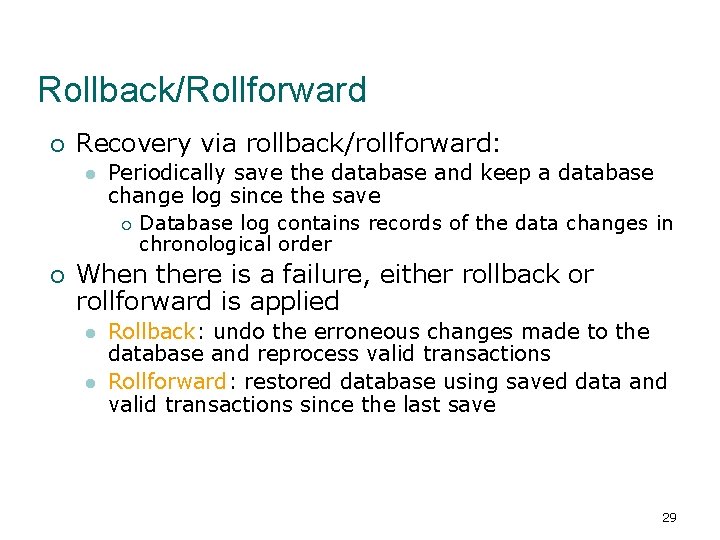
Rollback/Rollforward ¡ Recovery via rollback/rollforward: l ¡ Periodically save the database and keep a database change log since the save ¡ Database log contains records of the data changes in chronological order When there is a failure, either rollback or rollforward is applied l l Rollback: undo the erroneous changes made to the database and reprocess valid transactions Rollforward: restored database using saved data and valid transactions since the last save 29
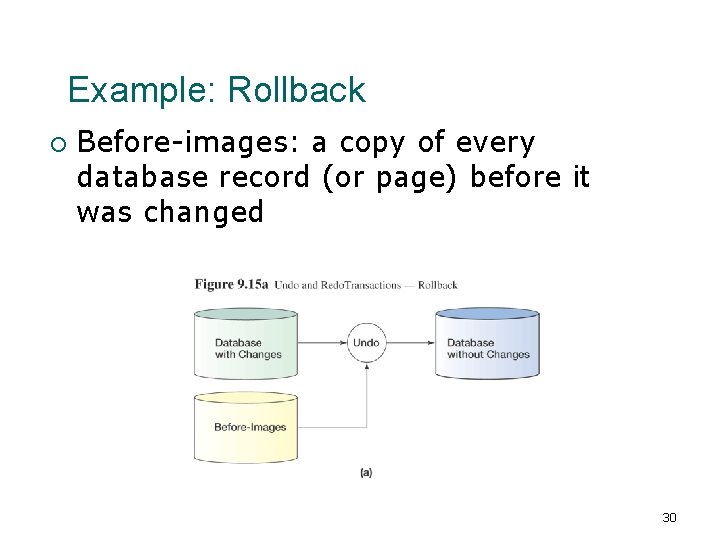
Example: Rollback ¡ Before-images: a copy of every database record (or page) before it was changed 30
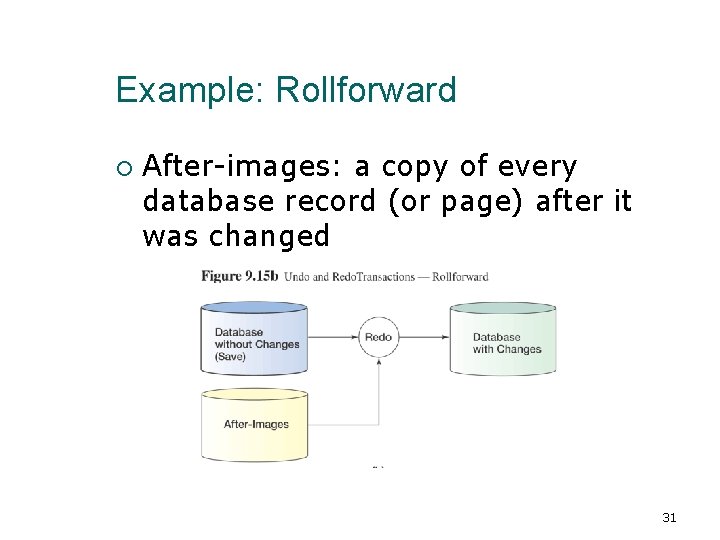
Example: Rollforward ¡ After-images: a copy of every database record (or page) after it was changed 31
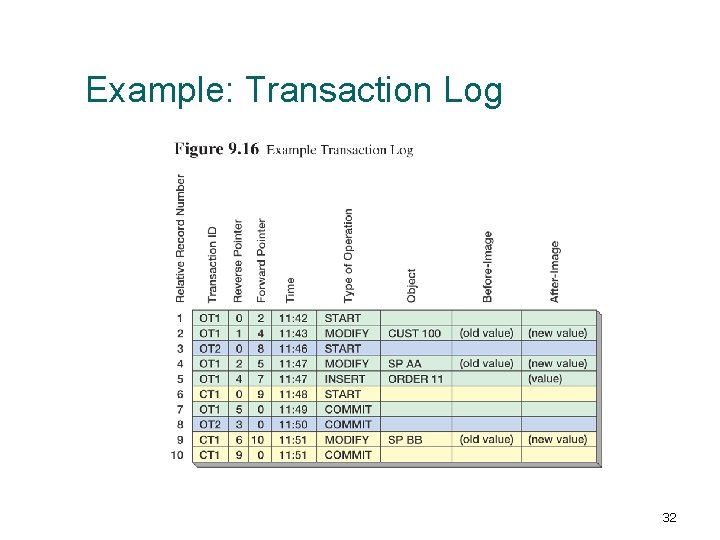
Example: Transaction Log 32
Checkpoint ¡ A checkpoint is a point of synchronization between the database and the transaction log l l ¡ Checkpoints speed up database recovery process l l ¡ DBMS refuses new requests, finishes processing outstanding requests, and writes its buffers to disk The DBMS waits until the writing is successfully completed the log and the database are synchronized Database can be recovered using after-images since the last checkpoint Checkpoint can be done several times per hour Most DBMS products automatically checkpoint themselves 33
Managing the DBMS ¡ DBA’s Responsibilities l l l Generate database application performance reports Investigate user performance complaints Assess need for changes in database structure or application design Modify database structure Evaluate and implement new DBMS features Tune the DBMS 34
Maintaining the Data Repository ¡ ¡ ¡ DBA is responsible for maintaining the data repository Data repositories are collections of metadata about users, databases, and its applications The repository may be l l ¡ Virtual as it is composed of metadata from many different sources: DBMS, code libraries, Web page generation and editing tools, etc. An integrated product from a CASE tool vendor or from other companies The best repositories are active and they are part of the system development process 35
- Slides: 35