
Managing IT Vulnerabilities Information Security Management 95 752
Managing IT Vulnerabilities Information Security Management 95 -752 Sasha Romanosky October 08, 2009 1
whoami? • Over 10 years experience in information security – e. Bay, Morgan Stanley • Published works on vulnerability management, security patterns • Co-developer of CVSS (Common Vulnerability Scoring System) • Developed Fox. Tor: firefox extension for anonymous browsing • Now a Ph. D student in the Heinz College • Research: Measuring and modeling security and privacy laws • Also, your TA! 2
Managing IT Vulnerabilities • In this class, you’ve learned all about basic information security tools, practices and controls • The purpose of this talk is to discuss IT risk. Specifically, managing IT vulnerabilities. We’ll also look at some commercial tools. • This generally involves three steps – Finding the vulns (scanning: nessus, Qualys, n. Circle, etc) – Scoring and Prioritizing vulns (CVSS) – Analyzing vulns (Red. Seal, Skybox) – Remediating vulns 3
Quick definitions • IT Asset: some network-enabled IT device of value to an organization • Asset value: the value that the organization places on an IT asset • Vulnerability: an exposure or weakness of an asset • Threat: probability of an attack or other harmful event • Risk: damage caused when a threat exploits a vulnerability 4
Why Vulnerability Management? • Do we really need to worry about computer vulnerabilities given all the other security issues around the organization? • Only you can answer that. But, consider this: • Vulnerabilities are a quick win: – – 5 Detection is fairly straightforward (most products do this very well) Fixing holes will reduce loss It’s relatively easy to quantify progress This might be your job one day? (anyone? )
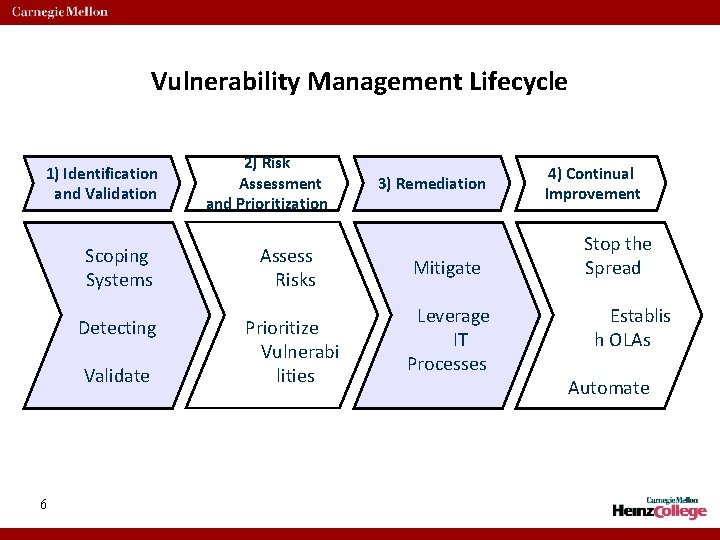
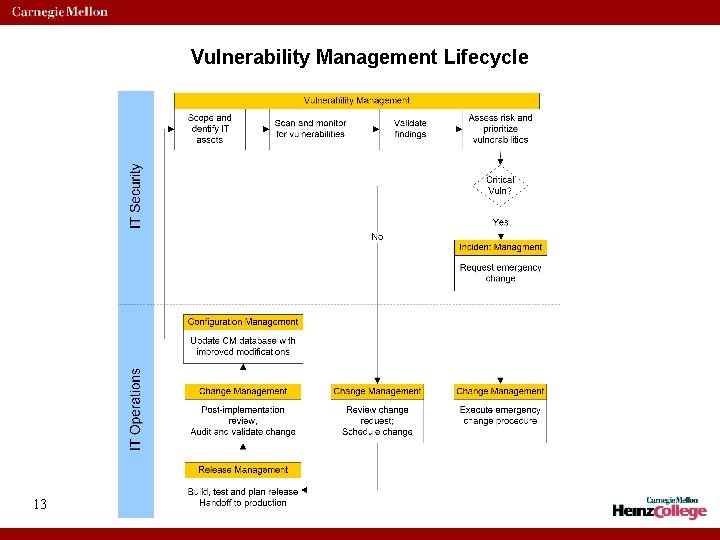
Vulnerability Management Lifecycle 1) Identification and Validation Scoping Systems Assess Risks Detecting Prioritize Vulnerabi lities Validate 6 2) Risk Assessment and Prioritization 3) Remediation Mitigate Leverage IT Processes 4) Continual Improvement Stop the Spread Establis h OLAs Automate
Vulnerability Management Lifecycle 1) Identification and Validation • Scoping systems: find all the networks; wireless, backup, transit, admin, test, production. Identify and document them all – even if you won’t be scanning them immediately. • Detecting vulns: all IT assets should be scanned or monitored, (even printers!) Scanners actively probe devices whereas monitoring passively checks networks or hosts. • Validating findings: once you have the (mountain of) data, validate the results to weed out false positives 7
Vulnerability Management Lifecycle 2) Risk Assessment and Prioritization • Assessing risks: perform a quick risk assessment. E. g. Risk = threat likelihood * vuln severity * asset value. Take note of security controls that limit or mitigate the actual risk of the vulns. • Prioritization: prioritize the remaining vulns according to their risk and the effort (cost) required to fix them. • Also consider how past incidents occurred, this may affect the prioritization. E. g. perhaps all past breaches occurred from 3 rd party network connectivity. 8
Vulnerability Management Lifecycle 3) Remediation • The challenge is: How to affect change when the motivations of the group finding the vulns aren’t (necessarily) those of the group fixing them? • Leverage (not circumvent) existing IT processes by delivering fixes as just another stock of planned work. i. e. Change Management. • IT can then test and coordinate the fixes as necessary. It may not done as fast, but it will get done. • For critical vulns: use the emergency change request process (most organizations will have one. If not, you can create it) 9
Vulnerability Management Lifecycle 4) Continual Improvement • Stopping the spread: incorporate changes/patches of current findings into future system builds. • Setting Expectations: By setting proper SLAs, both parties have clear expectations as to what can be done when. • Automation: much of the efficiency and effectiveness can be achieved through automation of detection, reporting, and remediation (if possible) 10
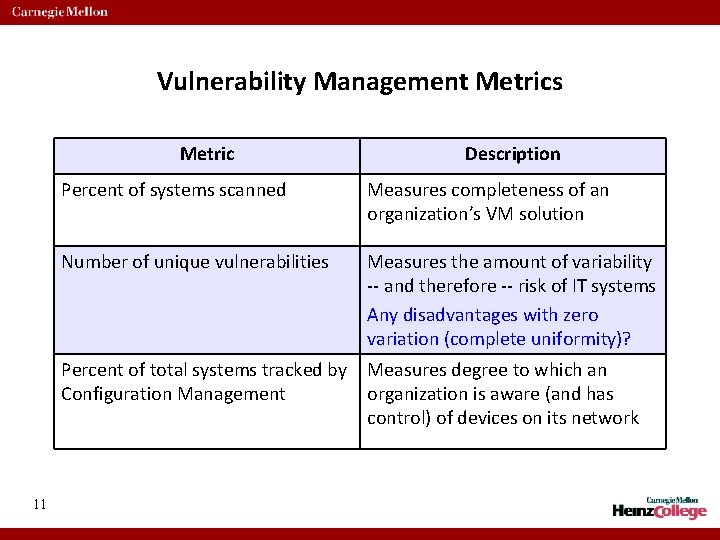
Vulnerability Management Metrics Metric 11 Description Percent of systems scanned Measures completeness of an organization’s VM solution Number of unique vulnerabilities Measures the amount of variability -- and therefore -- risk of IT systems Any disadvantages with zero variation (complete uniformity)? Percent of total systems tracked by Configuration Management Measures degree to which an organization is aware (and has control) of devices on its network
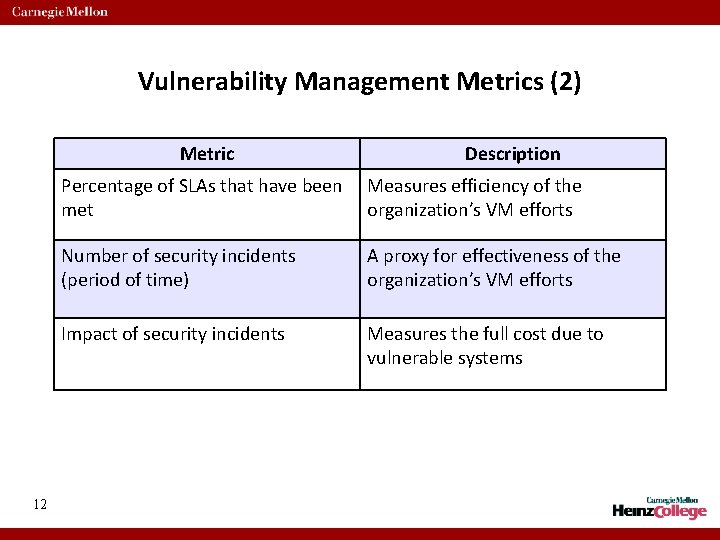
Vulnerability Management Metrics (2) Metric 12 Description Percentage of SLAs that have been met Measures efficiency of the organization’s VM efforts Number of security incidents (period of time) A proxy for effectiveness of the organization’s VM efforts Impact of security incidents Measures the full cost due to vulnerable systems
Vulnerability Management Lifecycle 13
Vuln Mgmt Review • Starts with discovery: networks, devices, and vulnerabilities • Prioritize according to risk and effort to fix • Achieve greater success by working with (not against) IT processes • Establish reasonable SLAs and automate as much as possible 14

15 http: //www. acct. org/Questions. jpg
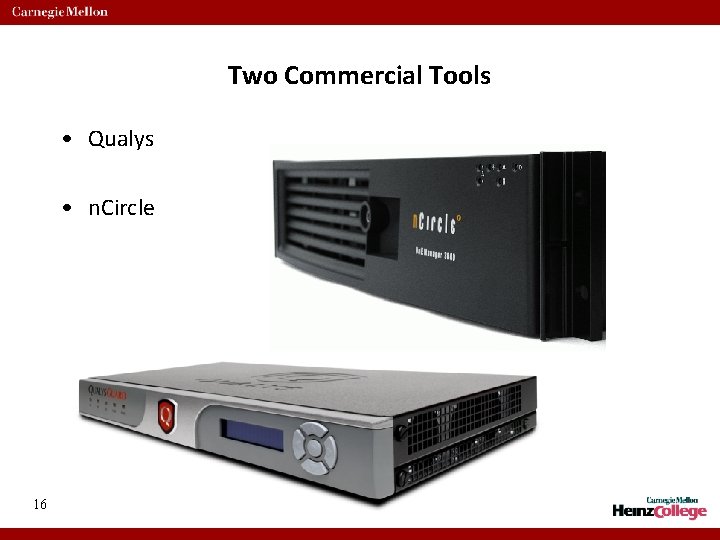
Two Commercial Tools • Qualys • n. Circle 16
Qualys • Privately held since 1999, based in Redwood Shores, California, USA. • Fewer than 200 employees • Over two thousand customers running more than two million scans per month. • They provide hardware appliances that customers install inside, throughout their network. 17
Qualys (2) • Appliances communicate only with the Qualys servers to: – Update vulnerability signature, – Listen for commands (map, scan, stop), and – Upload scan data • Customers manage scans, reports through web interface to Qualys servers. • Two important points: – Each device requires direct connectivity to Qualys servers – this isn’t always easy – All vulnerability data is stored off-site – Risks? Benefits? 18
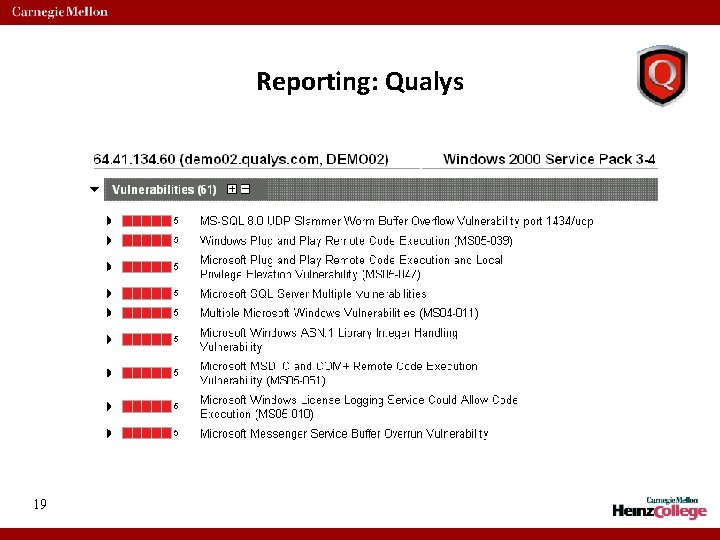
Reporting: Qualys 19
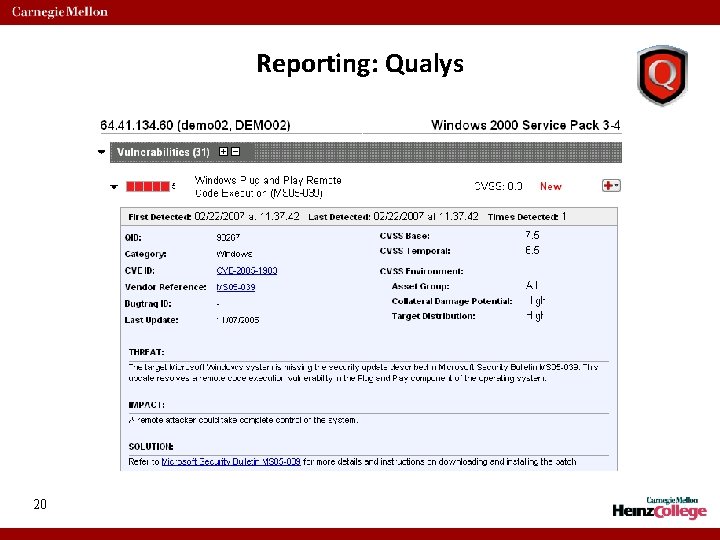
Reporting: Qualys 20
n. Circle • Won numerous awards for innovation and technology leadership (4 patents awarded, 5 pending) • Named one of the top 100 best places to work in the San Francisco Bay Area. • Headquartered in San Francisco, with offices in London, Toronto and Tokyo. • Certified EAL level 3 under Common Criteria • Customers include: Visa, American Express, Fujitsu, US Cellular, Shell, All US Federal Reserve Banks 21
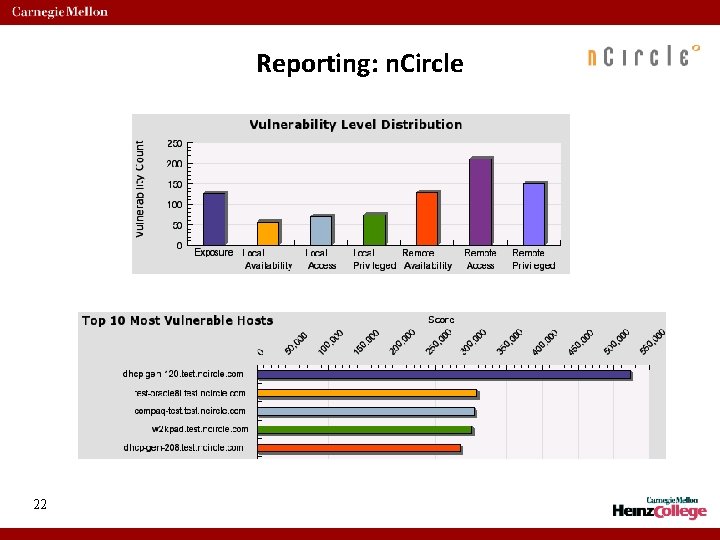
Reporting: n. Circle 22
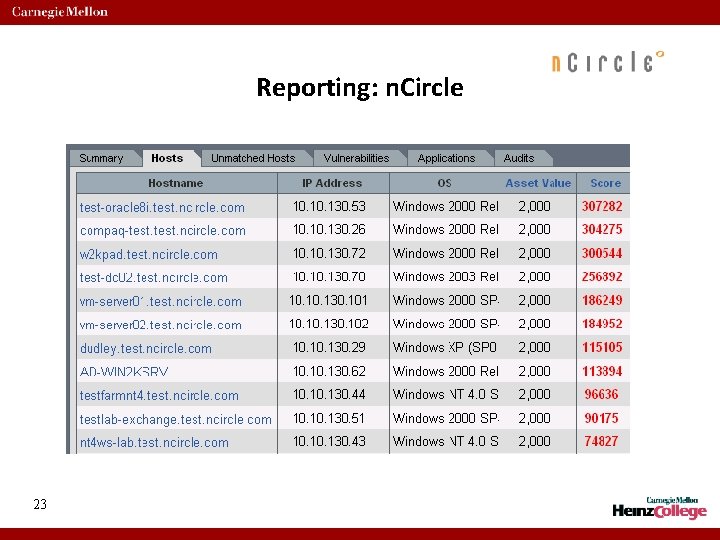
Reporting: n. Circle 23

24 http: //www. acct. org/Questions. jpg
IT Risk Analysis. Consider this… • A network with 10, 000 IP devices, each with 10 vulnerabilities • That’s 100, 000 different ways loss can occur • But of course, not all vulnerabilities cause the same amount of loss, and their likelihood of being exploited will differ • So the challenges are: – How do you figure out what’s at risk, and – How do you prioritize the work? 25
Prioritization is contextual • That is, different groups will have their own use for the results (which is good if you’re the one rolling this out!) • For the Network/firewall Engineer: show me any errors in my configurations • For the Security Manager: show me the top 10 most vulnerable devices • For the IT Manager: show me the most common vulnerabilities • For the Auditor: show me all machines that are out of SOX / PCI compliance 26
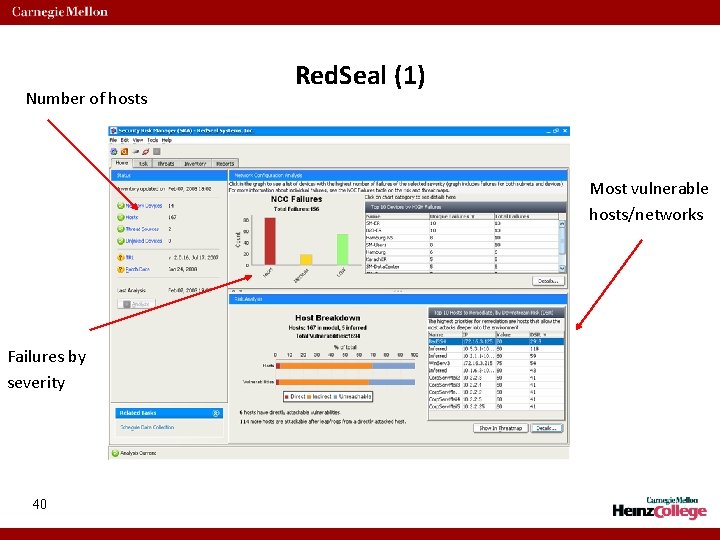
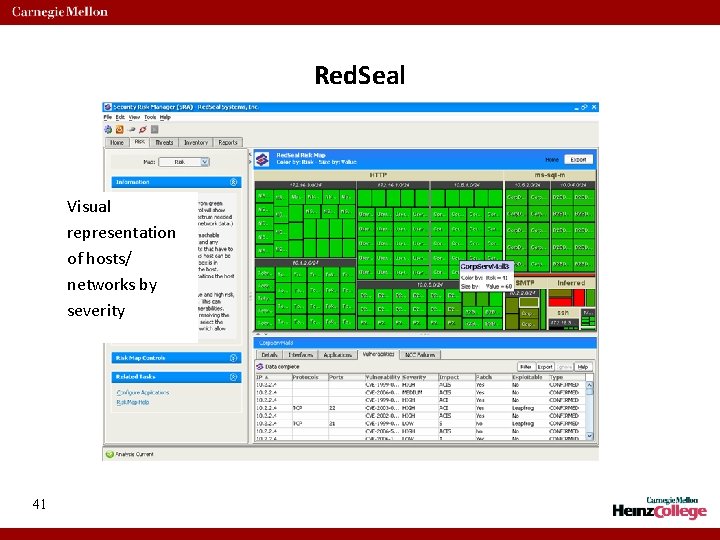
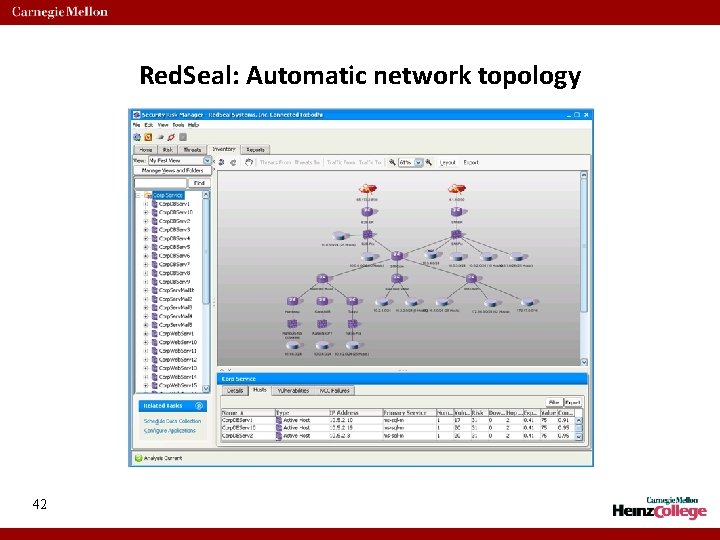
Two Commercial Risk Analysis Tools: Skybox and Red. Seal Inputs: • Vulnerability scan data: identifies listening services/ports and vulnerable hosts • Router ACLs: describe how networks connect to one another • Firewall configs: identifies which protocols can talk to which hosts/networks • Asset values (optional): relative or absolute measure of value to the enterprise 27 Outputs: • Network Topology • Attack paths through the network • Very specialized visualization and reporting: (riskiest hosts, most common vulns, trends)
Caveats • These tools only recognizes IT vulnerabilities – Cannot address policy, human or organizational weaknesses • They are not tools for calculating ROI of security controls • Countermeasures are implicitly considered – Cannot model on antivirus, change management, backup controls – Versus explicitly modeled in other methodologies 28
Skybox! 29
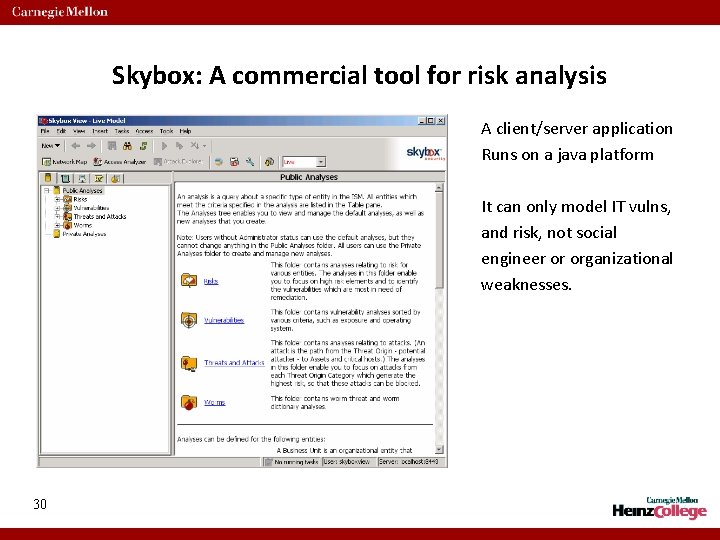
Skybox: A commercial tool for risk analysis A client/server application Runs on a java platform It can only model IT vulns, and risk, not social engineer or organizational weaknesses. 30
Skybox Step 1: import vuln data and router, firewall configs Step 2: group assets by function (or anything else that makes sense). 31
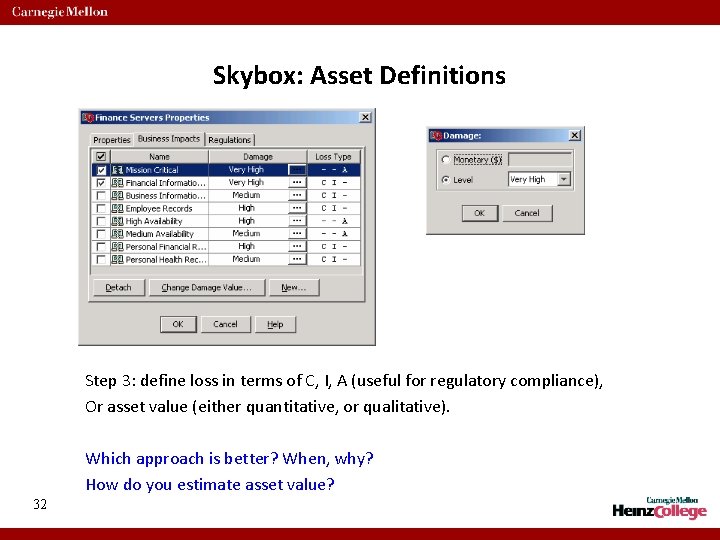
Skybox: Asset Definitions Step 3: define loss in terms of C, I, A (useful for regulatory compliance), Or asset value (either quantitative, or qualitative). Which approach is better? When, why? How do you estimate asset value? 32
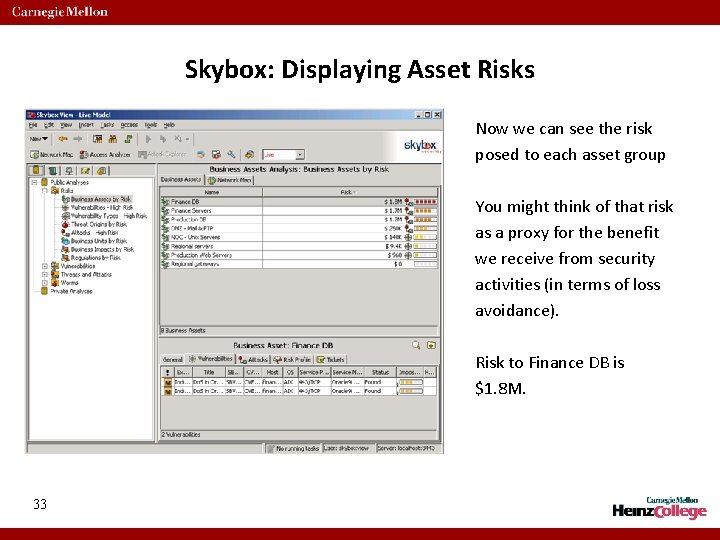
Skybox: Displaying Asset Risks Now we can see the risk posed to each asset group You might think of that risk as a proxy for the benefit we receive from security activities (in terms of loss avoidance). Risk to Finance DB is $1. 8 M. 33
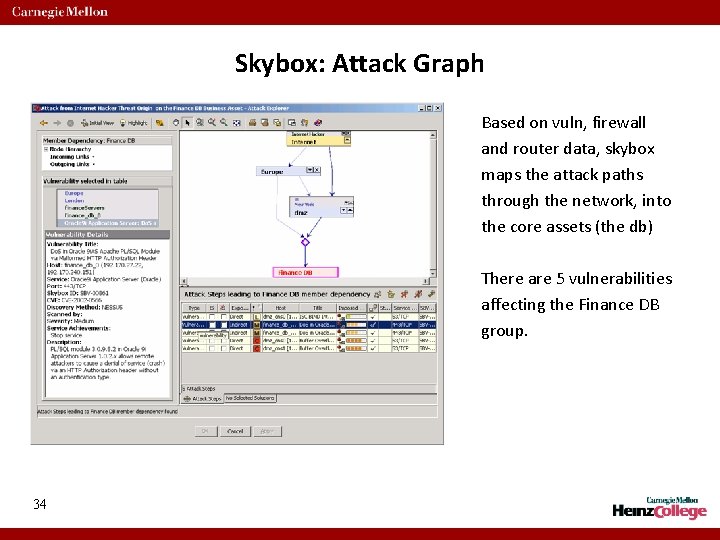
Skybox: Attack Graph Based on vuln, firewall and router data, skybox maps the attack paths through the network, into the core assets (the db) There are 5 vulnerabilities affecting the Finance DB group. 34
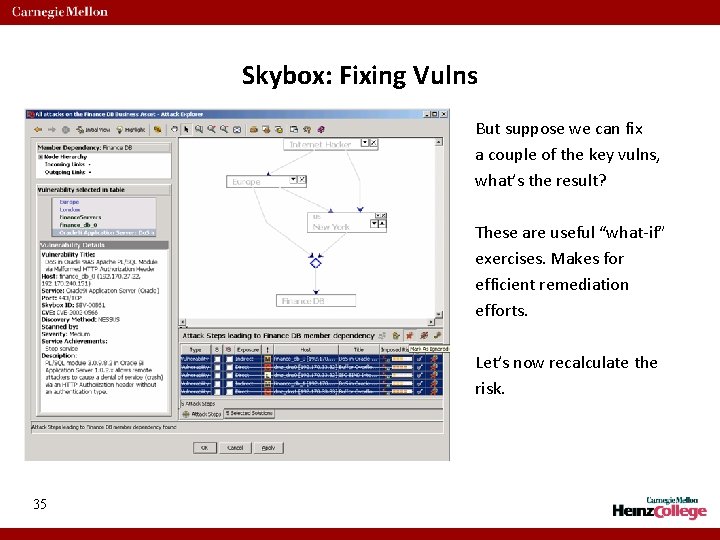
Skybox: Fixing Vulns But suppose we can fix a couple of the key vulns, what’s the result? These are useful “what-if” exercises. Makes for efficient remediation efforts. Let’s now recalculate the risk. 35
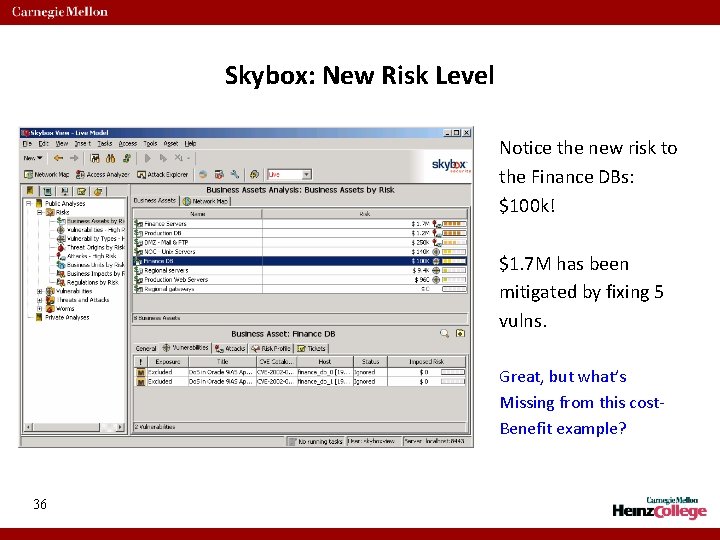
Skybox: New Risk Level Notice the new risk to the Finance DBs: $100 k! $1. 7 M has been mitigated by fixing 5 vulns. Great, but what’s Missing from this cost. Benefit example? 36
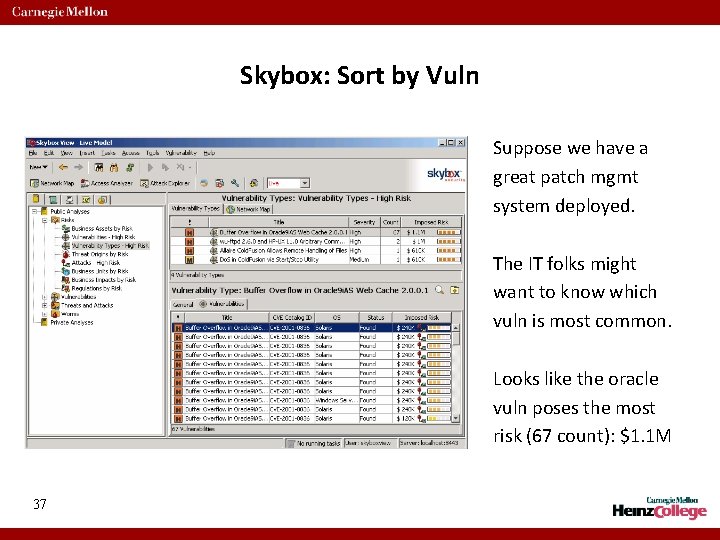
Skybox: Sort by Vuln Suppose we have a great patch mgmt system deployed. The IT folks might want to know which vuln is most common. Looks like the oracle vuln poses the most risk (67 count): $1. 1 M 37
Skybox: Risk Calculation • So how is all this calculated? Loosely, it’s as follows: • Total risk to an asset: ∑ (risk from a single attack) • Where, risk from a single attack = f ( Number of attack steps in attack path, Difficulty in exploiting vulnerability, Skill of attacker, Commonness of the vulnerability, Impact to the asset ) 38
Red. Seal! 39
Number of hosts Red. Seal (1) Most vulnerable hosts/networks Failures by severity 40
Red. Seal Visual representation of hosts/ networks by severity 41
Red. Seal: Automatic network topology 42
Red. Seal: Attack Graph 43
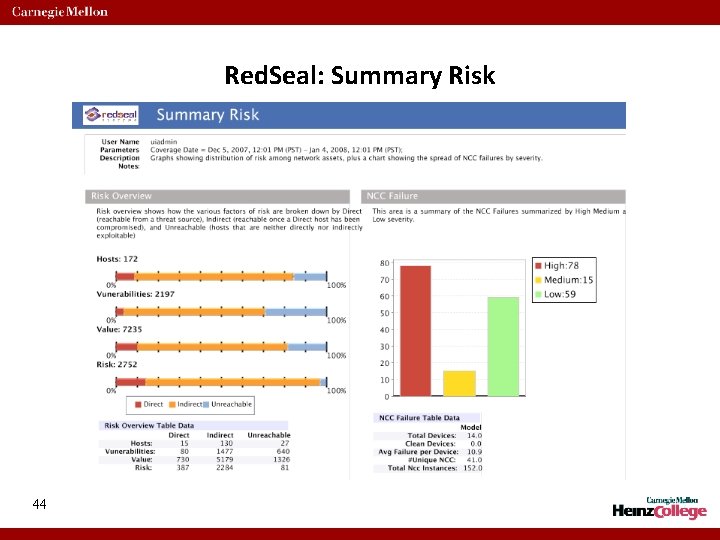
Red. Seal: Summary Risk 44
Risk Analysis Recap • Skybox and Redseal are incredibly sophisticated risk analysis engines • Inputs are: vulnerability data, network connectivity (router, firewall) • Requires customer configuration for: asset value, threat origin, • They help answer the following: – which assets are most at risk? – which vulnerabilities pose the biggest risk? – which threat sources pose the biggest risk? – Which assets are out of compliance? • Remember: they only recognize IT vulnerabilities 45

46 http: //www. acct. org/Questions. jpg
- Slides: 46