
Management Information Systems MANAGING THE DIGITAL FIRM 12
- Slides: 51
Management Information Systems MANAGING THE DIGITAL FIRM, 12 TH EDITION Chapter 8 SECURING INFORMATION SYSTEMS
What is Wanna. Cry Ransomware? • On 12 May 2017, a new strain of the Ransom. Crypt. XXX (Wanna. Cry) ransomware began spreading widely impacting a large number of organizations across the world. • Wanna. Cry infects the system by encrypting all its files.
Vulnerable Microsoft OS The following list of Microsoft Operating Systems (OS) are known to be vulnerable if they have not been updated with Microsoft security bulletin (MS 17 -010 -Critical) which was released in March 2017: • Windows 10 • Windows RT 8. 1 • Windows 7 • Windows Vista Machines running on Windows XP would not have patches to protect against this ransomware as the OS has been desupported by Microsoft.
What I need to do for my home computer to prevent Wanna. Cry Ransomware? • Ensure all Windows-based systems are fullypatched, especially that MS 17 -010 has been applied as in the advisory sent yesterday. • Disable SMB (file sharing) services on the system and block SMB port access from external if it is not required. • Update Anti-virus software with the latest malware definitions.
Securing Information Systems Managing IT 25 s
Management Information Systems CHAPTER 8: SECURING INFORMATION SYSTEMS Learning Objectives • Why are information systems vulnerable to destruction, error, and abuse? • What is the business value of security and control? • What are the components of an organizational framework for security and control? • What are the most important tools and technologies for safeguarding information resources? 6 © Prentice Hall 2011
Management Information Systems CHAPTER 8: SECURING INFORMATION SYSTEMS You’re on Facebook? Watch Out! • Facebook – world’s largest social network • Problem – Identity theft and malicious software – Examples: • 2009 18 -month hacker scam for passwords, resulted in Trojan horse download that stole financial data • Dec 2008 Koobface worm • May 2010 Spam campaigned aimed at stealing logins • Illustrates: Types of security attacks facing consumers • Demonstrates: Ubiquity of hacking, malicious software 7 © Prentice Hall 2011
Boston Celtics Score Big Points Against Spyware • Problem: Spyware infecting laptops during team travel affecting accessibility and performance of proprietary system • Solutions: Deploy security software to reduce spyware. • Mi 5 Network’s Webgate security appliance tool sits between corporate firewall and network to prevent spyware entering network or infected computers connecting to network • Demonstrates IT’s role in combating malicious software • Illustrates digital technology’s role in achieving security on the Web
System Vulnerability and Abuse • Security: • Policies, procedures and technical measures used to prevent unauthorized access, alteration, theft, or physical damage to information systems • Controls: • Methods, policies, and organizational procedures that ensure safety of organization’s assets; accuracy and reliability of its accounting records; and operational adherence to management standards
System Vulnerability and Abuse • Why systems are vulnerable • Hardware problems • Breakdowns, configuration errors, damage from improper use or crime • Software problems • Programming errors, installation errors, unauthorized changes) • Disasters • Power failures, flood, fires, etc. • Use of networks and computers outside of firm’s control • E. g. , with domestic or offshore outsourcing vendors
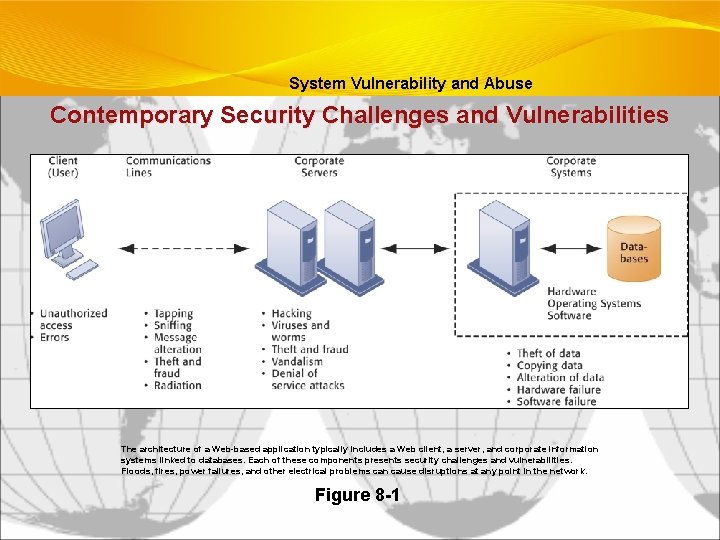
System Vulnerability and Abuse Contemporary Security Challenges and Vulnerabilities The architecture of a Web-based application typically includes a Web client, a server, and corporate information systems linked to databases. Each of these components presents security challenges and vulnerabilities. Floods, fires, power failures, and other electrical problems can cause disruptions at any point in the network. Figure 8 -1
System Vulnerability and Abuse • Internet vulnerabilities • Network open to anyone • Size of Internet means abuses can have wide impact • Use of fixed Internet addresses with permanent connections to Internet eases identification by hackers • E-mail attachments • E-mail used for transmitting trade secrets • IM messages lack security, can be easily intercepted
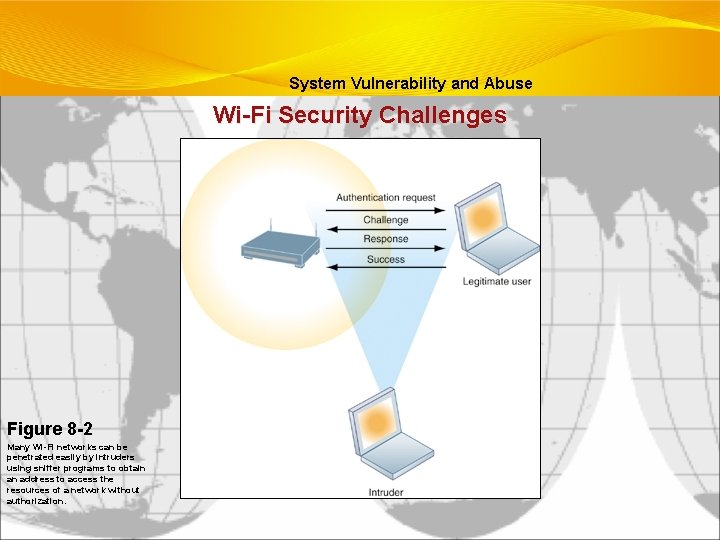
System Vulnerability and Abuse • Wireless security challenges • Radio frequency bands easy to scan • SSIDs (service set identifiers) • • Identify access points Broadcast multiple times • War driving • • Eavesdroppers drive by buildings and try to intercept network traffic When hacker gains access to SSID, has access to network’s resources • WEP (Wired Equivalent Privacy) • • • Security standard for 802. 11 Basic specification uses shared password for both users and access point Users often fail to use security features
System Vulnerability and Abuse Wi-Fi Security Challenges Figure 8 -2 Many Wi-Fi networks can be penetrated easily by intruders using sniffer programs to obtain an address to access the resources of a network without authorization.
System Vulnerability and Abuse • Malicious software (malware) • Viruses: Rogue software program that attaches itself to other software programs or data files in order to be executed • Worms: Independent computer programs that copy themselves from one computer to other computers over a network • Trojan horses: Software program that appears to be benign but then does something other than expected • Spyware: Small programs install themselves surreptitiously on computers to monitor user Web surfing activity and serve up advertising • Key loggers: Record every keystroke on computer to steal serial numbers, passwords, launch Internet attacks
System Vulnerability and Abuse • Spoofing • Misrepresenting oneself by using fake e-mail addresses or masquerading as someone else • Redirecting Web link to address different from intended one, with site masquerading as intended destination • Sniffer: Eavesdropping program that monitors information traveling over network • Denial-of-service attacks (Do. S): Flooding server with thousands of false requests to crash the network • Distributed denial-of-service attacks (DDo. S): Use of numerous computers to launch a Do. S • Botnets: Networks of “zombie” PCs infiltrated by bot malware
System Vulnerability and Abuse • Identity theft: Theft of personal Information (social security id, driver’s license or credit card numbers) to impersonate someone else • Phishing: Setting up fake Web sites or sending e-mail messages that look like legitimate businesses to ask users for confidential personal data. • Evil twins: Wireless networks that pretend to offer trustworthy Wi-Fi connections to the Internet • Pharming: Redirects users to a bogus Web page, even when individual types correct Web page address into his or her browser • Click fraud
System Vulnerability and Abuse • Global threats - Cyberterrorism and cyberwarfare • Concern that Internet vulnerabilities and other networks make digital networks easy targets for digital attacks by terrorists, foreign intelligence services, or other groups
Management Information Systems Chapter 8 Securing Information Systems System Vulnerability and Abuse • Internal threats – Employees • Security threats often originate inside an organization • Inside knowledge • Sloppy security procedures • Social engineering • Software vulnerability
Business Value of Security and Control • Legal and regulatory requirements for electronic records management • Firms face new legal obligations for the retention and storage of electronic records as well as for privacy protection • HIPAA: Medical security and privacy rules and procedures • Gramm-Leach-Bliley Act: Requires financial institutions to ensure the security and confidentiality of customer data • Sarbanes-Oxley Act: Imposes responsibility on companies and their management to safeguard the accuracy and integrity of financial information that is used internally and released externally
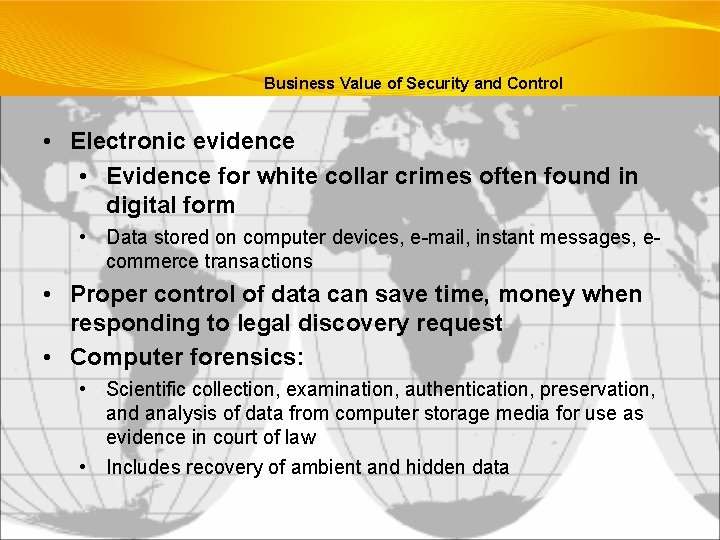
Business Value of Security and Control • Electronic evidence • Evidence for white collar crimes often found in digital form • Data stored on computer devices, e-mail, instant messages, ecommerce transactions • Proper control of data can save time, money when responding to legal discovery request • Computer forensics: • Scientific collection, examination, authentication, preservation, and analysis of data from computer storage media for use as evidence in court of law • Includes recovery of ambient and hidden data
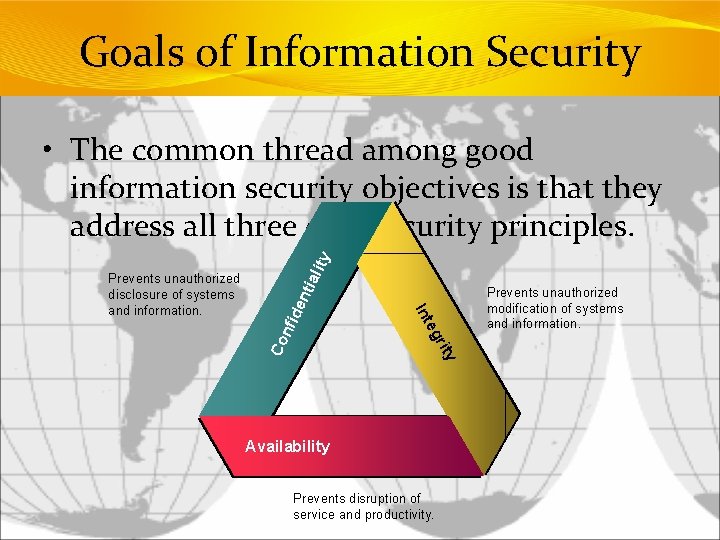
Goals of Information Security nfi de ity r eg Co Int Prevents unauthorized disclosure of systems and information. nti alit y • The common thread among good information security objectives is that they address all three core security principles. Availability Prevents disruption of service and productivity. Prevents unauthorized modification of systems and information.
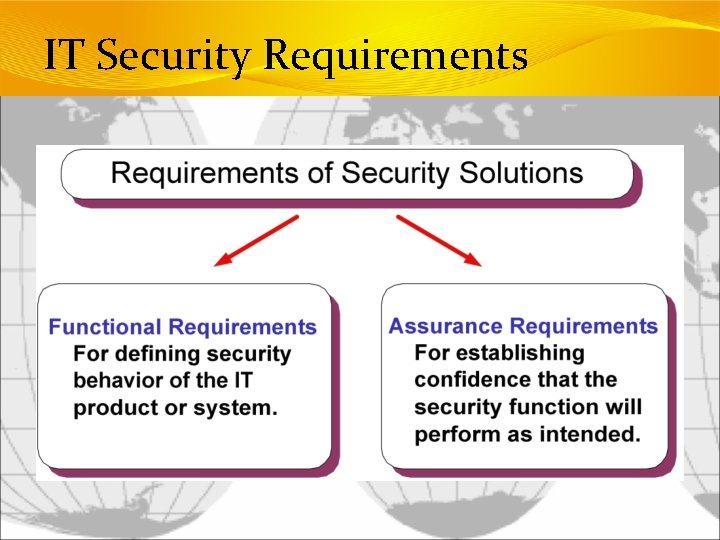
IT Security Requirements
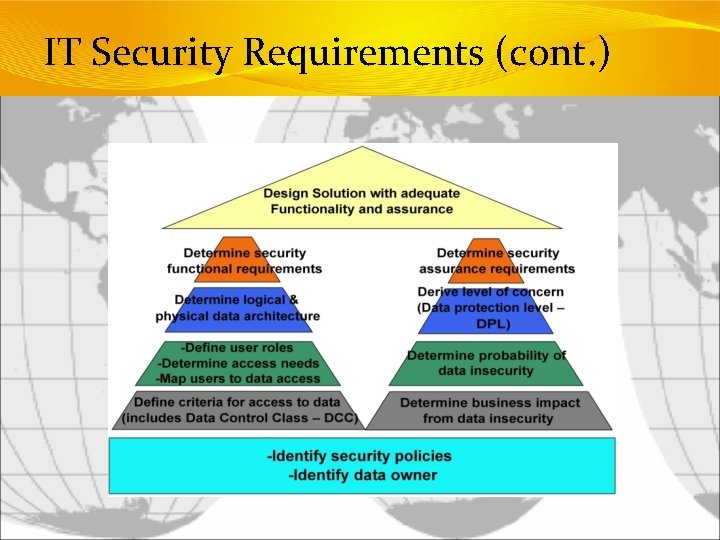
IT Security Requirements (cont. )
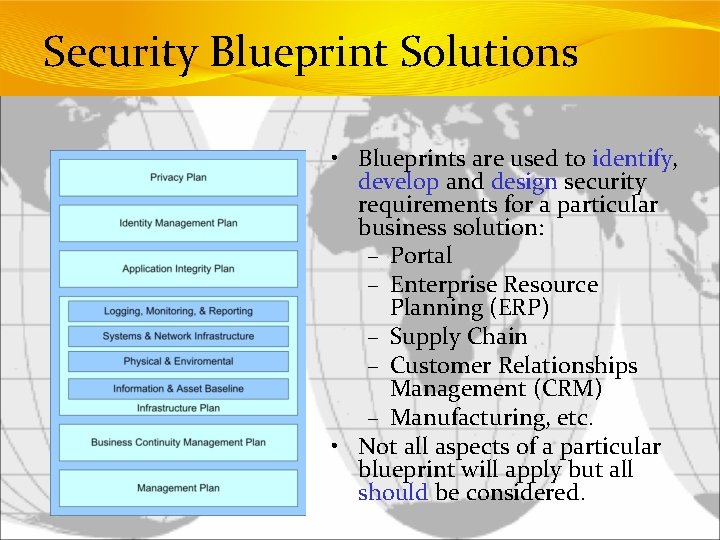
Security Blueprint Solutions • Blueprints are used to identify, develop and design security requirements for a particular business solution: – Portal – Enterprise Resource Planning (ERP) – Supply Chain – Customer Relationships Management (CRM) – Manufacturing, etc. • Not all aspects of a particular blueprint will apply but all should be considered.
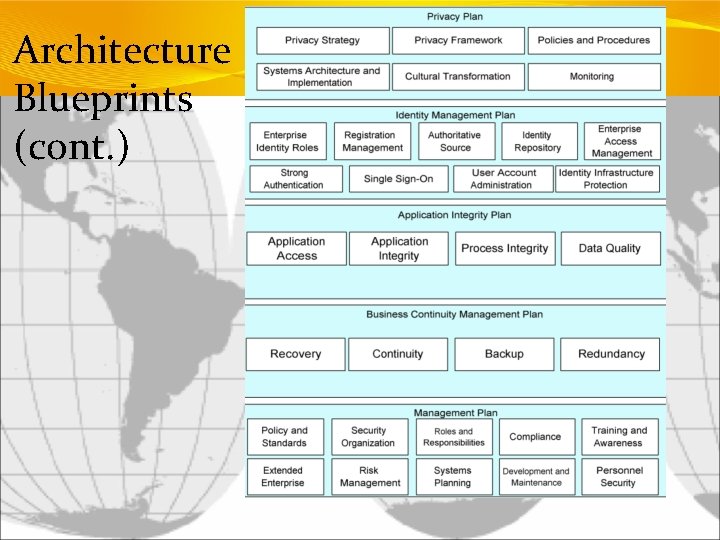
Architecture Blueprints • Security Blueprint – Tailored security best practices that, in total, form a comprehensive security policy program and technical architecture. – Composed of several security domains, that at a minimum, are mapped from the ISO/IEC 17799 standard.
Architecture Blueprints (cont. )
Infrastructure Blueprints • Individual security blueprints reflect • Tailored requirements meeting the organization’s specific requirements • Influenced by legal, regulatory, business, IT drivers.
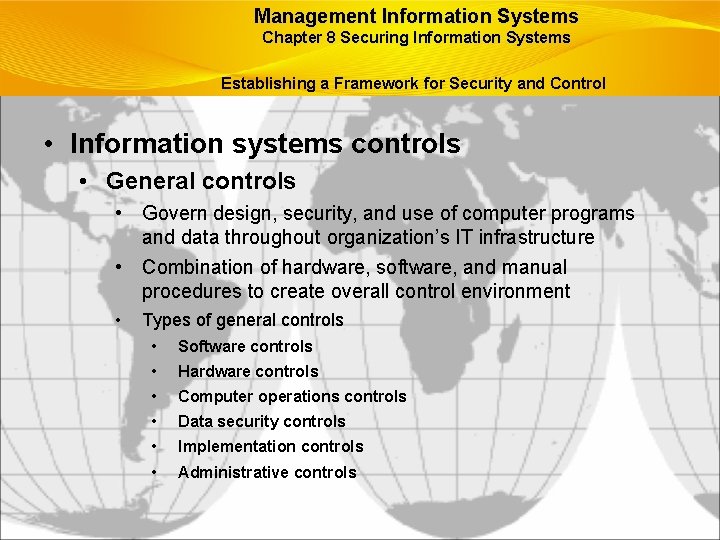
Management Information Systems Chapter 8 Securing Information Systems Establishing a Framework for Security and Control • Information systems controls • General controls • Govern design, security, and use of computer programs and data throughout organization’s IT infrastructure • Combination of hardware, software, and manual procedures to create overall control environment • Types of general controls • Software controls • Hardware controls • Computer operations controls • Data security controls • Implementation controls • Administrative controls
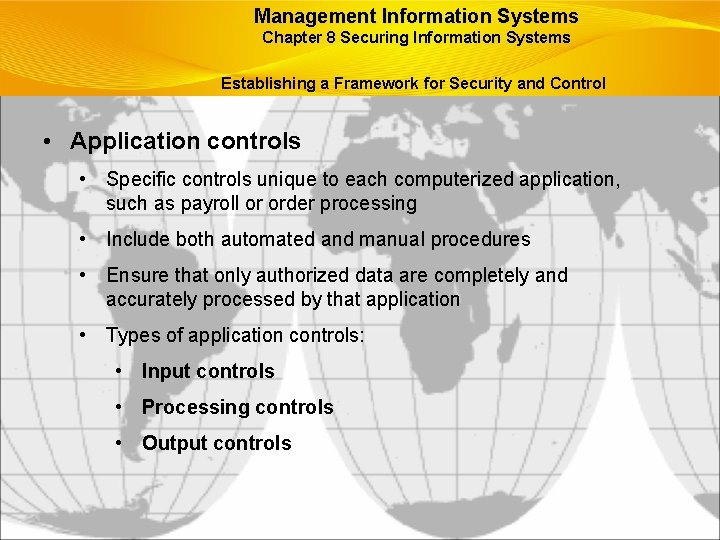
Management Information Systems Chapter 8 Securing Information Systems Establishing a Framework for Security and Control • Application controls • Specific controls unique to each computerized application, such as payroll or order processing • Include both automated and manual procedures • Ensure that only authorized data are completely and accurately processed by that application • Types of application controls: • Input controls • Processing controls • Output controls
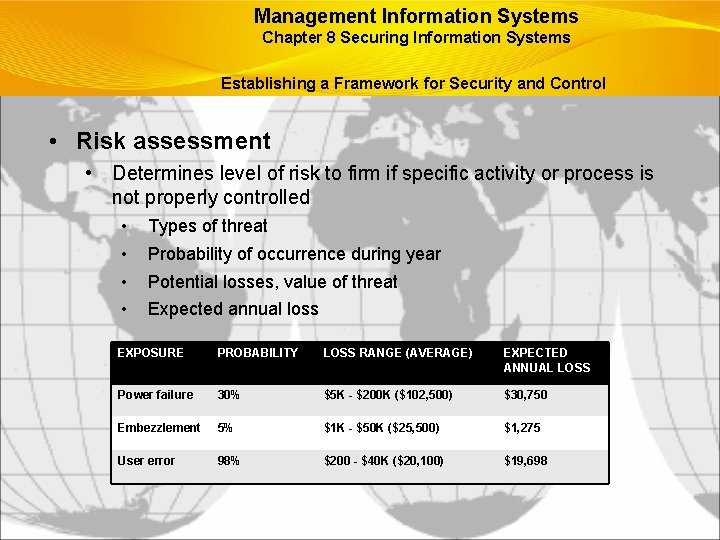
Management Information Systems Chapter 8 Securing Information Systems Establishing a Framework for Security and Control • Risk assessment • Determines level of risk to firm if specific activity or process is not properly controlled • • Types of threat Probability of occurrence during year Potential losses, value of threat Expected annual loss EXPOSURE PROBABILITY LOSS RANGE (AVERAGE) EXPECTED ANNUAL LOSS Power failure 30% $5 K - $200 K ($102, 500) $30, 750 Embezzlement 5% $1 K - $50 K ($25, 500) $1, 275 User error 98% $200 - $40 K ($20, 100) $19, 698
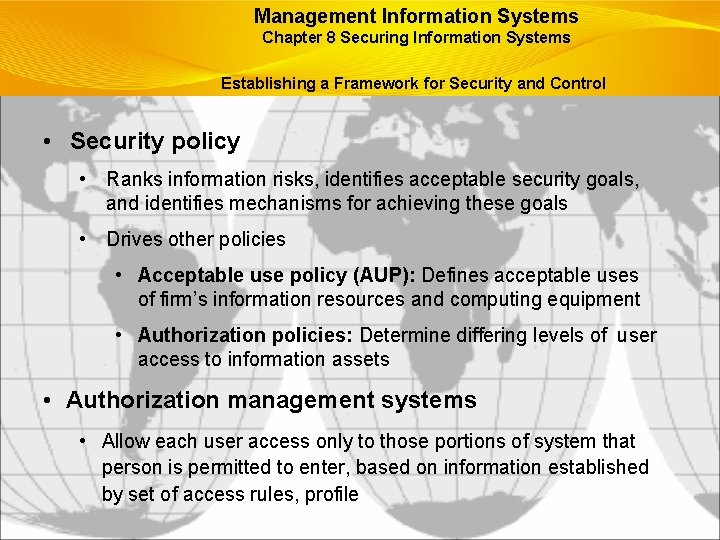
Management Information Systems Chapter 8 Securing Information Systems Establishing a Framework for Security and Control • Security policy • Ranks information risks, identifies acceptable security goals, and identifies mechanisms for achieving these goals • Drives other policies • Acceptable use policy (AUP): Defines acceptable uses of firm’s information resources and computing equipment • Authorization policies: Determine differing levels of user access to information assets • Authorization management systems • Allow each user access only to those portions of system that person is permitted to enter, based on information established by set of access rules, profile
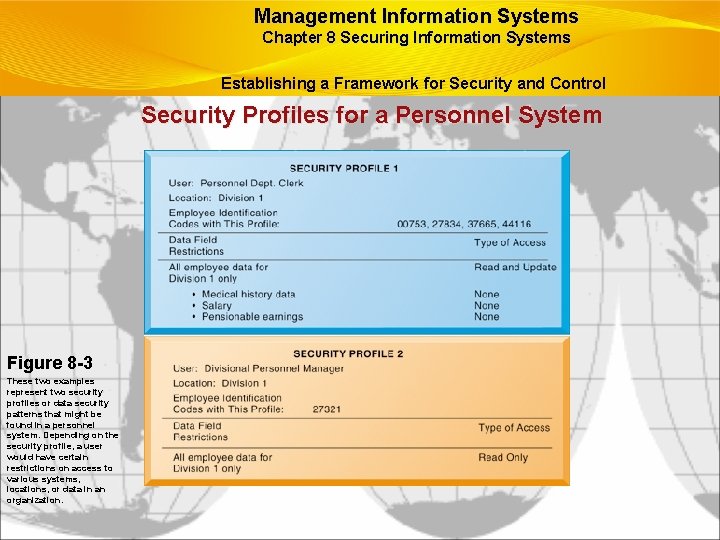
Management Information Systems Chapter 8 Securing Information Systems Establishing a Framework for Security and Control Security Profiles for a Personnel System Figure 8 -3 These two examples represent two security profiles or data security patterns that might be found in a personnel system. Depending on the security profile, a user would have certain restrictions on access to various systems, locations, or data in an organization.
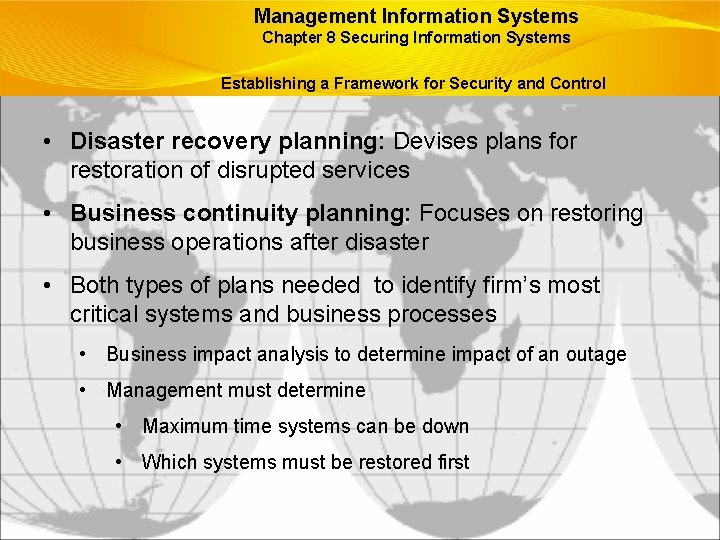
Management Information Systems Chapter 8 Securing Information Systems Establishing a Framework for Security and Control • Disaster recovery planning: Devises plans for restoration of disrupted services • Business continuity planning: Focuses on restoring business operations after disaster • Both types of plans needed to identify firm’s most critical systems and business processes • Business impact analysis to determine impact of an outage • Management must determine • Maximum time systems can be down • Which systems must be restored first
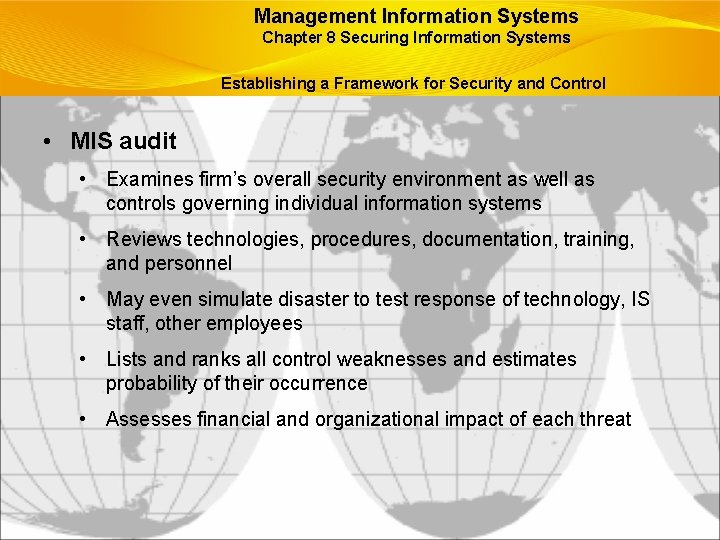
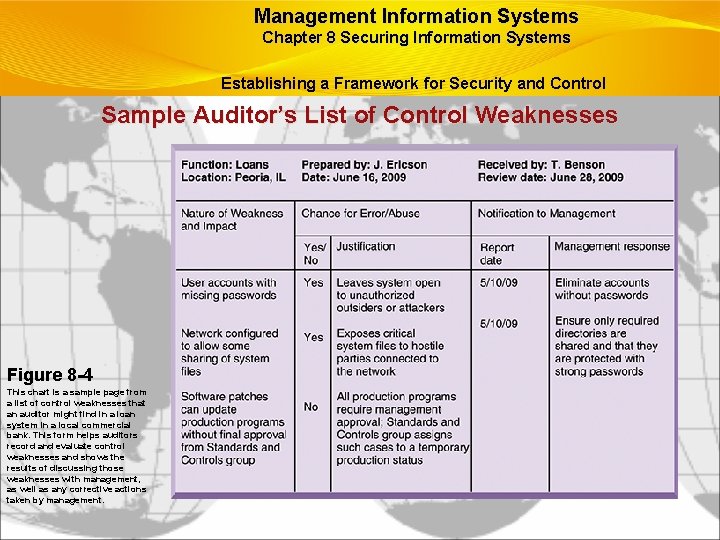
Management Information Systems Chapter 8 Securing Information Systems Establishing a Framework for Security and Control • MIS audit • Examines firm’s overall security environment as well as controls governing individual information systems • Reviews technologies, procedures, documentation, training, and personnel • May even simulate disaster to test response of technology, IS staff, other employees • Lists and ranks all control weaknesses and estimates probability of their occurrence • Assesses financial and organizational impact of each threat
Management Information Systems Chapter 8 Securing Information Systems Establishing a Framework for Security and Control Sample Auditor’s List of Control Weaknesses Figure 8 -4 This chart is a sample page from a list of control weaknesses that an auditor might find in a loan system in a local commercial bank. This form helps auditors record and evaluate control weaknesses and shows the results of discussing those weaknesses with management, as well as any corrective actions taken by management.
Management Information Systems Chapter 8 Securing Information Systems Technologies and Tools for Security • Access control: Policies and procedures to prevent improper access to systems by unauthorized insiders and outsiders • Authorization • Authentication • Password systems • Tokens • Smart cards • Biometric authentication
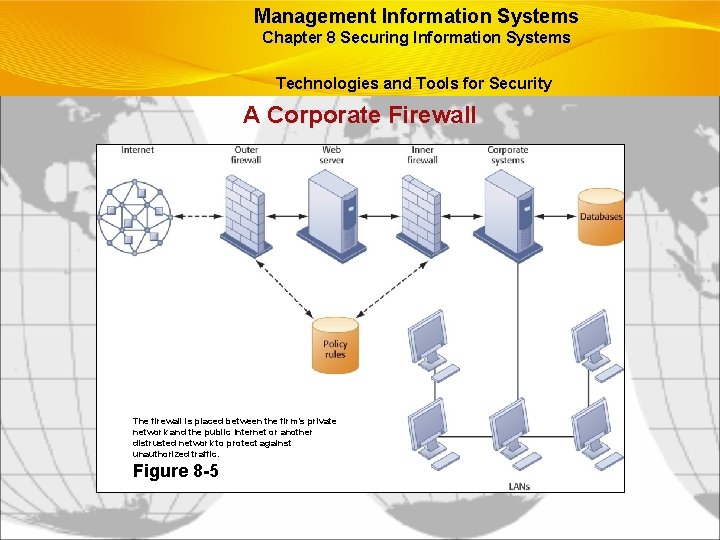
Management Information Systems Chapter 8 Securing Information Systems Technologies and Tools for Security • Firewall: Hardware and/or software to prevent unauthorized access to private networks • Screening technologies • • Packet filtering Stateful inspection Network address translation (NAT) Application proxy filtering • Intrusion detection systems: Monitor vulnerable points on networks to detect and deter intruders • Examines events as they are happening to discover attacks in progress • Scans network to find patterns indicative of attacks
Management Information Systems Chapter 8 Securing Information Systems Technologies and Tools for Security A Corporate Firewall The firewall is placed between the firm’s private network and the public Internet or another distrusted network to protect against unauthorized traffic. Figure 8 -5
Management Information Systems Chapter 8 Securing Information Systems Technologies and Tools for Security • Antivirus and antispyware software: • Checks computers for presence of malware and can often eliminate it as well • Require continual updating • Unified threat management (UTM) • Comprehensive security management products • Tools include • • • Firewalls Intrusion detection VPNs Web content filtering Antispam software
Management Information Systems Chapter 8 Securing Information Systems Technologies and Tools for Security • Securing wireless networks • WEP security can be improved: • Activating it • Assigning unique name to network’s SSID • Using it with VPN technology • Wi-Fi Alliance finalized WAP 2 specification, replacing WEP with stronger standards • Continually changing keys • Encrypted authentication system with central server
Management Information Systems Chapter 8 Securing Information Systems Technologies and Tools for Security • Encryption: • Transforming text or data into cipher text that cannot be read by unintended recipients • Two methods for encrypting network traffic • Secure Sockets Layer (SSL) and successor Transport Layer Security (TLS) • Secure Hypertext Transfer Protocol (S-HTTP) • Two methods of encryption • Symmetric key encryption • Public key encryption
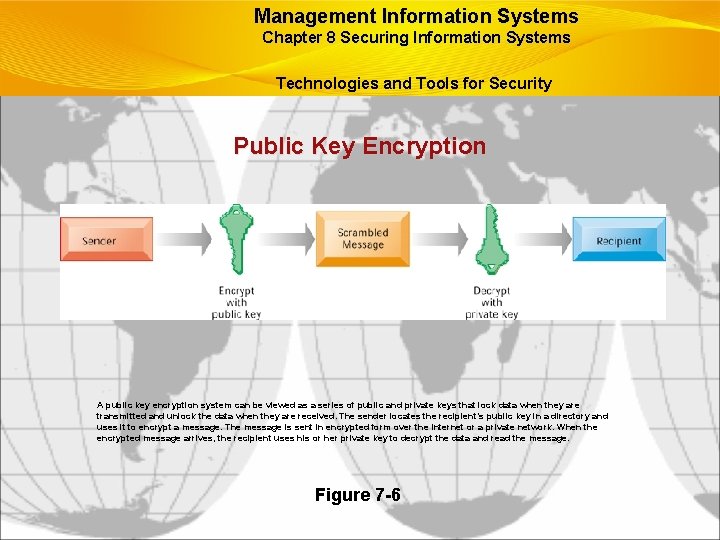
Management Information Systems Chapter 8 Securing Information Systems Technologies and Tools for Security Public Key Encryption A public key encryption system can be viewed as a series of public and private keys that lock data when they are transmitted and unlock the data when they are received. The sender locates the recipient’s public key in a directory and uses it to encrypt a message. The message is sent in encrypted form over the Internet or a private network. When the encrypted message arrives, the recipient uses his or her private key to decrypt the data and read the message. Figure 7 -6
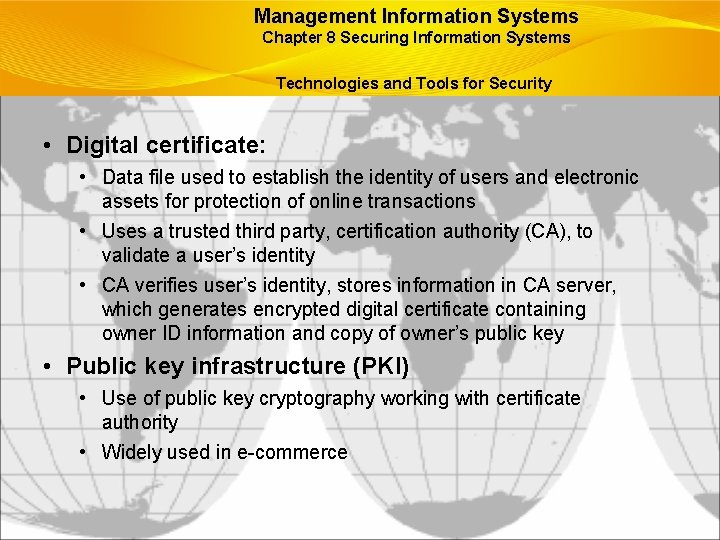
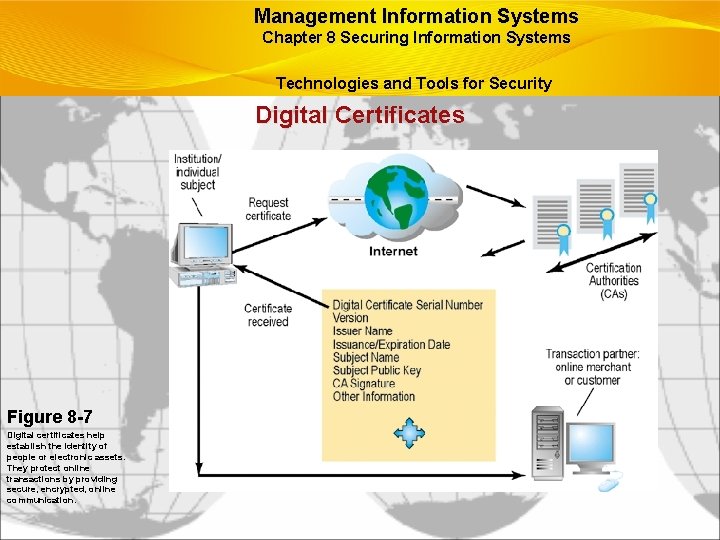
Management Information Systems Chapter 8 Securing Information Systems Technologies and Tools for Security • Digital certificate: • Data file used to establish the identity of users and electronic assets for protection of online transactions • Uses a trusted third party, certification authority (CA), to validate a user’s identity • CA verifies user’s identity, stores information in CA server, which generates encrypted digital certificate containing owner ID information and copy of owner’s public key • Public key infrastructure (PKI) • Use of public key cryptography working with certificate authority • Widely used in e-commerce
Management Information Systems Chapter 8 Securing Information Systems Technologies and Tools for Security Digital Certificates Figure 8 -7 Digital certificates help establish the identity of people or electronic assets. They protect online transactions by providing secure, encrypted, online communication.
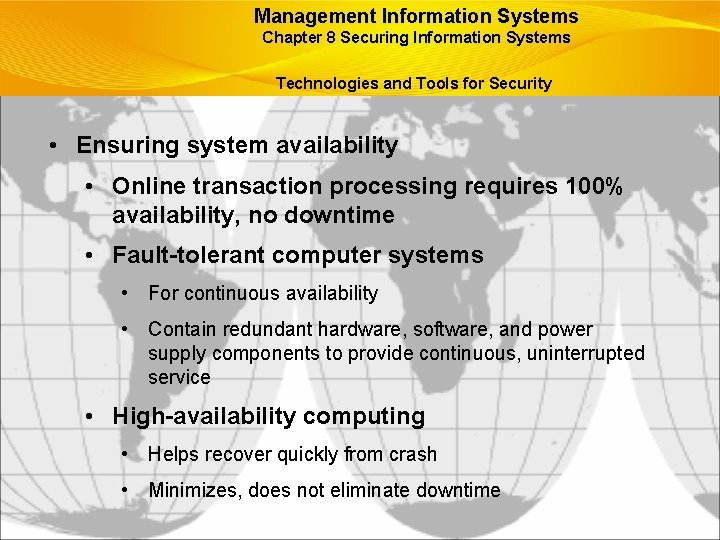
Management Information Systems Chapter 8 Securing Information Systems Technologies and Tools for Security • Ensuring system availability • Online transaction processing requires 100% availability, no downtime • Fault-tolerant computer systems • For continuous availability • Contain redundant hardware, software, and power supply components to provide continuous, uninterrupted service • High-availability computing • Helps recover quickly from crash • Minimizes, does not eliminate downtime
Management Information Systems Chapter 8 Securing Information Systems Technologies and Tools for Security • Recovery-oriented computing • Designing systems that recover quickly with capabilities to help operators pinpoint and correct of faults in multicomponent systems • Controlling network traffic • Deep packet inspection (DPI) • Security outsourcing • Managed security service providers (MSSPs)
Management Information Systems Chapter 8 Securing Information Systems Technologies and Tools for Security Can Salesforce. com On-Demand Remain in Demand? • Read the Interactive Session: Technology and then discuss the following questions: • How did the problems experienced by Salesforce. com impact its business? • How did the problems impact its customers? • What steps did Salesforce. com take to solve the problems? Were these steps sufficient? • List and describe other vulnerabilities discussed in this chapter that might create outages at Salesforce. com and measures to safeguard against them.
Management Information Systems Chapter 8 Securing Information Systems Technologies and Tools for Security • Ensuring software quality • Software Metrics: Objective assessments of system in form of quantified measurements • Number of transactions • Online response time • Payroll checks printed per hour • Known bugs per hundred lines of code • Testing: Early and regular testing • Walkthrough: Review of specification or design document by small group of qualified people • Debugging: Process by which errors are eliminated
All rights reserved. No part of this publication may be reproduced, stored in a retrieval system, or transmitted, in any form or by any means, electronic, mechanical, photocopying, recording, or otherwise, without the prior written permission of the publisher. Printed in the United States of America. Copyright © 2010 Pearson Education, Inc. Publishing as Prentice Hall