
MAKING CONTAINERS EASIER WITH HPC CONTAINER MAKER Scott



- Slides: 15
MAKING CONTAINERS EASIER WITH HPC CONTAINER MAKER Scott Mc. Millan, Ph. D. Senior Solutions Architect
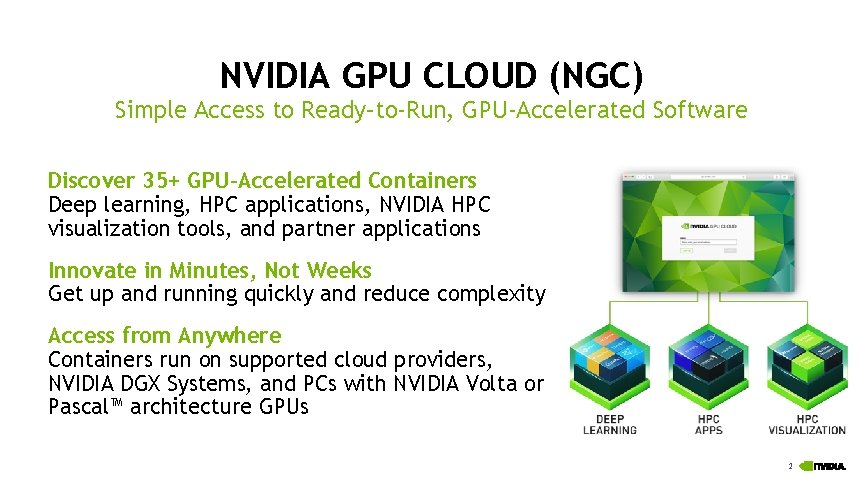
NVIDIA GPU CLOUD (NGC) Simple Access to Ready–to-Run, GPU-Accelerated Software Discover 35+ GPU-Accelerated Containers Deep learning, HPC applications, NVIDIA HPC visualization tools, and partner applications Innovate in Minutes, Not Weeks Get up and running quickly and reduce complexity Access from Anywhere Containers run on supported cloud providers, NVIDIA DGX Systems, and PCs with NVIDIA Volta or Pascal™ architecture GPUs 2
WHAT IF A CONTAINER IMAGE IS NOT AVAILABLE FROM NGC? 3
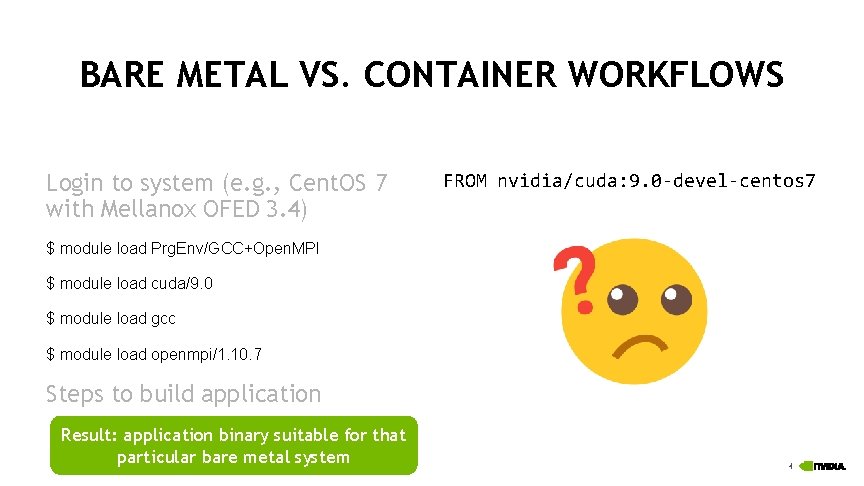
BARE METAL VS. CONTAINER WORKFLOWS Login to system (e. g. , Cent. OS 7 with Mellanox OFED 3. 4) FROM nvidia/cuda: 9. 0 -devel-centos 7 $ module load Prg. Env/GCC+Open. MPI $ module load cuda/9. 0 $ module load gcc $ module load openmpi/1. 10. 7 Steps to build application Result: application binary suitable for that particular bare metal system 4
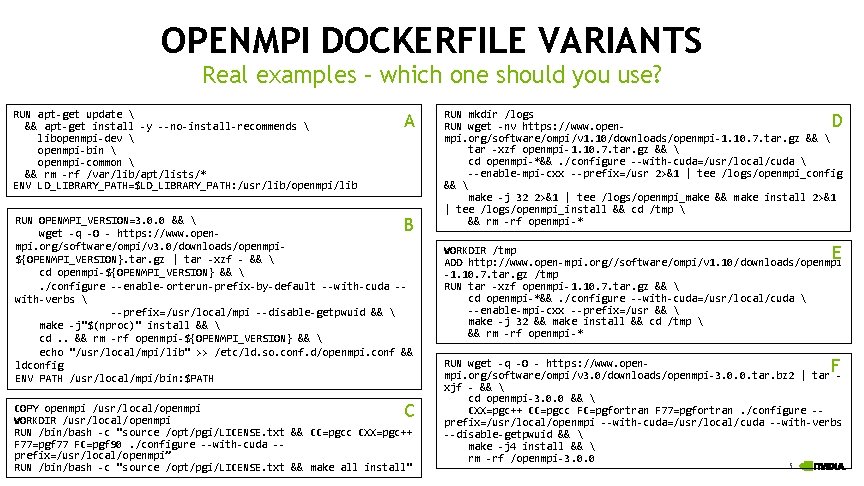
OPENMPI DOCKERFILE VARIANTS Real examples – which one should you use? RUN apt-get update && apt-get install -y --no-install-recommends libopenmpi-dev openmpi-bin openmpi-common && rm -rf /var/lib/apt/lists/* ENV LD_LIBRARY_PATH=$LD_LIBRARY_PATH: /usr/lib/openmpi/lib A RUN OPENMPI_VERSION=3. 0. 0 && wget -q -O - https: //www. openmpi. org/software/ompi/v 3. 0/downloads/openmpi${OPENMPI_VERSION}. tar. gz | tar -xzf - && cd openmpi-${OPENMPI_VERSION} && . /configure --enable-orterun-prefix-by-default --with-cuda -with-verbs --prefix=/usr/local/mpi --disable-getpwuid && make -j"$(nproc)" install && cd. . && rm -rf openmpi-${OPENMPI_VERSION} && echo "/usr/local/mpi/lib" >> /etc/ld. so. conf. d/openmpi. conf && ldconfig ENV PATH /usr/local/mpi/bin: $PATH B C COPY openmpi /usr/local/openmpi WORKDIR /usr/local/openmpi RUN /bin/bash -c "source /opt/pgi/LICENSE. txt && CC=pgcc CXX=pgc++ F 77=pgf 77 FC=pgf 90. /configure --with-cuda -prefix=/usr/local/openmpi” RUN /bin/bash -c "source /opt/pgi/LICENSE. txt && make all install" RUN mkdir /logs RUN wget -nv https: //www. openmpi. org/software/ompi/v 1. 10/downloads/openmpi-1. 10. 7. tar. gz && tar -xzf openmpi-1. 10. 7. tar. gz && cd openmpi-*&&. /configure --with-cuda=/usr/local/cuda --enable-mpi-cxx --prefix=/usr 2>&1 | tee /logs/openmpi_config && make -j 32 2>&1 | tee /logs/openmpi_make && make install 2>&1 | tee /logs/openmpi_install && cd /tmp && rm -rf openmpi-* D E WORKDIR /tmp ADD http: //www. open-mpi. org//software/ompi/v 1. 10/downloads/openmpi -1. 10. 7. tar. gz /tmp RUN tar -xzf openmpi-1. 10. 7. tar. gz && cd openmpi-*&&. /configure --with-cuda=/usr/local/cuda --enable-mpi-cxx --prefix=/usr && make -j 32 && make install && cd /tmp && rm -rf openmpi-* F RUN wget -q -O - https: //www. openmpi. org/software/ompi/v 3. 0/downloads/openmpi-3. 0. 0. tar. bz 2 | tar xjf - && cd openmpi-3. 0. 0 && CXX=pgc++ CC=pgcc FC=pgfortran F 77=pgfortran. /configure -prefix=/usr/local/openmpi --with-cuda=/usr/local/cuda --with-verbs --disable-getpwuid && make -j 4 install && rm -rf /openmpi-3. 0. 0 5
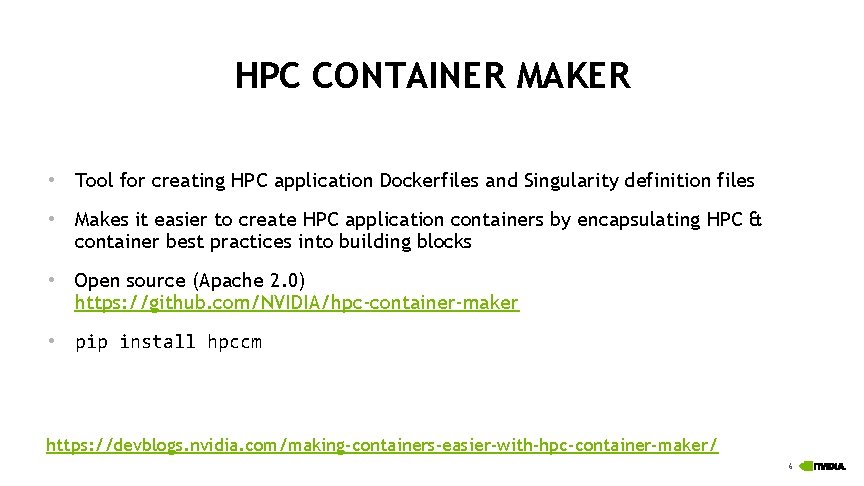
HPC CONTAINER MAKER • Tool for creating HPC application Dockerfiles and Singularity definition files • Makes it easier to create HPC application containers by encapsulating HPC & container best practices into building blocks • Open source (Apache 2. 0) https: //github. com/NVIDIA/hpc-container-maker • pip install hpccm https: //devblogs. nvidia. com/making-containers-easier-with-hpc-container-maker/ 6
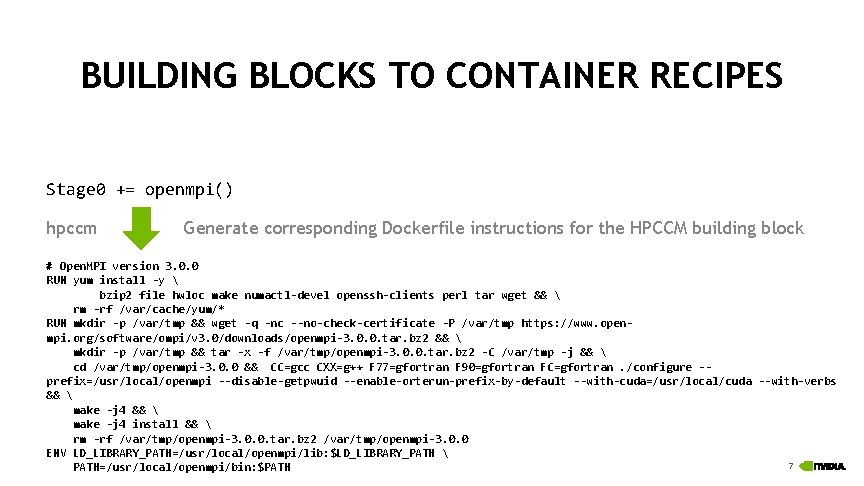
BUILDING BLOCKS TO CONTAINER RECIPES Stage 0 += openmpi() hpccm Generate corresponding Dockerfile instructions for the HPCCM building block # Open. MPI version 3. 0. 0 RUN yum install -y bzip 2 file hwloc make numactl-devel openssh-clients perl tar wget && rm -rf /var/cache/yum/* RUN mkdir -p /var/tmp && wget -q -nc --no-check-certificate -P /var/tmp https: //www. openmpi. org/software/ompi/v 3. 0/downloads/openmpi-3. 0. 0. tar. bz 2 && mkdir -p /var/tmp && tar -x -f /var/tmp/openmpi-3. 0. 0. tar. bz 2 -C /var/tmp -j && cd /var/tmp/openmpi-3. 0. 0 && CC=gcc CXX=g++ F 77=gfortran F 90=gfortran FC=gfortran. /configure -prefix=/usr/local/openmpi --disable-getpwuid --enable-orterun-prefix-by-default --with-cuda=/usr/local/cuda --with-verbs && make -j 4 install && rm -rf /var/tmp/openmpi-3. 0. 0. tar. bz 2 /var/tmp/openmpi-3. 0. 0 ENV LD_LIBRARY_PATH=/usr/local/openmpi/lib: $LD_LIBRARY_PATH 7 PATH=/usr/local/openmpi/bin: $PATH
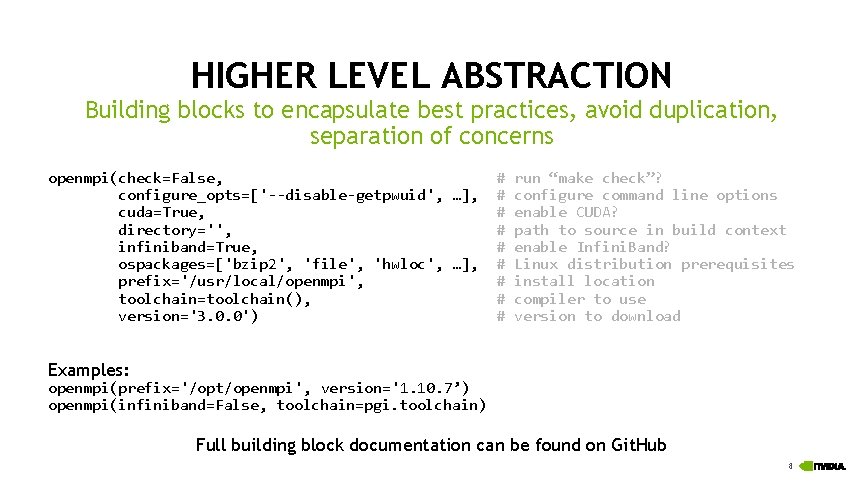
HIGHER LEVEL ABSTRACTION Building blocks to encapsulate best practices, avoid duplication, separation of concerns openmpi(check=False, # run “make check”? configure_opts=['--disable-getpwuid', …], # configure command line options cuda=True, # enable CUDA? directory='', # path to source in build context infiniband=True, # enable Infini. Band? ospackages=['bzip 2', 'file', 'hwloc', …], # Linux distribution prerequisites prefix='/usr/local/openmpi', # install location toolchain=toolchain(), # compiler to use version='3. 0. 0') # version to download Examples: openmpi(prefix='/opt/openmpi', version='1. 10. 7’) openmpi(infiniband=False, toolchain=pgi. toolchain) Full building block documentation can be found on Git. Hub 8
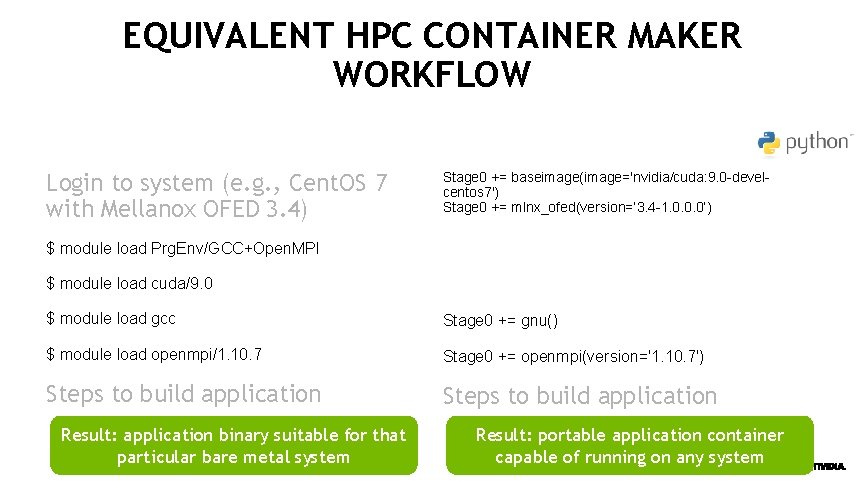
EQUIVALENT HPC CONTAINER MAKER WORKFLOW Login to system (e. g. , Cent. OS 7 with Mellanox OFED 3. 4) Stage 0 += baseimage(image='nvidia/cuda: 9. 0 -develcentos 7') Stage 0 += mlnx_ofed(version=‘ 3. 4 -1. 0. 0. 0’) $ module load Prg. Env/GCC+Open. MPI $ module load cuda/9. 0 $ module load gcc Stage 0 += gnu() $ module load openmpi/1. 10. 7 Stage 0 += openmpi(version='1. 10. 7') Steps to build application Result: application binary suitable for that particular bare metal system Result: portable application container capable of running on any system 9
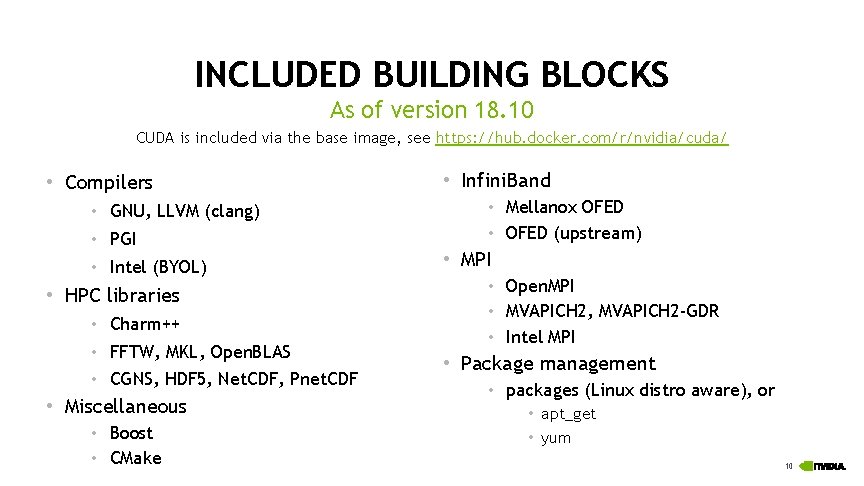
INCLUDED BUILDING BLOCKS As of version 18. 10 CUDA is included via the base image, see https: //hub. docker. com/r/nvidia/cuda/ • Compilers • GNU, LLVM (clang) • PGI • Intel (BYOL) • HPC libraries • Charm++ • FFTW, MKL, Open. BLAS • CGNS, HDF 5, Net. CDF, Pnet. CDF • Miscellaneous • Boost • CMake • Infini. Band • Mellanox OFED • OFED (upstream) • MPI • Open. MPI • MVAPICH 2, MVAPICH 2 -GDR • Intel MPI • Package management • packages (Linux distro aware), or • apt_get • yum 10
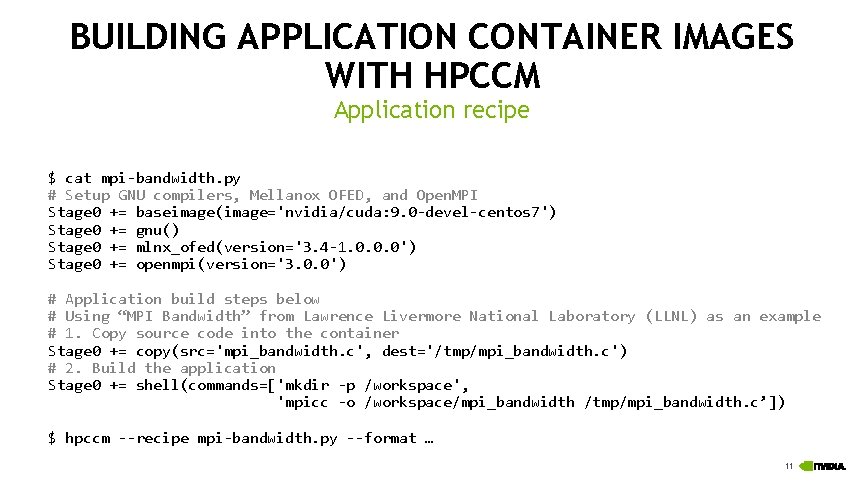
BUILDING APPLICATION CONTAINER IMAGES WITH HPCCM Application recipe $ cat mpi-bandwidth. py # Setup GNU compilers, Mellanox OFED, and Open. MPI Stage 0 += baseimage(image='nvidia/cuda: 9. 0 -devel-centos 7') Stage 0 += gnu() Stage 0 += mlnx_ofed(version='3. 4 -1. 0. 0. 0') Stage 0 += openmpi(version='3. 0. 0') # Application build steps below # Using “MPI Bandwidth” from Lawrence Livermore National Laboratory (LLNL) as an example # 1. Copy source code into the container Stage 0 += copy(src='mpi_bandwidth. c', dest='/tmp/mpi_bandwidth. c') # 2. Build the application Stage 0 += shell(commands=['mkdir -p /workspace', 'mpicc -o /workspace/mpi_bandwidth /tmp/mpi_bandwidth. c’]) $ hpccm --recipe mpi-bandwidth. py --format … 11
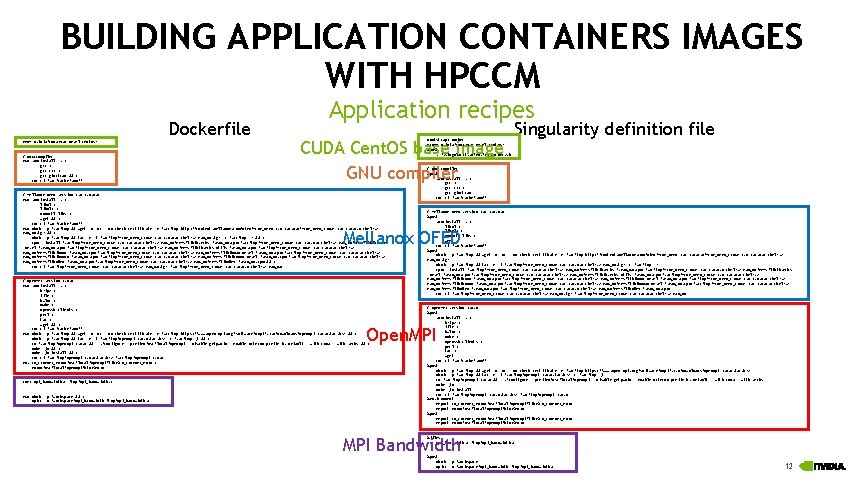
BUILDING APPLICATION CONTAINERS IMAGES WITH HPCCM Dockerfile FROM nvidia/cuda: 9. 0 -devel-centos 7 # GNU compiler RUN yum install -y gcc-c++ gcc-gfortran && rm -rf /var/cache/yum/* Application recipes CUDA Cent. OS base image GNU compiler Boot. Strap: docker From: nvidia/cuda: 9. 0 -devel-centos 7 %post . /. singularity. d/env/10 -docker. sh # Mellanox OFED version 3. 4 -1. 0. 0. 0 RUN yum install -y libnl 3 numactl-libs wget && rm -rf /var/cache/yum/* RUN mkdir -p /var/tmp && wget -q -nc --no-check-certificate -P /var/tmp http: //content. mellanox. com/ofed/MLNX_OFED-3. 4 -1. 0. 0. 0/MLNX_OFED_LINUX-3. 4 -1. 0. 0. 0 -rhel 7. 2 x 86_64. tgz && mkdir -p /var/tmp && tar -x -f /var/tmp/MLNX_OFED_LINUX-3. 4 -1. 0. 0. 0 -rhel 7. 2 -x 86_64. tgz -C /var/tmp -z && rpm --install /var/tmp/MLNX_OFED_LINUX-3. 4 -1. 0. 0. 0 -rhel 7. 2 -x 86_64/RPMS/libibverbs-*. x 86_64. rpm /var/tmp/MLNX_OFED_LINUX-3. 4 -1. 0. 0. 0 -rhel 7. 2 -x 86_64/RPMS/libibverbs -devel-*. x 86_64. rpm /var/tmp/MLNX_OFED_LINUX-3. 4 -1. 0. 0. 0 -rhel 7. 2 -x 86_64/RPMS/libibverbs-utils-*. x 86_64. rpm /var/tmp/MLNX_OFED_LINUX-3. 4 -1. 0. 0. 0 -rhel 7. 2 x 86_64/RPMS/libibmad-*. x 86_64. rpm /var/tmp/MLNX_OFED_LINUX-3. 4 -1. 0. 0. 0 -rhel 7. 2 -x 86_64/RPMS/libibmad-devel-*. x 86_64. rpm /var/tmp/MLNX_OFED_LINUX-3. 4 -1. 0. 0. 0 -rhel 7. 2 x 86_64/RPMS/libibumad-*. x 86_64. rpm /var/tmp/MLNX_OFED_LINUX-3. 4 -1. 0. 0. 0 -rhel 7. 2 -x 86_64/RPMS/libibumad-devel-*. x 86_64. rpm /var/tmp/MLNX_OFED_LINUX-3. 4 -1. 0. 0. 0 -rhel 7. 2 x 86_64/RPMS/libmlx 4 -*. x 86_64. rpm /var/tmp/MLNX_OFED_LINUX-3. 4 -1. 0. 0. 0 -rhel 7. 2 -x 86_64/RPMS/libmlx 5 -*. x 86_64. rpm && rm -rf /var/tmp/MLNX_OFED_LINUX-3. 4 -1. 0. 0. 0 -rhel 7. 2 -x 86_64. tgz /var/tmp/MLNX_OFED_LINUX-3. 4 -1. 0. 0. 0 -rhel 7. 2 -x 86_64 Singularity definition file # GNU compiler %post yum install -y gcc-c++ gcc-gfortran rm -rf /var/cache/yum/* # Mellanox OFED version 3. 4 -1. 0. 0. 0 %post yum install -y libnl 3 numactl-libs wget rm -rf /var/cache/yum/* %post mkdir -p /var/tmp && wget -q -nc --no-check-certificate -P /var/tmp http: //content. mellanox. com/ofed/MLNX_OFED-3. 4 -1. 0. 0. 0/MLNX_OFED_LINUX-3. 4 -1. 0. 0. 0 -rhel 7. 2 x 86_64. tgz mkdir -p /var/tmp && tar -x -f /var/tmp/MLNX_OFED_LINUX-3. 4 -1. 0. 0. 0 -rhel 7. 2 -x 86_64. tgz -C /var/tmp -z rpm --install /var/tmp/MLNX_OFED_LINUX-3. 4 -1. 0. 0. 0 -rhel 7. 2 -x 86_64/RPMS/libibverbs-*. x 86_64. rpm /var/tmp/MLNX_OFED_LINUX-3. 4 -1. 0. 0. 0 -rhel 7. 2 -x 86_64/RPMS/libibverbs -devel-*. x 86_64. rpm /var/tmp/MLNX_OFED_LINUX-3. 4 -1. 0. 0. 0 -rhel 7. 2 -x 86_64/RPMS/libibverbs-utils-*. x 86_64. rpm /var/tmp/MLNX_OFED_LINUX-3. 4 -1. 0. 0. 0 -rhel 7. 2 x 86_64/RPMS/libibmad-*. x 86_64. rpm /var/tmp/MLNX_OFED_LINUX-3. 4 -1. 0. 0. 0 -rhel 7. 2 -x 86_64/RPMS/libibmad-devel-*. x 86_64. rpm /var/tmp/MLNX_OFED_LINUX-3. 4 -1. 0. 0. 0 -rhel 7. 2 x 86_64/RPMS/libibumad-*. x 86_64. rpm /var/tmp/MLNX_OFED_LINUX-3. 4 -1. 0. 0. 0 -rhel 7. 2 -x 86_64/RPMS/libibumad-devel-*. x 86_64. rpm /var/tmp/MLNX_OFED_LINUX-3. 4 -1. 0. 0. 0 -rhel 7. 2 x 86_64/RPMS/libmlx 4 -*. x 86_64. rpm /var/tmp/MLNX_OFED_LINUX-3. 4 -1. 0. 0. 0 -rhel 7. 2 -x 86_64/RPMS/libmlx 5 -*. x 86_64. rpm rm -rf /var/tmp/MLNX_OFED_LINUX-3. 4 -1. 0. 0. 0 -rhel 7. 2 -x 86_64. tgz /var/tmp/MLNX_OFED_LINUX-3. 4 -1. 0. 0. 0 -rhel 7. 2 -x 86_64 Mellanox OFED # Open. MPI version 3. 0. 0 RUN yum install -y bzip 2 file hwloc make openssh-clients perl tar wget && rm -rf /var/cache/yum/* RUN mkdir -p /var/tmp && wget -q -nc --no-check-certificate -P /var/tmp https: //www. open-mpi. org/software/ompi/v 3. 0/downloads/openmpi-3. 0. 0. tar. bz 2 && mkdir -p /var/tmp && tar -x -f /var/tmp/openmpi-3. 0. 0. tar. bz 2 -C /var/tmp -j && cd /var/tmp/openmpi-3. 0. 0 && . /configure --prefix=/usr/local/openmpi --disable-getpwuid --enable-orterun-prefix-by-default --with-cuda --with-verbs && make -j 4 install && rm -rf /var/tmp/openmpi-3. 0. 0. tar. bz 2 /var/tmp/openmpi-3. 0. 0 ENV LD_LIBRARY_PATH=/usr/local/openmpi/lib: $LD_LIBRARY_PATH PATH=/usr/local/openmpi/bin: $PATH # Open. MPI version 3. 0. 0 %post yum install -y bzip 2 file hwloc make openssh-clients perl tar wget rm -rf /var/cache/yum/* %post mkdir -p /var/tmp && wget -q -nc --no-check-certificate -P /var/tmp https: //www. open-mpi. org/software/ompi/v 3. 0/downloads/openmpi-3. 0. 0. tar. bz 2 mkdir -p /var/tmp && tar -x -f /var/tmp/openmpi-3. 0. 0. tar. bz 2 -C /var/tmp -j cd /var/tmp/openmpi-3. 0. 0 && . /configure --prefix=/usr/local/openmpi --disable-getpwuid --enable-orterun-prefix-by-default --with-cuda --with-verbs make -j 4 install rm -rf /var/tmp/openmpi-3. 0. 0. tar. bz 2 /var/tmp/openmpi-3. 0. 0 %environment export LD_LIBRARY_PATH=/usr/local/openmpi/lib: $LD_LIBRARY_PATH export PATH=/usr/local/openmpi/bin: $PATH %post export LD_LIBRARY_PATH=/usr/local/openmpi/lib: $LD_LIBRARY_PATH export PATH=/usr/local/openmpi/bin: $PATH Open. MPI COPY mpi_bandwidth. c /tmp/mpi_bandwidth. c RUN mkdir -p /workspace && mpicc -o /workspace/mpi_bandwidth /tmp/mpi_bandwidth. c MPI Bandwidth %files mpi_bandwidth. c /tmp/mpi_bandwidth. c %post mkdir -p /workspace mpicc -o /workspace/mpi_bandwidth /tmp/mpi_bandwidth. c 12
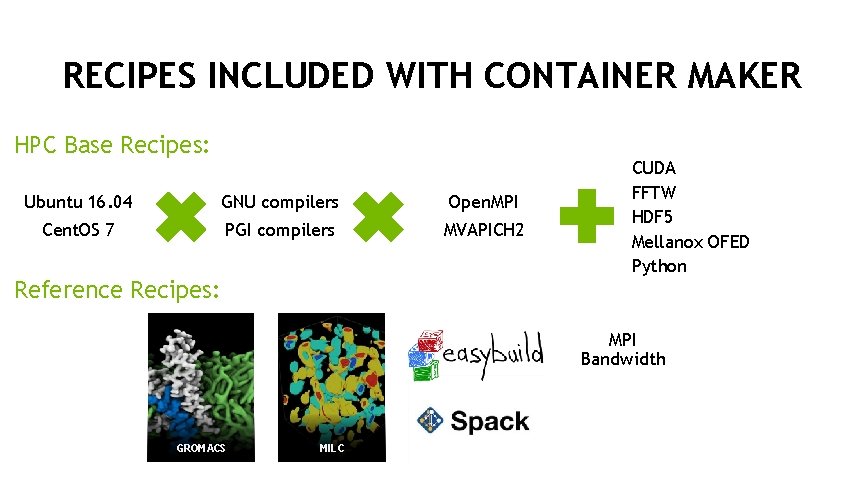
RECIPES INCLUDED WITH CONTAINER MAKER HPC Base Recipes: Ubuntu 16. 04 GNU compilers Open. MPI Cent. OS 7 PGI compilers MVAPICH 2 Reference Recipes: CUDA FFTW HDF 5 Mellanox OFED Python MPI Bandwidth GROMACS MILC 13
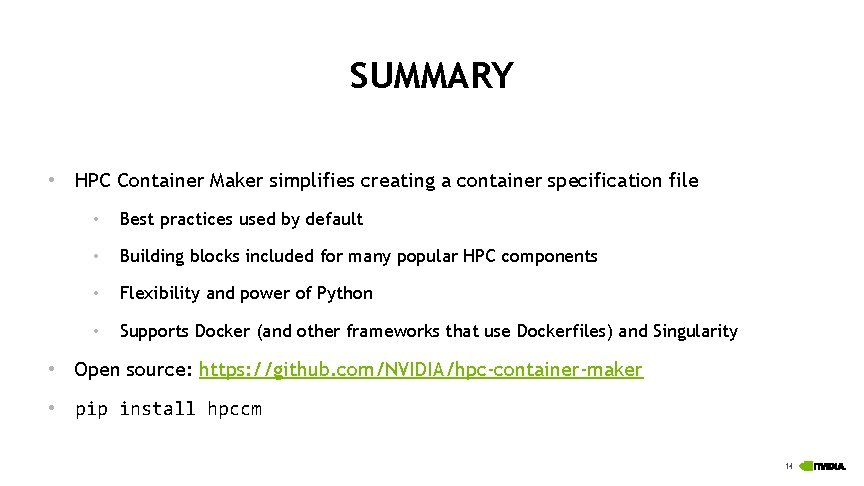
SUMMARY • HPC Container Maker simplifies creating a container specification file • Best practices used by default • Building blocks included for many popular HPC components • Flexibility and power of Python • Supports Docker (and other frameworks that use Dockerfiles) and Singularity • Open source: https: //github. com/NVIDIA/hpc-container-maker • pip install hpccm 14
THANK YOU!