
Maintaining Tivoli Workload Scheduler Agents with IBM Endpoint
Maintaining Tivoli Workload Scheduler Agents with IBM Endpoint Manager Mark Delaney mark. delaney@systemsmanaged. com www. systemsmanaged. com
Typical Scenarios • Many different versions of TWS agents and patch levels in your estate • New TWS agents are being added all of the time • End of support for a TWS version requires you to audit and upgrade to meet compliance • Maintenance slots are difficult to predict as an agent could be running work at any time • TWS versions go out of support every 12 months • root/administrator access required for patch or upgrade of TWS agents is often difficult to obtain • Transfer of TWS software to agents can be problematic 2
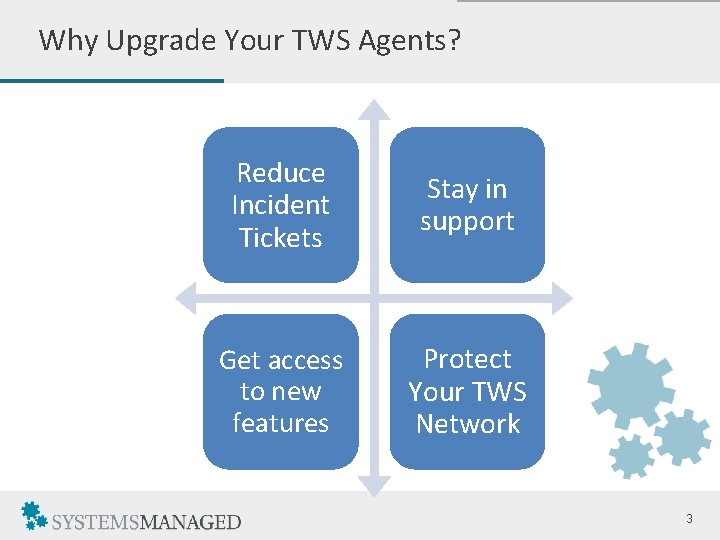
Why Upgrade Your TWS Agents? Reduce Incident Tickets Stay in support Get access to new features Protect Your TWS Network 3
The Goals • A proven, default TWS agent version and patch level deployed across all servers in the estate • New TWS agents being added must adhere to the default level • Upgrades of TWS agents must not affect running workloads • Reduce the manual effort required to upgrade TWS agents as much as possible • Remove any manual tasks and administrative overhead (pulling root password etc. ) • Utilise network bandwidth effectively observing company firewall restrictions 4
How IBM Endpoint Manager Can Help • One-click, on-demand upgrades or patches of TWS agents • Scheduled upgrade or patch of agents based on maintenance window, hostname, subnet, group membership, etc. • Easily configure static or dynamic groups of agents as targets • Upgrade, patch or rollback to FTAs, DAs, or z/OS Agents • Perform multiple actions in one click using a baseline (e. g. upgrade TWS 8. 3 -> TWS 8. 6 -> TWS 9. 1 FP 1) • New TWS agents can be upgraded to meet the baseline automatically • Intelligently upgrades around an agent’s workload (e. g. “You’re busy running jobs, I’ll come back later”) • IEM agent takes care of the upgrade. No manual logging into agent is required 5
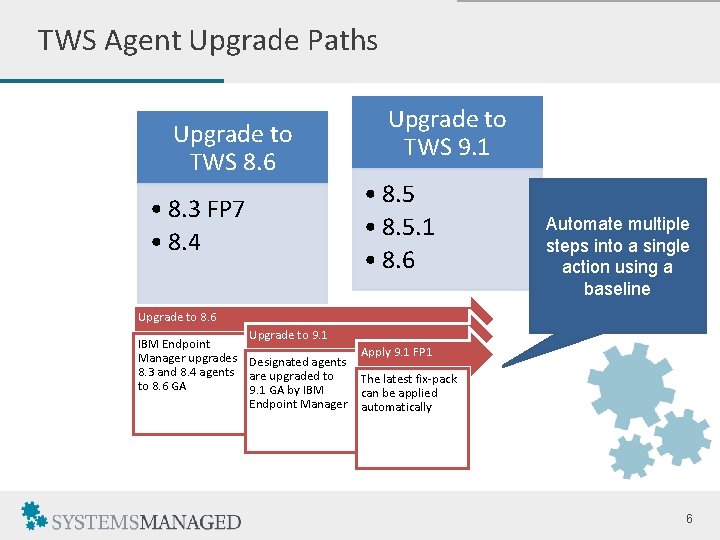
TWS Agent Upgrade Paths Upgrade to TWS 8. 6 • 8. 3 FP 7 • 8. 4 Upgrade to TWS 9. 1 • 8. 5. 1 • 8. 6 Automate multiple steps into a single action using a baseline Upgrade to 8. 6 Upgrade to 9. 1 IBM Endpoint Manager upgrades Designated agents 8. 3 and 8. 4 agents are upgraded to to 8. 6 GA 9. 1 GA by IBM Endpoint Manager Apply 9. 1 FP 1 The latest fix-pack can be applied automatically 6
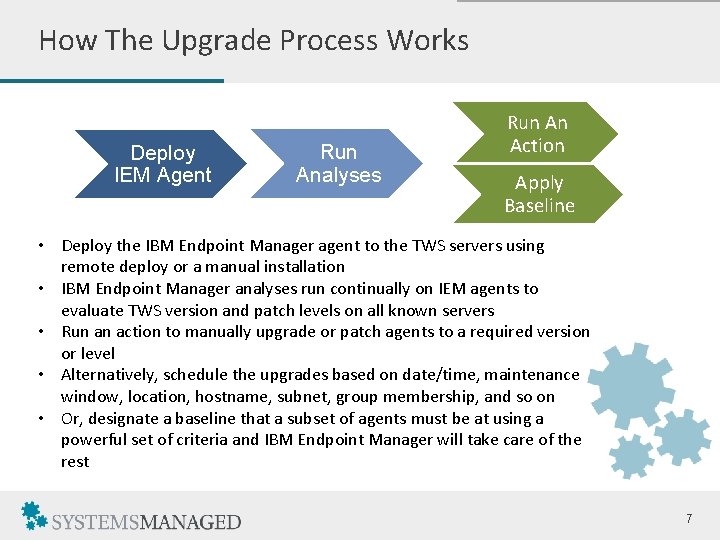
How The Upgrade Process Works Deploy IEM Agent Run Analyses Run An Action Apply Baseline • Deploy the IBM Endpoint Manager agent to the TWS servers using remote deploy or a manual installation • IBM Endpoint Manager analyses run continually on IEM agents to evaluate TWS version and patch levels on all known servers • Run an action to manually upgrade or patch agents to a required version or level • Alternatively, schedule the upgrades based on date/time, maintenance window, location, hostname, subnet, group membership, and so on • Or, designate a baseline that a subset of agents must be at using a powerful set of criteria and IBM Endpoint Manager will take care of the rest 7
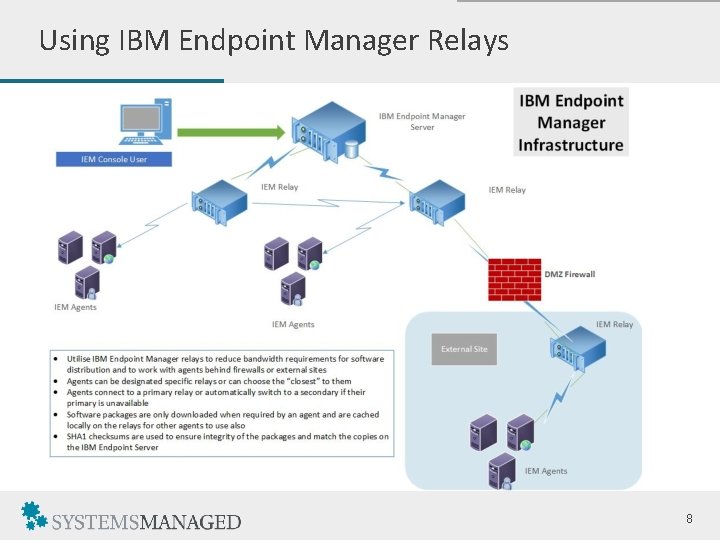
Using IBM Endpoint Manager Relays 8
IBM Endpoint Manager Solution Key Points • Reduce the overhead of upgrading an agent to minutes rather than hours • Utilise IBM Endpoint Manager relays to reduce the amount of traffic and throttle bandwidth when transferring files • Schedule unattended upgrades around the business • Web-based reporting to show what was upgraded and when • Covers all versions of TWS from v 8. 3 and above • Handles Fault Tolerant Agents, Dynamic Agents and z/OS agents for upgrades, patching or rollbacks • IBM Endpoint Manager incorporates IBM Licence Metric Tool – required for Sub-Capacity Licencing 9
Demo 10
More Information For further information, or to discuss a demonstration, contact Mark Delaney. Email: mark. delaney@systemsmanaged. com Website: http: //www. systemsmanaged. com Follow me on Twitter: @SYSMANAGED www. systemsmanaged. com 11
- Slides: 11