
Maintaining Data File maintenance refers to the procedures

- Slides: 33
Maintaining Data
File maintenance refers to the procedures that keep data current. File maintenance procedures include adding records to, modifying records in, and deleting records from a file.
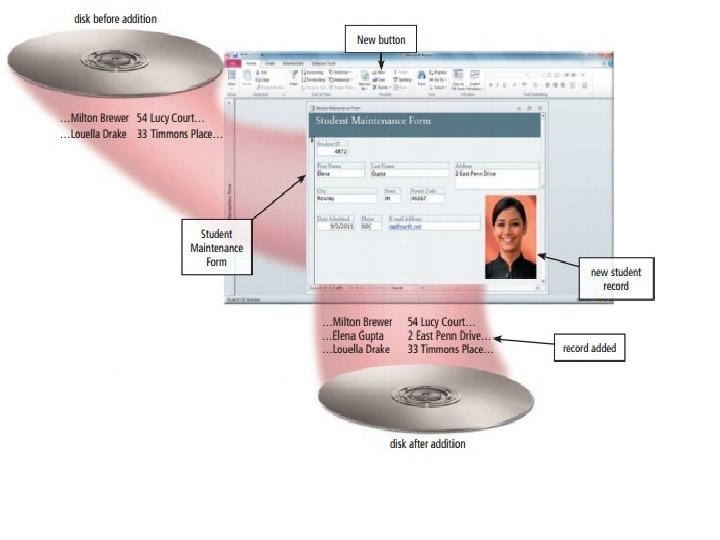
Adding Records Users add new records to a file when they obtain new data. If a new student is admitted to the school, an admissions department clerk adds a new record to the Student file. The process required to add this record to the file might include the following steps:
1. An admissions department clerk uses the database management system (DBMS) to display a Student Maintenance Form that gives him or her access to the Student file. The clerk then clicks the New button, which begins the process of adding a record to the Student file.
2. The clerk fills in the fields of the student record with data (except for the Student ID, which automatically is assigned by the DBMS)
3. The clerk takes a picture of the student using a digital camera. The DBMS stores this picture in the Student file and prints it on a student ID card.
4. The admissions department clerk verifies the data on the screen and then instructs the DBMS to add the new student record to the Student file. The system software determines where to write the record on the disk
Modifying Records Generally, users modify a record in a file for two reasons: (1) to correct inaccurate data or (2) to update old data with new data.
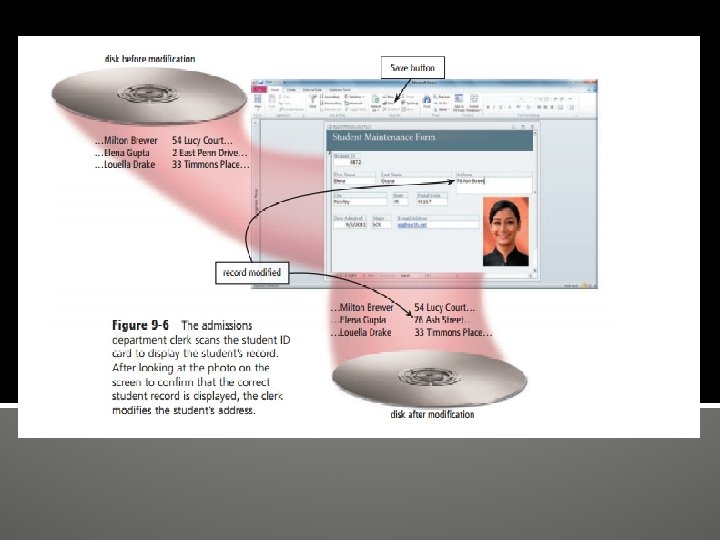
Suppose, for example, that Elena Gupta moves from 2 East Penn Drive to 76 Ash Street. The process to change the address and update Elena Gupta’s record might include the following steps:
1. The admissions department clerk displays the Student Maintenance Form.
2. Assuming Elena Gupta is present, the clerk inserts Elena’s student ID card in a card reader to display her student record on the screen. If Elena did not have her ID card or was not present, the clerk could enter Elena’s student ID number — if Elena knew it. Otherwise, the clerk could New button 358 Chapter 9 Database Management enter Gupta in the Last Name field, which would retrieve all students with that same last name. The clerk then would scroll through all of the retrieved records to determine which one is Elena’s.
3. The DBMS displays data about Elena Gupta so that the clerk can confirm the correct student record is displayed.
4. The clerk enters the new street address, 76 Ash Street. 5. The admissions department clerk verifies the data on the screen and then, if required, clicks the Save button to modify the record in the Student file. The DBMS modifies the record on the disk
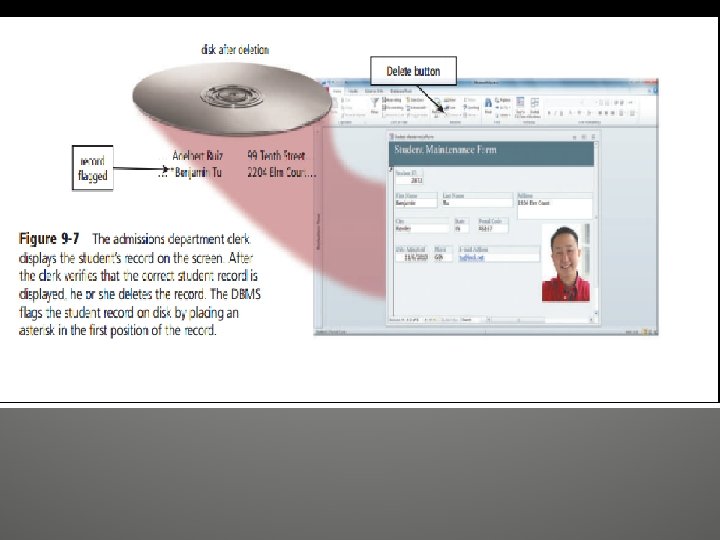
Deleting Records When a record no longer is needed, a user deletes it from a file. Assume a student named Benjamin Tu is moving out of the country. The process required to delete a record from a file includes the following steps:
1. The admissions department clerk displays the Student Maintenance Form. 2. The clerk displays Benjamin Tu’s student record on the screen. 3. The clerk confirms the correct student record is displayed. Then, the clerk clicks the Delete button to delete the record from the Student file and then, if required, clicks the Save button to save the modified file.
Validating Data Validation is the process of comparing data with a set of rules or values to find out if the data is correct. Many programs perform a validity check that analyzes data, either as you enter it or after you enter it, to help ensure that it is correct. For instance, when an admissions department clerk adds or modifies data in a student record, the DBMS tests the entered data
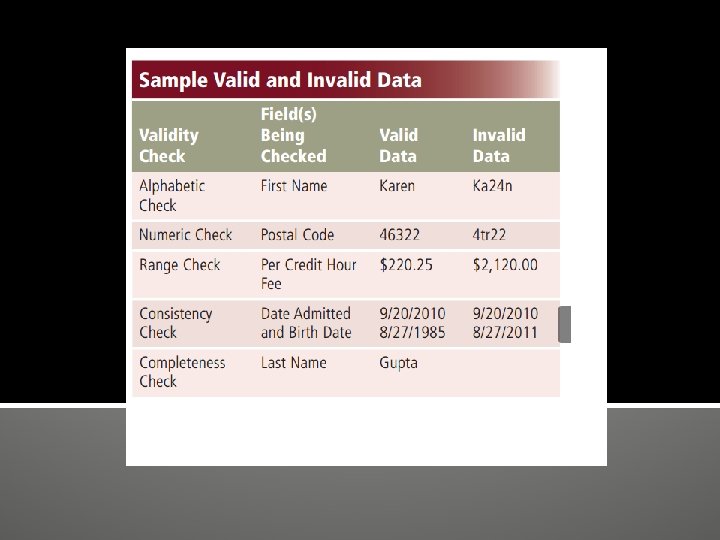
Alphabetic/Numeric Check An alphabetic check ensures that users enter only alphabetic data into a field. A numeric check ensures that users enter only numeric data into a field. For example, data in a First Name field should contain only characters from the alphabet. Data in a Postal Code field should contain numbers (with the exception of the special characters such as a hyphen). Range Check A range check determines whether a number is within a specified range. Assume the lowest per credit hour fee at the school is $75. 00 and the highest is $370. 75. A range check for the Credit Hour Fee field ensures it is a value between $75. 00 and $370. 75.
Consistency Check A consistency check tests the data in two or more associated fields to ensure that the relationship is logical and their data is in the correct format. For example, the value in a Date Admitted field cannot occur earlier in time than a value in a Birth Date field. Completeness Check A completeness check verifies that a required field contains data. For example, some fields cannot be left blank; others require a minimum number of characters. One completeness check can ensure that data exists in a Last Name field. Another can ensure that a day, month, and year are included in a Birth Date field.
Check Digit A check digit is a number(s) or character(s) that is appended to or inserted in a primary key value. A check digit often confirms the accuracy of a primary key value. Bank account, credit card, and other identification numbers often include one or more check digits.
File Processing versus Databases Almost all application programs use the file processing approach, the database approach, or a combination of both approaches to store and manage data. The following pages discuss these two approaches.
File Processing Systems In the past, many organizations exclusively used file processing systems to store and manage data. In a typical file processing system, each department or area within an organization has its own set of files. The records in one file may not relate to the records in any other file.
Data Redundancy — Each department or area in an organization has its own files in a file processing system. Thus, the same fields are stored in multiple files. If a file processing system is used at a school, for example, the Student file and the Student Schedule file both might store the same students’ names and addresses.
Isolated Data — Often it is difficult to access data stored in separate files in different departments. Sharing data from multiple, separate files is a complicated procedure and usually requires the experience of a computer programmer
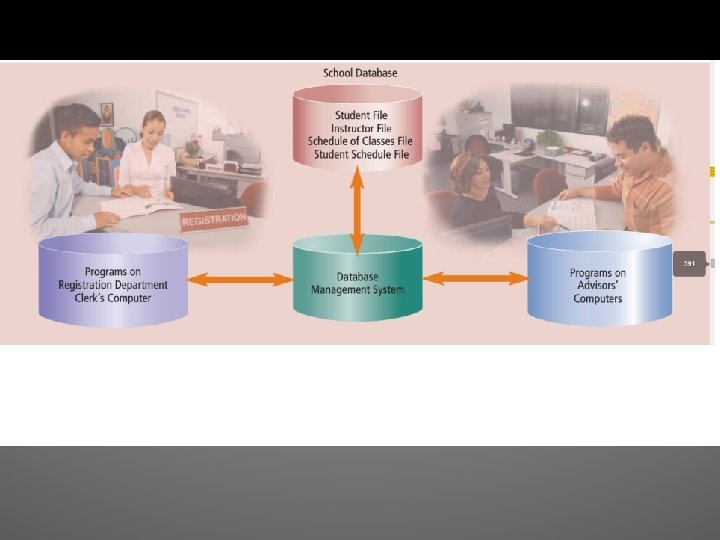
The Database Approach When an organization uses the database approach, many programs and users share the data in the database. A school’s database most likely at a minimum contains data about students, instructors, schedule of classes, and student schedules.
The database approach addresses many of the weaknesses associated with file processing systems. The following list presents some strengths of the database approach.
• Reduced Data Redundancy — Most data items are stored in only one file, which greatly reduces duplicate data. Figure 9 -10 demonstrates the differences between how a file processing application and a database application might store data. • Improved Data Integrity — When users modify data in the database, they make changes to one file instead of multiple files. Thus, the database approach increases the data’s integrity by reducing the possibility of introducing inconsistencies.
• Shared Data — The data in a database environment belongs to and is shared, usually over a network, by the entire organization. Organizations that use databases typically have security settings to define who can access, add, modify, and delete the data in a database. • Easier Access — The database approach allows nontechnical users to access and maintain data, providing they have the necessary privileges. • Reduced Development Time — It often is easier and faster to develop programs that use the database approach.
END