
Machine Instructions and Programs Objectives l l l
Machine Instructions and Programs
Objectives l l l Machine instructions and program execution, including branching and subroutine call and return operations. Number representation and addition/subtraction in the 2’s-complement system. Addressing methods for accessing register and memory operands. Assembly language for representing machine instructions, data, and programs. Program-controlled Input/Output operations.
Number, Arithmetic Operations, and Characters
Signed Integer l 3 major representations: Sign and magnitude One’s complement Two’s complement l Assumptions: 4 -bit machine word 16 different values can be represented Roughly half are positive, half are negative
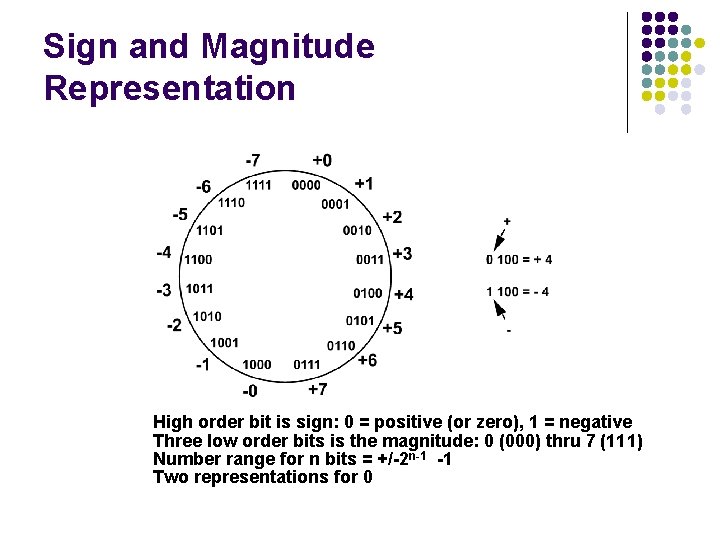
Sign and Magnitude Representation High order bit is sign: 0 = positive (or zero), 1 = negative Three low order bits is the magnitude: 0 (000) thru 7 (111) Number range for n bits = +/-2 n-1 -1 Two representations for 0
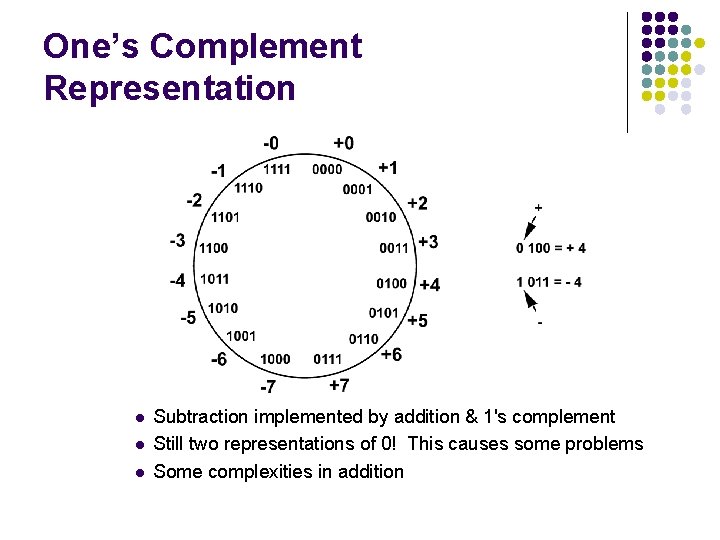
One’s Complement Representation l l l Subtraction implemented by addition & 1's complement Still two representations of 0! This causes some problems Some complexities in addition
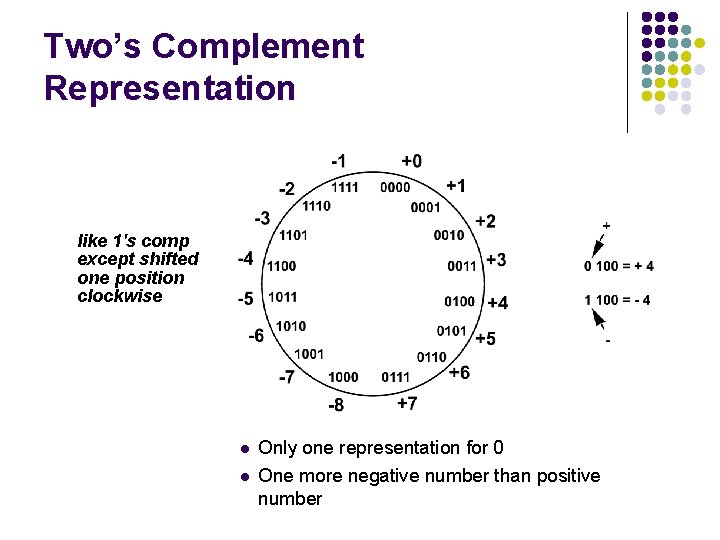
Two’s Complement Representation like 1's comp except shifted one position clockwise l l Only one representation for 0 One more negative number than positive number
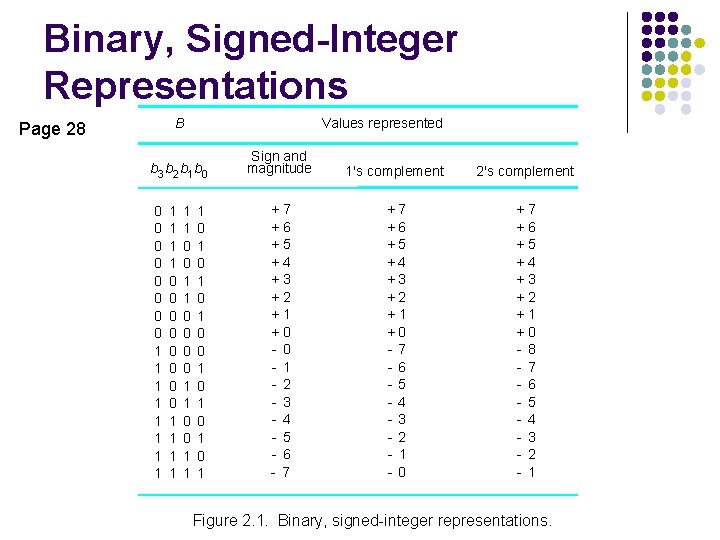
Binary, Signed-Integer Representations B Page 28 Values represented b 3 b 2 b 1 b 0 0 0 0 0 1 1 1 0 0 0 0 1 1 1 0 0 1 1 1 0 1 0 1 Sign and magnitude 1's complement +7 +6 +5 +4 +3 +2 +1 +0 - 1 - 2 - 3 - 4 - 5 - 6 - 7 +7 +6 +5 +4 +3 +2 +1 +0 -7 -6 -5 -4 -3 -2 - 1 -0 2's complement + + + + - 7 6 5 4 3 2 1 0 8 7 6 5 4 3 2 1 Figure 2. 1. Binary, signed-integer representations.
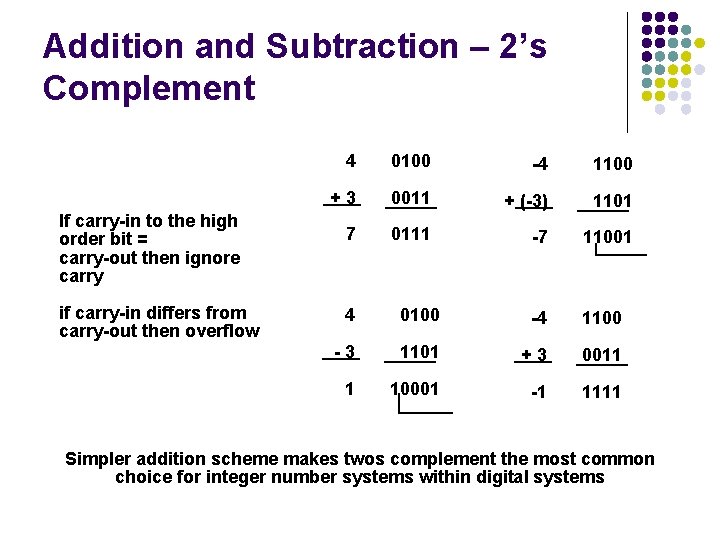
Addition and Subtraction – 2’s Complement If carry-in to the high order bit = carry-out then ignore carry if carry-in differs from carry-out then overflow 4 0100 -4 1100 +3 0011 + (-3) 1101 7 0111 -7 11001 4 0100 -4 1100 -3 1101 +3 0011 1 10001 -1 1111 Simpler addition scheme makes twos complement the most common choice for integer number systems within digital systems
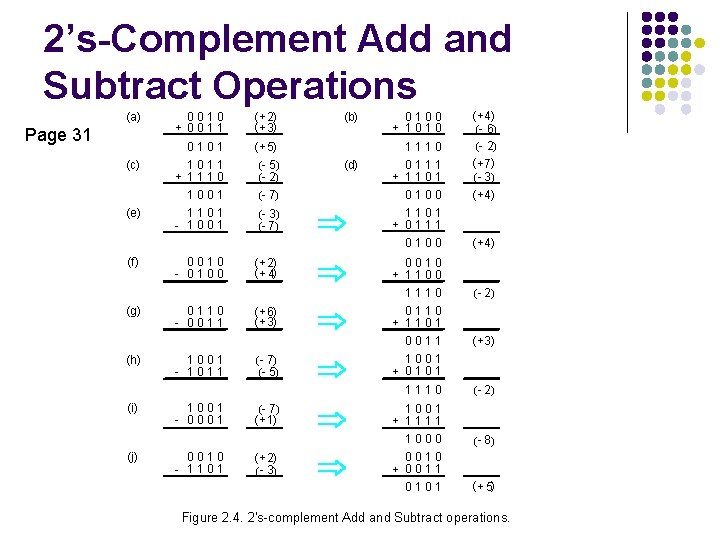
2’s-Complement Add and Subtract Operations (a) Page 31 (c) (e) (f) (g) (h) (i) (j) 0010 + 0011 ( + 2) ( + 3) 0101 ( + 5) 1011 + 1110 1001 (- 5) (- 2) (- 7) 1101 - 1001 (- 3) (- 7) 0010 - 0100 0110 - 0011 1001 - 1011 1001 - 0001 0010 - 1101 (b) 0100 ( + 4) (- 6) (- 2) ( + 7) ( - 3) ( + 4) 1101 + 0111 0100 ( + 4) 0100 + 1010 1110 (d) 0111 + 1101 ( + 2) ( + 4) 0010 + 1100 ( + 6) ( + 3) 1110 0110 + 1101 0011 ( + 3) 1001 + 0101 1110 ( - 2) 1001 + 1111 1000 ( - 8) 0010 + 0011 0101 ( + 5) ( - 7) (- 5) (- 7) ( + 1) ( + 2) ( - 3) ( - 2) Figure 2. 4. 2's-complement Add and Subtract operations.
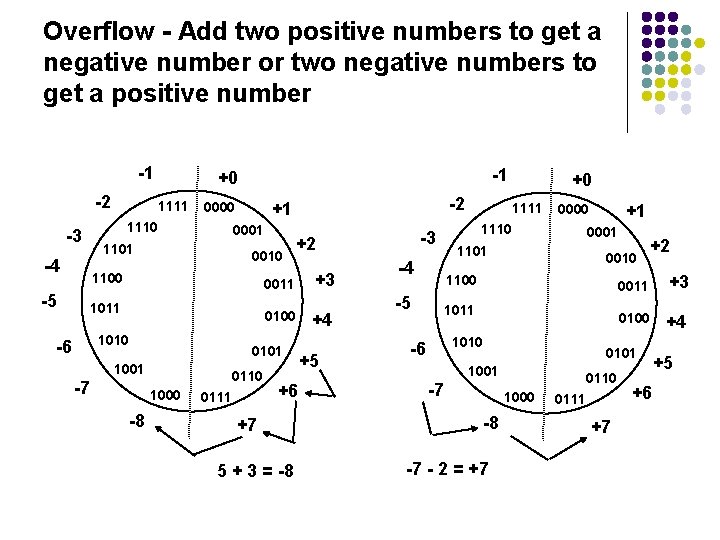
Overflow - Add two positive numbers to get a negative number or two negative numbers to get a positive number -1 -2 -3 1101 -4 -5 1111 1110 -1 +0 0001 0010 1100 0100 1010 0101 1001 -7 1000 -8 0110 0111 +6 +7 5 + 3 = -8 -3 +2 0011 1011 -6 -2 +1 0000 +3 +4 +5 1101 -4 -5 1111 1110 +0 +1 0000 0001 0010 1100 1011 1010 -6 1000 -8 -7 - 2 = +7 0011 +3 0100 +4 0101 1001 -7 +2 0110 0111 +7 +6 +5
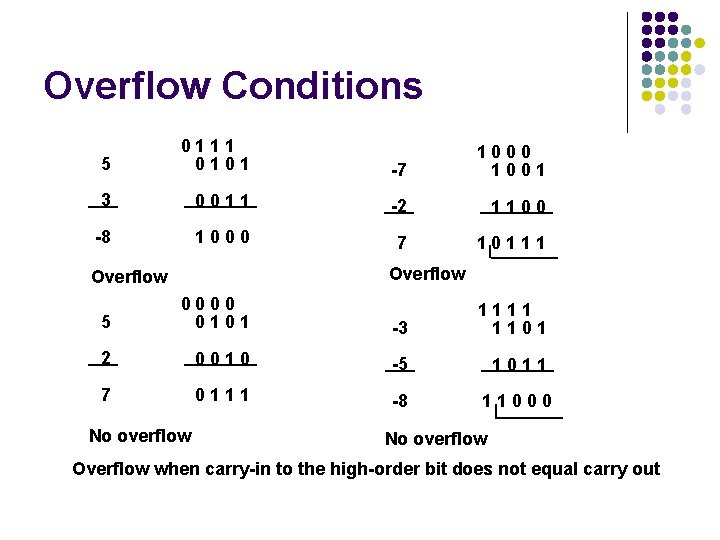
Overflow Conditions 5 0111 0101 -7 1000 1001 3 0011 -2 1100 -8 1000 7 10111 Overflow 5 0000 0101 -3 1111 1101 2 0010 -5 1011 7 0111 -8 11000 No overflow Overflow when carry-in to the high-order bit does not equal carry out
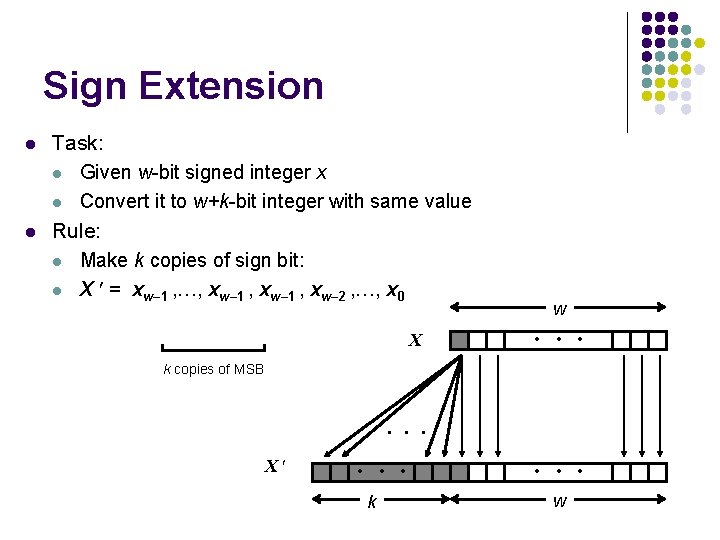
Sign Extension l l Task: l Given w-bit signed integer x l Convert it to w+k-bit integer with same value Rule: l Make k copies of sign bit: l X = xw– 1 , …, xw– 1 , xw– 2 , …, x 0 X w • • • k copies of MSB • • • X • • • k • • • w
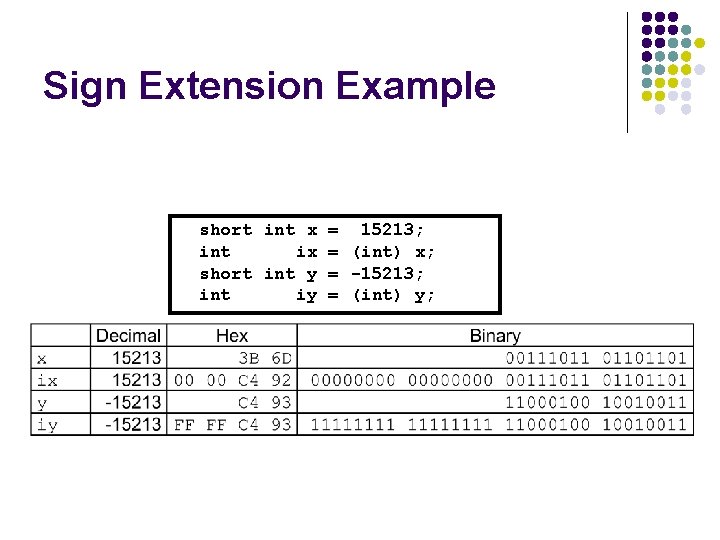
Sign Extension Example short int x = 15213; int ix = (int) x; short int y = -15213; int iy = (int) y;
Memory Locations, Addresses, and Operations
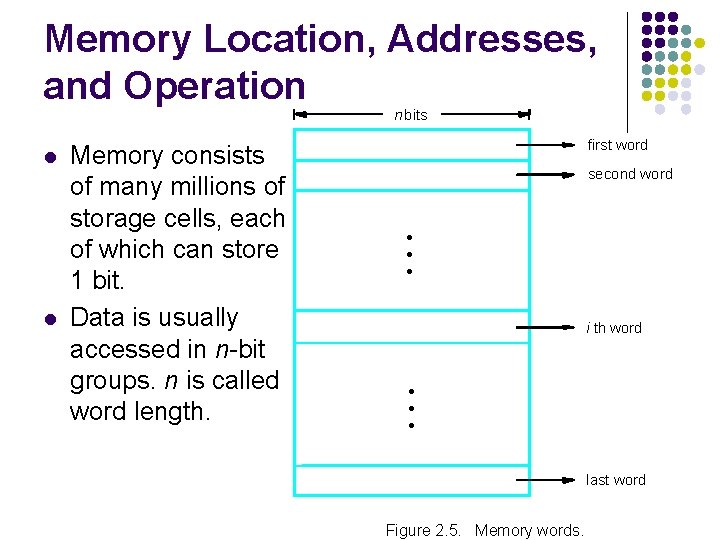
Memory Location, Addresses, and Operation n bits l l Memory consists of many millions of storage cells, each of which can store 1 bit. Data is usually accessed in n-bit groups. n is called word length. first word second word • • • i th word • • • last word Figure 2. 5. Memory words.
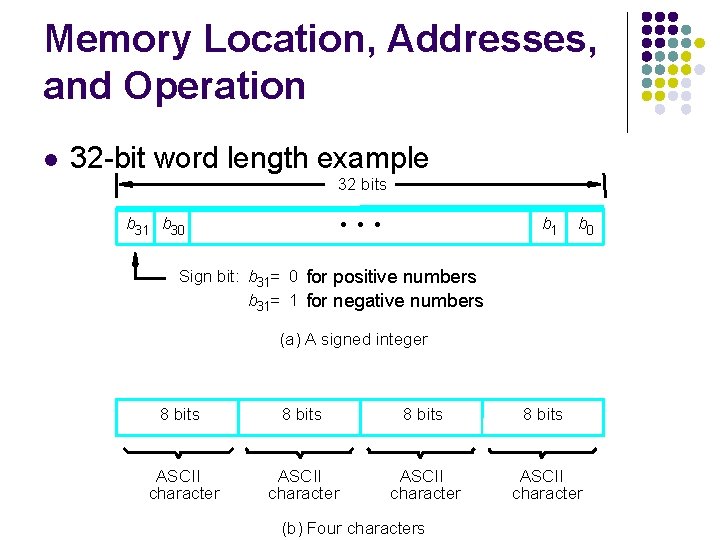
Memory Location, Addresses, and Operation 32 -bit word length example 32 bits b 31 b 30 b 1 • • • l b 0 Sign bit: b 31= 0 for positive numbers b 31= 1 for negative numbers (a) A signed integer 8 bits ASCII character (b) Four characters
Memory Location, Addresses, and Operation l l l To retrieve information from memory, either for one word or one byte (8 -bit), addresses for each location are needed. A k-bit address memory has 2 k memory locations, namely 0 – 2 k-1, called memory space. 24 -bit memory: 224 = 16, 777, 216 = 16 M (1 M=220) 32 -bit memory: 232 = 4 G (1 G=230) 1 K(kilo)=210 1 T(tera)=240
Memory Location, Addresses, and Operation l l l It is impractical to assign distinct addresses to individual bit locations in the memory. The most practical assignment is to have successive addresses refer to successive byte locations in the memory – byteaddressable memory. Byte locations have addresses 0, 1, 2, … If word length is 32 bits, they successive words are located at addresses 0, 4, 8, …
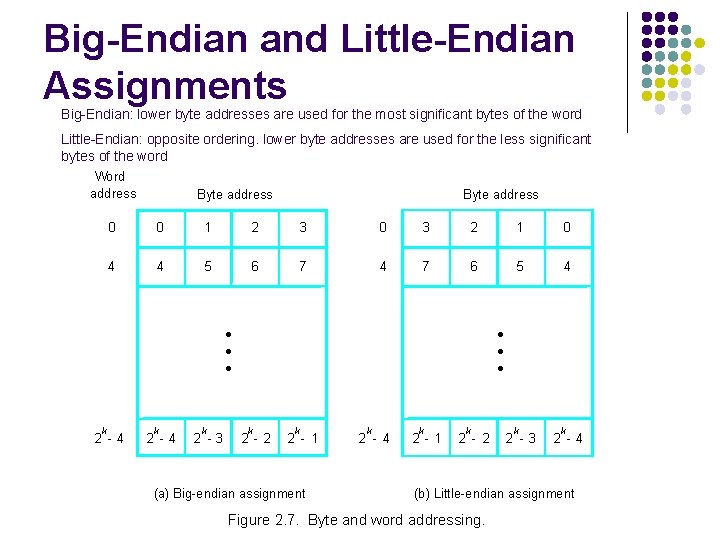
Big-Endian and Little-Endian Assignments Big-Endian: lower byte addresses are used for the most significant bytes of the word Little-Endian: opposite ordering. lower byte addresses are used for the less significant bytes of the word Word address Byte address 0 0 1 2 3 0 3 2 1 0 4 4 5 6 7 4 7 6 5 4 • • • k 2 -4 k 2 -3 • • • k 2 - 2 k 2 - 1 (a) Big-endian assignment k 2 - 4 k 2 - 1 k 2 - 2 k 2 -3 k 2 -4 (b) Little-endian assignment Figure 2. 7. Byte and word addressing.
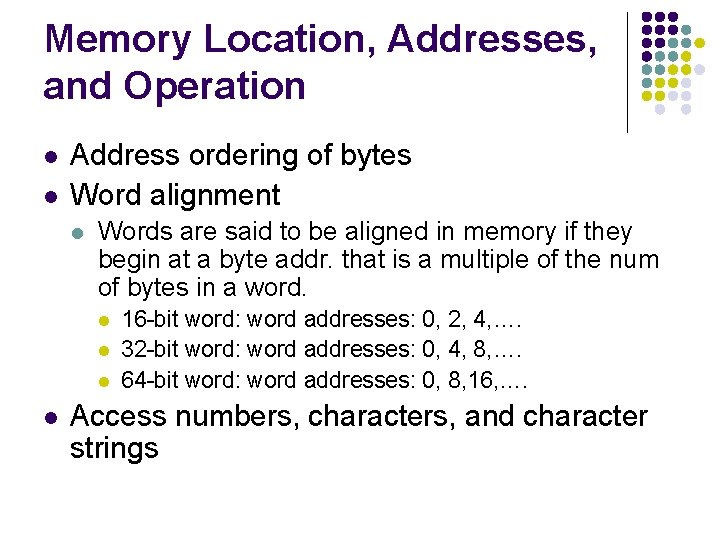
Memory Location, Addresses, and Operation l l Address ordering of bytes Word alignment l Words are said to be aligned in memory if they begin at a byte addr. that is a multiple of the num of bytes in a word. l l 16 -bit word: word addresses: 0, 2, 4, …. 32 -bit word: word addresses: 0, 4, 8, …. 64 -bit word: word addresses: 0, 8, 16, …. Access numbers, characters, and character strings
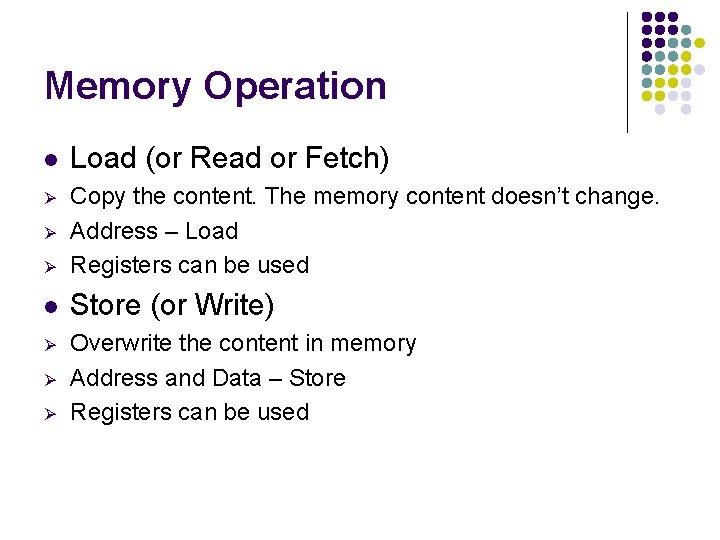
Memory Operation l Load (or Read or Fetch) Ø Ø Copy the content. The memory content doesn’t change. Address – Load Registers can be used l Store (or Write) Ø Overwrite the content in memory Address and Data – Store Registers can be used Ø Ø Ø
Instruction and Instruction Sequencing
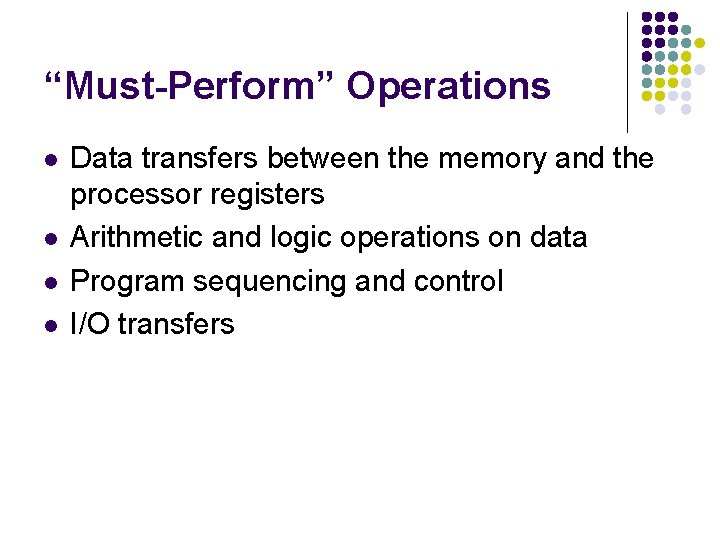
“Must-Perform” Operations l l Data transfers between the memory and the processor registers Arithmetic and logic operations on data Program sequencing and control I/O transfers
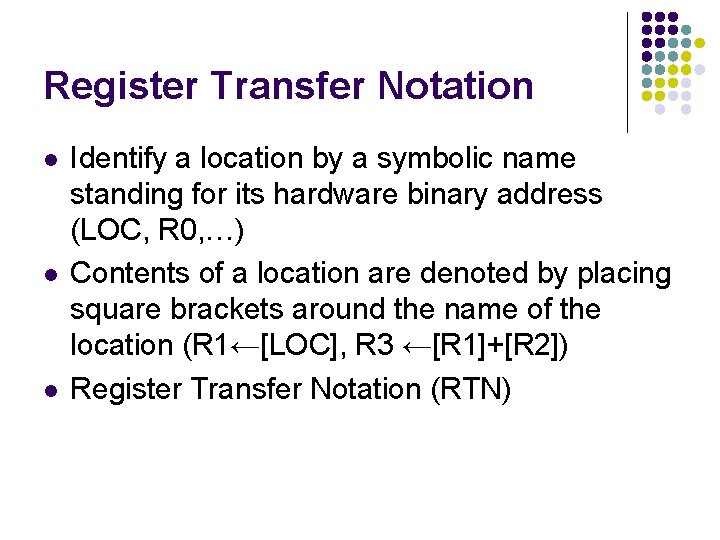
Register Transfer Notation l l l Identify a location by a symbolic name standing for its hardware binary address (LOC, R 0, …) Contents of a location are denoted by placing square brackets around the name of the location (R 1←[LOC], R 3 ←[R 1]+[R 2]) Register Transfer Notation (RTN)
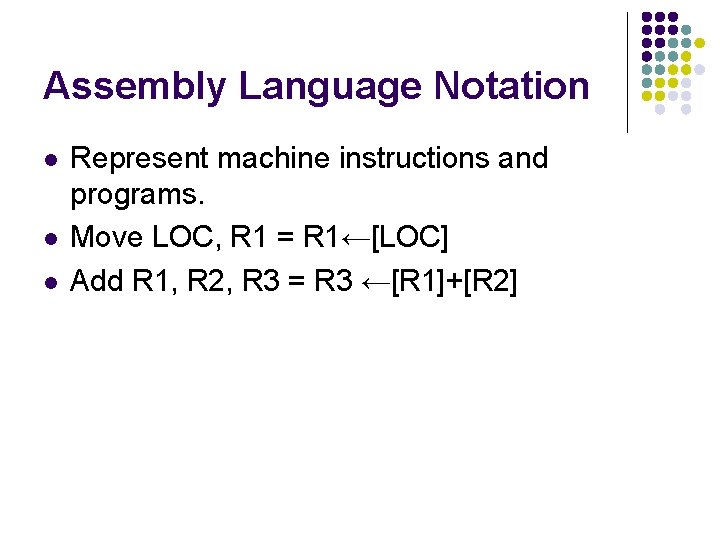
Assembly Language Notation l l l Represent machine instructions and programs. Move LOC, R 1 = R 1←[LOC] Add R 1, R 2, R 3 = R 3 ←[R 1]+[R 2]
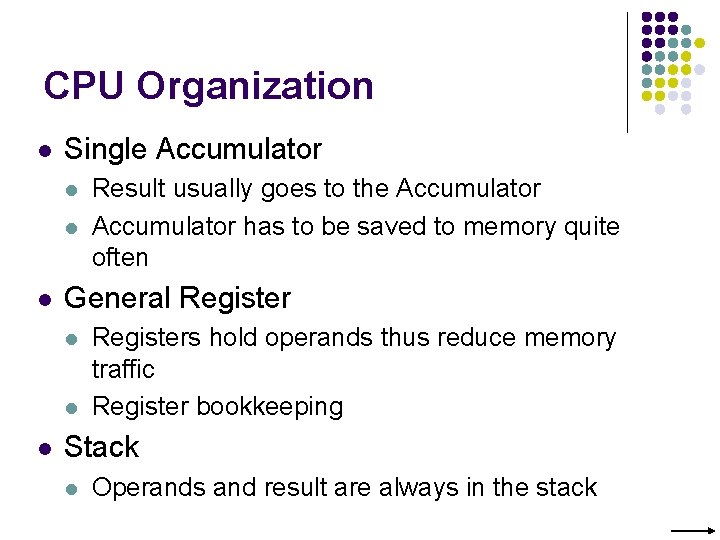
CPU Organization l Single Accumulator l l l General Register l l l Result usually goes to the Accumulator has to be saved to memory quite often Registers hold operands thus reduce memory traffic Register bookkeeping Stack l Operands and result are always in the stack
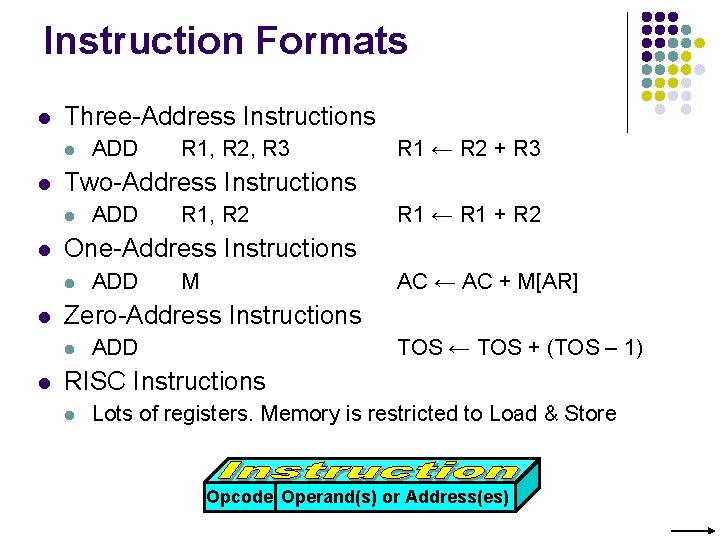
Instruction Formats l Three-Address Instructions l l ADD R 1, R 2 R 1 ← R 1 + R 2 ADD M AC ← AC + M[AR] Zero-Address Instructions l l R 1 ← R 2 + R 3 One-Address Instructions l l R 1, R 2, R 3 Two-Address Instructions l l ADD TOS ← TOS + (TOS – 1) RISC Instructions l Lots of registers. Memory is restricted to Load & Store Opcode Operand(s) or Address(es)
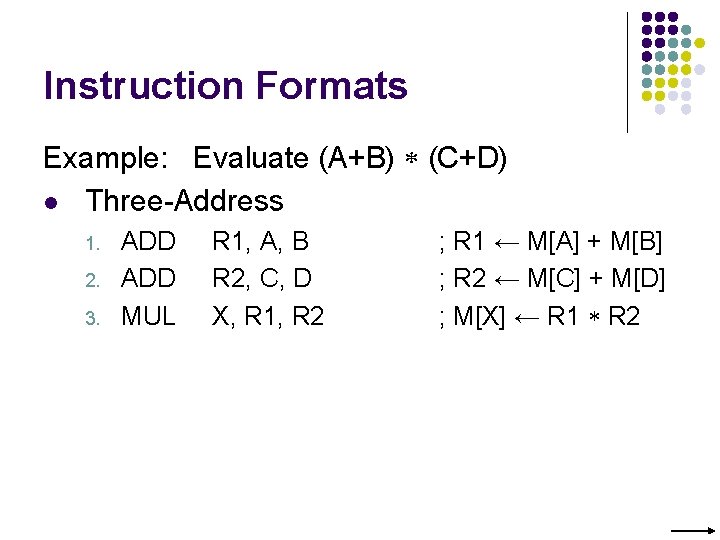
Instruction Formats Example: Evaluate (A+B) (C+D) l Three-Address 1. 2. 3. ADD MUL R 1, A, B R 2, C, D X, R 1, R 2 ; R 1 ← M[A] + M[B] ; R 2 ← M[C] + M[D] ; M[X] ← R 1 R 2
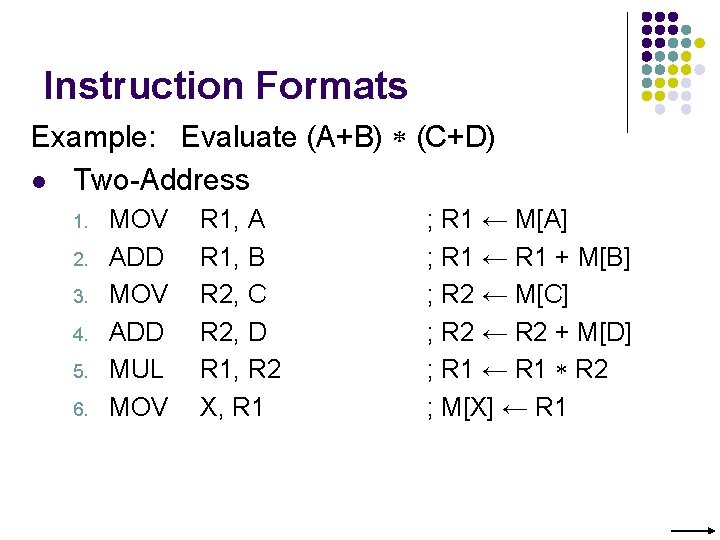
Instruction Formats Example: Evaluate (A+B) (C+D) l Two-Address 1. 2. 3. 4. 5. 6. MOV ADD MUL MOV R 1, A R 1, B R 2, C R 2, D R 1, R 2 X, R 1 ; R 1 ← M[A] ; R 1 ← R 1 + M[B] ; R 2 ← M[C] ; R 2 ← R 2 + M[D] ; R 1 ← R 1 R 2 ; M[X] ← R 1
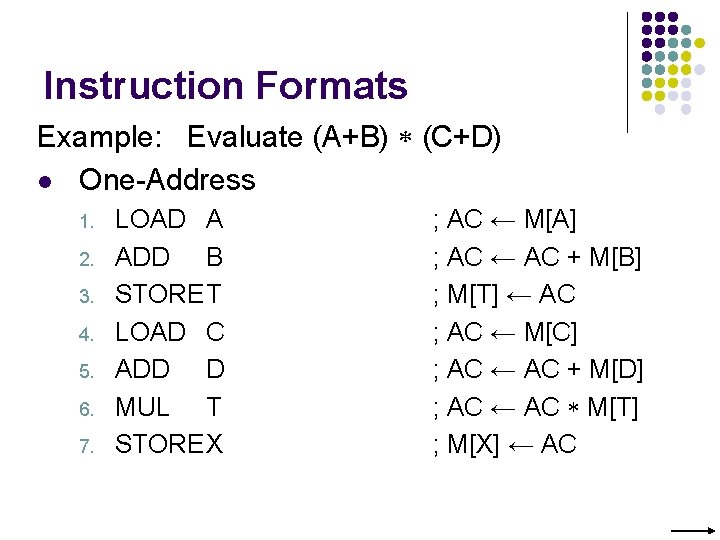
Instruction Formats Example: Evaluate (A+B) (C+D) l One-Address 1. 2. 3. 4. 5. 6. 7. LOAD A ADD B STORET LOAD C ADD D MUL T STOREX ; AC ← M[A] ; AC ← AC + M[B] ; M[T] ← AC ; AC ← M[C] ; AC ← AC + M[D] ; AC ← AC M[T] ; M[X] ← AC
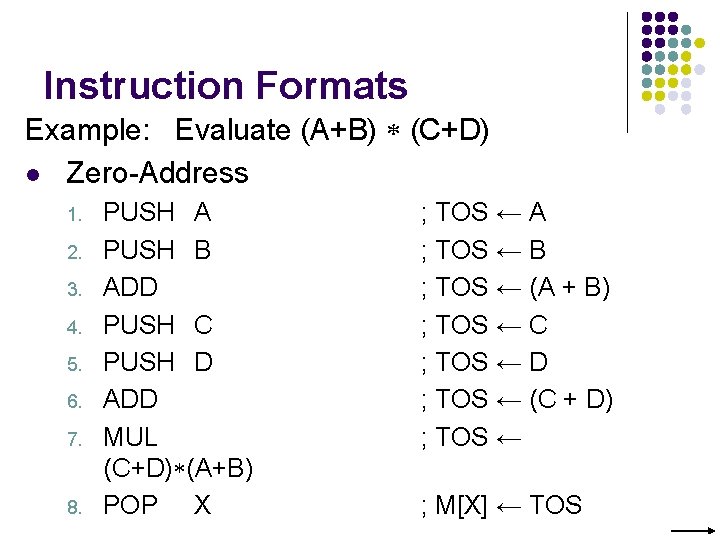
Instruction Formats Example: Evaluate (A+B) (C+D) l Zero-Address 1. 2. 3. 4. 5. 6. 7. 8. PUSH A PUSH B ADD PUSH C PUSH D ADD MUL (C+D) (A+B) POP X ; TOS ← A ; TOS ← B ; TOS ← (A + B) ; TOS ← C ; TOS ← D ; TOS ← (C + D) ; TOS ← ; M[X] ← TOS
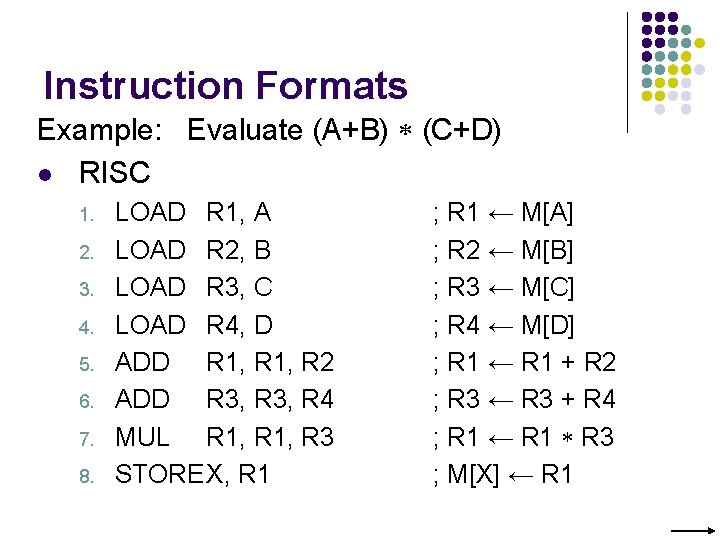
Instruction Formats Example: Evaluate (A+B) (C+D) l RISC 1. 2. 3. 4. 5. 6. 7. 8. LOAD R 1, A LOAD R 2, B LOAD R 3, C LOAD R 4, D ADD R 1, R 2 ADD R 3, R 4 MUL R 1, R 3 STOREX, R 1 ; R 1 ← M[A] ; R 2 ← M[B] ; R 3 ← M[C] ; R 4 ← M[D] ; R 1 ← R 1 + R 2 ; R 3 ← R 3 + R 4 ; R 1 ← R 1 R 3 ; M[X] ← R 1
Using Registers l l Registers are faster Shorter instructions l l l The number of registers is smaller (e. g. 32 registers need 5 bits) Potential speedup Minimize the frequency with which data is moved back and forth between the memory and processor registers.
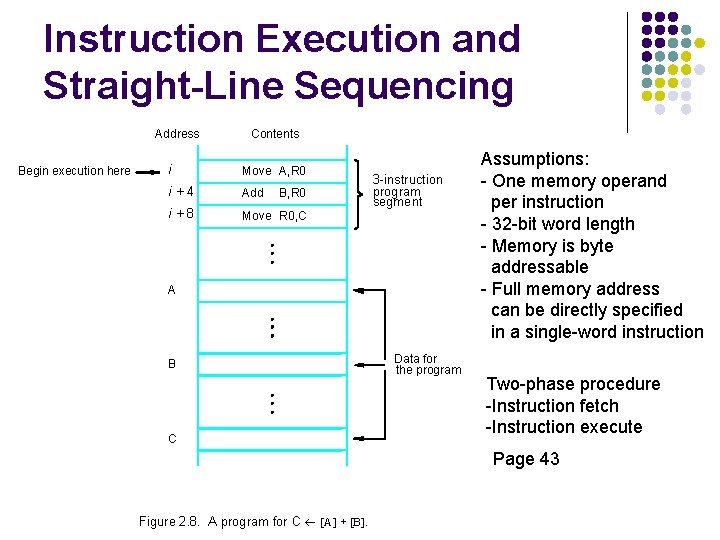
Instruction Execution and Straight-Line Sequencing Address Begin execution here Contents i Move A, R 0 i+4 Add i+8 Move R 0, C B, R 0 3 -instruction program segment A B C Data for the program Assumptions: - One memory operand per instruction - 32 -bit word length - Memory is byte addressable - Full memory address can be directly specified in a single-word instruction Two-phase procedure -Instruction fetch -Instruction execute Page 43 Figure 2. 8. A program for C ¬ [A] + [B].
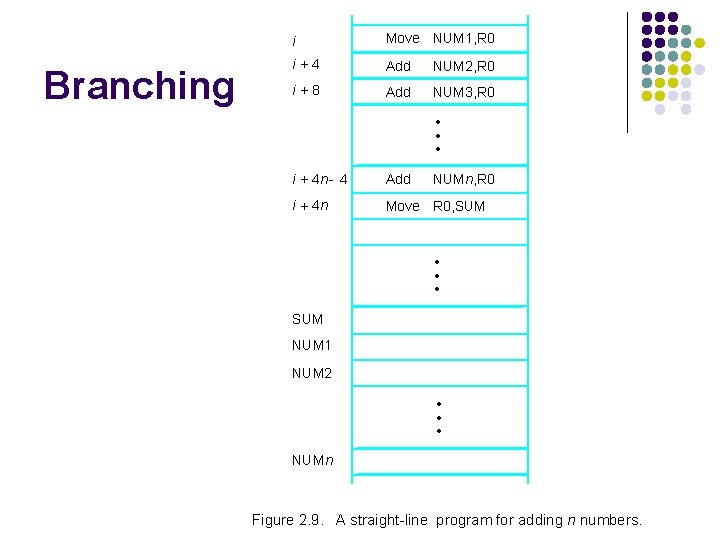
Branching i Move NUM 1, R 0 i+4 Add NUM 2, R 0 i+8 Add NUM 3, R 0 • • • i + 4 n - 4 Add NUMn, R 0 i + 4 n Move R 0, SUM • • • SUM NUM 1 NUM 2 • • • NUMn Figure 2. 9. A straight-line program for adding n numbers.
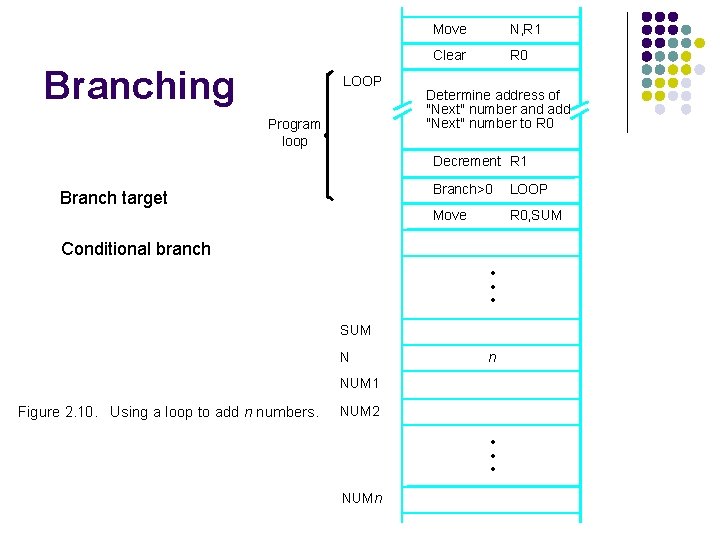
Branching LOOP Program loop Move N, R 1 Clear R 0 Determine address of "Next" number and add "Next" number to R 0 Decrement R 1 Branch target Branch>0 LOOP Move R 0, SUM Conditional branch • • • SUM N n NUM 1 Figure 2. 10. Using a loop to add n numbers. NUM 2 • • • NUMn
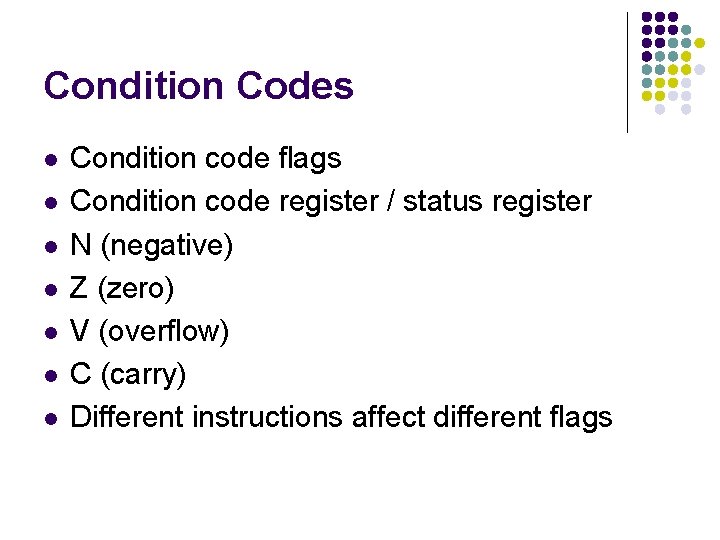
Condition Codes l l l l Condition code flags Condition code register / status register N (negative) Z (zero) V (overflow) C (carry) Different instructions affect different flags
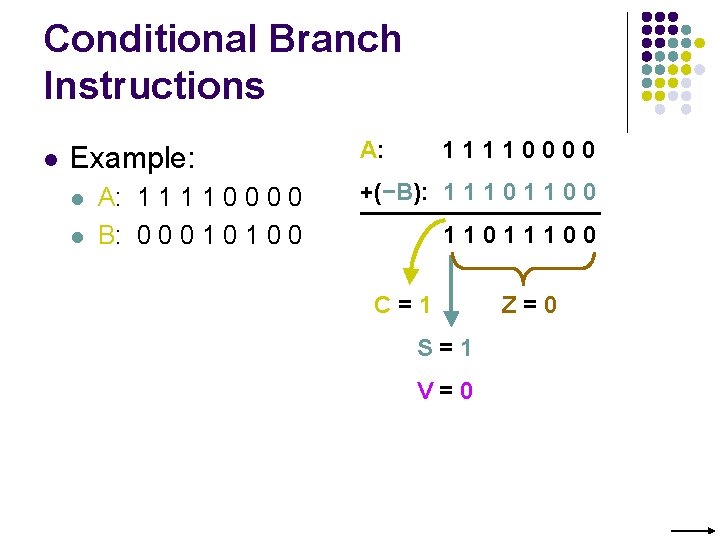
Conditional Branch Instructions l Example: l l A: 1 1 0 0 B: 0 0 0 1 0 0 A: 11110000 +(−B): 1 1 1 0 0 11011100 C=1 S=1 V=0 Z=0
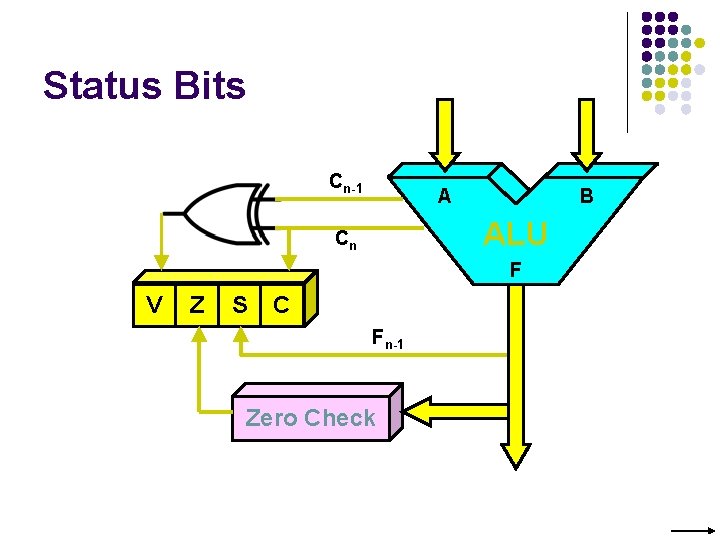
Status Bits Cn-1 A B ALU Cn F V Z S C Fn-1 Zero Check

Addressing Modes
Generating Memory Addresses l l l How to specify the address of branch target? Can we give the memory operand address directly in a single Add instruction in the loop? Use a register to hold the address of NUM 1; then increment by 4 on each pass through the loop.
Addressing Modes l Implied l l l . . . AC is implied in “ADD M[AR]” in “One-Address” instr. TOS is implied in “ADD” in “Zero-Address” instr. Immediate l l Opcode Mode The use of a constant in “MOV R 1, 5”, i. e. R 1 ← 5 Register l Indicate which register holds the operand
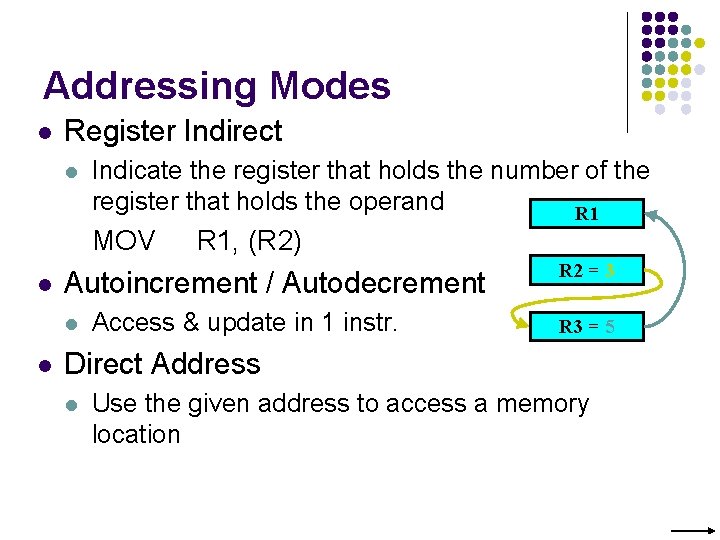
Addressing Modes l Register Indirect l Indicate the register that holds the number of the register that holds the operand R 1 MOV l Autoincrement / Autodecrement l l R 1, (R 2) Access & update in 1 instr. R 2 = 3 R 3 = 5 Direct Address l Use the given address to access a memory location
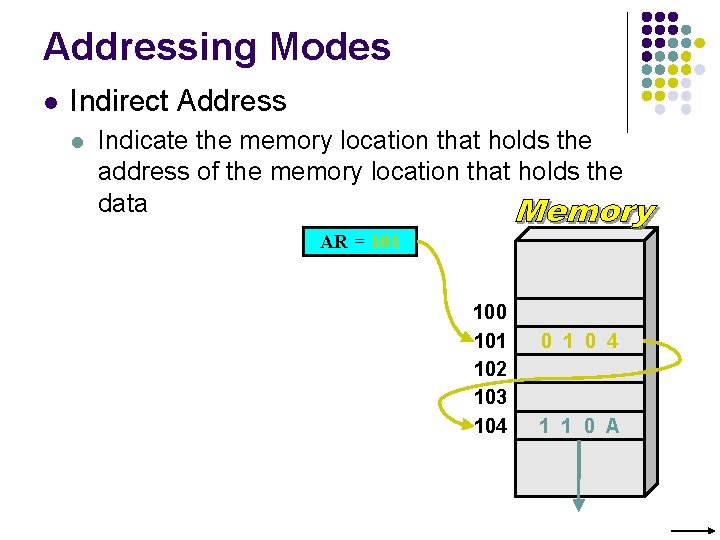
Addressing Modes l Indirect Address l Indicate the memory location that holds the address of the memory location that holds the data AR = 101 100 101 102 103 104 0 1 0 4 1 1 0 A
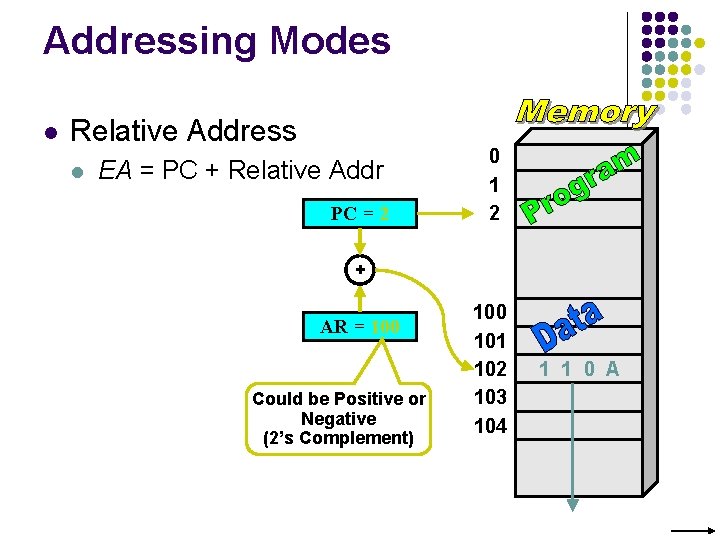
Addressing Modes l Relative Address l EA = PC + Relative Addr PC = 2 0 1 2 + AR = 100 Could be Positive or Negative (2’s Complement) 100 101 102 103 104 1 1 0 A
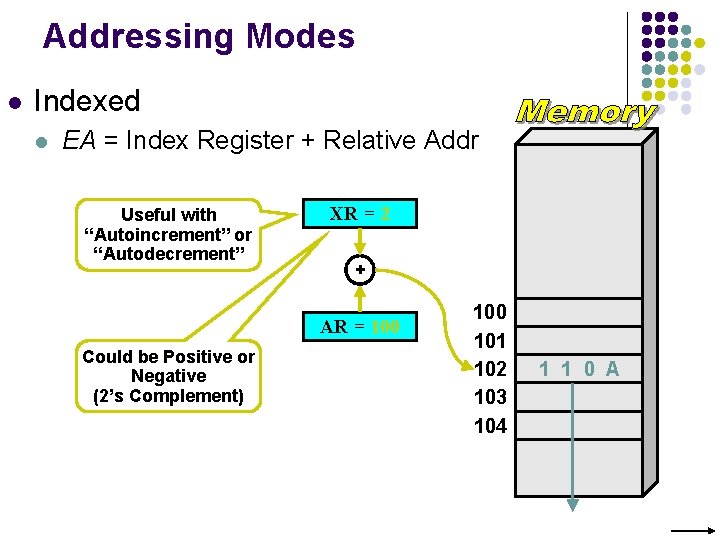
Addressing Modes l Indexed l EA = Index Register + Relative Addr Useful with “Autoincrement” or “Autodecrement” XR = 2 + AR = 100 Could be Positive or Negative (2’s Complement) 100 101 102 103 104 1 1 0 A
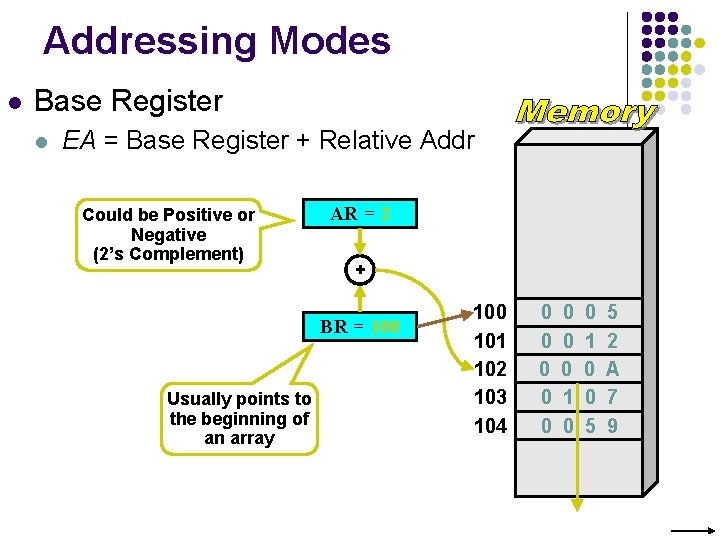
Addressing Modes l Base Register l EA = Base Register + Relative Addr Could be Positive or Negative (2’s Complement) AR = 2 + BR = 100 Usually points to the beginning of an array 100 101 102 103 104 0 0 0 0 1 0 0 5 5 2 A 7 9
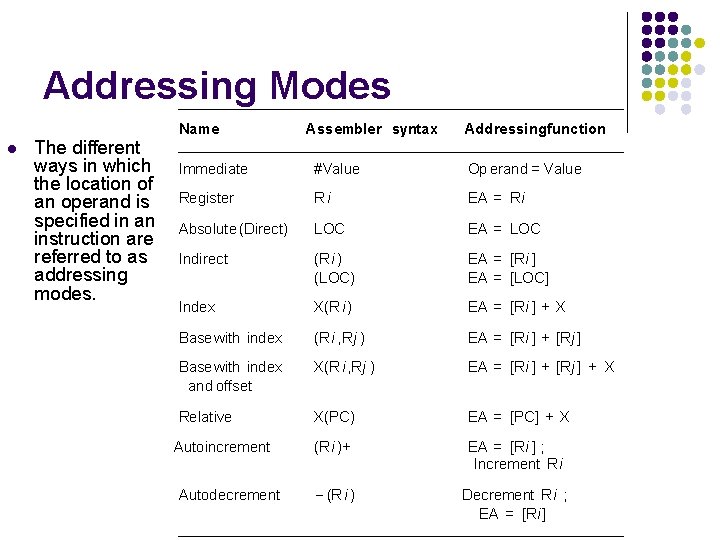
Addressing Modes l The different ways in which the location of an operand is specified in an instruction are referred to as addressing modes. Name Assembler syntax Addressingfunction Immediate #Value Op erand = Value Register Ri EA = Ri Absolute (Direct) LOC EA = LOC Indirect (Ri ) (LOC) EA = [Ri ] EA = [LOC] Index X(R i) EA = [Ri ] + X Basewith index (Ri , Rj ) EA = [Ri ] + [Rj ] Basewith index and offset X(R i, Rj ) EA = [Ri ] + [Rj ] + X Relative X(PC) EA = [PC] + X (Ri )+ EA = [Ri ] ; Increment Ri (Ri ) Decrement R i ; EA = [Ri] Autoincrement Autodecrement
Indexing and Arrays l l l Index mode – the effective address of the operand is generated by adding a constant value to the contents of a register. Index register X(Ri): EA = X + [Ri] The constant X may be given either as an explicit number or as a symbolic name representing a numerical value. If X is shorter than a word, sign-extension is needed.
Indexing and Arrays l l In general, the Index mode facilitates access to an operand whose location is defined relative to a reference point within the data structure in which the operand appears. Several variations: (Ri, Rj): EA = [Ri] + [Rj] X(Ri, Rj): EA = X + [Ri] + [Rj]
Relative Addressing l l l Relative mode – the effective address is determined by the Index mode using the program counter in place of the general-purpose register. X(PC) – note that X is a signed number Branch>0 LOOP This location is computed by specifying it as an offset from the current value of PC. Branch target may be either before or after the branch instruction, the offset is given as a singed num.
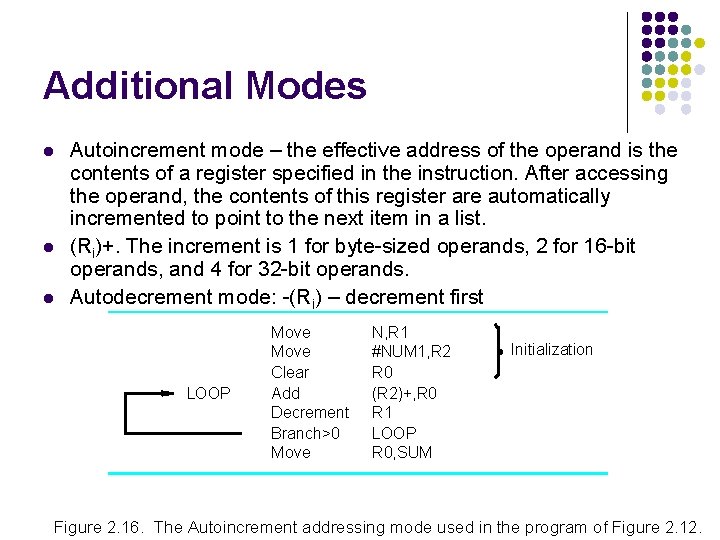
Additional Modes l l l Autoincrement mode – the effective address of the operand is the contents of a register specified in the instruction. After accessing the operand, the contents of this register are automatically incremented to point to the next item in a list. (Ri)+. The increment is 1 for byte-sized operands, 2 for 16 -bit operands, and 4 for 32 -bit operands. Autodecrement mode: -(Ri) – decrement first LOOP Move Clear Add Decrement Branch>0 Move N, R 1 #NUM 1, R 2 R 0 (R 2)+, R 0 R 1 LOOP R 0, SUM Initialization Figure 2. 16. The Autoincrement addressing mode used in the program of Figure 2. 12.

Assembly Language
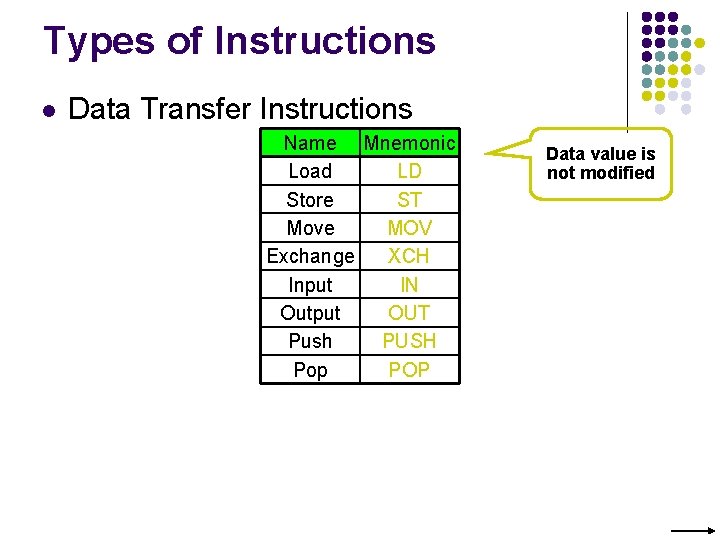
Types of Instructions l Data Transfer Instructions Name Mnemonic Load LD Store ST Move MOV Exchange XCH Input IN Output OUT Push PUSH Pop POP Data value is not modified
![Data Transfer Instructions Mode Assembly Register Transfer Direct address LD ADR AC ← M[ADR]](http://slidetodoc.com/presentation_image_h/21a5021eb21249cef86489b4ea8b181b/image-56.jpg "Data Transfer Instructions Mode Assembly Register Transfer Direct address LD ADR AC ← M[ADR]")
Data Transfer Instructions Mode Assembly Register Transfer Direct address LD ADR AC ← M[ADR] Indirect address LD @ADR AC ← M[M[ADR]] Relative address LD $ADR AC ← M[PC+ADR] Immediate operand LD #NBR AC ← NBR Index addressing LD ADR(X) AC ← M[ADR+XR] Register LD R 1 AC ← R 1 Register indirect LD (R 1) AC ← M[R 1] Autoincrement LD (R 1)+ AC ← M[R 1], R 1 ← R 1+1
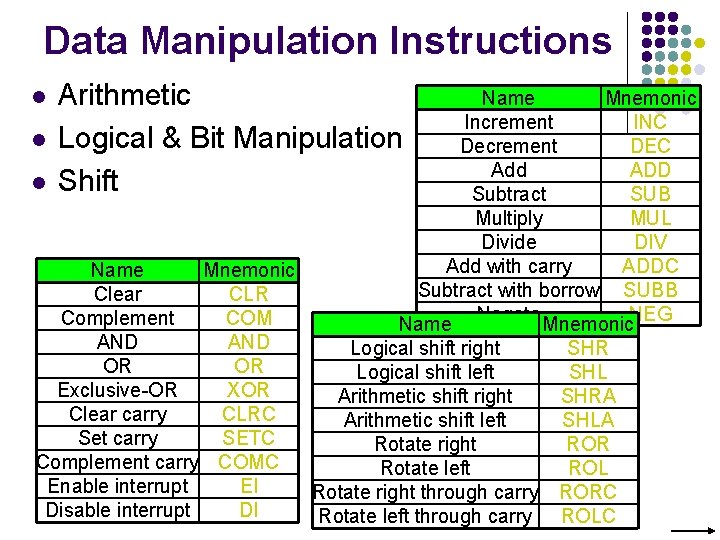
Data Manipulation Instructions l Arithmetic Logical & Bit Manipulation Shift Name Mnemonic Increment INC l Decrement DEC Add ADD l Subtract SUB Multiply MUL Divide DIV Add with carry ADDC Name Mnemonic Subtract with borrow SUBB Clear CLR Negate NEG Complement COM Name Mnemonic AND Logical shift right SHR OR OR Logical shift left SHL Exclusive-OR XOR Arithmetic shift right SHRA Clear carry CLRC Arithmetic shift left SHLA Set carry SETC Rotate right ROR Complement carry COMC Rotate left ROL Enable interrupt EI Rotate right through carry RORC Disable interrupt DI Rotate left through carry ROLC
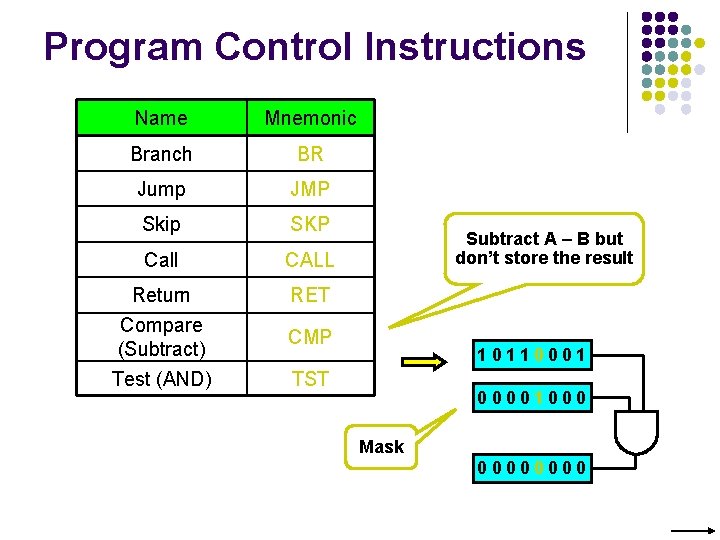
Program Control Instructions Name Mnemonic Branch BR Jump JMP Skip SKP Call CALL Return Compare (Subtract) Test (AND) RET Subtract A – B but don’t store the result CMP 10110001 TST 00001000 Mask 0000
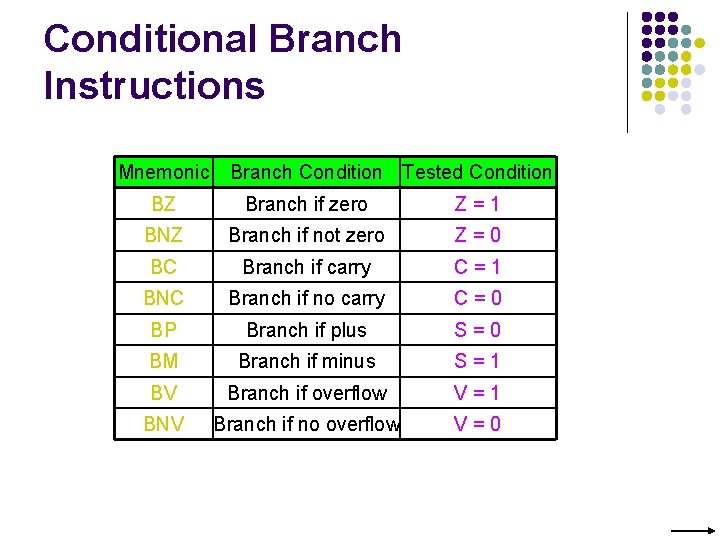
Conditional Branch Instructions Mnemonic Branch Condition Tested Condition BZ Branch if zero Z=1 BNZ Branch if not zero Z=0 BC Branch if carry C=1 BNC Branch if no carry C=0 BP Branch if plus S=0 BM Branch if minus S=1 BV Branch if overflow V=1 BNV Branch if no overflow V=0
Basic Input/Output Operations
I/O l l l The data on which the instructions operate are not necessarily already stored in memory. Data need to be transferred between processor and outside world (disk, keyboard, etc. ) I/O operations are essential, the way they are performed can have a significant effect on the performance of the computer.
Program-Controlled I/O Example l Read in character input from a keyboard and produce character output on a display screen. Ø Rate of data transfer (keyboard, display, processor) Difference in speed between processor and I/O device creates the need for mechanisms to synchronize the transfer of data. A solution: on output, the processor sends the first character and then waits for a signal from the display that the character has been received. It then sends the second character. Input is sent from the keyboard in a similar way. Ø Ø
Program-Controlled I/O Example - Registers - Flags - Device interface
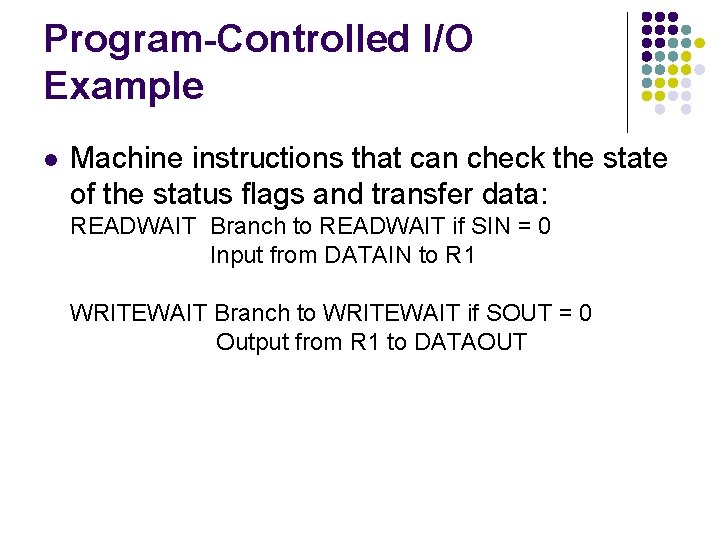
Program-Controlled I/O Example l Machine instructions that can check the state of the status flags and transfer data: READWAIT Branch to READWAIT if SIN = 0 Input from DATAIN to R 1 WRITEWAIT Branch to WRITEWAIT if SOUT = 0 Output from R 1 to DATAOUT
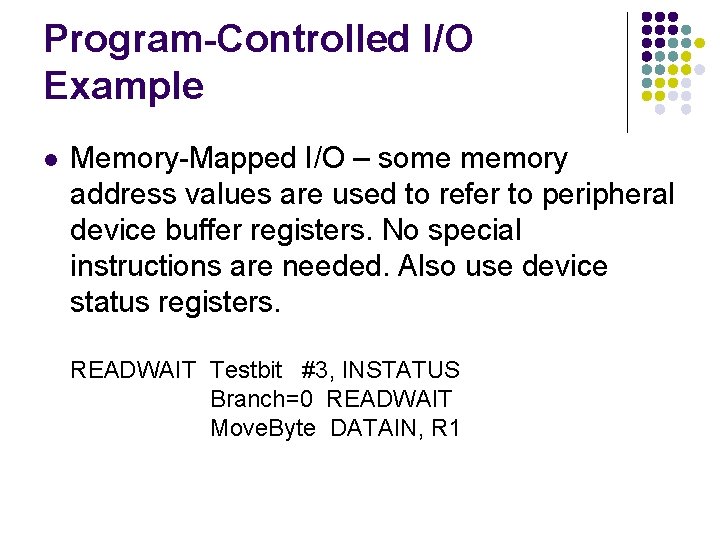
Program-Controlled I/O Example l Memory-Mapped I/O – some memory address values are used to refer to peripheral device buffer registers. No special instructions are needed. Also use device status registers. READWAIT Testbit #3, INSTATUS Branch=0 READWAIT Move. Byte DATAIN, R 1
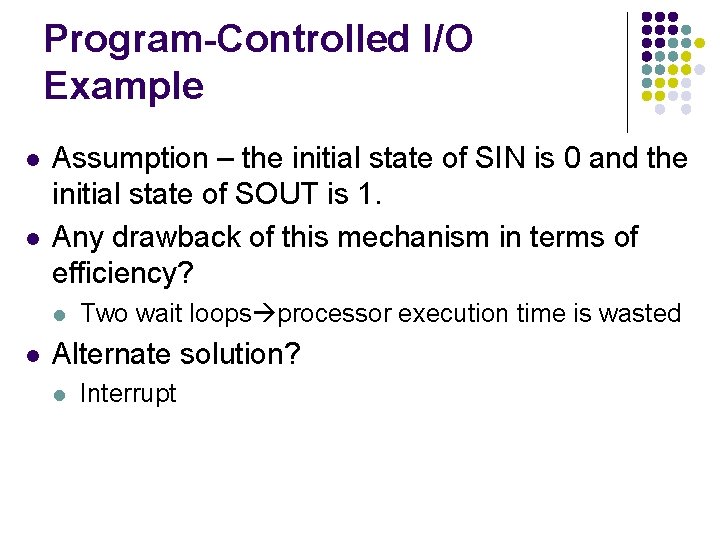
Program-Controlled I/O Example l l Assumption – the initial state of SIN is 0 and the initial state of SOUT is 1. Any drawback of this mechanism in terms of efficiency? l l Two wait loops processor execution time is wasted Alternate solution? l Interrupt

Stacks
Home Work l For each Addressing modes mentioned before, state one example for each addressing mode stating the specific benefit for using such addressing mode for such an application.
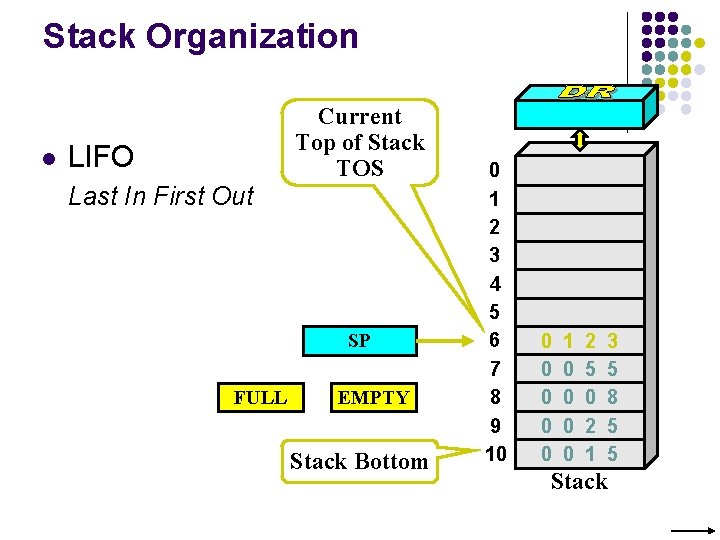
Stack Organization l LIFO Last In First Out Current Top of Stack TOS SP FULL EMPTY Stack Bottom 0 1 2 3 4 5 6 7 8 9 10 0 0 1 0 0 2 5 0 2 1 3 5 8 5 5 Stack
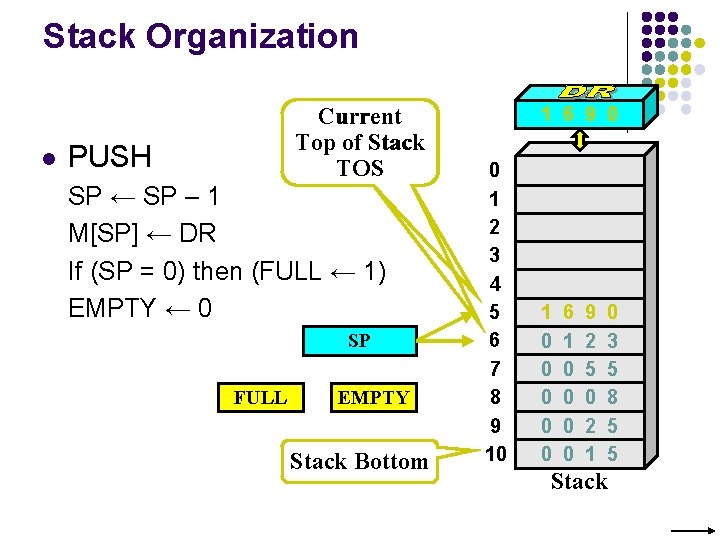
Stack Organization l Current Top of Stack TOS PUSH SP ← SP – 1 M[SP] ← DR If (SP = 0) then (FULL ← 1) EMPTY ← 0 SP FULL EMPTY Stack Bottom 1 6 9 0 0 1 2 3 4 5 6 7 8 9 10 1 0 0 0 6 1 0 0 9 2 5 0 2 1 0 3 5 8 5 5 Stack
![Stack Organization l Current Top of Stack TOS POP DR ← M[SP] SP ←](http://slidetodoc.com/presentation_image_h/21a5021eb21249cef86489b4ea8b181b/image-71.jpg "Stack Organization l Current Top of Stack TOS POP DR ← M[SP] SP ←")
Stack Organization l Current Top of Stack TOS POP DR ← M[SP] SP ← SP + 1 If (SP = 11) then (EMPTY ← 1) FULL ← 0 SP FULL EMPTY Stack Bottom 0 1 2 3 4 5 6 7 8 9 10 1 0 0 0 6 1 0 0 9 2 5 0 2 1 0 3 5 8 5 5 Stack
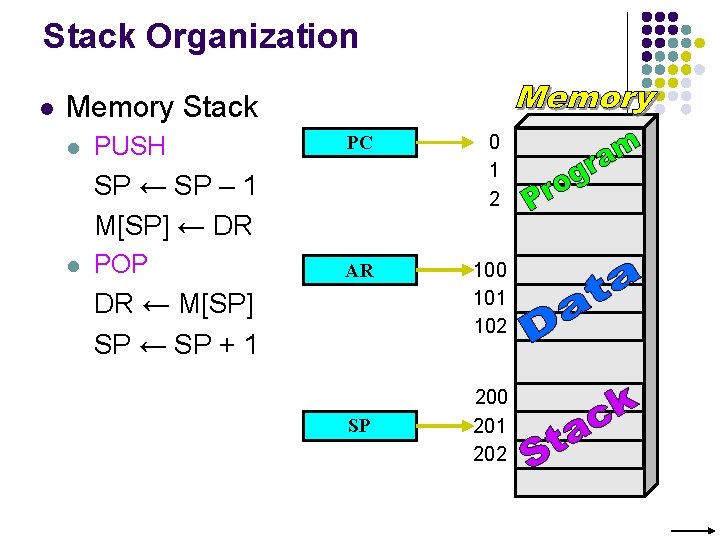
Stack Organization l Memory Stack l PUSH PC 0 1 2 AR 100 101 102 SP ← SP – 1 M[SP] ← DR l POP DR ← M[SP] SP ← SP + 1 SP 200 201 202
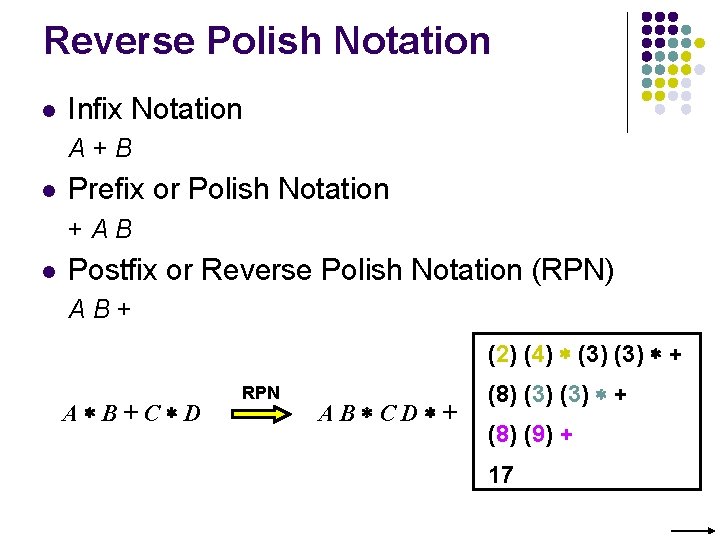
Reverse Polish Notation l Infix Notation A+B l Prefix or Polish Notation +AB l Postfix or Reverse Polish Notation (RPN) AB+ (2) (4) (3) + A B+C D RPN AB CD + (8) (3) + (8) (9) + 17
![Reverse Polish Notation l Example (A + B) [C (D + E) + F]](http://slidetodoc.com/presentation_image_h/21a5021eb21249cef86489b4ea8b181b/image-74.jpg "Reverse Polish Notation l Example (A + B) [C (D + E) + F]")
Reverse Polish Notation l Example (A + B) [C (D + E) + F] (A B +) (D E +) C F +
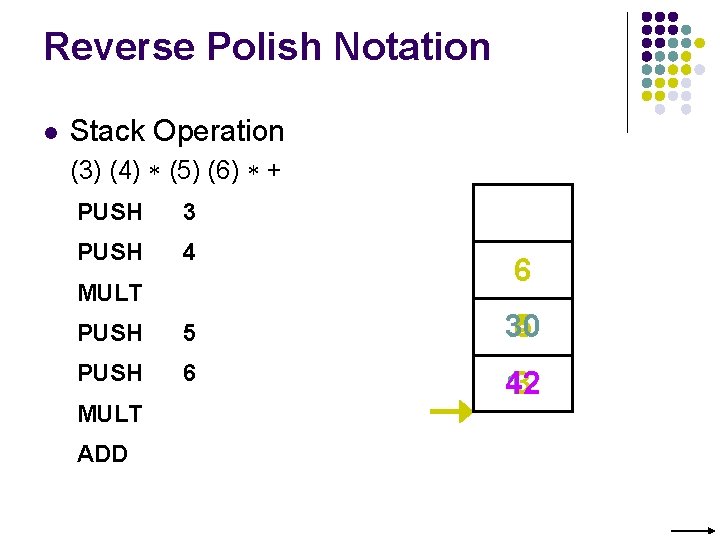
Reverse Polish Notation l Stack Operation (3) (4) (5) (6) + PUSH 3 PUSH 4 MULT 6 PUSH 5 30 4 5 PUSH 6 3 42 12 MULT ADD
Additional Instructions
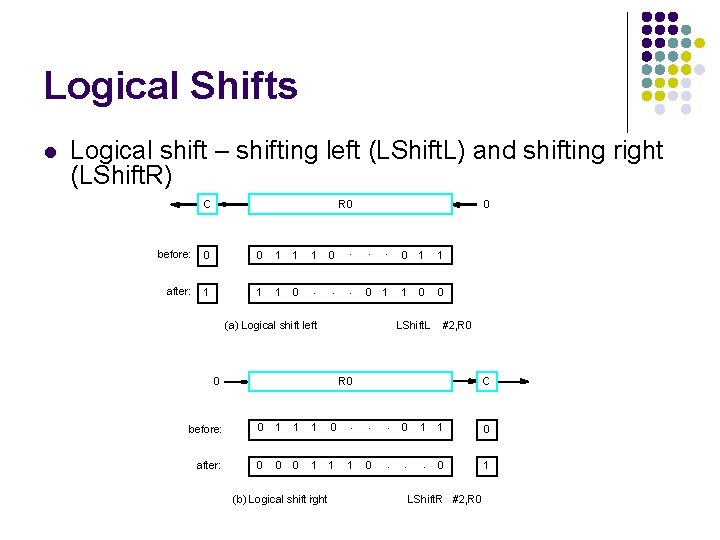
Logical Shifts l Logical shift – shifting left (LShift. L) and shifting right (LShift. R) C R 0 . . . before: 0 0 1 1 1 after: 1 1 1 0 . . . 0 0 0 1 (a) Logical shift left 0 1 1 1 0 0 LShift. L 0 #2, R 0 C before: 0 1 1 1 0 . . . after: 0 0 0 1 1 1 (b) Logical shift irght 0 0 1 1 0 . . . 0 1 LShift. R #2, R 0
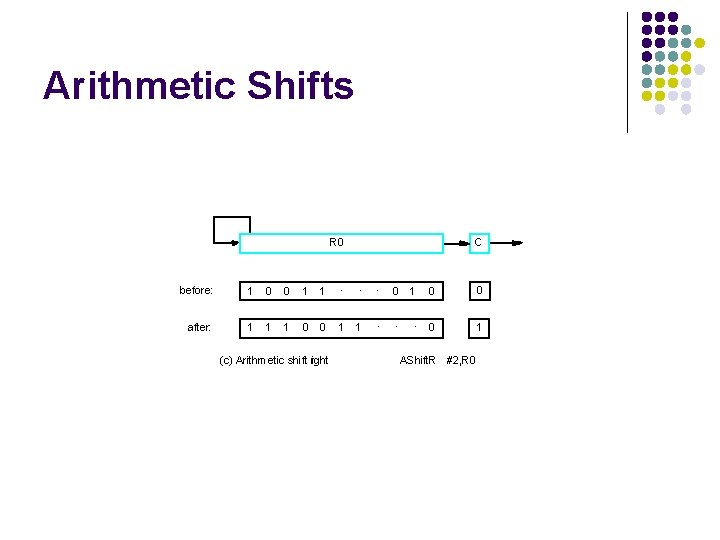
Arithmetic Shifts R 0 C before: 1 0 0 1 1 . . . after: 1 1 1 0 0 1 (c) Arithmetic shift right 1 1 0 0 . . . 0 1 0 AShift. R #2, R 0
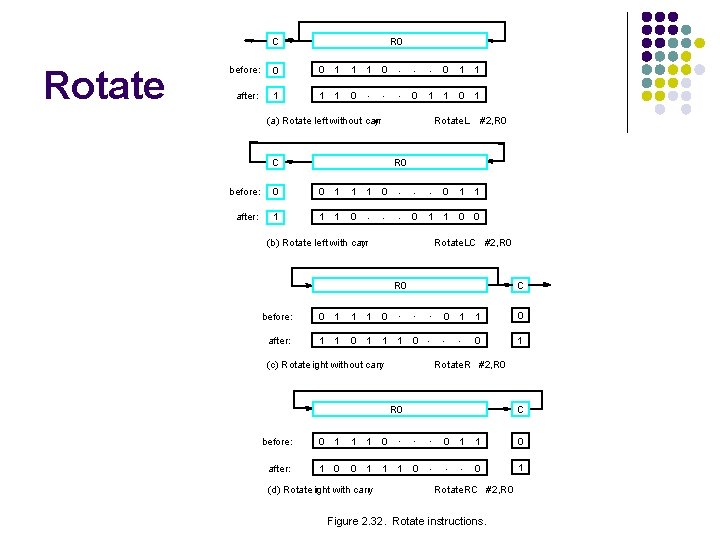
C Rotate R 0 before: 0 0 1 1 1 after: 1 1 1 0 0 . . . 0 0 1 1 0 1 (a) Rotate left without carr y C Rotate. L #2, R 0 before: 0 0 1 1 1 after: 1 1 1 0 0 . . . 0 0 1 1 0 0 (b) Rotate left with carr y Rotate. LC #2, R 0 C . . . before: 0 1 1 1 0 after: 1 1 0 1 1 1 0 0 1 . . . (c) Rotate ight r without carry 1 0 0 1 Rotate. R #2, R 0 . . . before: 0 1 1 1 0 after: 1 0 0 1 1 1 (d) Rotate ight r with carry C 0 0 1 1 0 . . . 0 1 Rotate. RC #2, R 0 Figure 2. 32. Rotate instructions.
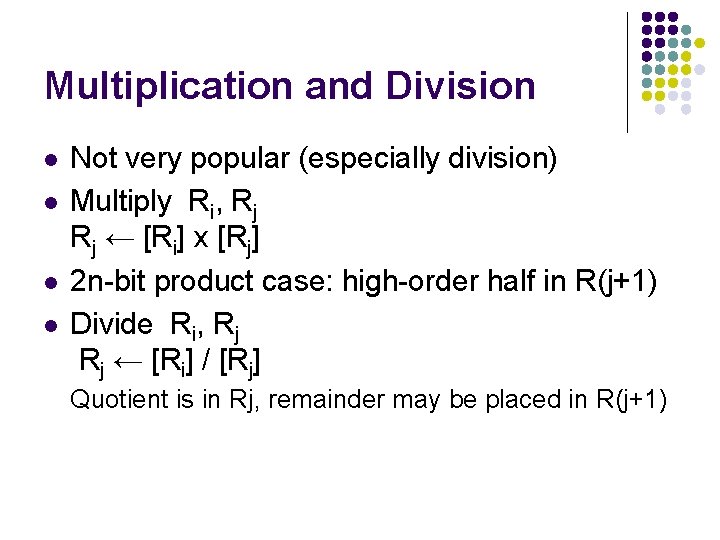
Multiplication and Division l l Not very popular (especially division) Multiply Ri, Rj Rj ← [Ri] х [Rj] 2 n-bit product case: high-order half in R(j+1) Divide Ri, Rj Rj ← [Ri] / [Rj] Quotient is in Rj, remainder may be placed in R(j+1)
Encoding of Machine Instructions
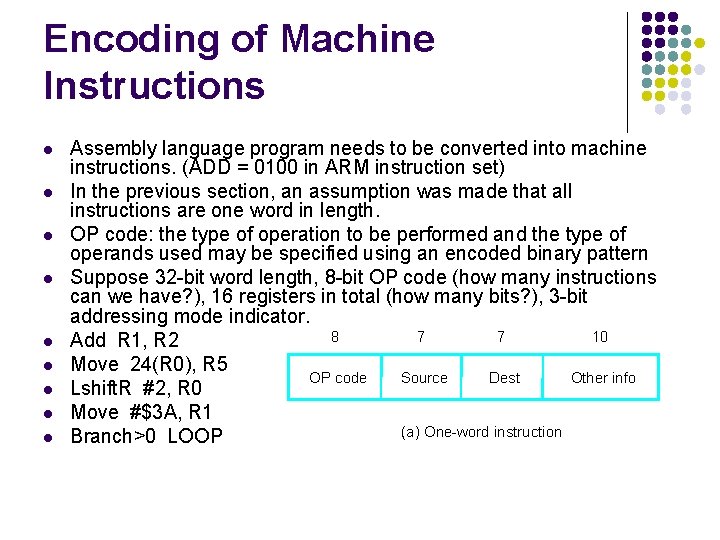
Encoding of Machine Instructions l l l l l Assembly language program needs to be converted into machine instructions. (ADD = 0100 in ARM instruction set) In the previous section, an assumption was made that all instructions are one word in length. OP code: the type of operation to be performed and the type of operands used may be specified using an encoded binary pattern Suppose 32 -bit word length, 8 -bit OP code (how many instructions can we have? ), 16 registers in total (how many bits? ), 3 -bit addressing mode indicator. 8 7 7 10 Add R 1, R 2 Move 24(R 0), R 5 OP code Source Dest Other info Lshift. R #2, R 0 Move #$3 A, R 1 (a) One-word instruction Branch>0 LOOP
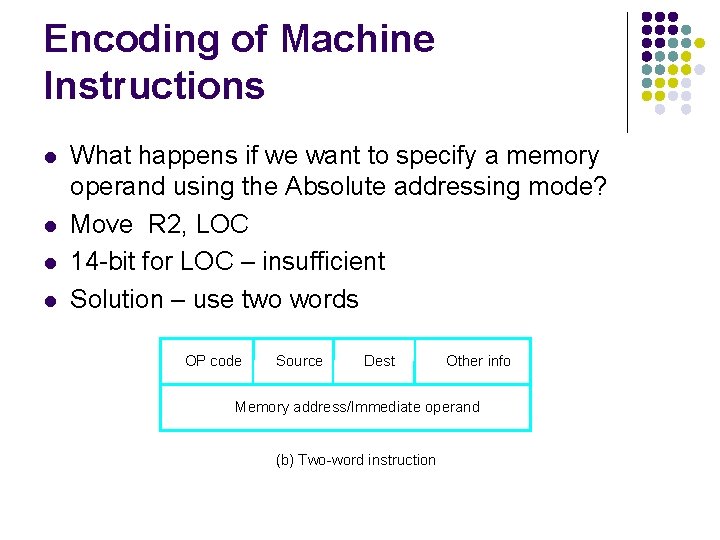
Encoding of Machine Instructions l l What happens if we want to specify a memory operand using the Absolute addressing mode? Move R 2, LOC 14 -bit for LOC – insufficient Solution – use two words OP code Source Dest Other info Memory address/Immediate operand (b) Two-word instruction
Encoding of Machine Instructions l l Then what if an instruction in which two operands can be specified using the Absolute addressing mode? Move LOC 1, LOC 2 Solution – use two additional words This approach results in instructions of variable length. Complex instructions can be implemented, closely resembling operations in high-level programming languages – Complex Instruction Set Computer (CISC)
Encoding of Machine Instructions l l l If we insist that all instructions must fit into a single 32 -bit word, it is not possible to provide a 32 -bit address or a 32 -bit immediate operand within the instruction. It is still possible to define a highly functional instruction set, which makes extensive use of the processor registers. Add R 1, R 2 ----- yes Add LOC, R 2 ----- no Add (R 3), R 2 ----- yes
- Slides: 85