
m SCOA SEGMENTATION and the TESTING OF YOUR
- Slides: 17
m. SCOA SEGMENTATION and the TESTING OF YOUR DATA Presented by: National Treasury
Background • Previously no validation was done with the use of Items to the various cost centres; • Funding for transactions were not clearly defined and mainly combined into one source of funding; • Budgeting on m. SCOA should be at an advanced stage and in the FULL m. SCOA segments. 2
What should we look for • Project segment is directly aligned to the IDP – Capital and Operating; • Function segment implemented fully; • Item segment correctly used, and correctly aligned to the other segments; • Funding segment used at lowest level of the chart; • Region segment utilised and not all done for whole of the municipality; • Costing done at the municipality; • General rules. 3
Rules – Project Segment • Both Capital and Operational projects must be used; • Capital projects can only have Item: Assets; • Operation projects can only have Item: Expenditure; • Default projects are for Revenue and non-cash transactions; • Default projects may NOT have Item: Expenditure and Assets; • Municipal running cost is only for the items required for the organisation to function, and not for any services that the municipality renders; • Typical work streams must be utilised fully in the municipality; • Repairs and Maintenance must be broken down to lowest project; • Travel subsistence must be broken down to individual trips/seminars/workshops; • Revenue forgone and cost of revenue projects must be used; 4
Rules – Function segment • Function segment must be used to the full extend; • Remuneration of Councillors can only be against Function: Mayor and Council; • Items generally specific for one function can only be against that function: • Bulk purchase electricity => Function: Electricity; 5
Rules – Item segment(s) • Salaries for management must be specified as per chart; • Councillors remuneration must be specified as per chart; • Revenue items must be against the relevant Function: • Refuse Removal Fees => Function: Waste; • Travel and Subsistence items must be broken down; • Revenue forgone must have the correct segmentation; 6
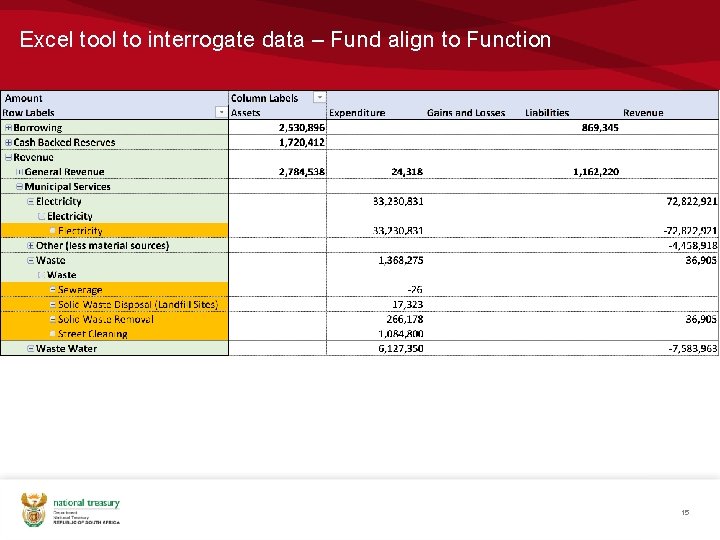
Rules – Fund segment • Services should fund themselves – • Align Funding to the Function segment; • Equitable share must be broken down per item on the posting level; • Grant funding should balance; • Non-funding transactions will be investigated and cannot be used as default 7
Rules – Region segment • Correct use of Region for the specific municipality; • Use of head office and whole of municipality inline with actual expenditure; • Revenue per ward; • Capital projects per ward. 8
Rules – Costing segment • Costing segment must be used – other than Default; • Default Costing may NOT have default expenditure or revenue; • Charges and Recoveries should balance. 9
Rules – General • Posting level; • Use of all six segments; • Projects must contain the GUID extensions; • Trial balance must balance; • BS and I&E must balance; • Budgeting must be on BS accounts; 10
Excel tool to interrogate data - How • Text file containing the m. SCOA chart • Text file submitted to the LG Upload Portal – TABB or ORGB • Create pivot tables to extract relevant information 11
Excel tool to interrogate data 12
Excel tool to interrogate data – Project and Functions with Items 13
Excel tool to interrogate data –Function 14
Excel tool to interrogate data – Fund align to Function 15
Excel tool to interrogate data – Costing with Items 16
THANK YOU