
Logic and Computer Design Fundamentals Chapter 9 Computer
![Encoding for Datapath Control DX AX BX Code MB R[DR] R[SA] R[SB] 0 XXX](https://slidetodoc.com/presentation_image/e5d5d9186d2fd9bd511d1e3aeac41de8/image-73.jpg "Encoding for Datapath Control DX AX BX Code MB R[DR] R[SA] R[SB] 0 XXX")
- Slides: 83
Logic and Computer Design Fundamentals Chapter 9 – Computer Design Basics Part 1 – Datapaths Charles Kime & Thomas Kaminski © 2008 Pearson Education, Inc. (Hyperlinks are active in View Show mode)
Overview § Part 1 – Datapaths • • • Introduction Datapath Example Arithmetic Logic Unit (ALU) Shifter Datapath Representation and Control Word § Part 2 – A Simple Computer § Part 3 – Multiple Cycle Hardwired Control Chapter 9 Part 1 2
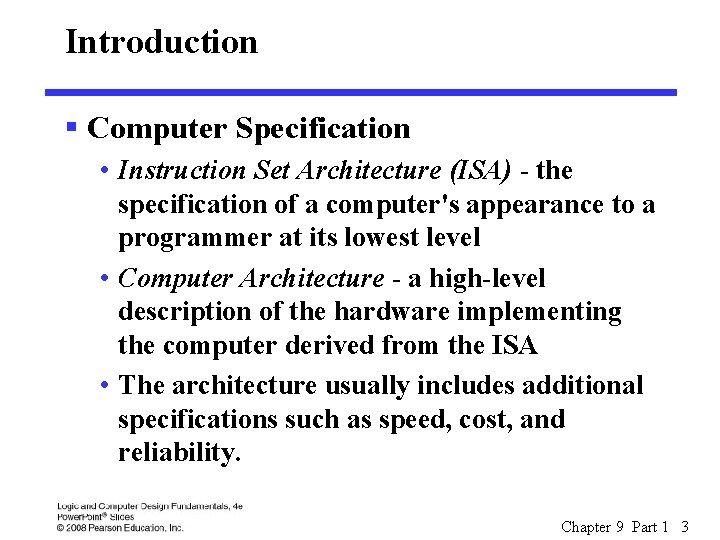
Introduction § Computer Specification • Instruction Set Architecture (ISA) - the specification of a computer's appearance to a programmer at its lowest level • Computer Architecture - a high-level description of the hardware implementing the computer derived from the ISA • The architecture usually includes additional specifications such as speed, cost, and reliability. Chapter 9 Part 1 3
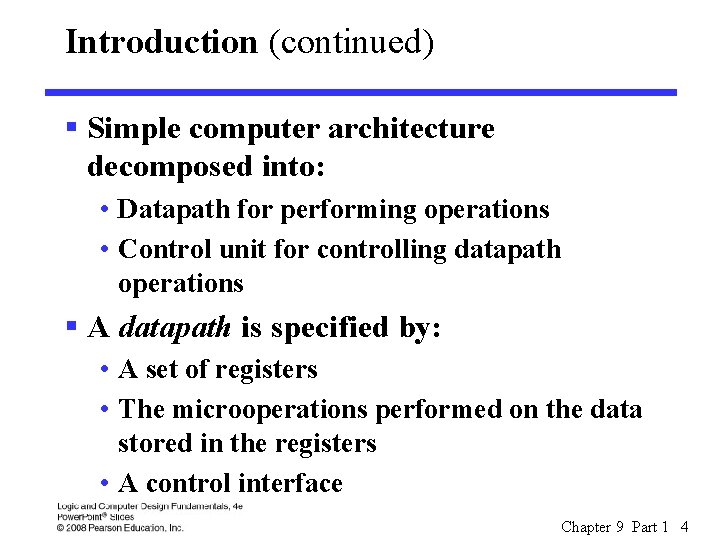
Introduction (continued) § Simple computer architecture decomposed into: • Datapath for performing operations • Control unit for controlling datapath operations § A datapath is specified by: • A set of registers • The microoperations performed on the data stored in the registers • A control interface Chapter 9 Part 1 4
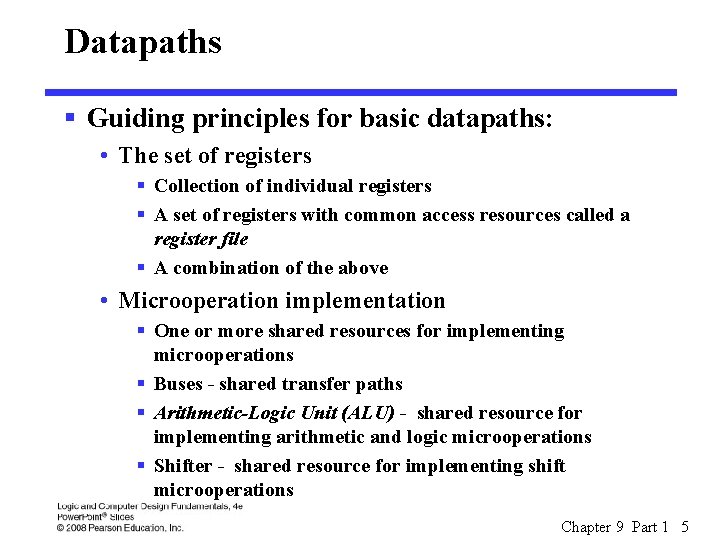
Datapaths § Guiding principles for basic datapaths: • The set of registers § Collection of individual registers § A set of registers with common access resources called a register file § A combination of the above • Microoperation implementation § One or more shared resources for implementing microoperations § Buses - shared transfer paths § Arithmetic-Logic Unit (ALU) - shared resource for implementing arithmetic and logic microoperations § Shifter - shared resource for implementing shift microoperations Chapter 9 Part 1 5
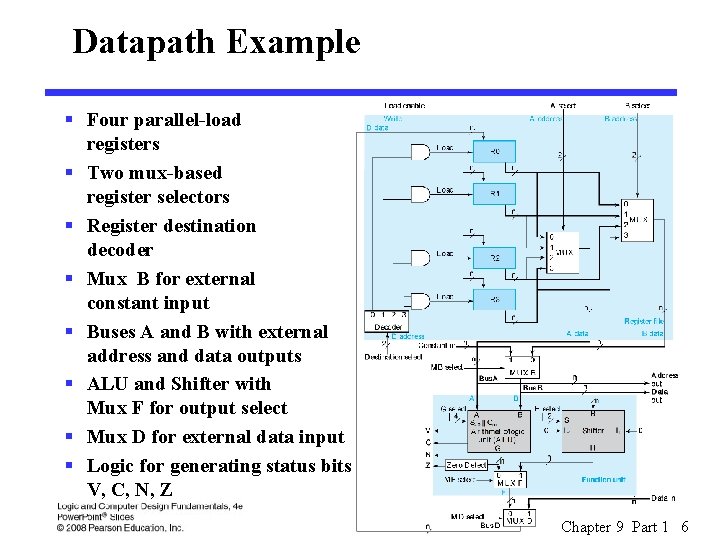
Datapath Example § Four parallel-load registers § Two mux-based register selectors § Register destination decoder § Mux B for external constant input § Buses A and B with external address and data outputs § ALU and Shifter with Mux F for output select § Mux D for external data input § Logic for generating status bits V, C, N, Z Chapter 9 Part 1 6
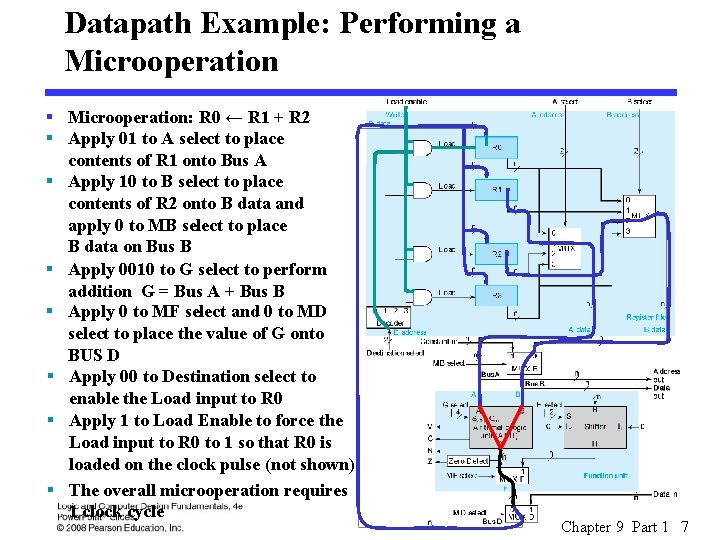
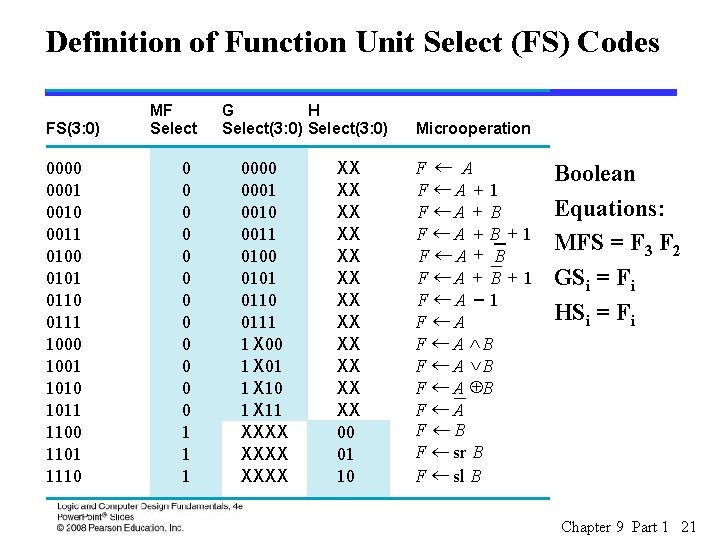
Datapath Example: Performing a Microoperation § Microoperation: R 0 ← R 1 + R 2 § Apply 01 to A select to place contents of R 1 onto Bus A § Apply 10 to B select to place contents of R 2 onto B data and apply 0 to MB select to place B data on Bus B § Apply 0010 to G select to perform addition G = Bus A + Bus B § Apply 0 to MF select and 0 to MD select to place the value of G onto BUS D § Apply 00 to Destination select to enable the Load input to R 0 § Apply 1 to Load Enable to force the Load input to R 0 to 1 so that R 0 is loaded on the clock pulse (not shown) § The overall microoperation requires 1 clock cycle Chapter 9 Part 1 7
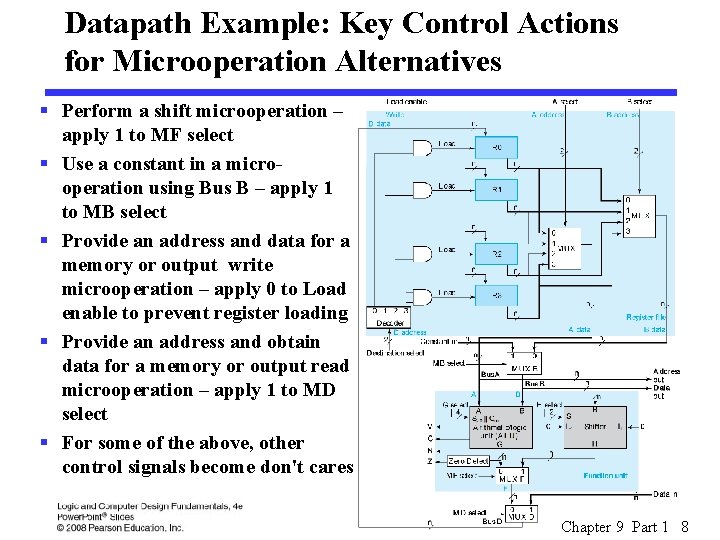
Datapath Example: Key Control Actions for Microoperation Alternatives § Perform a shift microoperation – apply 1 to MF select § Use a constant in a microoperation using Bus B – apply 1 to MB select § Provide an address and data for a memory or output write microoperation – apply 0 to Load enable to prevent register loading § Provide an address and obtain data for a memory or output read microoperation – apply 1 to MD select § For some of the above, other control signals become don't cares Chapter 9 Part 1 8
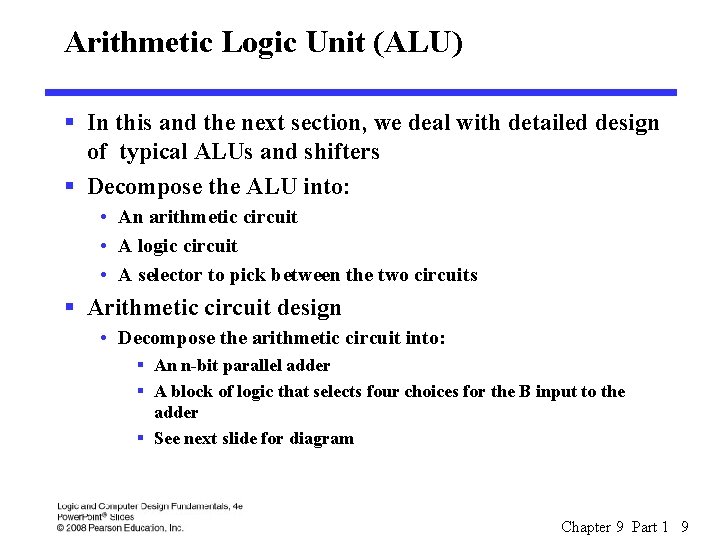
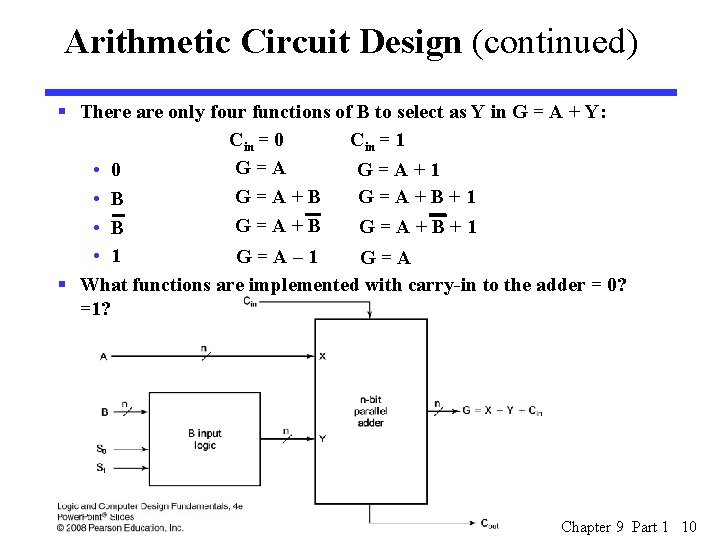
Arithmetic Logic Unit (ALU) § In this and the next section, we deal with detailed design of typical ALUs and shifters § Decompose the ALU into: • An arithmetic circuit • A logic circuit • A selector to pick between the two circuits § Arithmetic circuit design • Decompose the arithmetic circuit into: § An n-bit parallel adder § A block of logic that selects four choices for the B input to the adder § See next slide for diagram Chapter 9 Part 1 9
Arithmetic Circuit Design (continued) § There are only four functions of B to select as Y in G = A + Y: Cin = 0 Cin = 1 G=A+1 • 0 G=A+B+1 • B • 1 G=A– 1 G=A § What functions are implemented with carry-in to the adder = 0? =1? Chapter 9 Part 1 10
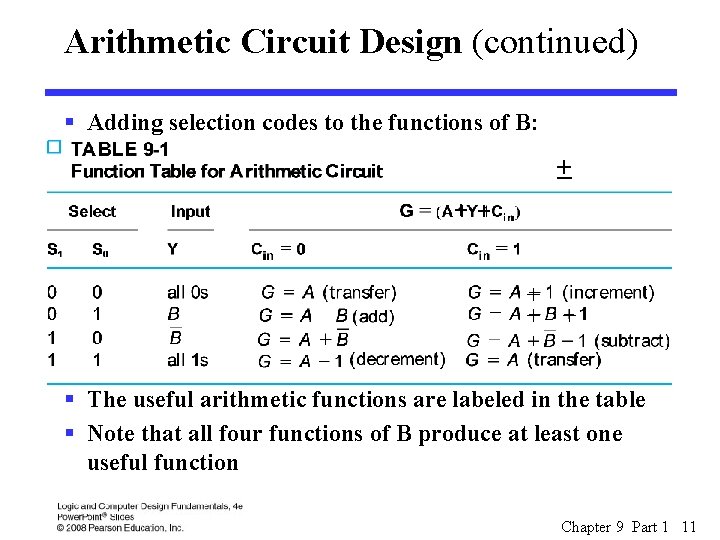
Arithmetic Circuit Design (continued) § Adding selection codes to the functions of B: + ++ + § The useful arithmetic functions are labeled in the table § Note that all four functions of B produce at least one useful function Chapter 9 Part 1 11
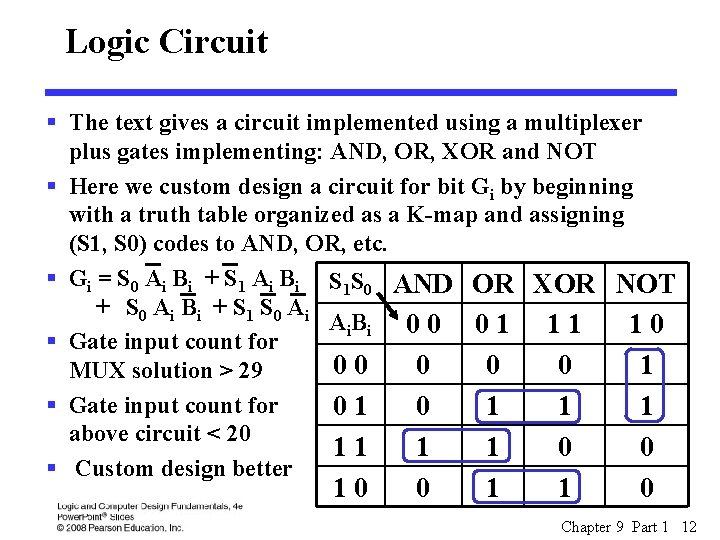
Logic Circuit § The text gives a circuit implemented using a multiplexer plus gates implementing: AND, OR, XOR and NOT § Here we custom design a circuit for bit Gi by beginning with a truth table organized as a K-map and assigning (S 1, S 0) codes to AND, OR, etc. § Gi = S 0 Ai Bi + S 1 Ai Bi S 1 S 0 AND OR XOR NOT + S 0 Ai B i + S 1 S 0 Ai Ai B i 0 0 0 1 11 10 § Gate input count for 00 0 1 MUX solution > 29 § Gate input count for 01 0 1 1 1 above circuit < 20 11 1 1 0 0 § Custom design better 10 0 1 1 0 Chapter 9 Part 1 12
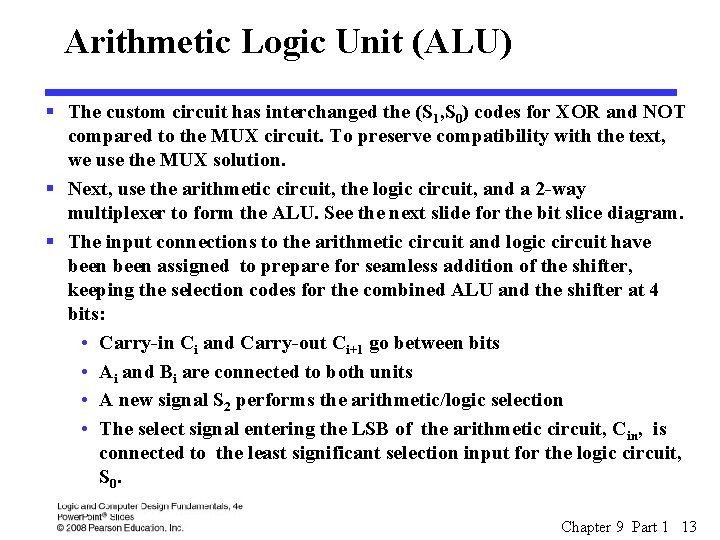
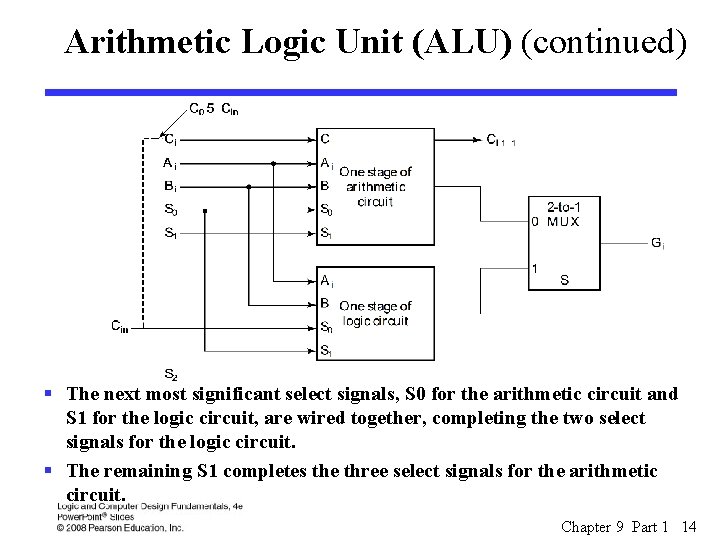
Arithmetic Logic Unit (ALU) § The custom circuit has interchanged the (S 1, S 0) codes for XOR and NOT compared to the MUX circuit. To preserve compatibility with the text, we use the MUX solution. § Next, use the arithmetic circuit, the logic circuit, and a 2 -way multiplexer to form the ALU. See the next slide for the bit slice diagram. § The input connections to the arithmetic circuit and logic circuit have been assigned to prepare for seamless addition of the shifter, keeping the selection codes for the combined ALU and the shifter at 4 bits: • Carry-in Ci and Carry-out Ci+1 go between bits • Ai and Bi are connected to both units • A new signal S 2 performs the arithmetic/logic selection • The select signal entering the LSB of the arithmetic circuit, Cin, is connected to the least significant selection input for the logic circuit, S 0. Chapter 9 Part 1 13
Arithmetic Logic Unit (ALU) (continued) § The next most significant select signals, S 0 for the arithmetic circuit and S 1 for the logic circuit, are wired together, completing the two select signals for the logic circuit. § The remaining S 1 completes the three select signals for the arithmetic circuit. Chapter 9 Part 1 14
Combinational Shifter Parameters § Direction: Left, Right § Number of positions with examples: • Single bit: § 1 position § 0 and 1 positions • Multiple bit: § 1 to n – 1 positions § 0 to n – 1 positions § Filling of vacant positions • Many options depending on instruction set • Here, will provide input lines or zero fill Chapter 9 Part 1 15
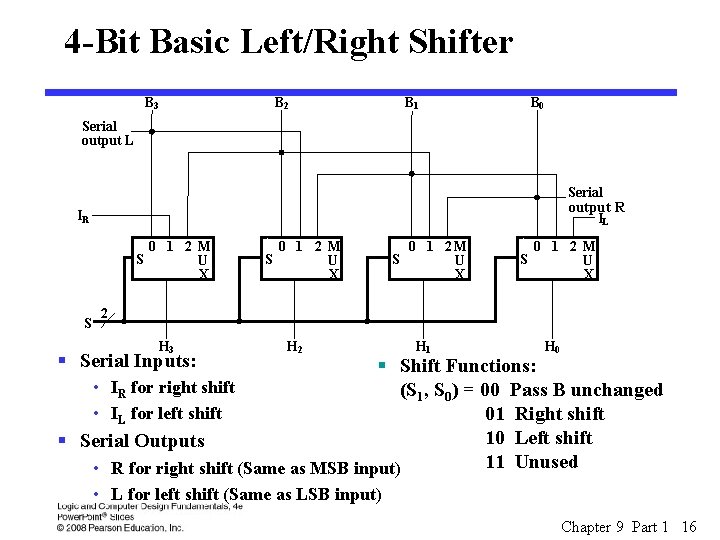
4 -Bit Basic Left/Right Shifter B 3 B 2 B 1 B 0 Serial output L Serial output R IL IR S S 0 1 2 M U X S 0 1 2 M U X 2 H 3 § Serial Inputs: H 2 H 1 H 0 § Shift Functions: • IR for right shift (S 1, S 0) = 00 Pass B unchanged • IL for left shift 01 Right shift 10 Left shift § Serial Outputs 11 Unused • R for right shift (Same as MSB input) • L for left shift (Same as LSB input) Chapter 9 Part 1 16
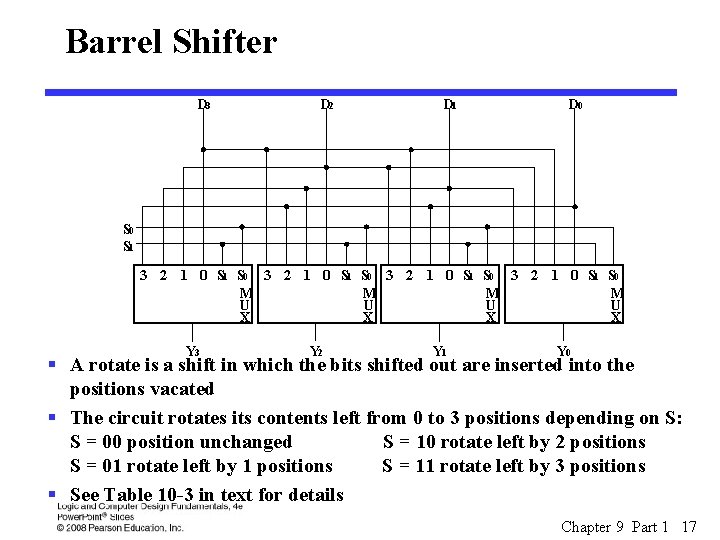
Barrel Shifter D 3 D 2 D 1 D 0 S 1 3 2 1 0 S 1 S 0 M M U U X X Y 3 Y 2 Y 1 Y 0 § A rotate is a shift in which the bits shifted out are inserted into the positions vacated § The circuit rotates its contents left from 0 to 3 positions depending on S: S = 00 position unchanged S = 10 rotate left by 2 positions S = 01 rotate left by 1 positions S = 11 rotate left by 3 positions § See Table 10 -3 in text for details Chapter 9 Part 1 17
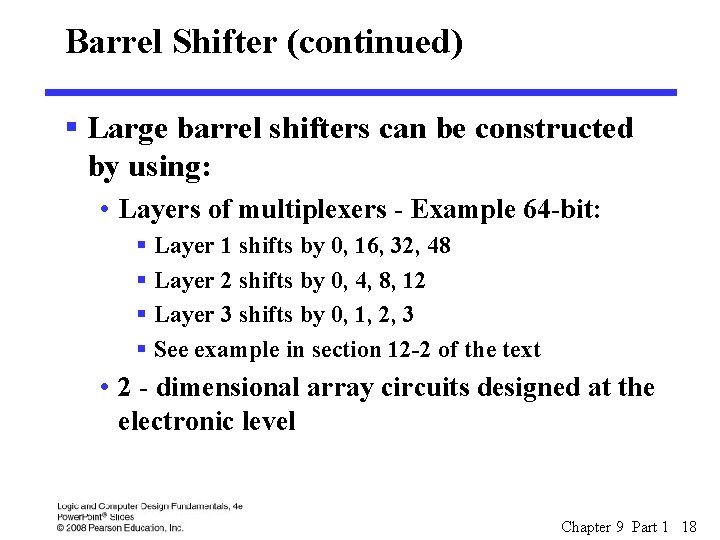
Barrel Shifter (continued) § Large barrel shifters can be constructed by using: • Layers of multiplexers - Example 64 -bit: § Layer 1 shifts by 0, 16, 32, 48 § Layer 2 shifts by 0, 4, 8, 12 § Layer 3 shifts by 0, 1, 2, 3 § See example in section 12 -2 of the text • 2 - dimensional array circuits designed at the electronic level Chapter 9 Part 1 18
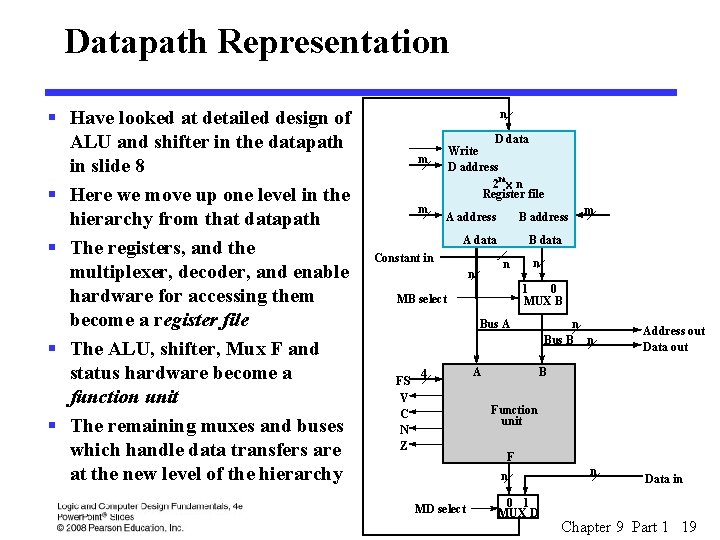
Datapath Representation § Have looked at detailed design of ALU and shifter in the datapath in slide 8 § Here we move up one level in the hierarchy from that datapath § The registers, and the multiplexer, decoder, and enable hardware for accessing them become a register file § The ALU, shifter, Mux F and status hardware become a function unit § The remaining muxes and buses which handle data transfers are at the new level of the hierarchy n D data Write D address 2 mx n Register file m m A address B address A data Constant in B data n n n 1 0 MUX B MB select Bus A FS V C N Z 4 m A n Bus B n Address out Data out B Function unit F n MD select 0 1 MUX D n Data in Chapter 9 Part 1 19
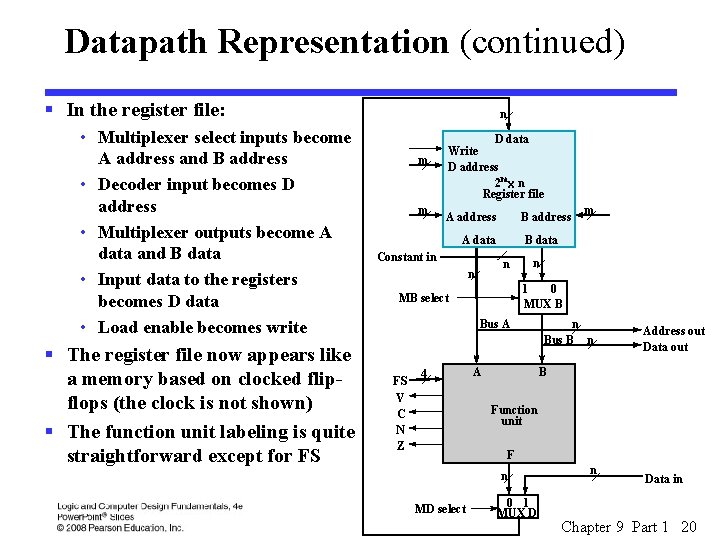
Datapath Representation (continued) § In the register file: • Multiplexer select inputs become A address and B address • Decoder input becomes D address • Multiplexer outputs become A data and B data • Input data to the registers becomes D data • Load enable becomes write § The register file now appears like a memory based on clocked flipflops (the clock is not shown) § The function unit labeling is quite straightforward except for FS n m m D data Write D address 2 mx n Register file A address B address A data Constant in B data n n n 1 0 MUX B MB select Bus A FS V C N Z 4 m A n Bus B n Address out Data out B Function unit F n MD select 0 1 MUX D n Data in Chapter 9 Part 1 20
Definition of Function Unit Select (FS) Codes and MF G Select, H Select, in T FS(3: 0) 0000 0001 0010 0011 0100 0101 0110 0111 1000 1001 1010 1011 1100 1101 1110 of FS Codes MF Select 0 0 0 1 1 1 G H Select(3: 0) 0000 0001 0010 0011 0100 0101 0110 0111 1 X 00 1 X 01 1 X 10 1 X 11 XXXX XX XX XX 00 01 10 Microoperation F ¬ A F ¬A + 1 F ¬A + B + 1 F ¬A - 1 F ¬A F ¬ A ÙB F ¬ A ÚB F ¬ A ÅB F ¬A F ¬B F ¬ sr B F ¬ sl B Boolean Equations: MFS = F 3 F 2 GSi = Fi HSi = Fi Chapter 9 Part 1 21
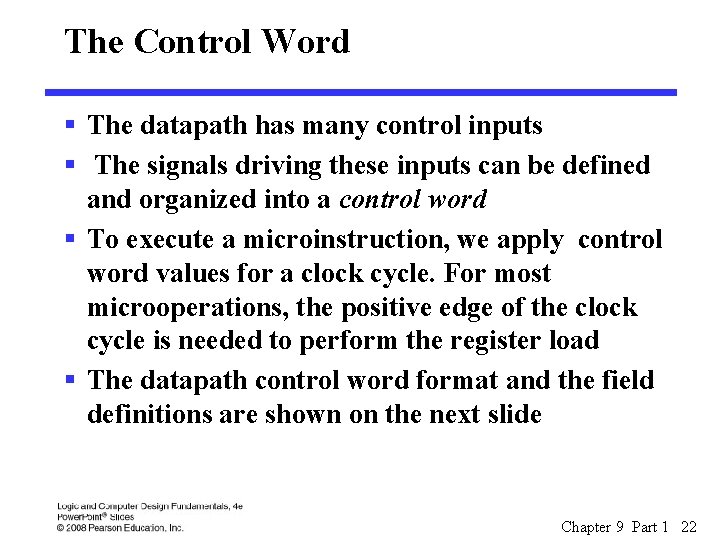
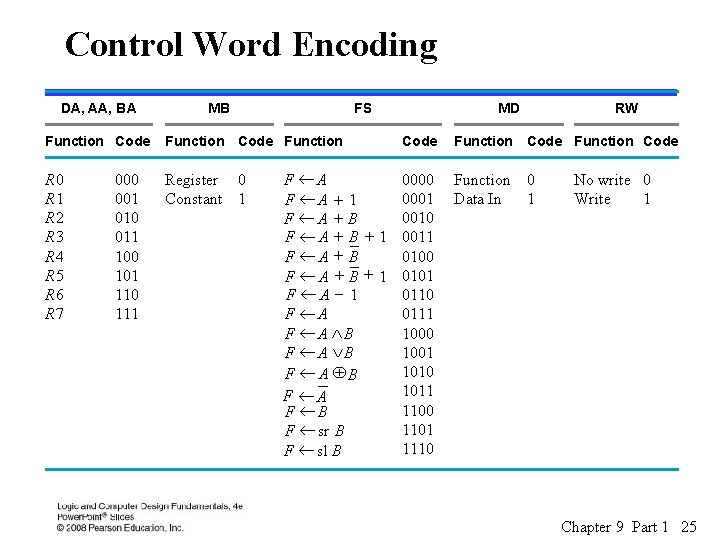
The Control Word § The datapath has many control inputs § The signals driving these inputs can be defined and organized into a control word § To execute a microinstruction, we apply control word values for a clock cycle. For most microoperations, the positive edge of the clock cycle is needed to perform the register load § The datapath control word format and the field definitions are shown on the next slide Chapter 9 Part 1 22
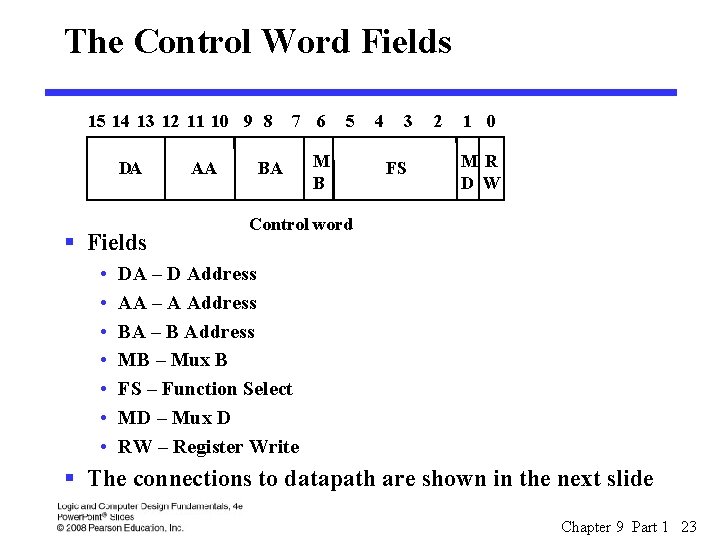
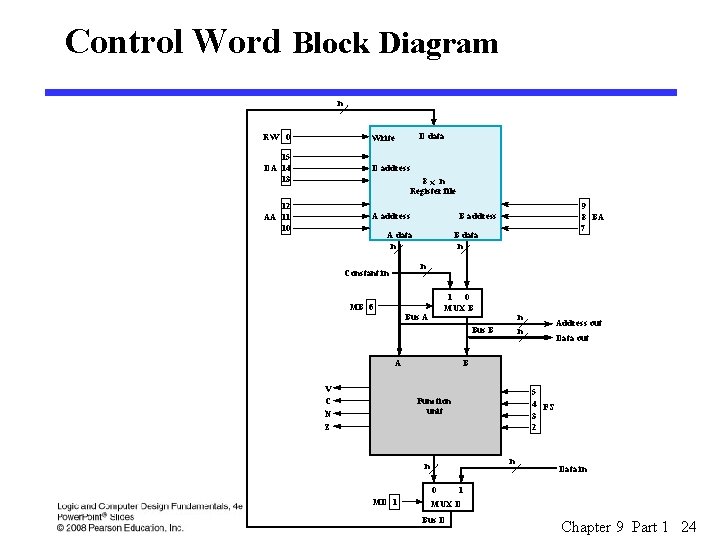
The Control Word Fields 15 14 13 12 11 10 9 8 DA § Fields • • AA 7 6 BA 5 M B 4 3 FS 2 1 0 MR D W Control word DA – D Address AA – A Address BA – B Address MB – Mux B FS – Function Select MD – Mux D RW – Register Write § The connections to datapath are shown in the next slide Chapter 9 Part 1 23
Control Word Block Diagram n D data RW 0 Write 15 DA 14 13 D address 12 AA 11 10 A address 8 x n Register file 9 8 BA 7 B address A data n B data n n Constant in MB 6 1 0 MUX B Bus A n n Bus B A V C N Z Data out B 5 4 FS 3 2 Function unit n n 0 MD 1 Address out Data in 1 MUX D Bus D Chapter 9 Part 1 24
Control Word Encoding of Control W DA, AA, BA MB FS Function Code Function R 0 R 1 R 2 R 3 R 4 R 5 R 6 R 7 Register 0 Constant 1 000 001 010 011 100 101 110 111 MD Code F ¬A 0000 0001 F ¬A + 1 0010 F ¬A + B F ¬ A + B + 1 0011 F ¬A + B 0100 F ¬ A + B + 1 0101 F ¬A - 1 0110 F ¬A 0111 F ¬ A ÙB 1000 F ¬ A ÚB 1001 1010 F ¬A ÅB 1011 F ¬A 1100 F ¬B 1101 F ¬ sr B 1110 F ¬ sl B RW Function Code Function 0 Data In 1 No write 0 Write 1 Chapter 9 Part 1 25
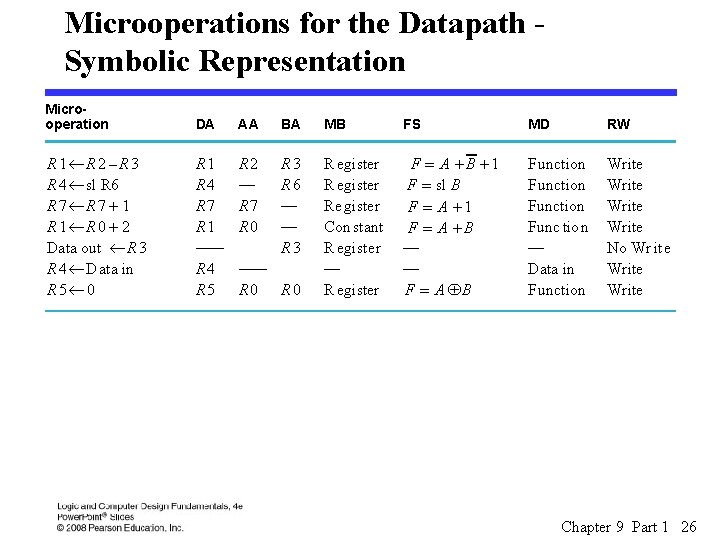
Microoperations for the Datapath Symbolic Representation Microoperation DA AA BA MB FS MD RW R 1¬R 2 –R 3 R 4 ¬ sl R 6 R 7¬R 7 + 1 R 1¬R 0 + 2 Data out ¬ R 3 R 4 ¬ Data in R 5¬ 0 R 1 R 4 R 7 R 1 —— R 4 R 5 R 2 — R 7 R 0 R 3 R 6 — — R 3 Register Re gister Con stant Register — Register F = A +B +1 F = sl B F = A +1 F = A +B — — F = A ÅB Function Func tion — Data in Function Write No Wr ite Write —— R 0 Chapter 9 Part 1 26
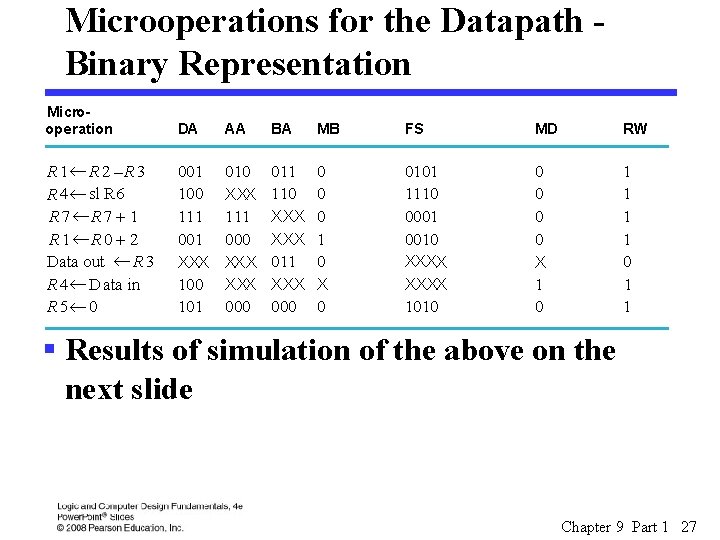
Microoperations for the Datapath Binary Representation m Microoperations from Ta Binary Co o Microoperation DA AA BA MB FS MD RW R 1¬R 2 –R 3 R 4 ¬ sl R 6 R 7¬R 7 + 1 R 1¬R 0 + 2 Data out ¬ R 3 R 4 ¬ D ata in R 5¬ 0 001 100 111 001 XXX 100 101 010 XXX 111 000 XXX 000 011 110 XXX 011 XXX 000 0 1 0 X 0 0101 1110 0001 0010 0 0 X 1 0 1 1 XXXX 1010 § Results of simulation of the above on the next slide Chapter 9 Part 1 27
Datapath Simulation Chapter 9 Part 1 28
Logic and Computer Design Fundamentals Chapter 9 – Computer Design Basics Part 1 – Datapaths Charles Kime & Thomas Kaminski © 2008 Pearson Education, Inc. (Hyperlinks are active in View Show mode)
Overview § Part 1 – Datapaths § Part 2 – A Simple Computer • Instruction Set Architecture (ISA) • Single-Cycle Hardwired Control § PC Function § Instruction Decoder § Example Instruction Execution § Part 3 – Multiple Cycle Hardwired Control Chapter 9 Part 2 30
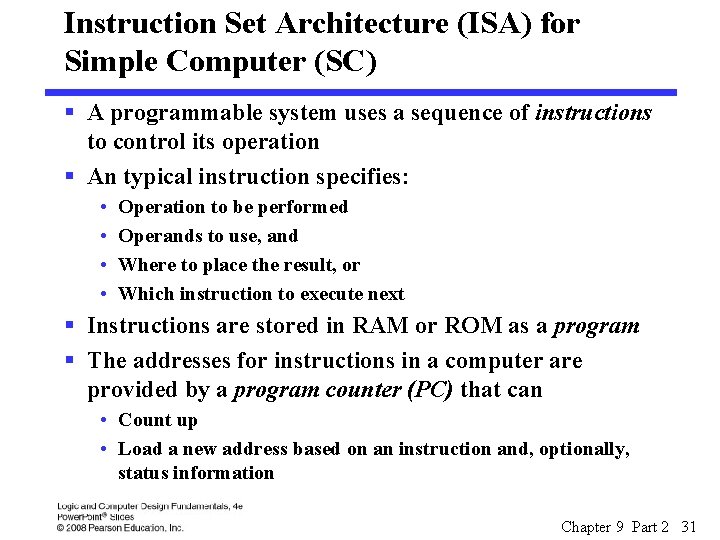
Instruction Set Architecture (ISA) for Simple Computer (SC) § A programmable system uses a sequence of instructions to control its operation § An typical instruction specifies: • • Operation to be performed Operands to use, and Where to place the result, or Which instruction to execute next § Instructions are stored in RAM or ROM as a program § The addresses for instructions in a computer are provided by a program counter (PC) that can • Count up • Load a new address based on an instruction and, optionally, status information Chapter 9 Part 2 31
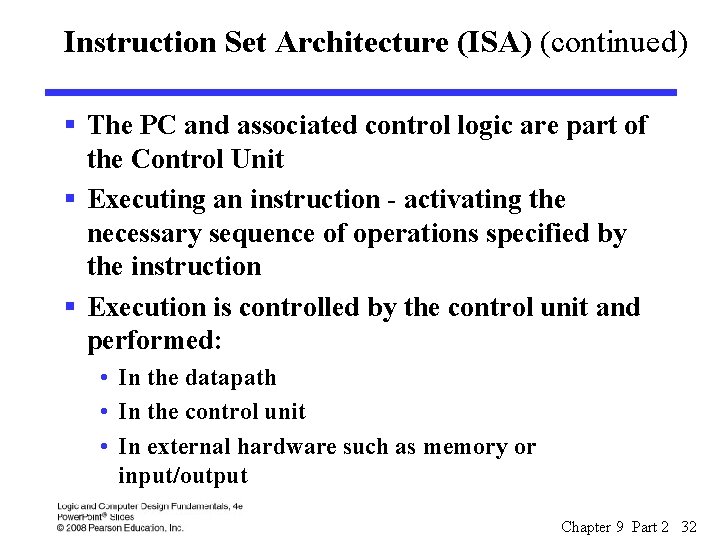
Instruction Set Architecture (ISA) (continued) § The PC and associated control logic are part of the Control Unit § Executing an instruction - activating the necessary sequence of operations specified by the instruction § Execution is controlled by the control unit and performed: • In the datapath • In the control unit • In external hardware such as memory or input/output Chapter 9 Part 2 32
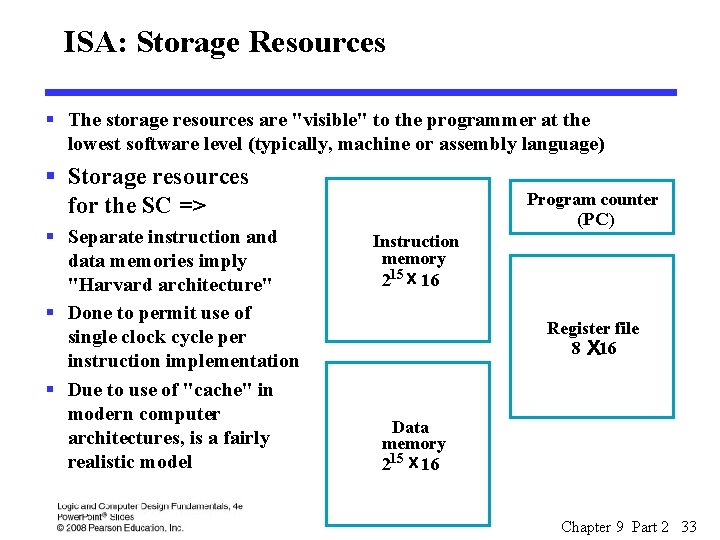
ISA: Storage Resources § The storage resources are "visible" to the programmer at the lowest software level (typically, machine or assembly language) § Storage resources for the SC => § Separate instruction and data memories imply "Harvard architecture" § Done to permit use of single clock cycle per instruction implementation § Due to use of "cache" in modern computer architectures, is a fairly realistic model Program counter (PC) Instruction memory 215 x 16 Register file 8 x 16 Data memory 215 x 16 Chapter 9 Part 2 33
ISA: Instruction Format § A instruction consists of a bit vector § The fields of an instruction are subvectors representing specific functions and having specific binary codes defined § The format of an instruction defines the subvectors and their function § An ISA usually contains multiple formats § The SC ISA contains the three formats presented on the next slide Chapter 9 Part 2 34
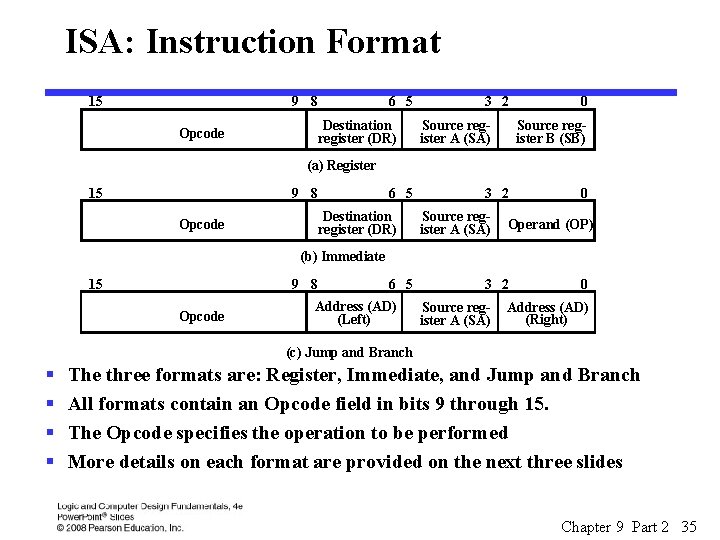
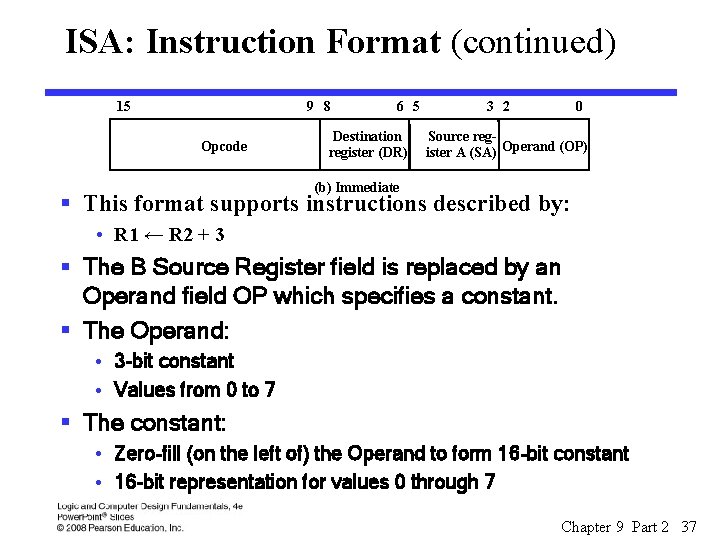
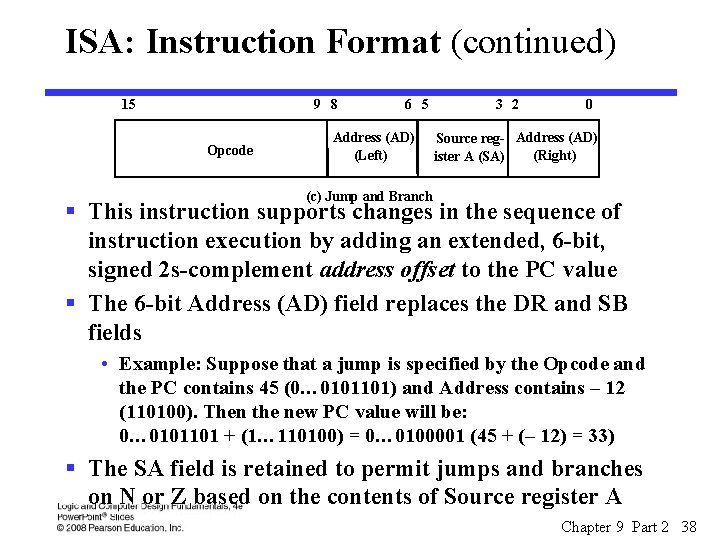
ISA: Instruction Format 15 9 8 6 5 Destination register (DR) Opcode 3 2 Source register A (SA) 0 Source register B (SB) (a) Register 15 9 8 6 5 Destination register (DR) Opcode 3 2 Source register A (SA) 0 Operand (OP) (b) Immediate 15 9 8 Opcode 6 5 Address (AD) (Left) 3 2 Source register A (SA) 0 Address (AD) (Right) (c) Jump and Branch § § The three formats are: Register, Immediate, and Jump and Branch All formats contain an Opcode field in bits 9 through 15. The Opcode specifies the operation to be performed More details on each format are provided on the next three slides Chapter 9 Part 2 35
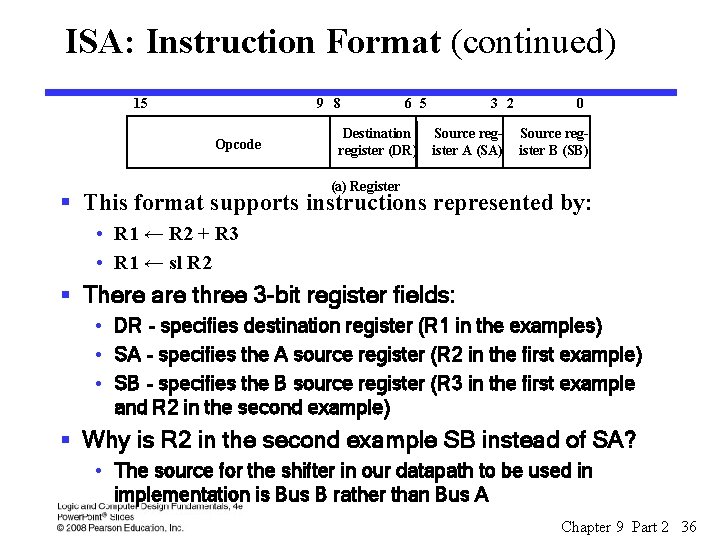
ISA: Instruction Format (continued) 15 9 8 Opcode 6 5 Destination register (DR) 3 2 Source register A (SA) 0 Source register B (SB) (a) Register § This format supports instructions represented by: • R 1 ← R 2 + R 3 • R 1 ← sl R 2 § There are three 3 -bit register fields: • DR - specifies destination register (R 1 in the examples) • SA - specifies the A source register (R 2 in the first example) • SB - specifies the B source register (R 3 in the first example and R 2 in the second example) § Why is R 2 in the second example SB instead of SA? • The source for the shifter in our datapath to be used in implementation is Bus B rather than Bus A Chapter 9 Part 2 36
ISA: Instruction Format (continued) 15 9 8 Opcode 6 5 Destination register (DR) 3 2 0 Source register A (SA) Operand (OP) (b) Immediate § This format supports instructions described by: • R 1 ← R 2 + 3 § The B Source Register field is replaced by an Operand field OP which specifies a constant. § The Operand: • 3 -bit constant • Values from 0 to 7 § The constant: • Zero-fill (on the left of) the Operand to form 16 -bit constant • 16 -bit representation for values 0 through 7 Chapter 9 Part 2 37
ISA: Instruction Format (continued) 15 9 8 Opcode 6 5 Address (AD) (Left) 3 2 0 Source reg- Address (AD) (Right) ister A (SA) (c) Jump and Branch § This instruction supports changes in the sequence of instruction execution by adding an extended, 6 -bit, signed 2 s-complement address offset to the PC value § The 6 -bit Address (AD) field replaces the DR and SB fields • Example: Suppose that a jump is specified by the Opcode and the PC contains 45 (0… 0101101) and Address contains – 12 (110100). Then the new PC value will be: 0… 0101101 + (1… 110100) = 0… 0100001 (45 + (– 12) = 33) § The SA field is retained to permit jumps and branches on N or Z based on the contents of Source register A Chapter 9 Part 2 38
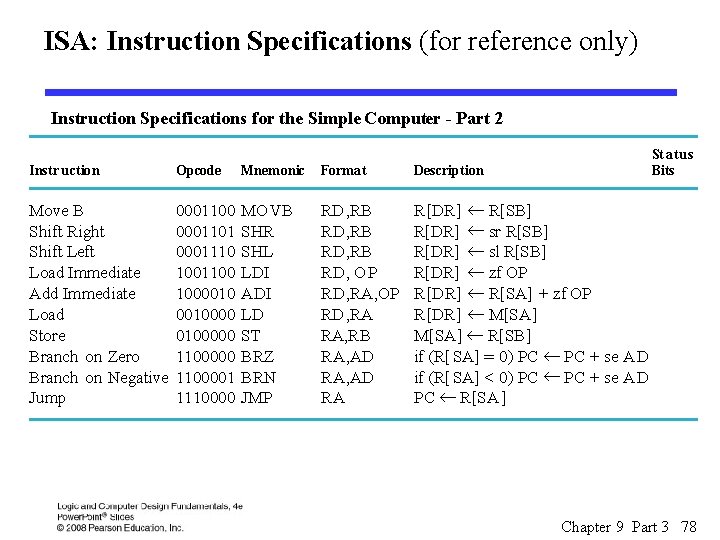
ISA: Instruction Specifications § The specifications provide: • The name of the instruction • The instruction's opcode • A shorthand name for the opcode called a mnemonic • A specification for the instruction format • A register transfer description of the instruction, and • A listing of the status bits that are meaningful during an instruction's execution (not used in the architectures defined in this chapter) Chapter 9 Part 2 39
ISA: Instruction Specifications (continued) Chapter 9 Part 2 40
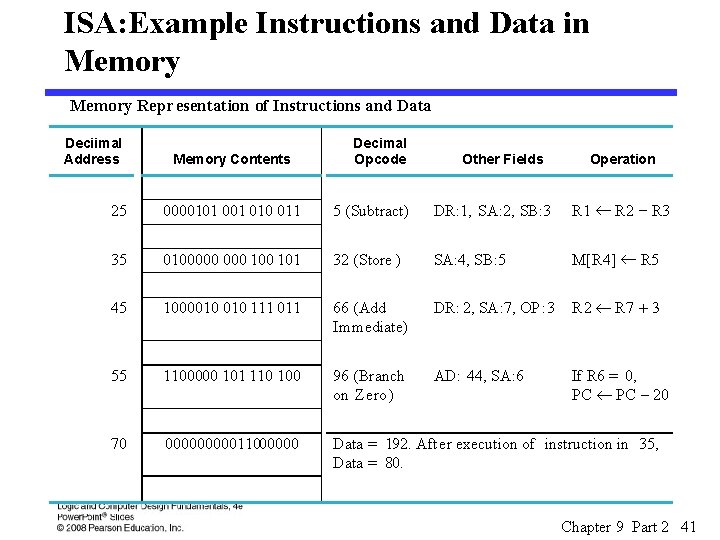
ISA: Example Instructions and Data in Memory Repr esentation of Instructions and Data Deciimal Address Memory Contents Decimal Opcode Other Fields Operation 25 0000101 010 011 5 (Subtract) DR: 1, SA: 2, SB: 3 R 1 ¬ R 2 - R 3 35 0100000 100 101 32 (Store ) SA: 4, SB: 5 M[R 4] ¬ R 5 45 1000010 111 011 66 (Add Immediate) DR: 2, SA: 7, OP : 3 R 2 ¬ R 7 + 3 55 1100000 101 110 100 96 (Branch on Zero) AD: 44, SA: 6 If R 6 = 0, PC ¬ PC - 20 70 0000011000000 Data = 192. After execution of instruction in 35, Data = 80. Chapter 9 Part 2 41
Single-Cycle Hardwired Control § Based on the ISA defined, design a computer architecture to support the ISA § The architecture is to fetch and execute each instruction in a single clock cycle § The datapath from Figure 10 -11 will be used § The control unit will be defined as a part of the design § The block diagram is shown on the next slide Chapter 9 Part 2 42
Chapter 9 Part 2 43
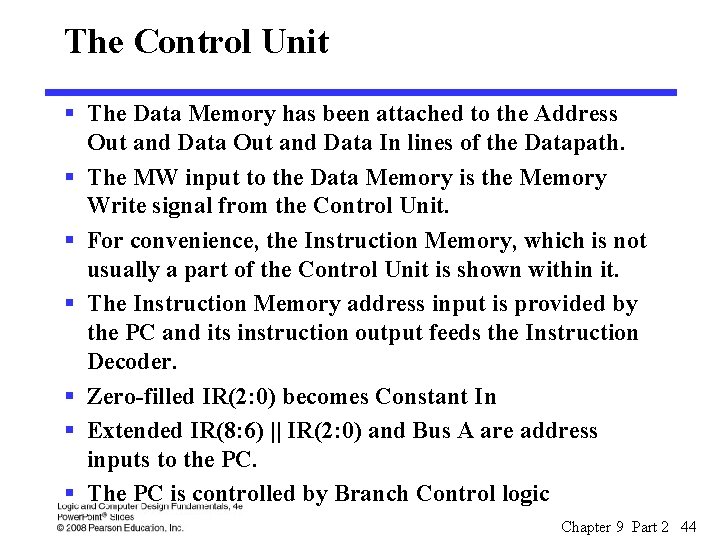
The Control Unit § The Data Memory has been attached to the Address Out and Data In lines of the Datapath. § The MW input to the Data Memory is the Memory Write signal from the Control Unit. § For convenience, the Instruction Memory, which is not usually a part of the Control Unit is shown within it. § The Instruction Memory address input is provided by the PC and its instruction output feeds the Instruction Decoder. § Zero-filled IR(2: 0) becomes Constant In § Extended IR(8: 6) || IR(2: 0) and Bus A are address inputs to the PC. § The PC is controlled by Branch Control logic Chapter 9 Part 2 44
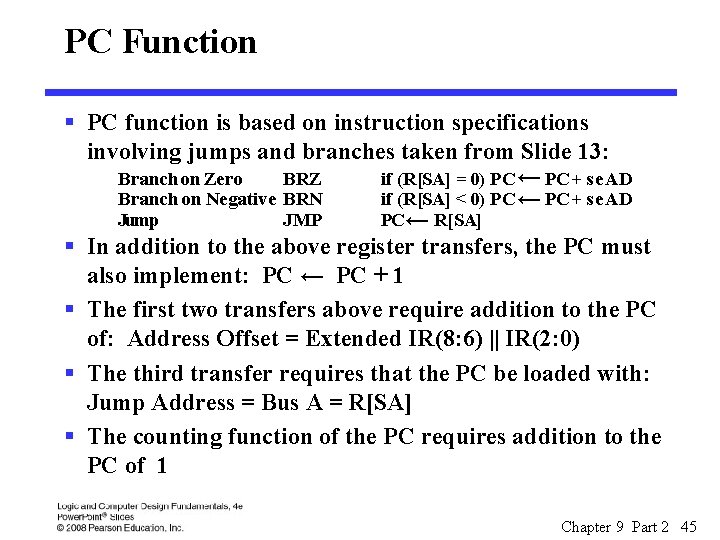
PC Function § PC function is based on instruction specifications involving jumps and branches taken from Slide 13: Branch on Zero BRZ if (R[SA] = 0) PC ← PC + se AD Branch on Negative BRN if (R[SA] < 0) PC ← PC + se AD Jump JMP PC ← R[SA] § In addition to the above register transfers, the PC must also implement: PC ← PC + 1 § The first two transfers above require addition to the PC of: Address Offset = Extended IR(8: 6) || IR(2: 0) § The third transfer requires that the PC be loaded with: Jump Address = Bus A = R[SA] § The counting function of the PC requires addition to the PC of 1 Chapter 9 Part 2 45
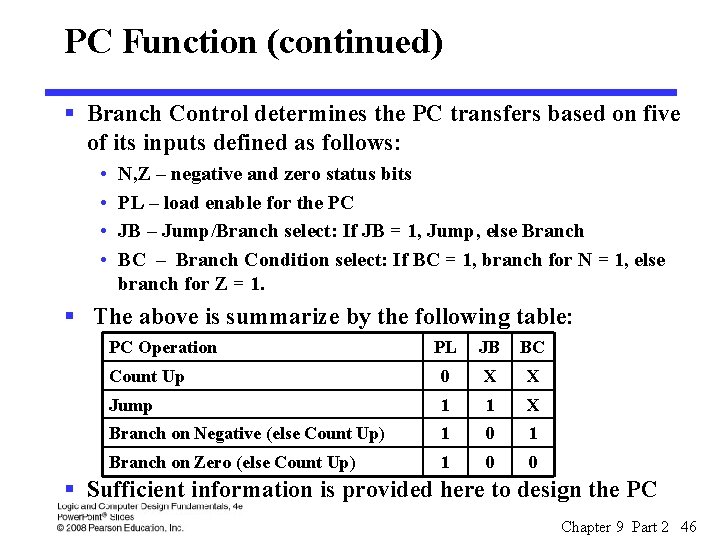
PC Function (continued) § Branch Control determines the PC transfers based on five of its inputs defined as follows: • • N, Z – negative and zero status bits PL – load enable for the PC JB – Jump/Branch select: If JB = 1, Jump, else Branch BC – Branch Condition select: If BC = 1, branch for N = 1, else branch for Z = 1. § The above is summarize by the following table: PC Operation PL JB BC Count Up 0 X X Jump 1 1 X Branch on Negative (else Count Up) 1 0 1 Branch on Zero (else Count Up) 1 0 0 § Sufficient information is provided here to design the PC Chapter 9 Part 2 46
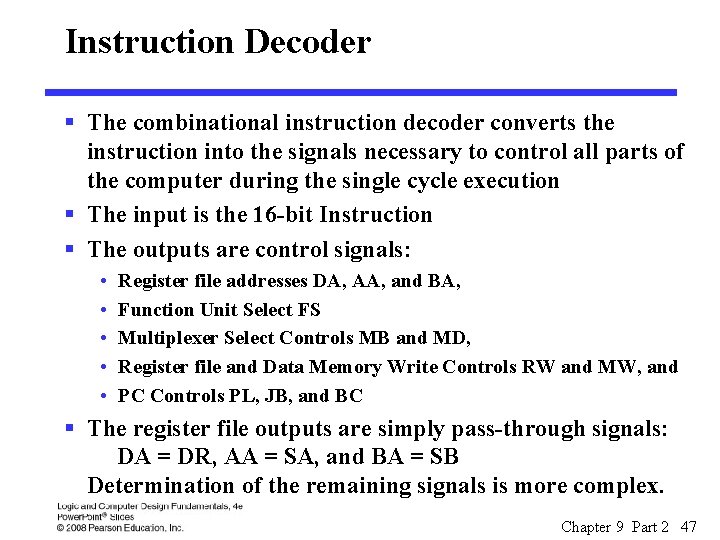
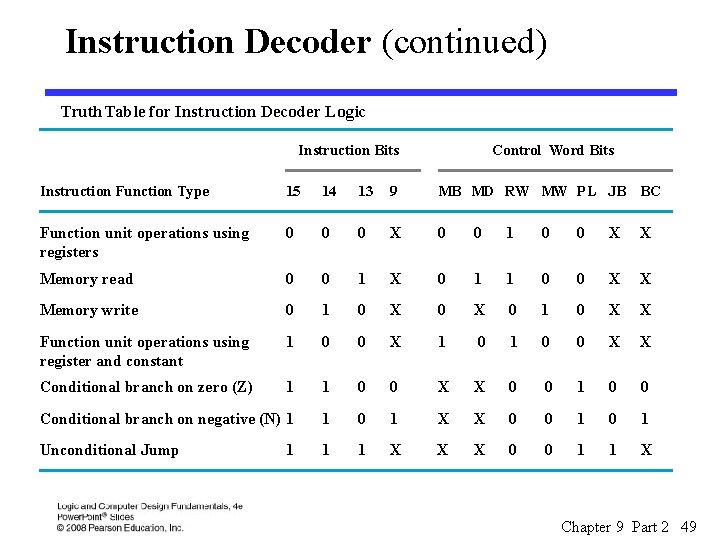
Instruction Decoder § The combinational instruction decoder converts the instruction into the signals necessary to control all parts of the computer during the single cycle execution § The input is the 16 -bit Instruction § The outputs are control signals: • • • Register file addresses DA, AA, and BA, Function Unit Select FS Multiplexer Select Controls MB and MD, Register file and Data Memory Write Controls RW and MW, and PC Controls PL, JB, and BC § The register file outputs are simply pass-through signals: DA = DR, AA = SA, and BA = SB Determination of the remaining signals is more complex. Chapter 9 Part 2 47
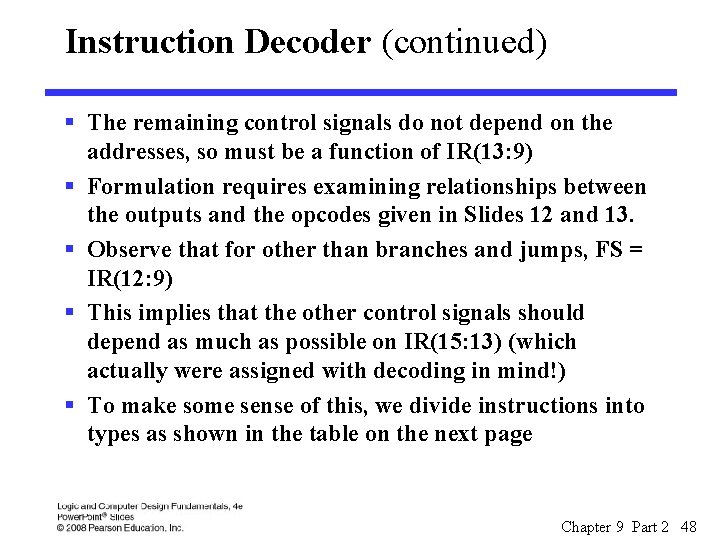
Instruction Decoder (continued) § The remaining control signals do not depend on the addresses, so must be a function of IR(13: 9) § Formulation requires examining relationships between the outputs and the opcodes given in Slides 12 and 13. § Observe that for other than branches and jumps, FS = IR(12: 9) § This implies that the other control signals should depend as much as possible on IR(15: 13) (which actually were assigned with decoding in mind!) § To make some sense of this, we divide instructions into types as shown in the table on the next page Chapter 9 Part 2 48
Instruction Decoder (continued) Truth Table for Instruction Decoder Logic Instruction Bits Control Wo rd Bits Instruction Function Type 15 14 13 9 MB MD RW MW PL JB BC Function unit operations using registers 0 0 0 X 0 0 1 0 0 X X Memory read 0 0 1 X 0 1 1 0 0 X X Memory write 0 1 0 X X Function unit operations using register and constant 1 0 0 X X Conditional branch on zero (Z) 1 1 0 0 X X 0 0 1 0 0 Conditional branch on negative (N) 1 1 0 1 X X 0 0 1 Unconditional Jump 1 1 X X X 0 0 1 1 X 1 Chapter 9 Part 2 49
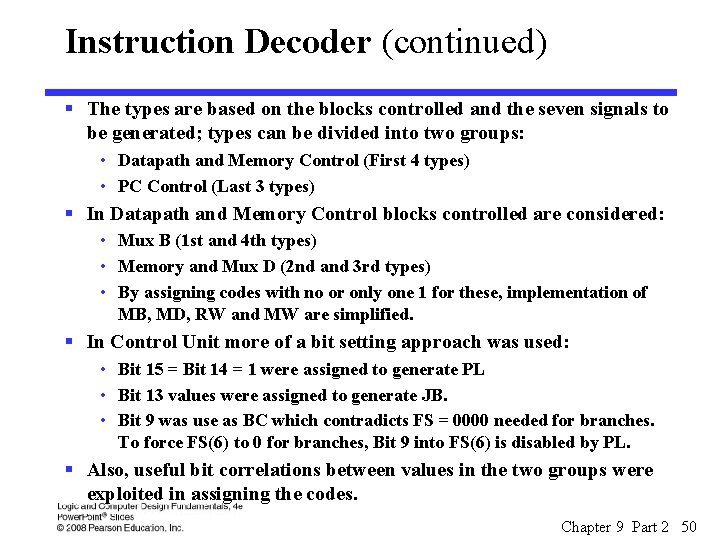
Instruction Decoder (continued) § The types are based on the blocks controlled and the seven signals to be generated; types can be divided into two groups: • Datapath and Memory Control (First 4 types) • PC Control (Last 3 types) § In Datapath and Memory Control blocks controlled are considered: • Mux B (1 st and 4 th types) • Memory and Mux D (2 nd and 3 rd types) • By assigning codes with no or only one 1 for these, implementation of MB, MD, RW and MW are simplified. § In Control Unit more of a bit setting approach was used: • Bit 15 = Bit 14 = 1 were assigned to generate PL • Bit 13 values were assigned to generate JB. • Bit 9 was use as BC which contradicts FS = 0000 needed for branches. To force FS(6) to 0 for branches, Bit 9 into FS(6) is disabled by PL. § Also, useful bit correlations between values in the two groups were exploited in assigning the codes. Chapter 9 Part 2 50
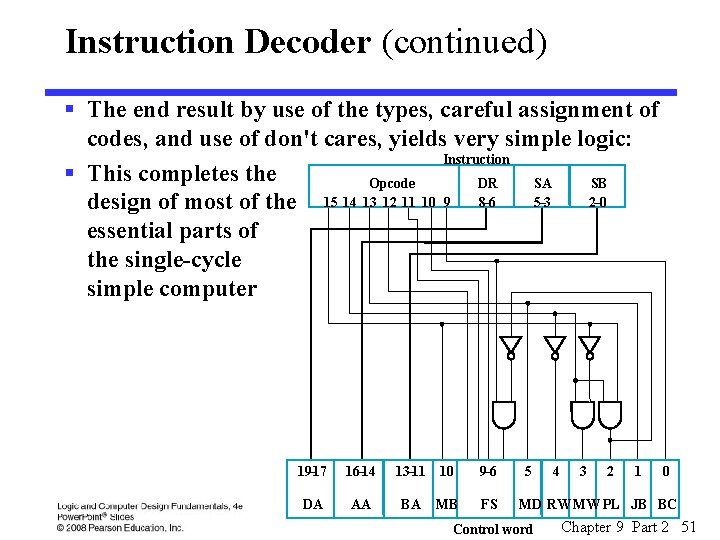
Instruction Decoder (continued) § The end result by use of the types, careful assignment of codes, and use of don't cares, yields very simple logic: Instruction § This completes the Opcode DR SA SB 5– 3 2– 0 design of most of the 15 14 13 12 11 10 9 8– 6 essential parts of the single-cycle simple computer 19– 17 16– 14 DA AA 13– 11 10 BA MB 9– 6 FS 5 4 3 2 1 0 MD RW MW PL JB BC Control word Chapter 9 Part 2 51
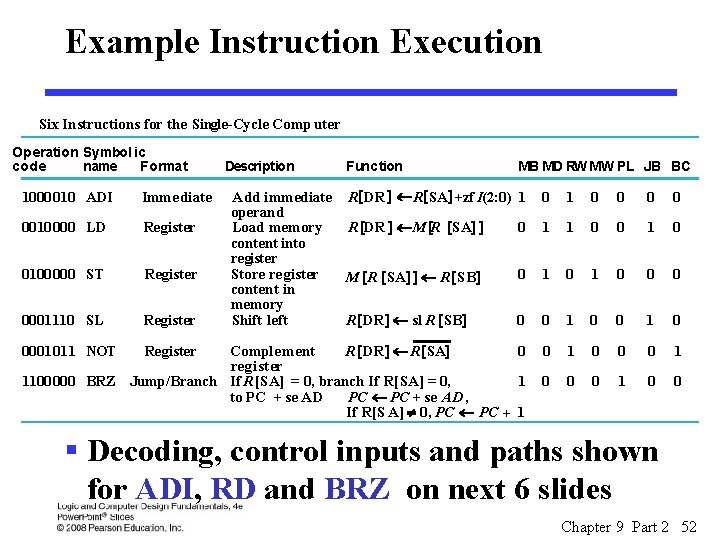
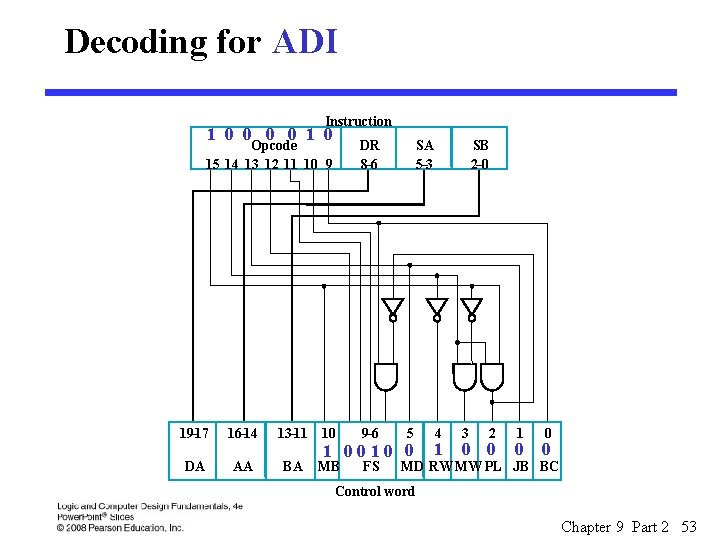
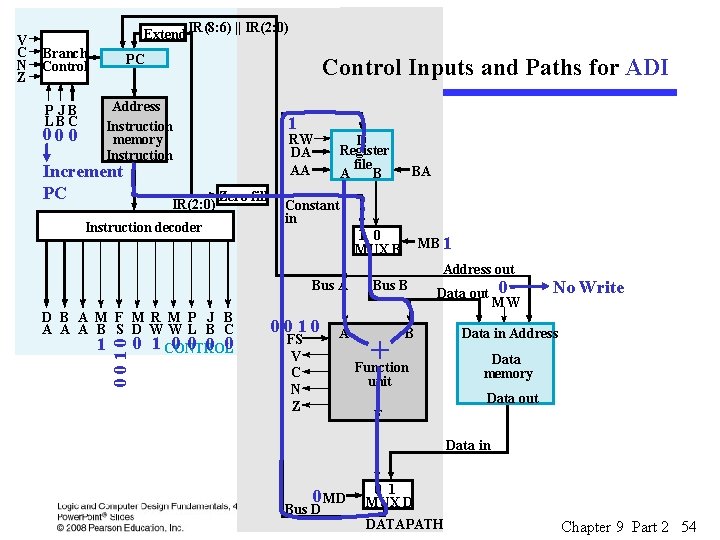
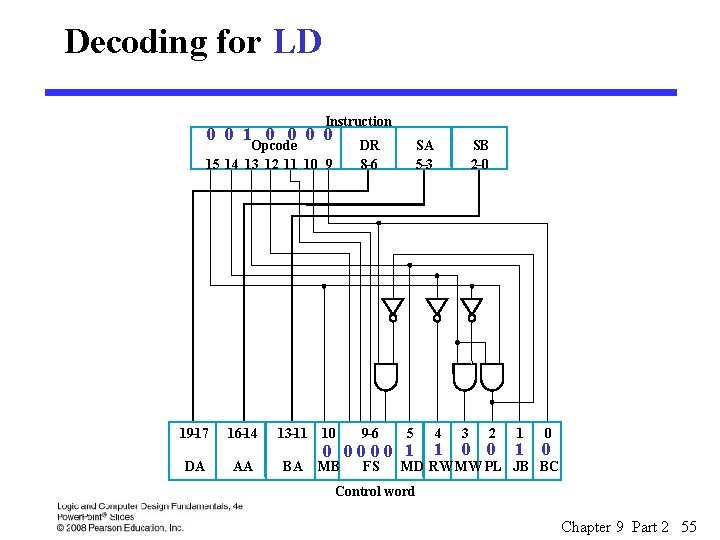
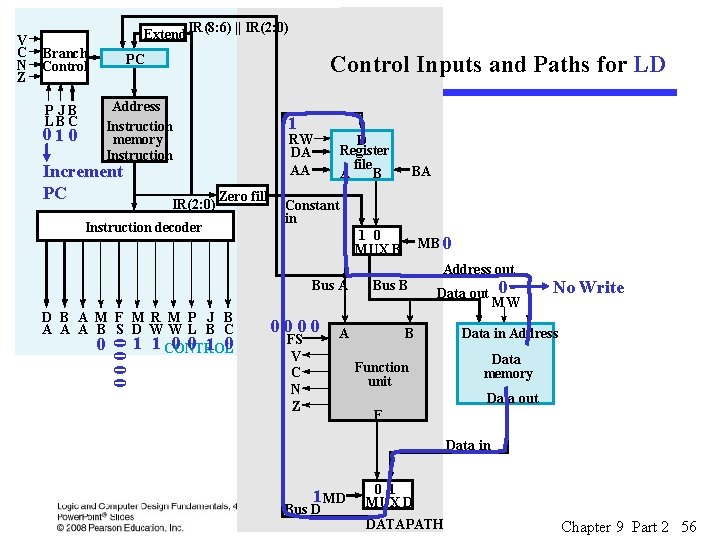
Example Instruction Execution Six Instructions for the Single-Cycle Comp uter Operation Symbol ic code name Format 1000010 ADI Imme diate 0010000 LD Register 0100000 ST Register 0001110 SL Register Description Function Add immediate R [DR ] ¬ R[SA] +zf I(2: 0) operand Load memory R [DR ] ¬ M [R [SA] ] content into register Store register M [R [SA] ] ¬ R [SB] content in memory Shift left R [DR ] ¬ sl R [SB] MB MD RW MW PL JB BC 1 0 0 0 1 1 0 0 0 1 0 Comple ment R [DR ] ¬ R [SA] 0 register 1100000 BRZ Jump/Branch If R [SA] = 0, branch If R[SA] = 0, 1 to PC + se AD PC ¬ PC + se AD , If R[S A] ¹ 0, PC ¬ PC + 1 0 0 0001011 NOT Register § Decoding, control inputs and paths shown for ADI, RD and BRZ on next 6 slides Chapter 9 Part 2 52
Decoding for ADI Instruction 1 0 0 1 0 Opcode 15 14 13 12 11 10 9 19– 17 16– 14 DA AA DR 8– 6 13– 11 10 BA 9– 6 SA 5– 3 5 1 0010 0 MB FS SB 2– 0 4 1 3 2 0 0 1 0 0 0 MD RW MW PL JB BC Control word Chapter 9 Part 2 53
Branch Control PC P JB LBC Address Instruction memory Instruction 00 0 Increment PC IR(8: 6) || IR(2: 0) Control Inputs and Paths for ADI IR(2: 0) 1 RW DA AA Zero fill Instruction decoder D Register file A B BA Constant in 1 0 MUX B MB 1 Address out Bus A D B A M F M R M P J B A A A B S D WW L B C 0 0 1 0 1 CONTROL 0010 V C N Z Extend 0010 FS V C N Z A Bus B + Data out B Function unit 0 MW No Write Data in Address Data memory Data out F Data in 0 MD Bus D 0 1 MUX D DATAPATH Chapter 9 Part 2 54
Decoding for LD Instruction 0 0 1 0 0 Opcode 15 14 13 12 11 10 9 19– 17 16– 14 DA AA DR 8– 6 13– 11 10 BA 9– 6 SA 5– 3 5 0 0000 1 MB FS SB 2– 0 4 1 3 2 0 0 1 1 0 0 MD RW MW PL JB BC Control word Chapter 9 Part 2 55
Branch Control PC P JB LBC Address Instruction memory Instruction 01 0 Increment PC IR(8: 6) || IR(2: 0) Control Inputs and Paths for LD IR(2: 0) 1 RW DA AA Zero fill Instruction decoder D Register file A B BA Constant in 1 0 MUX B MB 0 Address out Bus A D B A M F M R M P J B A A A B S D WW L B C 0 0 1 1 CONTROL 0000 V C N Z Extend 0000 FS V C N Z Bus B A Data out B Function unit 0 MW No Write Data in Address Data memory Data out F Data in 1 MD Bus D 0 1 MUX D DATAPATH Chapter 9 Part 2 56
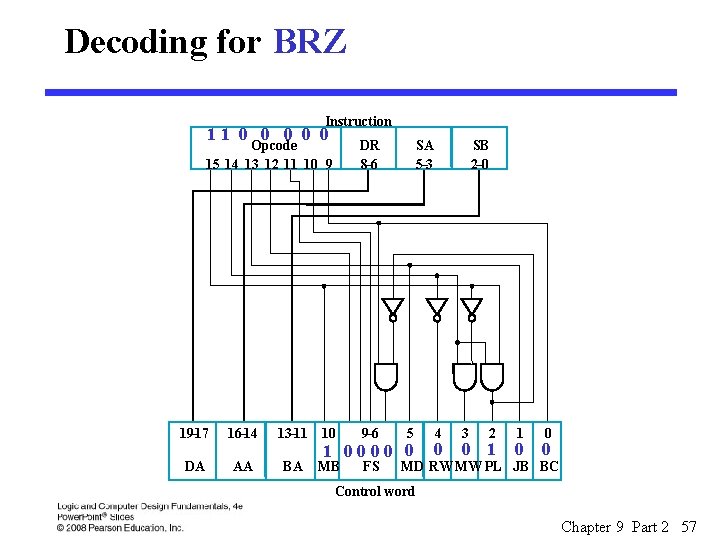
Decoding for BRZ Instruction 11 0 0 0 Opcode 15 14 13 12 11 10 9 19– 17 16– 14 DA AA DR 8– 6 13– 11 10 BA 9– 6 SA 5– 3 5 1 0000 0 MB FS SB 2– 0 4 0 3 2 0 1 1 0 0 0 MD RW MW PL JB BC Control word Chapter 9 Part 2 57
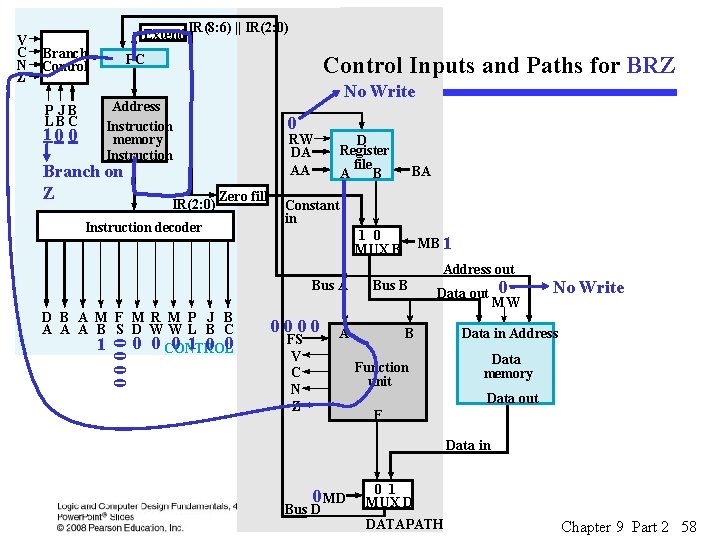
Branch Control PC P JB LBC Address Instruction memory Instruction 10 0 Branch on Z IR(8: 6) || IR(2: 0) Control Inputs and Paths for BRZ IR(2: 0) No Write 0 RW DA AA Zero fill Instruction decoder D Register file A B BA Constant in 1 0 MUX B MB 1 Address out Bus A D B A M F M R M P J B A A A B S D WW L B C 0 1 0 0 CONTROL 0000 V C N Z Extend 0000 FS V C N Z Bus B A Data out B Function unit 0 MW No Write Data in Address Data memory Data out F Data in 0 MD Bus D 0 1 MUX D DATAPATH Chapter 9 Part 2 58
Logic and Computer Design Fundamentals Chapter 9 – Computer Design Basics Part 1 – Datapaths Charles Kime & Thomas Kaminski © 2008 Pearson Education, Inc. (Hyperlinks are active in View Show mode)
Overview § Part 1 – Datapaths § Part 2 – A Simple Computer § Part 3 – Multiple Cycle Hardwired Control • • Single Cycle Computer Issues Modifications to Datapath Modifications to Control Sequential Control Design Chapter 9 Part 3 60
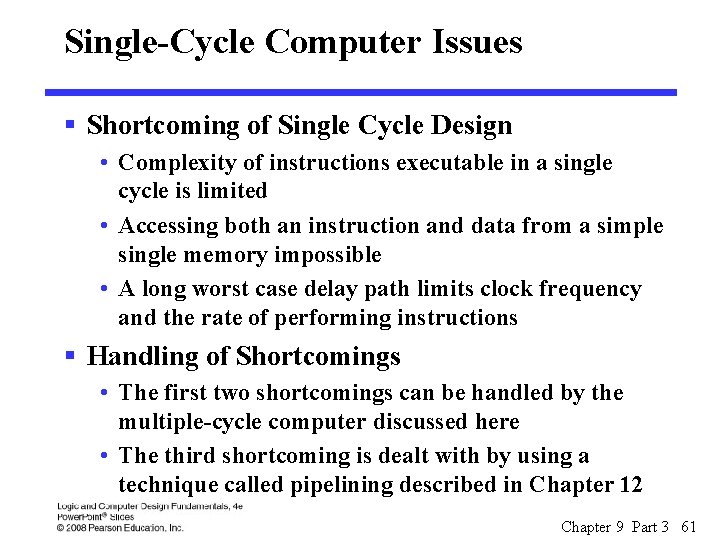
Single-Cycle Computer Issues § Shortcoming of Single Cycle Design • Complexity of instructions executable in a single cycle is limited • Accessing both an instruction and data from a simple single memory impossible • A long worst case delay path limits clock frequency and the rate of performing instructions § Handling of Shortcomings • The first two shortcomings can be handled by the multiple-cycle computer discussed here • The third shortcoming is dealt with by using a technique called pipelining described in Chapter 12 Chapter 9 Part 3 61
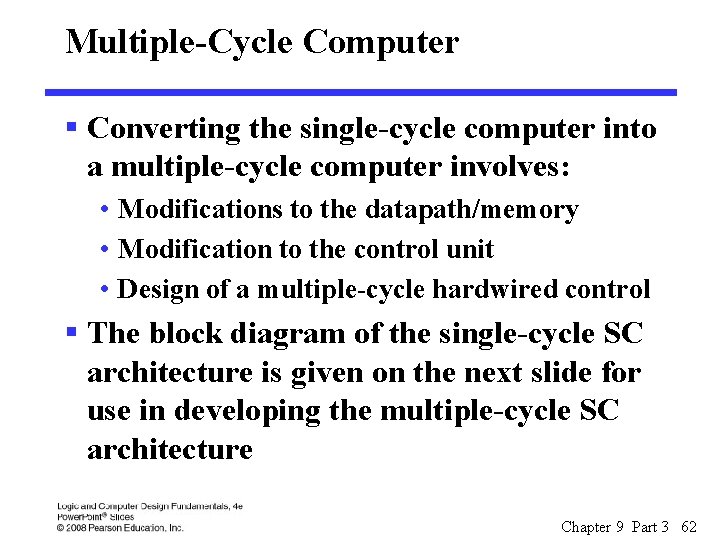
Multiple-Cycle Computer § Converting the single-cycle computer into a multiple-cycle computer involves: • Modifications to the datapath/memory • Modification to the control unit • Design of a multiple-cycle hardwired control § The block diagram of the single-cycle SC architecture is given on the next slide for use in developing the multiple-cycle SC architecture Chapter 9 Part 3 62
Chapter 9 Part 3 63
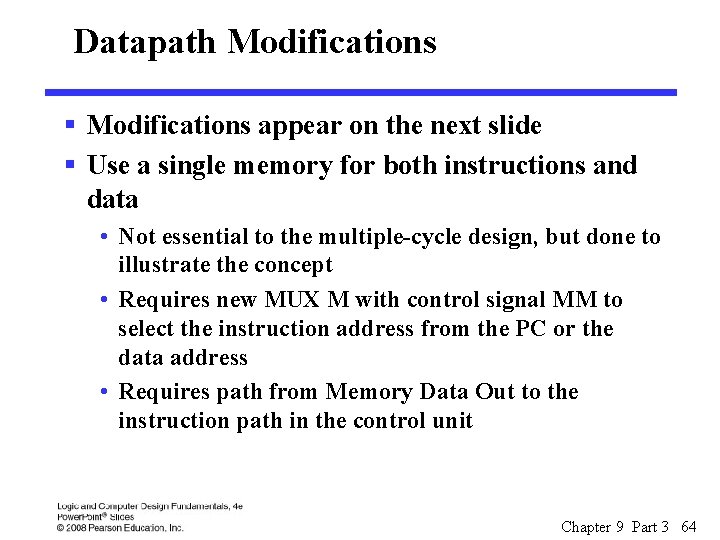
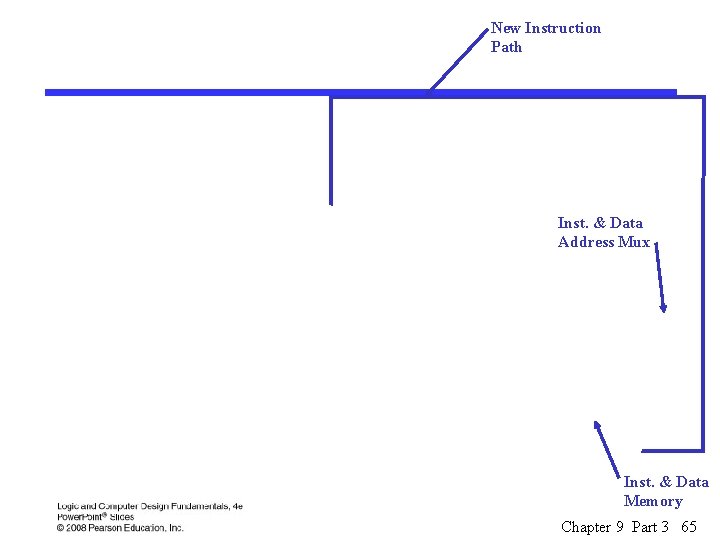
Datapath Modifications § Modifications appear on the next slide § Use a single memory for both instructions and data • Not essential to the multiple-cycle design, but done to illustrate the concept • Requires new MUX M with control signal MM to select the instruction address from the PC or the data address • Requires path from Memory Data Out to the instruction path in the control unit Chapter 9 Part 3 64
New Instruction Path Inst. & Data Address Mux Inst. & Data Memory Chapter 9 Part 3 65
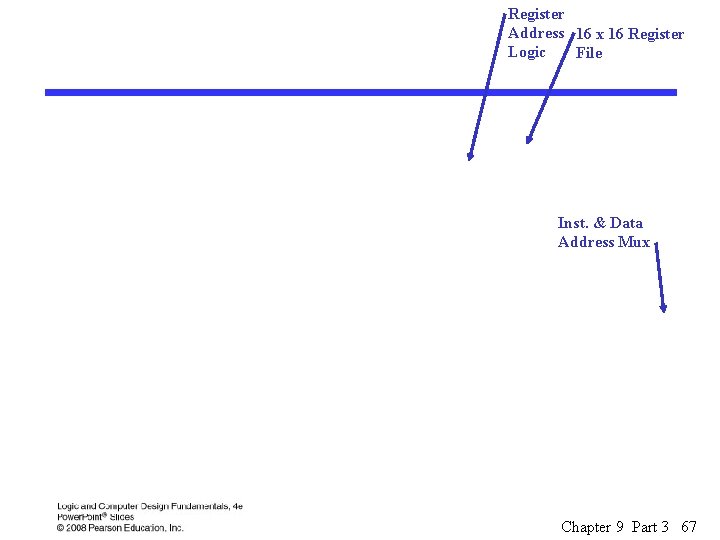
Datapath Modifications (continued) § To hold operands between cycles, need additional registers • Add 8 temporary storage registers to the Register File § Register File becomes 16 x 16 § Addresses to Register File increase from 3 to 4 bits • Register File addresses come from: § The instruction for the Storage Resource registers (0 to 7) § The control word for the Temporary Storage registers (8 to 15) § The control word specifies the source for Register File addresses • Add Register Address Logic to the Register File to select the register address sources • Three new control fields for register address source selection and temporary storage addressing: DX, AX, BX Chapter 9 Part 3 66
Register Address 16 x 16 Register Logic File Inst. & Data Address Mux Chapter 9 Part 3 67
Control Unit Modifications § Must hold instruction over the multiple cycles to draw on instruction information throughout instruction execution • Requires an Instruction Register (IR) to hold the instruction § Load control signal IL • Requires the addition of a "hold" operation to the PC since it only counts up to obtain a new instruction § New encoding for the PC operations uses 2 bits Chapter 9 Part 3 68
Add "hold" operation Instruction Register IR Chapter 9 Part 3 69
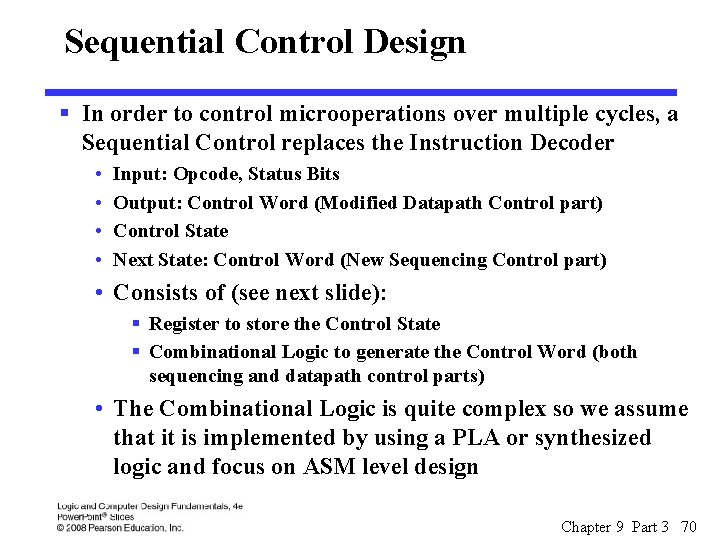
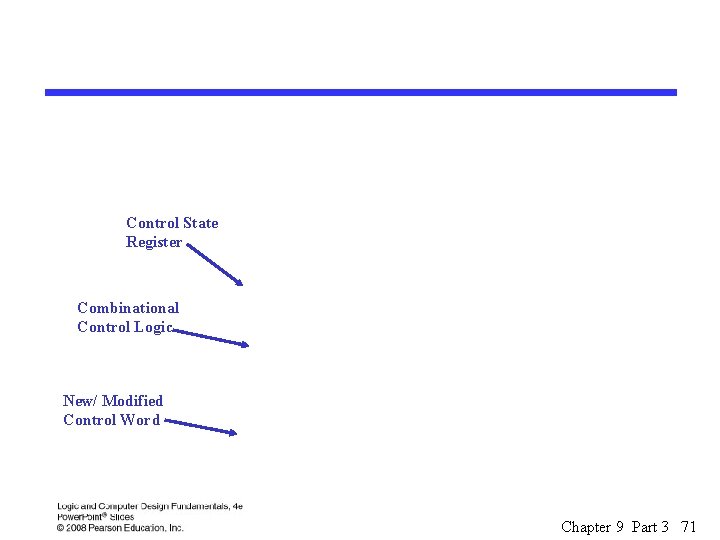
Sequential Control Design § In order to control microoperations over multiple cycles, a Sequential Control replaces the Instruction Decoder • • Input: Opcode, Status Bits Output: Control Word (Modified Datapath Control part) Control State Next State: Control Word (New Sequencing Control part) • Consists of (see next slide): § Register to store the Control State § Combinational Logic to generate the Control Word (both sequencing and datapath control parts) • The Combinational Logic is quite complex so we assume that it is implemented by using a PLA or synthesized logic and focus on ASM level design Chapter 9 Part 3 70
Control State Register Combinational Control Logic New/ Modified Control Word Chapter 9 Part 3 71
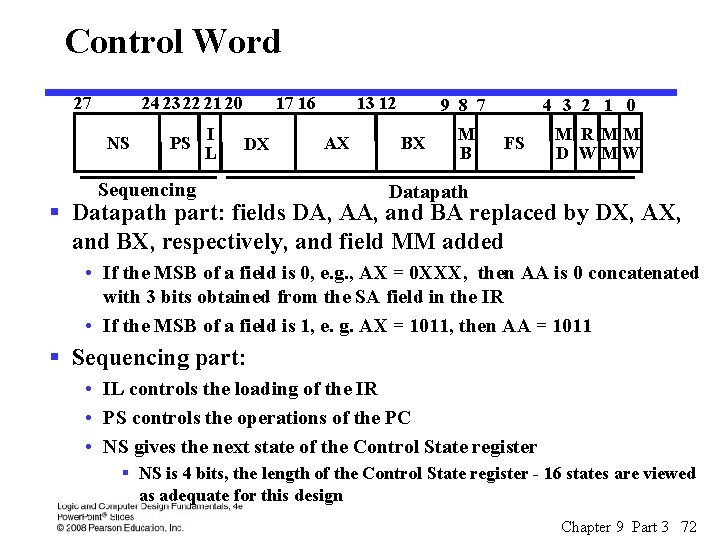
Control Word 27 24 23 22 21 20 NS PS I L 17 16 DX Sequencing 13 12 AX 9 8 7 BX M B 4 3 2 1 0 FS M R MM D WMW Datapath § Datapath part: fields DA, AA, and BA replaced by DX, AX, and BX, respectively, and field MM added • If the MSB of a field is 0, e. g. , AX = 0 XXX, then AA is 0 concatenated with 3 bits obtained from the SA field in the IR • If the MSB of a field is 1, e. g. AX = 1011, then AA = 1011 § Sequencing part: • IL controls the loading of the IR • PS controls the operations of the PC • NS gives the next state of the Control State register § NS is 4 bits, the length of the Control State register - 16 states are viewed as adequate for this design Chapter 9 Part 3 72
Encoding for Datapath Control DX AX BX Code MB R[DR] R[SA] R[SB] 0 XXX Register R 8 R 9 R 10 R 11 R 12 R 13 R 14 R 15 Code 0 FS Code MD MM MW Code No Address No write Out write 1000 Constant 1 F ← A + 1 0001 Data In Write PC Write 1001 0010 F ←A + B 1010 Unused 0011 1011 Unused 0100 F ← A + B + 1 0101 1100 1101 0110 F ←A – 1 1110 Unused 0111 1000 F ← A ^B 1001 F ←Av. B 1010 F ←A + B 1011 F ←A 1100 F ←B 1101 F ← sr B 1110 F ← sl B Unused 1111 F ←A 0000 Fn. Ut RW 0 1 Chapter 9 Part 3 73
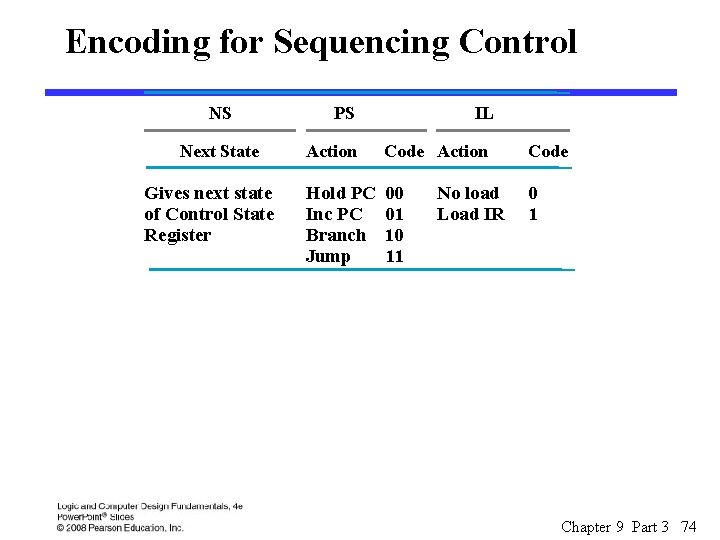
Encoding for Sequencing Control NS Next State Gives next state of Control State Register PS IL Action Code Hold PC Inc PC Branch Jump 00 01 10 11 0 1 No load Load IR Chapter 9 Part 3 74
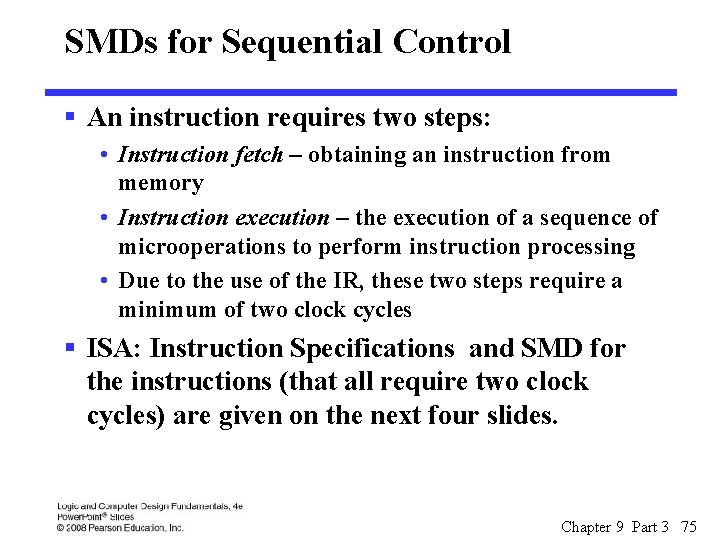
SMDs for Sequential Control § An instruction requires two steps: • Instruction fetch – obtaining an instruction from memory • Instruction execution – the execution of a sequence of microoperations to perform instruction processing • Due to the use of the IR, these two steps require a minimum of two clock cycles § ISA: Instruction Specifications and SMD for the instructions (that all require two clock cycles) are given on the next four slides. Chapter 9 Part 3 75
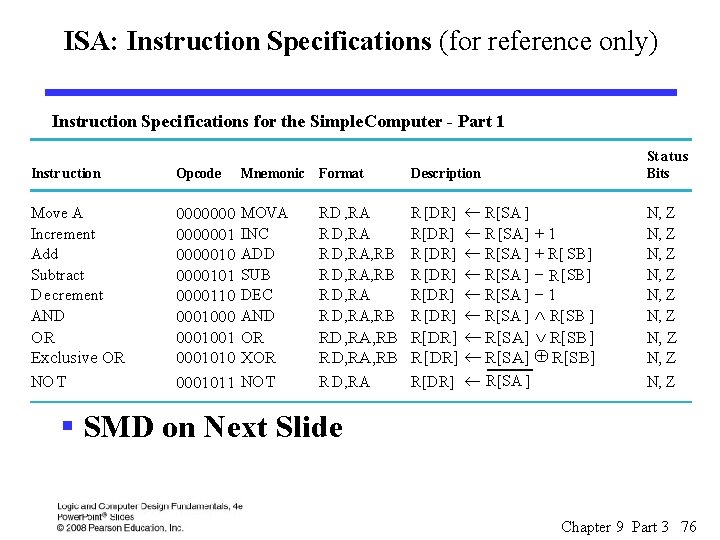
ISA: Instruction Specifications (for reference only) Instruction Speci fications for the Simple. Computer - Part 1 St atus Bits Instr uction Opcode Mnemonic Format Description Move A Increment Add Subtract D ecrement AND 00000001 00000101 0000110 0001001 0001010 0001011 MOVA INC ADD SUB DEC AND RD , RA R D, RA, RB R D, RA, RB R [DR] R[DR] R [DR] +1 + R[ SB] - R [SB] -1 Ù R[SB ] N, Z N, Z OR XOR RD, RA, RB R[DR] ¬ R[SA] Ú R[SB] RD, RA, RB R[DR] ¬ R[SA] Å R[SB] N, Z NO T R D, RA OR Exclusive OR NO T ¬ R[SA ] ¬ R [SA] ¬ R[SA ] R[DR] ¬ R[SA ] N, Z § SMD on Next Slide Chapter 9 Part 3 76
SMD for Two-Cycle Instructions - Part 1 Chapter 9 Part 3 77
ISA: Instruction Specifications (for reference only) Instruction Specifications for the Simple Computer - Part 2 St atus Bits Instr uction Opcode Mnemonic Format Description Move B Shift Right Shift Left Load Immediate Add Immediate Load Store Branch on Zero Branch on Negative Jump 0001100 0001101 0001110 1001100 1000010000 0100000 1100001 1110000 MOVB SHR SHL LDI ADI LD ST BRZ BRN JMP RD , RB RD, OP RD, RA, OP RD , RA RA, RB RA, AD RA R[DR] ¬ R[SB] R[DR] ¬ sr R[SB] R[DR] ¬ sl R[SB] R[DR] ¬ zf OP R[DR] ¬ R[SA] + zf OP R[DR] ¬ M[SA] ¬ R[SB] if (R[SA] = 0) PC ¬ PC + se AD if (R[SA] < 0) PC ¬ PC + se AD PC ¬ R[SA ] Chapter 9 Part 3 78
SMD for 2 -Cycle Instructions – Part 2 § Instruction Fetch Portion Duplicated From Part 1 Chapter 9 Part 3 79
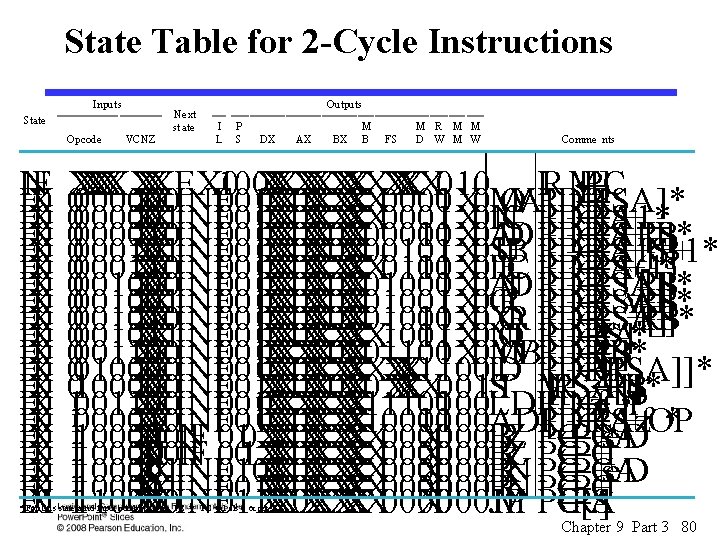
State Table for 2 -Cycle Instructions Inputs Ne xt st ate State Opcode IEN F X 0 E X 0 E X 0 E X 0 E X 0 EX 0 VCNZ Outputs I L P S DX AX BX M B FS M R M M D W M W Comme nts X X X XX X X XEX 0 X X X X XX 010 R ← 100 I M [ PC ] ← 0000 X XINF 0 01 0 X X XX X X 0000 01 X 0 M O V AR [DR ] R [SA]* ← X XINF X X XX X X 000001 0 0 0001 01 X 0 I N C R [DR ] R [S A ]+ 1* ← 00000010 X XINF 0 01 0 X X X 00010 01 X 0 A D DR [DR ] R [S A ]+ R [S B ]* ← X XINF X X X 000101 0 0 00101 01 X 0 S U B R [DR } R [S A ]+ R [ S B ] + 1* ← 00000110 X XINF 0 01 0 X X XX X X 0110 01 X 0 D E C R [DR ] R [S A ]+ (-1) * ← X XINF X X X 001000 0 01000 01 X 0 A N D R [DR ] R [SA] R [S B ]* ← v 00001001 X XINF 0 01 0 X X X 01001 01 X 0 O R R [DR ] R [SA] R [S B ]* ← + X XINF X X X 001010 0 01010 01 X 0 X O R R [DR ] R [SA] R [S B ]* ← 00001011 X XINF 0 01 0 X X XX X X 1011 01 X 0 N O T R [DR ] R [ S A ] * ← X XINF X X X X X 001100 0 01100 01 X 0 M O V BR [DR ] R [S B ]* ← X XINF X X XX X X X X 1100 L 0 010000 0 01 0 0 D R [DR ] M [ R [SA]]* ← X XINF X X X X 0 X X XX 001 S 01100000 0 01 0 0 X T M [ R [SA]] R [S B ]* ← 001100 X XINF 0 01 0 X X X 11100 0100 LDI R [DR ] z f. OP * ← 11000010 X XINF 0 01 0 X X XX X 10010 0100 ADI R [DR ] R [S A ]+ z f. OP * ← X X X X XX X X 000 B 100000 1 I N F 01 0 X 0 0000 R Z PC PC + s e A D ← X X X X XX X X 000 B 11100000 0 I N F 00 1 X 0 0000 R Z PC PC + 1 ← X X XINF X X X XX X X 000 B 100001 1 0 10 0 0000 R N PC PC + s e A D ← X X XINF X X X XX X X 000 B 11100001 0 0000 R N PC PC + 1 ← 110000 X XINF 011 X X 0 X X XX 0000 X 000 JM P PCR[S A] ^ * For thi s state a nd input combinati on, PC ¬ PC + 1 als o occur s. Chapter 9 Part 3 80
SMD for Right Shift and Left Shift Multiple Chapter 9 Part 3 81
State Table For Right and Left Shift Multiple Chapter 9 Part 3 82
Terms of Use § All (or portions) of this material © 2008 by Pearson Education, Inc. § Permission is given to incorporate this material or adaptations thereof into classroom presentations and handouts to instructors in courses adopting the latest edition of Logic and Computer Design Fundamentals as the course textbook. § These materials or adaptations thereof are not to be sold or otherwise offered for consideration. § This Terms of Use slide or page is to be included within the original materials or any adaptations thereof. Chapter 9 Part 1 83