
LOCAL MANAGEMENT PLATFORM Go beyond outofband Uplogix is

LOCAL MANAGEMENT PLATFORM
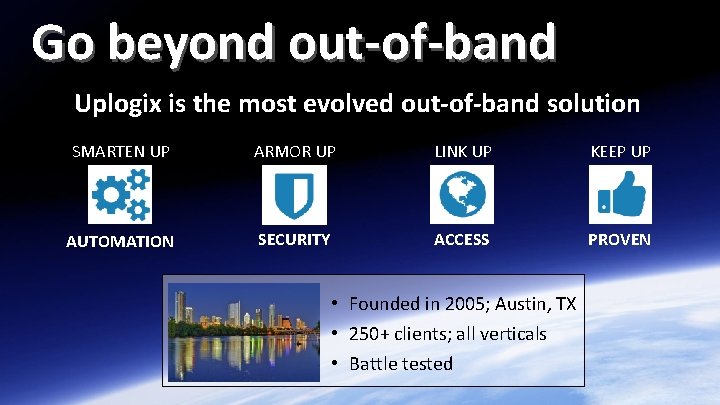
Go beyond out-of-band Uplogix is the most evolved out-of-band solution SMARTEN UP ARMOR UP LINK UP KEEP UP AUTOMATION SECURITY ACCESS PROVEN • Founded in 2005; Austin, TX • 250+ clients; all verticals • Battle tested © 2015 Uplogix, Inc. | uplogix. com | 2

Who is “Going Local” with Uplogix? Financial Services Mfg. & Retail MSP & Outsourcing Healthcare & Enterprise Government Education & Non-Profit Satellite Energy © 2015 Uplogix, Inc. | uplogix. com | 3
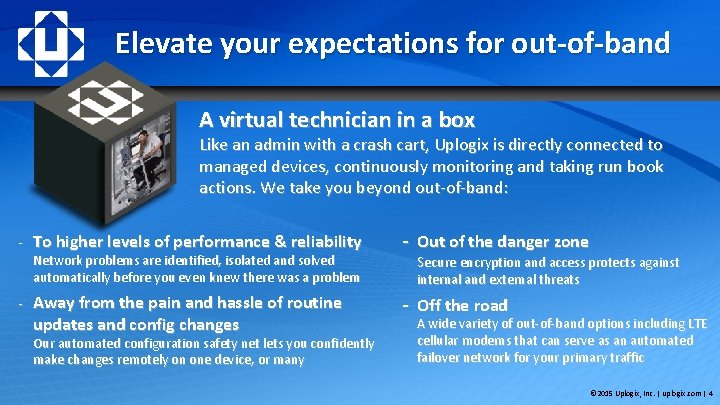
Elevate your expectations for out-of-band A virtual technician in a box Like an admin with a crash cart, Uplogix is directly connected to managed devices, continuously monitoring and taking run book actions. We take you beyond out-of-band: - To higher levels of performance & reliability Network problems are identified, isolated and solved automatically before you even knew there was a problem - Away from the pain and hassle of routine updates and config changes Our automated configuration safety net lets you confidently make changes remotely on one device, or many - Out of the danger zone Secure encryption and access protects against internal and external threats - Off the road A wide variety of out-of-band options including LTE cellular modems that can serve as an automated failover network for your primary traffic © 2015 Uplogix, Inc. | uplogix. com | 4
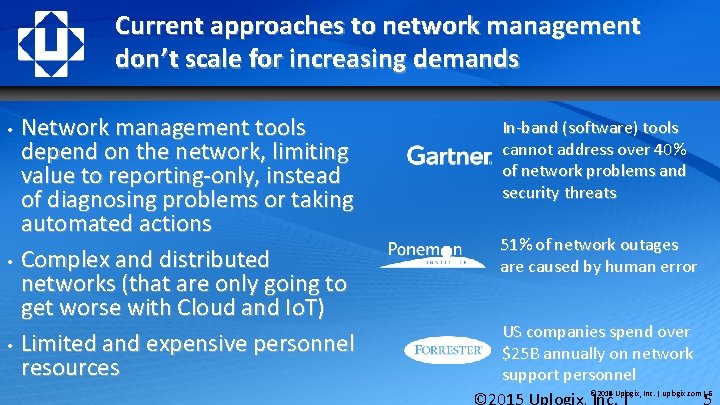
Current approaches to network management don’t scale for increasing demands • • • Network management tools depend on the network, limiting value to reporting-only, instead of diagnosing problems or taking automated actions Complex and distributed networks (that are only going to get worse with Cloud and Io. T) Limited and expensive personnel resources In-band (software) tools cannot address over 40% of network problems and security threats 51% of network outages are caused by human error US companies spend over $25 B annually on network support personnel © 2014 Uplogix, Inc. | uplogix. com | 5 © 2015 Uplogix, Inc. | uplogix. com | 5
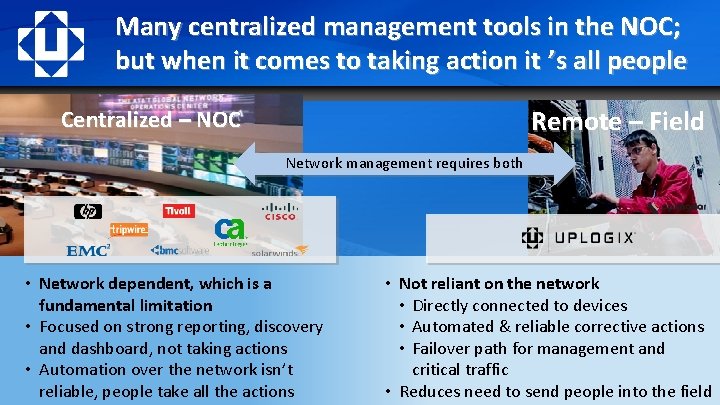
Many centralized management tools in the NOC; but when it comes to taking action it ’s all people Remote – Field Centralized – NOC Network management requires both • Network dependent, which is a fundamental limitation • Focused on strong reporting, discovery and dashboard, not taking actions • Automation over the network isn’t reliable, people take all the actions • Not reliant on the network • Directly connected to devices • Automated & reliable corrective actions • Failover path for management and critical traffic © 2015 Uplogix, Inc. | uplogix. com | 6 • Reduces need to send people into the field
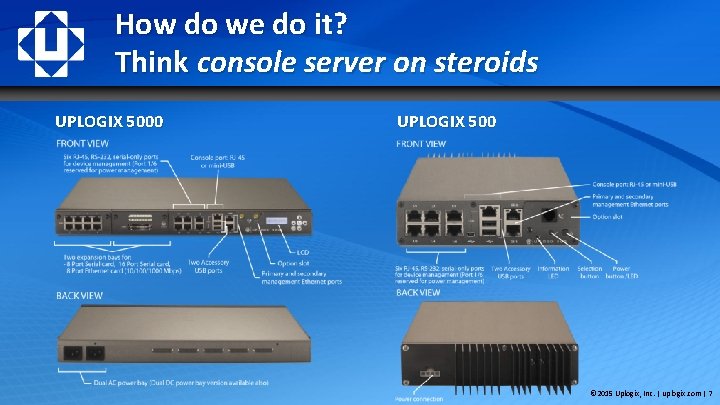
How do we do it? Think console server on steroids UPLOGIX 5000 UPLOGIX 500 © 2015 Uplogix, Inc. | uplogix. com | 7
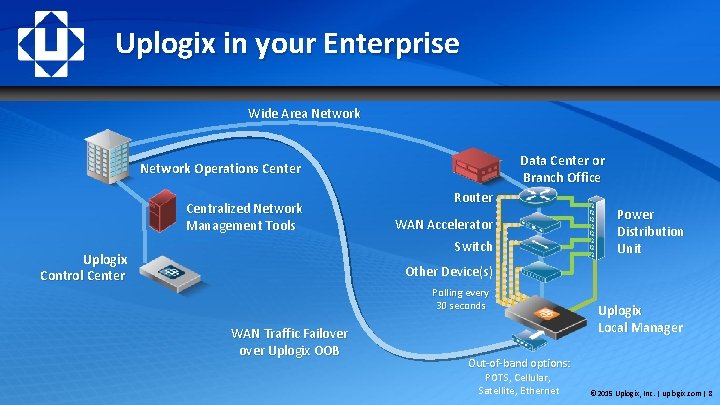
Uplogix in your Enterprise Wide Area Network Data Center or Branch Office Network Operations Center Centralized Network Management Tools Router WAN Accelerator Switch Uplogix Control Center Power Distribution Unit Other Device(s) Polling every 30 seconds WAN Traffic Failover Uplogix OOB Uplogix Local Manager Out-of-band options: POTS, Cellular, Satellite, Ethernet © 2015 Uplogix, Inc. | uplogix. com | 8
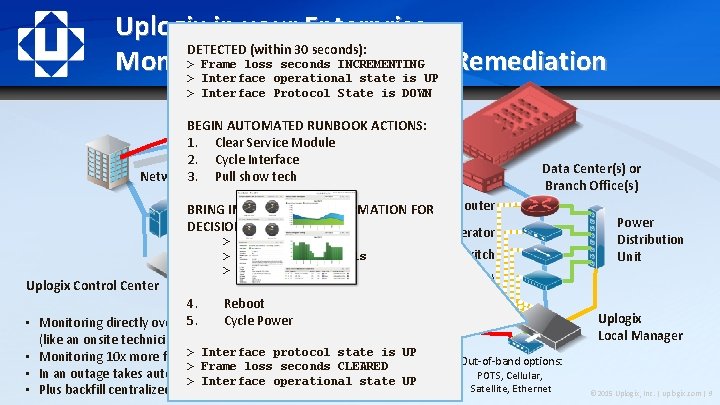
Uplogix in your Enterprise – DETECTED (within 30 seconds): > Frame loss seconds INCREMENTING Monitoring and Automated Remediation > Interface operational state is UP > Interface Protocol State is DOWN Wide Area Network BEGIN AUTOMATED RUNBOOK ACTIONS: INTERNET 1. Clear Service Module 2. Cycle Interface Pull show tech Network 3. Operations Center Data Center(s) or Branch Office(s) Router BRING IN ADDITIONAL INFORMATION FOR DECISION Secondary Network Connection MAKING: WAN Accelerator > Vo. IP Over Uplogix OOB test fails (up to 50 Mbps) Uplogix Control Center • • > HTTP traffic fails > TCP SYN-ACK fail Switch Power Distribution Unit Other Device(s) 4. Reboot 5. Cycle Power Monitoring directly over the console port, not the network (like an onsite technician) > Interface protocol state is UP Monitoring 10 x more frequently, gathering richer data > Frame loss seconds CLEARED In an outage takes automatic recovery actions within seconds > Interface operational state UP Plus backfill centralized tools over an out-of-band link Uplogix Local Manager Out-of-band options: POTS, Cellular, Satellite, Ethernet © 2015 Uplogix, Inc. | uplogix. com | 9
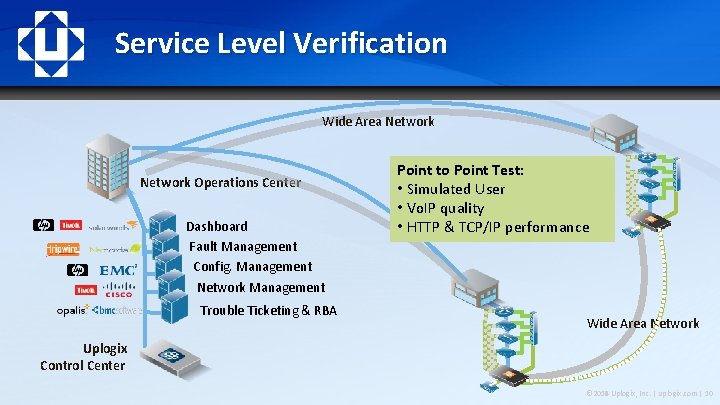
Service Level Verification Wide Area Network Operations Center Dashboard Fault Management Config. Management Point to Point Test: • Simulated User • Vo. IP quality • HTTP & TCP/IP performance Network Management Trouble Ticketing & RBA Wide Area Network Uplogix Control Center © 2014 Uplogix, Inc. | uplogix. com | 10 © 2015 Uplogix, Inc. | uplogix. com | 10
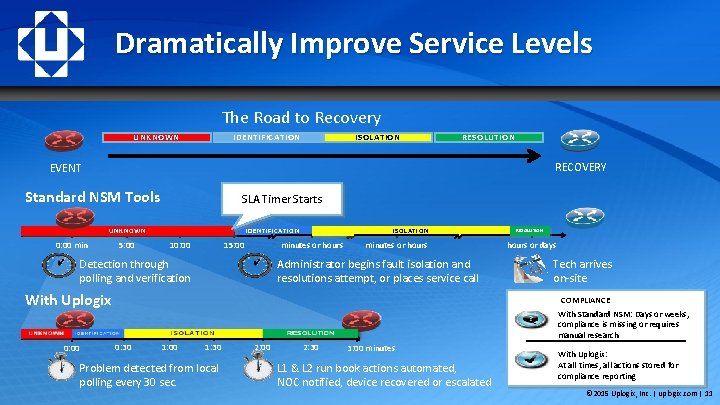
Dramatically Improve Service Levels The Road to Recovery UNKNOWN IDENTIFICATION ISOLATION RESOLUTION RECOVERY EVENT Standard NSM Tools SLA Timer Starts UNKNOWN 0: 00 min 5: 00 ISOLATION IDENTIFICATION 10: 00 minutes or hours 15: 00 minutes or hours Administrator begins fault isolation and resolutions attempt, or places service call Detection through polling and verification With Uplogix UNKNOWN IDENT IFI CAT ION 0: 00 0: 30 1: 30 Problem detected from local polling every 30 sec. 2: 00 2: 30 Tech arrives on-site COMPLIANCE With Standard NSM: Days or weeks, compliance is missing or requires manual research RESOLUTION ISOLATION 1: 00 RESOLUTION hours or days 3: 00 minutes L 1 & L 2 run book actions automated, NOC notified, device recovered or escalated With Uplogix: At all times, all actions stored for compliance reporting © 2015 Uplogix, Inc. | uplogix. com | 11
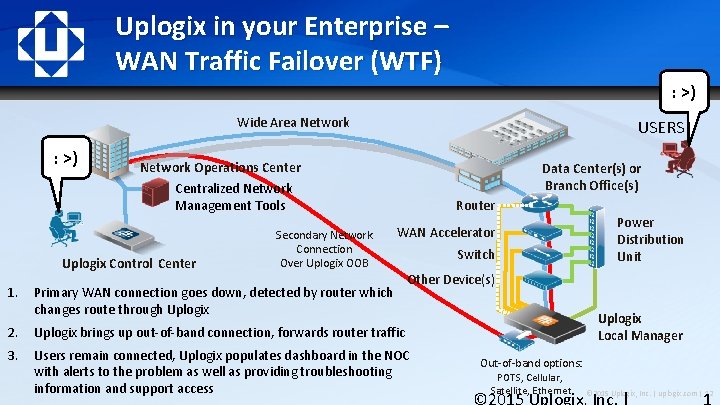
Uplogix in your Enterprise – WAN Traffic Failover (WTF) ? !? ! : >) Wide Area Network : >) USERS Network Operations Center Data Center(s) or Branch Office(s) Centralized Network Management Tools Uplogix Control Center 1. Secondary Network Connection Over Uplogix OOB Router WAN Accelerator Primary WAN connection goes down, detected by router which changes route through Uplogix Switch Power Distribution Unit Other Device(s) 2. Uplogix brings up out-of-band connection, forwards router traffic 3. Users remain connected, Uplogix populates dashboard in the NOC with alerts to the problem as well as providing troubleshooting information and support access Uplogix Local Manager Out-of-band options: POTS, Cellular, Satellite, Ethernet © 2015 Uplogix, Inc. | uplogix. com | 12
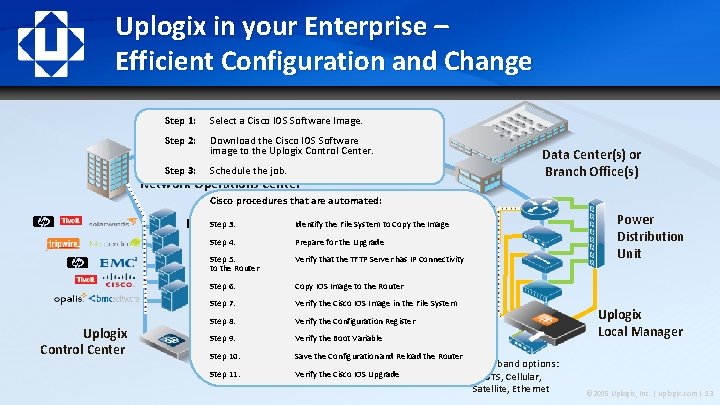
Uplogix in your Enterprise – Efficient Configuration and Change Step 1: Select a Cisco IOS Software Image. Wide Area Network Step 2: Download the Cisco IOS Software image to the Uplogix Control Center. Step 3: Schedule the job. Data Center(s) or Branch Office(s) Network Operations Center Cisco procedures that are automated: Step 3: Dashboard Router Identify the File System to Copy the Image Step 4: Prepare for the Upgrade WAN Accelerator Fault Management Step 5: Verify that the TFTP Server has IP Connectivity Config. Management Switch to the Router Network Management Step 6: Copy IOS Image to the Router Other Device(s) Trouble Ticketing & RBA Step 7: Verify the Cisco IOS Image in the File System Uplogix Control Center Step 8: Verify the Configuration Register Step 9: Verify the Boot Variable Step 10: Save the Configuration and Reload the Router Step 11: Verify the Cisco IOS Upgrade Out-of-band options: POTS, Cellular, Satellite, Ethernet Power Distribution Unit Uplogix Local Manager © 2015 Uplogix, Inc. | uplogix. com | 13
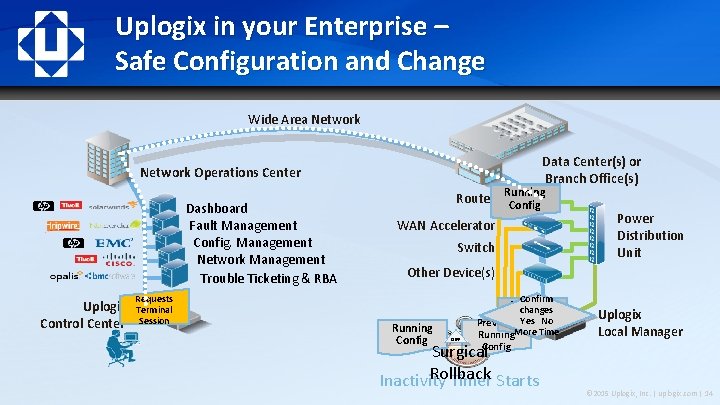
Uplogix in your Enterprise – Safe Configuration and Change Wide Area Network Data Center(s) or Branch Office(s) Network Operations Center Running Dashboard Fault Management Config. Management Network Management Trouble Ticketing & RBA Uplogix Control Center Requests Terminal Session Router Config WAN Accelerator Switch Power Distribution Unit Other Device(s) Confirm Running Config Roll back changes Yes No Previous DIFF Running. More Time Config Surgical Rollback Inactivity Timer Starts Uplogix Local Manager © 2015 Uplogix, Inc. | uplogix. com | 14
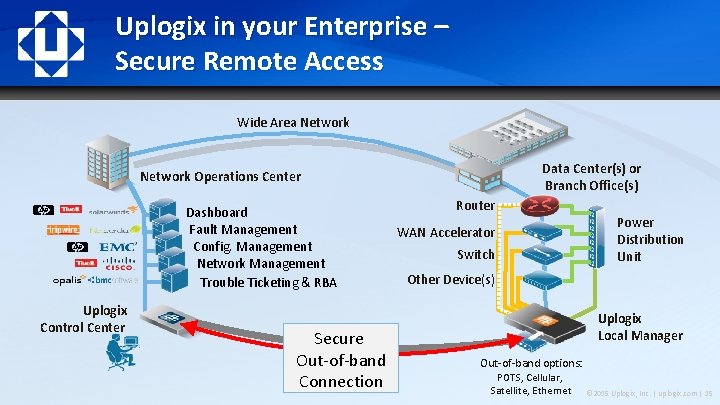
Uplogix in your Enterprise – Secure Remote Access Wide Area Network Data Center(s) or Branch Office(s) Network Operations Center Dashboard Fault Management Config. Management Network Management Trouble Ticketing & RBA Uplogix Control Center Secure Out-of-band Connection Router WAN Accelerator Switch Power Distribution Unit Other Device(s) Uplogix Local Manager Out-of-band options: POTS, Cellular, Satellite, Ethernet © 2015 Uplogix, Inc. | uplogix. com | 15
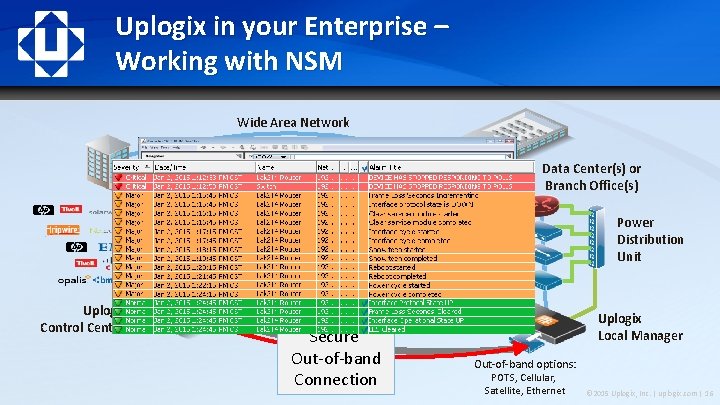
Uplogix in your Enterprise – Working with NSM Wide Area Network Data Center(s) or Branch Office(s) Network Operations Center Dashboard Fault Management Config. Management Network Management Trouble Ticketing & RBA Uplogix Control Center Secure Out-of-band Connection Router WAN Accelerator Switch Power Distribution Unit Other Device(s) Uplogix Local Manager Out-of-band options: POTS, Cellular, Satellite, Ethernet © 2015 Uplogix, Inc. | uplogix. com | 16
Survivable Logging and AAA Network-independent role-based management access • • Extend granular management policies to network devices and remote access TACACS/RADIUS integration in/out-of-band with offline caching Network-independent authorization, audit & logging • • • Remove shared passwords Maintain regulatory compliance regardless of the network state (e. g. PCI, SOX, HIPAA) Independent SLA validation of business applications Secure access • SSHv 2 access with optional IPSec • Out-of-band uses dial-from remote to reduce war-dialing endpoints © 2015 Uplogix, Inc. | uplogix. com | 17
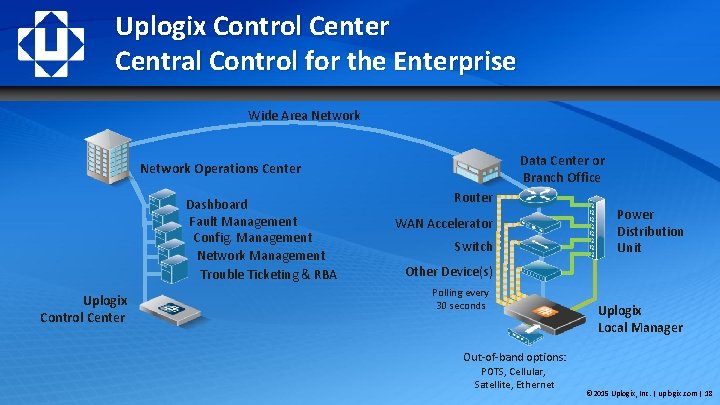
Uplogix Control Center Central Control for the Enterprise Wide Area Network Data Center or Branch Office Network Operations Center Dashboard Fault Management Config. Management Network Management Trouble Ticketing & RBA Uplogix Control Center Router WAN Accelerator Switch Power Distribution Unit Other Device(s) Polling every 30 seconds Uplogix Local Manager Out-of-band options: POTS, Cellular, Satellite, Ethernet © 2015 Uplogix, Inc. | uplogix. com | 18
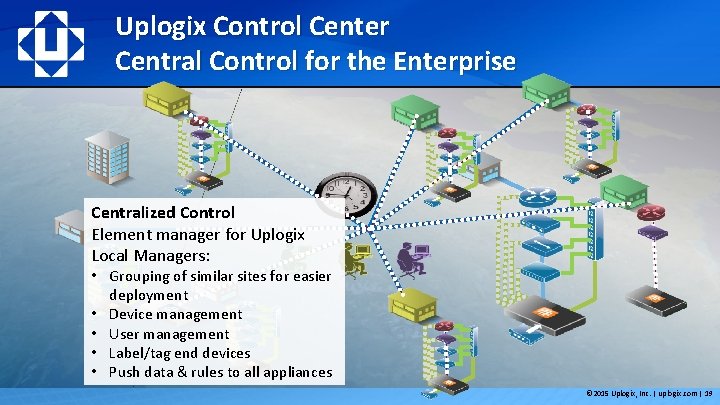
Uplogix Control Center Central Control for the Enterprise Centralized Control Element manager for Uplogix Local Managers: • Grouping of similar sites for easier deployment • Device management • User management • Label/tag end devices • Push data & rules to all appliances © 2015 Uplogix, Inc. | uplogix. com | 19
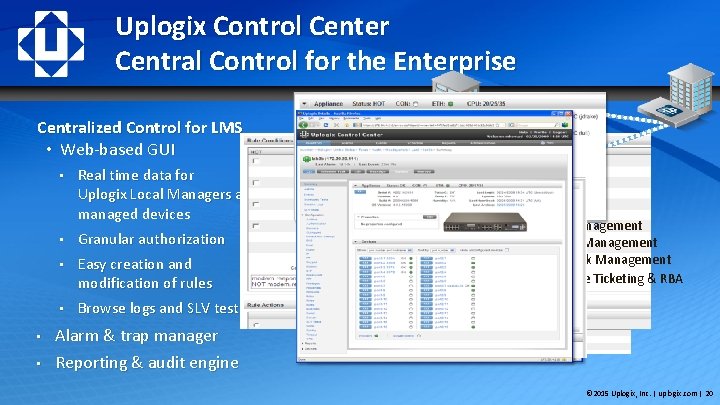
Uplogix Control Center Central Control for the Enterprise Centralized Control for LMS • Web-based GUI • • • Real time data for Uplogix Local Managers and managed devices • Granular authorization • Easy creation and modification of rules • Browse logs and SLV tests SOX PCIDSS Dashboard HIPAA Fault Management Config. Management NERC/FERC Network Management FISMA Trouble Ticketing & RBA GLBA Alarm & trap manager Reporting & audit engine © 2015 Uplogix, Inc. | uplogix. com | 20
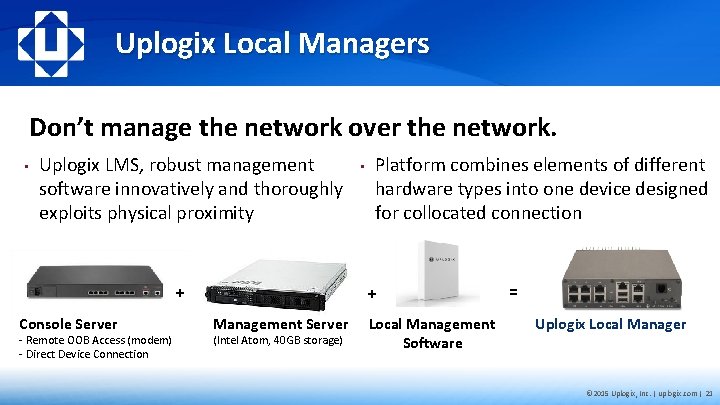
Uplogix Local Managers Don’t manage the network over the network. • Uplogix LMS, robust management software innovatively and thoroughly exploits physical proximity + Console Server - Remote OOB Access (modem) - Direct Device Connection • Platform combines elements of different hardware types into one device designed for collocated connection + Management Server (Intel Atom, 40 GB storage) Local Management Software = Uplogix Local Manager © 2015 Uplogix, Inc. | uplogix. com | 21
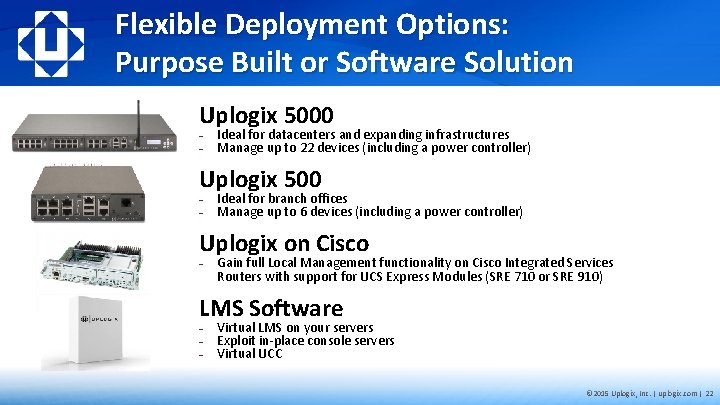
Flexible Deployment Options: Purpose Built or Software Solution Uplogix 5000 − − Ideal for datacenters and expanding infrastructures Manage up to 22 devices (including a power controller) Uplogix 500 − − Ideal for branch offices Manage up to 6 devices (including a power controller) Uplogix on Cisco − Gain full Local Management functionality on Cisco Integrated Services Routers with support for UCS Express Modules (SRE 710 or SRE 910) LMS Software − − − Virtual LMS on your servers Exploit in-place console servers Virtual UCC © 2015 Uplogix, Inc. | uplogix. com | 22
Summary • Empower existing IT staff to manage growing environments, maintain service levels and improve security as IT infrastructures become more network sensitive • Directly connected See more than SNMP, more reliably and without impacting the network at all (poll intensively) • Fail-safes change completely so you can do more, automate more, more often & without worry • Flexible automation through the same CLI access technicians use – robust change processes and run book automations, no limitations • Extends role-based management access and detailed “always” on audit to network devices • Complements and improves existing centralized network management tools for better performance, reliability and expanded capabilities © 2015 Uplogix, Inc. | uplogix. com | 23
Uplogix Local Management Platform Thank You © 2015 Uplogix, Inc. | uplogix. com | 24

© 2014 Uplogix, Inc. | uplogix. com | 25
- Slides: 25