
Load Sharing Facility LSF Minerva Scientific Computing Environment

![More bsub [options] https: //www. ibm. com/support/knowledgecenter/SSETD 4_9. 1. 3/lsf_command_r ef/bsub. heading_options. 1. html](https://slidetodoc.com/presentation_image_h2/607c58847760887dd1662691a67f18f2/image-32.jpg "More bsub [options] https: //www. ibm. com/support/knowledgecenter/SSETD 4_9. 1. 3/lsf_command_r ef/bsub. heading_options. 1. html")
- Slides: 35
Load Sharing Facility (LSF) Minerva Scientific Computing Environment https: //labs. icahn. mssm. edu/minervalab Patricia Kovatch Eugene Fluder, Ph. D Hyung Min Cho, Ph. D Lili Gai, Ph. D Dansha Jiang, Ph. D March 18, 2020
Outline ▶ LSF introduction and basic LSF commands ▶ Dependent job ▶ Self-scheduler ▶ Parallel jobs: job arrays, parallel processing and GPUs ▶ Job restart with checkpoint ? ▶ Tips for efficient usage of the queuing system 2
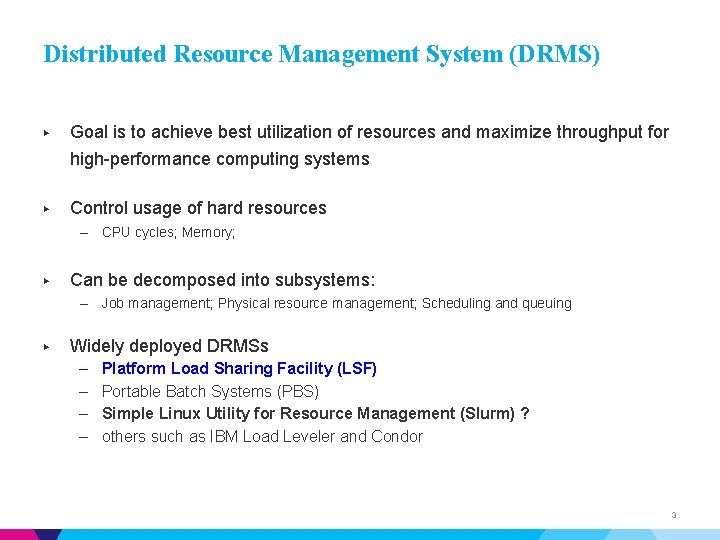
Distributed Resource Management System (DRMS) ▶ Goal is to achieve best utilization of resources and maximize throughput for high-performance computing systems ▶ Control usage of hard resources – CPU cycles; Memory; ▶ Can be decomposed into subsystems: – Job management; Physical resource management; Scheduling and queuing ▶ Widely deployed DRMSs – – Platform Load Sharing Facility (LSF) Portable Batch Systems (PBS) Simple Linux Utility for Resource Management (Slurm) ? others such as IBM Load Leveler and Condor 3
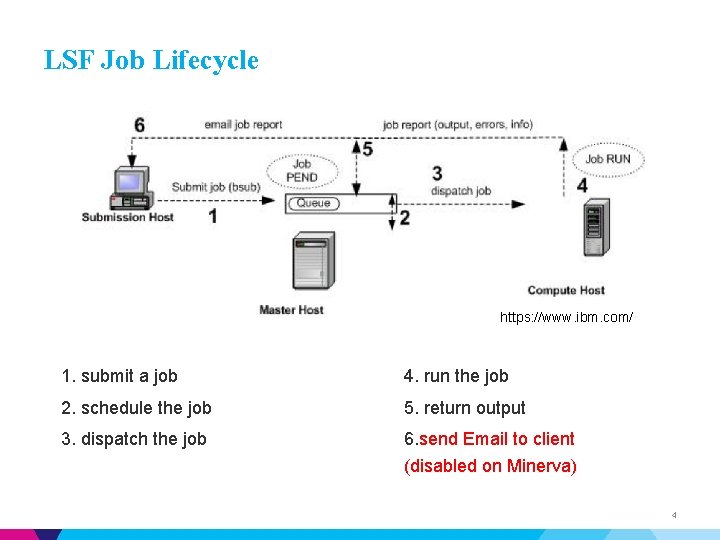
LSF Job Lifecycle https: //www. ibm. com/ 1. submit a job 4. run the job 2. schedule the job 5. return output 3. dispatch the job 6. send Email to client (disabled on Minerva) 4
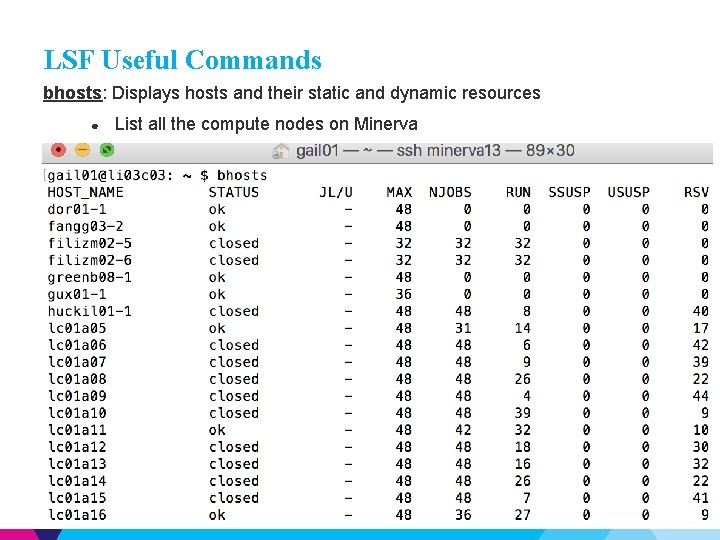
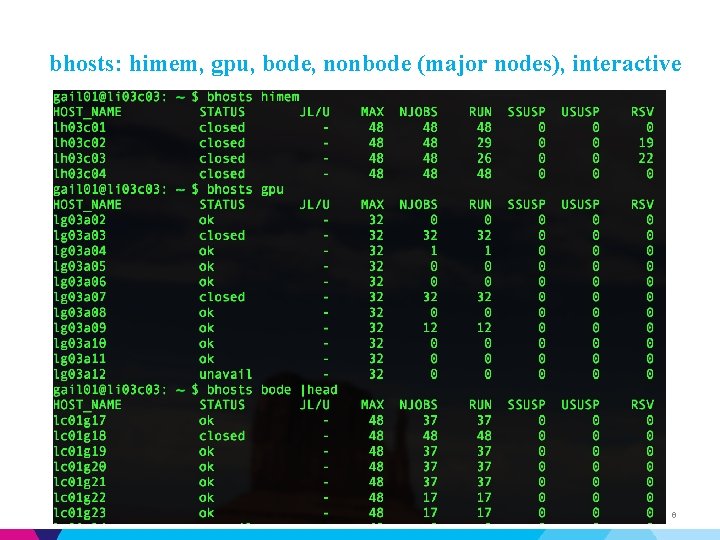
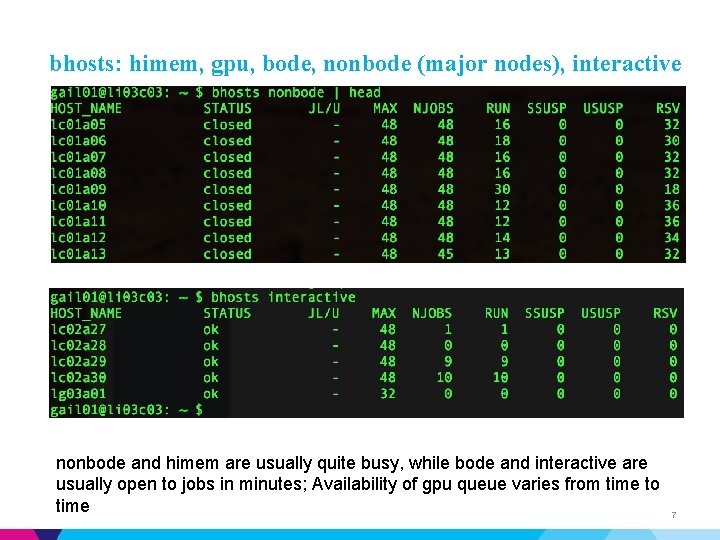
LSF Useful Commands bhosts: Displays hosts and their static and dynamic resources ● List all the compute nodes on Minerva 5
bhosts: himem, gpu, bode, nonbode (major nodes), interactive 6
bhosts: himem, gpu, bode, nonbode (major nodes), interactive nonbode and himem are usually quite busy, while bode and interactive are usually open to jobs in minutes; Availability of gpu queue varies from time to time 7
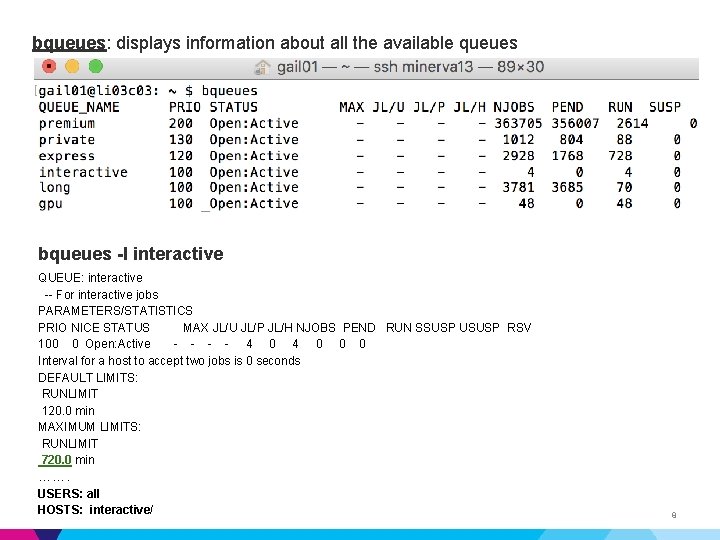
bqueues: displays information about all the available queues bqueues -l interactive QUEUE: interactive -- For interactive jobs PARAMETERS/STATISTICS PRIO NICE STATUS MAX JL/U JL/P JL/H NJOBS PEND RUN SSUSP USUSP RSV 100 0 Open: Active - - 4 0 0 0 Interval for a host to accept two jobs is 0 seconds DEFAULT LIMITS: RUNLIMIT 120. 0 min MAXIMUM LIMITS: RUNLIMIT 720. 0 min ……. USERS: all HOSTS: interactive/ 8
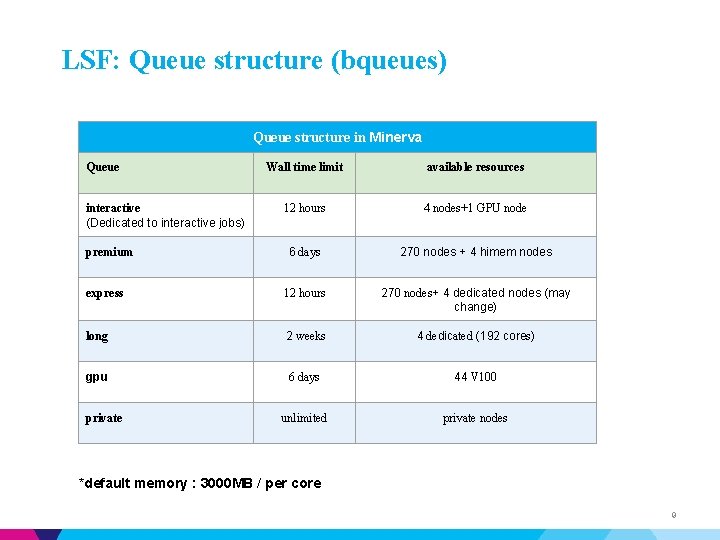
LSF: Queue structure (bqueues) Queue structure in Minerva Queue Wall time limit available resources 12 hours 4 nodes+1 GPU node 6 days 270 nodes + 4 himem nodes express 12 hours 270 nodes+ 4 dedicated nodes (may change) long 2 weeks 4 dedicated (192 cores) gpu 6 days 44 V 100 unlimited private nodes interactive (Dedicated to interactive jobs) premium private *default memory : 3000 MB / per core 9
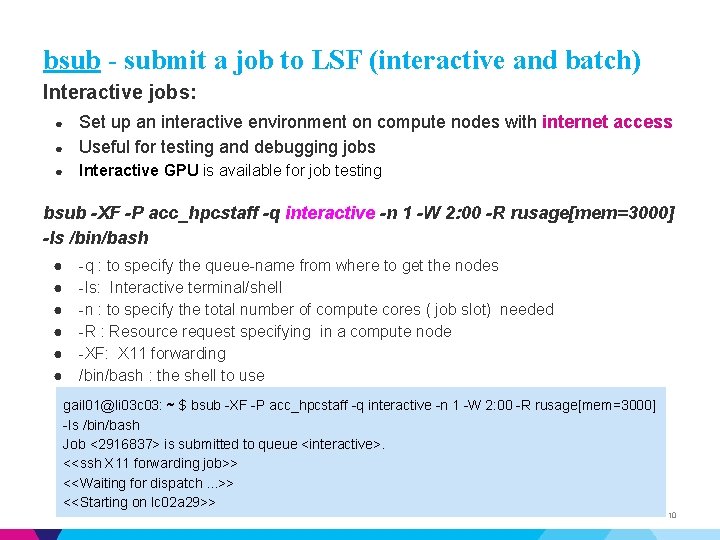
bsub - submit a job to LSF (interactive and batch) Interactive jobs: ● Set up an interactive environment on compute nodes with internet access Useful for testing and debugging jobs ● Interactive GPU is available for job testing ● bsub -XF -P acc_hpcstaff -q interactive -n 1 -W 2: 00 -R rusage[mem=3000] -Is /bin/bash ● ● ● -q : to specify the queue-name from where to get the nodes -Is: Interactive terminal/shell -n : to specify the total number of compute cores ( job slot) needed -R : Resource request specifying in a compute node -XF: X 11 forwarding /bin/bash : the shell to use gail 01@li 03 c 03: ~ $ bsub -XF -P acc_hpcstaff -q interactive -n 1 -W 2: 00 -R rusage[mem=3000] -Is /bin/bash Job <2916837> is submitted to queue <interactive>. <<ssh X 11 forwarding job>> <<Waiting for dispatch. . . >> <<Starting on lc 02 a 29>> 10
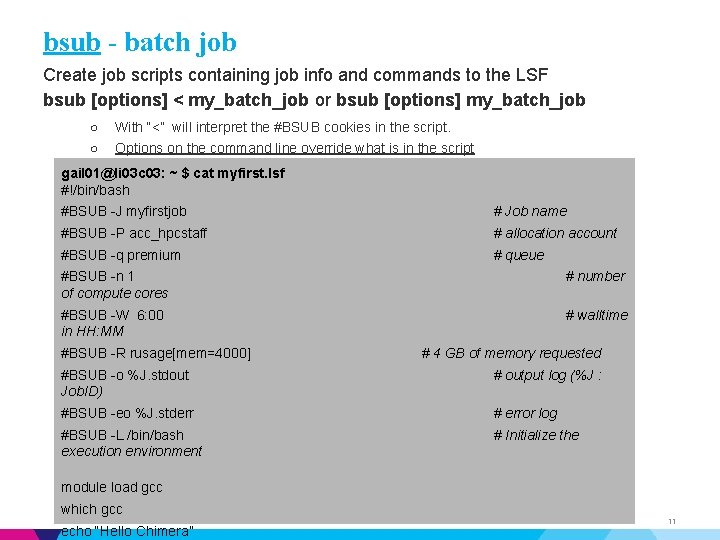
bsub - batch job Create job scripts containing job info and commands to the LSF bsub [options] < my_batch_job or bsub [options] my_batch_job ○ With “<” will interpret the #BSUB cookies in the script. ○ Options on the command line override what is in the script gail 01@li 03 c 03: ~ $ cat myfirst. lsf #!/bin/bash #BSUB -J myfirstjob # Job name #BSUB -P acc_hpcstaff # allocation account #BSUB -q premium # queue #BSUB -n 1 of compute cores # number #BSUB -W 6: 00 in HH: MM # walltime #BSUB -R rusage[mem=4000] # 4 GB of memory requested #BSUB -o %J. stdout Job. ID) # output log (%J : #BSUB -eo %J. stderr # error log #BSUB -L /bin/bash execution environment # Initialize the module load gcc which gcc echo “Hello Chimera” 11
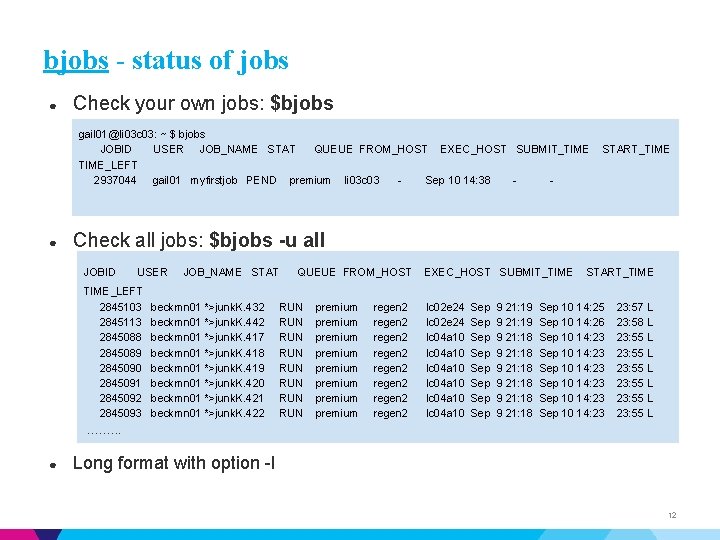
bjobs - status of jobs ● Check your own jobs: $bjobs gail 01@li 03 c 03: ~ $ bjobs JOBID USER JOB_NAME STAT QUEUE FROM_HOST EXEC_HOST SUBMIT_TIME_LEFT 2937044 gail 01 myfirstjob PEND premium li 03 c 03 Sep 10 14: 38 - ● START_TIME Check all jobs: $bjobs -u all JOBID USER TIME_LEFT 2845103 2845113 2845088 2845089 2845090 2845091 2845092 2845093 JOB_NAME STAT beckmn 01 *>junk. K. 432 beckmn 01 *>junk. K. 442 beckmn 01 *>junk. K. 417 beckmn 01 *>junk. K. 418 beckmn 01 *>junk. K. 419 beckmn 01 *>junk. K. 420 beckmn 01 *>junk. K. 421 beckmn 01 *>junk. K. 422 QUEUE FROM_HOST RUN RUN premium premium regen 2 regen 2 EXEC_HOST SUBMIT_TIME lc 02 e 24 lc 04 a 10 lc 04 a 10 Sep Sep 9 21: 19 9 21: 18 9 21: 18 START_TIME Sep 10 14: 25 Sep 10 14: 26 Sep 10 14: 23 Sep 10 14: 23 23: 57 L 23: 58 L 23: 55 L 23: 55 L ……. . . ● Long format with option -l 12
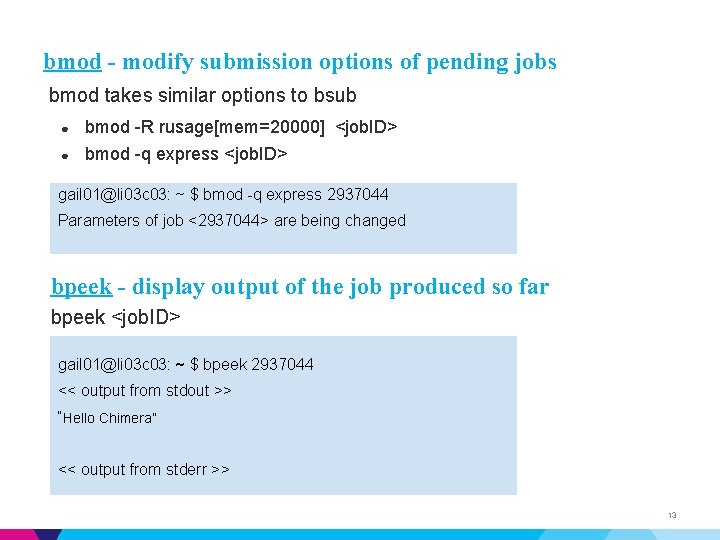
bmod - modify submission options of pending jobs bmod takes similar options to bsub ● bmod -R rusage[mem=20000] <job. ID> ● bmod -q express <job. ID> gail 01@li 03 c 03: ~ $ bmod -q express 2937044 Parameters of job <2937044> are being changed bpeek - display output of the job produced so far bpeek <job. ID> gail 01@li 03 c 03: ~ $ bpeek 2937044 << output from stdout >> “Hello Chimera” << output from stderr >> 13
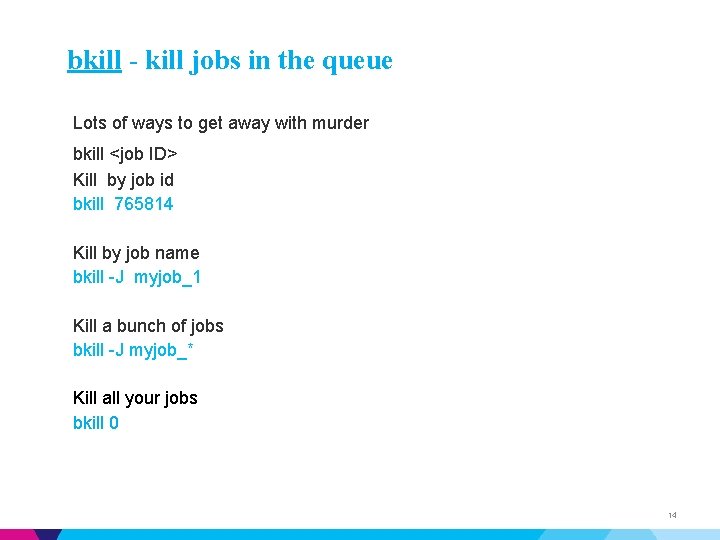
bkill - kill jobs in the queue Lots of ways to get away with murder bkill <job ID> Kill by job id bkill 765814 Kill by job name bkill -J myjob_1 Kill a bunch of jobs bkill -J myjob_* Kill all your jobs bkill 0 14
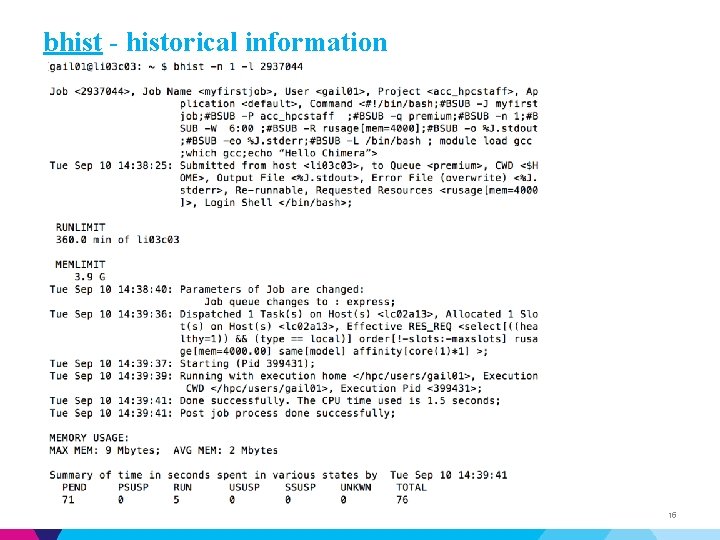
bhist - historical information 15
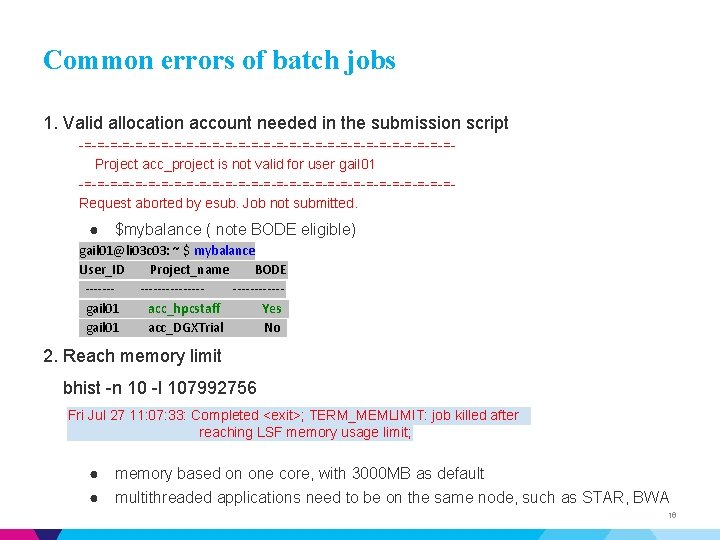
Common errors of batch jobs 1. Valid allocation account needed in the submission script -=-=-=-=-=-=-=-=-=-=-=-=-=-=-=Project acc_project is not valid for user gail 01 -=-=-=-=-=-=-=-=-=-=-=-=-=-=-=Request aborted by esub. Job not submitted. ● $mybalance ( note BODE eligible) gail 01@li 03 c 03: ~ $ mybalance User_ID Project_name BODE ----------------gail 01 acc_hpcstaff Yes gail 01 acc_DGXTrial No 2. Reach memory limit bhist -n 10 -l 107992756 Fri Jul 27 11: 07: 33: Completed <exit>; TERM_MEMLIMIT: job killed after reaching LSF memory usage limit; ● memory based on one core, with 3000 MB as default ● multithreaded applications need to be on the same node, such as STAR, BWA 16
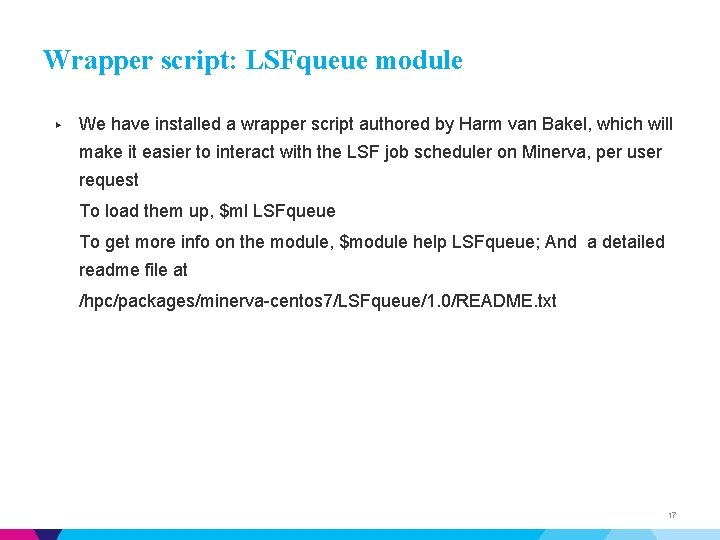
Wrapper script: LSFqueue module ▶ We have installed a wrapper script authored by Harm van Bakel, which will make it easier to interact with the LSF job scheduler on Minerva, per user request To load them up, $ml LSFqueue To get more info on the module, $module help LSFqueue; And a detailed readme file at /hpc/packages/minerva-centos 7/LSFqueue/1. 0/README. txt 17
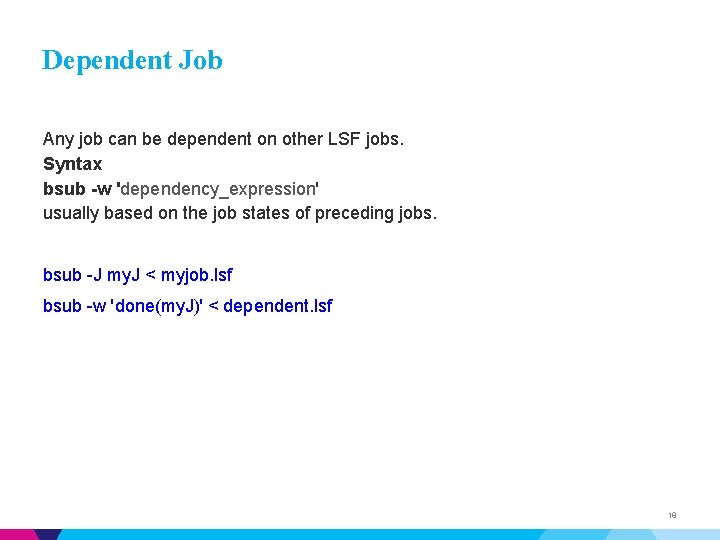
Dependent Job Any job can be dependent on other LSF jobs. Syntax bsub -w 'dependency_expression' usually based on the job states of preceding jobs. bsub -J my. J < myjob. lsf bsub -w 'done(my. J)' < dependent. lsf 18
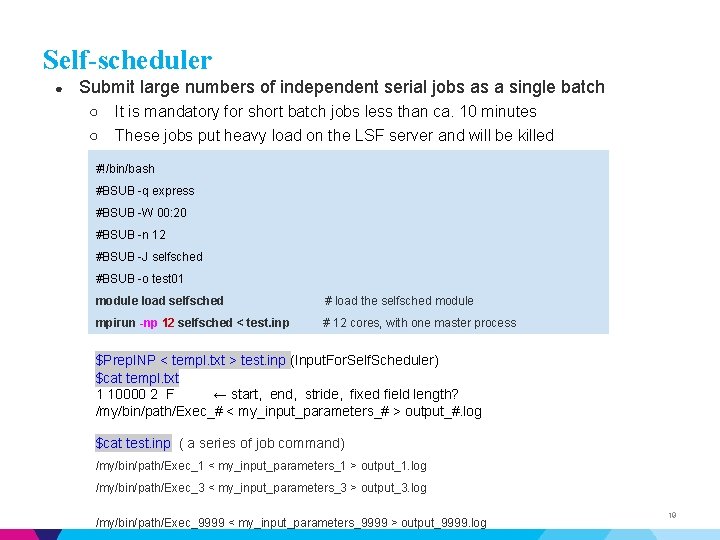
Self-scheduler ● Submit large numbers of independent serial jobs as a single batch ○ It is mandatory for short batch jobs less than ca. 10 minutes ○ These jobs put heavy load on the LSF server and will be killed #!/bin/bash #BSUB -q express #BSUB -W 00: 20 #BSUB -n 12 #BSUB -J selfsched #BSUB -o test 01 module load selfsched # load the selfsched module mpirun -np 12 selfsched < test. inp # 12 cores, with one master process $Prep. INP < templ. txt > test. inp (Input. For. Self. Scheduler) $cat templ. txt 1 10000 2 F ← start, end, stride, fixed field length? /my/bin/path/Exec_# < my_input_parameters_# > output_#. log $cat test. inp ( a series of job command) /my/bin/path/Exec_1 < my_input_parameters_1 > output_1. log /my/bin/path/Exec_3 < my_input_parameters_3 > output_3. log. /my/bin/path/Exec_9999 < my_input_parameters_9999 > output_9999. log 19
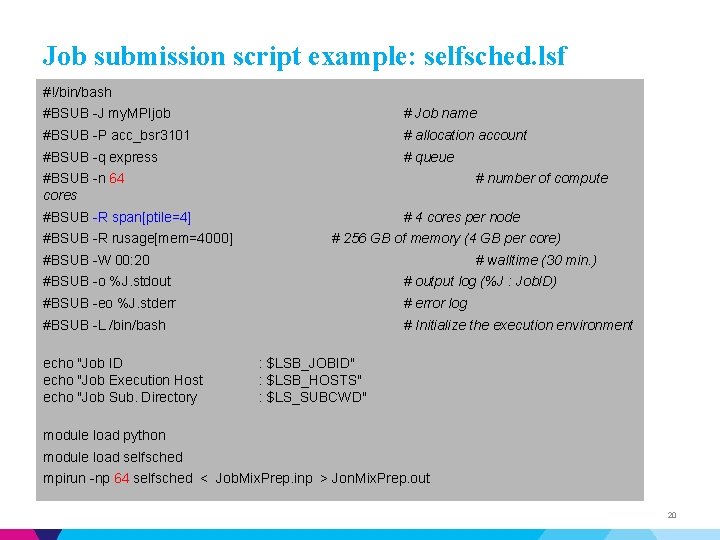
Job submission script example: selfsched. lsf #!/bin/bash #BSUB -J my. MPIjob # Job name #BSUB -P acc_bsr 3101 # allocation account #BSUB -q express # queue #BSUB -n 64 cores # number of compute #BSUB -R span[ptile=4] #BSUB -R rusage[mem=4000] # 4 cores per node # 256 GB of memory (4 GB per core) #BSUB -W 00: 20 # walltime (30 min. ) #BSUB -o %J. stdout # output log (%J : Job. ID) #BSUB -eo %J. stderr # error log #BSUB -L /bin/bash # Initialize the execution environment echo "Job ID echo "Job Execution Host echo "Job Sub. Directory : $LSB_JOBID" : $LSB_HOSTS" : $LS_SUBCWD" module load python module load selfsched mpirun -np 64 selfsched < Job. Mix. Prep. inp > Jon. Mix. Prep. out 20
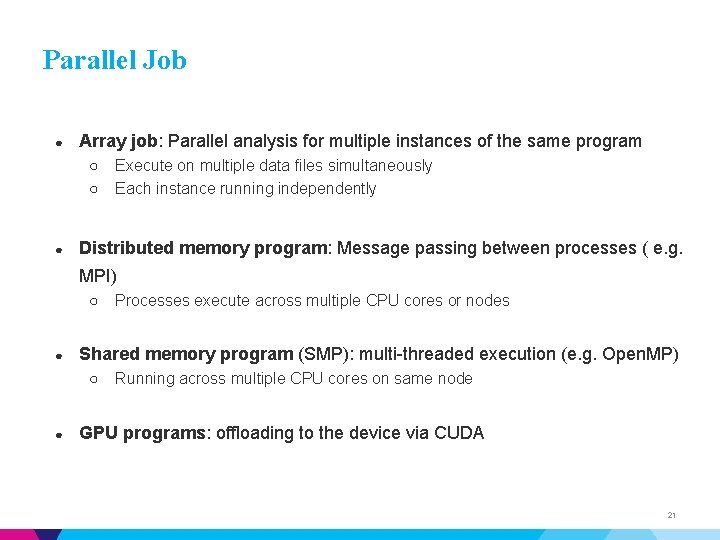
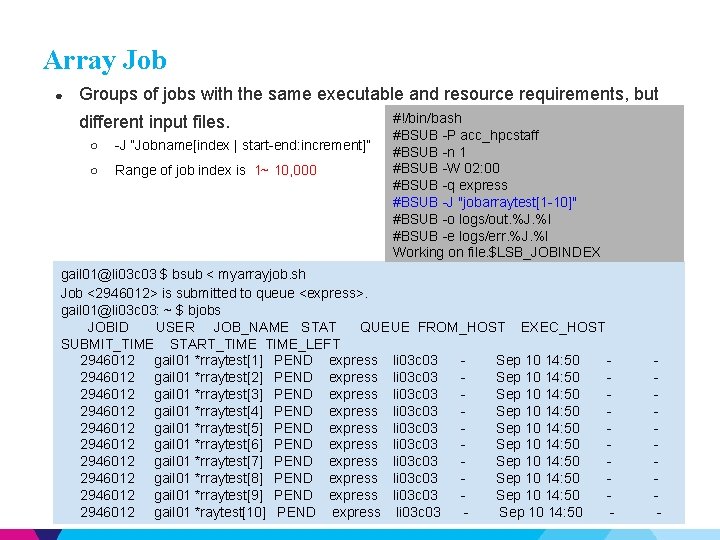
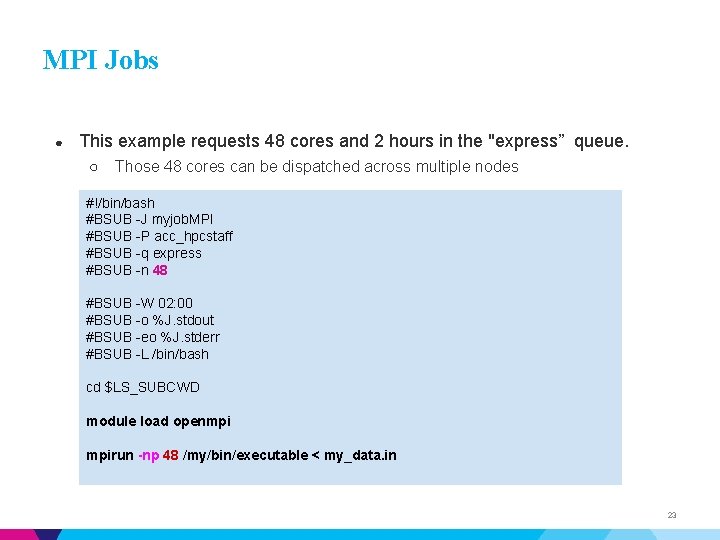
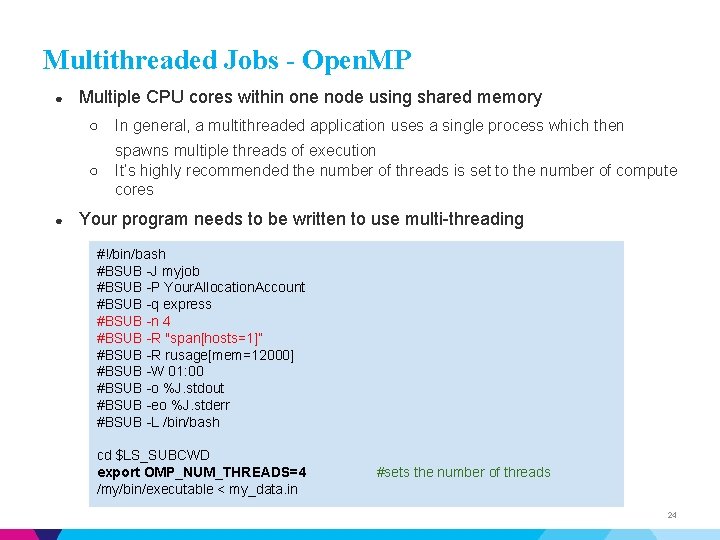
Parallel Job ● Array job: Parallel analysis for multiple instances of the same program ○ ○ ● Execute on multiple data files simultaneously Each instance running independently Distributed memory program: Message passing between processes ( e. g. MPI) ○ ● Shared memory program (SMP): multi-threaded execution (e. g. Open. MP) ○ ● Processes execute across multiple CPU cores or nodes Running across multiple CPU cores on same node GPU programs: offloading to the device via CUDA 21
Array Job ● Groups of jobs with the same executable and resource requirements, but different input files. ○ -J “Jobname[index | start-end: increment]” ○ Range of job index is 1~ 10, 000 #!/bin/bash #BSUB -P acc_hpcstaff #BSUB -n 1 #BSUB -W 02: 00 #BSUB -q express #BSUB -J "jobarraytest[1 -10]" #BSUB -o logs/out. %J. %I #BSUB -e logs/err. %J. %I Working on file. $LSB_JOBINDEX gail 01@li 03 c 03 $ bsub < myarrayjob. sh Job <2946012> is submitted to queue <express>. gail 01@li 03 c 03: ~ $ bjobs JOBID USER JOB_NAME STAT QUEUE FROM_HOST EXEC_HOST SUBMIT_TIME START_TIME_LEFT 2946012 gail 01 *rraytest[1] PEND express li 03 c 03 Sep 10 14: 50 2946012 gail 01 *rraytest[2] PEND express li 03 c 03 Sep 10 14: 50 2946012 gail 01 *rraytest[3] PEND express li 03 c 03 Sep 10 14: 50 2946012 gail 01 *rraytest[4] PEND express li 03 c 03 Sep 10 14: 50 2946012 gail 01 *rraytest[5] PEND express li 03 c 03 Sep 10 14: 50 2946012 gail 01 *rraytest[6] PEND express li 03 c 03 Sep 10 14: 50 2946012 gail 01 *rraytest[7] PEND express li 03 c 03 Sep 10 14: 50 2946012 gail 01 *rraytest[8] PEND express li 03 c 03 Sep 10 14: 50 2946012 gail 01 *rraytest[9] PEND express li 03 c 03 Sep 10 14: 50 2946012 gail 01 *raytest[10] PEND express li 03 c 03 Sep 10 14: 50 - - 22
MPI Jobs ● This example requests 48 cores and 2 hours in the "express” queue. ○ Those 48 cores can be dispatched across multiple nodes #!/bin/bash #BSUB -J myjob. MPI #BSUB -P acc_hpcstaff #BSUB -q express #BSUB -n 48 #BSUB -W 02: 00 #BSUB -o %J. stdout #BSUB -eo %J. stderr #BSUB -L /bin/bash cd $LS_SUBCWD module load openmpi mpirun -np 48 /my/bin/executable < my_data. in 23
Multithreaded Jobs - Open. MP ● ● Multiple CPU cores within one node using shared memory ○ In general, a multithreaded application uses a single process which then ○ spawns multiple threads of execution It’s highly recommended the number of threads is set to the number of compute cores Your program needs to be written to use multi-threading #!/bin/bash #BSUB -J myjob #BSUB -P Your. Allocation. Account #BSUB -q express #BSUB -n 4 #BSUB -R "span[hosts=1]” #BSUB -R rusage[mem=12000] #BSUB -W 01: 00 #BSUB -o %J. stdout #BSUB -eo %J. stderr #BSUB -L /bin/bash cd $LS_SUBCWD export OMP_NUM_THREADS=4 /my/bin/executable < my_data. in #sets the number of threads 24
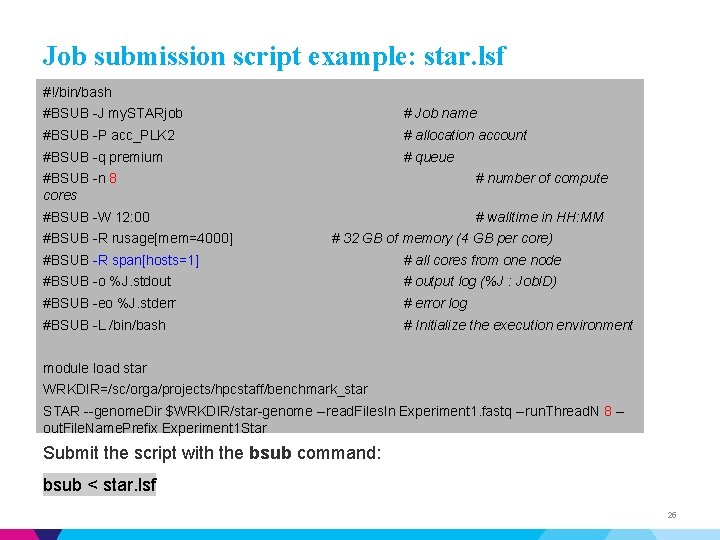
Job submission script example: star. lsf #!/bin/bash #BSUB -J my. STARjob # Job name #BSUB -P acc_PLK 2 # allocation account #BSUB -q premium # queue #BSUB -n 8 cores # number of compute #BSUB -W 12: 00 # walltime in HH: MM #BSUB -R rusage[mem=4000] # 32 GB of memory (4 GB per core) #BSUB -R span[hosts=1] # all cores from one node #BSUB -o %J. stdout # output log (%J : Job. ID) #BSUB -eo %J. stderr # error log #BSUB -L /bin/bash # Initialize the execution environment module load star WRKDIR=/sc/orga/projects/hpcstaff/benchmark_star STAR --genome. Dir $WRKDIR/star-genome --read. Files. In Experiment 1. fastq --run. Thread. N 8 -out. File. Name. Prefix Experiment 1 Star Submit the script with the bsub command: bsub < star. lsf 25
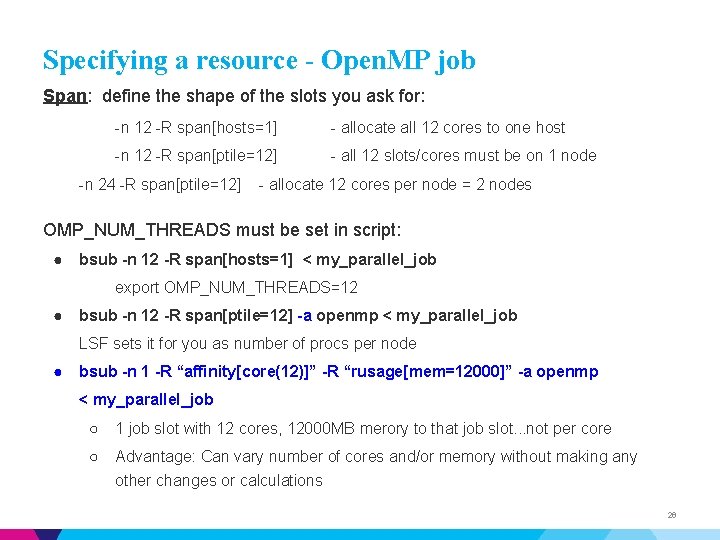
Specifying a resource - Open. MP job Span: define the shape of the slots you ask for: -n 12 -R span[hosts=1] - allocate all 12 cores to one host -n 12 -R span[ptile=12] - all 12 slots/cores must be on 1 node -n 24 -R span[ptile=12] - allocate 12 cores per node = 2 nodes OMP_NUM_THREADS must be set in script: ● bsub -n 12 -R span[hosts=1] < my_parallel_job export OMP_NUM_THREADS=12 ● bsub -n 12 -R span[ptile=12] -a openmp < my_parallel_job LSF sets it for you as number of procs per node ● bsub -n 1 -R “affinity[core(12)]” -R “rusage[mem=12000]” -a openmp < my_parallel_job ○ 1 job slot with 12 cores, 12000 MB merory to that job slot. . . not per core ○ Advantage: Can vary number of cores and/or memory without making any other changes or calculations 26
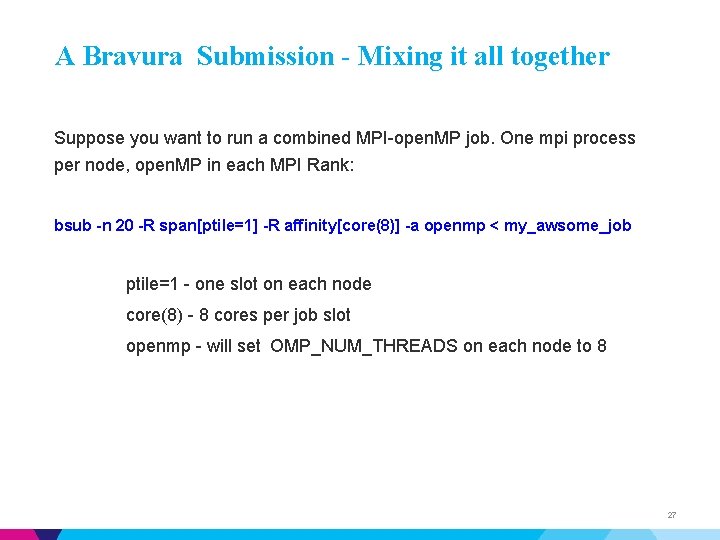
A Bravura Submission - Mixing it all together Suppose you want to run a combined MPI-open. MP job. One mpi process per node, open. MP in each MPI Rank: bsub -n 20 -R span[ptile=1] -R affinity[core(8)] -a openmp < my_awsome_job ptile=1 - one slot on each node core(8) - 8 cores per job slot openmp - will set OMP_NUM_THREADS on each node to 8 27
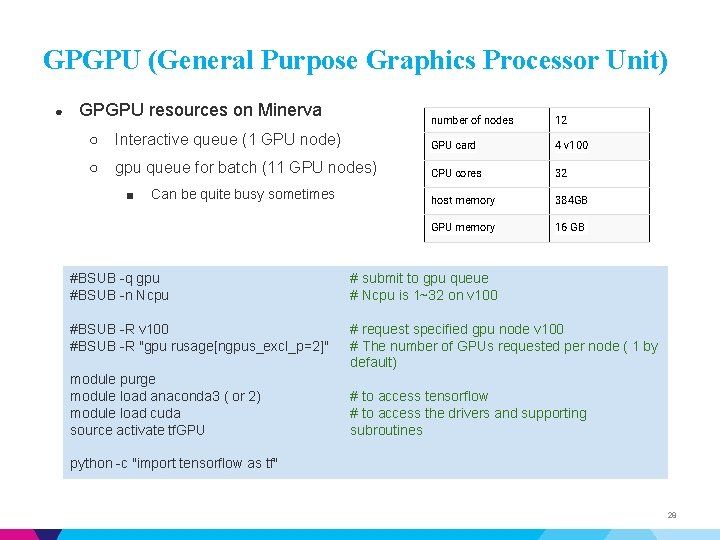
GPGPU (General Purpose Graphics Processor Unit) ● GPGPU resources on Minerva number of nodes 12 ○ Interactive queue (1 GPU node) GPU card 4 v 100 ○ gpu queue for batch (11 GPU nodes) CPU cores 32 host memory 384 GB GPU memory 16 GB ■ Can be quite busy sometimes #BSUB -q gpu #BSUB -n Ncpu # submit to gpu queue # Ncpu is 1~32 on v 100 #BSUB -R "gpu rusage[ngpus_excl_p=2]" # request specified gpu node v 100 # The number of GPUs requested per node ( 1 by default) module purge module load anaconda 3 ( or 2) module load cuda source activate tf. GPU # to access tensorflow # to access the drivers and supporting subroutines python -c "import tensorflow as tf" 28
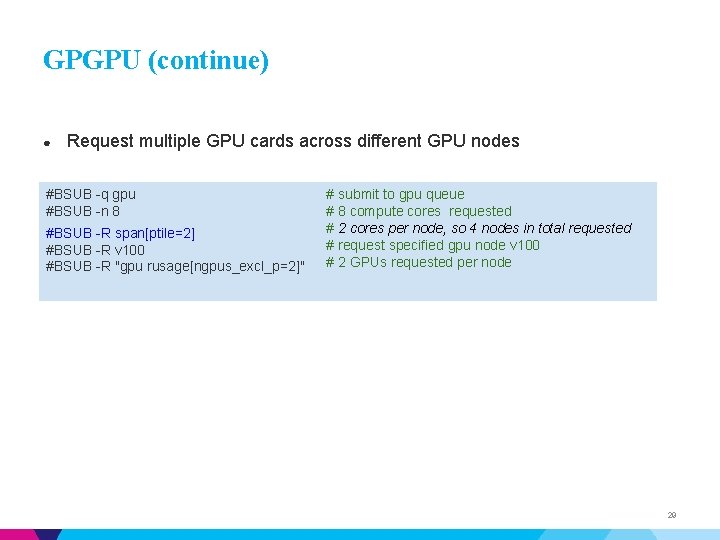
GPGPU (continue) ● Request multiple GPU cards across different GPU nodes #BSUB -q gpu #BSUB -n 8 #BSUB -R span[ptile=2] #BSUB -R v 100 #BSUB -R "gpu rusage[ngpus_excl_p=2]" # submit to gpu queue # 8 compute cores requested # 2 cores per node, so 4 nodes in total requested # request specified gpu node v 100 # 2 GPUs requested per node 29
Checkpoint/Restart ▶ The long-time standard BLCR method is no longer supported ▶ We are investigating a more modern method: Checkpoint/Restart In User space (CRIU) ▶ In final stages of testing. Watch for the Announcement. 30
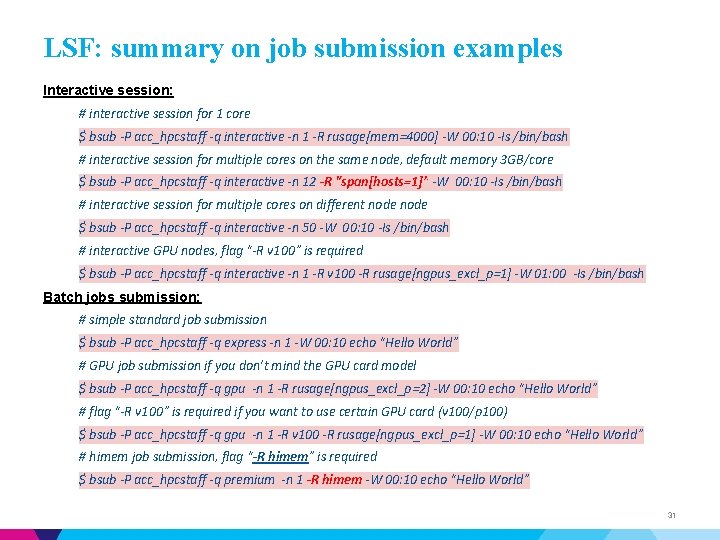
LSF: summary on job submission examples Interactive session: # interactive session for 1 core $ bsub -P acc_hpcstaff -q interactive -n 1 -R rusage[mem=4000] -W 00: 10 -Is /bin/bash # interactive session for multiple cores on the same node, default memory 3 GB/core $ bsub -P acc_hpcstaff -q interactive -n 12 -R "span[hosts=1]” -W 00: 10 -Is /bin/bash # interactive session for multiple cores on different node $ bsub -P acc_hpcstaff -q interactive -n 50 -W 00: 10 -Is /bin/bash # interactive GPU nodes, flag “-R v 100” is required $ bsub -P acc_hpcstaff -q interactive -n 1 -R v 100 -R rusage[ngpus_excl_p=1] -W 01: 00 -Is /bin/bash Batch jobs submission: # simple standard job submission $ bsub -P acc_hpcstaff -q express -n 1 -W 00: 10 echo “Hello World” # GPU job submission if you don’t mind the GPU card model $ bsub -P acc_hpcstaff -q gpu -n 1 -R rusage[ngpus_excl_p=2] -W 00: 10 echo “Hello World” # flag “-R v 100” is required if you want to use certain GPU card (v 100/p 100) $ bsub -P acc_hpcstaff -q gpu -n 1 -R v 100 -R rusage[ngpus_excl_p=1] -W 00: 10 echo “Hello World” # himem job submission, flag “-R himem” is required $ bsub -P acc_hpcstaff -q premium -n 1 -R himem -W 00: 10 echo “Hello World” 31
More bsub [options] https: //www. ibm. com/support/knowledgecenter/SSETD 4_9. 1. 3/lsf_command_r ef/bsub. heading_options. 1. html 32
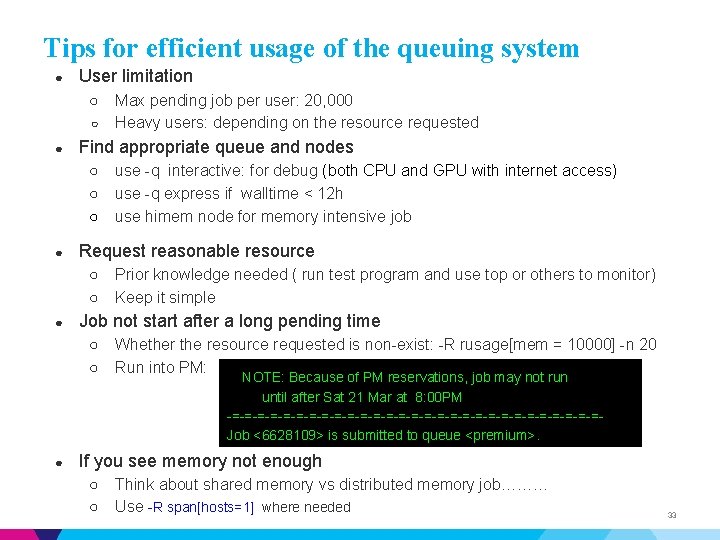
Tips for efficient usage of the queuing system ● User limitation ○ ○ ● Find appropriate queue and nodes ○ ○ ○ ● Prior knowledge needed ( run test program and use top or others to monitor) Keep it simple Job not start after a long pending time ○ ○ ● use -q interactive: for debug (both CPU and GPU with internet access) use -q express if walltime < 12 h use himem node for memory intensive job Request reasonable resource ○ ○ ● Max pending job per user: 20, 000 Heavy users: depending on the resource requested Whether the resource requested is non-exist: -R rusage[mem = 10000] -n 20 Run into PM: NOTE: Because of PM reservations, job may not run until after Sat 21 Mar at 8: 00 PM -=-=-=-=-=-=-=-=-=-=-=-=-=-=-=Job <6628109> is submitted to queue <premium>. If you see memory not enough ○ ○ Think about shared memory vs distributed memory job……… Use -R span[hosts=1] where needed 33
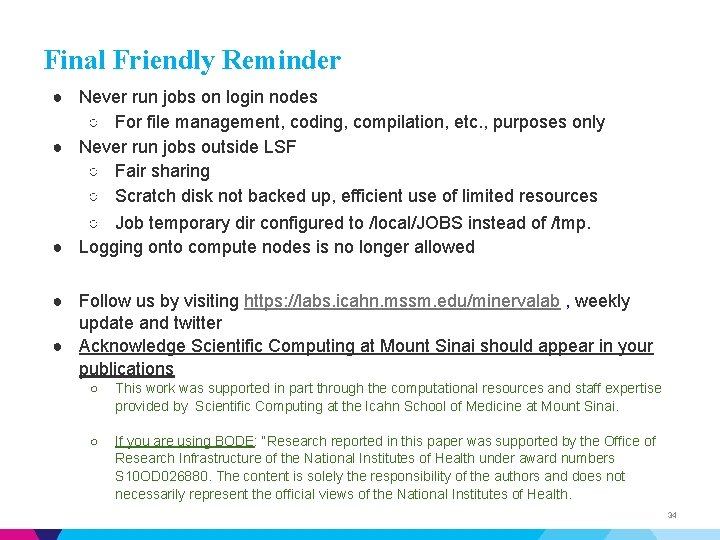
Final Friendly Reminder ● Never run jobs on login nodes ○ For file management, coding, compilation, etc. , purposes only ● Never run jobs outside LSF ○ Fair sharing ○ Scratch disk not backed up, efficient use of limited resources ○ Job temporary dir configured to /local/JOBS instead of /tmp. ● Logging onto compute nodes is no longer allowed ● Follow us by visiting https: //labs. icahn. mssm. edu/minervalab , weekly update and twitter ● Acknowledge Scientific Computing at Mount Sinai should appear in your publications ○ This work was supported in part through the computational resources and staff expertise provided by Scientific Computing at the Icahn School of Medicine at Mount Sinai. ○ If you are using BODE: “Research reported in this paper was supported by the Office of Research Infrastructure of the National Institutes of Health under award numbers S 10 OD 026880. The content is solely the responsibility of the authors and does not necessarily represent the official views of the National Institutes of Health. 34
Last but not Least ▶ Got a problem? Need a program installed? Send an email to: hpchelp@hpc. mssm. edu 35