
Linux Traffic Control and usage of tctcng for
![References q [1] Differentiated Service on Linux HOWTO, http: //www. opalsoft. net/qos/DS. htm q](https://slidetodoc.com/presentation_image/543f5ed24f96c4b345dbe815f961166f/image-33.jpg "References q [1] Differentiated Service on Linux HOWTO, http: //www. opalsoft. net/qos/DS. htm q")
- Slides: 34
Linux Traffic Control and usage of tc/tcng for traffic engineering in Linux October 14, 2008 Laziz Yunusov Advanced Networking Technology Lab. (YU ANTL) Dept. of Information & Comm. Eng, Graduate School, Yeungnam University, KOREA (Tel : +82 53 810 2497, Fax : +82 53 810 4742 http: //antl. yu. ac. kr/, E mail : ylaziz@gmail. com)
Outline q Introduction q Processing of network data in Linux kernel q Queuing disciplines q Introduction to tc q Terminology q Example configurations using tc – FIFO, PQ q Overview of tcng q Installation of tcng q Slides to be added q References Advanced Networking Tech. Lab. Yeungnam University (YU-ANTL) 2 Laziz Yunusov, Linux Traffic Control
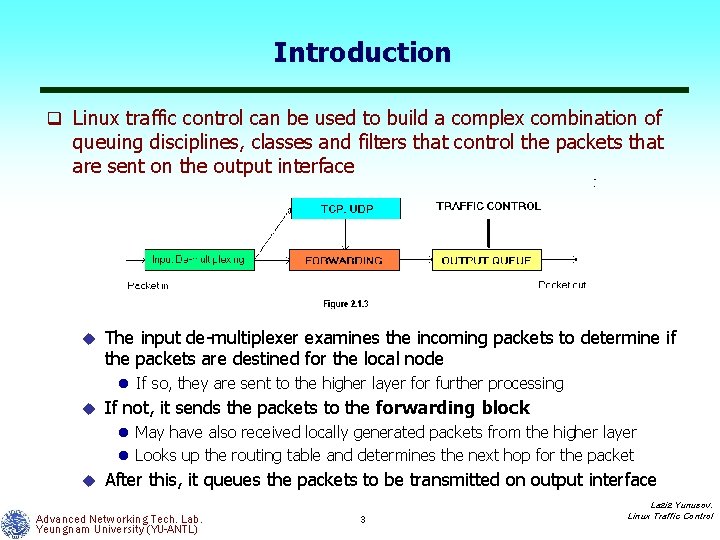
Introduction q Linux traffic control can be used to build a complex combination of queuing disciplines, classes and filters that control the packets that are sent on the output interface u The input de multiplexer examines the incoming packets to determine if the packets are destined for the local node l If so, they are sent to the higher layer for further processing u If not, it sends the packets to the forwarding block l May have also received locally generated packets from the higher layer l Looks up the routing table and determines the next hop for the packet u After this, it queues the packets to be transmitted on output interface Advanced Networking Tech. Lab. Yeungnam University (YU-ANTL) 3 Laziz Yunusov, Linux Traffic Control
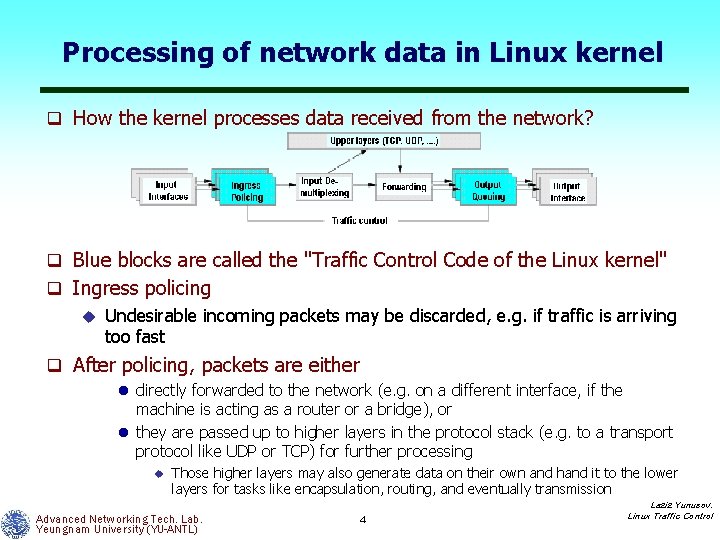
Processing of network data in Linux kernel q How the kernel processes data received from the network? q Blue blocks are called the "Traffic Control Code of the Linux kernel" q Ingress policing u Undesirable incoming packets may be discarded, e. g. if traffic is arriving too fast q After policing, packets are either l directly forwarded to the network (e. g. on a different interface, if the machine is acting as a router or a bridge), or l they are passed up to higher layers in the protocol stack (e. g. to a transport protocol like UDP or TCP) for further processing u Those higher layers may also generate data on their own and hand it to the lower layers for tasks like encapsulation, routing, and eventually transmission Advanced Networking Tech. Lab. Yeungnam University (YU-ANTL) 4 Laziz Yunusov, Linux Traffic Control
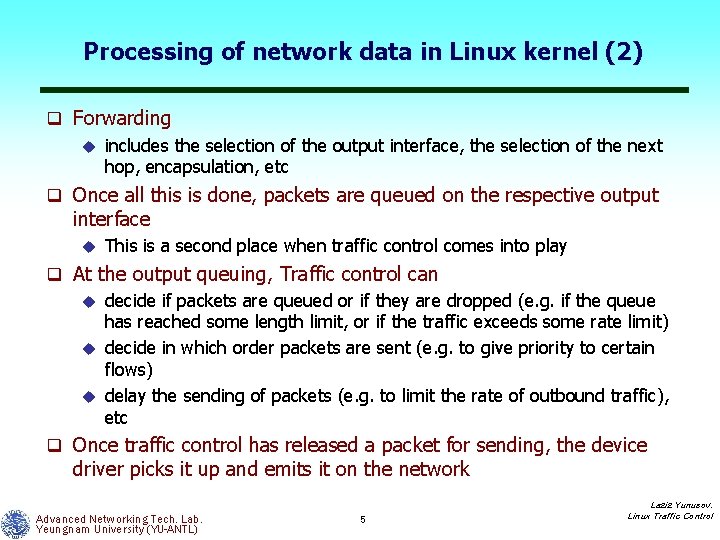
Processing of network data in Linux kernel (2) q Forwarding u includes the selection of the output interface, the selection of the next hop, encapsulation, etc q Once all this is done, packets are queued on the respective output interface u This is a second place when traffic control comes into play q At the output queuing, Traffic control can u decide if packets are queued or if they are dropped (e. g. if the queue has reached some length limit, or if the traffic exceeds some rate limit) u decide in which order packets are sent (e. g. to give priority to certain flows) u delay the sending of packets (e. g. to limit the rate of outbound traffic), etc q Once traffic control has released a packet for sending, the device driver picks it up and emits it on the network Advanced Networking Tech. Lab. Yeungnam University (YU-ANTL) 5 Laziz Yunusov, Linux Traffic Control
Major components of Linux Traffic Control Code q Four major conceptual components u Queuing disciplines u Classes u Filters u Policers Advanced Networking Tech. Lab. Yeungnam University (YU-ANTL) 6 Laziz Yunusov, Linux Traffic Control
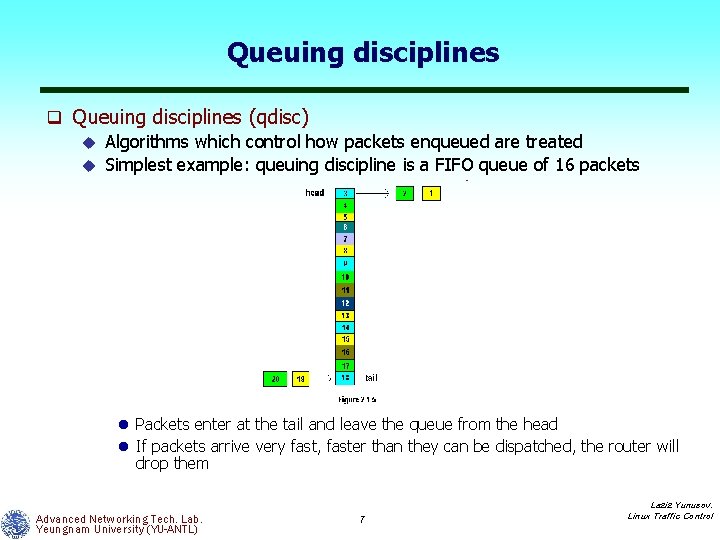
Queuing disciplines q Queuing disciplines (qdisc) u Algorithms which control how packets enqueued are treated u Simplest example: queuing discipline is a FIFO queue of 16 packets l Packets enter at the tail and leave the queue from the head l If packets arrive very fast, faster than they can be dispatched, the router will drop them Advanced Networking Tech. Lab. Yeungnam University (YU-ANTL) 7 Laziz Yunusov, Linux Traffic Control
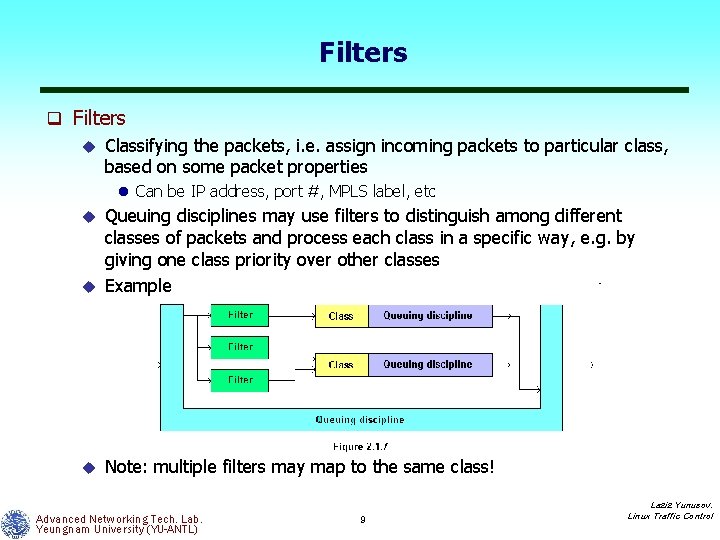
Queuing disciplines (2) q But many there are other qdiscs, more complex than FIFO u These qdiscs do not store packets themselves u Instead, they contain other qdiscs, which they give packets to and take packets from l Interesting point is, that these contained queuing disciplines could be arbitrary queuing disciplines u In Linux this concept is handled by classes, and such qdiscs are known as classful qdiscs q Classes u Each class can be viewed as a socket to which you can plug in any other queuing discipline u Classes normally don't store their packets themselves, but they use another queuing discipline to take care of that u That queuing discipline can be arbitrarily chosen from the set of available queuing disciplines, and it may well have classes, which in turn use queuing disciplines, etc Advanced Networking Tech. Lab. Yeungnam University (YU-ANTL) 8 Laziz Yunusov, Linux Traffic Control
Filters q Filters u Classifying the packets, i. e. assign incoming packets to particular class, based on some packet properties l Can be IP address, port #, MPLS label, etc Queuing disciplines may use filters to distinguish among different classes of packets and process each class in a specific way, e. g. by giving one class priority over other classes u Example u u Note: multiple filters may map to the same class! Advanced Networking Tech. Lab. Yeungnam University (YU-ANTL) 9 Laziz Yunusov, Linux Traffic Control
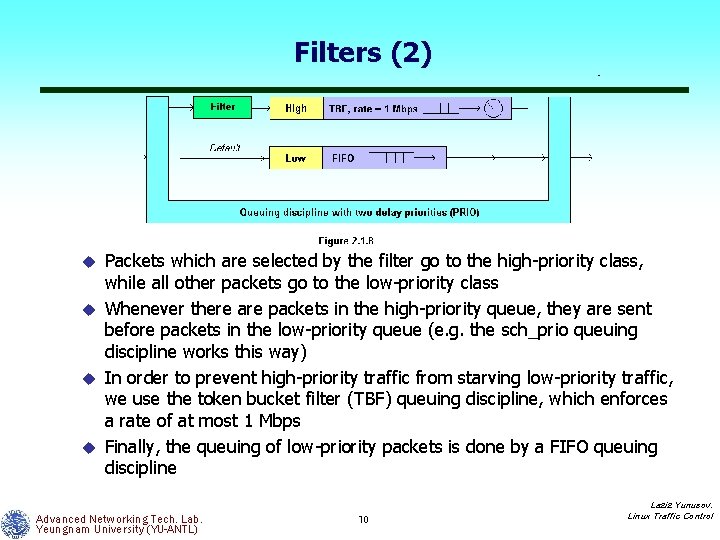
Filters (2) Packets which are selected by the filter go to the high priority class, while all other packets go to the low priority class u Whenever there are packets in the high priority queue, they are sent before packets in the low priority queue (e. g. the sch_prio queuing discipline works this way) u In order to prevent high priority traffic from starving low priority traffic, we use the token bucket filter (TBF) queuing discipline, which enforces a rate of at most 1 Mbps u Finally, the queuing of low priority packets is done by a FIFO queuing discipline u Advanced Networking Tech. Lab. Yeungnam University (YU-ANTL) 10 Laziz Yunusov, Linux Traffic Control
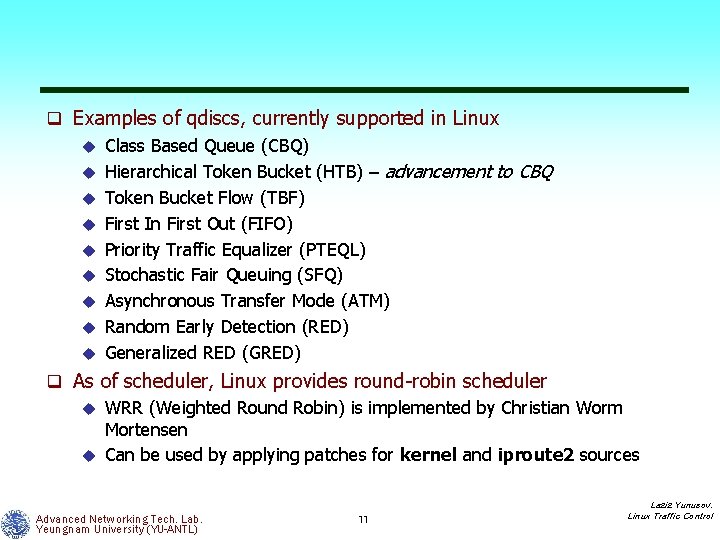
q Examples of qdiscs, currently supported in Linux u Class Based Queue (CBQ) u Hierarchical Token Bucket (HTB) – advancement to CBQ u Token Bucket Flow (TBF) u First In First Out (FIFO) u Priority Traffic Equalizer (PTEQL) u Stochastic Fair Queuing (SFQ) u Asynchronous Transfer Mode (ATM) u Random Early Detection (RED) u Generalized RED (GRED) q As of scheduler, Linux provides round robin scheduler u WRR (Weighted Round Robin) is implemented by Christian Worm Mortensen u Can be used by applying patches for kernel and iproute 2 sources Advanced Networking Tech. Lab. Yeungnam University (YU-ANTL) 11 Laziz Yunusov, Linux Traffic Control
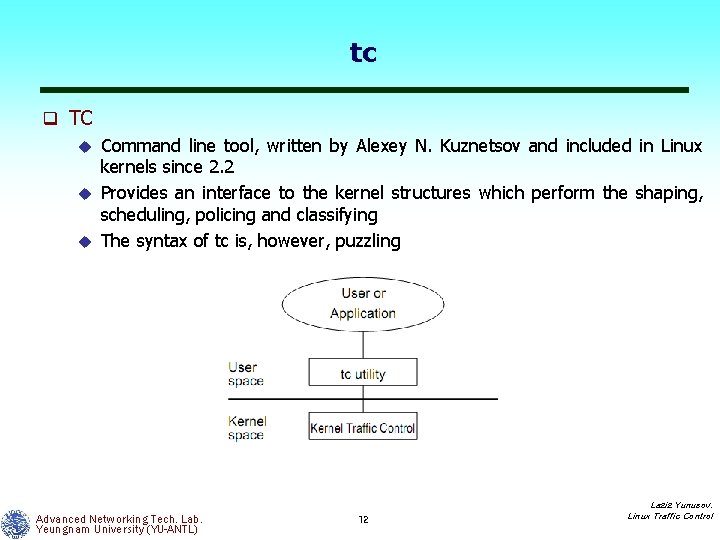
tc q TC Command line tool, written by Alexey N. Kuznetsov and included in Linux kernels since 2. 2 u Provides an interface to the kernel structures which perform the shaping, scheduling, policing and classifying u The syntax of tc is, however, puzzling u Advanced Networking Tech. Lab. Yeungnam University (YU-ANTL) 12 Laziz Yunusov, Linux Traffic Control
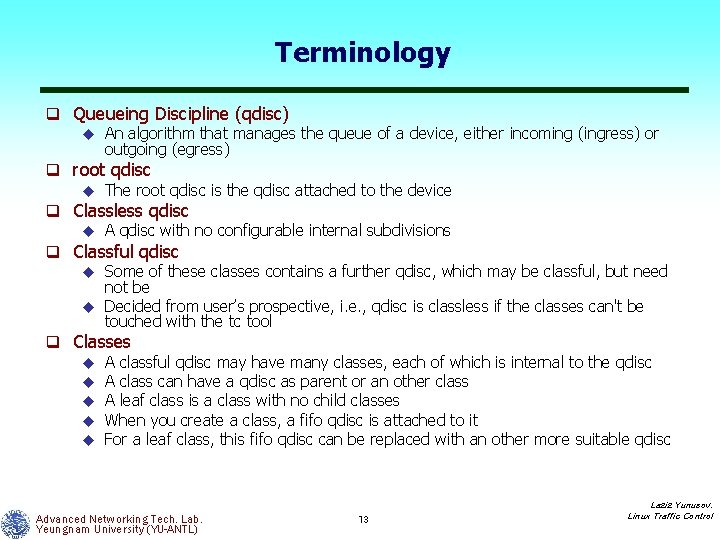
Terminology q Queueing Discipline (qdisc) u An algorithm that manages the queue of a device, either incoming (ingress) or outgoing (egress) q root qdisc u The root qdisc is the qdisc attached to the device q Classless qdisc u A qdisc with no configurable internal subdivisions q Classful qdisc u Some of these classes contains a further qdisc, which may be classful, but need not be u Decided from user’s prospective, i. e. , qdisc is classless if the classes can't be touched with the tc tool q Classes u A classful qdisc may have many classes, each of which is internal to the qdisc u A class can have a qdisc as parent or an other class u A leaf class is a class with no child classes u When you create a class, a fifo qdisc is attached to it u For a leaf class, this fifo qdisc can be replaced with an other more suitable qdisc Advanced Networking Tech. Lab. Yeungnam University (YU-ANTL) 13 Laziz Yunusov, Linux Traffic Control
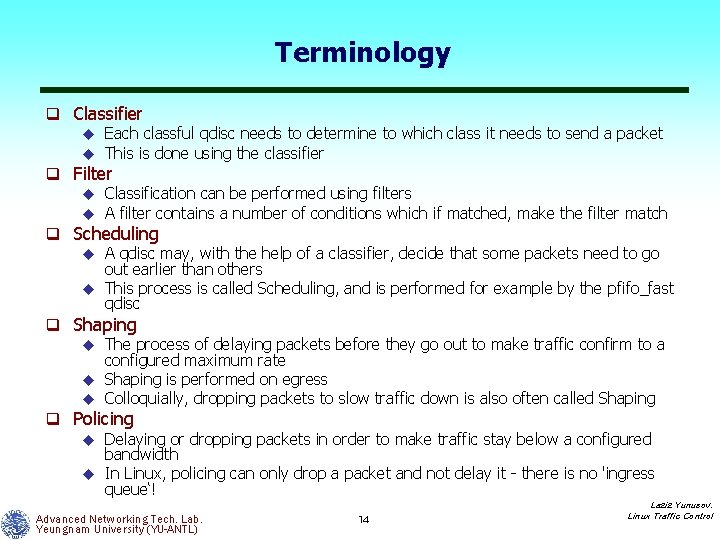
Terminology q Classifier u Each classful qdisc needs to determine to which class it needs to send a packet u This is done using the classifier q Filter u Classification can be performed using filters u A filter contains a number of conditions which if matched, make the filter match q Scheduling u A qdisc may, with the help of a classifier, decide that some packets need to go out earlier than others u This process is called Scheduling, and is performed for example by the pfifo_fast qdisc q Shaping u The process of delaying packets before they go out to make traffic confirm to a configured maximum rate u Shaping is performed on egress u Colloquially, dropping packets to slow traffic down is also often called Shaping q Policing u Delaying or dropping packets in order to make traffic stay below a configured bandwidth u In Linux, policing can only drop a packet and not delay it there is no 'ingress queue‘! Advanced Networking Tech. Lab. Yeungnam University (YU-ANTL) 14 Laziz Yunusov, Linux Traffic Control
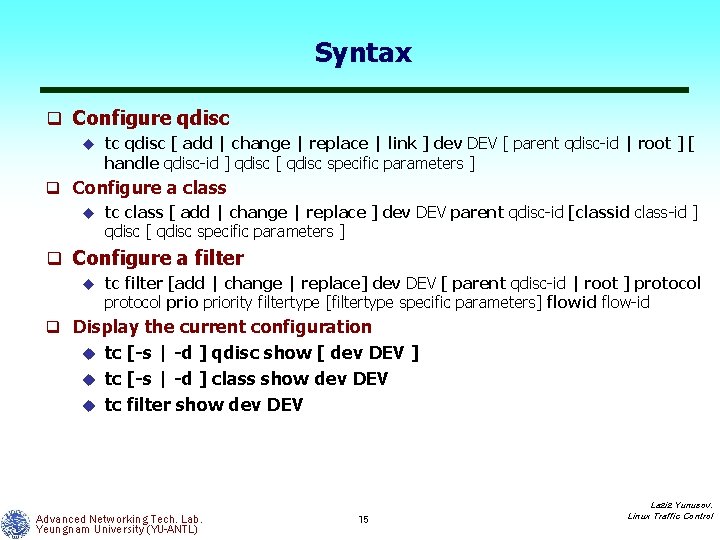
Syntax q Configure qdisc u tc qdisc [ add | change | replace | link ] dev DEV [ parent qdisc id | root ] [ handle qdisc id ] qdisc [ qdisc specific parameters ] q Configure a class u tc class [ add | change | replace ] dev DEV parent qdisc id [classid class id ] qdisc [ qdisc specific parameters ] q Configure a filter u tc filter [add | change | replace] dev DEV [ parent qdisc id | root ] protocol priority filtertype [filtertype specific parameters] flowid flow id q Display the current configuration tc [-s | -d ] qdisc show [ dev DEV ] u tc [-s | -d ] class show dev DEV u tc filter show dev DEV u Advanced Networking Tech. Lab. Yeungnam University (YU-ANTL) 15 Laziz Yunusov, Linux Traffic Control
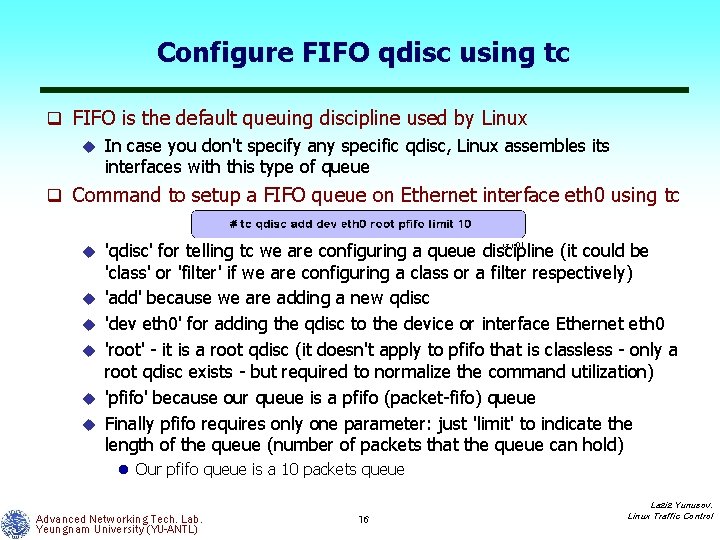
Configure FIFO qdisc using tc q FIFO is the default queuing discipline used by Linux u In case you don't specify any specific qdisc, Linux assembles its interfaces with this type of queue q Command to setup a FIFO queue on Ethernet interface eth 0 using tc u u u 'qdisc' for telling tc we are configuring a queue discipline (it could be 'class' or 'filter' if we are configuring a class or a filter respectively) 'add' because we are adding a new qdisc 'dev eth 0' for adding the qdisc to the device or interface Ethernet eth 0 'root' it is a root qdisc (it doesn't apply to pfifo that is classless only a root qdisc exists but required to normalize the command utilization) 'pfifo' because our queue is a pfifo (packet fifo) queue Finally pfifo requires only one parameter: just 'limit' to indicate the length of the queue (number of packets that the queue can hold) l Our pfifo queue is a 10 packets queue Advanced Networking Tech. Lab. Yeungnam University (YU-ANTL) 16 Laziz Yunusov, Linux Traffic Control
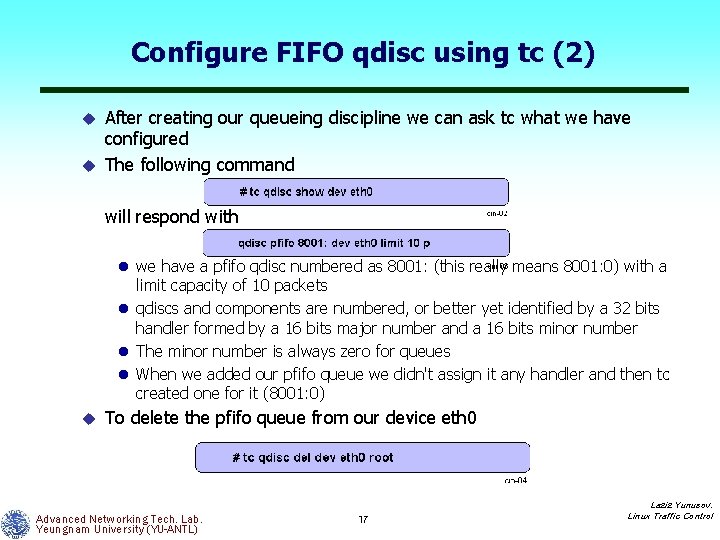
Configure FIFO qdisc using tc (2) After creating our queueing discipline we can ask tc what we have configured u The following command u will respond with l we have a pfifo qdisc numbered as 8001: (this really means 8001: 0) with a limit capacity of 10 packets l qdiscs and components are numbered, or better yet identified by a 32 bits handler formed by a 16 bits major number and a 16 bits minor number l The minor number is always zero for queues l When we added our pfifo queue we didn't assign it any handler and then tc created one for it (8001: 0) u To delete the pfifo queue from our device eth 0 Advanced Networking Tech. Lab. Yeungnam University (YU-ANTL) 17 Laziz Yunusov, Linux Traffic Control
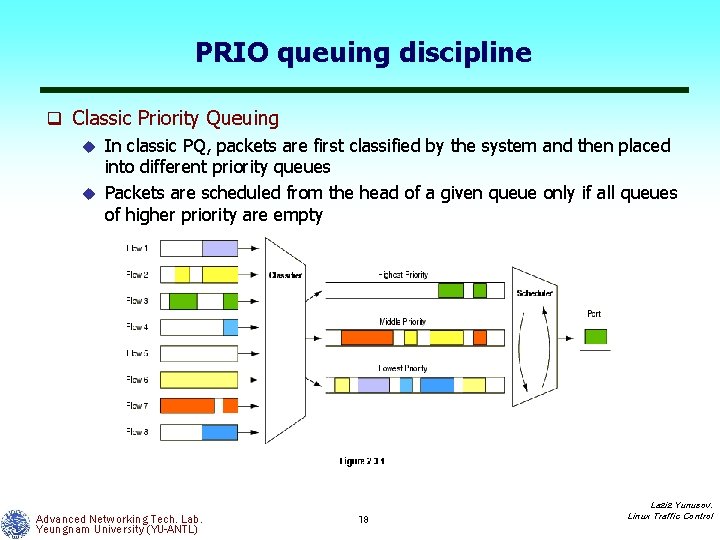
PRIO queuing discipline q Classic Priority Queuing u In classic PQ, packets are first classified by the system and then placed into different priority queues u Packets are scheduled from the head of a given queue only if all queues of higher priority are empty Advanced Networking Tech. Lab. Yeungnam University (YU-ANTL) 18 Laziz Yunusov, Linux Traffic Control
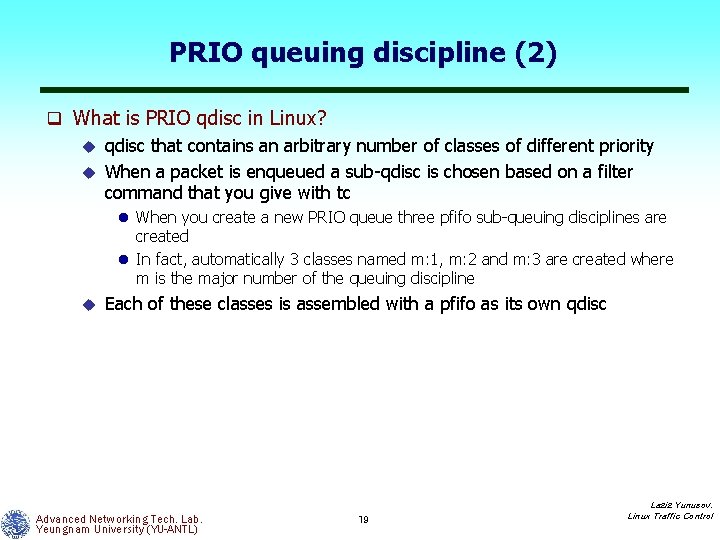
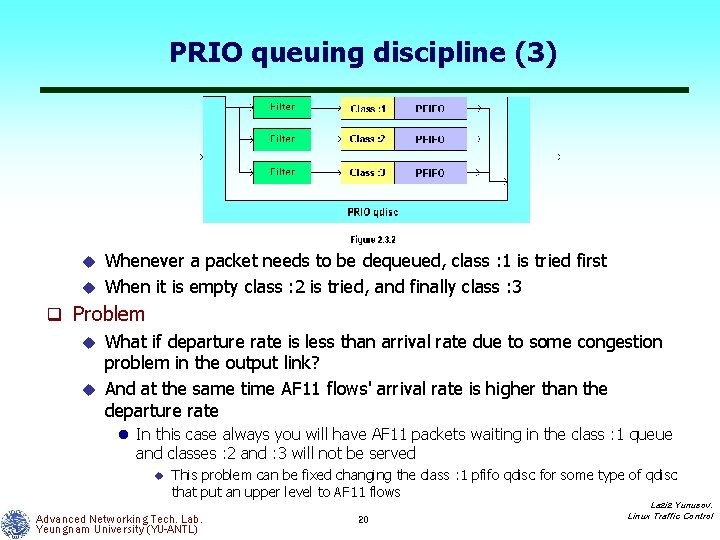
PRIO queuing discipline (2) q What is PRIO qdisc in Linux? u qdisc that contains an arbitrary number of classes of different priority u When a packet is enqueued a sub qdisc is chosen based on a filter command that you give with tc l When you create a new PRIO queue three pfifo sub queuing disciplines are created l In fact, automatically 3 classes named m: 1, m: 2 and m: 3 are created where m is the major number of the queuing discipline u Each of these classes is assembled with a pfifo as its own qdisc Advanced Networking Tech. Lab. Yeungnam University (YU-ANTL) 19 Laziz Yunusov, Linux Traffic Control
PRIO queuing discipline (3) Whenever a packet needs to be dequeued, class : 1 is tried first u When it is empty class : 2 is tried, and finally class : 3 u q Problem u What if departure rate is less than arrival rate due to some congestion problem in the output link? u And at the same time AF 11 flows' arrival rate is higher than the departure rate l In this case always you will have AF 11 packets waiting in the class : 1 queue and classes : 2 and : 3 will not be served u This problem can be fixed changing the class : 1 pfifo qdisc for some type of qdisc that put an upper level to AF 11 flows Advanced Networking Tech. Lab. Yeungnam University (YU-ANTL) 20 Laziz Yunusov, Linux Traffic Control
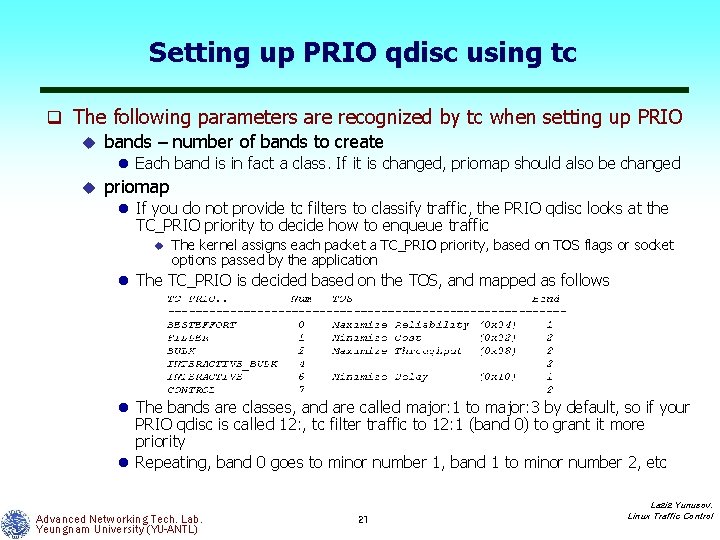
Setting up PRIO qdisc using tc q The following parameters are recognized by tc when setting up PRIO u bands – number of bands to create l Each band is in fact a class. If it is changed, priomap should also be changed u priomap l If you do not provide tc filters to classify traffic, the PRIO qdisc looks at the TC_PRIO priority to decide how to enqueue traffic u The kernel assigns each packet a TC_PRIO priority, based on TOS flags or socket options passed by the application l The TC_PRIO is decided based on the TOS, and mapped as follows l The bands are classes, and are called major: 1 to major: 3 by default, so if your PRIO qdisc is called 12: , tc filter traffic to 12: 1 (band 0) to grant it more priority l Repeating, band 0 goes to minor number 1, band 1 to minor number 2, etc Advanced Networking Tech. Lab. Yeungnam University (YU-ANTL) 21 Laziz Yunusov, Linux Traffic Control
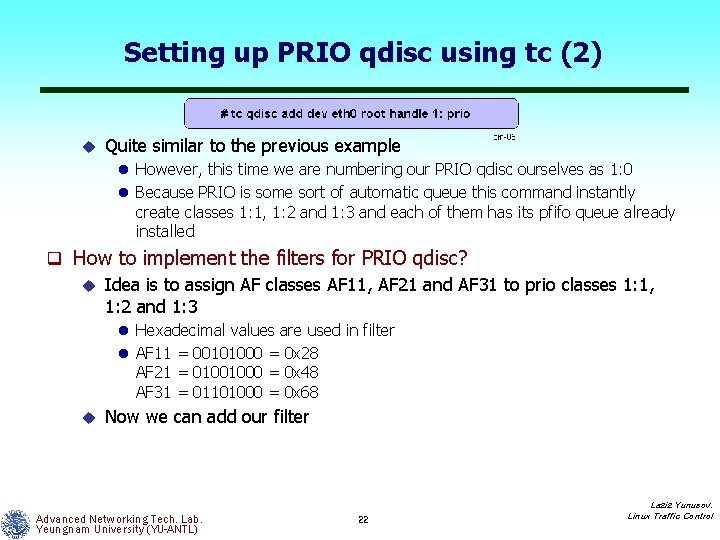
Setting up PRIO qdisc using tc (2) u Quite similar to the previous example l However, this time we are numbering our PRIO qdisc ourselves as 1: 0 l Because PRIO is some sort of automatic queue this command instantly create classes 1: 1, 1: 2 and 1: 3 and each of them has its pfifo queue already installed q How to implement the filters for PRIO qdisc? u Idea is to assign AF classes AF 11, AF 21 and AF 31 to prio classes 1: 1, 1: 2 and 1: 3 l Hexadecimal values are used in filter l AF 11 = 00101000 = 0 x 28 AF 21 = 01001000 = 0 x 48 AF 31 = 01101000 = 0 x 68 u Now we can add our filter Advanced Networking Tech. Lab. Yeungnam University (YU-ANTL) 22 Laziz Yunusov, Linux Traffic Control
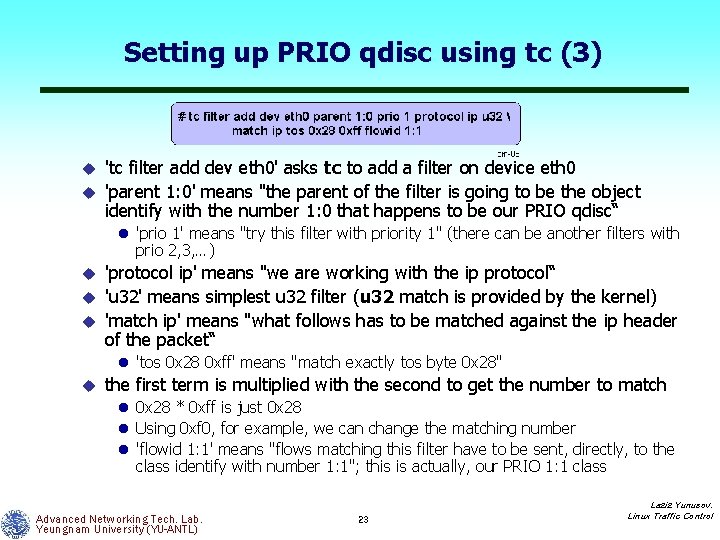
Setting up PRIO qdisc using tc (3) 'tc filter add dev eth 0' asks tc to add a filter on device eth 0 u 'parent 1: 0' means "the parent of the filter is going to be the object identify with the number 1: 0 that happens to be our PRIO qdisc“ u l 'prio 1' means "try this filter with priority 1" (there can be another filters with prio 2, 3, …) 'protocol ip' means "we are working with the ip protocol“ u 'u 32' means simplest u 32 filter (u 32 match is provided by the kernel) u 'match ip' means "what follows has to be matched against the ip header of the packet“ u l 'tos 0 x 28 0 xff' means "match exactly tos byte 0 x 28" u the first term is multiplied with the second to get the number to match l 0 x 28 * 0 xff is just 0 x 28 l Using 0 xf 0, for example, we can change the matching number l 'flowid 1: 1' means "flows matching this filter have to be sent, directly, to the class identify with number 1: 1"; this is actually, our PRIO 1: 1 class Advanced Networking Tech. Lab. Yeungnam University (YU-ANTL) 23 Laziz Yunusov, Linux Traffic Control
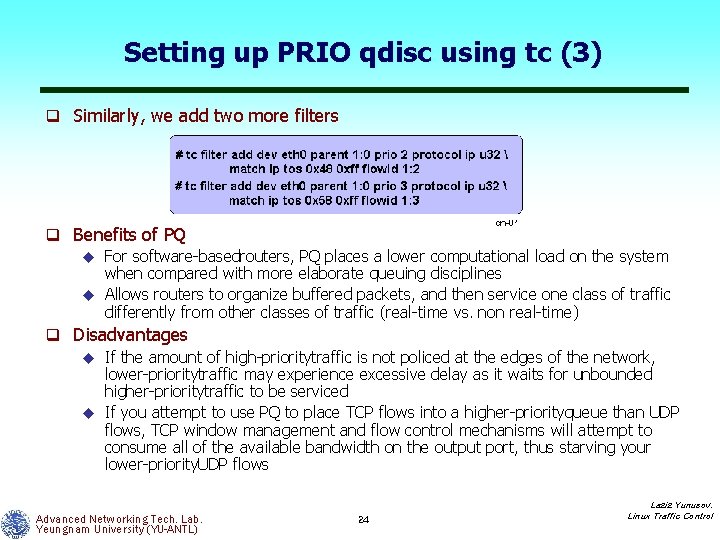
Setting up PRIO qdisc using tc (3) q Similarly, we add two more filters q Benefits of PQ u For software basedrouters, PQ places a lower computational load on the system when compared with more elaborate queuing disciplines u Allows routers to organize buffered packets, and then service one class of traffic differently from other classes of traffic (real time vs. non real time) q Disadvantages u If the amount of high prioritytraffic is not policed at the edges of the network, lower prioritytraffic may experience excessive delay as it waits for unbounded higher prioritytraffic to be serviced u If you attempt to use PQ to place TCP flows into a higher priorityqueue than UDP flows, TCP window management and flow control mechanisms will attempt to consume all of the available bandwidth on the output port, thus starving your lower priority. UDP flows Advanced Networking Tech. Lab. Yeungnam University (YU-ANTL) 24 Laziz Yunusov, Linux Traffic Control
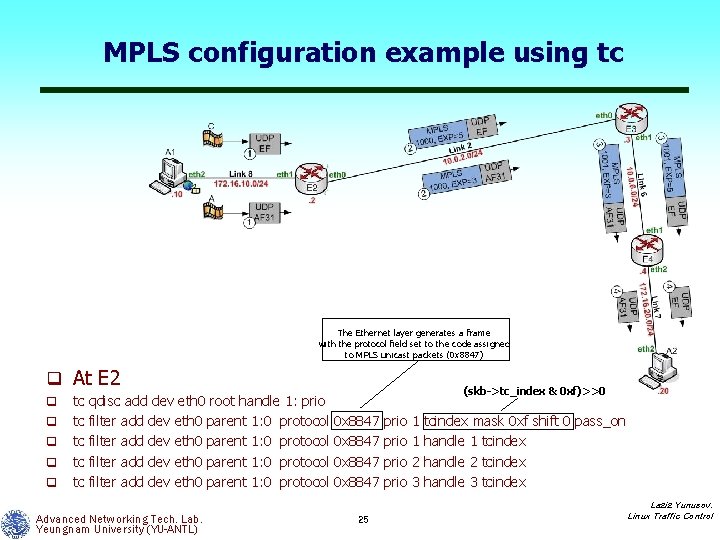
MPLS configuration example using tc The Ethernet layer generates a frame with the protocol field set to the code assigned to MPLS unicast packets (0 x 8847) q At E 2 q q q tc tc tc qdisc add dev eth 0 root handle 1: prio filter add dev eth 0 parent 1: 0 protocol Advanced Networking Tech. Lab. Yeungnam University (YU-ANTL) (skb->tc_index & 0 xf)>>0 0 x 8847 25 prio 1 1 2 3 tcindex mask 0 xf shift 0 pass_on handle 1 tcindex handle 2 tcindex handle 3 tcindex Laziz Yunusov, Linux Traffic Control
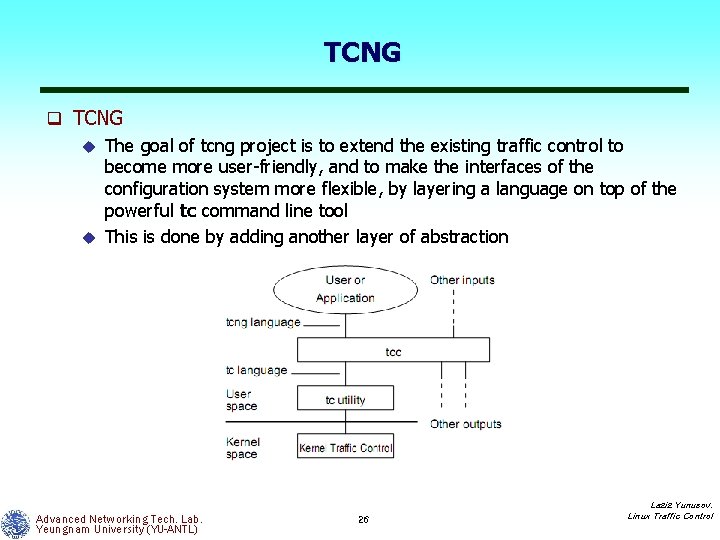
TCNG q TCNG u The goal of tcng project is to extend the existing traffic control to become more user friendly, and to make the interfaces of the configuration system more flexible, by layering a language on top of the powerful tc command line tool u This is done by adding another layer of abstraction Advanced Networking Tech. Lab. Yeungnam University (YU-ANTL) 26 Laziz Yunusov, Linux Traffic Control
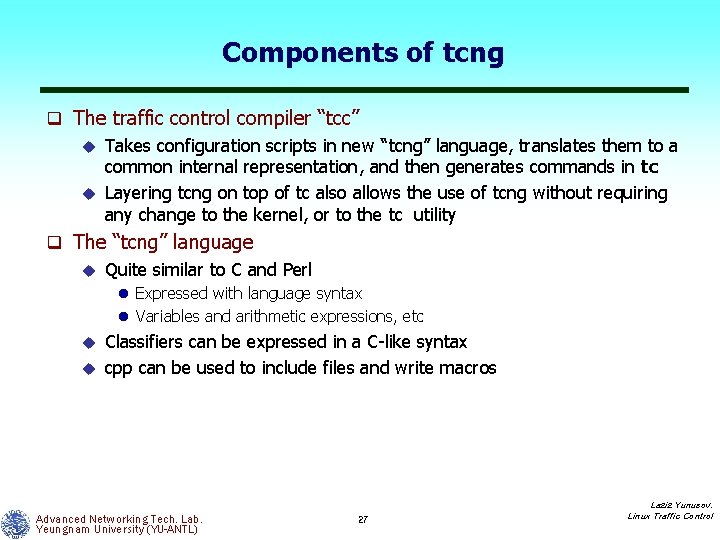
Components of tcng q The traffic control compiler “tcc” u Takes configuration scripts in new “tcng” language, translates them to a common internal representation, and then generates commands in tc u Layering tcng on top of tc also allows the use of tcng without requiring any change to the kernel, or to the tc utility q The “tcng” language u Quite similar to C and Perl l Expressed with language syntax l Variables and arithmetic expressions, etc Classifiers can be expressed in a C like syntax u cpp can be used to include files and write macros u Advanced Networking Tech. Lab. Yeungnam University (YU-ANTL) 27 Laziz Yunusov, Linux Traffic Control
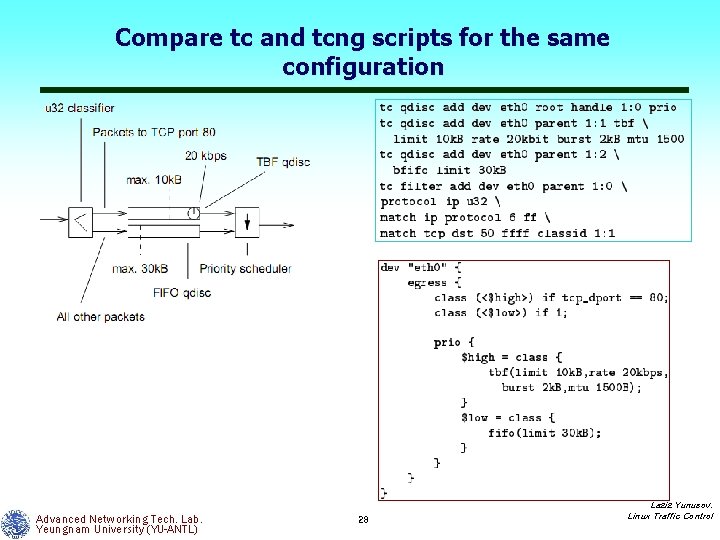
Compare tc and tcng scripts for the same configuration Advanced Networking Tech. Lab. Yeungnam University (YU-ANTL) 28 Laziz Yunusov, Linux Traffic Control
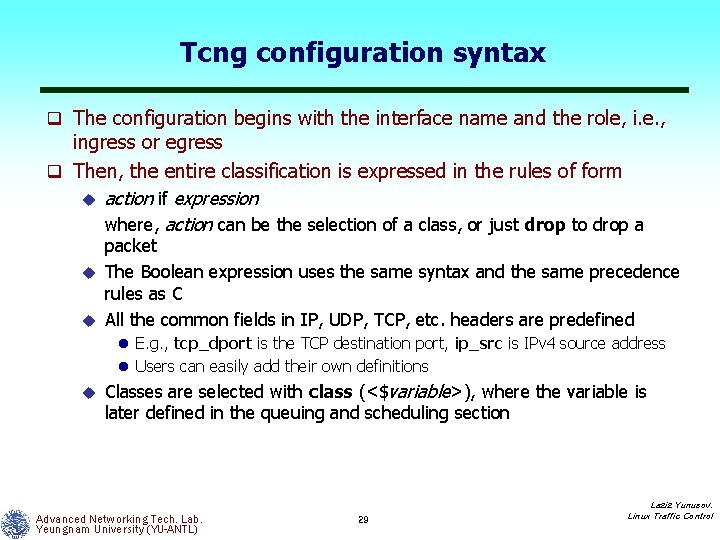
Tcng configuration syntax q The configuration begins with the interface name and the role, i. e. , ingress or egress q Then, the entire classification is expressed in the rules of form u action if expression where, action can be the selection of a class, or just drop to drop a packet u The Boolean expression uses the same syntax and the same precedence rules as C u All the common fields in IP, UDP, TCP, etc. headers are predefined l E. g. , tcp_dport is the TCP destination port, ip_src is IPv 4 source address l Users can easily add their own definitions u Classes are selected with class (<$variable>), where the variable is later defined in the queuing and scheduling section Advanced Networking Tech. Lab. Yeungnam University (YU-ANTL) 29 Laziz Yunusov, Linux Traffic Control
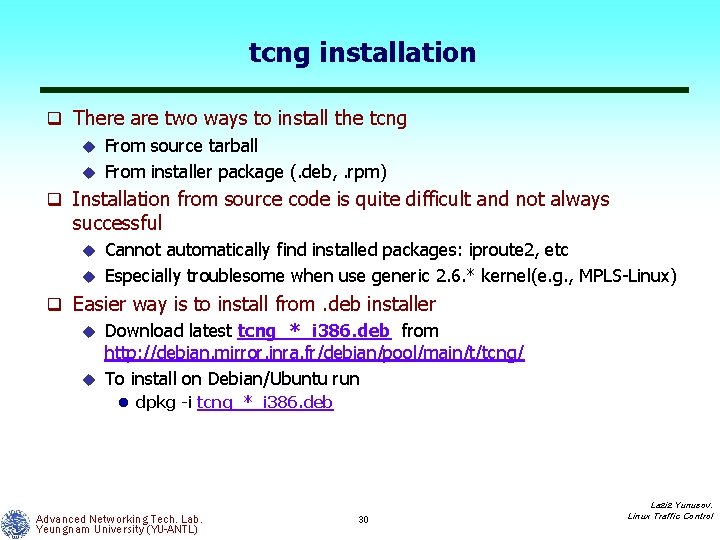
tcng installation q There are two ways to install the tcng u From source tarball u From installer package (. deb, . rpm) q Installation from source code is quite difficult and not always successful Cannot automatically find installed packages: iproute 2, etc u Especially troublesome when use generic 2. 6. * kernel(e. g. , MPLS Linux) u q Easier way is to install from. deb installer u Download latest tcng_*_i 386. deb from http: //debian. mirror. inra. fr/debian/pool/main/t/tcng/ u To install on Debian/Ubuntu run l dpkg -i tcng_*_i 386. deb Advanced Networking Tech. Lab. Yeungnam University (YU-ANTL) 30 Laziz Yunusov, Linux Traffic Control
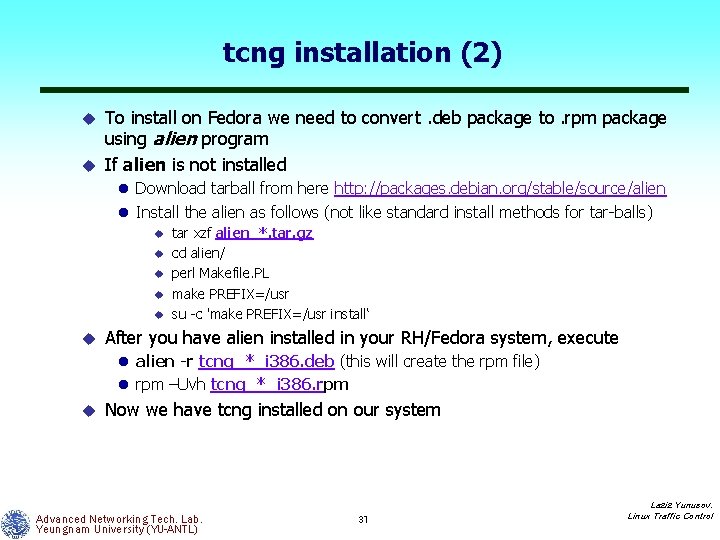
tcng installation (2) To install on Fedora we need to convert. deb package to. rpm package using alien program u If alien is not installed u l Download tarball from here http: //packages. debian. org/stable/source/alien l Install the alien as follows (not like standard install methods for tar balls) u u u tar xzf alien_*. tar. gz cd alien/ perl Makefile. PL make PREFIX=/usr su c 'make PREFIX=/usr install‘ After you have alien installed in your RH/Fedora system, execute l alien -r tcng_*_i 386. deb (this will create the rpm file) l rpm –Uvh tcng_*_i 386. rpm u Now we have tcng installed on our system Advanced Networking Tech. Lab. Yeungnam University (YU-ANTL) 31 Laziz Yunusov, Linux Traffic Control
Slides to be included soon q More on writing tcng scripts q How to add & user’s own definitions in tcng, for example, like mpls_exp or mpls_label q Installation procedures of WRR (weighted round robin) scheduler in 2. 6. * kernels Kernel patching and iproute 2+tc packages patching u Fixing possible error messages u q Demonstrate an example scenario with WRR q etc Advanced Networking Tech. Lab. Yeungnam University (YU-ANTL) 32 Laziz Yunusov, Linux Traffic Control
References q [1] Differentiated Service on Linux HOWTO, http: //www. opalsoft. net/qos/DS. htm q [2] MPLS Linux labs, http: //www. elcom. pub. ro/~adrian. popa/mpls linux docs/3 diffserv_and_qos. html q [3] tcng homepage, http: //tcng. sourceforge. net/ q [4] Traffic Control Next Generation, Reference Manual. http: //linux ip. net/gl/tcng/ Advanced Networking Tech. Lab. Yeungnam University (YU-ANTL) 33 Laziz Yunusov, Linux Traffic Control
Q&A q Thank you for your kind attention! Advanced Networking Tech. Lab. Yeungnam University (YU-ANTL) 34 Laziz Yunusov, Linux Traffic Control