
Linear Programming Operations Management Dr Ron Lembke Motivating
Linear Programming Operations Management Dr. Ron Lembke
Motivating Example n Suppose you are an entrepreneur making plans to make a killing over the summer by traveling across the country selling products you design and manufacture yourself. To be more straightforward, you plan to follow the Dead all summer, selling t-shirts.

Example n n You are really good with tie-dye, so you earn a profit of $25 for each t-shirt. The sweatshirt screen-printed sweatshirt makes a profit of $20. You have 4 days before you leave, and you want to figure out how many of each to make before you head out for the summer. You plan to work 14 hours a day on this. It takes you 30 minutes per tie dye, and 15 minutes to make a sweatshirt.
Example You have a limited amount of space in the van. Being an engineer at heart, you figure: ¨ If you cram everything in the van, you have 40 cubit feet of space in the van. ¨ A tightly packed t-shirt takes 0. 2 ft 3 ¨ A tightly packed sweatshirt takes 0. 5 ft 3. How many of each should you make?
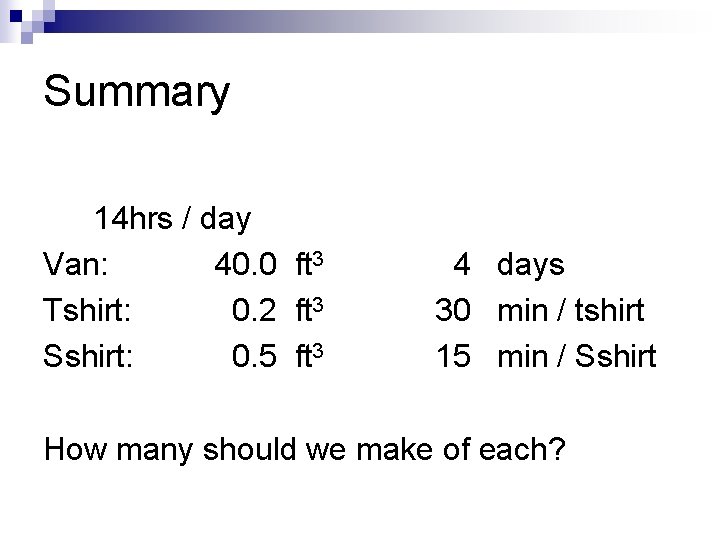
Summary 14 hrs / day Van: 40. 0 ft 3 Tshirt: 0. 2 ft 3 Sshirt: 0. 5 ft 3 4 days 30 min / tshirt 15 min / Sshirt How many should we make of each?
Linear Programming What we have just done is called “Linear Programming. ” n Has nothing to do with computer programming n Invented in WWII to optimize military “programs. ” n “Linear” because no x 3, cosines, x*y, etc. n
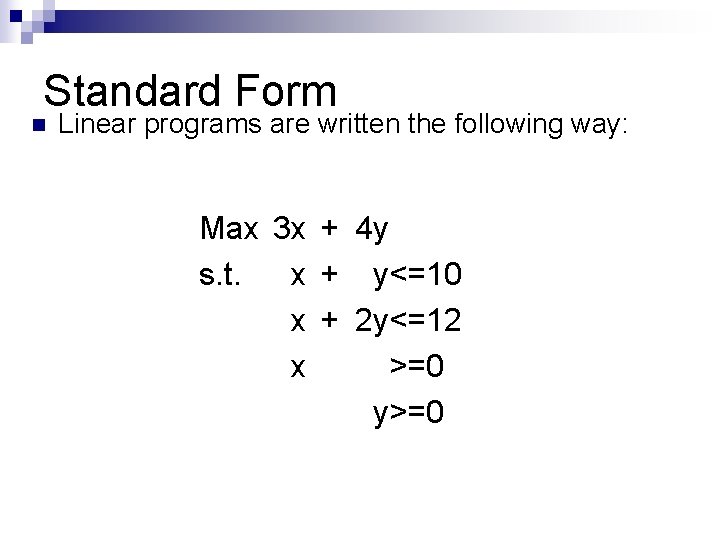
Standard Form n Linear programs are written the following way: Max 3 x + 4 y s. t. x + y<=10 x + 2 y<=12 x >=0 y>=0
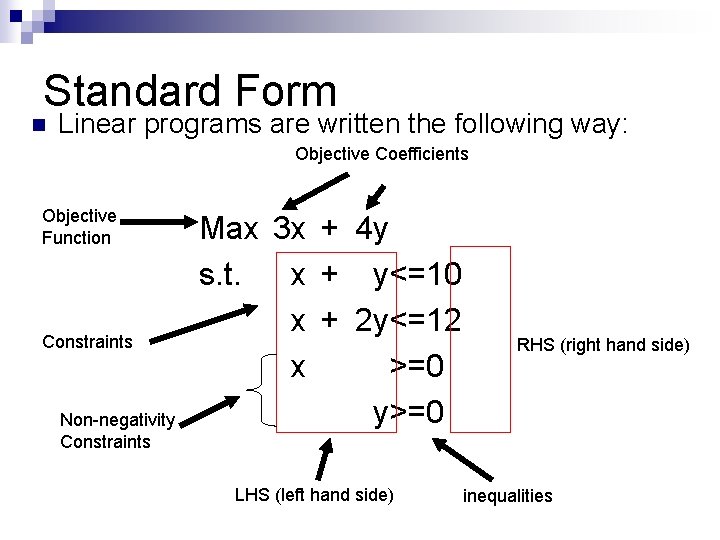
Standard Form n Linear programs are written the following way: Objective Coefficients Objective Function Constraints Non-negativity Constraints Max 3 x + 4 y s. t. x + y<=10 x + 2 y<=12 x >=0 y>=0 LHS (left hand side) RHS (right hand side) inequalities
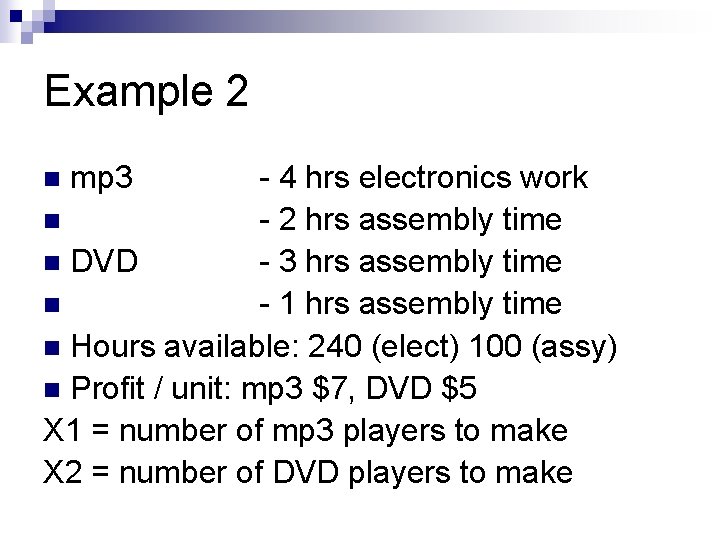
Example 2 - 4 hrs electronics work n - 2 hrs assembly time n DVD - 3 hrs assembly time n - 1 hrs assembly time n Hours available: 240 (elect) 100 (assy) n Profit / unit: mp 3 $7, DVD $5 X 1 = number of mp 3 players to make X 2 = number of DVD players to make n mp 3
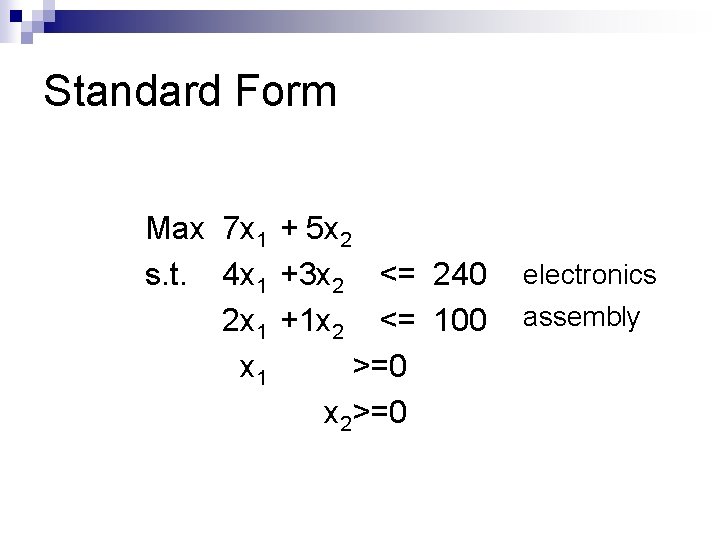
Standard Form Max 7 x 1 + 5 x 2 s. t. 4 x 1 +3 x 2 <= 240 2 x 1 +1 x 2 <= 100 x 1 >=0 x 2>=0 electronics assembly
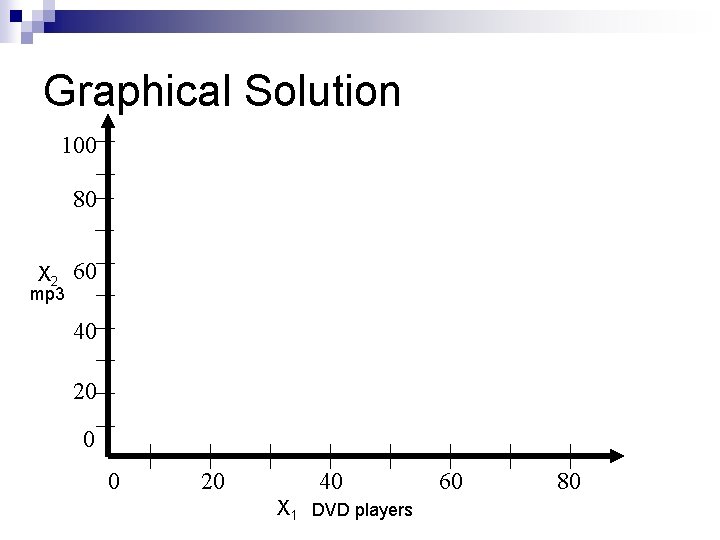
Graphical Solution 100 80 X 2 mp 3 60 40 20 0 0 20 40 X 1 DVD players 60 80
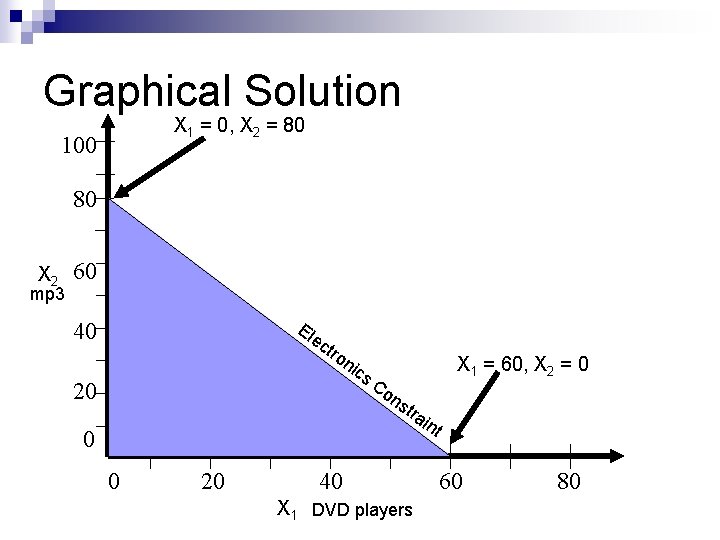
Graphical Solution X 1 = 0, X 2 = 80 100 80 X 2 mp 3 60 El 40 ec 20 tro nic X 1 = 60, X 2 = 0 s. C on str 0 0 20 40 X 1 DVD players ain t 60 80
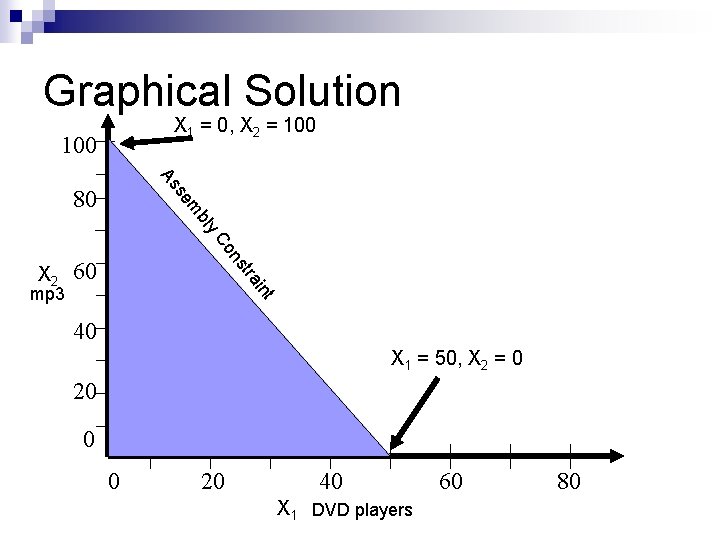
Graphical Solution X 1 = 0, X 2 = 100 As y bl m se 80 60 t in tra mp 3 ns Co X 2 40 X 1 = 50, X 2 = 0 20 0 0 20 40 X 1 DVD players 60 80
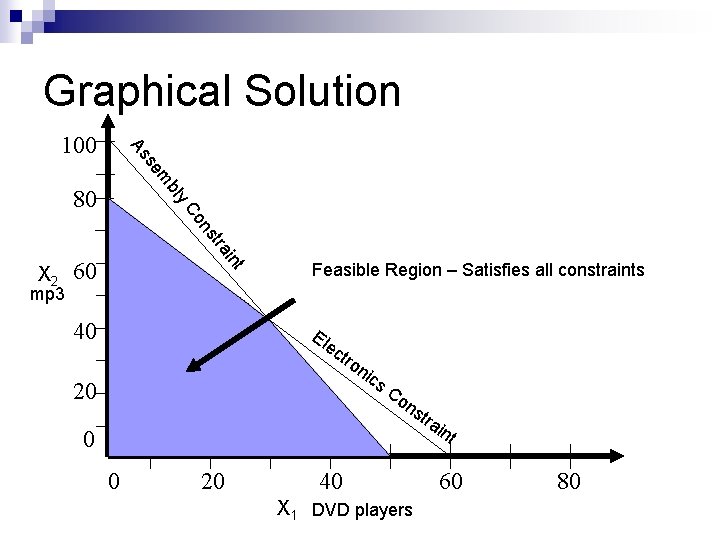
Graphical Solution m se As 100 y bl 80 mp 3 t in tra ns Co X 2 60 40 Feasible Region – Satisfies all constraints El ec tro 20 nic s. C on str ain 0 t 0 20 40 X 1 DVD players 60 80
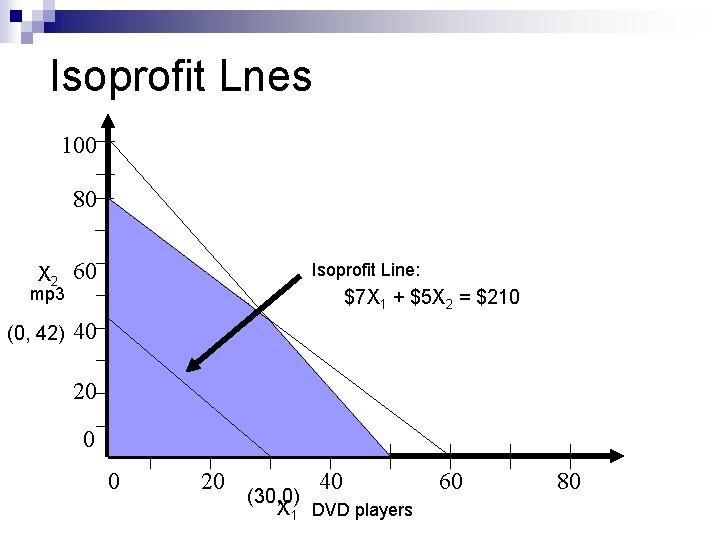
Isoprofit Lnes 100 80 X 2 mp 3 (0, 42) 60 Isoprofit Line: $7 X 1 + $5 X 2 = $210 40 20 0 0 20 40 (30, 0) X 1 DVD players 60 80
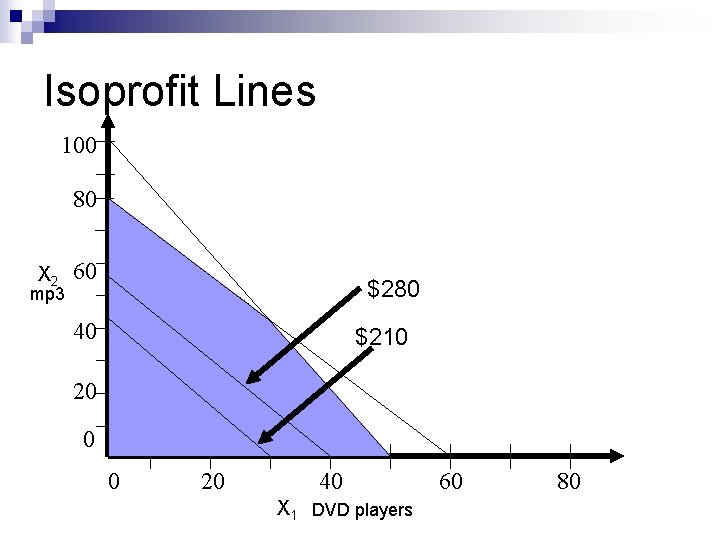
Isoprofit Lines 100 80 X 2 mp 3 60 $280 40 $210 20 0 0 20 40 X 1 DVD players 60 80
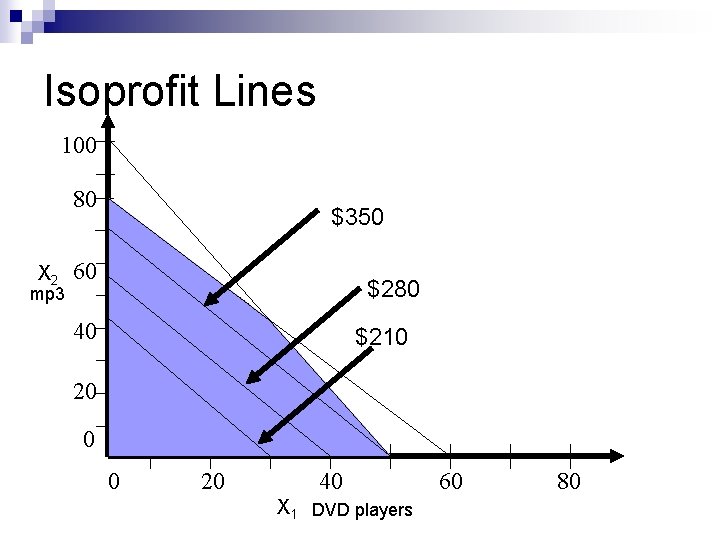
Isoprofit Lines 100 80 X 2 mp 3 $350 60 $280 40 $210 20 0 0 20 40 X 1 DVD players 60 80
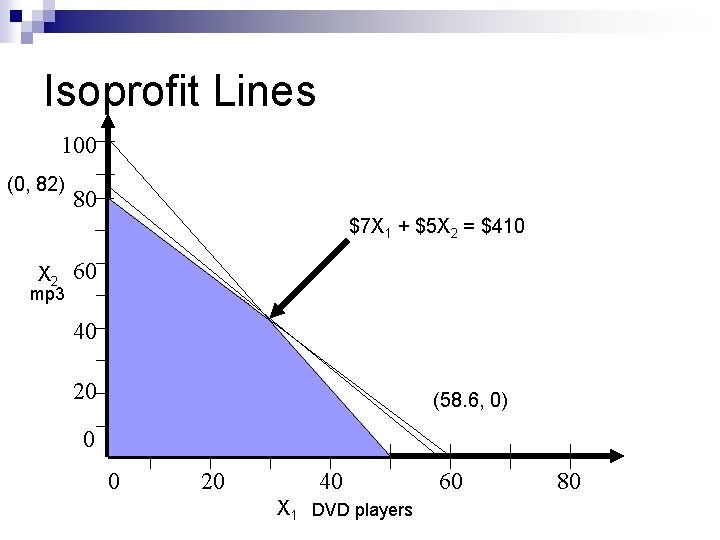
Isoprofit Lines 100 (0, 82) 80 $7 X 1 + $5 X 2 = $410 X 2 mp 3 60 40 20 (58. 6, 0) 0 0 20 40 X 1 DVD players 60 80
Mathematical Solution Obviously, graphical solution is slow n We can prove that an optimal solution always exists at the intersection of constraints. n Why not just go directly to the places where the constraints intersect? n
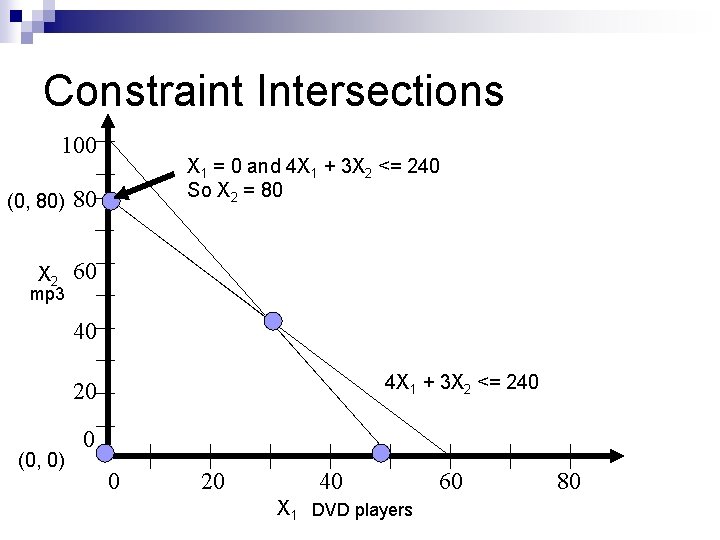
Constraint Intersections 100 (0, 80) X 2 mp 3 X 1 = 0 and 4 X 1 + 3 X 2 <= 240 So X 2 = 80 80 60 40 4 X 1 + 3 X 2 <= 240 20 (0, 0) 0 0 20 40 X 1 DVD players 60 80
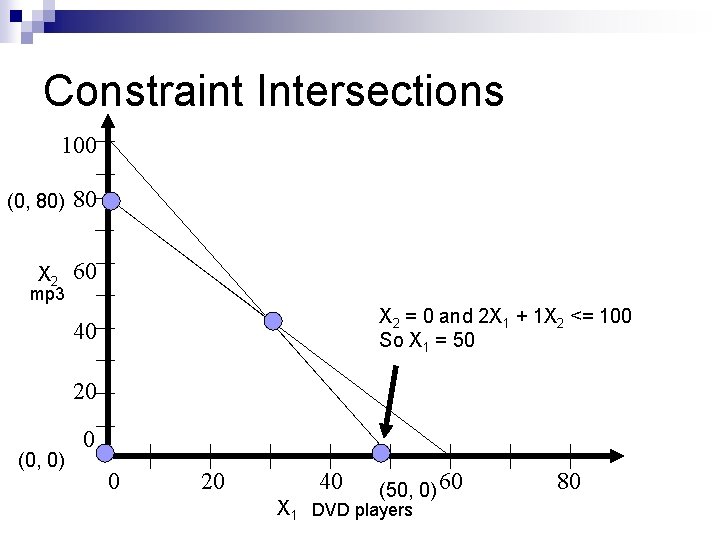
Constraint Intersections 100 (0, 80) X 2 mp 3 80 60 X 2 = 0 and 2 X 1 + 1 X 2 <= 100 So X 1 = 50 40 20 (0, 0) 0 0 20 40 (50, 0) 60 X 1 DVD players 80
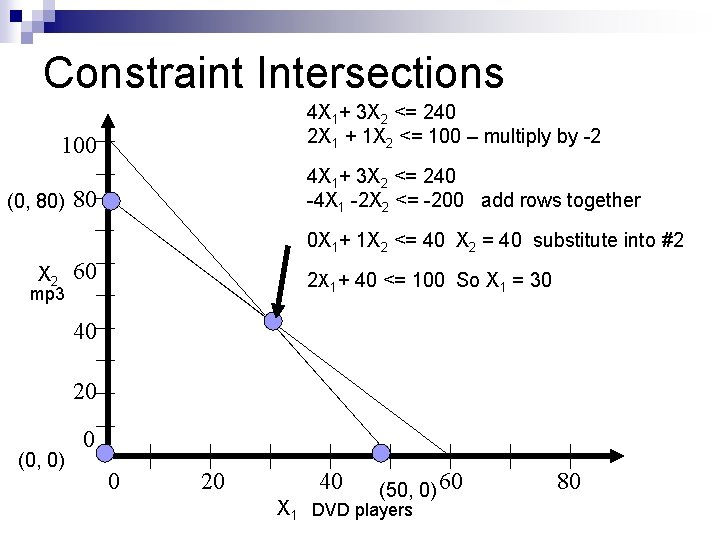
Constraint Intersections 4 X 1+ 3 X 2 <= 240 2 X 1 + 1 X 2 <= 100 – multiply by -2 100 (0, 80) 4 X 1+ 3 X 2 <= 240 -4 X 1 -2 X 2 <= -200 add rows together 80 0 X 1+ 1 X 2 <= 40 X 2 = 40 substitute into #2 X 2 mp 3 60 2 X 1+ 40 <= 100 So X 1 = 30 40 20 (0, 0) 0 0 20 40 (50, 0) 60 X 1 DVD players 80
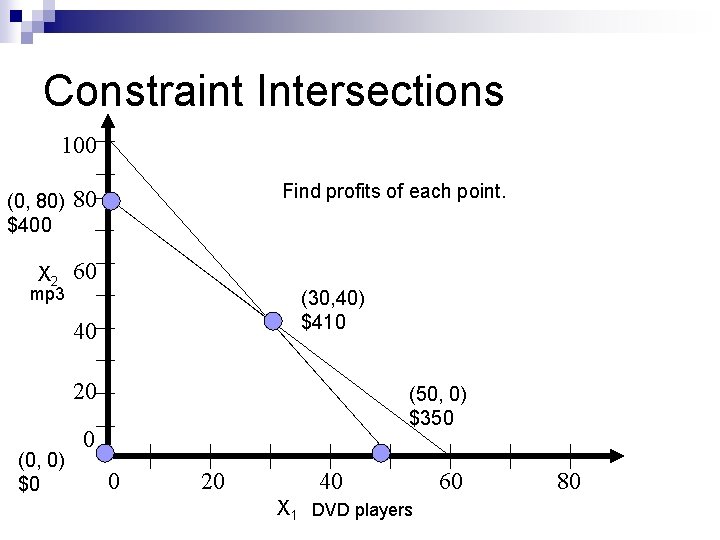
Constraint Intersections 100 (0, 80) $400 X 2 mp 3 Find profits of each point. 80 60 (30, 40) $410 40 20 (0, 0) $0 (50, 0) $350 0 0 20 40 X 1 DVD players 60 80

Do we have to do this? Obviously, this is not much fun: slow and tedious n Yes, you have to know how to do this to solve a two-variable problem. n We won’t solve every problem this way. n
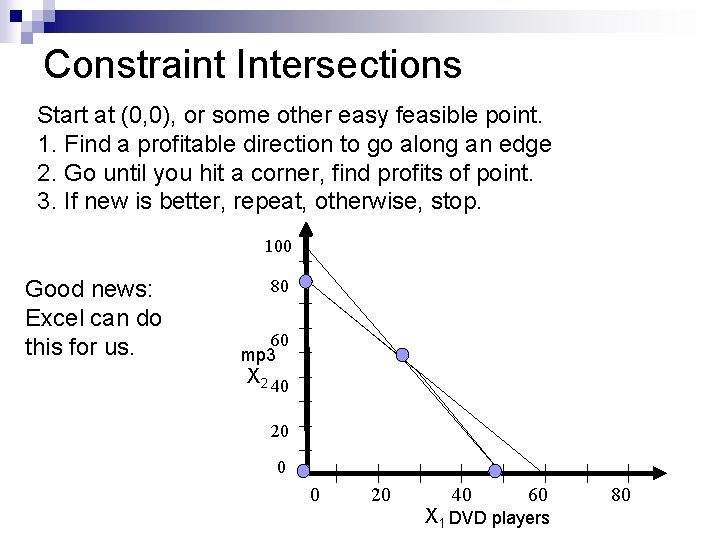
Constraint Intersections Start at (0, 0), or some other easy feasible point. 1. Find a profitable direction to go along an edge 2. Go until you hit a corner, find profits of point. 3. If new is better, repeat, otherwise, stop. 100 Good news: Excel can do this for us. 80 60 mp 3 X 2 40 20 0 0 20 40 60 X 1 DVD players 80
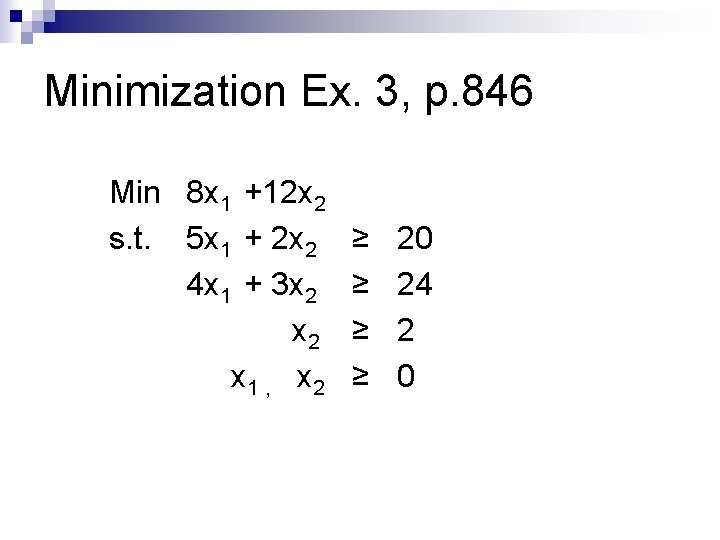
Minimization Ex. 3, p. 846 Min 8 x 1 +12 x 2 s. t. 5 x 1 + 2 x 2 4 x 1 + 3 x 2 x 1 , x 2 ≥ ≥ 20 24 2 0
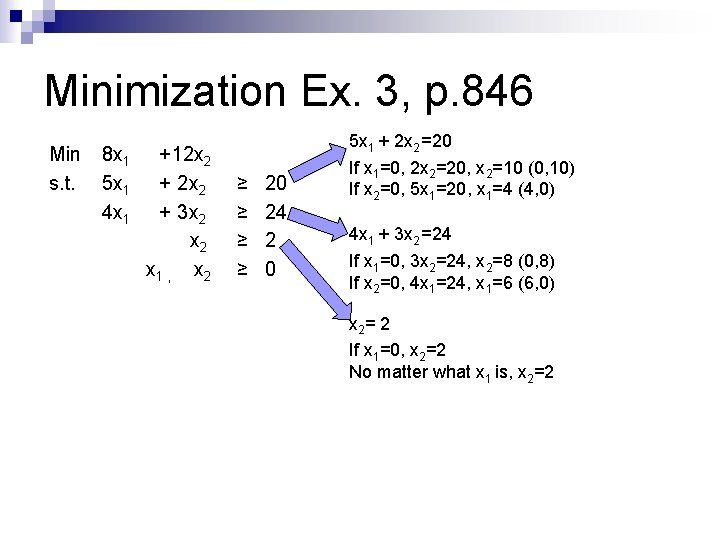
Minimization Ex. 3, p. 846 Min s. t. 8 x 1 5 x 1 4 x 1 +12 x 2 + 3 x 2 x 1 , x 2 ≥ ≥ 20 24 2 0 5 x 1 + 2 x 2 =20 If x 1=0, 2 x 2=20, x 2=10 (0, 10) If x 2=0, 5 x 1=20, x 1=4 (4, 0) 4 x 1 + 3 x 2 =24 If x 1=0, 3 x 2=24, x 2=8 (0, 8) If x 2=0, 4 x 1=24, x 1=6 (6, 0) x 2= 2 If x 1=0, x 2=2 No matter what x 1 is, x 2=2
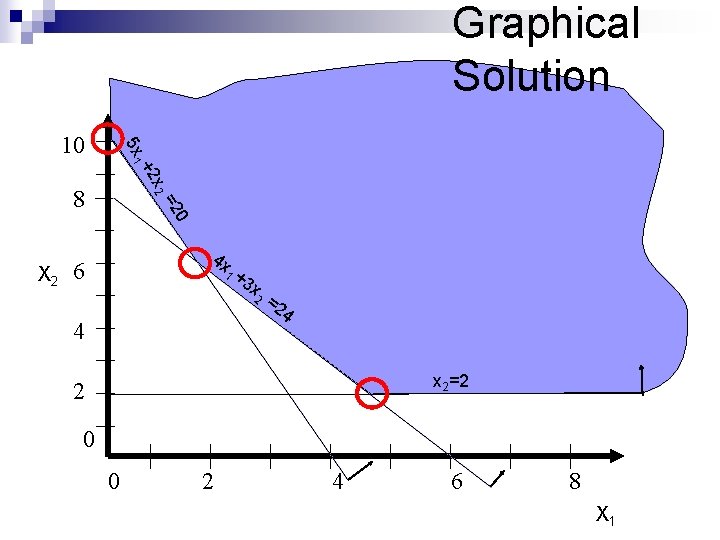
Graphical Solution x 2 +2 5 x 1 10 0 =2 8 X 2 4 x 6 1 +3 x 2 4 =2 4 x 2=2 2 0 0 2 4 6 8 X 1
![[5 x 1+2 x 2 =20]*3 [4 x 1+3 x 2 =24]*2 (0, 10)](http://slidetodoc.com/presentation_image_h2/58e6f0f518bc9c662821fbf874b67e0e/image-30.jpg "[5 x 1+2 x 2 =20]*3 [4 x 1+3 x 2 =24]*2 (0, 10)")
[5 x 1+2 x 2 =20]*3 [4 x 1+3 x 2 =24]*2 (0, 10) +2 5 x 1 10 7 x 1 =2 0 5 x 1+2 x 2 =20 5*1. 71 + 2 x 2 =20 2 x 2 = 11. 45 x 2 = 5. 725 (1. 71, 5. 73) 4 x 6 +3 x (1. 71, 5. 73) 2 = 24 1 4 = 12 x 1 = 12/7= 1. 71 x 2 8 X 2 15 x 1+6 x 2 = 60 - 8 x 1 +6 x 2 = 48 x 2 =2 2 0 0 2 4 6 8 X 1
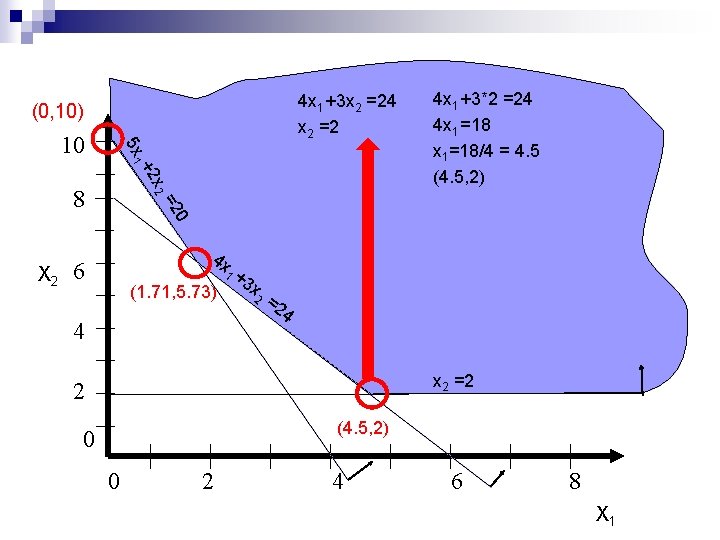
4 x 1 +3 x 2 =24 x 2 =2 (0, 10) x 2 +2 5 x 1 10 0 =2 8 4 x 1 +3*2 =24 4 x 1 =18 x 1=18/4 = 4. 5 (4. 5, 2) X 2 4 x 6 +3 x (1. 71, 5. 73) 2 = 24 1 4 x 2 =2 2 (4. 5, 2) 0 0 2 4 6 8 X 1
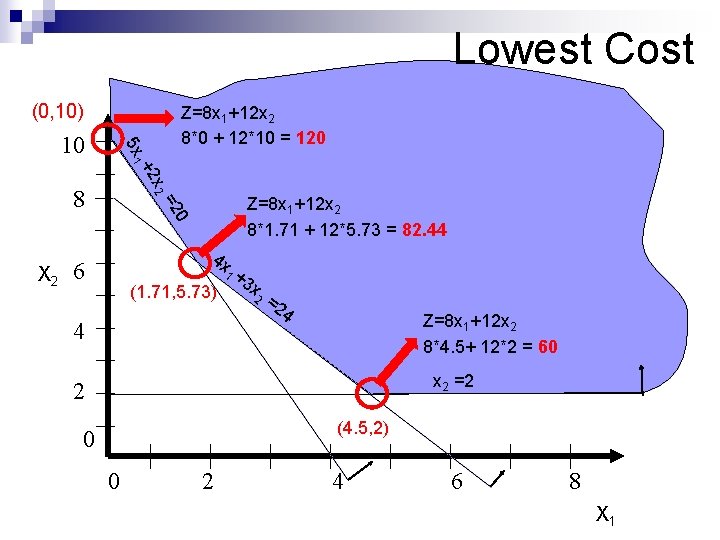
Lowest Cost (0, 10) x 2 +2 5 x 1 10 Z=8 x 1+12 x 2 8*0 + 12*10 = 120 Z=8 x 1+12 x 2 8*1. 71 + 12*5. 73 = 82. 44 0 =2 8 X 2 4 x 6 +3 x (1. 71, 5. 73) 2 = 24 1 4 Z=8 x 1+12 x 2 8*4. 5+ 12*2 = 60 x 2 =2 2 (4. 5, 2) 0 0 2 4 6 8 X 1
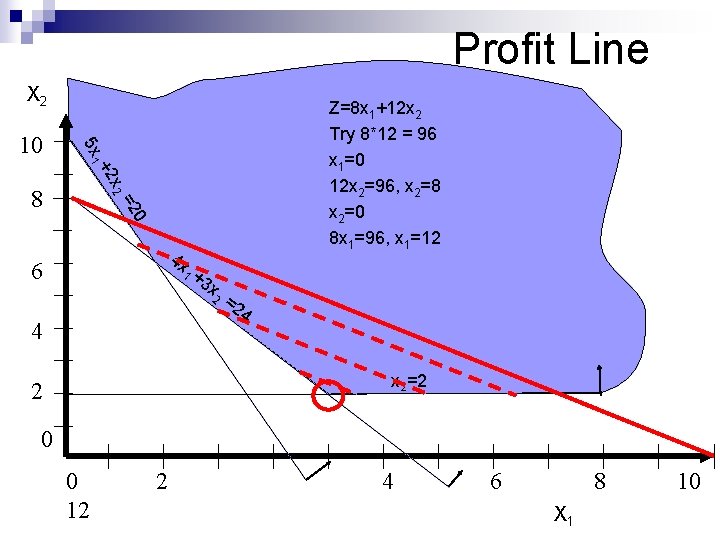
Profit Line X 2 x 2 +2 5 x 1 10 Z=8 x 1+12 x 2 Try 8*12 = 96 x 1=0 12 x 2=96, x 2=8 x 2=0 8 x 1=96, x 1=12 0 =2 8 4 x 6 1 +3 x 2 4 =2 4 x 2=2 2 0 0 12 2 4 6 8 X 1 10
Formulating in Excel 1. 2. 3. 4. Write the LP out on paper, with all constraints and the objective function. Decide on cells to represent variables. Enter coefficients of each variable in each constraint in a block of cells. Compute amount of each constraint being used by current solution.
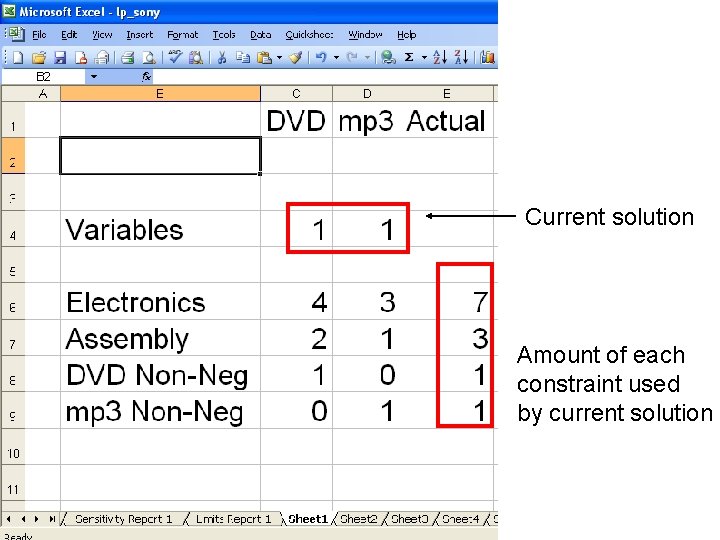
Current solution Amount of each constraint used by current solution
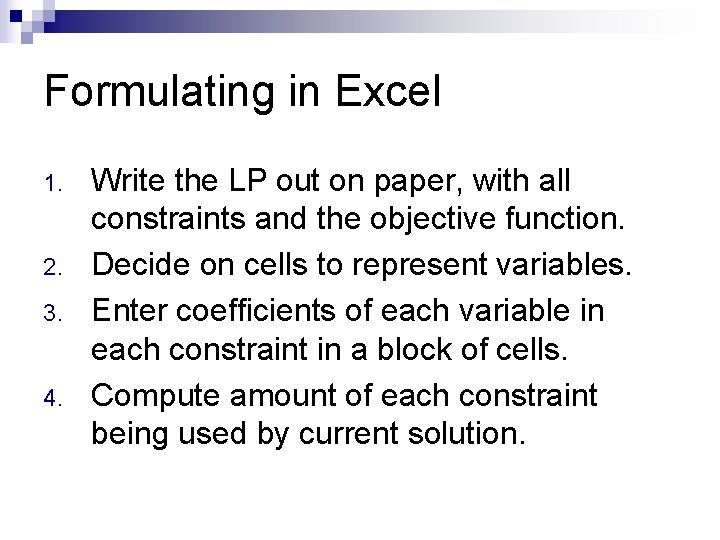
Formulating in Excel 5. Place inequalities in sheet, so you remember <=, >= 6. Enter amount of each constraint 7. Enter objective coefficients 8. Calculate value of objective function 9. Make sure you have plenty of labels. 10. Widen columns for readability.
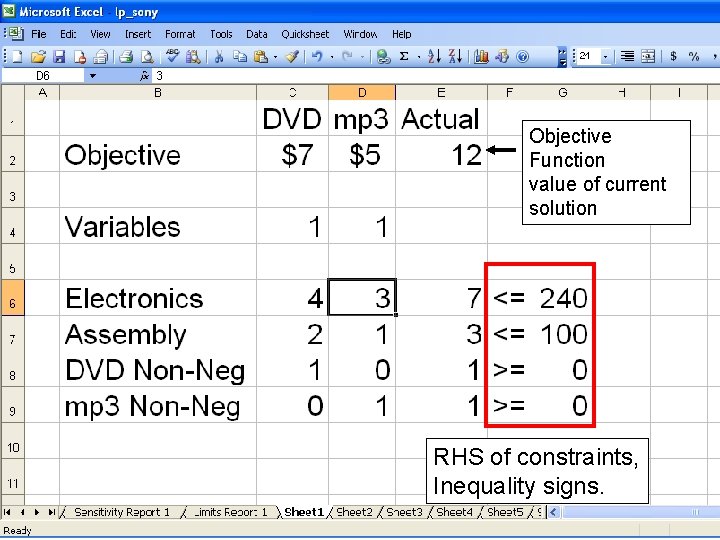
Objective Function value of current solution RHS of constraints, Inequality signs.
Solving in Excel All we have so far is a big ‘what if” tool. We need to tell the LP Solver that this is an LP that it can solve. n Choose ‘Solver’ from ‘Tools’ menu
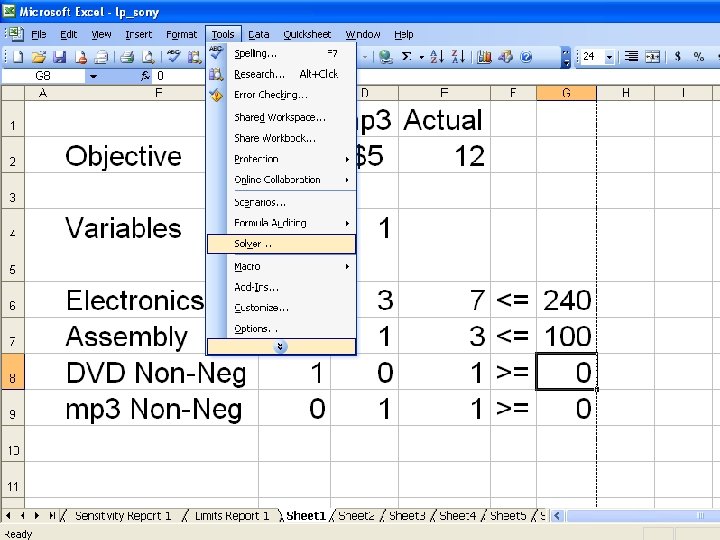
Solving in Excel 1. 2. 3. Choose ‘Solver’ from ‘Tools’ menu Tell Solver what is the objective function, and which are variables. Tell Solver to minimize or maximize
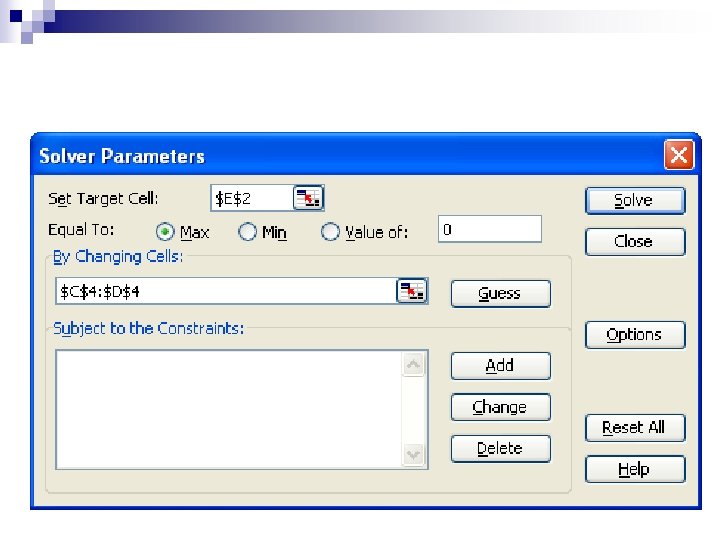
Solving in Excel 1. 2. 3. 4. Choose ‘Solver’ from ‘Tools’ menu Tell Solver what is the objective function, and which are variables. Tell Solver to minimize or maximize Add constraints: ¨ ¨ 5. Click ‘Add’, enter LHS, RHS, choose inequality Click ‘Add’ if you need to do more, or click ‘Ok’ if this is the last one. Add rest of constraints
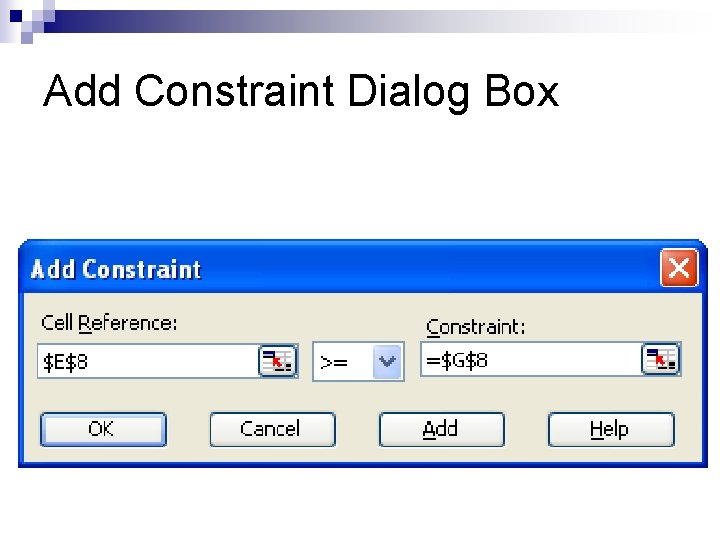
Add Constraint Dialog Box
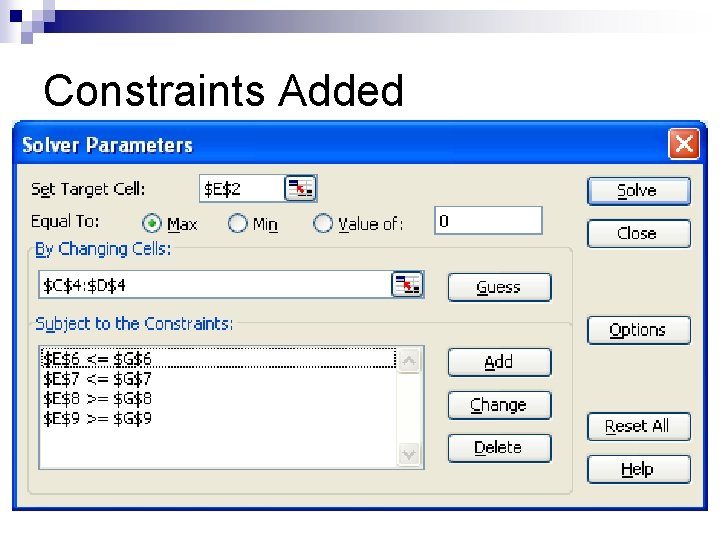
Constraints Added
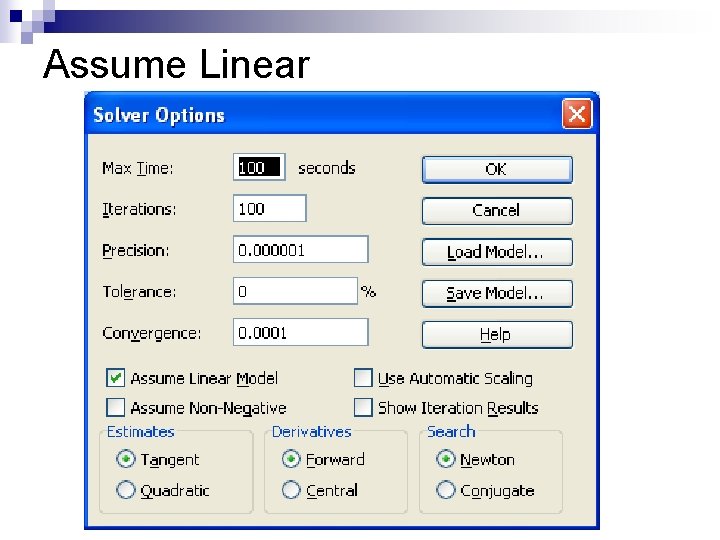
Assuming Linear 6. You have to tell Solver that the model is Linear. Click ‘options, ’ and make sure the ‘Assume Linear Model’ box is checked.
Assume Linear
Assuming Linear 6. 7. You have to tell Solver that the model is Linear. Click ‘options, ’ and make sure the ‘Assume Linear Model’ box is checked. On this box, checking “assume non-negative” means you don’t need to actually add the nonnegativity constraints manually. Solve the LP: Click ‘Solve. ’ Look at Results.
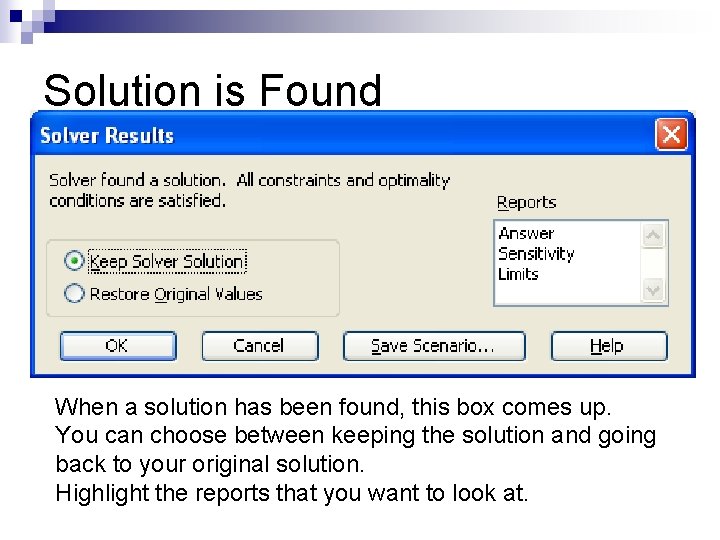
Solution is Found When a solution has been found, this box comes up. You can choose between keeping the solution and going back to your original solution. Highlight the reports that you want to look at.
Solution After clicking on the reports you want generated, they will be generated on new worksheets. n You will return to the workbook page you were at when you called up Solver. n It will show the optimal solution that was found. n
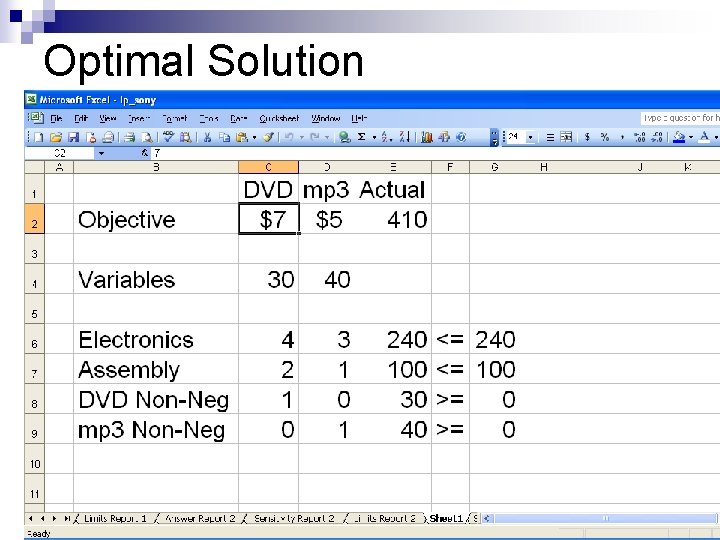
Optimal Solution
Answer Report Gives optimal and initial values of objective function n Gives optimal and initial values of variables n Tells amount of ‘slack’ between LHS and RHS of each constraint, tells whether constraint is binding. n
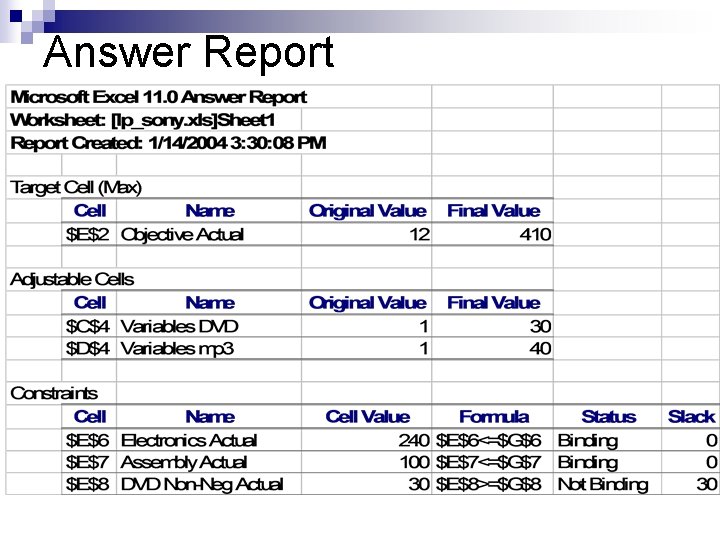
Answer Report
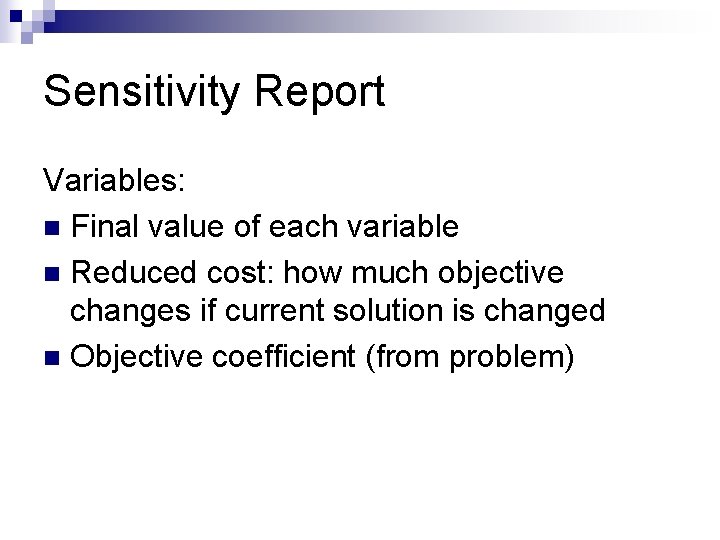
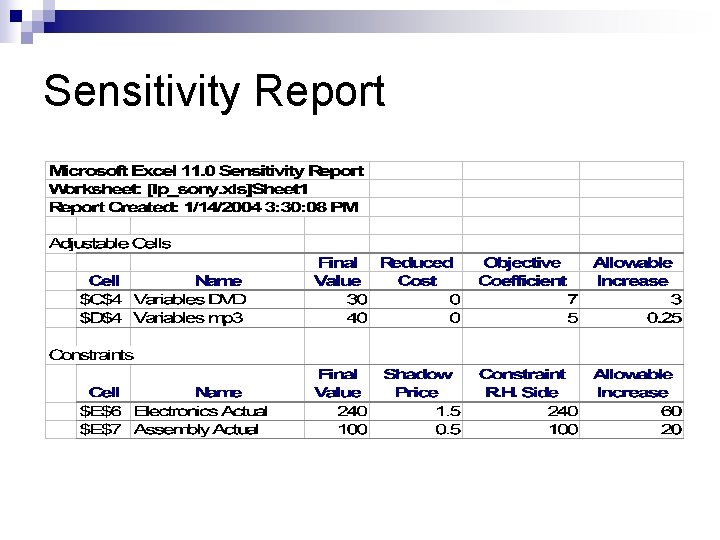
Sensitivity Report Variables: n Final value of each variable n Reduced cost: how much objective changes if current solution is changed n Objective coefficient (from problem)
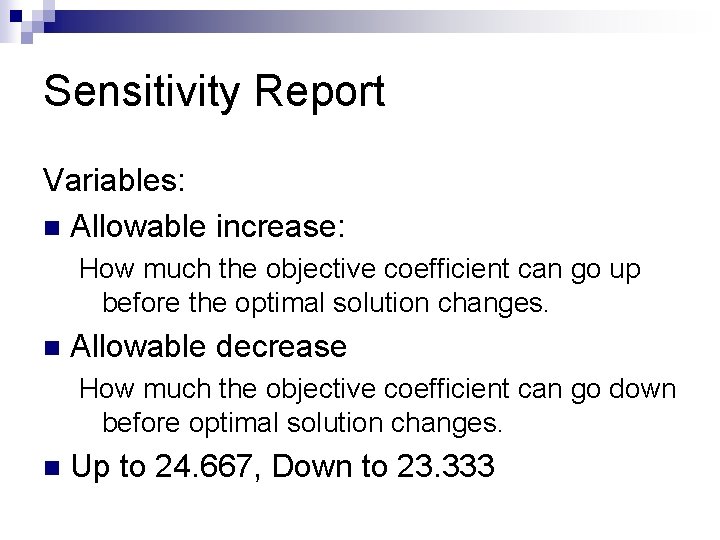
Sensitivity Report Variables: n Allowable increase: How much the objective coefficient can go up before the optimal solution changes. n Allowable decrease How much the objective coefficient can go down before optimal solution changes. n Up to 24. 667, Down to 23. 333
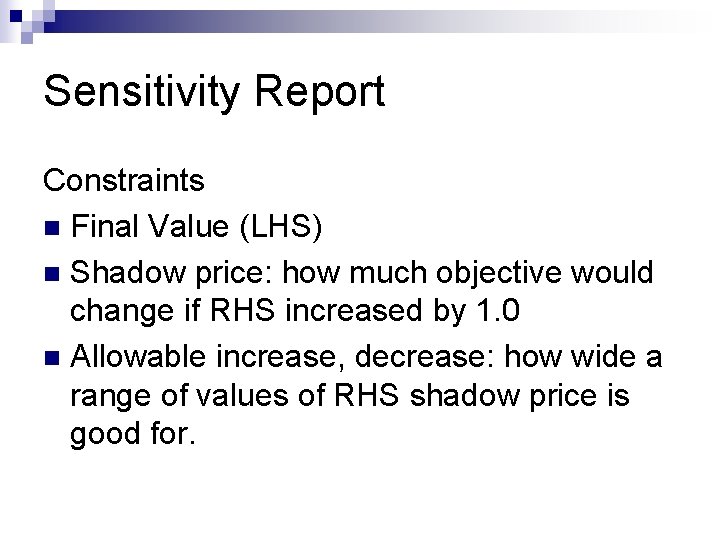
Sensitivity Report Constraints n Final Value (LHS) n Shadow price: how much objective would change if RHS increased by 1. 0 n Allowable increase, decrease: how wide a range of values of RHS shadow price is good for.
Sensitivity Report
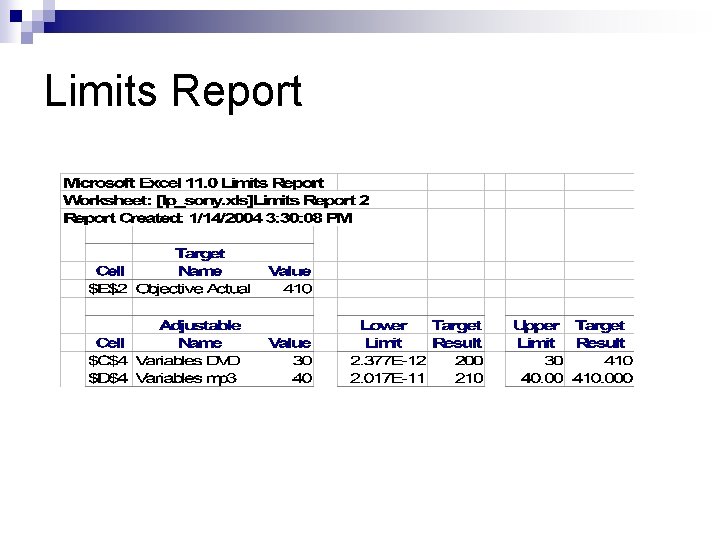
Limits Report Tells ranges of values over which the maximum and minimum objective values can be found. n Rarely useful n
Limits Report
- Slides: 58