
LINEAR CONTROL ft m fdt k Nm xt
![s-plane D(s)=s 2+9 s+15 by MATLAB >>a=[1 9 15]; s 1=-2. 2087 >> roots](https://slidetodoc.com/presentation_image_h/336d0641f8787e276535de75bd7da2e9/image-32.jpg "s-plane D(s)=s 2+9 s+15 by MATLAB >>a=[1 9 15]; s 1=-2. 2087 >> roots")
![Example 2: V 1(s) V 2(s) 100 D(s) >>a=[1 3 75]; s 1=-1. 5+8.](https://slidetodoc.com/presentation_image_h/336d0641f8787e276535de75bd7da2e9/image-33.jpg "Example 2: V 1(s) V 2(s) 100 D(s) >>a=[1 3 75]; s 1=-1. 5+8.")
![Example 3: V 1(s) V 2(s) 100 D(s) >>a=[1 0 15]; s 1=+3. 8730](https://slidetodoc.com/presentation_image_h/336d0641f8787e276535de75bd7da2e9/image-35.jpg "Example 3: V 1(s) V 2(s) 100 D(s) >>a=[1 0 15]; s 1=+3. 8730")
![Example 4: V 1(s) V 2(s) 100 D(s) >>a=[1 -2 16]; s 1=1+3. 8730](https://slidetodoc.com/presentation_image_h/336d0641f8787e276535de75bd7da2e9/image-37.jpg "Example 4: V 1(s) V 2(s) 100 D(s) >>a=[1 -2 16]; s 1=1+3. 8730")
![By MATLAB, >>K=2000; >>ns=[K]; Stable >>ds=[1 30 200 K]; V 2(t) >>step(ns, ds) K=2000](https://slidetodoc.com/presentation_image_h/336d0641f8787e276535de75bd7da2e9/image-49.jpg "By MATLAB, >>K=2000; >>ns=[K]; Stable >>ds=[1 30 200 K]; V 2(t) >>step(ns, ds) K=2000")
![By MATLAB, Marginally stable K=6000 >>K=6000; >>ns=[K]; >>ds=[1 30 200 K]; D(s)=s 3+30 s](https://slidetodoc.com/presentation_image_h/336d0641f8787e276535de75bd7da2e9/image-50.jpg "By MATLAB, Marginally stable K=6000 >>K=6000; >>ns=[K]; >>ds=[1 30 200 K]; D(s)=s 3+30 s")
![By MATLAB, >>K=8000; >>ns=[K]; K=6000 >>ds=[1 30 200 K]; >>step(ns, ds) V 2(t) Unstable](https://slidetodoc.com/presentation_image_h/336d0641f8787e276535de75bd7da2e9/image-51.jpg "By MATLAB, >>K=8000; >>ns=[K]; K=6000 >>ds=[1 30 200 K]; >>step(ns, ds) V 2(t) Unstable")
![Angles of asymptotes: Poles of Gp(s) Zeros of Gp(s) >>ns=[1 1]; >>ds=[1 9 28](https://slidetodoc.com/presentation_image_h/336d0641f8787e276535de75bd7da2e9/image-67.jpg "Angles of asymptotes: Poles of Gp(s) Zeros of Gp(s) >>ns=[1 1]; >>ds=[1 9 28")
![Root Locus by MATLAB, >>ns=[1 3]; >>ds=[1 13 54 >>rlocus(ns, ds) 82 60 0];](https://slidetodoc.com/presentation_image_h/336d0641f8787e276535de75bd7da2e9/image-75.jpg "Root Locus by MATLAB, >>ns=[1 3]; >>ds=[1 13 54 >>rlocus(ns, ds) 82 60 0];")
![BODE PLOT by MATLAB >>wn=1; >>ksi=0. 3; >>ns=[wn^2]; >>ds=[1 2*ksi*wn wn^2]; >>bode(ns, ds) 79](https://slidetodoc.com/presentation_image_h/336d0641f8787e276535de75bd7da2e9/image-79.jpg "BODE PLOT by MATLAB >>wn=1; >>ksi=0. 3; >>ns=[wn^2]; >>ds=[1 2*ksi*wn wn^2]; >>bode(ns, ds) 79")
- Slides: 87
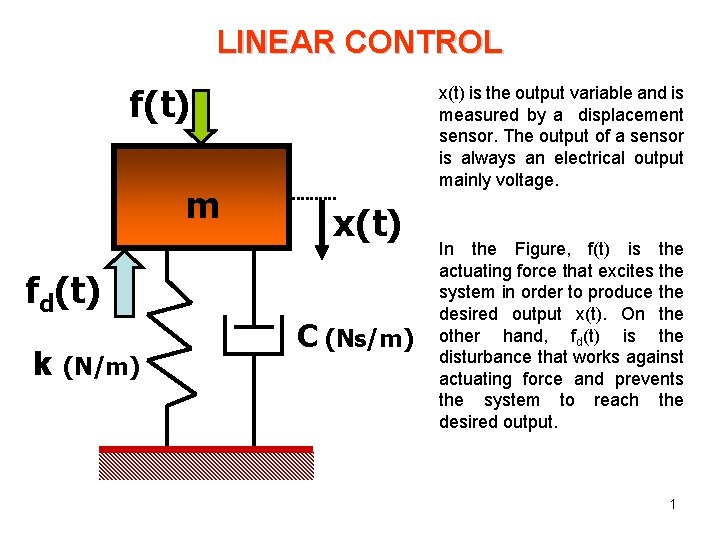
LINEAR CONTROL f(t) m fd(t) k (N/m) x(t) is the output variable and is measured by a displacement sensor. The output of a sensor is always an electrical output mainly voltage. x(t) C (Ns/m) In the Figure, f(t) is the actuating force that excites the system in order to produce the desired output x(t). On the other hand, fd(t) is the disturbance that works against actuating force and prevents the system to reach the desired output. 1
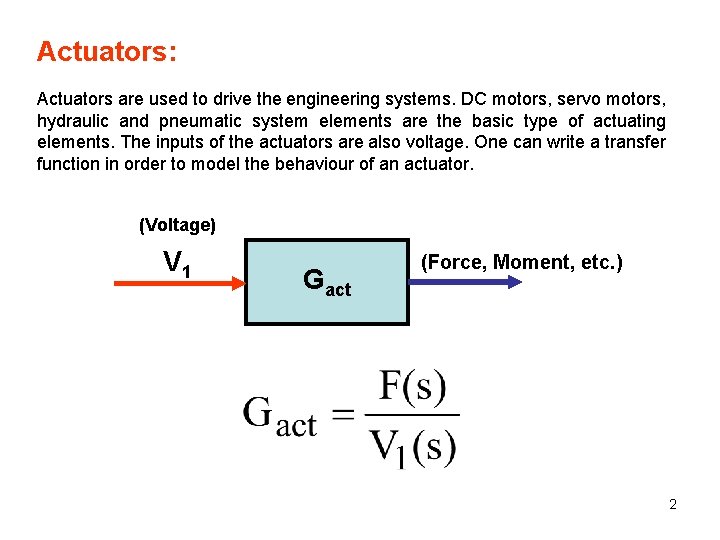
Actuators: Actuators are used to drive the engineering systems. DC motors, servo motors, hydraulic and pneumatic system elements are the basic type of actuating elements. The inputs of the actuators are also voltage. One can write a transfer function in order to model the behaviour of an actuator. (Voltage) V 1 Gact (Force, Moment, etc. ) 2
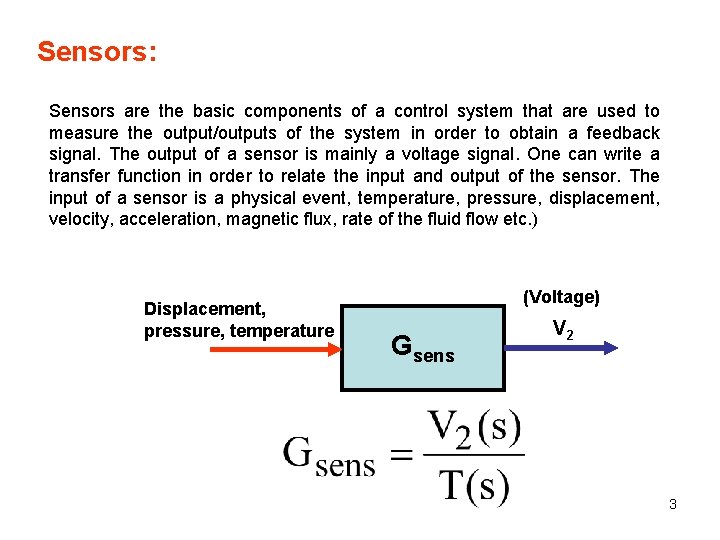
Sensors: Sensors are the basic components of a control system that are used to measure the output/outputs of the system in order to obtain a feedback signal. The output of a sensor is mainly a voltage signal. One can write a transfer function in order to relate the input and output of the sensor. The input of a sensor is a physical event, temperature, pressure, displacement, velocity, acceleration, magnetic flux, rate of the fluid flow etc. ) Displacement, pressure, temperature (Voltage) Gsens V 2 3
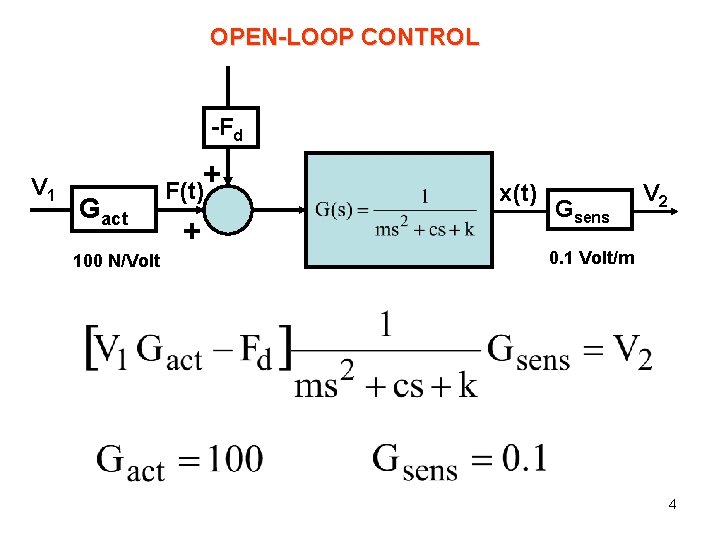
OPEN-LOOP CONTROL -Fd V 1 + Gact 100 N/Volt F(t) + x(t) Gsens V 2 0. 1 Volt/m 4
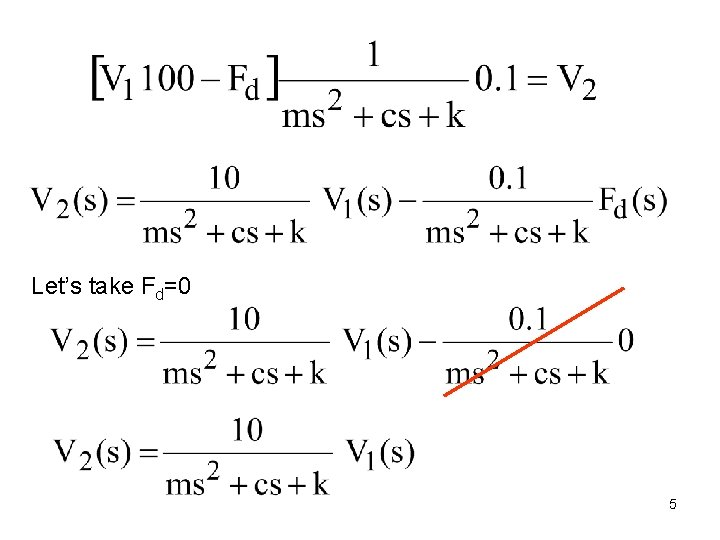
Let’s take Fd=0 5
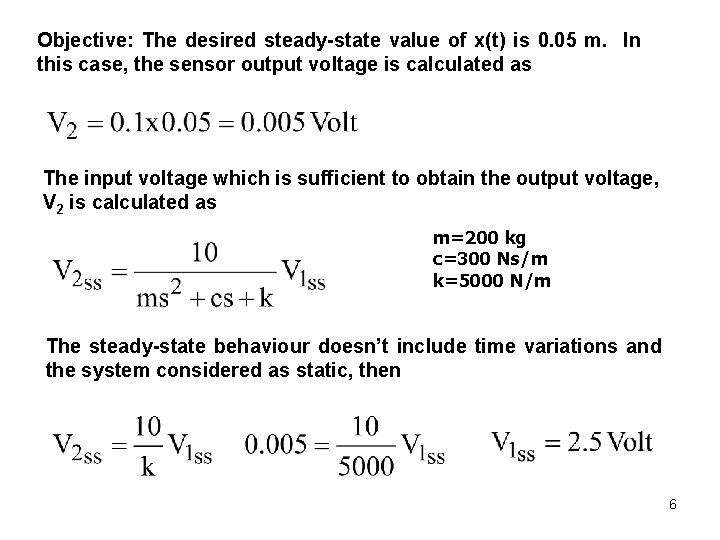
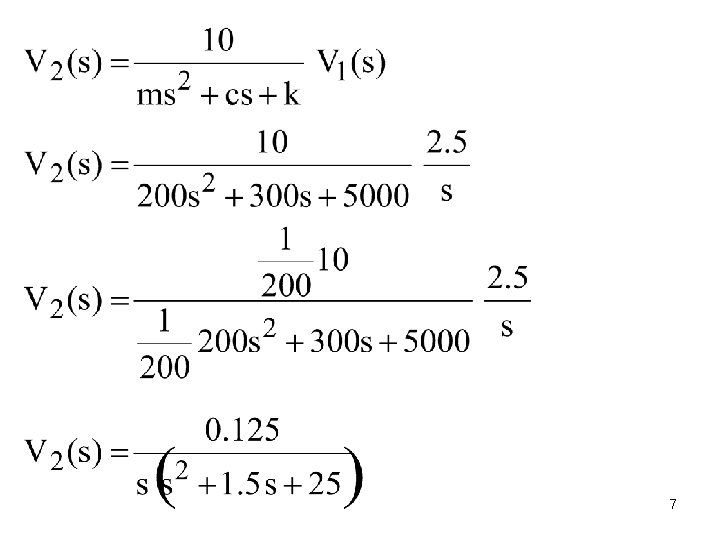
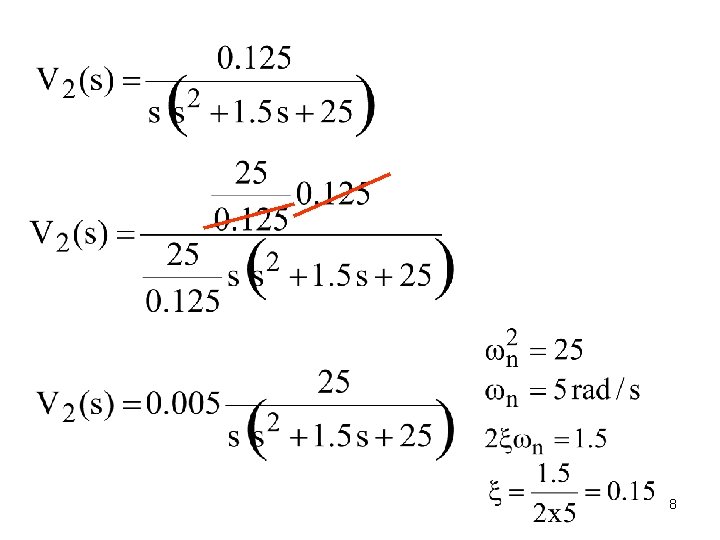
Objective: The desired steady-state value of x(t) is 0. 05 m. In this case, the sensor output voltage is calculated as The input voltage which is sufficient to obtain the output voltage, V 2 is calculated as m=200 kg c=300 Ns/m k=5000 N/m The steady-state behaviour doesn’t include time variations and the system considered as static, then 6
7
8
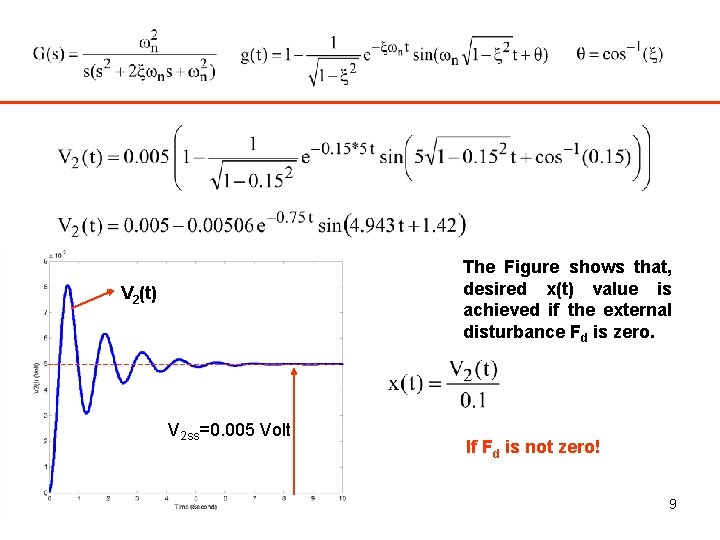
The Figure shows that, desired x(t) value is achieved if the external disturbance Fd is zero. V 2(t) V 2 ss=0. 005 Volt If Fd is not zero! 9
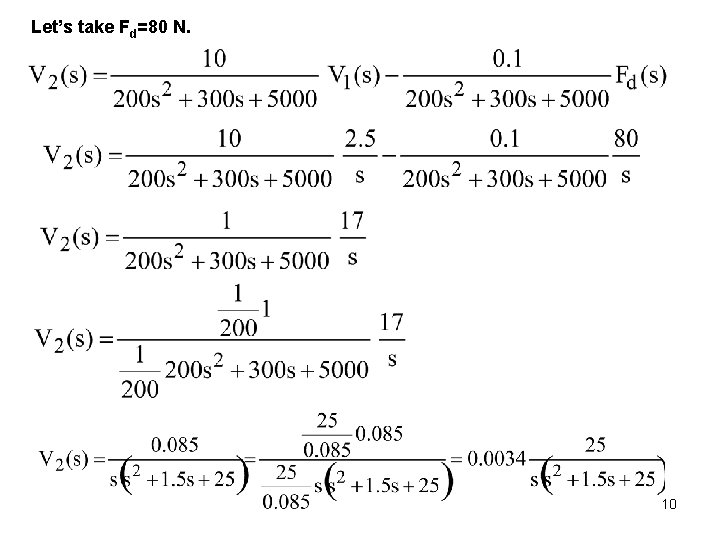
Let’s take Fd=80 N. 10
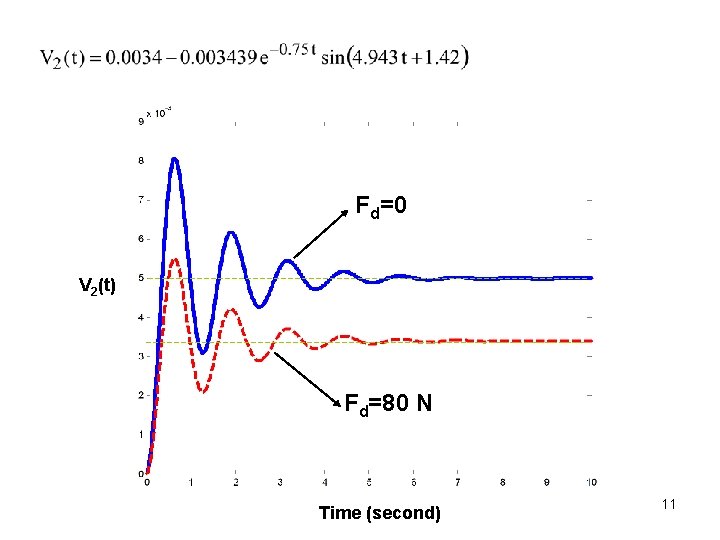
Fd=0 V 2(t) Fd=80 N Time (second) 11
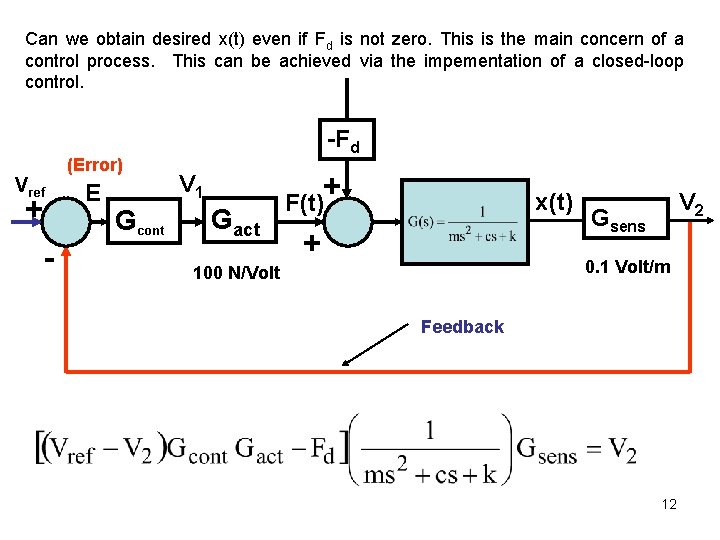
Can we obtain desired x(t) even if Fd is not zero. This is the main concern of a control process. This can be achieved via the impementation of a closed-loop control. Vref + - (Error) E Gcont -Fd + V 1 Gact x(t) F(t) + V 2 Gsens 0. 1 Volt/m 100 N/Volt Feedback 12
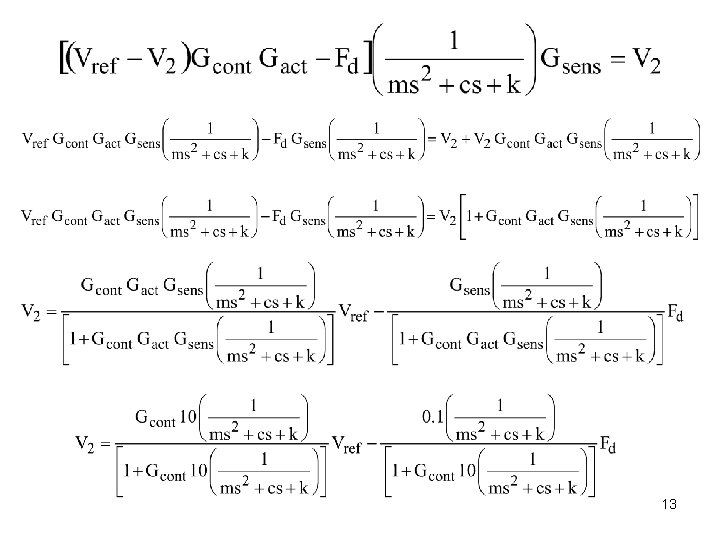
13
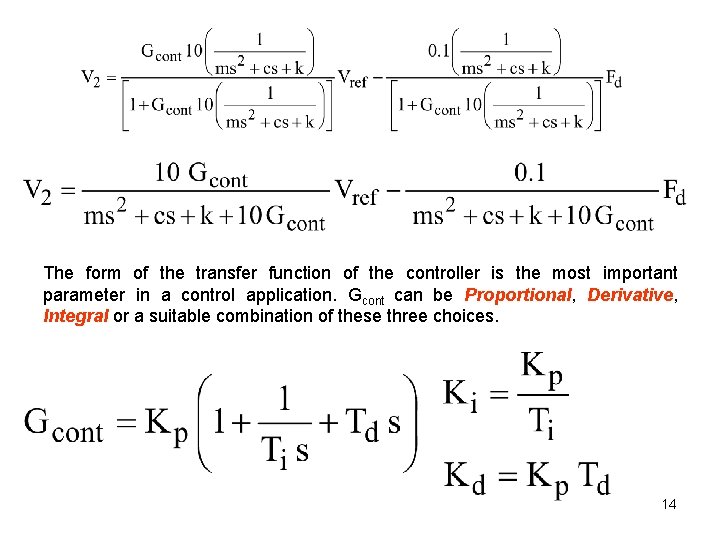
The form of the transfer function of the controller is the most important parameter in a control application. Gcont can be Proportional, Derivative, Integral or a suitable combination of these three choices. 14
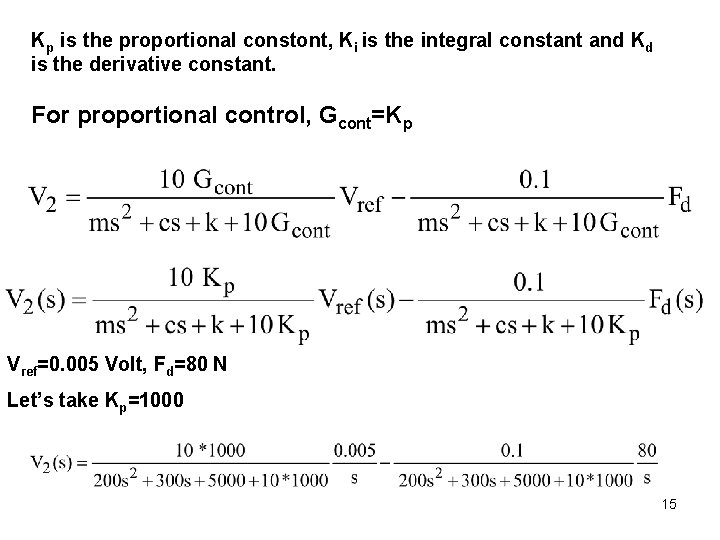
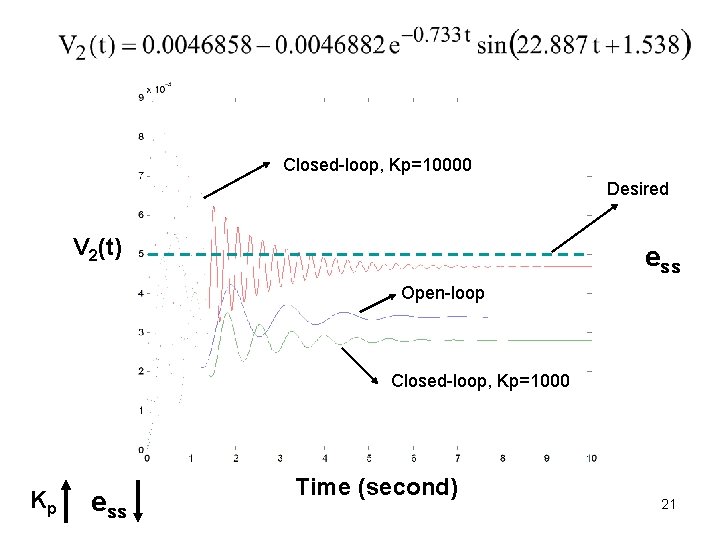
Kp is the proportional constont, Ki is the integral constant and Kd is the derivative constant. For proportional control, Gcont=Kp Vref=0. 005 Volt, Fd=80 N Let’s take Kp=1000 15
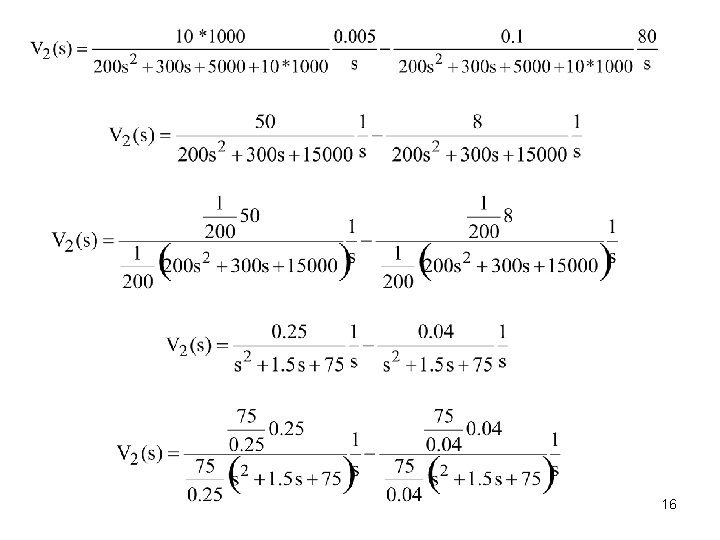
16
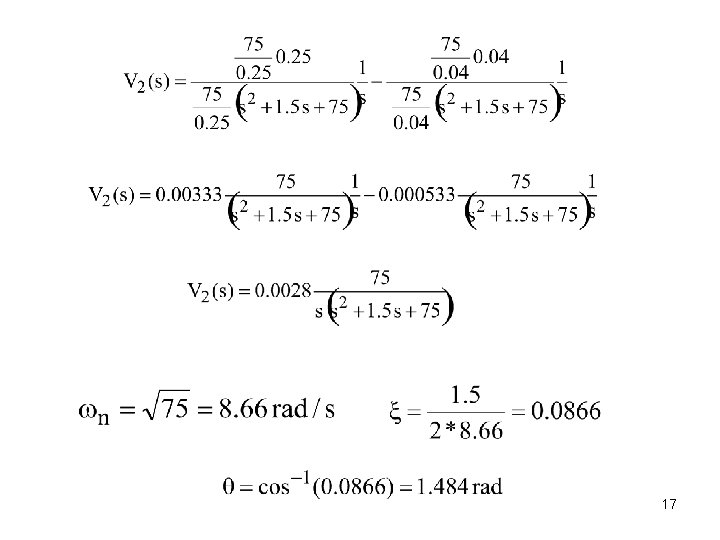
17
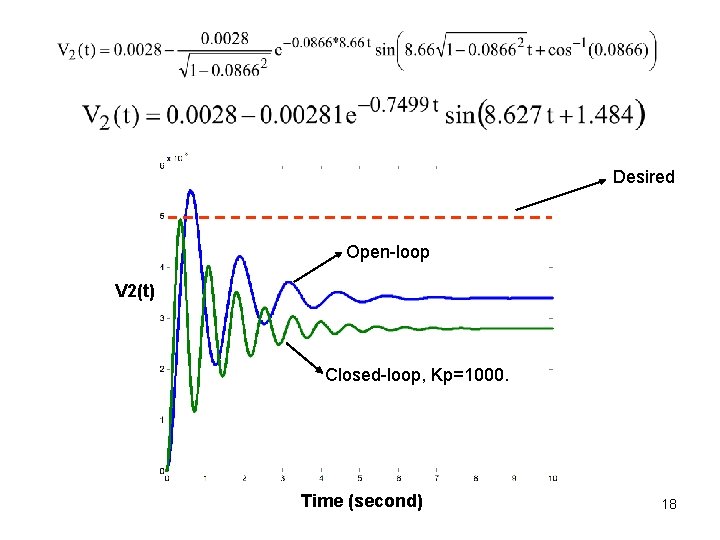
Desired Open-loop V 2(t) Closed-loop, Kp=1000. Time (second) 18
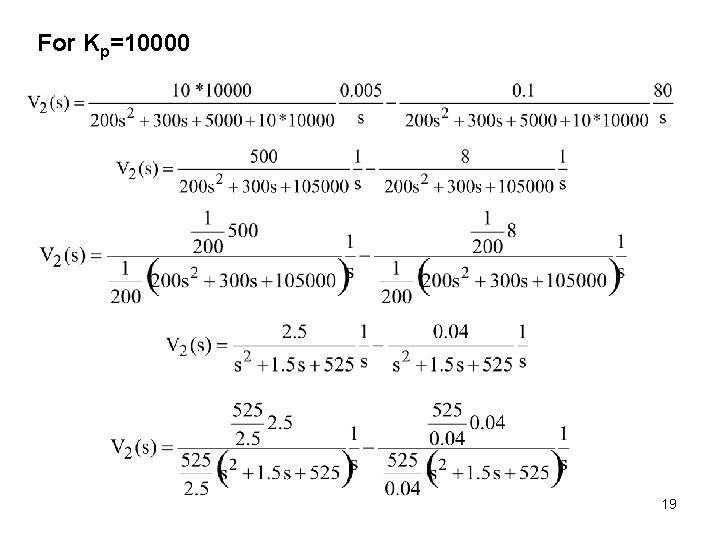
For Kp=10000 19
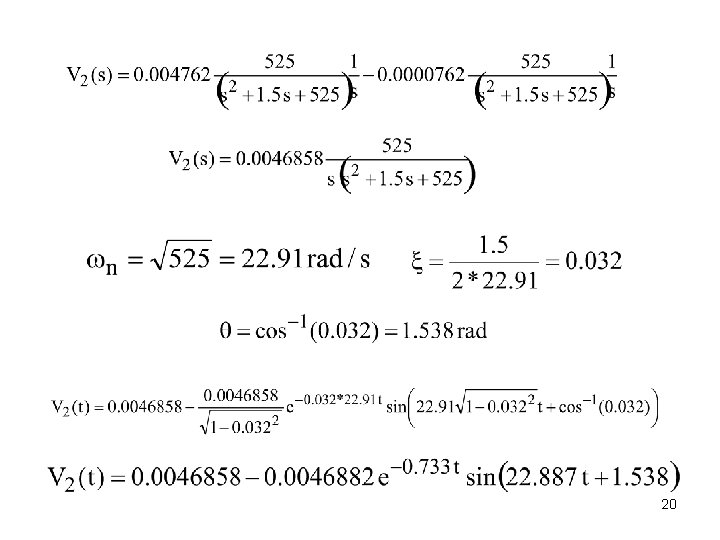
20
Closed-loop, Kp=10000 Desired V 2(t) ess Open-loop Closed-loop, Kp=1000 Kp ess Time (second) 21
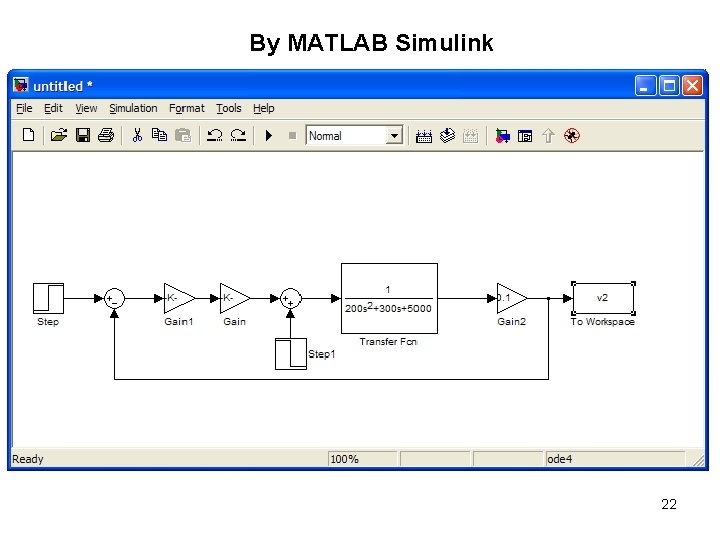
By MATLAB Simulink 22
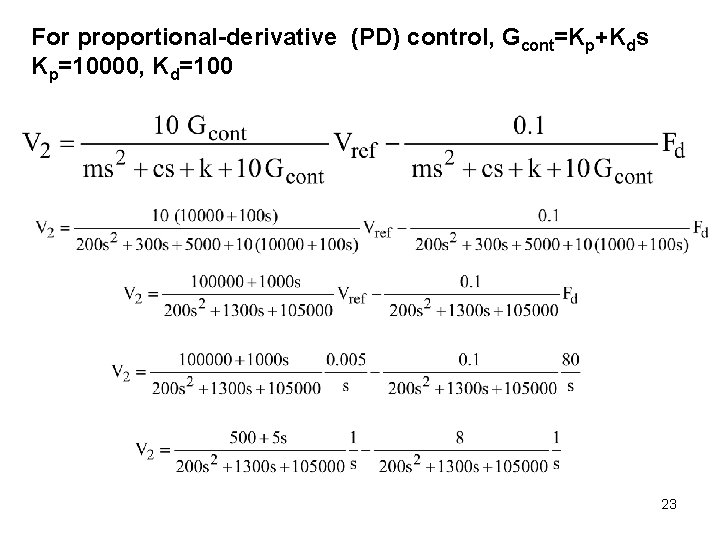
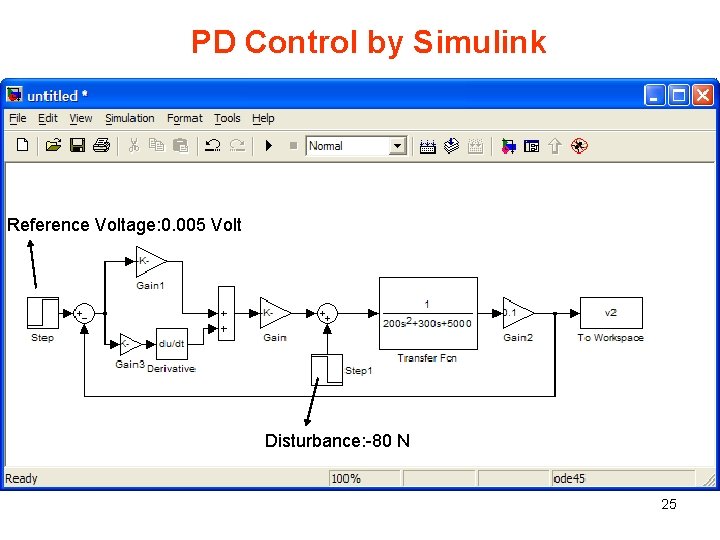
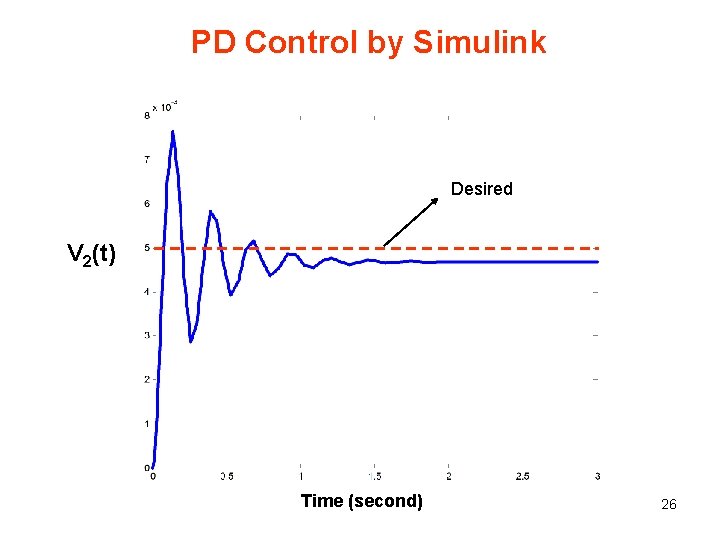
For proportional-derivative (PD) control, Gcont=Kp+Kds Kp=10000, Kd=100 23
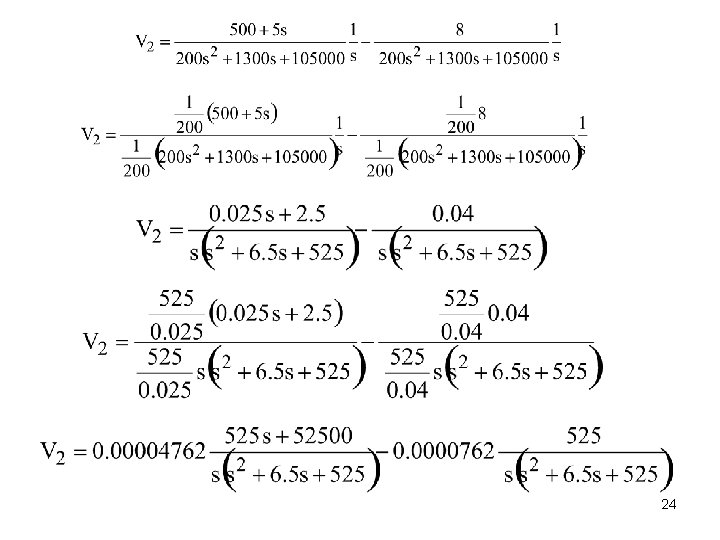
24
PD Control by Simulink Reference Voltage: 0. 005 Volt Disturbance: -80 N 25
PD Control by Simulink Desired V 2(t) Time (second) 26
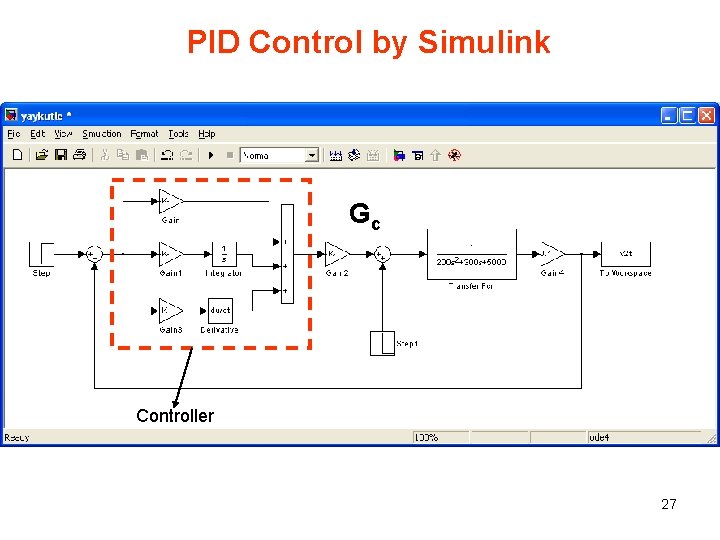
PID Control by Simulink Gc Controller 27
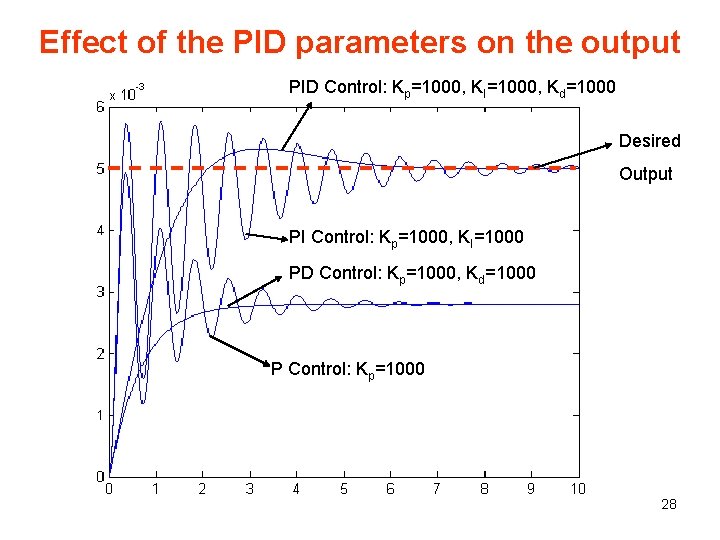
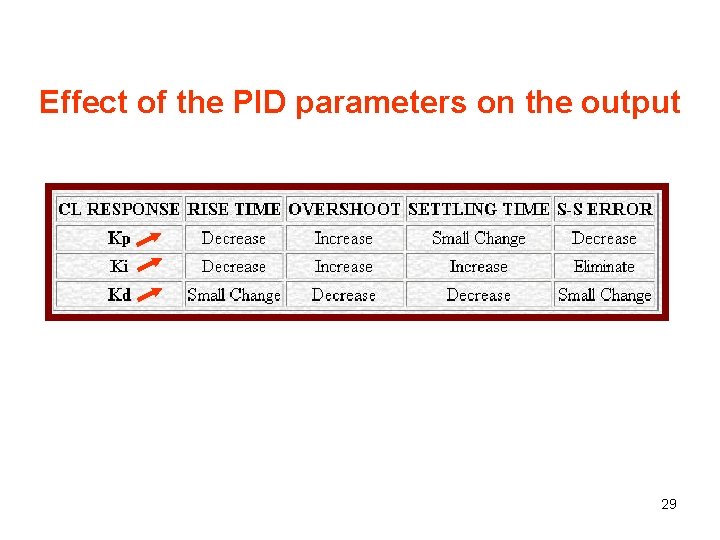
Effect of the PID parameters on the output PID Control: Kp=1000, KI=1000, Kd=1000 Desired Output PI Control: Kp=1000, KI=1000 PD Control: Kp=1000, Kd=1000 P Control: Kp=1000 28
Effect of the PID parameters on the output 29
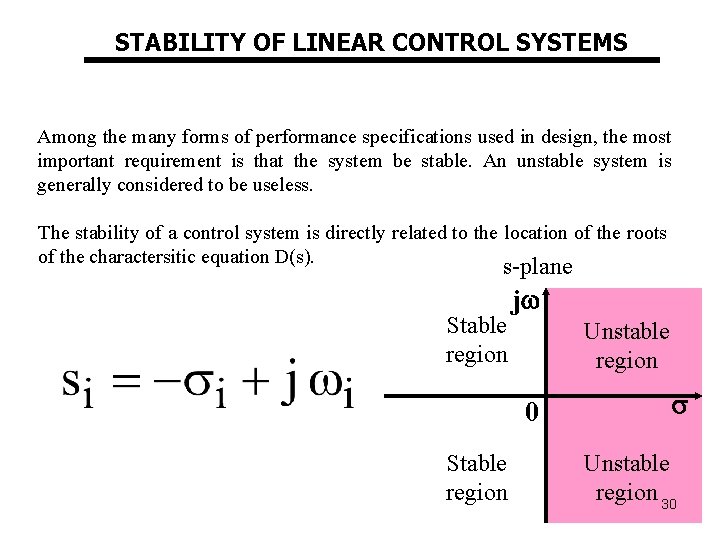
STABILITY OF LINEAR CONTROL SYSTEMS Among the many forms of performance specifications used in design, the most important requirement is that the system be stable. An unstable system is generally considered to be useless. The stability of a control system is directly related to the location of the roots of the charactersitic equation D(s). s-plane Stable region j Unstable region 0 Stable region Unstable region 30
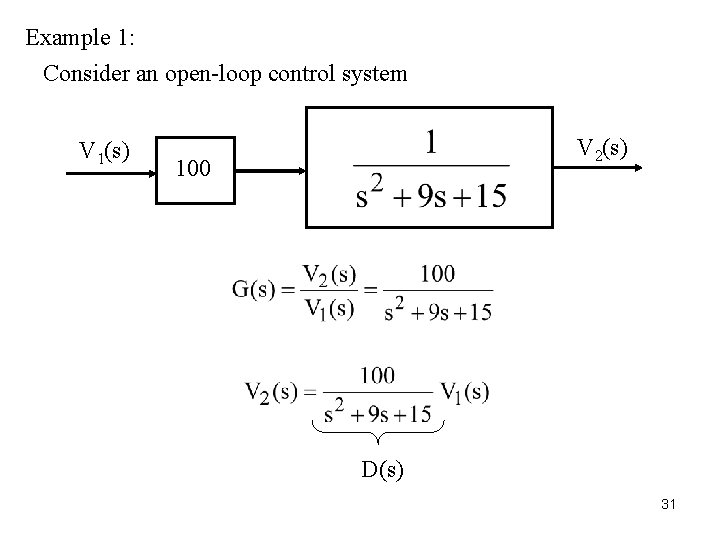
Example 1: Consider an open-loop control system V 1(s) V 2(s) 100 D(s) 31
s-plane D(s)=s 2+9 s+15 by MATLAB >>a=[1 9 15]; s 1=-2. 2087 >> roots (a) s 2= -6. 7913 -2. 2087 Response of the system to a unit step input can be obtained by MATLAB as >>ns=[100]; V 2(t) The two roots of D(s) are in the left hand side of the s-plane. It can be easily said that the open-loop system is stable. V 2 ss=6. 66 >>ds=[1 9 15], >>step(ns, ds) Time (s) 32
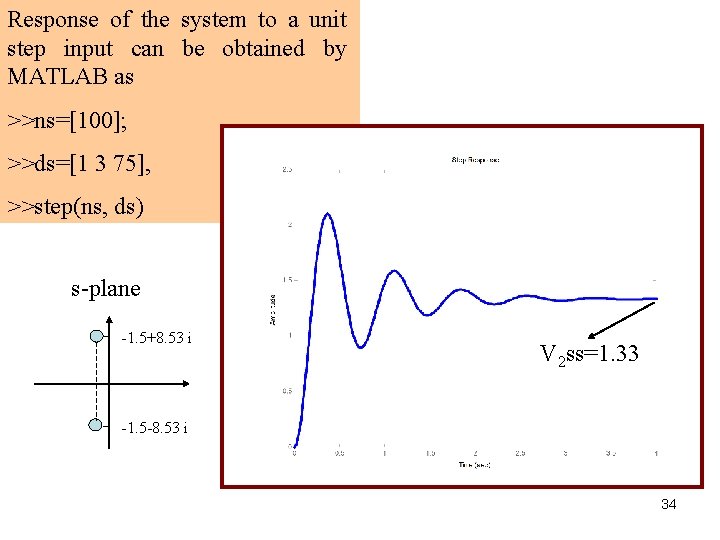
Example 2: V 1(s) V 2(s) 100 D(s) >>a=[1 3 75]; s 1=-1. 5+8. 53 i >> roots (a) s 2=-1. 5 -8. 53 i 33
Response of the system to a unit step input can be obtained by MATLAB as >>ns=[100]; >>ds=[1 3 75], >>step(ns, ds) s-plane -1. 5+8. 53 i V 2 ss=1. 33 -1. 5 -8. 53 i 34
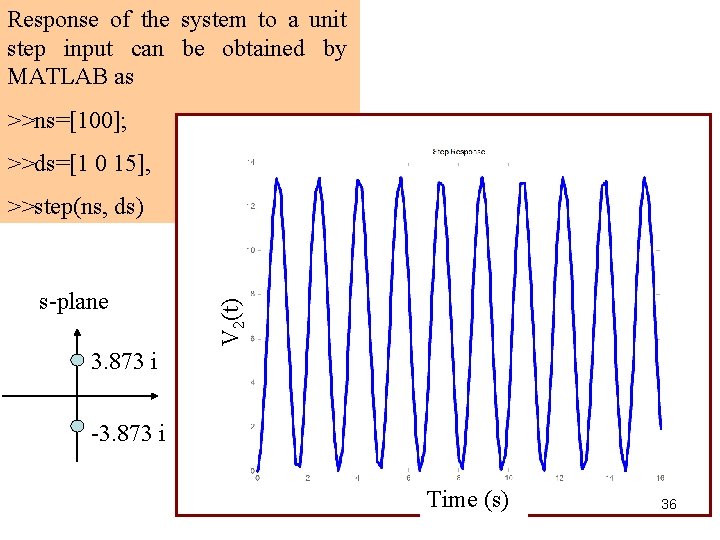
Example 3: V 1(s) V 2(s) 100 D(s) >>a=[1 0 15]; s 1=+3. 8730 i >> roots (a) s 2= -3. 8730 i The real part of the roots are zero. No roots on the right-half s-plane and system is said to be marginally 35 stable.
Response of the system to a unit step input can be obtained by MATLAB as >>ns=[100]; >>ds=[1 0 15], s-plane V 2(t) >>step(ns, ds) 3. 873 i -3. 873 i Time (s) 36
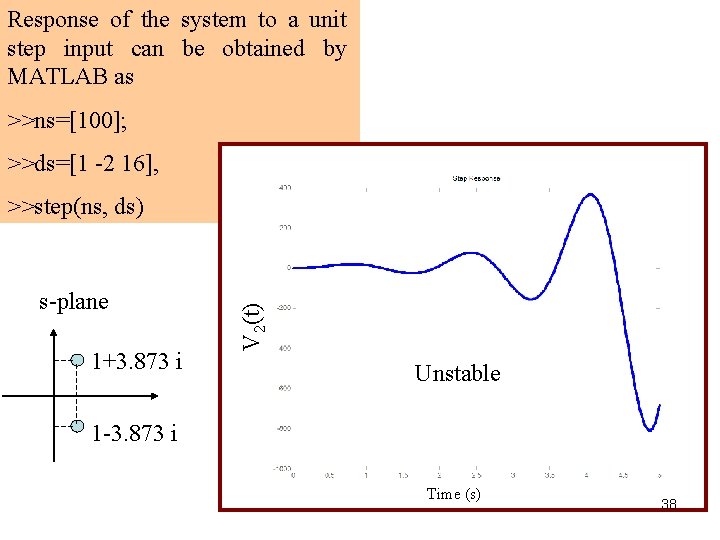
Example 4: V 1(s) V 2(s) 100 D(s) >>a=[1 -2 16]; s 1=1+3. 8730 i >> roots (a) s 2= 1 -3. 8730 i The real part of the roots are positive. Two roots are on the righthalf s-plane and system is said to be 37 unstable.
Response of the system to a unit step input can be obtained by MATLAB as >>ns=[100]; >>ds=[1 -2 16], s-plane 1+3. 873 i V 2(t) >>step(ns, ds) Unstable 1 -3. 873 i Time (s) 38
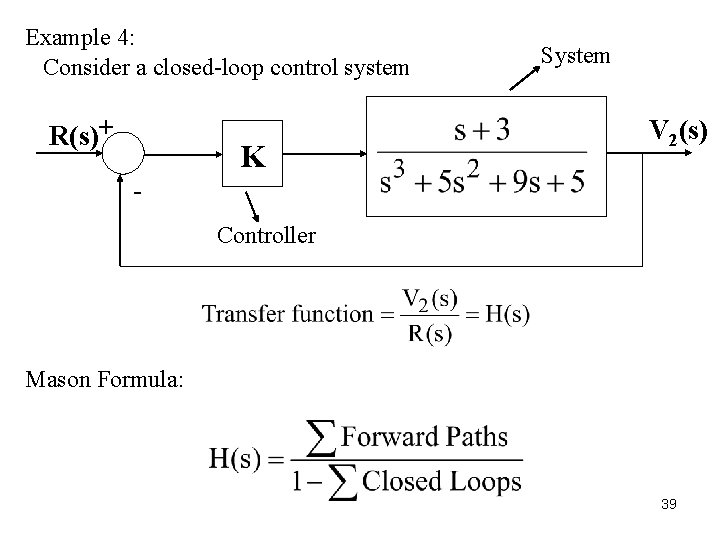
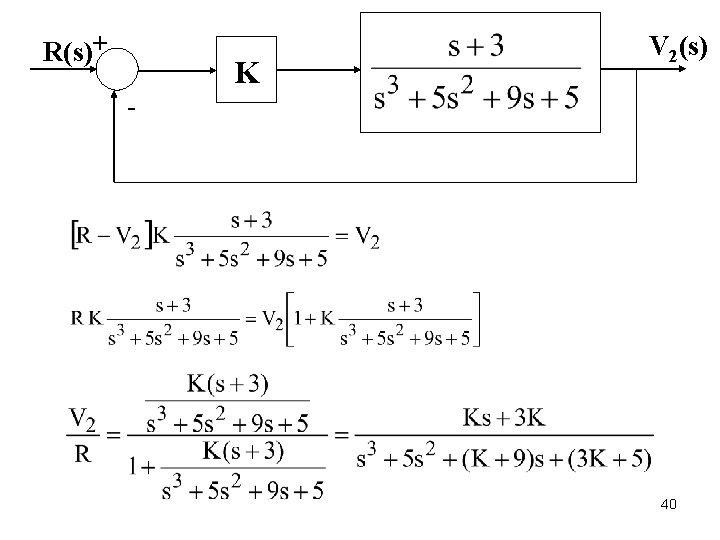
Example 4: Consider a closed-loop control system R(s)+ K System V 2(s) Controller Mason Formula: 39
R(s)+ K V 2(s) - 40
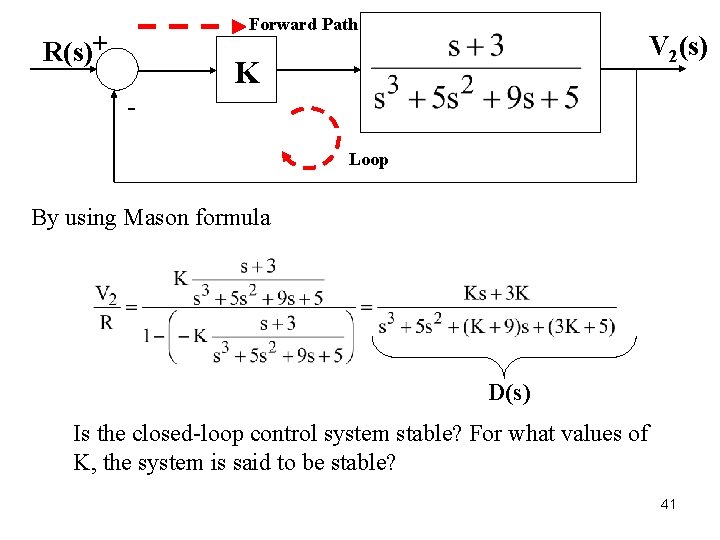
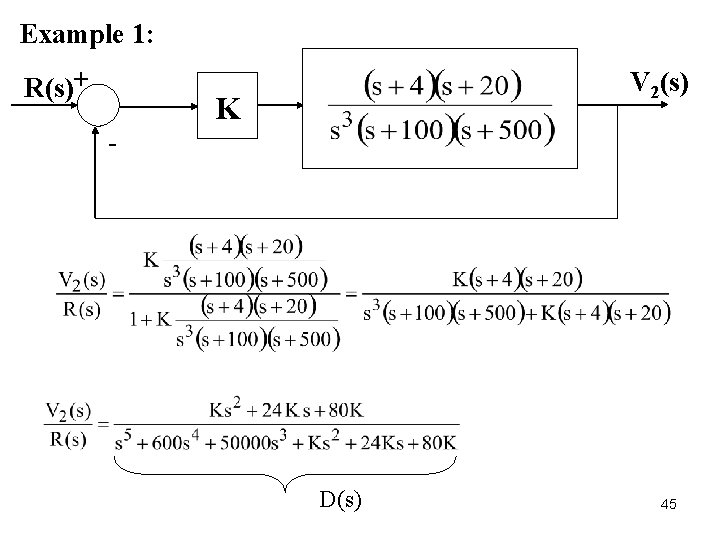
Forward Path R(s)+ V 2(s) K Loop By using Mason formula D(s) Is the closed-loop control system stable? For what values of K, the system is said to be stable? 41
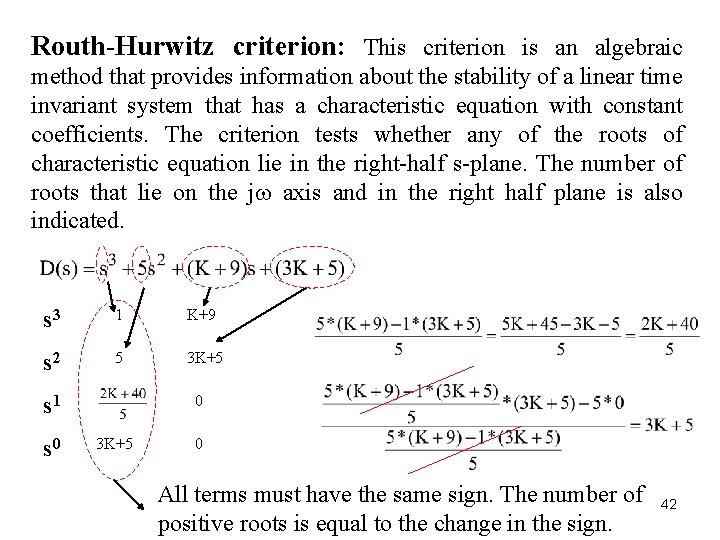
Routh-Hurwitz criterion: This criterion is an algebraic method that provides information about the stability of a linear time invariant system that has a characteristic equation with constant coefficients. The criterion tests whether any of the roots of characteristic equation lie in the right-half s-plane. The number of roots that lie on the j axis and in the right half plane is also indicated. s 3 1 K+9 s 2 5 3 K+5 s 1 s 0 0 3 K+5 0 All terms must have the same sign. The number of positive roots is equal to the change in the sign. 42
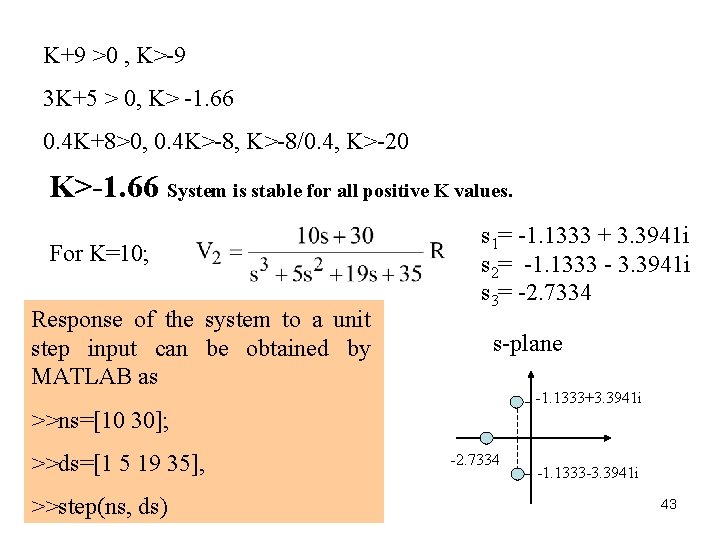
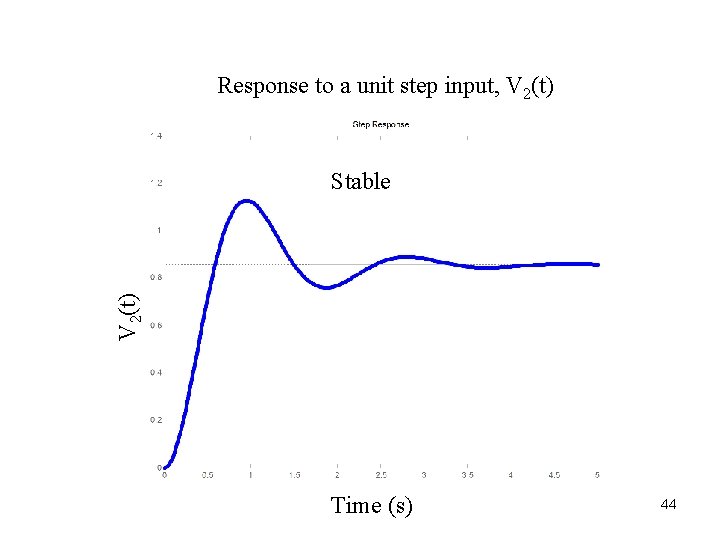
K+9 >0 , K>-9 3 K+5 > 0, K> -1. 66 0. 4 K+8>0, 0. 4 K>-8, K>-8/0. 4, K>-20 K>-1. 66 System is stable for all positive K values. For K=10; Response of the system to a unit step input can be obtained by MATLAB as s 1= -1. 1333 + 3. 3941 i s 2= -1. 1333 - 3. 3941 i s 3= -2. 7334 s-plane -1. 1333+3. 3941 i >>ns=[10 30]; >>ds=[1 5 19 35], >>step(ns, ds) -2. 7334 -1. 1333 -3. 3941 i 43
Response to a unit step input, V 2(t) Stable Time (s) 44
Example 1: R(s)+ V 2(s) K - D(s) 45
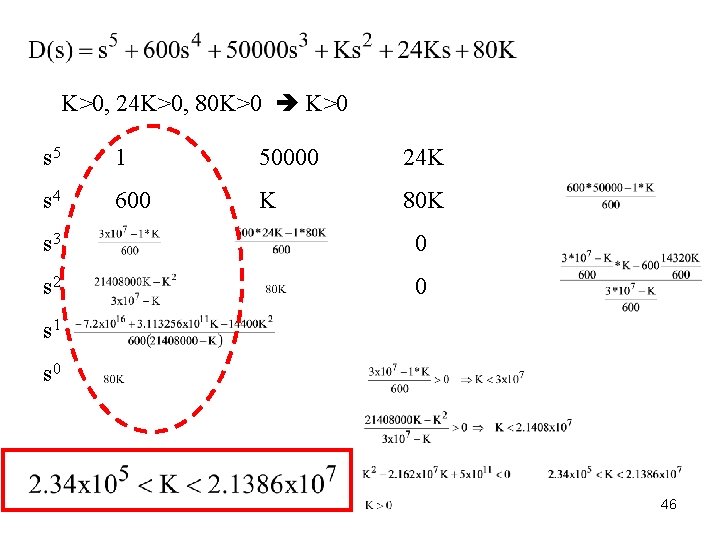
K>0, 24 K>0, 80 K>0 s 5 1 50000 24 K s 4 600 K 80 K s 3 0 s 2 0 s 1 s 0 46
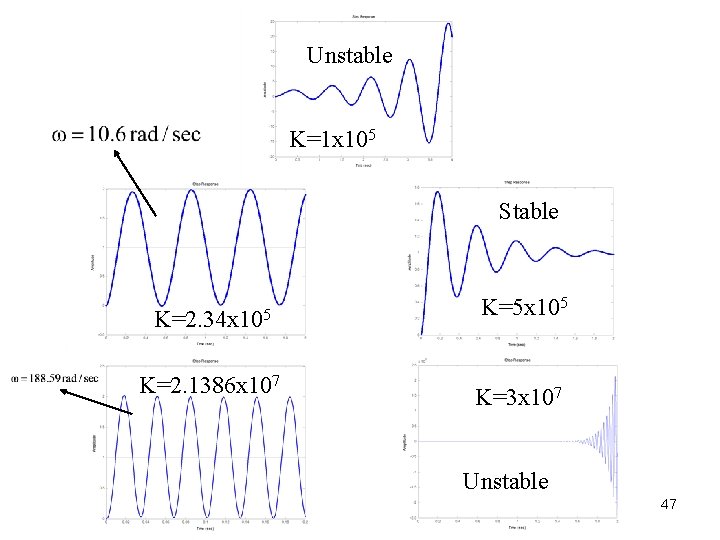
Unstable K=1 x 10⁵ Stable K=2. 34 x 105 K=2. 1386 x 107 K=5 x 10⁵ K=3 x 10⁷ Unstable 47
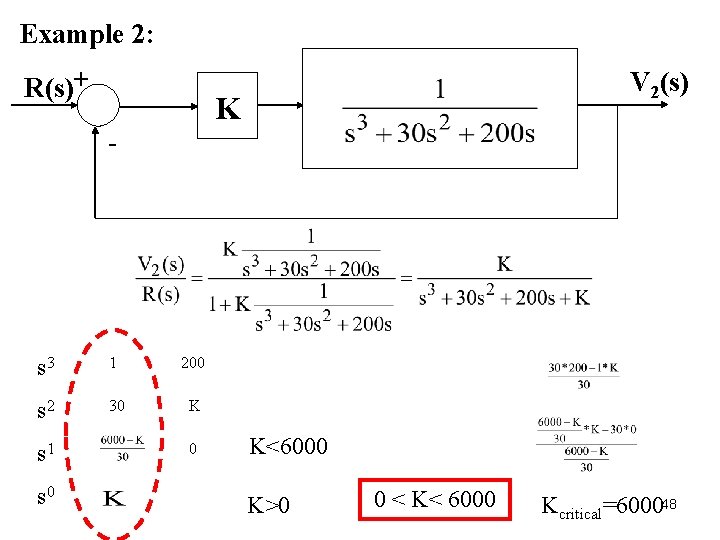
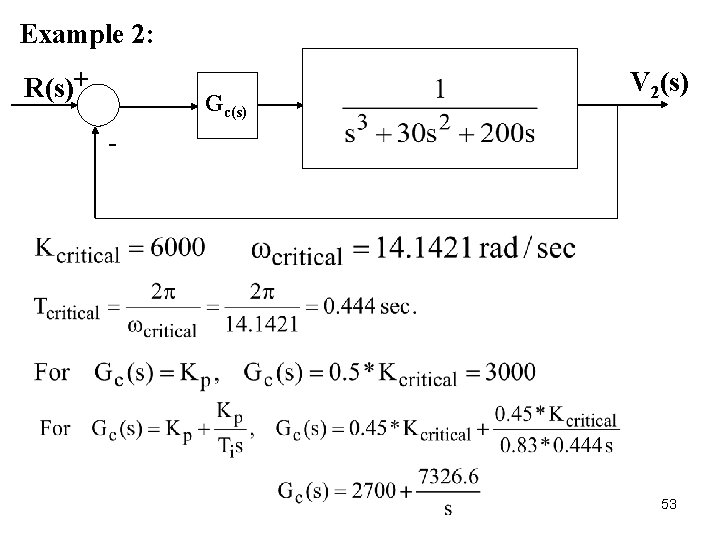
Example 2: R(s)+ V 2(s) K - s 3 1 200 s 2 30 K s 1 s 0 0 K<6000 K>0 0 < K< 6000 Kcritical=600048
By MATLAB, >>K=2000; >>ns=[K]; Stable >>ds=[1 30 200 K]; V 2(t) >>step(ns, ds) K=2000 Time (sec) 49
By MATLAB, Marginally stable K=6000 >>K=6000; >>ns=[K]; >>ds=[1 30 200 K]; D(s)=s 3+30 s 2+200 s+6000 V 2(t) >>step(ns, ds) >>ds=[1 30 200 6000]; >>roots(ds) p 1=-30. 0000 p 2= 0. 0000 +14. 1421 i p 3=0. 0000 -14. 1421 i Time (sec) 50
By MATLAB, >>K=8000; >>ns=[K]; K=6000 >>ds=[1 30 200 K]; >>step(ns, ds) V 2(t) Unstable Time (sec) 51
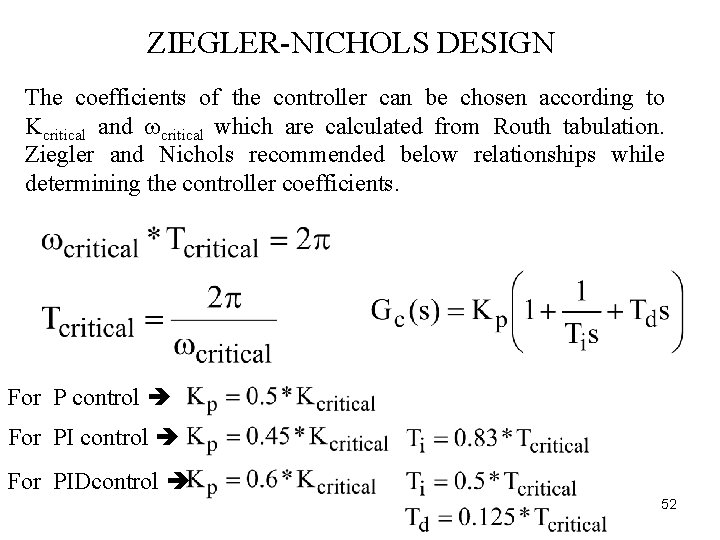
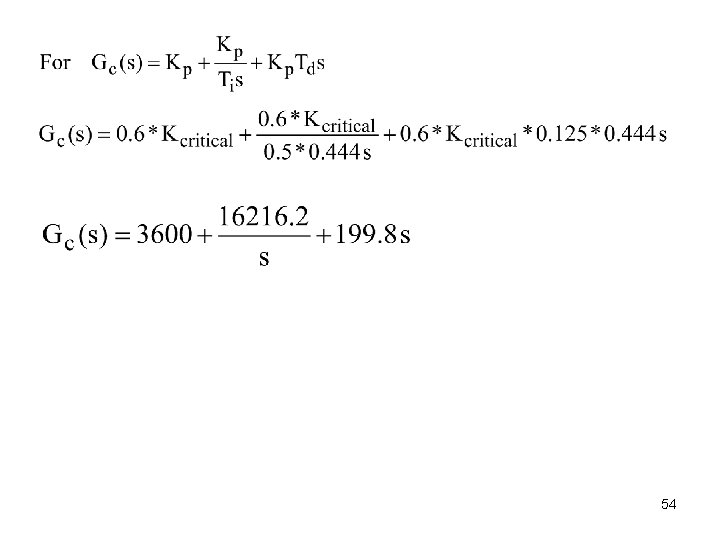
ZIEGLER-NICHOLS DESIGN The coefficients of the controller can be chosen according to Kcritical and critical which are calculated from Routh tabulation. Ziegler and Nichols recommended below relationships while determining the controller coefficients. For P control For PIDcontrol 52
Example 2: R(s)+ Gc(s) V 2(s) - 53
54
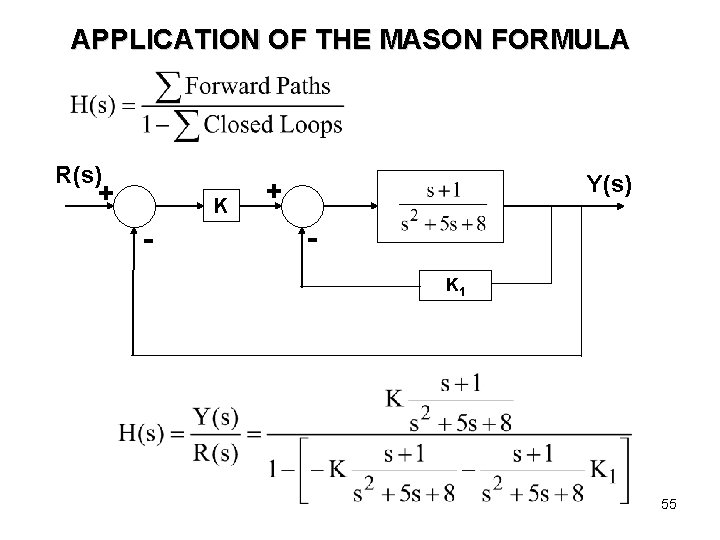
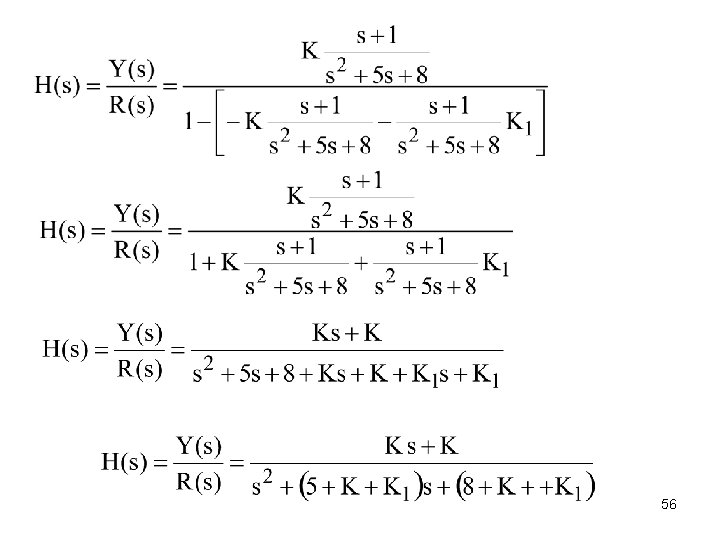
APPLICATION OF THE MASON FORMULA R(s) + K - Y(s) + K 1 55
56
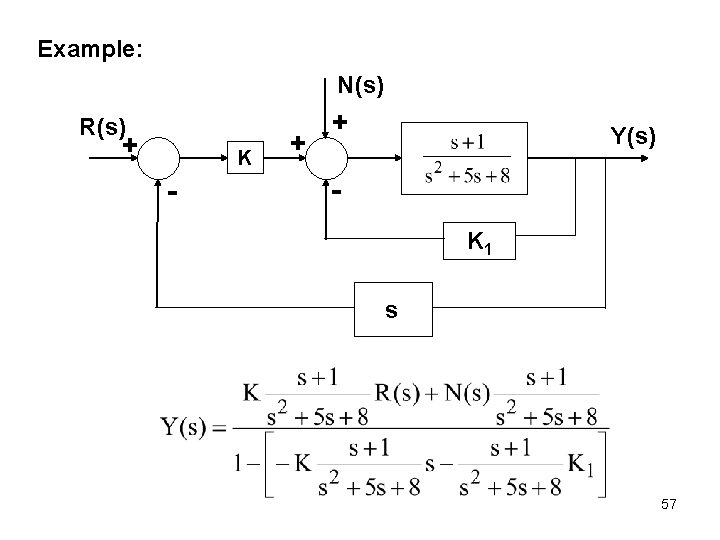
Example: N(s) R(s) + K - + + Y(s) K 1 s 57
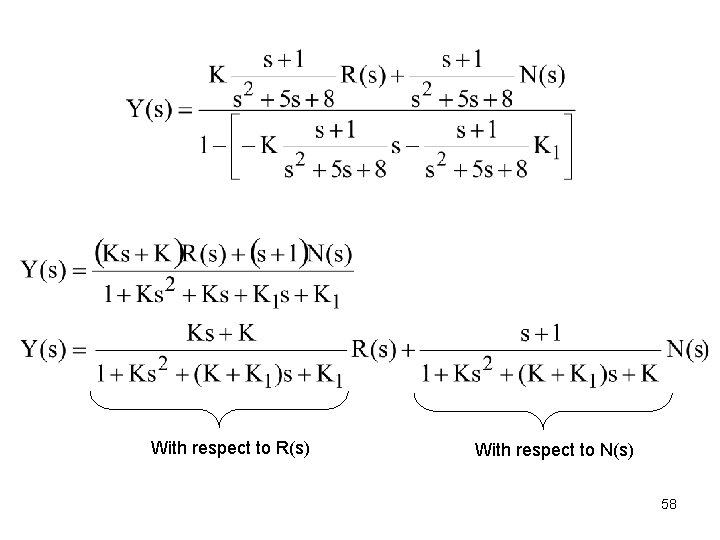
With respect to R(s) With respect to N(s) 58
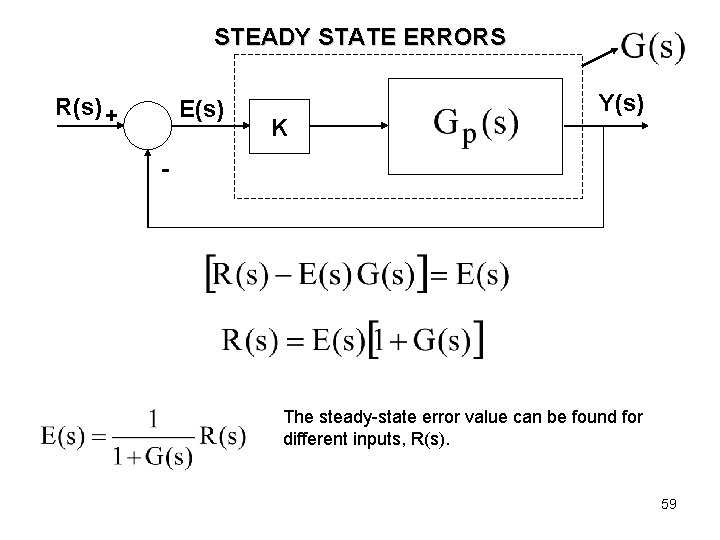
STEADY STATE ERRORS R(s) + E(s) K Y(s) - The steady-state error value can be found for different inputs, R(s). 59
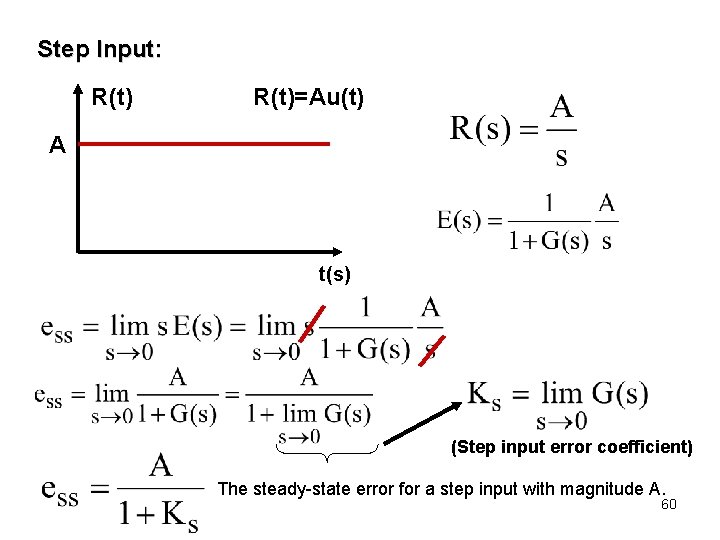
Step Input: R(t)=Au(t) A t(s) (Step input error coefficient) The steady-state error for a step input with magnitude A. 60
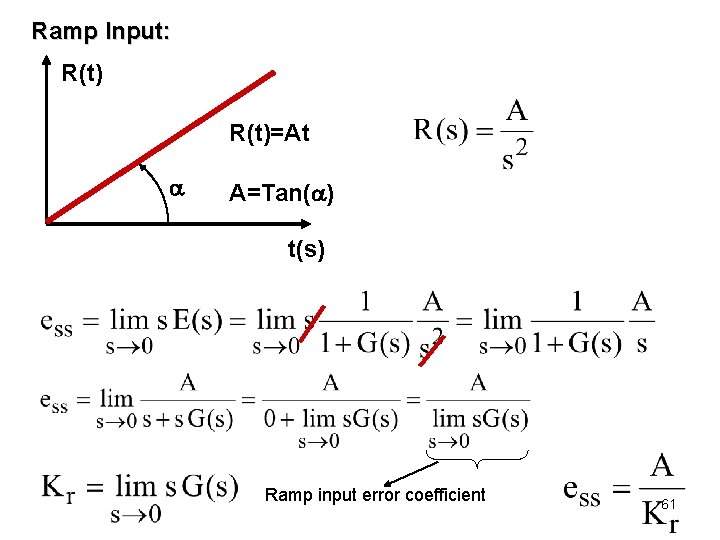
Ramp Input: R(t)=At A=Tan( ) t(s) Ramp input error coefficient 61
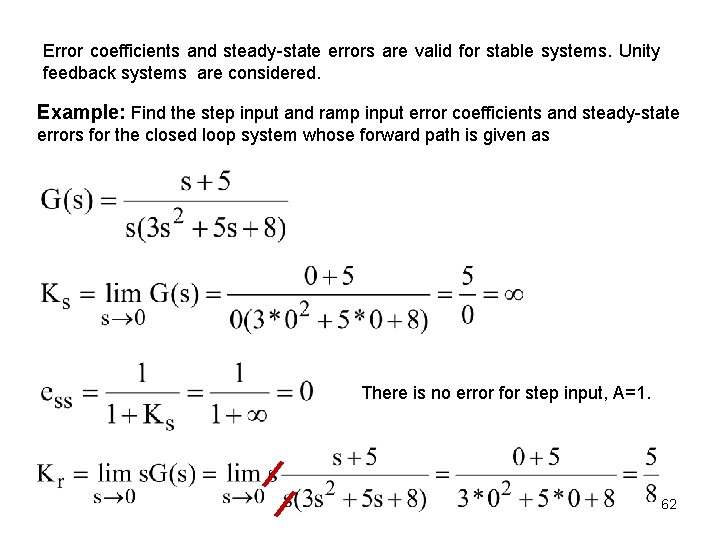
Error coefficients and steady-state errors are valid for stable systems. Unity feedback systems are considered. Example: Find the step input and ramp input error coefficients and steady-state errors for the closed loop system whose forward path is given as There is no error for step input, A=1. 62
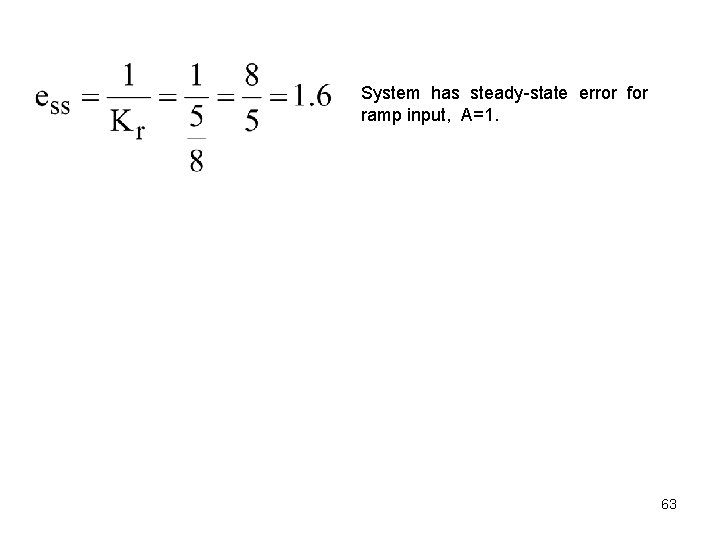
System has steady-state error for ramp input, A=1. 63
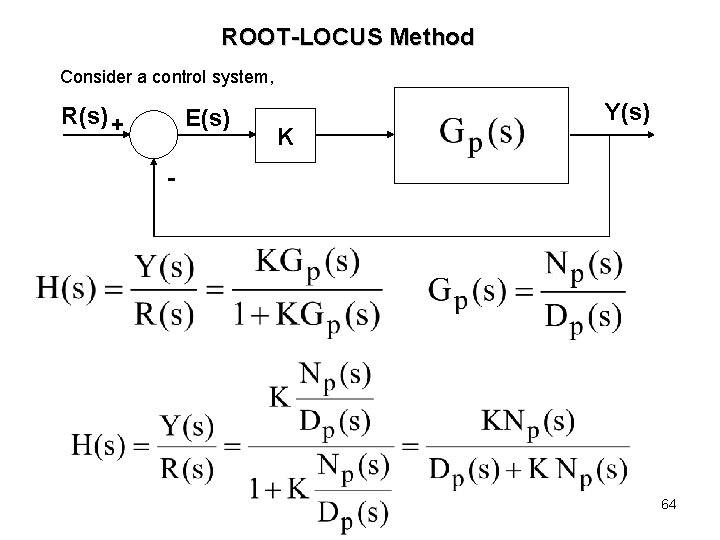
ROOT-LOCUS Method Consider a control system, R(s) + E(s) K Y(s) - 64
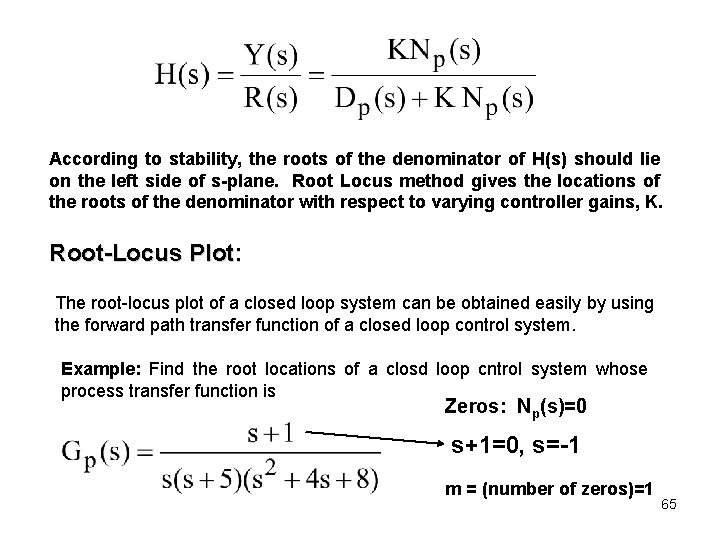
According to stability, the roots of the denominator of H(s) should lie on the left side of s-plane. Root Locus method gives the locations of the roots of the denominator with respect to varying controller gains, K. Root-Locus Plot: The root-locus plot of a closed loop system can be obtained easily by using the forward path transfer function of a closed loop control system. Example: Find the root locations of a closd loop cntrol system whose process transfer function is Zeros: Np(s)=0 s+1=0, s=-1 m = (number of zeros)=1 65
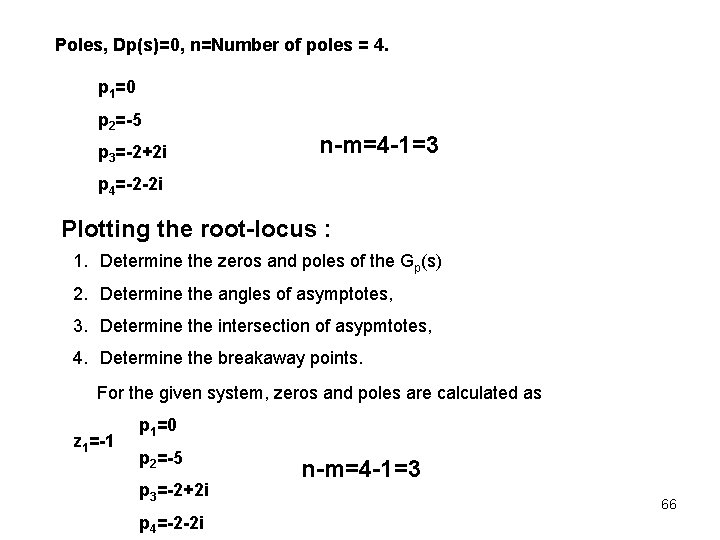
Poles, Dp(s)=0, n=Number of poles = 4. p 1=0 p 2=-5 p 3=-2+2 i n-m=4 -1=3 p 4=-2 -2 i Plotting the root-locus : 1. Determine the zeros and poles of the Gp(s) 2. Determine the angles of asymptotes, 3. Determine the intersection of asypmtotes, 4. Determine the breakaway points. For the given system, zeros and poles are calculated as z 1=-1 p 1=0 p 2=-5 p 3=-2+2 i p 4=-2 -2 i n-m=4 -1=3 66
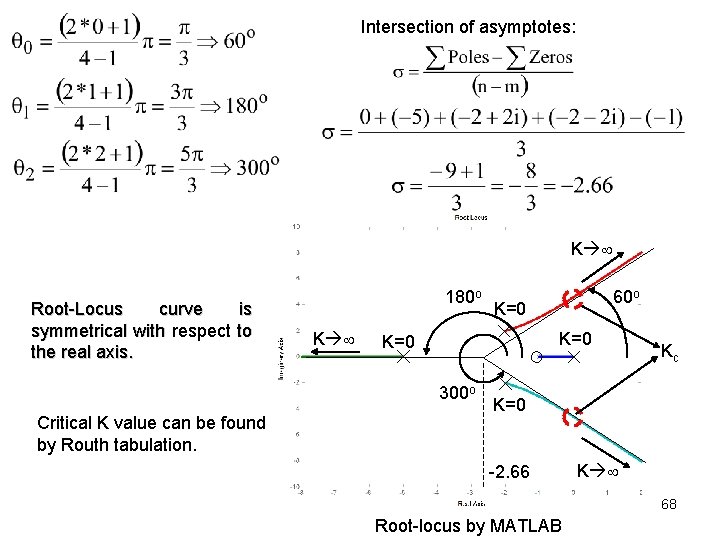
Angles of asymptotes: Poles of Gp(s) Zeros of Gp(s) >>ns=[1 1]; >>ds=[1 9 28 40 0] >>rlocus(pay, payda) Root-locus by MATLAB 67
Intersection of asymptotes: K Root-Locus curve is symmetrical with respect to the real axis. 180 o K K=0 K=0 300 o Critical K value can be found by Routh tabulation. 60 o Kc K=0 -2. 66 K 68 Root-locus by MATLAB
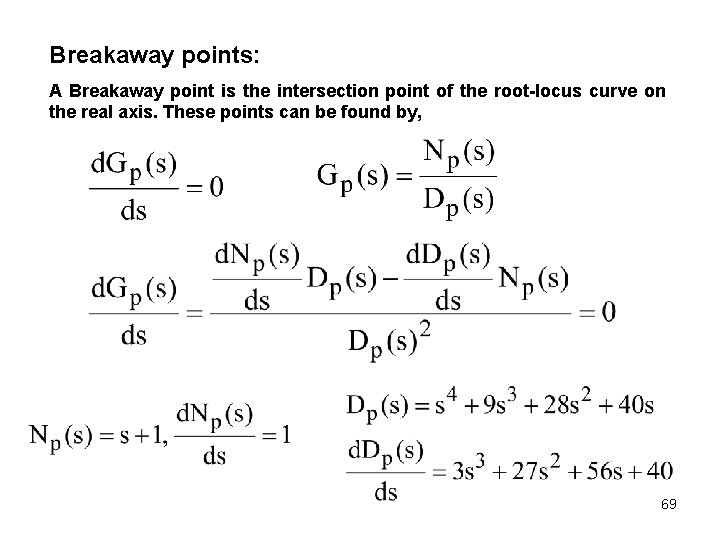
Breakaway points: A Breakaway point is the intersection point of the root-locus curve on the real axis. These points can be found by, 69
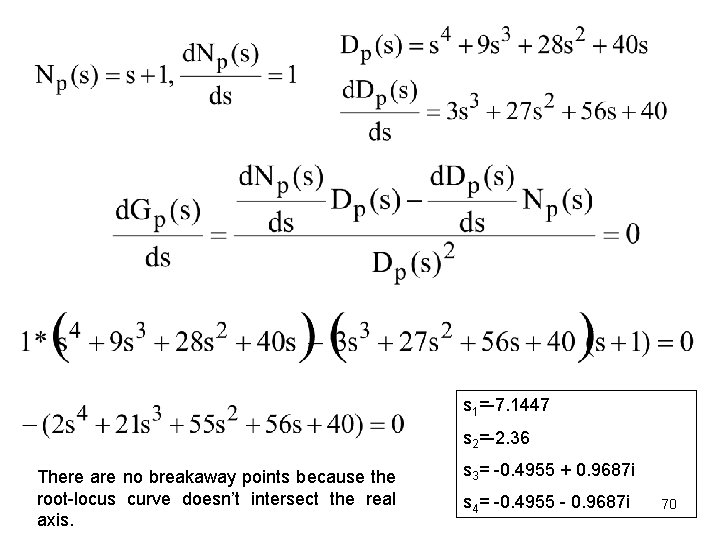
s 1=-7. 1447 s 2=-2. 36 There are no breakaway points because the root-locus curve doesn’t intersect the real axis. s 3= -0. 4955 + 0. 9687 i s 4= -0. 4955 - 0. 9687 i 70
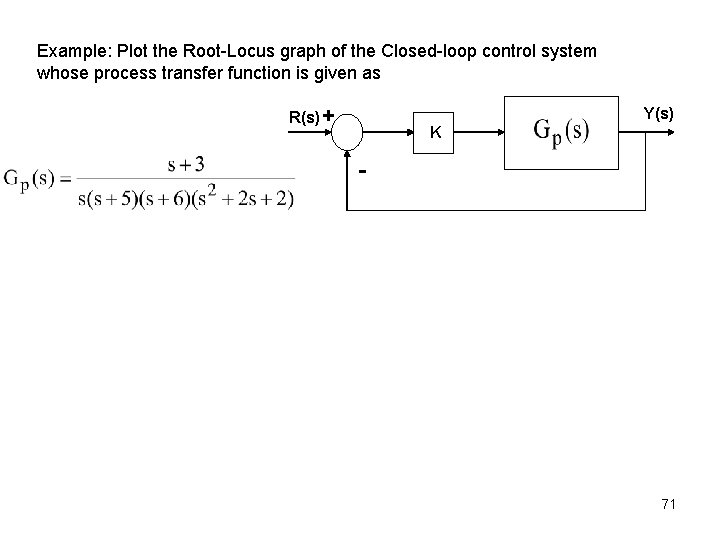
Example: Plot the Root-Locus graph of the Closed-loop control system whose process transfer function is given as R(s) + Y(s) K - 71
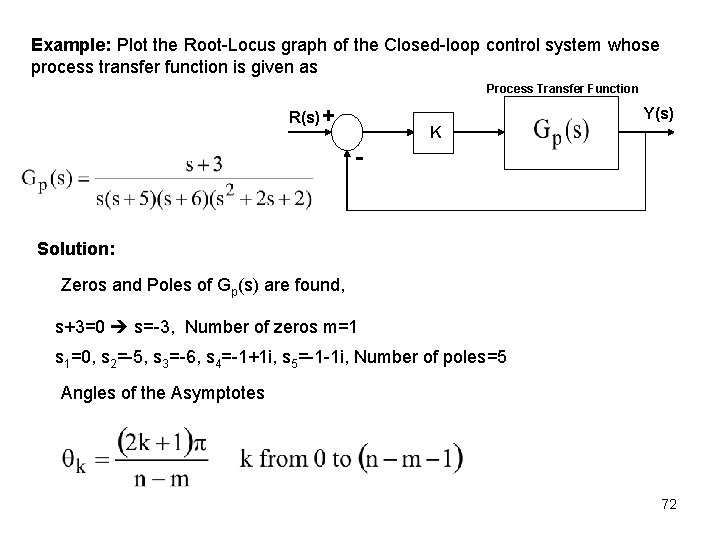
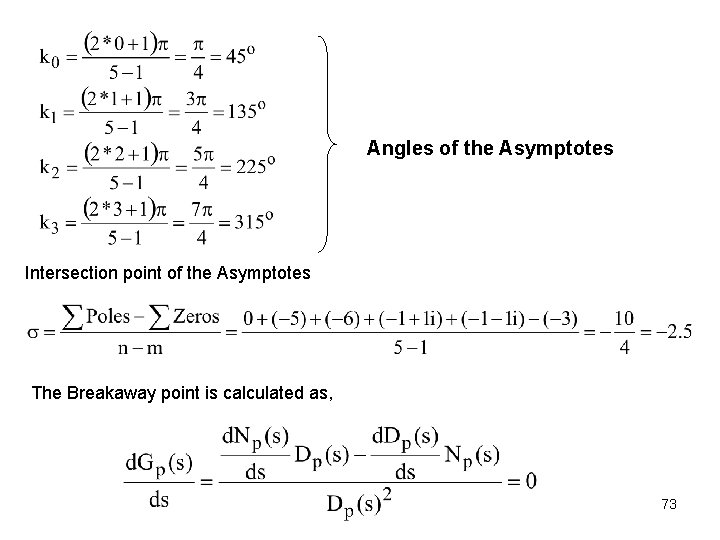
Example: Plot the Root-Locus graph of the Closed-loop control system whose process transfer function is given as Process Transfer Function R(s) + Y(s) K - Solution: Zeros and Poles of Gp(s) are found, s+3=0 s=-3, Number of zeros m=1 s 1=0, s 2=-5, s 3=-6, s 4=-1+1 i, s 5=-1 -1 i, Number of poles=5 Angles of the Asymptotes 72
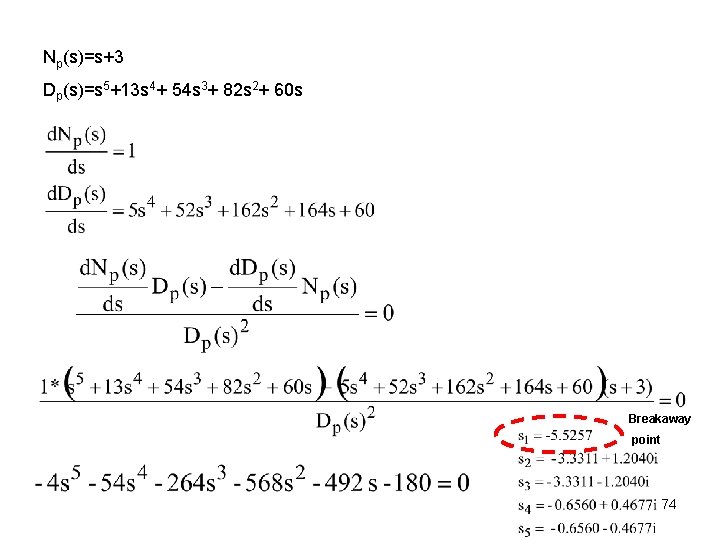
Angles of the Asymptotes Intersection point of the Asymptotes The Breakaway point is calculated as, 73
Np(s)=s+3 Dp(s)=s 5+13 s 4+ 54 s 3+ 82 s 2+ 60 s Breakaway point 74
Root Locus by MATLAB, >>ns=[1 3]; >>ds=[1 13 54 >>rlocus(ns, ds) 82 60 0]; Asymptote Imaginary K K 135 O Breakaway Point -5. 53 K=0 45 O K=0 K=0 Real K Intersection point K -2. 5 75
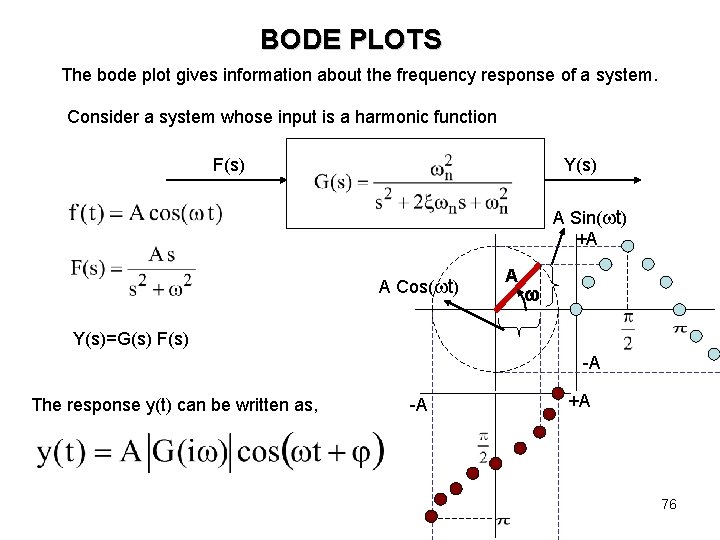
BODE PLOTS The bode plot gives information about the frequency response of a system. Consider a system whose input is a harmonic function F(s) Y(s) A Sin( t) +A A Cos( t) A Y(s)=G(s) F(s) -A The response y(t) can be written as, -A +A 76
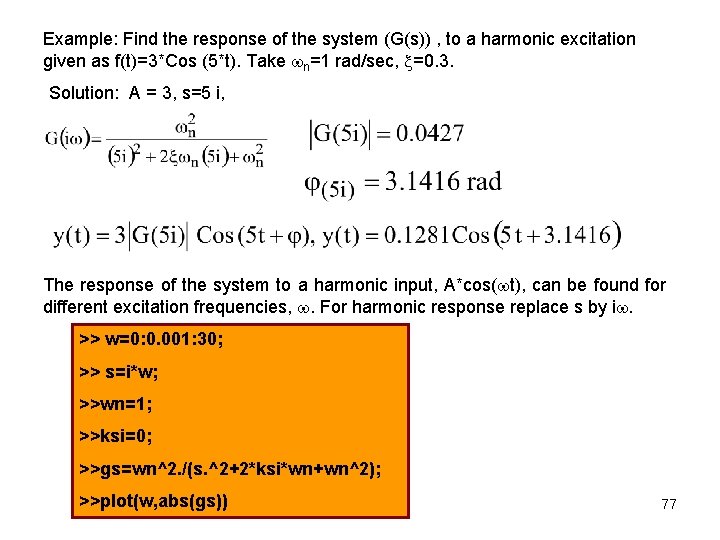
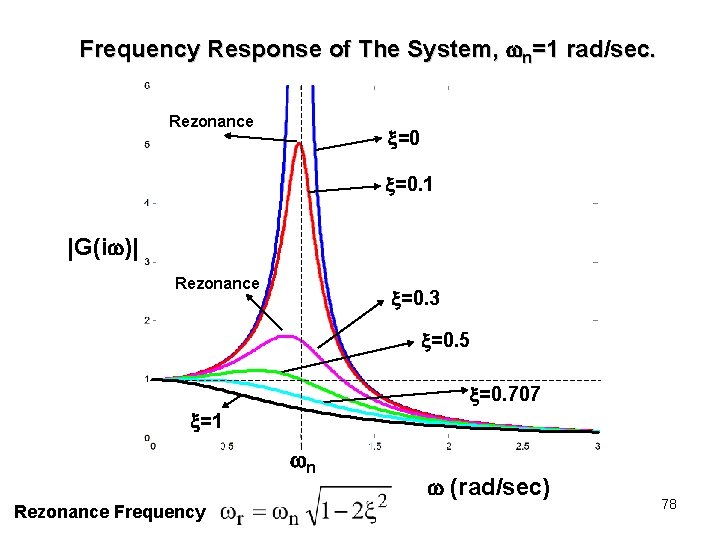
Example: Find the response of the system (G(s)) , to a harmonic excitation given as f(t)=3*Cos (5*t). Take n=1 rad/sec, =0. 3. Solution: A = 3, s=5 i, The response of the system to a harmonic input, A*cos( t), can be found for different excitation frequencies, . For harmonic response replace s by i. >> w=0: 0. 001: 30; >> s=i*w; >>wn=1; >>ksi=0; >>gs=wn^2. /(s. ^2+2*ksi*wn+wn^2); >>plot(w, abs(gs)) 77
Frequency Response of The System, n=1 rad/sec. Rezonance =0 =0. 1 |G(i )| Rezonance =0. 3 =0. 5 =0. 707 =1 n Rezonance Frequency (rad/sec) 78
BODE PLOT by MATLAB >>wn=1; >>ksi=0. 3; >>ns=[wn^2]; >>ds=[1 2*ksi*wn wn^2]; >>bode(ns, ds) 79
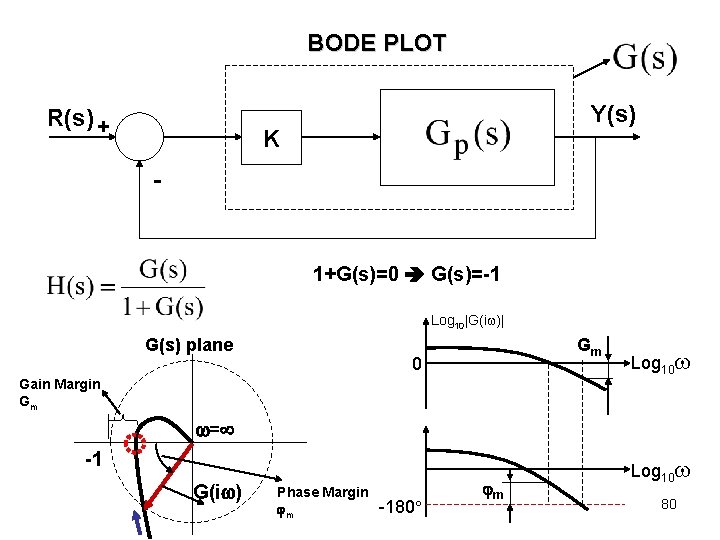
BODE PLOT R(s) + Y(s) K - 1+G(s)=0 G(s)=-1 Log 10|G(i )| G(s) plane Gm 0 Log 10 Gain Margin Gm = -1 G(i ) Phase Margin m -180 m Log 10 80
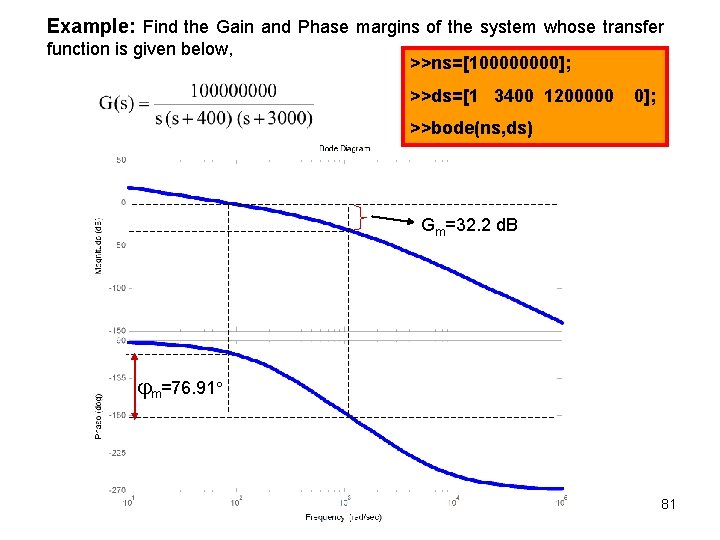
Example: Find the Gain and Phase margins of the system whose transfer function is given below, >>ns=[10000]; >>ds=[1 3400 1200000 0]; >>bode(ns, ds) Gm=32. 2 d. B m=76. 91 81
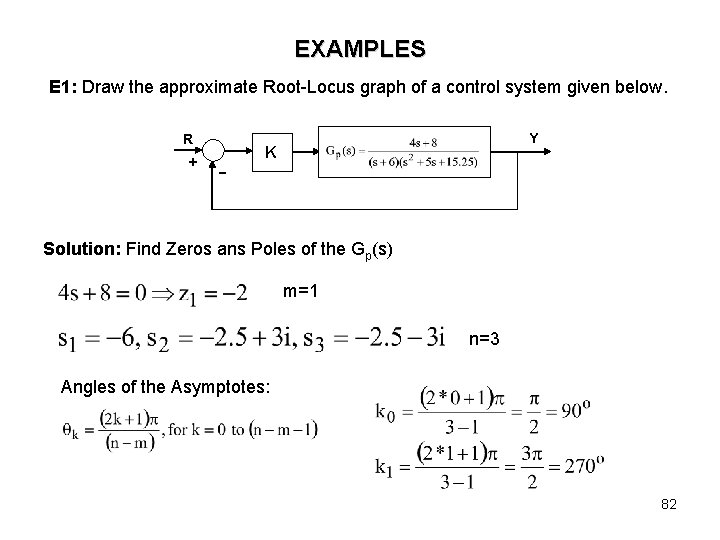
EXAMPLES E 1: Draw the approximate Root-Locus graph of a control system given below. R + - Y K Solution: Find Zeros ans Poles of the Gp(s) m=1 n=3 Angles of the Asymptotes: 82
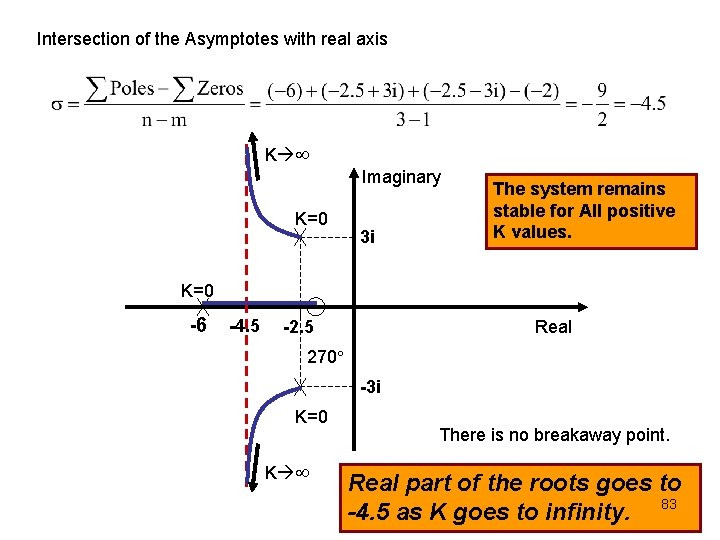
Intersection of the Asymptotes with real axis K Imaginary K=0 3 i The system remains stable for All positive K values. K=0 -6 -4. 5 -2. 5 Real 270 -3 i K=0 K There is no breakaway point. Real part of the roots goes to -4. 5 as K goes to infinity. 83
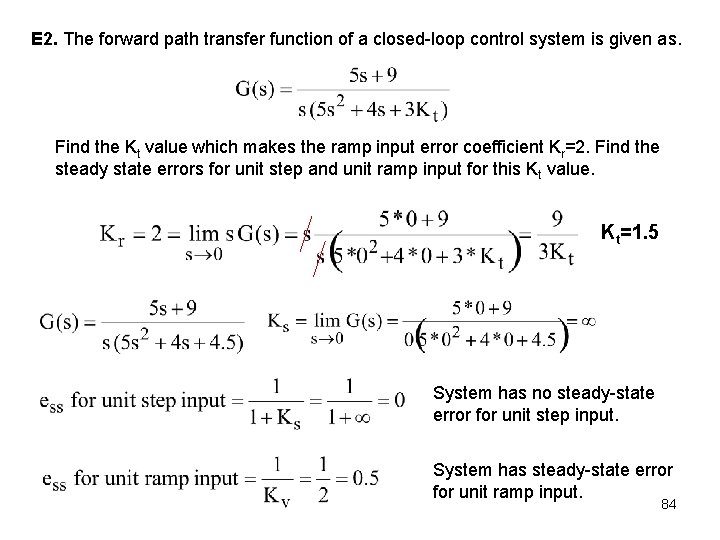
E 2. The forward path transfer function of a closed-loop control system is given as. Find the Kt value which makes the ramp input error coefficient Kr=2. Find the steady state errors for unit step and unit ramp input for this Kt value. Kt=1. 5 System has no steady-state error for unit step input. System has steady-state error for unit ramp input. 84
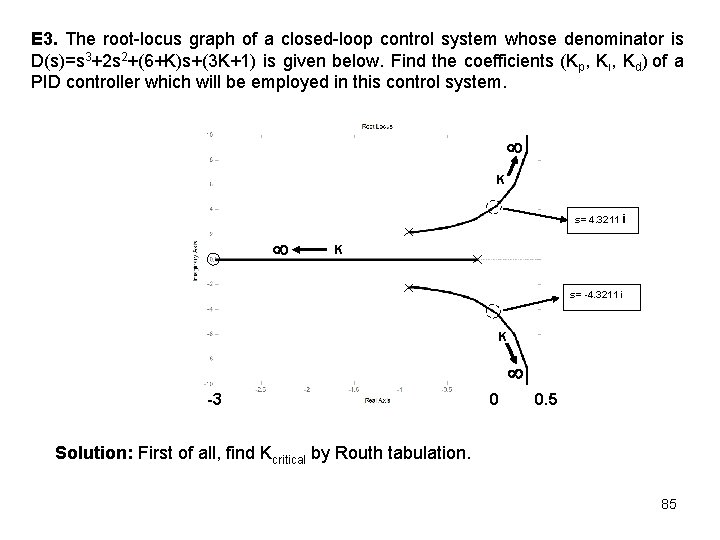
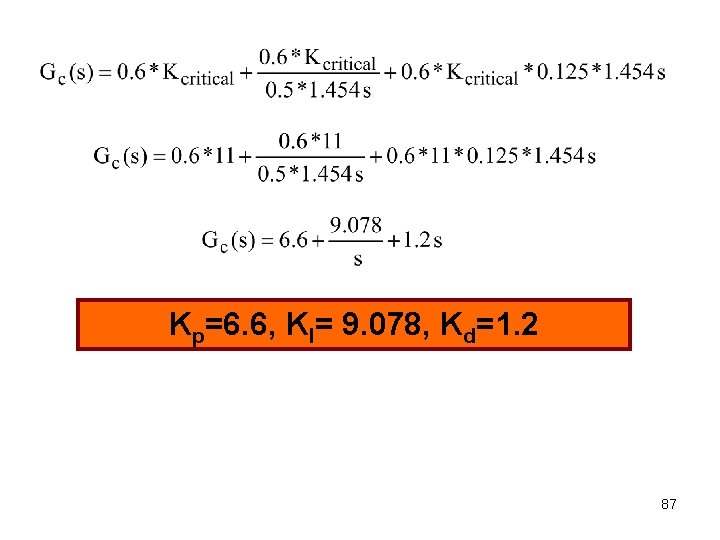
E 3. The root-locus graph of a closed-loop control system whose denominator is D(s)=s 3+2 s 2+(6+K)s+(3 K+1) is given below. Find the coefficients (Kp, Kı, Kd) of a PID controller which will be employed in this control system. K s= 4. 3211 i K s= -4. 3211 i K -3 0 0. 5 Solution: First of all, find Kcritical by Routh tabulation. 85
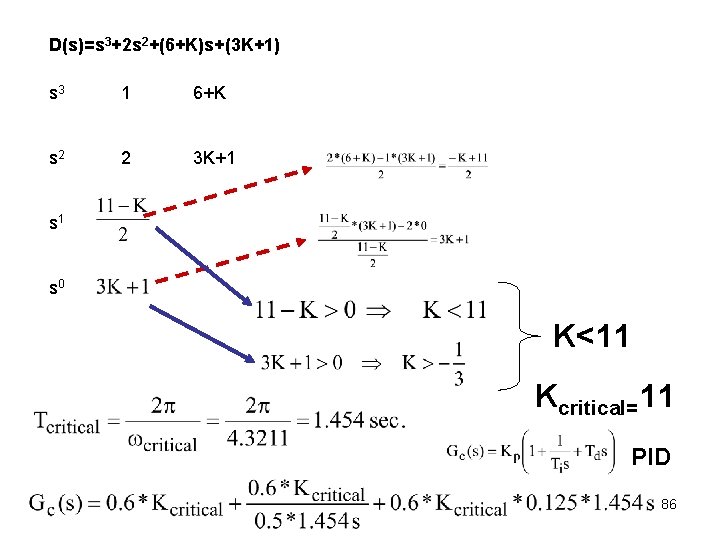
D(s)=s 3+2 s 2+(6+K)s+(3 K+1) s 3 1 6+K s 2 2 3 K+1 s 0 K<11 Kcritical=11 PID 86
Kp=6. 6, KI= 9. 078, Kd=1. 2 87