
Level 2 DIT Component 1 Internal Assessment User
- Slides: 1
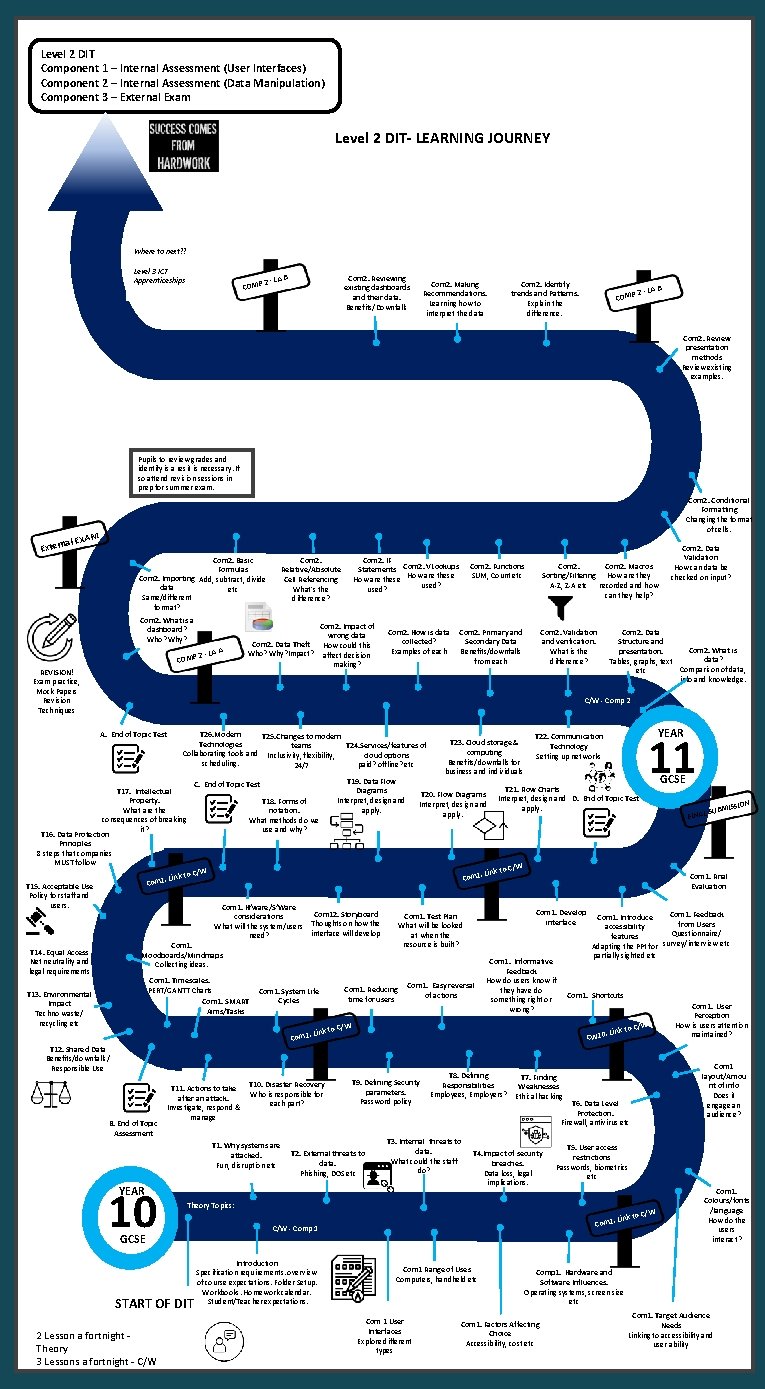
Level 2 DIT Component 1 – Internal Assessment (User Interfaces) Component 2 – Internal Assessment (Data Manipulation) Component 3 – External Exam Level 2 DIT- LEARNING JOURNEY Where to next? ? Level 3 ICT Apprenticeships COMP 2 - LA B Com 2. Reviewing existing dashboards and their data. Benefits/Downfalls Com 2. Making Recommendations. Learning how to interpret the data Com 2. Identify trends and Patterns. Explain the difference. COMP 2 - LA B Com 2. Review presentation methods Review existing examples. Pupils to review grades and identify is a resit is necessary. If so attend revision sessions in prep for summer exam. al EXA Extern Com 2. Conditional Formatting Changing the format of cells. M Com 2. Basic Formulas Com 2. Importing Add, subtract, divide data etc Same/different format? Com 2. What is a dashboard? Who? Why? COMP 2 - LA A/W REVISION! Exam practice, Mock Papers Revision Techniques Com 2. Relative/Absolute Cell Referencing What's the difference? Com 2. IF Statements Com 2. VLookups How are these used? Com 2. Impact of wrong data Com 2. Data Theft How could this Who? Why? Impact? affect decision making? Com 2. How is data collected? Examples of each Com 2. Functions SUM, Count etc Com 2. Macros Sorting/Filtering How are they A-Z, Z-A etc recorded and how can they help? Com 2. Primary and Secondary Data Benefits/downfalls from each Com 2. Validation and verification. What is the difference? Com 2. Data Validation How can data be checked on input? Com 2. Data Structure and Com 2. What is presentation. data? Tables, graphs, text Comparison of data, etc info and knowledge. C/W - Comp 2 A. End of Topic Test T 26. Modern T 25. Changes to modern Technologies T 24. Services/features of teams Collaborating tools and Inclusivity, flexibility, cloud options scheduling. paid? offline? etc 24/7 C. End of Topic Test T 17. Intellectual Property. What are the consequences of breaking it? T 16. Data Protection Principles 8 steps that companies MUST follow . Link Com 1 T 15. Acceptable Use Policy for staff and users. T 18. Forms of notation. What methods do we use and why? T 19. Data Flow Diagrams Interpret, design and apply. Com 1. Timescales. PERT/GANTT Charts Com 1. SMART Aims/Tasks Com 1. System Life Cycles . Com 1 B. End of Topic Assessment T 11. Actions to take after an attack. Investigate, respond & manage T 10. Disaster Recovery Who is responsible for each part? T 1. Why systems are attacked. Fun, disruption etc 10 T 9. Defining Security parameters. Password policy T 2. External threats to data. Phishing, DOS etc T 3. Internal threats to data. What could the staff do? to C/W T 6. Data Level Protection. Firewall, antivirus etc T 4. Impact of security breaches. Data loss, legal implications. T 5. User access restrictions Passwords, biometrics etc START OF DIT . Link Com 1 C/W - Comp 1 Introduction Specification requirements. overview of course expectations. Folder Setup. Workbooks. Homework calendar. Student/Teacher expectations. Com 1 Range of Uses Computers, handheld etc Com 1 User Interfaces Explore different types Com 1. User Perception How is users attention maintained? Com 1 layout/Amou nt of info Does it engage an audience? T 7. Finding Weaknesses Ethical hacking Theory Topics: GCSE ISSION SUBM Com 1. Shortcuts . Link T 8. Defining Responsibilities Employees, Employers? FINAL Com 1. Feedback Com 1. Introduce from Users accessibility Questionnaire/ features Adapting the PPt for survey/interview etc partially sighted etc CW 10 YEAR 2 Lesson a fortnight Theory 3 Lessons a fortnight - C/W Com 1. Informative Feedback How do users know if they have do something right or wrong? o C/W Link t T 12. Shared Data Benefits/downfalls/ Responsible Use GCSE Com 1. Final Evaluation Com 1. Develop interface Com 1. Easy reversal of actions 11 to C/W Com 1. Test Plan What will be looked at when the resource is built? Com 1. Reducing time for users YEAR T 22. Communication Technology Setting up networks T 21. Flow Charts Interpret, design and D. End of Topic Test apply. . Link Com 1. Moodboards/Mindmaps Collecting ideas. T 13. Environmental Impact Techno waste/ recycling etc T 20. Flow Diagrams Interpret, design and apply. to C/W Com 1. H’ware/S’Ware Com 12. Storyboard considerations What will the system/users Thoughts on how the interface will develop need? T 14. Equal Access Net neutrality and legal requirements T 23. Cloud storage & computing Benefits/downfalls for business and individuals to C/W Com 1. Colours/fonts /language How do the users interact? Comp 1. Hardware and Software Influences. Operating systems, screen size etc Com 1. Factors Affecting Choice Accessibility, cost etc Com 1. Target Audience Needs Linking to accessibility and user ability