
Lesson Objective What is a computer system Success
Lesson Objective What is a computer system? Success Criteria Strand 5 Strand 6 I can explain how information travels around a computer system. I can explain the main architecture of a computer system. Towards: I can explain what either hardware or software is (with examples). Met: I can give a definition for a computer system and explain both hardware and software (with examples). Depth: I can give examples (with explanations) for things that are/ are not computer systems.
Starter Task 10/02/2022 What is a computer system? A computer system is one that is able to take a set of inputs, process them and create a set of outputs. This is done by a combination of hardware and software. 1. Add today’s title and date to your learning diary. 2. Answer the following question in your learning diary: What do you think are the differences between hardware and software?

Hardware vs software Hardware – The physical parts of a computer system, eg a graphics card, hard disk drive, CD drive etc. Software – The programs, applications and data in a computer system. Any parts of a computer system that aren't physical. Now update your answer from before
Task 1 - What is a computer? Watch this video. You will need to answer some questions on it afterwards so pay close attention! https: //www. youtube. com/watch? v=fth. N 55 Rt. E 8 M
�The computer system has one or more inputs to provide data. This data is then processed in some way. The outcome of the processing is sent to an output or it may be stored until some event happens to cause it to be output. �For processing to take place, there needs to be a set of instructions of what needs to be done. This set of instructions is called a program.
Task 2 - What is a computer? Questions 1. What makes up a computer system? Depth: Can you think of any device in your kitchen that counts as a computer system? Can you explain why?
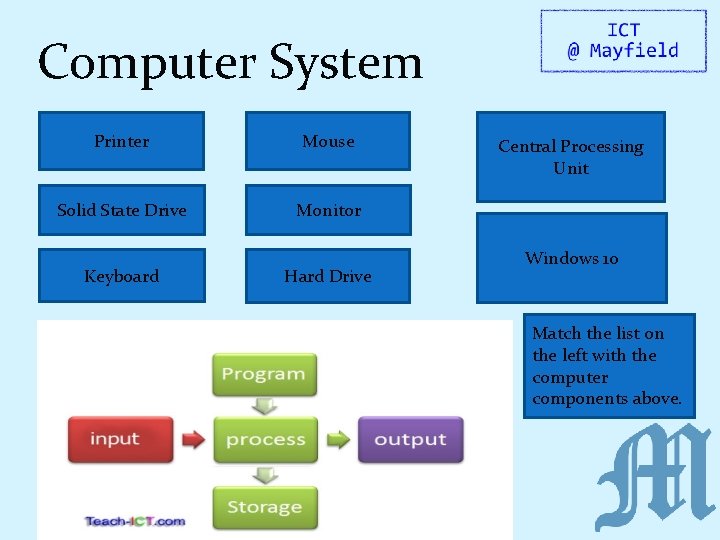
Computer System Printer Mouse Solid State Drive Monitor Keyboard Hard Drive Central Processing Unit Windows 10 Match the list on the left with the computer components above.
RAG 123 1. Mark on the effort you think you have put in today. 2. Mark on how well you think you have met today’s success criteria. 3. Explain why! Towards: I can explain what either hardware or software is (with examples). Met: I can give a definition for a computer system and explain both hardware and software (with examples). Depth: I can give examples (with explanations) for things that are/ are not computer systems.
Lesson Objective How does a computer make decisions? Success Criteria Strand 5: I can understand how the fetch – execute cycle works and how Moore’s law affects computer architecture. Towards: I can explain the main role of a CPU. Met: I can explain how the Fetch, Decode and Execute cycle works. Depth: I can explain how each part of the Fetch, Decode and Execute cycle can be made quicker.
Starter Task 10/02/2022 How does a computer make decisions? 1. Add today’s title and date to your learning diary. 2. Answer the following question in your learning diary: What does CPU stand for? What does it do?
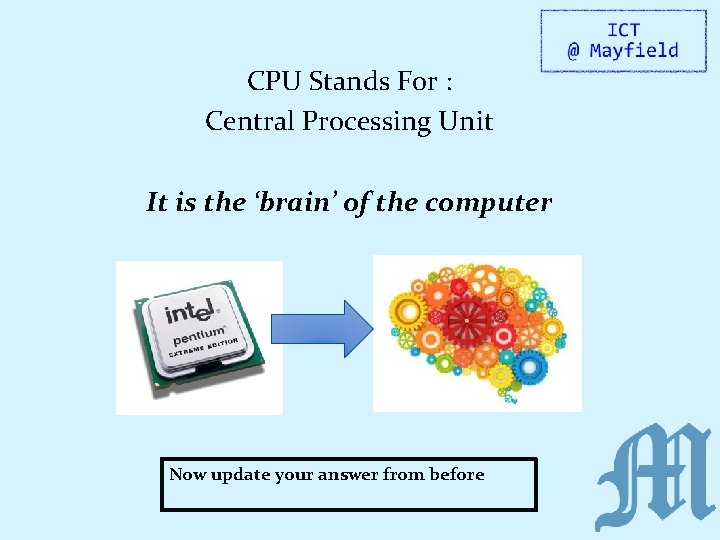
CPU Stands For : Central Processing Unit It is the ‘brain’ of the computer Now update your answer from before
Task 1 – What is a CPU? Watch the following video – pay careful attention as you are going to be answering some questions afterwards! https: //www. youtube. com/watch? v=Ak. Fi 90 l. Zm. XA
Task 1 – What is a CPU? Questions (answer in full sentences): 1. Is the CPU hardware or software? 2. What 2 things does the CPU have to process? Depth: What are the differences between the 2 things in question 1?
Task 2 – Human CPU As a group you have just acted as a computer system. The CPU/processor was responsible for executing the Fetch/ Decode/ Execute cycle: Fetch instructions/data. (Collect the data) Decode these instructions/data. (Understand make sense of the data) Execute these instructions/data. (Do something with the data) Task: Explain this in your own words, including a diagram. Depth: For each part of the Fetch, Decode, Execute cycle which devices are the processor interacting with?
Task 2 – Human CPU You are now going to be placed into groups of 5: Person 1 will be the User Person 2 will be the Input device Person 3 will be the Processor Person 4 will be the Storage device Person 5 will be the Output device The user has tasks they want to carry out using the computer. The Processor must tell the other devices what to do to achieve the tasks.
RAG 123 1. Mark on the effort you think you have put in today. 2. Mark on how well you think you have met today’s success criteria. 3. Explain why! Towards: I can explain the main role of a CPU. Met: I can explain how the Fetch, Decode and Execute cycle works. Depth: I can explain how each part of the Fetch, Decode and Execute cycle can be made quicker.
- Slides: 16