
Lesson 19 Handling Backorders Creating Issues from Backorders
Lesson 19: Handling Backorders Creating Issues from Backorders
Objectives In this lesson you will learn: -How to process an issue for items that have been backordered - For the purposes of this lesson the assumption is that an issue has been processed previously that included one or more items on backorder. 2 Copyright 2002 Sterling Commerce, Inc. All rights reserved.
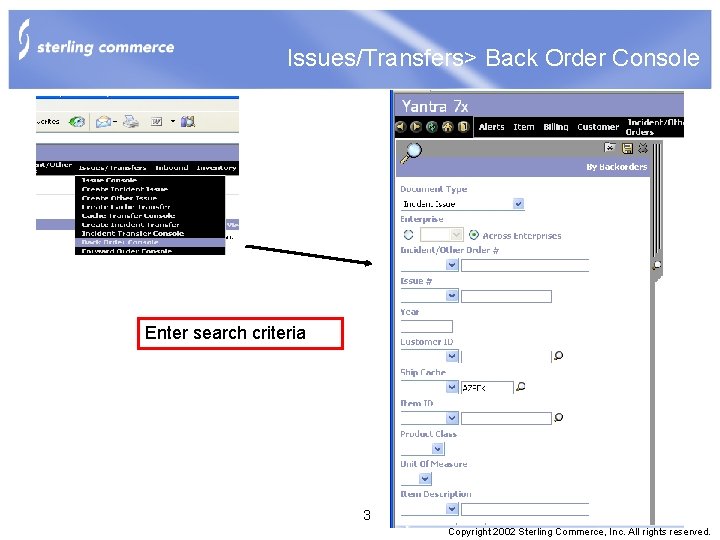
Issues/Transfers> Back Order Console Enter search criteria 3 Copyright 2002 Sterling Commerce, Inc. All rights reserved.

Back Order Line List Check the line or lines for processing the backorder issue Enter the quantities to be issued. Click on Create Issue 4 Copyright 2002 Sterling Commerce, Inc. All rights reserved.
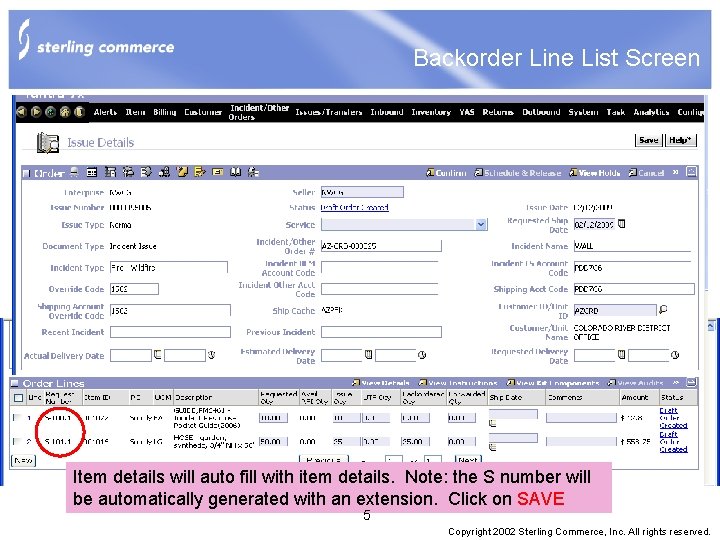
Backorder Line List Screen Item details will auto fill with item details. Note: the S number will be automatically generated with an extension. Click on SAVE 5 Copyright 2002 Sterling Commerce, Inc. All rights reserved.

Completing the Backorder Issue Process -From this point the same process is followed as with the issue to complete -Confirm the shipment -Schedule and Release -Complete the move tasks via the console or scan device -Complete the shipment details -Print the Issue report 6 Copyright 2002 Sterling Commerce, Inc. All rights reserved.
Lesson 18 Summary On this lesson the user learned: -The necessary steps to create and process a backorder 7 Copyright 2002 Sterling Commerce, Inc. All rights reserved.
Questions? 8 Copyright 2002 Sterling Commerce, Inc. All rights reserved.
- Slides: 8