
lesson 13 et 438 a pptx ET 438
- Slides: 20
lesson 13 et 438 a. pptx ET 438 a Automatic Control Systems Technology LESSON 13: EFFECTS OF NEGATIVE FEEDBACK ON SYSTEM DISTURBANCES 1
lesson 13 et 438 a. pptx LEARNING OBJECTIVES After this presentation you will be able to: Ø Ø Reduce a block diagram with multiple inputs using superposition theory. Explain how negative feedback reduces the effects of system disturbances with a proportional controller. Interpret step-response time plots. Use Matlab control toolbox functions to plot the step response of control systems, 2
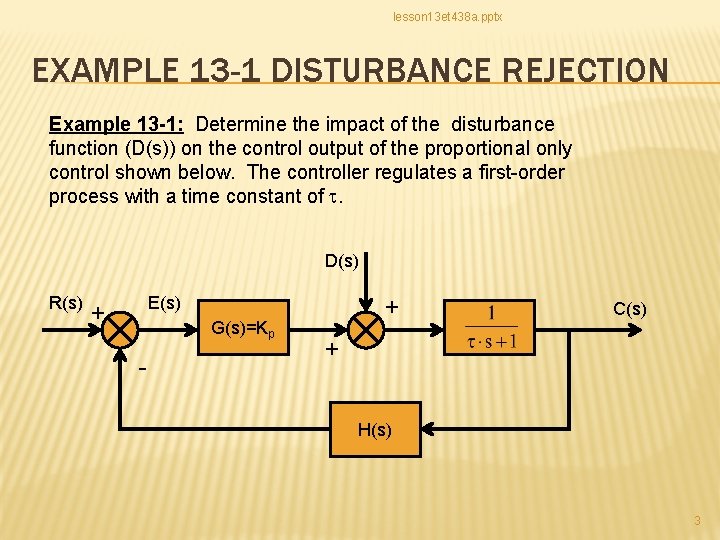
lesson 13 et 438 a. pptx EXAMPLE 13 -1 DISTURBANCE REJECTION Example 13 -1: Determine the impact of the disturbance function (D(s)) on the control output of the proportional only control shown below. The controller regulates a first-order process with a time constant of t. D(s) R(s) E(s) + G(s)=Kp - + C(s) + H(s) 3
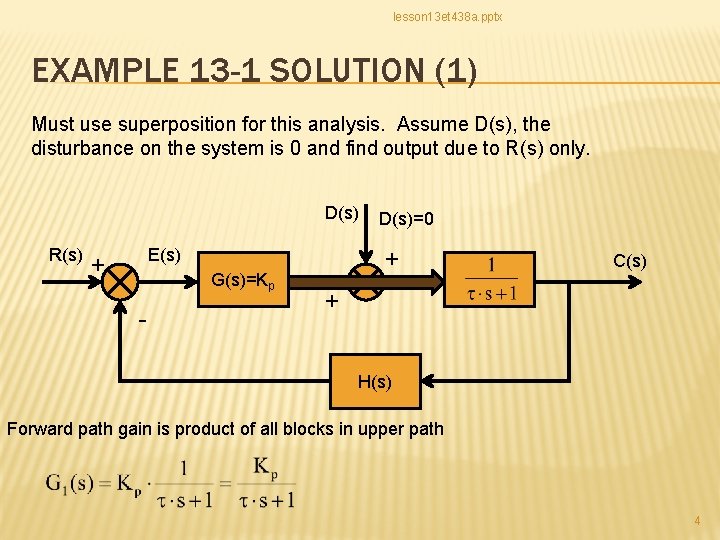
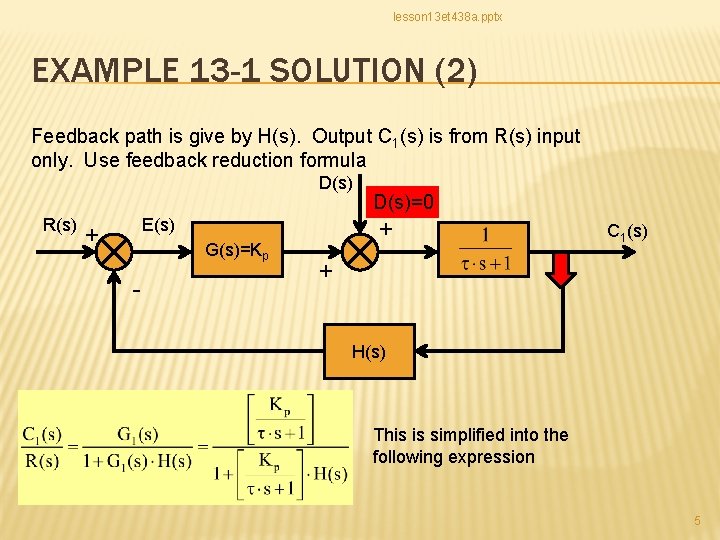
lesson 13 et 438 a. pptx EXAMPLE 13 -1 SOLUTION (1) Must use superposition for this analysis. Assume D(s), the disturbance on the system is 0 and find output due to R(s) only. D(s) R(s) E(s) + G(s)=Kp - D(s)=0 + C(s) + H(s) Forward path gain is product of all blocks in upper path 4
lesson 13 et 438 a. pptx EXAMPLE 13 -1 SOLUTION (2) Feedback path is give by H(s). Output C 1(s) is from R(s) input only. Use feedback reduction formula D(s) R(s) E(s) + G(s)=Kp - D(s)=0 + C 1(s) + H(s) This is simplified into the following expression 5
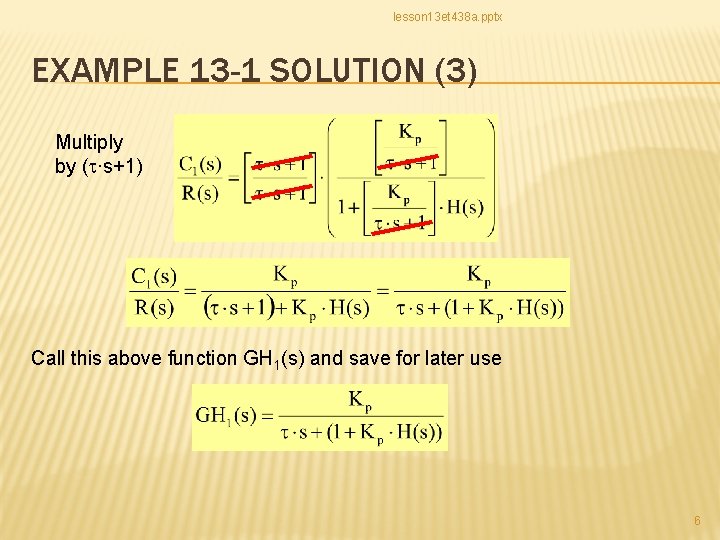
lesson 13 et 438 a. pptx EXAMPLE 13 -1 SOLUTION (3) Multiply by (t∙s+1) Call this above function GH 1(s) and save for later use 6
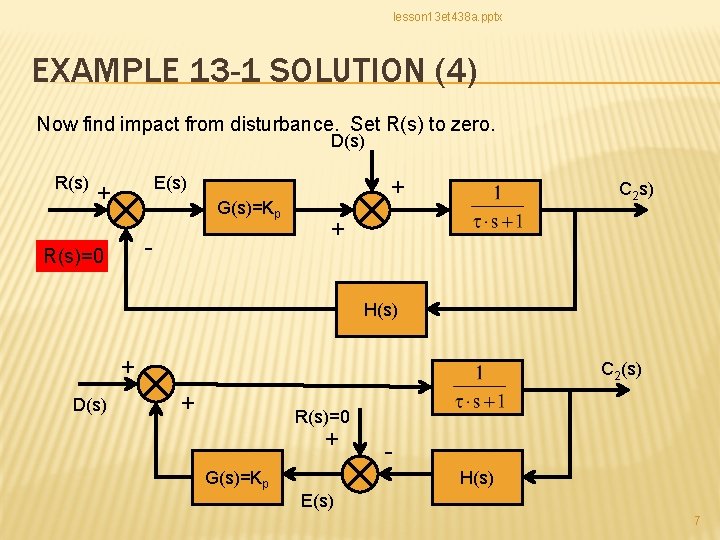
lesson 13 et 438 a. pptx EXAMPLE 13 -1 SOLUTION (4) Now find impact from disturbance. Set R(s) to zero. D(s) R(s) E(s) + G(s)=Kp - R(s)=0 + C 2 s) + H(s) + D(s) C 2(s) + R(s)=0 + G(s)=Kp H(s) E(s) 7
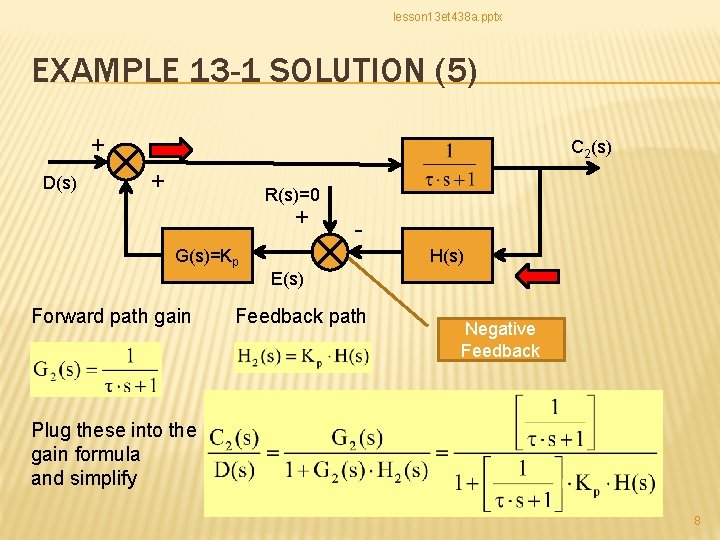
lesson 13 et 438 a. pptx EXAMPLE 13 -1 SOLUTION (5) + D(s) C 2(s) + R(s)=0 + - G(s)=Kp H(s) E(s) Forward path gain Feedback path Negative Feedback Plug these into the gain formula and simplify 8
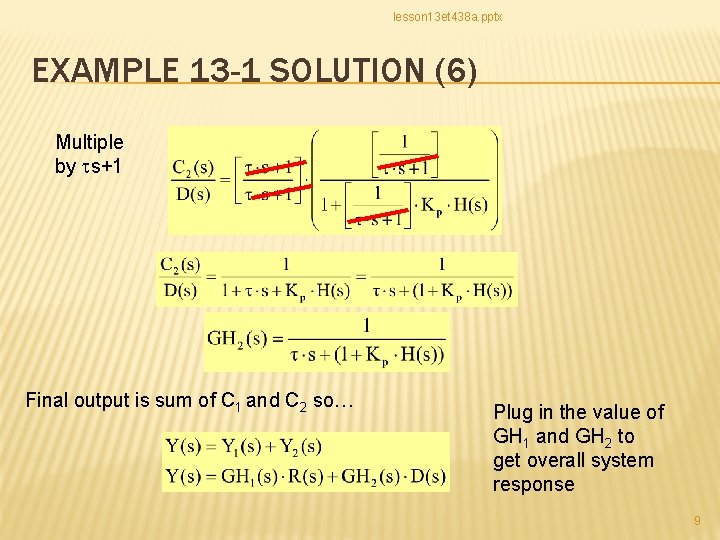
lesson 13 et 438 a. pptx EXAMPLE 13 -1 SOLUTION (6) Multiple by ts+1 Final output is sum of C 1 and C 2 so… Plug in the value of GH 1 and GH 2 to get overall system response 9
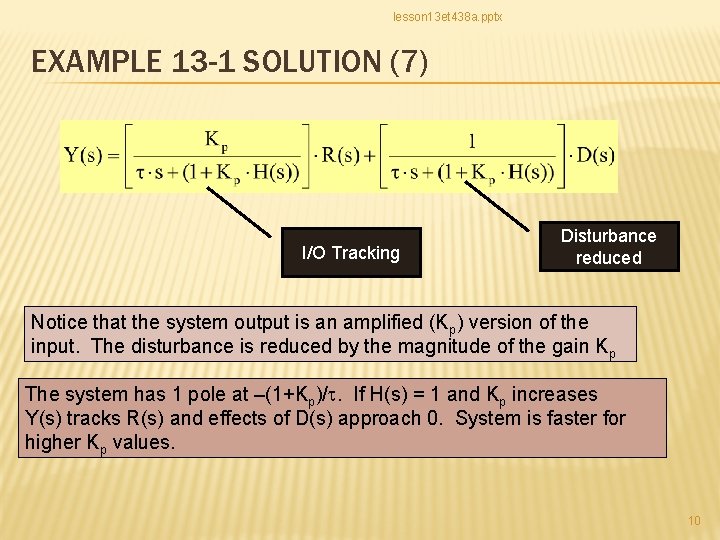
lesson 13 et 438 a. pptx EXAMPLE 13 -1 SOLUTION (7) I/O Tracking Disturbance reduced Notice that the system output is an amplified (Kp) version of the input. The disturbance is reduced by the magnitude of the gain Kp The system has 1 pole at –(1+Kp)/t. If H(s) = 1 and Kp increases Y(s) tracks R(s) and effects of D(s) approach 0. System is faster for higher Kp values. 10
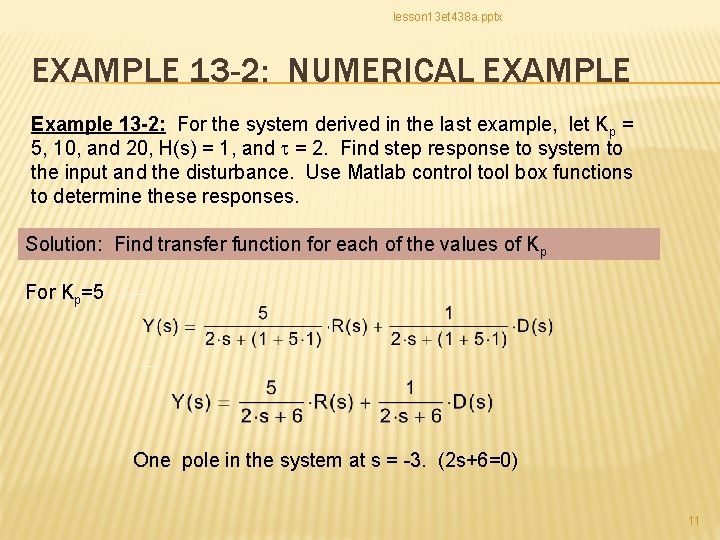
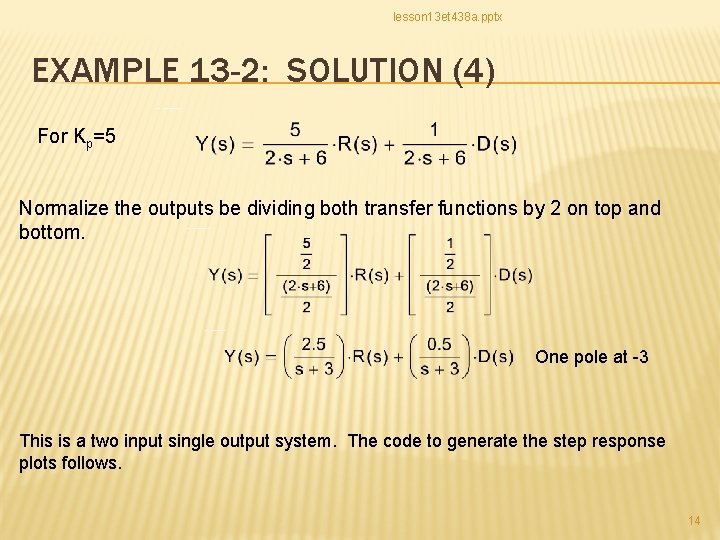
lesson 13 et 438 a. pptx EXAMPLE 13 -2: NUMERICAL EXAMPLE Example 13 -2: For the system derived in the last example, let Kp = 5, 10, and 20, H(s) = 1, and t = 2. Find step response to system to the input and the disturbance. Use Matlab control tool box functions to determine these responses. Solution: Find transfer function for each of the values of Kp For Kp=5 One pole in the system at s = -3. (2 s+6=0) 11
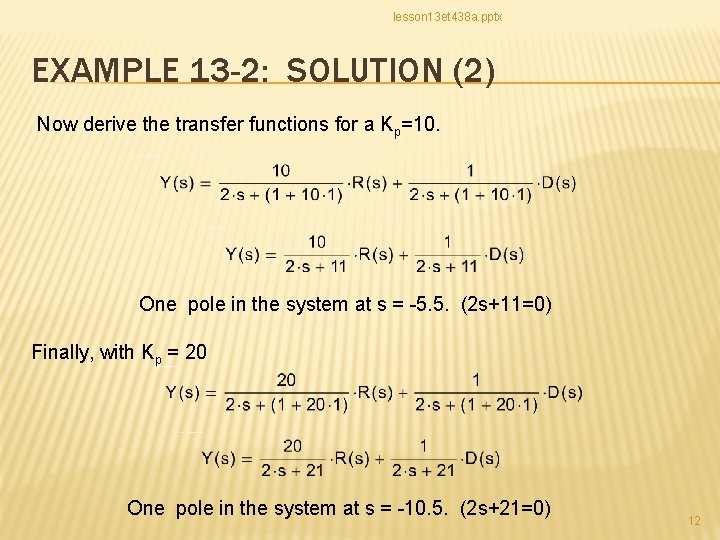
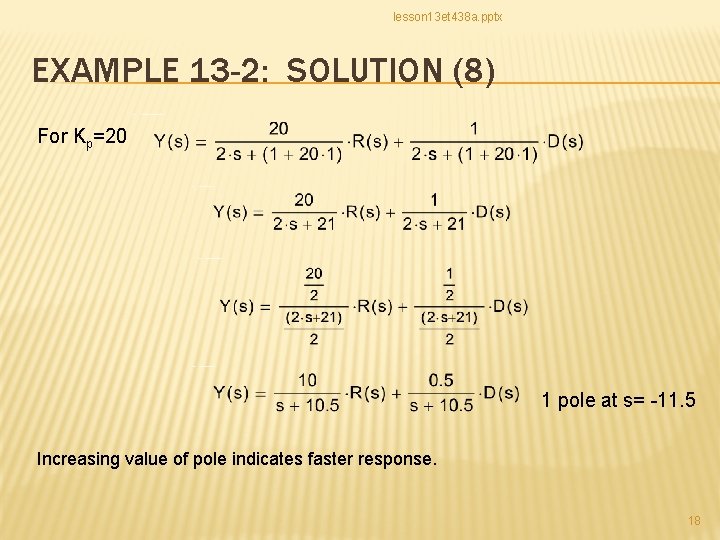
lesson 13 et 438 a. pptx EXAMPLE 13 -2: SOLUTION (2) Now derive the transfer functions for a Kp=10. One pole in the system at s = -5. 5. (2 s+11=0) Finally, with Kp = 20 One pole in the system at s = -10. 5. (2 s+21=0) 12
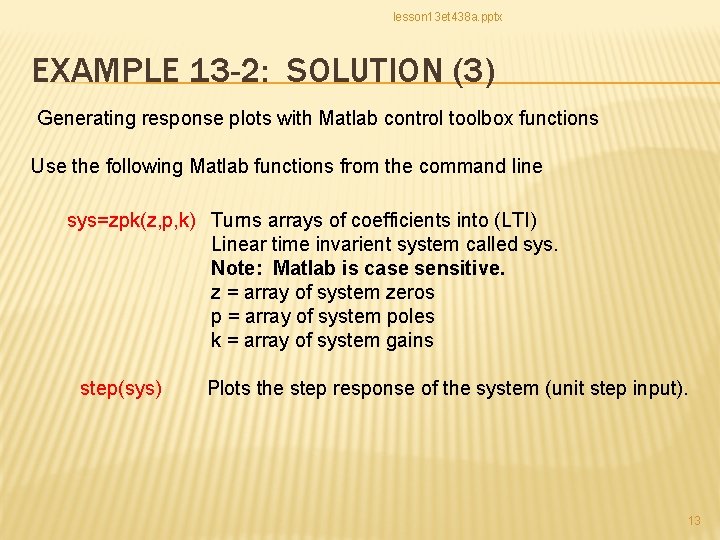
lesson 13 et 438 a. pptx EXAMPLE 13 -2: SOLUTION (3) Generating response plots with Matlab control toolbox functions Use the following Matlab functions from the command line sys=zpk(z, p, k) Turns arrays of coefficients into (LTI) Linear time invarient system called sys. Note: Matlab is case sensitive. z = array of system zeros p = array of system poles k = array of system gains step(sys) Plots the step response of the system (unit step input). 13
lesson 13 et 438 a. pptx EXAMPLE 13 -2: SOLUTION (4) For Kp=5 Normalize the outputs be dividing both transfer functions by 2 on top and bottom. One pole at -3 This is a two input single output system. The code to generate the step response plots follows. 14
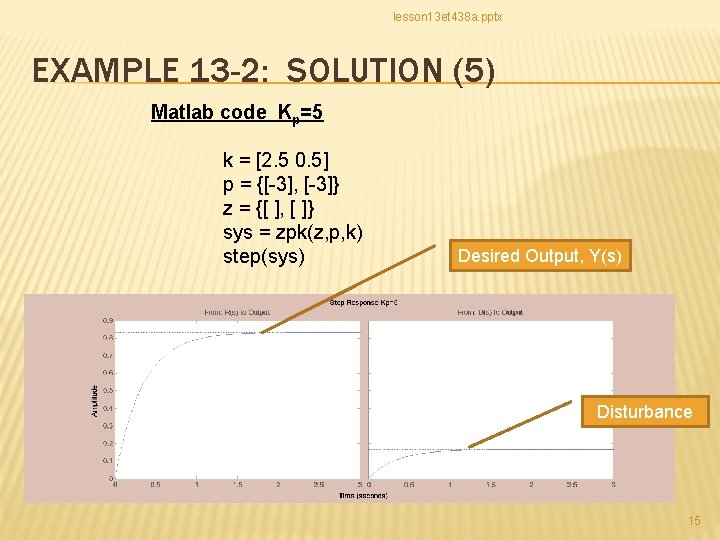
lesson 13 et 438 a. pptx EXAMPLE 13 -2: SOLUTION (5) Matlab code Kp=5 k = [2. 5 0. 5] p = {[-3], [-3]} z = {[ ], [ ]} sys = zpk(z, p, k) step(sys) Desired Output, Y(s) Disturbance 15
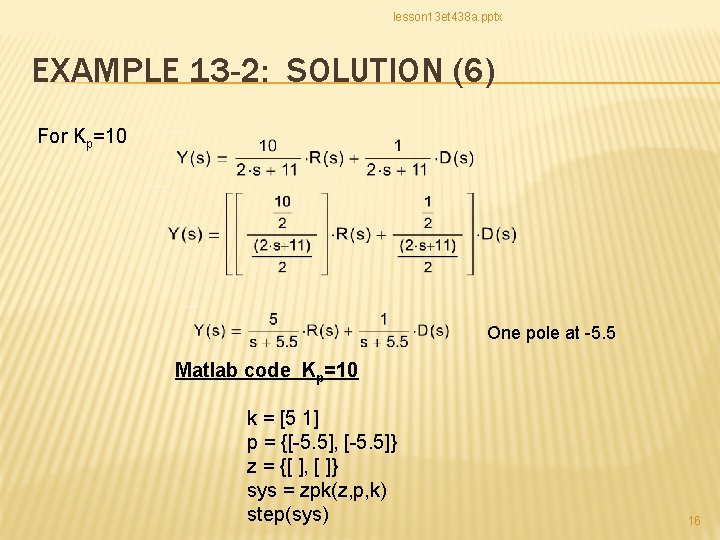
lesson 13 et 438 a. pptx EXAMPLE 13 -2: SOLUTION (6) For Kp=10 One pole at -5. 5 Matlab code Kp=10 k = [5 1] p = {[-5. 5], [-5. 5]} z = {[ ], [ ]} sys = zpk(z, p, k) step(sys) 16
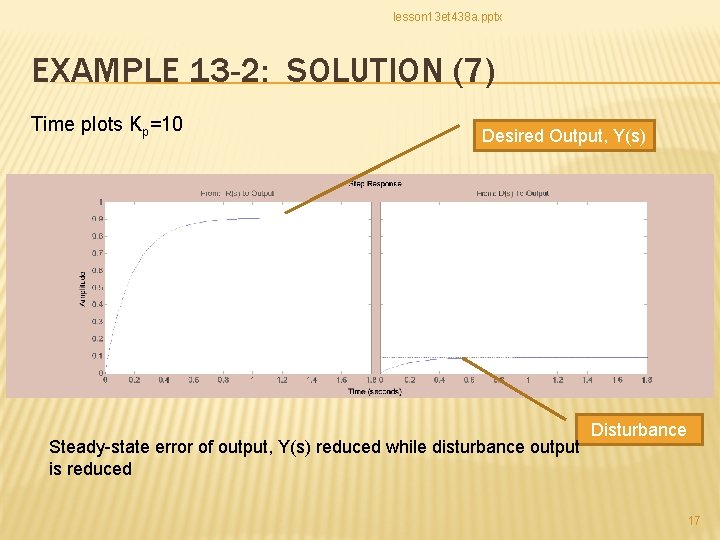
lesson 13 et 438 a. pptx EXAMPLE 13 -2: SOLUTION (7) Time plots Kp=10 Desired Output, Y(s) Steady-state error of output, Y(s) reduced while disturbance output is reduced Disturbance 17
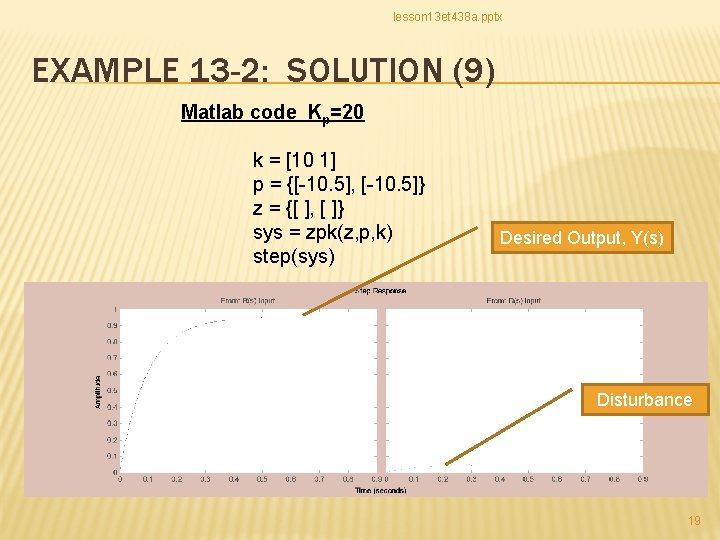
lesson 13 et 438 a. pptx EXAMPLE 13 -2: SOLUTION (8) For Kp=20 1 pole at s= -11. 5 Increasing value of pole indicates faster response. 18
lesson 13 et 438 a. pptx EXAMPLE 13 -2: SOLUTION (9) Matlab code Kp=20 k = [10 1] p = {[-10. 5], [-10. 5]} z = {[ ], [ ]} sys = zpk(z, p, k) step(sys) Desired Output, Y(s) Disturbance 19
lesson 13 et 438 a. pptx ET 438 a Automatic Control Systems Technology END LESSON 13: EFFECTS OF NEGATIVE FEEDBACK ON SYSTEM DISTURBANCES 20