
Lesson 1 Computers and Computer Systems Computer Literacy
- Slides: 29
Lesson 1 Computers and Computer Systems Computer Literacy BASICS: A Comprehensive Guide to IC 3, 4 th Edition Morrison / Wells
Objectives l l Lesson 1 l 2 l l l Understand the importance of computers. Define computers and computer systems. Classify computers. Use computer systems. Identify system components. Identify types of storage devices. Morrison / Wells CLB: A Comp Guide to IC 3 4 E
Objectives (continued) Care for storage media. Lesson 1 l 3 Morrison / Wells CLB: A Comp Guide to IC 3 4 E
Understanding the Importance of Computers l Lesson 1 l 4 The computer is one of the most important inventions of the past century. You find computers and computer technology everywhere throughout society—from businesses and financial organizations, to home electronics and appliances, to personal applications such as clothing embedded with i. Pod controls. Morrison / Wells CLB: A Comp Guide to IC 3 4 E
Understanding the Importance of Computers (continued) l Lesson 1 l 5 l l A Brief History of the Computer: The first computers were developed in the late 1940 s and early 1950 s for use by the military and government. In 1971, Dr. Ted Hoff developed the microprocessor. The first Apple computer was built in 1976. The IBM PC was introduced in 1981. Morrison / Wells CLB: A Comp Guide to IC 3 4 E
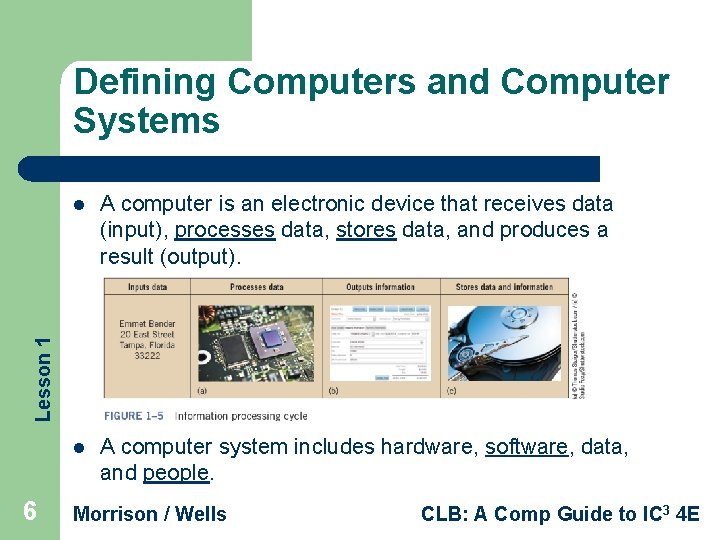
Defining Computers and Computer Systems A computer is an electronic device that receives data (input), processes data, stores data, and produces a result (output). l A computer system includes hardware, software, data, and people. Lesson 1 l 6 Morrison / Wells CLB: A Comp Guide to IC 3 4 E
Defining Computers and Computer Systems (continued) l l Lesson 1 l 7 l The actual machine—wires, transistors, and circuits—is called hardware. Software consists of instructions or programs for controlling the computer. Data is text, numbers, sound, images, or video. The computer receives data through an input device, process the data, produces the output (or information), and stores the data and information on a storage device. Morrison / Wells CLB: A Comp Guide to IC 3 4 E
***QUICK RECAP*** Lesson 1 1) What are the four parts of the Information Processing Cycle? Input (data), processes data, stores data, produces a result (output) 2) What are the four parts of a computer system? Hardware, software, data, people 8 Morrison / Wells CLB: A Comp Guide to IC 3 4 E
Classifying Computers l Lesson 1 l 9 Special-purpose computers are used mostly to control something else. General-purpose computers are divided into categories, based on their physical size, function, cost, and performance: Desktop and notebook computers – Server – Mobile devices – Tablet PC – Mainframe computer Morrison / Wells – Supercomputer – Embedded computers – Portable players – Calculators – Computer game systems – Electronic book readers CLB: A Comp Guide to IC 3 4 E –
Using Computer Systems l l Computers are used for all kinds of tasks. Computers take raw data and change it into information. An example of the procedure: Lesson 1 – – 10 You enter programs and data with some type of input device. The computer uses instructions to process the data and to turn it into information. You send the information to some type of output device. You store it for later retrieval. Morrison / Wells CLB: A Comp Guide to IC 3 4 E
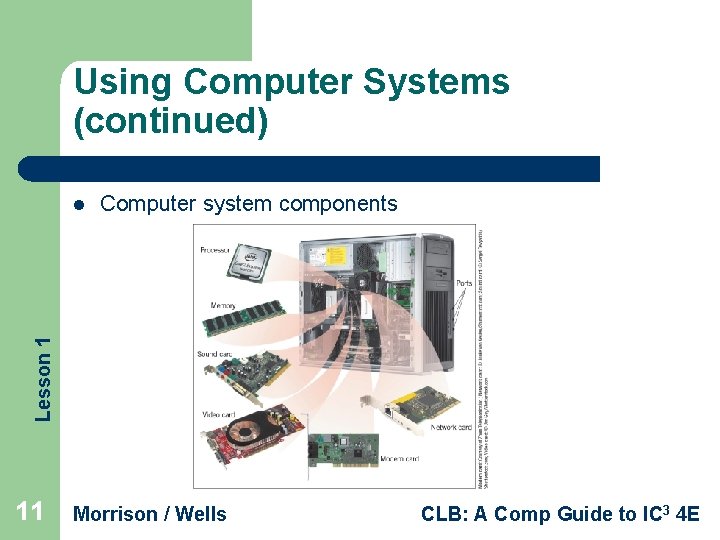
Using Computer Systems (continued) Computer system components Lesson 1 l 11 Morrison / Wells CLB: A Comp Guide to IC 3 4 E
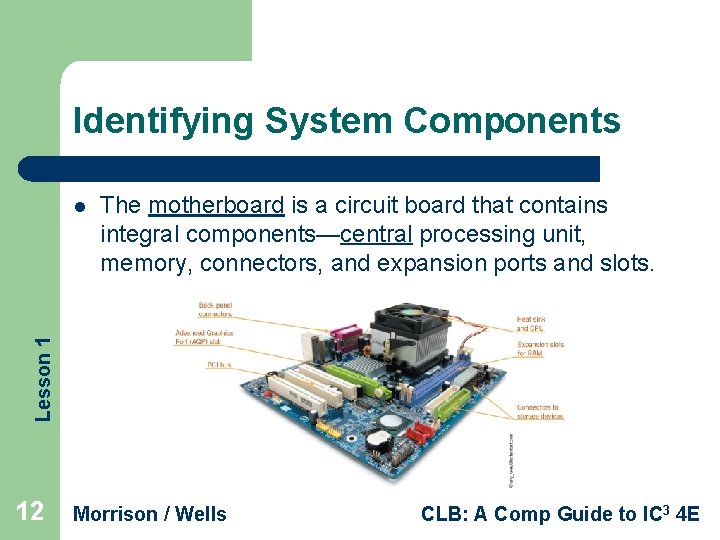
Identifying System Components The motherboard is a circuit board that contains integral components—central processing unit, memory, connectors, and expansion ports and slots. Lesson 1 l 12 Morrison / Wells CLB: A Comp Guide to IC 3 4 E
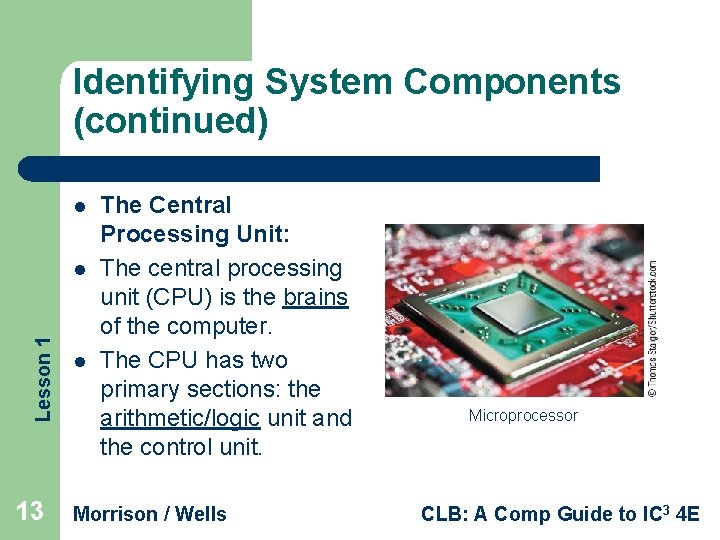
Identifying System Components (continued) l Lesson 1 l 13 l The Central Processing Unit: The central processing unit (CPU) is the brains of the computer. The CPU has two primary sections: the arithmetic/logic unit and the control unit. Morrison / Wells Microprocessor CLB: A Comp Guide to IC 3 4 E
Identifying System Components (continued) l The Arithmetic/Logic Unit: – l The Control Unit: Lesson 1 – – – 14 The arithmetic/logic unit (ALU) performs arithmetic computations and logical operations. The control unit coordinates all of the processor’s activities. You communicate with the computer through programming languages. The computer uses machine language, or binary code, which contains only 1 s and 0 s. Morrison / Wells CLB: A Comp Guide to IC 3 4 E
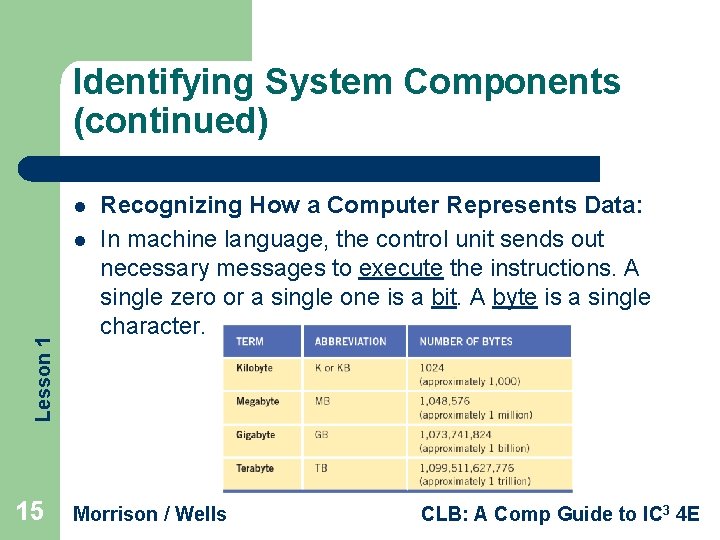
Identifying System Components (continued) l Lesson 1 l 15 Recognizing How a Computer Represents Data: In machine language, the control unit sends out necessary messages to execute the instructions. A single zero or a single one is a bit. A byte is a single character. Morrison / Wells CLB: A Comp Guide to IC 3 4 E
***QUICK RECAP*** Lesson 1 1) Which unit is known as the “brains” of the computer? CPU 2) How does someone communicate with a computer? Programming languages 16 Morrison / Wells CLB: A Comp Guide to IC 3 4 E
Identifying System Components (continued) l l l Lesson 1 l 17 Memory: Memory is where data is stored on the motherboard. Memory can be short term or long term. When you want to store a file or information permanently, you use secondary storage devices such as the computer’s hard drive or a USB drive. You might think of this as long term memory. Morrison / Wells CLB: A Comp Guide to IC 3 4 E
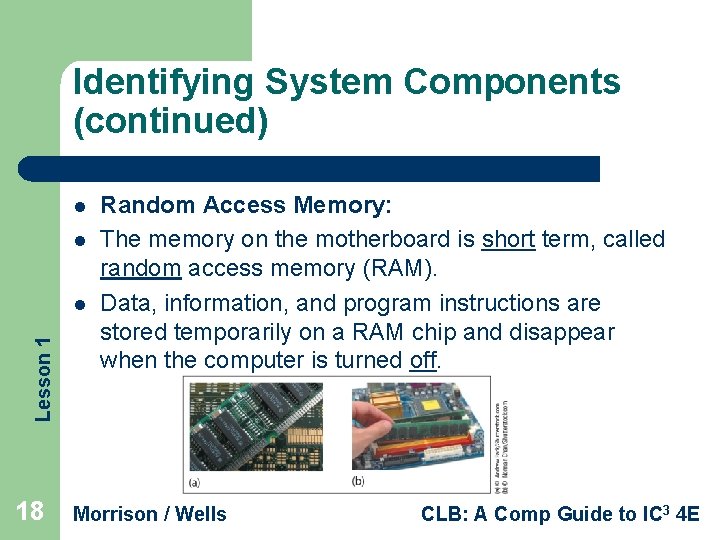
Identifying System Components (continued) l l Lesson 1 l 18 Random Access Memory: The memory on the motherboard is short term, called random access memory (RAM). Data, information, and program instructions are stored temporarily on a RAM chip and disappear when the computer is turned off. Morrison / Wells CLB: A Comp Guide to IC 3 4 E
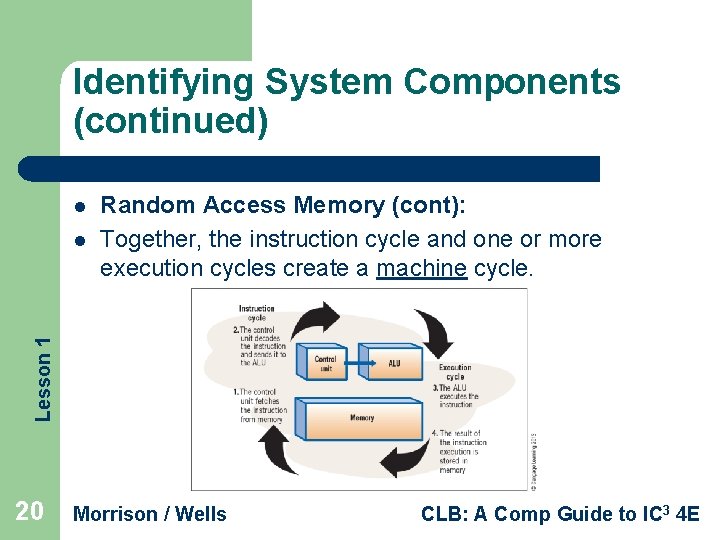
Identifying System Components (continued) l Lesson 1 l 19 l Random Access Memory (cont): The instruction cycle is the amount of time it takes to retrieve instructions to perform a specified task and complete the command. The execution cycle refers to the amount of time it takes the CPU to execute the instruction and store the results in RAM. Morrison / Wells CLB: A Comp Guide to IC 3 4 E
Identifying System Components (continued) l Lesson 1 l Random Access Memory (cont): Together, the instruction cycle and one or more execution cycles create a machine cycle. 20 Morrison / Wells CLB: A Comp Guide to IC 3 4 E
Identifying System Components (continued) l l Random Access Memory (cont): For every instruction, a processor repeats a set of four basic operations, which compose a machine cycle: Lesson 1 1. 2. 3. 4. 21 Fetching is the process of obtaining a program instruction or data item from RAM Decoding refers to the process of translating the instruction into signals the computer can execute. Executing is the process of carrying out the commands. Storing, in this context, means writing the result to memory (not to a storage medium). Morrison / Wells CLB: A Comp Guide to IC 3 4 E
Identifying System Components (continued) l l Lesson 1 l 22 l Read-Only Memory: Another type of memory found on the motherboard is read-only memory (ROM). ROM chips store specific instructions that are needed for computer operations. These instructions remain on the chip even when the power is turned off. The more common of these is the BIOS ROM, containing instructions to start the system when you turn on the computer. Morrison / Wells CLB: A Comp Guide to IC 3 4 E
***QUICK RECAP*** 1) This type of memory is considered short term? Lesson 1 RAM 2) What is ROM? Read-Only Memory 23 Morrison / Wells CLB: A Comp Guide to IC 3 4 E
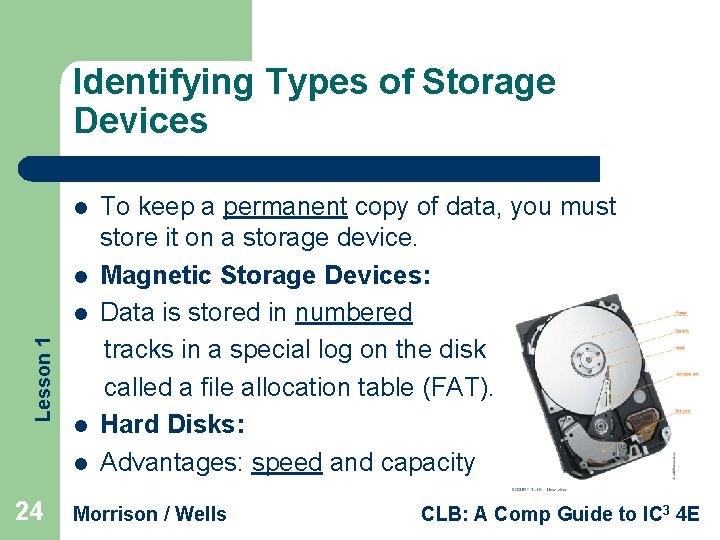
Identifying Types of Storage Devices l l Lesson 1 l l l 24 To keep a permanent copy of data, you must store it on a storage device. Magnetic Storage Devices: Data is stored in numbered tracks in a special log on the disk called a file allocation table (FAT). Hard Disks: Advantages: speed and capacity Morrison / Wells CLB: A Comp Guide to IC 3 4 E
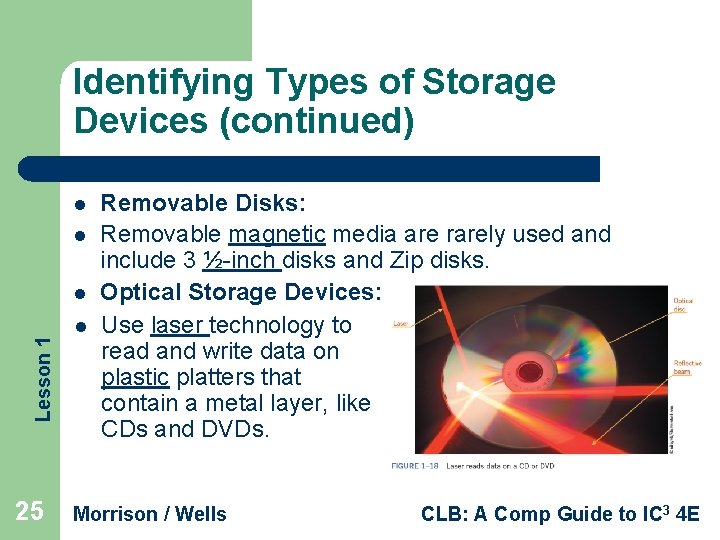
Identifying Types of Storage Devices (continued) l l Lesson 1 l 25 l Removable Disks: Removable magnetic media are rarely used and include 3 ½-inch disks and Zip disks. Optical Storage Devices: Use laser technology to read and write data on plastic platters that contain a metal layer, like CDs and DVDs. Morrison / Wells CLB: A Comp Guide to IC 3 4 E
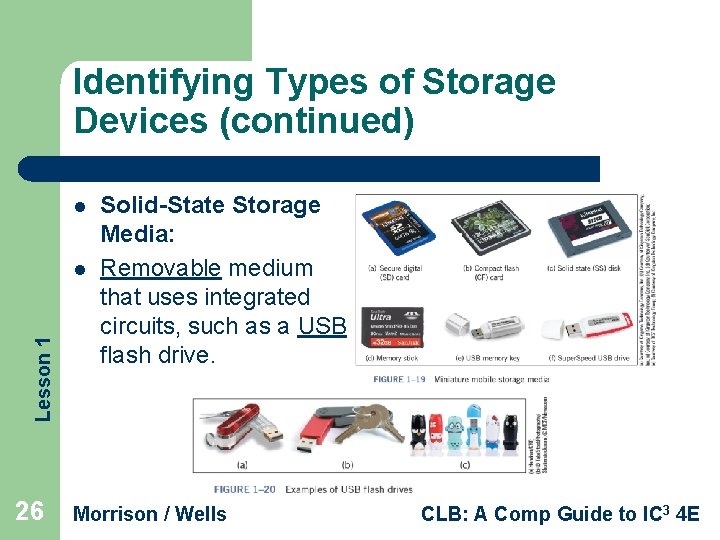
Identifying Types of Storage Devices (continued) l Lesson 1 l 26 Solid-State Storage Media: Removable medium that uses integrated circuits, such as a USB flash drive. Morrison / Wells CLB: A Comp Guide to IC 3 4 E
Identifying Types of Storage Devices (continued) l Lesson 1 l 27 l Network Drives: Hard drive or tape drive connected to a network server and is available to and shared by multiple users. Remote storage is used to extend disk space on a server and to eliminate the addition of more hard disks or other storage devices. Morrison / Wells CLB: A Comp Guide to IC 3 4 E
***QUICK RECAP*** 1) What type of storage device keeps a log on a FAT? Lesson 1 Magnetic Storage 2) CDs and DVDs are examples of _____ storage devices? Optical 28 Morrison / Wells CLB: A Comp Guide to IC 3 4 E
Caring for Storage Media l l Lesson 1 l l 29 Keep away from magnetic fields. Avoid extreme temperatures. Remove media from drives and store them properly when not in use. When handling DVDs and other optical discs, hold them at the edges. Never try to remove the media from a drive when the drive indicator light is on. Keep discs in a sturdy case when transporting. Morrison / Wells CLB: A Comp Guide to IC 3 4 E