
Lesson 1 Background Lesson 1 Background Objectives Give
Lesson 1: Background
Lesson 1: Background Objectives: – Give a brief history of computers. – Describe how hardware and software make up computer architecture. – Understand the binary representation of data and programs in computers. – Discuss the evolution of programming languages. – Describe the software development process – Discuss the fundamental concepts of objectoriented programming.
Lesson 1: Background Vocabulary: – – application software bit byte central processing unit (CPU) – hardware – information hiding – object-oriented programming – – primary memory secondary memory software development life cycle (SDLC) – system software – waterfall model
1. 1 History of Computers • 1940 s: The ENIAC was one of the world’s first computers. – Large stand-alone machine – Used large amounts of electricity – Contained miles of wires and thousands of vacuum tubes – Considered immensely useful when compared to hand-operated calculators
1. 1 History of Computers • 1950 s: IBM sold its first business computer. – Computational power was equivalent to 1/800 of a typical 800 -megahertz Pentium computer sold in 2000 – Performed one task at a time – Typical input and output devices were punch cards and paper tape
1. 1 History of Computers • 1960 s: Expensive time-sharing computers became popular in large organizations that could afford them. – 30 people could work on one computer simultaneously – Input occurs via teletype machine – Output is printed on a roll of paper – Could be connected to the telephone
1. 1 History of Computers • 1970 s: The advantages of computer networks was realized. – Email and file transfers were born • 1980 s: PCs became available in large numbers. – Networks of interconnected PCs became popular (LANs) – Organizations utilized resource and file sharing
1. 1 History of Computers • 1990 s: An explosion of computer use occurs. – Hundreds of millions of computers are being used in businesses and homes – Most computers are now connected to the Internet – Java is quickly becoming the common language of today’s computers
1. 2 Computer Hardware and Software Computers consist of two primary components: 1. Hardware Physical devices that you see on your desktop 2. Software Programs that give hardware useful functionality
1. 2 Computer Hardware and Software • Hardware – A bit (or binary digit) • • The smallest unit of information processed by a computer Consists of a single 0 or 1 – Bytes • • Consists of 8 adjacent bits The capacity of computer memory and storage devices is usually expressed in bytes
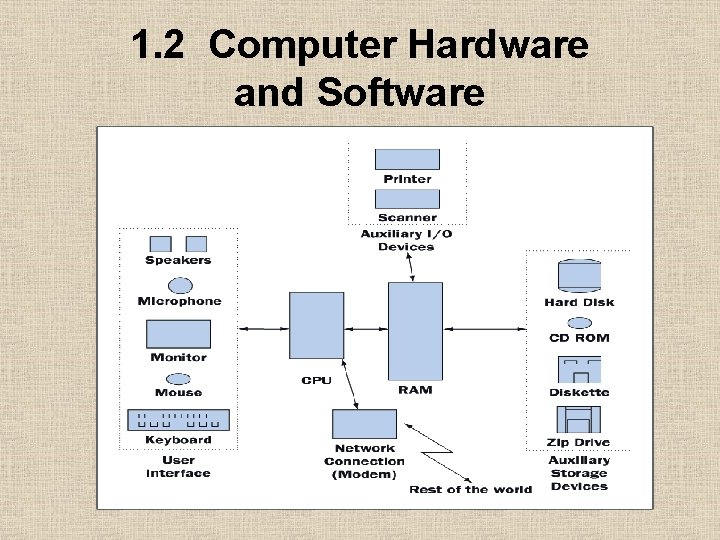
1. 2 Computer Hardware and Software Hardware – As illustrated in figure 1 -2, a PC consists of six major subsystems 1. 2. 3. 4. 5. 6. User interface Auxiliary I/O devices Auxiliary storage devices Network connection Internal memory Central processing unit
1. 2 Computer Hardware and Software
1. 2 Computer Hardware and Software • Computer software processes complex patterns of 0 s and 1 s and transforms them to be viewed as text, images, etc.
1. 2 Computer Hardware and Software Two broad categories of software: 1. System Software: • • supports the basic operations of a computer allows users to transfer information to and from the computer w Examples: OS, Compilers, Communications Software, User Interface Subsystem 2. Application Software: • allows users to accomplish specialized tasks w Examples: Word Processors, Spreadsheets, Database systems, Other programs we write
1. 3 Binary Representation of Information and Computer Memory • Examine how different types of information are represented in binary notation. – – – – Integers Floating Point Numbers Characters and Strings Images Sound Program Instructions Computer Memory
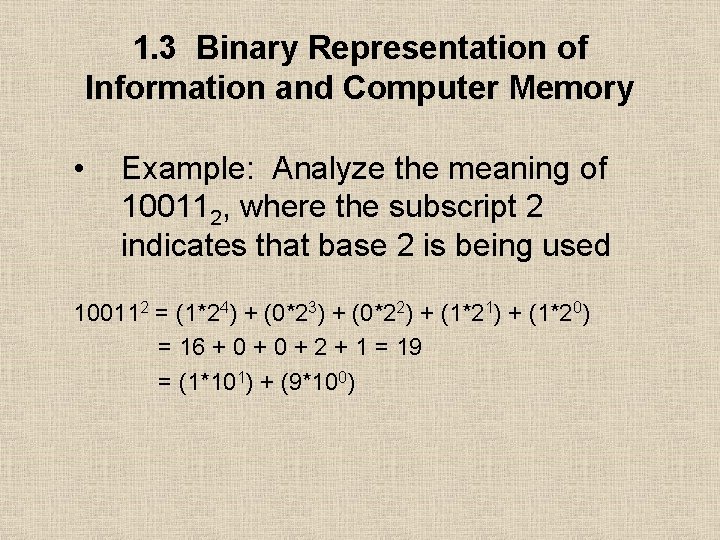
1. 3 Binary Representation of Information and Computer Memory • Example: Analyze the meaning of 100112, where the subscript 2 indicates that base 2 is being used 100112 = (1*24) + (0*23) + (0*22) + (1*21) + (1*20) = 16 + 0 + 2 + 1 = 19 = (1*101) + (9*100)
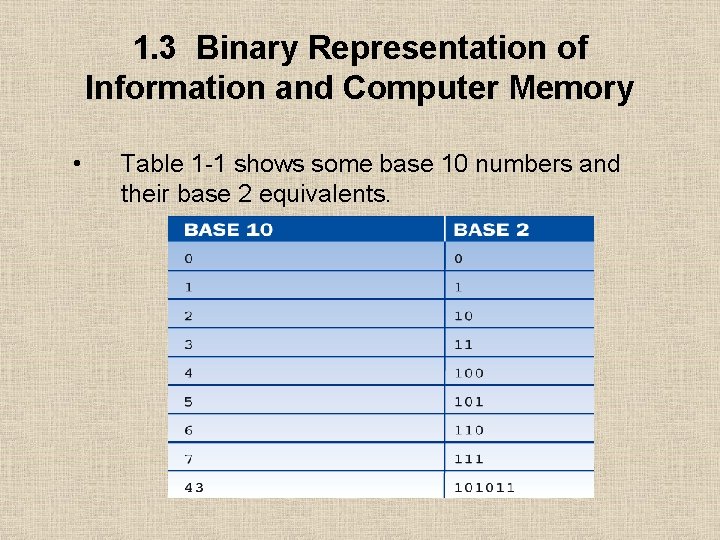
1. 3 Binary Representation of Information and Computer Memory • Table 1 -1 shows some base 10 numbers and their base 2 equivalents.
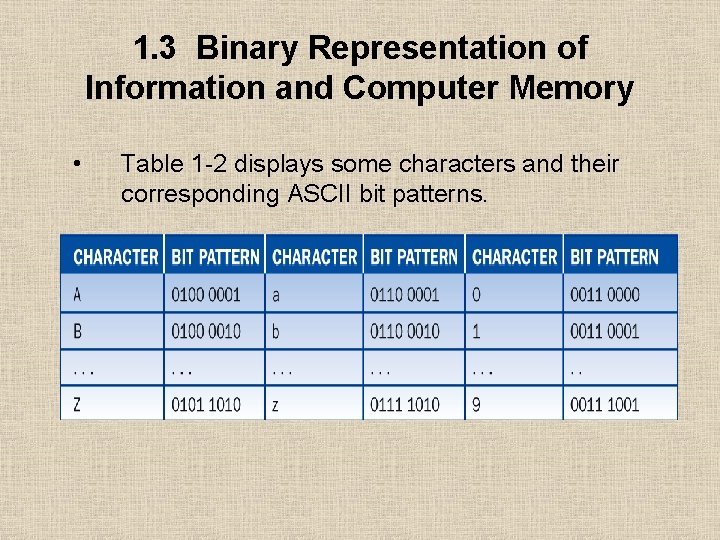
1. 3 Binary Representation of Information and Computer Memory • Table 1 -2 displays some characters and their corresponding ASCII bit patterns.
1. 3 Binary Representation of Information and Computer Memory • Examine how different types of information are represented in binary notation. – – – – Integers Floating Point Numbers Characters and Strings Images Sound Program Instructions Computer Memory
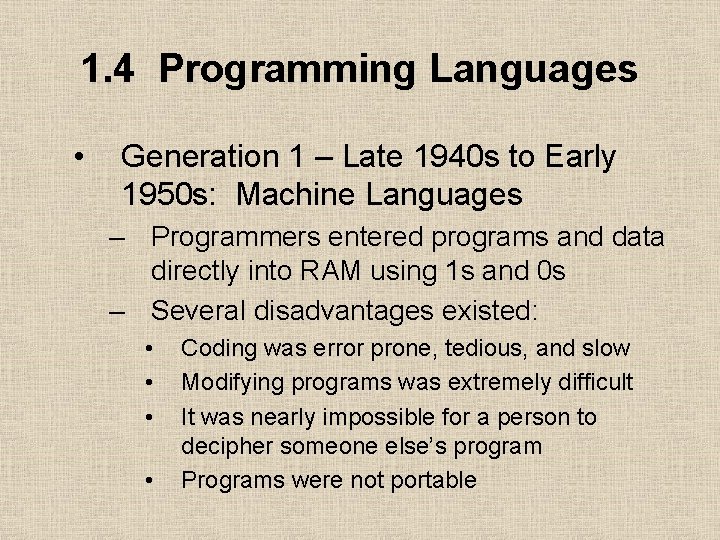
1. 4 Programming Languages • Generation 1 – Late 1940 s to Early 1950 s: Machine Languages – Programmers entered programs and data directly into RAM using 1 s and 0 s – Several disadvantages existed: • • Coding was error prone, tedious, and slow Modifying programs was extremely difficult It was nearly impossible for a person to decipher someone else’s program Programs were not portable
1. 4 Programming Languages • Generation 2 – Early 1950 s to Present: Assembly Languages – Uses mnemonic symbols to represent instructions and data – Assembly language is: • • • More programmer friendly than machine language Tedious to use and difficult to modify Since each type of computer has its own unique assembly language, it is not portable
1. 4 Programming Languages • Generation 3 – Mid-1950 s to Present: High-Level Languages – Designed to be human friendly – easy to read, write, and understand – Each instruction corresponds to many instructions in machine language – Translation to machine language occurs through a program called a ‘compiler’ – Examples: FORTRAN, COBOL, BASIC, C, Pascal, C++, Smalltalk, and Java
1. 5 The Software Development Process • • • Creating high-quality software involves organization, planning and utilizing various diagrammatic conventions Computer scientists have created a view of the software development process known as the ‘software development life cycle’ (SDLC) One method is known as the ‘waterfall model’’ • A mistake made in one phase often requires the developer to back up and redo some of the work in the previous phase
1. 5 The Software Development Process • The Waterfall Model consists of several phases: – – – Customer Request Analysis Design Implementation Integration Maintenance
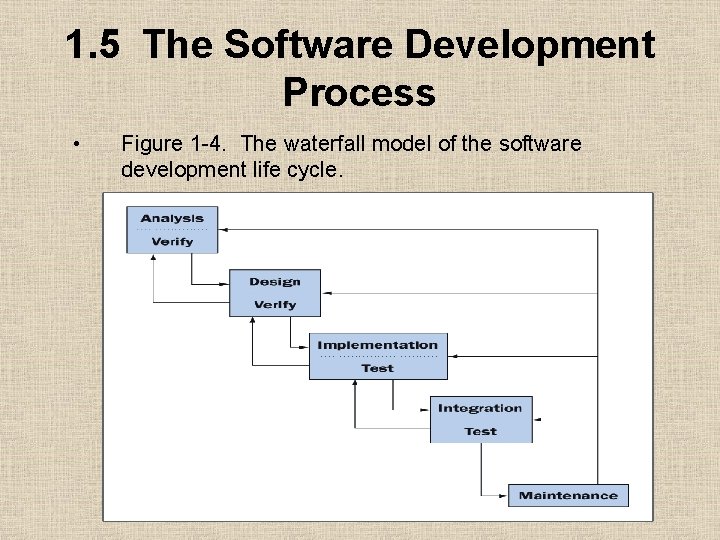
1. 5 The Software Development Process • Figure 1 -4. The waterfall model of the software development life cycle.
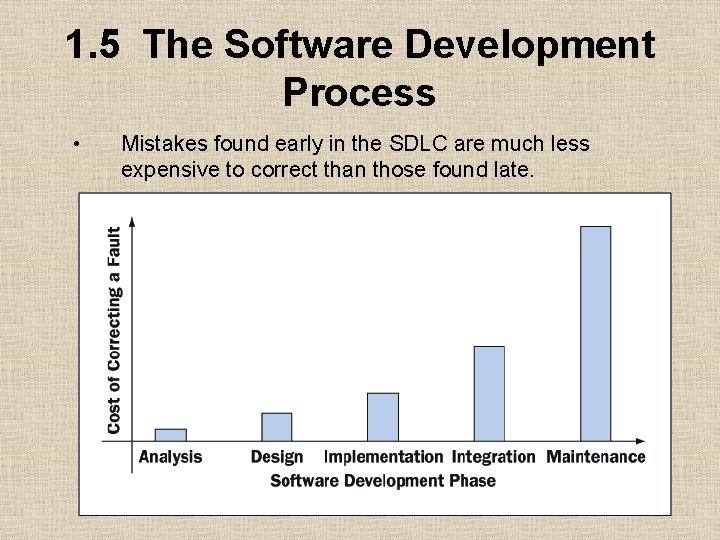
1. 5 The Software Development Process • Mistakes found early in the SDLC are much less expensive to correct than those found late.
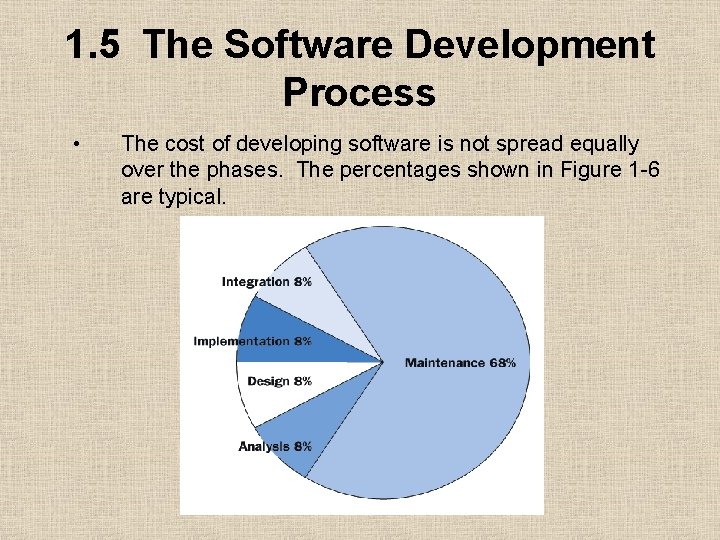
1. 5 The Software Development Process • The cost of developing software is not spread equally over the phases. The percentages shown in Figure 1 -6 are typical.
1. 6 Basic Concepts of Object-Oriented Programming • High-level programming languages utilize two different approaches – Procedural approach • Examples: COBOL, FORTRAN, BASIC, C and Pascal – Object-oriented approach • Examples: Smalltalk, C++, and Java
1. 6 Basic Concepts of Object-Oriented Programming • Object-oriented programming (OOP) involves: – Planning • • • Determine your needs Create a list of necessary resources Establish the rule of behavior to be followed – Execution – Outcome
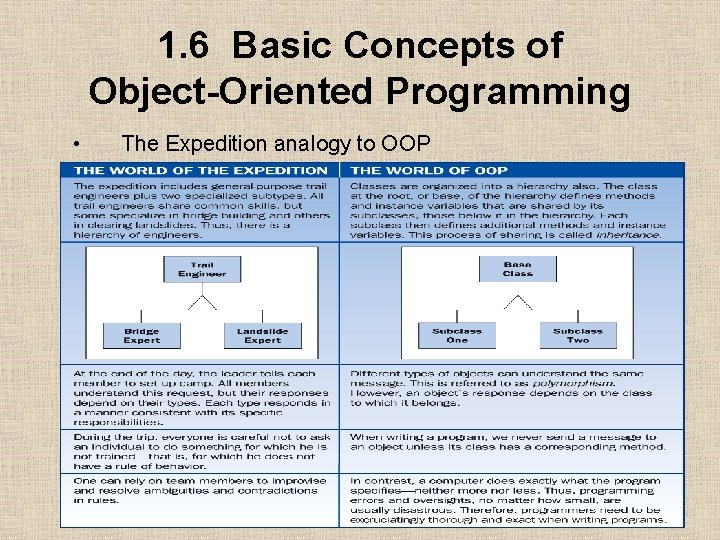
1. 6 Basic Concepts of Object-Oriented Programming • The Expedition analogy to OOP
- Slides: 30