
Legacy system components Support Software Runs on System

- Slides: 17
Legacy system components Support Software Runs on System Hardware uses Runs on Application Software uses Embeds knowledge of uses Application Data Business Rules Constrains Business Processes 1
Recap 2
Maintaining Legacy System • Maintaining legacy system is expensive. – Different parts of the system have been implemented by different teams, lacking consistency. – Part or all of the system may be implemented using an obsolete language. – System documentation is inadequate and out of date. • In some cases the only documentation is the source code. • In some cases even the source code is not available 3
Software Engineering II Lecture 38 Fakhar Lodhi 4
Maintaining Legacy System – Many years of maintenance have usually corrupted the system structure, making it increasingly difficult to understand – The data processed by the system may be maintained in different files which have incompatible structures – There may be data duplication and the documentation of the data itself may be out of date, inaccurate, and incomplete. 5
Maintaining Legacy System – System Hardware • The hardware platform may be outdated and is hard to maintain. – In may cases, the legacy systems have been written for mainframe hardware which is » no longer available, » expensive to maintain, and » not be compatible with current organizational IT purchasing policies. – Support software • OS, database, and compiler etc • May be obsolete and no longer supported by the vendors 6
Legacy migration risks • There is rarely a complete specification of the system available. Therefore, there is no straight forward way of specifying the services provided by a legacy system. • Important business rules are often embedded in the software and may not be documented elsewhere. • Business processes and the way legacy systems operate are often intertwined. • New software development may take several years • New software development is itself risky • Changes to one part of the system inevitably involve further changes to other components 7
Legacy System Assessment • 4 strategic options 1. Scrap the system completely 2. Continue maintaining the system 3. Transform the system in some way to improve its maintainability 4. Replace the system with a new system 8
Legacy System Assessment 1. Scrap the system completely • System is not making an effective contribution to business processes • Business processes have changed significantly and the organization is no longer completely dependent upon the system 2. Continue maintaining the system • System is still required • It is stable • Requirements are not changing frequently 9
Legacy System Assessment 3. Transform the system in some way to improve its maintainability • System quality has been degraded • Regular changes to the system are required 4. Replace the system with a new system • Old system cannot continue in operation • Off-the shelf alternative is available or system can be developed at a reasonable cost 10
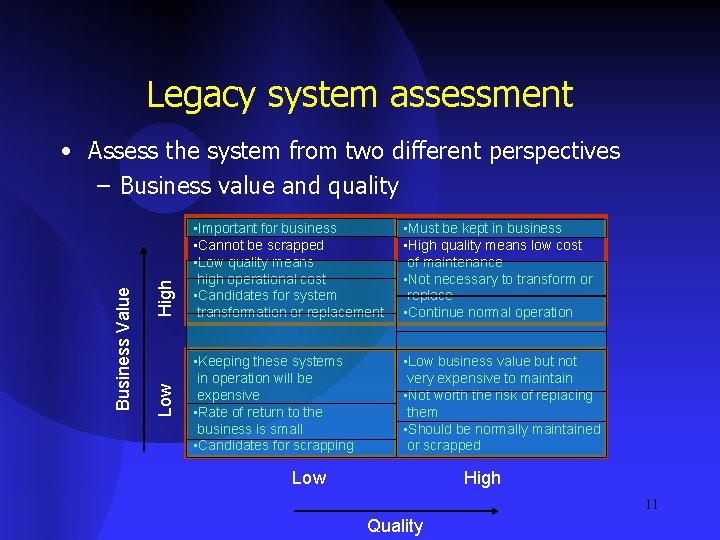
Legacy system assessment High Low Business Value • Assess the system from two different perspectives – Business value and quality • Important for business • Cannot be scrapped • Low quality means high operational cost • Candidates for system transformation or replacement • Must be kept in business • High quality means low cost of maintenance • Not necessary to transform or replace • Continue normal operation • Keeping these systems in operation will be expensive • Rate of return to the business is small • Candidates for scrapping • Low business value but not very expensive to maintain • Not worth the risk of replacing them • Should be normally maintained or scrapped Low High 11 Quality
Business Value Assessment • Subjective judgment • Different business viewpoints – End-users – Customers – Line managers – IT managers – Senior managers 12
End Users • How effective do they find the system in supporting their business processes • How much of the system functionality is used 13
Customers • Is the use of the system transparent to customer or are their interaction constrained by the system • Are they kept waiting because of the system • Do system errors have a direct impact on the customer 14
IT Managers • Are there difficulties in finding people to work on the system • Does the system consume resources which could be deployed more effectively on other systems 15
Line Managers • Do managers think that the system is effective in contributing to success of their unit • Is the cost of keeping the system in use justified • Is the data managed by the system critical for the functioning of the manager’s unit 16
Senior Managers • Does the system and associated business process make an effective contribution to the business goal 17