
Lecture Set 3 E Introduction Basic Software Development

Lecture Set 3 E Introduction Basic Software Development Issues 1. 2. Notes on Software Development Intro to Software Development Tools 7/31/2008 2: 43 PM
Objectives n n n Slide 2 Explain the software development life cycle Describe selected tools used to help design software systems Develop some ability to use UML Activity Diagrams in mapping out the behavior of a software system
Introduction to Software Development n The software development life cycle consists of a sequence of well-defined steps n n n n Slide 3 Problem identification System design System implementation System documentation System testing System deployment Postimplementation audit Missing from this “picture” are the “feedback” loops (What does this mean? )
Software Design Methodologies and Tools n n n Software systems should be designed before they are implemented As software systems become more complex, the design process becomes increasingly important Several methodologies exist to design software systems n n Slide 4 The choice of methodology is often subjective Design tools apply some type of model to describe the software system
System Analysis Methodologies n n Slide 5 Pseudocode uses English-like statements to depict an application’s actions Top-down design is used to subdivide general tasks into more specific tasks Flowcharting uses graphical symbols to depict an application’s actions The Unified Modeling Language (UML) supplies several graphical templates to model a system
Pseudocode n n Pseudocode uses English-like statements to describe a particular task Pseudocode is not exact n n Different developers may write pseudocode differently Pseudocode characteristics n n The words “start” and “stop” denote the beginning and end of a process The word “if” indicates a decision n n Slide 6 Decisions can be nested Pseudocode used mainly for small algorithms design – sorts, searches etc
Top-Down (Hierarchical) Design n Steps n n Define general tasks first Decompose general tasks into more specific tasks n n Slide 7 Continue decomposing sub-tasks, as needed Hierarchical Input Process Output (HIPO) charts are used to visualize the top-down design process
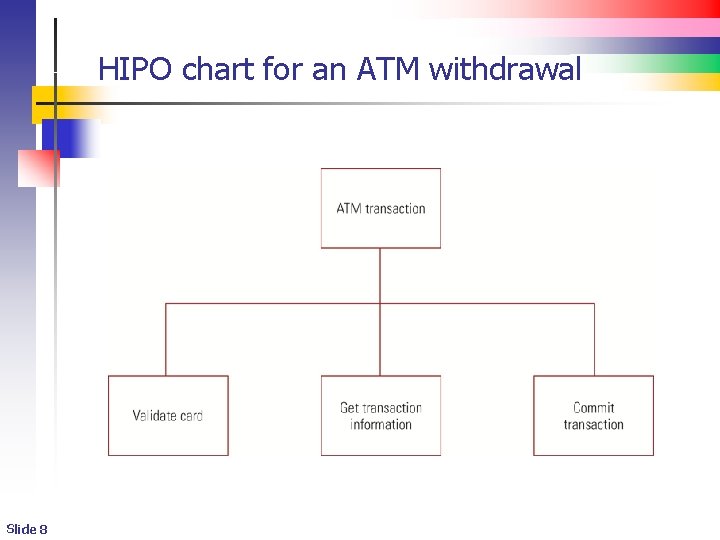
HIPO chart for an ATM withdrawal Slide 8
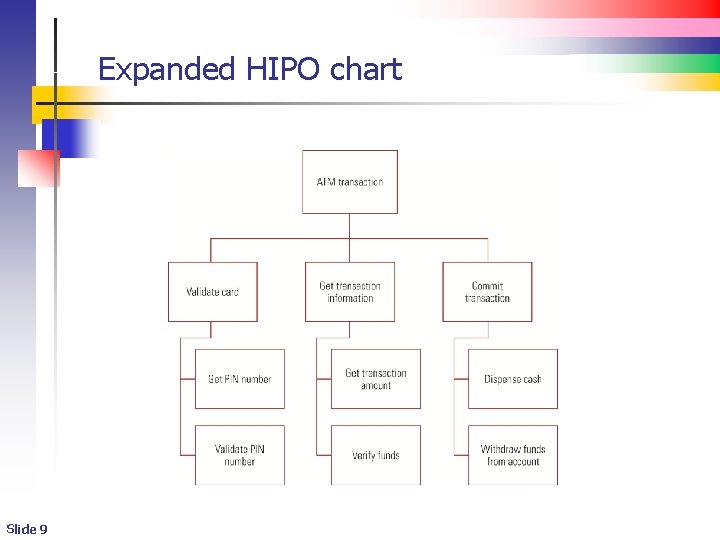
Expanded HIPO chart Slide 9
Flowcharting n n Slide 10 A flowchart consists of graphical symbols that depict the processing in an application or part of an application – you’ve seen these before Each graphical symbol denotes a specific type of operation Flowcharting also most suitable for small algorithms design – not for modeling more complex systems Even this ATM model is not quite accurate
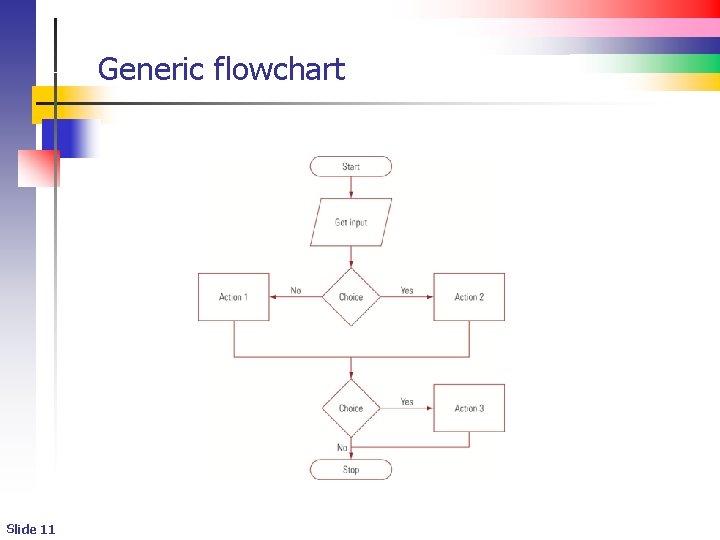
Generic flowchart Slide 11
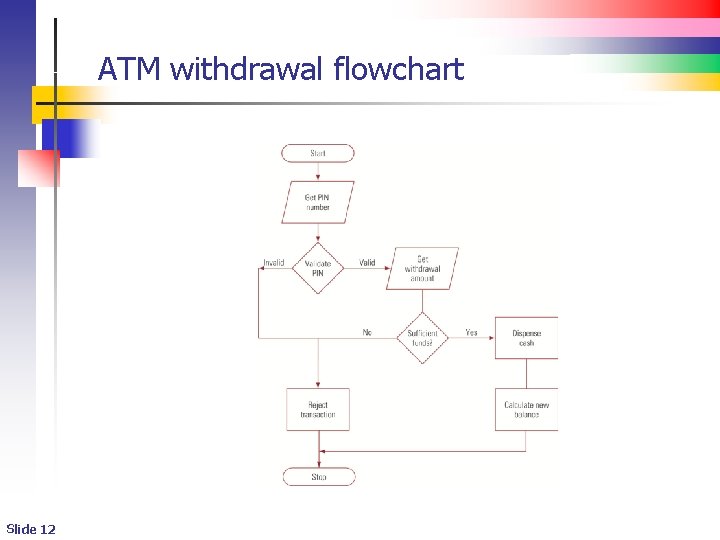
ATM withdrawal flowchart Slide 12
The Unified Modeling Language (UML) n n Slide 13 The Unified Modeling Language (UML) is used to model complex software systems in a visual way It's one of the premier design methodologies in use today The UML consists of several diagrams to model specific parts of a system Most important because it facilitates modeling of data and processes together
Common UML Diagrams n n n Class diagrams model the conceptual and physical aspects of a system Use case diagrams model the actors (users) of a system Activity diagrams show the actions performed by the system and the order in which those actions are performed n Slide 14 UML activity diagrams are similar to flowcharts
UML Class Diagrams n UML class diagrams are made up of three sections n n n The top section contains the name of a class The middle section contains the attributes of a class (data) The operations (class methods) appear in the bottom section n Slide 15 The data passed to an operation appears in parentheses
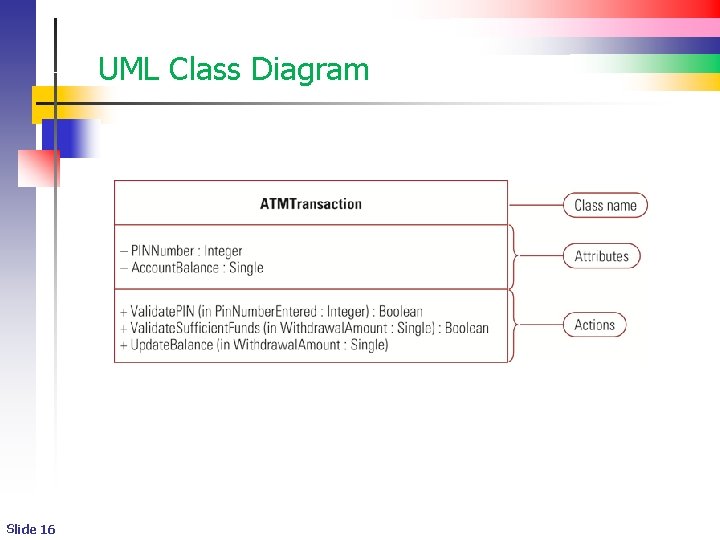
UML Class Diagram Slide 16
UML Use Case Diagrams n Use case diagrams model the actors (users) of the system n n Slide 17 A rectangular box defines the boundaries of the system Stick figures define the actors Lines connect the actors with the system's elements We will not get too wrapped up in this aspect of UML until near the end of the course
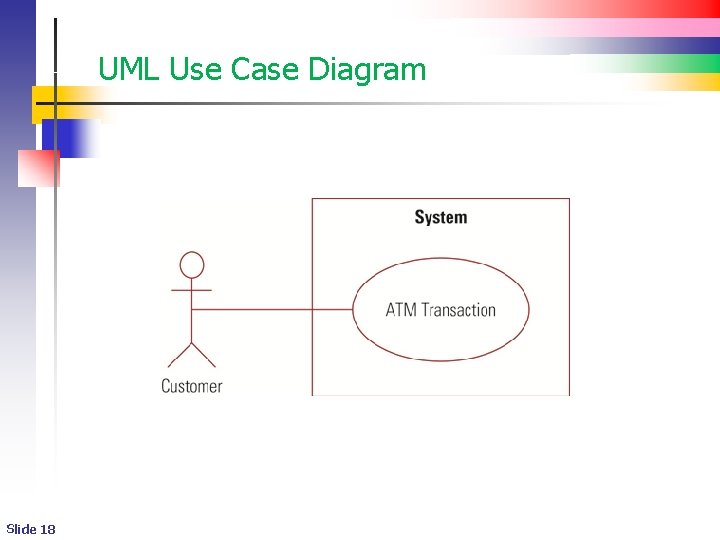
UML Use Case Diagram Slide 18
UML Activity Diagrams n n UML activity diagrams resemble a flowchart A solid black circle at the top of the diagram represents the activity’s initial state Arrows connect activities together A horizontal bar represents a decision n n Slide 19 In UML terms, this is called a fork transition A bordered black circle represents the activity's ending state
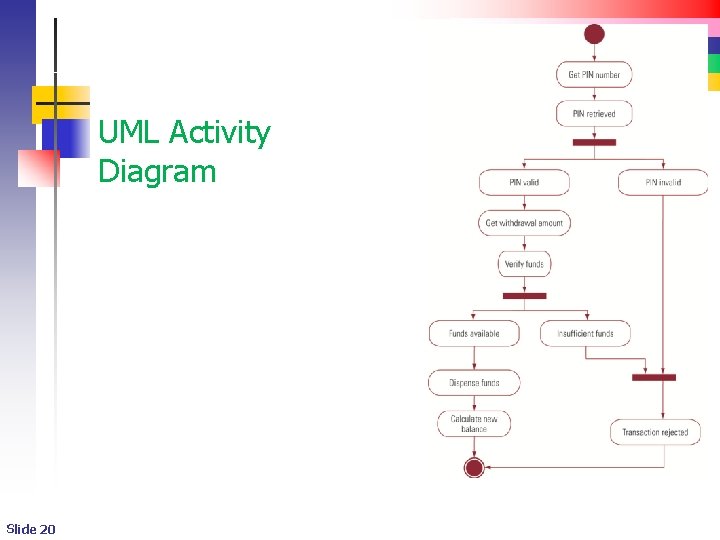
UML Activity Diagram Slide 20
“Relaxed” Activity diagram n n Activity diagrams hold the key to our projects. You will need to use them in understanding the behavior of the systems you will build n n Slide 21 ATM project Game project Transaction Processing project I will use a relaxed version of an activity diagram (a behavior diagram) in class 8/13/2008 10: 35 PM
- Slides: 21