
Lecture Objectives History of ISDN What is Integrated
Lecture Objectives • History of ISDN • What is Integrated Services Digital Network • ISDN Channels – B, D, H • ISDN services – BRI – PRI • ISDN Architecture • ISDN devices and how they operate – TE 1, TE 2 devices – TA – NT 1 and NT 2 devices • ISDN Reference Points • ISDN Layer Specifications 1
History of Dial-up Technology • • An application of PSTN to carry data on behalf of end user It traces its origin back to the days of telegraph Alexander Graham Bell invented the telephone in 1875 By 1970, more than 90 percent of American homes had telephone service. • In 1979 the modulator-demodulator (modem) was introduced, and dialup networking was born. • Early uses of modems were for intermittent point-to-point WAN connections. • In the late 1980 s, the ITU-T began setting up V-series recommendations to standardize communications between both data communications equipment (DCE) and data terminal equipment (DTE). 2
Dial-up Connectivity Technology • Plain Old Telephone Service – The regular phone lines used in voice calls are referred to as Plain old telephone service (POTS). – Sounds carried over this service are sampled at a rate of 8000 times per second (using 8 bits per sample) in their conversion to digital signals so that sound can be carried on a 64 kbps channel at acceptable levels. – Dialup connectivity across POTS lines has historically been limited to about 33, 600 bps via modem—often referred to as V. 34 speeds 3
History of ISDN • The earliest phone systems relied on human operators to make connections between customers as each call was made • It quickly replaced by automated switches, which allowed the end user to "dial" their desired party. • In 1960 s, we began to use digital technology in the central offices to increase the flexibility and expandability of the existing analog phone network. • CO to CO transmission via digital signals, thus Analog-digital-analog conversions • T 1 carrier – The central office digital switches were connected together by T 1 carrier. – It could carry twenty-four of these 64 Kbps voice channels, and it used the same amount of copper wire as only two analog voice calls. 4
Integrated Digital Network IDN • Integrated Digital Network – In the late 1960 s, CCITT (Consultative Committee for International Telegraph and Telephone, now called ITU-T) began – – working on IDN It is an effort to standardize digital hardware IDN combines the functions of switching and transmission into one piece of hardware, further raising the efficiency of the network. However, the last segment between the central office and the customer premises remained an analog connection. The phone companies would still have to perform expensive analog-digital conversion within their central switch. 5
Concept of ISDN • The ISDN service is based on the concept of providing a set of channels at a single interface. • The concept of ISDN was introduced in 1972 • By moving the analog-digital conversion equipment into the customer premises, the phone company could provide both data and voice services over a single line. • The voice service would be digitized at the customer premises, combined with any data services, and then these Integrated Services would be transmitted to the phone companies central office. 6
Basics of ISDN • Local Loop – In a traditional phone system, the local loop is analog – In an ISDN network, the local loop itself is digital. – The first piece of the local loop is commonly referred to as CPE, or customer premises equipment – The telephone company provides service up to a junction box somewhere on your property, called a demarcation point, or demarc. – From the demarc, all the hardware and cabling is considered CPE. In an analog system, this would include your telephone equipment and any cabling installed in your residence or office. 7
Basics of ISDN • Central Office – From the demarc on your property, the phone company runs wire to its local Central Office. – The central office is the core of all the local loops in the area. The copper wire from each residence and business terminates in the central office switch. – A phone company switch is actually a complex computer with hundreds or thousands of input/output ports. – Central office switches, also called Class Five switches, handle call-setup, teardown, and monitoring. 8
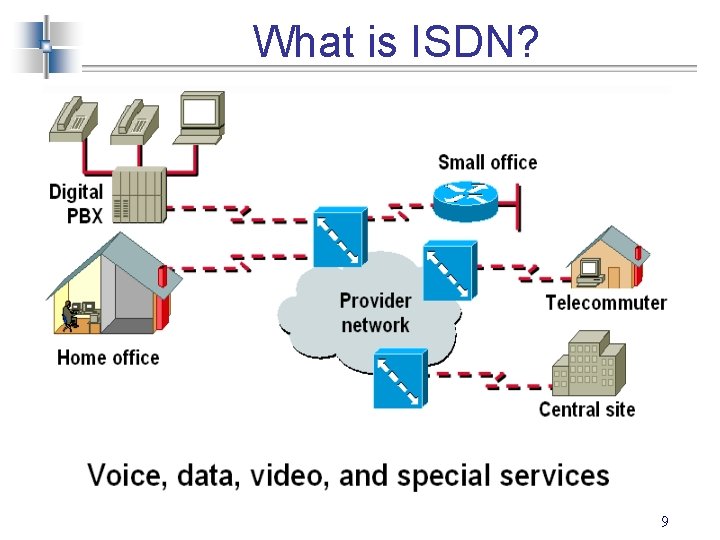
What is ISDN? 9
ISDN • ISDN provides switched (dialed) digital WAN services in increments of 64 kbps – Before ISDN most dial services used the same analog lines that were connected to phone • Integrated Services Digital Network (ISDN) is comprised(consist) of digital telephony and datatransport services offered by regional telephone carriers. • ISDN involves the digitization of the telephone network, which permits voice, data, text, graphics, music, video, and other source material to be transmitted over existing telephone wires. 10
ISDN • Integrated Services Digital Network (ISDN) is comprised of digital telephony and data-transport services offered by regional telephone carriers. • ISDN involves the digitization of the telephone network, which permits voice, data, text, graphics, music, video, and other source material to be transmitted over existing telephone wires. • ISDN is another leased service that provides a digital telephone or data connection into a home or business. • With ISDN you can have a digital telephone line and a 64 Kbps data line, or one 128 Kbps data line. • The basic rate interface (BRI) is the service for homes and small businesses, while the primary rate interface (PRI) is the service for larger businesses. 11
Advantages of ISDN • Speed – The modem was a big breakthrough in computer communications. It allowed computers to communicate by converting their digital information into an analog signal to travel through the public phone network. – There is an upper limit to the amount of information that an analog telephone line can hold. – Currently, it is about 56 kb/s bi-directionally. Commonly available modems have a maximum speed of 56 kb/s, but are limited by the quality of the analog connection and routinely go about 45 -50 kb/s. – ISDN allows multiple digital channels to be operated simultaneously through the same regular phone wiring used for analog lines. 12
Advantages of ISDN • Multiple Devices – Previously, it was necessary to have a separate phone line for each device you wished to use simultaneously. For example, one line each was required for a telephone, fax, computer, and live video conference system. – Transferring a file to someone while talking on the phone or seeing their live picture on a video screen would require several potentially expensive phone lines. – ISDN allows multiple devices to share a single line. – It is possible to combine many different digital data sources and have the information routed to the proper destination. – Since the line is digital, it is easier to keep the noise and interference out while combining these signals. – ISDN technically refers to a specific set of digital services provided through a single, standard interface. 13

Applications of ISDN • Telephony – ISDN can be used for regular telephone traffic • Telefax (fax) – The group 4 fax is specially designed for use in ISDN. This fax uses a bit rate of 64 kbit/s, which corresponds to the capacity of one B-channel. – A group 3 fax can be connected to ISDN through an adapter which adapts the bit rate to 64 kbit/s. • Videoconferencing and video-telephony – ISDN can be used for video-telephony, desktop conferencing and videoconferencing. – One BRI - that is, two B-channels - gives a relatively good picture and good sound. In video-telephony and PC-based desktop conferencing, the quality is usually considered acceptable. – More than two B-channels (usually six or 30 channels) may be needed to get good picture quality in videoconferencing. 14
Applications of ISDN • Telemedicine – Telemedicine may serve as an example of an application. • File transfer – Large data files, high-quality images and CAD/CAM files can be transferred over ISDN. • LAN Interconnect – ISDN is a flexible alternative for LAN interconnect. More Bchannels can easily be added as the need for capacity increases. The initial cost is relatively small, and the network service and routers with ISDN interfaces are rather cheap. • Remote connection to LAN – ISDN BRI is a practical alternative for connecting teleworkers to their company's LAN. Most applications include a server connected to the LAN and to a client in the local computer. 15
Applications of ISDN • ISDN applications include: – high-speed image applications additional telephone lines in homes to serve the telecommuting industry – high-speed file transfer – videoconferencing. – Voice service 16
Principles of ISDN • ISDN Supports – – Voice and non-voice applications Circuit and packet switching Non-switched services (leased lines) 64 kbps channels • as the standard rate for digitized voice • Being introduced in IDNs – Layered protocol architecture. 17
ISDN Channels -The BChannel • Bearer channel or B-channel. – B channels are used to transport data. B channels are called bearer channels because they bear or carry the data. B channels operate at speeds of up to 64 kbps, although the speed might be lower depending on the service provider. – It is the principle channel used for circuit switching, packet switching, and dedicated (leased) circuits – Supports 64 Kbps data rates. – To control the transmission of data, B–Channels are always combined with a D-channel. – In case of mixed traffic, all traffic must be destined for the same endpoints. 18
B - Channel • Four kind of connections supported by B – Channels – – Circuit switched Packet switched (X. 25) Frame mode (frame relay node) Semi-permanent (leased line) 19
The D (Delta) Channel • The D-channel is used for control signaling (call setup) and may also carry some data. • This allows the call setup and tear-down signals to have their own dedicated channel, while the entire bandwidth of the Bchannel is left for the actual data. • ISDN signals new data calls using the D channel. When a router creates a B channel call to another device using a BRI or PRI, it sends the phone number it wants to connect to inside a message sent across the D channel. • The phone company’s switch receives the message and sets up the circuit. Signaling a new call over the D channel is effectively the same thing as picking up the phone and dialing a number to create a voice call. 20
D (Delta) - Channel • D - Channel – D-channels can be different sizes, depending on how many Bchannels they are controlling. • For a BRI, the D-channel is a 16 Kbps pipe • For a PRI, the D-channel is a 64 Kbps Pipe. – Used for signaling information to control circuit switched calls – May be used for packet switching • H – Channel – Used to provider higher bit rates – Used in PRI 21
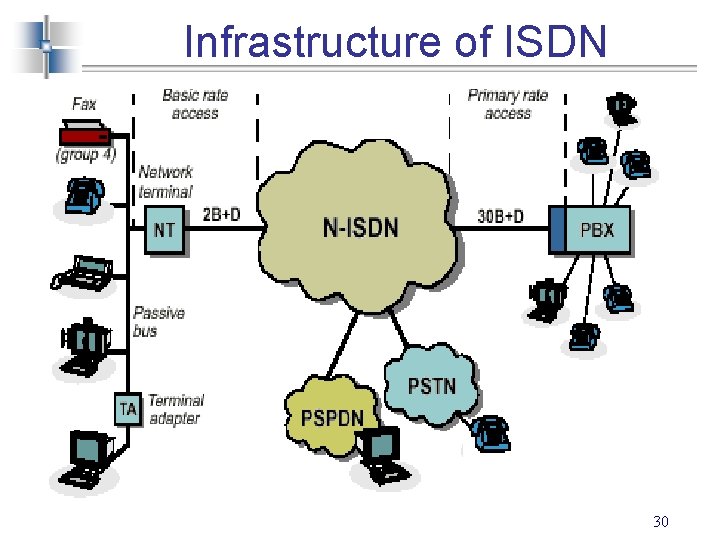
ISDN PRI Services • There are two types of services associated with ISDN: – BRI – PRI • Basic Rate Interface (BRI) service offers: – 2 B channels • 64 kbps, Carry user data – 1 D channel (2 B+D). • 16 kbps, Carry control and signaling info • Provides framing control and other overhead, bringing its total bit rate to 192 kbps. • • The B channels are dial able, and the D channel can be always on. Many users combine both B channels for a 128 Kbps data channel. Existing one or two pair of twisted pair cable is used to provide full duplex digital communication. 22
BRI • • • The BRI was intended for residential or home-office use. Used for residential and small office use Allows simultaneous use of voice and data applications Existing two-wire local loops supports BRI A BRI will allow users to access both voice and data services simultaneously. • Depending on your hardware, you can connect up to eight distinct devices to your BRI. • This allows you to build a network of devices, both phone, data, and video, and use any three of them at the same time. • NOTE: – While some people will promote the BRI as being a 144 Kbps data channel (64 + 16 = 144), remember that only the 128 Kbps Bchannel bandwidth (64 +64 = 128) is commonly available to the user. The 16 Kbps data channel is reserved for signaling in most circumstances. 23
ISDN PRI Services • PRI ISDN is used by larger businesses • Primary Rate Interface (PRI) service offers: – 23 B channels • 64 kbps • Carry user data – 1 D channel 64 kbps • Carry control and signaling info • It can also support user data if required • Signaling protocols comprises of OSI layer 1 to layer 3 – (23 B+D) used in North America and Japan. • Supports total bit rate of 1. 544 Mbps. – (30 B+D) used in Australia and other countries • Supports total interface rate of 2. 048 Mbps 24
PRI • Used in offices with digital PBX or LAN • While the BRI was designed as the maximum amount of data that could flow over normal wiring, the Primary Rate Interface (PRI) was designed as the maximum amount of data that could flow over a T-1 carrier. 25
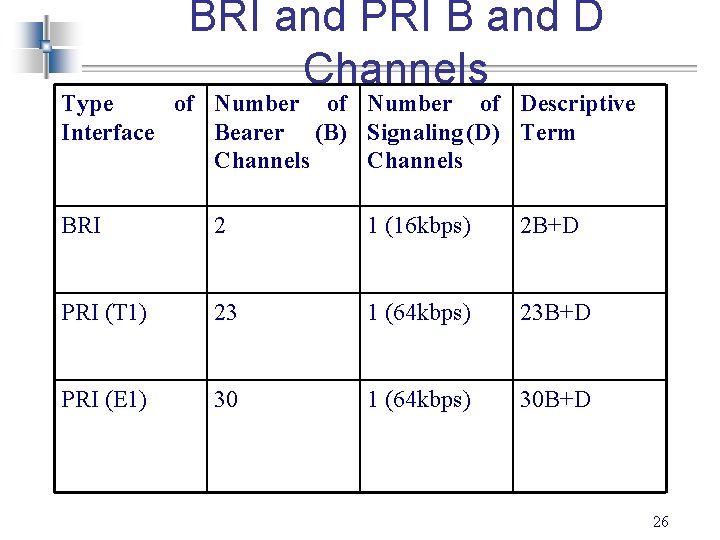
BRI and PRI B and D Channels Type of Number of Descriptive Interface Bearer (B) Signaling (D) Term Channels BRI 2 1 (16 kbps) 2 B+D PRI (T 1) 23 1 (64 kbps) 23 B+D PRI (E 1) 30 1 (64 kbps) 30 B+D 26
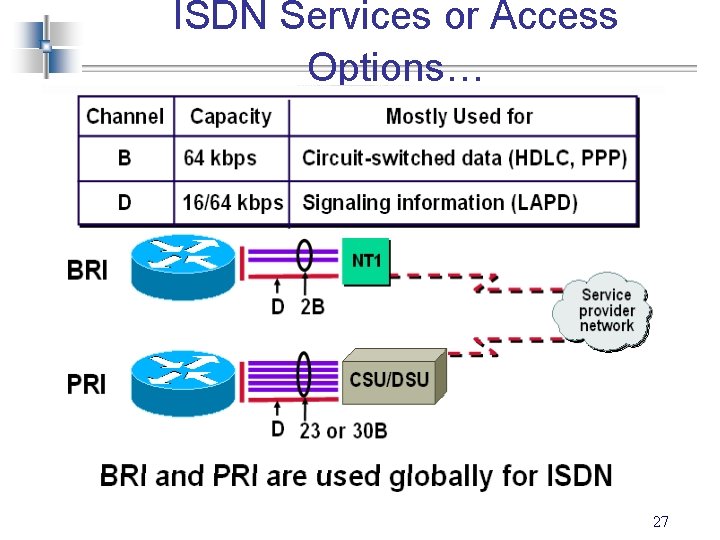
ISDN Services or Access Options… 27
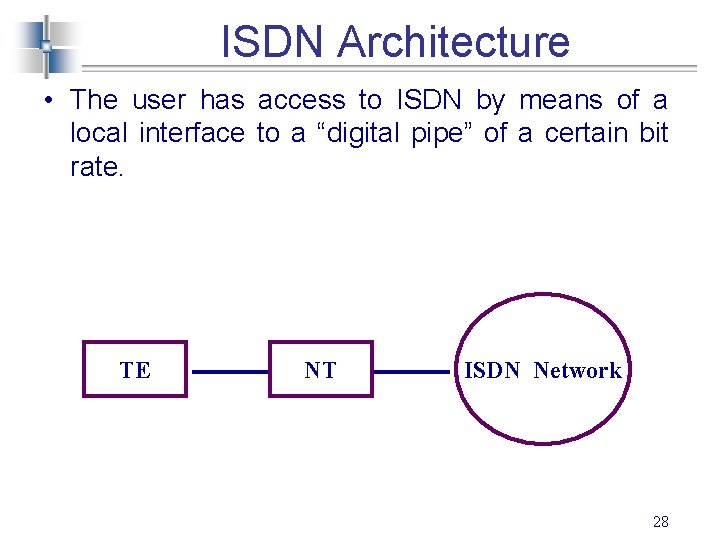
ISDN Architecture • The user has access to ISDN by means of a local interface to a “digital pipe” of a certain bit rate. TE NT ISDN Network 28
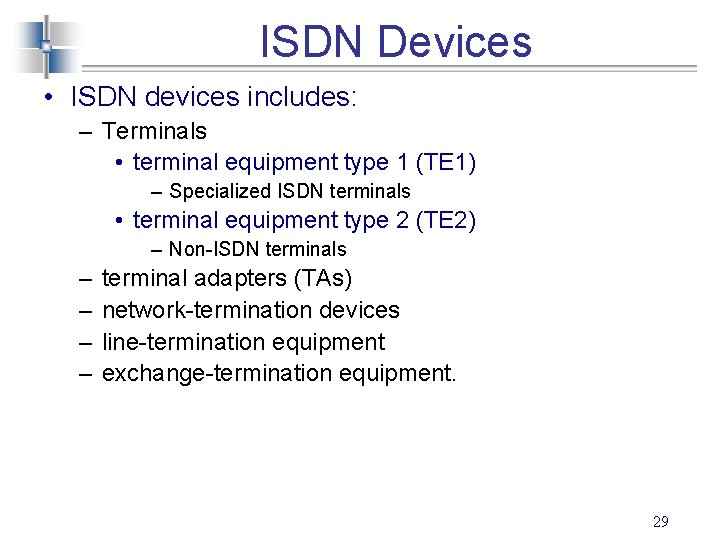
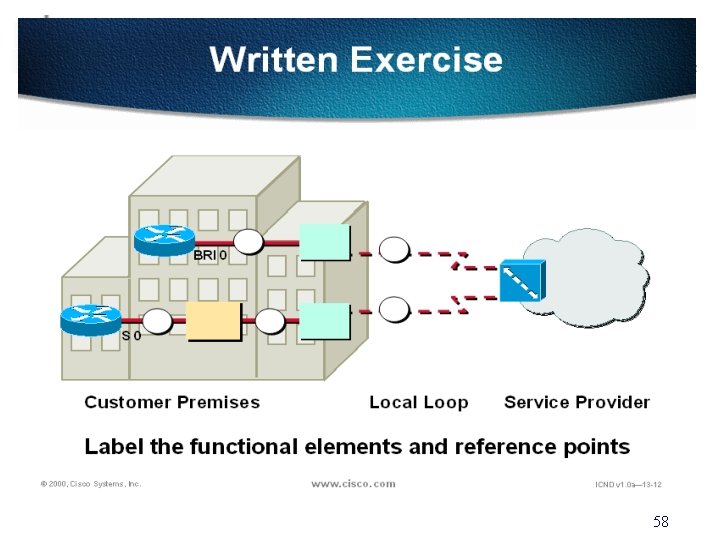
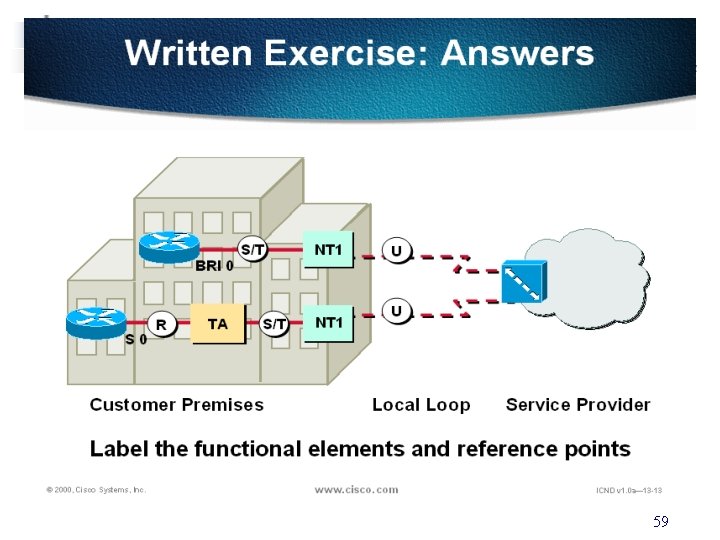
ISDN Devices • ISDN devices includes: – Terminals • terminal equipment type 1 (TE 1) – Specialized ISDN terminals • terminal equipment type 2 (TE 2) – Non-ISDN terminals – – terminal adapters (TAs) network-termination devices line-termination equipment exchange-termination equipment. 29
Infrastructure of ISDN 30
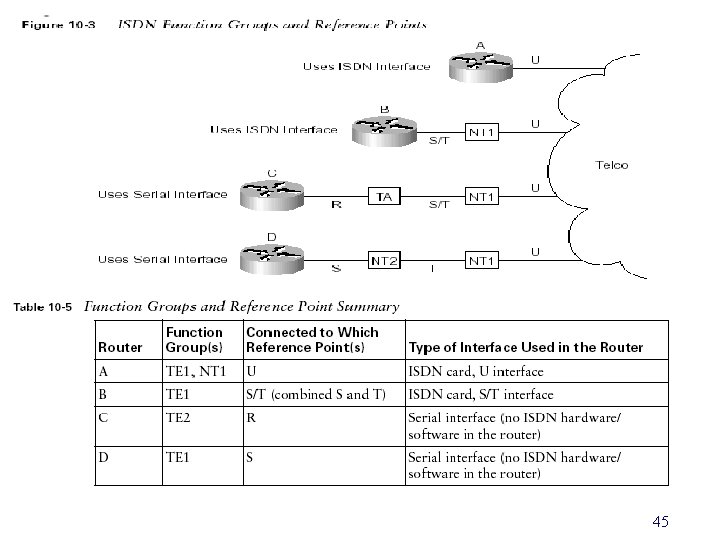
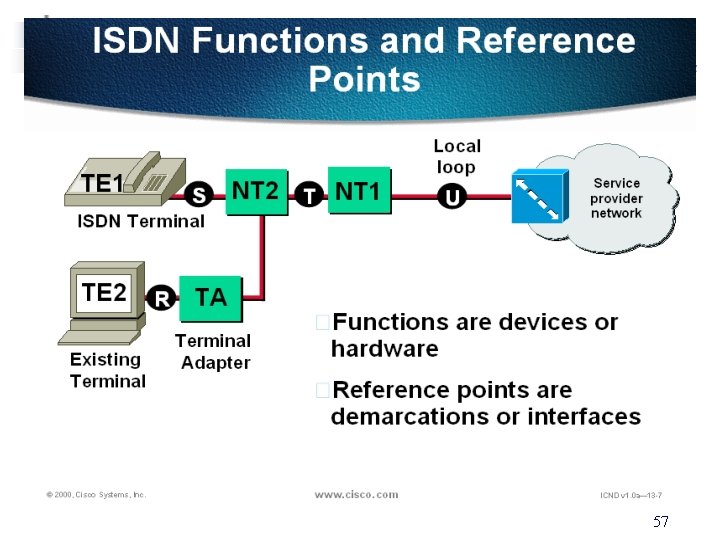
Function Groups and Reference Points • The ISDN specifications identify the various functions that must be performed to support customer premises equipment (CPE). • ISDN uses the term function group to refer to a set o functions that a piece of hardware or software must perform. • Because the ITU wanted several options for customer, it defined several different functions groups. • Because the function groups might be implemented by separate products, possibly even from different vendors, the ITU needed to explicitly define the interfaces between the devices that perform each function. • Therefore, ISDN uses the term reference point to refer to this interfaces between two function groups 31
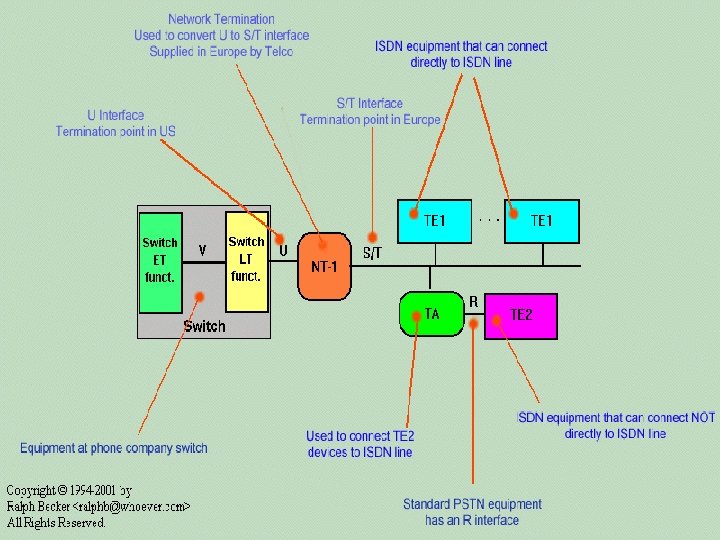
ISDN Devices • To connect to the ISDN network: – TE 1 uses four-wire, twisted-pair digital link. – TE 2 s uses a TA. • ISDN Terminal Adapter (TA): – It can be either a standalone device (or) – A board inside the TE 2. • If the TE 2 is implemented as a standalone device, it connects to the TA via a standard physical-layer interface. 32
ISDN Devices • Network Termination devices connect the four-wire subscriber wiring to the conventional two-wire local loop. – NT 1 • In North America, the NT 1 is a customer premises equipment (CPE) device. It is provided by the carrier. – NT 2 • The NT 2 is a more complicated device that typically is found in digital PBXs and that performs Layer 2 and 3 protocol functions and concentration services. 33
Why NT devices are used? • In an ISDN system, the local loop is significantly more complex. The cabling is identical in most cases, but the CPE is far different. • The phone company is sending the full digital signal to the demarc • You need to provide the equipment to handle the physical and electrical termination for this signal, and the equipment to interface it to your telephone or data equipment. • These devices, called Network Terminators and Terminal Adapters 34
Internet Architecture and Protocols, PUCIT, University of the Punjab, Pakistan 35
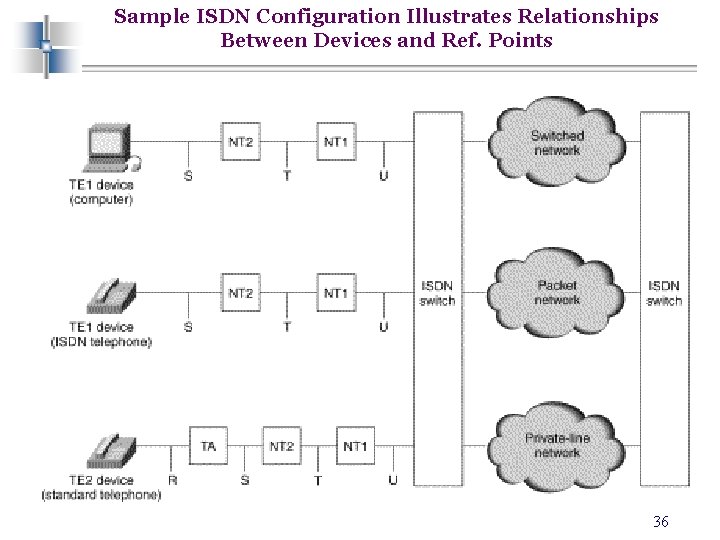
Sample ISDN Configuration Illustrates Relationships Between Devices and Ref. Points 36
Terminal Equipment 1 • TE 1 is a device that supports standard ISDN interface. E. g. digital telephones, digital fax machines etc. • A Terminal Equipment 1 (TE 1) device is a piece of user equipment that speaks the "S" interface language natively, and can connect directly to the NT devices. • Examples of a TE 1 device would be an ISDN workstation (such as the SGI Indy), an ISDN fax, or an ISDN-ready telephone. 37
Terminal Equipment 2 • TE 2 are non-ISDN devices • Terminal Equipment 2 (TE 2) devices are far more common--in fact, every comm. device that isn't in the TE 1 category is a TE 2 device. • An traditional phone, a PC, and a FAX are all examples of TE 2 devices. • To attach a TE 2 device to the ISDN network, you need the appropriate Terminal Adapter. A TE 2 device attaches to the Terminal Adapter through the "R" interface. 38
Network Termination 1 (NT 1) • NT 1 includes functions associated with the physical and electrical termination of the ISDN on the user’s premises • These correspond to OSI layer 1 • It may be controlled by the service provider • It provides a physical connector interface for user device attachment • Also perform line maintenance functions • It supports multiple channels, using synchronous TDM 39
Network Termination 2 (NT 2) • NT 2 is an intelligent device that can perform switching and concentration functions • It includes functionality up to layer 3 of OSI model • Examples – Digital PBX – A LAN • The concentration function – Multiple devices attached to a digital PBX, or a LAN may transmit data across an ISDN • Note – NT 2 Device is used where we have to provide switching facility. 40
Functional Devices • Network Terminator 1 – The Network Terminator 1 (NT 1) is the device that communicates directly with the Central Office switch. The NT 1 receives a "U" interface connection from the phone company, and puts out a "T" interface connection for the NT 2, which is often in the same piece of physical hardware. – The NT 1 handles the physical layer responsibilities of the connection, including physical and electrical termination, line monitoring and diagnostics, and multiplexing of D- and B-channels. 41
Network Terminator 2 – The Network Terminator 2 (NT 2) sits between an NT 1 device and any terminal equipment or adapters. – An NT 2 accepts a "T" interface from the NT 1, and provides an "S" interface – In most small installations, the NT 1 and NT 2 functions reside in the same piece of hardware. 42
Network Terminator 2 – In larger installations, including all PRI installations, a separate NT 2 may be used. – ISDN Network routers and digital PBX's are examples of common NT 2 devices. – The NT 2 handles data-link and network layer responsibilities in ISDN installations with many devices, including routing and contention monitoring. 43
Terminal Adapters • These devices connect a TE 2 device to the ISDN • • network. The Terminal Adapter (TA) connects to the NT device using the "S" interface and connects to a TE 2 device using the "R" interface. Terminal adapters are often combined with an NT 1 for use with personal computers. Because of this, they are often referred to as ISDN modems. This is actually not exactly accurate, because TA's do not perform analog-digital conversion like modems. A TA performs Digital to digital conversion, I. e. converting standard telecommunication protocols into ISDN protocols and specifications 44
45
Physical Interfaces • Function group—A set of functions implemented by a device and software • Reference point—The interface between two function groups, including cabling details • The ISDN standard defines several physical wiring interfaces, but most users only need to be familiar with one or two. – – U-Interface (user) S Interface (system) T Interface (terminal) R Interface (rate) 46
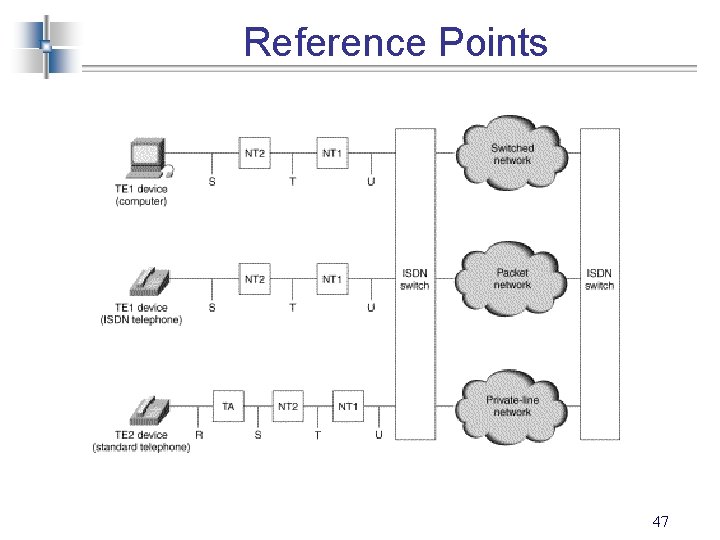
Reference Points 47
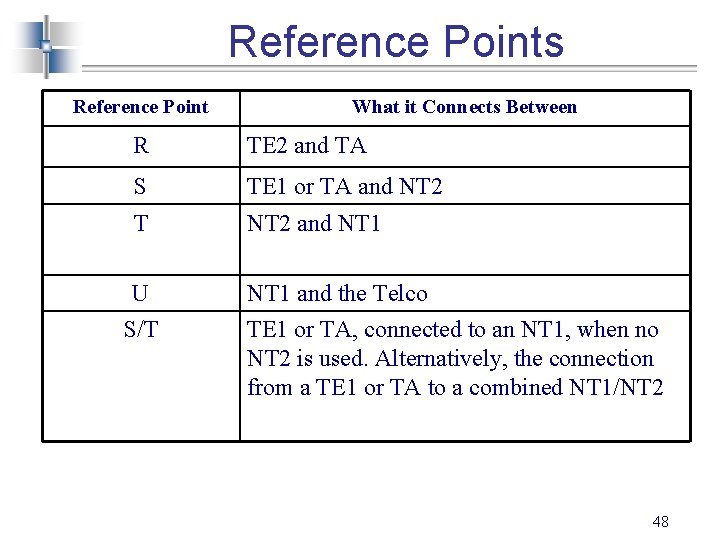
Reference Points Reference Point What it Connects Between R TE 2 and TA S TE 1 or TA and NT 2 T NT 2 and NT 1 U S/T NT 1 and the Telco TE 1 or TA, connected to an NT 1, when no NT 2 is used. Alternatively, the connection from a TE 1 or TA to a combined NT 1/NT 2 48
U – Interface • In the U. S. , the telephone company provides its BRI customers with a U interface. • The U interface is a two-wire (single pair) interface your phone company delivers for connection to the NT 1, the same physical interface provided for POTS lines • It supports full-duplex data transfer over a single pair of wires • Thus, only a single device can be connected to a U interface at customer premises. This device is called an Network Termination 1 (NT-1). 49
S/T Interface • The S/T-interface is the 4 -wire interface between the NT 1 and the ISDN networking equipment such as an ISDN TA or router. An S/T interface is used when the NT 1 is a separate device. • With the S-interface, you can have up to eight addressable ISDN devices connected to your line, and up to two can be active at any one time (because each ISDN line has two channels). • If you choose not to have an NT 1, but instead connect directly to the phone company’s 2 -wire U-interface, then you can have only one dedicated device on the line 50
Reference Points • U – In the U. S. , the telephone company provides its BRI customers with a U interface. – The U interface is a two-wire (single pair) interface your phone company delivers for connection to the NT 1, the same physical interface provided for POTS lines – It supports full-duplex data transfer over a single pair of wires – Thus, only a single device can be connected to a U interface at customer premises. This device is called an Network Termination 1 (NT-1). • R – Provides a non-ISDN interface between user equipment that is not ISDN compatible and adapter equipment – E. g the interface between TE 2 and TA 51
Reference Points • T – Corresponds to a minimal ISDN network termination at the customer’s premises – It separates the network provider equipment from user equipment – E. g the interface between NT 1 and NT 2 • S – Corresponds to the interface of individual ISDN terminals – It separates the user terminal equipment from network related communication functions. – E. g the interface between TE 1 and NT 2 52
Other interfaces • The interface between your ISDN networking equipment and your computer is usually one of the standard industry interfaces. • For example, an External TA will use the computer's serial COM port such as RS 232. ISDN routers will use a standard Ethernet connection, either directly to a computer's NIC card or via an intermediary Ethernet hub. Internet Architecture and Protocols, PUCIT, University of the Punjab, Pakistan 53
Reference Points • ISDN specifies a number of reference points that define logical interfaces between functional groups, such as TAs and NT 1 s. – – R—The reference point between non-ISDN equipment and a TA. S—The reference point between user terminals and the NT 2. T—The reference point between NT 1 and NT 2 devices. U—The reference point between NT 1 devices and linetermination equipment in the carrier network. • The U reference point is relevant only in North America, where the NT 1 function is not provided by the carrier network. 54
The User-Network Interface • After defining the functional devices, the standards went on to define the protocol that each device used to speak with the devices on either side of it. • These protocols were assigned the letters R, S, T, and U as identifiers, and were termed reference points. 55
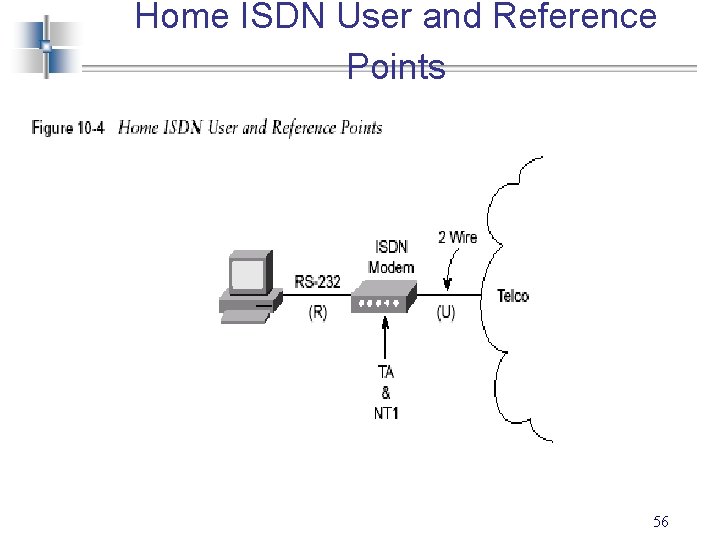
Home ISDN User and Reference Points 56
57
58
59
References • CCNA ICND Exam Study Guide – 10 th Chapter, Cisco Press 2004 • Online Resources – http: //www. ralphb. net/ISDN/ – http: //en. wikipedia. org/wiki/Integrated_services_digital _network 60
- Slides: 60