
Lecture 5 Pipelining Basics Biggest contributors to performance
Lecture 5: Pipelining Basics • Biggest contributors to performance: clock speed, parallelism • Today: basic pipelining implementation (Sections A. 1 -A. 3) 1
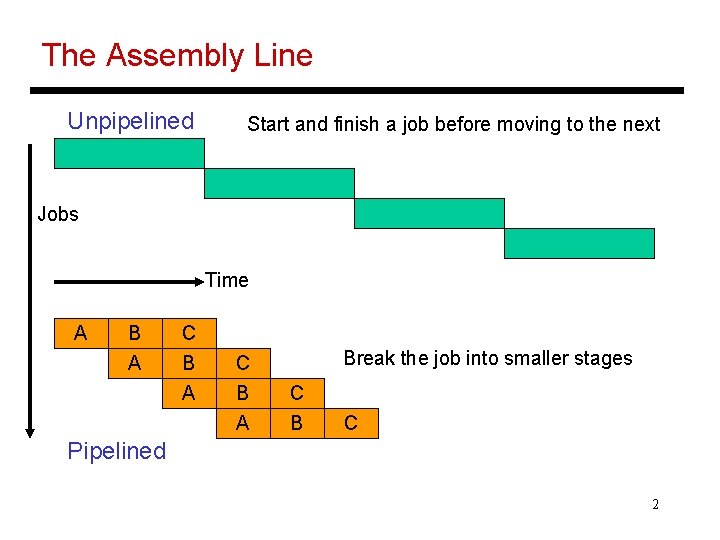
The Assembly Line Unpipelined Start and finish a job before moving to the next Jobs Time A B A C B A Break the job into smaller stages C B C Pipelined 2
Performance Improvements? • Does it take longer to finish each individual job? • Does it take shorter to finish a series of jobs? • What assumptions were made while answering these questions? • Is a 10 -stage pipeline better than a 5 -stage pipeline? 3
Quantitative Effects • As a result of pipelining: Ø Time in ns per instruction goes up Ø Number of cycles per instruction goes up (note the increase in clock speed) Ø Total execution time goes down, resulting in lower time per instruction Ø Average cycles per instruction increases slightly Ø Under ideal conditions, speedup = ratio of elapsed times between successive instruction completions = number of pipeline stages = increase in clock speed 4

A 5 -Stage Pipeline 5
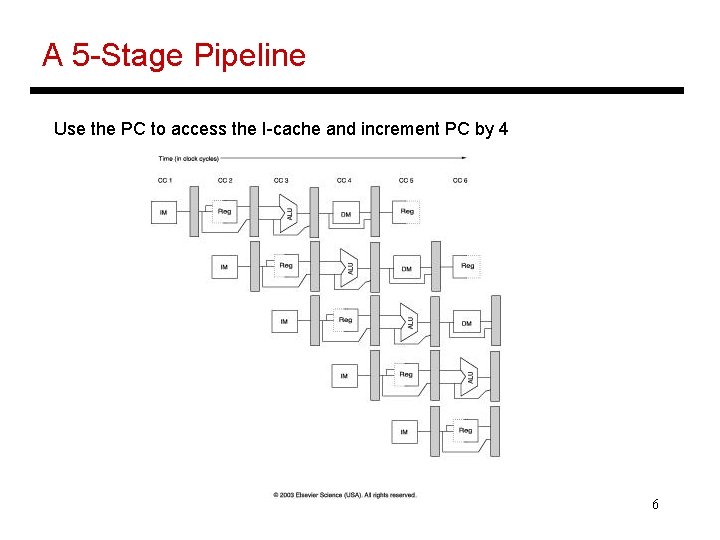
A 5 -Stage Pipeline Use the PC to access the I-cache and increment PC by 4 6
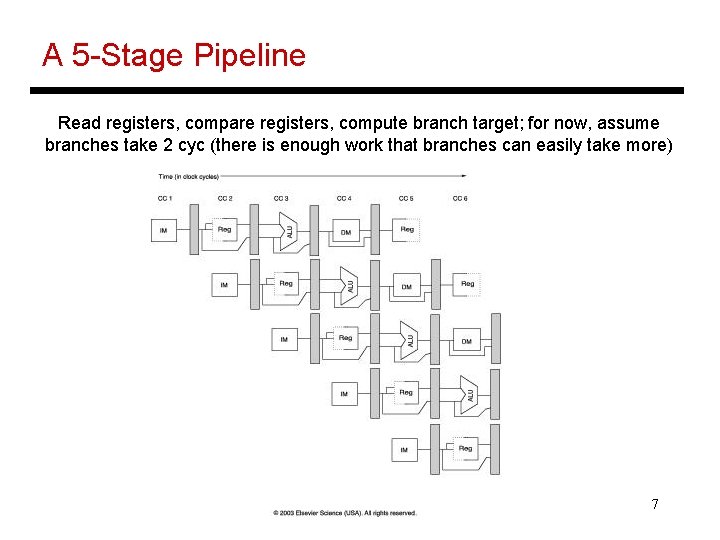
A 5 -Stage Pipeline Read registers, compare registers, compute branch target; for now, assume branches take 2 cyc (there is enough work that branches can easily take more) 7
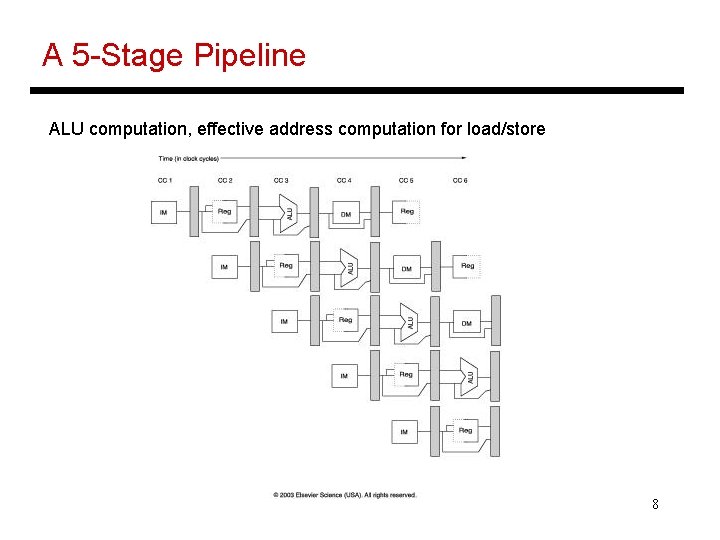
A 5 -Stage Pipeline ALU computation, effective address computation for load/store 8
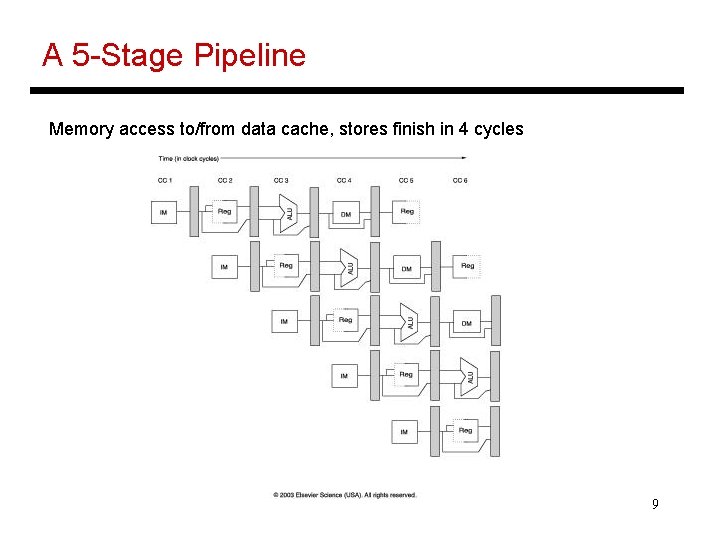
A 5 -Stage Pipeline Memory access to/from data cache, stores finish in 4 cycles 9

A 5 -Stage Pipeline Write result of ALU computation or load into register file 10
Conflicts/Problems • I-cache and D-cache are accessed in the same cycle – it helps to implement them separately • Registers are read and written in the same cycle – easy to deal with if register read/write time equals cycle time/2 (else, use bypassing) • Branch target changes only at the end of the second stage -- what do you do in the meantime? • Data between stages get latched into registers (overhead that increases latency per instruction) 11
Hazards • Structural hazards: different instructions in different stages (or the same stage) conflicting for the same resource • Data hazards: an instruction cannot continue because it needs a value that has not yet been generated by an earlier instruction • Control hazard: fetch cannot continue because it does not know the outcome of an earlier branch – special case of a data hazard – separate category because they are treated in different ways 12
Structural Hazards • Example: a unified instruction and data cache stage 4 (MEM) and stage 1 (IF) can never coincide • The later instruction and all its successors are delayed until a cycle is found when the resource is free these are pipeline bubbles • Structural hazards are easy to eliminate – increase the number of resources (for example, implement a separate instruction and data cache) 13
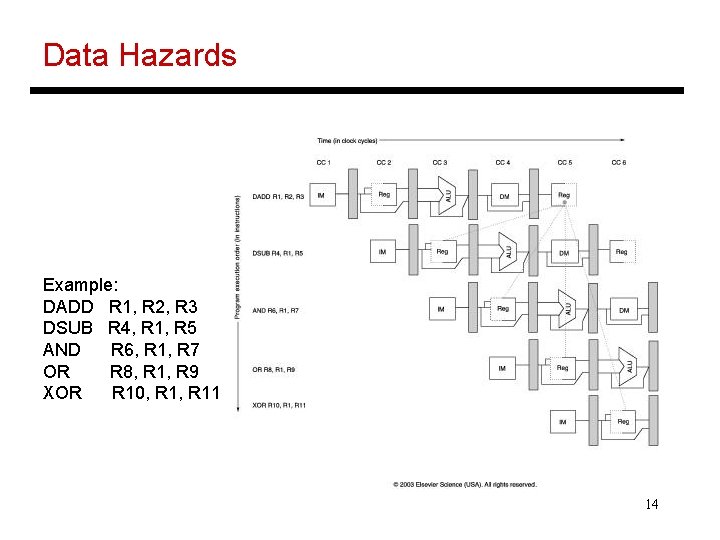
Data Hazards Example: DADD R 1, R 2, R 3 DSUB R 4, R 1, R 5 AND R 6, R 1, R 7 OR R 8, R 1, R 9 XOR R 10, R 11 14
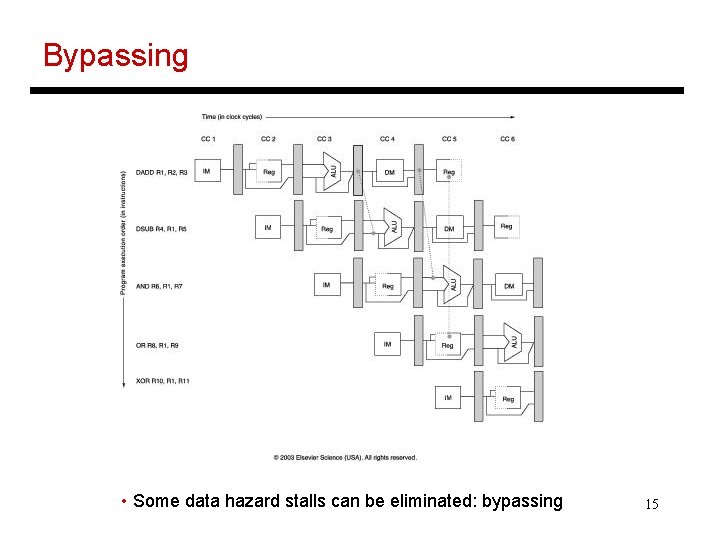
Bypassing • Some data hazard stalls can be eliminated: bypassing 15
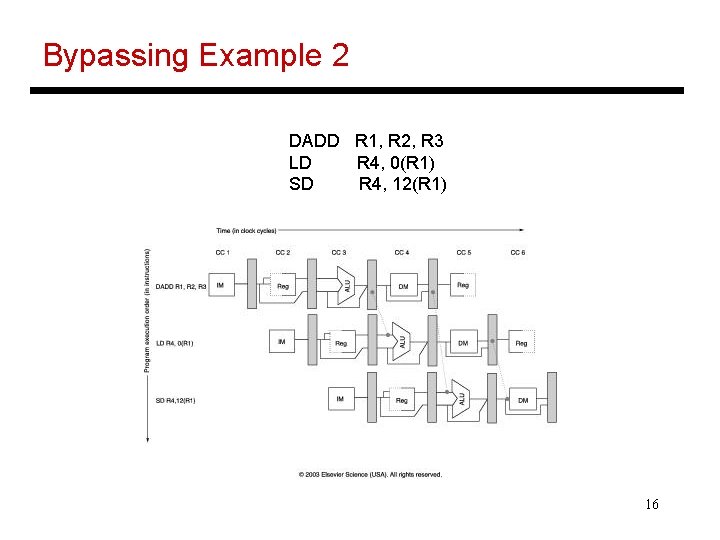
Bypassing Example 2 DADD R 1, R 2, R 3 LD R 4, 0(R 1) SD R 4, 12(R 1) 16
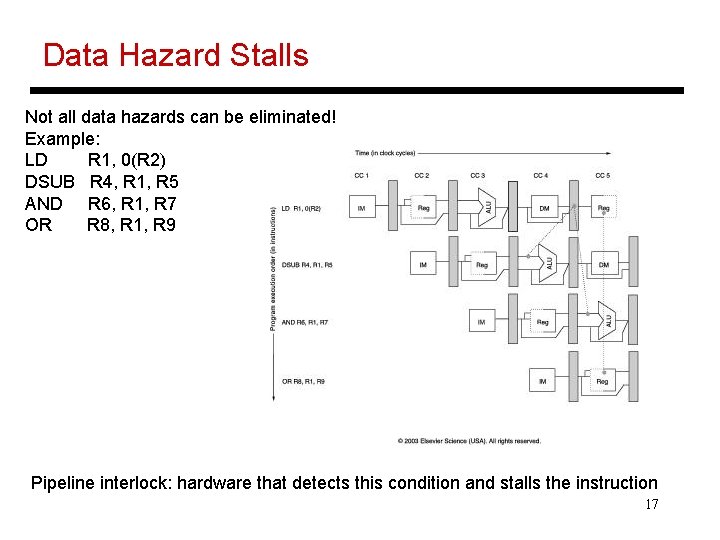
Data Hazard Stalls Not all data hazards can be eliminated! Example: LD R 1, 0(R 2) DSUB R 4, R 1, R 5 AND R 6, R 1, R 7 OR R 8, R 1, R 9 Pipeline interlock: hardware that detects this condition and stalls the instruction 17
Control Hazards • Simple techniques to handle control hazard stalls: Ø for every branch, introduce a stall cycle (note: every 6 th instruction is a branch!) Ø assume the branch is not taken and start fetching the next instruction – if the branch is taken, need hardware to cancel the effect of the wrong-path instruction Ø fetch the next instruction (branch delay slot) and execute it anyway – if the instruction turns out to be on the correct path, useful work was done – if the instruction turns out to be on the wrong path, hopefully program state is not lost 18
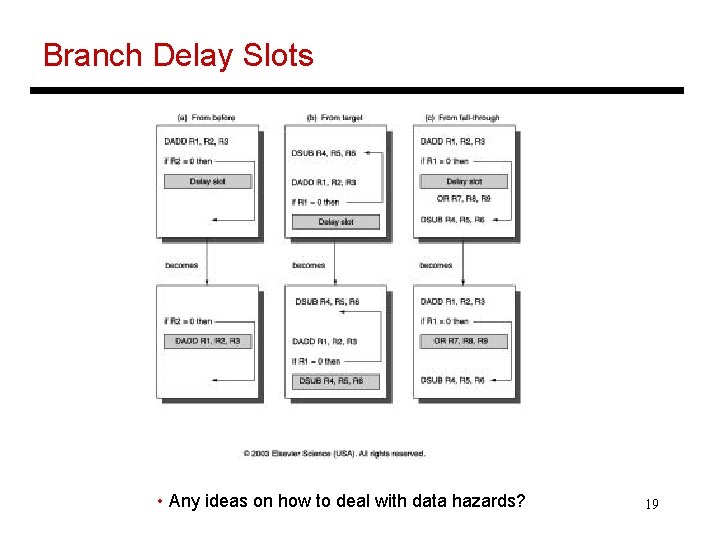
Branch Delay Slots • Any ideas on how to deal with data hazards? 19
Slowdowns from Stalls • Perfect pipelining with no hazards an instruction completes every cycle (total cycles ~ num instructions) speedup = increase in clock speed = num pipeline stages • With hazards and stalls, some cycles (= stall time) go by during which no instruction completes, and then the stalled instruction completes • Total cycles = number of instructions + stall cycles • Slowdown because of stalls = 1/ (1 + stall cycles per instr) 20
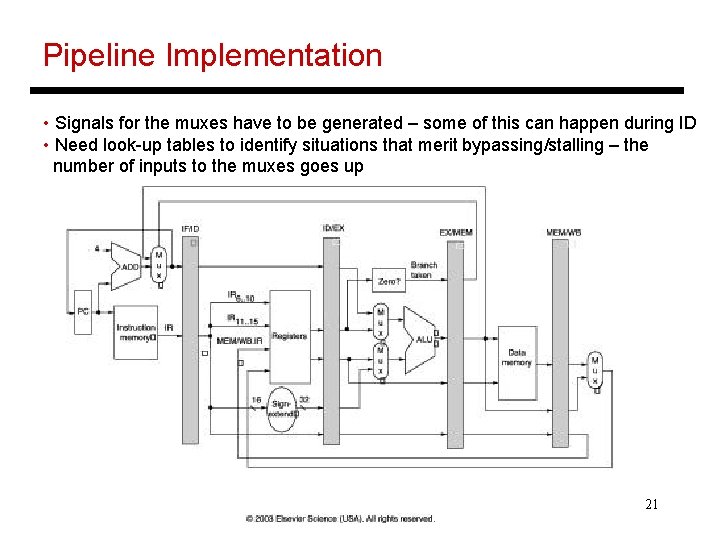
Pipeline Implementation • Signals for the muxes have to be generated – some of this can happen during ID • Need look-up tables to identify situations that merit bypassing/stalling – the number of inputs to the muxes goes up 21
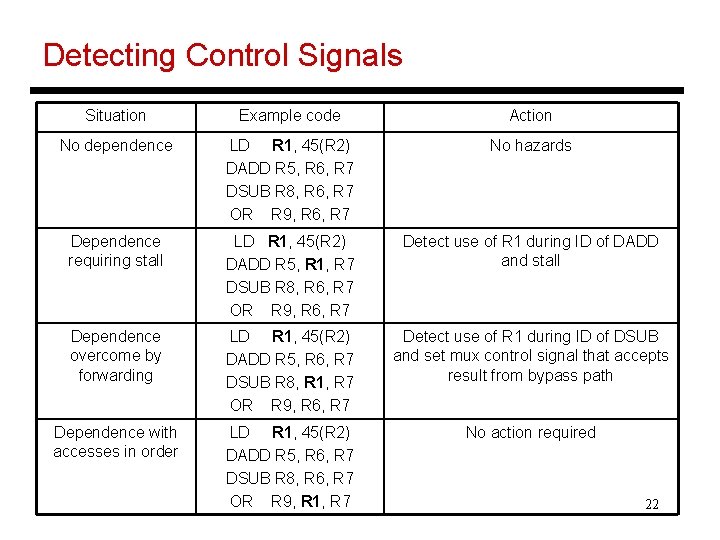
Detecting Control Signals Situation Example code Action No dependence LD R 1, 45(R 2) DADD R 5, R 6, R 7 DSUB R 8, R 6, R 7 OR R 9, R 6, R 7 No hazards Dependence requiring stall LD R 1, 45(R 2) DADD R 5, R 1, R 7 DSUB R 8, R 6, R 7 OR R 9, R 6, R 7 Detect use of R 1 during ID of DADD and stall Dependence overcome by forwarding LD R 1, 45(R 2) DADD R 5, R 6, R 7 DSUB R 8, R 1, R 7 OR R 9, R 6, R 7 Detect use of R 1 during ID of DSUB and set mux control signal that accepts result from bypass path Dependence with accesses in order LD R 1, 45(R 2) DADD R 5, R 6, R 7 DSUB R 8, R 6, R 7 OR R 9, R 1, R 7 No action required 22
Summary • Basic 5 -stage pipeline • Structural and data hazards: bypassing, stalling • Control hazards: branch delay slots • Next class: difficulties in pipelining, long latency operations, scoreboarding 23
Title • Bullet 24
- Slides: 24