
Lecture 3 Integration with web technology Technology of
Lecture 3 Integration with web technology Technology of information systems
Contents • History of IS development • Web services technology Technology of information systems
History of IS development (1) • '60 -'70: Record technology – – Files per program Batch processing Hardcoded record layouts Data redundancy and inconsistency • '80 -'90: Database technology – Data per set of applications – Hard-coded relations, but views, fields and formats adjustable • ’ 85 -’ 95: User interface technology – – Interactive systems Graphical user interfaces Client-server architecture (thick clients) Integrated in 4 -generation tools (Oracle, Cool. Gen etc) Technology of information systems
History of IS development (2) • ’ 90 -’ 00: Coordination and integration technology – Workflow: support of business functions isolated from the application code, in a separate component (Wf. MS) – Remote Procedure Call (RPC) – Middleware: integration of components, message passing; CORBA as standard – EDIFACT: standard exchange format • '00 -? ? : Web (services) technology – Browser as only user interface (thin clients) – Standards for data formats and communication protocols Technology of information systems

History of IS development (3) Remote Procedure Call: basic integration mechanism • RPC: programming abstraction that hides the communication • RPC behaves as a normal procedure call: – Synchronous communication with a procedure, i. e. the invoker waits for the answer – Specified by input parameters and return values. RPC sockets UDP, TCP IP • Sockets: interface of the operating system to underlying communication protocols • UDP: User Datagram Protocol, to transport data packets without guarantees • TCP: Transmission Control Protocol, to verify correct delivery of data packets • IP: Internet protocol, to move packets from one node to another Technology of information systems
History of IS development (4) From single system to multi-tier monolith systems Technology of information systems
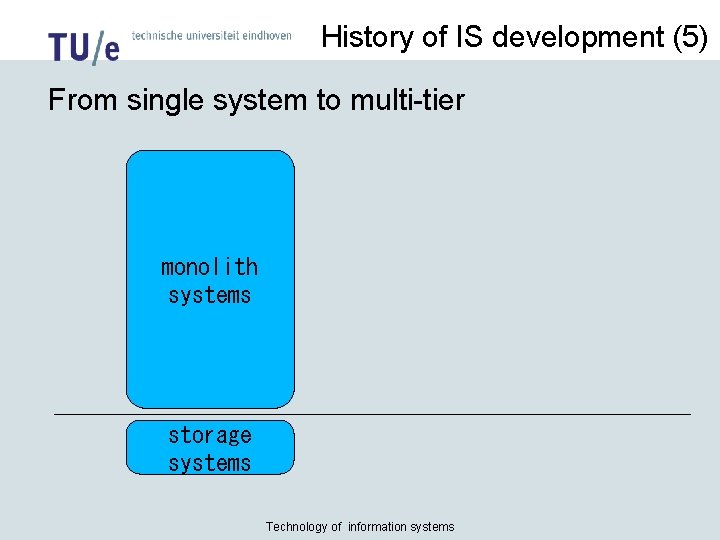
History of IS development (5) From single system to multi-tier monolith systems storage systems Technology of information systems

History of IS development (6) From single system to multi-tier presentation process & business logic dataaccess & storage terminal application system database systems Technology of information systems
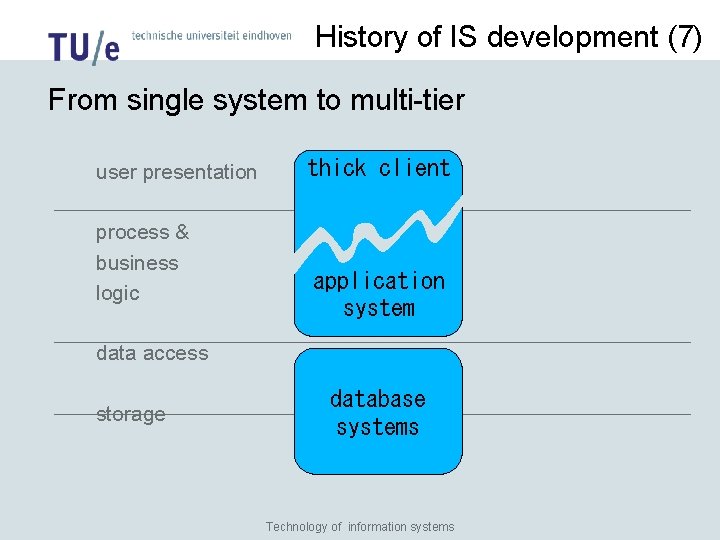
History of IS development (7) From single system to multi-tier user presentation process & business logic thick client application system data access storage database systems Technology of information systems
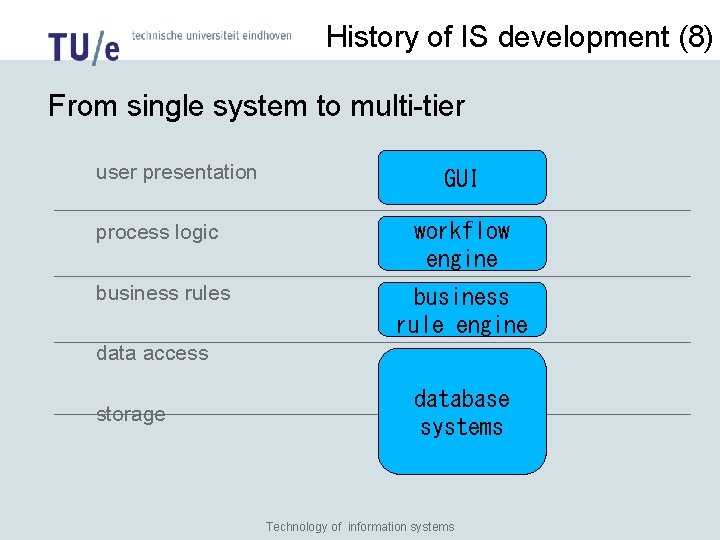
History of IS development (8) From single system to multi-tier user presentation GUI process logic workflow engine business rules business rule engine data access storage database systems Technology of information systems
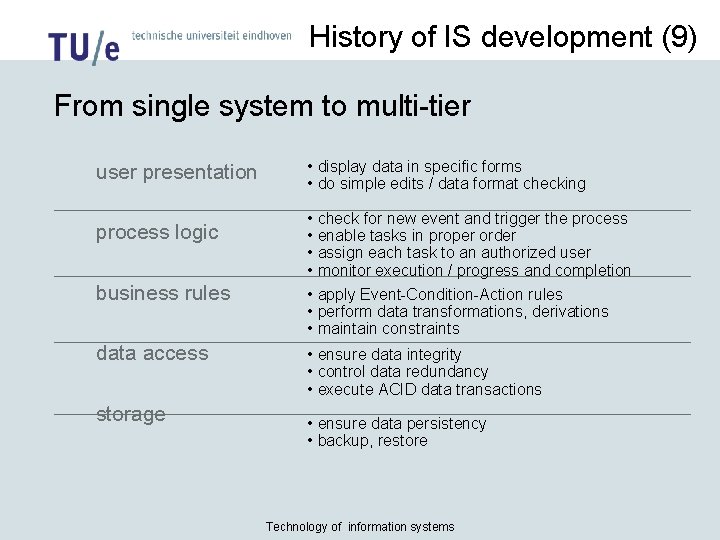
History of IS development (9) From single system to multi-tier user presentation process logic business rules data access storage • display data in specific forms • do simple edits / data format checking • check for new event and trigger the process • enable tasks in proper order • assign each task to an authorized user • monitor execution / progress and completion • apply Event-Condition-Action rules • perform data transformations, derivations • maintain constraints • ensure data integrity • control data redundancy • execute ACID data transactions • ensure data persistency • backup, restore Technology of information systems
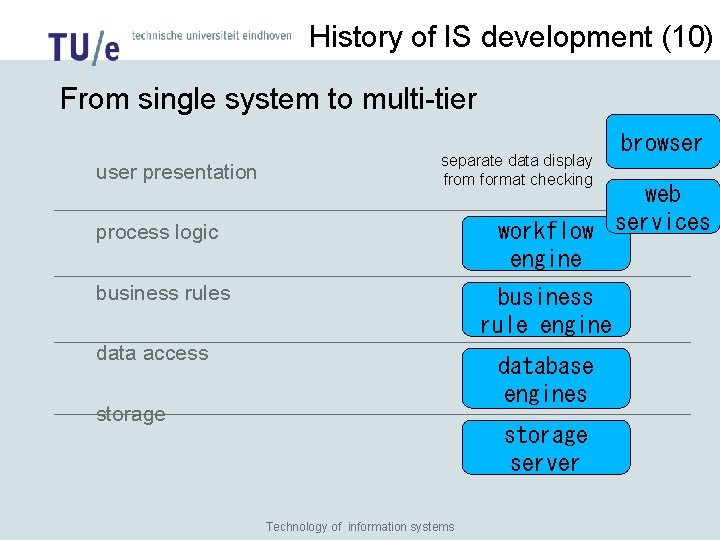
History of IS development (10) From single system to multi-tier user presentation separate data display from format checking browser web workflow services engine process logic business rules business rule engine data access database engines storage server Technology of information systems
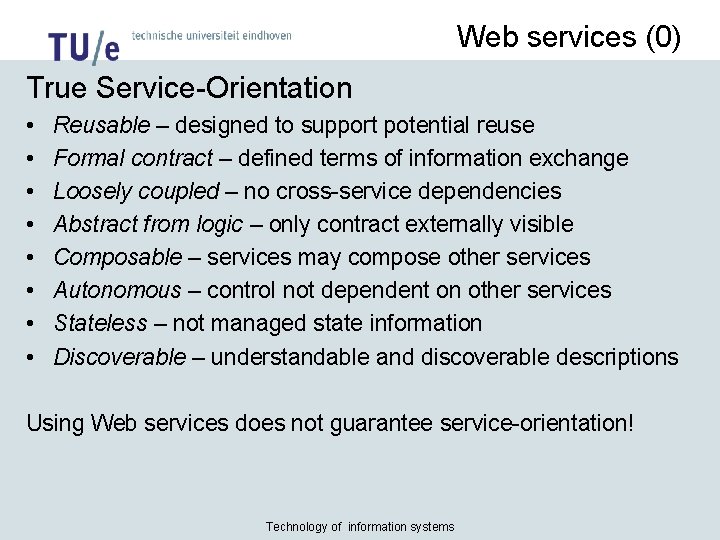
Web services (0) True Service-Orientation • • Reusable – designed to support potential reuse Formal contract – defined terms of information exchange Loosely coupled – no cross-service dependencies Abstract from logic – only contract externally visible Composable – services may compose other services Autonomous – control not dependent on other services Stateless – not managed state information Discoverable – understandable and discoverable descriptions Using Web services does not guarantee service-orientation! Technology of information systems
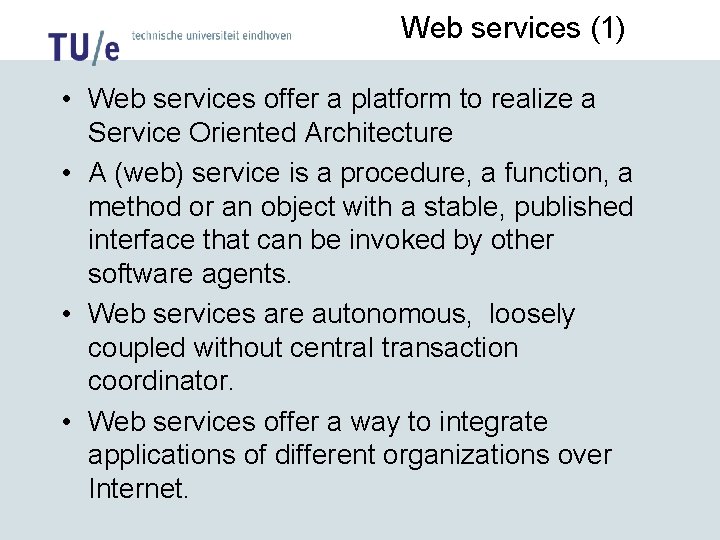
Web services (1) • Web services offer a platform to realize a Service Oriented Architecture • A (web) service is a procedure, a function, a method or an object with a stable, published interface that can be invoked by other software agents. • Web services are autonomous, loosely coupled without central transaction coordinator. • Web services offer a way to integrate applications of different organizations over Internet.
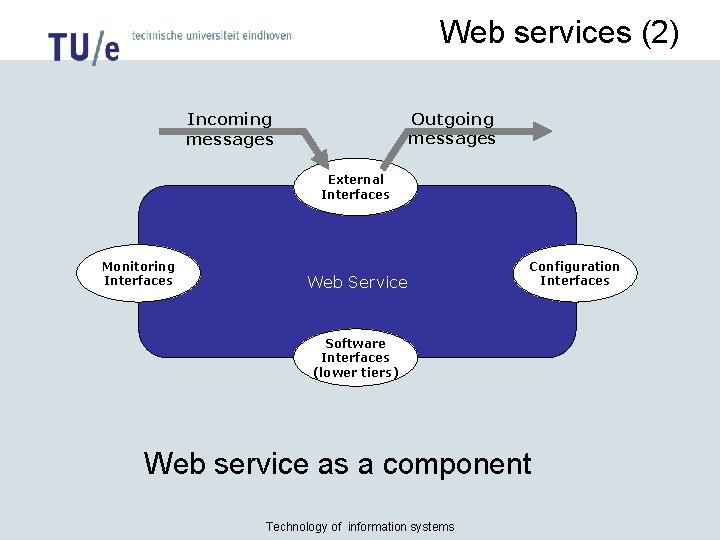
Web services (2) Outgoing messages Incoming messages External Interfaces Monitoring Interfaces Web Service Configuration Interfaces Software Interfaces (lower tiers) Web service as a component Technology of information systems
Web services (3) • Definition of a web service by W 3 C: ”A software application identified by an URI, and its interfaces and bindings are capable of being defined, described and discovered as XML artifacts. A web service supports direct interactions with other software agents using XML-based messages exchanged via Internet-based protocols” • Web services use the following standards: – – – XML: SOAP: WSDL: BPEL: UDDI: Extensible Markup Language Simple Object Access Protocol Web Services Description Language Business Process Execution Language Universal Description, Discovery and Integration
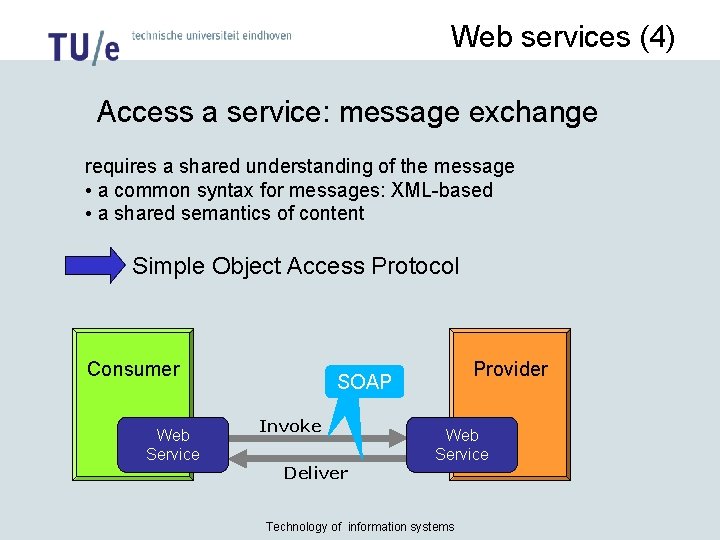
Web services (4) Access a service: message exchange requires a shared understanding of the message • a common syntax for messages: XML-based • a shared semantics of content Simple Object Access Protocol Consumer Web Service Provider SOAP Invoke Deliver Web Service Technology of information systems
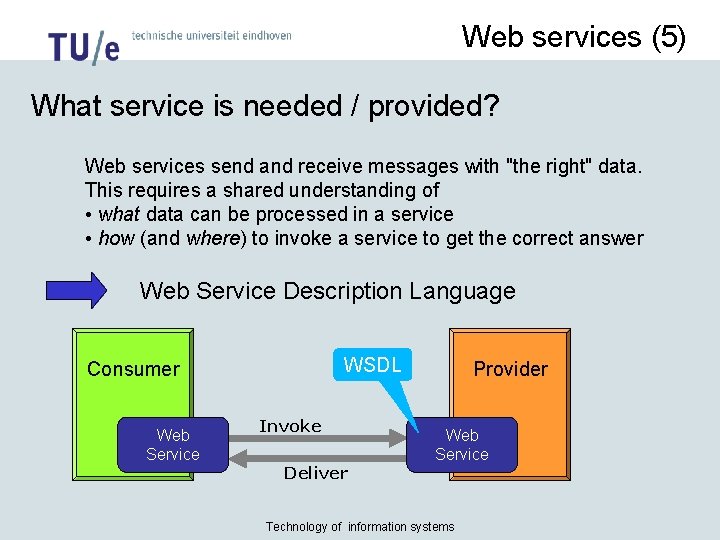
Web services (5) What service is needed / provided? Web services send and receive messages with "the right" data. This requires a shared understanding of • what data can be processed in a service • how (and where) to invoke a service to get the correct answer • Web Service Description Language WSDL Consumer Web Service Invoke Deliver Provider Web Service Technology of information systems
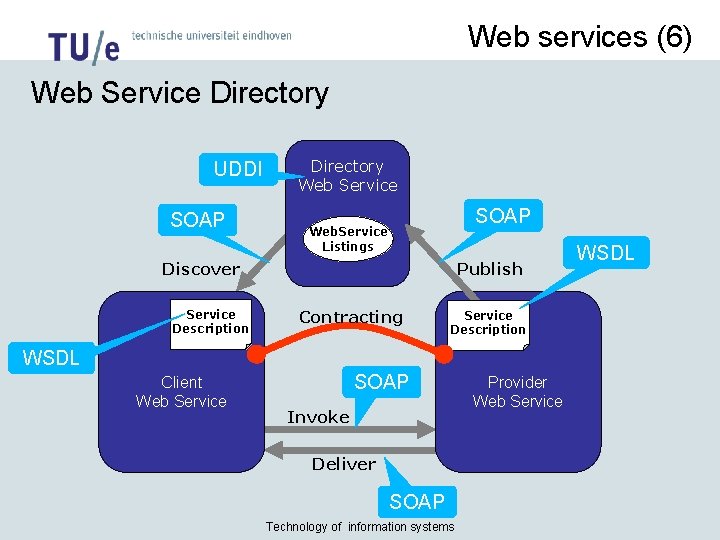
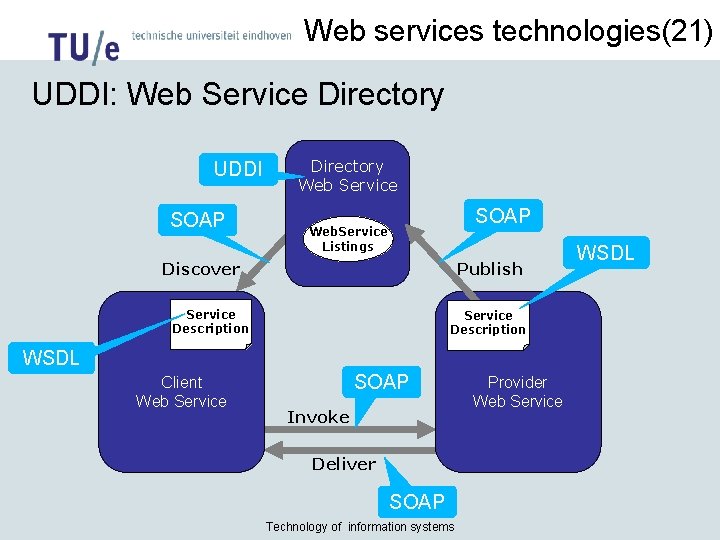
Web services (6) Web Service Directory UDDI SOAP Directory Web Service SOAP Web. Service Listings Discover Service Description Publish Contracting Service Description WSDL Client Web Service SOAP Invoke Deliver SOAP Technology of information systems Provider Web Service WSDL
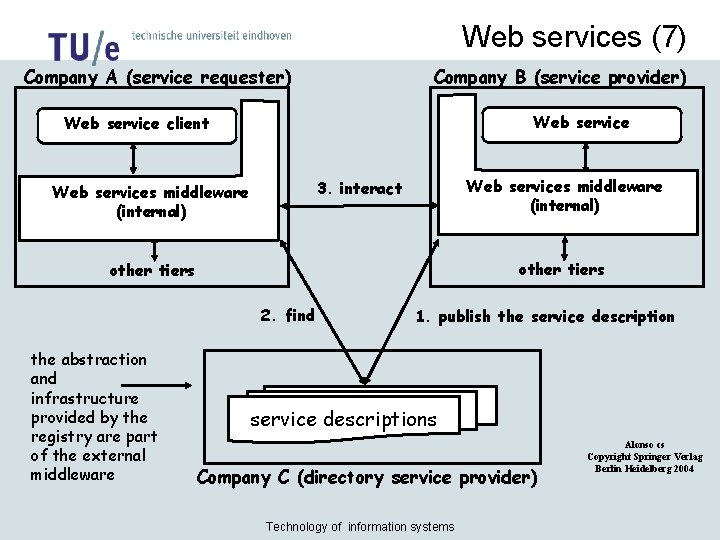
Web services (7) Company A (service requester) Company B (service provider) Web service client Web services middleware (internal) 3. interact Web services middleware (internal) other tiers 2. find the abstraction and infrastructure provided by the registry are part of the external middleware 1. publish the service descriptions Company C (directory service provider) Technology of information systems Alonso cs Copyright Springer Verlag Berlin Heidelberg 2004
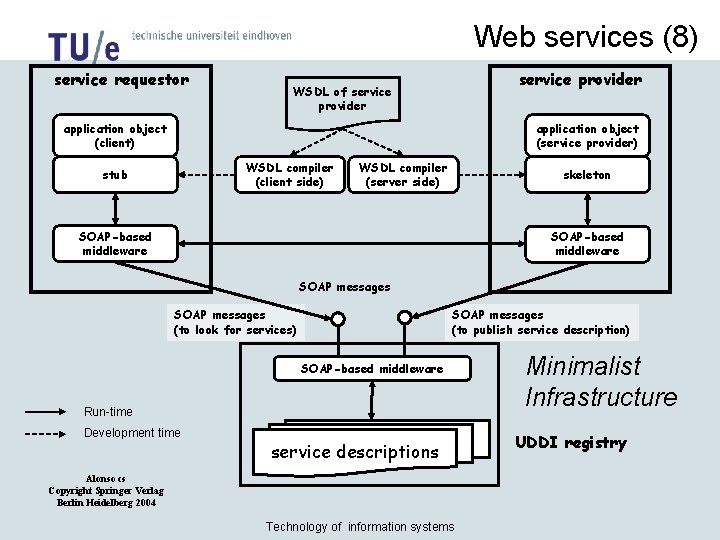
Web services (8) service requestor service provider WSDL of service provider application object (service provider) application object (client) WSDL compiler (client side) stub WSDL compiler (server side) skeleton SOAP-based middleware SOAP messages (to look for services) SOAP messages (to publish service description) SOAP-based middleware Run-time Development time service descriptions Alonso cs Copyright Springer Verlag Berlin Heidelberg 2004 Technology of information systems Minimalist Infrastructure UDDI registry
Web services technologies (1) • XML extensible markup language: – Standard (very simple) grammar for tree structured data sets (we call them: documents) – Document Type Definition (DTD) or XML Schema Definition (XSD) are languages to define the type of an XML document; i. e. additional grammar. (XSD more powerful than DTD) – Document layout in XML Style Language (XSL) – Good separation between form (XSL) and content (XSD) Technology of information systems
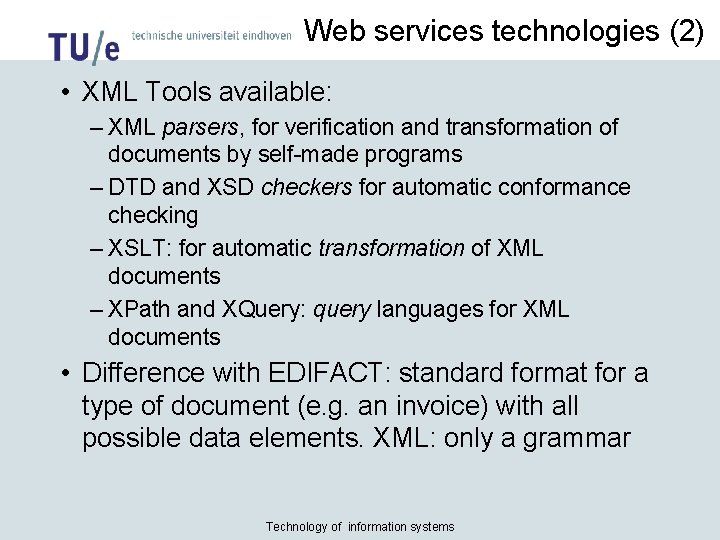
Web services technologies (2) • XML Tools available: – XML parsers, for verification and transformation of documents by self-made programs – DTD and XSD checkers for automatic conformance checking – XSLT: for automatic transformation of XML documents – XPath and XQuery: query languages for XML documents • Difference with EDIFACT: standard format for a type of document (e. g. an invoice) with all possible data elements. XML: only a grammar Technology of information systems
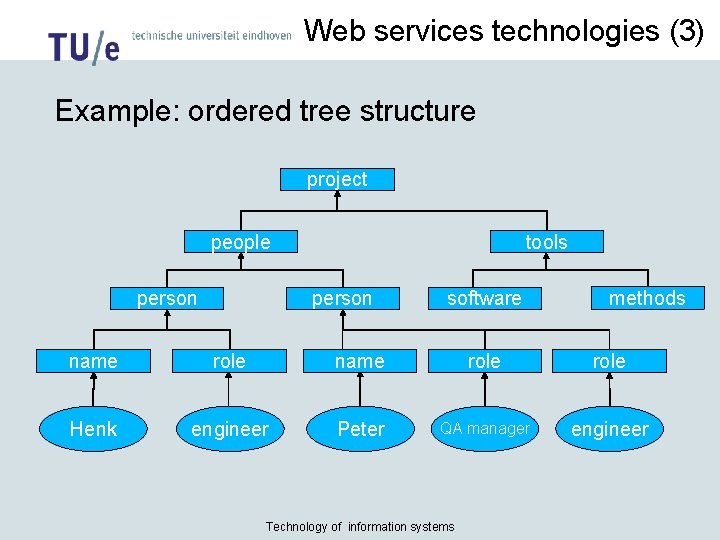
Web services technologies (3) Example: ordered tree structure project people person tools person software methods name role Henk engineer Peter QA manager engineer Technology of information systems
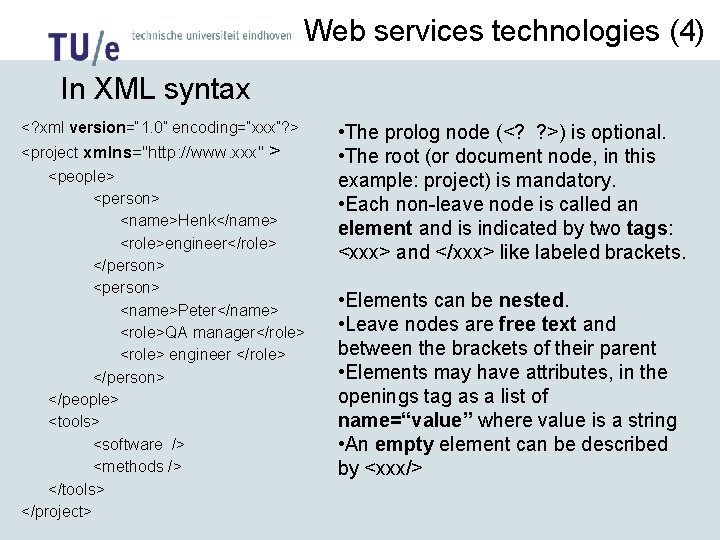
Web services technologies (4) In XML syntax <? xml version=“ 1. 0” encoding=“xxx”? > <project xmlns="http: //www. xxx" > <people> <person> <name>Henk</name> <role>engineer</role> </person> <name>Peter</name> <role>QA manager</role> <role> engineer </role> </person> </people> <tools> <software /> <methods /> </tools> </project> • The prolog node (<? ? >) is optional. • The root (or document node, in this example: project) is mandatory. • Each non-leave node is called an element and is indicated by two tags: <xxx> and </xxx> like labeled brackets. • Elements can be nested. • Leave nodes are free text and between the brackets of their parent • Elements may have attributes, in the openings tag as a list of name=“value” where value is a string • An empty element can be described by <xxx/>
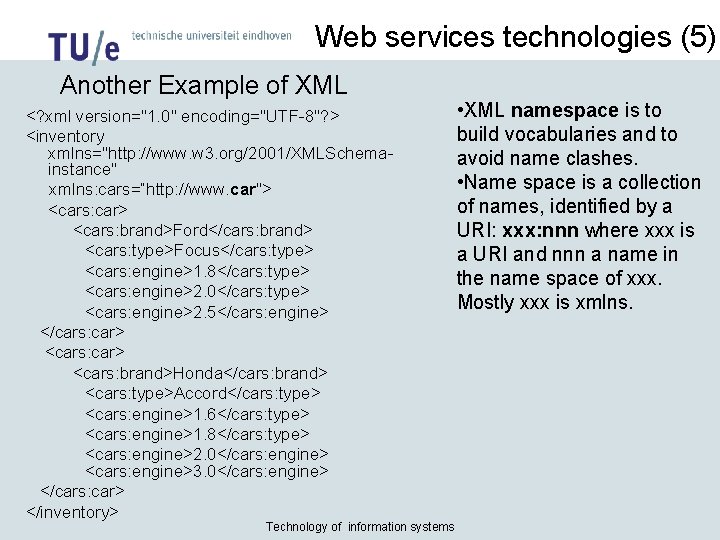
Web services technologies (5) Another Example of XML <? xml version="1. 0" encoding="UTF-8"? > <inventory xmlns="http: //www. w 3. org/2001/XMLSchemainstance" xmlns: cars=“http: //www. car"> <cars: car> <cars: brand>Ford</cars: brand> <cars: type>Focus</cars: type> <cars: engine>1. 8</cars: type> <cars: engine>2. 0</cars: type> <cars: engine>2. 5</cars: engine> </cars: car> <cars: brand>Honda</cars: brand> <cars: type>Accord</cars: type> <cars: engine>1. 6</cars: type> <cars: engine>1. 8</cars: type> <cars: engine>2. 0</cars: engine> <cars: engine>3. 0</cars: engine> </cars: car> </inventory> Technology of information systems • XML namespace is to build vocabularies and to avoid name clashes. • Name space is a collection of names, identified by a URI: xxx: nnn where xxx is a URI and nnn a name in the name space of xxx. Mostly xxx is xmlns.
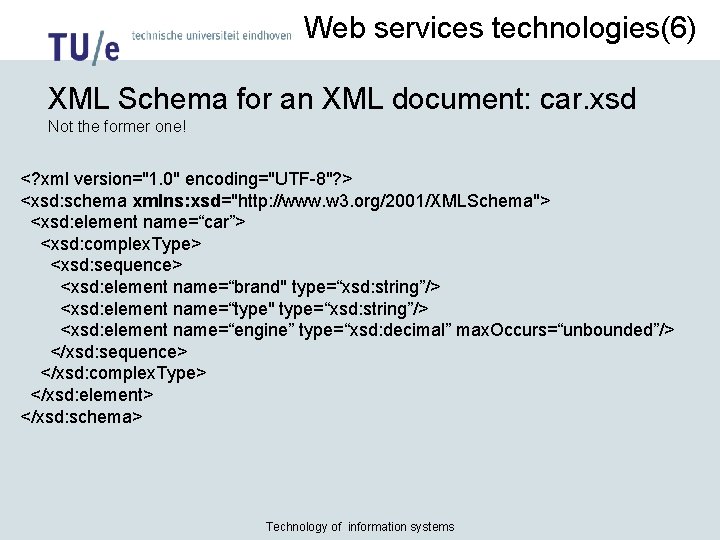
Web services technologies(6) XML Schema for an XML document: car. xsd Not the former one! <? xml version="1. 0" encoding="UTF-8"? > <xsd: schema xmlns: xsd="http: //www. w 3. org/2001/XMLSchema"> <xsd: element name=“car”> <xsd: complex. Type> <xsd: sequence> <xsd: element name=“brand" type=“xsd: string”/> <xsd: element name=“type" type=“xsd: string”/> <xsd: element name=“engine” type=“xsd: decimal” max. Occurs=“unbounded”/> </xsd: sequence> </xsd: complex. Type> </xsd: element> </xsd: schema> Technology of information systems
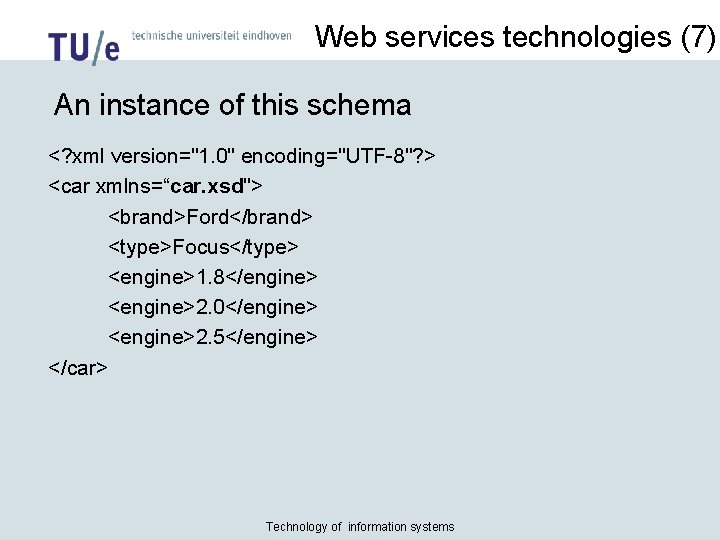
Web services technologies (7) An instance of this schema <? xml version="1. 0" encoding="UTF-8"? > <car xmlns=“car. xsd"> <brand>Ford</brand> <type>Focus</type> <engine>1. 8</engine> <engine>2. 0</engine> <engine>2. 5</engine> </car> Technology of information systems
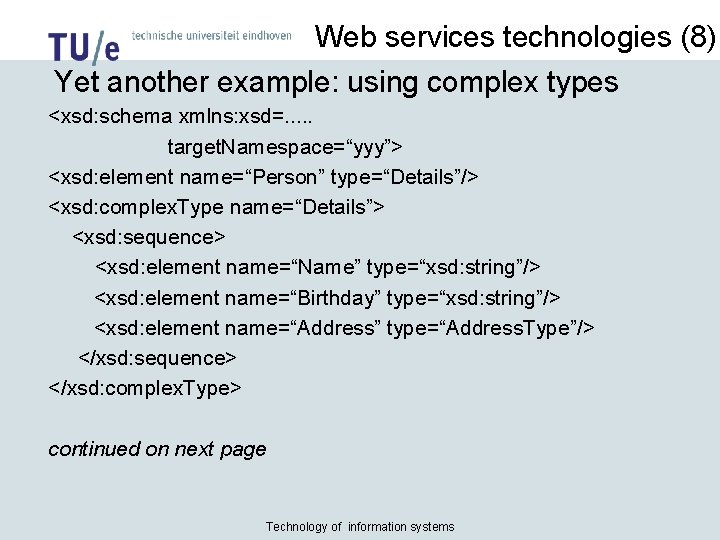
Web services technologies (8) Yet another example: using complex types <xsd: schema xmlns: xsd=. . . target. Namespace=“yyy”> <xsd: element name=“Person” type=“Details”/> <xsd: complex. Type name=“Details”> <xsd: sequence> <xsd: element name=“Name” type=“xsd: string”/> <xsd: element name=“Birthday” type=“xsd: string”/> <xsd: element name=“Address” type=“Address. Type”/> </xsd: sequence> </xsd: complex. Type> continued on next page Technology of information systems
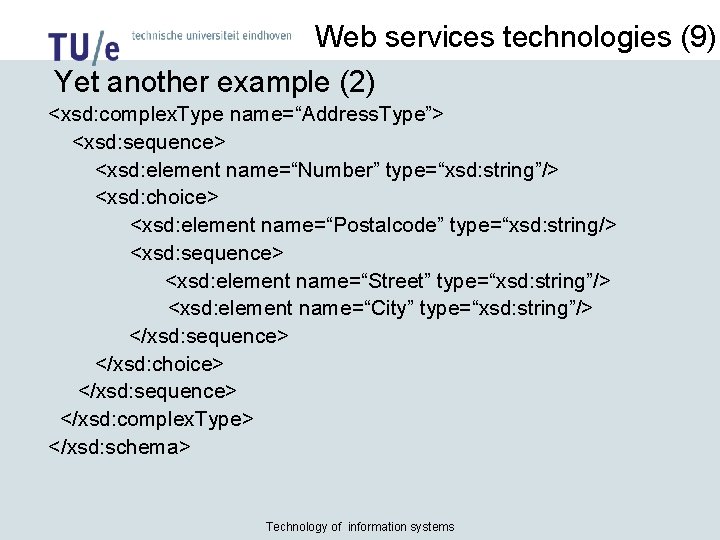
Web services technologies (9) Yet another example (2) <xsd: complex. Type name=“Address. Type”> <xsd: sequence> <xsd: element name=“Number” type=“xsd: string”/> <xsd: choice> <xsd: element name=“Postalcode” type=“xsd: string/> <xsd: sequence> <xsd: element name=“Street” type=“xsd: string”/> <xsd: element name=“City” type=“xsd: string”/> </xsd: sequence> </xsd: choice> </xsd: sequence> </xsd: complex. Type> </xsd: schema> Technology of information systems
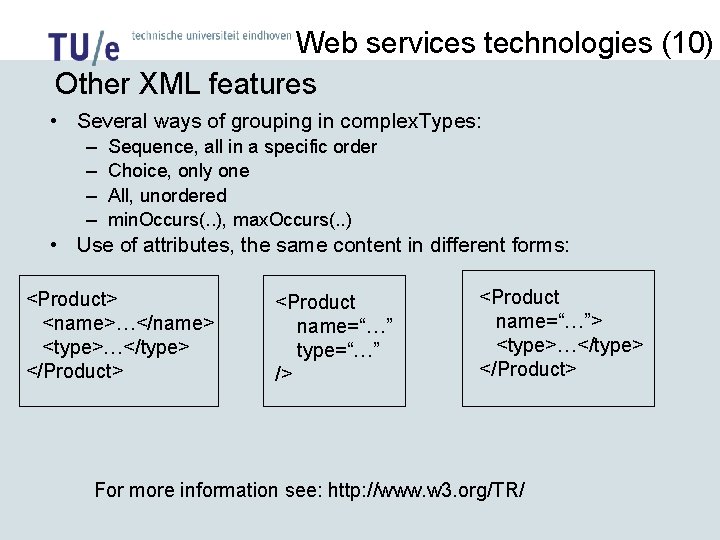
Web services technologies (10) Other XML features • Several ways of grouping in complex. Types: – – Sequence, all in a specific order Choice, only one All, unordered min. Occurs(. . ), max. Occurs(. . ) • Use of attributes, the same content in different forms: <Product> <name>…</name> <type>…</type> </Product> <Product name=“…” type=“…” /> <Product name=“…”> <type>…</type> </Product> For more information see: http: //www. w 3. org/TR/
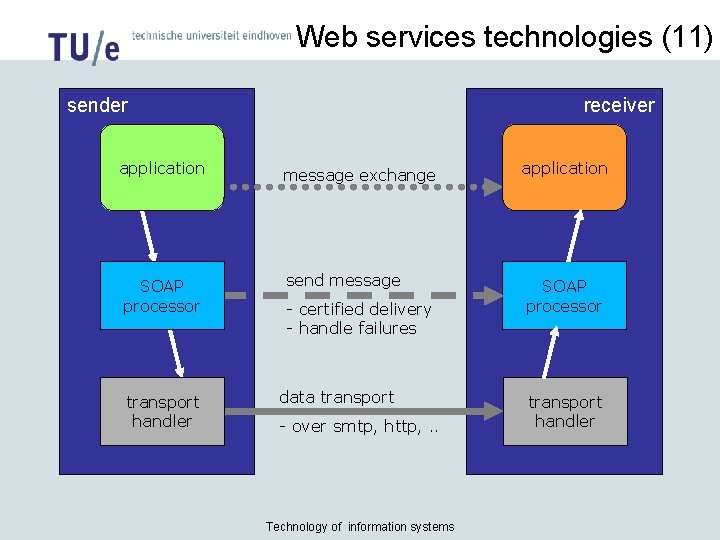
Web services technologies (11) sender receiver application message exchange application SOAP processor send message SOAP processor transport handler - certified delivery - handle failures data transport - over smtp, http, . . Technology of information systems transport handler

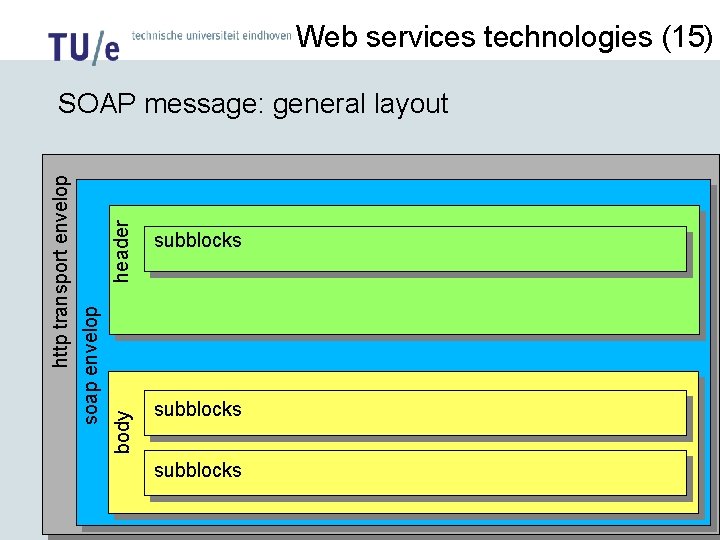
Web services technologies(12) SOAP: Simple Object Access Protocol • A formal set of conventions governing the format and processing rules of messages. • SOAP protocols are essentially stateless and one-way • SOAP messages have XML syntax • Can be asynchronous, via SMTP protocol or synchronous via HTTP protocol • With SOAP messages we can simulate RPC (by defining two messages: one for call with parameters and one for return value) • SOAP messages are packed in an envelope with (optional) header blocks and at least one body block. Technology of information systems
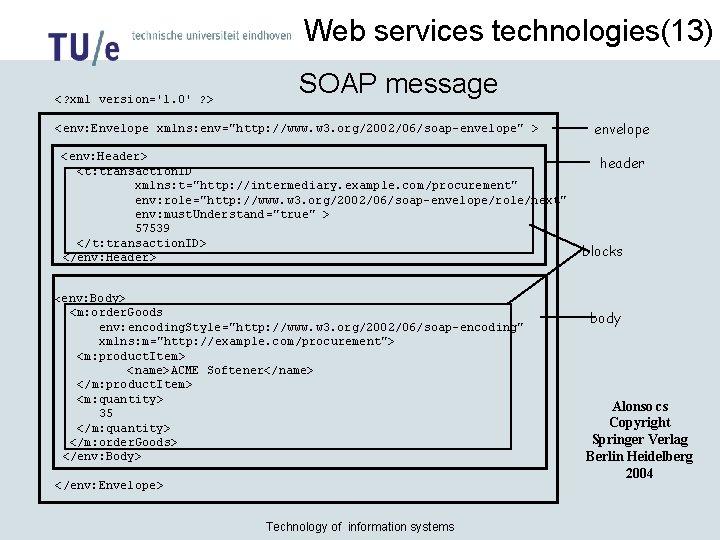
Web services technologies(13) <? xml version='1. 0' ? > SOAP message <env: Envelope xmlns: env="http: //www. w 3. org/2002/06/soap-envelope" > <env: Header> <t: transaction. ID xmlns: t="http: //intermediary. example. com /procurement" env: role="http: //www. w 3. org/2002/06/soap-envelope/role/next" env: must. Understand="true" > 57539 </t: transaction. ID> </env: Header> envelope header blocks <env: Body> <m: order. Goods env: encoding. Style="http: //www. w 3. org/2002/06/soap-encoding" xmlns: m="http: //example. com/procurement"> <m: product. Item> <name>ACME Softener</name> </m: product. Item> <m: quantity> 35 </m: quantity> </m: order. Goods> </env: Body> </env: Envelope> Technology of information systems body Alonso cs Copyright Springer Verlag Berlin Heidelberg 2004
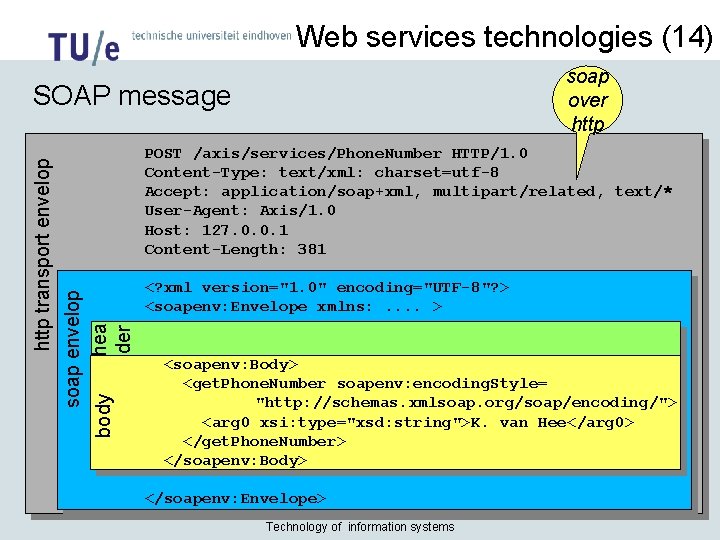
Web services technologies (14) soap over http POST /axis/services/Phone. Number HTTP/1. 0 Content-Type: text/xml: charset=utf-8 Accept: application/soap+xml, multipart/related, text/* User-Agent: Axis/1. 0 Host: 127. 0. 0. 1 Content-Length: 381 soap envelop hea body der http transport envelop SOAP message <? xml version="1. 0" encoding="UTF-8"? > <soapenv: Envelope xmlns: . . > <soapenv: Body> <get. Phone. Number soapenv: encoding. Style= "http: //schemas. xmlsoap. org/soap/encoding/"> <arg 0 xsi: type="xsd: string">K. van Hee</arg 0> </get. Phone. Number> </soapenv: Body> </soapenv: Envelope> Technology of information systems
Web services technologies (15) header body soap envelop http transport envelop SOAP message: general layout subblocks Technology of information systems
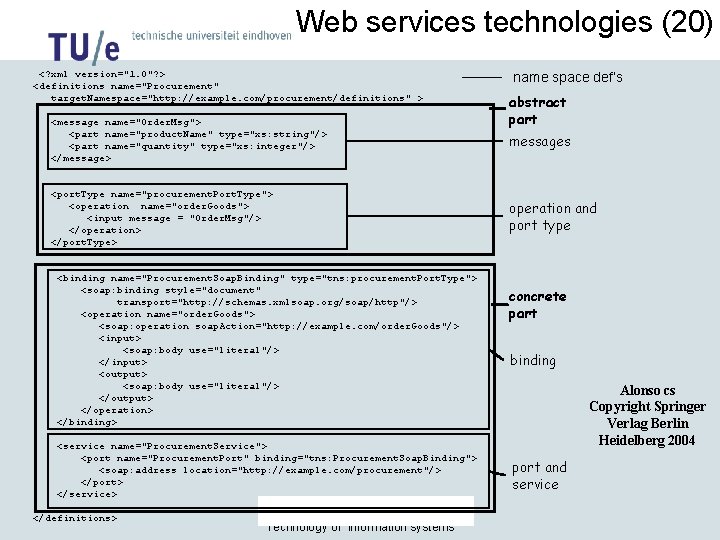
Web services technologies(16) WSDL: Web Service Description Language • An XML format for describing network services as a set of “endpoints” (services) operating on messages. • The operations and messages are described abstractly, and then bound to a concrete network protocol and message format to define an endpoint. • Related concrete endpoints are combined into abstract endpoints. • WSDL is extensible to allow description of endpoints and their messages regardless of formats or network protocols. Technology of information systems

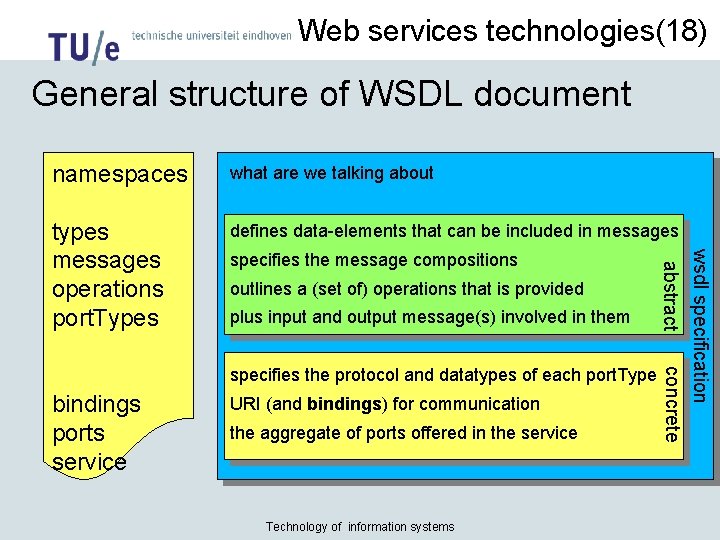
Web services technologies(17) WSDL: Web Service Description Language WSDL specification types operations port types bindings services and ports concrete abstract messages • Operation: • Exchange of messages • Exchange pattern • Port type: • set of operations • Abstract service: • Set of port types • Bindings: • Message encoding • Protocol binding • Ports: • Also called “end points” • Binding +URI Technology of information systems
Web services technologies(18) General structure of WSDL document what are we talking about types messages operations port. Types defines data-elements that can be included in messages outlines a (set of) operations that is provided plus input and output message(s) involved in them specifies the protocol and datatypes of each port. Type bindings ports service URI (and bindings) for communication the aggregate of ports offered in the service Technology of information systems abstract specifies the message compositions wsdl specification concrete namespaces
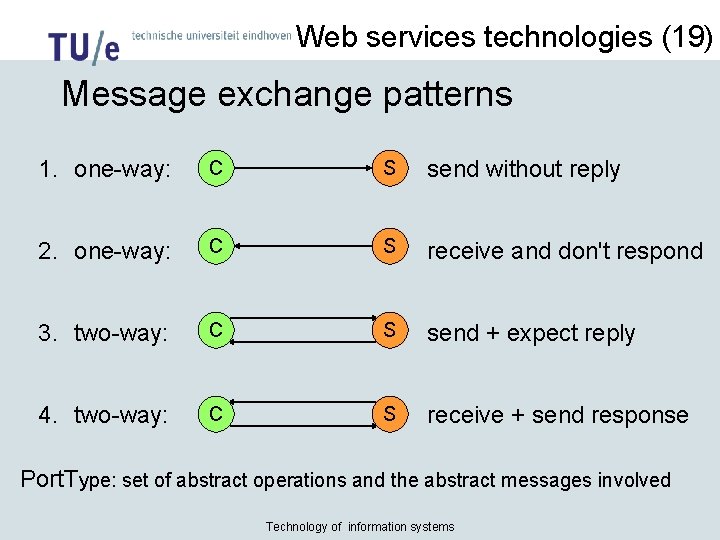
Web services technologies (19) Message exchange patterns 1. one-way: C S send without reply 2. one-way: C S receive and don't respond 3. two-way: C S send + expect reply 4. two-way: C S receive + send response Port. Type: set of abstract operations and the abstract messages involved Technology of information systems
Web services technologies (20) <? xml version="1. 0"? > <definitions name="Procurement" target. Namespace="http: //example. com/procurement/definitions" > <message name="Order. Msg"> <part name="product. Name" type="xs: string"/> <part name="quantity" type="xs: integer"/> </message> <port. Type name="procurement. Port. Type"> <operation name="order. Goods"> <input message = "Order. Msg"/> </operation> </port. Type> <binding name="Procurement. Soap. Binding" type="tns: procurement. Port. Type"> <soap: binding style="document" transport="http: //schemas. xmlsoap. org/soap/http"/> <operation name="order. Goods"> <soap: operation soap. Action="http: //example. com/order. Goods"/> <input> <soap: body use="literal"/> </input> <output> <soap: body use="literal"/> </output> </operation> </binding> <service name="Procurement. Service"> <port name="Procurement. Port" binding="tns: Procurement. Soap. Binding"> <soap: address location="http: //example. com/procurement"/> </port> </service> </definitions> Technology of information systems name space def’s abstract part messages operation and port type concrete part binding Alonso cs Copyright Springer Verlag Berlin Heidelberg 2004 port and service
Web services technologies(21) UDDI: Web Service Directory UDDI SOAP Directory Web Service SOAP Web. Service Listings Discover Publish Service Description WSDL Client Web Service SOAP Invoke Deliver SOAP Technology of information systems Provider Web Service WSDL
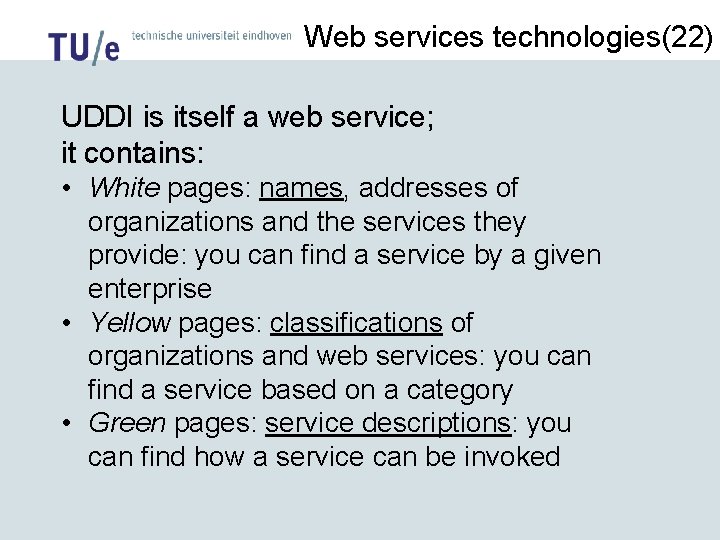
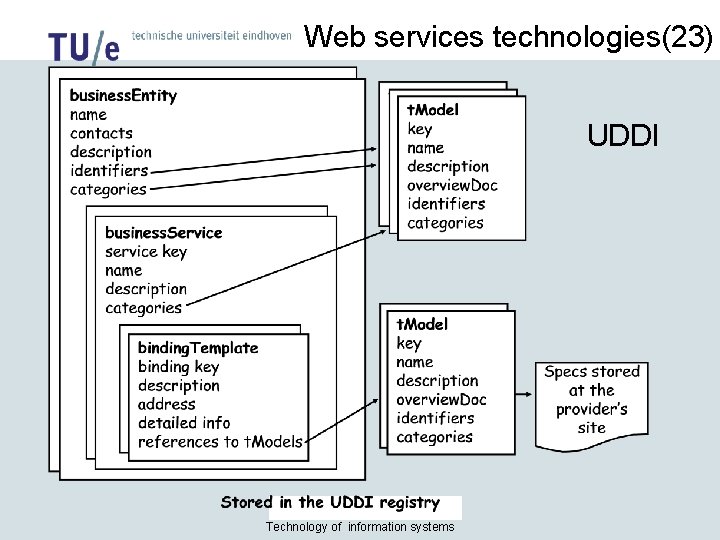
Web services technologies(22) UDDI is itself a web service; it contains: • White pages: names, addresses of organizations and the services they provide: you can find a service by a given enterprise • Yellow pages: classifications of organizations and web services: you can find a service based on a category • Green pages: service descriptions: you can find how a service can be invoked
Web services technologies(23) UDDI Technology of information systems
Web services technologies(24) Issues in dynamic contracting: • • • payment quality-of-service, how to verify, what-if authentication, signature security, encryption, reliability non-disclosure, trademarks, copyright present services are offered for free, as-is • http: //uddi. Xmethods. net • http: //ws. ou. nl/uddipublic/ • http: //uddi. microsoft. com/search
- Slides: 45