
Lecture 3 Instruction Sets Section 1 3 Sections

- Slides: 18
Lecture 3: Instruction Sets • Section 1. 3, Sections 2. 1 -2. 8 • Technology trends • Design issues in defining an instruction set Ø Register and memory access Ø Instruction and operand types 1
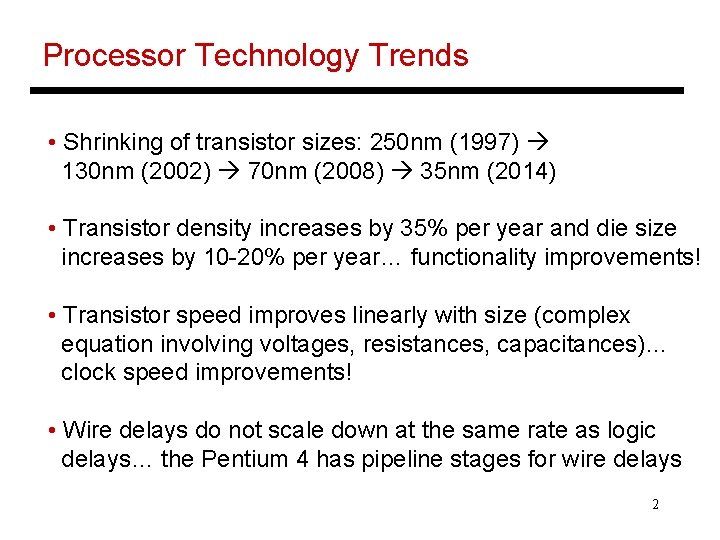
Processor Technology Trends • Shrinking of transistor sizes: 250 nm (1997) 130 nm (2002) 70 nm (2008) 35 nm (2014) • Transistor density increases by 35% per year and die size increases by 10 -20% per year… functionality improvements! • Transistor speed improves linearly with size (complex equation involving voltages, resistances, capacitances)… clock speed improvements! • Wire delays do not scale down at the same rate as logic delays… the Pentium 4 has pipeline stages for wire delays 2
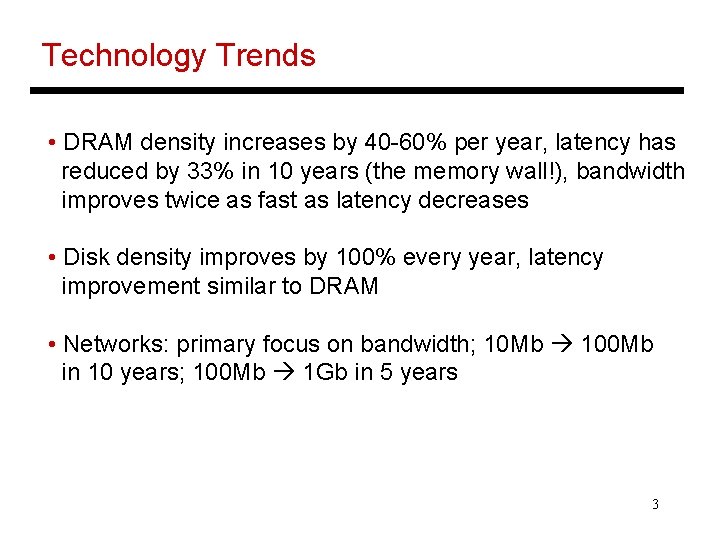
Technology Trends • DRAM density increases by 40 -60% per year, latency has reduced by 33% in 10 years (the memory wall!), bandwidth improves twice as fast as latency decreases • Disk density improves by 100% every year, latency improvement similar to DRAM • Networks: primary focus on bandwidth; 10 Mb 100 Mb in 10 years; 100 Mb 1 Gb in 5 years 3
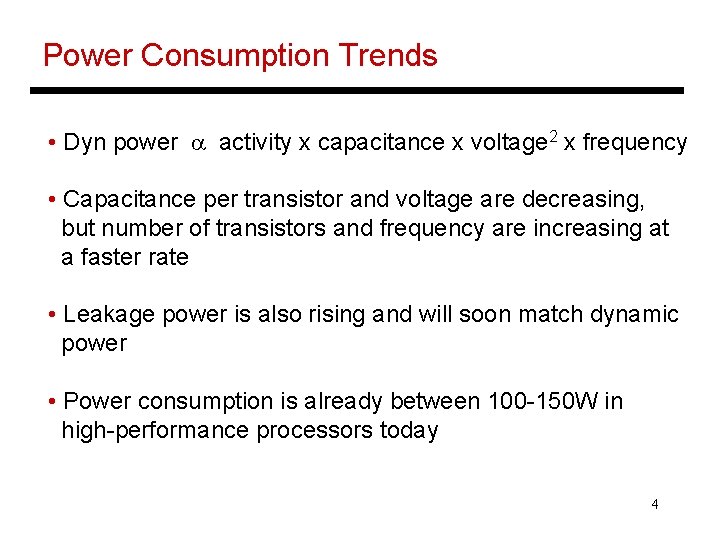
Power Consumption Trends • Dyn power a activity x capacitance x voltage 2 x frequency • Capacitance per transistor and voltage are decreasing, but number of transistors and frequency are increasing at a faster rate • Leakage power is also rising and will soon match dynamic power • Power consumption is already between 100 -150 W in high-performance processors today 4
Notable Points • Complexity-effective design is important: a complex design takes longer to build, verify, and consumes more power • Don’t forget about software cost while evaluating a system’s cost-performance • Similarly, power-performance of a single component is misleading • Can’t use CPI or IPC while comparing different ISAs • Don’t rely on peak performance metrics or on results obtained with synthetic benchmarks 5
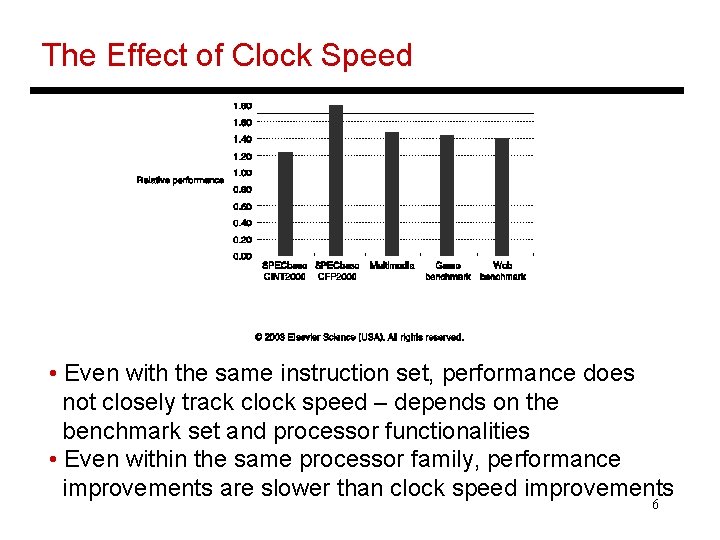
The Effect of Clock Speed • Even with the same instruction set, performance does not closely track clock speed – depends on the benchmark set and processor functionalities • Even within the same processor family, performance improvements are slower than clock speed improvements 6
ISAs for Different Segments • Instruction sets for all three segments are very similar • Desktops: equal emphasis for int and fp, little regard for code size and power • Servers: little need for high floating-point performance • Embedded: emphasis on low cost and power – code size is important, floating-point may be optional • Desktops and embedded also care about multimedia apps -- hence, use special media extension instructions 7
RISC Vs. CISC • Complex Instruction Set Computer: if you do it in hardware, it’s fast hence, implement every functionality in hardware Ø rich instruction set Ø complex decoding Ø complex analysis to identify dependences • Reduced Instruction Set Computer: by using a few simple instruction primitives, the hardware is simpler Ø easy to extract parallelism Ø easy to effect high clock speeds • x 86 is CISC and is popular for compatibility reasons – CISC instrs are converted to RISC instrs in hardware 8
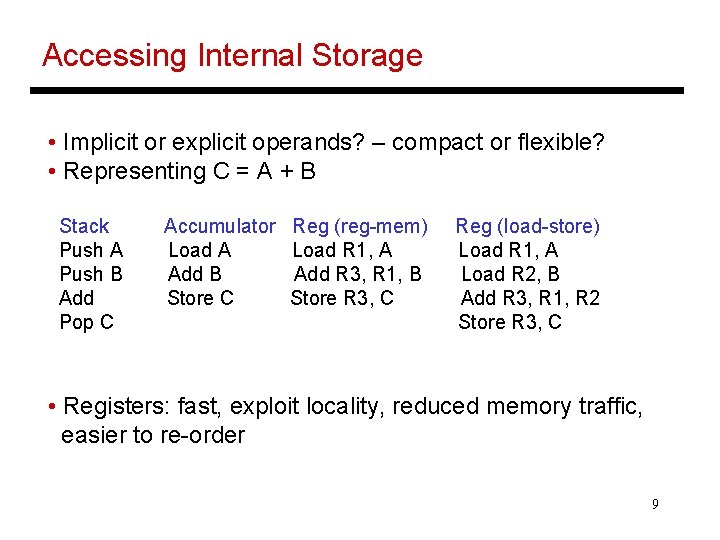
Accessing Internal Storage • Implicit or explicit operands? – compact or flexible? • Representing C = A + B Stack Push A Push B Add Pop C Accumulator Load A Add B Store C Reg (reg-mem) Load R 1, A Add R 3, R 1, B Store R 3, C Reg (load-store) Load R 1, A Load R 2, B Add R 3, R 1, R 2 Store R 3, C • Registers: fast, exploit locality, reduced memory traffic, easier to re-order 9
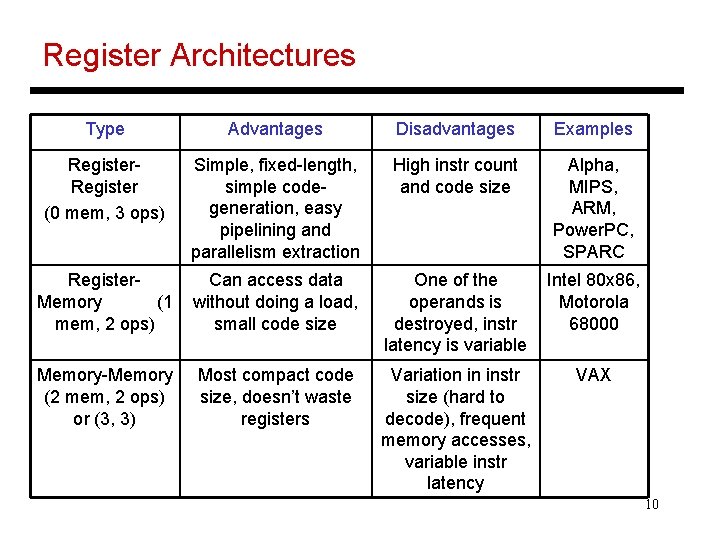
Register Architectures Type Advantages Disadvantages Examples Register (0 mem, 3 ops) Simple, fixed-length, simple codegeneration, easy pipelining and parallelism extraction High instr count and code size Alpha, MIPS, ARM, Power. PC, SPARC Register. Memory (1 mem, 2 ops) Can access data without doing a load, small code size One of the operands is destroyed, instr latency is variable Intel 80 x 86, Motorola 68000 Memory-Memory (2 mem, 2 ops) or (3, 3) Most compact code size, doesn’t waste registers Variation in instr size (hard to decode), frequent memory accesses, variable instr latency VAX 10
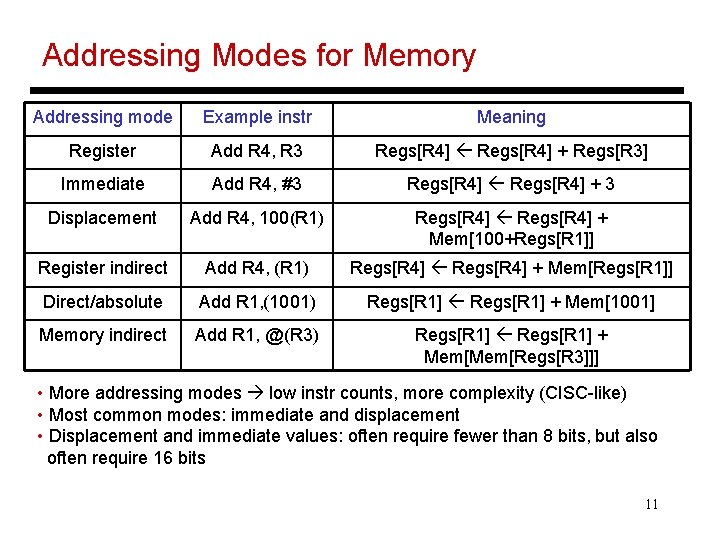
Addressing Modes for Memory Addressing mode Example instr Meaning Register Add R 4, R 3 Regs[R 4] + Regs[R 3] Immediate Add R 4, #3 Regs[R 4] + 3 Displacement Add R 4, 100(R 1) Regs[R 4] + Mem[100+Regs[R 1]] Register indirect Add R 4, (R 1) Regs[R 4] + Mem[Regs[R 1]] Direct/absolute Add R 1, (1001) Regs[R 1] + Mem[1001] Memory indirect Add R 1, @(R 3) Regs[R 1] + Mem[Regs[R 3]]] • More addressing modes low instr counts, more complexity (CISC-like) • Most common modes: immediate and displacement • Displacement and immediate values: often require fewer than 8 bits, but also often require 16 bits 11
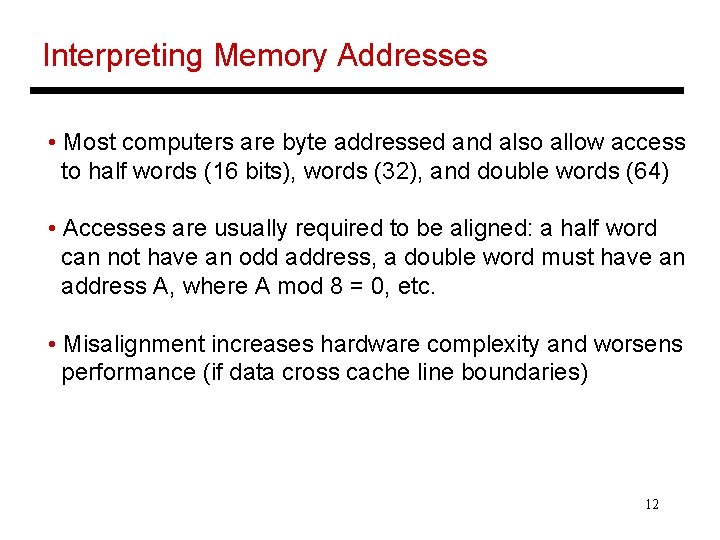
Interpreting Memory Addresses • Most computers are byte addressed and also allow access to half words (16 bits), words (32), and double words (64) • Accesses are usually required to be aligned: a half word can not have an odd address, a double word must have an address A, where A mod 8 = 0, etc. • Misalignment increases hardware complexity and worsens performance (if data cross cache line boundaries) 12
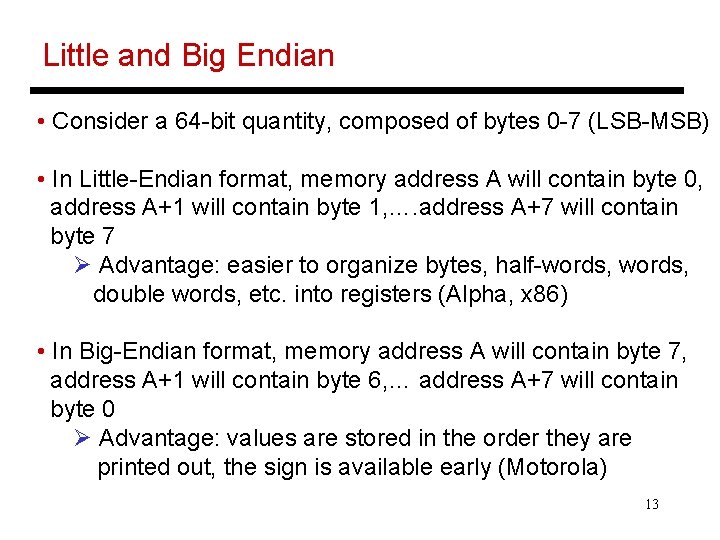
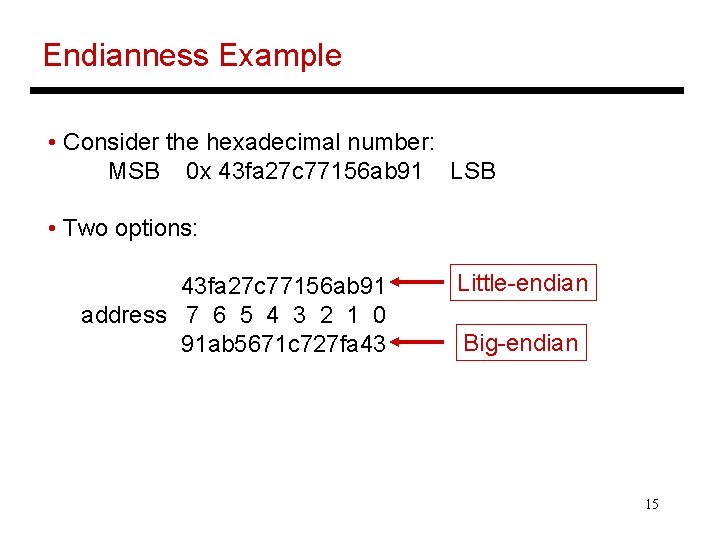
Little and Big Endian • Consider a 64 -bit quantity, composed of bytes 0 -7 (LSB-MSB) • In Little-Endian format, memory address A will contain byte 0, address A+1 will contain byte 1, …. address A+7 will contain byte 7 Ø Advantage: easier to organize bytes, half-words, double words, etc. into registers (Alpha, x 86) • In Big-Endian format, memory address A will contain byte 7, address A+1 will contain byte 6, … address A+7 will contain byte 0 Ø Advantage: values are stored in the order they are printed out, the sign is available early (Motorola) 13
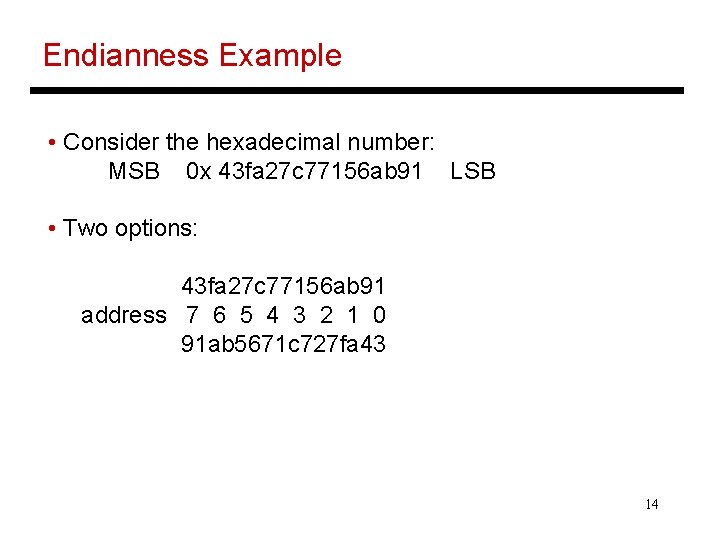
Endianness Example • Consider the hexadecimal number: MSB 0 x 43 fa 27 c 77156 ab 91 LSB • Two options: 43 fa 27 c 77156 ab 91 address 7 6 5 4 3 2 1 0 91 ab 5671 c 727 fa 43 14
Endianness Example • Consider the hexadecimal number: MSB 0 x 43 fa 27 c 77156 ab 91 LSB • Two options: 43 fa 27 c 77156 ab 91 address 7 6 5 4 3 2 1 0 91 ab 5671 c 727 fa 43 Little-endian Big-endian 15
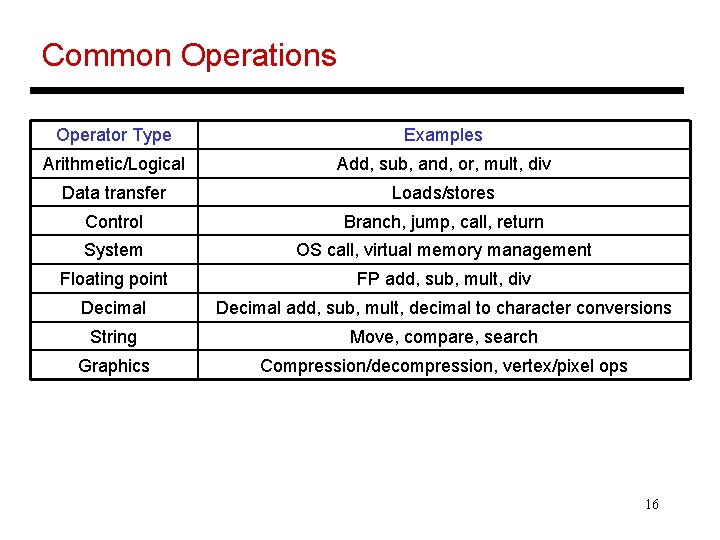
Common Operations Operator Type Examples Arithmetic/Logical Add, sub, and, or, mult, div Data transfer Loads/stores Control Branch, jump, call, return System OS call, virtual memory management Floating point FP add, sub, mult, div Decimal add, sub, mult, decimal to character conversions String Move, compare, search Graphics Compression/decompression, vertex/pixel ops 16
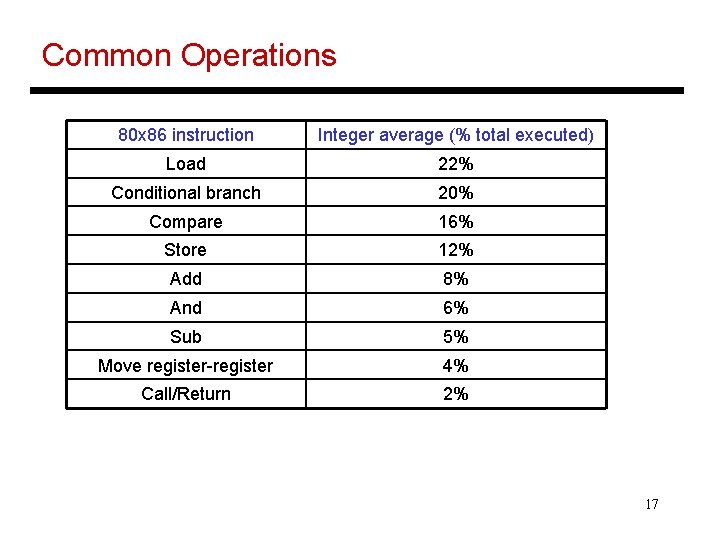
Common Operations 80 x 86 instruction Integer average (% total executed) Load 22% Conditional branch 20% Compare 16% Store 12% Add 8% And 6% Sub 5% Move register-register 4% Call/Return 2% 17
Title • Bullet 18