
Lecture 3 Business Intelligence OLAP Data Warehouse and
Lecture 3: Business Intelligence: OLAP, Data Warehouse, and Column Store 1
Why we still study OLAP/Data Warehouse in Big Data? • Understand the Big Data history – How does the requirement of (big) data analytics/business intelligence evolve over the time? – What are the architecture and implementation techniques being developed? Will they still be useful in Big Data? – Understand their limitation and what factors have changed from 90’s to now? • No. SQL is not only SQL • Hive/Impala aims to provide OLAP/BI for Big Data using Hadoop 2
Highlights • OLAP – Multi-relational Data model – Operators – SQL • Data warehouse (architecture, issues, optimizations) • Join Processing • Column Stores (Optimized for OLAP workload) 3
Let’s get back to the root in 70’s: Relational Database
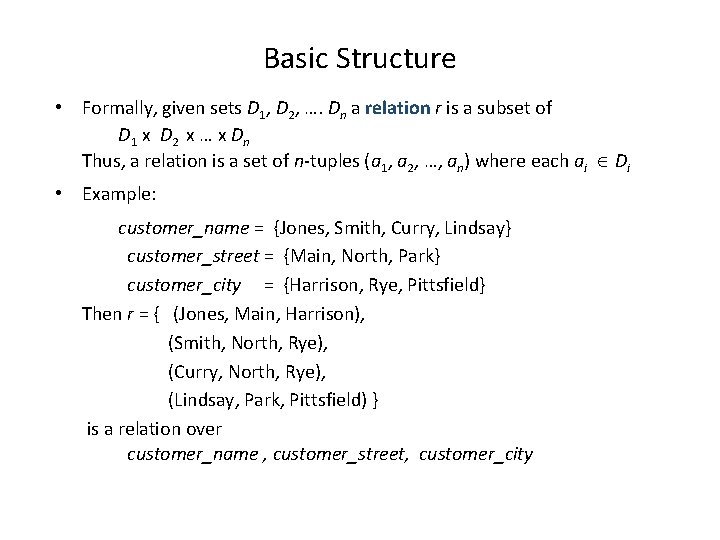
Basic Structure • Formally, given sets D 1, D 2, …. Dn a relation r is a subset of D 1 x D 2 x … x Dn Thus, a relation is a set of n-tuples (a 1, a 2, …, an) where each ai Di • Example: customer_name = {Jones, Smith, Curry, Lindsay} customer_street = {Main, North, Park} customer_city = {Harrison, Rye, Pittsfield} Then r = { (Jones, Main, Harrison), (Smith, North, Rye), (Curry, North, Rye), (Lindsay, Park, Pittsfield) } is a relation over customer_name , customer_street, customer_city
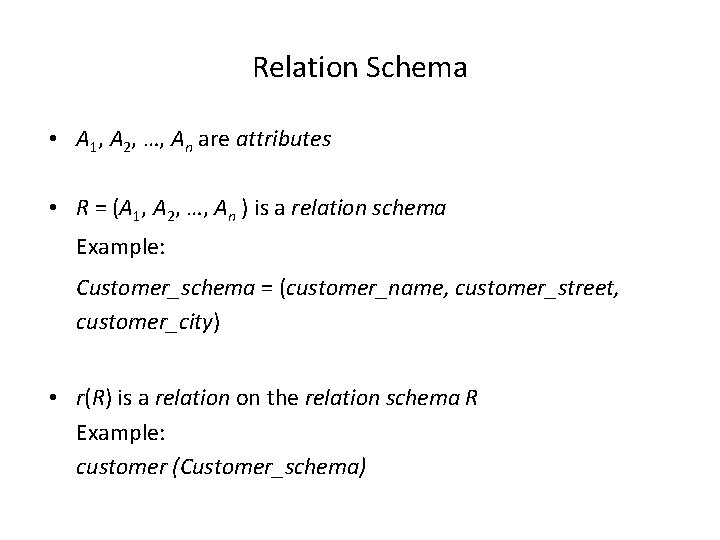
Relation Schema • A 1, A 2, …, An are attributes • R = (A 1, A 2, …, An ) is a relation schema Example: Customer_schema = (customer_name, customer_street, customer_city) • r(R) is a relation on the relation schema R Example: customer (Customer_schema)
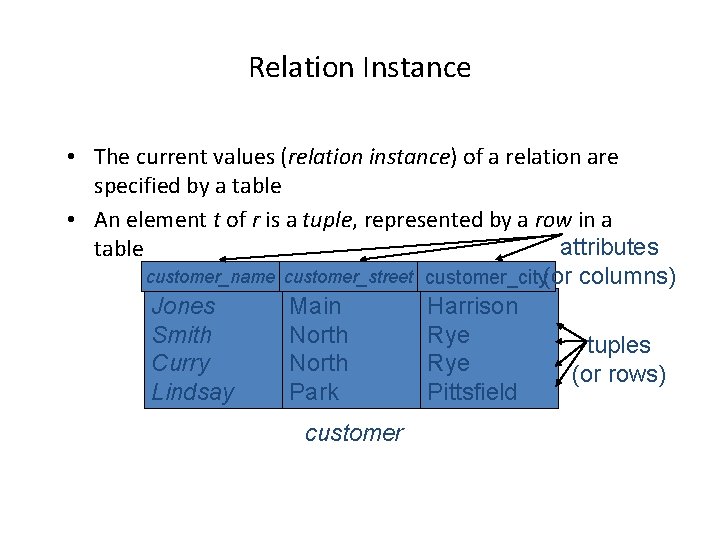
Relation Instance • The current values (relation instance) of a relation are specified by a table • An element t of r is a tuple, represented by a row in a attributes table customer_name customer_street customer_city(or columns) Jones Main Harrison Smith North Rye tuples Curry North Rye (or rows) Lindsay Park Pittsfield customer
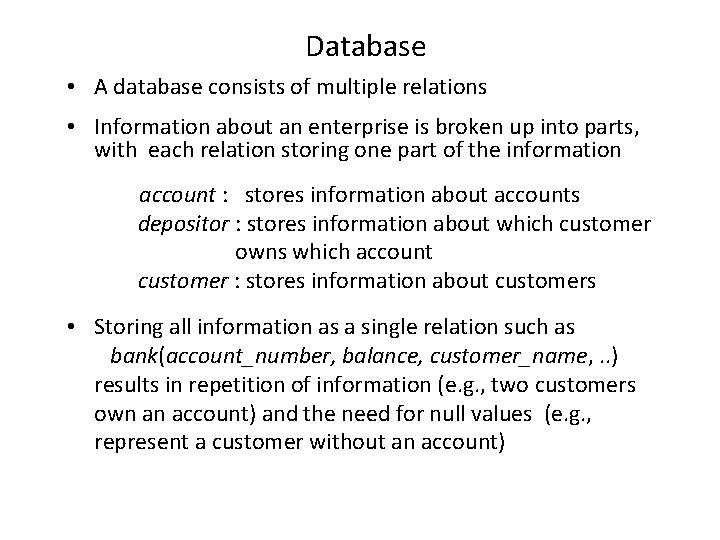
Database • A database consists of multiple relations • Information about an enterprise is broken up into parts, with each relation storing one part of the information account : stores information about accounts depositor : stores information about which customer owns which account customer : stores information about customers • Storing all information as a single relation such as bank(account_number, balance, customer_name, . . ) results in repetition of information (e. g. , two customers own an account) and the need for null values (e. g. , represent a customer without an account)
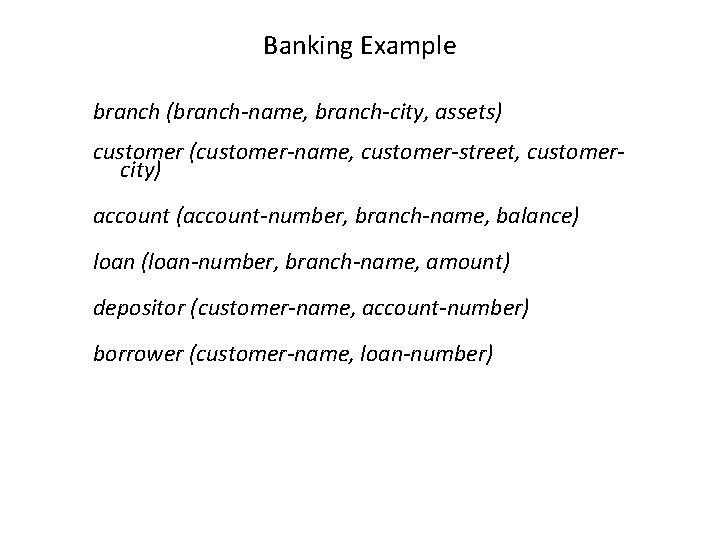
Banking Example branch (branch-name, branch-city, assets) customer (customer-name, customer-street, customercity) account (account-number, branch-name, balance) loan (loan-number, branch-name, amount) depositor (customer-name, account-number) borrower (customer-name, loan-number)
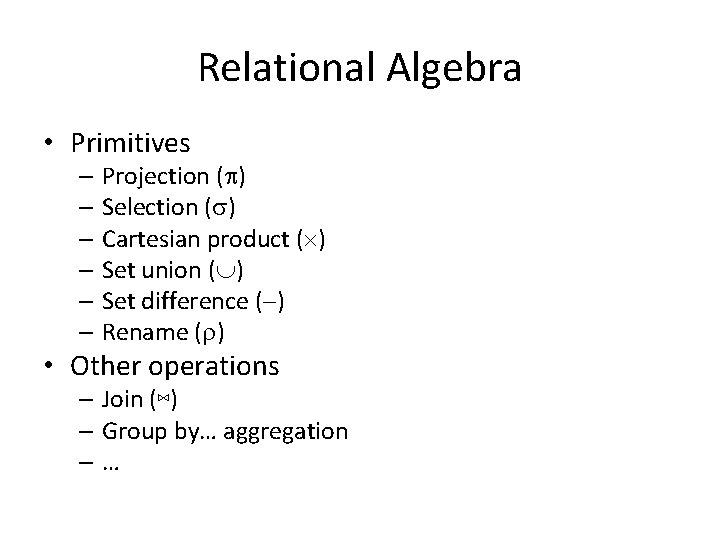
Relational Algebra • Primitives – Projection ( ) – Selection ( ) – Cartesian product ( ) – Set union ( ) – Set difference ( ) – Rename ( ) • Other operations – Join (⋈) – Group by… aggregation –…
What happens next? • SQL • System R (DB 2), INGRES, ORACLE, SQL-Server, Teradata – B+-Tree (select) – Transaction Management – Join algorithm 11
In early 90’s: OLAP & Data Warehouse
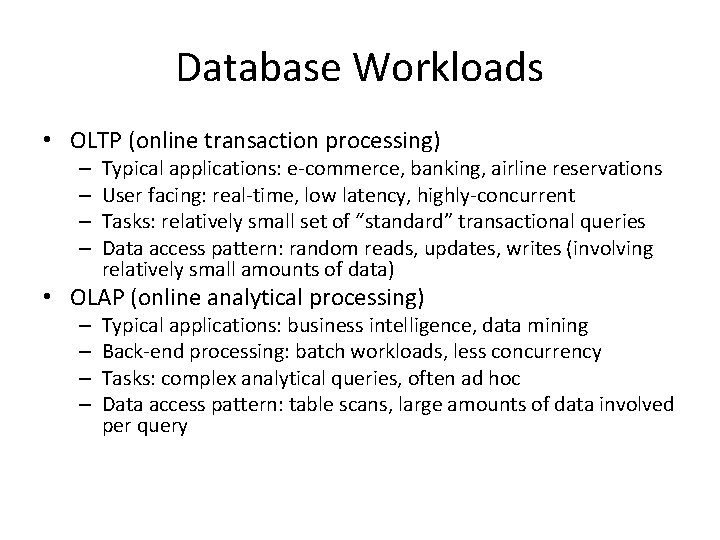
Database Workloads • OLTP (online transaction processing) – – Typical applications: e-commerce, banking, airline reservations User facing: real-time, low latency, highly-concurrent Tasks: relatively small set of “standard” transactional queries Data access pattern: random reads, updates, writes (involving relatively small amounts of data) • OLAP (online analytical processing) – – Typical applications: business intelligence, data mining Back-end processing: batch workloads, less concurrency Tasks: complex analytical queries, often ad hoc Data access pattern: table scans, large amounts of data involved per query
OLTP • Most database operations involve On-Line Transaction Processing (OTLP). – Short, simple, frequent queries and/or modifications, each involving a small number of tuples. – Examples: Answering queries from a Web interface, sales at cash registers, selling airline tickets. 14
OLAP • Of increasing importance are On-Line Application Processing (OLAP) queries. – Few, but complex queries --- may run for hours. – Queries do not depend on having an absolutely up -to-date database. 15
OLAP Examples 1. Amazon analyzes purchases by its customers to come up with an individual screen with products of likely interest to the customer. 2. Analysts at Wal-Mart look for items with increasing sales in some region. 16
One Database or Two? • Downsides of co-existing OLTP and OLAP workloads – Poor memory management – Conflicting data access patterns – Variable latency • Solution: separate databases – User-facing OLTP database for high-volume transactions – Data warehouse for OLAP workloads – How do we connect the two?
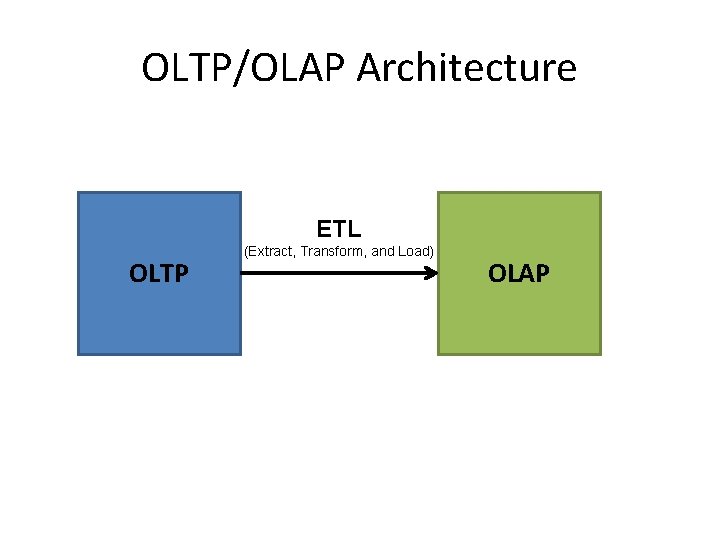
OLTP/OLAP Architecture ETL OLTP (Extract, Transform, and Load) OLAP
OLTP/OLAP Integration • OLTP database for user-facing transactions – Retain records of all activity – Periodic ETL (e. g. , nightly) • Extract-Transform-Load (ETL) – Extract records from source – Transform: clean data, check integrity, aggregate, etc. – Load into OLAP database • OLAP database for data warehousing – Business intelligence: reporting, ad hoc queries, data mining, etc. – Feedback to improve OLTP services
The Data Warehouse • The most common form of data integration. – Copy sources into a single DB (warehouse) and try to keep it up-to-date. – Usual method: periodic reconstruction of the warehouse, perhaps overnight. – Frequently essential for analytic queries. 20
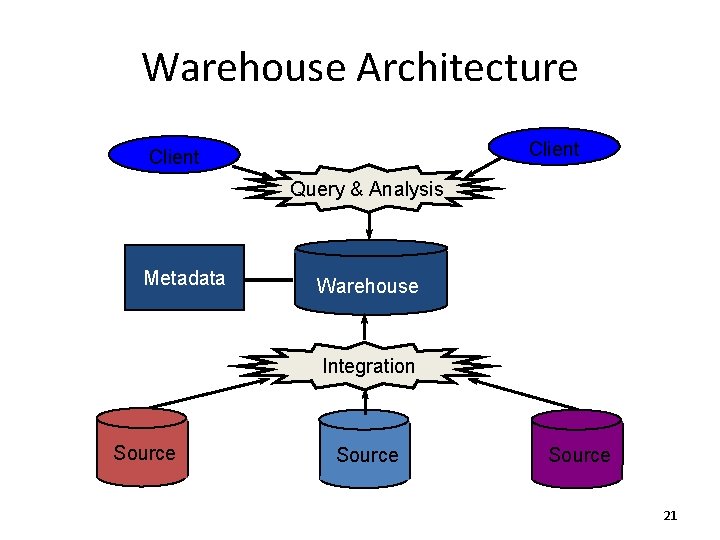
Warehouse Architecture Client Query & Analysis Metadata Warehouse Integration Source 21
Star Schemas • A star schema is a common organization for data at a warehouse. It consists of: 1. Fact table : a very large accumulation of facts such as sales. w Often “insert-only. ” 2. Dimension tables : smaller, generally static information about the entities involved in the facts. 22
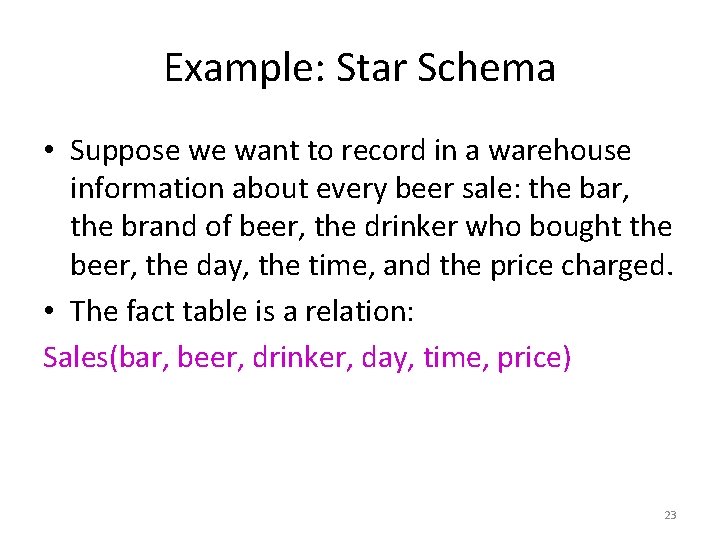
Example: Star Schema • Suppose we want to record in a warehouse information about every beer sale: the bar, the brand of beer, the drinker who bought the beer, the day, the time, and the price charged. • The fact table is a relation: Sales(bar, beer, drinker, day, time, price) 23
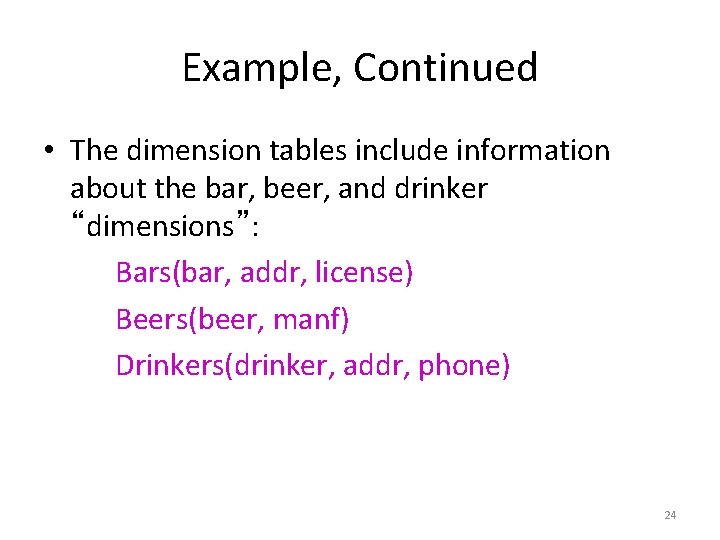
Example, Continued • The dimension tables include information about the bar, beer, and drinker “dimensions”: Bars(bar, addr, license) Beers(beer, manf) Drinkers(drinker, addr, phone) 24
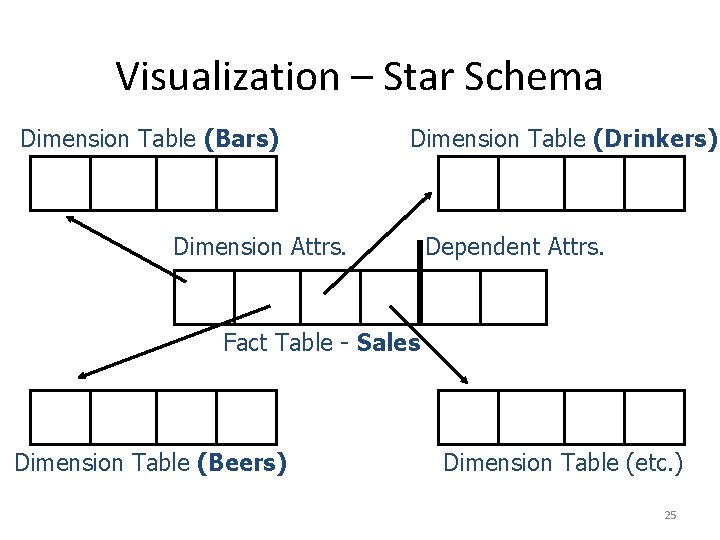
Visualization – Star Schema Dimension Table (Bars) Dimension Table (Drinkers) Dimension Attrs. Dependent Attrs. Fact Table - Sales Dimension Table (Beers) Dimension Table (etc. ) 25
Dimensions and Dependent Attributes • Two classes of fact-table attributes: 1. Dimension attributes : the key of a dimension table. 2. Dependent attributes : a value determined by the dimension attributes of the tuple. 26
Warehouse Models & Operators • Data Models – relations – stars & snowflakes – cubes • Operators – slice & dice – roll-up, drill down – pivoting – other 27
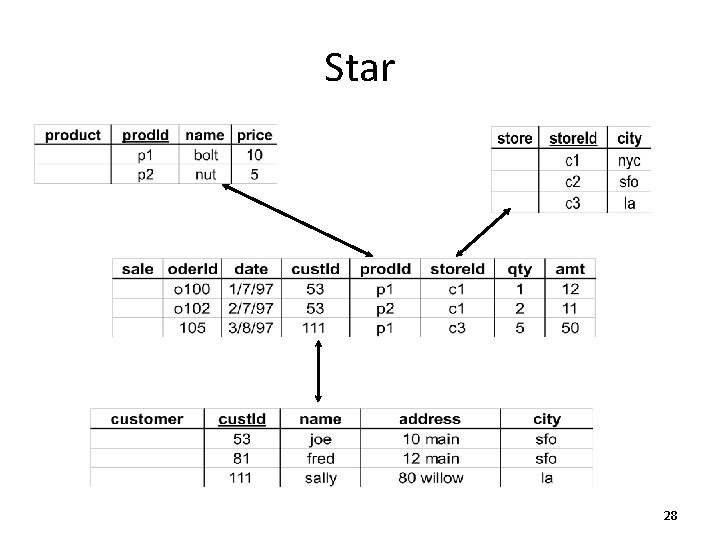
Star 28
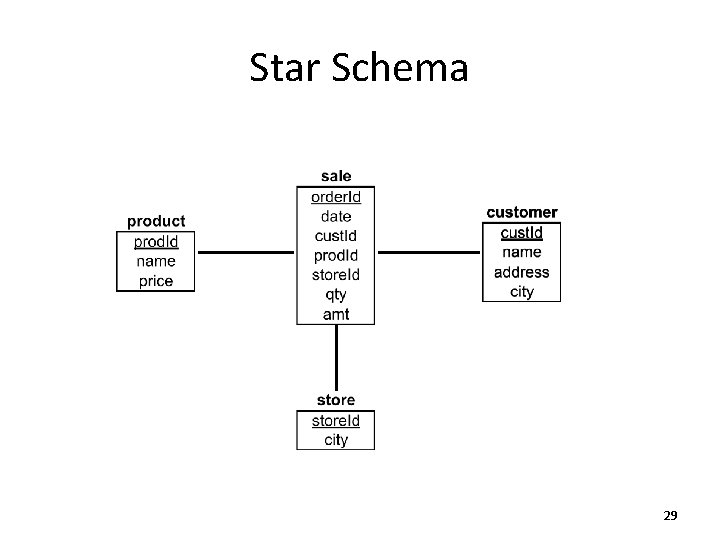
Star Schema 29
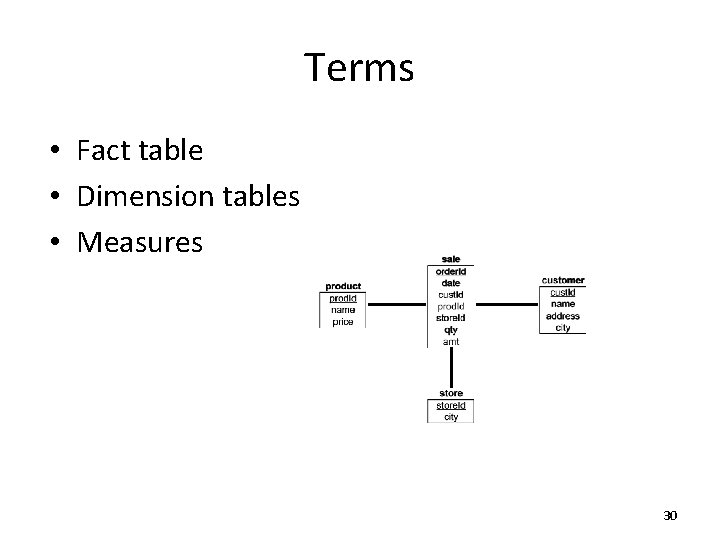
Terms • Fact table • Dimension tables • Measures 30
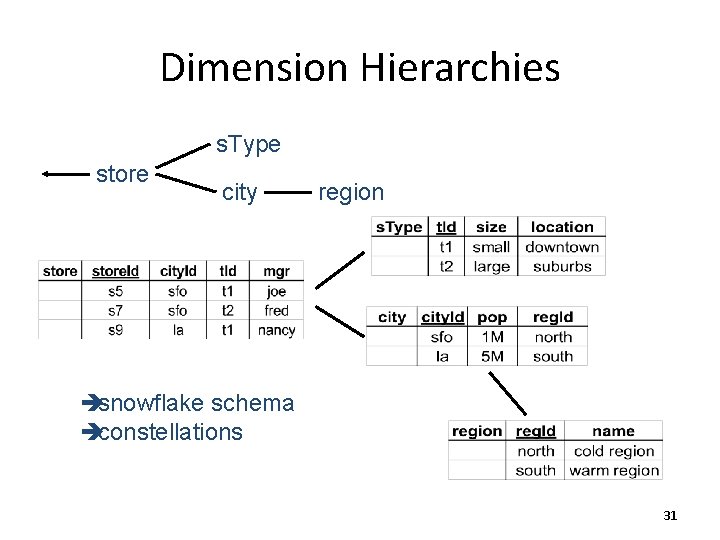
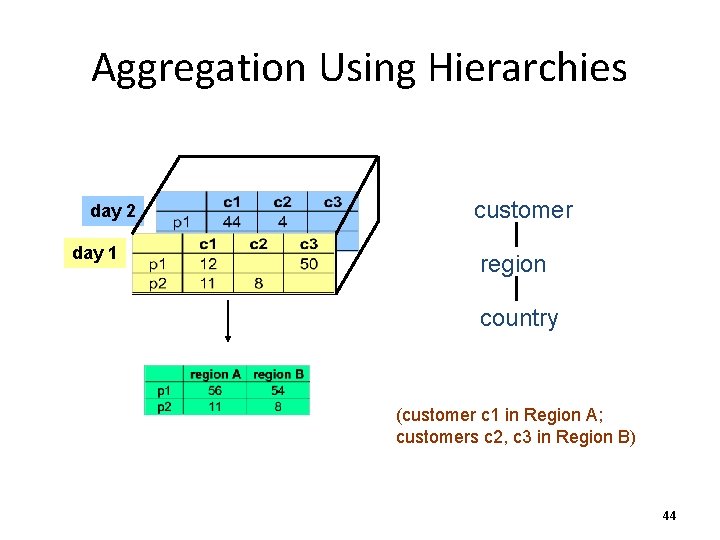
Dimension Hierarchies s. Type store city region èsnowflake schema èconstellations 31
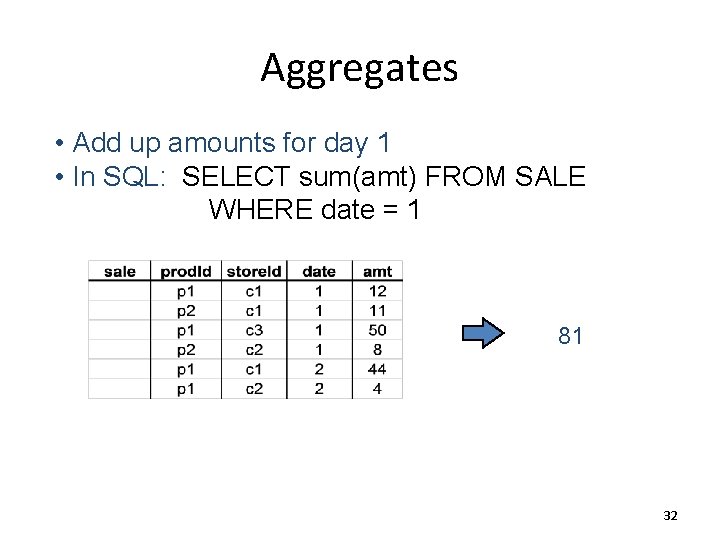
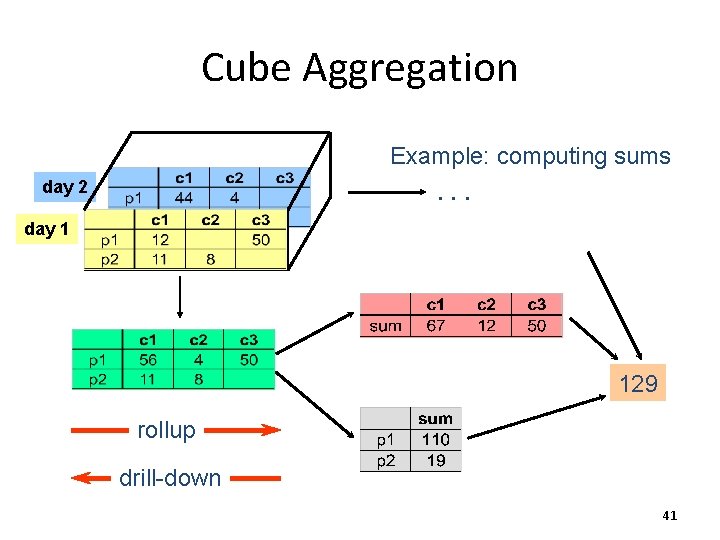
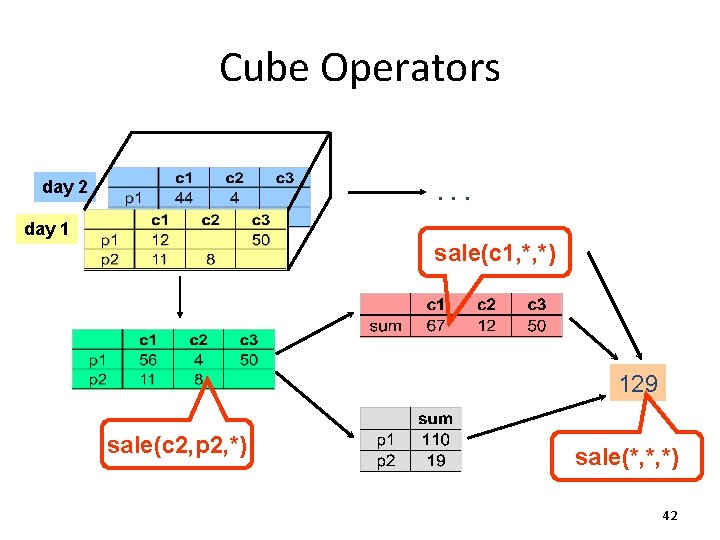
Aggregates • Add up amounts for day 1 • In SQL: SELECT sum(amt) FROM SALE WHERE date = 1 81 32
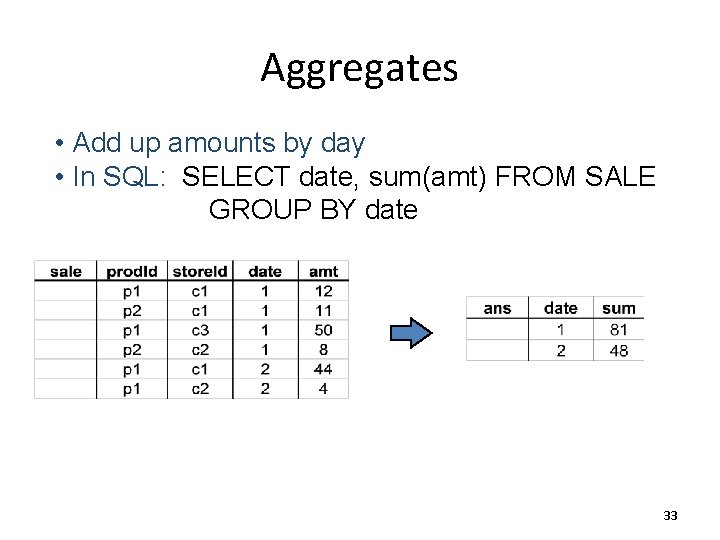
Aggregates • Add up amounts by day • In SQL: SELECT date, sum(amt) FROM SALE GROUP BY date 33
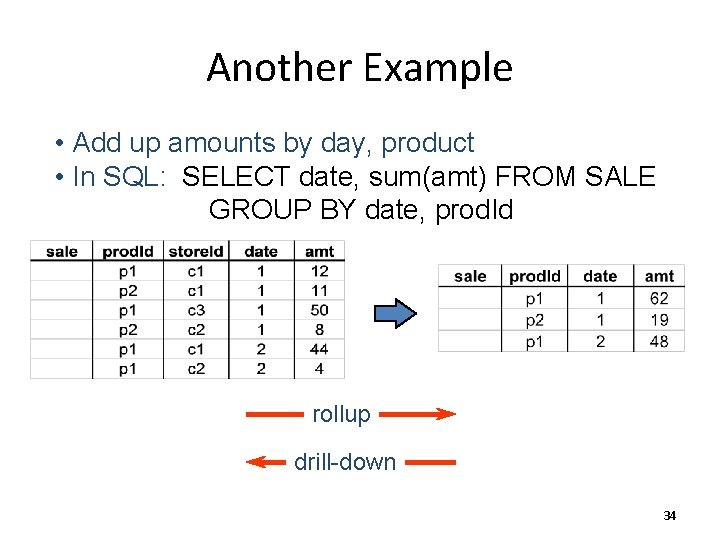
Another Example • Add up amounts by day, product • In SQL: SELECT date, sum(amt) FROM SALE GROUP BY date, prod. Id rollup drill-down 34
ROLAP vs. MOLAP • ROLAP: Relational On-Line Analytical Processing • MOLAP: Multi-Dimensional On-Line Analytical Processing 35
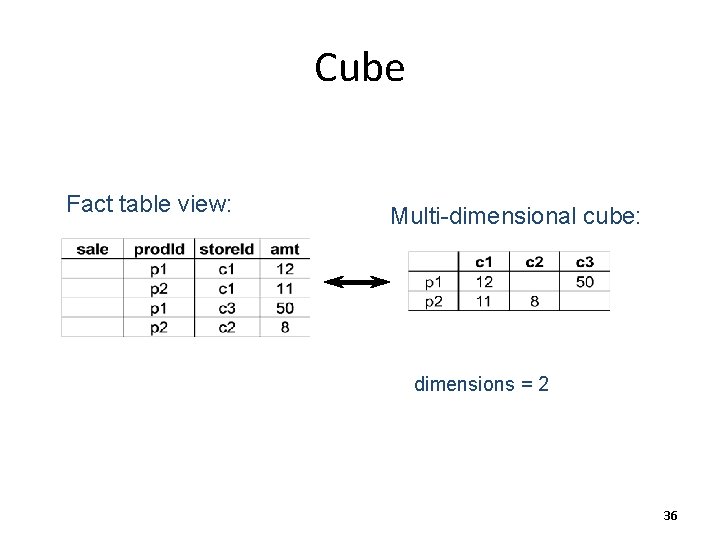
Cube Fact table view: Multi-dimensional cube: dimensions = 2 36
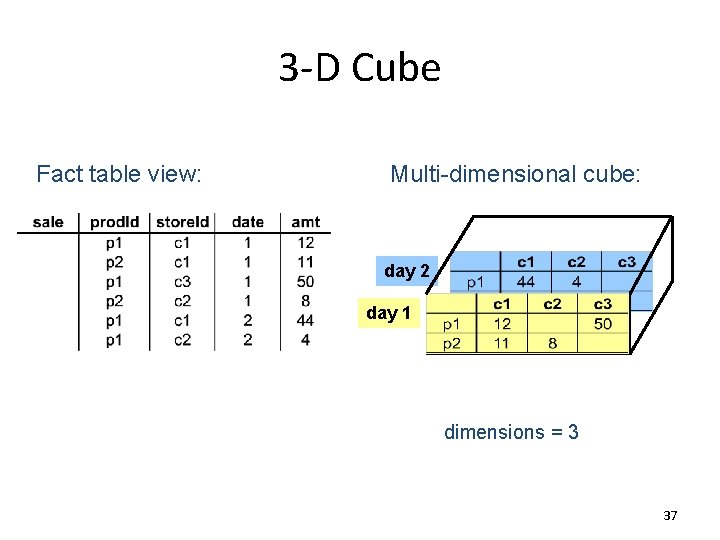
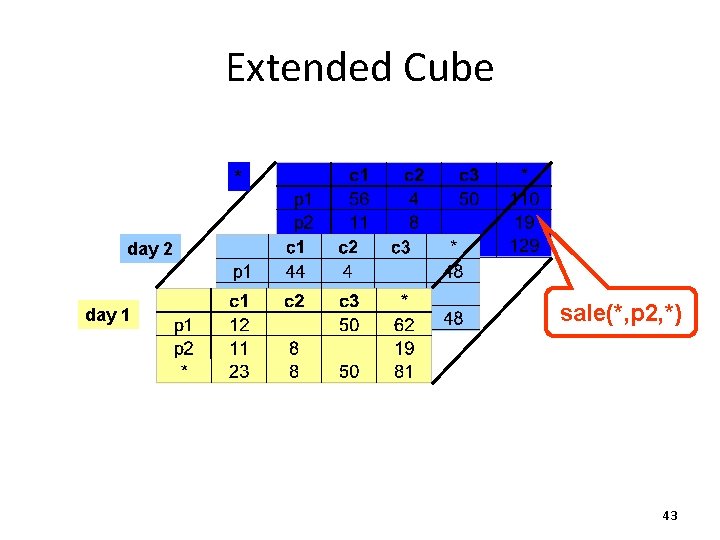
3 -D Cube Fact table view: Multi-dimensional cube: day 2 day 1 dimensions = 3 37
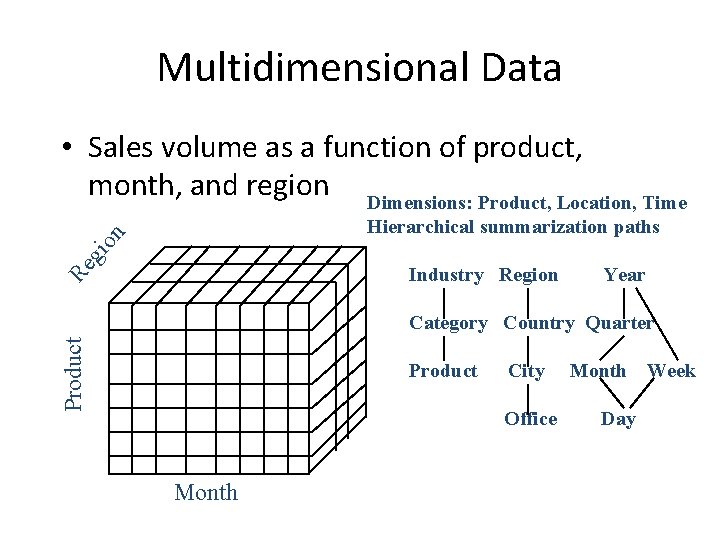
Multidimensional Data • Sales volume as a function of product, month, and region Dimensions: Product, Location, Time gi on Hierarchical summarization paths Re Industry Region Year Product Category Country Quarter Product City Office Month Day Week
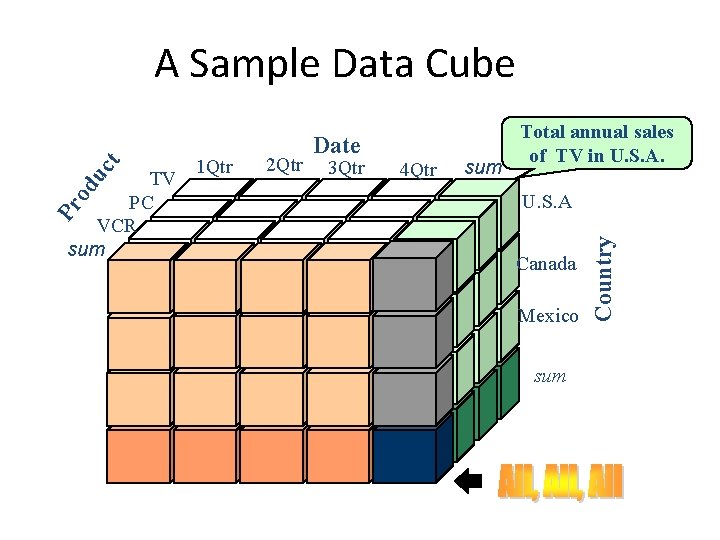
Pr od TV PC VCR sum 1 Qtr 2 Qtr Date 3 Qtr 4 Qtr sum Total annual sales of TV in U. S. A Canada Mexico sum Country uc t A Sample Data Cube
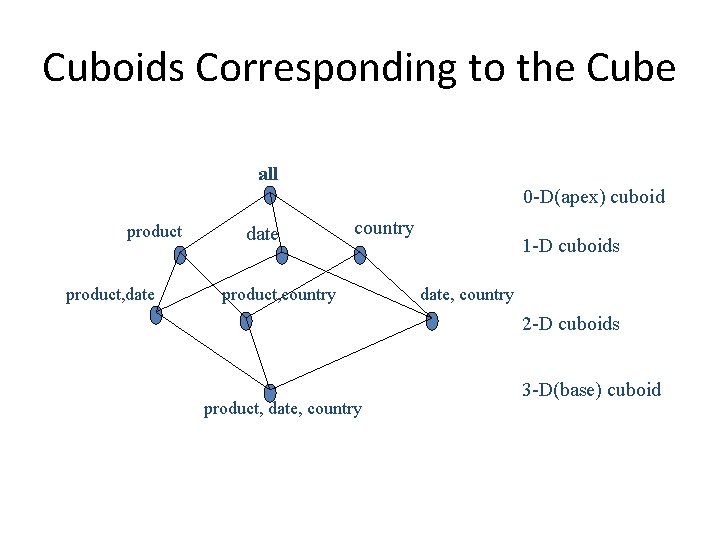
Cuboids Corresponding to the Cube all 0 -D(apex) cuboid product, date country product, country 1 -D cuboids date, country 2 -D cuboids product, date, country 3 -D(base) cuboid
Cube Aggregation Example: computing sums. . . day 2 day 1 129 rollup drill-down 41
Cube Operators day 2 . . . day 1 sale(c 1, *, *) 129 sale(c 2, p 2, *) sale(*, *, *) 42
Extended Cube * day 2 day 1 sale(*, p 2, *) 43
Aggregation Using Hierarchies day 2 day 1 customer region country (customer c 1 in Region A; customers c 2, c 3 in Region B) 44
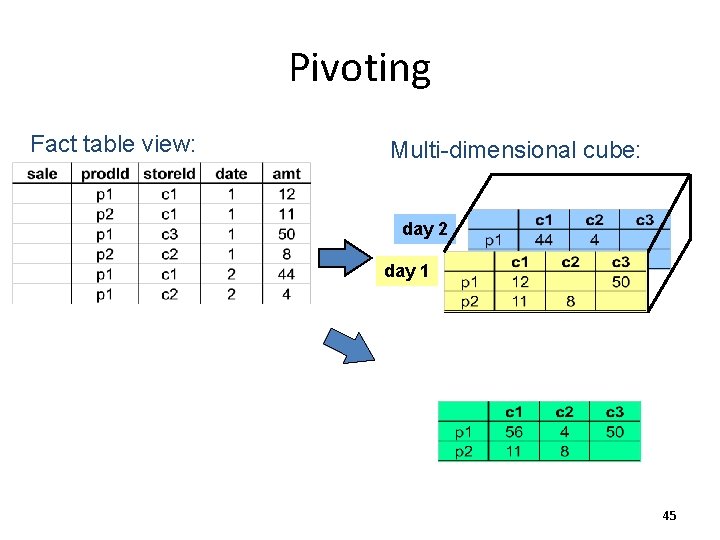
Pivoting Fact table view: Multi-dimensional cube: day 2 day 1 45
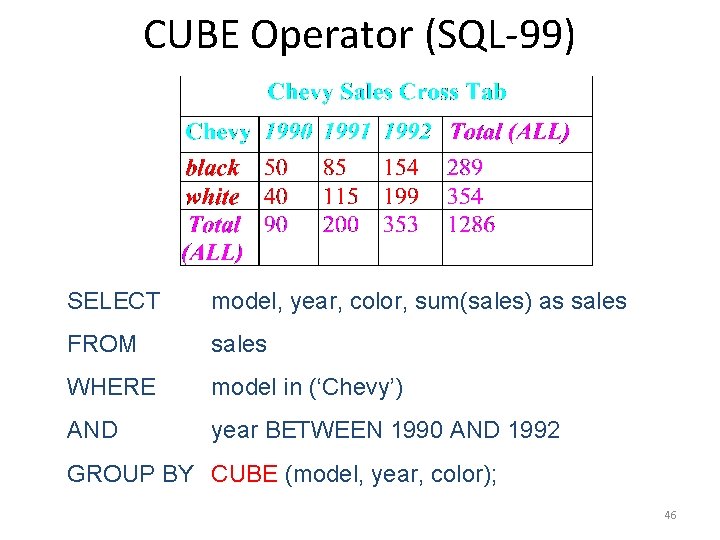
CUBE Operator (SQL-99) SELECT model, year, color, sum(sales) as sales FROM sales WHERE model in (‘Chevy’) AND year BETWEEN 1990 AND 1992 GROUP BY CUBE (model, year, color); 46
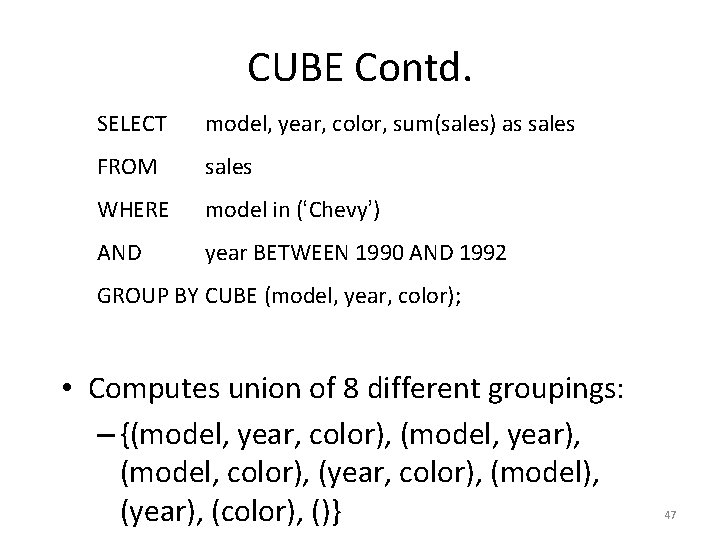
CUBE Contd. SELECT model, year, color, sum(sales) as sales FROM sales WHERE model in (‘Chevy’) AND year BETWEEN 1990 AND 1992 GROUP BY CUBE (model, year, color); • Computes union of 8 different groupings: – {(model, year, color), (model, year), (model, color), (year, color), (model), (year), (color), ()} 47
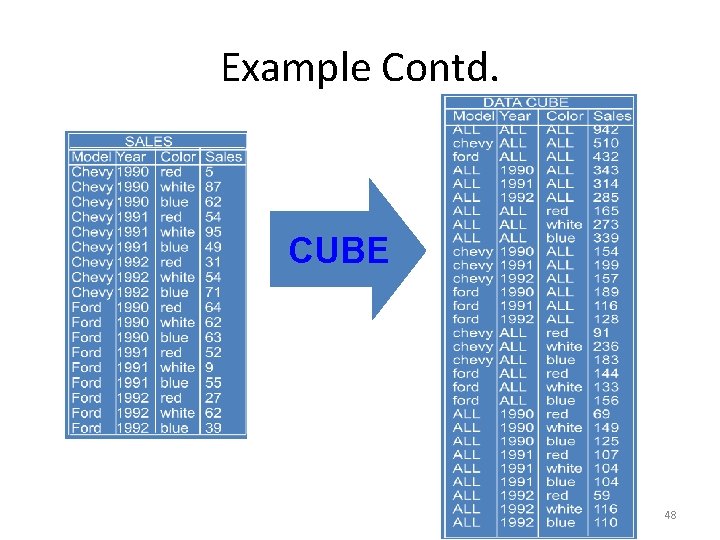
Example Contd. CUBE 48
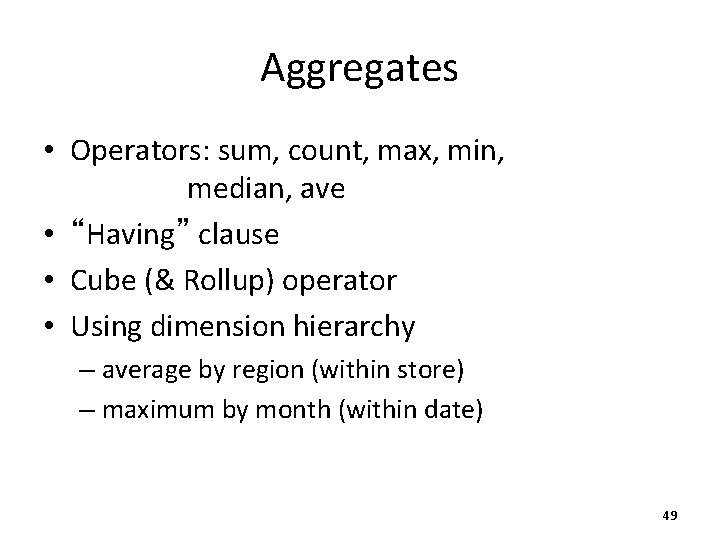
Aggregates • Operators: sum, count, max, min, median, ave • “Having” clause • Cube (& Rollup) operator • Using dimension hierarchy – average by region (within store) – maximum by month (within date) 49
Query & Analysis Tools • • • Query Building Report Writers (comparisons, growth, graphs, …) Spreadsheet Systems Web Interfaces Data Mining 50
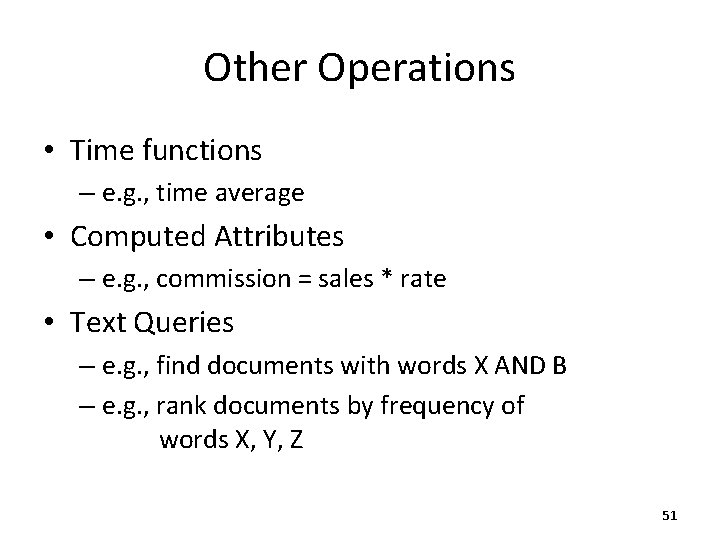
Other Operations • Time functions – e. g. , time average • Computed Attributes – e. g. , commission = sales * rate • Text Queries – e. g. , find documents with words X AND B – e. g. , rank documents by frequency of words X, Y, Z 51
Data Warehouse Implementation
Implementing a Warehouse • • Monitoring: Sending data from sources Integrating: Loading, cleansing, . . . Processing: Query processing, indexing, . . . Managing: Metadata, Design, . . . 53
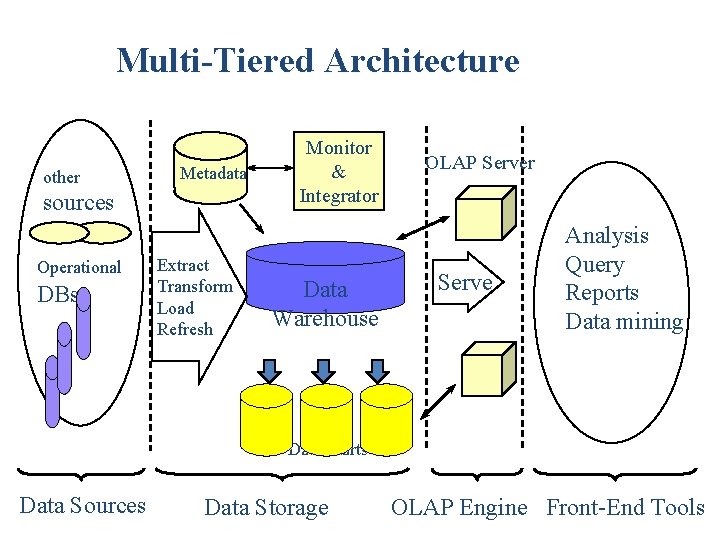
Multi-Tiered Architecture other Metadata sources Operational DBs Extract Transform Load Refresh Monitor & Integrator Data Warehouse OLAP Server Serve Analysis Query Reports Data mining Data Marts Data Sources Data Storage OLAP Engine Front-End Tools
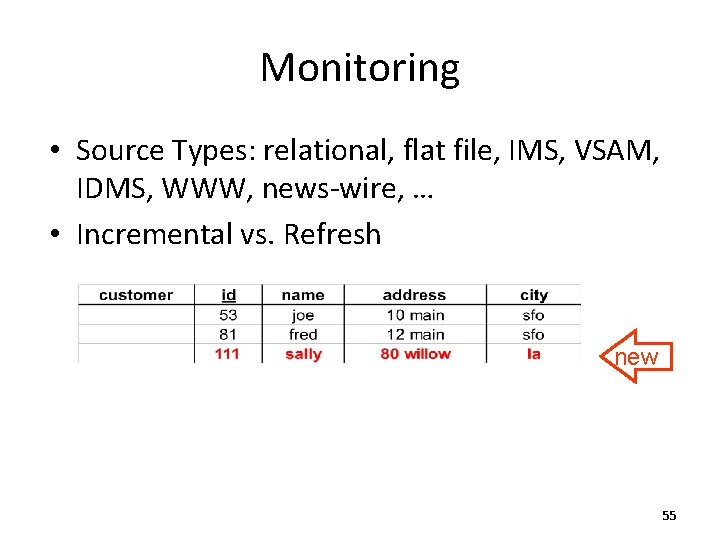
Monitoring • Source Types: relational, flat file, IMS, VSAM, IDMS, WWW, news-wire, … • Incremental vs. Refresh new 55
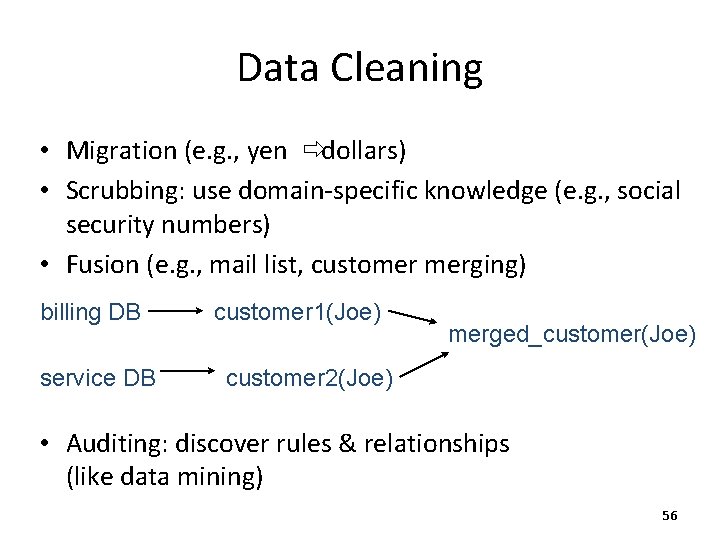
Data Cleaning • Migration (e. g. , yen ðdollars) • Scrubbing: use domain-specific knowledge (e. g. , social security numbers) • Fusion (e. g. , mail list, customer merging) billing DB service DB customer 1(Joe) merged_customer(Joe) customer 2(Joe) • Auditing: discover rules & relationships (like data mining) 56
Loading Data • Incremental vs. refresh • Off-line vs. on-line • Frequency of loading – At night, 1 x a week/month, continuously • Parallel/Partitioned load 57
OLAP Implementation
Derived Data • Derived Warehouse Data – indexes – aggregates – materialized views (next slide) • When to update derived data? • Incremental vs. refresh 59
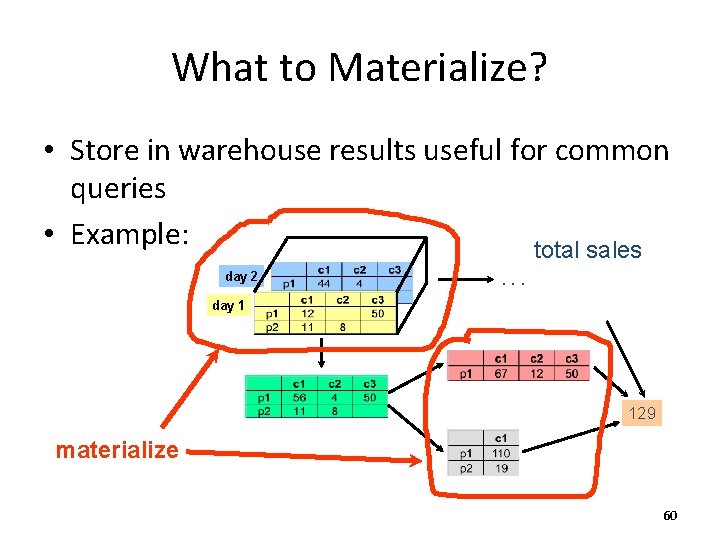
What to Materialize? • Store in warehouse results useful for common queries • Example: total sales day 2 . . . day 1 129 materialize 60
Materialization Factors • • Type/frequency of queries Query response time Storage cost Update cost 61
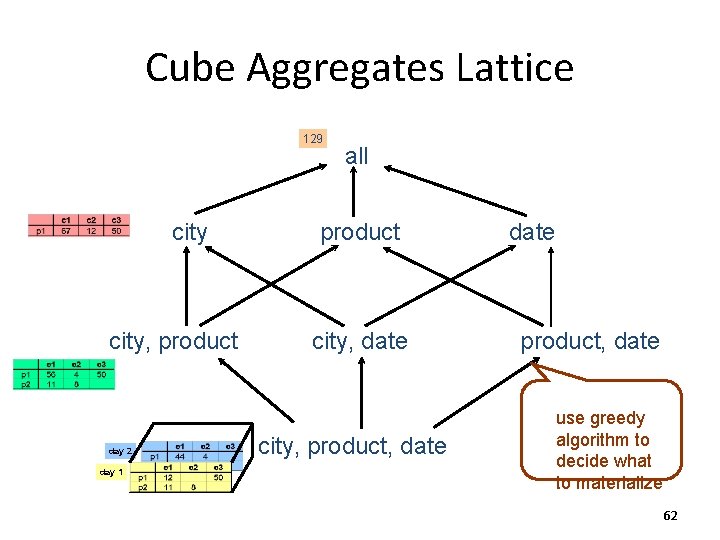
Cube Aggregates Lattice 129 city, product day 2 day 1 all product city, date city, product, date use greedy algorithm to decide what to materialize 62
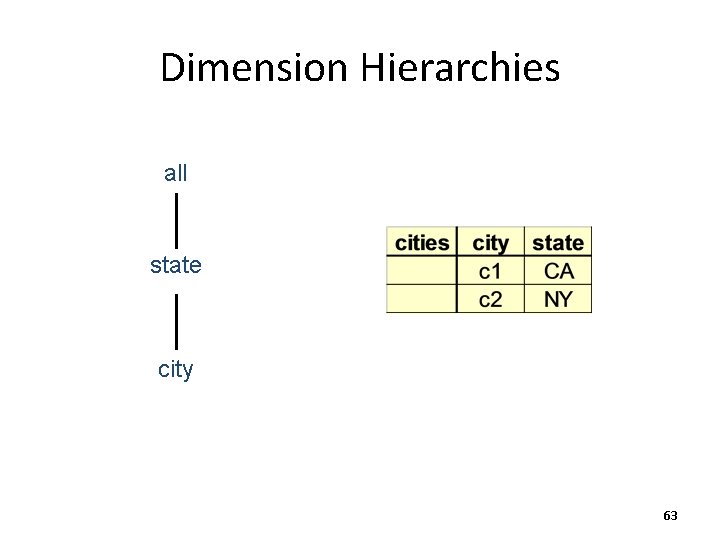
Dimension Hierarchies all state city 63
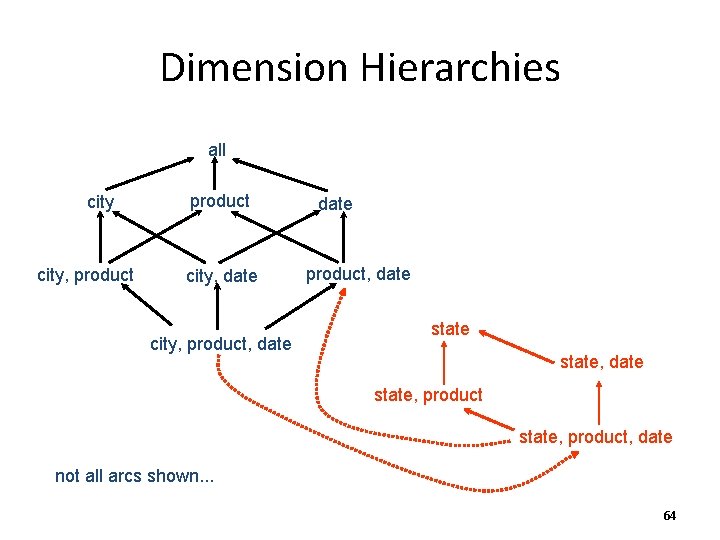
Dimension Hierarchies all city, product city, date city, product, date state, date state, product, date not all arcs shown. . . 64
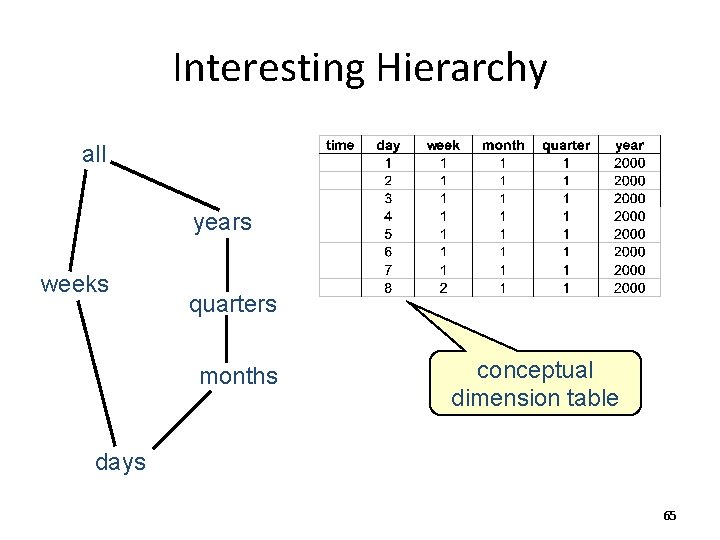
Interesting Hierarchy all years weeks quarters months conceptual dimension table days 65
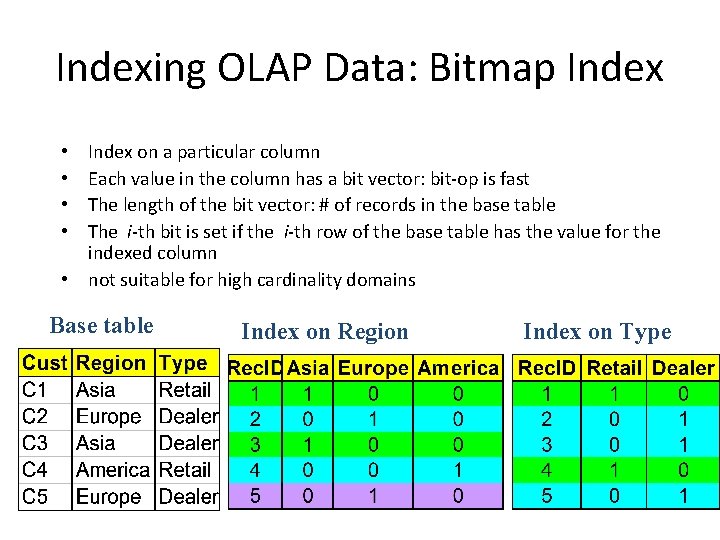
Indexing OLAP Data: Bitmap Index on a particular column Each value in the column has a bit vector: bit-op is fast The length of the bit vector: # of records in the base table The i-th bit is set if the i-th row of the base table has the value for the indexed column • not suitable for high cardinality domains • • Base table Index on Region Index on Type

Join Processing
Join • How does DBMS join two tables? • Sorting is one way. . . • Database must choose best way for each query
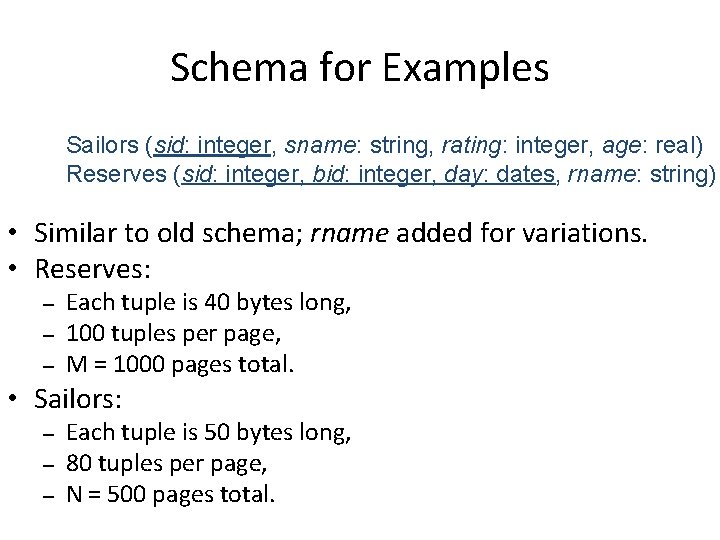
Schema for Examples Sailors (sid: integer, sname: string, rating: integer, age: real) Reserves (sid: integer, bid: integer, day: dates, rname: string) • Similar to old schema; rname added for variations. • Reserves: – – – Each tuple is 40 bytes long, 100 tuples per page, M = 1000 pages total. • Sailors: – – – Each tuple is 50 bytes long, 80 tuples per page, N = 500 pages total.
Equality Joins With One Join Column SELECT FROM WHERE * Reserves R 1, Sailors S 1 R 1. sid=S 1. sid • In algebra: R S. Common! Must be carefully optimized. R S is large; so, R S followed by a selection is inefficient. • Assume: M tuples in R, p. R tuples per page, N tuples in S, p. S tuples per page. – In our examples, R is Reserves and S is Sailors. • We will consider more complex join conditions later. • Cost metric: # of I/Os. We will ignore output costs.
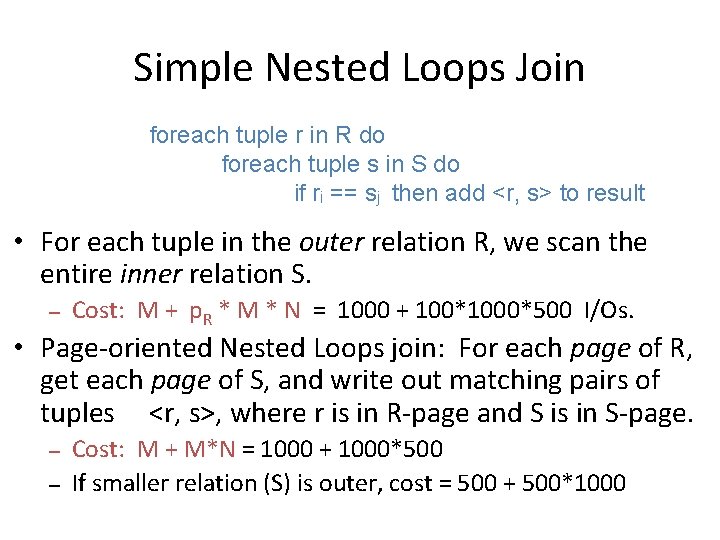
Simple Nested Loops Join foreach tuple r in R do foreach tuple s in S do if ri == sj then add <r, s> to result • For each tuple in the outer relation R, we scan the entire inner relation S. – Cost: M + p. R * M * N = 1000 + 100*1000*500 I/Os. • Page-oriented Nested Loops join: For each page of R, get each page of S, and write out matching pairs of tuples <r, s>, where r is in R-page and S is in S-page. – – Cost: M + M*N = 1000 + 1000*500 If smaller relation (S) is outer, cost = 500 + 500*1000
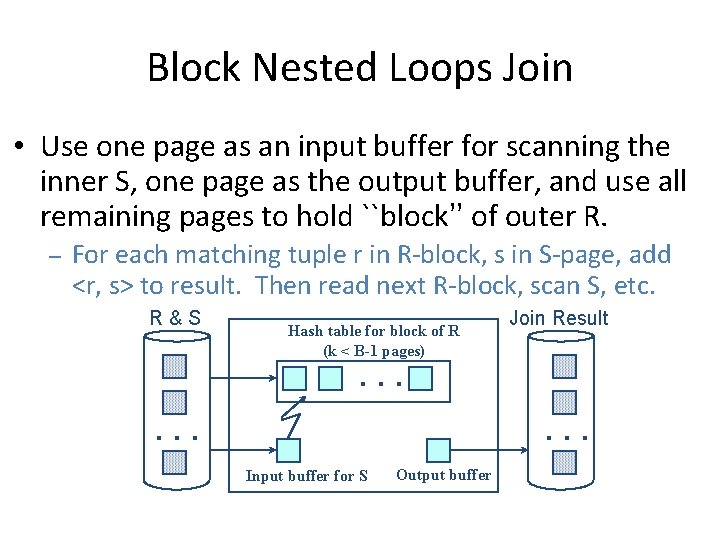
Block Nested Loops Join • Use one page as an input buffer for scanning the inner S, one page as the output buffer, and use all remaining pages to hold ``block’’ of outer R. – For each matching tuple r in R-block, s in S-page, add <r, s> to result. Then read next R-block, scan S, etc. R&S Hash table for block of R (k < B-1 pages) Join Result . . Input buffer for S Output buffer
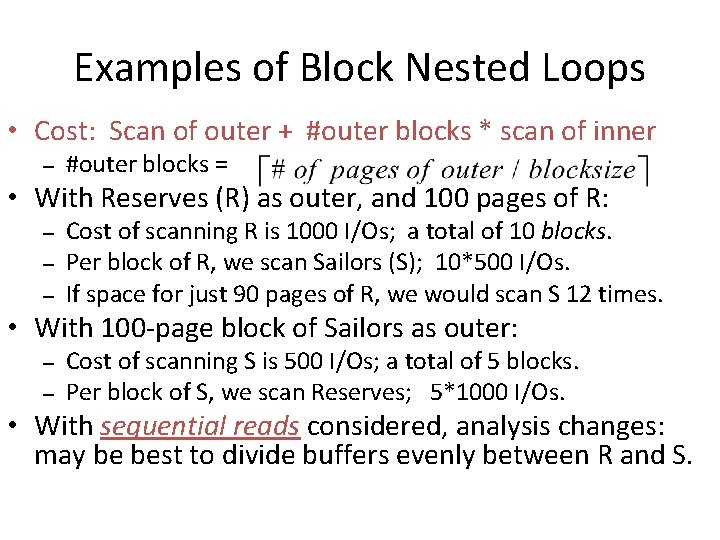
Examples of Block Nested Loops • Cost: Scan of outer + #outer blocks * scan of inner – #outer blocks = • With Reserves (R) as outer, and 100 pages of R: – – – Cost of scanning R is 1000 I/Os; a total of 10 blocks. Per block of R, we scan Sailors (S); 10*500 I/Os. If space for just 90 pages of R, we would scan S 12 times. • With 100 -page block of Sailors as outer: – – Cost of scanning S is 500 I/Os; a total of 5 blocks. Per block of S, we scan Reserves; 5*1000 I/Os. • With sequential reads considered, analysis changes: may be best to divide buffers evenly between R and S.
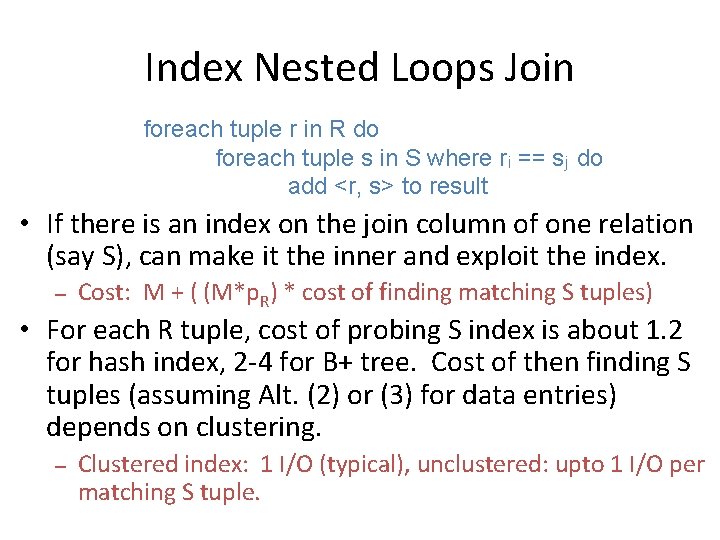
Index Nested Loops Join foreach tuple r in R do foreach tuple s in S where ri == sj do add <r, s> to result • If there is an index on the join column of one relation (say S), can make it the inner and exploit the index. – Cost: M + ( (M*p. R) * cost of finding matching S tuples) • For each R tuple, cost of probing S index is about 1. 2 for hash index, 2 -4 for B+ tree. Cost of then finding S tuples (assuming Alt. (2) or (3) for data entries) depends on clustering. – Clustered index: 1 I/O (typical), unclustered: upto 1 I/O per matching S tuple.
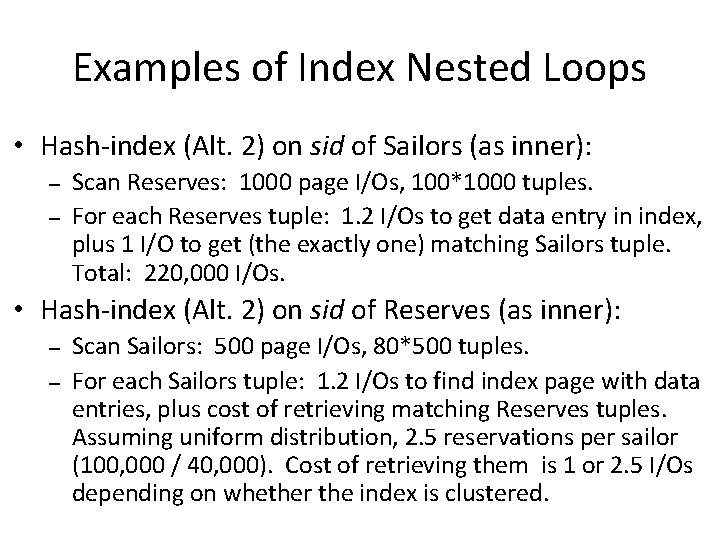
Examples of Index Nested Loops • Hash-index (Alt. 2) on sid of Sailors (as inner): – – Scan Reserves: 1000 page I/Os, 100*1000 tuples. For each Reserves tuple: 1. 2 I/Os to get data entry in index, plus 1 I/O to get (the exactly one) matching Sailors tuple. Total: 220, 000 I/Os. • Hash-index (Alt. 2) on sid of Reserves (as inner): – – Scan Sailors: 500 page I/Os, 80*500 tuples. For each Sailors tuple: 1. 2 I/Os to find index page with data entries, plus cost of retrieving matching Reserves tuples. Assuming uniform distribution, 2. 5 reservations per sailor (100, 000 / 40, 000). Cost of retrieving them is 1 or 2. 5 I/Os depending on whether the index is clustered.
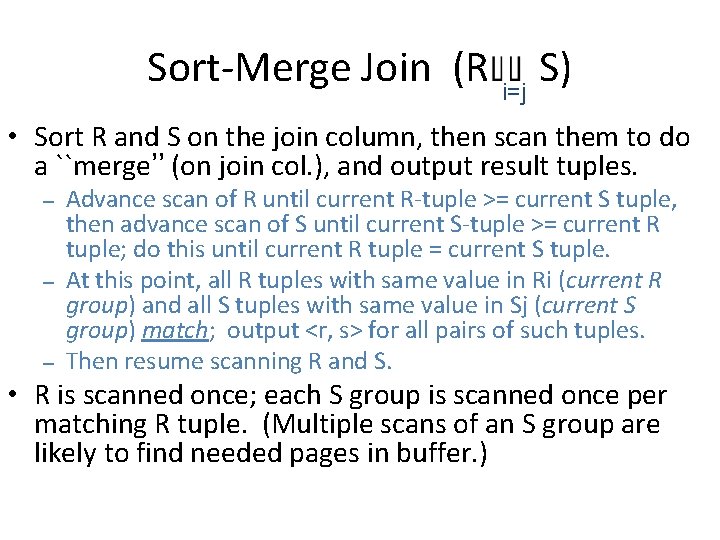
Sort-Merge Join (R i=j S) • Sort R and S on the join column, then scan them to do a ``merge’’ (on join col. ), and output result tuples. – – – Advance scan of R until current R-tuple >= current S tuple, then advance scan of S until current S-tuple >= current R tuple; do this until current R tuple = current S tuple. At this point, all R tuples with same value in Ri (current R group) and all S tuples with same value in Sj (current S group) match; output <r, s> for all pairs of such tuples. Then resume scanning R and S. • R is scanned once; each S group is scanned once per matching R tuple. (Multiple scans of an S group are likely to find needed pages in buffer. )
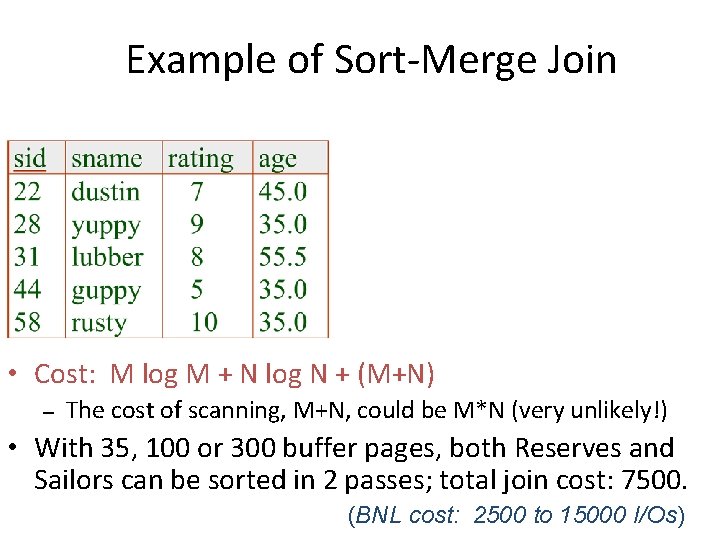
Example of Sort-Merge Join • Cost: M log M + N log N + (M+N) – The cost of scanning, M+N, could be M*N (very unlikely!) • With 35, 100 or 300 buffer pages, both Reserves and Sailors can be sorted in 2 passes; total join cost: 7500. (BNL cost: 2500 to 15000 I/Os)
Refinement of Sort-Merge Join • We can combine the merging phases in the sorting of R and S with the merging required for the join. – – With B > , where L is the size of the larger relation, using the sorting refinement that produces runs of length 2 B in Pass 0, #runs of each relation is < B/2. Allocate 1 page per run of each relation, and `merge’ while checking the join condition. Cost: read+write each relation in Pass 0 + read each relation in (only) merging pass (+ writing of result tuples). In example, cost goes down from 7500 to 4500 I/Os. • In practice, cost of sort-merge join, like the cost of external sorting, is linear.
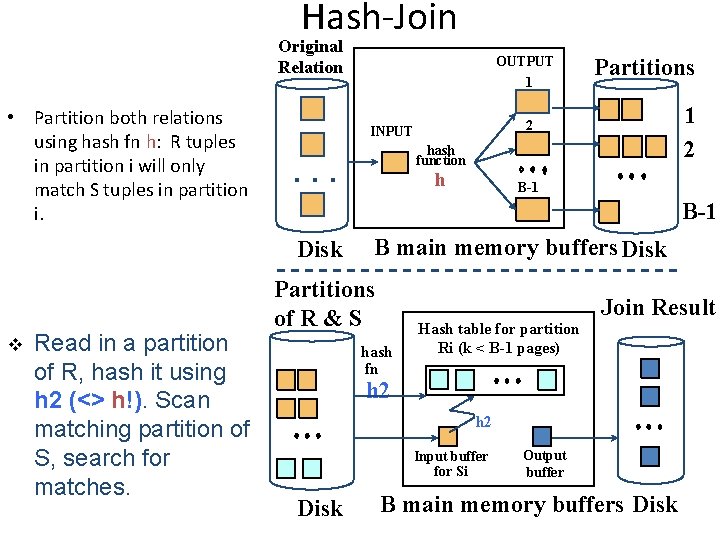
Hash-Join Original Relation • Partition both relations using hash fn h: R tuples in partition i will only match S tuples in partition i. Read in a partition of R, hash it using h 2 (<> h!). Scan matching partition of S, search for matches. Partitions 1 2 2 INPUT hash function . . . h B-1 Disk v OUTPUT 1 B main memory buffers Disk Partitions of R & S hash fn Hash table for partition Ri (k < B-1 pages) Join Result h 2 Input buffer for Si Disk Output buffer B main memory buffers Disk
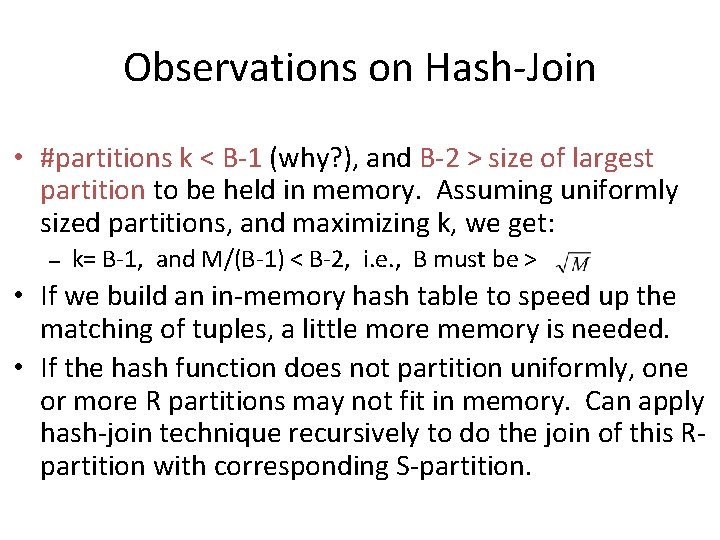
Observations on Hash-Join • #partitions k < B-1 (why? ), and B-2 > size of largest partition to be held in memory. Assuming uniformly sized partitions, and maximizing k, we get: – k= B-1, and M/(B-1) < B-2, i. e. , B must be > • If we build an in-memory hash table to speed up the matching of tuples, a little more memory is needed. • If the hash function does not partition uniformly, one or more R partitions may not fit in memory. Can apply hash-join technique recursively to do the join of this Rpartition with corresponding S-partition.
Cost of Hash-Join • In partitioning phase, read+write both relns; 2(M+N). In matching phase, read both relns; M+N I/Os. • In our running example, this is a total of 4500 I/Os. • Sort-Merge Join vs. Hash Join: – – Given a minimum amount of memory (what is this, for each? ) both have a cost of 3(M+N) I/Os. Hash Join superior on this count if relation sizes differ greatly. Also, Hash Join shown to be highly parallelizable. Sort-Merge less sensitive to data skew; result is sorted.
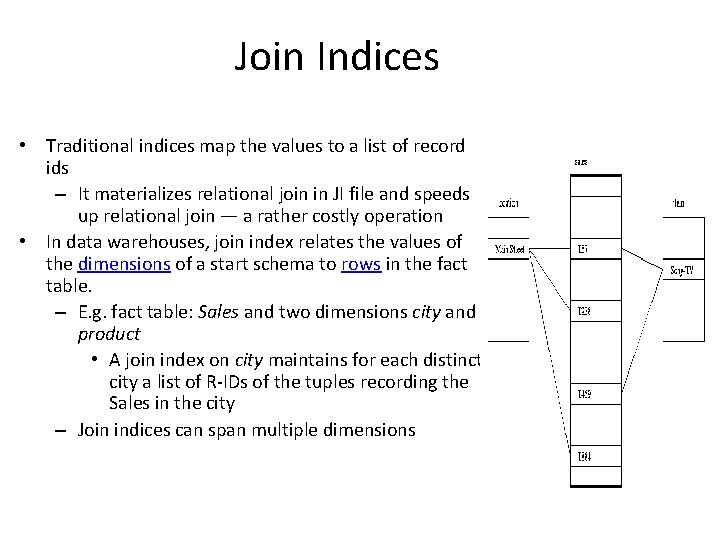
Join Indices • Traditional indices map the values to a list of record ids – It materializes relational join in JI file and speeds up relational join — a rather costly operation • In data warehouses, join index relates the values of the dimensions of a start schema to rows in the fact table. – E. g. fact table: Sales and two dimensions city and product • A join index on city maintains for each distinct city a list of R-IDs of the tuples recording the Sales in the city – Join indices can span multiple dimensions
General Join Conditions • Equalities over several attributes (e. g. , R. sid=S. sid AND R. rname=S. sname): – – For Index NL, build index on <sid, sname> (if S is inner); or use existing indexes on sid or sname. For Sort-Merge and Hash Join, sort/partition on combination of the two join columns. • Inequality conditions (e. g. , R. rname < S. sname): – For Index NL, need (clustered!) B+ tree index. • Range probes on inner; # matches likely to be much higher than for equality joins. – – Hash Join, Sort Merge Join not applicable. Block NL quite likely to be the best join method here.
An invention in 2000 s: Column Stores for OLAP
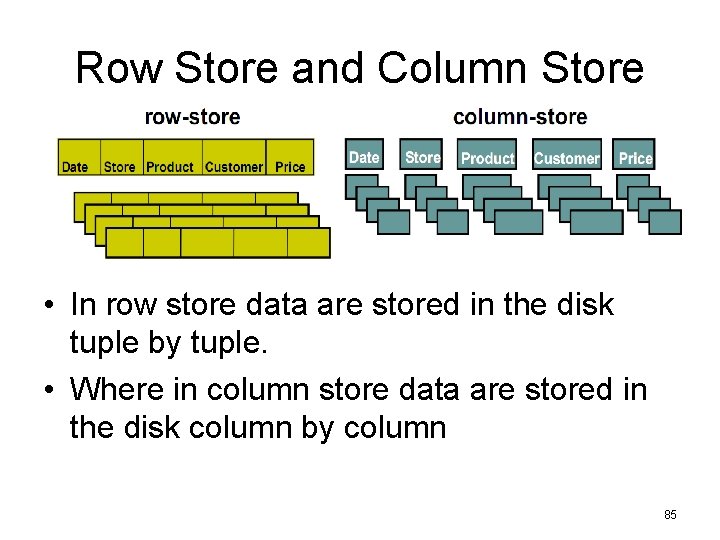
Row Store and Column Store • In row store data are stored in the disk tuple by tuple. • Where in column store data are stored in the disk column by column 85
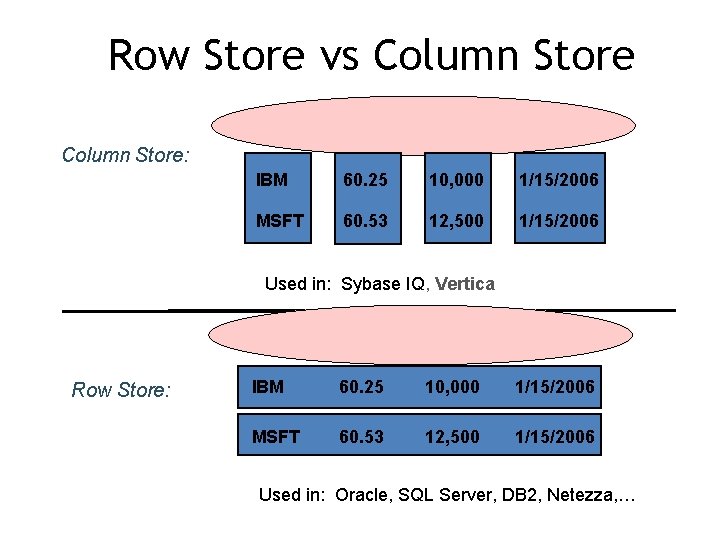
Row Store vs Column Store: IBM 60. 25 10, 000 1/15/2006 MSFT 60. 53 12, 500 1/15/2006 Used in: Sybase IQ, Vertica Row Store: IBM 60. 25 10, 000 1/15/2006 MSFT 60. 53 12, 500 1/15/2006 Used in: Oracle, SQL Server, DB 2, Netezza, …
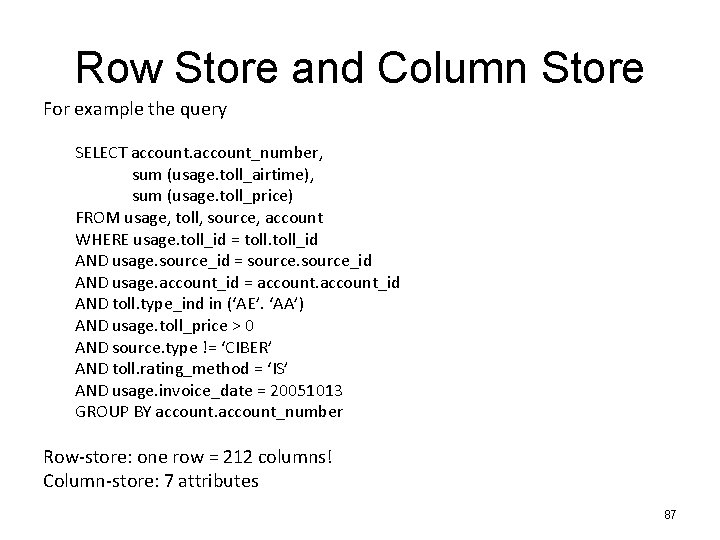
Row Store and Column Store For example the query SELECT account_number, sum (usage. toll_airtime), sum (usage. toll_price) FROM usage, toll, source, account WHERE usage. toll_id = toll_id AND usage. source_id = source_id AND usage. account_id = account_id AND toll. type_ind in (‘AE’. ‘AA’) AND usage. toll_price > 0 AND source. type != ‘CIBER’ AND toll. rating_method = ‘IS’ AND usage. invoice_date = 20051013 GROUP BY account_number Row-store: one row = 212 columns! Column-store: 7 attributes 87
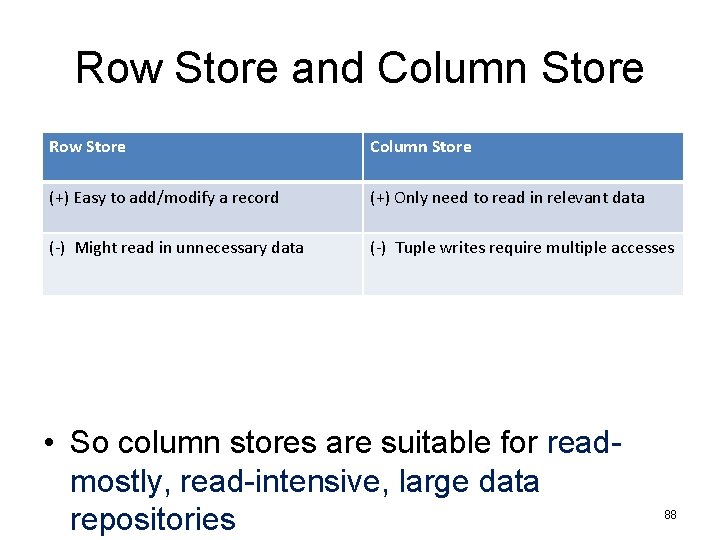
Row Store and Column Store Row Store Column Store (+) Easy to add/modify a record (+) Only need to read in relevant data (-) Might read in unnecessary data (-) Tuple writes require multiple accesses • So column stores are suitable for readmostly, read-intensive, large data repositories 88
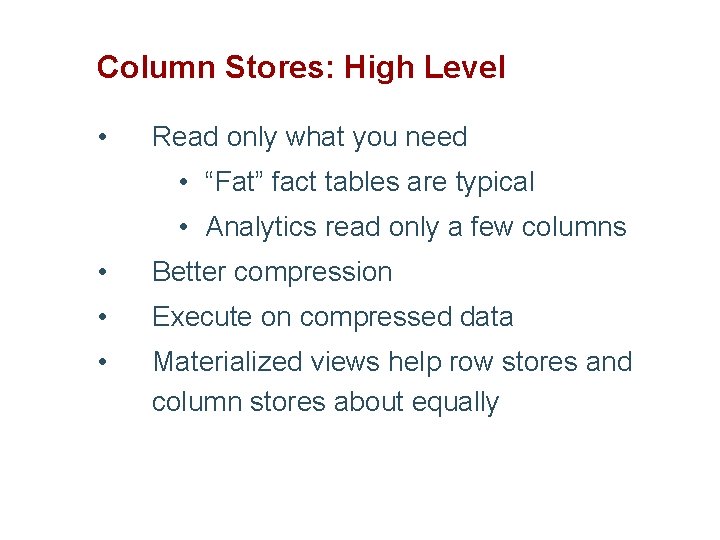
Column Stores: High Level • Read only what you need • “Fat” fact tables are typical • Analytics read only a few columns • Better compression • Execute on compressed data • Materialized views help row stores and column stores about equally
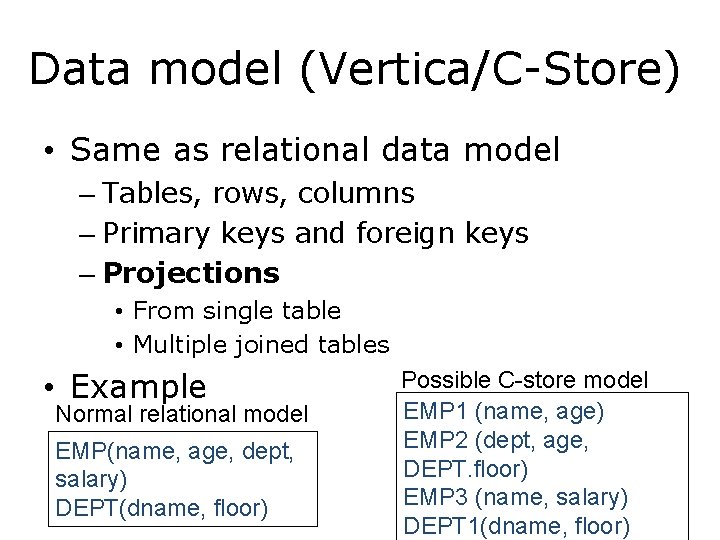
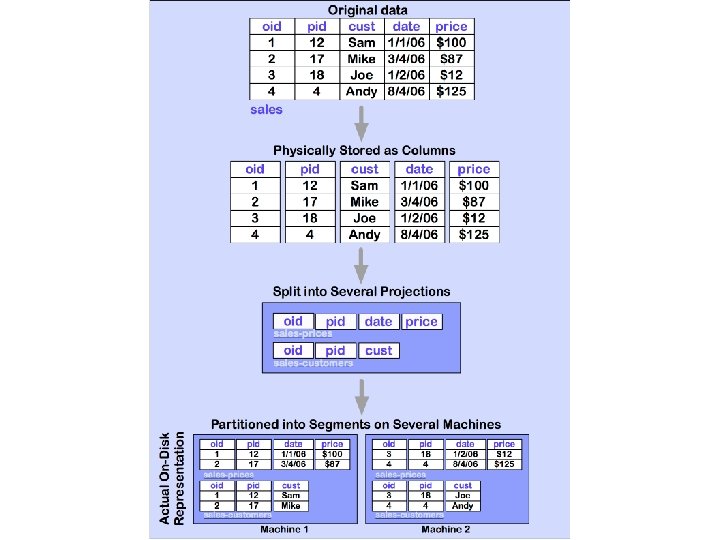
Data model (Vertica/C-Store) • Same as relational data model – Tables, rows, columns – Primary keys and foreign keys – Projections • From single table • Multiple joined tables • Example Normal relational model EMP(name, age, dept, salary) DEPT(dname, floor) Possible C-store model EMP 1 (name, age) EMP 2 (dept, age, DEPT. floor) EMP 3 (name, salary) DEPT 1(dname, floor)
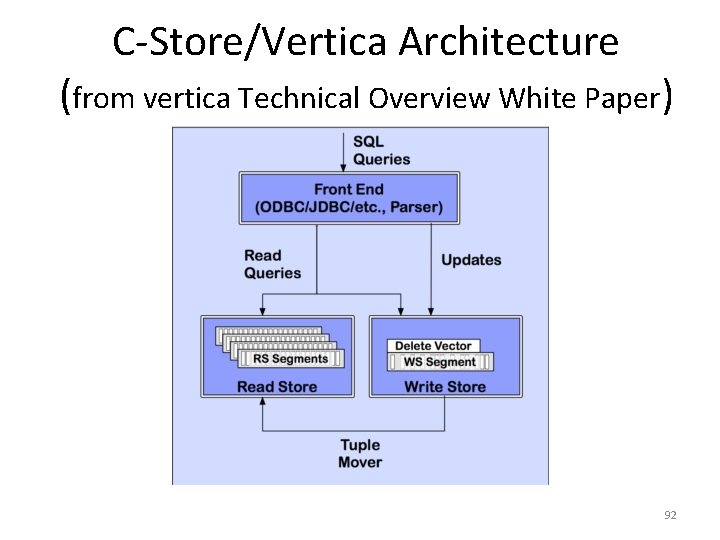
C-Store/Vertica Architecture (from vertica Technical Overview White Paper) 92
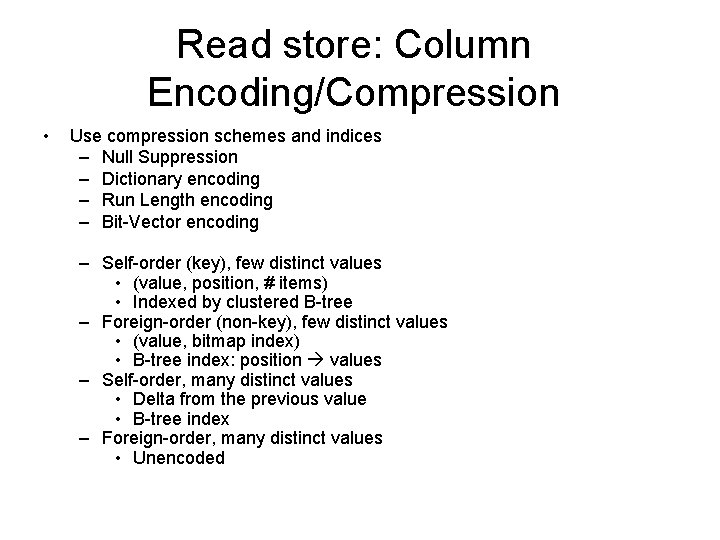
Read store: Column Encoding/Compression • Use compression schemes and indices – Null Suppression – Dictionary encoding – Run Length encoding – Bit-Vector encoding – Self-order (key), few distinct values • (value, position, # items) • Indexed by clustered B-tree – Foreign-order (non-key), few distinct values • (value, bitmap index) • B-tree index: position values – Self-order, many distinct values • Delta from the previous value • B-tree index – Foreign-order, many distinct values • Unencoded
Compression • Trades I/O for CPU – Increased column-store opportunities: – Higher data value locality in column stores – Techniques such as run length encoding far more useful 94
Write Store • Same structure, but explicitly use (segment, key) to identify records – Easier to maintain the mapping – Only concerns the inserted records • Tuple mover – Copies batch of records to RS • Delete record – Mark it on RS – Purged by tuple mover
How to solve read/write conflict • Situation: one transaction updates the record X, while another transaction reads X. • Use snapshot isolation
Query Execution - Operators • Select: Same as relational algebra, but produces a bit string • Project: Same as relational algebra • Join: Joins projections according to predicates • Aggregation: SQL like aggregates • Sort: Sort all columns of a projection 97
Query Execution - Operators • Decompress: Converts compressed column to uncompressed representation • Mask(Bitstring B, Projection Cs) => emit only those values whose corresponding bits are 1 • Concat: Combines one or more projections sorted in the same order into a single projection • Permute: Permutes a projection according to the ordering defined by a join index • Bitstring operators: Band – Bitwise AND, Bor – Bitwise OR, Bnot – complement 98
Benefits in query processing • Selection – has more indices to use • Projection – some “projections” already defined • Join – some projections are materialized joins • Aggregations – works on required columns only
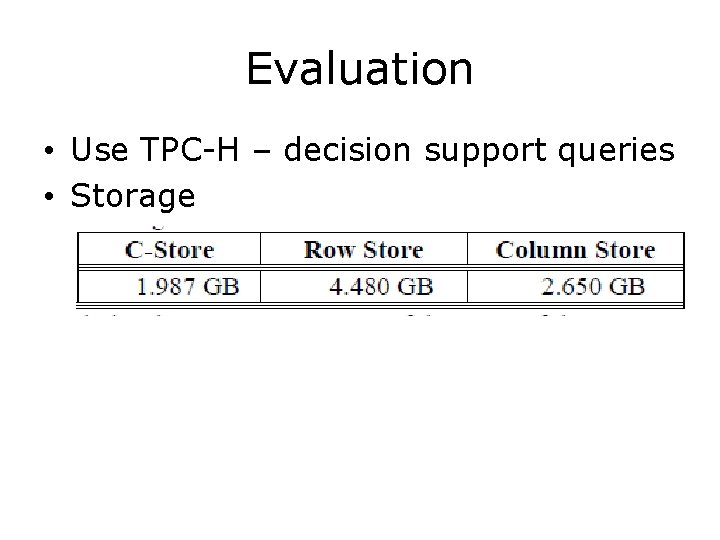
Evaluation • Use TPC-H – decision support queries • Storage
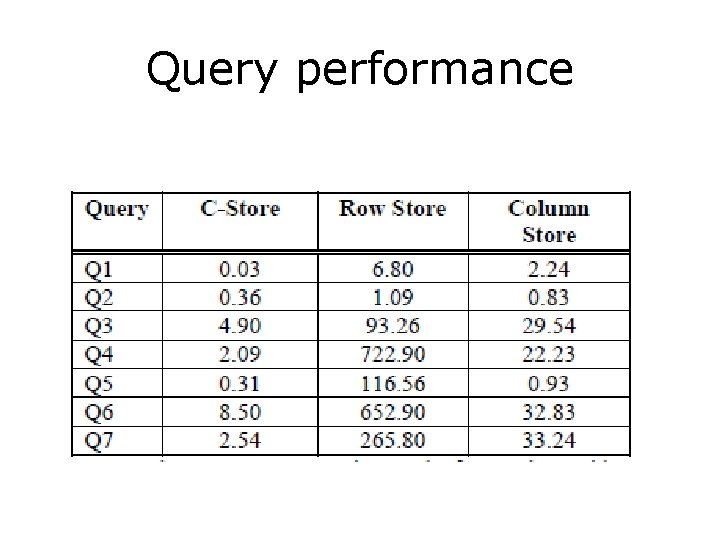
Query performance
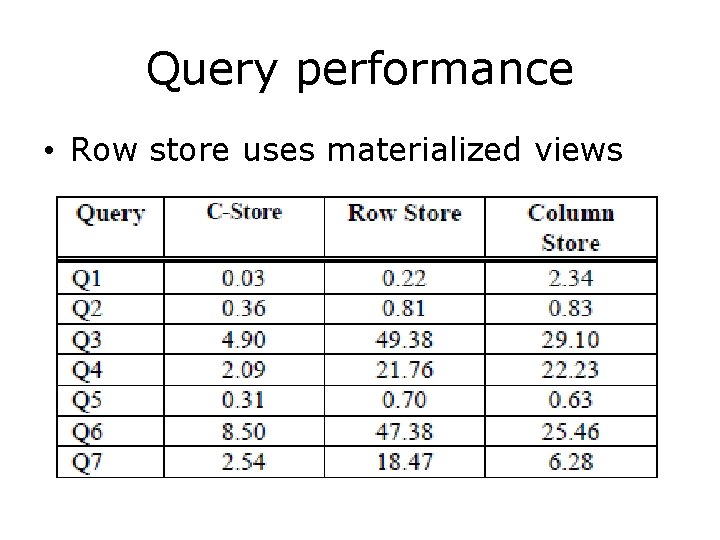
Query performance • Row store uses materialized views
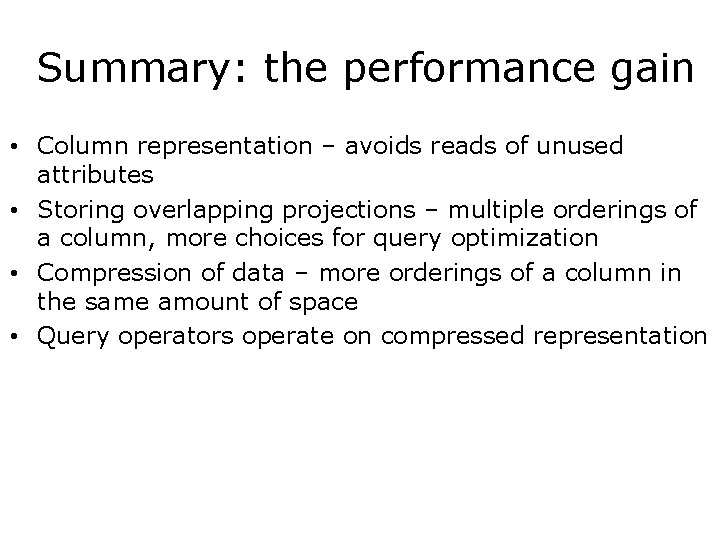
Summary: the performance gain • Column representation – avoids reads of unused attributes • Storing overlapping projections – multiple orderings of a column, more choices for query optimization • Compression of data – more orderings of a column in the same amount of space • Query operators operate on compressed representation
Google’s Dremel: Interactive Analysis of Web-Scale Datasets 104
Dremel system • Trillion-record, multi-terabyte datasets at interactive speed – Scales to thousands of nodes – Fault and straggler tolerant execution • Nested data model – Complex datasets; normalization is prohibitive – Columnar storage and processing • Tree architecture (as in web search) • Interoperates with Google's data mgmt tools – In situ data access (e. g. , GFS, Bigtable) – Map. Reduce pipelines 105
Widely used inside Google • Analysis of crawled web documents • Tracking install data for applications on Android Market • Crash reporting for Google products • OCR results from Google Books • Spam analysis • Debugging of map tiles on Google Maps § Tablet migrations in managed Bigtable instances § Results of tests run on Google's distributed build system § Disk I/O statistics for hundreds of thousands of disks § Resource monitoring for jobs run in Google's data centers § Symbols and dependencies in Google's codebase 106
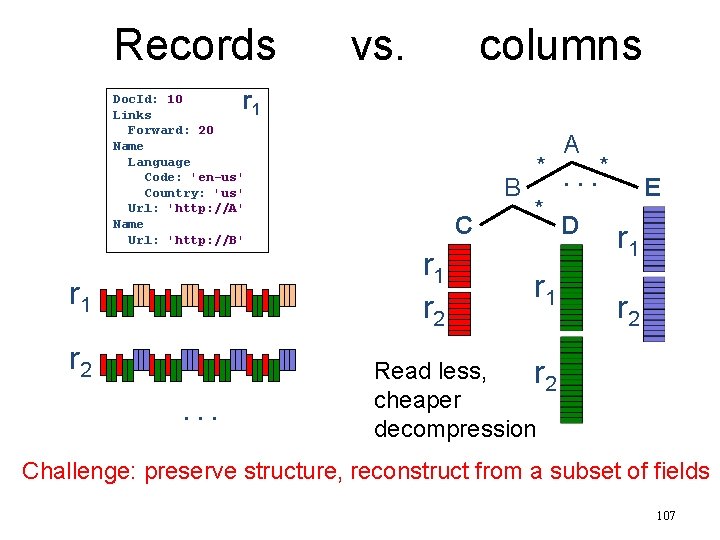
Records vs. columns r 1 Doc. Id: 10 Links Forward: 20 Name Language Code: 'en-us' Country: 'us' Url: 'http: //A' Name Url: 'http: //B' r 1 r 2. . . C r 1 r 2 A *. . . * B * D r 1 E r 1 r 2 Read less, r 2 cheaper decompression Challenge: preserve structure, reconstruct from a subset of fields 107
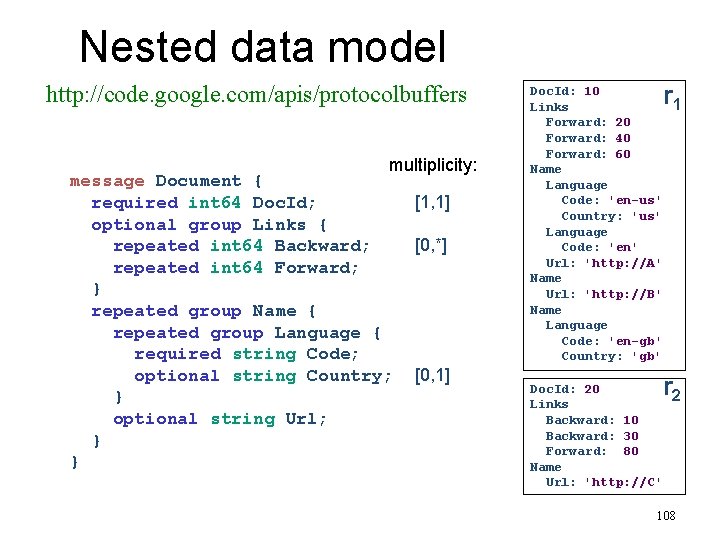
Nested data model http: //code. google. com/apis/protocolbuffers multiplicity: message Document { required int 64 Doc. Id; optional group Links { repeated int 64 Backward; repeated int 64 Forward; } repeated group Name { repeated group Language { required string Code; optional string Country; } optional string Url; } } [1, 1] [0, *] [0, 1] Doc. Id: 10 Links Forward: 20 Forward: 40 Forward: 60 Name Language Code: 'en-us' Country: 'us' Language Code: 'en' Url: 'http: //A' Name Url: 'http: //B' Name Language Code: 'en-gb' Country: 'gb' Doc. Id: 20 Links Backward: 10 Backward: 30 Forward: 80 Name Url: 'http: //C' r 1 r 2 108
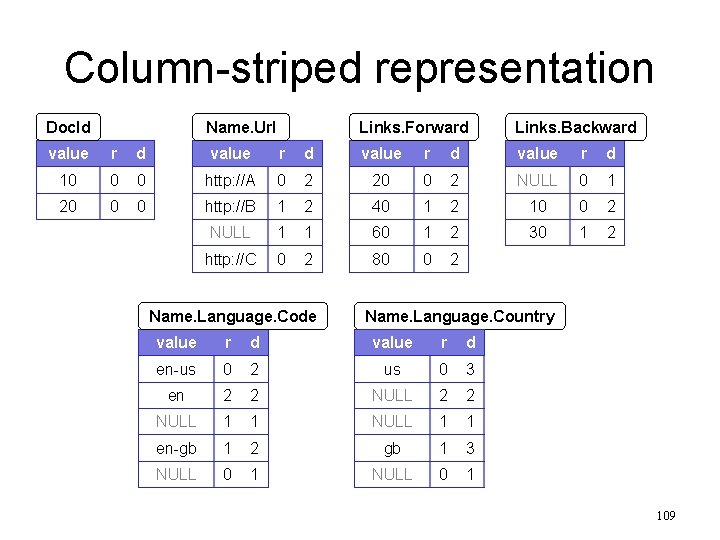
Column-striped representation Doc. Id Name. Url Links. Forward Links. Backward value r d 10 0 0 http: //A 0 2 20 0 2 NULL 0 1 20 0 0 http: //B 1 2 40 1 2 10 0 2 NULL 1 1 60 1 2 30 1 2 http: //C 0 2 80 0 2 Name. Language. Code Name. Language. Country value r d en-us 0 2 us 0 3 en 2 2 NULL 1 1 en-gb 1 2 gb 1 3 NULL 0 1 109
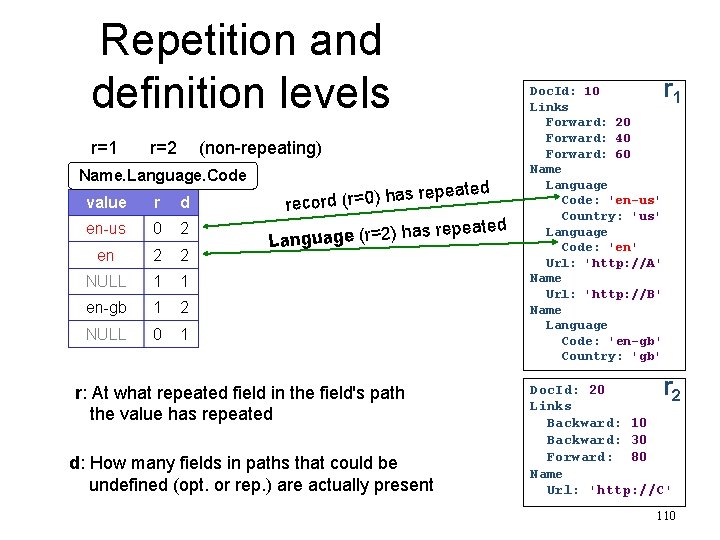
Repetition and definition levels r=1 r=2 (non-repeating) Name. Language. Code epeated value r d as r record (r=0) h en-us 0 2 en 2 2 has re Language (r=2) NULL 1 1 en-gb 1 2 NULL 0 1 r: At what repeated field in the field's path the value has repeated d: How many fields in paths that could be undefined (opt. or rep. ) are actually present peated Doc. Id: 10 Links Forward: 20 Forward: 40 Forward: 60 Name Language Code: 'en-us' Country: 'us' Language Code: 'en' Url: 'http: //A' Name Url: 'http: //B' Name Language Code: 'en-gb' Country: 'gb' r 1 r Doc. Id: 20 2 Links Backward: 10 Backward: 30 Forward: 80 Name Url: 'http: //C' 110
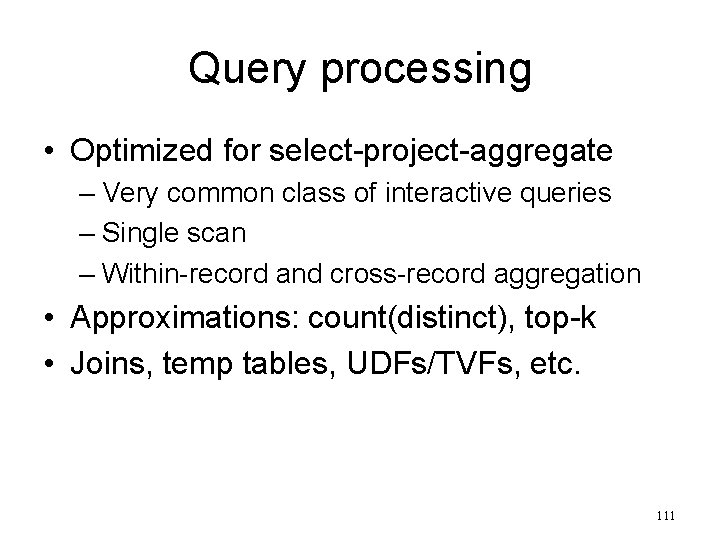
Query processing • Optimized for select-project-aggregate – Very common class of interactive queries – Single scan – Within-record and cross-record aggregation • Approximations: count(distinct), top-k • Joins, temp tables, UDFs/TVFs, etc. 111
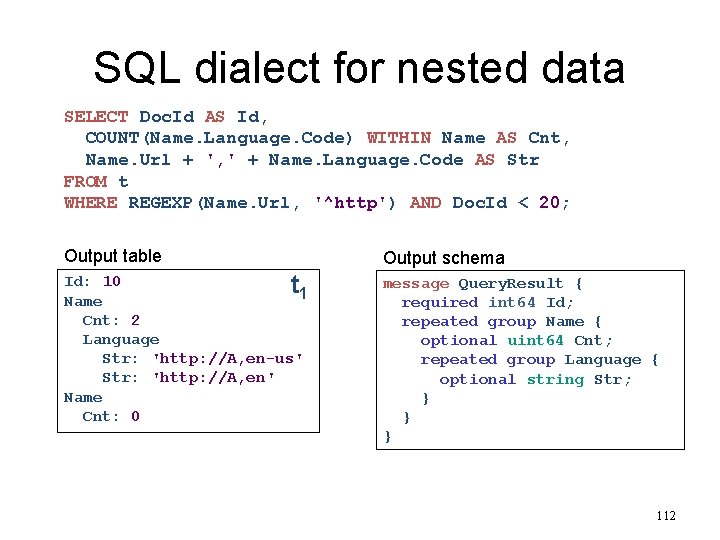
SQL dialect for nested data SELECT Doc. Id AS Id, COUNT(Name. Language. Code) WITHIN Name AS Cnt, Name. Url + ', ' + Name. Language. Code AS Str FROM t WHERE REGEXP(Name. Url, '^http') AND Doc. Id < 20; Output table Output schema Id: 10 t 1 Name Cnt: 2 Language Str: 'http: //A, en-us' Str: 'http: //A, en' Name Cnt: 0 message Query. Result { required int 64 Id; repeated group Name { optional uint 64 Cnt; repeated group Language { optional string Str; } } } 112
![Serving tree [Dean WSDM'09] client root server • Fault tolerance intermediate servers leaf servers](http://slidetodoc.com/presentation_image_h2/5990ca5a34a581ce5c647f39589c191c/image-113.jpg "Serving tree [Dean WSDM'09] client root server • Fault tolerance intermediate servers leaf servers")
Serving tree [Dean WSDM'09] client root server • Fault tolerance intermediate servers leaf servers (with local storage) • Parallelizes scheduling and aggregation . . . • Stragglers. . . • Designed for "small" results (<1 M records). . . histogram of response times storage layer (e. g. , GFS) 113
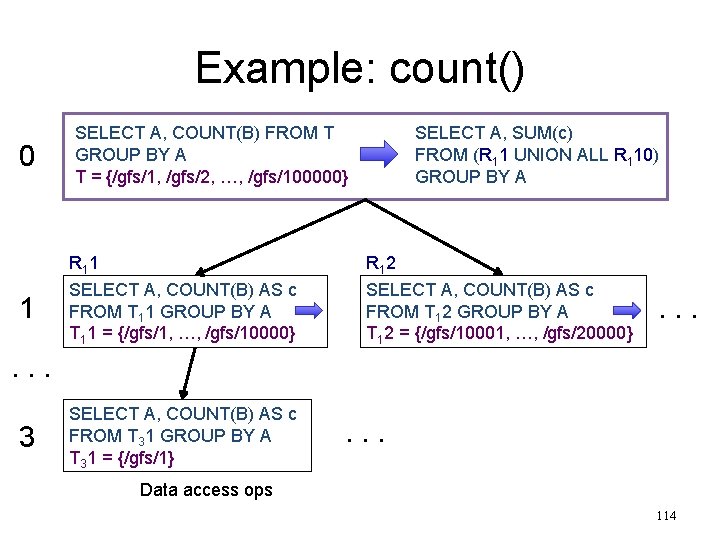
Example: count() 0 SELECT A, COUNT(B) FROM T GROUP BY A T = {/gfs/1, /gfs/2, …, /gfs/100000} 1 R 1 1 SELECT A, COUNT(B) AS c FROM T 11 GROUP BY A T 11 = {/gfs/1, …, /gfs/10000} SELECT A, SUM(c) FROM (R 11 UNION ALL R 110) GROUP BY A R 1 2 SELECT A, COUNT(B) AS c FROM T 12 GROUP BY A T 12 = {/gfs/10001, …, /gfs/20000} . . . 3 SELECT A, COUNT(B) AS c FROM T 31 GROUP BY A T 31 = {/gfs/1} . . . Data access ops 114
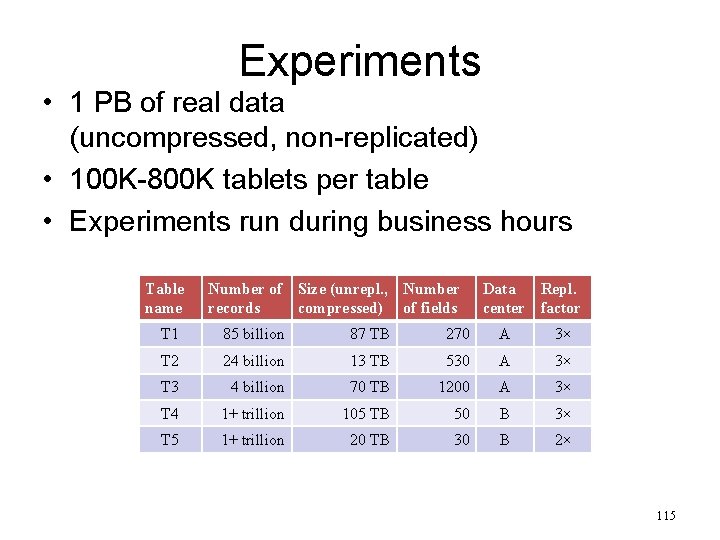
Experiments • 1 PB of real data (uncompressed, non-replicated) • 100 K-800 K tablets per table • Experiments run during business hours Table name Number of Size (unrepl. , Number records compressed) of fields Data Repl. center factor T 1 85 billion 87 TB 270 A 3× T 2 24 billion 13 TB 530 A 3× T 3 4 billion 70 TB 1200 A 3× T 4 1+ trillion 105 TB 50 B 3× T 5 1+ trillion 20 TB 30 B 2× 115
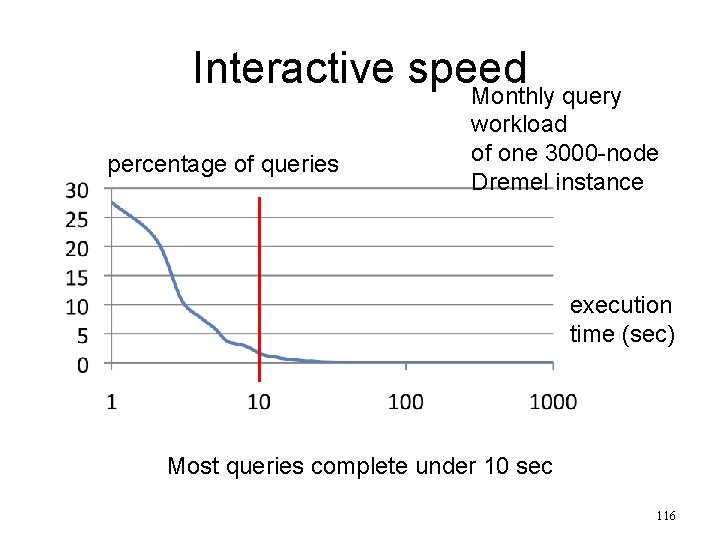
Interactive speed Monthly query percentage of queries workload of one 3000 -node Dremel instance execution time (sec) Most queries complete under 10 sec 116
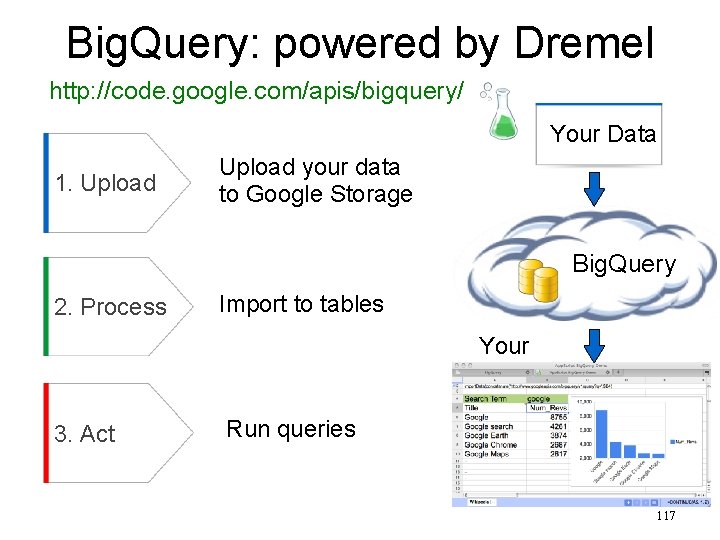
Big. Query: powered by Dremel http: //code. google. com/apis/bigquery/ Your Data 1. Upload your data to Google Storage Big. Query 2. Process Import to tables Your Apps 3. Act Run queries 117
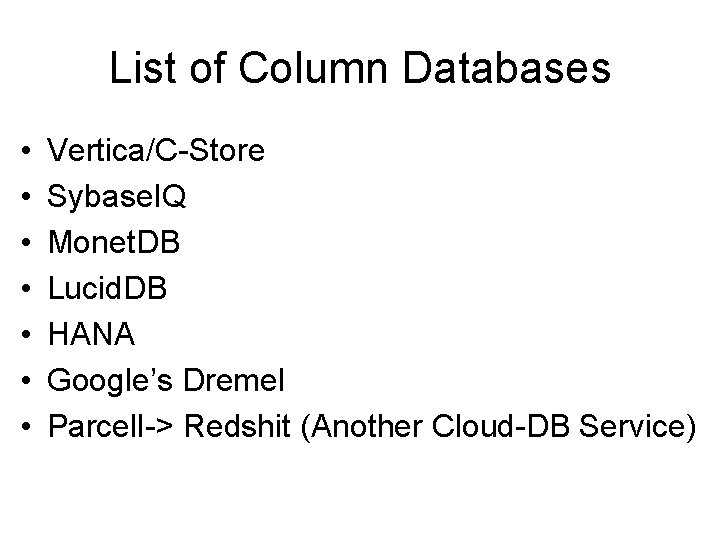
List of Column Databases • • Vertica/C-Store Sybase. IQ Monet. DB Lucid. DB HANA Google’s Dremel Parcell-> Redshit (Another Cloud-DB Service)
Take-home messages • OLAP – Multi-relational Data model – Operators – SQL • Data warehouse (architecture, issues, optimizations) • Join Processing • Column Stores (Optimized for OLAP workload) 119
- Slides: 119