
Lecture 3 Branches Sign in on the attendance
Lecture 3 Branches Sign in on the attendance sheet!
Last Time
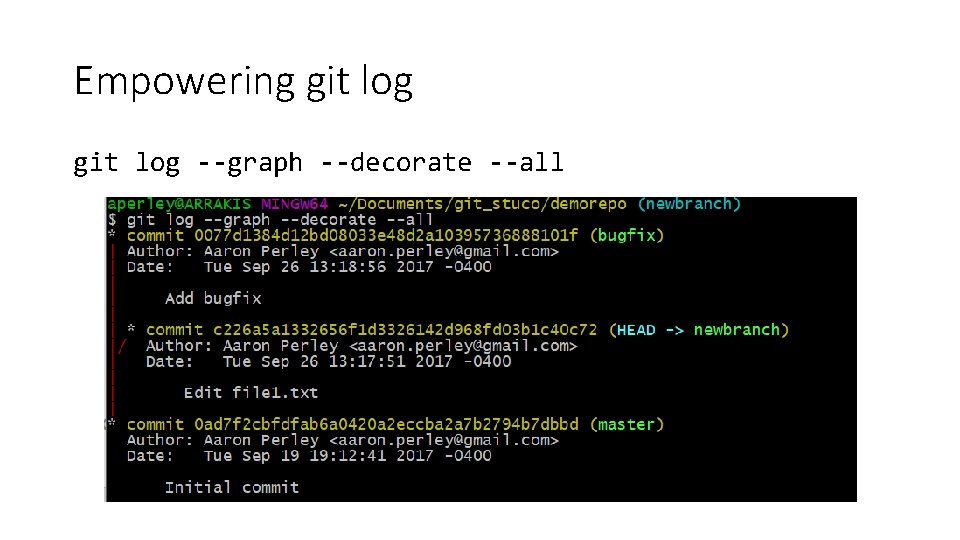
Empowering git log --graph --decorate --all
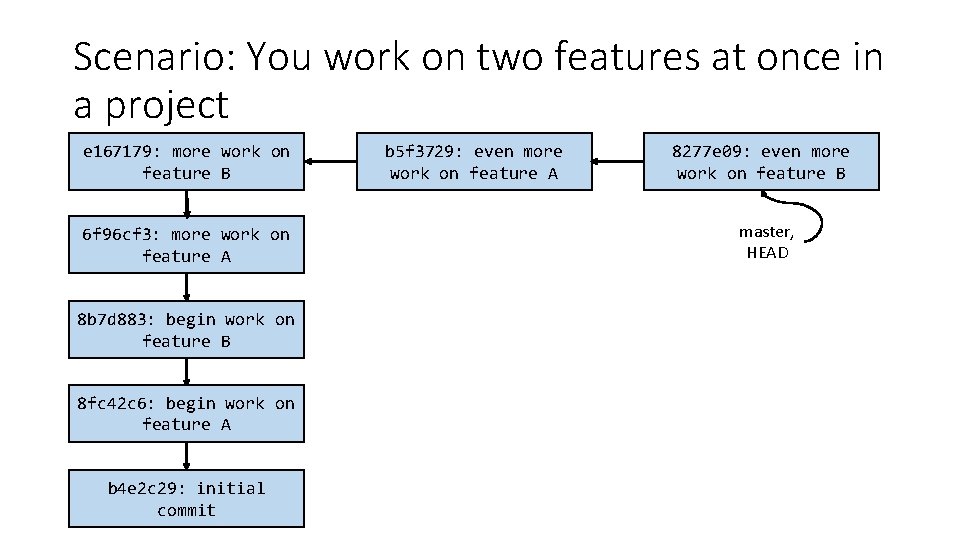
Scenario: You work on two features at once in a project e 167179: more work on feature B 6 f 96 cf 3: more work on feature A 8 b 7 d 883: begin work on feature B 8 fc 42 c 6: begin work on feature A b 4 e 2 c 29: initial commit b 5 f 3729: even more work on feature A 8277 e 09: even more work on feature B master, HEAD
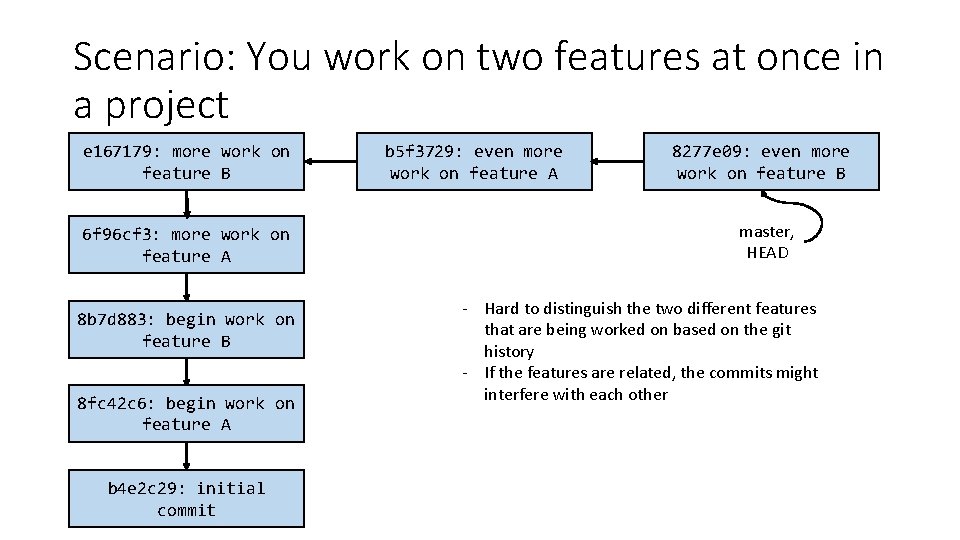
Scenario: You work on two features at once in a project e 167179: more work on feature B 6 f 96 cf 3: more work on feature A 8 b 7 d 883: begin work on feature B 8 fc 42 c 6: begin work on feature A b 4 e 2 c 29: initial commit b 5 f 3729: even more work on feature A 8277 e 09: even more work on feature B master, HEAD - Hard to distinguish the two different features that are being worked on based on the git history - If the features are related, the commits might interfere with each other
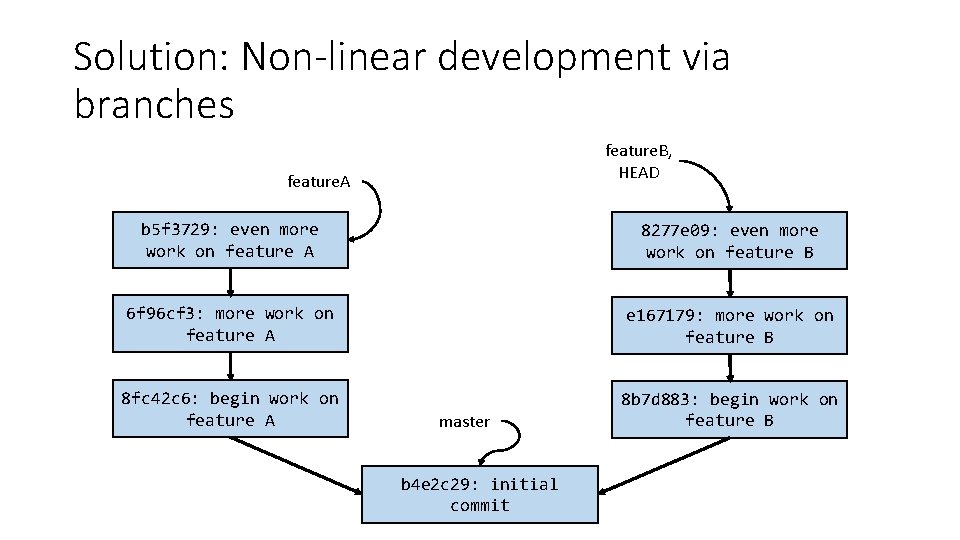
Solution: Non-linear development via branches feature. B, HEAD feature. A b 5 f 3729: even more work on feature A 8277 e 09: even more work on feature B 6 f 96 cf 3: more work on feature A e 167179: more work on feature B 8 fc 42 c 6: begin work on feature A 8 b 7 d 883: begin work on feature B master b 4 e 2 c 29: initial commit
Activity!
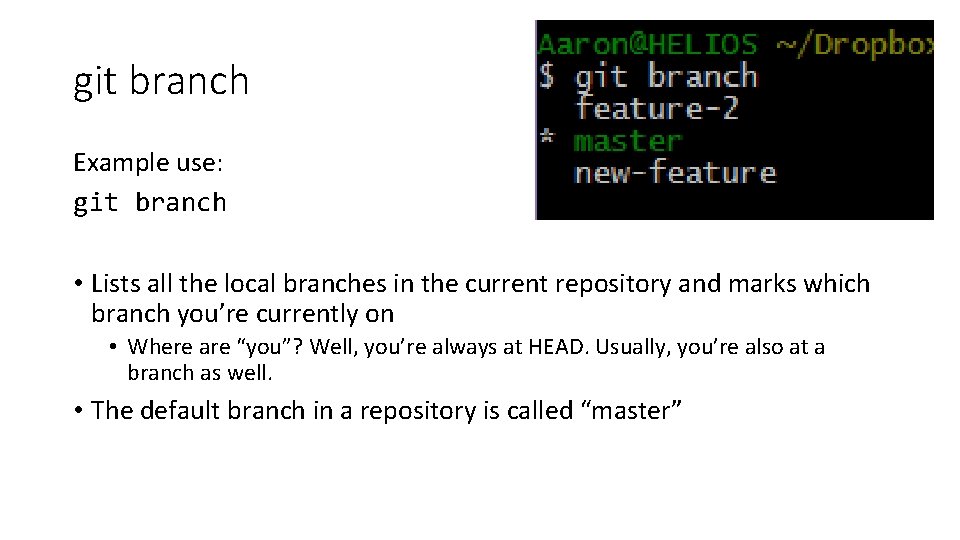
git branch Example use: git branch • Lists all the local branches in the current repository and marks which branch you’re currently on • Where are “you”? Well, you’re always at HEAD. Usually, you’re also at a branch as well. • The default branch in a repository is called “master”
git branch <newbranchname> Example use: git branch develop • Creates a new branch called “develop” that points to wherever you are right now (i. e. wherever HEAD is right now)
git checkout <branchname> Example use: git checkout develop • Switches to the branch named “develop” • Instead of a branch name, you can also put a commit hash • More on this next lecture
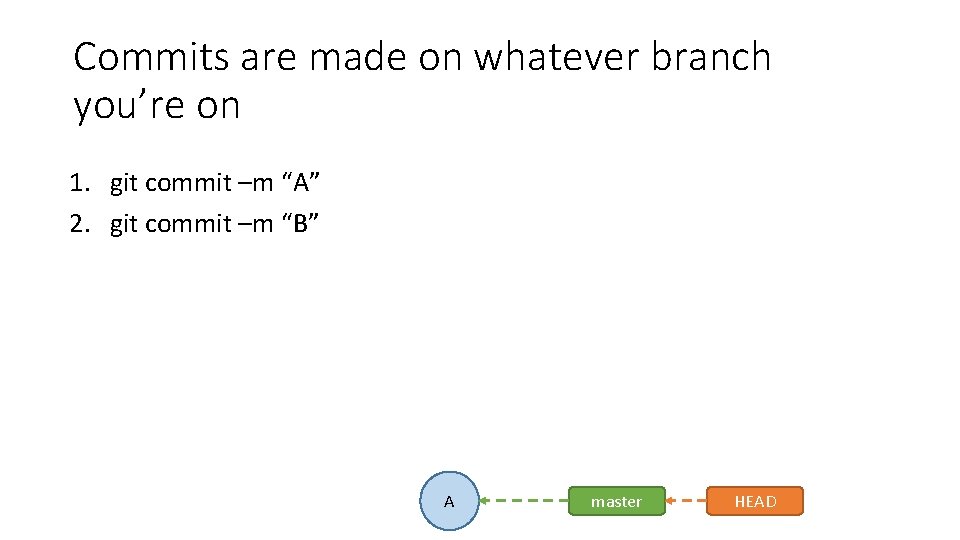
Commits are made on whatever branch you’re on 1. git commit –m “A” 2. git commit –m “B” A master HEAD
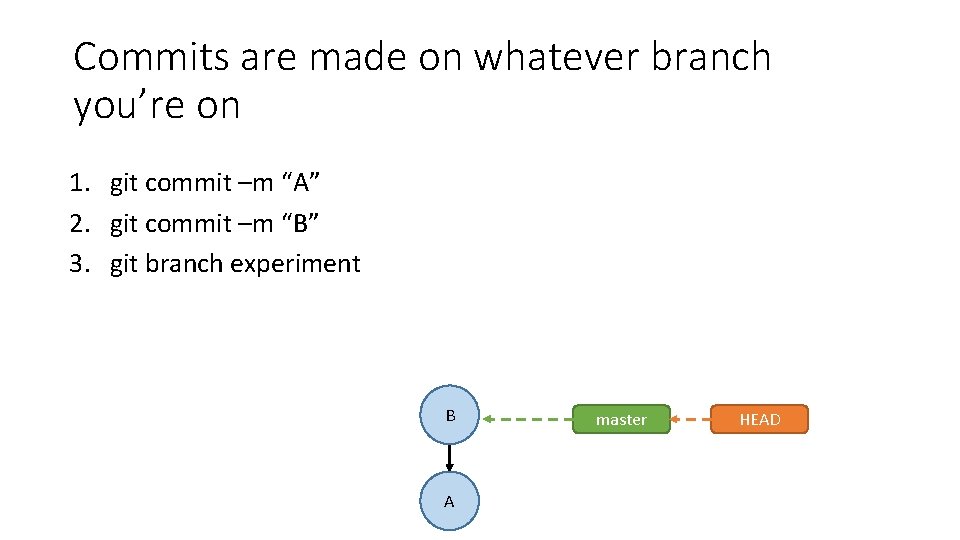
Commits are made on whatever branch you’re on 1. git commit –m “A” 2. git commit –m “B” 3. git branch experiment B A master HEAD

Commits are made on whatever branch you’re on 1. 2. 3. 4. git commit –m “A” git commit –m “B” git branch experiment git checkout experiment B master experiment A HEAD
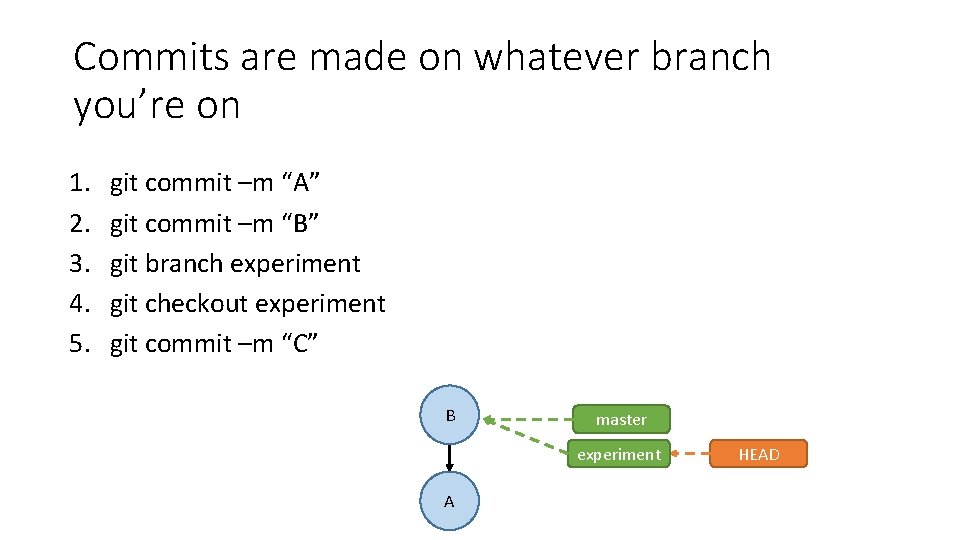
Commits are made on whatever branch you’re on 1. 2. 3. 4. 5. git commit –m “A” git commit –m “B” git branch experiment git checkout experiment git commit –m “C” B master experiment A HEAD

Commits are made on whatever branch you’re on 1. 2. 3. 4. 5. 6. git commit –m “A” git commit –m “B” git branch experiment git checkout experiment git commit –m “C” git commit –m “D” C B A experiment master HEAD
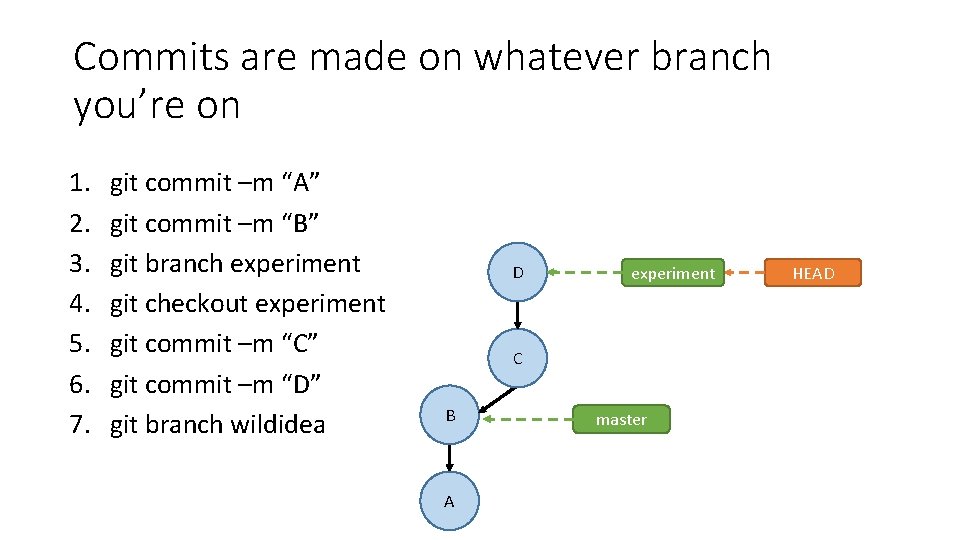
Commits are made on whatever branch you’re on 1. 2. 3. 4. 5. 6. 7. git commit –m “A” git commit –m “B” git branch experiment git checkout experiment git commit –m “C” git commit –m “D” git branch wildidea D experiment C B A master HEAD
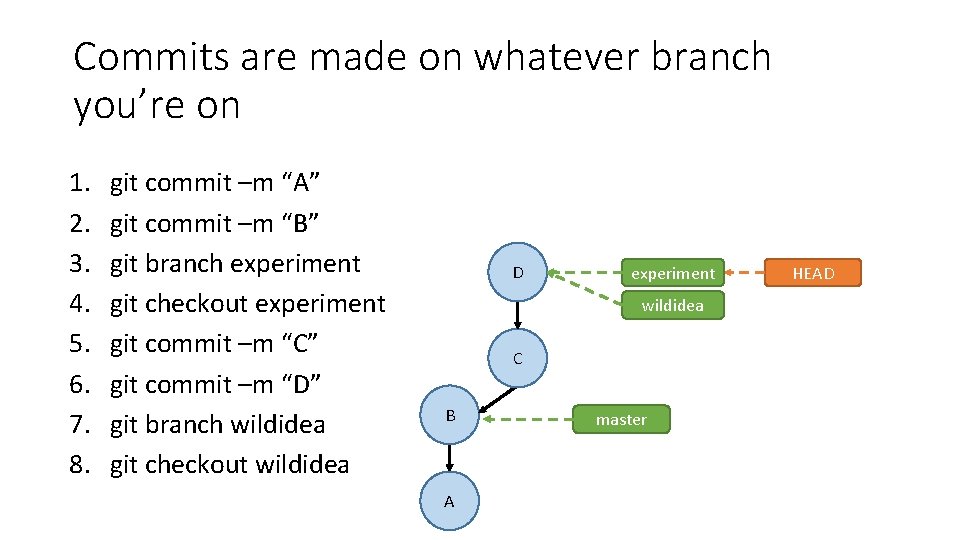
Commits are made on whatever branch you’re on 1. 2. 3. 4. 5. 6. 7. 8. git commit –m “A” git commit –m “B” git branch experiment git checkout experiment git commit –m “C” git commit –m “D” git branch wildidea git checkout wildidea D experiment wildidea C B A master HEAD
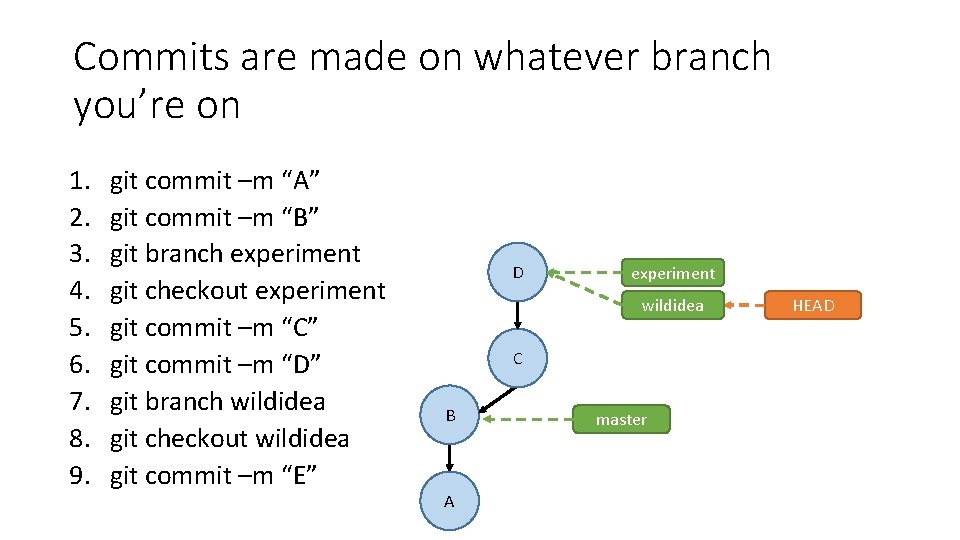
Commits are made on whatever branch you’re on 1. 2. 3. 4. 5. 6. 7. 8. 9. git commit –m “A” git commit –m “B” git branch experiment git checkout experiment git commit –m “C” git commit –m “D” git branch wildidea git checkout wildidea git commit –m “E” D experiment wildidea C B A master HEAD
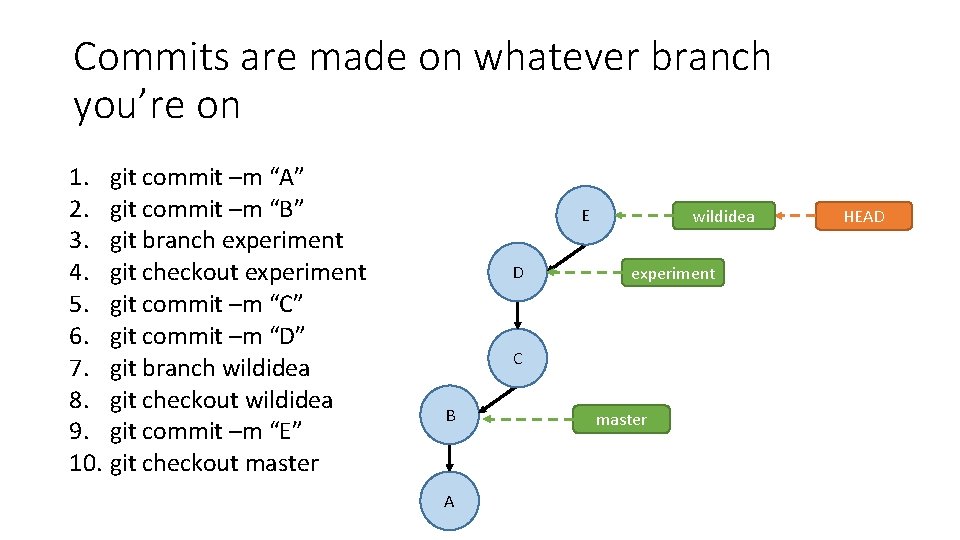
Commits are made on whatever branch you’re on 1. git commit –m “A” 2. git commit –m “B” 3. git branch experiment 4. git checkout experiment 5. git commit –m “C” 6. git commit –m “D” 7. git branch wildidea 8. git checkout wildidea 9. git commit –m “E” 10. git checkout master E D wildidea experiment C B A master HEAD
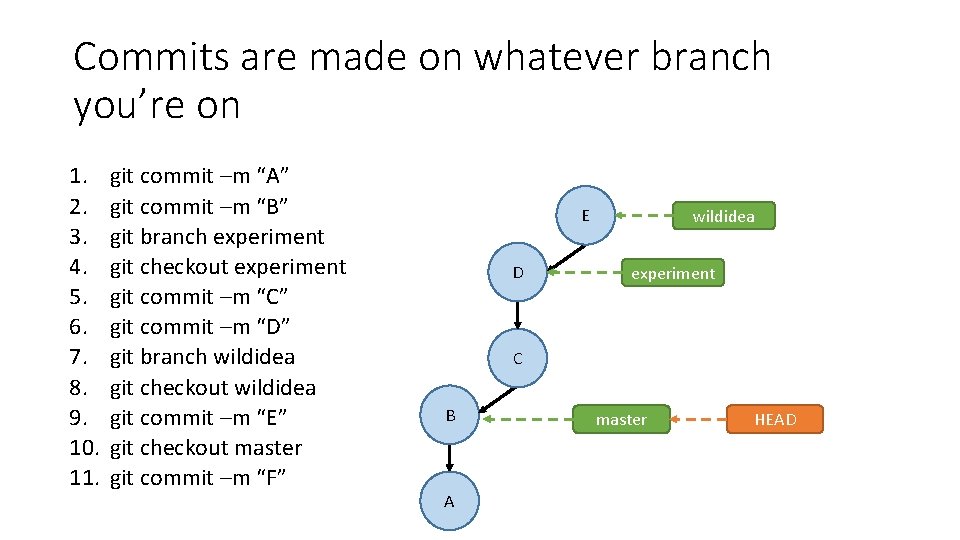
Commits are made on whatever branch you’re on 1. 2. 3. 4. 5. 6. 7. 8. 9. 10. 11. git commit –m “A” git commit –m “B” git branch experiment git checkout experiment git commit –m “C” git commit –m “D” git branch wildidea git checkout wildidea git commit –m “E” git checkout master git commit –m “F” E D wildidea experiment C B A master HEAD
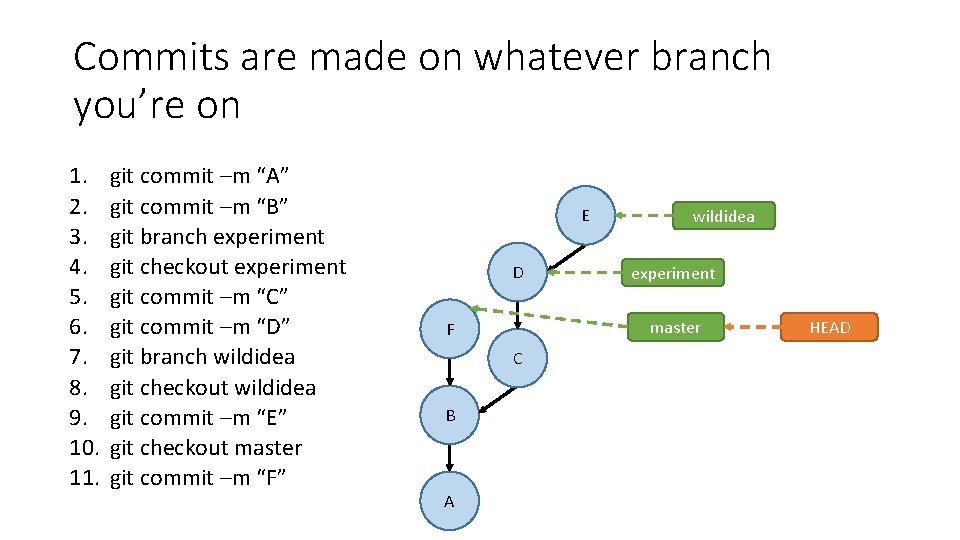
Commits are made on whatever branch you’re on 1. 2. 3. 4. 5. 6. 7. 8. 9. 10. 11. git commit –m “A” git commit –m “B” git branch experiment git checkout experiment git commit –m “C” git commit –m “D” git branch wildidea git checkout wildidea git commit –m “E” git checkout master git commit –m “F” E D C A experiment master F B wildidea HEAD
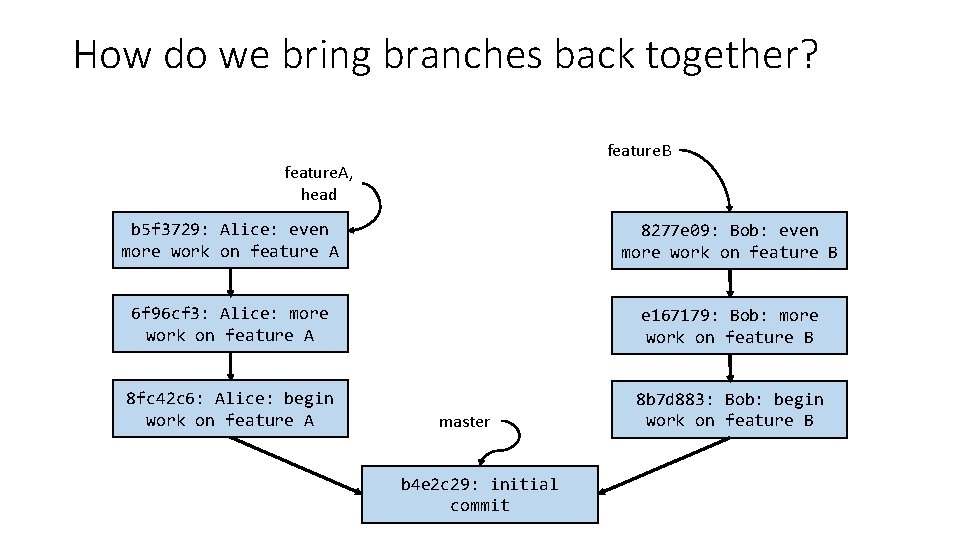
How do we bring branches back together? feature. B feature. A, head b 5 f 3729: Alice: even more work on feature A 8277 e 09: Bob: even more work on feature B 6 f 96 cf 3: Alice: more work on feature A e 167179: Bob: more work on feature B 8 fc 42 c 6: Alice: begin work on feature A 8 b 7 d 883: Bob: begin work on feature B master b 4 e 2 c 29: initial commit
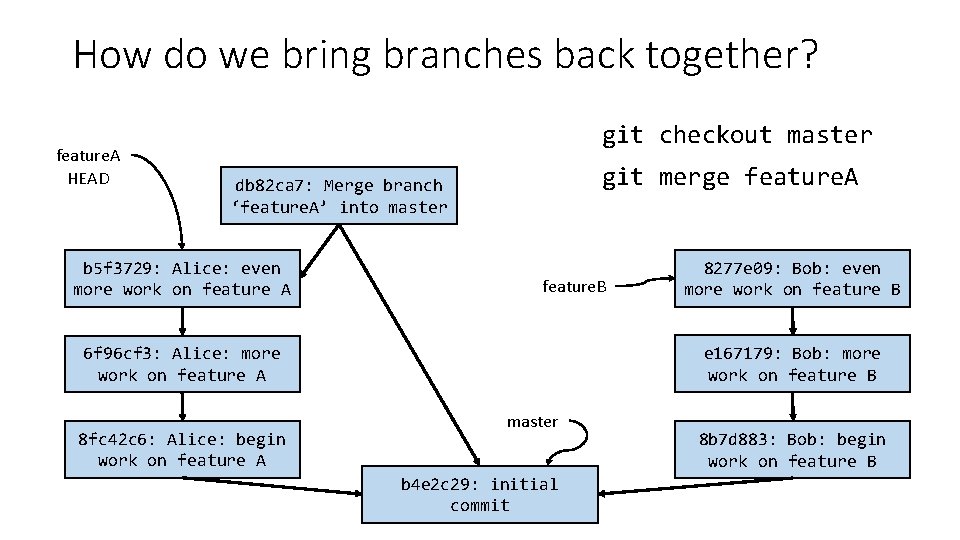
How do we bring branches back together? feature. A HEAD git checkout master git merge feature. A db 82 ca 7: Merge branch ‘feature. A’ into master b 5 f 3729: Alice: even more work on feature A feature. B e 167179: Bob: more work on feature B 6 f 96 cf 3: Alice: more work on feature A 8 fc 42 c 6: Alice: begin work on feature A 8277 e 09: Bob: even more work on feature B master b 4 e 2 c 29: initial commit 8 b 7 d 883: Bob: begin work on feature B
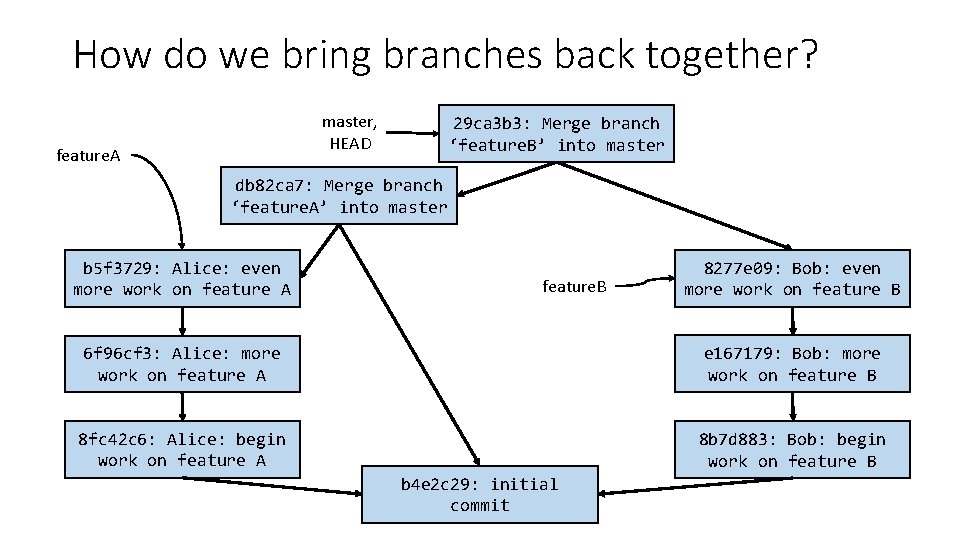
How do we bring branches back together? master, HEAD feature. A 29 ca 3 b 3: Merge branch ‘feature. B’ into master db 82 ca 7: Merge branch ‘feature. A’ into master b 5 f 3729: Alice: even more work on feature A feature. B 8277 e 09: Bob: even more work on feature B 6 f 96 cf 3: Alice: more work on feature A e 167179: Bob: more work on feature B 8 fc 42 c 6: Alice: begin work on feature A 8 b 7 d 883: Bob: begin work on feature B b 4 e 2 c 29: initial commit
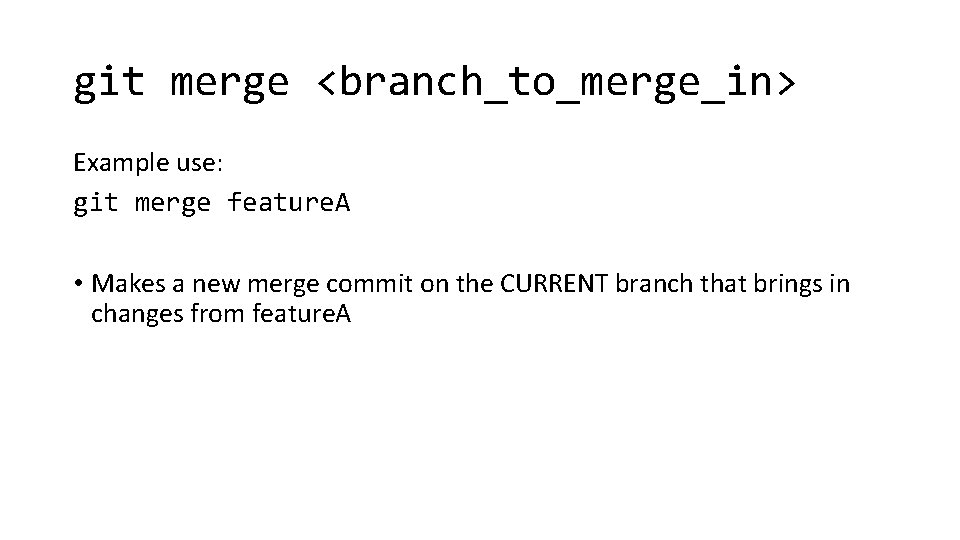
git merge <branch_to_merge_in> Example use: git merge feature. A • Makes a new merge commit on the CURRENT branch that brings in changes from feature. A
How does git know how to merge changes from another branch into yours? • Any guesses?
How does git know how to merge changes from another branch into yours? • It doesn’t.
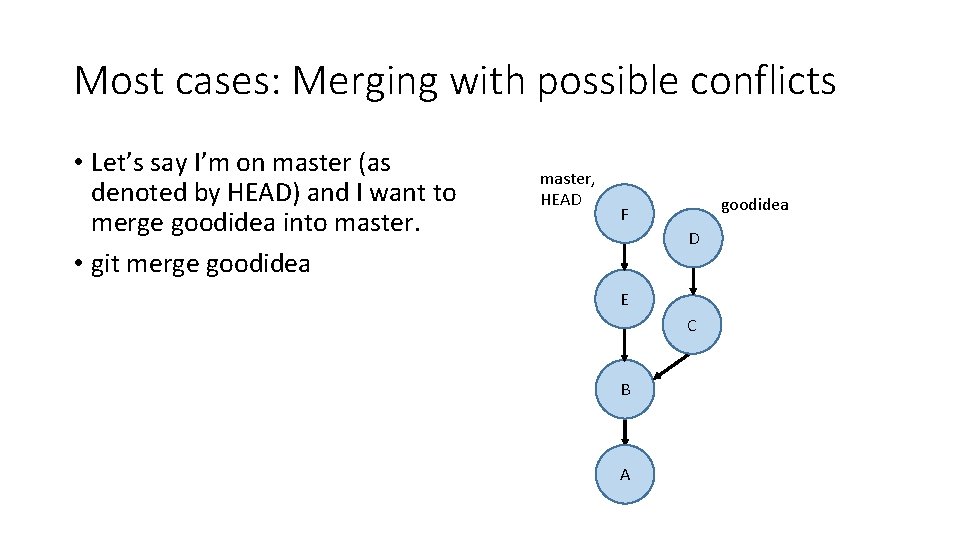
Most cases: Merging with possible conflicts • Let’s say I’m on master (as denoted by HEAD) and I want to merge goodidea into master. • git merge goodidea master, HEAD goodidea F D E C B A
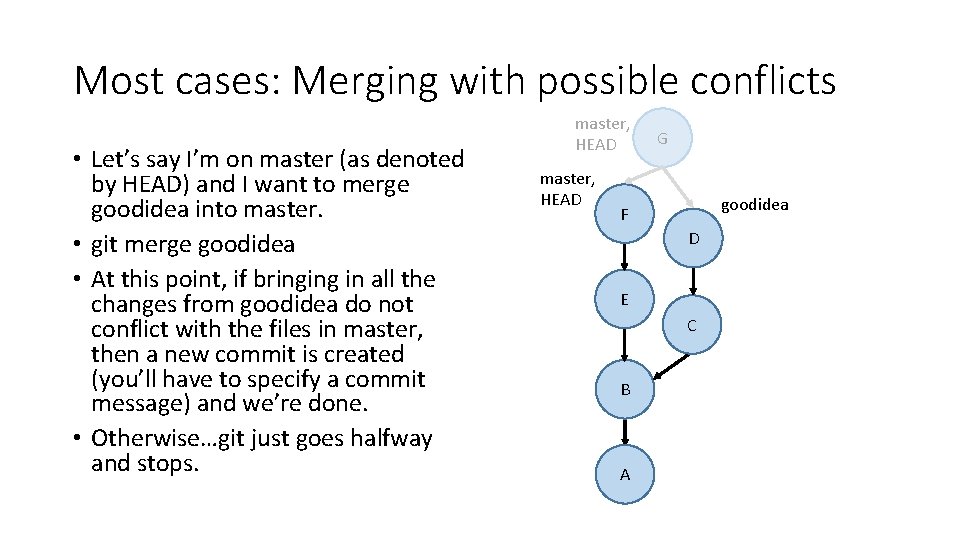
Most cases: Merging with possible conflicts • Let’s say I’m on master (as denoted by HEAD) and I want to merge goodidea into master. • git merge goodidea • At this point, if bringing in all the changes from goodidea do not conflict with the files in master, then a new commit is created (you’ll have to specify a commit message) and we’re done. • Otherwise…git just goes halfway and stops. master, HEAD G goodidea F D E C B A
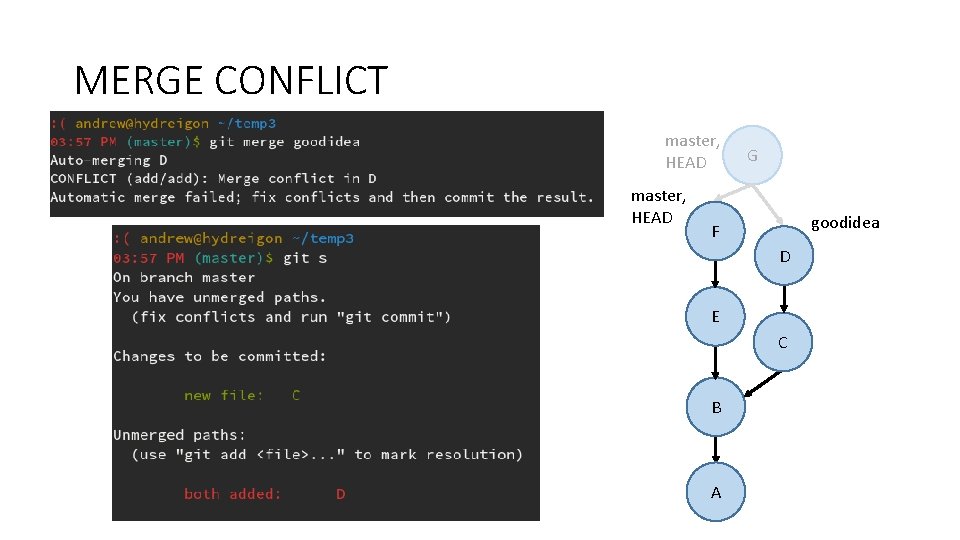
MERGE CONFLICT master, HEAD G goodidea F D E C B A
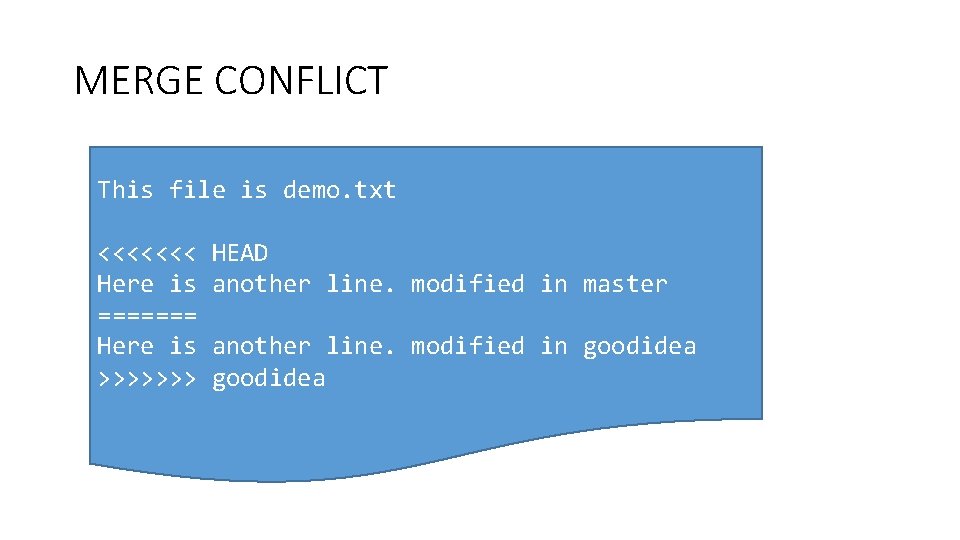
MERGE CONFLICT This file is demo. txt <<<<<<< Here is ======= Here is >>>>>>> HEAD another line. modified in master another line. modified in goodidea
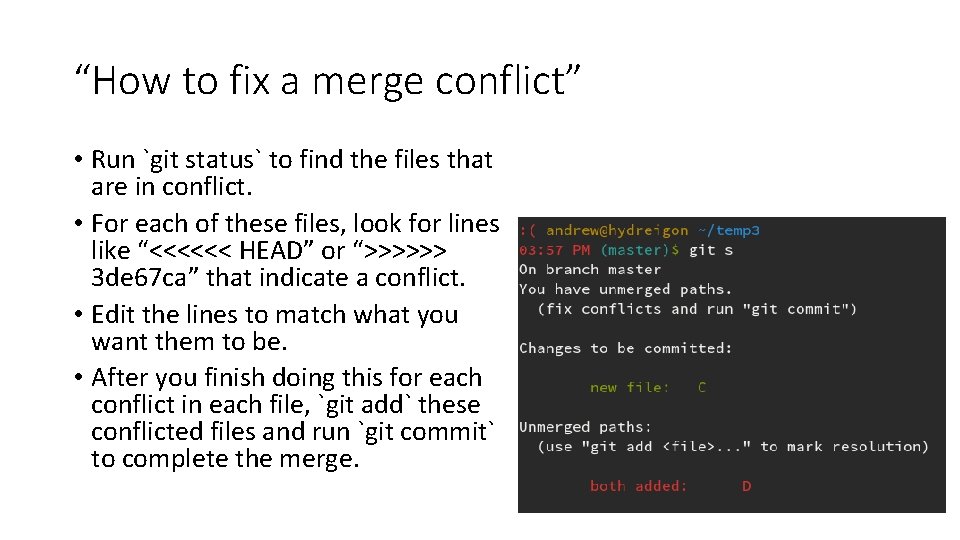
“How to fix a merge conflict” • Run `git status` to find the files that are in conflict. • For each of these files, look for lines like “<<<<<< HEAD” or “>>>>>> 3 de 67 ca” that indicate a conflict. • Edit the lines to match what you want them to be. • After you finish doing this for each conflict in each file, `git add` these conflicted files and run `git commit` to complete the merge.
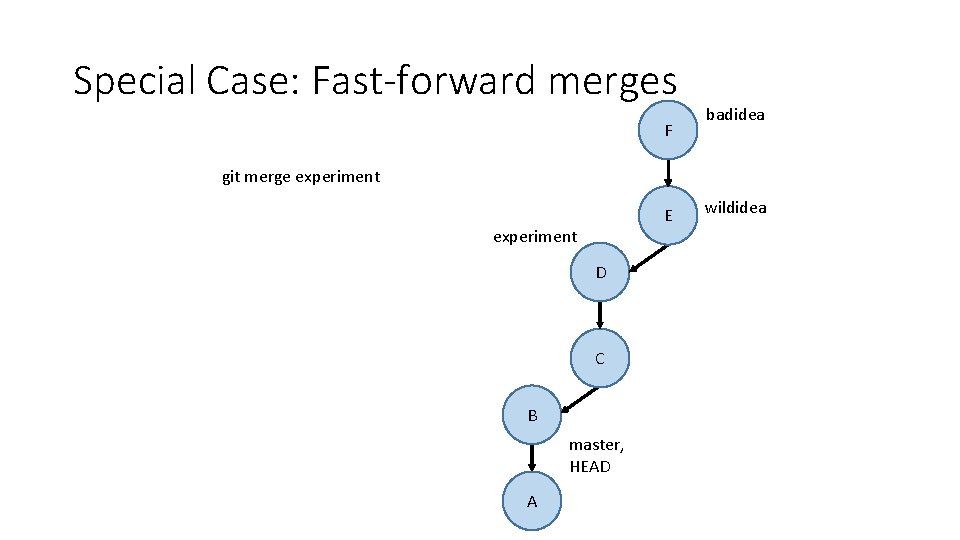
Special Case: Fast-forward merges F badidea git merge experiment E experiment D C B master, HEAD A wildidea
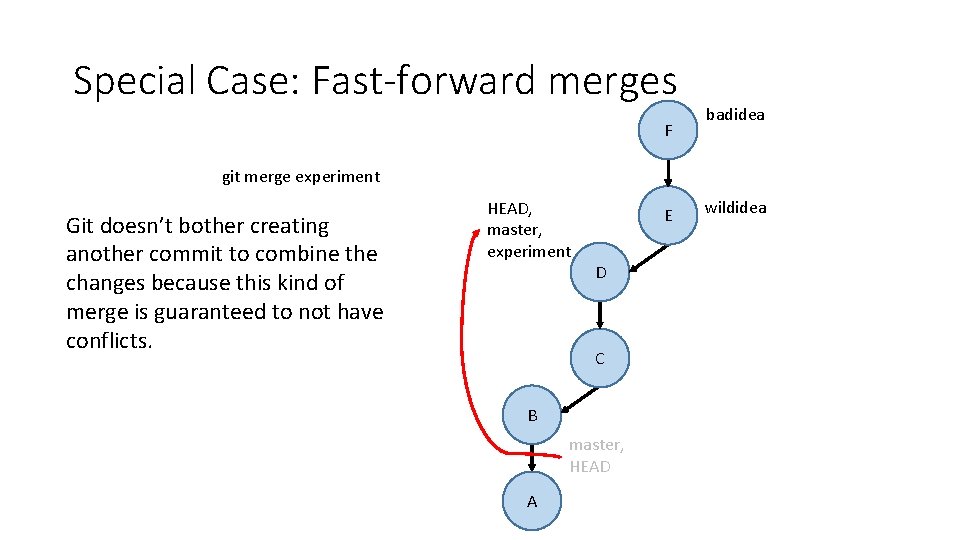
Special Case: Fast-forward merges F badidea git merge experiment Git doesn’t bother creating another commit to combine the changes because this kind of merge is guaranteed to not have conflicts. HEAD, master, experiment E D C B master, HEAD A wildidea
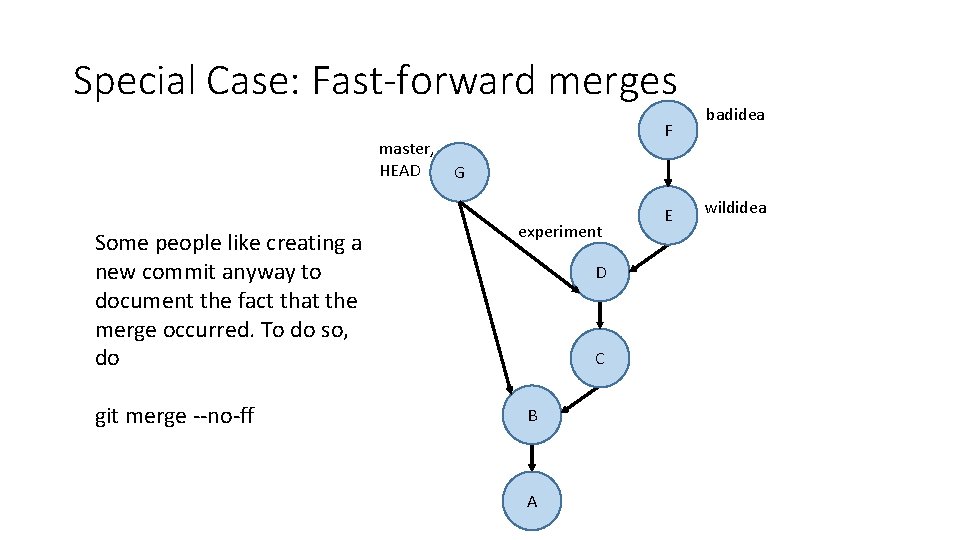
Special Case: Fast-forward merges master, HEAD Some people like creating a new commit anyway to document the fact that the merge occurred. To do so, do git merge --no-ff F badidea G experiment D C B A E wildidea
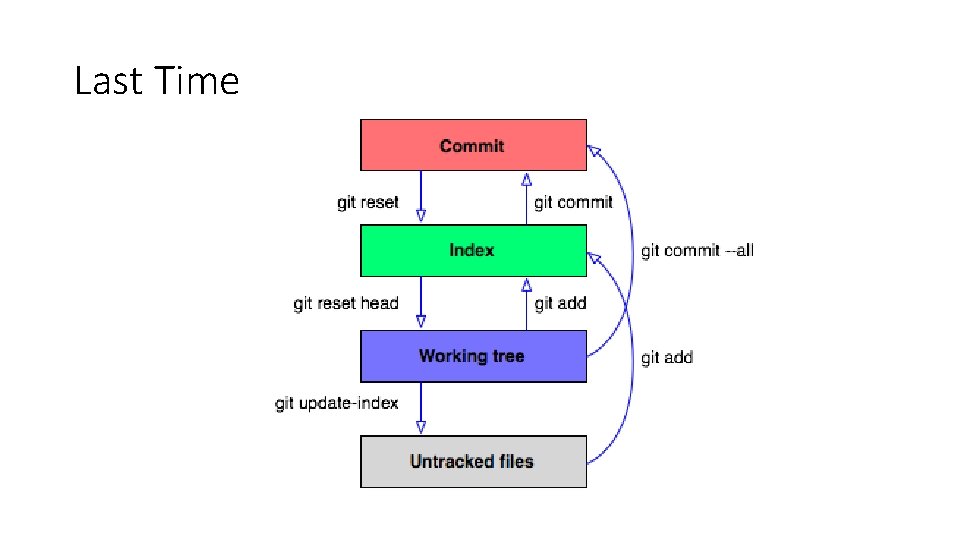
Summary • git branch – list all branches • git branch <branchname> - make a new branch • git checkout <branchname> - switch to another branch or commit • git merge <branchname> - make a commit merging in a branch
Activity! In pairs: 1. Create a git repository 2. Make a new file called file 1. txt, add some lines to it, and commit it 3. Create two branches called branch 1 and branch 2 4. Edit the same line in the text file and make a commit in each branch 5. Merge both branches back to master (merging the second branch back will require resolving the conflicts). 6. What do we call the merge that occurred when merging the first branch back to master?
Backups
![Exercise: What [directed, acyclic] graph do the following git commands produce? 1. 2. 3.](http://slidetodoc.com/presentation_image/f18cf65f421314f00cf53d899ed3c2dd/image-39.jpg "Exercise: What [directed, acyclic] graph do the following git commands produce? 1. 2. 3.")
Exercise: What [directed, acyclic] graph do the following git commands produce? 1. 2. 3. 4. 5. 6. 7. 8. 9. 10. 11. 12. git commit –m “A” git commit –m “B” git branch stable git branch experiment git checkout experiment git commit –m “C” git checkout master git commit –m “D” git branch goodidea git checkout experiment git branch whereami git commit –m “E” 13. 14. 15. 16. 17. 18. git checkout goodidea master, git checkout master HEAD git commit –m “F” F git checkout whereami git commit –m “G” git checkout master goodidea D stable experiment E whereami C B A G
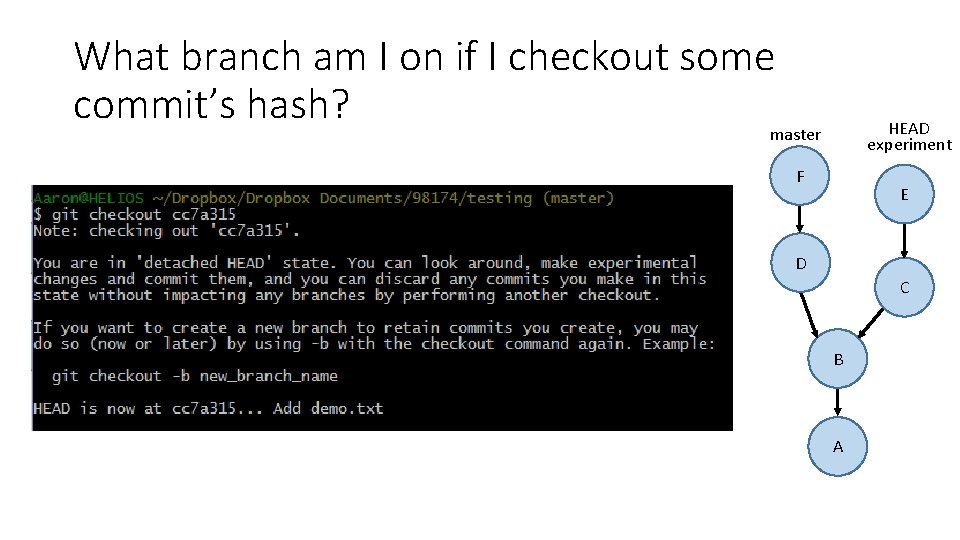
What branch am I on if I checkout some commit’s hash? HEAD experiment master F E D C stable B A
How to start a new branch from this commit? git branch new-feature git checkout new-feature How to get back to experiment? git checkout experiment
- Slides: 41