
Lecture 3 Access Control List Purpose of ACLs



- Slides: 29
Lecture 3 Access Control List Purpose of ACLs Wildcard Masks in ACLs Guidelines for ACL Creation Types of IPv 4 ACLs The content of this presentation slide is from Cisco Networking Academy.
Lecture 3 Access Control List Purpose of ACLs Explain how ACLs filter traffic.
Purpose of ACLs What is an ACL? An ACL is a series of IOS commands that are used to filter packets based on information found in the packet header. By default, a router does not have any ACLs configured. When an ACL is applied to an interface, the router performs the additional task of evaluating all network packets as they pass through the interface to determine if the packet can be forwarded. • An ACL uses a sequential list of permit or deny statements, known as access control entries (ACEs). Note: ACEs are also commonly called ACL statements. • When network traffic passes through an interface configured with an ACL, the router compares the information within the packet against each ACE, in sequential order, to determine if the packet matches one of the ACEs. This process is called packet filtering.
Purpose of ACLs What is an ACL? Several tasks performed by routers require the use of ACLs to identify traffic: • Limit network traffic to increase network performance • Provide traffic flow control • Provide a basic level of security for network access • Filter traffic based on traffic type • Screen hosts to permit or deny access to network services • Provide priority to certain classes of network traffic
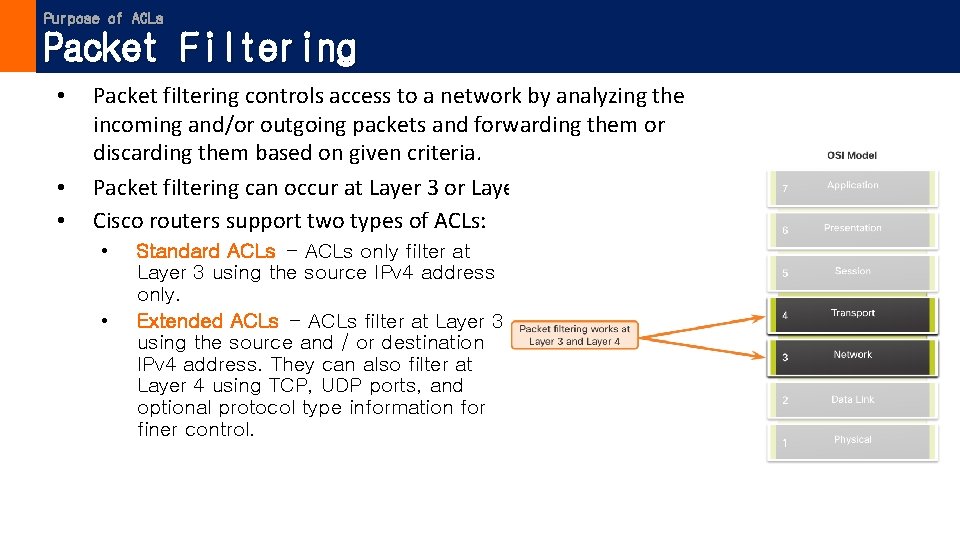
Purpose of ACLs Packet Filtering • • • Packet filtering controls access to a network by analyzing the incoming and/or outgoing packets and forwarding them or discarding them based on given criteria. Packet filtering can occur at Layer 3 or Layer 4. Cisco routers support two types of ACLs: • • Standard ACLs - ACLs only filter at Layer 3 using the source IPv 4 address only. Extended ACLs - ACLs filter at Layer 3 using the source and / or destination IPv 4 address. They can also filter at Layer 4 using TCP, UDP ports, and optional protocol type information for finer control.
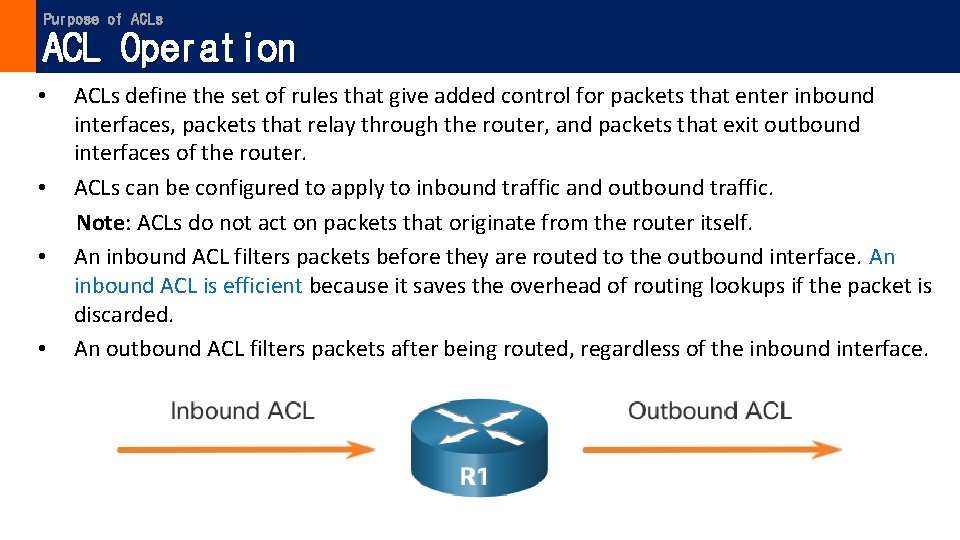
Purpose of ACLs ACL Operation • • ACLs define the set of rules that give added control for packets that enter inbound interfaces, packets that relay through the router, and packets that exit outbound interfaces of the router. ACLs can be configured to apply to inbound traffic and outbound traffic. Note: ACLs do not act on packets that originate from the router itself. An inbound ACL filters packets before they are routed to the outbound interface. An inbound ACL is efficient because it saves the overhead of routing lookups if the packet is discarded. An outbound ACL filters packets after being routed, regardless of the inbound interface.
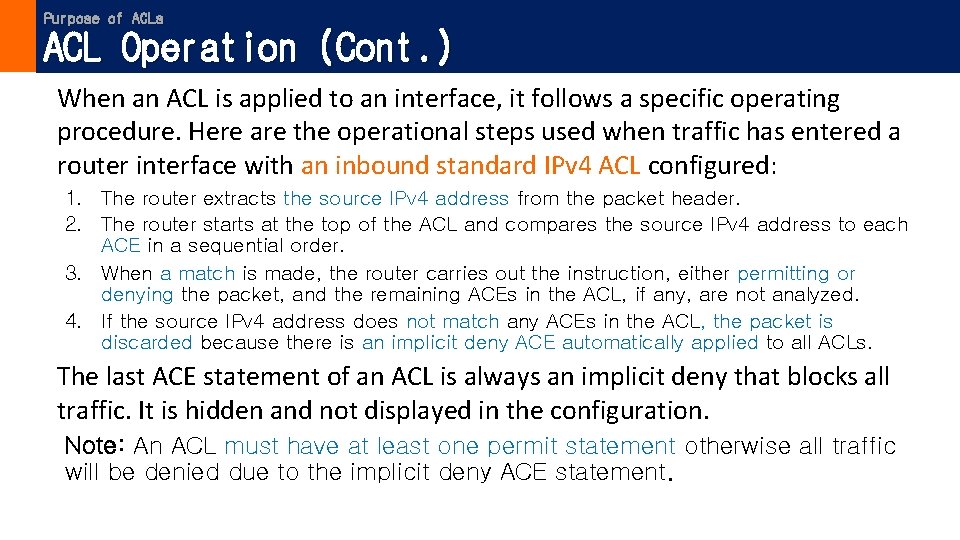
Purpose of ACLs ACL Operation (Cont. ) When an ACL is applied to an interface, it follows a specific operating procedure. Here are the operational steps used when traffic has entered a router interface with an inbound standard IPv 4 ACL configured: 1. The router extracts the source IPv 4 address from the packet header. 2. The router starts at the top of the ACL and compares the source IPv 4 address to each ACE in a sequential order. 3. When a match is made, the router carries out the instruction, either permitting or denying the packet, and the remaining ACEs in the ACL, if any, are not analyzed. 4. If the source IPv 4 address does not match any ACEs in the ACL, the packet is discarded because there is an implicit deny ACE automatically applied to all ACLs. The last ACE statement of an ACL is always an implicit deny that blocks all traffic. It is hidden and not displayed in the configuration. Note: An ACL must have at least one permit statement otherwise all traffic will be denied due to the implicit deny ACE statement.
Lecture 3 Access Control List Woldcard Masks in ACLs Explain how ACLs use wildcard masks.
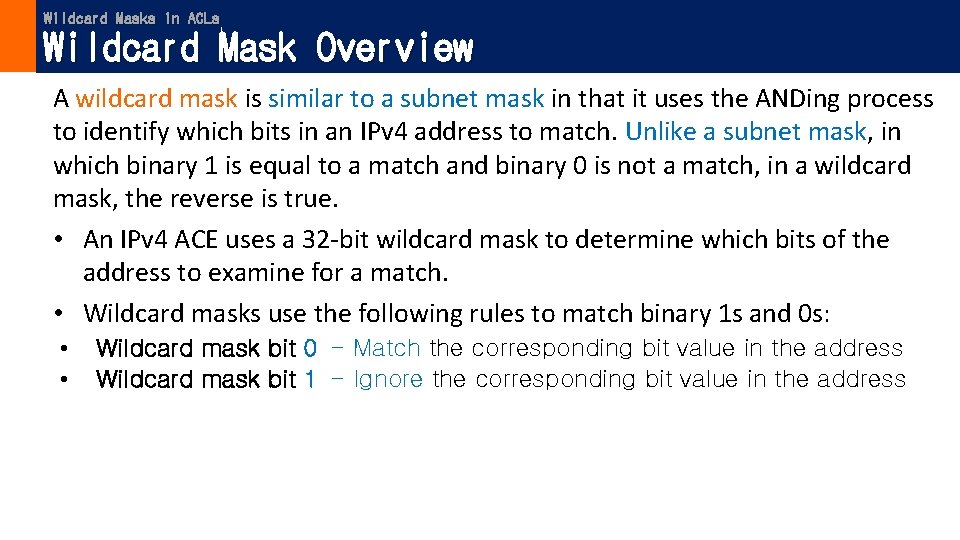
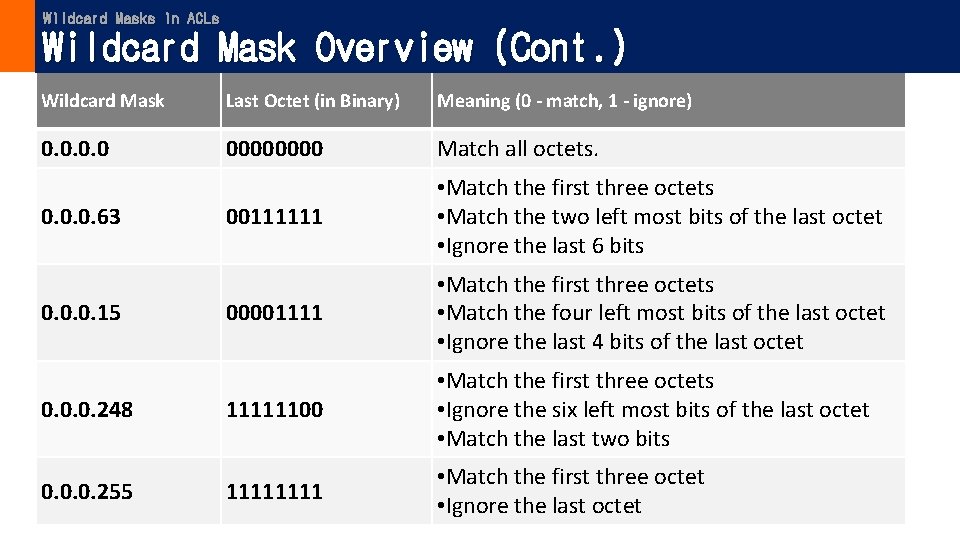
Wildcard Masks in ACLs Wildcard Mask Overview A wildcard mask is similar to a subnet mask in that it uses the ANDing process to identify which bits in an IPv 4 address to match. Unlike a subnet mask, in which binary 1 is equal to a match and binary 0 is not a match, in a wildcard mask, the reverse is true. • An IPv 4 ACE uses a 32 -bit wildcard mask to determine which bits of the address to examine for a match. • Wildcard masks use the following rules to match binary 1 s and 0 s: • • Wildcard mask bit 0 - Match the corresponding bit value in the address Wildcard mask bit 1 - Ignore the corresponding bit value in the address
Wildcard Masks in ACLs Wildcard Mask Overview (Cont. ) Wildcard Mask Last Octet (in Binary) Meaning (0 - match, 1 - ignore) 0. 0 0000 Match all octets. 00111111 • Match the first three octets • Match the two left most bits of the last octet • Ignore the last 6 bits 00001111 • Match the first three octets • Match the four left most bits of the last octet • Ignore the last 4 bits of the last octet 0. 0. 0. 248 11111100 • Match the first three octets • Ignore the six left most bits of the last octet • Match the last two bits 0. 0. 0. 255 1111 • Match the first three octet • Ignore the last octet 0. 0. 0. 63 0. 0. 0. 15
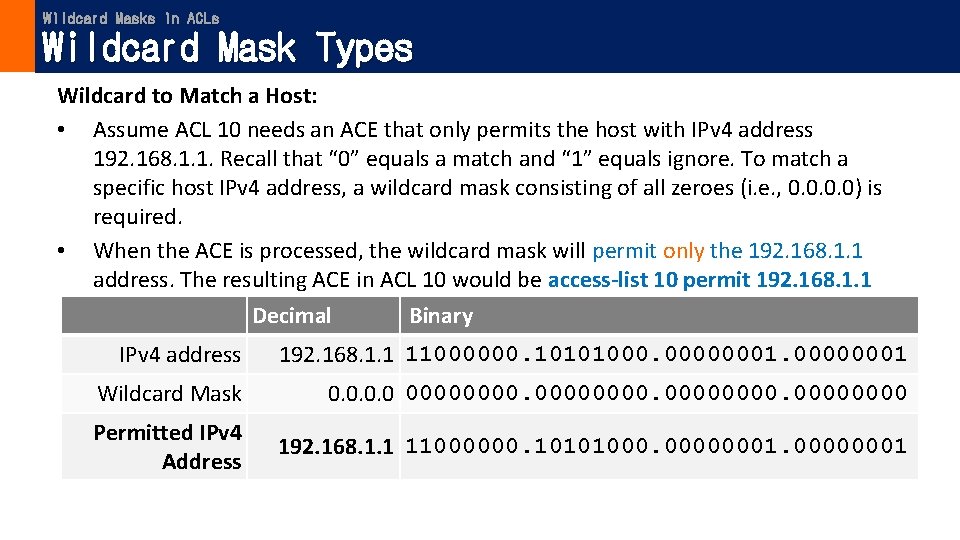
Wildcard Masks in ACLs Wildcard Mask Types Wildcard to Match a Host: • Assume ACL 10 needs an ACE that only permits the host with IPv 4 address 192. 168. 1. 1. Recall that “ 0” equals a match and “ 1” equals ignore. To match a specific host IPv 4 address, a wildcard mask consisting of all zeroes (i. e. , 0. 0) is required. • When the ACE is processed, the wildcard mask will permit only the 192. 168. 1. 1 address. The resulting ACE in ACL 10 would be access-list 10 permit 192. 168. 1. 1 0. 0. Binary Decimal IPv 4 address 192. 168. 1. 1 11000000. 10101000. 00000001 Wildcard Mask 0. 0 00000000. 0000 Permitted IPv 4 Address 192. 168. 1. 1 11000000. 10101000. 00000001
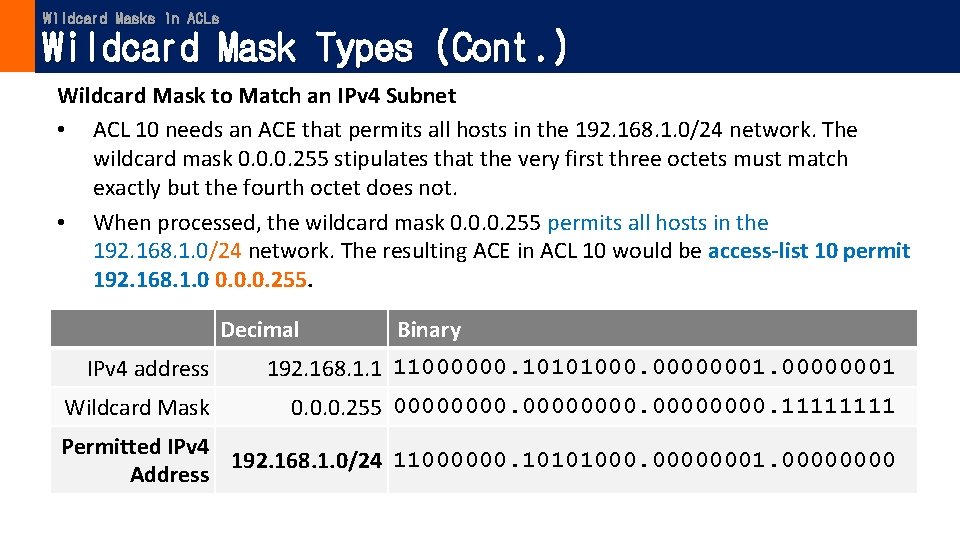
Wildcard Masks in ACLs Wildcard Mask Types (Cont. ) Wildcard Mask to Match an IPv 4 Subnet • ACL 10 needs an ACE that permits all hosts in the 192. 168. 1. 0/24 network. The wildcard mask 0. 0. 0. 255 stipulates that the very first three octets must match exactly but the fourth octet does not. • When processed, the wildcard mask 0. 0. 0. 255 permits all hosts in the 192. 168. 1. 0/24 network. The resulting ACE in ACL 10 would be access-list 10 permit 192. 168. 1. 0 0. 0. 0. 255. Decimal Binary IPv 4 address 192. 168. 1. 1 11000000. 10101000. 00000001 Wildcard Mask 0. 0. 0. 255 00000000. 1111 Permitted IPv 4 192. 168. 1. 0/24 11000000. 10101000. 00000001. 0000 Address
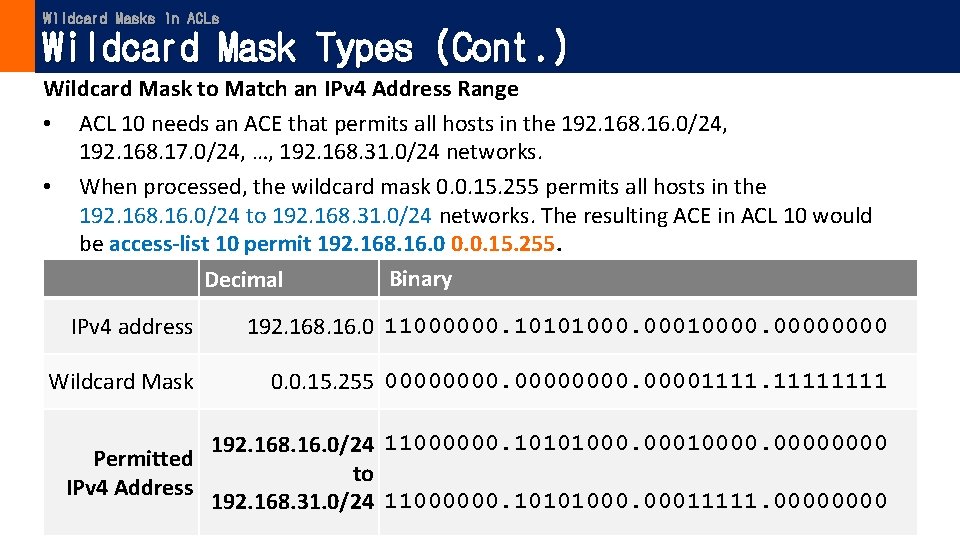
Wildcard Masks in ACLs Wildcard Mask Types (Cont. ) Wildcard Mask to Match an IPv 4 Address Range • ACL 10 needs an ACE that permits all hosts in the 192. 168. 16. 0/24, 192. 168. 17. 0/24, …, 192. 168. 31. 0/24 networks. • When processed, the wildcard mask 0. 0. 15. 255 permits all hosts in the 192. 168. 16. 0/24 to 192. 168. 31. 0/24 networks. The resulting ACE in ACL 10 would be access-list 10 permit 192. 168. 16. 0 0. 0. 15. 255. Binary Decimal IPv 4 address 192. 168. 16. 0 11000000. 10101000. 00010000 Wildcard Mask 0. 0. 15. 255 000000001111 192. 168. 16. 0/24 11000000. 10101000. 00010000 Permitted to IPv 4 Address 192. 168. 31. 0/24 11000000. 10101000. 00011111. 0000
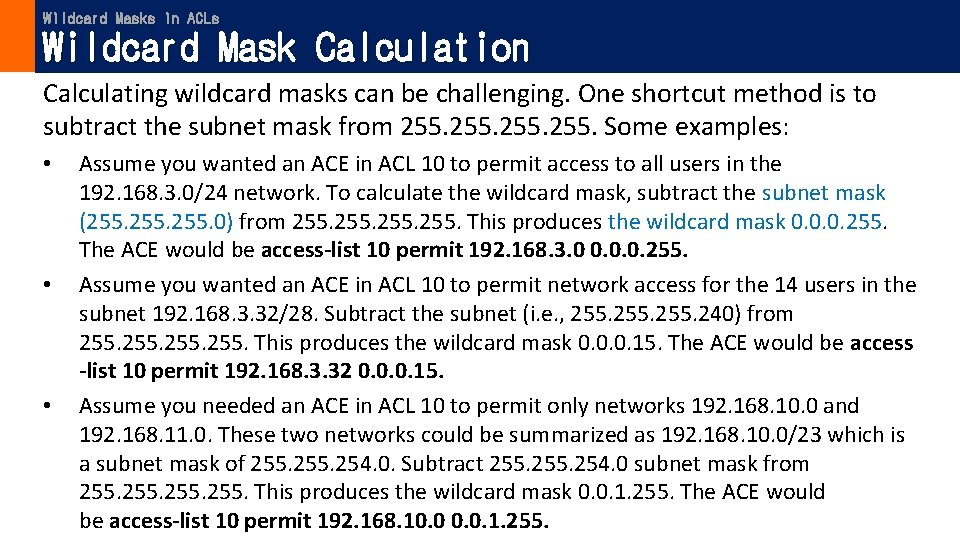
Wildcard Masks in ACLs Wildcard Mask Calculation Calculating wildcard masks can be challenging. One shortcut method is to subtract the subnet mask from 255. Some examples: • • • Assume you wanted an ACE in ACL 10 to permit access to all users in the 192. 168. 3. 0/24 network. To calculate the wildcard mask, subtract the subnet mask (255. 0) from 255. This produces the wildcard mask 0. 0. 0. 255. The ACE would be access-list 10 permit 192. 168. 3. 0 0. 0. 0. 255. Assume you wanted an ACE in ACL 10 to permit network access for the 14 users in the subnet 192. 168. 3. 32/28. Subtract the subnet (i. e. , 255. 240) from 255. This produces the wildcard mask 0. 0. 0. 15. The ACE would be access -list 10 permit 192. 168. 3. 32 0. 0. 0. 15. Assume you needed an ACE in ACL 10 to permit only networks 192. 168. 10. 0 and 192. 168. 11. 0. These two networks could be summarized as 192. 168. 10. 0/23 which is a subnet mask of 255. 254. 0. Subtract 255. 254. 0 subnet mask from 255. This produces the wildcard mask 0. 0. 1. 255. The ACE would be access-list 10 permit 192. 168. 10. 0. 1. 255.
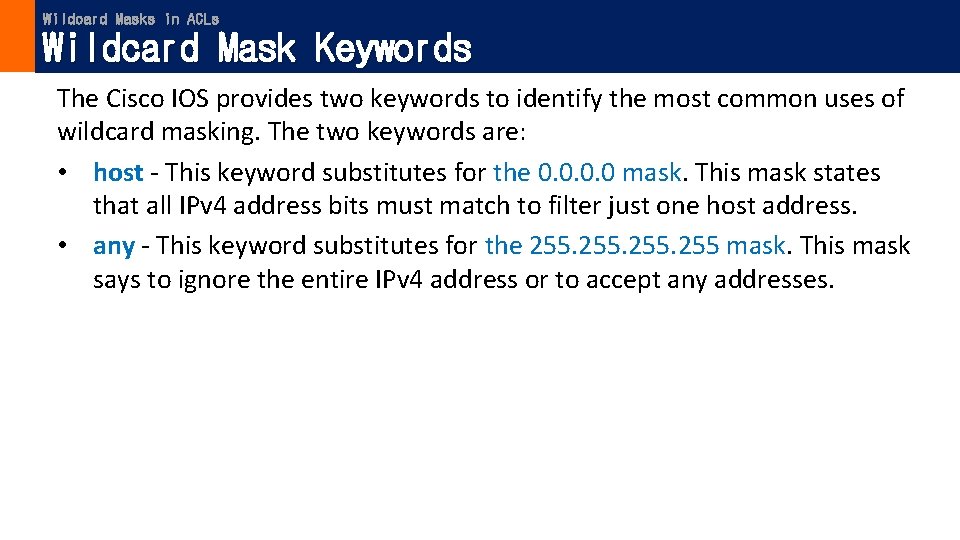
Wildcard Masks in ACLs Wildcard Mask Keywords The Cisco IOS provides two keywords to identify the most common uses of wildcard masking. The two keywords are: • host - This keyword substitutes for the 0. 0 mask. This mask states that all IPv 4 address bits must match to filter just one host address. • any - This keyword substitutes for the 255 mask. This mask says to ignore the entire IPv 4 address or to accept any addresses.
Lecture 3 Access Control List Guidelines for ACL Creation Explain how to create ACLs.
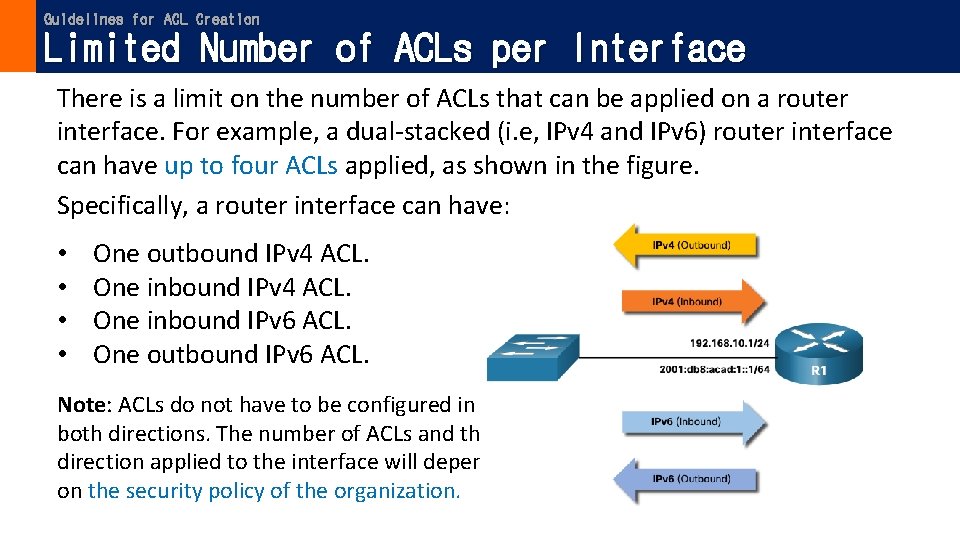
Guidelines for ACL Creation Limited Number of ACLs per Interface There is a limit on the number of ACLs that can be applied on a router interface. For example, a dual-stacked (i. e, IPv 4 and IPv 6) router interface can have up to four ACLs applied, as shown in the figure. Specifically, a router interface can have: • • One outbound IPv 4 ACL. One inbound IPv 6 ACL. One outbound IPv 6 ACL. Note: ACLs do not have to be configured in both directions. The number of ACLs and their direction applied to the interface will depend on the security policy of the organization.
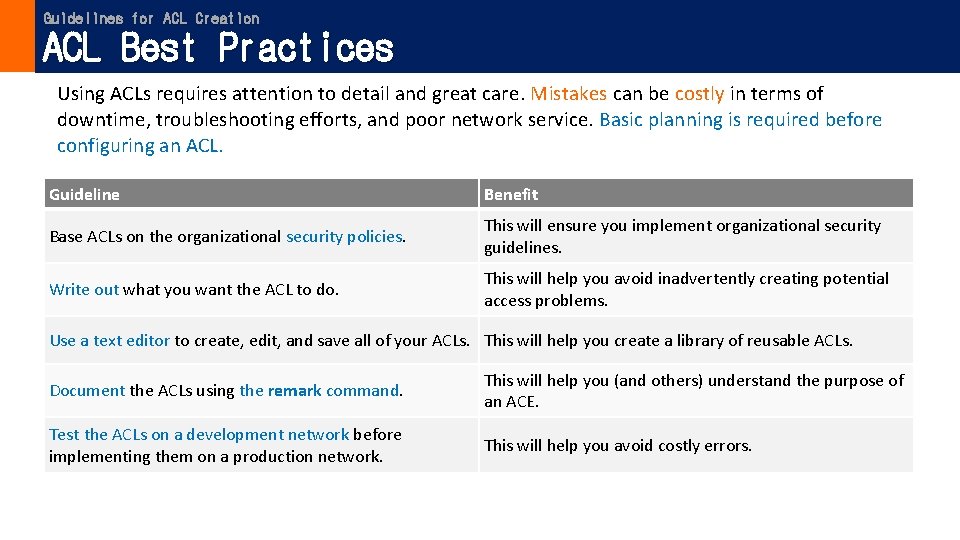
Guidelines for ACL Creation ACL Best Practices Using ACLs requires attention to detail and great care. Mistakes can be costly in terms of downtime, troubleshooting efforts, and poor network service. Basic planning is required before configuring an ACL. Guideline Benefit Base ACLs on the organizational security policies. This will ensure you implement organizational security guidelines. Write out what you want the ACL to do. This will help you avoid inadvertently creating potential access problems. Use a text editor to create, edit, and save all of your ACLs. This will help you create a library of reusable ACLs. Document the ACLs using the remark command. This will help you (and others) understand the purpose of an ACE. Test the ACLs on a development network before implementing them on a production network. This will help you avoid costly errors.
Lecture 3 Access Control List Types of IPv 4 ACLs Compare standard and extended IPv 4 ACLs.
Types of IPv 4 ACLs Standard and Extended ACLs There are two types of IPv 4 ACLs: • Standard ACLs - These permit or deny packets based only on the source IPv 4 address. • Extended ACLs - These permit or deny packets based on the source IPv 4 address and destination IPv 4 address, protocol type, source and destination TCP or UDP ports and more.
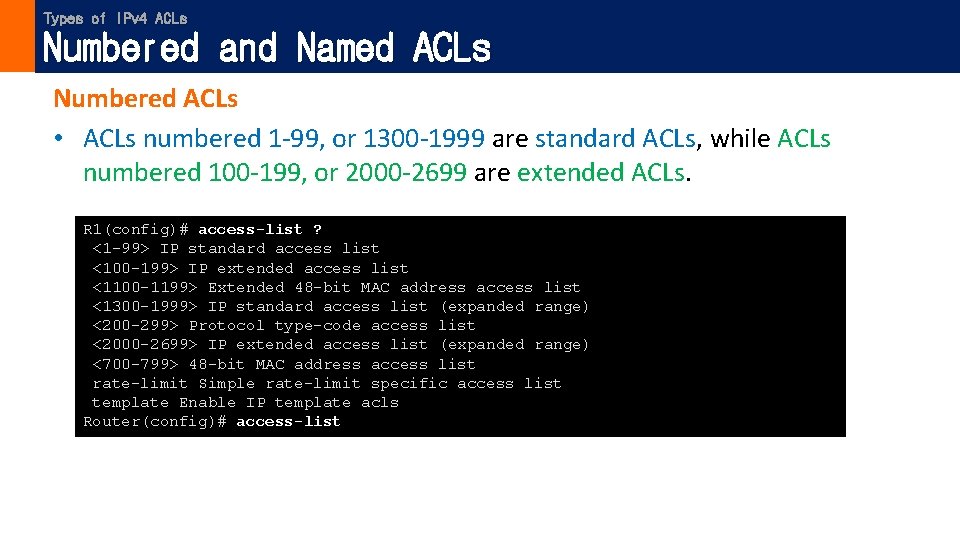
Types of IPv 4 ACLs Numbered and Named ACLs Numbered ACLs • ACLs numbered 1 -99, or 1300 -1999 are standard ACLs, while ACLs numbered 100 -199, or 2000 -2699 are extended ACLs. R 1(config)# access-list ? <1 -99> IP standard access list <100 -199> IP extended access list <1100 -1199> Extended 48 -bit MAC address access list <1300 -1999> IP standard access list (expanded range) <200 -299> Protocol type-code access list <2000 -2699> IP extended access list (expanded range) <700 -799> 48 -bit MAC address access list rate-limit Simple rate-limit specific access list template Enable IP template acls Router(config)# access-list
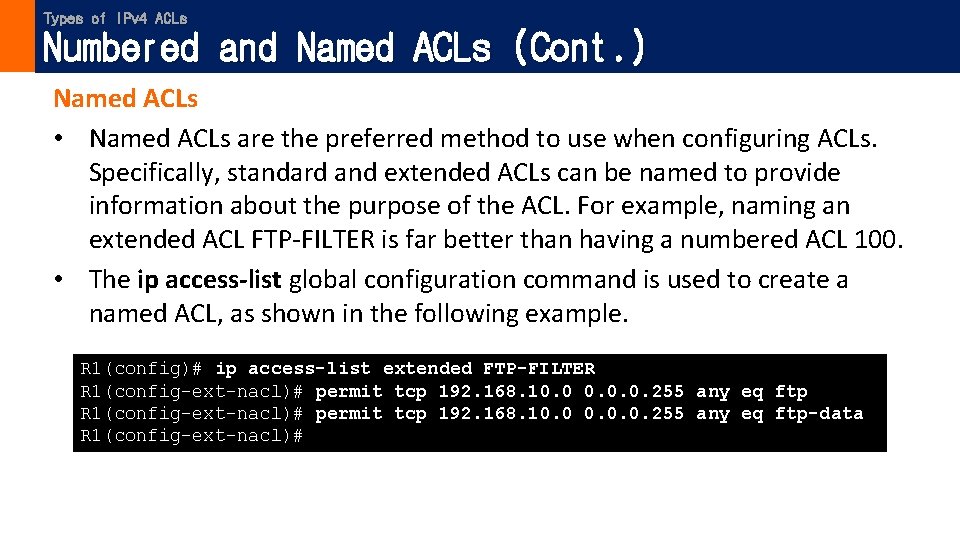
Types of IPv 4 ACLs Numbered and Named ACLs (Cont. ) Named ACLs • Named ACLs are the preferred method to use when configuring ACLs. Specifically, standard and extended ACLs can be named to provide information about the purpose of the ACL. For example, naming an extended ACL FTP-FILTER is far better than having a numbered ACL 100. • The ip access-list global configuration command is used to create a named ACL, as shown in the following example. R 1(config)# ip access-list extended FTP-FILTER R 1(config-ext-nacl)# permit tcp 192. 168. 10. 0. 0. 255 any eq ftp-data R 1(config-ext-nacl)#
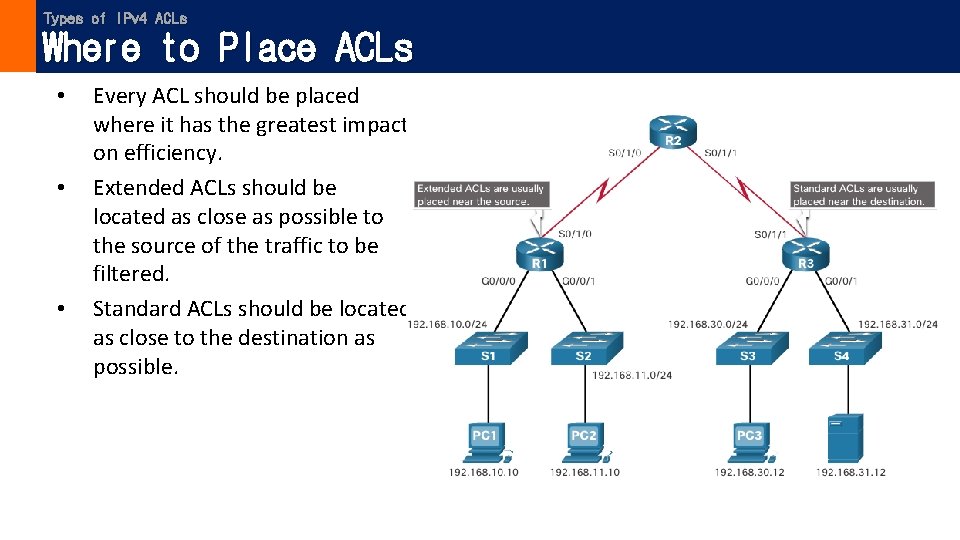
Types of IPv 4 ACLs Where to Place ACLs • • • Every ACL should be placed where it has the greatest impact on efficiency. Extended ACLs should be located as close as possible to the source of the traffic to be filtered. Standard ACLs should be located as close to the destination as possible.
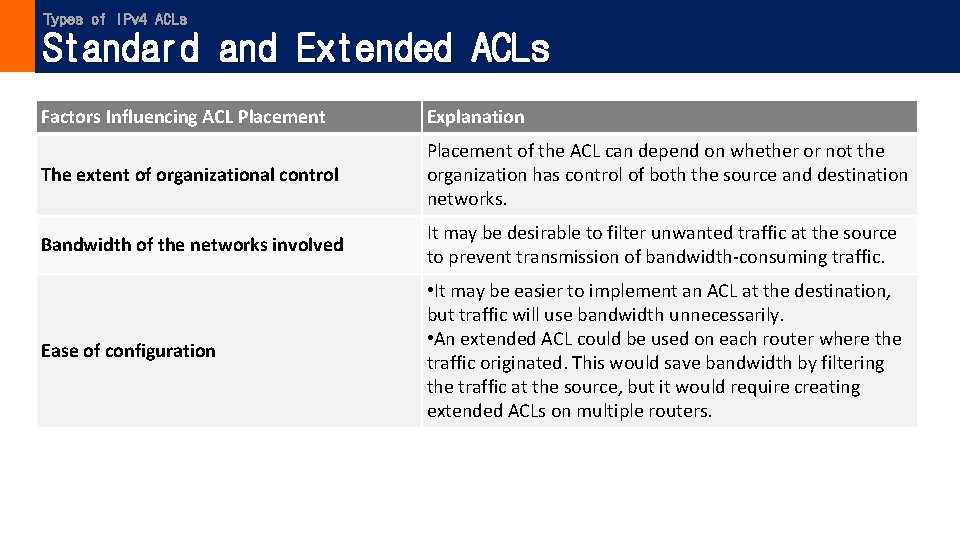
Types of IPv 4 ACLs Standard and Extended ACLs Factors Influencing ACL Placement Explanation The extent of organizational control Placement of the ACL can depend on whether or not the organization has control of both the source and destination networks. Bandwidth of the networks involved It may be desirable to filter unwanted traffic at the source to prevent transmission of bandwidth-consuming traffic. Ease of configuration • It may be easier to implement an ACL at the destination, but traffic will use bandwidth unnecessarily. • An extended ACL could be used on each router where the traffic originated. This would save bandwidth by filtering the traffic at the source, but it would require creating extended ACLs on multiple routers.
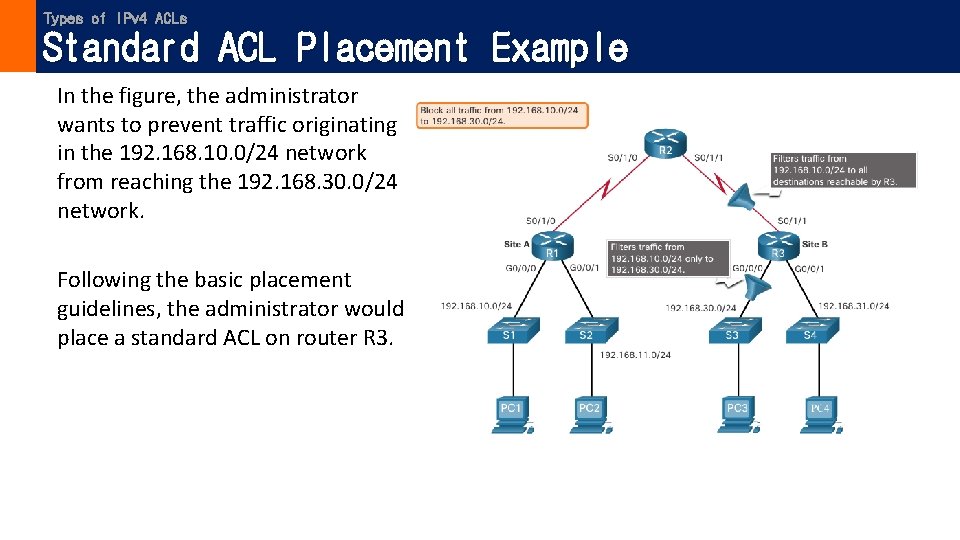
Types of IPv 4 ACLs Standard ACL Placement Example In the figure, the administrator wants to prevent traffic originating in the 192. 168. 10. 0/24 network from reaching the 192. 168. 30. 0/24 network. Following the basic placement guidelines, the administrator would place a standard ACL on router R 3.
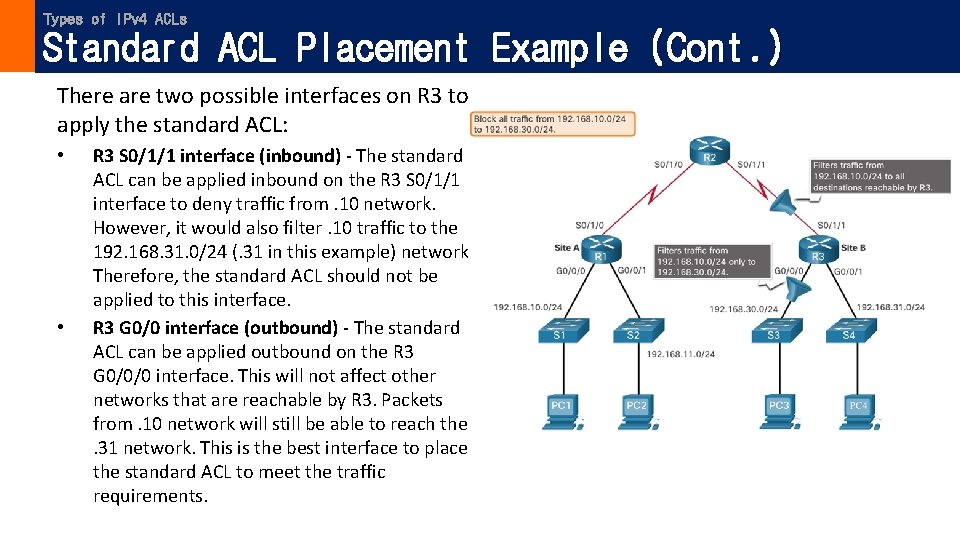
Types of IPv 4 ACLs Standard ACL Placement Example (Cont. ) There are two possible interfaces on R 3 to apply the standard ACL: • • R 3 S 0/1/1 interface (inbound) - The standard ACL can be applied inbound on the R 3 S 0/1/1 interface to deny traffic from. 10 network. However, it would also filter. 10 traffic to the 192. 168. 31. 0/24 (. 31 in this example) network. Therefore, the standard ACL should not be applied to this interface. R 3 G 0/0 interface (outbound) - The standard ACL can be applied outbound on the R 3 G 0/0/0 interface. This will not affect other networks that are reachable by R 3. Packets from. 10 network will still be able to reach the. 31 network. This is the best interface to place the standard ACL to meet the traffic requirements.
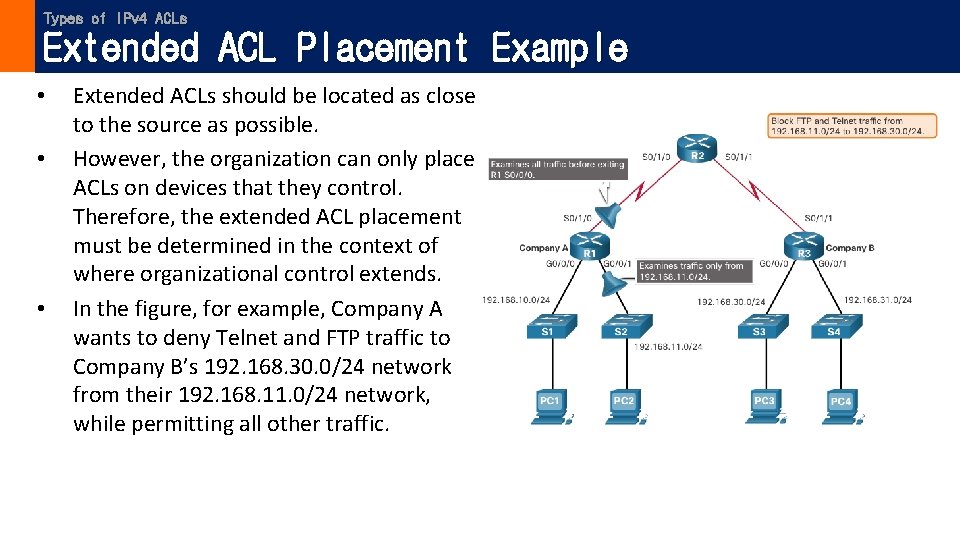
Types of IPv 4 ACLs Extended ACL Placement Example • • • Extended ACLs should be located as close to the source as possible. However, the organization can only place ACLs on devices that they control. Therefore, the extended ACL placement must be determined in the context of where organizational control extends. In the figure, for example, Company A wants to deny Telnet and FTP traffic to Company B’s 192. 168. 30. 0/24 network from their 192. 168. 11. 0/24 network, while permitting all other traffic.
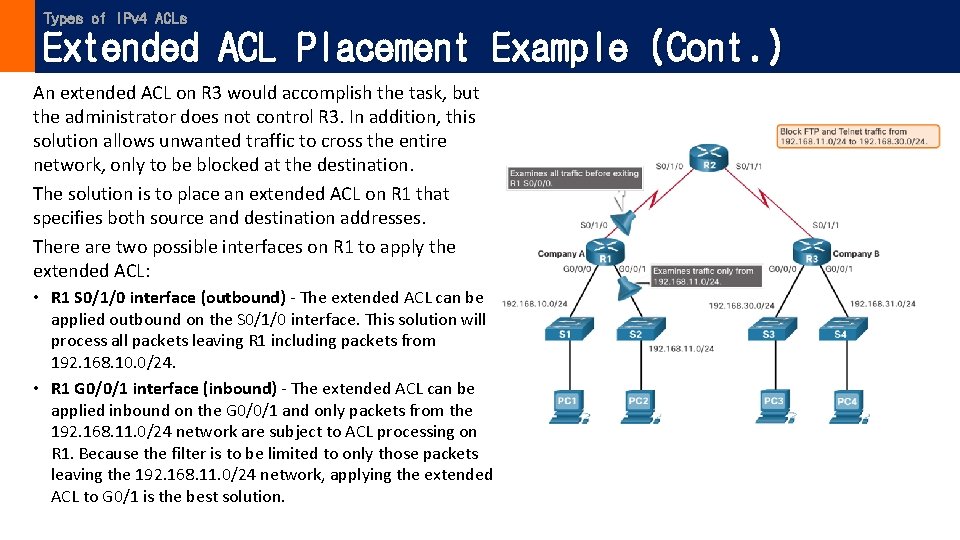
Types of IPv 4 ACLs Extended ACL Placement Example (Cont. ) An extended ACL on R 3 would accomplish the task, but the administrator does not control R 3. In addition, this solution allows unwanted traffic to cross the entire network, only to be blocked at the destination. The solution is to place an extended ACL on R 1 that specifies both source and destination addresses. There are two possible interfaces on R 1 to apply the extended ACL: • R 1 S 0/1/0 interface (outbound) - The extended ACL can be applied outbound on the S 0/1/0 interface. This solution will process all packets leaving R 1 including packets from 192. 168. 10. 0/24. • R 1 G 0/0/1 interface (inbound) - The extended ACL can be applied inbound on the G 0/0/1 and only packets from the 192. 168. 11. 0/24 network are subject to ACL processing on R 1. Because the filter is to be limited to only those packets leaving the 192. 168. 11. 0/24 network, applying the extended ACL to G 0/1 is the best solution.
The content of this presentation slide is from Cisco Networking Academy.