
Lecture 25 of 41 Spatial Sorting Binary Space
Lecture 25 of 41 Spatial Sorting: Binary Space Partitioning Quadtrees & Octrees William H. Hsu Department of Computing and Information Sciences, KSU KSOL course pages: http: //bit. ly/h. Gv. Xl. H / http: //bit. ly/e. Vizr. E Public mirror web site: http: //www. kddresearch. org/Courses/CIS 636 Instructor home page: http: //www. cis. ksu. edu/~bhsu Readings: Today: Chapter 6, esp. § 6. 1, Eberly 2 e – see http: //bit. ly/ie. Uq 45 Next class: Chapter 7, § 8. 4, Eberly 2 e Wikipedia, Binary Space Partitioning: http: //bit. ly/e. E 10 lc Wikipedia, Quadtree (http: //bit. ly/ky 0 Xy) & Octree (http: //bit. ly/d. Vrthx) CIS 536/636 Introduction to Computer Graphics Lecture 25 of 41 Computing & Information Sciences Kansas State University
Lecture Outline l l Reading for Last Class: § 2. 4. 3, 8. 1, Eberly 2 e, GL handout Reading for Today: Chapter 6, Esp. § 6. 1, Eberly 2 e Reading for Next Class: Chapter 7, § 8. 4, Eberly 2 e Last Time: Collision Handling, Part 1 of 2 Static vs. dynamic objects, testing vs. finding intersections Distance vs. intersection methods Triangle point containment test Method of separating axes l Today: Adaptive Spatial Partitioning Visible Surface Determination (VSD) revisited Constructive Solid Geometry (CSG) trees Binary Space Partitioning (BSP) trees Quadtrees: adaptive 2 -D (planar) subdivision Octrees: adaptive 3 -D (spatial) subdivision l Coming Soon: Volume Graphics & Voxels CIS 536/636 Introduction to Computer Graphics Lecture 25 of 41 Computing & Information Sciences Kansas State University
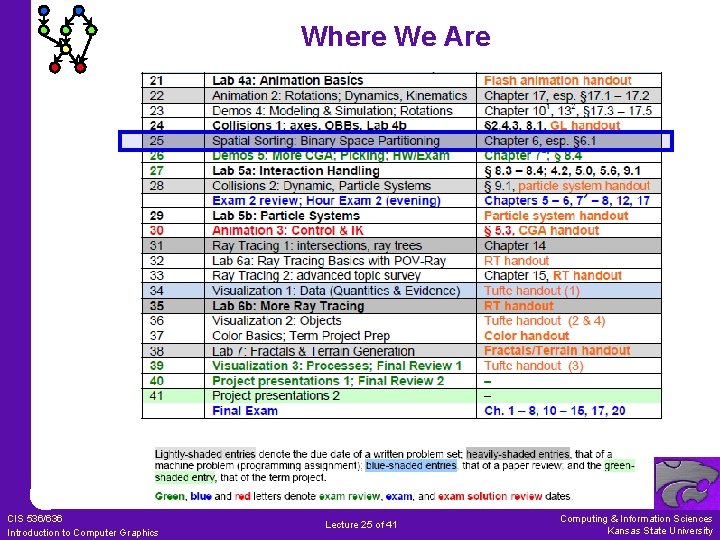
Where We Are CIS 536/636 Introduction to Computer Graphics Lecture 25 of 41 Computing & Information Sciences Kansas State University
Acknowledgements: Intersections, Containment – Eberly 1 e David H. Eberly Last lecture’s material: Chief Technology Officer Geometric Tools, LLC http: //www. geometrictools. com http: //bit. ly/en. Kbfs l View Frustum clipping Ø § 2. 4. 3, p. 70 – 77, 2 e Ø § 3. 4. 3, p. 93 – 99, & § 3. 7. 2, p. 133 – 136, 1 e l Collision detection: separating axes Ø § 8. 1, p. 393 – 443, 2 e Ø § 6. 4. p. 203 – 214, 1 e Later: l Distance methods Ø Chapter 14, p. 639 – 679, 2 e Ø § 2. 6, p. 38 – 77, 1 e l Intersection methods Ø Chapter 15, p. 681 – 717, 2 e Ø § 6. 2 – 6. 5, p. 188 – 243, 1 e 3 D Game Engine Design © 2000 D. H. Eberly See http: //bit. ly/ie. Uq 45 for second edition table of contents (TOC) CIS 536/636 Introduction to Computer Graphics Lecture 25 of 41 Computing & Information Sciences Kansas State University
![Review [1]: View Frustum Clipping 3 D Game Engine Design © 2000 D. H.](http://slidetodoc.com/presentation_image_h2/96ec56418169f6aba6d2381133bc6786/image-5.jpg "Review [1]: View Frustum Clipping 3 D Game Engine Design © 2000 D. H.")
Review [1]: View Frustum Clipping 3 D Game Engine Design © 2000 D. H. Eberly See http: //bit. ly/ie. Uq 45 for second edition table of contents (TOC) CIS 536/636 Introduction to Computer Graphics Lecture 25 of 41 Computing & Information Sciences Kansas State University
![Review [2]: Collision Detection vs. Response Adapted from slides © 2004 – 2005 S.](http://slidetodoc.com/presentation_image_h2/96ec56418169f6aba6d2381133bc6786/image-6.jpg "Review [2]: Collision Detection vs. Response Adapted from slides © 2004 – 2005 S.")
Review [2]: Collision Detection vs. Response Adapted from slides © 2004 – 2005 S. Rotenberg, UCSD CSE 169: Computer Animation, Winter 2005, http: //bit. ly/f 0 Vi. AN CIS 536/636 Introduction to Computer Graphics Lecture 25 of 41 Computing & Information Sciences Kansas State University
![Review [3]: Queries – Test- vs. Find-Intersection l Test-Intersection: Determine If Objects Intersect Static:](http://slidetodoc.com/presentation_image_h2/96ec56418169f6aba6d2381133bc6786/image-7.jpg "Review [3]: Queries – Test- vs. Find-Intersection l Test-Intersection: Determine If Objects Intersect Static:")
Review [3]: Queries – Test- vs. Find-Intersection l Test-Intersection: Determine If Objects Intersect Static: test whether they do at given instant Dynamic: test whether they intersect at any point along trajectories l Find-Intersection: Determine Intersection (or Contact) Set of Objects Static: intersection set (compare: A B) Dynamic: contact time (interval of overlap), sets (depends on time) Adapted from 3 D Game Engine Design © 2000 D. H. Eberly See http: //bit. ly/ie. Uq 45 for second edition table of contents (TOC) CIS 536/636 Introduction to Computer Graphics Lecture 25 of 41 Computing & Information Sciences Kansas State University
![Review [4]: Queries – Distance vs. Intersection l Distance-Based Parametric representation of object boundaries/interiors](http://slidetodoc.com/presentation_image_h2/96ec56418169f6aba6d2381133bc6786/image-8.jpg "Review [4]: Queries – Distance vs. Intersection l Distance-Based Parametric representation of object boundaries/interiors")
Review [4]: Queries – Distance vs. Intersection l Distance-Based Parametric representation of object boundaries/interiors Want: closest points on two objects (to see whether they intersect) Use: constrained minimization to solve for closest points l Intersection-Based Also uses parametric representation Want: overlapping subset of interior of two objects General approach: equate objects, solve for parameters Use one of two kinds of solution methods Ø Analytical (when feasible to solve exactly – e. g. , OBBs) Ø Numerical (approximate region of overlap) Solving for parameters in equation Harder to compute than distance-based; use only when needed Adapted from 3 D Game Engine Design © 2000 D. H. Eberly See http: //bit. ly/ie. Uq 45 for second edition table of contents (TOC) CIS 536/636 Introduction to Computer Graphics Lecture 25 of 41 Computing & Information Sciences Kansas State University
![Review [5]: Segment vs. Triangle – Solution Adapted from slides © 2004 – 2005](http://slidetodoc.com/presentation_image_h2/96ec56418169f6aba6d2381133bc6786/image-9.jpg "Review [5]: Segment vs. Triangle – Solution Adapted from slides © 2004 – 2005")
Review [5]: Segment vs. Triangle – Solution Adapted from slides © 2004 – 2005 S. Rotenberg, UCSD CSE 169: Computer Animation, Winter 2005, http: //bit. ly/f 0 Vi. AN CIS 536/636 Introduction to Computer Graphics Lecture 25 of 41 Computing & Information Sciences Kansas State University
![Review [6]: Segment vs. Triangle – Point Test Adapted from slides © 2004 –](http://slidetodoc.com/presentation_image_h2/96ec56418169f6aba6d2381133bc6786/image-10.jpg "Review [6]: Segment vs. Triangle – Point Test Adapted from slides © 2004 –")
Review [6]: Segment vs. Triangle – Point Test Adapted from slides © 2004 – 2005 S. Rotenberg, UCSD CSE 169: Computer Animation, Winter 2005, http: //bit. ly/f 0 Vi. AN CIS 536/636 Introduction to Computer Graphics Lecture 25 of 41 Computing & Information Sciences Kansas State University
![Review [7]: Faster Triangle – Point Containment Adapted from slides © 2004 – 2005](http://slidetodoc.com/presentation_image_h2/96ec56418169f6aba6d2381133bc6786/image-11.jpg "Review [7]: Faster Triangle – Point Containment Adapted from slides © 2004 – 2005")
Review [7]: Faster Triangle – Point Containment Adapted from slides © 2004 – 2005 S. Rotenberg, UCSD CSE 169: Computer Animation, Winter 2005, http: //bit. ly/f 0 Vi. AN CIS 536/636 Introduction to Computer Graphics Lecture 25 of 41 Computing & Information Sciences Kansas State University
![Review [8]: Sphere-Swept Volumes & Distances Wikipedia: Sphere http: //bit. ly/9 OWj. Qi Image](http://slidetodoc.com/presentation_image_h2/96ec56418169f6aba6d2381133bc6786/image-12.jpg "Review [8]: Sphere-Swept Volumes & Distances Wikipedia: Sphere http: //bit. ly/9 OWj. Qi Image")
Review [8]: Sphere-Swept Volumes & Distances Wikipedia: Sphere http: //bit. ly/9 OWj. Qi Image © 2008 Clip. Art. Of. com http: //bit. ly/e. Kh. E 2 f Capsule Image © 2007 Remotion Wiki http: //bit. ly/hu. Ez. NW Lozenge Image © 2011 Jasmin Studio Crafts http: //bit. ly/eu. Eopw Adapted from 3 D Game Engine Design © 2000 D. H. Eberly See http: //bit. ly/ie. Uq 45 for second edition table of contents (TOC) CIS 536/636 Introduction to Computer Graphics Lecture 25 of 41 Computing & Information Sciences Kansas State University
![Review [9]: Method of Separating Axes 3 D Game Engine Design © 2000 D.](http://slidetodoc.com/presentation_image_h2/96ec56418169f6aba6d2381133bc6786/image-13.jpg "Review [9]: Method of Separating Axes 3 D Game Engine Design © 2000 D.")
Review [9]: Method of Separating Axes 3 D Game Engine Design © 2000 D. H. Eberly See http: //bit. ly/ie. Uq 45 for second edition table of contents (TOC) CIS 536/636 Introduction to Computer Graphics Lecture 25 of 41 Computing & Information Sciences Kansas State University
Acknowledgements: Collisions, BSP/Quadtrees/Octrees Steve Rotenberg Visiting Lecturer Graphics Lab University of California – San Diego CEO/Chief Scientist, Pixel. Active http: //graphics. ucsd. edu Glenn G. Chappell Associate Professor Department of Computer Science University of Alaska Fairbanks http: //www. cs. uaf. edu/~chappell/ CIS 536/636 Introduction to Computer Graphics Lecture 25 of 41 Computing & Information Sciences Kansas State University
![Data Structures for Scenes [1]: Four Tree Representations l Scene Graphs Organized by how](http://slidetodoc.com/presentation_image_h2/96ec56418169f6aba6d2381133bc6786/image-15.jpg "Data Structures for Scenes [1]: Four Tree Representations l Scene Graphs Organized by how")
Data Structures for Scenes [1]: Four Tree Representations l Scene Graphs Organized by how scene is constructed Nodes hold objects l Constructive Solid Geometry (CSG) Trees Organized by how scene is constructed Leaves hold 3 -D primitives Internal nodes hold set operations l Binary Space Partitioning (BSP) Trees Organized by spatial relationships in scene Nodes hold facets (in 3 -D, polygons) l Quadtrees & Octrees Organized spatially Nodes represent regions in space Leaves hold objects Adapted from slides © 2004 G. G. Chappell, UAF CS 481/681: Advanced Computer Graphics, Spring 2004, http: //bit. ly/eivv. Vc CIS 536/636 Introduction to Computer Graphics Lecture 25 of 41 Computing & Information Sciences Kansas State University
![Data Structures for Scenes [2]: Implementing Scene Graphs l We think of scene graphs](http://slidetodoc.com/presentation_image_h2/96ec56418169f6aba6d2381133bc6786/image-16.jpg "Data Structures for Scenes [2]: Implementing Scene Graphs l We think of scene graphs")
Data Structures for Scenes [2]: Implementing Scene Graphs l We think of scene graphs as looking like the tree on the left. l However, it is often convenient to implement them as shown on the right. Implementation is a B-tree. Child pointers are first-logical-child and next-logical-sibling. Then traversing the logical tree is a simple pre-order traversal of the physical tree. This is how we draw. Logical Tree Physical Tree Adapted from slides © 2004 G. G. Chappell, UAF CS 481/681: Advanced Computer Graphics, Spring 2004, http: //bit. ly/eivv. Vc CIS 536/636 Introduction to Computer Graphics Lecture 25 of 41 Computing & Information Sciences Kansas State University
![Data Structures for Scenes [3]: Constructive Solid Geometry Trees l In Constructive Solid Geometry](http://slidetodoc.com/presentation_image_h2/96ec56418169f6aba6d2381133bc6786/image-17.jpg "Data Structures for Scenes [3]: Constructive Solid Geometry Trees l In Constructive Solid Geometry")
Data Structures for Scenes [3]: Constructive Solid Geometry Trees l In Constructive Solid Geometry (CSG), we construct a scene out of primitives representing solid 3 -D shapes. Existing objects are combined using set operations (union, intersection, set difference). l We represent a scene as a binary tree. U Leaves hold primitives. Internal nodes, which always have two children, hold set operations. Order of children matters! U U ∩ cube – cone sphere cube l CSG trees are useful for things other than rendering. Intersection tests (collision detection, etc. ) are not too hard. (Thus: ray tracing. ) l CSG does not integrate well with pipeline-based rendering, so we are not covering it in depth right now. How about a project on CSG? Adapted from slides © 2004 G. G. Chappell, UAF CS 481/681: Advanced Computer Graphics, Spring 2004, http: //bit. ly/eivv. Vc CIS 536/636 Introduction to Computer Graphics Lecture 25 of 41 Computing & Information Sciences Kansas State University
![Binary Space Partitioning Trees [1]: Idea l BSP tree: very different way to represent](http://slidetodoc.com/presentation_image_h2/96ec56418169f6aba6d2381133bc6786/image-18.jpg "Binary Space Partitioning Trees [1]: Idea l BSP tree: very different way to represent")
Binary Space Partitioning Trees [1]: Idea l BSP tree: very different way to represent a scene Nodes hold facets Structure of tree encodes spatial information about the scene l Applications Visible Surface Determination (VSD) aka Hidden Surface Removal Wikipedia: Visible Surface Determination, http: //bit. ly/et 2 y. NQ Related applications: portal rendering (http: //bit. ly/f. YO 5 T 6), etc. Adapted from slides © 2004 G. G. Chappell, UAF CS 481/681: Advanced Computer Graphics, Spring 2004, http: //bit. ly/eivv. Vc CIS 536/636 Introduction to Computer Graphics Lecture 25 of 41 Computing & Information Sciences Kansas State University
![Binary Space Partitioning Trees [2]: Definition l BSP tree: type of binary tree Nodes](http://slidetodoc.com/presentation_image_h2/96ec56418169f6aba6d2381133bc6786/image-19.jpg "Binary Space Partitioning Trees [2]: Definition l BSP tree: type of binary tree Nodes")
Binary Space Partitioning Trees [2]: Definition l BSP tree: type of binary tree Nodes can have 0, 1, or two children Order of child nodes matters, and if a node has just 1 child, it matters whether this is its left or right child l Each node holds a facet This may be only part of a facet from original scene When constructing a BSP tree, we may need to split facets l Organization Each facet lies in a unique plane ð In 2 -D, a unique line For each facet, we choose one side of its plane to be “outside” Other direction: “inside” ð This can be the side the normal vector points toward Rule: For each node ð Its left descendant subtree holds only facets “inside” it ð Its right descendant subtree holds only facets “outside” it Adapted from slides © 2004 G. G. Chappell, UAF CS 481/681: Advanced Computer Graphics, Spring 2004, http: //bit. ly/eivv. Vc CIS 536/636 Introduction to Computer Graphics Lecture 25 of 41 Computing & Information Sciences Kansas State University
![Binary Space Partitioning Trees [3]: Construction l To construct a BSP tree, we need](http://slidetodoc.com/presentation_image_h2/96ec56418169f6aba6d2381133bc6786/image-20.jpg "Binary Space Partitioning Trees [3]: Construction l To construct a BSP tree, we need")
Binary Space Partitioning Trees [3]: Construction l To construct a BSP tree, we need List of facets (with vertices) “Outside” direction for each l Procedure Begin with empty tree Iterate through facets, adding new node to tree for each new facet First facet goes in root node. For each subsequent facet, descend through tree, going left or right depending on whether facet lies inside or outside the facet stored in relevant node ð If facet lies partially inside & partially outside, split it along plane [line] of facet ð Facet becomes two “partial” facets ð Each inherits “outside” direction from original facet ð Continue descending through tree with each partial facet separately Finally, (partial) facet is added to current tree as leaf Adapted from slides © 2004 G. G. Chappell, UAF CS 481/681: Advanced Computer Graphics, Spring 2004, http: //bit. ly/eivv. Vc CIS 536/636 Introduction to Computer Graphics Lecture 25 of 41 Computing & Information Sciences Kansas State University
![Binary Space Partitioning Trees [4]: Simple Example l Suppose we are given the following](http://slidetodoc.com/presentation_image_h2/96ec56418169f6aba6d2381133bc6786/image-21.jpg "Binary Space Partitioning Trees [4]: Simple Example l Suppose we are given the following")
Binary Space Partitioning Trees [4]: Simple Example l Suppose we are given the following (2 -D) facets and “outside” directions: 2 Facet 1 becomes the root Facet 2 is inside of 1 Thus, after facet 2, we have the following BSP tree: 3 1 l We iterate through the facets in numerical order 1 2 l Facet 3 is partially inside facet 1 and partially outside. 2 We split facet 3 along the line containing facet 1 The resulting facets are 3 a and 3 b They inherit their “outside” directions from facet 3 1 l The final BSP tree looks like this: 3 b 1 l We place facets 3 a and 3 b separately Facet 3 a is inside facet 1 and outside facet 2 Facet 3 b is outside facet 1 3 a 2 3 b 3 a Adapted from slides © 2004 G. G. Chappell, UAF CS 481/681: Advanced Computer Graphics, Spring 2004, http: //bit. ly/eivv. Vc CIS 536/636 Introduction to Computer Graphics Lecture 25 of 41 Computing & Information Sciences Kansas State University
![BSP Tree Traversal [1] l Important use of BSP trees: provide back-to-front (or front-to-back)](http://slidetodoc.com/presentation_image_h2/96ec56418169f6aba6d2381133bc6786/image-22.jpg "BSP Tree Traversal [1] l Important use of BSP trees: provide back-to-front (or front-to-back)")
BSP Tree Traversal [1] l Important use of BSP trees: provide back-to-front (or front-to-back) ordering of facets in scene, from point of view of observer When we say “back-to-front” ordering, we mean that no facet comes before something that appears directly behind it This still allows nearby facets to precede those farther away Key idea: All descendants on one side of facet can come before facet, which can come before all descendants on other side l Procedure For each facet, determine on which side of it observer lies Back-to-front ordering: in-order traversal of tree where subtree opposite from observer comes before subtree on same side 2 1 3 a 3 b Adapted from slides © 2004 G. G. Chappell, UAF CS 481/681: Advanced Computer Graphics, Spring 2004, http: //bit. ly/eivv. Vc CIS 536/636 Introduction to Computer Graphics Lecture 25 of 41 Computing & Information Sciences Kansas State University
![BSP Tree Traversal [2] l Procedure: For each facet, determine on which side of](http://slidetodoc.com/presentation_image_h2/96ec56418169f6aba6d2381133bc6786/image-23.jpg "BSP Tree Traversal [2] l Procedure: For each facet, determine on which side of")
BSP Tree Traversal [2] l Procedure: For each facet, determine on which side of it the observer lies. Back-to-front ordering: Do an in-order traversal of the tree in which the subtree opposite from the observer comes before the subtree on the same side as the observer. l Our observer is inside 1, outside 2, inside 3 a, outside 3 b. 1 2 1 3 a 2 3 b 3 a 3 b l Resulting back-to-front ordering: 3 b, 1, 2, 3 a. l Is this really back-to-front? Adapted from slides © 2004 G. G. Chappell, UAF CS 481/681: Advanced Computer Graphics, Spring 2004, http: //bit. ly/eivv. Vc CIS 536/636 Introduction to Computer Graphics Lecture 25 of 41 Computing & Information Sciences Kansas State University
BSP Trees: What Are They Good For? l BSP trees are primarily useful when a back-to-front or front-to-back ordering is desired: For HSR For translucency via blending l Since it can take some time to construct a BSP tree, they are useful primarily for: Static scenes Some dynamic objects are acceptable l BSP-tree techniques are generally a waste of effort for small scenes. We use them on: Large, complex scenes Adapted from slides © 2004 G. G. Chappell, UAF CS 481/681: Advanced Computer Graphics, Spring 2004, http: //bit. ly/eivv. Vc CIS 536/636 Introduction to Computer Graphics Lecture 25 of 41 Computing & Information Sciences Kansas State University
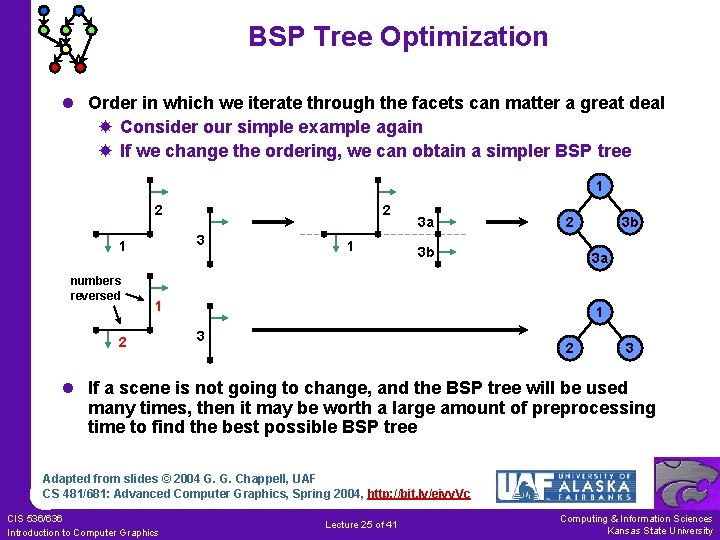
BSP Tree Optimization l Order in which we iterate through the facets can matter a great deal Consider our simple example again If we change the ordering, we can obtain a simpler BSP tree 1 2 3 1 numbers reversed 2 1 3 a 2 3 b 3 a 1 2 3 b 1 3 2 3 l If a scene is not going to change, and the BSP tree will be used many times, then it may be worth a large amount of preprocessing time to find the best possible BSP tree Adapted from slides © 2004 G. G. Chappell, UAF CS 481/681: Advanced Computer Graphics, Spring 2004, http: //bit. ly/eivv. Vc CIS 536/636 Introduction to Computer Graphics Lecture 25 of 41 Computing & Information Sciences Kansas State University
![BSP Trees: Finding Inside/Outside [1] l When dealing with BSP trees, we need to](http://slidetodoc.com/presentation_image_h2/96ec56418169f6aba6d2381133bc6786/image-26.jpg "BSP Trees: Finding Inside/Outside [1] l When dealing with BSP trees, we need to")
BSP Trees: Finding Inside/Outside [1] l When dealing with BSP trees, we need to determine inside or outside many times. What exactly does this mean? A facet lies entirely on one side of a plane if all of its vertices lie on that side. Vertices are points. The position of the observer is also a point. Thus, given a facet and a point, we need to be able to determine on which side of the facet’s plane the point lies. l We assume we know the normal vector of the facet (and that it points toward the “outside”). If not, compute the normal using a cross product. If you are using vecpos. h, and three non-colinear vertices of the facet are stored in pos variables p 1, p 2, p 3, then you can find the normal as follows. vec n = cross(p 2 -p 1, p 3 -p 1). normalized(); Adapted from slides © 2004 G. G. Chappell, UAF CS 481/681: Advanced Computer Graphics, Spring 2004, http: //bit. ly/eivv. Vc CIS 536/636 Introduction to Computer Graphics Lecture 25 of 41 Computing & Information Sciences Kansas State University
![BSP Trees: Finding Inside/Outside [2] l To determine on which side of a facet’s](http://slidetodoc.com/presentation_image_h2/96ec56418169f6aba6d2381133bc6786/image-27.jpg "BSP Trees: Finding Inside/Outside [2] l To determine on which side of a facet’s")
BSP Trees: Finding Inside/Outside [2] l To determine on which side of a facet’s plane a point lies: Let N be the normal vector of the facet Let p be a point in the facet’s plane ð Maybe p is a vertex of the facet? Let z be the point we want to check Compute (z – p) · N ð If this is positive, then z is on the outside ð Negative: inside ð Zero: on the plane l Using vecpos. h, and continuing from previous slide: pos z = …; // point to check if (dot(z-p 1, n) >= 0. ) // Outside or on plane else // Inside Adapted from slides © 2004 G. G. Chappell, UAF CS 481/681: Advanced Computer Graphics, Spring 2004, http: //bit. ly/eivv. Vc CIS 536/636 Introduction to Computer Graphics Lecture 25 of 41 Computing & Information Sciences Kansas State University
![BSP Trees: Splitting Polygons [1] l May need to split facet when constructing BSP](http://slidetodoc.com/presentation_image_h2/96ec56418169f6aba6d2381133bc6786/image-28.jpg "BSP Trees: Splitting Polygons [1] l May need to split facet when constructing BSP")
BSP Trees: Splitting Polygons [1] l May need to split facet when constructing BSP tree l Example Suppose we have the facet shown below. If all vertices are (say) outside, then no split required But if A, E, and F are outside (+), and B, C, and D are inside (–), then we must split into two facets E + – D + F – C A + – B Adapted from slides © 2004 G. G. Chappell, UAF CS 481/681: Advanced Computer Graphics, Spring 2004, http: //bit. ly/eivv. Vc CIS 536/636 Introduction to Computer Graphics Lecture 25 of 41 Computing & Information Sciences Kansas State University
![BSP Trees: Splitting Polygons [2] l Where do we split? Since the expression (z](http://slidetodoc.com/presentation_image_h2/96ec56418169f6aba6d2381133bc6786/image-29.jpg "BSP Trees: Splitting Polygons [2] l Where do we split? Since the expression (z")
BSP Trees: Splitting Polygons [2] l Where do we split? Since the expression (z – p) · N is positive at E and negative at D, it must be zero somewhere on the line segment joining D and E. Call this point S. This is one place where the facet splits. Let k 1 be the value of (z – p) · N at D, and let k 2 be the value at E. Then S = (1/(k 2 – k 1)) (k 2 D – k 1 E). Point T (shown in the diagram) is computed similarly. l Using vecpos. h (continuing from earlier slides): E + – D S double k 1 = dot(D-p 1, n); double k 2 = dot(E-p 1, n); pos S = affinecomb(k 2, D, -k 1, E); // Explanation of above line? – C + F T A + – B Adapted from slides © 2004 G. G. Chappell, UAF CS 481/681: Advanced Computer Graphics, Spring 2004, http: //bit. ly/eivv. Vc CIS 536/636 Introduction to Computer Graphics Lecture 25 of 41 Computing & Information Sciences Kansas State University
![BSP Trees: Splitting Polygons [3] l We were given vertices A, B, C, D,](http://slidetodoc.com/presentation_image_h2/96ec56418169f6aba6d2381133bc6786/image-30.jpg "BSP Trees: Splitting Polygons [3] l We were given vertices A, B, C, D,")
BSP Trees: Splitting Polygons [3] l We were given vertices A, B, C, D, E, F in order l We computed S and T S lies between D and E T lies between A and B l We have A, (split at T), B, C, D, (split at S), E, F l We form two polygons as follows: Start through vertex list When we get to split, use that vertex, and skip to other split E D Result: A, T, S, E, F S Do the same with the part we skipped Result: B, C, D, S, T F C T A B Adapted from slides © 2004 G. G. Chappell, UAF CS 481/681: Advanced Computer Graphics, Spring 2004, http: //bit. ly/eivv. Vc CIS 536/636 Introduction to Computer Graphics Lecture 25 of 41 Computing & Information Sciences Kansas State University
![Quadtrees & Octrees [1]: Background l Idea of binary space partition: good general applicability](http://slidetodoc.com/presentation_image_h2/96ec56418169f6aba6d2381133bc6786/image-31.jpg "Quadtrees & Octrees [1]: Background l Idea of binary space partition: good general applicability")
Quadtrees & Octrees [1]: Background l Idea of binary space partition: good general applicability l Variations used in several different structures BSP trees (of course) ð Split along planes containing facets Quadtrees & octrees (next) ð Split along pre-defined planes. Wikipedia, Octree http: //bit. ly/d. Vrthx K-d trees (Lecture 28) ð Split along planes parallel to coordinate axes, so as to split up the objects nicely. ð How about a project on K-d trees? l Quadtrees used to partition 2 -D space; octrees are for 3 -D Two concepts are nearly identical Unfortunate that they are given different names Adapted from slides © 2004 G. G. Chappell, UAF CS 481/681: Advanced Computer Graphics, Spring 2004, http: //bit. ly/eivv. Vc CIS 536/636 Introduction to Computer Graphics Lecture 25 of 41 Computing & Information Sciences Kansas State University
![Quadtrees & Octrees [2]: Definition l In general Quadtree: tree in which each node](http://slidetodoc.com/presentation_image_h2/96ec56418169f6aba6d2381133bc6786/image-32.jpg "Quadtrees & Octrees [2]: Definition l In general Quadtree: tree in which each node")
Quadtrees & Octrees [2]: Definition l In general Quadtree: tree in which each node has at most 4 children Octree: tree in which each node has at most 8 children Binary tree: tree in which each node has at most 2 children l In practice, however, we use “quadtree” and “octree” to mean something more specific Each node of the tree corresponds to a square (quadtree) or cubical (octree) region If a node has children, think of its region being chopped into 4 (quadtree) or 8 (octree) equal subregions Child nodes correspond to these smaller subregions of parent’s region Subdivide as little or as much as is necessary Each internal node has exactly 4 (quadtree) or 8 (octree) children Adapted from slides © 2004 G. G. Chappell, UAF CS 481/681: Advanced Computer Graphics, Spring 2004, http: //bit. ly/eivv. Vc CIS 536/636 Introduction to Computer Graphics Lecture 25 of 41 Computing & Information Sciences Kansas State University
![Quadtrees & Octrees [3]: Example l Root node of quadtree corresponds to square region](http://slidetodoc.com/presentation_image_h2/96ec56418169f6aba6d2381133bc6786/image-33.jpg "Quadtrees & Octrees [3]: Example l Root node of quadtree corresponds to square region")
Quadtrees & Octrees [3]: Example l Root node of quadtree corresponds to square region in space Generally, this encompasses entire “region of interest” l If desired, subdivide along lines parallel to the coordinate axes, forming four smaller identically sized square regions A A B B C D E A Child nodes correspond to these l Some or all of these children may be subdivided further D E B C A B l Octrees work in a similar fashion, but in 3 -D, with cubical regions subdivided into 8 parts C C F D G E H I F G D H I A E Adapted from slides © 2004 G. G. Chappell, UAF CS 481/681: Advanced Computer Graphics, Spring 2004, http: //bit. ly/eivv. Vc CIS 536/636 Introduction to Computer Graphics Lecture 25 of 41 Computing & Information Sciences Kansas State University
![Quadtrees & Octrees [4]: What Are They Good For? l Handling Observer-Object Interactions Subdivide](http://slidetodoc.com/presentation_image_h2/96ec56418169f6aba6d2381133bc6786/image-34.jpg "Quadtrees & Octrees [4]: What Are They Good For? l Handling Observer-Object Interactions Subdivide")
Quadtrees & Octrees [4]: What Are They Good For? l Handling Observer-Object Interactions Subdivide the quadtree/octree until each leaf’s region intersects only a small number of objects Each leaf holds a list of pointers to objects that intersect its region Find out which leaf the observer is in. We only need to test for interactions with the objects pointed to by that leaf l Inside/Outside Tests for Odd Shapes The root node represent a square containing the shape If node’s region lies entirely inside or entirely outside shape, do not subdivide it Otherwise, do subdivide (unless a predefined depth limit has been exceeded) Then the quadtree or octree contains information allowing us to check quickly whether a given point is inside the shape l Sparse Arrays of Spatially-Organized Data Store array data in the quadtree or octree Only subdivide if that region of space contains interesting data This is how an octree is used in the BLUIsculpt program Adapted from slides © 2004 G. G. Chappell, UAF CS 481/681: Advanced Computer Graphics, Spring 2004, http: //bit. ly/eivv. Vc CIS 536/636 Introduction to Computer Graphics Lecture 25 of 41 Computing & Information Sciences Kansas State University
Summary l l Reading for Last Class: § 2. 4. 3, 8. 1, Eberly 2 e, GL handout Reading for Today: Chapter 6, Esp. § 6. 1, Eberly 2 e Reading for Next Class: Chapter 7, § 8. 4, Eberly 2 e Last Time: Collision Detection Part 1 of 2 Static vs. dynamic, testing vs. finding, distance vs. intersection Triangle point containment test Lots of intersections: spheres, capsules, lozenges Method of separating axes l Today: Adaptive Spatial Partitioning Visible Surface Determination (VSD) revisited Constructive Solid Geometry (CSG) trees Binary Space Partitioning (BSP) trees Quadtrees: adaptive 2 -D (planar) subdivision Octrees: adaptive 3 -D (spatial) subdivision l Coming Soon: Volume Graphics & Voxels CIS 536/636 Introduction to Computer Graphics Lecture 25 of 41 Computing & Information Sciences Kansas State University
Terminology l Collision Detection Static vs. dynamic objects Queries: test-intersection vs. find-intersection Parametric methods: distance-based, intersection-based l Bounding Objects Axis-aligned bounding box Oriented bounding box: can point in arbitrary direction Sphere Capsule Lozenge l Constructive Solid Geometry Tree: Regularized Boolean Set Operators l Adaptive Spatial Partitioning: Calculating Intersection, Visibility Binary Space Partitioning tree – 2 -way decision tree/surface Quadtree – 4 -way for 2 -D Octree – 8 -way for 3 -D CIS 536/636 Introduction to Computer Graphics Lecture 25 of 41 Computing & Information Sciences Kansas State University
- Slides: 36