
Lecture 24 Introduction to state variable modeling Overall
Lecture 24 • Introduction to state variable modeling • Overall idea • Example • Simulating system response using MATLAB • Related educational materials: –Chapter 9. 1 - 9. 3
Overview of our approach to date • We wrote one differential equation in one unknown • This is called an input-output equation • The equation relates the output directly to the input • This approach is useful only for low-order systems • We applied the approach to first and second order systems • Allows us to obtain insight into the overall system behavior relative to input-output equation coefficients • We want to simulate higher-order systems
Notes on generating input-output equations • I defined unknowns as voltages across capacitors and currents through inductors • Used KVL and KCL to write multiple equations in these unknowns • Combined them into a single equation in one unknown • Why did I recommend this approach?
State-variable models • State-variable models consist of N first-order differential equations in N unknowns • Mathematically equivalent to a single Nth order equation in one unknown • The unknowns are the state variables • The state variables are the minimum amount of information necessary to completely describe the system’s state
Definition of system state • The state of a system is the information necessary to completely characterize the system at some instant in time • Given the state at some time, and the input at all subsequent times, we can determine the output at any subsequent time • Comparable to initial conditions • The state uniquely determines the energy in all the system’s energy storage elements
Choice of state variables • The choice of state variables is not unique • We will choose as our state variables: • Voltages across capacitors • Currents through inductors • As we have seen, these variables will describe the energy stored in all energy storage elements • They are a legitimate choice for state variables
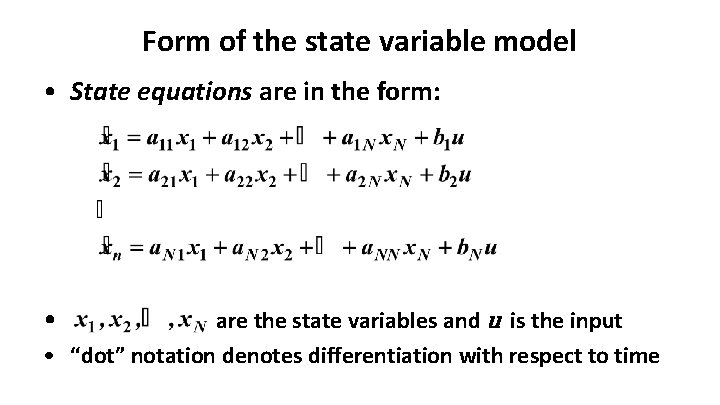
Form of the state variable model • State equations are in the form: • are the state variables and u is the input • “dot” notation denotes differentiation with respect to time
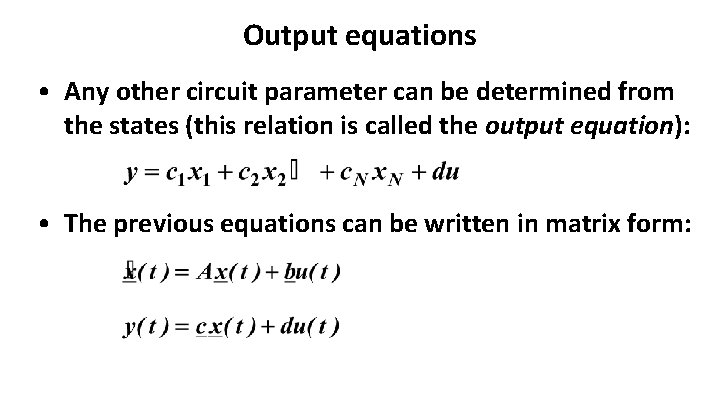
Output equations • Any other circuit parameter can be determined from the states (this relation is called the output equation): • The previous equations can be written in matrix form:
Matrix form – continued
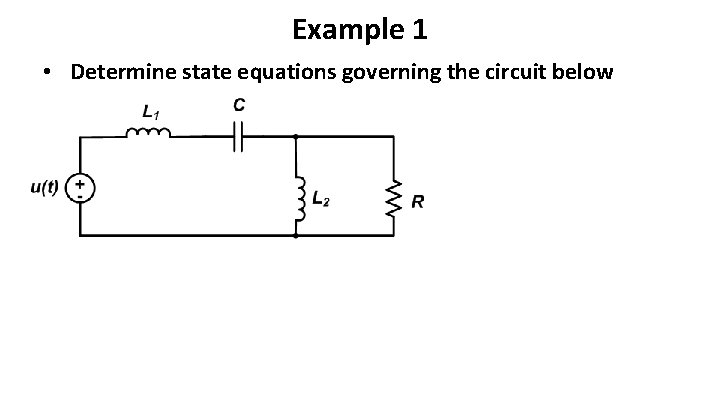
Example 1 • Determine state equations governing the circuit below
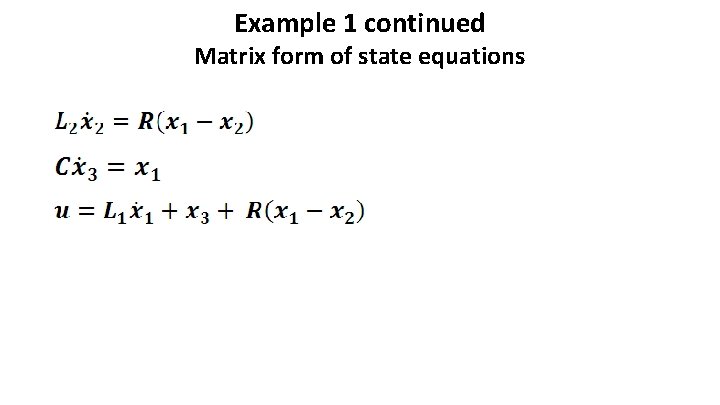
Example 1 continued Matrix form of state equations
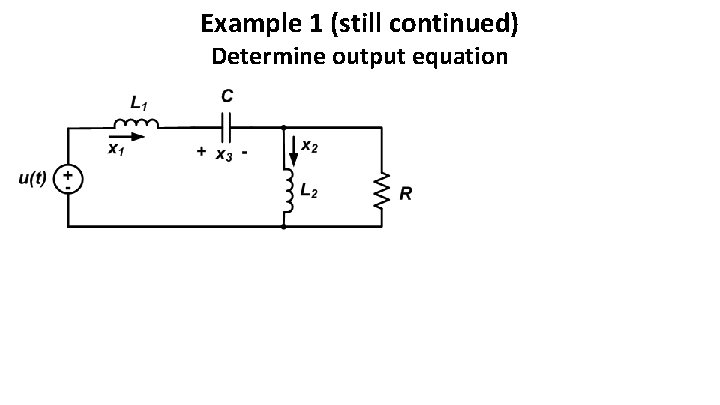
Example 1 (still continued) Determine output equation
Simulating system response using MATLAB • Analytical solution of higher-order differential equations is generally not feasible • Typically, we resort to numerical (or computergenerated) solutions • Numerical simulation of the system response • MATLAB is a common tool for solving differential equations numerically • Contains a number of built-in simulation capabilities
Prerequisite MATLAB background • It is assumed that you have access to: • MATLAB’s control systems toolbox • It is also assumed that you can use MATLAB to: • Set up arrays • Perform basic matrix operations • Perform basic plotting operations
Natural and step responses using MATLAB • MATLAB’s control systems toolbox provides specialpurpose commands to determine the natural and step responses of a given system • System is (for us) defined by a state variable model {A, b, c, d} • MATLAB commands and syntax: • step(A, b, c, d) plots the system’s unit step response • initial(A, b, c, d, x 0) plots the system’s natural response to the initial conditions provided in the vector x 0
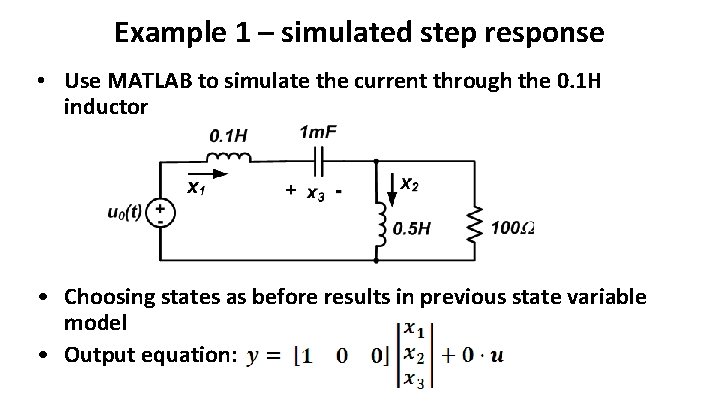
Example 1 – simulated step response • Use MATLAB to simulate the current through the 0. 1 H inductor • Choosing states as before results in previous state variable model • Output equation:
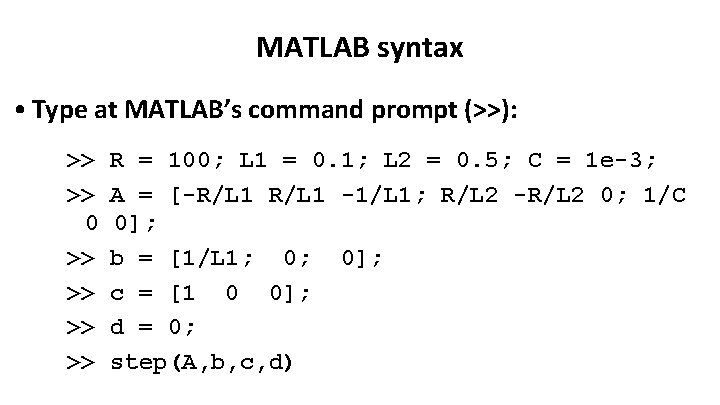
MATLAB syntax • Type at MATLAB’s command prompt (>>): >> >> 0 >> >> R = 100; L 1 = 0. 1; L 2 = 0. 5; C = 1 e-3; A = [-R/L 1 -1/L 1; R/L 2 -R/L 2 0; 1/C 0]; b = [1/L 1; 0; 0]; c = [1 0 0]; d = 0; step(A, b, c, d)
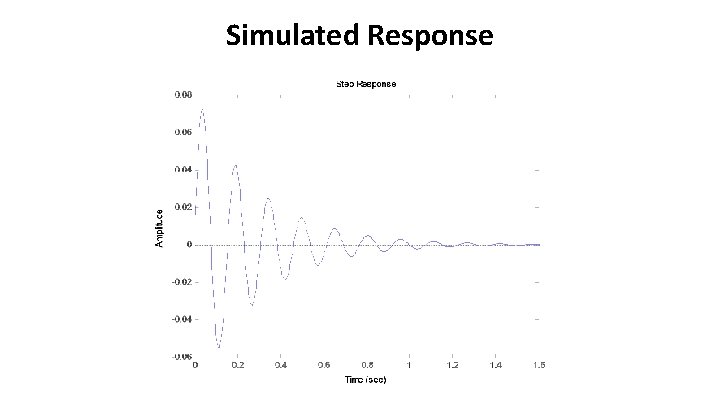
Simulated Response
State variable models and input-output equations • Advantages of state variable models: • Fairly easy to write governing equations for higher-order systems • State variable models easy to solve numerically • Changing output does not affect state equations! • {A, b, c, d} can give direct information about system behavior • Advantages of input-output equations • Higher-order system responses are often interpreted in terms of first and second order system responses • Laplace transform based techniques often rely on inputoutput representation of a system

- Slides: 20