
Lecture 20 of 41 Boundary Representations Volume Graphics
Lecture 20 of 41 Boundary Representations & Volume Graphics Videos 3: Surfaces, Solid Modeling William H. Hsu Department of Computing and Information Sciences, KSU KSOL course pages: http: //bit. ly/h. Gv. Xl. H / http: //bit. ly/e. Vizr. E Public mirror web site: http: //www. kddresearch. org/Courses/CIS 636 Instructor home page: http: //www. cis. ksu. edu/~bhsu Readings: Today: § 10. 4, 12. 7, Eberly 2 e – see http: //bit. ly/ie. Uq 45, Mesh handout Next class: Flash animation handout Reference on curves (required for CIS 736): § 11. 1 – 11. 6, Eberly 2 e Videos: http: //www. kddresearch. org/Courses/CIS 636/Lectures/Videos/ CIS 536/636 Introduction to Computer Graphics Lecture 20 of 41 Computing & Information Sciences Kansas State University
Lecture Outline l l Reading for Last Class: § 5. 3 – 5. 5, Eberly 2 e, CGA handout Reading for Today: § 10. 4, 12. 7, Eberly 2 e, Mesh handout Reading for Next Class: § 11. 1 – 11. 6 (736), Flash animation handout Last Time: Skinning and Morphing Skins: surface meshes for faces, character models Morphing: gradual transition between skins GPU-based vertex tweening: texture arrays, vertex texturing, hybrid l Today: Curves & Surfaces Piecewise linear, quadratic, cubic curves and their properties Interpolation: subdivision (De. Casteljau’s algorithm) Bicubic surfaces & bilinear interpolation l Outside Viewing: CG Basics 10, Advanced CG 4 & 5 l Previous Videos: Morphing & Other Special Effects (SFX) l Today’s Videos: Bicubic Surfaces (NURBS), Solid Modeling CIS 536/636 Introduction to Computer Graphics Lecture 20 of 41 Computing & Information Sciences Kansas State University
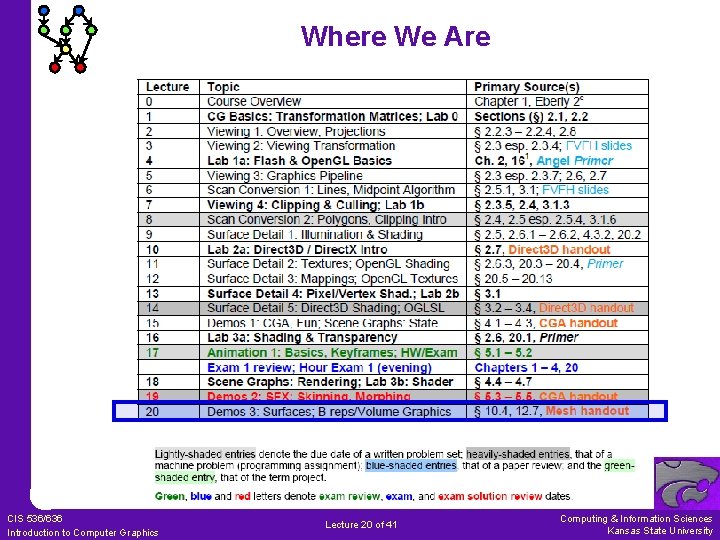
Where We Are CIS 536/636 Introduction to Computer Graphics Lecture 20 of 41 Computing & Information Sciences Kansas State University
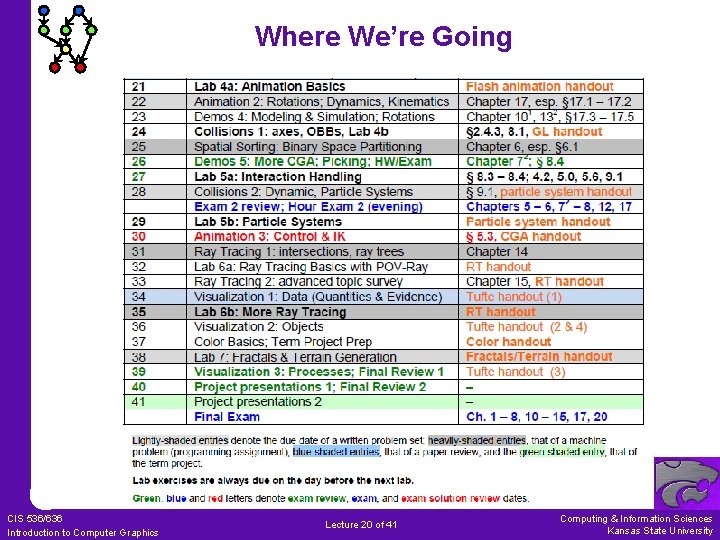
Where We’re Going CIS 536/636 Introduction to Computer Graphics Lecture 20 of 41 Computing & Information Sciences Kansas State University
![Review [1]: Morphing Targets l Vertex Tweening Two key meshes are blended Varying by](http://slidetodoc.com/presentation_image_h2/890534009f1a70bf4d7668f07dde3ca3/image-5.jpg "Review [1]: Morphing Targets l Vertex Tweening Two key meshes are blended Varying by")
Review [1]: Morphing Targets l Vertex Tweening Two key meshes are blended Varying by time l Morph Targets Represent by relative vectors Ø From base mesh Ø To target meshes Geometry: mesh represents model Samples: corresponding images l Applications Image morphing (see videos) Lip syncing (work of Elon Gasper) © 1987 Exxon Mobil, Inc. http: //youtu. be/Vi 5 Plr. Zp. G 40 Adapted from “Morphing and Animation” © 2007 G. J. Katz, University of Pennsylvania Lecture 12, CIS 565 (formerly 665): GPU Programming and Architecture, http: //bit. ly/e. Fk. Xmk CIS 536/636 Introduction to Computer Graphics Lecture 20 of 41 Computing & Information Sciences Kansas State University
![Review [2]: Morph Target Animation & Lip Sync l From Base Mesh to Multiple](http://slidetodoc.com/presentation_image_h2/890534009f1a70bf4d7668f07dde3ca3/image-6.jpg "Review [2]: Morph Target Animation & Lip Sync l From Base Mesh to Multiple")
Review [2]: Morph Target Animation & Lip Sync l From Base Mesh to Multiple Targets l Effects: Facial Animation with Muscle Deformation l Lip Sync Problem: matching mouth movements to speech waveform Early work: Elon Gasper & Bright Star – http: //bit. ly/g 4 s. KBL Used in Sierra’s Alphabet Blocks (1992) – http: //bit. ly/h. SKCE 3 Adapted from “Morphing and Animation” © 2007 G. J. Katz, University of Pennsylvania Lecture 12, CIS 565 (formerly 665): GPU Programming and Architecture, http: //bit. ly/e. Fk. Xmk CIS 536/636 Introduction to Computer Graphics Lecture 20 of 41 Computing & Information Sciences Kansas State University
![Review [3]: GPU Animation Method 1 l l Hold Vertex Data in Texture Arrays](http://slidetodoc.com/presentation_image_h2/890534009f1a70bf4d7668f07dde3ca3/image-7.jpg "Review [3]: GPU Animation Method 1 l l Hold Vertex Data in Texture Arrays")
Review [3]: GPU Animation Method 1 l l Hold Vertex Data in Texture Arrays Manipulate Data in Pixel Shader / Fragment Shader Re-output to Texture Arrays Pass Output as Input to Vertex Shader (NB: Usually Other Way Around!) Adapted from “Morphing and Animation” © 2007 G. J. Katz, University of Pennsylvania Lecture 12, CIS 565 (formerly 665): GPU Programming and Architecture, http: //bit. ly/e. Fk. Xmk CIS 536/636 Introduction to Computer Graphics Lecture 20 of 41 Computing & Information Sciences Kansas State University
![Review [4]: Pros & Cons of GPU Method 1 l Advantages Keeps vertex, geometry](http://slidetodoc.com/presentation_image_h2/890534009f1a70bf4d7668f07dde3ca3/image-8.jpg "Review [4]: Pros & Cons of GPU Method 1 l Advantages Keeps vertex, geometry")
Review [4]: Pros & Cons of GPU Method 1 l Advantages Keeps vertex, geometry processing units’ workload at minimum (Why is this good? ) Good for copy operations, vertex tweening l Disadvantages Per-vertex data has to be accessed through texture lookups Number of constant registers is less in pixel shader (224) than vertex shader (256) Can not divide modification process into several pieces because only single quad is drawn Therefore: constant registers must hold all bone matrices and morph target weights for entire object Adapted from “Morphing and Animation” © 2007 G. J. Katz, University of Pennsylvania Lecture 12, CIS 565 (formerly 665): GPU Programming and Architecture, http: //bit. ly/e. Fk. Xmk CIS 536/636 Introduction to Computer Graphics Lecture 20 of 41 Computing & Information Sciences Kansas State University
![Review [5]: GPU Animation Method 2 l Apply Modifications in Vertex Shader, Do Nothing](http://slidetodoc.com/presentation_image_h2/890534009f1a70bf4d7668f07dde3ca3/image-9.jpg "Review [5]: GPU Animation Method 2 l Apply Modifications in Vertex Shader, Do Nothing")
Review [5]: GPU Animation Method 2 l Apply Modifications in Vertex Shader, Do Nothing in Pixel Shader Destination pixel is specified explicitly as vertex shader input Still writing all vertices to texture l Advantage: Can Easily Segment Modification Groups l Disadvantage: Speed Issues Make This Method Impractical Adapted from “Morphing and Animation” © 2007 G. J. Katz, University of Pennsylvania Lecture 12, CIS 565 (formerly 665): GPU Programming and Architecture, http: //bit. ly/e. Fk. Xmk CIS 536/636 Introduction to Computer Graphics Lecture 20 of 41 Computing & Information Sciences Kansas State University
![Review [6]: Hybrid CPU/GPU System l Use Hybrid CPU/GPU Approach to Get Real Speed](http://slidetodoc.com/presentation_image_h2/890534009f1a70bf4d7668f07dde3ca3/image-10.jpg "Review [6]: Hybrid CPU/GPU System l Use Hybrid CPU/GPU Approach to Get Real Speed")
Review [6]: Hybrid CPU/GPU System l Use Hybrid CPU/GPU Approach to Get Real Speed Advantage 1. Let CPU compute final vertex attributes used during rendering frames n, n + k 2. Let GPU compute vertex tweening at frames greater than n, smaller than n + k 3. Phase shift animations between characters so processors do not have peak loads l Advantages Vertex tweening supported on almost all hardware Modification algorithms performed on CPU, so no restrictions Adapted from “Morphing and Animation” © 2007 G. J. Katz, University of Pennsylvania Lecture 12, CIS 565 (formerly 665): GPU Programming and Architecture, http: //bit. ly/e. Fk. Xmk CIS 536/636 Introduction to Computer Graphics Lecture 20 of 41 Computing & Information Sciences Kansas State University

Acknowledgements: Curves & Surfaces Steve Rotenberg Visiting Lecturer Graphics Lab University of California – San Diego CEO/Chief Scientist, Pixel. Active http: //graphics. ucsd. edu Barry Mc. Caul Lecturer School of Computing Dublin City University http: //www. computing. dcu. ie/~bmccaul/ Ken Hawick Professor Institute of Information and Mathematical Sciences (IIMS) Massey University – Albany http: //www. massey. ac. nz/~kahawick/ CIS 536/636 Introduction to Computer Graphics Lecture 20 of 41 Computing & Information Sciences Kansas State University
Acknowledgements: Splines Jim Foley Professor, College of Computing & Stephen Fleming Chair in Telecommunications Georgia Institute of Technology James D. Foley Georgia Tech http: //bit. ly/aj. Yf 2 Q Andy van Dam Andries van Dam Brown University http: //www. cs. brown. edu/~avd/ T. J. Watson University Professor of Technology and Education & Professor of Computer Science Brown University Steve Feiner Professor of Computer Science & Director, Computer Graphics and User Interfaces Laboratory Columbia University John F. Hughes Associate Professor of Computer Science Brown University CIS 536/636 Introduction to Computer Graphics Lecture 20 of 41 Steven K. Feiner Columbia University http: //www. cs. columbia. edu/~feiner/ John F. Hughes Brown University http: //www. cs. brown. edu/~jfh/ Computing & Information Sciences Kansas State University
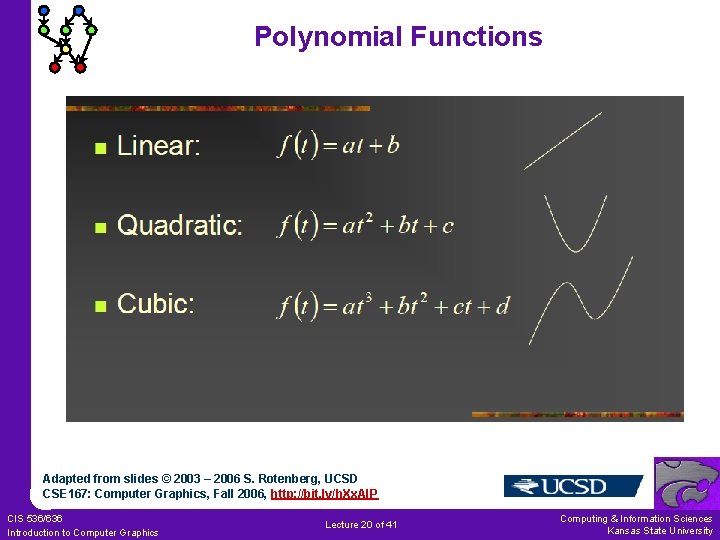
Polynomial Functions Adapted from slides © 2003 – 2006 S. Rotenberg, UCSD CSE 167: Computer Graphics, Fall 2006, http: //bit. ly/h. Xx. Al. P CIS 536/636 Introduction to Computer Graphics Lecture 20 of 41 Computing & Information Sciences Kansas State University
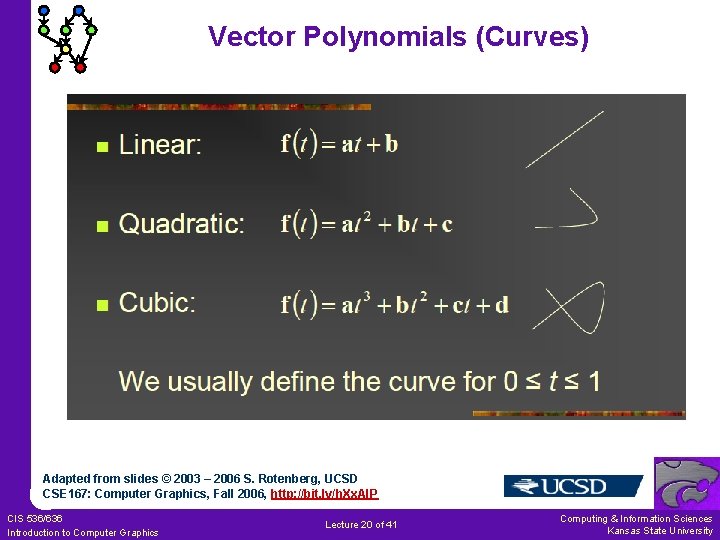
Vector Polynomials (Curves) Adapted from slides © 2003 – 2006 S. Rotenberg, UCSD CSE 167: Computer Graphics, Fall 2006, http: //bit. ly/h. Xx. Al. P CIS 536/636 Introduction to Computer Graphics Lecture 20 of 41 Computing & Information Sciences Kansas State University
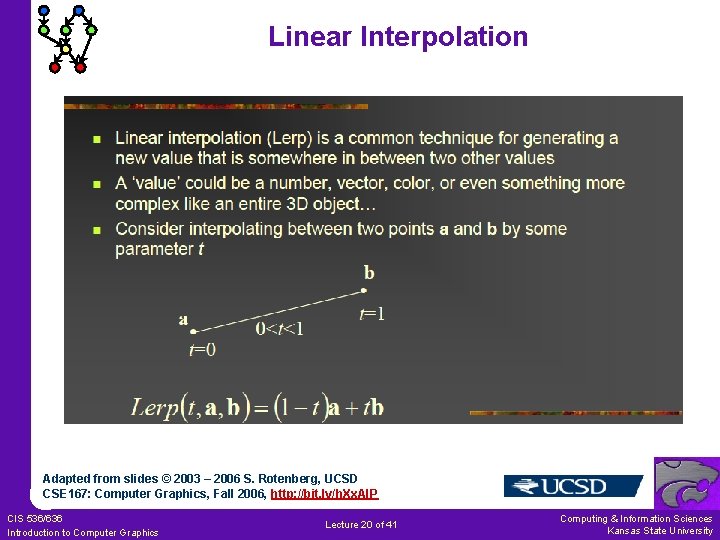
Linear Interpolation Adapted from slides © 2003 – 2006 S. Rotenberg, UCSD CSE 167: Computer Graphics, Fall 2006, http: //bit. ly/h. Xx. Al. P CIS 536/636 Introduction to Computer Graphics Lecture 20 of 41 Computing & Information Sciences Kansas State University
![Splines [1]: Representing General Curves Adapted from slides © 2010 van Dam et al.](http://slidetodoc.com/presentation_image_h2/890534009f1a70bf4d7668f07dde3ca3/image-16.jpg "Splines [1]: Representing General Curves Adapted from slides © 2010 van Dam et al.")
Splines [1]: Representing General Curves Adapted from slides © 2010 van Dam et al. , Brown University http: //bit. ly/hi. St 0 f Reused with permission. CIS 536/636 Introduction to Computer Graphics Lecture 20 of 41 Computing & Information Sciences Kansas State University
![Splines [2]: Spline Types & Uses Adapted from slides © 2010 van Dam et](http://slidetodoc.com/presentation_image_h2/890534009f1a70bf4d7668f07dde3ca3/image-17.jpg "Splines [2]: Spline Types & Uses Adapted from slides © 2010 van Dam et")
Splines [2]: Spline Types & Uses Adapted from slides © 2010 van Dam et al. , Brown University http: //bit. ly/hi. St 0 f Reused with permission. CIS 536/636 Introduction to Computer Graphics Lecture 20 of 41 Computing & Information Sciences Kansas State University
![Splines [3]: Hermite Curves Adapted from slides © 2010 van Dam et al. ,](http://slidetodoc.com/presentation_image_h2/890534009f1a70bf4d7668f07dde3ca3/image-18.jpg "Splines [3]: Hermite Curves Adapted from slides © 2010 van Dam et al. ,")
Splines [3]: Hermite Curves Adapted from slides © 2010 van Dam et al. , Brown University http: //bit. ly/hi. St 0 f Reused with permission. CIS 536/636 Introduction to Computer Graphics Lecture 20 of 41 Computing & Information Sciences Kansas State University
![Splines [4]: Hermite Weighting Explained Adapted from slides © 2010 van Dam et al.](http://slidetodoc.com/presentation_image_h2/890534009f1a70bf4d7668f07dde3ca3/image-19.jpg "Splines [4]: Hermite Weighting Explained Adapted from slides © 2010 van Dam et al.")
Splines [4]: Hermite Weighting Explained Adapted from slides © 2010 van Dam et al. , Brown University http: //bit. ly/hi. St 0 f Reused with permission. CIS 536/636 Introduction to Computer Graphics Lecture 20 of 41 Computing & Information Sciences Kansas State University
![Splines [5]: Bézier Curves Brown Exploratory (Spalter & Bielawa): http: //bit. ly/fva 1 il](http://slidetodoc.com/presentation_image_h2/890534009f1a70bf4d7668f07dde3ca3/image-20.jpg "Splines [5]: Bézier Curves Brown Exploratory (Spalter & Bielawa): http: //bit. ly/fva 1 il")
Splines [5]: Bézier Curves Brown Exploratory (Spalter & Bielawa): http: //bit. ly/fva 1 il Adapted from slides © 2010 van Dam et al. , Brown University http: //bit. ly/hi. St 0 f Reused with permission. CIS 536/636 Introduction to Computer Graphics Lecture 20 of 41 Computing & Information Sciences Kansas State University
![Bézier Curves [1]: Piecewise Cubic Curves Adapted from slides © 2003 – 2006 S.](http://slidetodoc.com/presentation_image_h2/890534009f1a70bf4d7668f07dde3ca3/image-21.jpg "Bézier Curves [1]: Piecewise Cubic Curves Adapted from slides © 2003 – 2006 S.")
Bézier Curves [1]: Piecewise Cubic Curves Adapted from slides © 2003 – 2006 S. Rotenberg, UCSD CSE 167: Computer Graphics, Fall 2006, http: //bit. ly/h. Xx. Al. P CIS 536/636 Introduction to Computer Graphics Lecture 20 of 41 Computing & Information Sciences Kansas State University
![Bézier Curves [2]: Formulation Adapted from slides © 2003 – 2006 S. Rotenberg, UCSD](http://slidetodoc.com/presentation_image_h2/890534009f1a70bf4d7668f07dde3ca3/image-22.jpg "Bézier Curves [2]: Formulation Adapted from slides © 2003 – 2006 S. Rotenberg, UCSD")
Bézier Curves [2]: Formulation Adapted from slides © 2003 – 2006 S. Rotenberg, UCSD CSE 167: Computer Graphics, Fall 2006, http: //bit. ly/h. Xx. Al. P CIS 536/636 Introduction to Computer Graphics Lecture 20 of 41 Computing & Information Sciences Kansas State University
![Bézier Curves [3]: Interpolation Problem Defined Adapted from slides © 2003 – 2006 S.](http://slidetodoc.com/presentation_image_h2/890534009f1a70bf4d7668f07dde3ca3/image-23.jpg "Bézier Curves [3]: Interpolation Problem Defined Adapted from slides © 2003 – 2006 S.")
Bézier Curves [3]: Interpolation Problem Defined Adapted from slides © 2003 – 2006 S. Rotenberg, UCSD CSE 167: Computer Graphics, Fall 2006, http: //bit. ly/h. Xx. Al. P CIS 536/636 Introduction to Computer Graphics Lecture 20 of 41 Computing & Information Sciences Kansas State University
![De Casteljau’s Algorithm [1]: Idea Adapted from slides © 2003 – 2006 S. Rotenberg,](http://slidetodoc.com/presentation_image_h2/890534009f1a70bf4d7668f07dde3ca3/image-24.jpg "De Casteljau’s Algorithm [1]: Idea Adapted from slides © 2003 – 2006 S. Rotenberg,")
De Casteljau’s Algorithm [1]: Idea Adapted from slides © 2003 – 2006 S. Rotenberg, UCSD CSE 167: Computer Graphics, Fall 2006, http: //bit. ly/h. Xx. Al. P CIS 536/636 Introduction to Computer Graphics Lecture 20 of 41 Computing & Information Sciences Kansas State University
![De Casteljau’s Algorithm [2]: Initialization Adapted from slides © 2003 – 2006 S. Rotenberg,](http://slidetodoc.com/presentation_image_h2/890534009f1a70bf4d7668f07dde3ca3/image-25.jpg "De Casteljau’s Algorithm [2]: Initialization Adapted from slides © 2003 – 2006 S. Rotenberg,")
De Casteljau’s Algorithm [2]: Initialization Adapted from slides © 2003 – 2006 S. Rotenberg, UCSD CSE 167: Computer Graphics, Fall 2006, http: //bit. ly/h. Xx. Al. P CIS 536/636 Introduction to Computer Graphics Lecture 20 of 41 Computing & Information Sciences Kansas State University
![De Casteljau’s Algorithm [3]: Lerp Step 1 Adapted from slides © 2003 – 2006](http://slidetodoc.com/presentation_image_h2/890534009f1a70bf4d7668f07dde3ca3/image-26.jpg "De Casteljau’s Algorithm [3]: Lerp Step 1 Adapted from slides © 2003 – 2006")
De Casteljau’s Algorithm [3]: Lerp Step 1 Adapted from slides © 2003 – 2006 S. Rotenberg, UCSD CSE 167: Computer Graphics, Fall 2006, http: //bit. ly/h. Xx. Al. P CIS 536/636 Introduction to Computer Graphics Lecture 20 of 41 Computing & Information Sciences Kansas State University
![De Casteljau’s Algorithm [4]: Lerp Step 2 Adapted from slides © 2003 – 2006](http://slidetodoc.com/presentation_image_h2/890534009f1a70bf4d7668f07dde3ca3/image-27.jpg "De Casteljau’s Algorithm [4]: Lerp Step 2 Adapted from slides © 2003 – 2006")
De Casteljau’s Algorithm [4]: Lerp Step 2 Adapted from slides © 2003 – 2006 S. Rotenberg, UCSD CSE 167: Computer Graphics, Fall 2006, http: //bit. ly/h. Xx. Al. P CIS 536/636 Introduction to Computer Graphics Lecture 20 of 41 Computing & Information Sciences Kansas State University
![De Casteljau’s Algorithm [5]: Lerp Step 3 Adapted from slides © 2003 – 2006](http://slidetodoc.com/presentation_image_h2/890534009f1a70bf4d7668f07dde3ca3/image-28.jpg "De Casteljau’s Algorithm [5]: Lerp Step 3 Adapted from slides © 2003 – 2006")
De Casteljau’s Algorithm [5]: Lerp Step 3 Adapted from slides © 2003 – 2006 S. Rotenberg, UCSD CSE 167: Computer Graphics, Fall 2006, http: //bit. ly/h. Xx. Al. P CIS 536/636 Introduction to Computer Graphics Lecture 20 of 41 Computing & Information Sciences Kansas State University
![De Casteljau’s Algorithm [6]: Recursive Linear Interpolation Adapted from slides © 2003 – 2006](http://slidetodoc.com/presentation_image_h2/890534009f1a70bf4d7668f07dde3ca3/image-29.jpg "De Casteljau’s Algorithm [6]: Recursive Linear Interpolation Adapted from slides © 2003 – 2006")
De Casteljau’s Algorithm [6]: Recursive Linear Interpolation Adapted from slides © 2003 – 2006 S. Rotenberg, UCSD CSE 167: Computer Graphics, Fall 2006, http: //bit. ly/h. Xx. Al. P CIS 536/636 Introduction to Computer Graphics Lecture 20 of 41 Computing & Information Sciences Kansas State University
![Bernstein Polynomials [1]: Coefficients of Control Points Adapted from slides © 2003 – 2006](http://slidetodoc.com/presentation_image_h2/890534009f1a70bf4d7668f07dde3ca3/image-30.jpg "Bernstein Polynomials [1]: Coefficients of Control Points Adapted from slides © 2003 – 2006")
Bernstein Polynomials [1]: Coefficients of Control Points Adapted from slides © 2003 – 2006 S. Rotenberg, UCSD CSE 167: Computer Graphics, Fall 2006, http: //bit. ly/h. Xx. Al. P CIS 536/636 Introduction to Computer Graphics Lecture 20 of 41 Computing & Information Sciences Kansas State University
![Bernstein Polynomials [2]: Piecewise Cubic Basis Adapted from slides © 2003 – 2006 S.](http://slidetodoc.com/presentation_image_h2/890534009f1a70bf4d7668f07dde3ca3/image-31.jpg "Bernstein Polynomials [2]: Piecewise Cubic Basis Adapted from slides © 2003 – 2006 S.")
Bernstein Polynomials [2]: Piecewise Cubic Basis Adapted from slides © 2003 – 2006 S. Rotenberg, UCSD CSE 167: Computer Graphics, Fall 2006, http: //bit. ly/h. Xx. Al. P CIS 536/636 Introduction to Computer Graphics Lecture 20 of 41 Computing & Information Sciences Kansas State University
![Bernstein Polynomials [3]: Binomial Form of Basis Functions Adapted from slides © 2003 –](http://slidetodoc.com/presentation_image_h2/890534009f1a70bf4d7668f07dde3ca3/image-32.jpg "Bernstein Polynomials [3]: Binomial Form of Basis Functions Adapted from slides © 2003 –")
Bernstein Polynomials [3]: Binomial Form of Basis Functions Adapted from slides © 2003 – 2006 S. Rotenberg, UCSD CSE 167: Computer Graphics, Fall 2006, http: //bit. ly/h. Xx. Al. P CIS 536/636 Introduction to Computer Graphics Lecture 20 of 41 Computing & Information Sciences Kansas State University
![Bernstein Polynomials [4]: Cubic Matrix Form Adapted from slides © 2003 – 2006 S.](http://slidetodoc.com/presentation_image_h2/890534009f1a70bf4d7668f07dde3ca3/image-33.jpg "Bernstein Polynomials [4]: Cubic Matrix Form Adapted from slides © 2003 – 2006 S.")
Bernstein Polynomials [4]: Cubic Matrix Form Adapted from slides © 2003 – 2006 S. Rotenberg, UCSD CSE 167: Computer Graphics, Fall 2006, http: //bit. ly/h. Xx. Al. P CIS 536/636 Introduction to Computer Graphics Lecture 20 of 41 Computing & Information Sciences Kansas State University
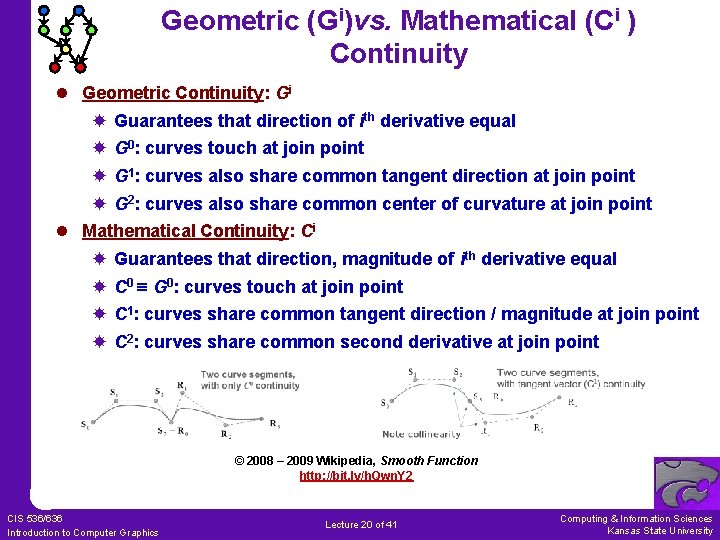
Geometric (Gi)vs. Mathematical (Ci ) Continuity l Geometric Continuity: Gi Guarantees that direction of ith derivative equal G 0: curves touch at join point G 1: curves also share common tangent direction at join point G 2: curves also share common center of curvature at join point l Mathematical Continuity: Ci Guarantees that direction, magnitude of ith derivative equal C 0 G 0: curves touch at join point C 1: curves share common tangent direction / magnitude at join point C 2: curves share common second derivative at join point © 2008 – 2009 Wikipedia, Smooth Function http: //bit. ly/h. Qwn. Y 2 CIS 536/636 Introduction to Computer Graphics Lecture 20 of 41 Computing & Information Sciences Kansas State University
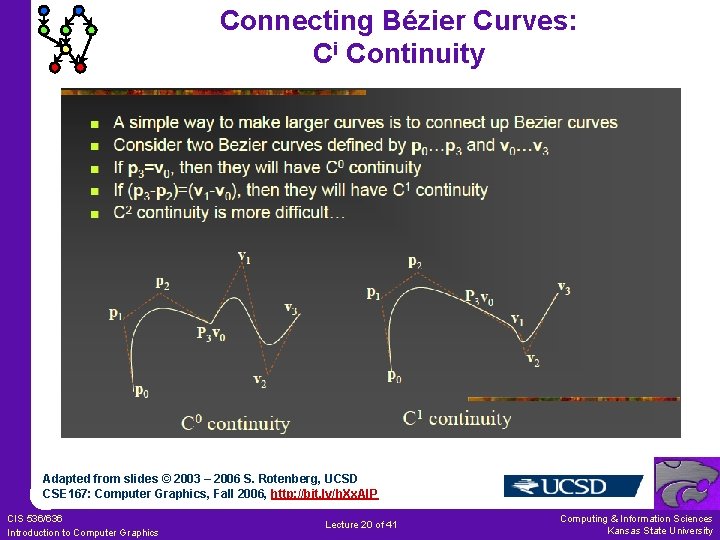
Connecting Bézier Curves: Ci Continuity Adapted from slides © 2003 – 2006 S. Rotenberg, UCSD CSE 167: Computer Graphics, Fall 2006, http: //bit. ly/h. Xx. Al. P CIS 536/636 Introduction to Computer Graphics Lecture 20 of 41 Computing & Information Sciences Kansas State University
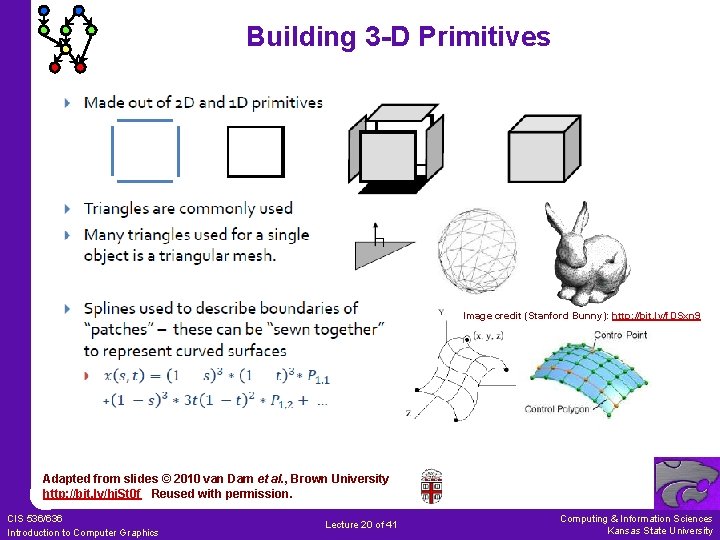
Building 3 -D Primitives Image credit (Stanford Bunny): http: //bit. ly/f. DSxn 9 Adapted from slides © 2010 van Dam et al. , Brown University http: //bit. ly/hi. St 0 f Reused with permission. CIS 536/636 Introduction to Computer Graphics Lecture 20 of 41 Computing & Information Sciences Kansas State University
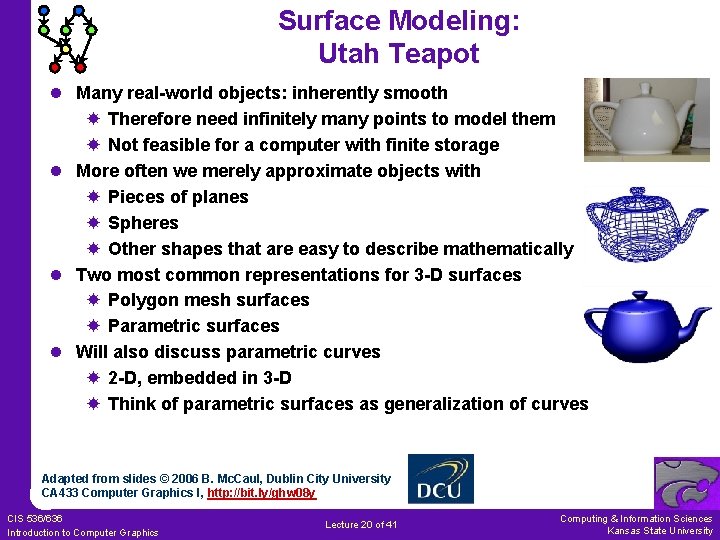
Surface Modeling: Utah Teapot l Many real-world objects: inherently smooth Therefore need infinitely many points to model them Not feasible for a computer with finite storage l More often we merely approximate objects with Pieces of planes Spheres Other shapes that are easy to describe mathematically l Two most common representations for 3 -D surfaces Polygon mesh surfaces Parametric surfaces l Will also discuss parametric curves 2 -D, embedded in 3 -D Think of parametric surfaces as generalization of curves Adapted from slides © 2006 B. Mc. Caul, Dublin City University CA 433 Computer Graphics I, http: //bit. ly/ghw 08 y CIS 536/636 Introduction to Computer Graphics Lecture 20 of 41 Computing & Information Sciences Kansas State University
![Polygon Meshes [1]: Vertex, Edge, Polygon Tables V 1 E 2 VERTEX TABLE EDGE](http://slidetodoc.com/presentation_image_h2/890534009f1a70bf4d7668f07dde3ca3/image-38.jpg "Polygon Meshes [1]: Vertex, Edge, Polygon Tables V 1 E 2 VERTEX TABLE EDGE")
Polygon Meshes [1]: Vertex, Edge, Polygon Tables V 1 E 2 VERTEX TABLE EDGE TABLE V 1: x 1, y 1, z 1 E 1: V 1, V 2: x 2, y 2, z 2 E 2: V 2, V 3: x 3, y 3, z 3 E 3: V 3, V 1 V 4: x 4, y 4, z 4 E 4: V 3, V 4 E 5: V 4, V 5 E 6: V 5, V 1 V 5: x 5, y 5, z 5 E 6 E 3 E 1 P 2 V E 4 E 5 3 V 5 V 4 POLYGON TABLE P 1: P 2: V 1, V 2 , V 3 V 1 , V 3 , V 4 , V 5 OR POLYGON TABLE P 1: P 2: E 1, E 2 , E 3 , E 4 , E 5 , E 6 Adapted from slides © 2006 B. Mc. Caul, Dublin City University CA 433 Computer Graphics I, http: //bit. ly/ghw 08 y CIS 536/636 Introduction to Computer Graphics Lecture 20 of 41 Computing & Information Sciences Kansas State University
![Polygon Meshes [2]: “Eliminating” Edge Table l The geometry can be stored as three](http://slidetodoc.com/presentation_image_h2/890534009f1a70bf4d7668f07dde3ca3/image-39.jpg "Polygon Meshes [2]: “Eliminating” Edge Table l The geometry can be stored as three")
Polygon Meshes [2]: “Eliminating” Edge Table l The geometry can be stored as three tables: a vertex table, an edge table, and a polygon table. Each entry in the vertex table is a list of coordinates defining that point. Each entry in the edge table consists of a pointer to each endpoint of that edge. And the entries in the polygon table define a polygon by providing pointers to the edges that make up the polygon. l We can eliminate the edge table by letting the polygon table reference the vertices directly, but we can run into problems, such as drawing some edges twice, because we don't realise that we have visited the same set of points before, in a different polygon. We could go even further and eliminate the vertex table by listing all the coordinates explicitly in the polygon table, but this wastes space because the same points appear in the polygon table several times. Adapted from slides © 2006 B. Mc. Caul, Dublin City University CA 433 Computer Graphics I, http: //bit. ly/ghw 08 y CIS 536/636 Introduction to Computer Graphics Lecture 20 of 41 Computing & Information Sciences Kansas State University
![Polygon Meshes [3]: Representation 1. Explicit way: just list 3 D vertices of each](http://slidetodoc.com/presentation_image_h2/890534009f1a70bf4d7668f07dde3ca3/image-40.jpg "Polygon Meshes [3]: Representation 1. Explicit way: just list 3 D vertices of each")
Polygon Meshes [3]: Representation 1. Explicit way: just list 3 D vertices of each polygon in a certain order. Problems are, firstly it represents same vertex many times and secondly, no explicit representation of shared edges and vertices 2. Pointer to a vertex list: store all vertices once into a numbered list, and represent each polygon by its vertices. It saves space (vertex only listed once) but still has no explicit representation of shared edges and vertices 3. Explicit edges: list all edges that belong to a polygon, and for each edge list the vertices that define it along with the polygons of which it is a member. Adapted from slides © 2006 B. Mc. Caul, Dublin City University CA 433 Computer Graphics I, http: //bit. ly/ghw 08 y CIS 536/636 Introduction to Computer Graphics Lecture 20 of 41 Computing & Information Sciences Kansas State University
![Types of Curves [1]: Explicit & Implicit 1. Explicit In Cartesian plane, explicit equation](http://slidetodoc.com/presentation_image_h2/890534009f1a70bf4d7668f07dde3ca3/image-41.jpg "Types of Curves [1]: Explicit & Implicit 1. Explicit In Cartesian plane, explicit equation")
Types of Curves [1]: Explicit & Implicit 1. Explicit In Cartesian plane, explicit equation of planar curve given by y = f(x) Difficulties with this approach a) impossible to get multiple values of y for single x, so curves such as circles and ellipses must be represented by multiple curve segments b) describing curves with vertical tangents: difficult, numerically unstable 2. Implicit f(x, y) = 0 Ax + By + C =0 Difficulties: determining tangent continuity of two given curves – crucial in many applications (Circle can be defined as: x 2 + y 2 = 1, but what about half circle? ) Adapted from slides © 2006 B. Mc. Caul, Dublin City University CA 433 Computer Graphics I, http: //bit. ly/ghw 08 y CIS 536/636 Introduction to Computer Graphics Lecture 20 of 41 Computing & Information Sciences Kansas State University
![Types of Curves [2]: Parametric 3. Parametric Curves Cubic polynomials that define curve segment](http://slidetodoc.com/presentation_image_h2/890534009f1a70bf4d7668f07dde3ca3/image-42.jpg "Types of Curves [2]: Parametric 3. Parametric Curves Cubic polynomials that define curve segment")
Types of Curves [2]: Parametric 3. Parametric Curves Cubic polynomials that define curve segment Q(t)= [x(t) y(t)]T are of form: Written in matrix form, system becomes Q(t)= [x(t) y(t)] = T C where Adapted from slides © 2006 B. Mc. Caul, Dublin City University CA 433 Computer Graphics I, http: //bit. ly/ghw 08 y CIS 536/636 Introduction to Computer Graphics Lecture 20 of 41 Computing & Information Sciences Kansas State University
![Parametric Bicubic Surfaces [1] l Equations that describe parametric curve depend on variable t](http://slidetodoc.com/presentation_image_h2/890534009f1a70bf4d7668f07dde3ca3/image-43.jpg "Parametric Bicubic Surfaces [1] l Equations that describe parametric curve depend on variable t")
Parametric Bicubic Surfaces [1] l Equations that describe parametric curve depend on variable t not explicitly part of geometry l By sweeping through t, in our case 0 ≤ t ≤ 1, we can evaluate equations and determine x, y values for points on curve t = 1. 0 t t = 0. 0 Parameter space Object space Adapted from slides © 2006 B. Mc. Caul, Dublin City University CA 433 Computer Graphics I, http: //bit. ly/ghw 08 y CIS 536/636 Introduction to Computer Graphics Lecture 20 of 41 Computing & Information Sciences Kansas State University
![Review [8]: Parametric Bicubic Surfaces l Parametric Bicubic Surface: Generalization of Parametric Cubic Curve](http://slidetodoc.com/presentation_image_h2/890534009f1a70bf4d7668f07dde3ca3/image-44.jpg "Review [8]: Parametric Bicubic Surfaces l Parametric Bicubic Surface: Generalization of Parametric Cubic Curve")
Review [8]: Parametric Bicubic Surfaces l Parametric Bicubic Surface: Generalization of Parametric Cubic Curve l From Curves to Surfaces Let one parameter (say v) be held at constant value Above will represent a curve Surface generated by sweeping all points on boundary curve, e. g. , P(u, 0), through cubic trajectories, defined using v, to boundary curve P(u, 1) u=1 u=0 v=1 Adapted from slides © 2006 B. Mc. Caul, Dublin City University CA 433 Computer Graphics I, http: //bit. ly/ghw 08 y CIS 536/636 Introduction to Computer Graphics Lecture 20 of 41 Computing & Information Sciences Kansas State University
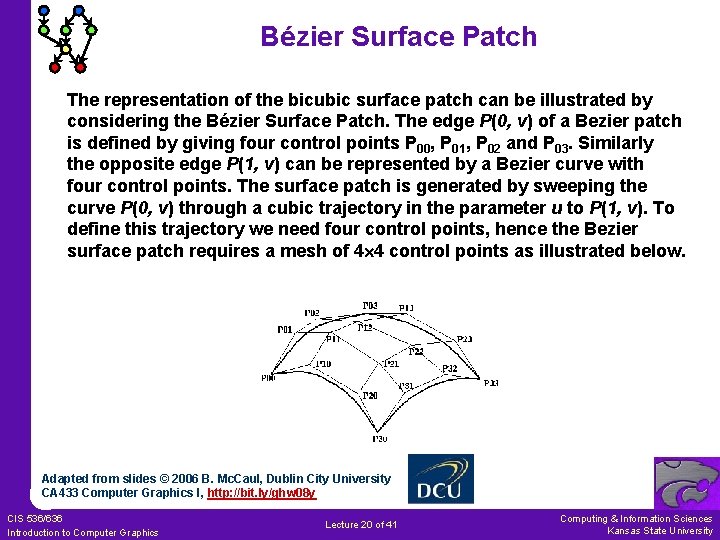
Bézier Surface Patch The representation of the bicubic surface patch can be illustrated by considering the Bézier Surface Patch. The edge P(0, v) of a Bezier patch is defined by giving four control points P 00, P 01, P 02 and P 03. Similarly the opposite edge P(1, v) can be represented by a Bezier curve with four control points. The surface patch is generated by sweeping the curve P(0, v) through a cubic trajectory in the parameter u to P(1, v). To define this trajectory we need four control points, hence the Bezier surface patch requires a mesh of 4 4 control points as illustrated below. Adapted from slides © 2006 B. Mc. Caul, Dublin City University CA 433 Computer Graphics I, http: //bit. ly/ghw 08 y CIS 536/636 Introduction to Computer Graphics Lecture 20 of 41 Computing & Information Sciences Kansas State University
Surfaces – Simple Extension l Easy to generalize from cubic curves to bicubic surfaces l Surfaces defined by parametric equations of two variables, s and t l i. e. , surface is approximated by series of crossing parametric cubic curves l Result is polygon mesh l Decreasing step size in s and t will give mesh of small near-planar quadrilateral patches more accuracy Adapted from slide © 2007 - 2008 K. Hawick, Massey University 159 -235 Graphics and Graphical Programming, http: //bit. ly/gm. Y 8 R 8 CIS 536/636 Introduction to Computer Graphics Lecture 20 of 41 Computing & Information Sciences Kansas State University
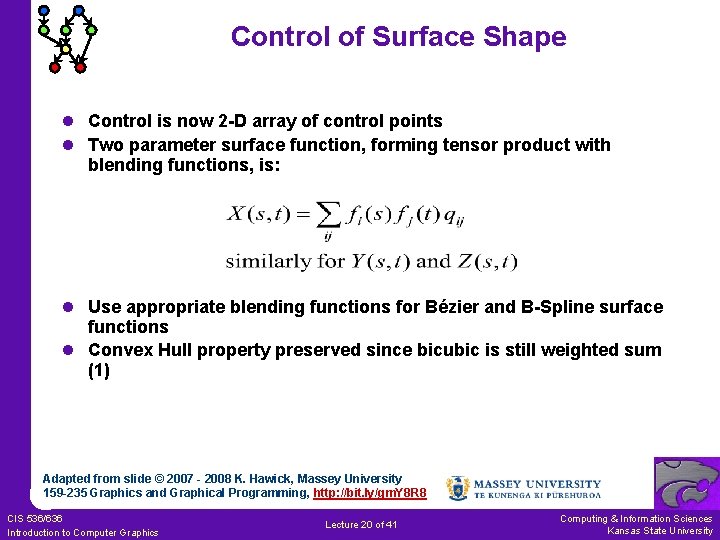
Control of Surface Shape l Control is now 2 -D array of control points l Two parameter surface function, forming tensor product with blending functions, is: l Use appropriate blending functions for Bézier and B-Spline surface functions l Convex Hull property preserved since bicubic is still weighted sum (1) Adapted from slide © 2007 - 2008 K. Hawick, Massey University 159 -235 Graphics and Graphical Programming, http: //bit. ly/gm. Y 8 R 8 CIS 536/636 Introduction to Computer Graphics Lecture 20 of 41 Computing & Information Sciences Kansas State University
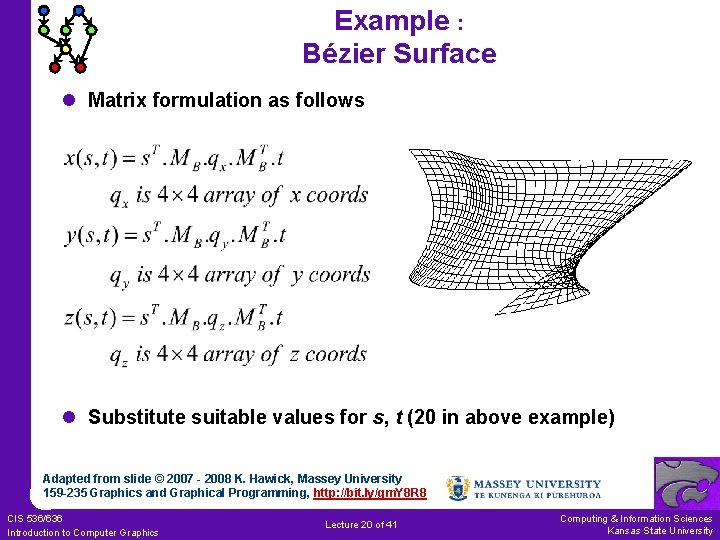
Example : Bézier Surface l Matrix formulation as follows l Substitute suitable values for s, t (20 in above example) Adapted from slide © 2007 - 2008 K. Hawick, Massey University 159 -235 Graphics and Graphical Programming, http: //bit. ly/gm. Y 8 R 8 CIS 536/636 Introduction to Computer Graphics Lecture 20 of 41 Computing & Information Sciences Kansas State University
B-Spline Surfaces l Break surface into 4 -sided patches choosing suitable values for s and t l Points on any external edges must be multiple knots of multiplicity k l Lot more work than Bézier l There are other types of spline systems and NURBS modelling packages are available to make the work much easier l Use polygon packages for display, hidden-surface removal and rendering (Bézier too) Adapted from slide © 2007 - 2008 K. Hawick, Massey University 159 -235 Graphics and Graphical Programming, http: //bit. ly/gm. Y 8 R 8 CIS 536/636 Introduction to Computer Graphics Lecture 20 of 41 Computing & Information Sciences Kansas State University
Continuity of Bicubic Patches l Hermite and Bézier patches C 0 continuity by sharing 4 control points between patches C 1 continuity when both sets of control points either side of the edge are collinear with the edge l B-Spline patch C 2 continuity between patches Adapted from slide © 2007 - 2008 K. Hawick, Massey University 159 -235 Graphics and Graphical Programming, http: //bit. ly/gm. Y 8 R 8 CIS 536/636 Introduction to Computer Graphics Lecture 20 of 41 Computing & Information Sciences Kansas State University
Display (Rendering) of Bicubic Patches l Can calculate surface normals to bicubic surfaces by vector cross product of their 2 tangent vectors l Normal is expensive to compute Formulation of normal is a biquintic (two-variable, fifth-degree) polynomial l Display Can use brute-force method – very expensive! Forward differencing method very attractive Adapted from slide © 2007 - 2008 K. Hawick, Massey University 159 -235 Graphics and Graphical Programming, http: //bit. ly/gm. Y 8 R 8 CIS 536/636 Introduction to Computer Graphics Lecture 20 of 41 Computing & Information Sciences Kansas State University
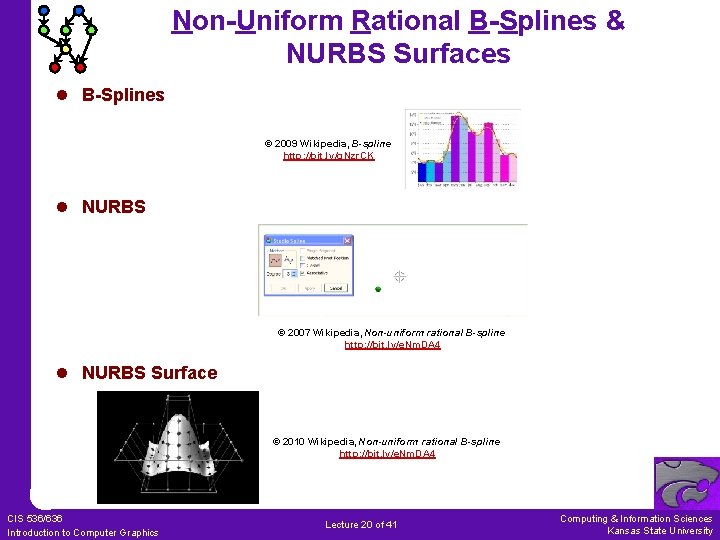
Non-Uniform Rational B-Splines & NURBS Surfaces l B-Splines © 2009 Wikipedia, B-spline http: //bit. ly/g. Nzr. CK l NURBS © 2007 Wikipedia, Non-uniform rational B-spline http: //bit. ly/e. Nm. DA 4 l NURBS Surface © 2010 Wikipedia, Non-uniform rational B-spline http: //bit. ly/e. Nm. DA 4 CIS 536/636 Introduction to Computer Graphics Lecture 20 of 41 Computing & Information Sciences Kansas State University
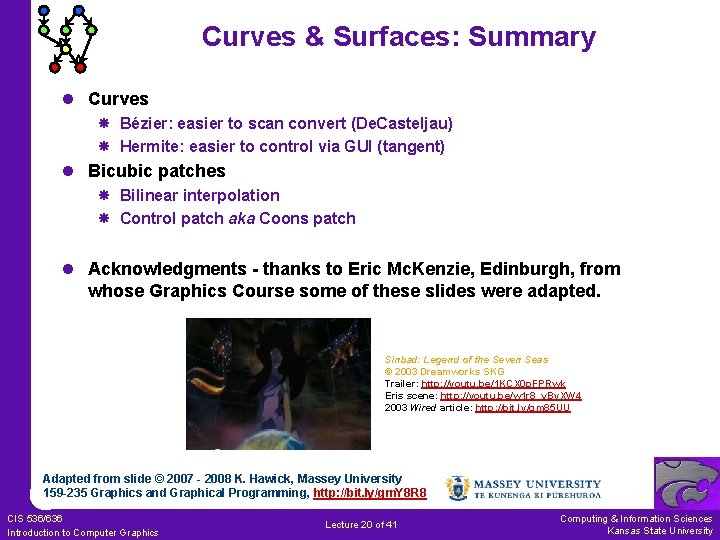
Curves & Surfaces: Summary l Curves Bézier: easier to scan convert (De. Casteljau) Hermite: easier to control via GUI (tangent) l Bicubic patches Bilinear interpolation Control patch aka Coons patch l Acknowledgments - thanks to Eric Mc. Kenzie, Edinburgh, from whose Graphics Course some of these slides were adapted. Sinbad: Legend of the Seven Seas © 2003 Dreamworks SKG Trailer: http: //youtu. be/1 KCX 0 p. FPRwk Eris scene: http: //youtu. be/w 1 r 8_v. By. XW 4 2003 Wired article: http: //bit. ly/gm 85 UU Adapted from slide © 2007 - 2008 K. Hawick, Massey University 159 -235 Graphics and Graphical Programming, http: //bit. ly/gm. Y 8 R 8 CIS 536/636 Introduction to Computer Graphics Lecture 20 of 41 Computing & Information Sciences Kansas State University
Further Reading l Foley et al. : Computer Graphics: Principles and Practice 2 nd edition in C (1991), http: //amzn. to/h. FNq. NC Chapter 11: Representing Curves and Surfaces l Approaches: Classical (Open. GL v 1 & 2) vs. New (Open. GL v 3 & 4) Classical: eval. Coord (http: //bit. ly/e 8 ol. Zj), eval. Mesh (http: //bit. ly/g. Gkt 8 Z) New: Map{1|2}{f|d}; Chapter 5, compatibility profile (http: //bit. ly/gkb. Vy. E) l Open. GL 1. 1 Specification All versions: http: //www. opengl. org/documentation/specs/ Chapter 5: Evaluators, http: //bit. ly/g. MVz. AO l Red Book (Open. GL Programming Guide) v 1. 1: http: //glprogramming. com/red/ (current edition: 7 th) Chapter 12: Evaluators and NURBS, http: //bit. ly/h. Z 1 tpb l Blue Book (Open. GL Reference Manual) 1992 edition: http: //glprogramming. com/blue/ See eval. Coord (http: //bit. ly/e. ADQLM), eval. Mesh (http: //bit. ly/f 7 Juog) Adapted from slides © 2006 B. Mc. Caul, Dublin City University CA 433 Computer Graphics I, http: //bit. ly/ghw 08 y CIS 536/636 Introduction to Computer Graphics Lecture 20 of 41 Computing & Information Sciences Kansas State University
Summary l l Reading for Last Class: § 5. 3 – 5. 5, Eberly 2 e, CGA handout Reading for Today: § 10. 4, 12. 7, Eberly 2 e, Mesh handout Reading for Next Class: § 11. 1 – 11. 6 (736), Flash animation handout Last Time: Brief Survey of Skinning and Morphing GPU-based vertex tweening: texture arrays, vertex texturing, hybrid Agent simulation using GPU-based finite state machines l Today: Curves & Surfaces Piecewise linear, quadratic, cubic curves and their properties Interpolation: subdivision (De. Casteljau’s algorithm) Bicubic surfaces & bilinear interpolation l Outside Viewing CIS 536 & 636 students: watch Basic CG lecture 10 on VSD CIS 736 students: watch Advanced CG lectures 4 & 5 on CGA, IK l Previous Videos: Morphing & Other Special Effects (SFX) l Today’s Videos: Bicubic Surfaces (NURBS), Solid Modeling CIS 536/636 Introduction to Computer Graphics Lecture 20 of 41 Computing & Information Sciences Kansas State University
Terminology l Skins – Surface Meshes for Faces, Character Models l Morphing – gradual transition between images or meshes Vertex tweening – texture arrays, vertex texturing, or hybrid method GPU computing – offload some tasks to GPU l Piecewise Polynomial Curves aka Splines Piecewise linear, piecewise quadratic, piecewise cubic Types of splines: Bézier, Hermite, B-splines, NURBS De. Casteljau’s algorithm: recursive linear interpolation (subdivision) Control points: vertices of control polygon, determine spline shape Bernstein polynomials: weight of each control point as function of t l Continuity: Geometric (Gi), Mathematical (Ci) l Bicubic Surfaces Controlled by control patch (Coons patch), defining 3 -D surface Bilinear interpolation – sweep spline along another spline path NURBS surface – bicubic surface based on NURBS curves CIS 536/636 Introduction to Computer Graphics Lecture 20 of 41 Computing & Information Sciences Kansas State University
- Slides: 56