
Lecture 2 Introduction to ObjectOrientation Message Passing In
Lecture 2 Introduction to Object-Orientation
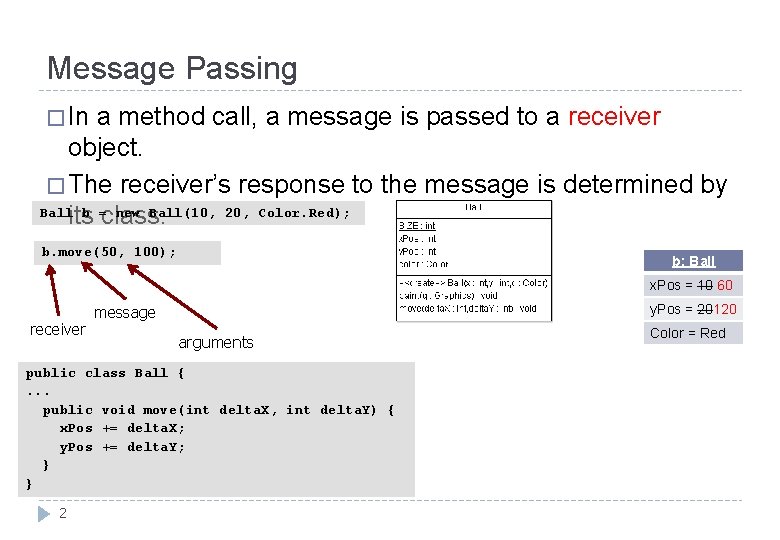
Message Passing � In a method call, a message is passed to a receiver object. � The receiver’s response to the message is determined by Ball b = new Ball(10, 20, Color. Red); its class. b. move(50, 100); b: Ball =10 x. Pos = 10 60 receiver 20 y. Pos = 20120 message arguments public class Ball {. . . public void move(int delta. X, int delta. Y) { x. Pos += delta. X; y. Pos += delta. Y; } } 2 Color = Red
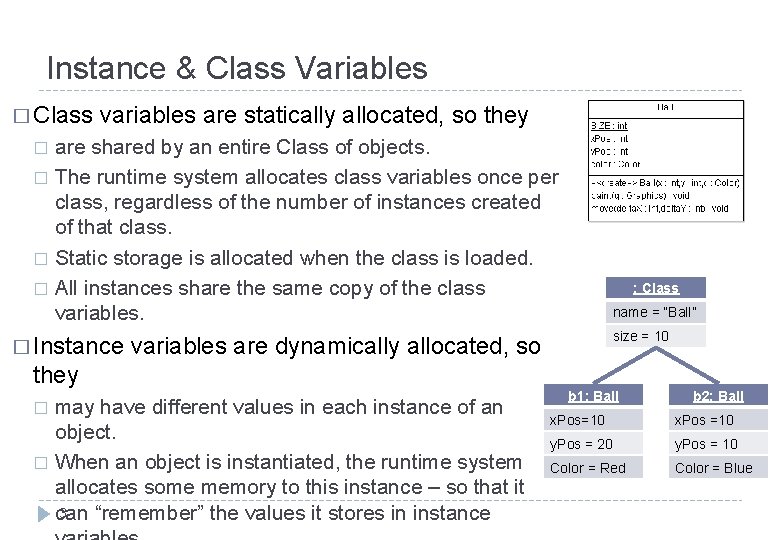
Instance & Class Variables � Class variables are statically allocated, so they are shared by an entire Class of objects. � The runtime system allocates class variables once per class, regardless of the number of instances created of that class. � Static storage is allocated when the class is loaded. � All instances share the same copy of the class variables. � � Instance name = “Ball” size = 10 variables are dynamically allocated, so they may have different values in each instance of an object. � When an object is instantiated, the runtime system allocates some memory to this instance – so that it 3 can “remember” the values it stores in instance � : Class b 1: Ball b 2: Ball x. Pos=10 x. Pos =10 y. Pos = 20 y. Pos = 10 Color = Red Color = Blue
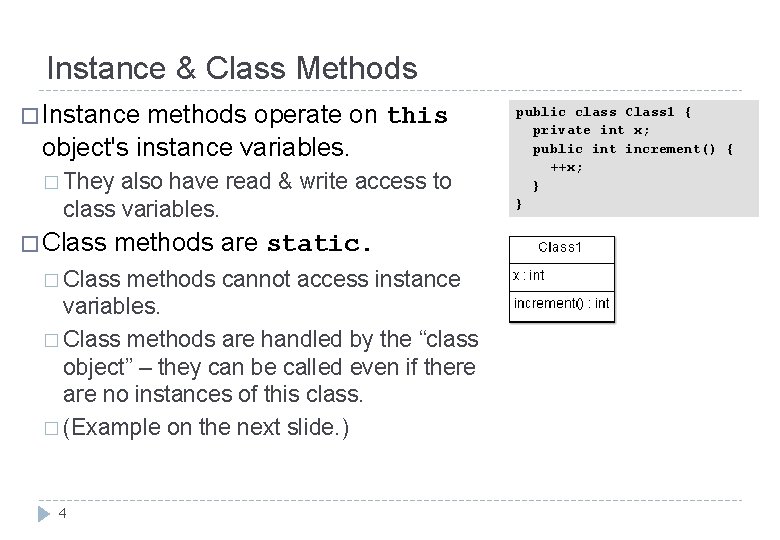
Instance & Class Methods � Instance methods operate on this object's instance variables. � They also have read & write access to class variables. � Class methods are static. � Class methods cannot access instance variables. � Class methods are handled by the “class object” – they can be called even if there are no instances of this class. � (Example on the next slide. ) 4 public class Class 1 { private int x; public int increment() { ++x; } }
![Class 1 App public class Class 1 App { public static void main( String[]](http://slidetodoc.com/presentation_image_h2/3f96d9f545eb7e03031b0025fa13885c/image-5.jpg "Class 1 App public class Class 1 App { public static void main( String[]")
Class 1 App public class Class 1 App { public static void main( String[] args ) { Class 1 x = new Class 1(); System. out. println( "Without initialisation, ++x = " + x. increment() ); System. out. println( "After another incrementation, ++x = " + x. increment() ); } } 5
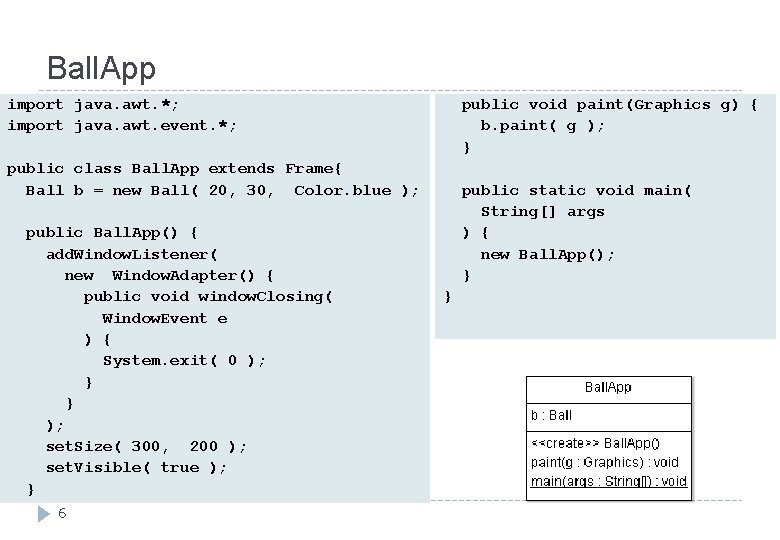
Ball. App import java. awt. *; import java. awt. event. *; public void paint(Graphics g) { b. paint( g ); } public class Ball. App extends Frame{ Ball b = new Ball( 20, 30, Color. blue ); public Ball. App() { add. Window. Listener( new Window. Adapter() { public void window. Closing( Window. Event e ) { System. exit( 0 ); } } ); set. Size( 300, 200 ); set. Visible( true ); } 6 public static void main( String[] args ) { new Ball. App(); } }
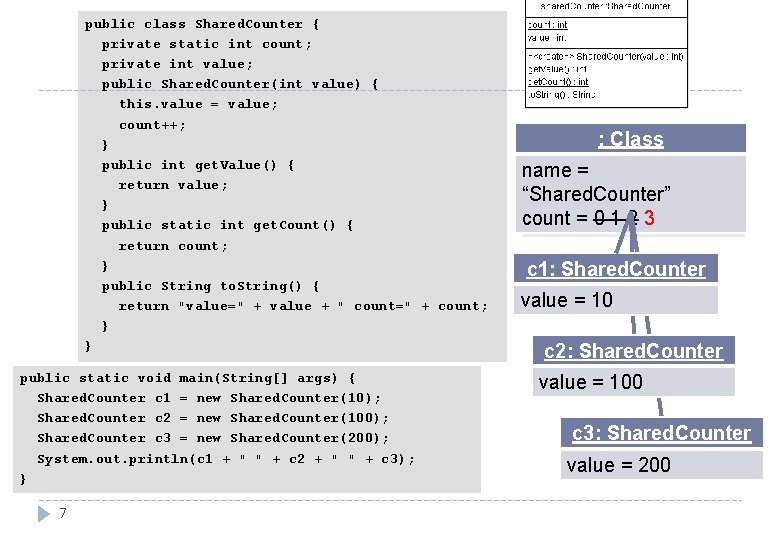
public class Shared. Counter { private static int count; private int value; public Shared. Counter(int value) { this. value = value; count++; } public int get. Value() { return value; } public static int get. Count() { return count; } public String to. String() { return "value=" + value + " count=" + count; } } public static void main(String[] args) { Shared. Counter c 1 = new Shared. Counter(10); Shared. Counter c 2 = new Shared. Counter(100); Shared. Counter c 3 = new Shared. Counter(200); System. out. println(c 1 + " " + c 2 + " " + c 3); } 7 Class : : : Class name=== name “Shared. Counter” count===00011223 count c 1: Shared. Counter value = 10 c 2: Shared. Counter value = 100 c 3: Shared. Counter value = 200
UML � Unified Modeling Language (UML) � When creating complex OO systems, where do we start? � When building complex systems, it might be worthwhile to plan things out before you start coding! � When building a house, we usually have a set of plans. � UML is a language which allows us to graphically model an OO system in a standardised format. � This helps us (and others!) understand the system. � There are many different UML diagrams, allowing us to model designs from many different viewpoints. Roughly, there are � Structure diagrams (documenting the architecture), e. g. class diagrams � 8 Behaviour diagrams (documenting the functionality), e. g. use-case diagrams
Object Diagrams in UML � In this lecture, I have drawn some object diagrams of instance models (using coloured boxes). � An object diagram is a graphic representation of an instance model, showing the state of a system after some objects have been instantiated, and after some variables of these objects have been updated. � Object diagrams are very helpful in tuition, but are not commonly used outside the classroom. � Please focus on the basics. � Understand the distinction between static variables and instance variables. � Develop a working understanding of instantation – this is a crucial concept! � Learn how to draw UML-standard class diagrams. � Honours-level students might want to learn more about object diagrams. I recommend “Modelling instances of classifiers using UML object diagrams”, online Help resource for the IBM Rational Software Modeler, available 4 March 2014. 9
Tool Support: Eclipse & Argo. UML? � You may use any development environment for this class. I recommend… � Eclipse � � Dr. Java � � Learning resources are available in COMPSCI 101 & 105 webareas. javac and a customisable text editor such as emacs � � The de-facto industry standard for Java developers. It’s FOSS: free and open-source software. Its codebase is robust and is under active development. Your tutors will help you learn this. I reckon every Java developer should know how to run javac from a console, but I won’t attempt to teach this!) You’ll also have to draw some class diagrams and use-case diagrams. Options: � � By hand: during exams and tests, and maybe your best choice for homework Argo. UML � � � FOSS, works ok (with some missing features e. g. no “undo” button – save your versions carefully!!) No longer under active development: v 0. 34 is dated 15 December 2011. No integration with current versions of Eclipse. I don’t know of any FOSS, nor of any inexpensive software package, which does a better job of forward- and reverse-engineering between UML and Java, and which supports both class and usecase diagrams. A general-purpose drawing package � 10 Warning: you’ll have trouble with the fancy arrowheads in UML!
Review � The OO approach is based on modeling the real world using interacting objects. � OO design is a process of determining what the stakeholders require, designing a set of classes with objects which will meet these requirements, implementing, and delivering. � The statements in a class define what its objects remember and what they can do (the messages they can understand), that is, they define � Instance variables, class variables, instance methods, and class methods � The � hardest concept in this set of lecture slides: instantiation. Very important! �A UML class diagram shows the “bare bones” of an OO system design. � It need not show all classes! (A diagram should not have irrelevant information. ) 11
- Slides: 11