
Lecture 2 Internet Structure Internetworking By Dr Najla
Lecture 2: Internet Structure & Internetworking By Dr. Najla Al-Nabhan edited by Maysoon Al Duwais Introduction 1 -1
Outlines v v v Characteristics of WAN Selecting WAN Connection Internet Infrastructure Packet-switching vs. circuit-switching delay, loss, throughput in networks protocol layers, service models Introduction 1 -2
Characteristics of WAN They connect networks that are separated by wide geographical areas. v They use the services of common carriers/ service provider. v They use serial connections of various types to access bandwidth over large geographic areas. v The world’s most popular WAN is the internet ( our course!) Najla Al-Nabhan Spring 2014 -1435 3 lecture 1: Revision
How to determine which type of WAN connection to Use? 1. 2. 3. 4. 5. 6. 7. 8. Availability Bandwidth Cost Ease of management—Dedicated lines are often easier to manage than shared lines. Application traffic—small packets vs. very large packets. Reliability—Is a backup connection necessary. Access control Quality of Service (Qo. S) Najla Al-Nabhan Spring 2014 -1435 4 lecture 1: Revision
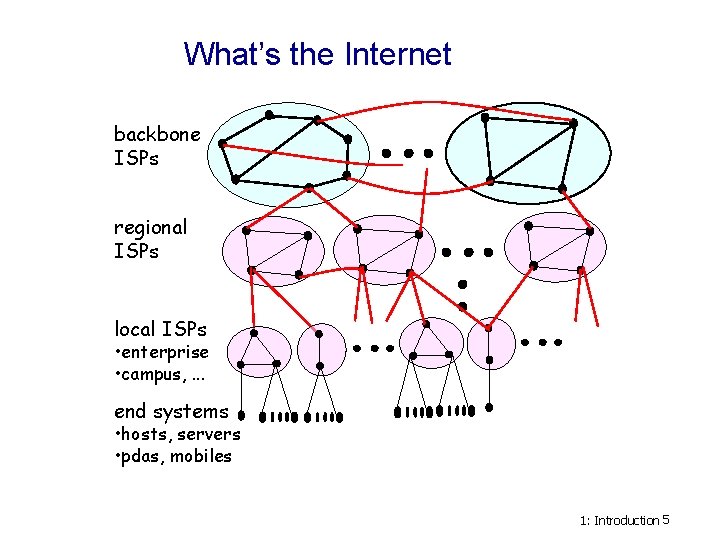
What’s the Internet backbone ISPs regional ISPs local ISPs • enterprise • campus, . . . end systems • hosts, servers • pdas, mobiles 1: Introduction 5
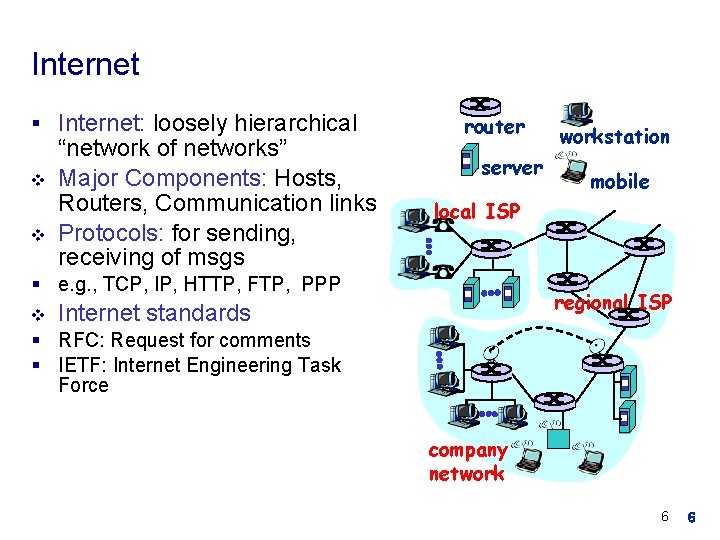
Internet § Internet: loosely hierarchical v v “network of networks” Major Components: Hosts, Routers, Communication links Protocols: for sending, receiving of msgs router server mobile local ISP § e. g. , TCP, IP, HTTP, FTP, PPP v workstation regional ISP Internet standards § RFC: Request for comments § IETF: Internet Engineering Task Force company network 6 6
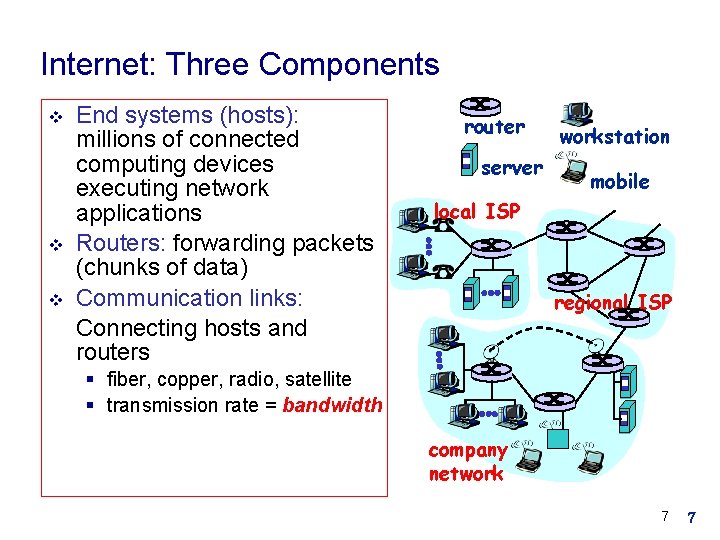
Internet: Three Components v v v End systems (hosts): millions of connected computing devices executing network applications Routers: forwarding packets (chunks of data) Communication links: Connecting hosts and routers router server workstation mobile local ISP regional ISP § fiber, copper, radio, satellite § transmission rate = bandwidth company network 7 7
Internet Service v Communication infrastructure enables distributed applications: § Web, email, games, e-commerce, file sharing v Communication services provided to applications: § Connectionless unreliable § connection-oriented reliable 8 8
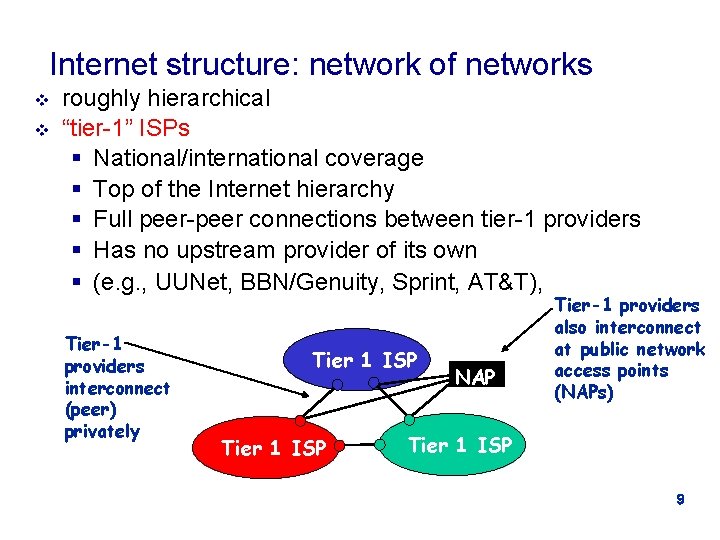
Internet structure: network of networks v v roughly hierarchical “tier-1” ISPs § National/international coverage § Top of the Internet hierarchy § Full peer-peer connections between tier-1 providers § Has no upstream provider of its own § (e. g. , UUNet, BBN/Genuity, Sprint, AT&T), Tier-1 providers interconnect (peer) privately Tier 1 ISP NAP Tier-1 providers also interconnect at public network access points (NAPs) Tier 1 ISP 9
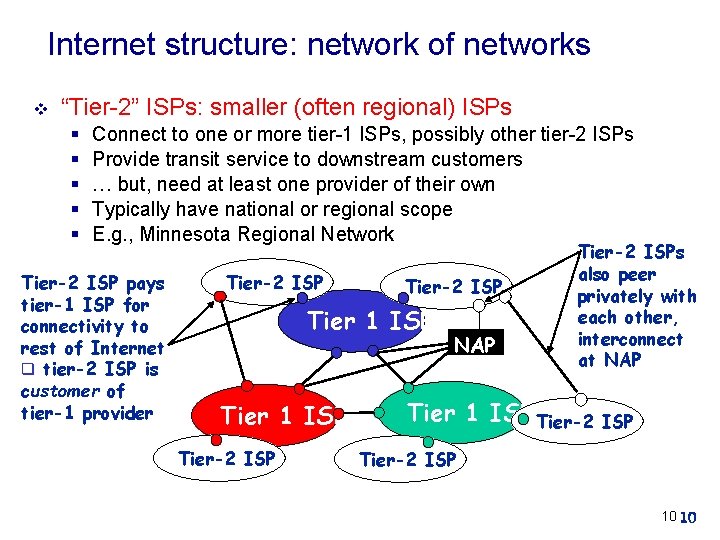
Internet structure: network of networks v “Tier-2” ISPs: smaller (often regional) ISPs § § § Connect to one or more tier-1 ISPs, possibly other tier-2 ISPs Provide transit service to downstream customers … but, need at least one provider of their own Typically have national or regional scope E. g. , Minnesota Regional Network Tier-2 ISP pays tier-1 ISP for connectivity to rest of Internet q tier-2 ISP is customer of tier-1 provider Tier-2 ISP Tier 1 ISP Tier-2 ISP NAP Tier-2 ISPs also peer privately with each other, interconnect at NAP Tier 1 ISP Tier-2 ISP 10 10
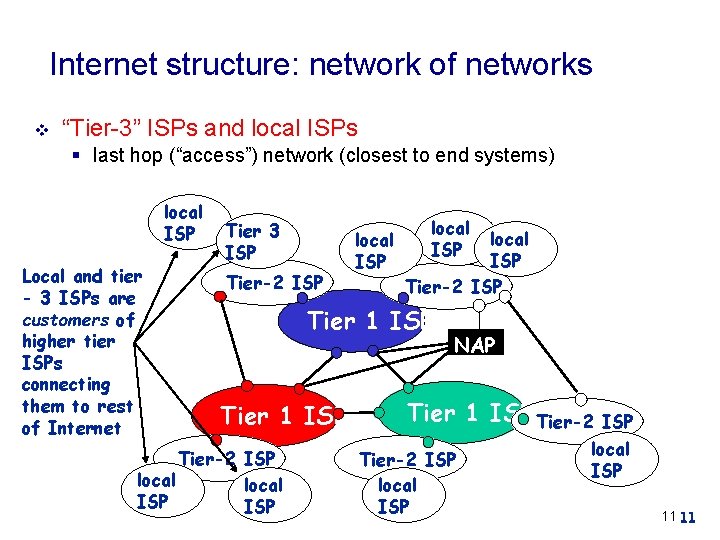
Internet structure: network of networks v “Tier-3” ISPs and local ISPs § last hop (“access”) network (closest to end systems) local ISP Local and tier - 3 ISPs are customers of higher tier ISPs connecting them to rest of Internet Tier 3 ISP Tier-2 ISP local ISP Tier-2 ISP Tier 1 ISP Tier-2 ISP local ISP NAP Tier 1 ISP Tier-2 ISP local ISP 11 11

Internet structure: network of networks v a packet passes through many networks! local ISP Tier 3 ISP Tier-2 ISP local ISP Tier-2 ISP Tier 1 ISP Tier-2 ISP local ISP NAP Tier 1 ISP Tier-2 ISP local ISP 12 12
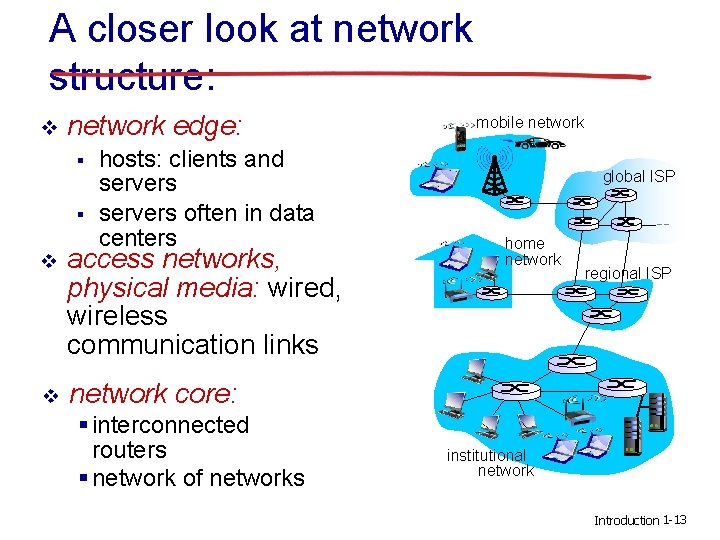
A closer look at network structure: v network edge: § § hosts: clients and servers often in data centers v access networks, physical media: wired, wireless communication links v network core: § interconnected routers § network of networks mobile network global ISP home network regional ISP institutional network Introduction 1 -13
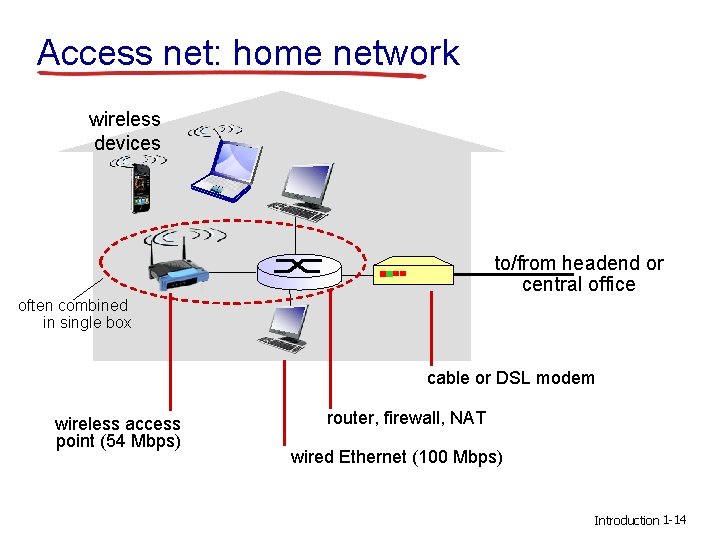
Access net: home network wireless devices to/from headend or central office often combined in single box cable or DSL modem wireless access point (54 Mbps) router, firewall, NAT wired Ethernet (100 Mbps) Introduction 1 -14
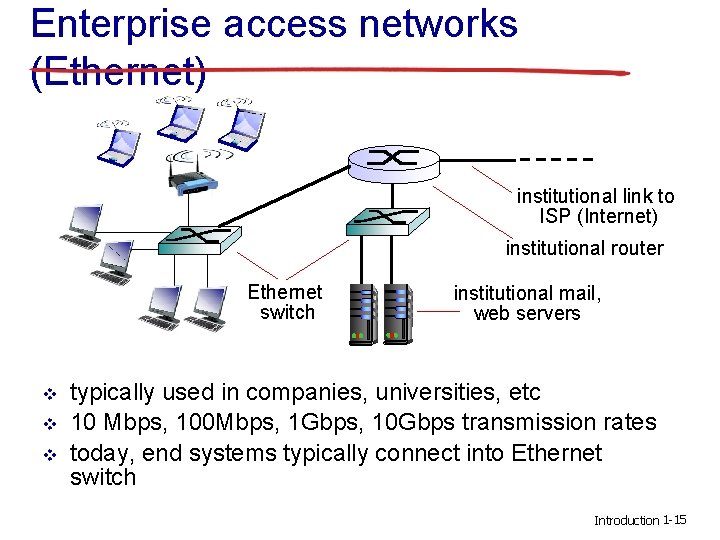
Enterprise access networks (Ethernet) institutional link to ISP (Internet) institutional router Ethernet switch v v v institutional mail, web servers typically used in companies, universities, etc 10 Mbps, 100 Mbps, 1 Gbps, 10 Gbps transmission rates today, end systems typically connect into Ethernet switch Introduction 1 -15
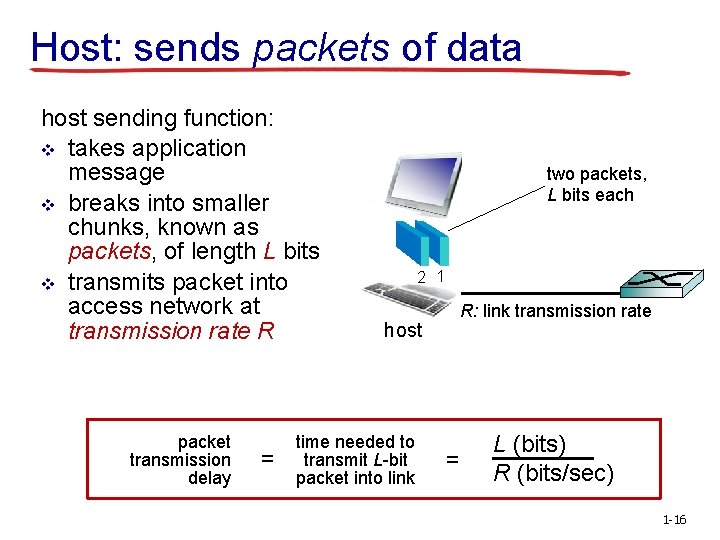
Host: sends packets of data host sending function: v takes application message v breaks into smaller chunks, known as packets, of length L bits v transmits packet into access network at transmission rate R packet transmission delay = two packets, L bits each 2 1 R: link transmission rate host time needed to transmit L-bit packet into link = L (bits) R (bits/sec) 1 -16
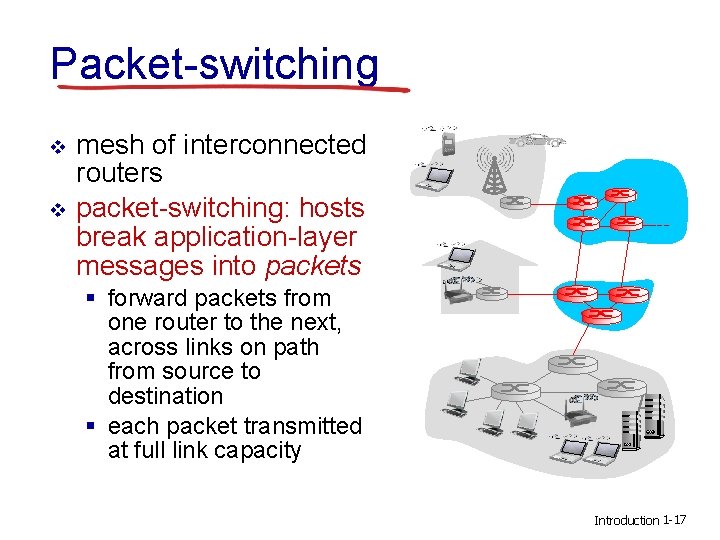
Packet-switching v v mesh of interconnected routers packet-switching: hosts break application-layer messages into packets § forward packets from one router to the next, across links on path from source to destination § each packet transmitted at full link capacity Introduction 1 -17
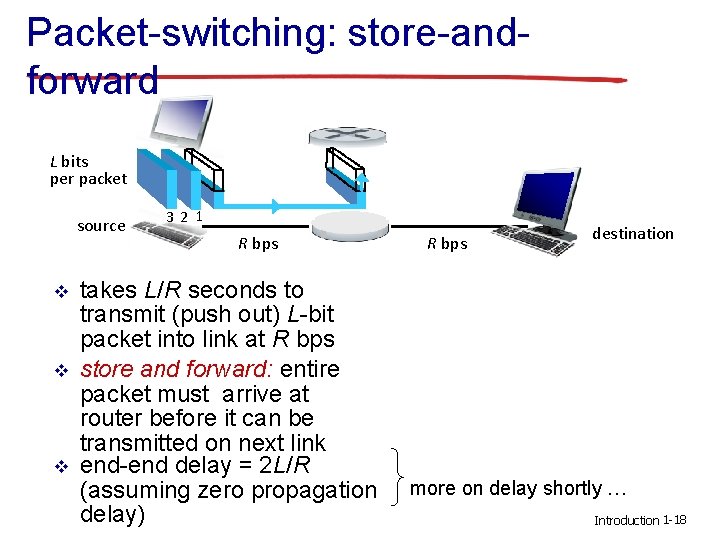
Packet-switching: store-andforward L bits per packet source v v v 3 2 1 R bps takes L/R seconds to transmit (push out) L-bit packet into link at R bps store and forward: entire packet must arrive at router before it can be transmitted on next link end-end delay = 2 L/R (assuming zero propagation delay) R bps destination more on delay shortly … Introduction 1 -18
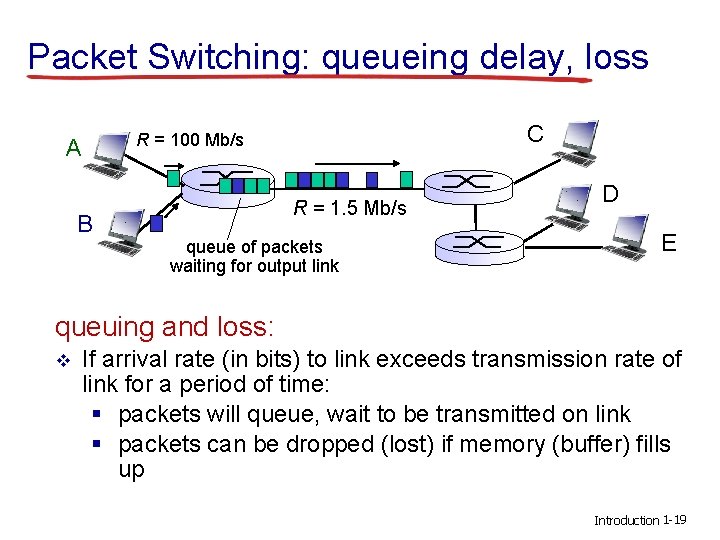
Packet Switching: queueing delay, loss A B C R = 100 Mb/s R = 1. 5 Mb/s queue of packets waiting for output link D E queuing and loss: v If arrival rate (in bits) to link exceeds transmission rate of link for a period of time: § packets will queue, wait to be transmitted on link § packets can be dropped (lost) if memory (buffer) fills up Introduction 1 -19
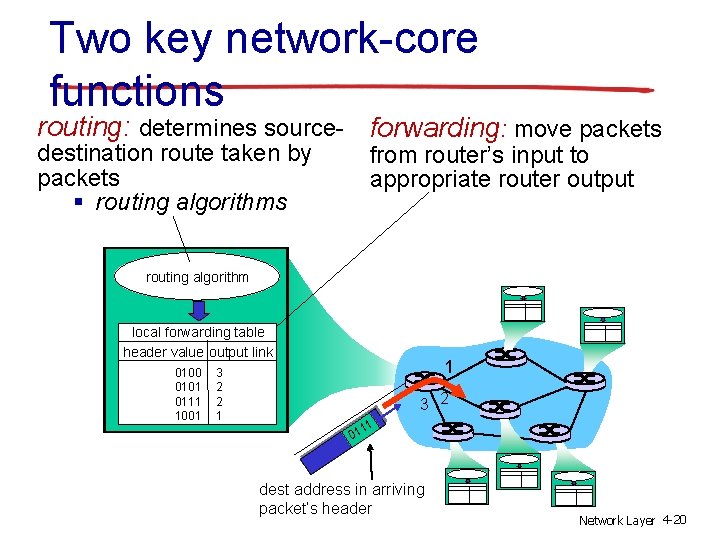
Two key network-core functions routing: determines source- forwarding: move packets destination route taken by packets § routing algorithms from router’s input to appropriate router output routing algorithm local forwarding table header value output link 0100 0101 0111 1001 1 3 2 2 1 3 2 11 01 dest address in arriving packet’s header Network Layer 4 -20
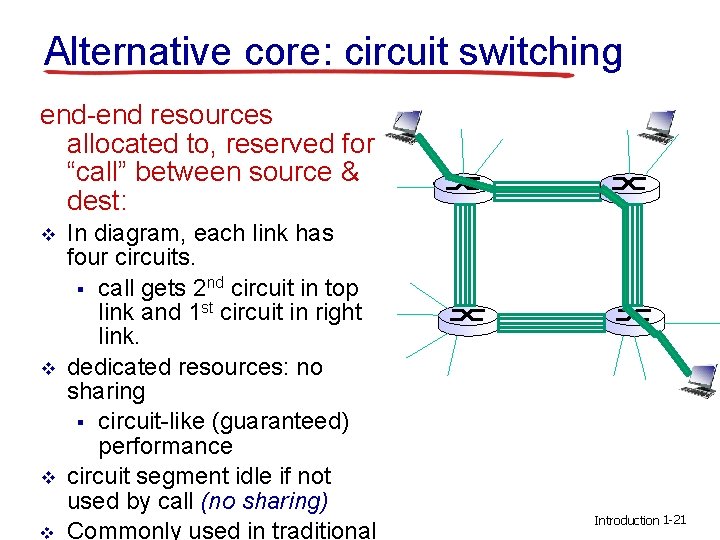
Alternative core: circuit switching end-end resources allocated to, reserved for “call” between source & dest: v v In diagram, each link has four circuits. § call gets 2 nd circuit in top link and 1 st circuit in right link. dedicated resources: no sharing § circuit-like (guaranteed) performance circuit segment idle if not used by call (no sharing) Commonly used in traditional Introduction 1 -21
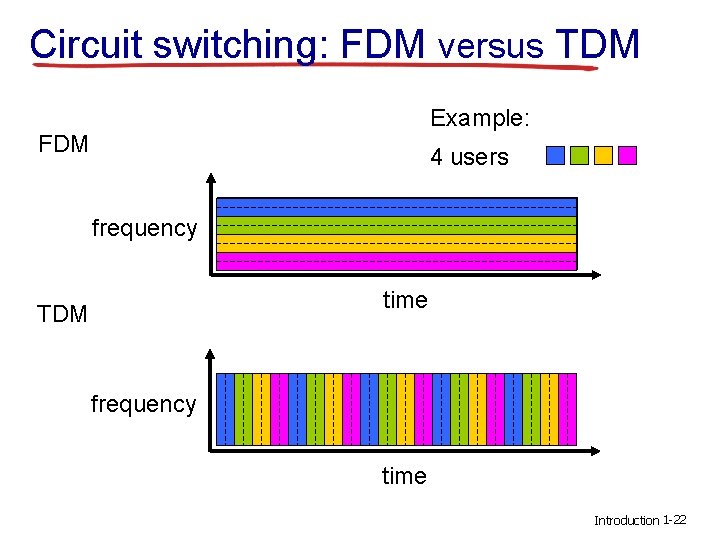
Circuit switching: FDM versus TDM Example: FDM 4 users frequency time TDM frequency time Introduction 1 -22
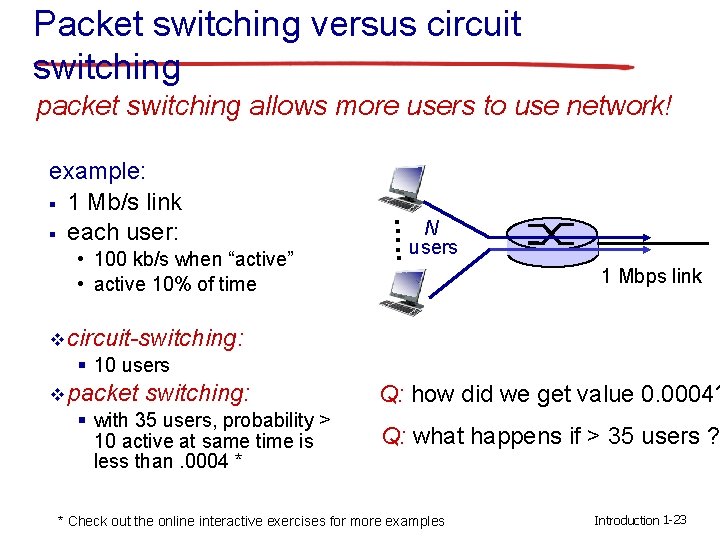
Packet switching versus circuit switching packet switching allows more users to use network! • 100 kb/s when “active” • active 10% of time N users …. . example: § 1 Mb/s link § each user: 1 Mbps link v circuit-switching: § 10 users v packet switching: Q: how did we get value 0. 0004? § with 35 users, probability > 10 active at same time is less than. 0004 * Q: what happens if > 35 users ? * Check out the online interactive exercises for more examples Introduction 1 -23
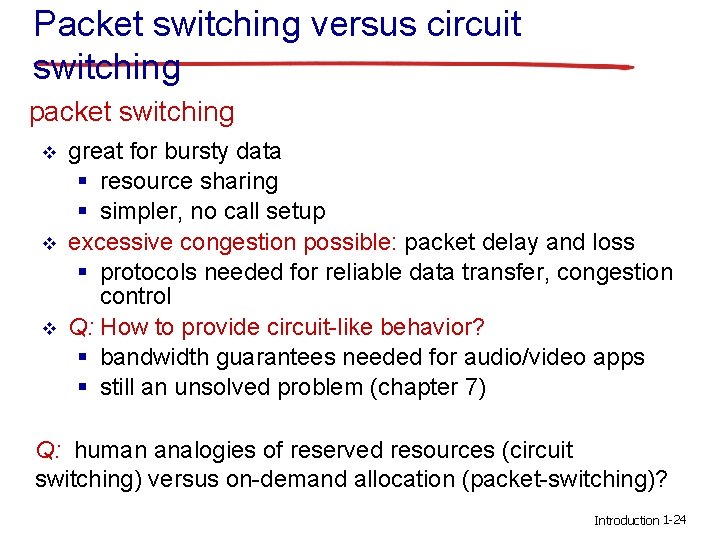
Packet switching versus circuit switching packet switching v v v great for bursty data § resource sharing § simpler, no call setup excessive congestion possible: packet delay and loss § protocols needed for reliable data transfer, congestion control Q: How to provide circuit-like behavior? § bandwidth guarantees needed for audio/video apps § still an unsolved problem (chapter 7) Q: human analogies of reserved resources (circuit switching) versus on-demand allocation (packet-switching)? Introduction 1 -24
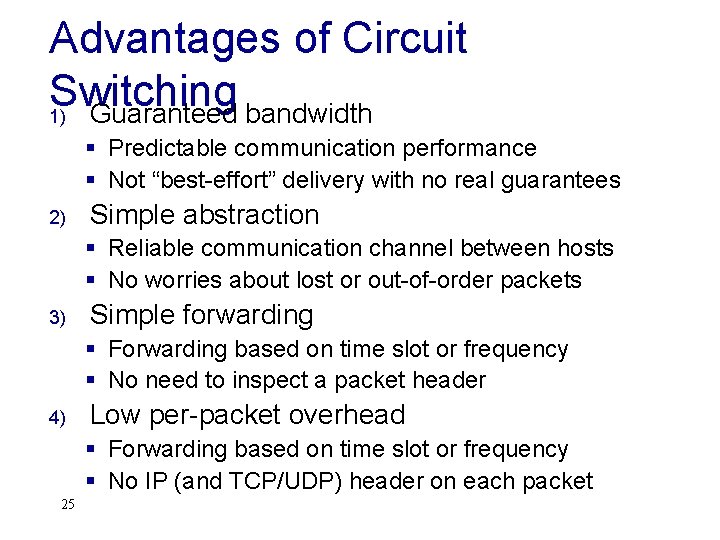
Advantages of Circuit Switching 1) Guaranteed bandwidth § Predictable communication performance § Not “best-effort” delivery with no real guarantees 2) Simple abstraction § Reliable communication channel between hosts § No worries about lost or out-of-order packets 3) Simple forwarding § Forwarding based on time slot or frequency § No need to inspect a packet header 4) Low per-packet overhead § Forwarding based on time slot or frequency § No IP (and TCP/UDP) header on each packet 25
Disadvantages of Circuit Switching 1) Wasted bandwidth § Bursty traffic leads to idle connection during silent period 2) Blocked connections § Connection refused when resources are not sufficient 3) Connection set-up delay § No communication until the connection is set up § Unable to avoid extra latency for small data transfers 4) Network state § Network nodes must store per-connection information § Unable to avoid per-connection storage and state 26
Advantages of Packet Switching v Not expensive v Packets are rerouted in case of any problems (reliable communication) v Faster -> Connectionless v Use bandwidth efficiently (Bandwidth sharing) v packet switching is widely used by applications such as Whats. App, Skype, Google Talk etc. Introduction 2 -27
Disadvantages of packet Switching v Can not be used in applications requiring very little delay & higher quality of service e. g. reliable voice calls. v Require high initial implementation costs. v Retransmission of lost packets by the sender often leads to loss of critical information if errors are not recovered. Introduction 2 -28
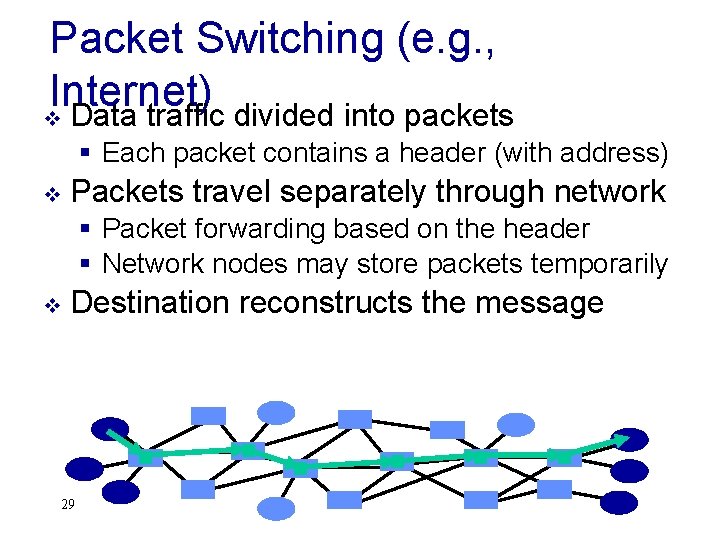
Packet Switching (e. g. , Internet) v Data traffic divided into packets § Each packet contains a header (with address) v Packets travel separately through network § Packet forwarding based on the header § Network nodes may store packets temporarily v Destination reconstructs the message 29
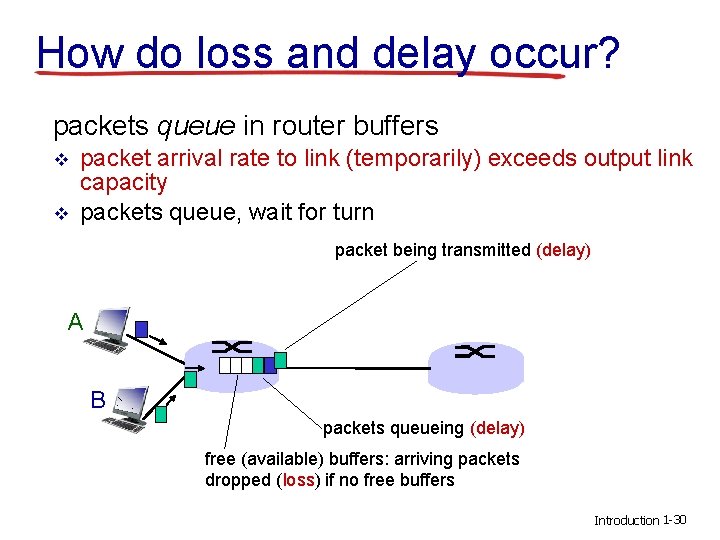
How do loss and delay occur? packets queue in router buffers v v packet arrival rate to link (temporarily) exceeds output link capacity packets queue, wait for turn packet being transmitted (delay) A B packets queueing (delay) free (available) buffers: arriving packets dropped (loss) if no free buffers Introduction 1 -30
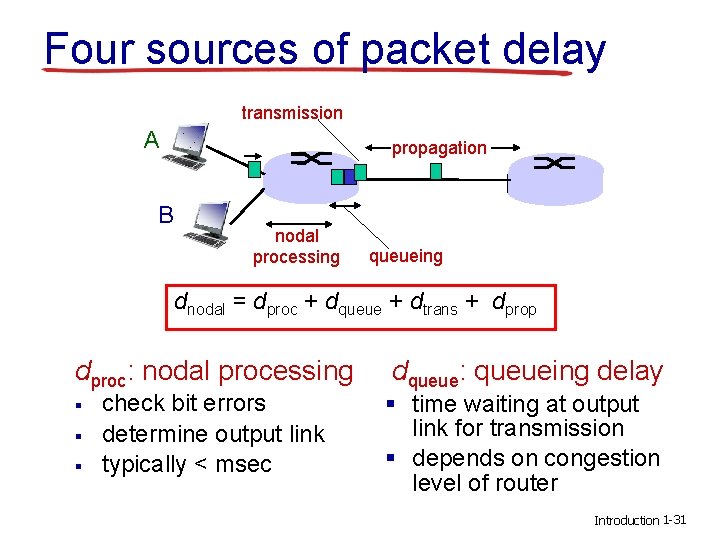
Four sources of packet delay transmission A propagation B nodal processing queueing dnodal = dproc + dqueue + dtrans + dprop dproc: nodal processing dqueue: queueing delay § § § check bit errors determine output link typically < msec § time waiting at output link for transmission § depends on congestion level of router Introduction 1 -31
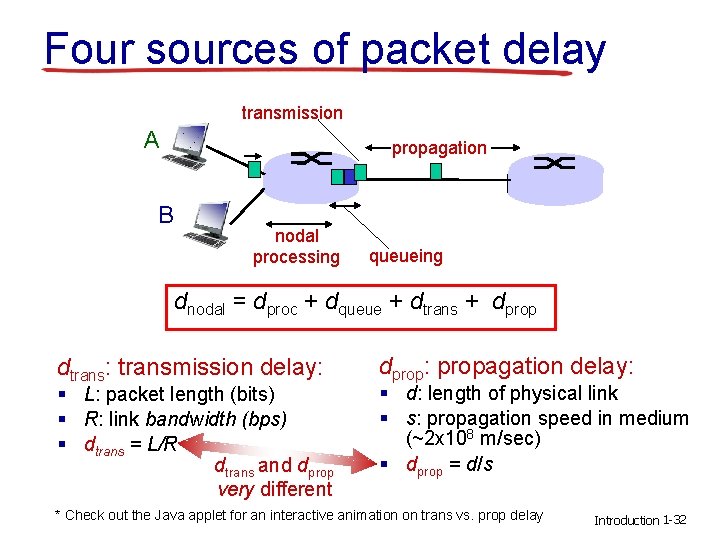
Four sources of packet delay transmission A propagation B nodal processing queueing dnodal = dproc + dqueue + dtrans + dprop dtrans: transmission delay: § L: packet length (bits) § R: link bandwidth (bps) § dtrans = L/R dtrans and dprop very different dprop: propagation delay: § d: length of physical link § s: propagation speed in medium (~2 x 10⁸ m/sec) § dprop = d/s * Check out the Java applet for an interactive animation on trans vs. prop delay Introduction 1 -32
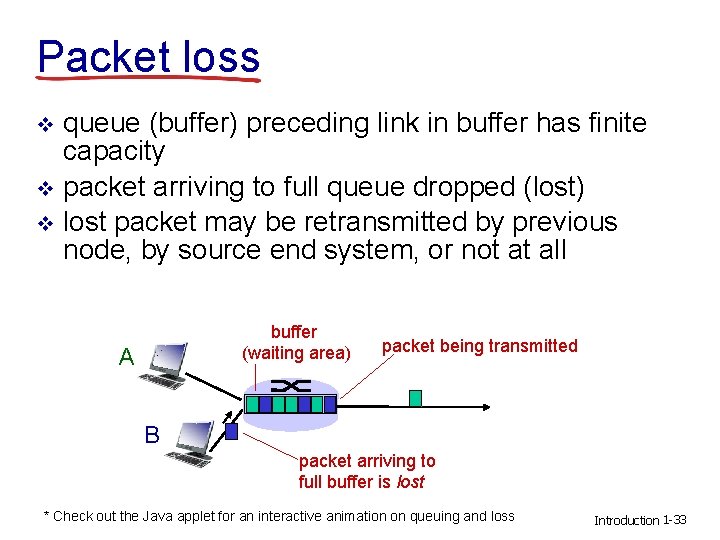
Packet loss queue (buffer) preceding link in buffer has finite capacity v packet arriving to full queue dropped (lost) v lost packet may be retransmitted by previous node, by source end system, or not at all v buffer (waiting area) A packet being transmitted B packet arriving to full buffer is lost * Check out the Java applet for an interactive animation on queuing and loss Introduction 1 -33
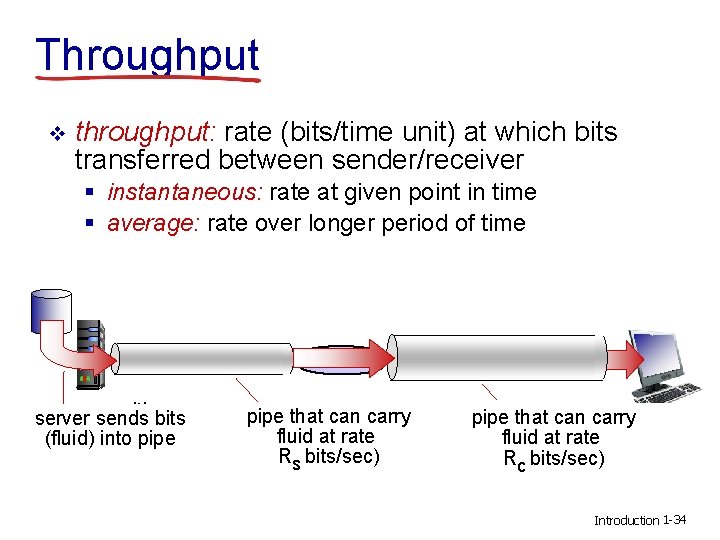
Throughput v throughput: rate (bits/time unit) at which bits transferred between sender/receiver § instantaneous: rate at given point in time § average: rate over longer period of time server, with server sends bits file of F bits (fluid) into pipe to send to client link capacity pipe that can carry Rs bits/sec fluid at rate Rs bits/sec) link capacity pipe that can carry Rc bits/sec fluid at rate Rc bits/sec) Introduction 1 -34
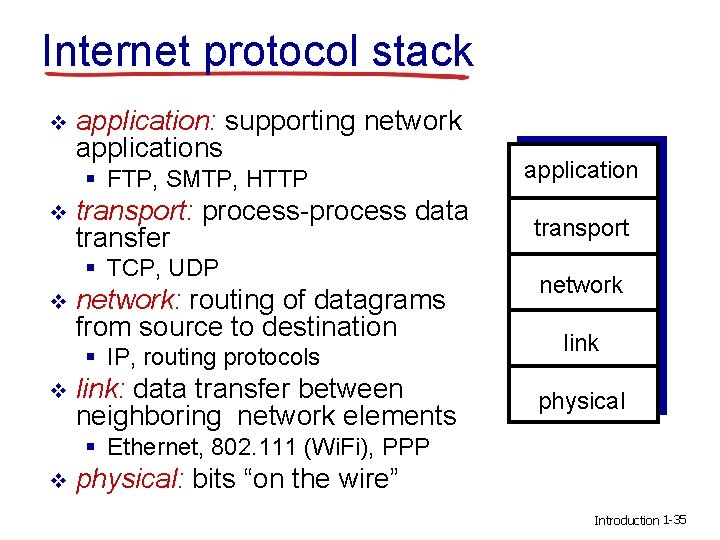
Internet protocol stack v application: supporting network applications § FTP, SMTP, HTTP v transport: process-process data transfer § TCP, UDP v network: routing of datagrams from source to destination § IP, routing protocols v link: data transfer between neighboring network elements application transport network link physical § Ethernet, 802. 111 (Wi. Fi), PPP v physical: bits “on the wire” Introduction 1 -35
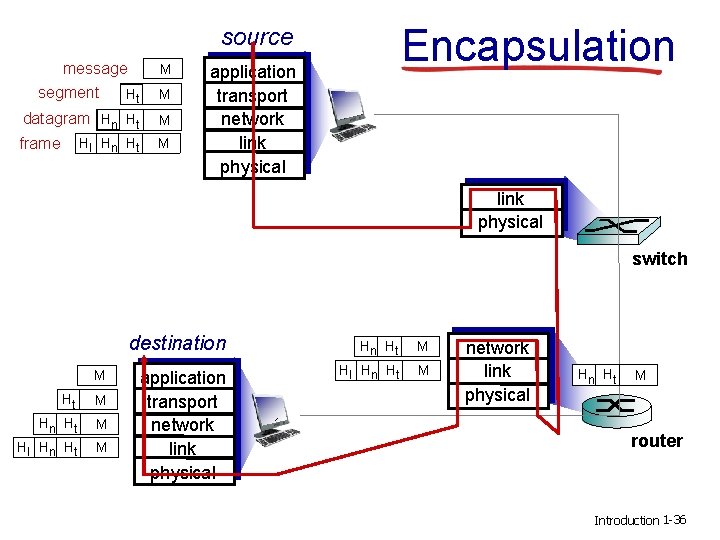
Encapsulation source message segment Ht M datagram Hn Ht M frame M Hl Hn Ht M application transport network link physical switch destination M Ht M Hn Ht Hl Hn Ht M M application transport network link physical Hn Ht Hl Hn Ht M M network link physical Hn Ht M router Introduction 1 -36
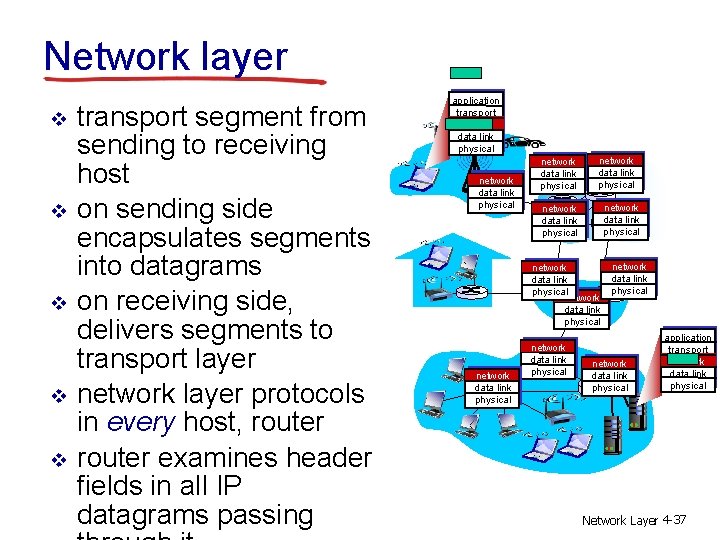
Network layer v v v transport segment from sending to receiving host on sending side encapsulates segments into datagrams on receiving side, delivers segments to transport layer network layer protocols in every host, router examines header fields in all IP datagrams passing application transport network data link physical network data link physical network data link physical application transport network data link physical Network Layer 4 -37
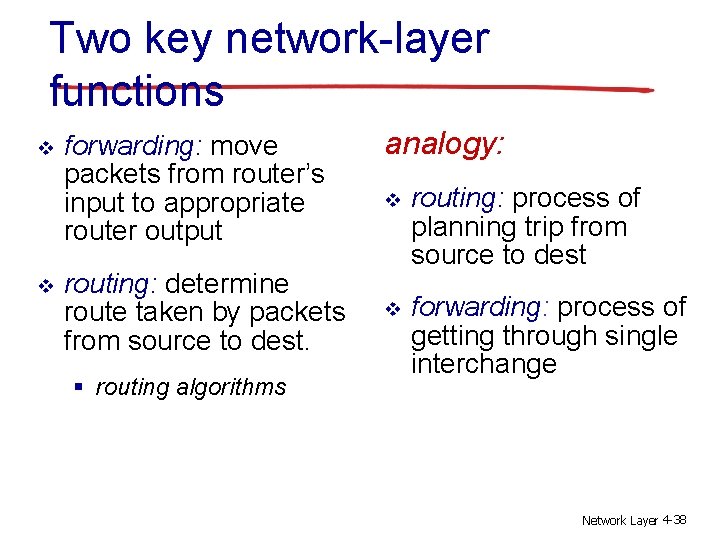
Two key network-layer functions v v forwarding: move packets from router’s input to appropriate router output routing: determine route taken by packets from source to dest. § routing algorithms analogy: v routing: process of planning trip from source to dest v forwarding: process of getting through single interchange Network Layer 4 -38
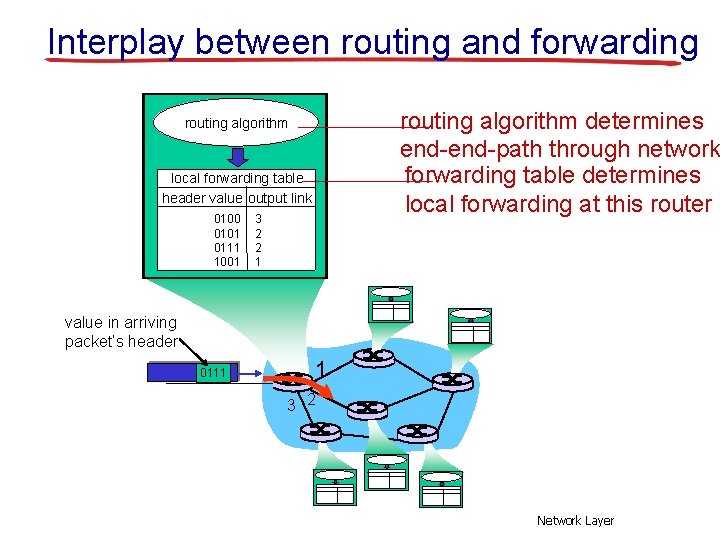
Interplay between routing and forwarding routing algorithm determines end-path through network forwarding table determines local forwarding at this router routing algorithm local forwarding table header value output link 0100 0101 0111 1001 3 2 2 1 value in arriving packet’s header 0111 1 3 2 Network Layer
Connection setup v 3 rd important function in some network architectures: § ATM, frame relay, X. 25 v before datagrams flow, two end hosts and intervening routers establish virtual connection § routers get involved v network vs transport layer connection service: § network: between two hosts (may also involve intervening routers in case of VCs) § transport: between two processes Network Layer 4 -40
- Slides: 40