
LECTURE 2 Cs 506 ComputerSystem Architecture ComputerSystem Architecture





- Slides: 88
LECTURE 2 Cs 506
Computer-System Architecture
Computer-System Architecture 1. 2. 3. Single-Processor Systems Multiprocessor Systems Clustered Systems
Computer-System Architecture 1 - Single general-purpose processor On a single-processor system, there is one main CPU capable of executing a general-purpose instruction set, including instructions from user processes. Most systems have special-purpose processors as well
Computer-System Architecture 2 - Multiprocessors systems : growing in use and importance Also known as parallel systems, tightly-coupled systems The system have two or more processors in close communication , sharing the computer bus memory and peripheral devices. Advantages include 1. Increased throughput 2. Economy of scale 3. Increased reliability – graceful degradation or fault tolerance
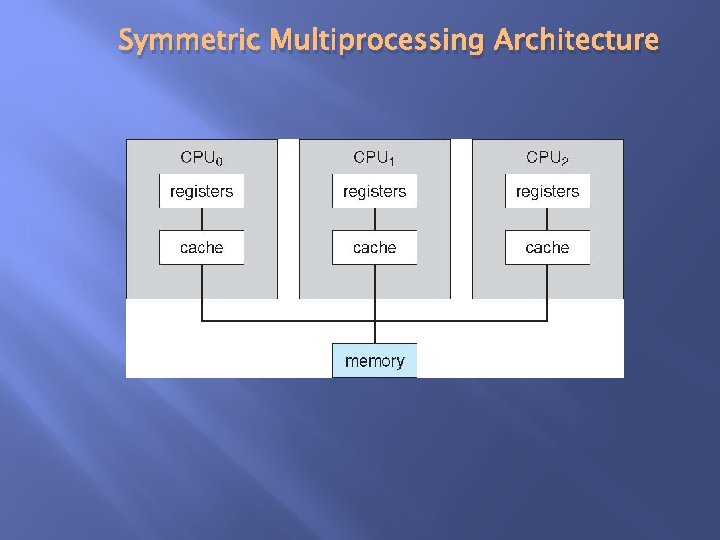
Computer-System Architecture Two types 1. Asymmetric Multiprocessing 2. Symmetric Multiprocessing 1 - Asymmetric Multiprocessing In which each processor is assigned a specific task. A master processor controls the system Master-slave relation ship 2 - Symmetric Multiprocessing All processors are peers Many processes can run simultaneous … n processes can run if n CPU
Symmetric Multiprocessing Architecture
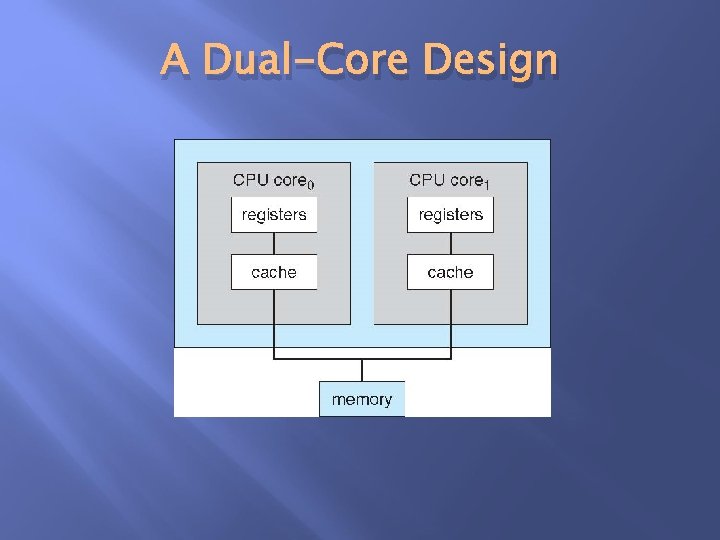
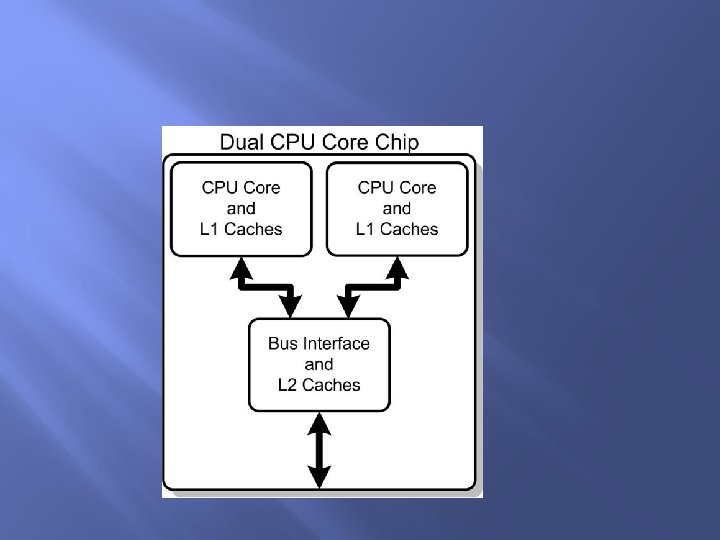
Computer-System Architecture - Multi-computing core Multi processor per chip Multi chips with single core Which better? And why? First Because on-chip communication is faster than between- chips
A Dual-Core Design
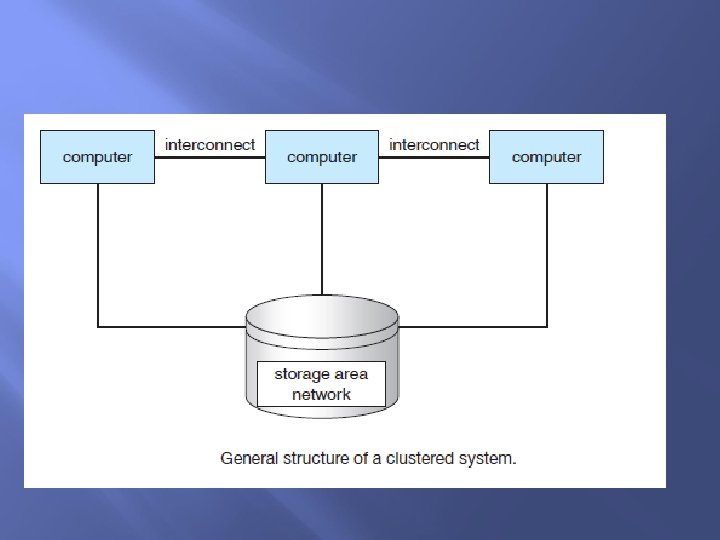
Clustered Systems 3 - Clustered Systems Like multiprocessor systems, but multiple systems working together A clustered system uses multiple CPUs to complete a task. It is different from parallel system in that clustered system consists of two or more individual systems tied together. Definition : The clustered computers share storage and are closely linked via LAN networking. 12
Clustered Systems Provides a high-availability service which survives failures: A layer of cluster software runs on cluster nodes. Each node can monitor one or more nodes over the LAN. The monitored machine can fail in some cases. The monitoring machine can take ownership of its storage. The monitoring machine can also restart applications that were running on the failed machine- The failed machine can remain down but the users will see a brief of the service. 13
Clustered Systems The clustered system can be of the following forms: Asymmetric clustering: In this form, one machine is in hot standby mode and other machine is running the application. The hot standby machine performs nothing. It only monitors the server. If failure It becomes the active server if the server fails. Symmetric clustering In this mode, two or more machines run the applications. They also monitor each other at the same time. This mode is more efficient because it uses all available machines. It can be used only if multiple applications are available to be executed high-performance computing (HPC) 14 Applications must be written to use parallelization
Operating System Structure 16
Operating System Structure Multiprogramming Multiprocessing Multitasking 17
Operating System Structure Multiprogramming: Multiprogramming is a form of parallel processing in which several programs are run at the same time on a uniprocessor. Since there is only one processor , there can be no true simultaneous execution of different programs. Instead, the operating system executes part of one program, then part of another, and so on. To the user it appears that all programs are 18 executing at the same time
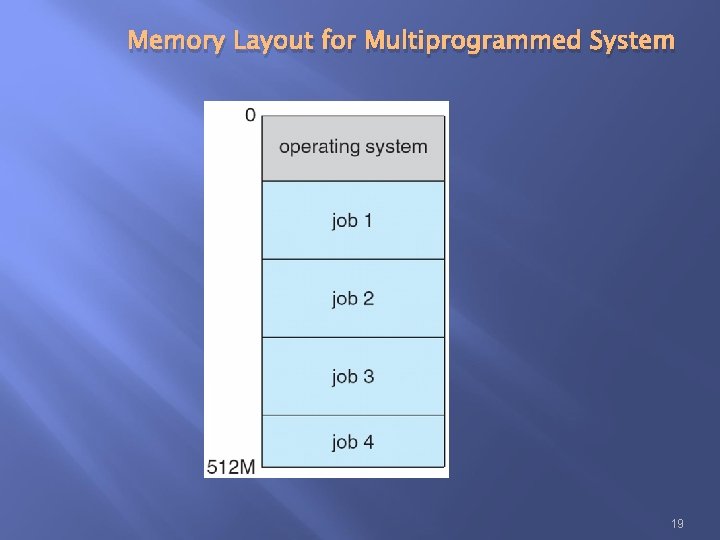
Memory Layout for Multiprogrammed System 19
Operating System Structure Multiprogramming needed for efficiency Single user cannot keep CPU and I/O devices busy at all times Multiprogramming organizes jobs (code and data) so CPU always has one to execute A subset of total jobs in system is kept in memory One job selected and run via job scheduling When it has to wait (for I/O for example), OS switches to another job 20
Operating System Structure Note : Multiprogramming means: that several programs in different stages of execution are coordinated to run on a single I-stream engine (CPU). Multiprocessing, which is the coordination of the simultaneous execution of several programs running on multiple I-stream engines (CPUs). 21
Operating System Structure Timesharing (multitasking): is logical extension in which CPU switches jobs so frequently that users can interact with each job while it is running, creating interactive computing 22
Operating System Structure Timesharing: Response time should be < 1 second Each user has at least one program executing in memory process If several jobs ready to run at the same time CPU scheduling If processes don’t fit in memory, swapping moves them in and out to run Virtual memory allows execution of processes not completely in memory 23
Multiprograming Running more then one program with in an application to perform a certain task. Example : In MS WORD, Writing in document and sending Email Multitasking Running more then one application to perform a certain task. Example: listening Song, playing game, work in ms word, excel and other applications simultaneously Multiprocessing Running more then one instruction through a processor. Example When create a file then computer takes Time and date default.
Operating-System Operations
Computer-System Operation Each device controller is in charge of a particular device type (disk drive, video displays etc). I/O devices and the CPU can execute concurrently. Each device controller has a local buffer. CPU moves data from/to main memory to/from local buffers I/O is from the device to local buffer of controller. Device controller informs CPU that it has finished its operation by causing an interrupt.
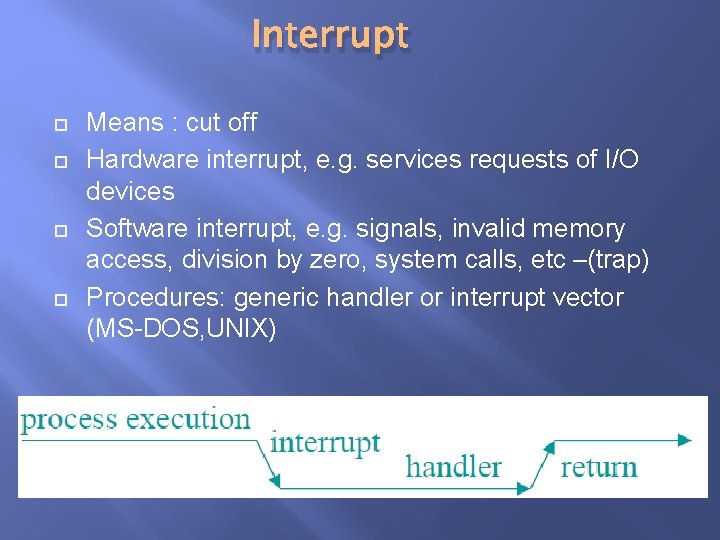
Interrupt Means : cut off Hardware interrupt, e. g. services requests of I/O devices Software interrupt, e. g. signals, invalid memory access, division by zero, system calls, etc –(trap) Procedures: generic handler or interrupt vector (MS-DOS, UNIX)
Operating-System Operations Interrupts are an important part of a computer architecture. Each computer design has its own interrupt mechanism, but several functions are common.
Operating-System Operations Interrupt driven by hardware Software error or request creates exception or trap Division by zero, request for operating system service Other process problems include infinite loop, processes modifying each other or the operating system
Common Functions of Interrupts Incoming interrupts are disabled while another interrupt is being processed to prevent a lost interrupt A trap is a software-generated interrupt caused either by an error or a user request An operating system is interrupt driven
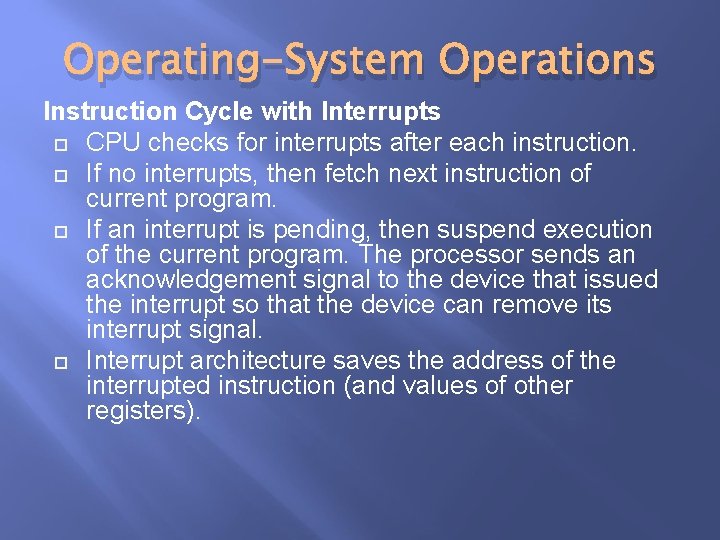
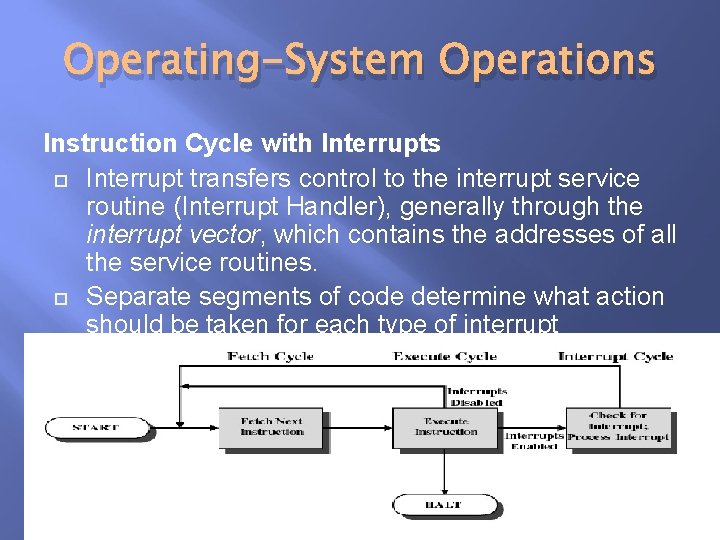
Operating-System Operations Instruction Cycle with Interrupts CPU checks for interrupts after each instruction. If no interrupts, then fetch next instruction of current program. If an interrupt is pending, then suspend execution of the current program. The processor sends an acknowledgement signal to the device that issued the interrupt so that the device can remove its interrupt signal. Interrupt architecture saves the address of the interrupted instruction (and values of other registers).
Operating-System Operations Instruction Cycle with Interrupts Interrupt transfers control to the interrupt service routine (Interrupt Handler), generally through the interrupt vector, which contains the addresses of all the service routines. Separate segments of code determine what action should be taken for each type of interrupt
Operating-System Operations Interrupt Handler A program that determines nature of the interrupt and performs whatever actions are needed Control is transferred to this program Generally part of the operating system
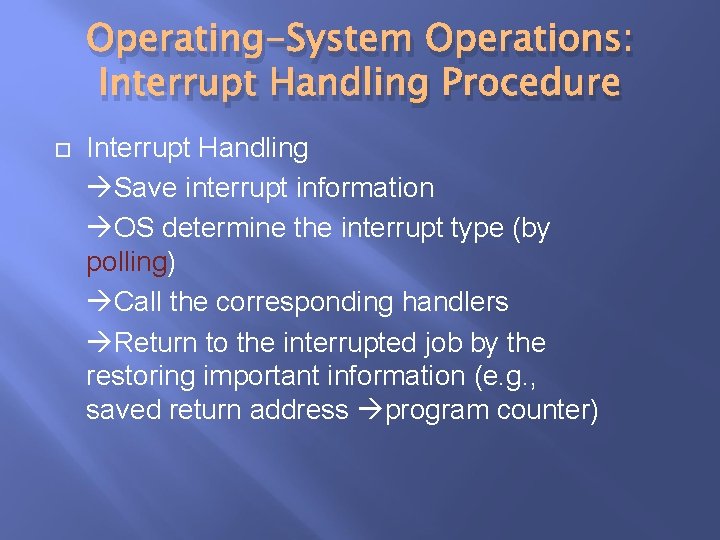
Operating-System Operations: Interrupt Handling Procedure Interrupt Handling Save interrupt information OS determine the interrupt type (by polling) Call the corresponding handlers Return to the interrupted job by the restoring important information (e. g. , saved return address program counter)
System Calls 35
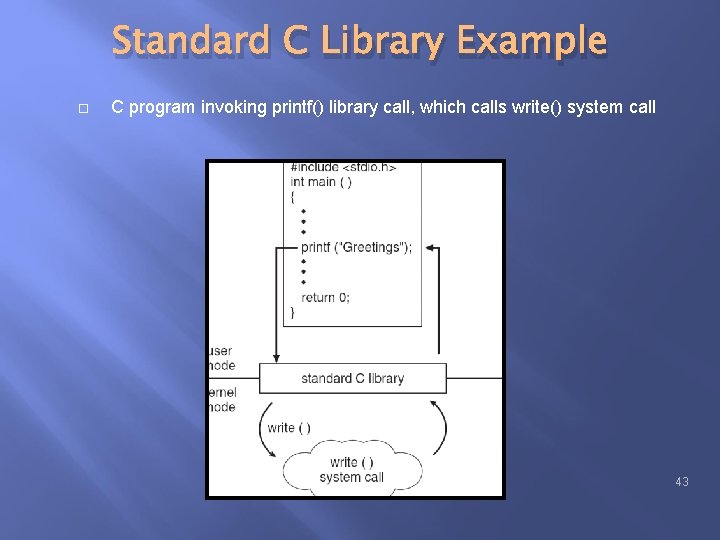
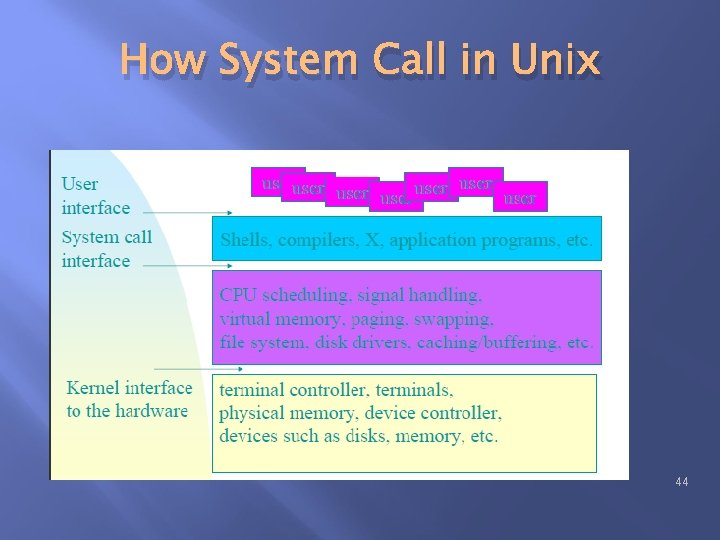
System Calls System calls : Interface between processes & OS Definition: is how a program requests a service from an operating system’s kernel. They provide the interface between a process and operating system. Is an interface between a user-space application and a service is provided in the kernel. 36
System Calls How to make system calls? Assemble-language instructions or subroutine/functions calls in high-level language such as C or Perl? Generation of in-line instructions or a call to a special run-time routine. Example: read and copy of a file! Library Calls vs System Calls 37
System Calls Programming interface to the services provided by the OS Typically written in a high-level language (C or C++) 38
System Calls Three most common APIs are Win 32 API for Windows, POSIX API for POSIX-based systems (including virtually all versions of UNIX, Linux, and Mac OS X), and Java API for the Java virtual machine (JVM) Why use APIs rather than system calls? (Note that the system-call names used throughout this text are generic) 39
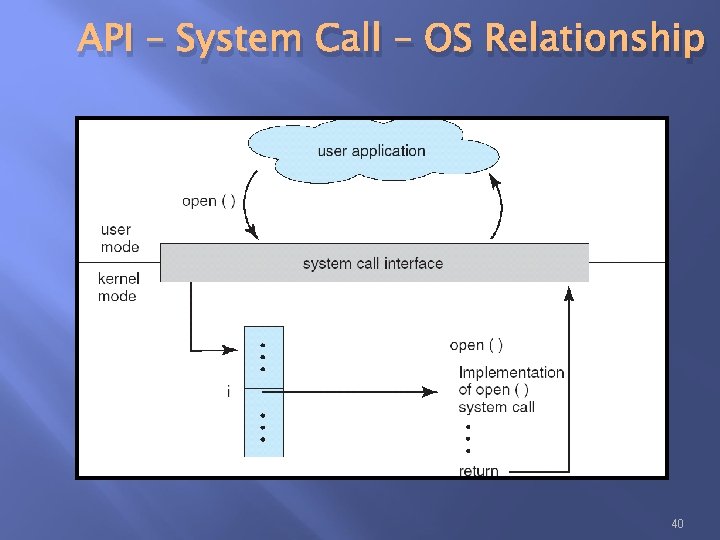
API – System Call – OS Relationship 40
System Call Implementation The system call interface invokes intended system call in OS kernel and returns status of the system call and any return values The caller need know nothing about how the system call is implemented Just needs to obey API and understand what OS will do as a result call Most details of OS interface hidden from programmer by API Managed by run-time support library (set of functions built into libraries included with compiler) 41
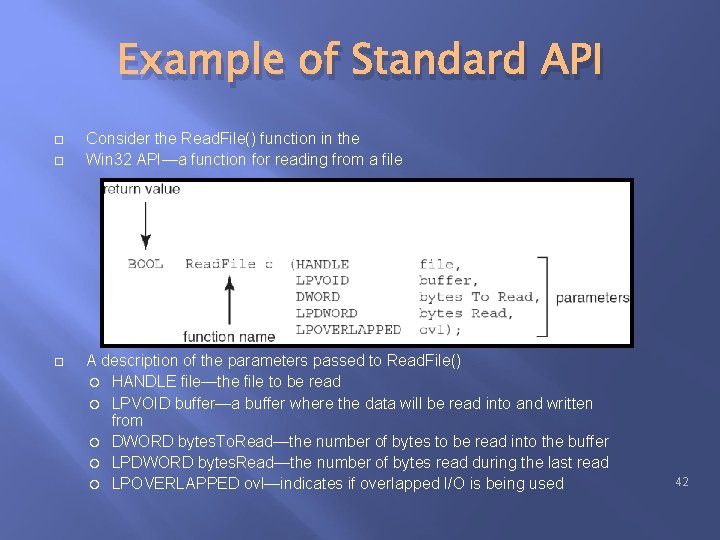
Example of Standard API Consider the Read. File() function in the Win 32 API—a function for reading from a file A description of the parameters passed to Read. File() HANDLE file—the file to be read LPVOID buffer—a buffer where the data will be read into and written from DWORD bytes. To. Read—the number of bytes to be read into the buffer LPDWORD bytes. Read—the number of bytes read during the last read LPOVERLAPPED ovl—indicates if overlapped I/O is being used 42
Standard C Library Example C program invoking printf() library call, which calls write() system call 43
How System Call in Unix 44
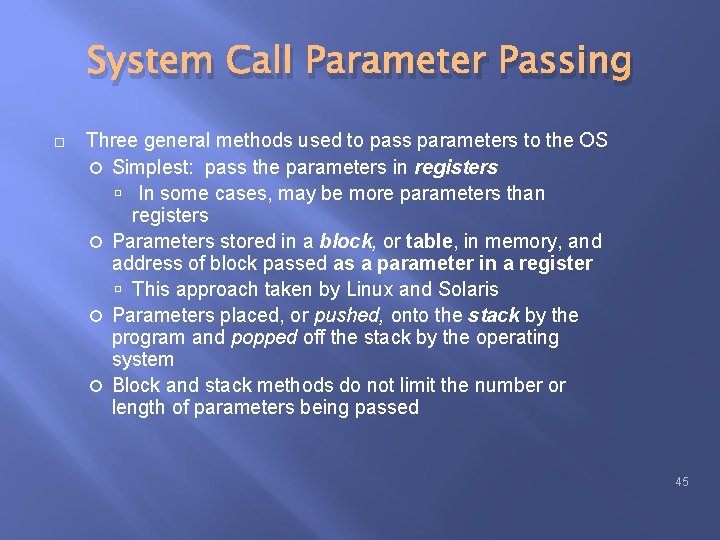
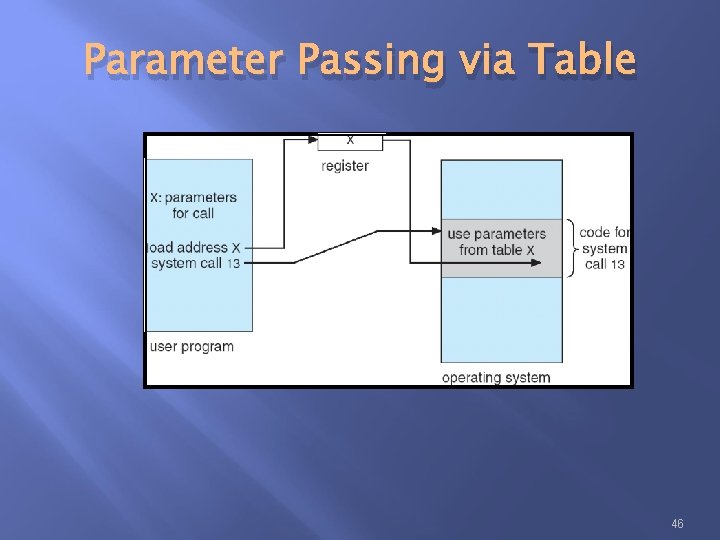
System Call Parameter Passing Three general methods used to pass parameters to the OS Simplest: pass the parameters in registers In some cases, may be more parameters than registers Parameters stored in a block, or table, in memory, and address of block passed as a parameter in a register This approach taken by Linux and Solaris Parameters placed, or pushed, onto the stack by the program and popped off the stack by the operating system Block and stack methods do not limit the number or length of parameters being passed 45
Parameter Passing via Table 46
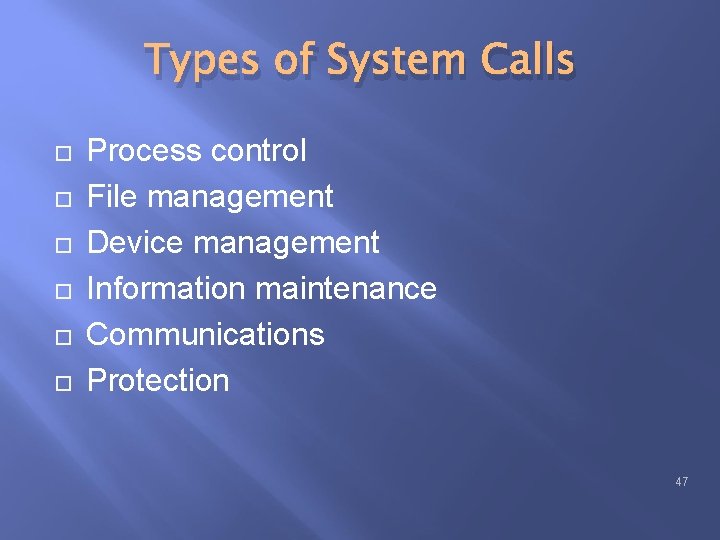
Types of System Calls Process control File management Device management Information maintenance Communications Protection 47
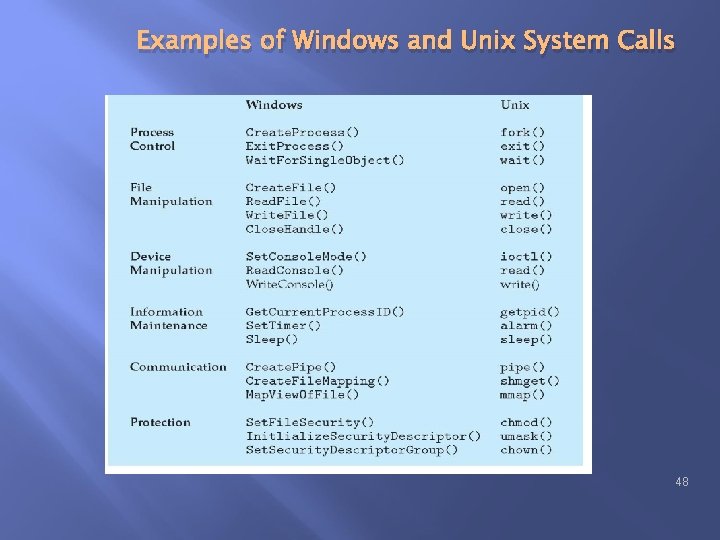
Examples of Windows and Unix System Calls 48
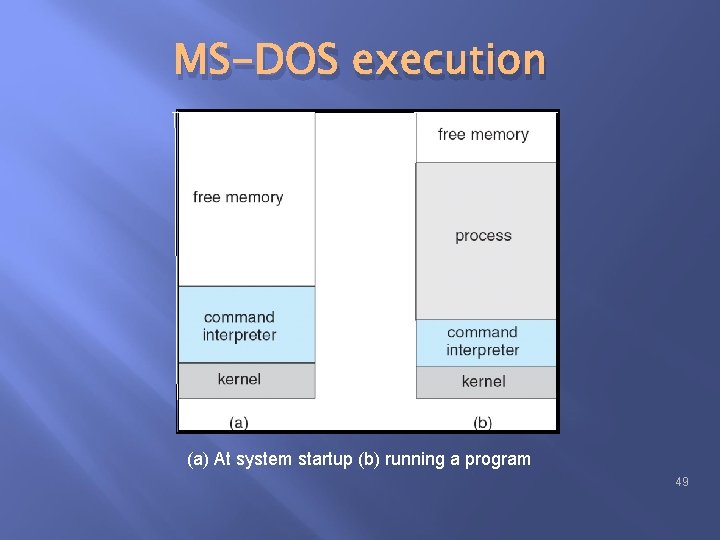
MS-DOS execution (a) At system startup (b) running a program 49
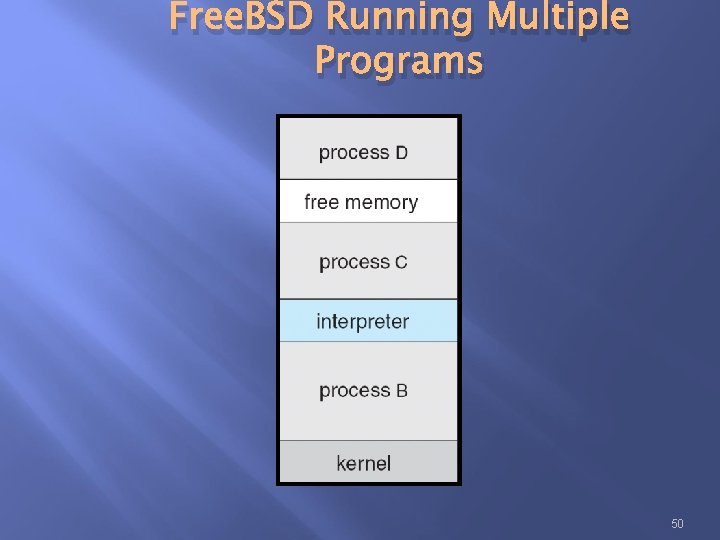
Free. BSD Running Multiple Programs 50
System programs 51
System Programs Provide a convenient environment for program development and execution Some of them are simply user interfaces to system calls; others are considerably more complex File management - Create, delete, copy, rename, print, dump, list, and generally manipulate files and directories 52
System Programs Status information Some ask the system for info - date, time, amount of available memory, disk space, number of users Others provide detailed performance, logging, and debugging information Typically, these programs format and print the output to the terminal or other output devices Some systems implement a registry - used to store and retrieve configuration information 53
System Programs (cont’d) File modification Text editors to create and modify files Special commands to search contents of files or perform transformations of the text Programming-language support - Compilers, assemblers, debuggers and interpreters sometimes provided 54
System Programs (cont’d) Program loading and execution. Absolute loaders, reloadable loaders, linkage editors, and overlay-loaders, debugging systems for higher-level and machine language 55
System Programs (cont’d) Communications - Provide the mechanism for creating virtual connections among processes, users, and computer systems Allow users to send messages to one another’s screens, browse web pages, send electronic-mail messages, log in remotely, transfer files from one machine to another 56
User Operating System Interface 57
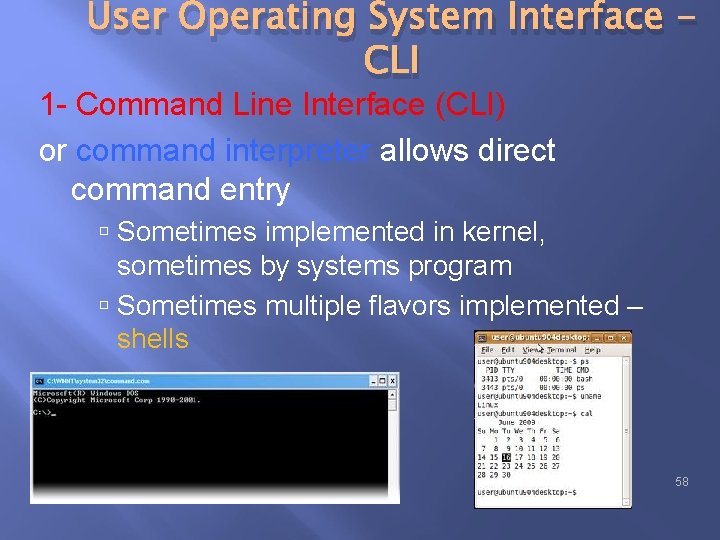
User Operating System Interface CLI 1 - Command Line Interface (CLI) or command interpreter allows direct command entry Sometimes implemented in kernel, sometimes by systems program Sometimes multiple flavors implemented – shells 58
User Operating System Interface CLI Primarily fetches a command from user and executes it Sometimes commands built-in, sometimes just names of programs If the latter, adding new features doesn’t require shell modification 59
User Operating System Interface GUI 2 - Graphical User Interface (GUI ) User-friendly desktop metaphor interface Usually mouse, keyboard, and monitor Icons represent files, programs, actions, etc Various mouse buttons over objects in the interface cause various actions (provide information, options, execute function, open directory (known as a folder) Invented at Xerox PARC 60
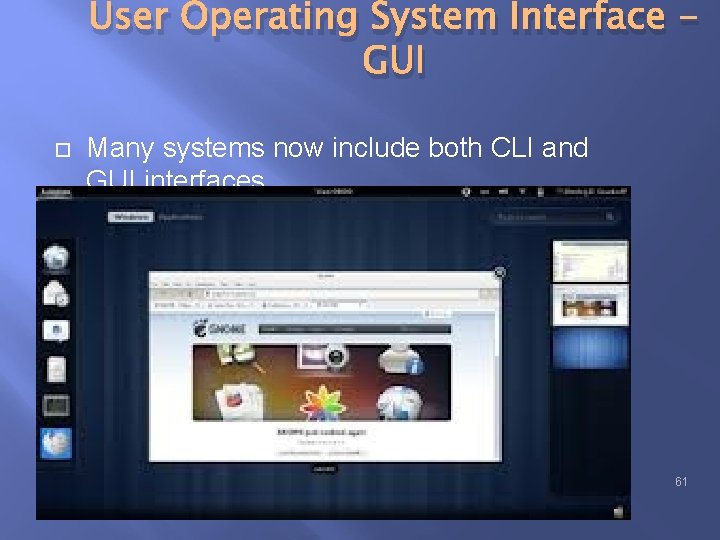
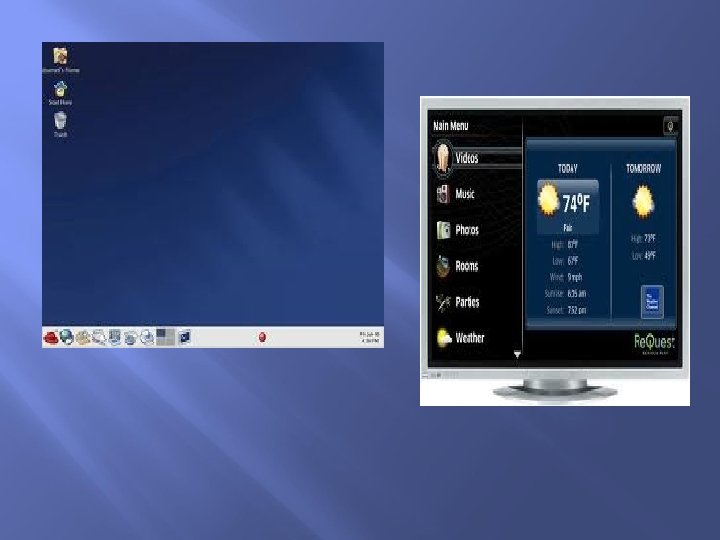
User Operating System Interface GUI Many systems now include both CLI and GUI interfaces Microsoft Windows is GUI with CLI “command” shell Apple Mac OS X as “Aqua” GUI interface with UNIX kernel underneath and shells available Solaris is CLI with optional GUI interfaces (Java Desktop, KDE) 61
Operating system structure Self Study 63
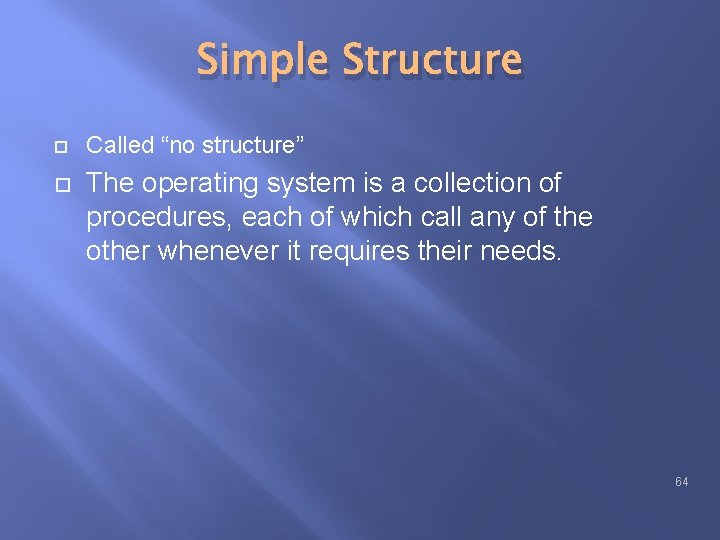
Simple Structure Called “no structure” The operating system is a collection of procedures, each of which call any of the other whenever it requires their needs. 64
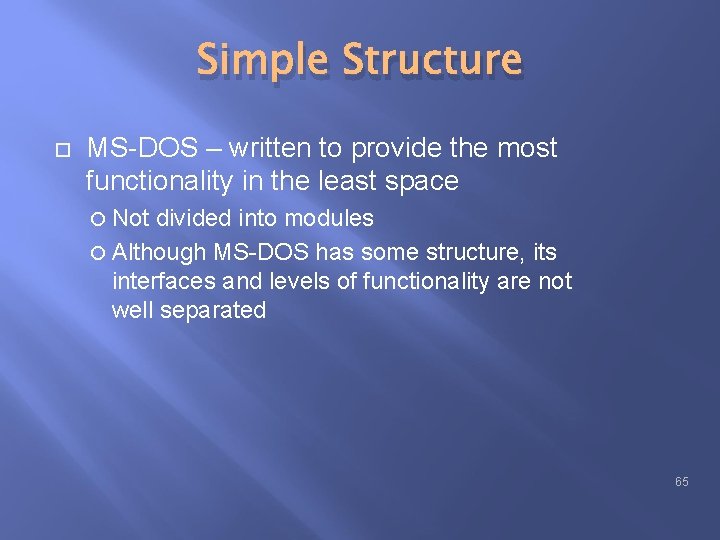
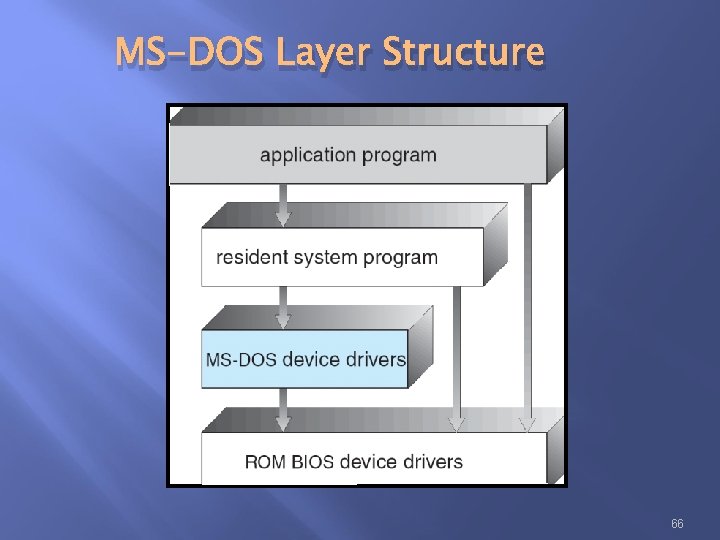
Simple Structure MS-DOS – written to provide the most functionality in the least space Not divided into modules Although MS-DOS has some structure, its interfaces and levels of functionality are not well separated 65
MS-DOS Layer Structure 66
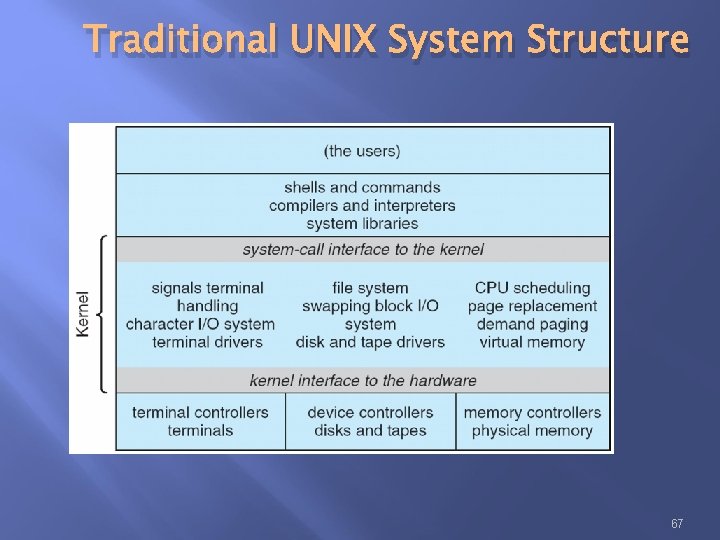
Traditional UNIX System Structure 67
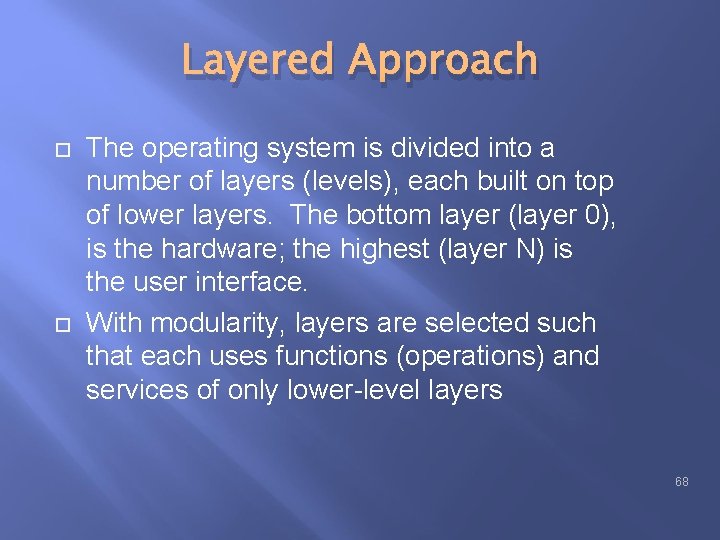
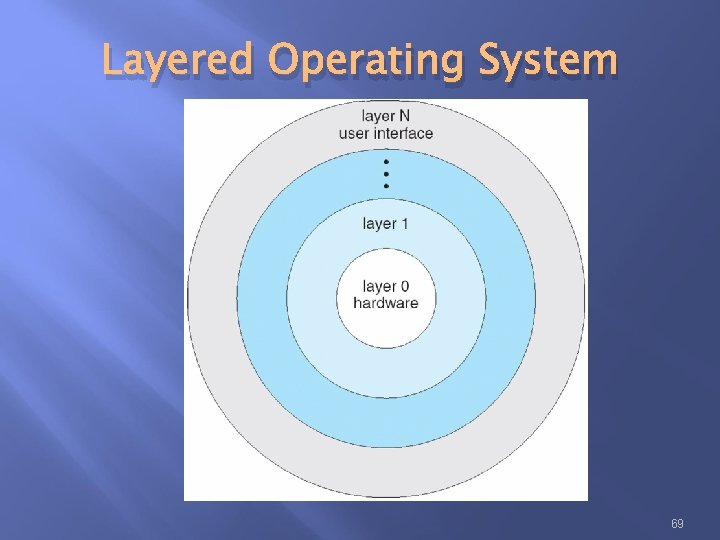
Layered Approach The operating system is divided into a number of layers (levels), each built on top of lower layers. The bottom layer (layer 0), is the hardware; the highest (layer N) is the user interface. With modularity, layers are selected such that each uses functions (operations) and services of only lower-level layers 68
Layered Operating System 69
Microkernel System Structure Philosophy of microkernel is to have the bare essentials in the kernel. Removing all non-essential components from kernel and implement them in system-and -user level. Program thst results a smaller kernel called microkernal. 70
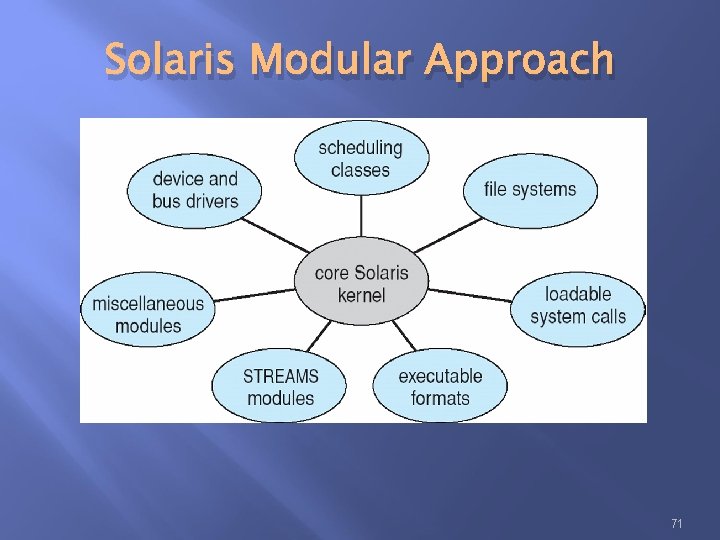
Solaris Modular Approach 71
Microkernel System Structure Moves as much from the kernel into “user” space. Communication takes place between user modules using message passing. Benefits: Easier to extend a microkernel Easier to port the operating system to new architectures More reliable (less code is running in kernel mode) More secure 72
Break
THE PROCESS Process
Process Concept An operating system executes a variety of programs: Batch system – jobs Time-shared systems – user programs or tasks The terms job and process almost interchangeably 75
Process Concept A program in execution An instance of a program running on a computer The entity that can be assigned to and executed on a processor A unit of activity characterized by the execution of a sequence of instructions, a current state, and an associated set of system instructions 76
Process Concept Process – a program in execution; process execution must progress in sequential fashion 77
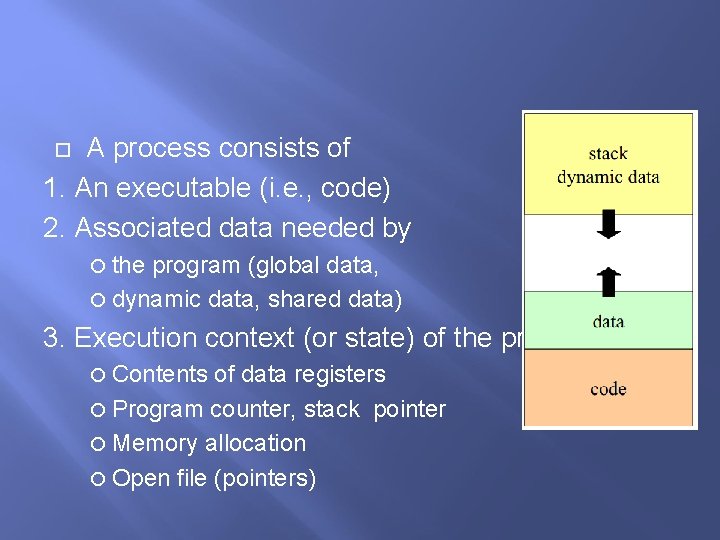
A process consists of 1. An executable (i. e. , code) 2. Associated data needed by the program (global data, dynamic data, shared data) 3. Execution context (or state) of the program, e. g. , Contents of data registers Program counter, stack pointer Memory allocation Open file (pointers)
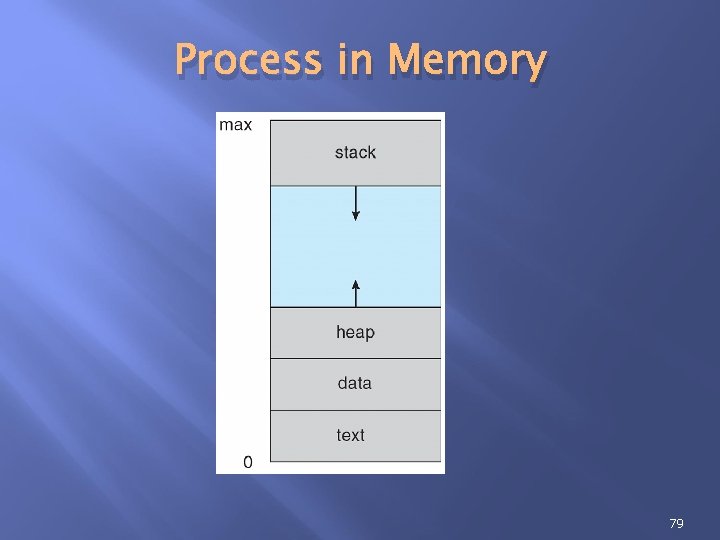
Process in Memory 79
Process Program : Passive entity (executable file) Process: Active entity (progam counter specify next instruction). A program becomes process when executable file is loaded into memory 80
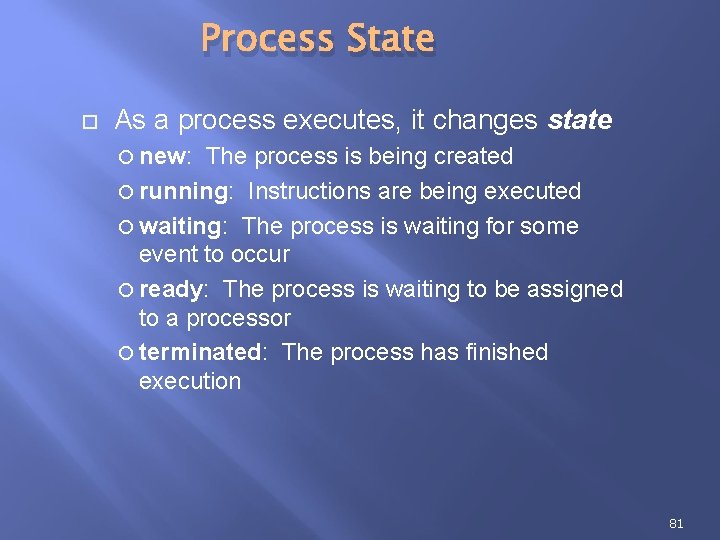
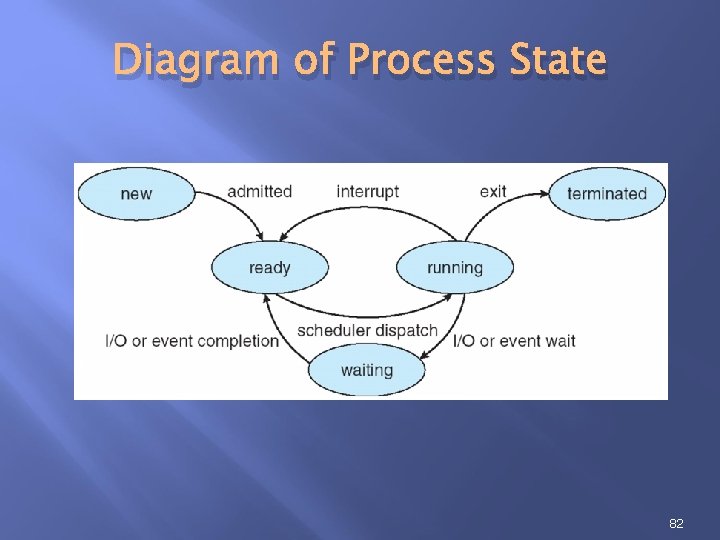
Process State As a process executes, it changes state new: The process is being created running: Instructions are being executed waiting: The process is waiting for some event to occur ready: The process is waiting to be assigned to a processor terminated: The process has finished execution 81
Diagram of Process State 82
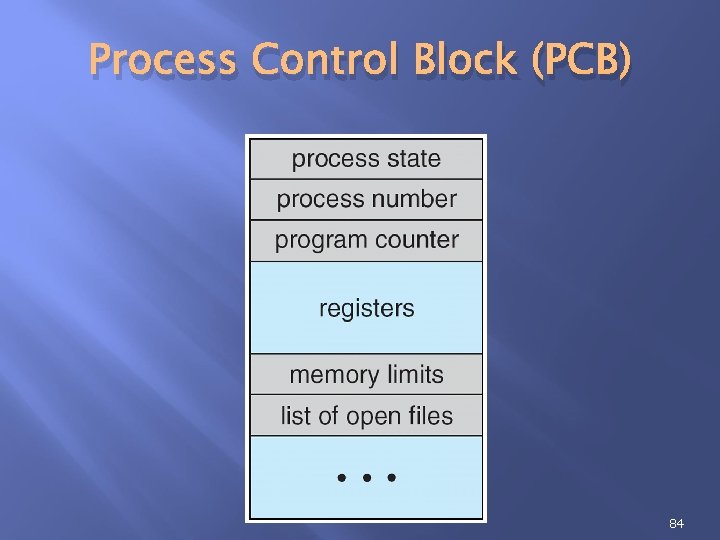
Process Control Block (PCB) Information associated with each process Process state Program counter CPU registers CPU scheduling information Memory-management information Accounting information I/O status information 83
Process Control Block (PCB) 84
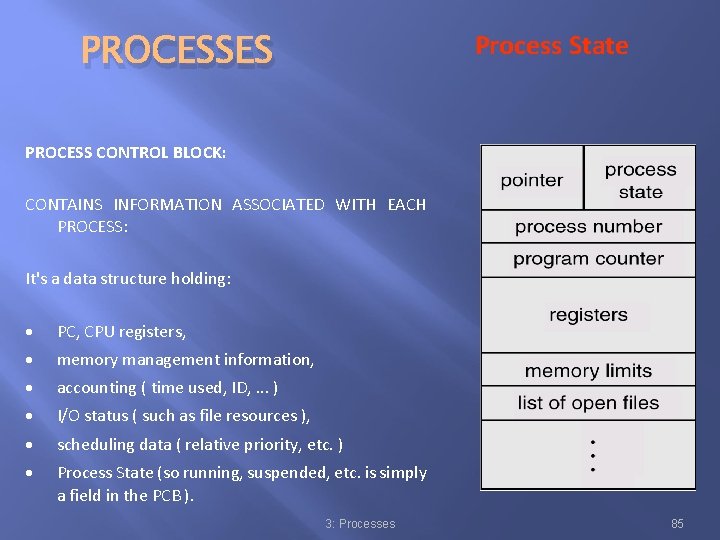
Process State PROCESSES PROCESS CONTROL BLOCK: CONTAINS INFORMATION ASSOCIATED WITH EACH PROCESS: It's a data structure holding: · PC, CPU registers, · memory management information, · accounting ( time used, ID, . . . ) · I/O status ( such as file resources ), · scheduling data ( relative priority, etc. ) · Process State (so running, suspended, etc. is simply a field in the PCB ). 3: Processes 85
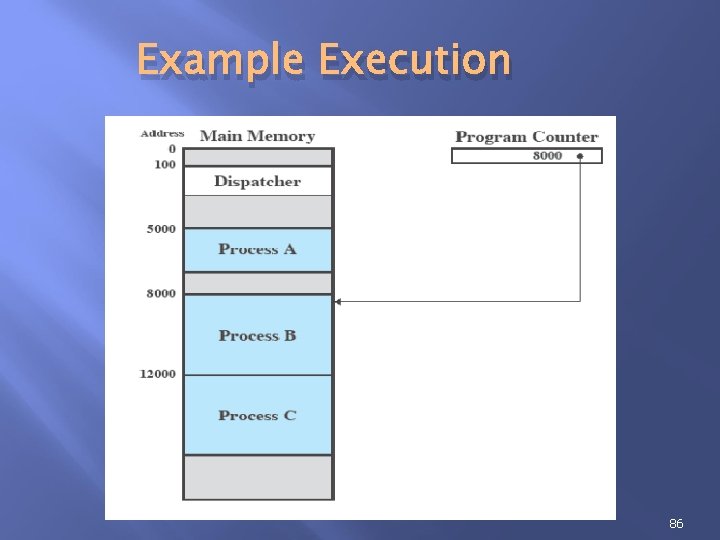
Example Execution 86
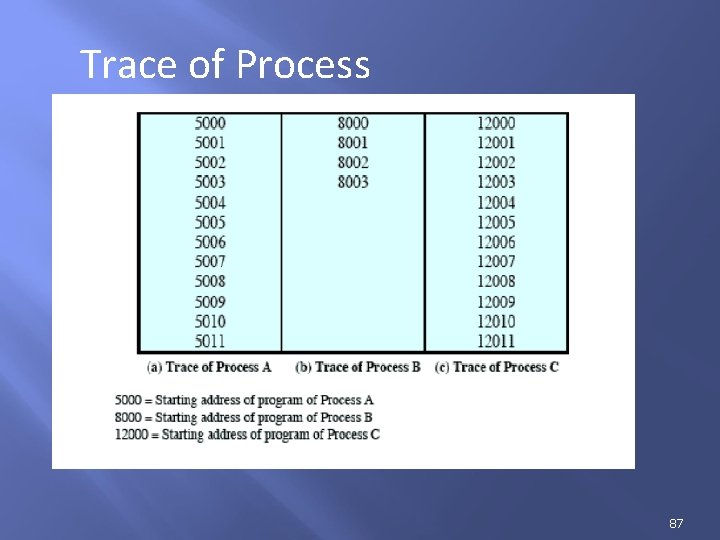
Trace of Process 87
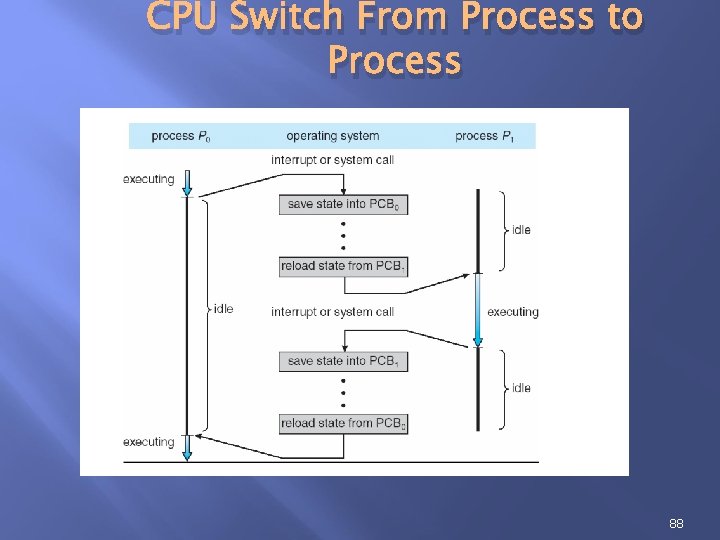
CPU Switch From Process to Process 88