
Lecture 16 Pico Blaze Overview ECE 448 FPGA

Lecture 16 Pico. Blaze Overview ECE 448 – FPGA and ASIC Design with VHDL
Required reading • P. Chu, FPGA Prototyping by VHDL Examples Chapter 14, Pico. Blaze Overview Recommended reading • K. Chapman, Pico. Blaze for Spartan-6, Virtex-6, and 7 -Series (KCPSM 6) ECE 448 – FPGA and ASIC Design with VHDL 2
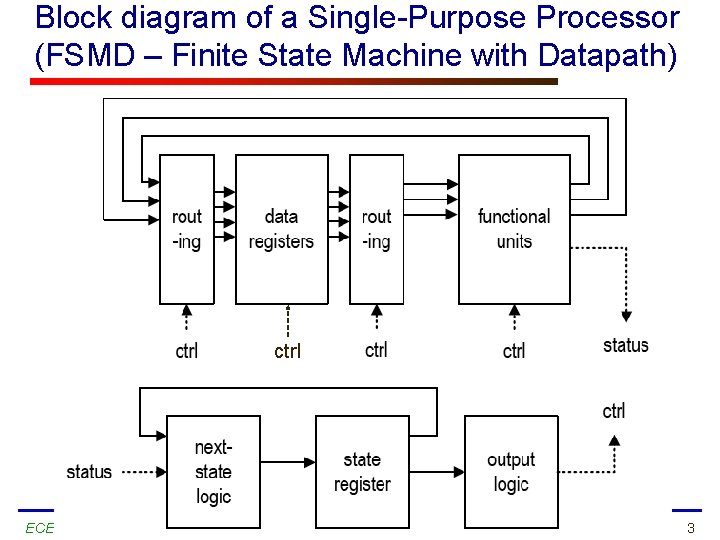
Block diagram of a Single-Purpose Processor (FSMD – Finite State Machine with Datapath) ctrl ECE 448 – FPGA and ASIC Design with VHDL 3

Block diagram of a General-Purpose Processor (Microcontroller) ECE 448 – FPGA and ASIC Design with VHDL 4
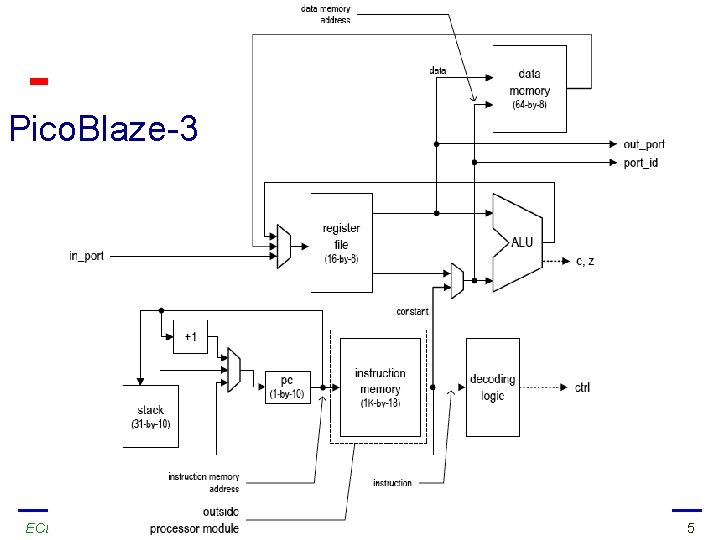
Pico. Blaze-3 ECE 448 – FPGA and ASIC Design with VHDL 5
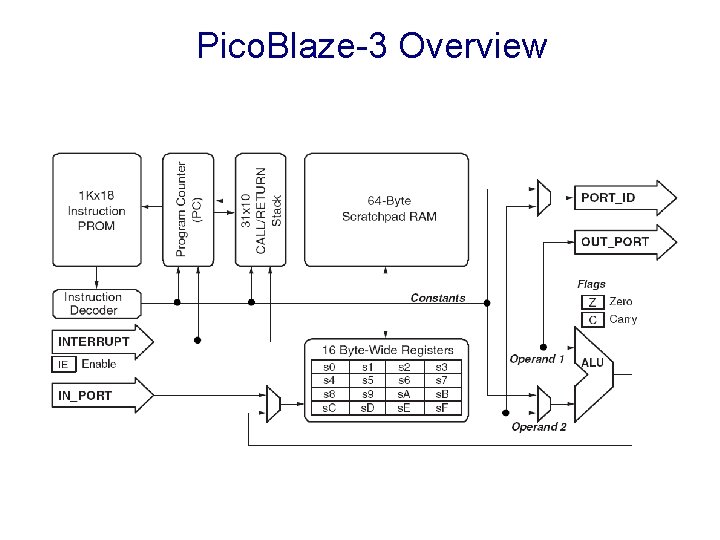
Pico. Blaze-3 Overview
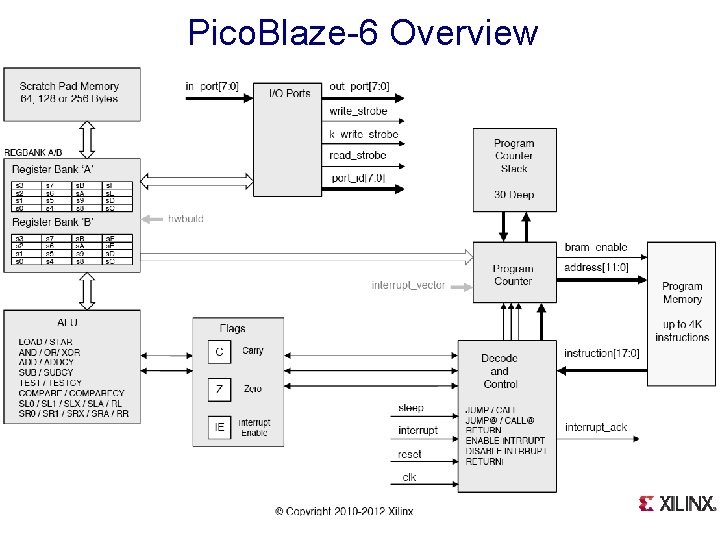
Pico. Blaze-6 Overview
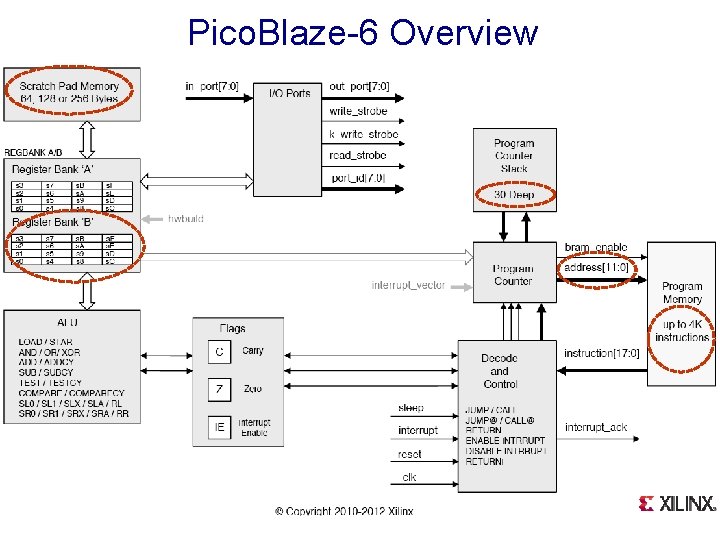
Pico. Blaze-6 Overview
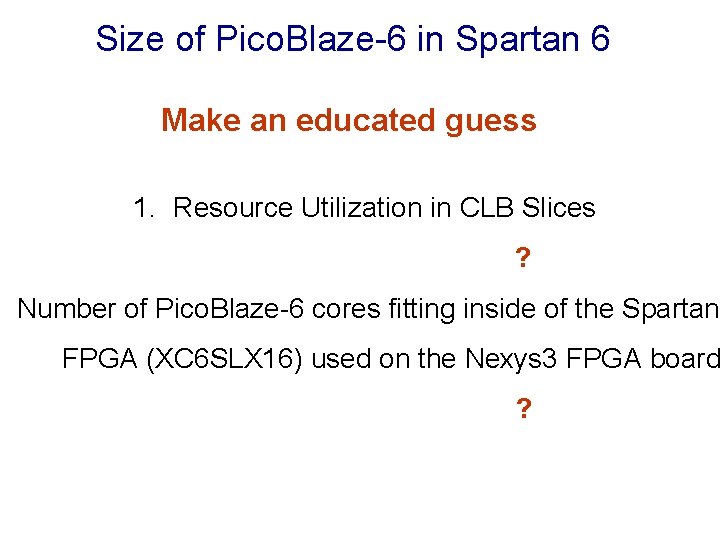
Size of Pico. Blaze-6 in Spartan 6 Make an educated guess 1. Resource Utilization in CLB Slices ? . Number of Pico. Blaze-6 cores fitting inside of the Spartan- FPGA (XC 6 SLX 16) used on the Nexys 3 FPGA board ?
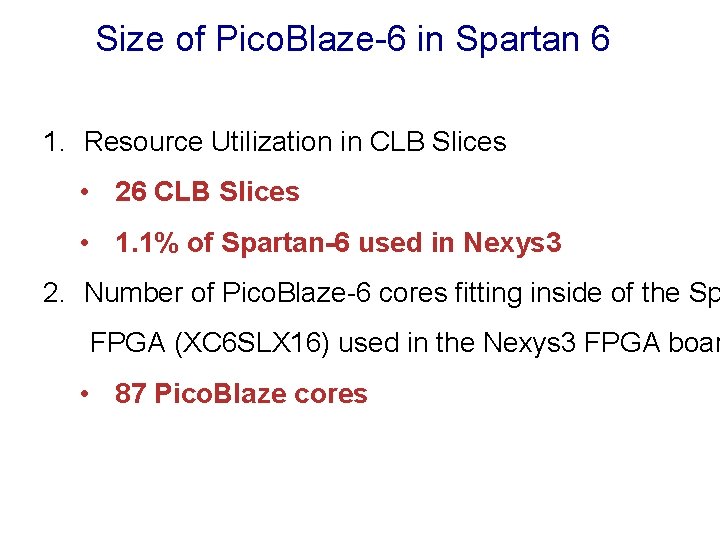
Size of Pico. Blaze-6 in Spartan 6 1. Resource Utilization in CLB Slices • 26 CLB Slices • 1. 1% of Spartan-6 used in Nexys 3 2. Number of Pico. Blaze-6 cores fitting inside of the Sp FPGA (XC 6 SLX 16) used in the Nexys 3 FPGA boar • 87 Pico. Blaze cores
Speed of Pico. Blaze-6 in Spartan 6 Make an educated guess 1. Maximum Clock Frequency ? 2. Maximum number of instructions per second ?
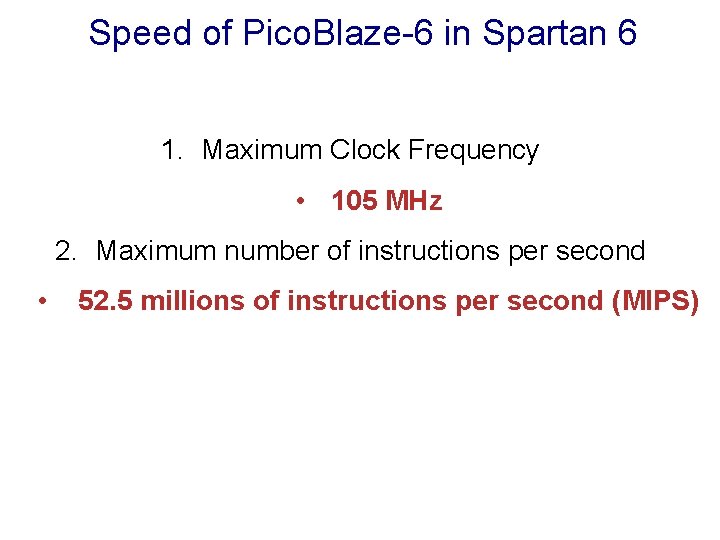
Speed of Pico. Blaze-6 in Spartan 6 1. Maximum Clock Frequency • 105 MHz 2. Maximum number of instructions per second • 52. 5 millions of instructions per second (MIPS)
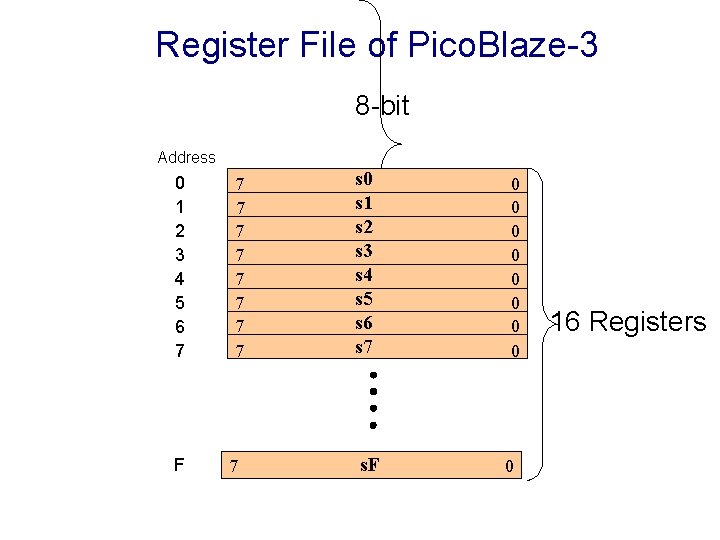
Register File of Pico. Blaze-3 8 -bit Address 0 1 2 3 4 5 6 7 F 7 7 7 7 7 s 0 s 1 s 2 s 3 s 4 s 5 s 6 s 7 s. F 0 0 0 0 0 16 Registers
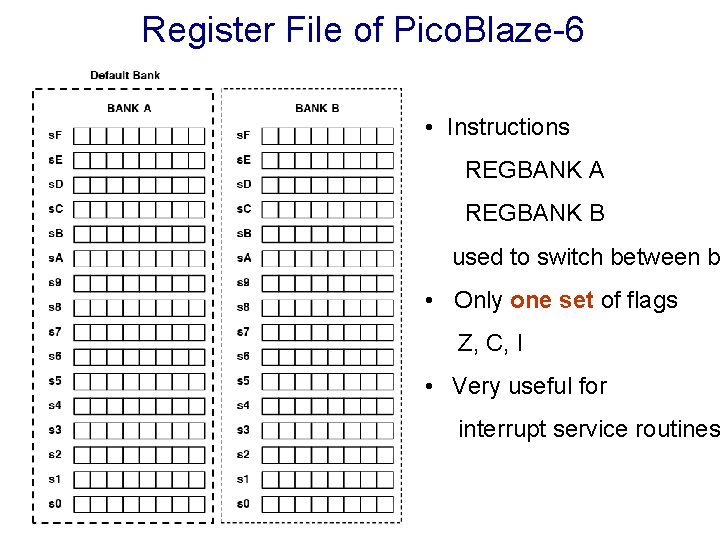
Register File of Pico. Blaze-6 • Instructions REGBANK A REGBANK B used to switch between b • Only one set of flags Z, C, I • Very useful for interrupt service routines
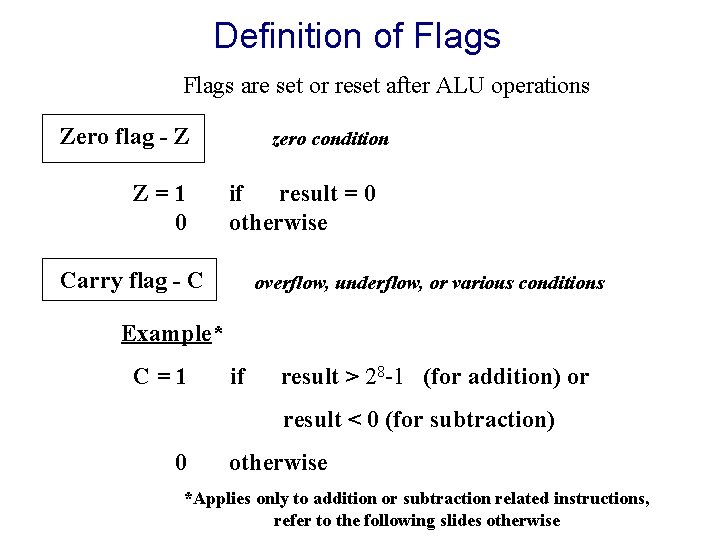
Definition of Flags are set or reset after ALU operations Zero flag - Z Z=1 0 zero condition if result = 0 otherwise Carry flag - C overflow, underflow, or various conditions Example* C=1 if result > 28 -1 (for addition) or result < 0 (for subtraction) 0 otherwise *Applies only to addition or subtraction related instructions, refer to the following slides otherwise
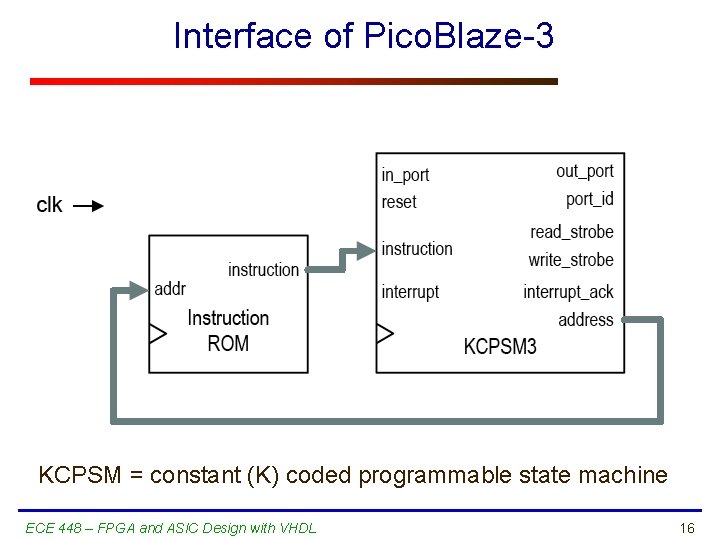
Interface of Pico. Blaze-3 KCPSM = constant (K) coded programmable state machine ECE 448 – FPGA and ASIC Design with VHDL 16
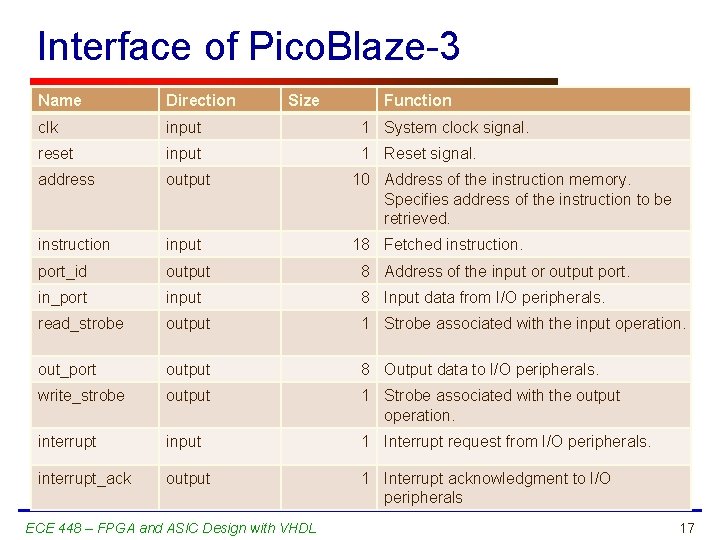
Interface of Pico. Blaze-3 Name Direction Size clk input 1 System clock signal. reset input 1 Reset signal. address output 10 Address of the instruction memory. Specifies address of the instruction to be retrieved. instruction input 18 Fetched instruction. port_id output 8 Address of the input or output port. in_port input 8 Input data from I/O peripherals. read_strobe output 1 Strobe associated with the input operation. out_port output 8 Output data to I/O peripherals. write_strobe output 1 Strobe associated with the output operation. interrupt input 1 Interrupt request from I/O peripherals. interrupt_ack output 1 Interrupt acknowledgment to I/O peripherals ECE 448 – FPGA and ASIC Design with VHDL Function 17
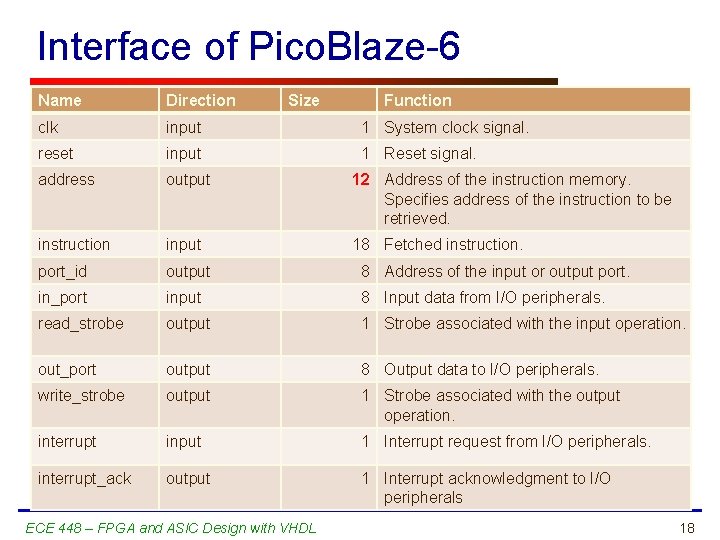
Interface of Pico. Blaze-6 Name Direction Size clk input 1 System clock signal. reset input 1 Reset signal. address output 12 Address of the instruction memory. Specifies address of the instruction to be retrieved. instruction input 18 Fetched instruction. port_id output 8 Address of the input or output port. in_port input 8 Input data from I/O peripherals. read_strobe output 1 Strobe associated with the input operation. out_port output 8 Output data to I/O peripherals. write_strobe output 1 Strobe associated with the output operation. interrupt input 1 Interrupt request from I/O peripherals. interrupt_ack output 1 Interrupt acknowledgment to I/O peripherals ECE 448 – FPGA and ASIC Design with VHDL Function 18
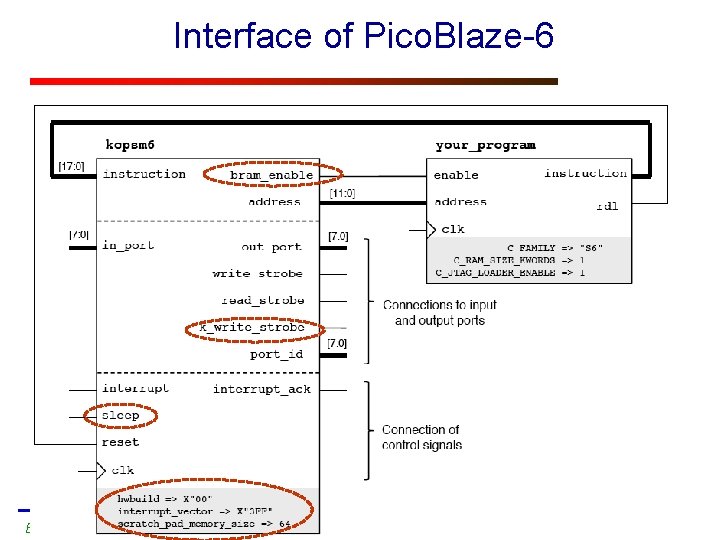
Interface of Pico. Blaze-6 ECE 448 – FPGA and ASIC Design with VHDL 19
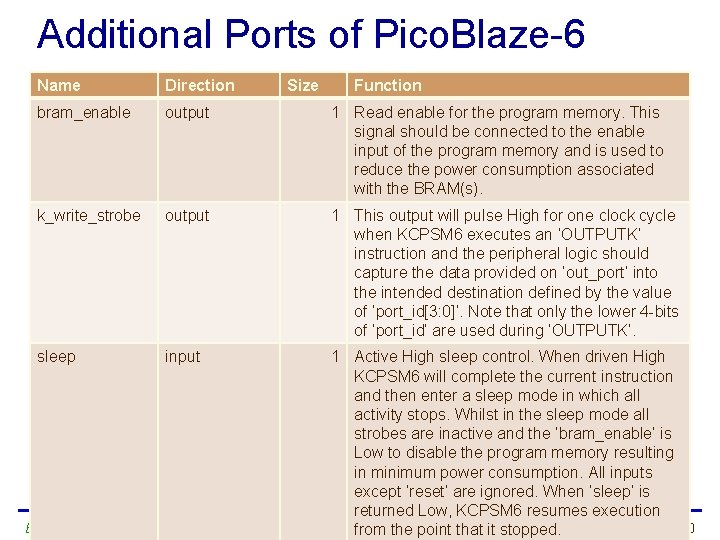
Additional Ports of Pico. Blaze-6 Name Direction Size Function bram_enable output 1 Read enable for the program memory. This signal should be connected to the enable input of the program memory and is used to reduce the power consumption associated with the BRAM(s). k_write_strobe output 1 This output will pulse High for one clock cycle when KCPSM 6 executes an ‘OUTPUTK’ instruction and the peripheral logic should capture the data provided on ‘out_port’ into the intended destination defined by the value of ‘port_id[3: 0]’. Note that only the lower 4 -bits of ‘port_id’ are used during ‘OUTPUTK’. sleep input 1 Active High sleep control. When driven High KCPSM 6 will complete the current instruction and then enter a sleep mode in which all activity stops. Whilst in the sleep mode all strobes are inactive and the ‘bram_enable’ is Low to disable the program memory resulting in minimum power consumption. All inputs except ‘reset’ are ignored. When ‘sleep’ is returned Low, KCPSM 6 resumes execution ECE 448 – FPGA and ASIC Design with VHDL 20 from the point that it stopped.
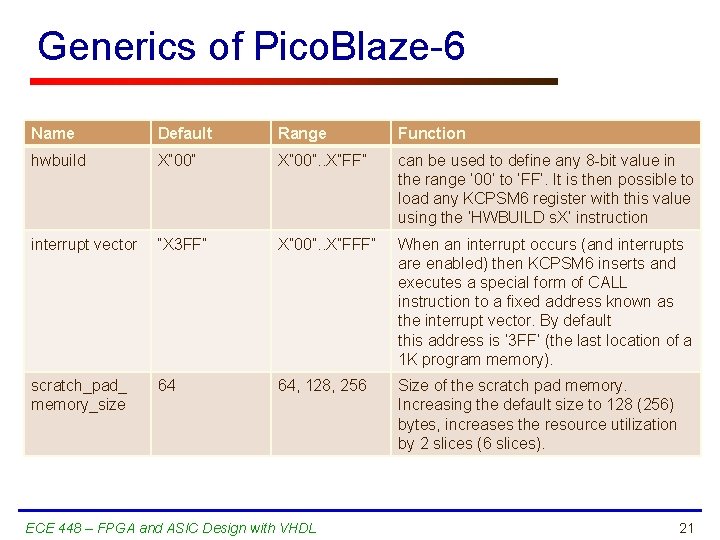
Generics of Pico. Blaze-6 Name Default Range Function hwbuild X” 00”. . X”FF” can be used to define any 8 -bit value in the range ‘ 00’ to ‘FF’. It is then possible to load any KCPSM 6 register with this value using the ‘HWBUILD s. X’ instruction interrupt vector “X 3 FF” X” 00”. . X”FFF” When an interrupt occurs (and interrupts are enabled) then KCPSM 6 inserts and executes a special form of CALL instruction to a fixed address known as the interrupt vector. By default this address is ‘ 3 FF’ (the last location of a 1 K program memory). scratch_pad_ memory_size 64 64, 128, 256 Size of the scratch pad memory. Increasing the default size to 128 (256) bytes, increases the resource utilization by 2 slices (6 slices). ECE 448 – FPGA and ASIC Design with VHDL 21
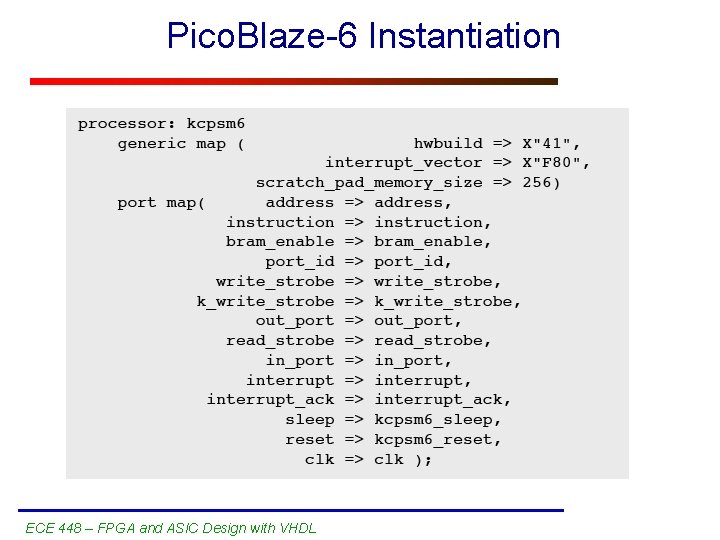
Pico. Blaze-6 Instantiation ECE 448 – FPGA and ASIC Design with VHDL 22
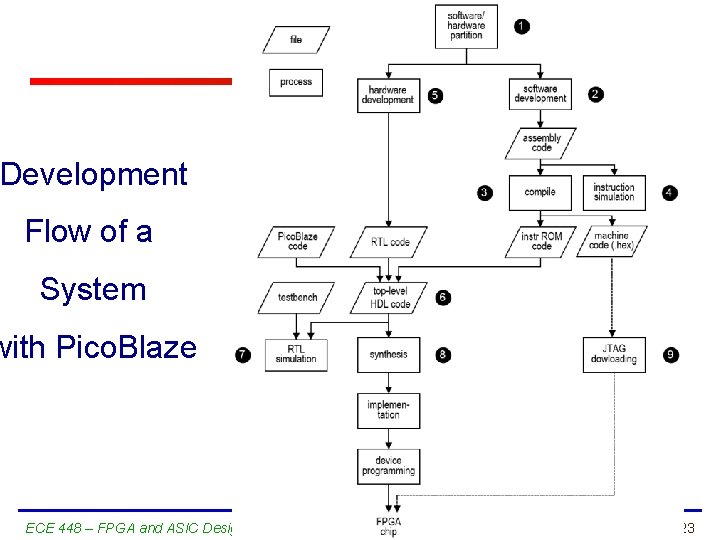
Development Flow of a System with Pico. Blaze ECE 448 – FPGA and ASIC Design with VHDL 23
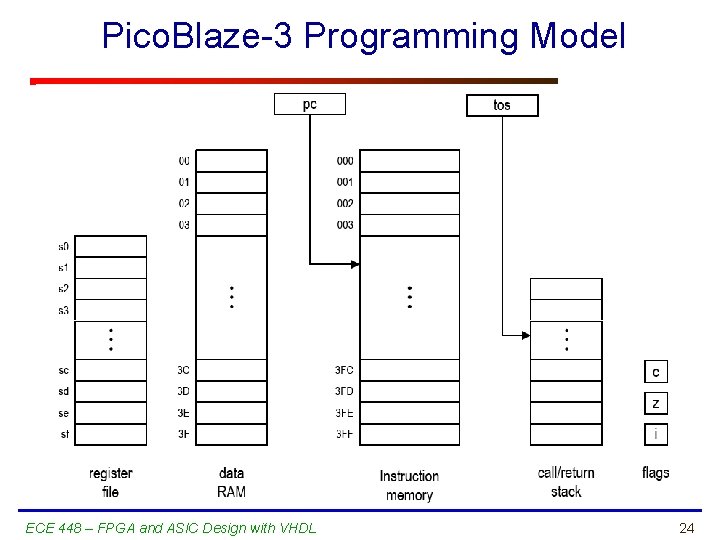
Pico. Blaze-3 Programming Model ECE 448 – FPGA and ASIC Design with VHDL 24
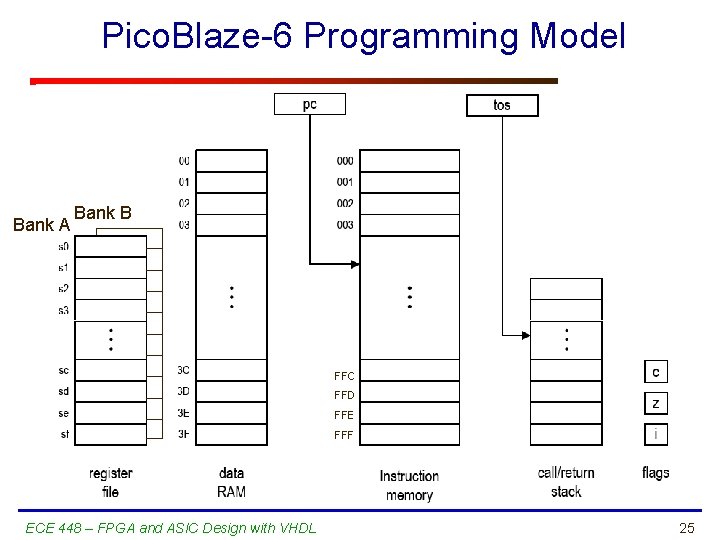
Pico. Blaze-6 Programming Model Bank A Bank B FFC FFD FFE FFF ECE 448 – FPGA and ASIC Design with VHDL 25
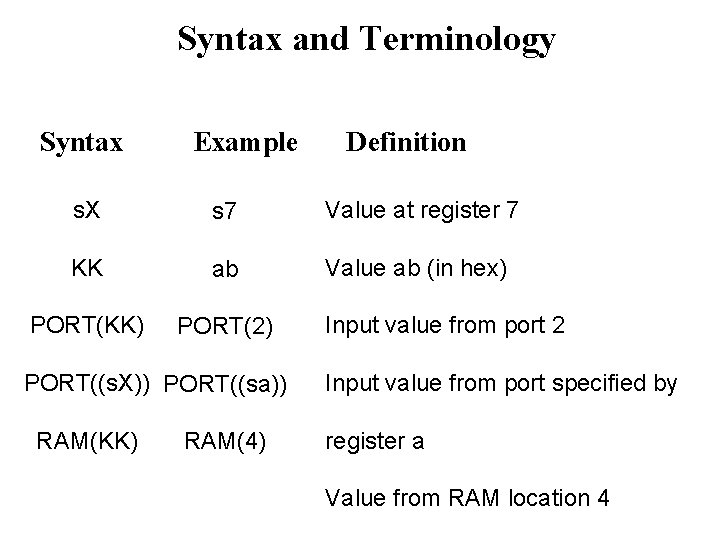
Syntax and Terminology Syntax Example Definition s. X s 7 Value at register 7 KK ab Value ab (in hex) PORT(KK) PORT(2) PORT((s. X)) PORT((sa)) RAM(KK) RAM(4) Input value from port 2 Input value from port specified by register a Value from RAM location 4
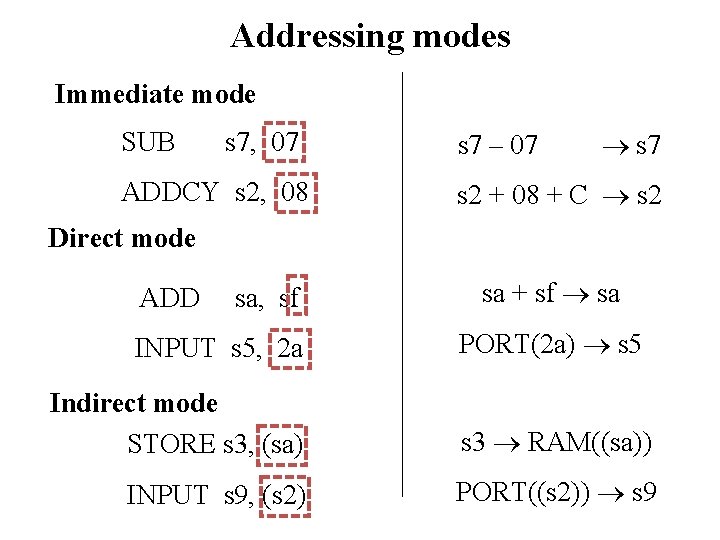
Addressing modes Immediate mode SUB s 7, 07 ADDCY s 2, 08 s 7 – 07 s 7 s 2 + 08 + C s 2 Direct mode ADD sa, sf INPUT s 5, 2 a sa + sf sa PORT(2 a) s 5 Indirect mode STORE s 3, (sa) s 3 RAM((sa)) INPUT s 9, (s 2) PORT((s 2)) s 9
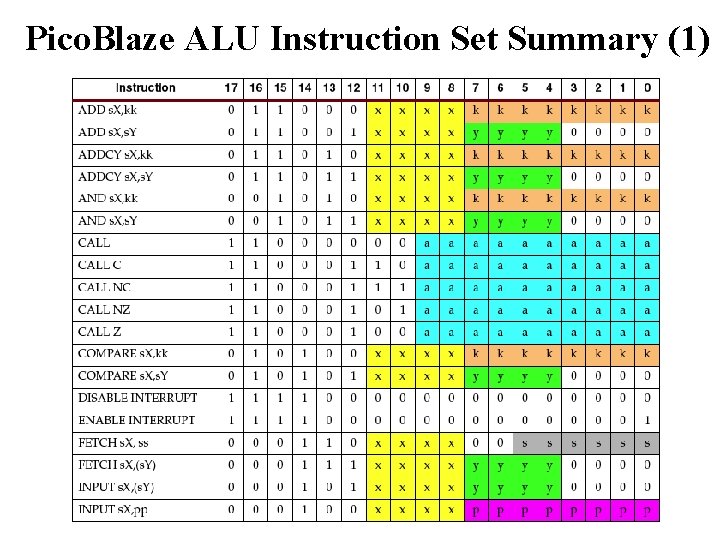
Pico. Blaze ALU Instruction Set Summary (1)
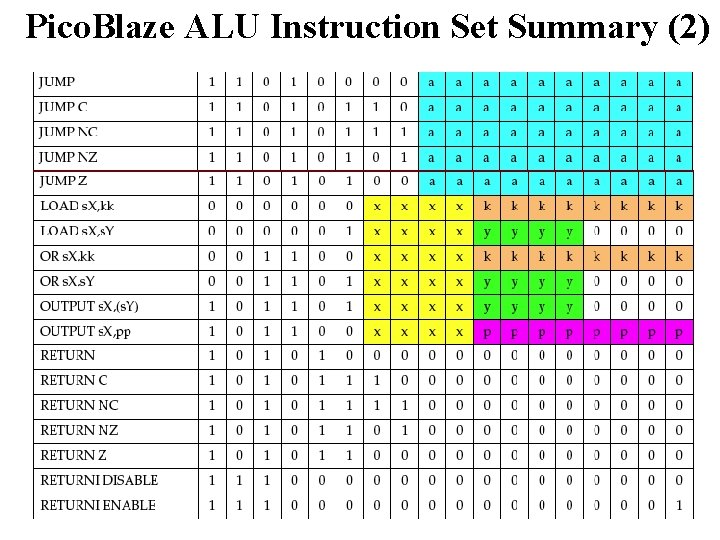
Pico. Blaze ALU Instruction Set Summary (2)
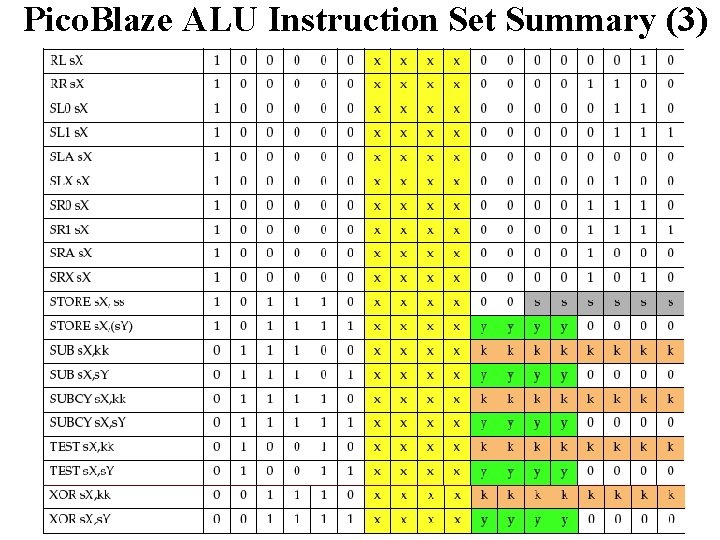
Pico. Blaze ALU Instruction Set Summary (3)
- Slides: 30