
Lecture 14 C new Introduction to Databases DB
Lecture 14 C new Introduction to Databases - DB Processing: The Disconnected Model (Using Data. Adapters, Data. Sets, and Data. Tables) By Chris Pascucci and FLF
The Disconnected Architecture – Data Sets n ADO. NET provides classes that are used to create applications that utilize a database. n n n You can create instances of these classes and use them in your application to manage and use database connections. To use these classes in the. NET Framework you must import the namespace System. Data that contains all these useful classes. When working in the disconnected mode the data retrieved from a database and utilized by your program is stored in a Data. Set. n n The Data. Set contains one or more Data. Tables. Data in the Data. Set is independent of the database that was used to retrieve it. A data set can contain the result of multiple queries The connection to the database is typically closed after data is retrieved. The connection is opened again when it’s needed.
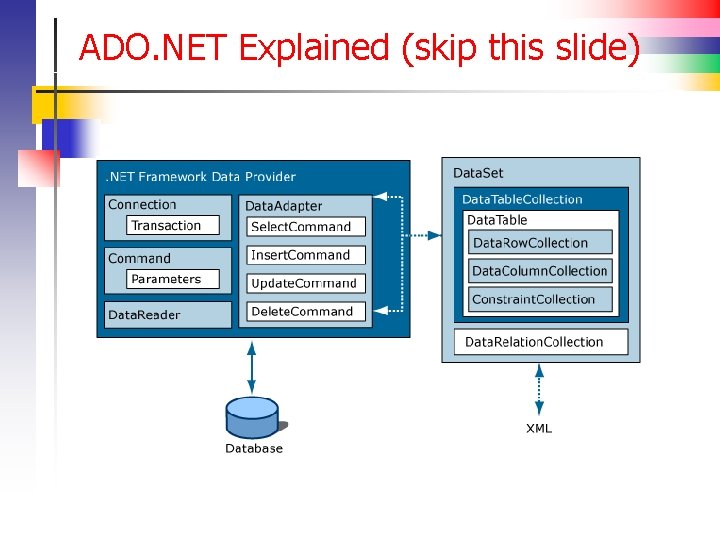
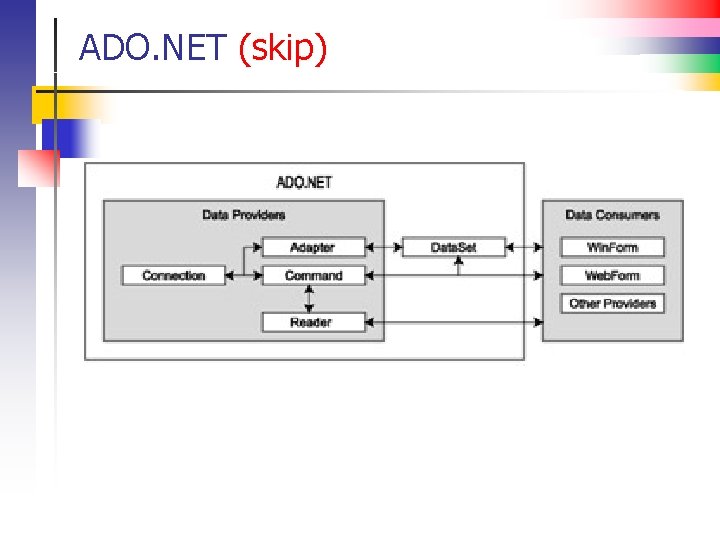
ADO. NET – The Data Adapter n Data. Adapter: n n n Manages the exchange of data between the Data. Set and a database. It issues an SQL Command (Select, Insert, Update or Delete) that is stored in the Command object. The Command object uses a Connection object to connect to the database and retrieve or update the data. The data is transferred back to the Data. Adapter, which then stores it in a Data. Set that can be used by the application. Note carefully – everything we manipulate is an object
ADO. NET Explained (skip this slide)
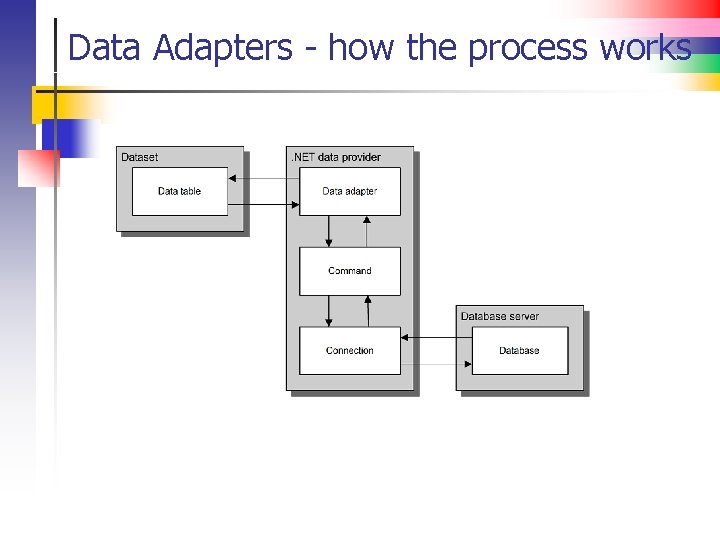
Data Adapters - how the process works
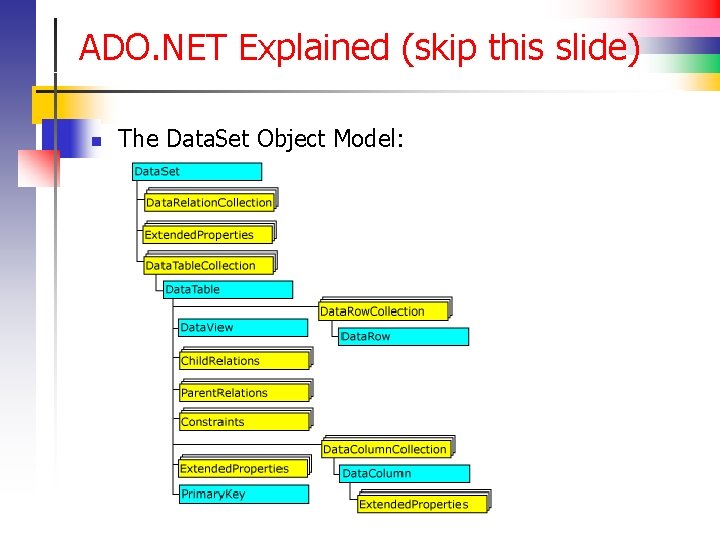
ADO. NET Explained (skip this slide) n The Data. Set Object Model:
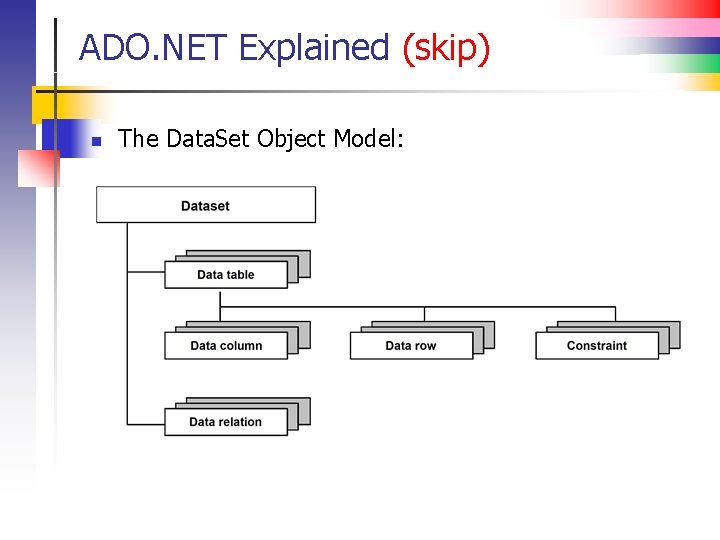
ADO. NET Explained (skip) n The Data. Set Object Model:
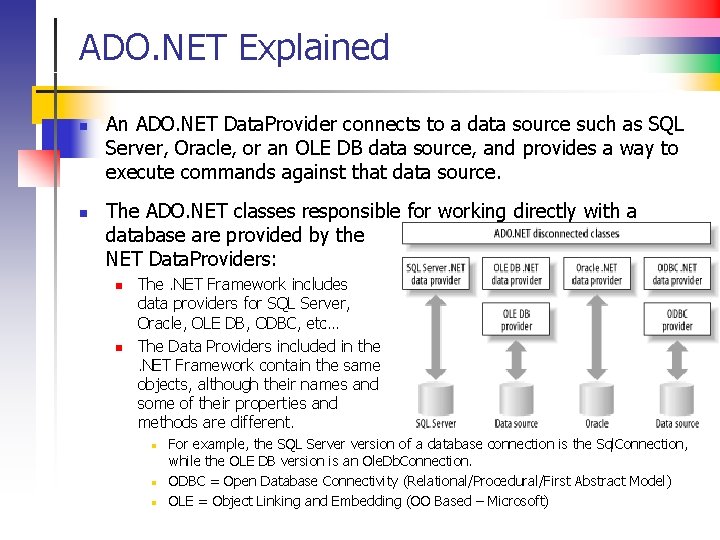
ADO. NET Explained n n An ADO. NET Data. Provider connects to a data source such as SQL Server, Oracle, or an OLE DB data source, and provides a way to execute commands against that data source. The ADO. NET classes responsible for working directly with a database are provided by the NET Data. Providers: n n The. NET Framework includes data providers for SQL Server, Oracle, OLE DB, ODBC, etc… The Data Providers included in the. NET Framework contain the same objects, although their names and some of their properties and methods are different. n n n For example, the SQL Server version of a database connection is the Sql. Connection, while the OLE DB version is an Ole. Db. Connection. ODBC = Open Database Connectivity (Relational/Procedural/First Abstract Model) OLE = Object Linking and Embedding (OO Based – Microsoft)
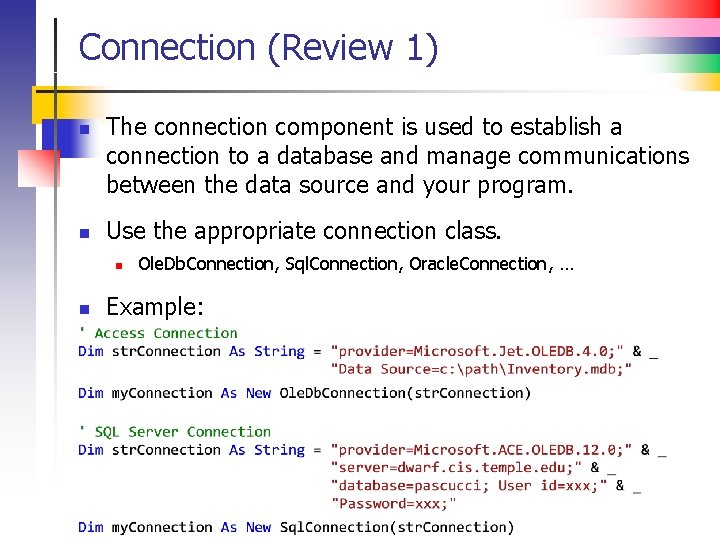
Connection (Review 1) n n The connection component is used to establish a connection to a database and manage communications between the data source and your program. Use the appropriate connection class. n n Ole. Db. Connection, Sql. Connection, Oracle. Connection, … Example:
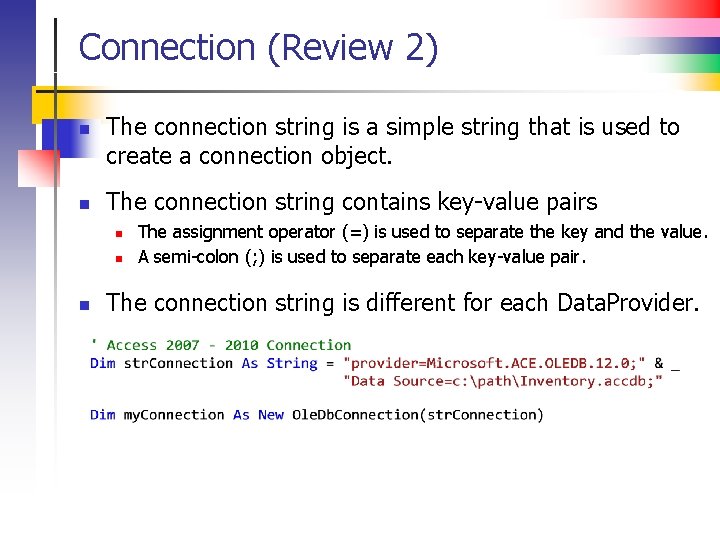
Connection (Review 2) n n The connection string is a simple string that is used to create a connection object. The connection string contains key-value pairs n n n The assignment operator (=) is used to separate the key and the value. A semi-colon (; ) is used to separate each key-value pair. The connection string is different for each Data. Provider.
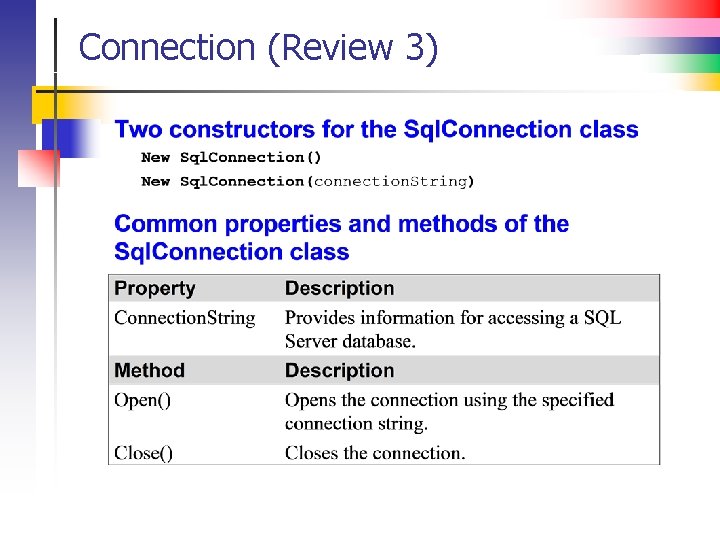
Connection (Review 3)
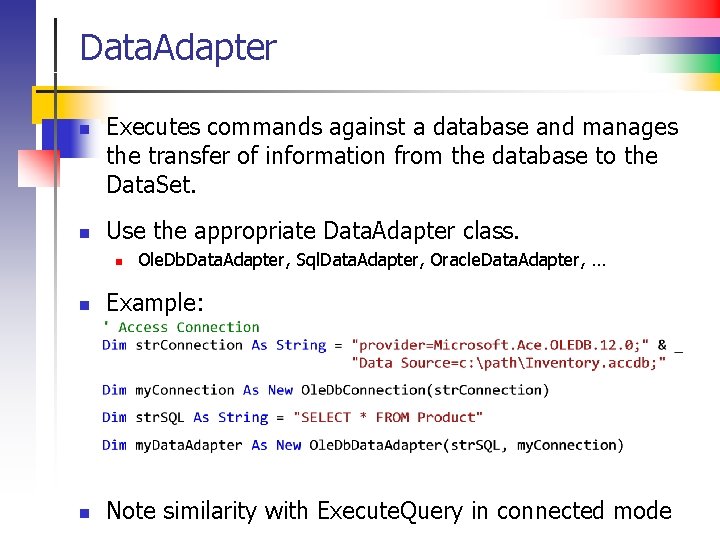
Data. Adapter n n Executes commands against a database and manages the transfer of information from the database to the Data. Set. Use the appropriate Data. Adapter class. n Ole. Db. Data. Adapter, Sql. Data. Adapter, Oracle. Data. Adapter, … n Example: n Note similarity with Execute. Query in connected mode
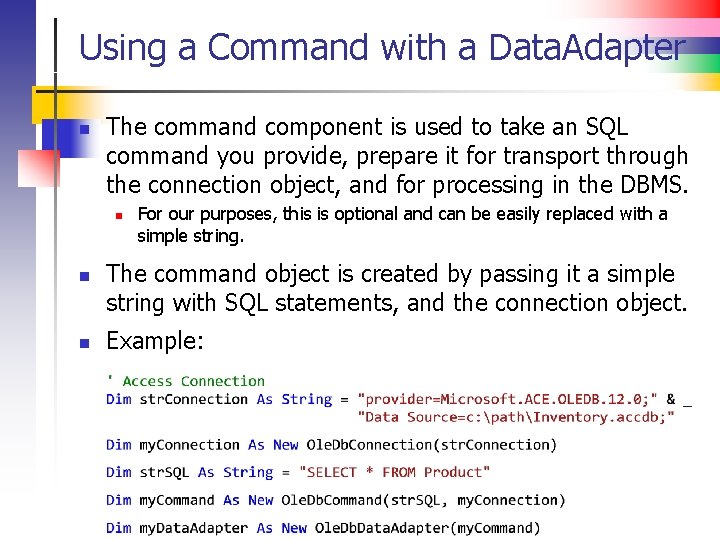
Using a Command with a Data. Adapter n The command component is used to take an SQL command you provide, prepare it for transport through the connection object, and for processing in the DBMS. n n n For our purposes, this is optional and can be easily replaced with a simple string. The command object is created by passing it a simple string with SQL statements, and the connection object. Example:
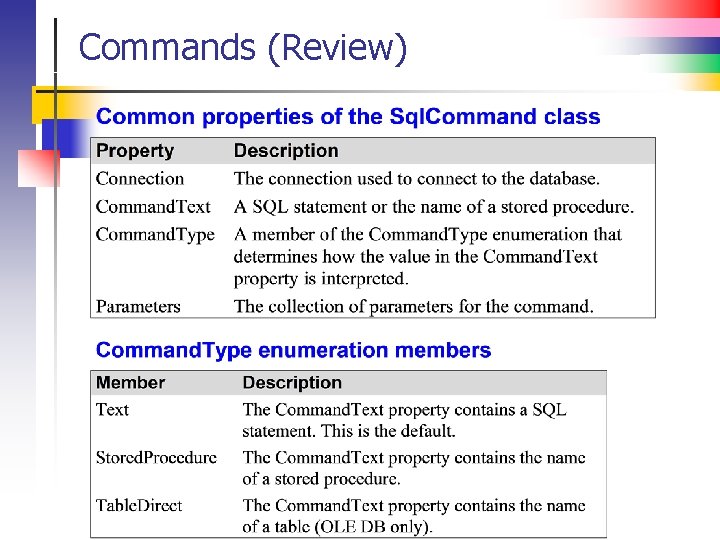
Commands (Review)
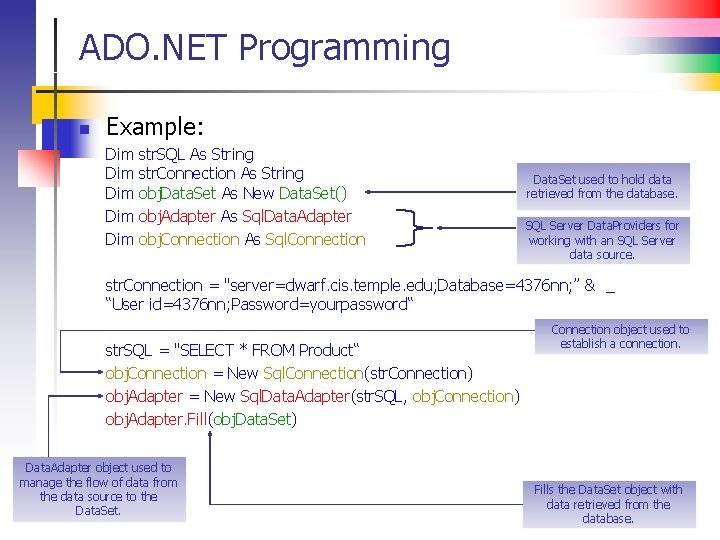
ADO. NET Programming n Example: Dim Dim Dim str. SQL As String str. Connection As String obj. Data. Set As New Data. Set() obj. Adapter As Sql. Data. Adapter obj. Connection As Sql. Connection Data. Set used to hold data retrieved from the database. SQL Server Data. Providers for working with an SQL Server data source. str. Connection = "server=dwarf. cis. temple. edu; Database=4376 nn; ” & _ “User id=4376 nn; Password=yourpassword“ str. SQL = "SELECT * FROM Product“ obj. Connection = New Sql. Connection(str. Connection) obj. Adapter = New Sql. Data. Adapter(str. SQL, obj. Connection) obj. Adapter. Fill(obj. Data. Set) Data. Adapter object used to manage the flow of data from the data source to the Data. Set. Connection object used to establish a connection. Fills the Data. Set object with data retrieved from the database.
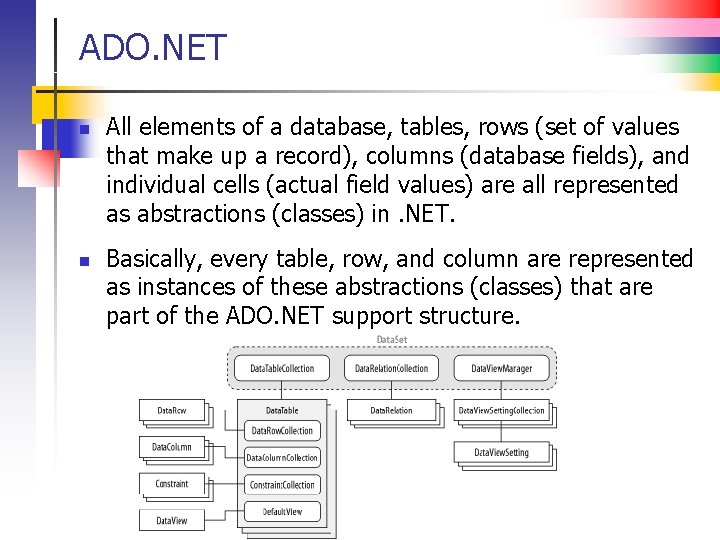
ADO. NET n n All elements of a database, tables, rows (set of values that make up a record), columns (database fields), and individual cells (actual field values) are all represented as abstractions (classes) in. NET. Basically, every table, row, and column are represented as instances of these abstractions (classes) that are part of the ADO. NET support structure.
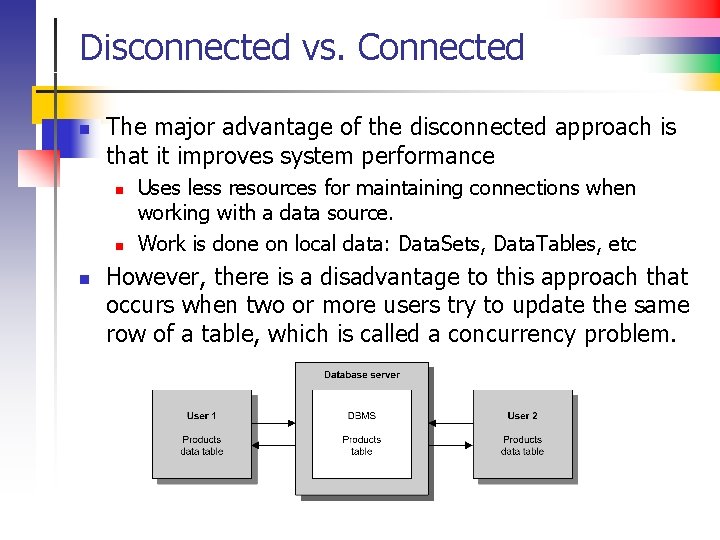
Disconnected vs. Connected n The major advantage of the disconnected approach is that it improves system performance n n n Uses less resources for maintaining connections when working with a data source. Work is done on local data: Data. Sets, Data. Tables, etc However, there is a disadvantage to this approach that occurs when two or more users try to update the same row of a table, which is called a concurrency problem.
Disconnected vs. Connected n n ADO. NET contains two different approaches to work with data in a database: Connected Data Architecture and the Disconnected Data Architecture. Connected Data Architecture: n n n Represents the objects that insist on having an open connection available for them to work and interact with the data source. ADO. NET provides classes to communicate directly with a data source. Disconnected Data Architecture: n n Represents the objects that open and close a connection to the data source as needed. Your application works with data that was copied from the data source. Any changes made to the “copied” data in the Dataset will be later reconciled with the data source. Connected applications alone don't fulfill the demands of today’s distributed applications. Improved performance, more efficient and more complex than the connected approach.
Concurrency Issues n n An old time problem when dealing with shared resources such as memory, files, DBs etc Occurs when multiple users try to access the same resource such as a row in a database table n n n Not a problem if all users are reading the resource Becomes a problem if one or more are writing Locking mechanisms need to be implemented to ensure the integrity of the resource
Disconnected vs. Connected Modes n n When using the disconnected mode of DB access concurrency problems occur because once data is retrieved by User A from the database, the connection is dropped. Now User B has can access the DB There are two ways that ADO. NET can handle concurrency problems: 1. Optimistic Concurrency – The program checks to see if there has been a change to the row since it was retrieved. If it has, the update or deletion will be refused and a concurrency exception will be thrown that your program must handle. 2. “Last In Wins” – Since no checking is done, the row that was updated by the last user will overwrite changes made to the row by the previous user. n Another way to avoid concurrency problems is to retrieve and update only one row at a time.
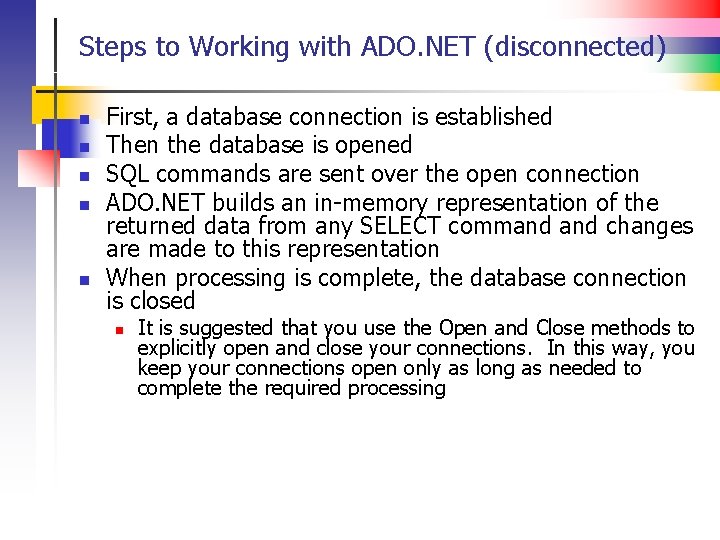
Steps to Working with ADO. NET (disconnected) n n n First, a database connection is established Then the database is opened SQL commands are sent over the open connection ADO. NET builds an in-memory representation of the returned data from any SELECT command changes are made to this representation When processing is complete, the database connection is closed n It is suggested that you use the Open and Close methods to explicitly open and close your connections. In this way, you keep your connections open only as long as needed to complete the required processing
Processing database elements n n All elements of a data base, tables (entities), rows (sets of values), columns (database fields), and individual cells (database values) are represented as abstractions in. NET In other words, every table, row, and column are represented as instances of the abstractions (classes) that are part of the ADO. NET support structure
How Do the Pieces Fit Together? n n Study the code example from Chris Pascucci first (see Lecture Set 14 C Ex) Then study the code sample provided by your lab assistant (Jessica Clark) at the end of the Client-Server Word document (also look at the starter code for the Final Project, Part III – ref. HW #12)
An Underlying Framework – n n The Connection Keeping a mental picture of this process in your head is important It all begins with the connection Already visited this idea for files. Now we revisit it again for databases Remember … n n In your programs, you manipulate objects using methods belonging to the class that defines the type of the object The class (an abstract data type) is an abstraction (model) of the object being manipulated
The Object Framework (drawing/files) n Recall … n We must have a class to model the entity to be manipulated (the surface to be drawn on) n n n The class is said to define an “abstract data type” We can then create objects (instances of the class we just created) Next comes the tricky part … We now have to connect that object to the actual entity to be drawn on OR Have to connect a stream to a sequential file
The Object Framework 2 n n n For databases, the object is an instance of a class that provides an abstract view of the database including an abstraction of database tables, rows, and columns All of these database features are modeled using ADO. NET classes So we program against elements of the ADO. NET classes without concern for the underlying structures
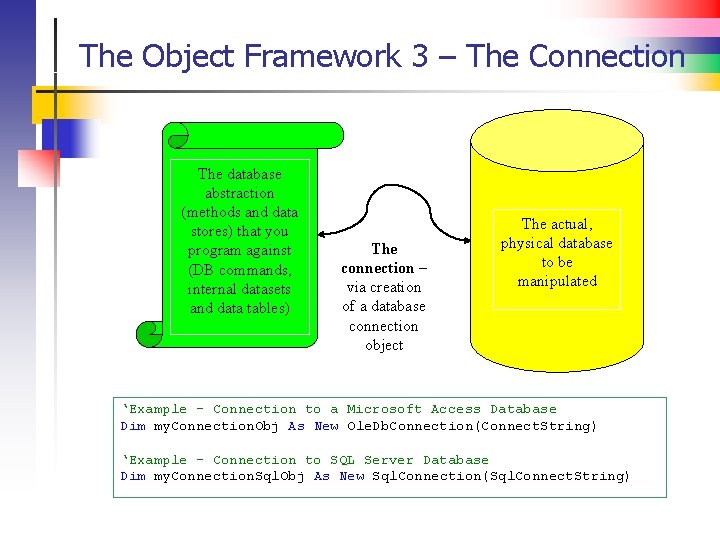
The Object Framework 3 – The Connection The database abstraction (methods and data stores) that you program against (DB commands, internal datasets and data tables) The connection – via creation of a database connection object The actual, physical database to be manipulated ‘Example - Connection to a Microsoft Access Database Dim my. Connection. Obj As New Ole. Db. Connection(Connect. String) ‘Example - Connection to SQL Server Database Dim my. Connection. Sql. Obj As New Sql. Connection(Sql. Connect. String)
Remember … n n n Why do this – what is this all about? The abstraction enables us to manipulate database objects in a uniform, consistent way, regardless of the DBMS (Access, My. SQL, SQL Server, Oracle) The underlying DBMS is hidden under several layers of ADO. NET software which does all the work
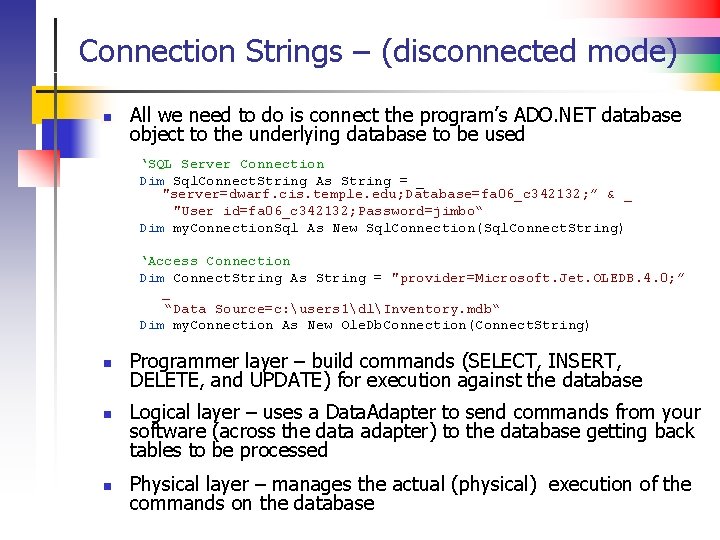
Connection Strings – (disconnected mode) n All we need to do is connect the program’s ADO. NET database object to the underlying database to be used ‘SQL Server Connection Dim Sql. Connect. String As String = _ "server=dwarf. cis. temple. edu; Database=fa 06_c 342132; ” & _ "User id=fa 06_c 342132; Password=jimbo“ Dim my. Connection. Sql As New Sql. Connection(Sql. Connect. String) ‘Access Connection Dim Connect. String As String = "provider=Microsoft. Jet. OLEDB. 4. 0; ” _ “Data Source=c: users 1dlInventory. mdb“ Dim my. Connection As New Ole. Db. Connection(Connect. String) n n n Programmer layer – build commands (SELECT, INSERT, DELETE, and UPDATE) for execution against the database Logical layer – uses a Data. Adapter to send commands from your software (across the data adapter) to the database getting back tables to be processed Physical layer – manages the actual (physical) execution of the commands on the database
ADO. NET (skip)
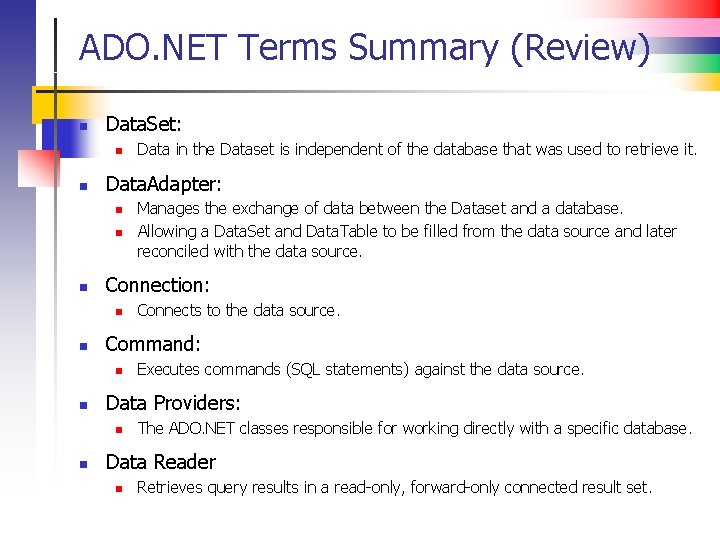
ADO. NET Terms Summary (Review) n Data. Set: n n Data. Adapter: n n n Executes commands (SQL statements) against the data source. Data Providers: n n Connects to the data source. Command: n n Manages the exchange of data between the Dataset and a database. Allowing a Data. Set and Data. Table to be filled from the data source and later reconciled with the data source. Connection: n n Data in the Dataset is independent of the database that was used to retrieve it. The ADO. NET classes responsible for working directly with a specific database. Data Reader n Retrieves query results in a read-only, forward-only connected result set.
ADO. NET Resources n Connection Strings: n n Ole. Db. Connection Class: n n http: //msdn. microsoft. com/en-us/library/system. data. oledbcommand. aspx Ole. Db. Data. Adapter Class: n n http: //msdn. microsoft. com/en-us/library/system. data. oledbconnection. aspx Ole. Db. Command Class: n n http: //www. connectionstrings. com http: //msdn. microsoft. com/enus/library/system. data. oledbdataadapter. aspx Ole. Db. Data. Reader Class: n http: //msdn. microsoft. com/en-us/library/system. data. oledbdatareader. aspx
- Slides: 32