
Lecture 12 Analysis of Clocked Sequential Network Given


- Slides: 32
Lecture 12 Analysis of Clocked Sequential Network • Given a sequential network and input sequence, analyze the network to determine the FF state sequence and output sequence. – First by tracing the 1 and 0 signals through the network. – Next by constructing a state graph or state table to represent the behavior of the network. Chap 13 C -H 1
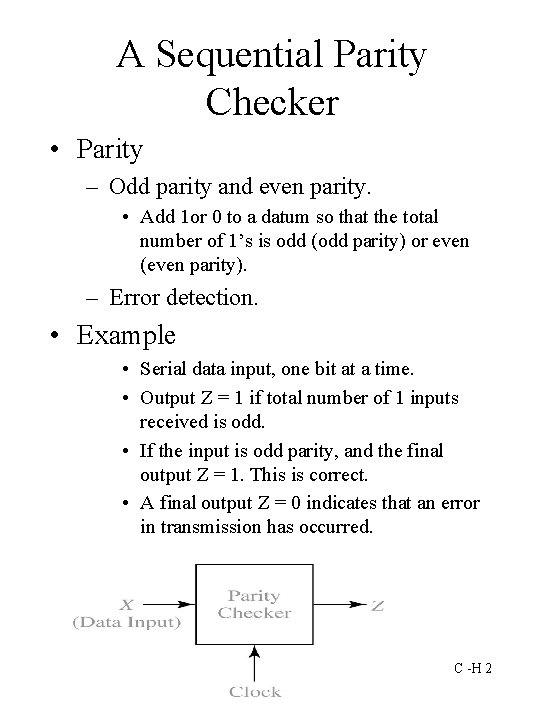
A Sequential Parity Checker • Parity – Odd parity and even parity. • Add 1 or 0 to a datum so that the total number of 1’s is odd (odd parity) or even (even parity). – Error detection. • Example • Serial data input, one bit at a time. • Output Z = 1 if total number of 1 inputs received is odd. • If the input is odd parity, and the final output Z = 1. This is correct. • A final output Z = 0 indicates that an error in transmission has occurred. Chap 13 C -H 2
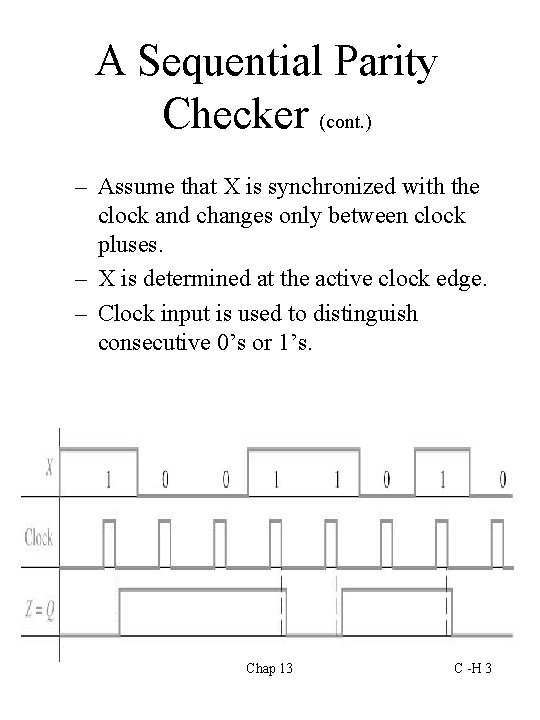
A Sequential Parity Checker (cont. ) – Assume that X is synchronized with the clock and changes only between clock pluses. – X is determined at the active clock edge. – Clock input is used to distinguish consecutive 0’s or 1’s. Chap 13 C -H 3
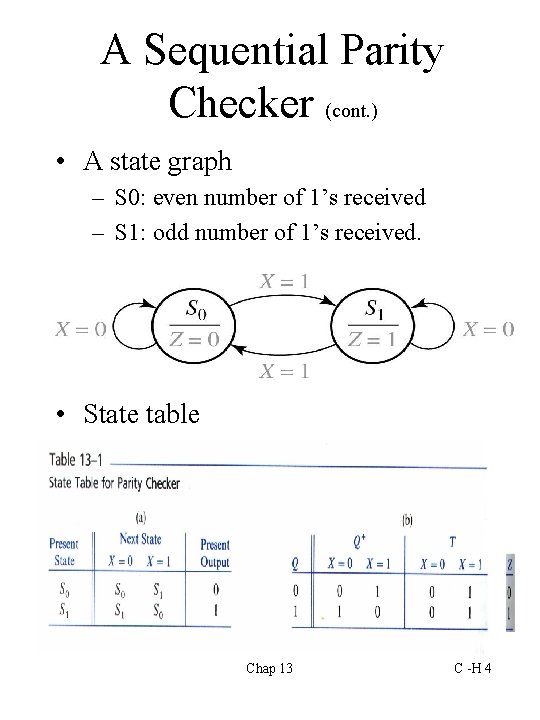
A Sequential Parity Checker (cont. ) • A state graph – S 0: even number of 1’s received – S 1: odd number of 1’s received. • State table Chap 13 C -H 4
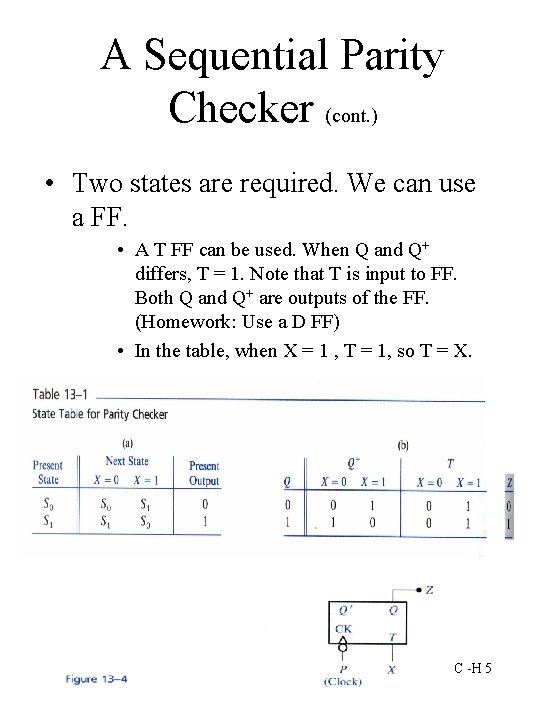
A Sequential Parity Checker (cont. ) • Two states are required. We can use a FF. • A T FF can be used. When Q and Q+ differs, T = 1. Note that T is input to FF. Both Q and Q+ are outputs of the FF. (Homework: Use a D FF) • In the table, when X = 1 , T = 1, so T = X. Chap 13 C -H 5
Analysis by Signal Tracing and Timing Charts • Given a clocked sequential network, procedure for analysis is as follows: • Assume initial state (0) for FF. • For the first input in the given sequence, determine the network output and the FF inputs. • Apply clock to the FFs and determine the new FF states after the next active clock edge. • Determine the outputs due to the new state. • Repeat for each input in the given sequence. – This is a timing chart. Chap 13 C -H 6
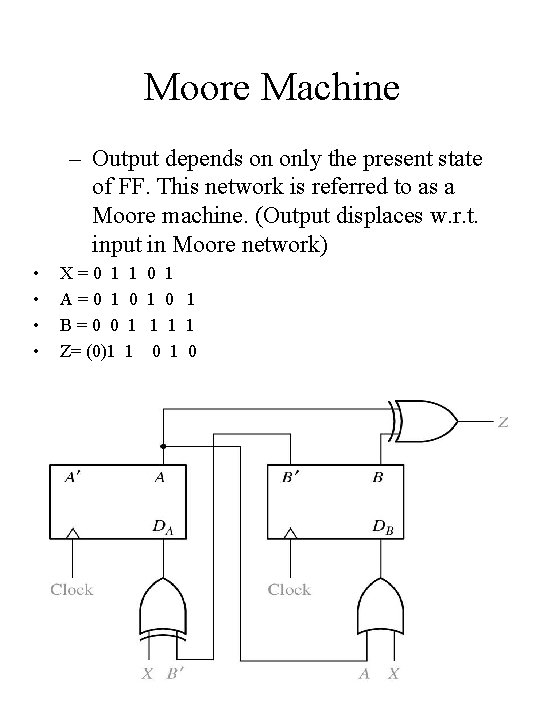
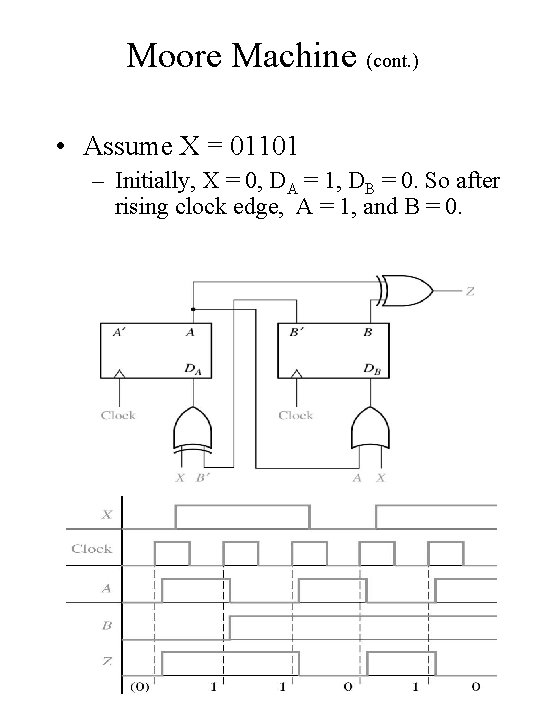
Moore Machine – Output depends on only the present state of FF. This network is referred to as a Moore machine. (Output displaces w. r. t. input in Moore network) • • X=0 1 A=0 1 B=0 0 Z= (0)1 1 0 1 1 0 1 0 Chap 13 C -H 7
Moore Machine (cont. ) • Assume X = 01101 – Initially, X = 0, DA = 1, DB = 0. So after rising clock edge, A = 1, and B = 0. Chap 13 C -H 8
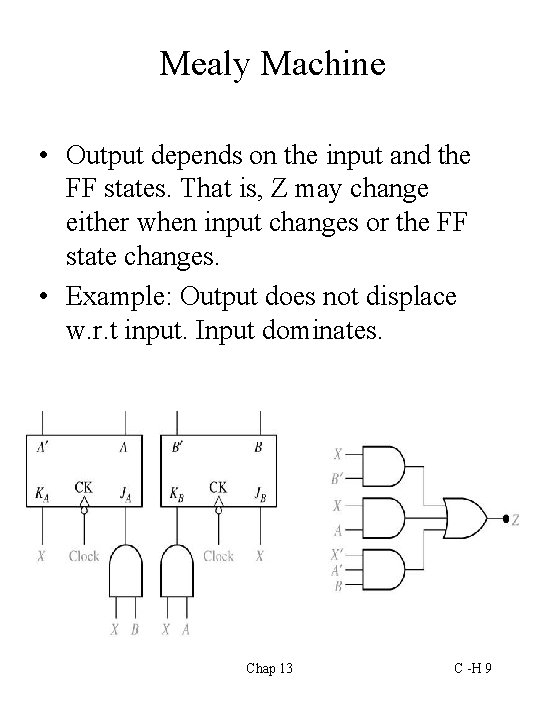
Mealy Machine • Output depends on the input and the FF states. That is, Z may change either when input changes or the FF state changes. • Example: Output does not displace w. r. t input. Input dominates. Chap 13 C -H 9
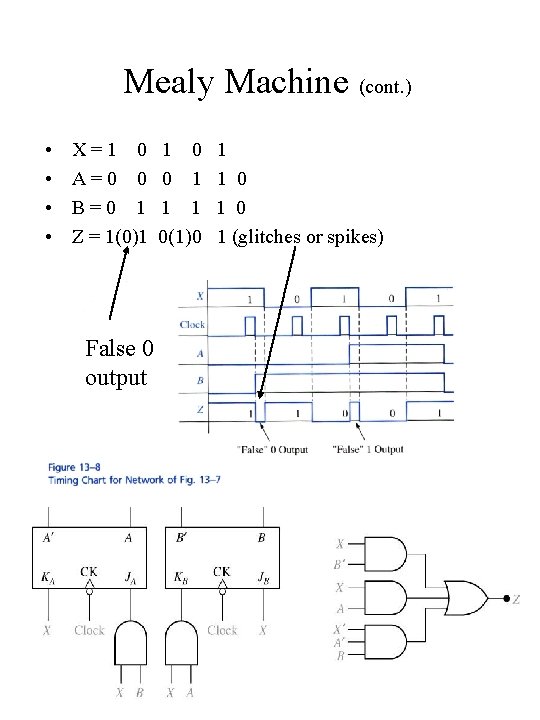
Mealy Machine (cont. ) • • X=1 0 A=0 0 B=0 1 Z = 1(0)1 1 0 0 1 1 1 0(1)0 1 1 0 1 (glitches or spikes) False 0 output Chap 13 C -H 10
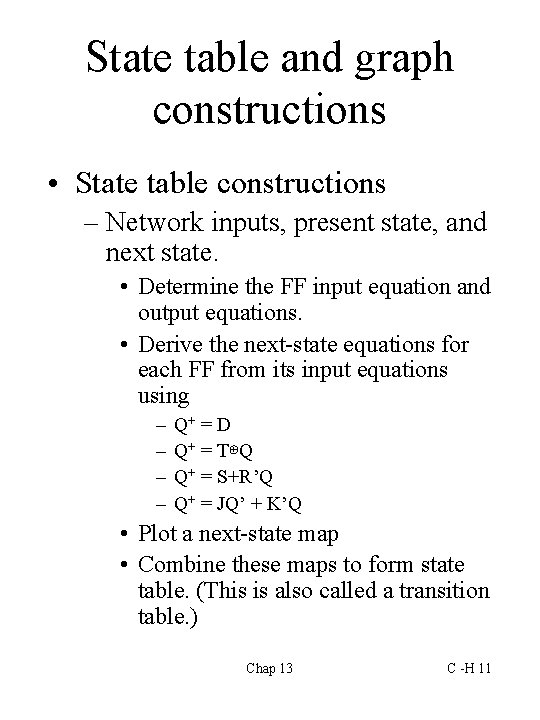
State table and graph constructions • State table constructions – Network inputs, present state, and next state. • Determine the FF input equation and output equations. • Derive the next-state equations for each FF from its input equations using – – Q+ = D Q+ = T⊕Q Q+ = S+R’Q Q+ = JQ’ + K’Q • Plot a next-state map • Combine these maps to form state table. (This is also called a transition table. ) Chap 13 C -H 11
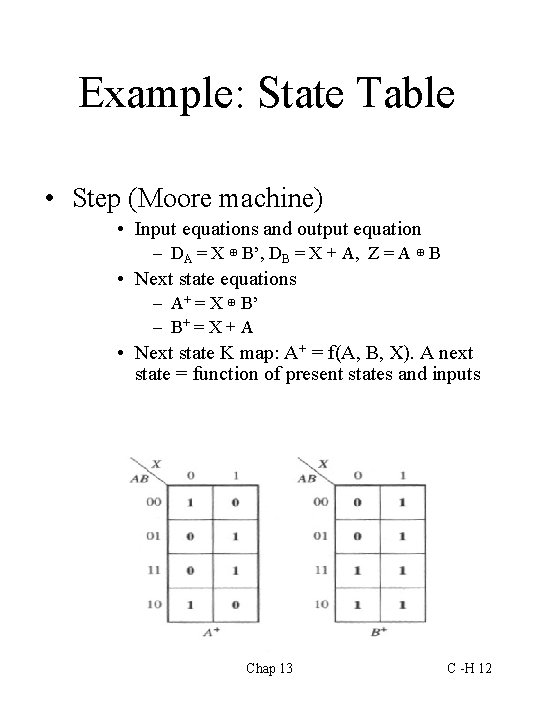
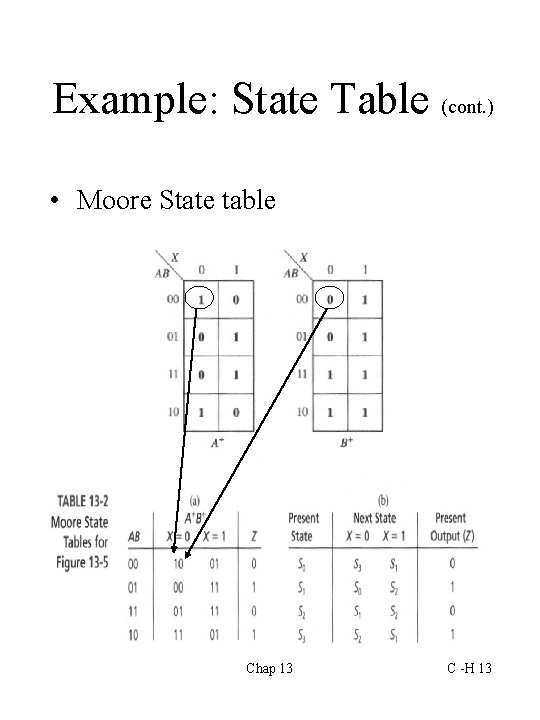
Example: State Table • Step (Moore machine) • Input equations and output equation – DA = X ⊕ B’, DB = X + A, Z = A ⊕ B • Next state equations – A+ = X ⊕ B’ – B+ = X + A • Next state K map: A+ = f(A, B, X). A next state = function of present states and inputs Chap 13 C -H 12
Example: State Table (cont. ) • Moore State table Chap 13 C -H 13
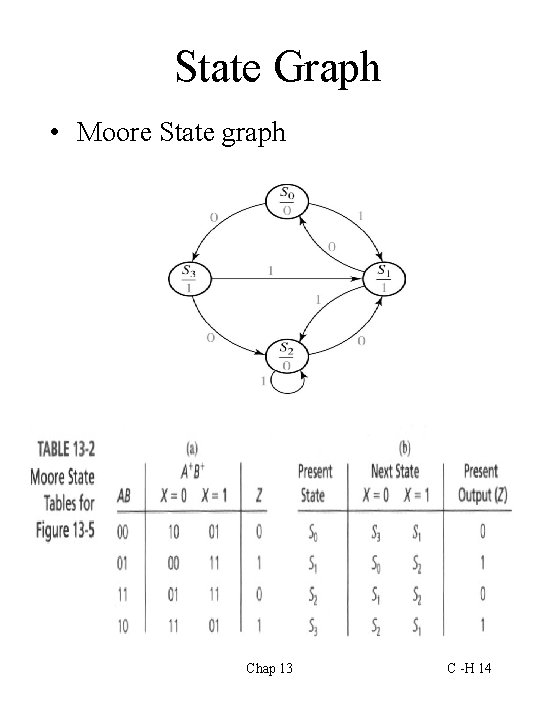
State Graph • Moore State graph Chap 13 C -H 14
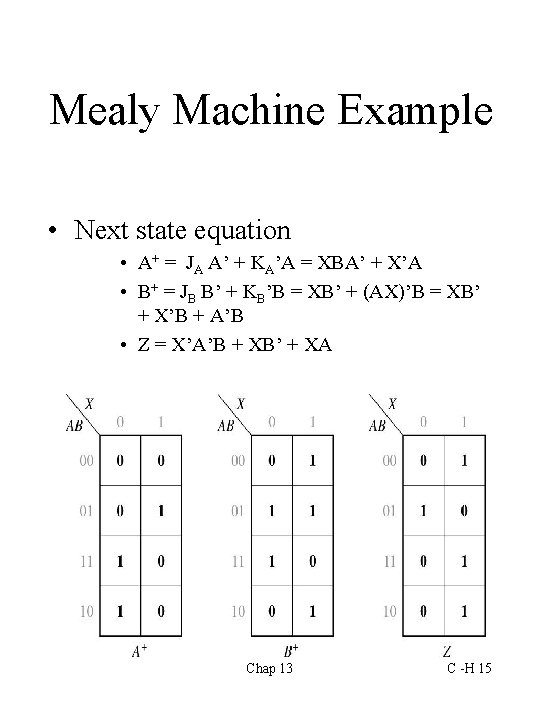
Mealy Machine Example • Next state equation • A+ = JA A’ + KA’A = XBA’ + X’A • B+ = JB B’ + KB’B = XB’ + (AX)’B = XB’ + X’B + A’B • Z = X’A’B + XB’ + XA Chap 13 C -H 15
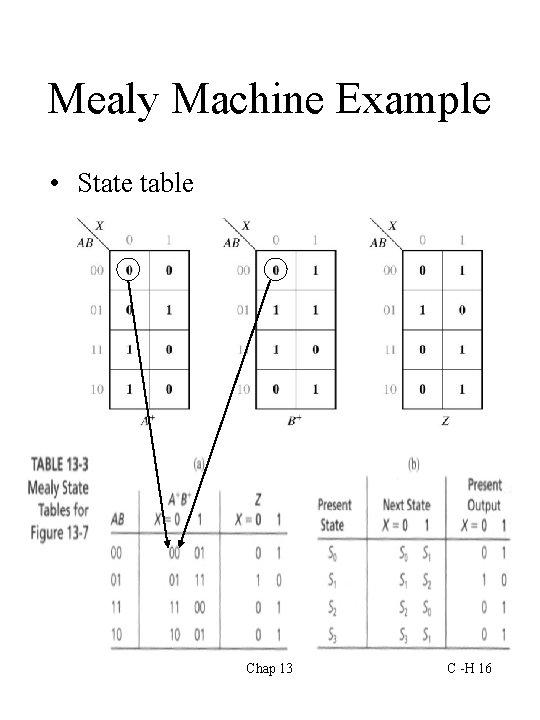
Mealy Machine Example • State table Chap 13 C -H 16
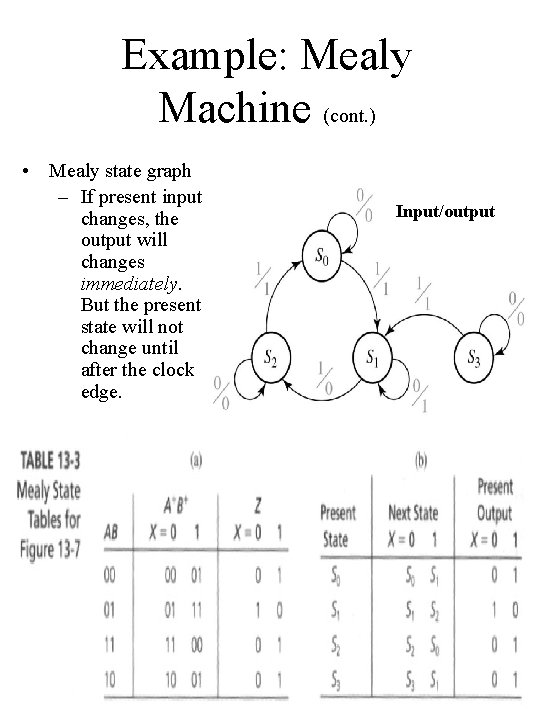
Example: Mealy Machine (cont. ) • Mealy state graph – If present input changes, the output will changes immediately. But the present state will not change until after the clock edge. Input/output Chap 13 C -H 17
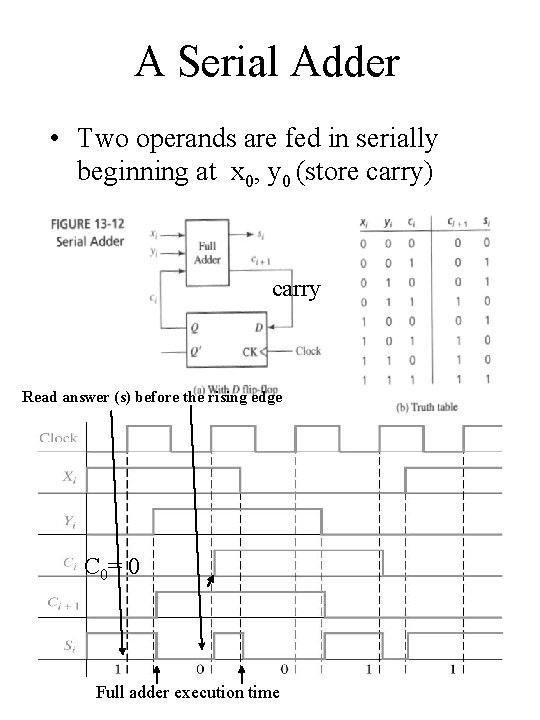
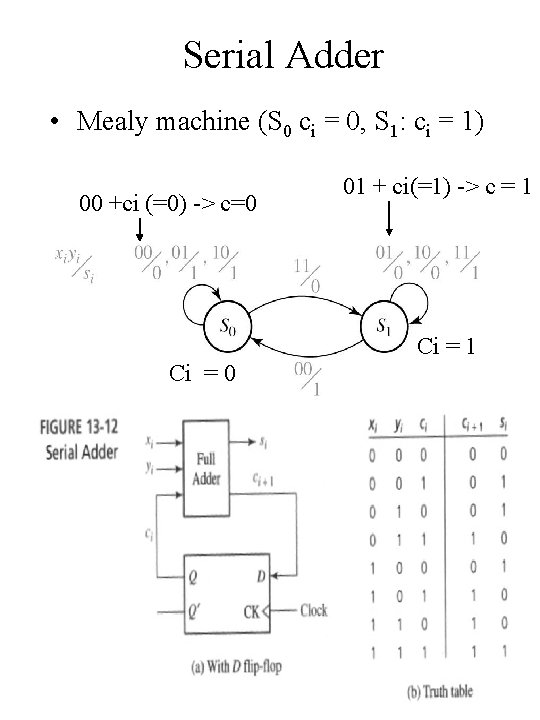
A Serial Adder • Two operands are fed in serially beginning at x 0, y 0 (store carry) carry Read answer (s) before the rising edge C 0= 0 Chap 13 Full adder execution time C -H 18
Serial Adder • Mealy machine (S 0 ci = 0, S 1: ci = 1) 00 +ci (=0) -> c=0 01 + ci(=1) -> c = 1 Ci = 0 Chap 13 C -H 19
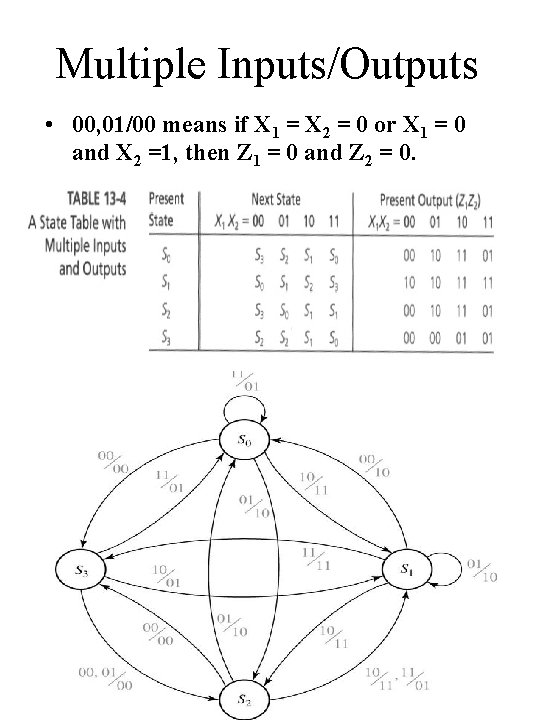
Multiple Inputs/Outputs • 00, 01/00 means if X 1 = X 2 = 0 or X 1 = 0 and X 2 =1, then Z 1 = 0 and Z 2 = 0. Chap 13 C -H 20
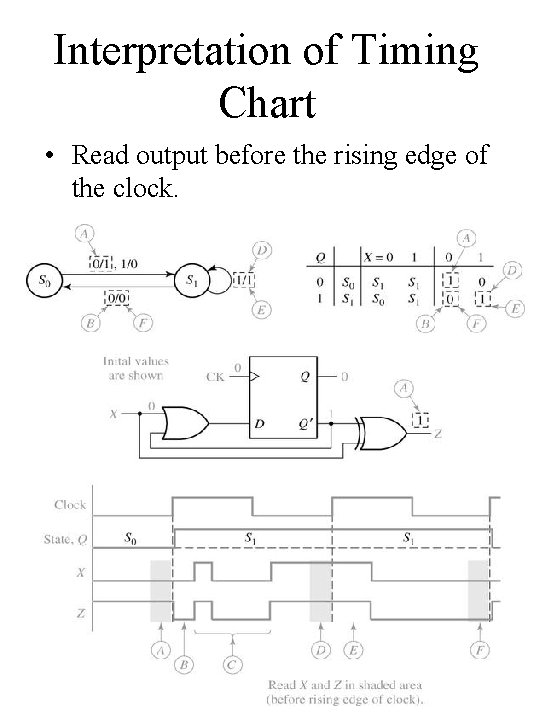
Timing Chart • State change occurs after the falling (rising) edge of the clock. • Input will normally be stable immediately before and after the active clock edge. • For a Moore circuit, the output changes only when the state changes. • For a Mealy circuit, the output can change when the input changes and when the state changes. Chap 13 C -H 21
Timing Charts (cont. ) • For a Mealy circuit, a false output may occur between the time the state changes and the time the input is changed. – If the state has changed to its next value, but the old input is still present, the output may be temporarily incorrect. – False outputs are difficult to determine from the state graph. • Use signal tracing or • Use the state table. Chap 13 C -H 22
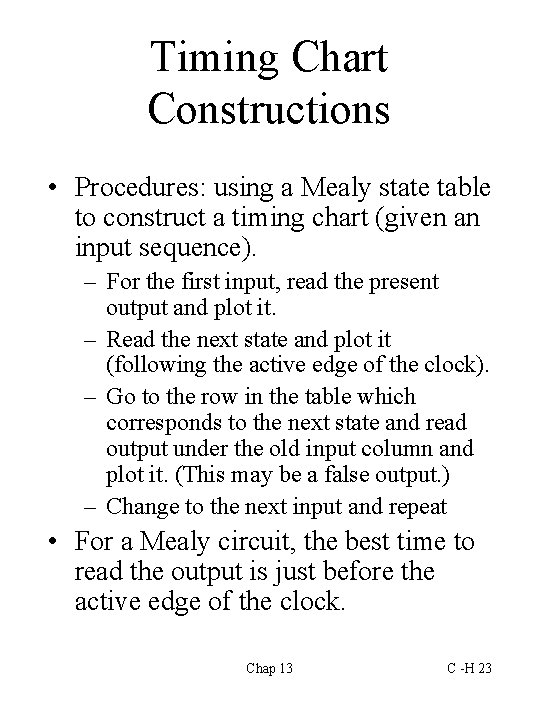
Timing Chart Constructions • Procedures: using a Mealy state table to construct a timing chart (given an input sequence). – For the first input, read the present output and plot it. – Read the next state and plot it (following the active edge of the clock). – Go to the row in the table which corresponds to the next state and read output under the old input column and plot it. (This may be a false output. ) – Change to the next input and repeat • For a Mealy circuit, the best time to read the output is just before the active edge of the clock. Chap 13 C -H 23
Interpretation of Timing Chart • Read output before the rising edge of the clock. Chap 13 C -H 24
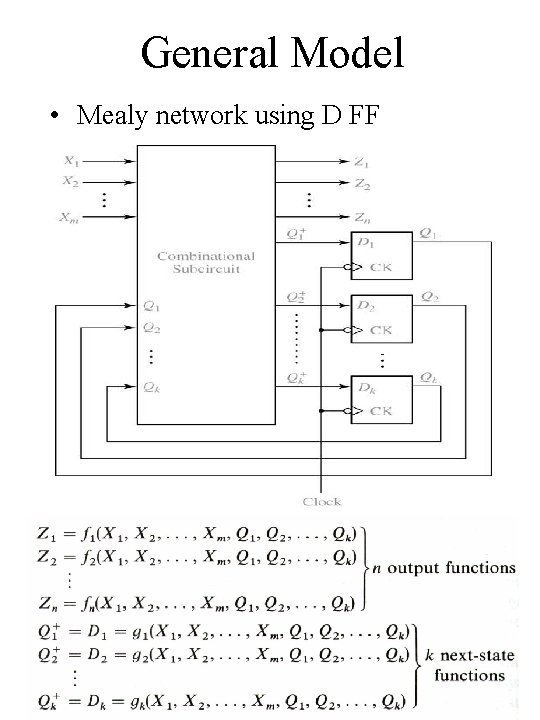
General Model • Mealy network using D FF Chap 13 C -H 25
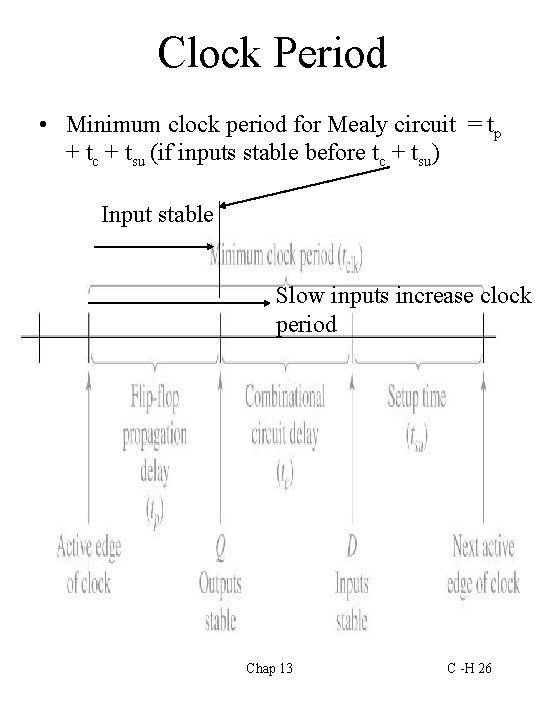
Clock Period • Minimum clock period for Mealy circuit = tp + tc + tsu (if inputs stable before tc + tsu) Input stable Slow inputs increase clock period Chap 13 C -H 26
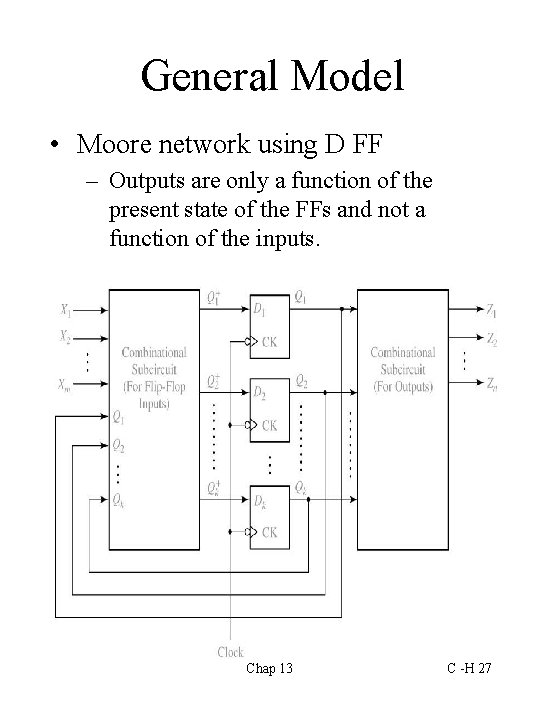
General Model • Moore network using D FF – Outputs are only a function of the present state of the FFs and not a function of the inputs. Chap 13 C -H 27
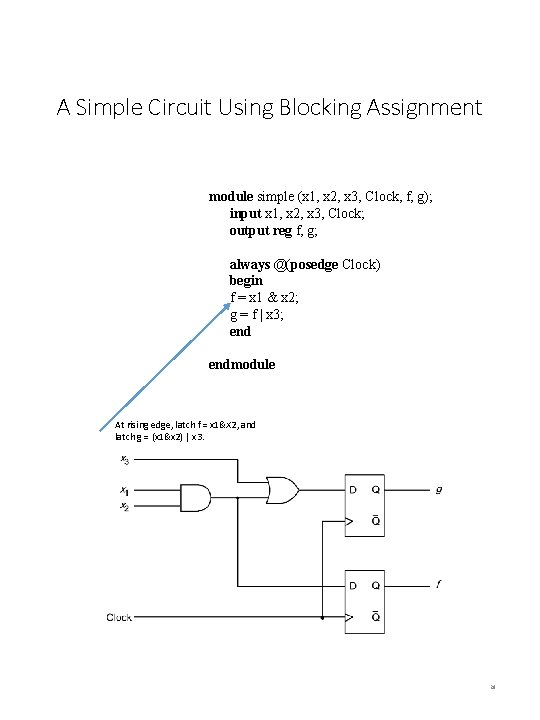
A Simple Circuit Using Blocking Assignment module simple (x 1, x 2, x 3, Clock, f, g); input x 1, x 2, x 3, Clock; output reg f, g; always @(posedge Clock) begin f = x 1 & x 2; g = f | x 3; endmodule At rising edge, latch f = x 1&X 2, and latch g = (x 1&x 2) | x 3. 28
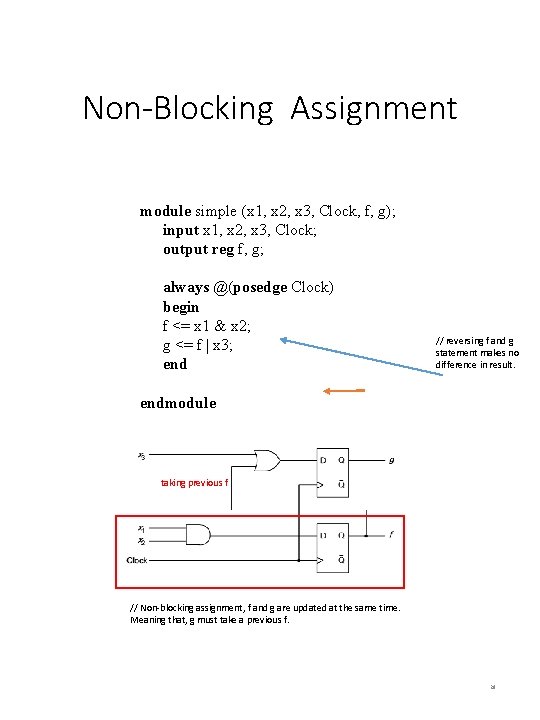
Non-Blocking Assignment module simple (x 1, x 2, x 3, Clock, f, g); input x 1, x 2, x 3, Clock; output reg f, g; always @(posedge Clock) begin f <= x 1 & x 2; g <= f | x 3; end // reversing f and g statement makes no difference in result. endmodule taking previous f // Non-blocking assignment, f and g are updated at the same time. Meaning that, g must take a previous f. 29
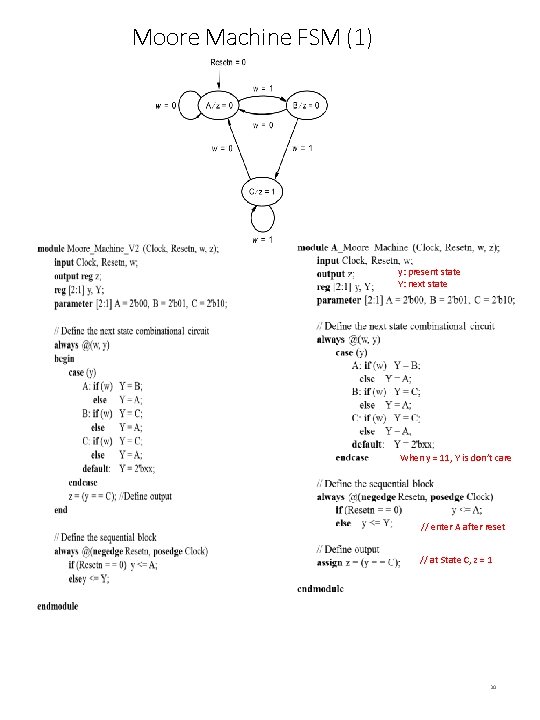
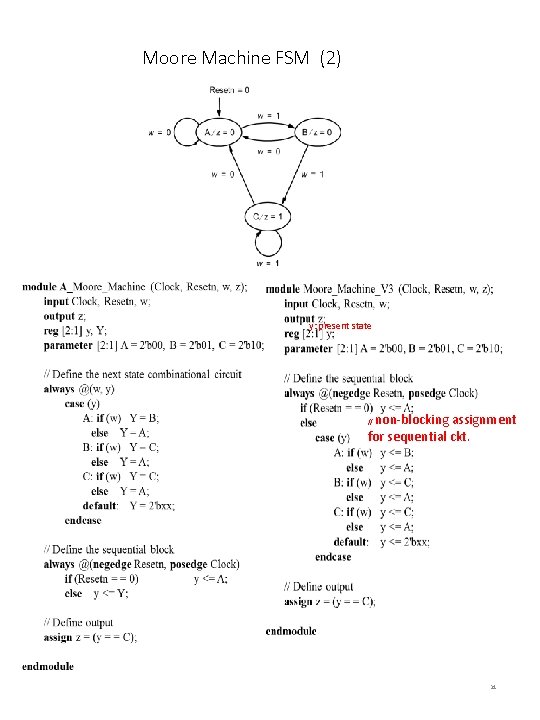
Moore Machine FSM (1) y: present state Y: next state When y = 11, Y is don’t care // enter A after reset // at State C, z = 1 30
Moore Machine FSM (2) y: present state non-blocking assignment for sequential ckt. // 31
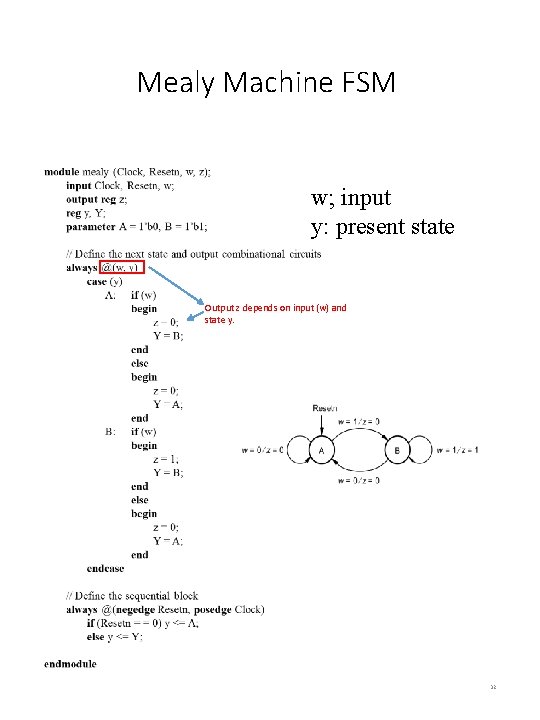
Mealy Machine FSM w; input y: present state Output z depends on input (w) and state y. 32