
Lecture 10 IO Subsystem and Storage Devices Prof

Lecture 10: I/O Subsystem and Storage Devices Prof. Seyed Majid Zahedi https: //ece. uwaterloo. ca/~smzahedi

Outline • I/O subsystem • I/O performance • Some queueing theory • Storage devices • Magnetic storage • Flash memory
What’s Next? • So far in this course • We have learned how to manage CPU and memory • What about I/O? • Without I/O, computers are useless (disembodied brains? ) • But … there is incredible variety of I/O devices • Accelerator (e. g. , GPU, TPU), storage (e. g. , SSD, HDD), transmission (e. g. , NIC, wireless adaptor), human-interface (e. g. , keyboard, mouse) • How can we standardize interfaces to these devices? • Devices are unreliable: media failures and transmission errors • How can we make them reliable? • Devices are unpredictable and/or slow • How can we manage them if we don’t know what they will do or how they will perform?
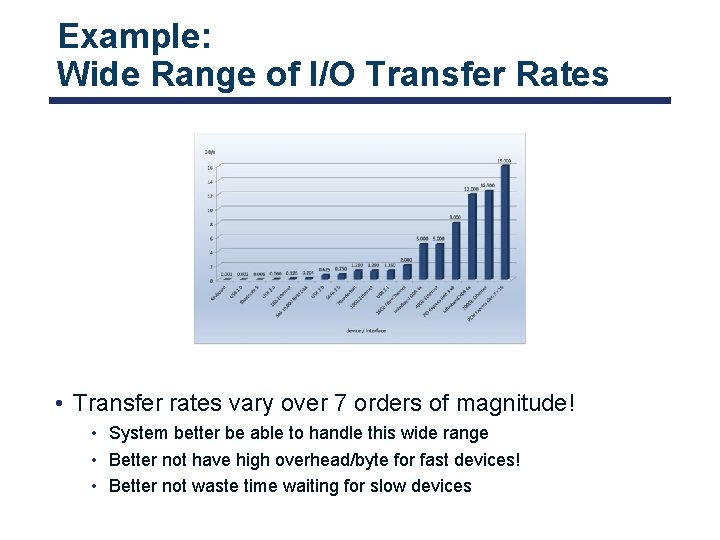
Example: Wide Range of I/O Transfer Rates • Transfer rates vary over 7 orders of magnitude! • System better be able to handle this wide range • Better not have high overhead/byte for fast devices! • Better not waste time waiting for slow devices
Goal of I/O Subsystem • Provide uniform interfaces, despite wide range of different devices • This code works on many different devices: FILE fd = fopen("/dev/something", "rw"); for (int i = 0; i < 10; i++) { fprintf(fd, "Count %dn", i); } close(fd); • Why? Because device drivers implement standard interface • We will get a flavor for what is involved in controlling devices in this lecture • We can only scratch the surface!
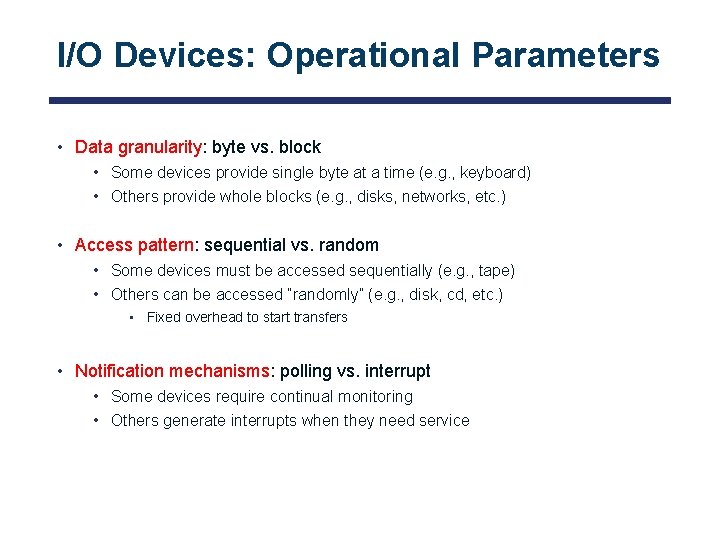
I/O Devices: Operational Parameters • Data granularity: byte vs. block • Some devices provide single byte at a time (e. g. , keyboard) • Others provide whole blocks (e. g. , disks, networks, etc. ) • Access pattern: sequential vs. random • Some devices must be accessed sequentially (e. g. , tape) • Others can be accessed “randomly” (e. g. , disk, cd, etc. ) • Fixed overhead to start transfers • Notification mechanisms: polling vs. interrupt • Some devices require continual monitoring • Others generate interrupts when they need service
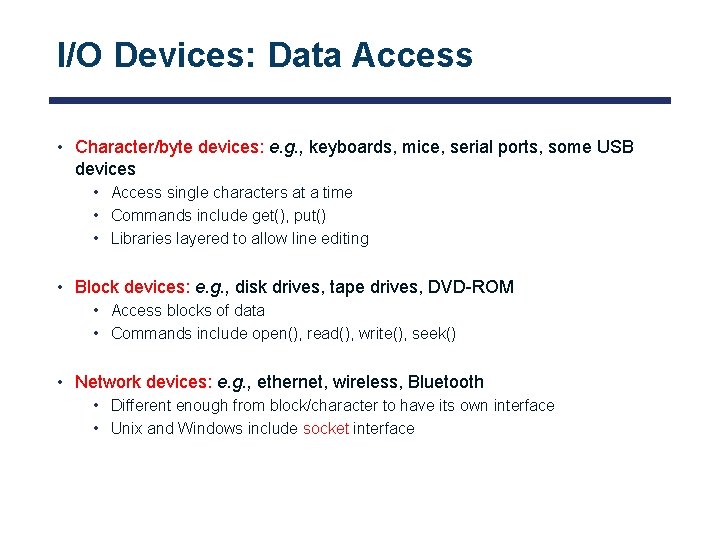
I/O Devices: Data Access • Character/byte devices: e. g. , keyboards, mice, serial ports, some USB devices • Access single characters at a time • Commands include get(), put() • Libraries layered to allow line editing • Block devices: e. g. , disk drives, tape drives, DVD-ROM • Access blocks of data • Commands include open(), read(), write(), seek() • Network devices: e. g. , ethernet, wireless, Bluetooth • Different enough from block/character to have its own interface • Unix and Windows include socket interface
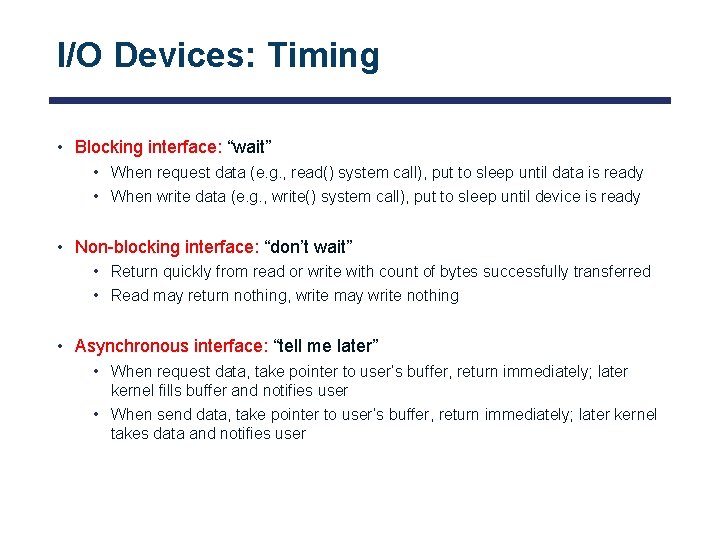
I/O Devices: Timing • Blocking interface: “wait” • When request data (e. g. , read() system call), put to sleep until data is ready • When write data (e. g. , write() system call), put to sleep until device is ready • Non-blocking interface: “don’t wait” • Return quickly from read or write with count of bytes successfully transferred • Read may return nothing, write may write nothing • Asynchronous interface: “tell me later” • When request data, take pointer to user’s buffer, return immediately; later kernel fills buffer and notifies user • When send data, take pointer to user’s buffer, return immediately; later kernel takes data and notifies user
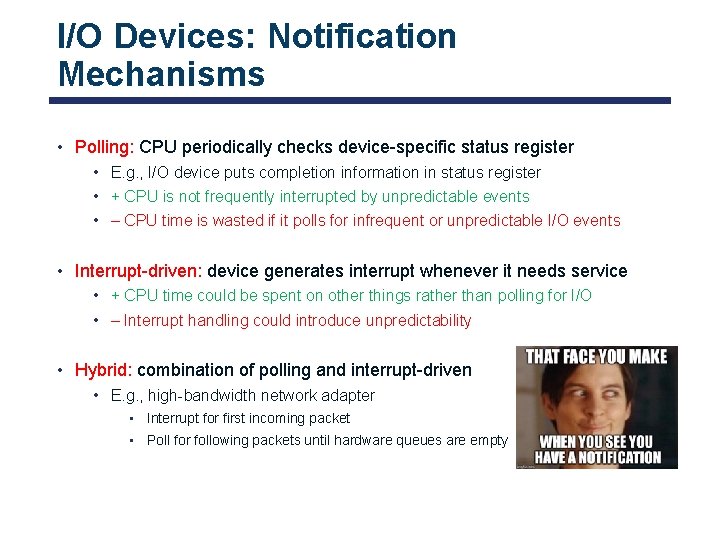
I/O Devices: Notification Mechanisms • Polling: CPU periodically checks device-specific status register • E. g. , I/O device puts completion information in status register • + CPU is not frequently interrupted by unpredictable events • – CPU time is wasted if it polls for infrequent or unpredictable I/O events • Interrupt-driven: device generates interrupt whenever it needs service • + CPU time could be spent on other things rather than polling for I/O • – Interrupt handling could introduce unpredictability • Hybrid: combination of polling and interrupt-driven • E. g. , high-bandwidth network adapter • Interrupt for first incoming packet • Poll for following packets until hardware queues are empty
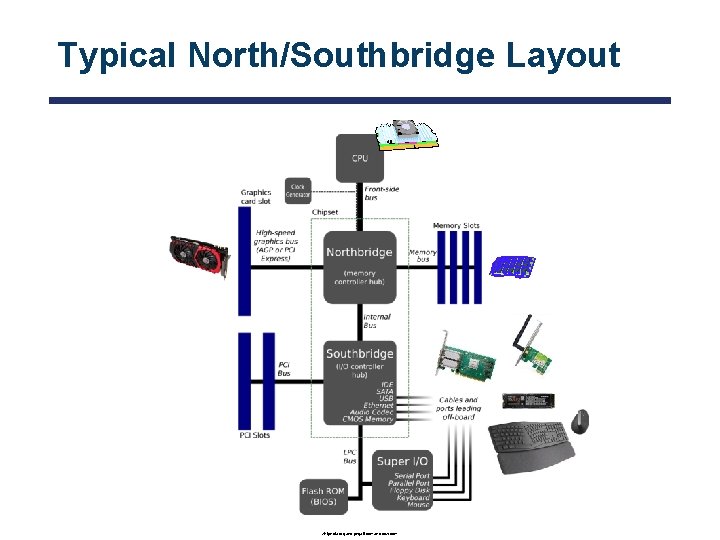
Typical North/Southbridge Layout wikipedia. org and pngall. com and cdw. com
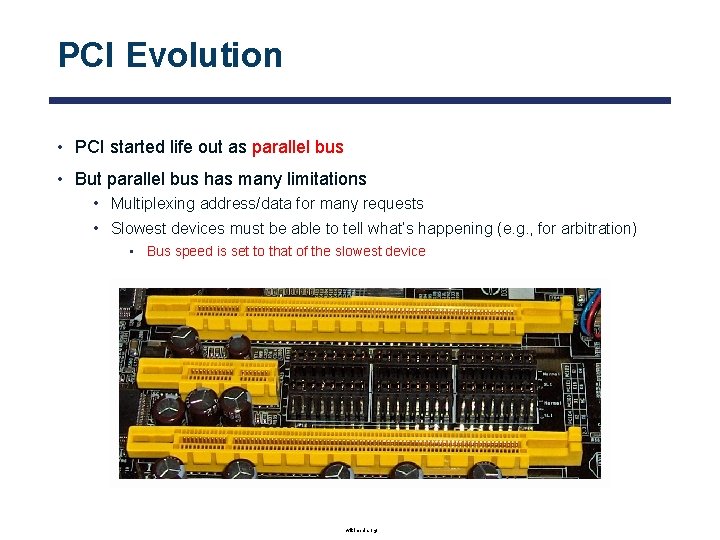
PCI Evolution • PCI started life out as parallel bus • But parallel bus has many limitations • Multiplexing address/data for many requests • Slowest devices must be able to tell what’s happening (e. g. , for arbitration) • Bus speed is set to that of the slowest device wikimedia. org
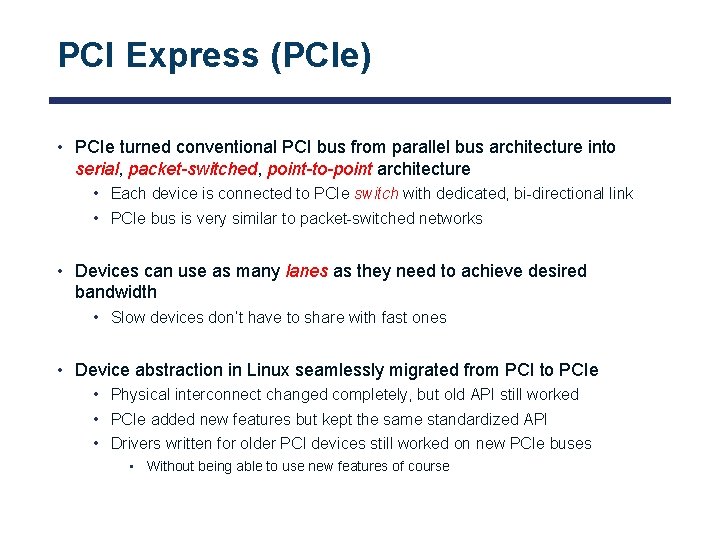
PCI Express (PCIe) • PCIe turned conventional PCI bus from parallel bus architecture into serial, packet-switched, point-to-point architecture • Each device is connected to PCIe switch with dedicated, bi-directional link • PCIe bus is very similar to packet-switched networks • Devices can use as many lanes as they need to achieve desired bandwidth • Slow devices don’t have to share with fast ones • Device abstraction in Linux seamlessly migrated from PCI to PCIe • Physical interconnect changed completely, but old API still worked • PCIe added new features but kept the same standardized API • Drivers written for older PCI devices still worked on new PCIe buses • Without being able to use new features of course
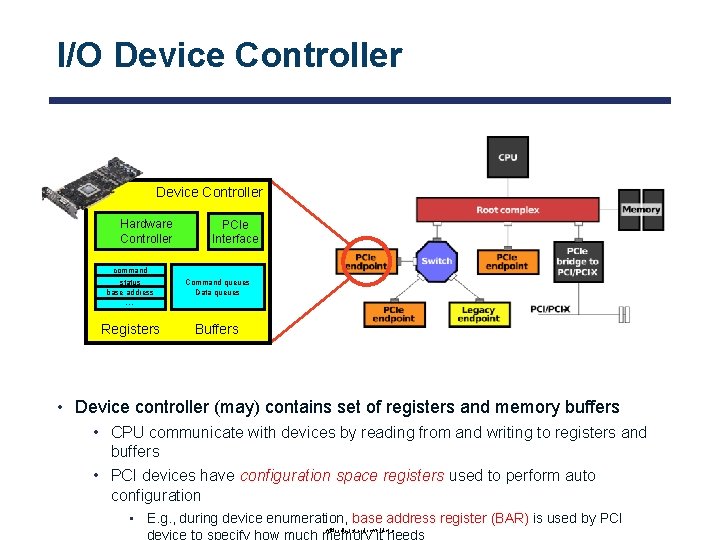
I/O Device Controller Hardware Controller PCIe Interface command status base address Command queues Data queues Registers Buffers … • Device controller (may) contains set of registers and memory buffers • CPU communicate with devices by reading from and writing to registers and buffers • PCI devices have configuration space registers used to perform auto configuration • E. g. , during device enumeration, base address register (BAR) is used by PCI device to specify how much memory it needs wikipedia. org and pcworld. com
Accessing I/O Devices • Port-mapped: I/O devices have separate address space from physical memory • Port-mapped I/O is also called isolated I/O • Entire bus could be dedicated to I/O devices • CPU performs I/O operations using special I/O instructions • Example: in/out instructions used in some Intel microprocessors (e. g. , out 0 x 21, al) • Memory-mapped: I/O devices use the same address space as physical memory • I/O devices listen to the same address bus that is connected to memory • Addresses reserved for I/O should not be available to physical memory • I/O devices are accessed like they are part of memory using • Example: load/store instructions
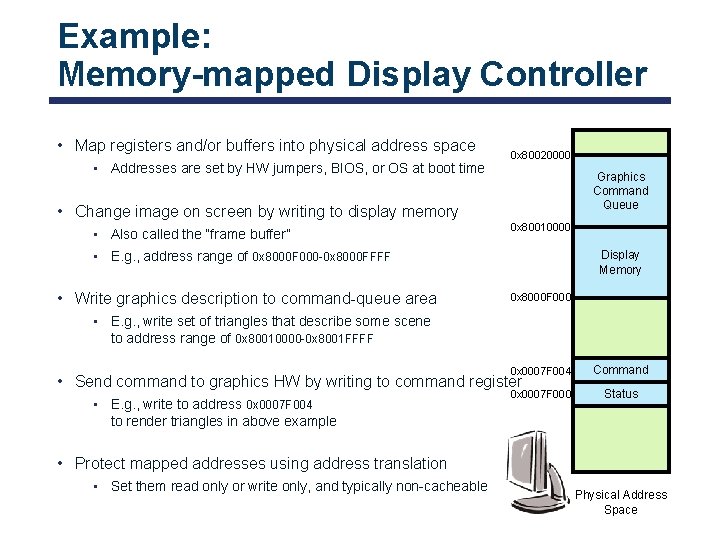
Example: Memory-mapped Display Controller • Map registers and/or buffers into physical address space • Addresses are set by HW jumpers, BIOS, or OS at boot time 0 x 80020000 Graphics Command Queue • Change image on screen by writing to display memory • Also called the “frame buffer” 0 x 80010000 • E. g. , address range of 0 x 8000 F 000 -0 x 8000 FFFF • Write graphics description to command-queue area Display Memory 0 x 8000 F 000 • E. g. , write set of triangles that describe some scene to address range of 0 x 80010000 -0 x 8001 FFFF 0 x 0007 F 004 Command 0 x 0007 F 000 Status • Send command to graphics HW by writing to command register • E. g. , write to address 0 x 0007 F 004 to render triangles in above example • Protect mapped addresses using address translation • Set them read only or write only, and typically non-cacheable Physical Address Space
Recall: I/O Data Transfer • Programmed I/O • Each byte transferred via processor in/out or load/store • + Simple hardware, easy to program • − Consumes processor cycles proportional to data size • Direct memory access (DMA) • Give controller access to memory bus • Ask it to transfer data blocks to/from memory directly
DMA for PCIe Devices • PCIe enables point-to-point communication between all endpoints • Each device contains its own, proprietary DMA engine • Unlike ISA, there is no central DMA controller • Device driver programs DMA engine and signals it to begin DMA transfer • DMA engine sends packets directly to memory controller • Once transfer is over, DMA engine raises interrupts (using same PCIe bus)
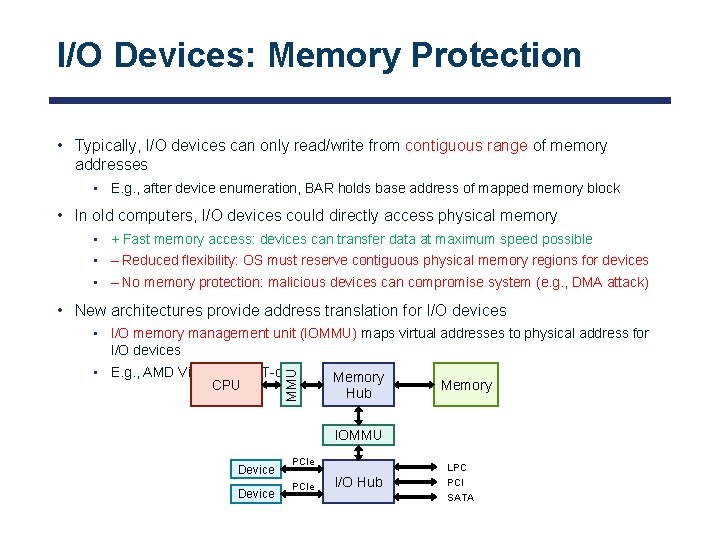
I/O Devices: Memory Protection • Typically, I/O devices can only read/write from contiguous range of memory addresses • E. g. , after device enumeration, BAR holds base address of mapped memory block • In old computers, I/O devices could directly access physical memory • + Fast memory access: devices can transfer data at maximum speed possible • – Reduced flexibility: OS must reserve contiguous physical memory regions for devices • – No memory protection: malicious devices can compromise system (e. g. , DMA attack) • New architectures provide address translation for I/O devices • E. g. , AMD Vi and Intel VT-d CPU MMU • I/O memory management unit (IOMMU) maps virtual addresses to physical address for I/O devices Memory Hub Memory IOMMU Device PCIe I/O Hub LPC PCI SATA
Memory Translation for PCIe Devices • Problem 1: address translation services (ATS) allows PCIe devices to bypass IOMMU • PCIe devices can implement address translation cache (ATC) similar to TLB • Using ATS protocol, any device can claim it is using addresses that have already been translated • For trusted devices, this is useful performance improvement • For untrusted devices, this introduces security threat • ATS protocol could allow malicious device to write to places it should not have access to • Problem 2: PCIe packets do not reach IOMMU when devices communicate with each other • PCIe allows peer-to-peer communication between devices • Malicious devices can compromise other devices by reading from or writing to their registers/buffers • Solution: access control services (ACS) disables ATS and prevents peer-to-peer transactions • ACS acts as gate-keeper, forcing all packets to go up to root complex and pass through IOMMU
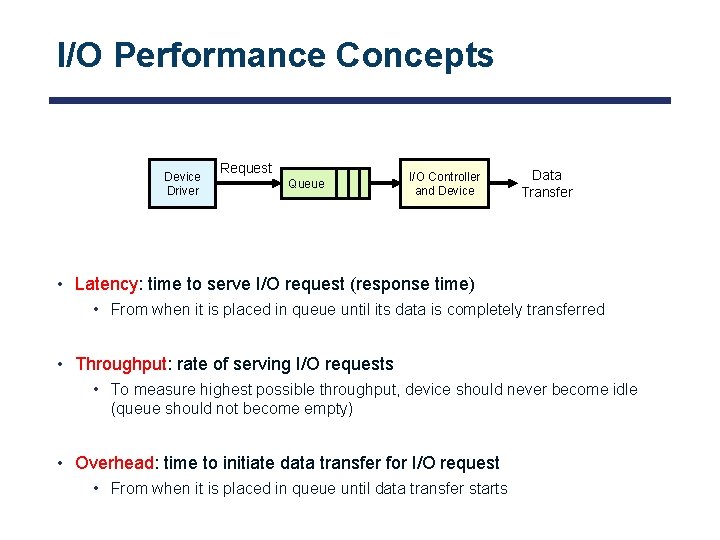
I/O Performance Concepts Device Driver Request Queue I/O Controller and Device Data Transfer • Latency: time to serve I/O request (response time) • From when it is placed in queue until its data is completely transferred • Throughput: rate of serving I/O requests • To measure highest possible throughput, device should never become idle (queue should not become empty) • Overhead: time to initiate data transfer for I/O request • From when it is placed in queue until data transfer starts
I/O Performance Concepts (cont. ) • Peak bandwidth: maximum rate of data transfer • Depends on bus bandwidth • E. g. , PCIe v 5. 0: 3. 93 GBps (per lane) • Also depends on device bandwidth • E. g. , rotational speed of disk • E. g. , write/read rate of NAND flash • Whichever is the bottleneck … • Effective bandwidth: rate of data transfer for I/O request • • Latency degrades bandwidth For most I/O requests, latency is roughly linear in size of transferred data Latency(n) = overhead + n / peak bandwidth Effective bandwidth(n) = n / latency(n)
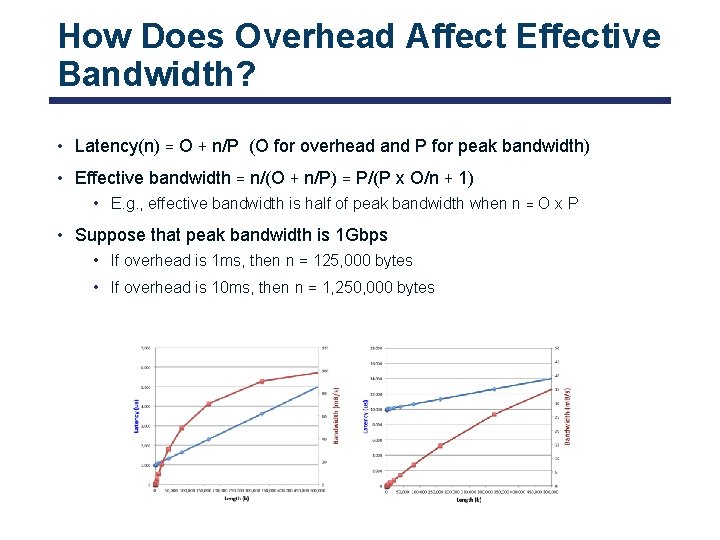
How Does Overhead Affect Effective Bandwidth? • Latency(n) = O + n/P (O for overhead and P for peak bandwidth) • Effective bandwidth = n/(O + n/P) = P/(P x O/n + 1) • E. g. , effective bandwidth is half of peak bandwidth when n = O x P • Suppose that peak bandwidth is 1 Gbps • If overhead is 1 ms, then n = 125, 000 bytes • If overhead is 10 ms, then n = 1, 250, 000 bytes
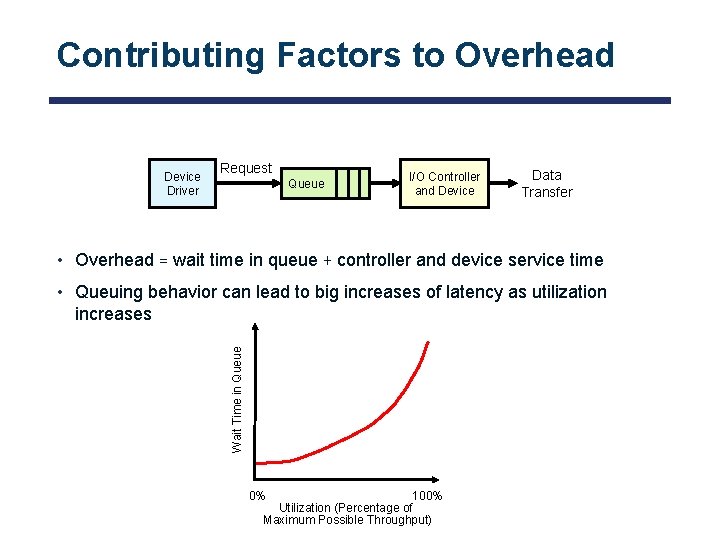
Contributing Factors to Overhead Device Driver Request Queue I/O Controller and Device Data Transfer • Overhead = wait time in queue + controller and device service time Wait Time in Queue • Queuing behavior can lead to big increases of latency as utilization increases 0% 100% Utilization (Percentage of Maximum Possible Throughput)
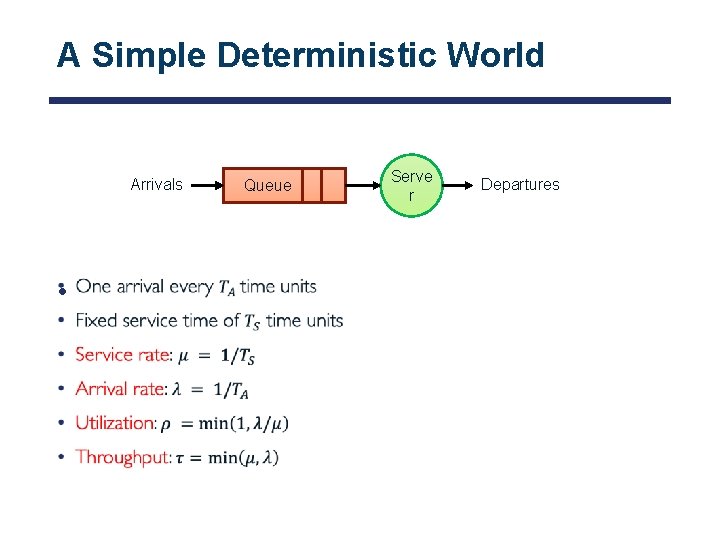
A Simple Deterministic World Arrivals • Queue Serve r Departures
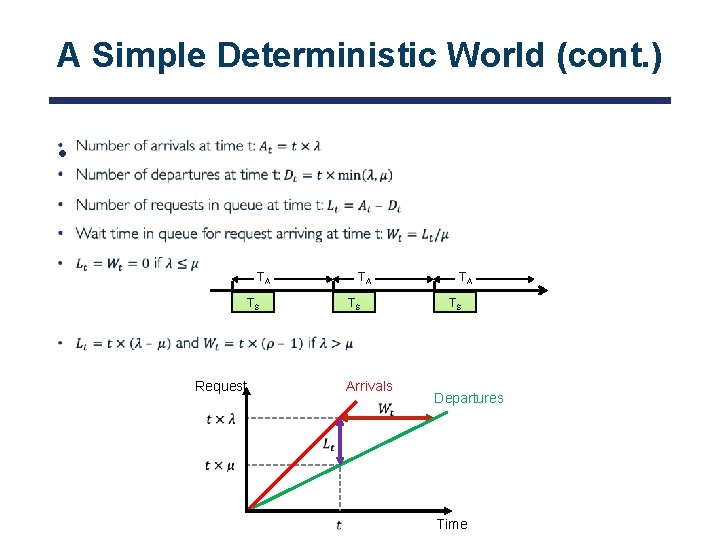
A Simple Deterministic World (cont. ) • TA TS Request TA TS Arrivals TA TS Departures Time
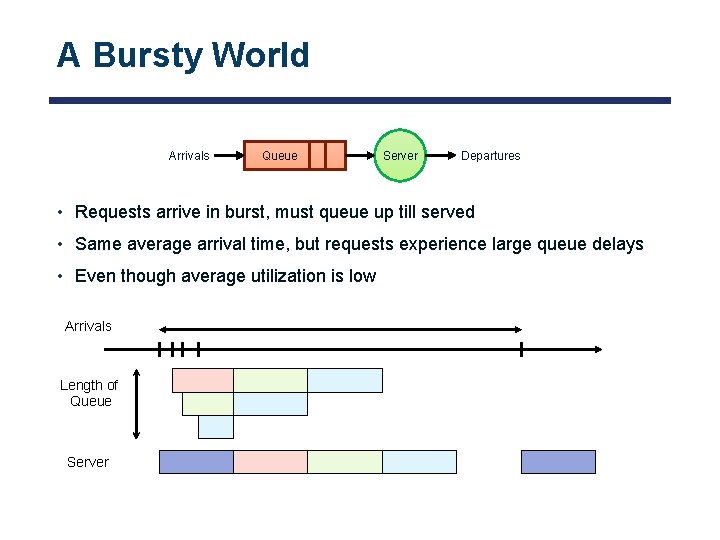
A Bursty World Arrivals Queue Server Departures • Requests arrive in burst, must queue up till served • Same average arrival time, but requests experience large queue delays • Even though average utilization is low Arrivals Length of Queue Server
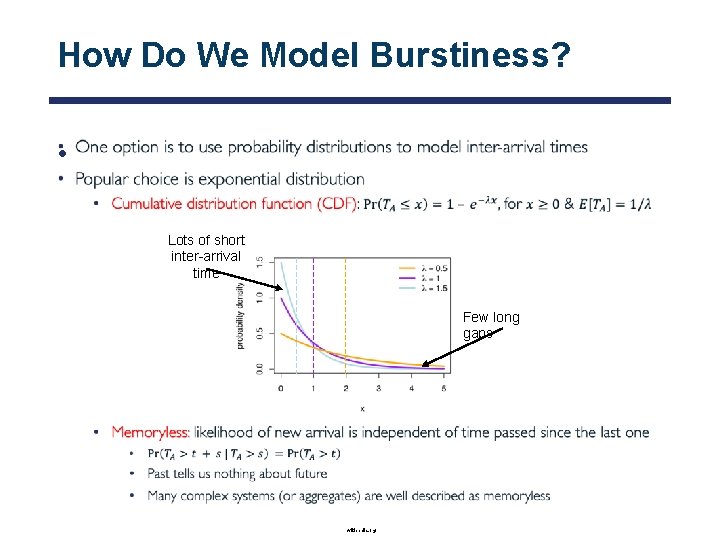
How Do We Model Burstiness? • Lots of short inter-arrival time Few long gaps wikipedia. org
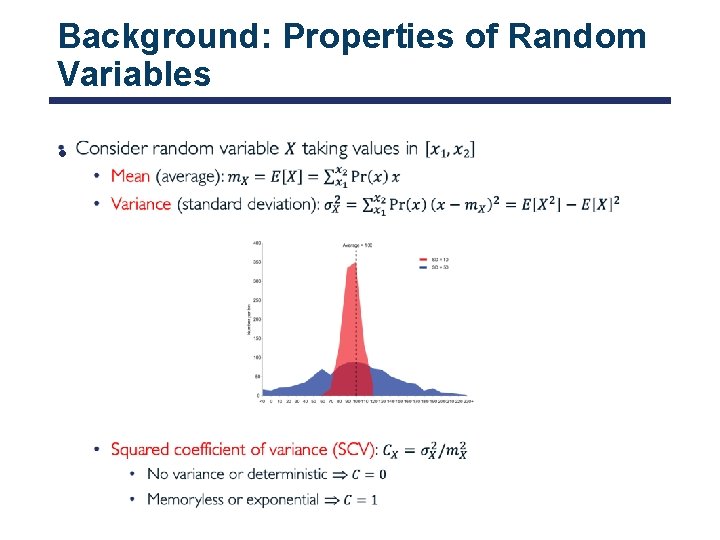
Background: Properties of Random Variables •
![Little’s Law [John Little, 1961] • shutterstock. com](http://slidetodoc.com/presentation_image_h2/66afdb3ec2cd2e09491c1cdddd5af31f/image-30.jpg "Little’s Law [John Little, 1961] • shutterstock. com")
Little’s Law [John Little, 1961] • shutterstock. com
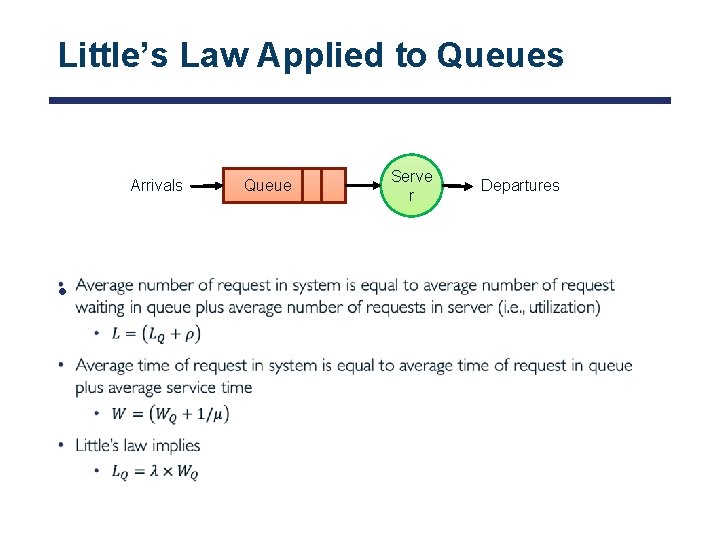
Little’s Law Applied to Queues Arrivals • Queue Serve r Departures
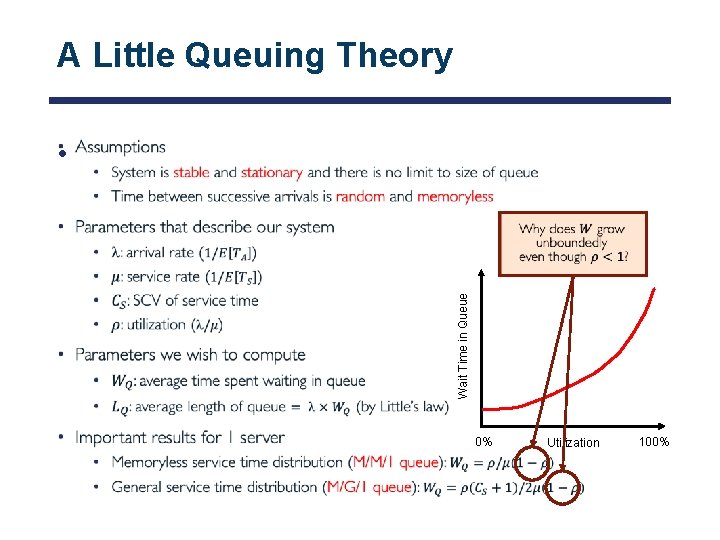
A Little Queuing Theory Wait Time in Queue • 0% Utilization 100%
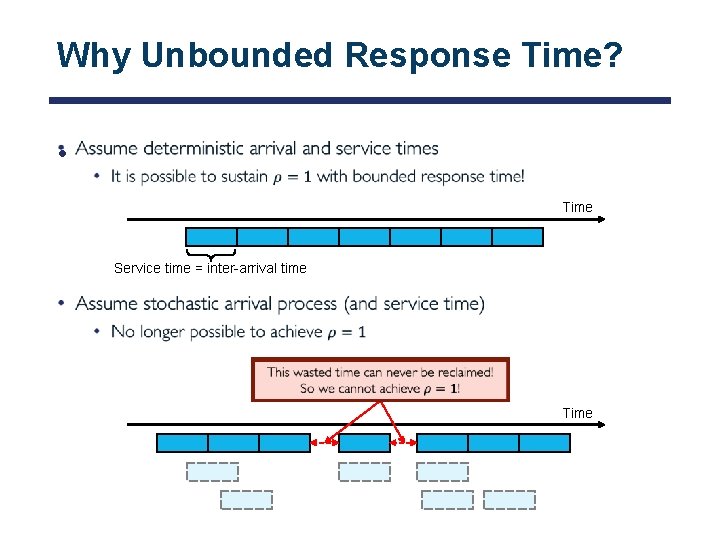
Why Unbounded Response Time? • Time Service time = inter-arrival time Time
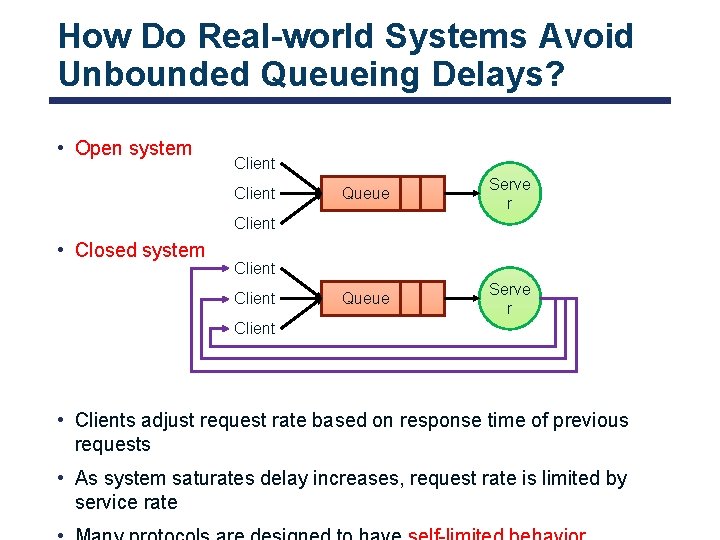
How Do Real-world Systems Avoid Unbounded Queueing Delays? • Open system Client Queue Serve r Client • Closed system Client • Clients adjust request rate based on response time of previous requests • As system saturates delay increases, request rate is limited by service rate
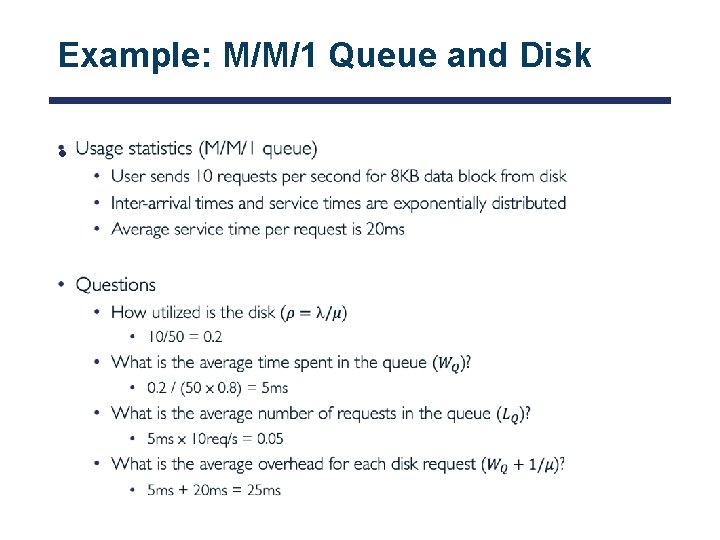
Example: M/M/1 Queue and Disk •
Where are we? • I/O subsystem • I/O performance • Some queueing theory • Storage devices • Magnetic storage • Flash memory
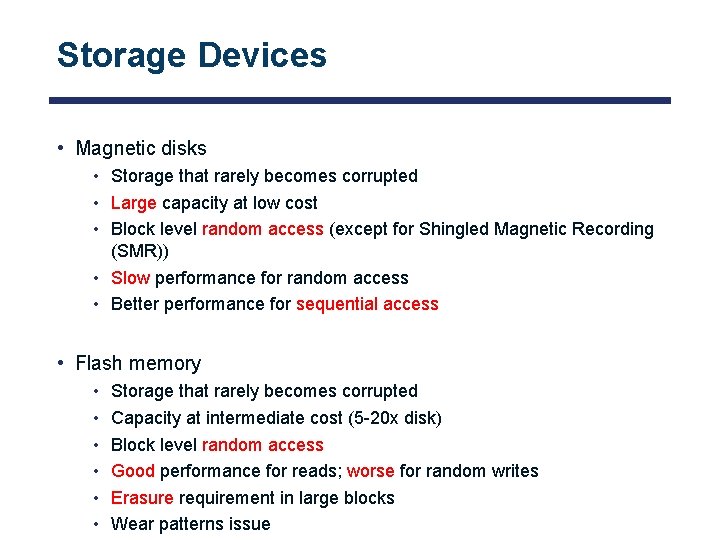
Storage Devices • Magnetic disks • Storage that rarely becomes corrupted • Large capacity at low cost • Block level random access (except for Shingled Magnetic Recording (SMR)) • Slow performance for random access • Better performance for sequential access • Flash memory • • • Storage that rarely becomes corrupted Capacity at intermediate cost (5 -20 x disk) Block level random access Good performance for reads; worse for random writes Erasure requirement in large blocks Wear patterns issue
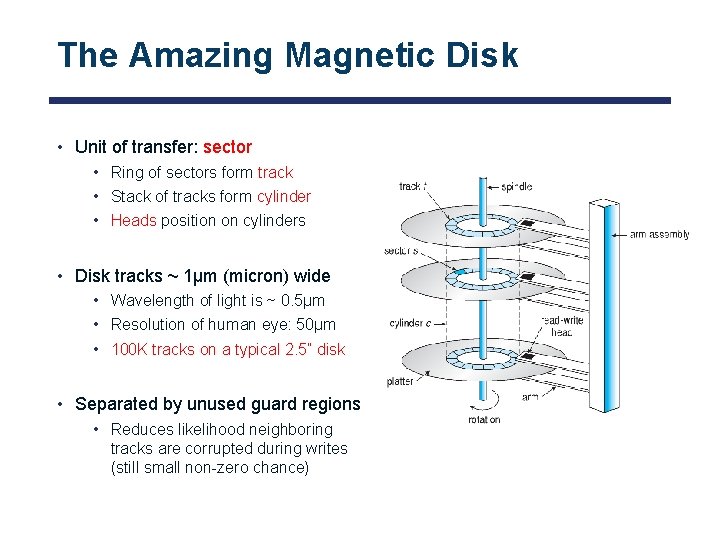
The Amazing Magnetic Disk • Unit of transfer: sector • Ring of sectors form track • Stack of tracks form cylinder • Heads position on cylinders • Disk tracks ~ 1µm (micron) wide • Wavelength of light is ~ 0. 5µm • Resolution of human eye: 50µm • 100 K tracks on a typical 2. 5” disk • Separated by unused guard regions • Reduces likelihood neighboring tracks are corrupted during writes (still small non-zero chance)
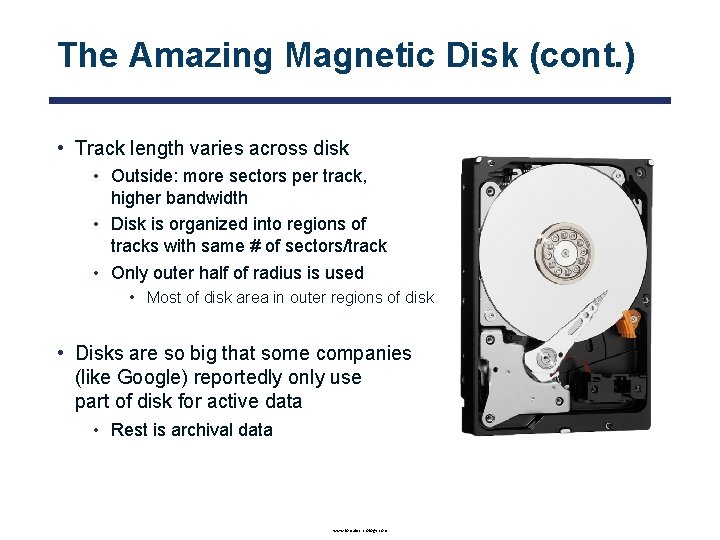
The Amazing Magnetic Disk (cont. ) • Track length varies across disk • Outside: more sectors per track, higher bandwidth • Disk is organized into regions of tracks with same # of sectors/track • Only outer half of radius is used • Most of disk area in outer regions of disk • Disks are so big that some companies (like Google) reportedly only use part of disk for active data • Rest is archival data www. lorextechnology. com

Magnetic Disks • Recall: cylinder is all tracks under head at any given point on all surface • Read/write data includes three stages • Seek time: position r/w head over proper track • Rotational latency: wait for desired sector to rotate under r/w head • Transfer time: transfer block of bits (sector) under r/w head Original position Seek time Disk Latency = Queuing Time + Controller time + Seek Time + Rotation Time + Transfer Time Request Software queue (device driver) Desired data Hardware Controller Rotational latency Media Time (Seek+Rot+Xfer) Result
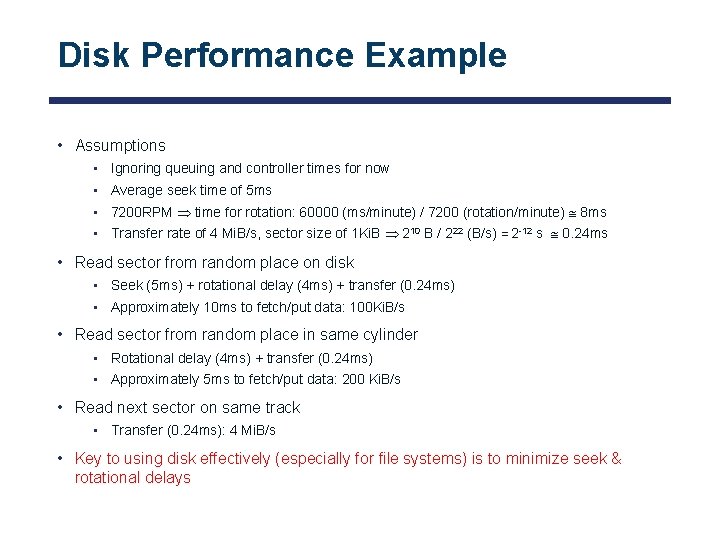
Disk Performance Example • Assumptions • Ignoring queuing and controller times for now • Average seek time of 5 ms • 7200 RPM time for rotation: 60000 (ms/minute) / 7200 (rotation/minute) 8 ms • Transfer rate of 4 Mi. B/s, sector size of 1 Ki. B 210 B / 222 (B/s) = 2 -12 s 0. 24 ms • Read sector from random place on disk • Seek (5 ms) + rotational delay (4 ms) + transfer (0. 24 ms) • Approximately 10 ms to fetch/put data: 100 Ki. B/s • Read sector from random place in same cylinder • Rotational delay (4 ms) + transfer (0. 24 ms) • Approximately 5 ms to fetch/put data: 200 Ki. B/s • Read next sector on same track • Transfer (0. 24 ms): 4 Mi. B/s • Key to using disk effectively (especially for file systems) is to minimize seek & rotational delays
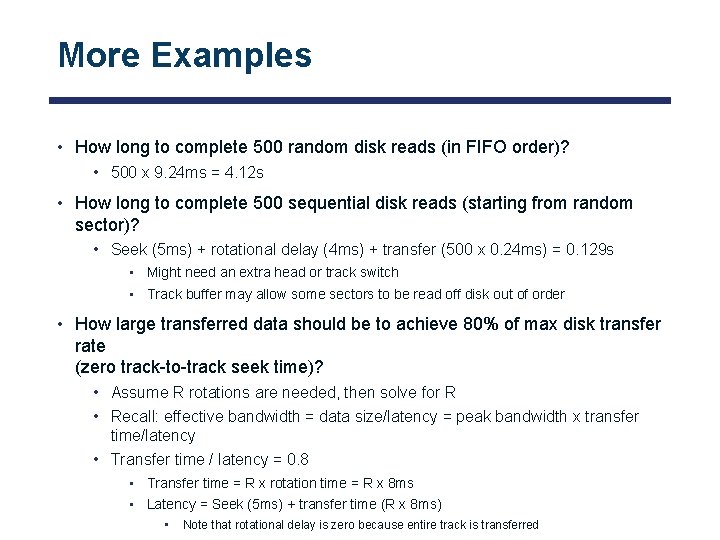
More Examples • How long to complete 500 random disk reads (in FIFO order)? • 500 x 9. 24 ms = 4. 12 s • How long to complete 500 sequential disk reads (starting from random sector)? • Seek (5 ms) + rotational delay (4 ms) + transfer (500 x 0. 24 ms) = 0. 129 s • Might need an extra head or track switch • Track buffer may allow some sectors to be read off disk out of order • How large transferred data should be to achieve 80% of max disk transfer rate (zero track-to-track seek time)? • Assume R rotations are needed, then solve for R • Recall: effective bandwidth = data size/latency = peak bandwidth x transfer time/latency • Transfer time / latency = 0. 8 • Transfer time = R x rotation time = R x 8 ms • Latency = Seek (5 ms) + transfer time (R x 8 ms) • Note that rotational delay is zero because entire track is transferred
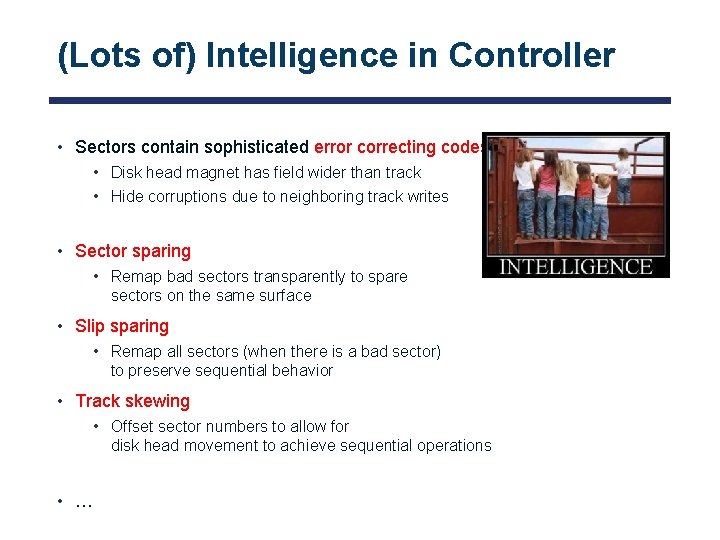
(Lots of) Intelligence in Controller • Sectors contain sophisticated error correcting codes • Disk head magnet has field wider than track • Hide corruptions due to neighboring track writes • Sector sparing • Remap bad sectors transparently to spare sectors on the same surface • Slip sparing • Remap all sectors (when there is a bad sector) to preserve sequential behavior • Track skewing • Offset sector numbers to allow for disk head movement to achieve sequential operations • …
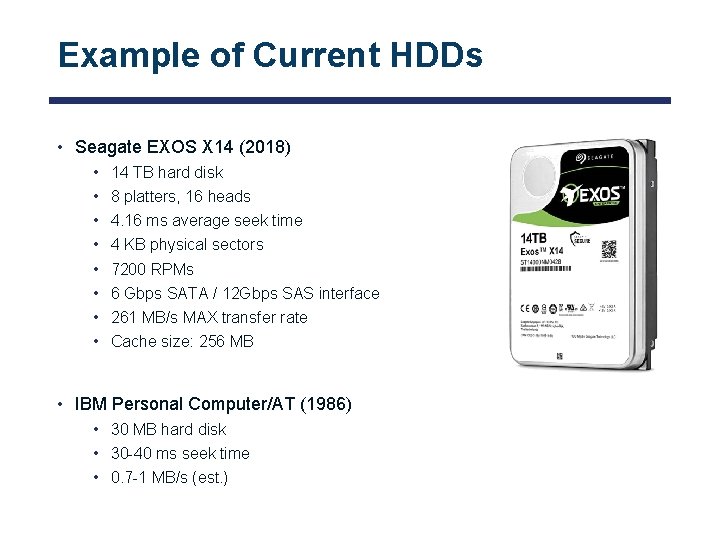
Example of Current HDDs • Seagate EXOS X 14 (2018) • • 14 TB hard disk 8 platters, 16 heads 4. 16 ms average seek time 4 KB physical sectors 7200 RPMs 6 Gbps SATA / 12 Gbps SAS interface 261 MB/s MAX transfer rate Cache size: 256 MB • IBM Personal Computer/AT (1986) • 30 MB hard disk • 30 -40 ms seek time • 0. 7 -1 MB/s (est. )
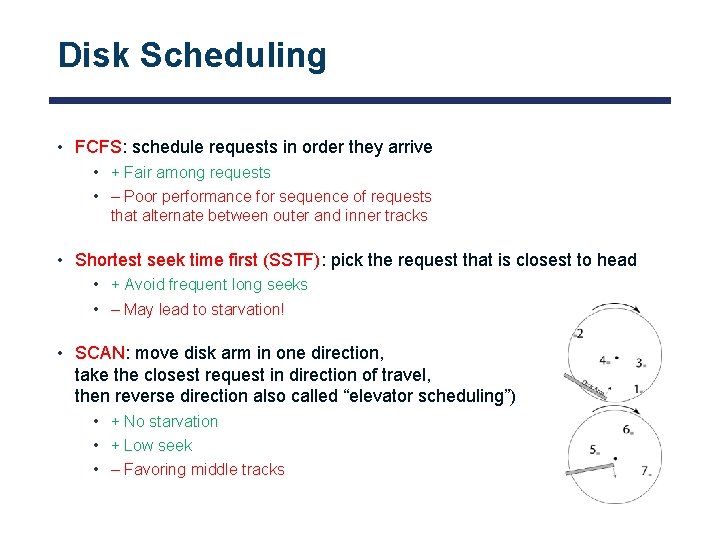
Disk Scheduling • FCFS: schedule requests in order they arrive • + Fair among requests • – Poor performance for sequence of requests that alternate between outer and inner tracks • Shortest seek time first (SSTF): pick the request that is closest to head • + Avoid frequent long seeks • – May lead to starvation! • SCAN: move disk arm in one direction, take the closest request in direction of travel, then reverse direction also called “elevator scheduling”) • + No starvation • + Low seek • – Favoring middle tracks
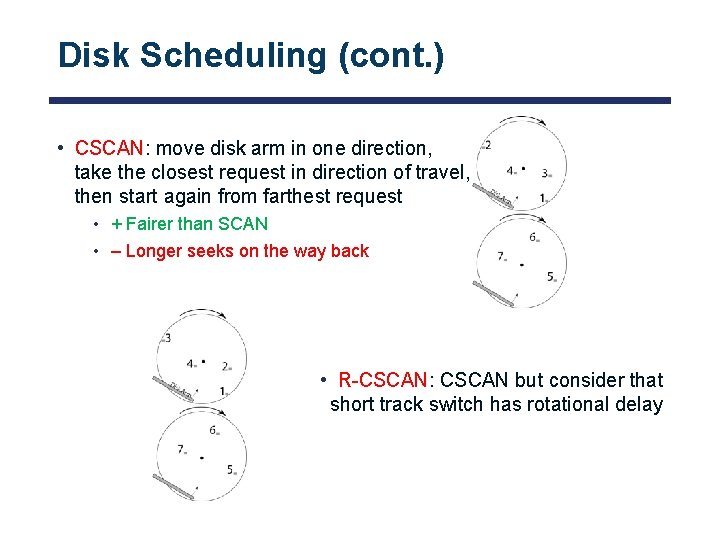
Disk Scheduling (cont. ) • CSCAN: move disk arm in one direction, take the closest request in direction of travel, then start again from farthest request • + Fairer than SCAN • – Longer seeks on the way back • R-CSCAN: CSCAN but consider that short track switch has rotational delay
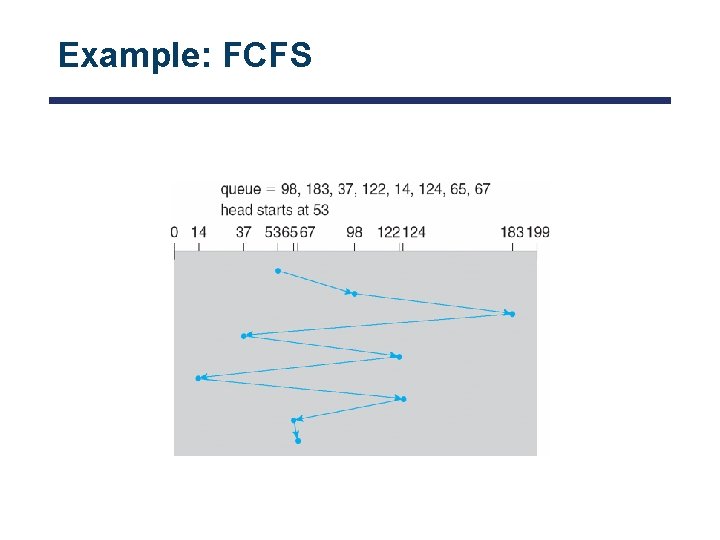
Example: FCFS
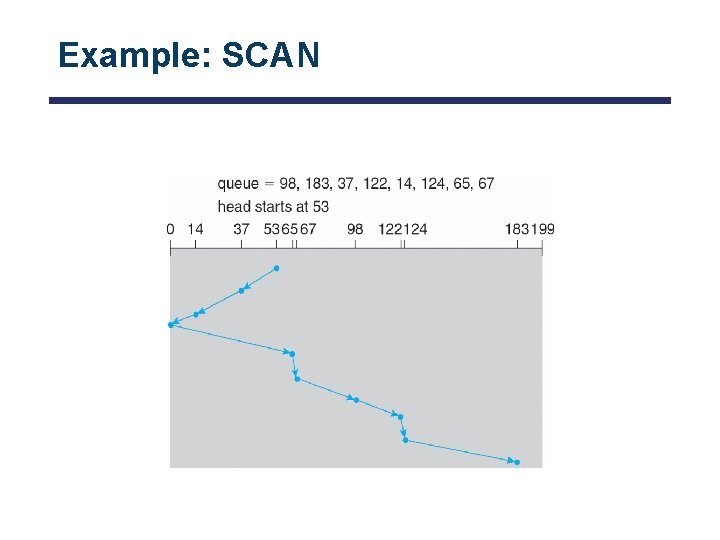
Example: SCAN
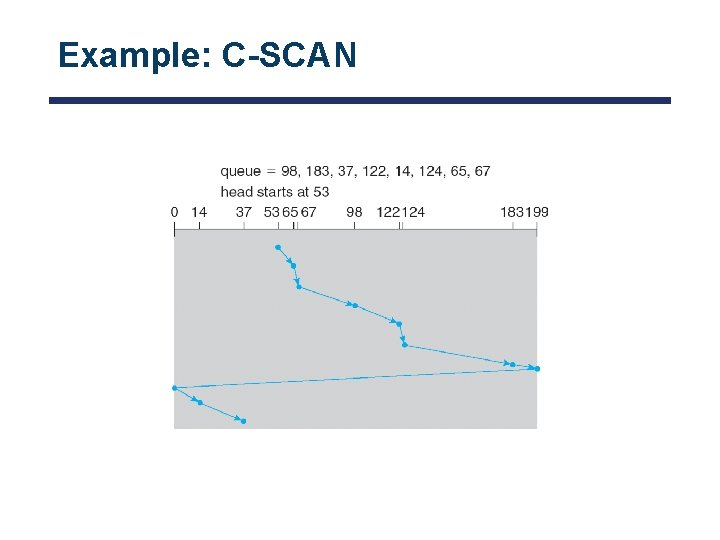
Example: C-SCAN
Final Notes on Disk Performance • When is disk performance highest? • When there are big sequential reads, or • When there is so much work to do that they can be piggy backed (reordering queues) • OK to be inefficient when things are mostly idle • Bursts are both a threat and an opportunity • Other techniques: • Reduce overhead through user level drivers • Reduce the impact of I/O delays by doing other useful work in the meantime

Flash Memory • 1995: replace rotating magnetic media with battery backed DRAM • 2009: use NAND multi-level cell (e. g. , 2 or 3 -bit cell) flash memory • No charge on FG ⇒ 1 and negative charge on FG ⇒ 0 • Data can be addressed, read, and modified in pages, typically between 4 Ki. B and 16 Ki. B • But … data can only be erased at level of entire blocks (Mi. B in size) • When block is erased all cells are logically set to 1 • No moving parts (no rotate/seek motors) • Eliminates seek and rotational delay • Very low power and lightweight • Limited “write cycles” Figures: www. androidcentral. com and flashdba. com
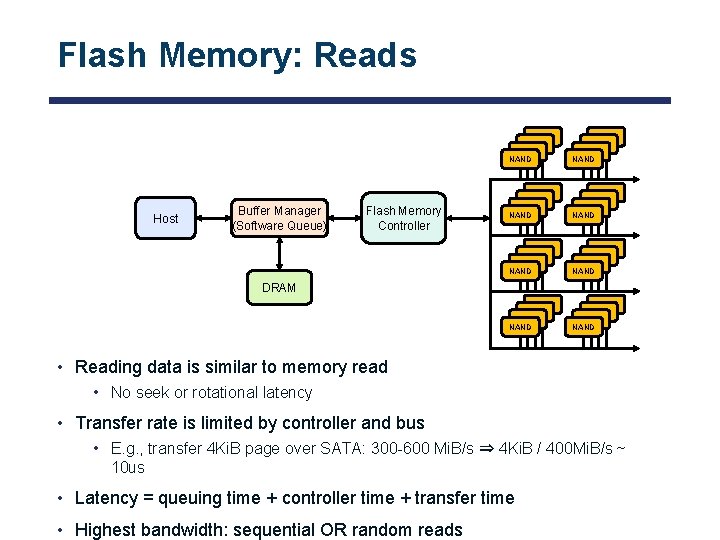
Flash Memory: Reads Host Buffer Manager (Software Queue) Flash Memory Controller NAND NAND NAND NAND NAND NAND NAND NAND DRAM • Reading data is similar to memory read • No seek or rotational latency • Transfer rate is limited by controller and bus • E. g. , transfer 4 Ki. B page over SATA: 300 -600 Mi. B/s ⇒ 4 Ki. B / 400 Mi. B/s ~ 10 us • Latency = queuing time + controller time + transfer time • Highest bandwidth: sequential OR random reads

Flash Memory: Writes • Writing data is complex! • Write and erase cycles require “high” voltage • Damages memory cells, limits SSD lifespan • Controller uses ECC, performs wear leveling • Data can only be written into empty pages in each block • Pages cannot be erased individually, erasing entire block takes time wikipedia. org
Flash Memory Controller • Flash devices include flash translation layer (FTL) • Maps logical flash pages to physical pages on flash device • Wear-levels by only writing each physical page a limited number of times • Remaps pages that no longer work (sector sparing) • When logical page is overwritten, TTL write new version to already-erased page • Remaps logical page to the new physical page • FTL maintains pool of empty blocks by coalescing used pages • Garbage collects blocks by copying live pages to new location, then erase • More efficient if blocks stored at the same time are deleted at the same time (e. g. , keep blocks of file together) • How does flash device know which blocks are live? • File system tells device when blocks are no longer in use (Trim command)

Example: Writes with GC • Rewriting some data requires reading, updating, and writing to new locations • If new location was previously used, it also needs to be erased • Much larger portions of flash may be erased and rewritten than required by size of new data wikipedia. org
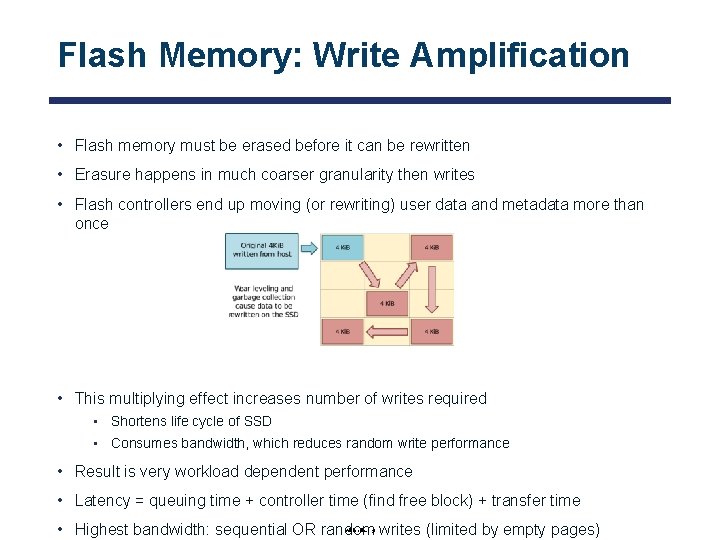
Flash Memory: Write Amplification • Flash memory must be erased before it can be rewritten • Erasure happens in much coarser granularity then writes • Flash controllers end up moving (or rewriting) user data and metadata more than once • This multiplying effect increases number of writes required • Shortens life cycle of SSD • Consumes bandwidth, which reduces random write performance • Result is very workload dependent performance • Latency = queuing time + controller time (find free block) + transfer time • Highest bandwidth: sequential OR random writes (limited by empty pages) wikipedia. org
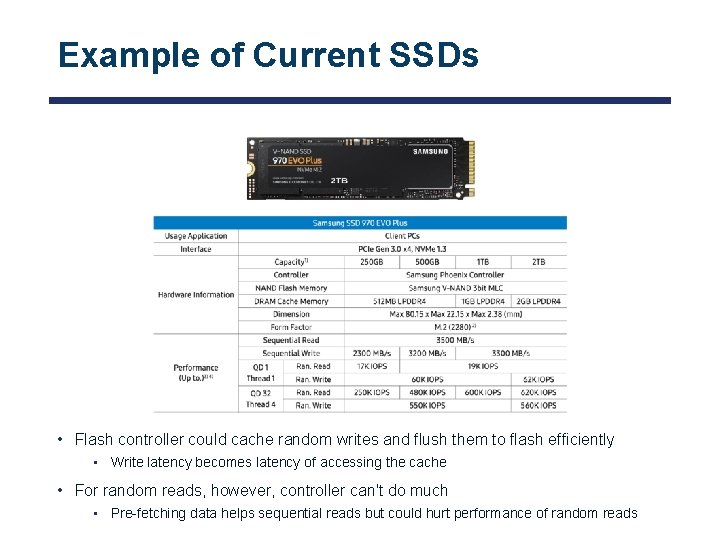
Example of Current SSDs • Flash controller could cache random writes and flush them to flash efficiently • Write latency becomes latency of accessing the cache • For random reads, however, controller can't do much • Pre-fetching data helps sequential reads but could hurt performance of random reads

Is Full Kindle Heavier Than Empty One? • Actually, “Yes”, but not by much • Flash works by trapping electrons: • So, erased state lower energy than written state • Assuming that: • • Kindle has 4 GB flash ½ of all bits in full Kindle are in high-energy state High-energy state about 10 -15 joules higher Then: Full Kindle is 1 attogram (10 -18 gram) heavier (Using E = mc 2) • Of course, this is less than most sensitive scale can measure (10 -9 grams) • This difference is overwhelmed by battery discharge, weight from getting warm, … According to John Kubiatowicz (New York Times, Oct 24, 2011)
SSD Summary • Pros (vs. hard disk drives) • Low latency, high throughput (eliminate seek/rotational delay) • No moving parts (very light weight, low power, silent, very shock insensitive) • Read at memory speeds (limited by controller and I/O bus) • Cons (these are changing rapidly!) • Expensive • Asymmetric block write performance • Controller garbage collection (GC) algorithms have major effect on performance • Limited drive lifetime • 1 -10 K writes/page for MLC NAND
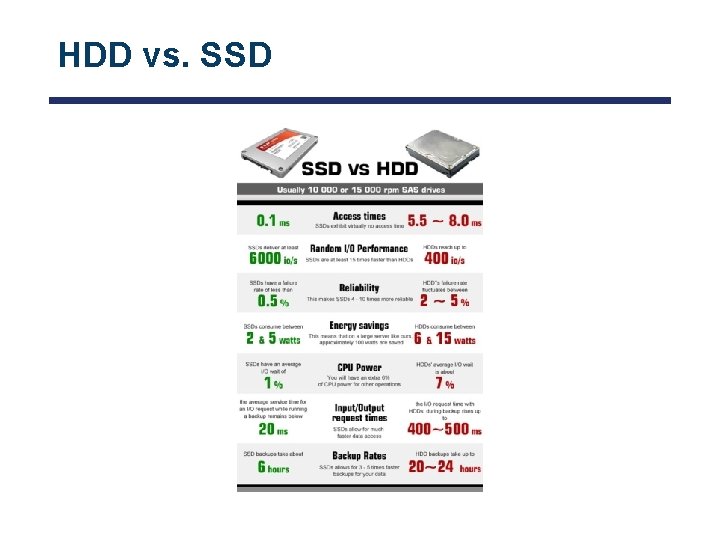
HDD vs. SSD
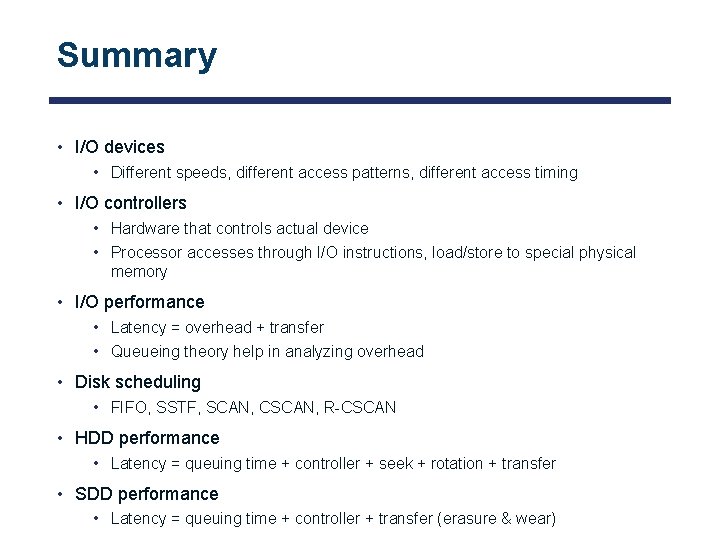
Summary • I/O devices • Different speeds, different access patterns, different access timing • I/O controllers • Hardware that controls actual device • Processor accesses through I/O instructions, load/store to special physical memory • I/O performance • Latency = overhead + transfer • Queueing theory help in analyzing overhead • Disk scheduling • FIFO, SSTF, SCAN, CSCAN, R-CSCAN • HDD performance • Latency = queuing time + controller + seek + rotation + transfer • SDD performance • Latency = queuing time + controller + transfer (erasure & wear)
Questions? globaldigitalcitizen. org
Acknowledgment • Slides by courtesy of Anderson, Culler, Stoica, Silberschatz, Joseph, and Canny
- Slides: 63