
Lecture 10 Buffer Manager and File Organization Lecture
Lecture 10: Buffer Manager and File Organization
Lecture 10 Today’s Lecture 1. Recap: Buffer Manager 2. Replacement Policies 3. Files and Records 2
Lecture 10 > Section 1 1. Buffer Manager 3
Lecture 10 > Section 1 What you will learn about in this section 1. Buffer Pool 2. Buffer Manager 4
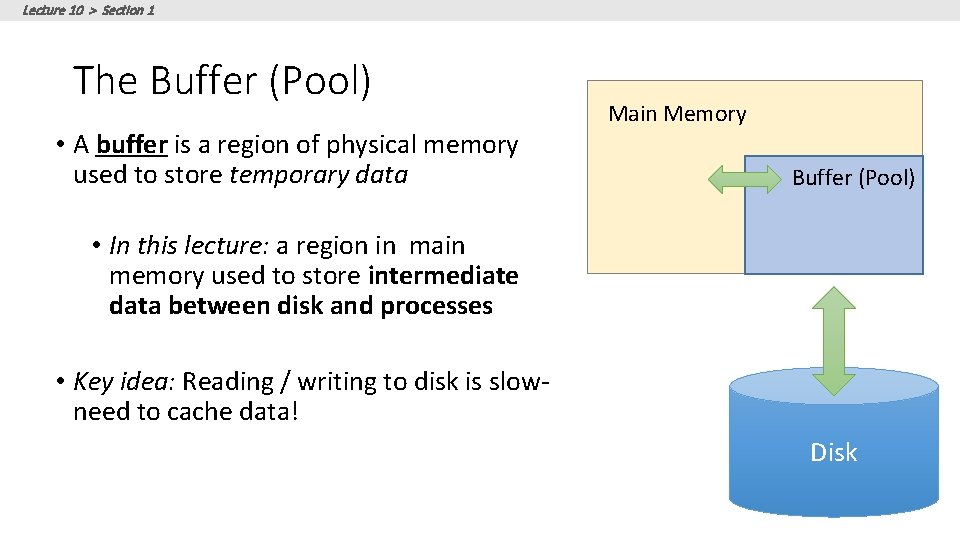
Lecture 10 > Section 1 The Buffer (Pool) • A buffer is a region of physical memory used to store temporary data Main Memory Buffer (Pool) • In this lecture: a region in main memory used to store intermediate data between disk and processes • Key idea: Reading / writing to disk is slowneed to cache data! Disk
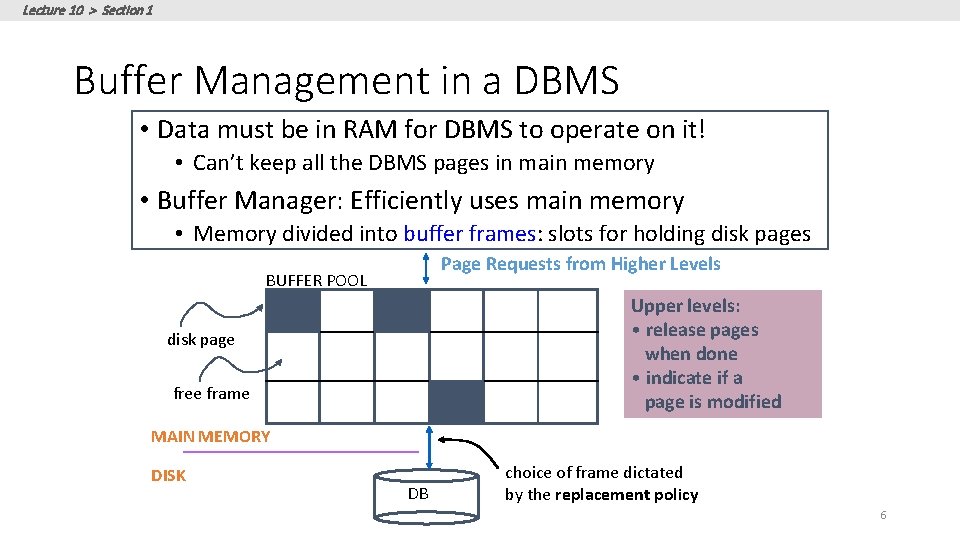
Lecture 10 > Section 1 Buffer Management in a DBMS • Data must be in RAM for DBMS to operate on it! • Can’t keep all the DBMS pages in main memory • Buffer Manager: Efficiently uses main memory • Memory divided into buffer frames: slots for holding disk pages Page Requests from Higher Levels BUFFER POOL Upper levels: • release pages when done • indicate if a page is modified disk page free frame MAIN MEMORY DISK DB choice of frame dictated by the replacement policy 6
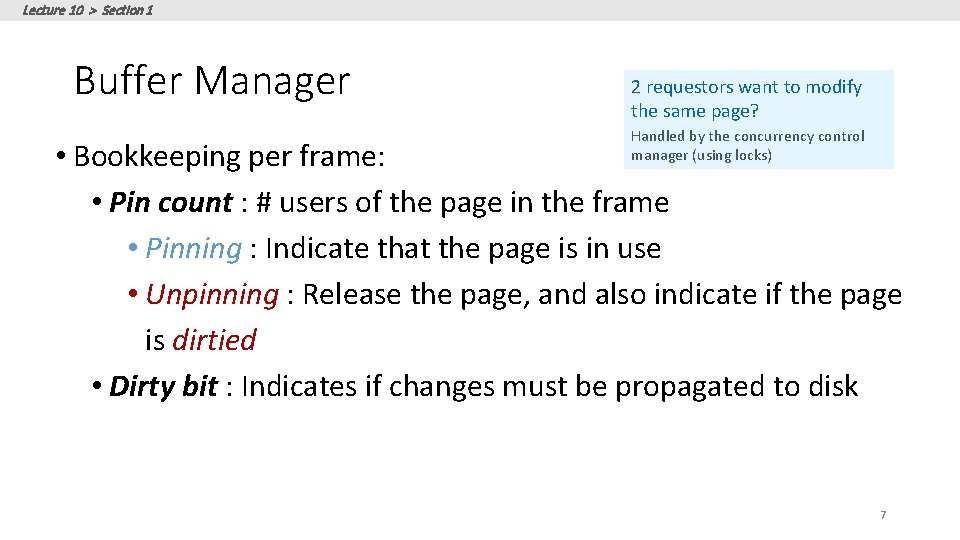
Lecture 10 > Section 1 Buffer Manager 2 requestors want to modify the same page? Handled by the concurrency control manager (using locks) • Bookkeeping per frame: • Pin count : # users of the page in the frame • Pinning : Indicate that the page is in use • Unpinning : Release the page, and also indicate if the page is dirtied • Dirty bit : Indicates if changes must be propagated to disk 7
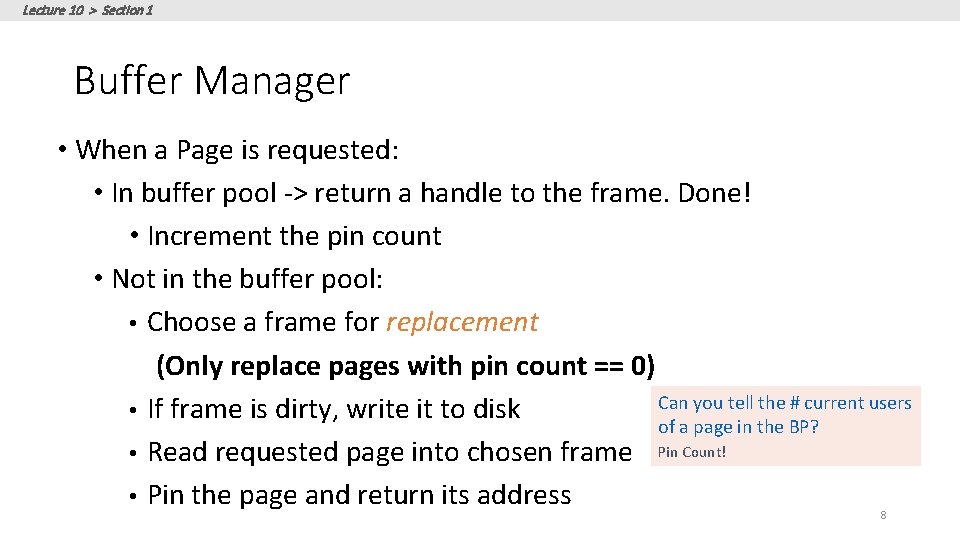
Lecture 10 > Section 1 Buffer Manager • When a Page is requested: • In buffer pool -> return a handle to the frame. Done! • Increment the pin count • Not in the buffer pool: • Choose a frame for replacement (Only replace pages with pin count == 0) Can you tell the # current users • If frame is dirty, write it to disk of a page in the BP? • Read requested page into chosen frame Pin Count! • Pin the page and return its address 8
Lecture 10 > Section 2 2. Replacement Policies 9
Lecture 10 > Section 2 What you will learn about in this section 1. Replacement Policy 2. LRU and Clock 3. Sequential Flooding 10
Lecture 10 > Section 2 Buffer replacement policy • How do we choose a frame for replacement? • LRU (Least Recently Used) • Clock • MRU (Most Recently Used) • FIFO, random, … • The replacement policy has big impact on # of I/O’s (depends on the access pattern) 11
Lecture 10 > Section 2 LRU • uses a queue of pointers to frames that have pin count = 0 • a page request uses frames only from the head of the queue • when a the pin count of a frame goes to 0, it is added to the end of the queue 12
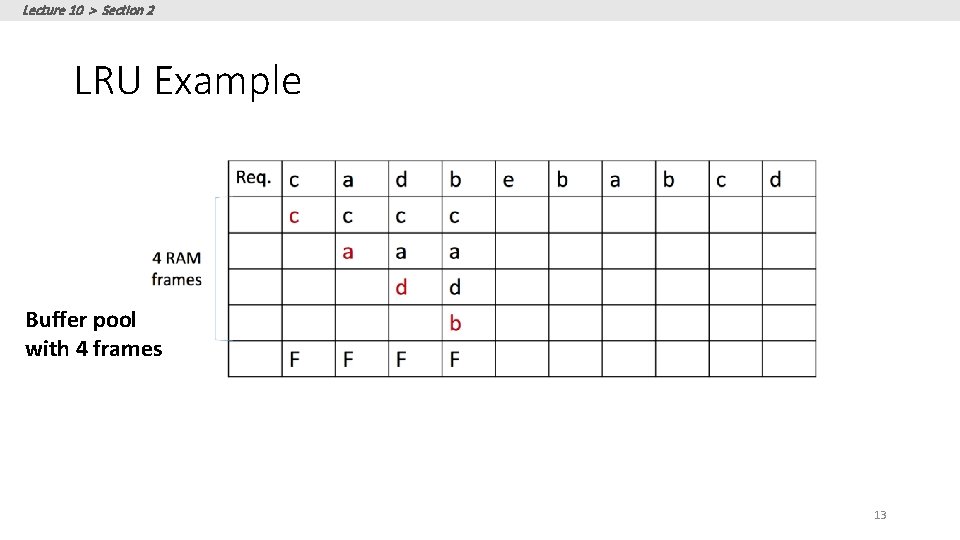
Lecture 10 > Section 2 LRU Example Buffer pool with 4 frames 13
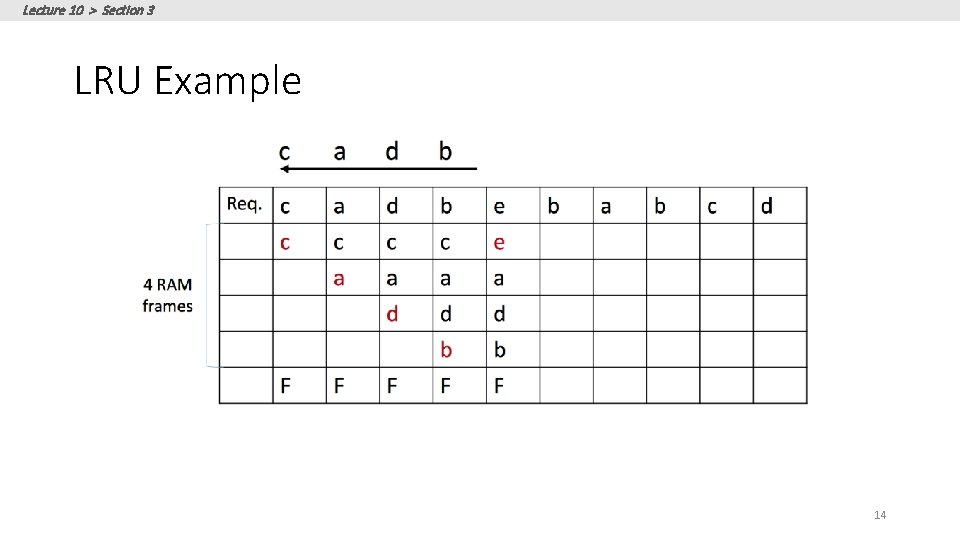
Lecture 10 > Section 3 LRU Example 14
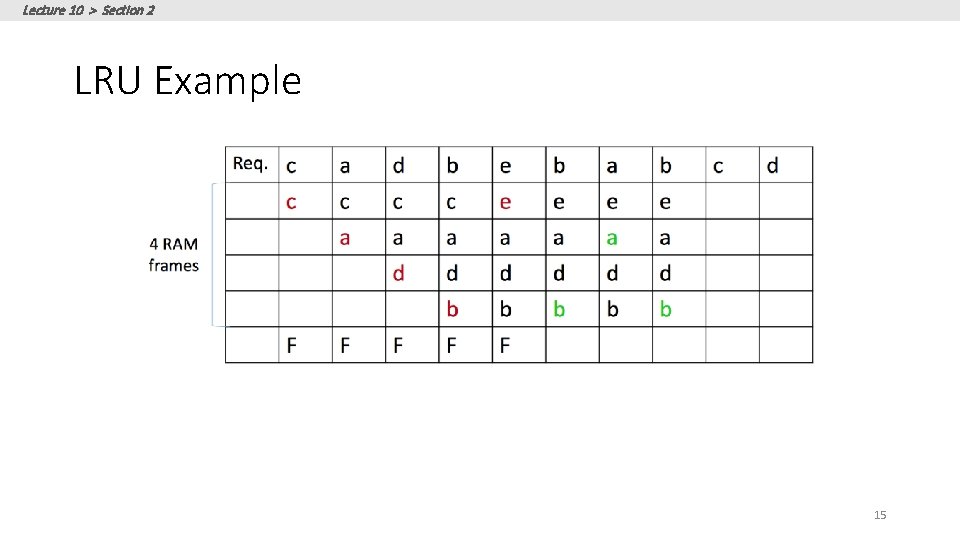
Lecture 10 > Section 2 LRU Example 15
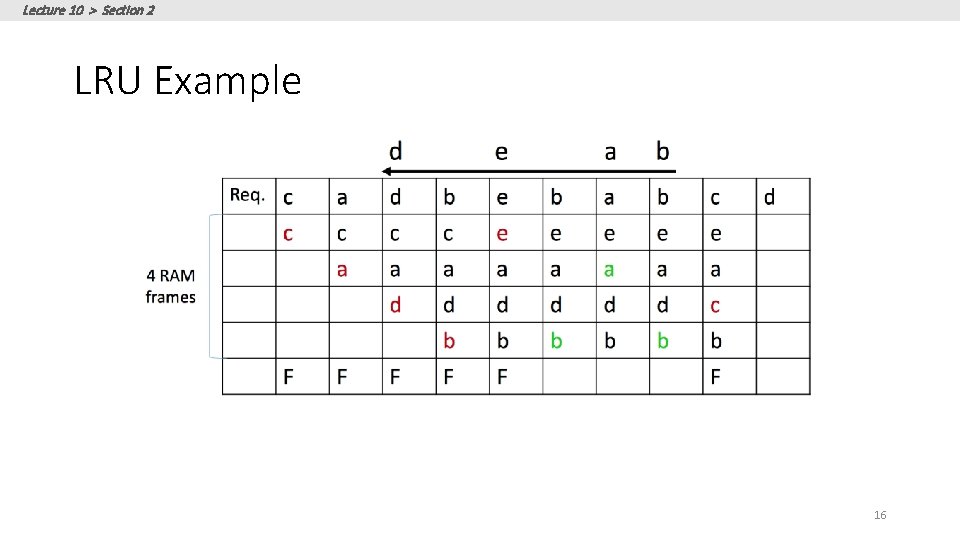
Lecture 10 > Section 2 LRU Example 16
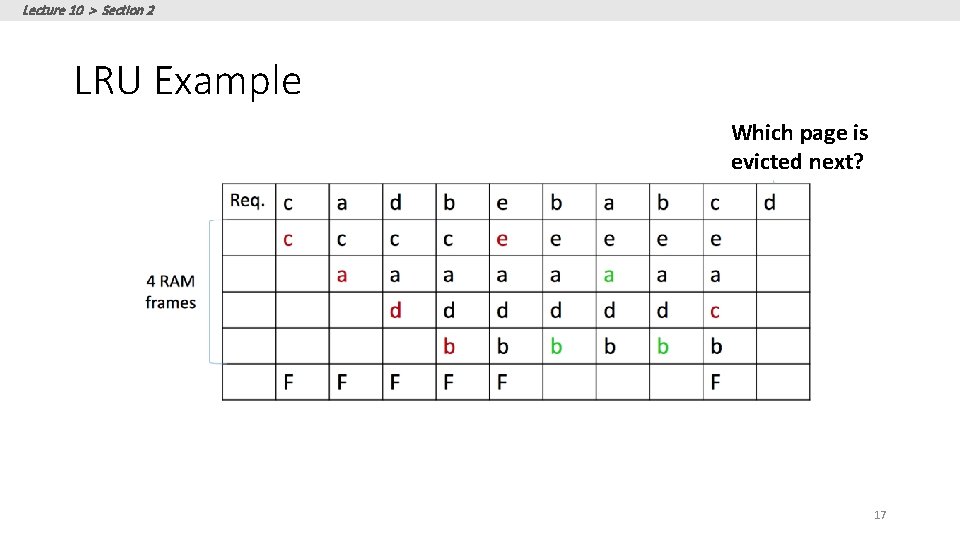
Lecture 10 > Section 2 LRU Example Which page is evicted next? 17
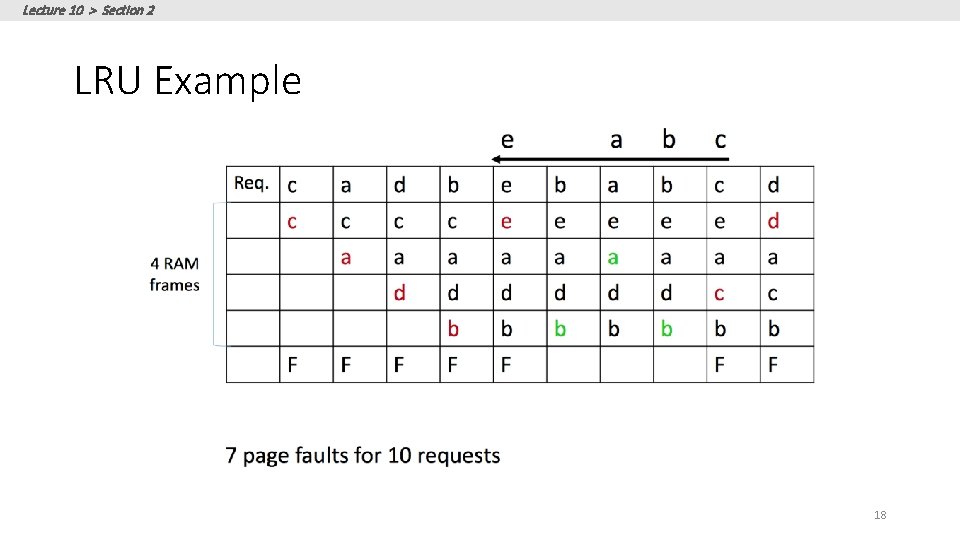
Lecture 10 > Section 2 LRU Example 18
Lecture 10 > Section 2 Clock • Variant of LRU with lower memory overhead • The N frames are organized into a cycle • Each frame has a referenced bit that is set to 1 when pin count becomes 0 • A current variable points to a frame • When a frame is considered: • • • If pin count > 0, increment current If referenced = 1, set to 0 and increment If referenced = 0 and pin count = 0, choose the page 19
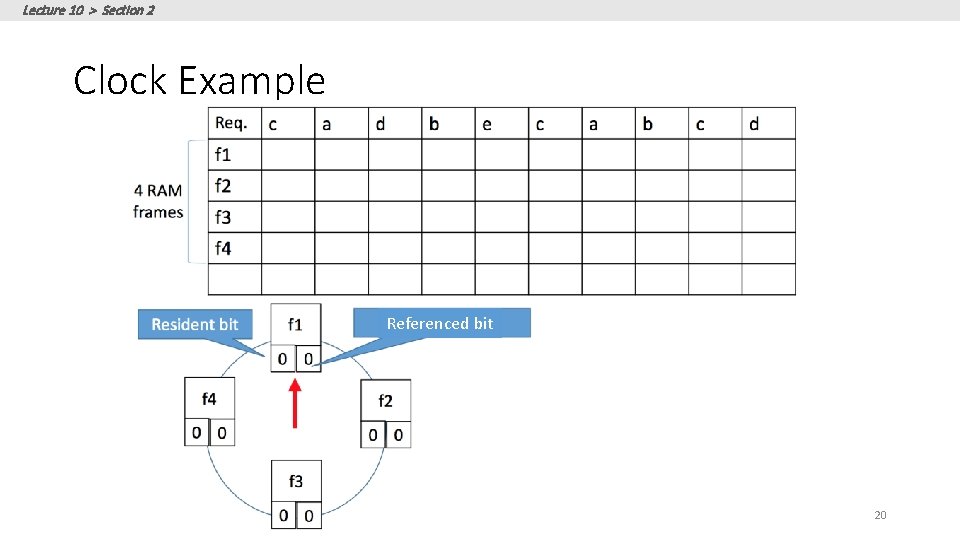
Lecture 10 > Section 2 Clock Example Referenced bit 20
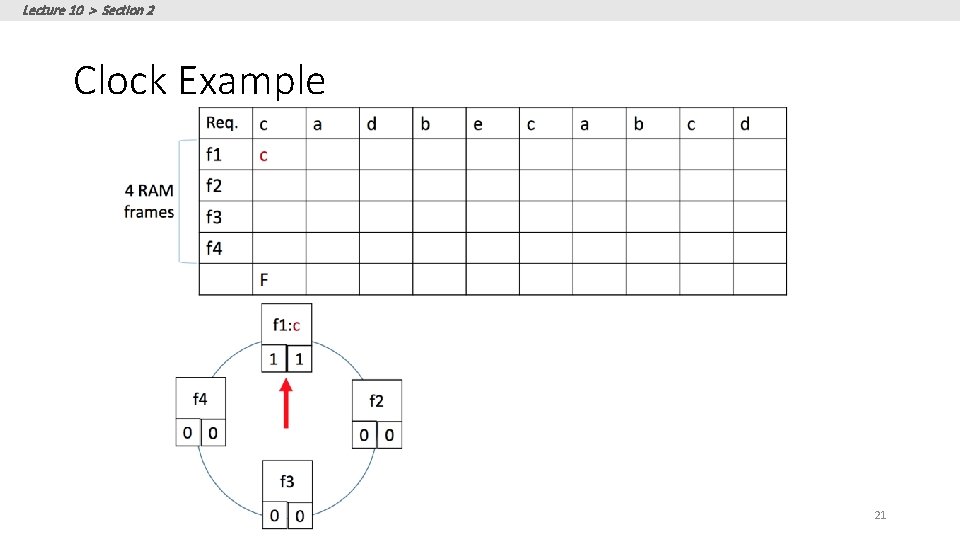
Lecture 10 > Section 2 Clock Example 21
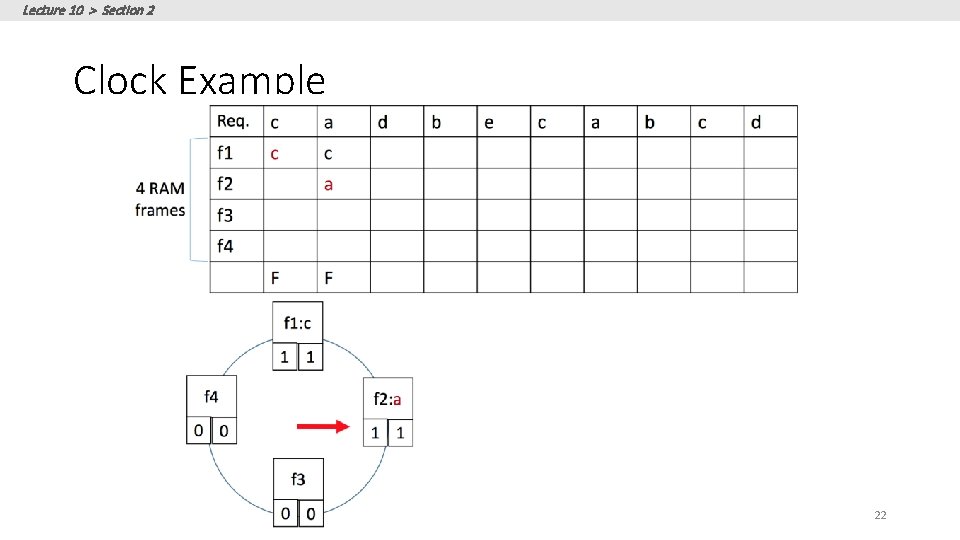
Lecture 10 > Section 2 Clock Example 22
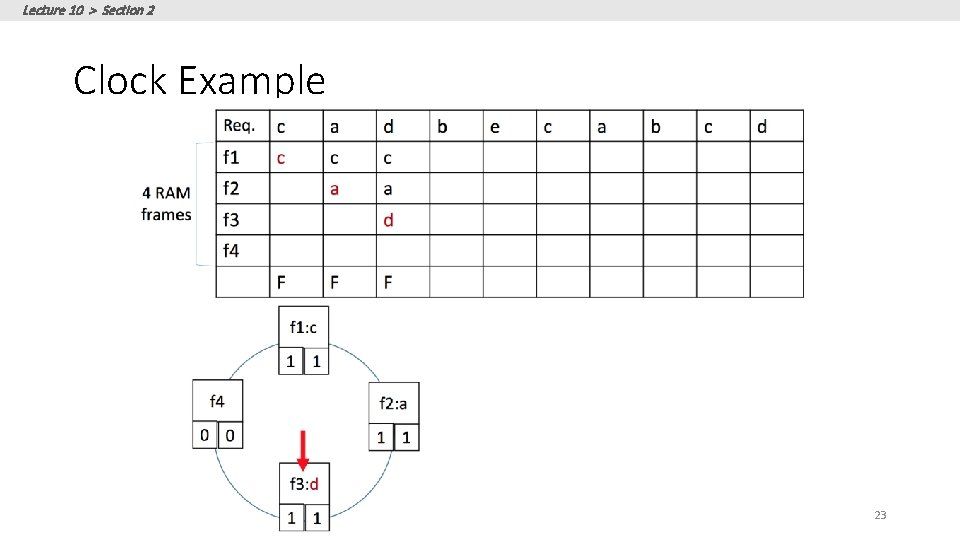
Lecture 10 > Section 2 Clock Example 23
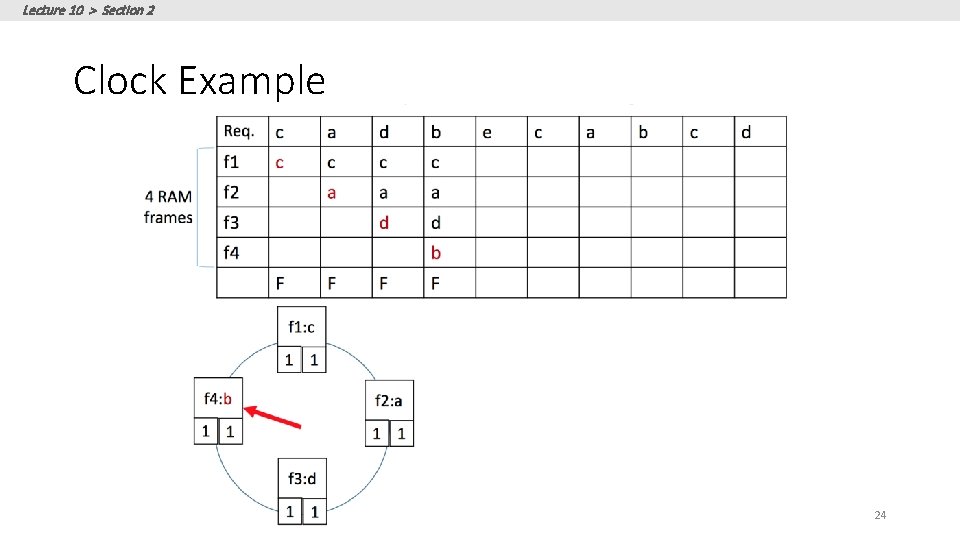
Lecture 10 > Section 2 Clock Example 24
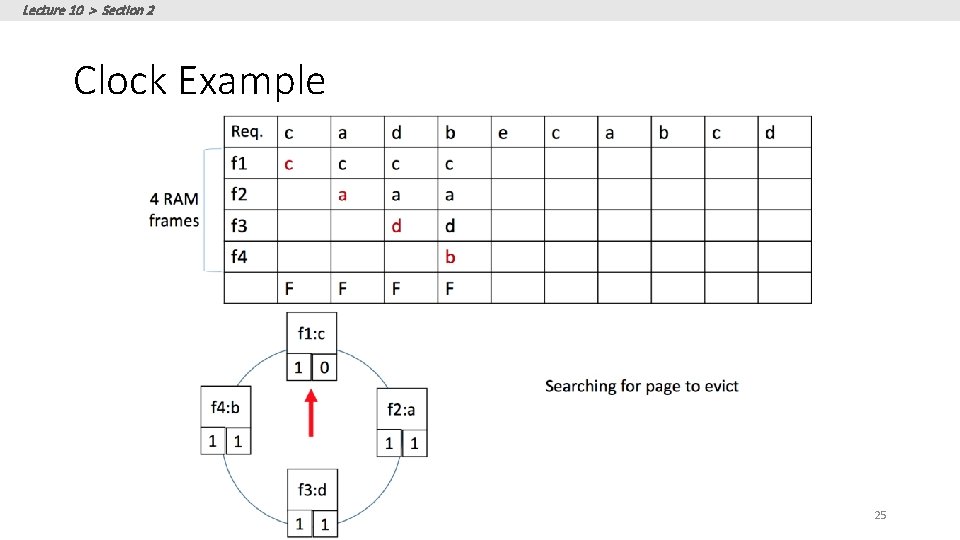
Lecture 10 > Section 2 Clock Example 25
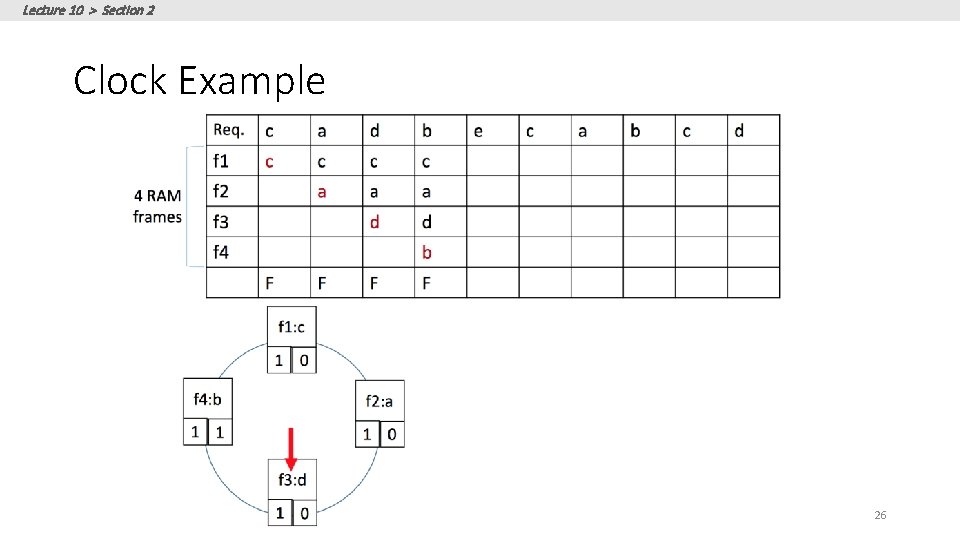
Lecture 10 > Section 2 Clock Example 26
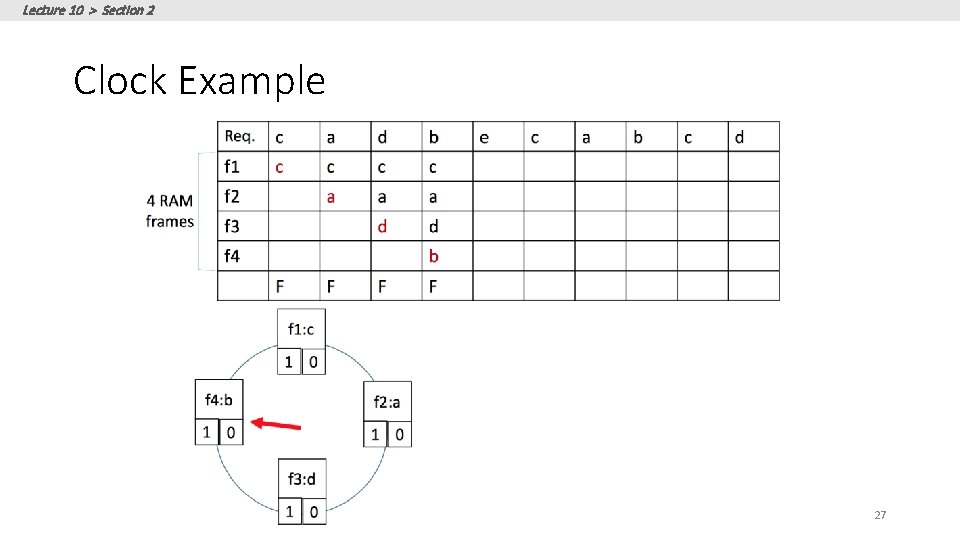
Lecture 10 > Section 2 Clock Example 27
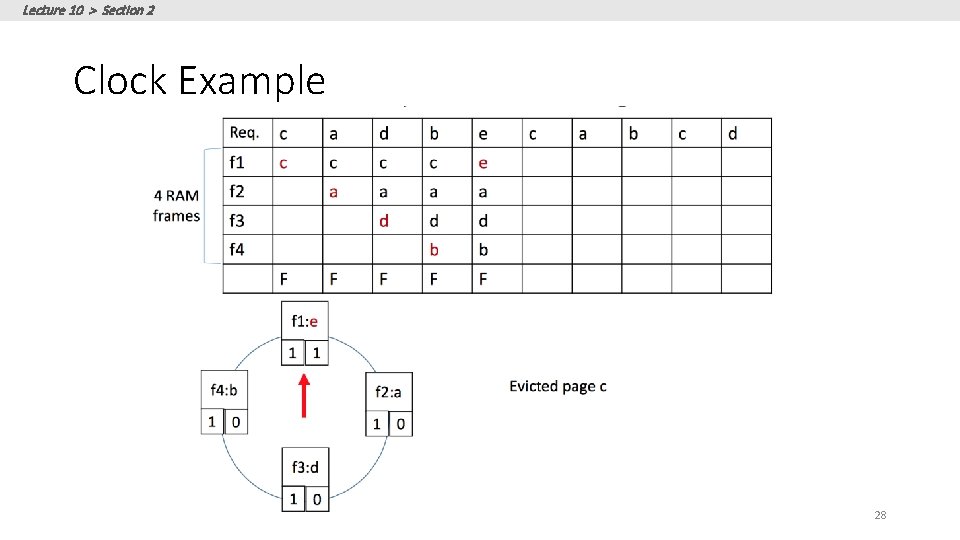
Lecture 10 > Section 2 Clock Example 28
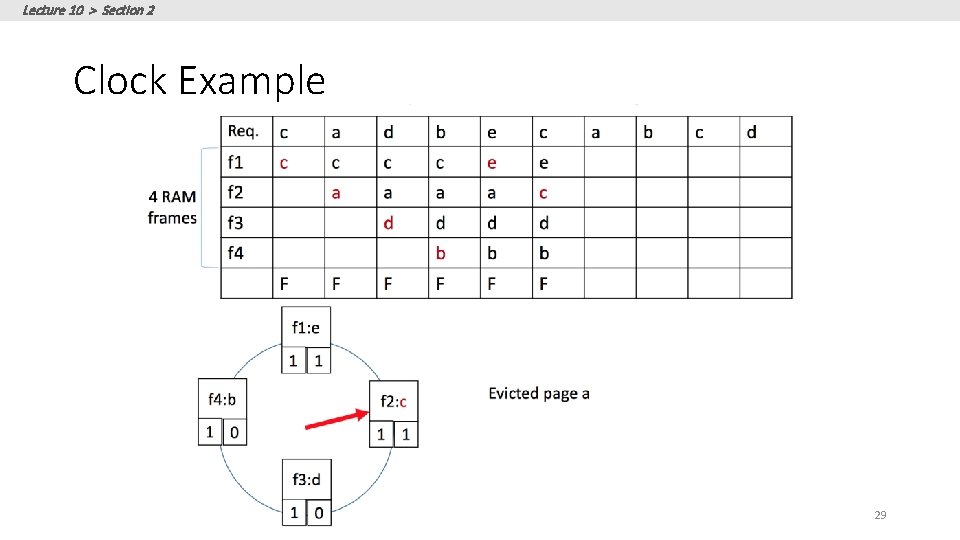
Lecture 10 > Section 2 Clock Example 29
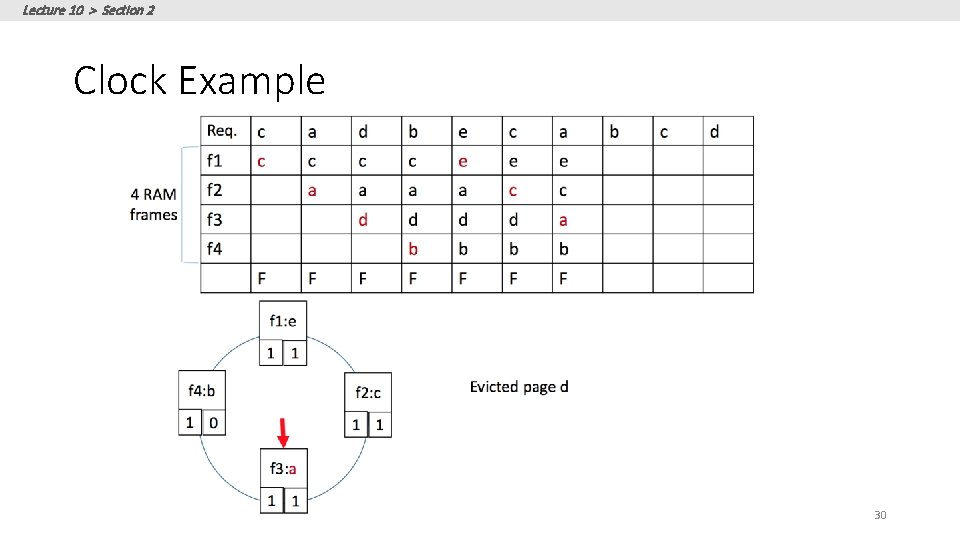
Lecture 10 > Section 2 Clock Example 30
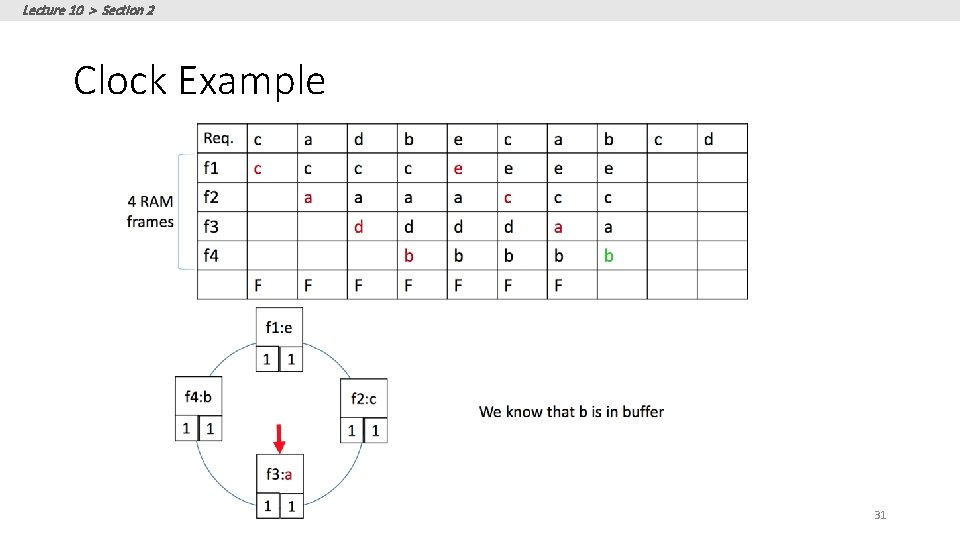
Lecture 10 > Section 2 Clock Example 31
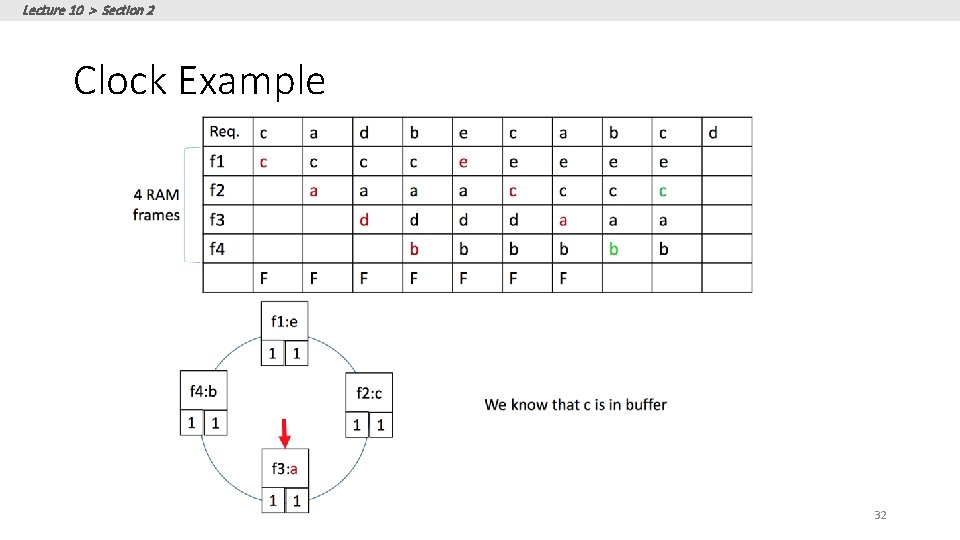
Lecture 10 > Section 2 Clock Example 32
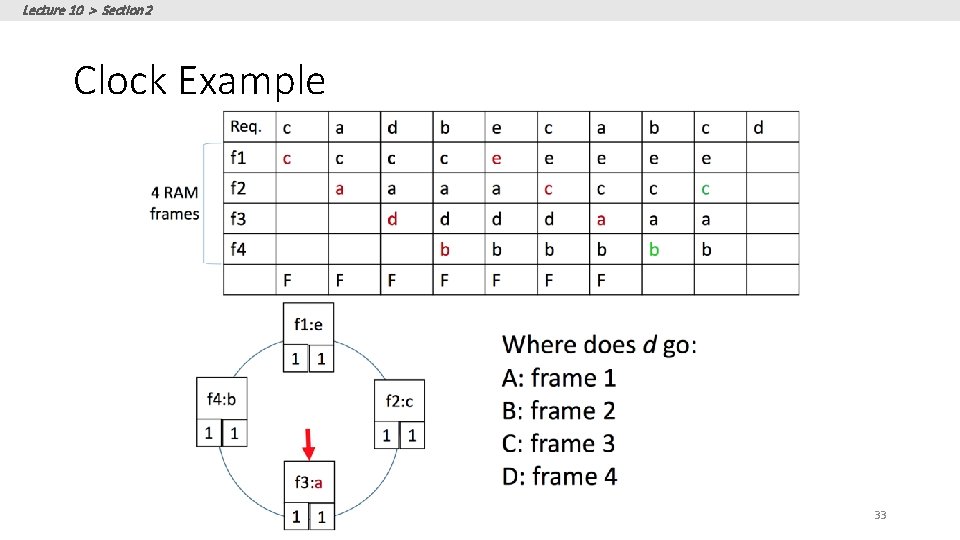
Lecture 10 > Section 2 Clock Example 33
Lecture 10 > Section 2 Sequential Flooding • Nasty situation caused by LRU policy + repeated sequential scans • • • # buffer frames < # pages in file each page request causes an I/O !! MRU much better in this situation 34
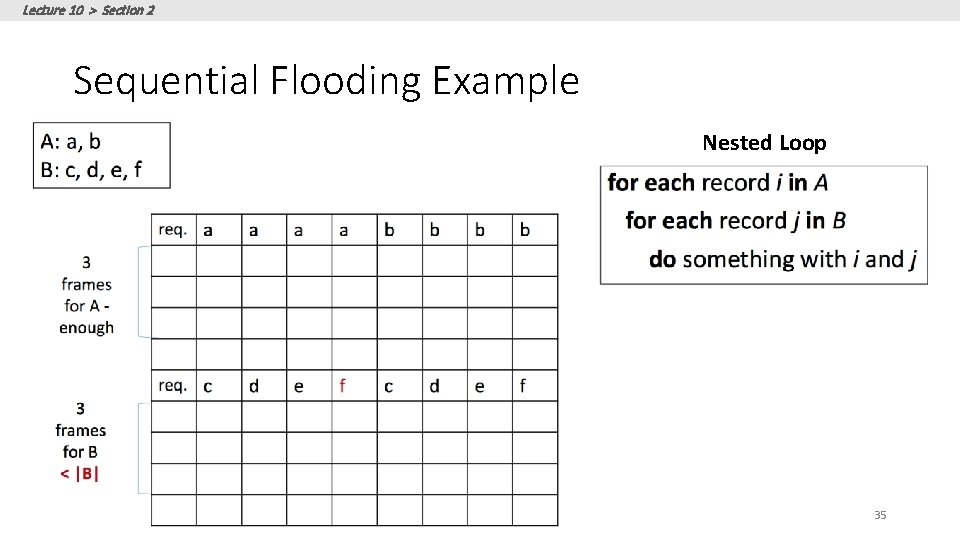
Lecture 10 > Section 2 Sequential Flooding Example Nested Loop 35
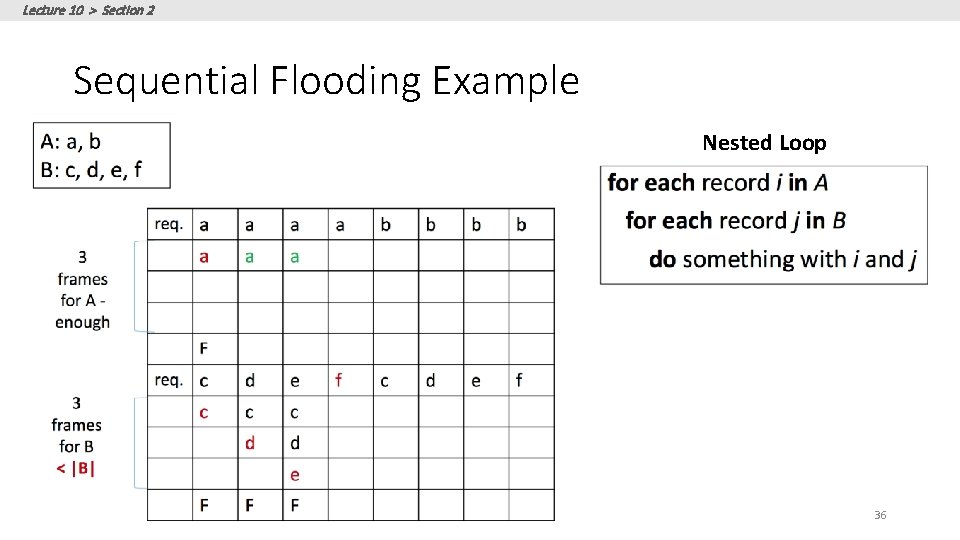
Lecture 10 > Section 2 Sequential Flooding Example Nested Loop 36
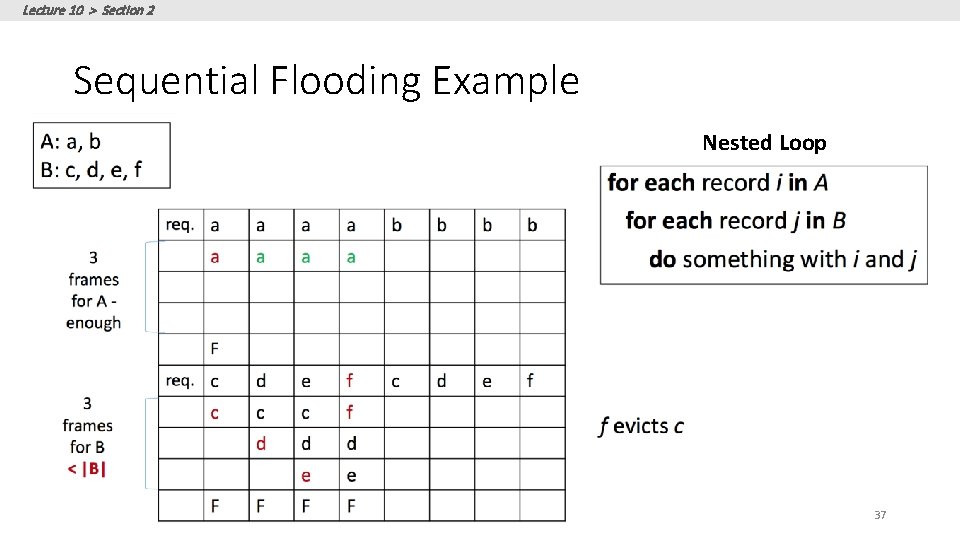
Lecture 10 > Section 2 Sequential Flooding Example Nested Loop 37
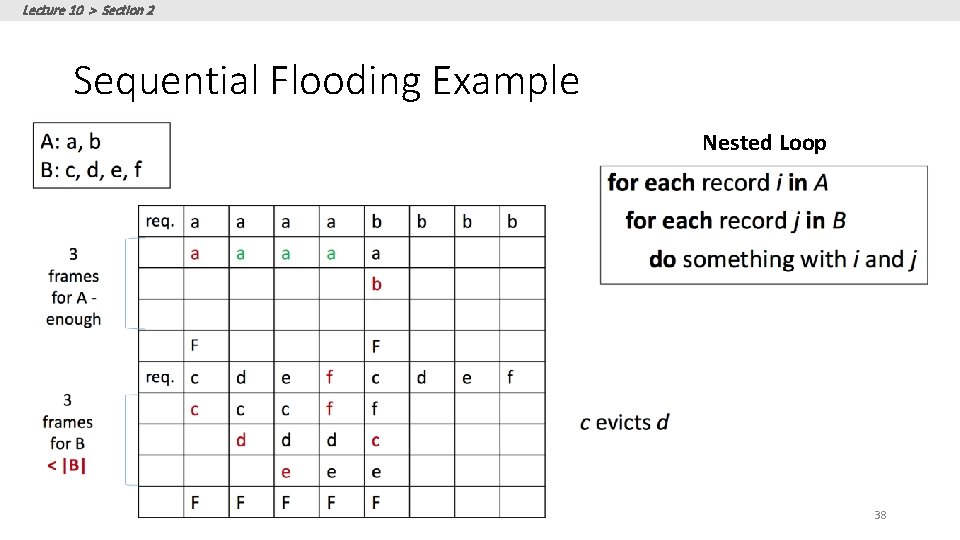
Lecture 10 > Section 2 Sequential Flooding Example Nested Loop 38
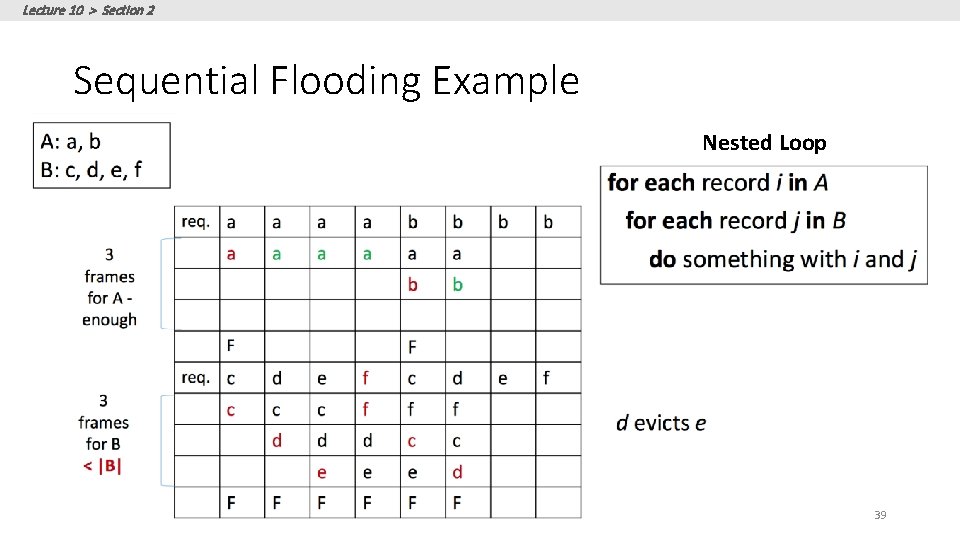
Lecture 10 > Section 2 Sequential Flooding Example Nested Loop 39
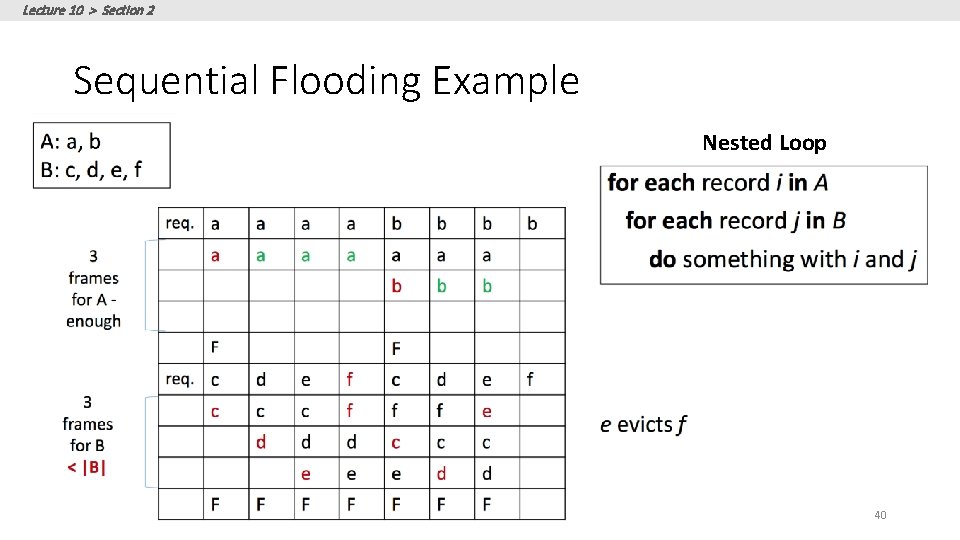
Lecture 10 > Section 2 Sequential Flooding Example Nested Loop 40
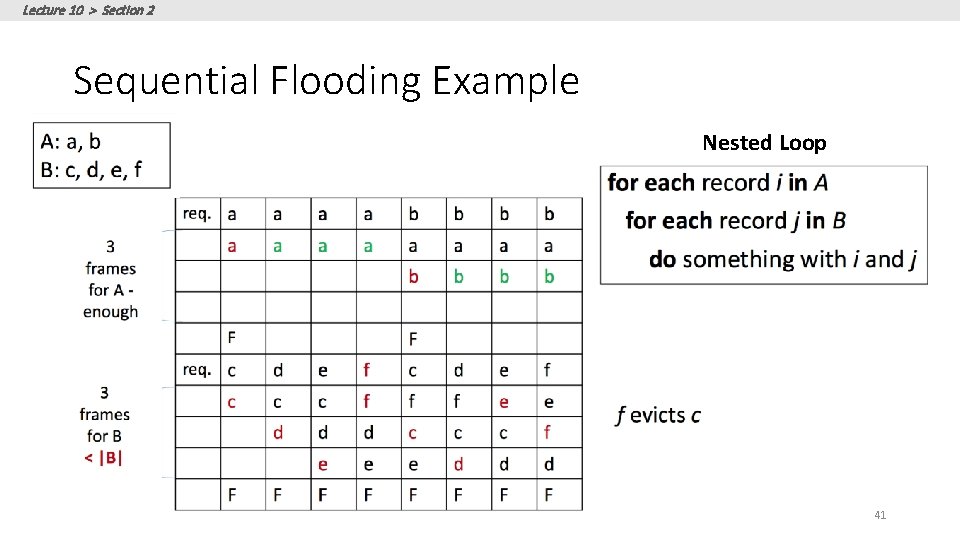
Lecture 10 > Section 2 Sequential Flooding Example Nested Loop 41
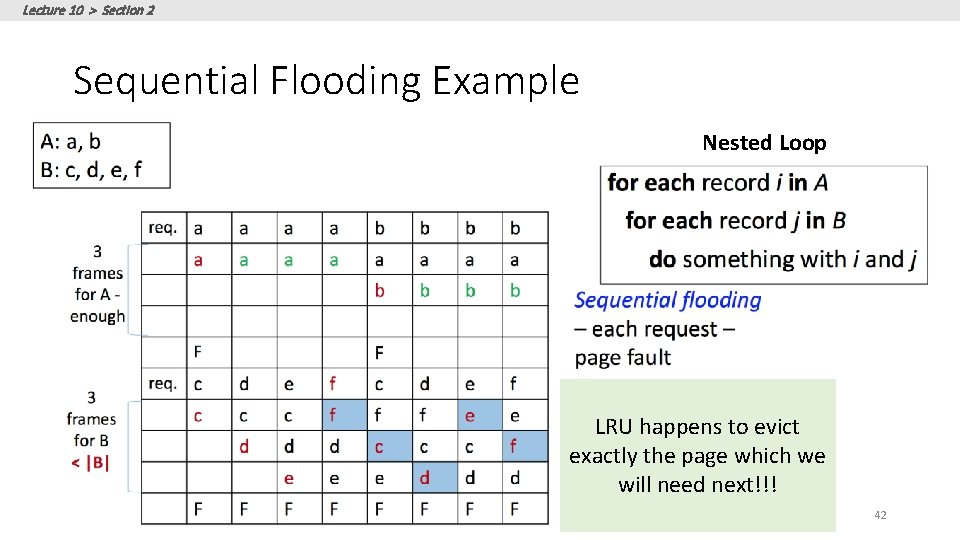
Lecture 10 > Section 2 Sequential Flooding Example Nested Loop LRU happens to evict exactly the page which we will need next!!! 42
Lecture 10 > Section 2 Sequential Flooding • Nasty situation caused by LRU policy + repeated sequential scans • • • # buffer frames < # pages in file each page request causes an I/O !! MRU much better in this situation 43
Lecture 10 > Section 3 3. Files and Records 44
Lecture 10 > Section 3 What you will learn about in this section 1. File Organization 2. Page Organization 3. BONUS: Column Stores 45
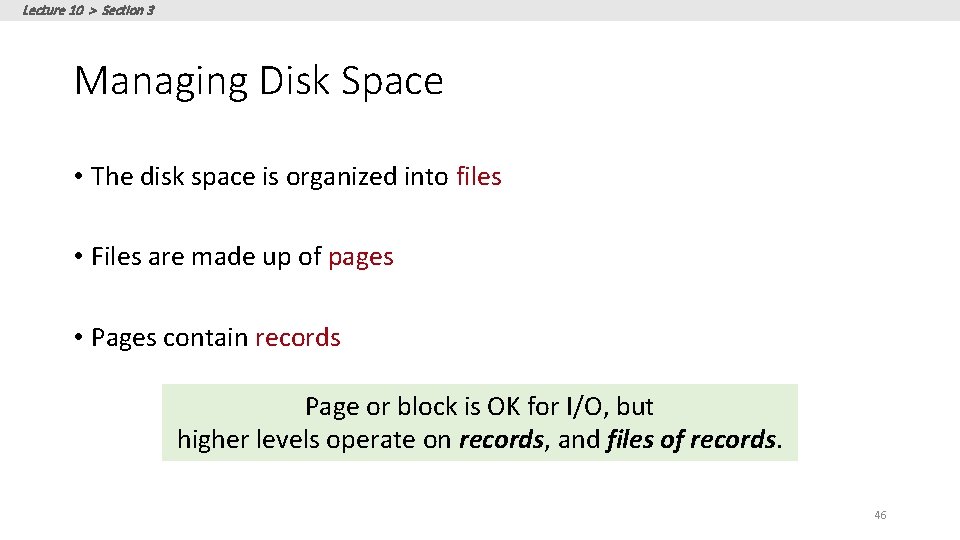
Lecture 10 > Section 3 Managing Disk Space • The disk space is organized into files • Files are made up of pages • Pages contain records Page or block is OK for I/O, but higher levels operate on records, and files of records. 46
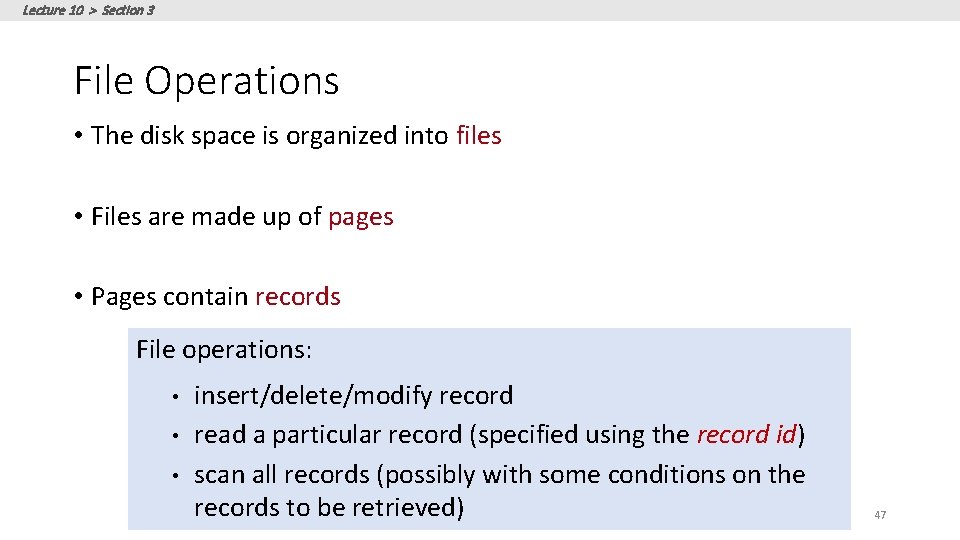
Lecture 10 > Section 3 File Operations • The disk space is organized into files • Files are made up of pages • Pages contain records File operations: • • • insert/delete/modify record read a particular record (specified using the record id) scan all records (possibly with some conditions on the records to be retrieved) 47
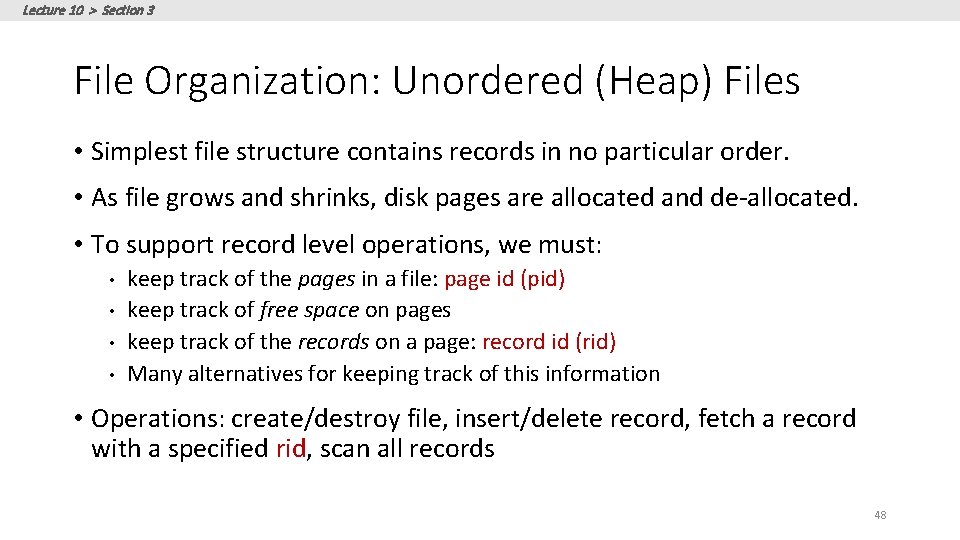
Lecture 10 > Section 3 File Organization: Unordered (Heap) Files • Simplest file structure contains records in no particular order. • As file grows and shrinks, disk pages are allocated and de-allocated. • To support record level operations, we must: • • keep track of the pages in a file: page id (pid) keep track of free space on pages keep track of the records on a page: record id (rid) Many alternatives for keeping track of this information • Operations: create/destroy file, insert/delete record, fetch a record with a specified rid, scan all records 48
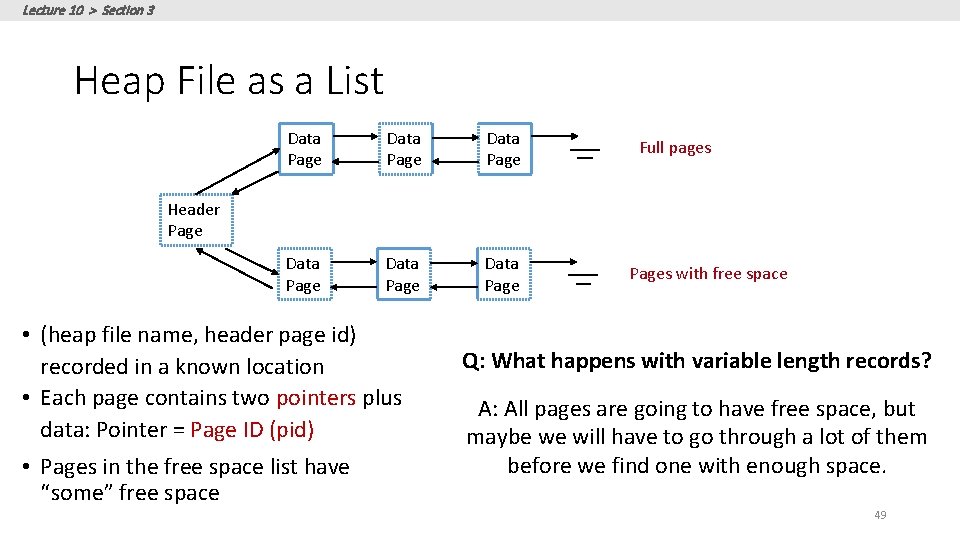
Lecture 10 > Section 3 Heap File as a List Data Page Data Page Full pages Header Page • (heap file name, header page id) recorded in a known location • Each page contains two pointers plus data: Pointer = Page ID (pid) • Pages in the free space list have “some” free space Pages with free space Q: What happens with variable length records? A: All pages are going to have free space, but maybe we will have to go through a lot of them before we find one with enough space. 49
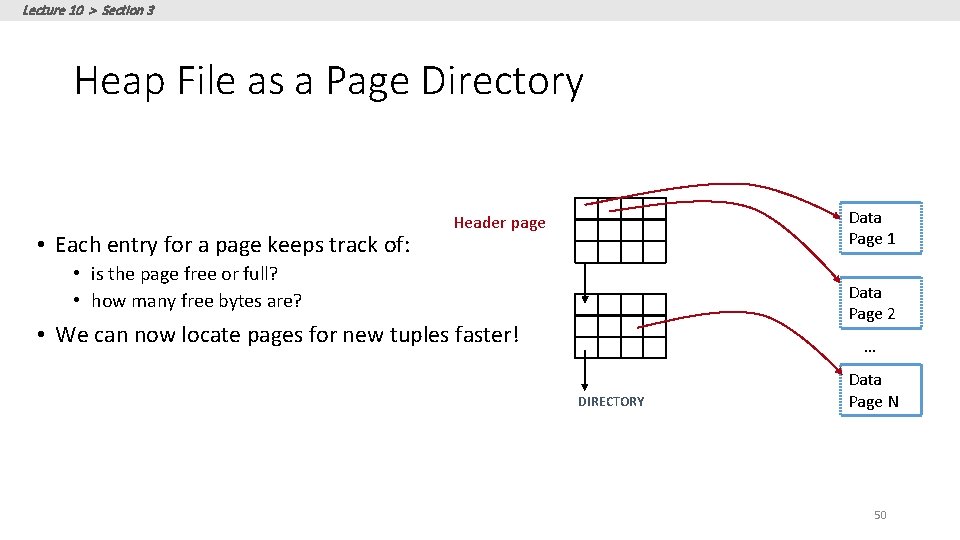
Lecture 10 > Section 3 Heap File as a Page Directory • Each entry for a page keeps track of: Data Page 1 Header page • is the page free or full? • how many free bytes are? Data Page 2 • We can now locate pages for new tuples faster! … DIRECTORY Data Page N 50
Lecture 10 > Section 3 Managing Disk Space • Files made up of pages • and pages contain records • But file operations are on records: File operations: • • • insert/delete/modify record read a particular record (specified using the record id) scan all records (possibly with some conditions on the records to be retrieved) 51
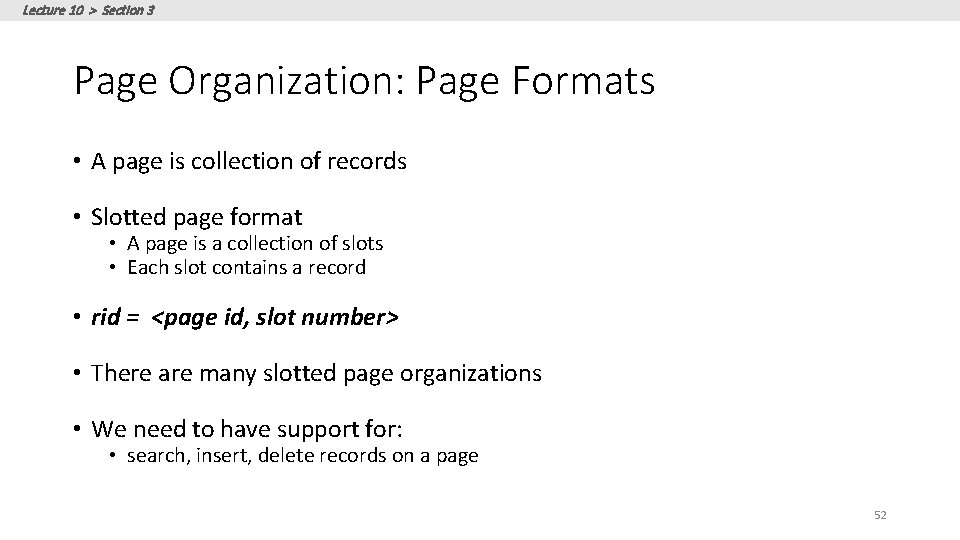
Lecture 10 > Section 3 Page Organization: Page Formats • A page is collection of records • Slotted page format • A page is a collection of slots • Each slot contains a record • rid = <page id, slot number> • There are many slotted page organizations • We need to have support for: • search, insert, delete records on a page 52
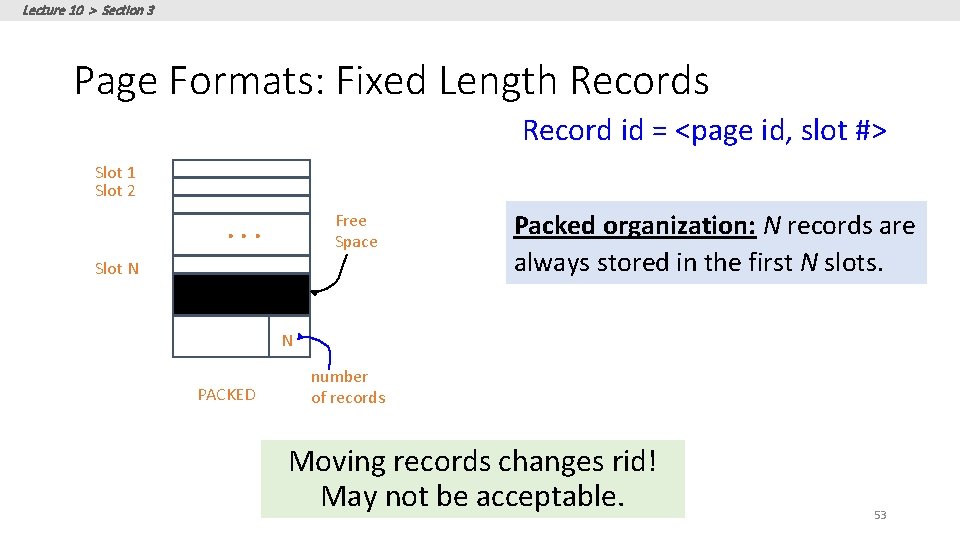
Lecture 10 > Section 3 Page Formats: Fixed Length Records Record id = <page id, slot #> Slot 1 Slot 2 Free Space . . . Slot N Packed organization: N records are always stored in the first N slots. N PACKED number of records Moving records changes rid! May not be acceptable. 53
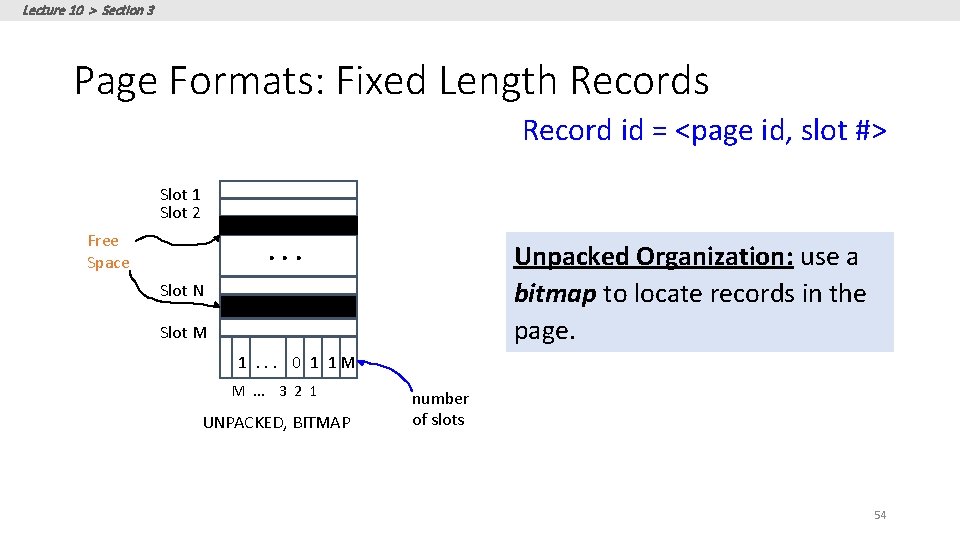
Lecture 10 > Section 3 Page Formats: Fixed Length Records Record id = <page id, slot #> Slot 1 Slot 2 Free Space . . . Unpacked Organization: use a bitmap to locate records in the page. Slot N Slot M 1. . . 0 1 1 M M. . . 3 2 1 UNPACKED, BITMAP number of slots 54
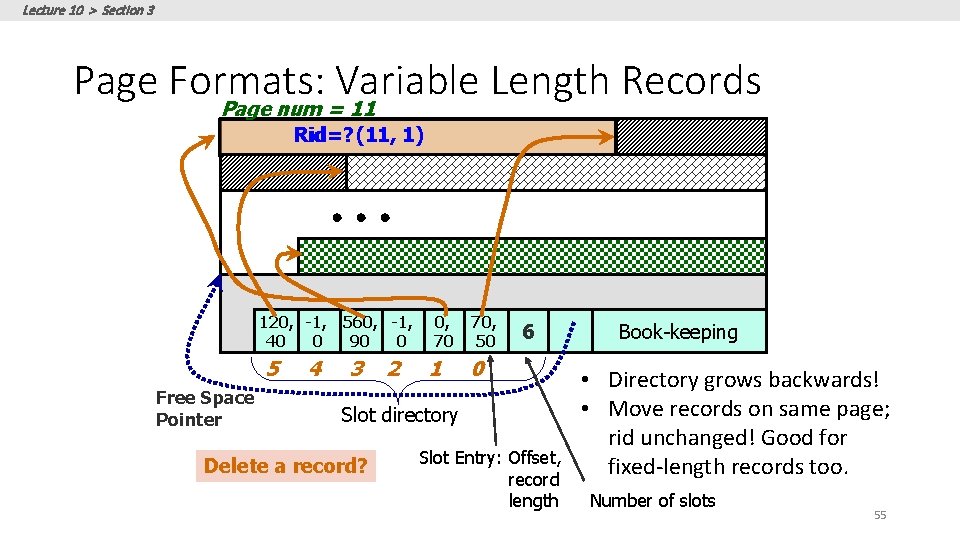
Lecture 10 > Section 3 Page Formats: Variable Length Records Page num = 11 Rid=? Rid= (11, 1) 120, -1, 560, -1, 40 0 90 0 5 Free Space Pointer 4 3 2 0, 70 1 70, 50 6 0 Slot directory Delete a record? Slot Entry: Offset, record length Book-keeping • Directory grows backwards! • Move records on same page; rid unchanged! Good for fixed-length records too. Number of slots 55
Lecture 10 > Section 3 Page Formats: Variable Length Records • Deletion: • offset is set to -1 • Insertion: • use any available slot • if no space is available, reorganize • rid remains unchanged when we move the record (since it is defined by the slot number) 56
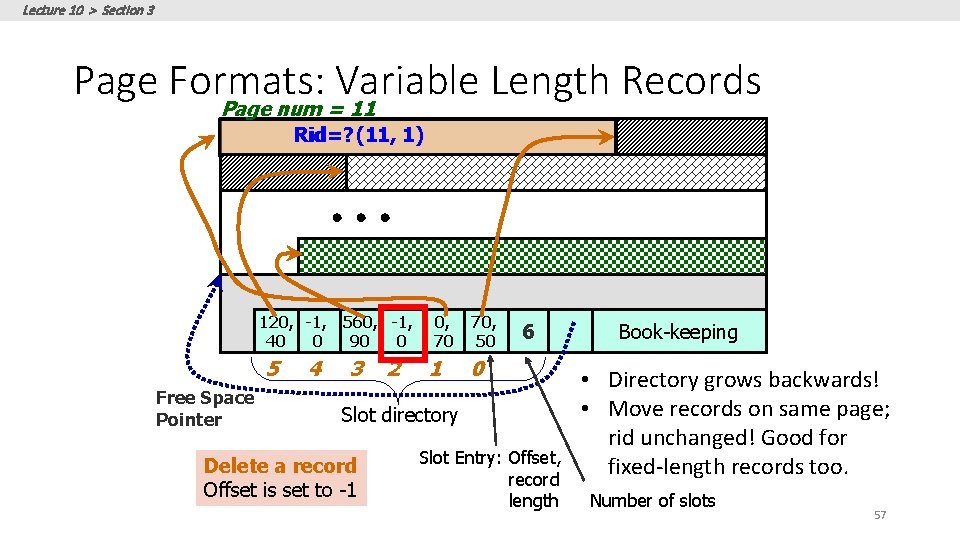
Lecture 10 > Section 3 Page Formats: Variable Length Records Page num = 11 Rid=? Rid= (11, 1) 120, -1, 560, -1, 40 0 90 0 5 Free Space Pointer 4 3 2 0, 70 1 70, 50 6 0 Slot directory Delete a record Offset is set to -1 Slot Entry: Offset, record length Book-keeping • Directory grows backwards! • Move records on same page; rid unchanged! Good for fixed-length records too. Number of slots 57
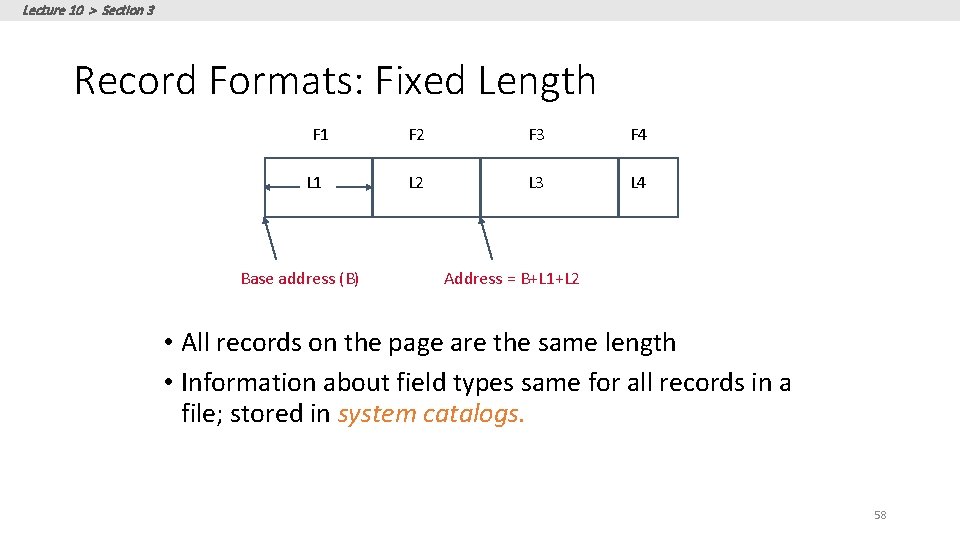
Lecture 10 > Section 3 Record Formats: Fixed Length F 1 L 1 Base address (B) F 2 F 3 F 4 L 2 L 3 L 4 Address = B+L 1+L 2 • All records on the page are the same length • Information about field types same for all records in a file; stored in system catalogs. 58
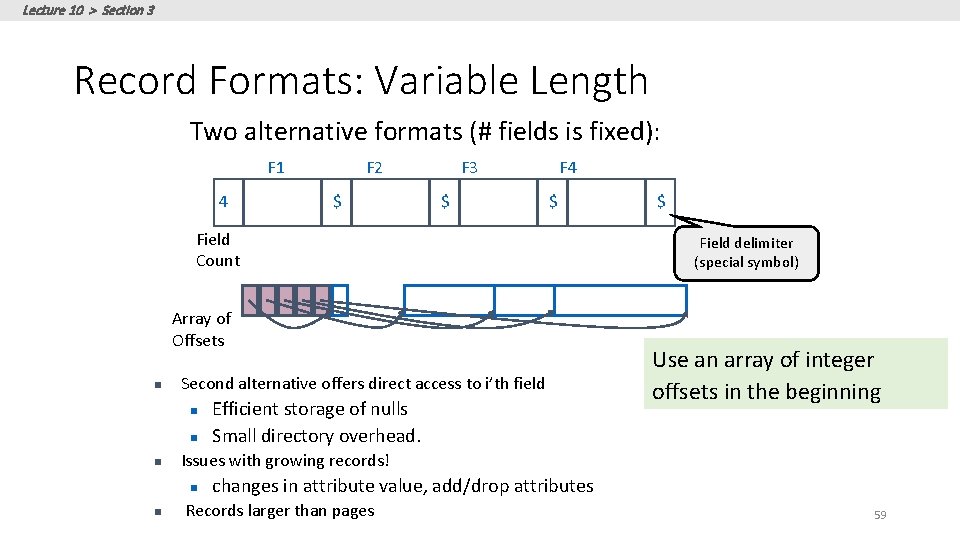
Lecture 10 > Section 3 Record Formats: Variable Length Two alternative formats (# fields is fixed): F 1 4 F 2 $ F 3 $ F 4 $ Field Count Array of Offsets n Second alternative offers direct access to i’th field n n n Field delimiter (special symbol) Use an array of integer offsets in the beginning Issues with growing records! n n Efficient storage of nulls Small directory overhead. $ changes in attribute value, add/drop attributes Records larger than pages 59
Lecture 10 > Section 3 Column Stores: Motivation • Consider a table: • Foo (a INTEGER, b INTEGER, c VARCHAR(255), …) • And the query`: • SELECT a FROM Foo WHERE a > 10 • What happens with the previous record format in terms of the bytes that have to be read from the IO subsystem? 60
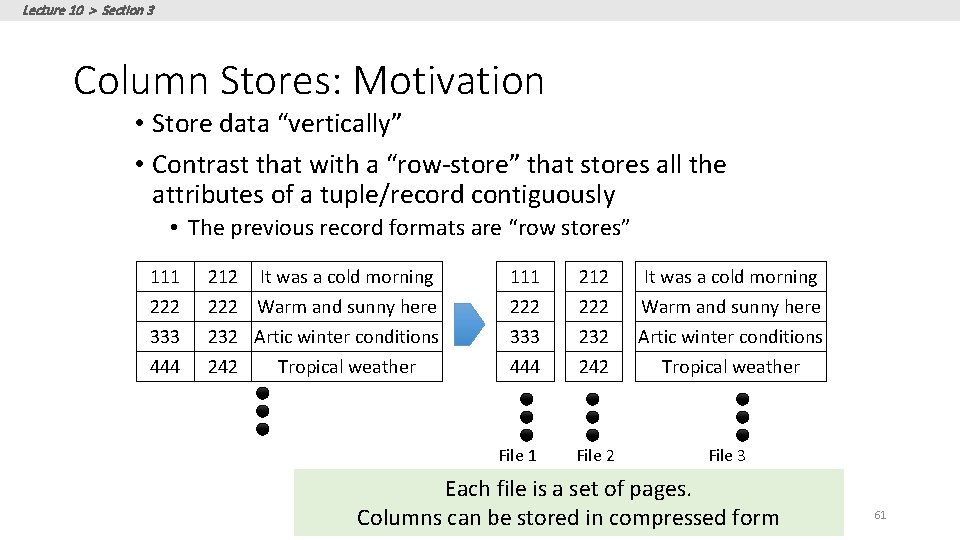
Lecture 10 > Section 3 Column Stores: Motivation • Store data “vertically” • Contrast that with a “row-store” that stores all the attributes of a tuple/record contiguously • The previous record formats are “row stores” 111 222 333 444 212 It was a cold morning 222 Warm and sunny here 232 Artic winter conditions 242 Tropical weather 111 222 333 444 File 1 212 222 232 242 It was a cold morning Warm and sunny here Artic winter conditions Tropical weather File 2 File 3 Each file is a set of pages. Columns can be stored in compressed form 61
Lecture 10 > Section 3 Column Stores: Motivation • Are there any disadvantages associated with column stores? 1. Updates are slower 2. Retrieving back more than one attribute can be slower, e. g. Queries like SELECT * are slower 62
- Slides: 62