
Lecture 08 Static Variable Memory Model TopDown Program
Lecture 08: Static Variable, Memory Model, Top-Down Program Development 4/22/2013 1

Outline • • Midterm results Static variables Memory model Program development 2

Midterm results • Good job – most of you have done well. • Avg: 84. 68 • Std: 36 3

Static Local Variables A permanent variable inside a function whose value lifetime lasts through the entire program execution (vs. local variable, its storage is gone at the end of the function) #include <stdio. h> void f 1() { static int k=0; int j = 10; printf("value of k=%d j=%dn", k, j); k=k+10; } void main() { int i = 0; f 1(); printf("after first calln"); f 1(); printf("after second calln"); f 1(); printf("after third calln"); } 4

Exercise 8 -1 Complete the following function sumit() that reads an integer from the user, computes an accumulative sum, and print it out. void sumit() { static int sum = 0; . . int num; printf("n. Enter a number: "); . . scanf("%d", &num); . . sum+=num; printf("The current sum is: %d", sum); } int main() { int i =0; printf("Enter 5 numbers to be summedn"); for(i = 0; i<5; ++i) sumit(); printf("Program completedn"); return 0; } 5

C Memory Model – where are variables & program code stored in the computer memory? • Program code • Function variables – Arguments – Local variables – Return location • Global Variables – Statically allocated – Dynamically allocated int fact (int n) { return(n*fact(n-1)); } void main() { … fact(5); …} 6

The Stack • Stores – – Function local variables Temporary variables Arguments for next function call Where to return when function ends 7

The Stack • Managed by compiler – – One stack frame each time function called Created when function called Stacked on top (under) one another Destroyed at function exit 8

What can go wrong? • Recall that local variables are stored on the stack • Memory for local variables is deallocated when function returns • Returning a pointer to a local variable is almost always a bug! char *my_strcat(char *s 1, char *s 2) { char s 3[1024]; strcpy(s 3, s 1); strcat(s 3, s 2); return s 3; } 9

What Can Go Wrong? • Run out of stack space • Unintentionally change values on the stack – In some other function's frame – Even return address from function • Access memory even after frame is deallocated 10

The Heap • C can use space in another part of memory: the heap – The heap is separate from the execution stack – Heap regions are not deallocated when a function returns • The programmer requests storage space on the heap – C never puts variables on the heap automatically – But local variables might point to locations on the heap – Heap space must be explicitly allocated and deallocated by the programmer 11

malloc() • Library function in <stdlib. h> – Stands for memory allocate • Requests a memory region of a specied size – Syntax: void *malloc(int size) – void * is generic pointer type 12

Usage int main() { int* p 1 = (int *) malloc(10 * sizeof(int)); if (p 1 == NULL) { // do cleanup } // do something free(p 1); return 0; } • Good to check the return value from malloc() • Must explicitly free memory when no longer in use 13

What Can Go Wrong? • • Run out of heap space: malloc returns 0 Unintentionally change other heap data Access memory after free'd free memory twice 14
![Multidimensional Array • On the stack: int a[10][20]; – Initialization: int a[][] = {{1,](http://slidetodoc.com/presentation_image_h/0dc9e574b9a61cbcda759e1ae79f9ed7/image-15.jpg "Multidimensional Array • On the stack: int a[10][20]; – Initialization: int a[][] = {{1,")
Multidimensional Array • On the stack: int a[10][20]; – Initialization: int a[][] = {{1, – Accessing the array: a[1][0] 2, 3}, {4, 5, 6}}; • On the heap: int **a = (int **) malloc() – The array size is not known until runtime and stored in a variable x int **a = (int **) malloc(x * sizeof(int *)); for (int i = 0; i < 10; i++) { a[i] = (int *) malloc(20 * sizeof(int)); } • Don't forget to free them! 15

Exercise 8 -2 Write a program that (1) asks for the number of friends, (2) asks for a name, and (3) checks a series of strings to see which one matches the names of friends. Please use • Use malloc() to create this multi-dimensional array to stores friends’ names. Assume that each name is less than 10 characters. • Use <string. h> library • Use scanf(“ %s”, . . ) to read a name separated by one or more whitespaces You can modify from the skeleton code on the next slide. 16
![#include <stdio. h> #include <string. h> int main() { char** friends; char name[10]; int](http://slidetodoc.com/presentation_image_h/0dc9e574b9a61cbcda759e1ae79f9ed7/image-17.jpg "#include <stdio. h> #include <string. h> int main() { char** friends; char name[10]; int")
#include <stdio. h> #include <string. h> int main() { char** friends; char name[10]; int n, i; printf("Input the number of your friends: "); scanf("%d", &n); /* call malloc() to allocate dynamic memory for friends and friends[1. . n-1] */ … for (; ; ) { printf("Input a name: "); scanf(" %s", name); for (i=0; i<n; i++) { if (strcmp(friends[i], name) == 0) { printf("%s is friend #%dn", name, i+1); break; } } if (i == n) { printf("%s is not a friendn", name); } } /* call free() to free memory for friends and friends[1. . n-1] */ … } 17

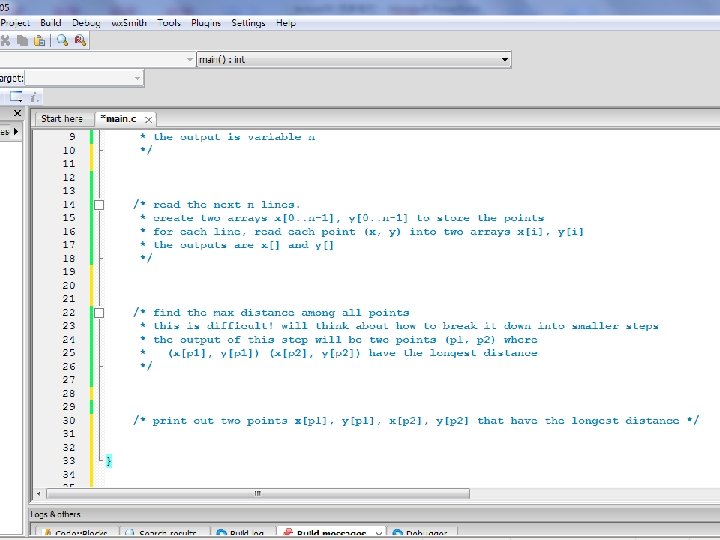
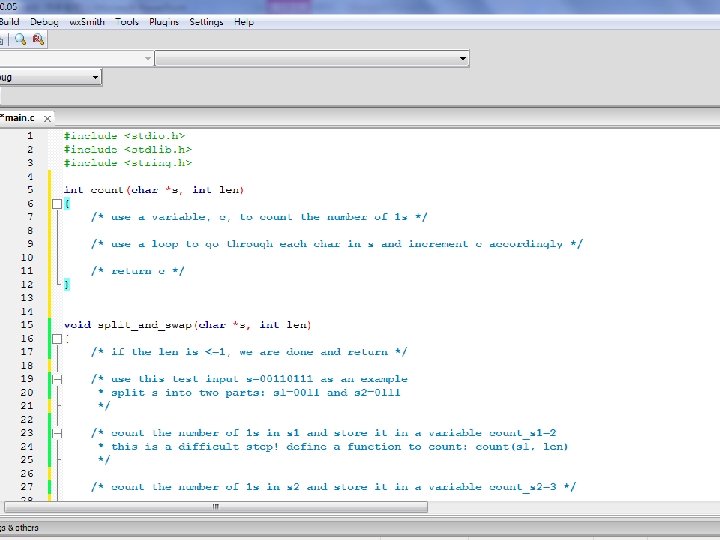
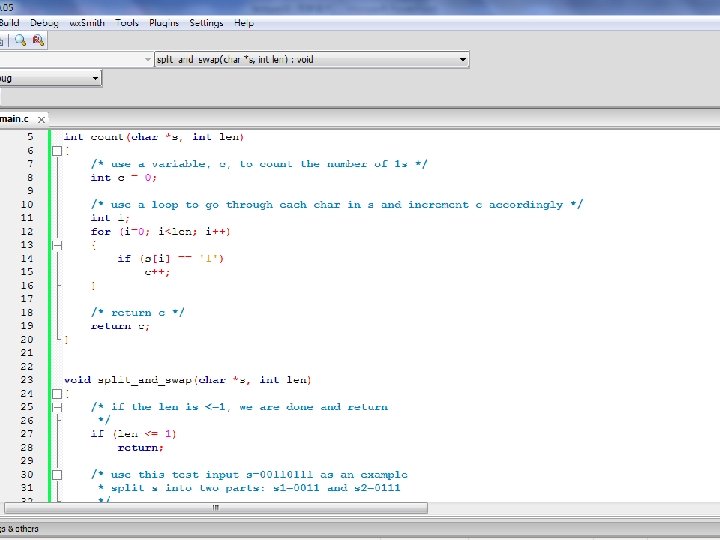
Program development (important!) • A Common problem – Know all C commands but don’t know how to use them to write a program. • Top-down approach – always work! – Start by writing down the main steps (in words/comments, not code) of a program. Like a paragraph in an essay. – For each difficult main step, break it down into smaller steps. Again in words/comments, not code. – Apply this “divide-and-conquer” approach until the steps are simple enough to code. – Write code 18

Last Year’s Midterm Problem 1 19

Top-Down Approach to Program Development • Start by writing down the main steps (in words/comments, not code) of a program. Like a paragraph in an essay. • For each difficult main step, break it down into smaller steps. Again in words/comments, not code. • Apply this “divide-and-conquer” approach until the steps are simple enough to code. • Write code 20

21

22

23
24

Top-Down Approach to Program Development • Start by writing down the main steps (in words/comments, not code) of a program. Like a paragraph in an essay. • For each difficult main step, break it down into smaller steps. Again in words/comments, not code. • Apply this “divide-and-conquer” approach until the steps are simple enough to code. • Write code 25

26

Top-Down Approach to Program Development • Start by writing down the main steps (in words/comments, not code) of a program. Like a paragraph in an essay. • For each difficult main step, break it down into smaller steps. Again in words/comments, not code. • Apply this “divide-and-conquer” approach until the steps are simple enough to code. • Write code 27

28

29

30

31

32

33

34

35

Systematic way of writing programs • Like writing an essay. • Start with an outline that describes what you are going to write. • Okay to write the comments in Chinese. 36

Exercise 8 -3 37

Top-Down Approach to Program Development • Start by writing down the main steps (in words/comments, not code) of a program. Like a paragraph in an essay. • For each difficult main step, break it down into smaller steps. Again in words/comments, not code. • Apply this “divide-and-conquer” approach until the steps are simple enough to code. • Write code 38

39

Top-Down Approach to Program Development • Start by writing down the main steps (in words/comments, not code) of a program. Like a paragraph in an essay. • For each difficult main step, break it down into smaller steps. Again in words/comments, not code. • Apply this “divide-and-conquer” approach until the steps are simple enough to code. • Write code 40

41

Top-Down Approach to Program Development • Start by writing down the main steps (in words/comments, not code) of a program. Like a paragraph in an essay. • For each difficult main step, break it down into smaller steps. Again in words/comments, not code. • Apply this “divide-and-conquer” approach until the steps are simple enough to code. • Write code 42
43

Top-Down Approach to Program Development • Start by writing down the main steps (in words/comments, not code) of a program. Like a paragraph in an essay. • For each difficult main step, break it down into smaller steps. Again in words/comments, not code. • Apply this “divide-and-conquer” approach until the steps are simple enough to code. • Write code one step at a time • Debug each step if necessary 44

45
46

47

48

49
- Slides: 49